
On this page
- Quick Reference (60 Seconds)
- What the Control Asks For
- Relationship to Other Controls
- Physical Access Rules
- Why Access Control Is the Foundation of Security
- Access Control Principles
- Role-Based Access Control (RBAC)
- Attribute-Based Access Control (ABAC)
- Policy-Based Access Control (PBAC)
- Privileged Access Management (PAM)
- Identity and Access Management (IAM) Architecture
- Authentication Methods
- Multi-Factor Authentication (MFA)
- Access Control for Cloud
- Access Control for Databases
- Access Control for Applications
- Access Control for APIs
- Access Control for Remote Work
- Access Control for Third Parties
- Access Reviews and Recertification
- Just-in-Time (JIT) Access
- Break-Glass and Emergency Access
- Tool Comparison
- Implementation Roadmap: About 8 Weeks for the Basics
- Common Audit Failures and Fixes
- Illustrative Scenarios
- Multi-Framework Mapping
- FAQ
- Industry-Specific Access Control Requirements
- Access Control Maturity Model
- Access Control Metrics and KPIs
- More Questions
- Illustrative Scenario: Chennai NBFC, Access Control Breach to Compliance Success
- Emerging Trends in Access Control
- References
Quick Reference (60 Seconds)
Figure · At a glance
A.5.15 at a glance
- Standard Reference
- ISO/IEC 27001:2022, Annex A, Control 5.15
- 27002 Guidance
- ISO/IEC 27002:2022, Clause 5.15
- Objective
- Ensure only authorized users can access
- Key Requirement
- An access control policy and rules
- Who It Applies
- All users, systems, applications, data
- Audit Focus
- Access control policy, user accounts
ISO 27001:2022 Annex A 5.15 asks for rules that control physical and logical access to information and other associated assets, based on business and information security requirements.
| Element | What You Need to Know |
|---|---|
| Standard Reference | ISO/IEC 27001:2022, Annex A, Control 5.15 |
| 27002 Guidance | ISO/IEC 27002:2022, Clause 5.15, Access control |
| Objective | Ensure only authorized users can access information and systems |
| Key Requirement | An access control policy and rules for physical and logical access, set by information owners from business and security requirements |
| Who It Applies To | All users, systems, applications, data, networks, cloud resources |
| Audit Focus | Access control policy, user accounts, privilege levels, access reviews, MFA, PAM, logs |
| Typical Failures | Excessive privileges, no access reviews, shared accounts, no MFA, weak passwords, no PAM |
| ISO 27002 attributes | Control type: Preventive · Properties: Confidentiality, Integrity, Availability · Concepts: Protect · Capabilities: Identity and access management · Domains: Protection |
The Bottom Line: If everyone can access everything, you have no security. Access control is the gatekeeper of your entire information security program.
What the Control Asks For
Figure · Matrix
Comparison: Access control policy to Logging
The Control in Brief
In short:
ISO 27001:2022 Annex A 5.15 asks organizations to set and implement rules to control physical and logical access to information and associated assets, based on business and security requirements.
Do you need this control?
A.5.15 is not mandatory in itself: under clause 6.1.3 you include it if your risk assessment calls for it, and record the decision in your Statement of Applicability. Essentially every organisation with systems and data includes it. What varies is the model (role-based, attribute-based) and the depth of documentation, which should match your size and risk.
What ISO 27002:2022 Adds
ISO/IEC 27002 guidance for 5.15 (paraphrased). Information owners decide the access requirements, and a topic-specific access control policy, communicated to relevant parties, should consider:
- who needs which type of access to which information and assets
- security of applications (A.8.26)
- physical access: backed by physical entry controls (A.7.2, A.7.3, A.7.4)
- need-to-know and classification of information (A.5.10, A.5.12, A.5.13)
- restrictions on privileged access (A.8.2) and segregation of duties (A.5.3)
- legal, regulatory and contractual limits on access to data or services (A.5.31 to A.5.34, A.8.3)
- segregation of access control functions: requesting, authorising and administering access are done by different people
- formal authorisation of access requests and management of access rights (A.5.16, A.5.18)
- logging (A.8.15)
When defining the rules, keep access rights consistent with classification and with physical perimeter needs, cover every type of connection (networks and network services included), and decide how dynamic factors such as location or device can be reflected. 27002 also recommends least privilege ("everything is forbidden unless expressly permitted"), need-to-know and need-to-use, and notes that RBAC, ABAC, MAC and DAC are all valid models: business needs and risk decide how granular the rules should be.
MFA, password rules, session controls and PAM are not part of 5.15 itself. They come from A.8.5 (secure authentication), A.5.17 (authentication information) and A.8.2 (privileged access rights), chosen through your risk assessment.
What Auditors Usually Look For
None of these is mandated by ISO; they are what auditors typically ask to see for A.5.15.
| Evidence | What it shows | Common failure |
|---|---|---|
| Access control policy | Rules for logical and physical access, approved and communicated | Policy covers IT systems only, or is a copy of a template |
| Access rules mapped to roles | Who may access what, by role or attribute | Rules exist only in people's heads |
| Formal approval | Requests approved by the owner, separate from the person who grants access | Admins grant their own requests |
| Privileged access restrictions | Privileged rights limited and controlled (A.8.2) | Shared admin accounts |
| Reviews | Access rights reviewed at defined intervals (A.5.18) | No review records |
| Logging | Access decisions and use are logged (A.8.15) | No logs for key systems |
Relationship to Other Controls
| Control | Relationship |
|---|---|
| A.5.3 Segregation of Duties | Access rules enforce separation of conflicting duties |
| A.5.12 Classification of Information | Access rights must be consistent with classification |
| A.5.16 Identity Management | Every access right is tied to a managed identity |
| A.5.17 Authentication Information | Rules for passwords, tokens and other credentials |
| A.5.18 Access Rights | Provisioning, review, change and removal of access rights |
| A.7.2 Physical Entry / A.7.3 Securing Offices, Rooms and Facilities | Physical side of the access control policy |
| A.8.2 Privileged Access Rights | Restricting and managing privileged access |
| A.8.3 Information Access Restriction | Applying the rules inside systems and applications |
| A.8.5 Secure Authentication | Authentication strength, including MFA |
| A.8.15 Logging | Recording access decisions and use |
Physical Access Rules
The access control policy covers physical as well as logical access, and the two should be consistent: someone who may not open a system remotely should not be able to walk into the room that hosts it.
- Define zones (public, office, restricted, server or network room) and who may enter each, by role
- Grant badges by the same request-and-approve process as system access, and remove them at exit (A.5.18, A.5.11)
- Review physical access lists with logical access reviews
- Log entry to restricted areas and investigate anomalies (A.7.2)
Why Access Control Is the Foundation of Security
The Access Control Pyramid
                    ┌─────────────┐
                    │  RESTRICTED  │  (Board papers, keys, bulk customer data)
                    │   Access     │  (Phishing-resistant MFA + JIT)
                    ├─────────────┤
                    │ CONFIDENTIAL │  (Finance, HR, Customer Data)
                    │   Access     │  (MFA + PAM + Role-Based)
                    ├─────────────┤
                    │   INTERNAL   │  (Employees, Standard Systems)
                    │   Access     │  (Standard Auth + MFA Preferred)
                    ├─────────────┤
                    │    PUBLIC    │  (Website, Marketing, No Auth)
                    │   Access     │  (No Auth or Basic Auth)
                    └─────────────┘
Access Control Failure Statistics
| Statistic | Source | Impact |
|---|---|---|
| Credential abuse was the most common initial access vector (22% of breaches) | Verizon DBIR 2025 | Stolen or guessed credentials remain a primary way in |
| 68% of breaches involved a non-malicious human element | Verizon DBIR 2024 | Mistakes and social engineering exploit access |
| MFA blocks over 99.9% of automated account-compromise attacks | Microsoft (2019) | Highly effective against bulk password attacks; targeted phishing needs phishing-resistant MFA |
Access Control Principles
Core Principles
| Principle | Definition | Implementation | Example |
|---|---|---|---|
| Least Privilege | Grant minimum access needed for job | Role-based permissions, regular review | Developer has dev access, not production |
| Need-to-Know | Access based on job function and necessity | Data classification + role mapping | HR sees HR data, not engineering data |
| Separation of Duties | No single person has complete control | Split roles, dual approval | Creator cannot approve their own changes |
| Defense in Depth | Multiple layers of access control | MFA + PAM + network segmentation + monitoring | MFA + VPN + firewall + SIEM |
| Default Deny | Deny access unless explicitly granted | Whitelist approach, explicit permissions | New user has no access by default |
| Accountability | All access attributable to an individual | No shared accounts, full logging | Every action tied to a user |
| Timely Revocation | Access revoked when no longer needed | Automated de-provisioning, access reviews | Immediate revocation on exit |
| Regular Review | Access reviewed periodically | Quarterly access reviews, annual recertification | Manager reviews team access quarterly |
| Centralized Management | Single point of control for access | IAM platform, identity provider | Microsoft Entra ID, Okta |
| Automated Provisioning | Automatic access based on role | HR-driven provisioning, group-based access | Workday → Microsoft Entra ID → applications |
Role-Based Access Control (RBAC)
RBAC Model
| Role | Permissions | Systems | Data Access | Approval |
|---|---|---|---|---|
| Standard User | Email, intranet, standard apps | Office 365, intranet, HR portal | Internal documents, own data | Manager |
| Developer | Dev environment, code repository, CI/CD | Dev servers, GitHub, Jenkins | Source code, dev data, test data | Engineering Lead |
| QA Engineer | Test environment, bug tracker | Staging, Jira, TestRail | Test data, bug reports | QA Lead |
| System Admin | Server administration, patching | Production servers, monitoring | System logs, config data | IT Manager |
| Database Admin | Database management, tuning | Database servers | Database metadata, no app data | IT Manager |
| Network Admin | Network configuration, firewall | Network devices, firewalls | Network config, logs | IT Manager |
| Security Analyst | Security tools, SIEM, logs | SIEM, EDR, vulnerability scanner | Security logs, alerts | CISO |
| Security Admin | Security tool configuration | SIEM, firewall, IAM | Security config, policies | CISO |
| Finance User | Finance system, reports | ERP, accounting, reporting | Financial data, invoices | CFO |
| HR User | HR system, recruitment | HRIS, ATS, payroll | Employee data, resumes | CHRO |
| Sales User | CRM, sales tools | Salesforce, HubSpot | Customer data, pipeline | VP Sales |
| Manager | Team management, approvals | Manager portal, approval workflows | Team data, reports | Department Head |
| Executive | Executive dashboard, all reports | BI, executive portal | All reports, summary data | CEO |
| Guest/Contractor | Limited access, time-bound | Specific project systems | Project-specific data | Project Manager |
| Service Account | Application-to-application | APIs, databases, services | Application data | Application Owner |
| Break-Glass | Emergency access, logged | Critical systems | All data (emergency only) | CISO + on-call |
RBAC Implementation
| Step | Action | Owner | Tool | Timeline |
|---|---|---|---|---|
| 1 | Inventory all roles | HR + IT | HRIS, directory | 1-2 weeks |
| 2 | Define role permissions | Security + Business | IAM, spreadsheet | 2-4 weeks |
| 3 | Map users to roles | HR + Managers | IAM, HRIS | 1-2 weeks |
| 4 | Implement in IAM | IT | Microsoft Entra ID, Okta | 2-4 weeks |
| 5 | Test access | IT + Users | Test environment | 1-2 weeks |
| 6 | Train users | HR + Security | LMS | 1-2 weeks |
| 7 | Monitor and adjust | Security | SIEM, IAM reports | Ongoing |
| 8 | Quarterly access reviews | Managers | IAM, review tool | Quarterly |
| 9 | Annual role review | Security + HR | IAM, review tool | Annual |
| 10 | Automate provisioning | IT | HRIS → IAM integration | Ongoing |
Attribute-Based Access Control (ABAC)
ABAC Model
| Attribute Type | Examples | Policy Example |
|---|---|---|
| User attributes | Department, role, clearance level, location, employment status | "User.department == 'Finance'" |
| Resource attributes | Classification, owner, type, sensitivity, department | "Resource.classification == 'Confidential'" |
| Environment attributes | Time of day, location, device compliance, network, MFA status | "Environment.time >= '09:00' AND Environment.time <= '18:00'" |
| Action attributes | Read, write, delete, execute, share | "Action == 'Read' OR Action == 'Write'" |
ABAC Policy Examples
| Policy | Expression | Use Case |
|---|---|---|
| Business hours only | User.employmentStatus == 'Active' AND Environment.time >= '09:00' AND Environment.time <= '18:00' AND Environment.dayOfWeek IN ['Mon', 'Tue', 'Wed', 'Thu', 'Fri'] | Prevent after-hours access |
| Location-based | User.department == 'Engineering' AND Environment.location == 'Office' OR Environment.network == 'Corporate VPN' | Office or VPN only |
| Device compliance | User.role == 'Admin' AND Environment.deviceCompliance == 'Compliant' AND Environment.MFA == 'Verified' | Admin access only on compliant devices |
| Classification-based | User.clearance >= Resource.classificationLevel AND (Action == 'Read' OR (Action == 'Write' AND User.department == Resource.ownerDepartment)) | Classified data access |
| Customer data | User.role == 'Customer Success' AND Resource.type == 'CustomerData' AND User.assignedCustomers CONTAINS Resource.customerId | Access only assigned customers |
| Time-limited project | User.project == 'ProjectX' AND Environment.date >= '2026-01-01' AND Environment.date <= '2026-06-30' | Project-based access |
| Manager access | User.isManager == true AND Resource.department == User.department AND Action IN ['Read', 'Approve'] | Manager access to team data |
| Emergency access | User.role == 'OnCall' AND Environment.alertLevel == 'Critical' AND Action == 'Read' | On-call emergency access |
| API access | User.application == 'AppX' AND Resource.API == 'Allowed' AND Environment.rateLimit < 1000 | API access control |
| Third-party | User.type == 'ThirdParty' AND Resource.thirdPartyAccess == 'Allowed' AND Environment.MFA == 'Verified' | Third-party access |
Policy-Based Access Control (PBAC)
PBAC vs RBAC vs ABAC
| Model | Granularity | Flexibility | Complexity | Best For |
|---|---|---|---|---|
| RBAC | Role-level | Low | Low | Most organizations, clear roles |
| ABAC | Attribute-level | High | High | Complex environments, dynamic access |
| PBAC | Policy-level | High | Medium | Regulatory compliance, policy-driven |
| Hybrid | Role + Attribute + Policy | Very High | High | Enterprise, complex requirements |
PBAC Implementation
| Policy Area | Policy Rule | Enforcement | Tool |
|---|---|---|---|
| DPDP Act | "Staff access personal data only for the purpose it was collected for, on a need-to-know basis" | Role- and purpose-based access; access logging | IAM + DLP |
| PCI DSS compliance | "No cardholder data access without PCI role and MFA" | Block non-PCI access | PAM + IAM |
| RBI payment data | "Payment system data is stored only in India; overseas support access is approved and logged" | Storage location policy + approval for overseas access | Cloud policy + PAM |
| SoD | "No user can both create and approve payments" | Block dual-role assignment | IAM + GRC |
| MFA policy | "All admin access requires MFA" | Enforce MFA on admin roles | IAM + MFA |
| Device compliance | "No corporate data access from non-compliant devices" | Block non-compliant devices | MDM + IAM |
| Time-based | "No sensitive access after 10 PM or before 6 AM" | Time-based access rules | IAM + PAM |
| Location-based | "No admin access outside India" | Geo-blocking | IAM + CASB |
| Risk-based | "High-risk login requires step-up authentication" | Step-up MFA | IAM + risk engine |
| Data residency | "Confidential data access only from India" | Geo-blocking for data | IAM + DLP |
Privileged Access Management (PAM)
PAM Requirements
| Requirement | Implementation | Best Practice | Tool |
|---|---|---|---|
| Credential vaulting | Passwords stored in vault, never known to users | All privileged passwords in vault | CyberArk, Delinea, HashiCorp |
| Session recording | All privileged sessions recorded | Record all admin sessions | CyberArk, Delinea, BeyondTrust |
| JIT access | Temporary elevation with approval | 2-hour max for production access | Microsoft Entra PIM, AWS IAM, CyberArk |
| Workflow approval | Approval required for privileged access | Manager + Security approval | ServiceNow, CyberArk, Delinea |
| Command filtering | Block dangerous commands | Prevent DROP, DELETE, rm -rf | CyberArk, Delinea |
| MFA for elevation | Require MFA for privilege escalation | Hardware key for admin access | YubiKey, Microsoft Entra ID, Duo |
| Rotation | Automatic credential rotation | Daily for service accounts, 90 days for admin | CyberArk, Delinea, HashiCorp |
| Discovery | Find all privileged accounts | Scan for unknown admin accounts | CyberArk, Delinea, Ping |
| Break-glass | Emergency access with logging | Pre-approved emergency accounts, enhanced logging | CyberArk, Delinea, custom |
| Delegation | Delegate privileged tasks without full admin | Just Enough Administration (JEA), sudoers | Microsoft Entra ID, Linux sudo |
| Analytics | Detect unusual privileged activity | ML-based anomaly detection | CyberArk, Delinea, UEBA |
| API security | Protect privileged API access | API keys in vault, rotated, monitored | HashiCorp Vault, AWS Secrets Manager |
| Cloud PAM | PAM for cloud admin | AWS IAM, Microsoft Entra PIM, GCP IAM | Native cloud tools + PAM |
| Endpoint PAM | PAM for local admin | Remove local admin, elevation via PAM | BeyondTrust, Delinea |
| Application PAM | PAM for application secrets | Secrets in vault, injected at runtime | HashiCorp Vault, AWS Secrets Manager |
PAM Architecture
┌─────────────────────────────────────────────────────────────┐
│                        PAM PLATFORM                         │
│  ┌─────────────┐  ┌─────────────┐  ┌─────────────┐         │
│  │   VAULT     │  │   SESSION   │  │   WORKFLOW  │         │
│  │  Passwords  │  │  Recording  │  │  Approval   │         │
│  │  Keys       │  │  Monitoring │  │  JIT        │         │
│  │  Certificates│  │  Analytics  │  │  Rotation   │         │
│  └─────────────┘  └─────────────┘  └─────────────┘         │
│  ┌─────────────┐  ┌─────────────┐  ┌─────────────┐         │
│  │  DISCOVERY  │  │   ANALYTICS │  │    CLOUD    │         │
│  │  Scan AD    │  │  UEBA       │  │  AWS/Azure  │         │
│  │  Scan Cloud │  │  Anomaly    │  │  GCP PAM    │         │
│  │  Scan Apps  │  │  Reporting  │  │  SaaS PAM   │         │
│  └─────────────┘  └─────────────┘  └─────────────┘         │
└─────────────────────────────────────────────────────────────┘
                              │
        ┌─────────────────────┼─────────────────────┐
        │                     │                     │
   ┌────▼────┐          ┌────▼────┐          ┌────▼────┐
   │ SERVERS │          │ CLOUD   │          │  APPS   │
   │ Linux   │          │ AWS     │          │ Database│
   │ Windows │          │ Azure   │          │ Code    │
   │ Network │          │ GCP     │          │ CI/CD   │
   └─────────┘          └─────────┘          └─────────┘
Identity and Access Management (IAM) Architecture
IAM Components
| Component | Purpose | Technology | Best Practice |
|---|---|---|---|
| Identity Provider (IdP) | Single source of truth for identity | Microsoft Entra ID, Okta, Ping, Google Workspace | Centralized, federated |
| Directory Service | User directory, authentication | Active Directory, LDAP, Microsoft Entra ID | Hierarchical, secure |
| Authentication Service | Verify identity | MFA, SSO, passwordless | MFA for all, passwordless for admin |
| Authorization Service | Grant access based on policy | RBAC, ABAC, PBAC | Least privilege, need-to-know |
| Provisioning Service | Automate account lifecycle | SCIM, HR-driven provisioning | Automate create/modify/delete |
| Access Review Service | Review and recertify access | Access review tool, attestation | Quarterly reviews |
| Session Management | Manage user sessions | SSO, session timeout, conditional access | Short timeouts, MFA step-up |
| Federation | Cross-organization trust | SAML, OAuth, OIDC | Standard protocols |
| Identity Governance | Governance, compliance, audit | IGA platform | Continuous compliance |
| Password Management | Password policy, vault | Password manager, self-service | Strong policy, no sharing |
| Lifecycle Management | Onboarding, changes, offboarding | HR-driven IAM | Automated provisioning |
| Access Analytics | Analyze access patterns | UEBA, IAM analytics | Detect anomalies |
| Privileged Identity | Admin and service accounts | PAM | Vault, JIT, rotation |
| Customer Identity | External user identity | CIAM (Customer IAM) | B2C, B2B identity |
| Device Identity | Device authentication and compliance | MDM, device certificate | Compliant device = access |
IAM Architecture Diagram
┌──────────────────────────────────────────────────────────────┐
│                      IDENTITY PROVIDER                          │
│              (Microsoft Entra ID / Okta / Ping Identity)                │
│   ┌──────────┐  ┌──────────┐  ┌──────────┐  ┌──────────┐      │
│   │   SSO    │  │   MFA    │  │ Lifecycle│  │   PIM    │      │
│   │  SAML    │  │  TOTP    │  │  SCIM   │  │   JIT    │      │
│   │  OAuth   │  │  FIDO2   │  │  Workday│  │ Approval │      │
│   │  OIDC    │  │  Push    │  │  HRIS   │  │  Review  │      │
│   └──────────┘  └──────────┘  └──────────┘  └──────────┘      │
└──────────────────────────────────────────────────────────────┘
                              │
        ┌─────────────────────┼─────────────────────┐
        │                     │                     │
   ┌────▼────┐          ┌────▼────┐          ┌────▼────┐
   │  CLOUD  │          │ ON-PREM │          │  SAAS   │
   │  AWS    │          │  AD     │          │ Office  │
   │  Azure  │          │  LDAP   │          │ Google  │
   │  GCP    │          │  Apps   │          │ Salesforce│
   └─────────┘          └─────────┘          └─────────┘
        │                     │                     │
   ┌────▼────┐          ┌────▼────┐          ┌────▼────┐
   │  PAM    │          │  PAM    │          │  PAM    │
   │  AWS IAM│          │CyberArk │          │Microsoft Entra PIM│
   │  Azure  │          │Delinea  │          │Okta     │
   │  PIM    │          │BeyondTrust│        │         │
   └─────────┘          └─────────┘          └─────────┘
Authentication Methods
Authentication Comparison
| Method | Security Level | User Experience | Cost | Best For | Implementation |
|---|---|---|---|---|---|
| Password only | Low | Easy | Free | No longer recommended | Legacy only |
| Password + SMS OTP | Medium | Easy | Low | Basic MFA, low risk | SMS gateway |
| Password + TOTP app | Medium-High | Easy | Low | Standard MFA | Microsoft/Google Authenticator |
| Password + Push notification | Medium-High | Easy | Low | Standard MFA | Duo, Okta, Microsoft |
| Password + Hardware key | High | Moderate | Medium | Admin, high-risk | YubiKey, Titan |
| Passwordless (FIDO2/WebAuthn) | Very High | Easy | Medium | Modern, high-security | Windows Hello, YubiKey, Passkeys |
| Biometric (fingerprint, face) | High | Easy | Medium | Mobile, device login | Touch ID, Face ID, Windows Hello |
| Certificate-based | High | Moderate | Medium | Device, VPN, machine auth | PKI, smart card |
| Risk-based adaptive | High | Easy | Medium | Dynamic security | Microsoft Entra ID, Okta, Ping |
| Single Sign-On (SSO) | High (with MFA) | Very Easy | Medium | All users | SAML, OIDC, OAuth |
| Social login | Medium | Very Easy | Free | Customer-facing | Google, Facebook, LinkedIn |
| Magic link | Medium | Easy | Low | Low-risk, temporary | Email link |
| QR code | Medium | Easy | Low | Mobile, temporary | QR code scan |
| Voice/phone call | Low-Medium | Moderate | Low | Backup, accessibility | Phone call OTP |
| Knowledge-based (security questions) | Very low | Easy | Free | Do not use (NIST SP 800-63B disallows it) | None |
Password Policy Requirements
ISO 27001 sets no password rules. A.5.17 asks for a process for authentication information; current practice follows NIST SP 800-63B.
| Requirement | Older common baseline | Current guidance (NIST SP 800-63B) | Tool |
|---|---|---|---|
| Length | 8 characters | At least 15 characters for password-only login; at least 8 when the password is one factor of MFA; allow 64+ | Entra ID, Okta, Google |
| Composition rules | 3 of 4 character types | Do not force composition rules | Entra ID, Okta |
| Expiry | 90 days | No periodic expiry; force a change on evidence of compromise | Entra ID, Okta |
| Blocklist | Common words | Check against breached and common-password lists | Entra Password Protection, HaveIBeenPwned |
| Sharing | Prohibited | Prohibited | Policy + DLP |
| Password manager | Recommended | Allow paste and password managers | 1Password, Bitwarden, Keeper |
| Self-service reset | Available | Available, protected by MFA | SSPR, Okta |
| Service accounts | Long random secrets | Vaulted, rotated, non-interactive; prefer workload identities | PAM, HashiCorp Vault, cloud secrets managers |
| Admin accounts | Long passphrase + MFA | Phishing-resistant MFA (FIDO2 or certificate) | Entra ID, Okta, YubiKey |
Multi-Factor Authentication (MFA)
MFA Requirements by Role
| Role | MFA Required | Method | Enforcement | Step-Up |
|---|---|---|---|---|
| Standard user | Yes | TOTP app or push | Enforced for all apps | Risk-based |
| Manager | Yes | TOTP app or push | Enforced for all apps | Risk-based |
| Developer | Yes | TOTP app or push | Enforced for all apps | Risk-based |
| System Admin | Yes | Phishing-resistant (FIDO2 key or passkey) | Enforced, no bypass | Always |
| Database Admin | Yes | Phishing-resistant (FIDO2 key or passkey) | Enforced, no bypass | Always |
| Security Admin | Yes | Phishing-resistant (FIDO2 key or passkey) | Enforced, no bypass | Always |
| CISO | Yes | Phishing-resistant (FIDO2 key or passkey) | Enforced, no bypass | Always |
| CEO/Executive | Yes | Phishing-resistant (FIDO2 key or passkey) | Enforced, no bypass | Always |
| Finance Admin | Yes | Phishing-resistant (FIDO2 key or passkey) | Enforced, no bypass | Always |
| HR Admin | Yes | Phishing-resistant (FIDO2 key or passkey) | Enforced, no bypass | Always |
| Third-party user | Yes | TOTP app or push | Enforced | Risk-based |
| Contractor | Yes | TOTP app or push | Enforced | Risk-based |
| Service account | N/A | Certificate or key | Non-interactive | N/A |
| Customer | Recommended | TOTP app or SMS | For sensitive actions | Risk-based |
| Break-glass | Yes | Hardware key + multiple factors | Enforced, always | Always |
MFA Implementation
| Step | Action | Owner | Tool | Timeline |
|---|---|---|---|---|
| 1 | Select MFA method | Security | Microsoft Entra ID, Okta, Duo | 1 week |
| 2 | Pilot with IT team | IT | MFA tool | 1 week |
| 3 | Roll out to admin accounts first | Security | MFA tool | 1 week |
| 4 | Roll out to all users | IT + HR | MFA tool | 2-4 weeks |
| 5 | Enforce MFA (no bypass) | Security | MFA tool | 1 week |
| 6 | Hardware keys for admins | Security | YubiKey, Titan | 2-4 weeks |
| 7 | Step-up authentication | Security | Risk-based MFA | 2-4 weeks |
| 8 | Passwordless for high-risk | Security | FIDO2, Windows Hello | 4-8 weeks |
| 9 | Monitor and adjust | Security | SIEM, MFA analytics | Ongoing |
| 10 | Annual MFA audit | Security | Audit tool | Annual |
Access Control for Cloud
Cloud IAM Best Practices
| Cloud | IAM Feature | Best Practice | Tool |
|---|---|---|---|
| AWS | IAM roles, policies, SCPs | Use roles, not users; SCPs for guardrails; least privilege | AWS IAM, IAM Access Analyzer |
| Azure | Microsoft Entra ID, RBAC, PIM, Conditional Access | PIM for admin; CA for device/MFA/location; RBAC | Microsoft Entra ID, Microsoft Entra PIM |
| GCP | IAM, Organization Policy, Access Transparency | Organization policies for constraints; IAM conditions; Access Transparency | Cloud IAM, Organization Policy |
| Multi-cloud | Centralized IAM, SSO, federation | Federated identity; centralized policy; unified access review | Okta, Ping, Microsoft Entra ID |
Cloud IAM Controls
| Control | AWS | Azure | GCP | Implementation |
|---|---|---|---|---|
| MFA | IAM MFA, hardware key | Microsoft Entra ID MFA, Conditional Access | 2-Step Verification | Enforced for all admin |
| PIM/JIT | IAM Identity Center, temporary credentials | Microsoft Entra PIM | IAM conditions | Time-limited access |
| RBAC | IAM policies, roles | Azure RBAC, custom roles | IAM roles, custom roles | Least privilege roles |
| Service accounts | IAM roles for service accounts | Managed identities | Service accounts | No service account keys |
| Cross-account | IAM roles, trust policies | Azure Lighthouse, cross-tenant | IAM service accounts | Restricted trust |
| API access | API Gateway, IAM auth | API Management, Microsoft Entra ID auth | Cloud Endpoints, IAM | Auth + rate limiting |
| Network access | VPC endpoints, IAM conditions | Private endpoints, NSG | VPC Service Controls | Network + IAM |
| Data access | S3 policies, Lake Formation | Azure Purview, RBAC | BigQuery IAM, Data Catalog | Data + IAM |
| Audit | CloudTrail, IAM Access Analyzer | Microsoft Entra ID logs, PIM reports | Cloud Audit Logs, Access Transparency | Full logging |
| Rotation | IAM key rotation, Secrets Manager | Key Vault rotation, managed identities | Secret Manager rotation | Automated rotation |
Access Control for Databases
Database Access Control
| Database | Authentication | Authorization | Encryption | Monitoring | Best Practice |
|---|---|---|---|---|---|
| PostgreSQL | Local, LDAP, AD, certificate | Role-based, row-level security | SSL/TLS, TDE | pgAudit, logging | Role-based, least privilege |
| MySQL | Local, LDAP, AD, certificate | Role-based, GRANT | SSL/TLS, TDE | MySQL Enterprise Audit | Role-based, least privilege |
| SQL Server | Windows auth, SQL auth, AD | Role-based, row-level security, masking | TDE, Always Encrypted | SQL Server Audit, DLM | Windows auth, least privilege |
| Oracle | Local, LDAP, AD, Kerberos | Role-based, Virtual Private Database, Label Security | TDE, column encryption | Oracle Audit Vault, Database Firewall | Role-based, least privilege |
| MongoDB | SCRAM, LDAP, Kerberos, x.509 | Role-based, field-level encryption | TLS, Client-Side FLE | MongoDB Atlas | Role-based, least privilege |
| DynamoDB | IAM, Cognito | IAM policies, fine-grained access | Encryption at rest, TLS | CloudTrail, DynamoDB Streams | IAM roles, least privilege |
| BigQuery | IAM, service accounts | IAM, authorized views, row-level security | Encryption at rest, TLS | Cloud Audit Logs, IAM | IAM, least privilege |
| Snowflake | Local, SSO, OAuth | RBAC, row access policies, column masking | TDE, dynamic masking | Account Usage, Access History | RBAC, least privilege |
| Redshift | IAM, local, AD | Role-based, column-level access | TDE, SSL | CloudTrail, audit logging | IAM, least privilege |
| Elasticsearch | Native, LDAP, AD, SAML, OIDC | Role-based, document-level security | TLS, encryption | Security audit logging | Role-based, least privilege |
Database Access Best Practices
| Practice | Implementation | Tool | Risk Mitigation |
|---|---|---|---|
| Separate accounts | App account, DBA account, read-only account | Database native | Privilege separation |
| No shared accounts | Each DBA has individual account | Database native | Accountability |
| Least privilege | Grant only necessary permissions | Database native | Over-privilege |
| Row-level security | Users see only their rows | PostgreSQL RLS, SQL Server RLS, Oracle VPD | Data isolation |
| Column masking | Mask sensitive columns for non-privileged users | SQL Server DDM, Oracle redaction, Snowflake masking | Data exposure |
| Query audit | Log all queries, especially DML | pgAudit, SQL Server Audit, Oracle Audit Vault | Monitoring |
| Session timeout | Auto-disconnect idle sessions | Database native | Session hijacking |
| Connection encryption | TLS for all connections | SSL/TLS configuration | Man-in-the-middle |
| No direct production access | Access via approved tools only | DBeaver, pgAdmin, SQL Developer | Unauthorized access |
| Read replicas for analytics | Analytics on read replica, not production | Database native | Performance + security |
| Dynamic data masking | Real-time masking for non-privileged users | SQL Server DDM, Oracle, Snowflake | Data exposure |
| Database firewall | Monitor and block malicious queries | Oracle Database Firewall, Imperva | SQL injection |
| Data activity monitoring (DAM) | Real-time monitoring of database activity | Imperva, IBM Guardium, Oracle AVDF | Insider threat |
| Just-in-time database access | Temporary access with approval | PAM + database | Over-privilege |
| Database vault | Separate admin domains for DBAs and security | Oracle Database Vault | Separation of duties |
Access Control for Applications
Application Access Control
| Layer | Control | Implementation | Best Practice |
|---|---|---|---|
| Presentation | UI-based access control | Role-based UI elements, feature flags | Show only authorized features |
| API Gateway | API-level access control | OAuth 2.0, JWT, scopes, rate limiting | Auth + rate limiting + scope validation |
| Application | Function-level access control | RBAC, ABAC, middleware checks | Check permissions in every function |
| Database | Data-level access control | Row-level security, column masking, GRANT | Least privilege at data level |
| File System | File-level access control | ACLs, permissions, encryption | Restricted file access |
| Network | Network-level access control | Firewall, NSG, VPC, subnet | Network segmentation |
| Identity | User-level access control | SSO, MFA, session management | SSO + MFA + session timeout |
Application Authorization Patterns
| Pattern | Description | Example | Use Case |
|---|---|---|---|
| Role-Based Access Control (RBAC) | Access based on role | if (user.role == 'Admin') | Simple applications |
| Permission-Based | Access based on specific permissions | if (user.hasPermission('delete_user')) | Granular applications |
| Attribute-Based Access Control (ABAC) | Access based on attributes | if (user.department == resource.department) | Complex applications |
| Policy-Based Access Control (PBAC) | Access based on policy | if (policy.evaluate(user, resource, action)) | Regulatory applications |
| Resource-Based Access Control | Access based on resource ownership | if (user.id == resource.ownerId) | User-owned resources |
| Context-Based Access Control | Access based on context | if (time < 18:00 && location == 'office') | Time/location-based |
| Claim-Based Access Control | Access based on claims in token | if (token.claims.contains('admin')) | Token-based systems |
| Hierarchical Access Control | Access based on hierarchy | if (user.level >= resource.level) | Organizational hierarchy |
| Workflow-Based Access Control | Access based on workflow state | if (workflow.state == 'approved') | Approval workflows |
Access Control for APIs
API Security Model
| Layer | Control | Implementation | Best Practice |
|---|---|---|---|
| Transport | TLS 1.2+ (1.3 preferred); mTLS for service-to-service | Server configuration, API gateway | TLS 1.2 minimum, 1.3 preferred |
| Authentication | OAuth 2.0, API keys, mTLS | Auth server, API gateway | OAuth 2.0 with PKCE for public clients |
| Authorization | Scopes, RBAC, claims | API gateway, application | Least privilege scopes |
| Input validation | Schema validation, sanitization | JSON Schema, OpenAPI, WAF | Strict validation |
| Rate limiting | Per client, per endpoint, per user | API gateway, application | Tiered limits |
| Output validation | Response schema, data filtering | Application, API gateway | Filter sensitive data |
| Audit logging | All requests, responses, errors | API gateway, SIEM | Full logging |
| Error handling | Generic errors, no info leakage | Application | Generic 500/400 |
| Versioning | Backward compatibility | URI versioning, header versioning | Versioned APIs |
| CORS | Restricted origins | API gateway | Whitelist origins |
| CSRF | Token, SameSite cookies | Application | Double-submit cookie |
| Content security | JSON only, no HTML | Content-Type validation | No HTML responses |
| API inventory | Every API inventoried, including internal and partner APIs | API gateway, discovery tools | Don't rely on secrecy: protect APIs by authentication and authorisation |
| Field-level authorisation | Return only the fields the caller may see | Application, API gateway | Object- and field-level checks (OWASP API Top 10) |
| API key rotation | Regular rotation, revocation | API gateway, IAM | 90-day rotation |
| Webhook security | Signature verification, replay protection | HMAC signature, timestamp | HMAC + timestamp |
| GraphQL security | Query depth limiting, complexity analysis | GraphQL server, WAF | Max depth 10, complexity score |
| API firewall | WAF for API | API gateway, WAF | OWASP API Top 10 protection |
| Schema validation | OpenAPI/Swagger validation | API gateway, validation tool | Validate against schema |
Access Control for Remote Work
Remote Access Controls
| Control | Requirement | Implementation | Tool |
|---|---|---|---|
| VPN or ZTNA | Required for remote access to internal systems | Always-on VPN or ZTNA | AnyConnect, WireGuard, Zscaler |
| Zero Trust | No implicit trust, verify every access | Zero Trust Network Access (ZTNA) | Zscaler, Netskope, Palo Alto |
| Device compliance | Only compliant devices access corporate resources | MDM compliance check | Intune, Jamf, Workspace ONE |
| MFA | MFA for all remote access | Enforce MFA for all remote sessions | Microsoft Entra ID, Okta, Duo |
| Session timeout | Short session timeout for remote | 15-30 minute timeout | VPN, remote desktop |
| Screen lock | Auto-lock when idle | 5-minute lock | OS policy, MDM |
| Clipboard restrictions | Restrict copy/paste for sensitive apps | Remote desktop policy | RDS, Citrix |
| Printer restrictions | Disable remote printing for sensitive | Remote desktop policy | RDS, Citrix |
| Drive restrictions | Restrict local drive access | Remote desktop policy | RDS, Citrix |
| Network segmentation | Remote access to specific segments only | Network segmentation, ZTNA | Firewall, ZTNA |
| Monitoring | Monitor all remote sessions | Session recording, SIEM | Session recording, SIEM |
| Geo-blocking | Block access from high-risk countries | Geo-blocking | VPN, IAM |
| IP whitelisting | Allow only from known IPs | IP whitelist | VPN, IAM |
| BYOD restrictions | Limited access from BYOD | BYOD containerization, web apps only | MDM, ZTNA |
| Home network security | Require secure home network | WPA3, no default passwords | Policy, awareness |
| Public WiFi | VPN mandatory on public WiFi | Always-on VPN | VPN client |
| Split tunneling | Restrict split tunneling | Force all traffic through VPN | VPN policy |
| Remote desktop | Approved remote desktop only | MFA, VPN or ZTNA, session recording | RDS Gateway, Citrix, an approved remote-support tool with MFA |
| Shadow IT prevention | Prevent use of unapproved remote tools | Block unapproved remote tools | Firewall, DLP |
| VNC/TeamViewer | Prohibit or strictly control | Block unapproved, approve corporate | Firewall, DLP |
Access Control for Third Parties
Third-Party Access Controls
| Control | Requirement | Implementation | Tool |
|---|---|---|---|
| Contract | Security terms in every third-party contract; a processing contract where the third party processes personal data on your behalf (DPDP s.8(2)) | Signed contract before access | Contract |
| NDA | Non-Disclosure Agreement for all third-party access | Signed NDA before access | Contract, NDA |
| Limited access | Only necessary access for third party | Role-based, time-bound | IAM, RBAC |
| MFA | MFA for all third-party access | Enforce MFA | Microsoft Entra ID, Okta |
| Time-bound | Access limited to contract duration | Time-bound accounts, expiration | IAM, PAM |
| Network segmentation | Third-party access to dedicated segment | DMZ, VLAN, network segmentation | Firewall, NSG |
| Monitoring | Enhanced monitoring for third-party access | Session recording, enhanced logging | SIEM, PAM, session recording |
| No shared accounts | Individual accounts for each third-party user | Individual accounts | IAM |
| Regular review | Monthly or quarterly access review for third parties | Monthly access review | Access review tool |
| Audit | Right to audit third-party access | Audit clause in contract | Audit records |
| Incident notification | Third-party must notify of incidents | Incident notification clause | Incident records |
| Exit | Immediate access revocation on contract end | Automated de-provisioning | IAM, HR system |
| Subcontractor | Subcontractor access controlled | Subcontractor approval, same controls | Contract, IAM |
| Vendor risk assessment | Risk assessment before access | Security assessment | Assessment report |
| Vendor monitoring | Continuous monitoring of vendor access | UEBA, CASB, SIEM | UEBA, CASB |
| Vendor portal | Dedicated vendor portal for access | Vendor portal, limited access | Vendor portal |
| No direct production access | Vendor access via staging or dedicated environment | Separate environment, no prod access | Environment separation |
Access Reviews and Recertification
Access Review Schedule
| Access Type | Review Frequency | Reviewer | Method | Evidence |
|---|---|---|---|---|
| Privileged and admin access | Quarterly (monthly where risk is high) | System owner + Security | Automated + manual | Review records |
| Third-party access | Quarterly, and at contract change | Contract owner + Security | Manual review | Review records |
| Shared and service accounts | Quarterly | Application owner + Security | Automated + manual | Review records |
| Application, database and cloud access | Semi-annually (quarterly for high-risk systems) | Application or data owner | Automated attestation | Attestation records |
| Standard user access | Semi-annually | Manager | Automated attestation | Attestation records |
| Elevated access | Per use | Approver | Just-in-time approval | Approval records |
| Role changes | At the change | HR + manager | Automated + manual | Change records |
| Exit | On or before the last working day; immediately for involuntary exits | HR + IT + Security | Automated de-provisioning | De-provisioning records |
Access Review Process
ACCESS REVIEW PROCESS

1. Initiation
   - Automated trigger (schedule) or manual trigger (event)
   - Generate access review report for reviewer
   - Notify reviewer via email + dashboard

2. Review
   - Reviewer logs into access review tool
   - Reviews each user's access to their resources
   - For each access: Approve, Revoke, or Reassign
   - Comments required for Revoke or Reassign
   - Can delegate review to another reviewer

3. Approval
   - Reviewer submits completed review
   - Manager of reviewer approves (if required)
   - Security reviews exceptions (if any)

4. Action
   - Approved access: No action, access continues
   - Revoked access: Access removed within 24 hours
   - Reassigned access: Access modified per reassign request
   - No response: Escalate to manager, then revoke

5. Documentation
   - Review record saved in audit trail
   - Access changes logged in IAM
   - Exceptions documented and approved
   - Report generated for audit

6. Follow-up
   - Verify revoked access is removed
   - Verify no orphaned accounts
   - Update risk register if exceptions
   - Report to CISO
Just-in-Time (JIT) Access
JIT Access Model
| Element | Standard Access | JIT Access | Difference |
|---|---|---|---|
| Duration | Permanent | Time-limited (1-8 hours) | Temporary |
| Approval | Onboarding | Per-request approval | Just-in-time approval |
| Scope | Role-based | Task-based | Specific task |
| Logging | Standard | Enhanced | Full session recording |
| Revocation | On exit | Automatic expiration | Auto-revoke |
| Monitoring | Standard | Real-time | Enhanced monitoring |
| Use case | Day-to-day | Elevated, sensitive, production | Emergency, maintenance |
| Example | Developer has dev access | Developer gets 2-hour production access | Time-limited production |
JIT Implementation
| Step | Action | Owner | Tool | Timeline |
|---|---|---|---|---|
| 1 | Define JIT-eligible roles | Security | IAM, PAM | 1 week |
| 2 | Define approval workflow | Security + Managers | ServiceNow, PAM | 1 week |
| 3 | Configure JIT in PAM | IT | Microsoft Entra PIM, CyberArk, AWS IAM | 2-4 weeks |
| 4 | Test JIT workflow | IT + Security | Test environment | 1 week |
| 5 | Train users | HR + Security | Training, documentation | 1 week |
| 6 | Roll out to production | IT | PAM | 1 week |
| 7 | Monitor and adjust | Security | SIEM, PAM analytics | Ongoing |
| 8 | Review JIT usage monthly | Security | PAM reports | Monthly |
Break-Glass and Emergency Access
Break-Glass Requirements
| Requirement | Implementation | Best Practice | Evidence |
|---|---|---|---|
| Dedicated accounts | Two emergency accounts per critical platform (for example cloud-only global admins) | Not tied to a single person, the IdP's federation or one MFA provider | Emergency account list |
| Strong, independent authentication | FIDO2 keys or certificates stored in a safe, with split custody if you want two-person control | Excluded from conditional access policies that could lock them out | Configuration record |
| Alerting | Alert on any sign-in | Real-time alert to Security and the on-call lead | Alert records |
| No routine use | Use only when normal admin access is unavailable | Policy prohibits routine use | Sign-in logs |
| Review after use | Review every use and rotate credentials | Within one working day | Review records |
| Testing | Test sign-in works | Quarterly | Test records |
Tool Comparison
| Tool | Type | Best For | Key Features |
|---|---|---|---|
| Microsoft Entra ID | Identity provider | Microsoft 365 organisations | SSO, Conditional Access, MFA, Access Reviews, PIM (P2) |
| Okta Workforce Identity | Identity provider | Mixed SaaS estates | SSO, adaptive MFA, lifecycle management |
| Google Cloud Identity | Identity provider | Google Workspace organisations | SSO, context-aware access |
| JumpCloud | Directory + SSO | SMEs with mixed devices | Directory, SSO, MFA, device management |
| AWS IAM Identity Center | Cloud IAM | AWS estates | Central workforce access, permission sets, temporary credentials |
| Microsoft Entra PIM | Just-in-time privileged access | Azure and Microsoft 365 | Time-bound role activation with approval |
| CyberArk / BeyondTrust / Delinea | PAM | Larger or regulated estates | Vaulting, session recording, JIT, endpoint privilege management |
| SailPoint / Saviynt | Identity governance (IGA) | Enterprises with many roles | Access certification, SoD rules, role mining |
| Keycloak / Authentik | Open-source IAM | Self-hosted, engineering-led teams | SSO, MFA, identity brokering |
| Windows Hello / Passkeys | Passwordless | All organisations | FIDO2 phishing-resistant sign-in |
Implementation Roadmap: About 8 Weeks for the Basics
| Week | Focus | Deliverable | Owner |
|---|---|---|---|
| 1 | Access control policy | Documented policy, roles, responsibilities | CISO |
| 2 | IAM architecture | IAM design, IdP selection, integration plan | IT Architect |
| 3 | IdP deployment | IdP deployed, directory synced, basic SSO | IT |
| 4 | MFA rollout | MFA enabled for all users, admin first | Security |
| 5 | RBAC implementation | Roles defined, assigned, tested | Security + IT |
| 6 | Privileged access | Individual admin accounts, credential vault, JIT where the platform supports it (a full PAM rollout usually takes longer) | Security Engineer |
| 7 | Access reviews | Access review process, tool, first review | Security + HR |
| 8 | Monitoring and optimization | SIEM rules, monitoring, optimization | SOC + Security |
Common Audit Failures and Fixes
| Failure | Auditor's Question | Fix | Timeline |
|---|---|---|---|
| No access control policy | "Show me your access control policy" | Create access control policy | 1-2 weeks |
| No MFA | "How do you ensure users are who they claim?" | Deploy MFA, starting with admin and remote access (A.8.5) | 2-4 weeks |
| Excessive privileges | "Why does this user have admin access?" | Implement least privilege, review | 2-4 weeks |
| No access reviews | "When did you last review access?" | Implement quarterly access reviews | 2-4 weeks |
| Shared accounts | "Who uses this admin account?" | Eliminate shared accounts, individual accounts | 2-4 weeks |
| Privileged access uncontrolled | "How do you manage privileged access?" | Restrict and manage privileged rights (A.8.2): individual admin accounts, vaulting, JIT; a PAM tool where risk warrants | 4-8 weeks |
| Weak passwords | "What is your password policy?" | Strengthen password policy, enable compromised check | 1-2 weeks |
| No session timeout | "How long do sessions stay active?" | Implement session timeout, screen lock | 1-2 weeks |
| Orphaned accounts | "Why does this ex-employee still have access?" | Implement automated de-provisioning | 2-4 weeks |
| No remote access controls | "How do you control remote access?" | Implement VPN, ZTNA, device compliance | 2-4 weeks |
| No third-party access controls | "How do you manage vendor access?" | Implement third-party access controls | 2-4 weeks |
| No break-glass procedure | "What if all admins are locked out?" | Create break-glass procedure | 1-2 weeks |
| No service account management | "How do you manage service accounts?" | Implement service account vault, rotation | 2-4 weeks |
| No cloud IAM | "How do you manage cloud access?" | Implement cloud IAM, JIT elevation, guardrail policies (SCPs) | 2-4 weeks |
| No access logs | "How do you monitor access?" | Implement SIEM, access logging, monitoring | 2-4 weeks |
Illustrative Scenarios
Illustrative scenario, a composite example for guidance, not a specific Singahi engagement or a verified outcome.
Illustrative Scenario 1: SaaS Company Implements Zero Trust with MFA and PAM
Company: 500-employee SaaS, no MFA, shared admin accounts, excessive privileges
Challenge: Audit finding on A.5.15, no MFA, shared admin accounts, no access reviews
Solution:
- Deployed Microsoft Entra ID as identity provider with SSO for all 200+ applications
- Implemented MFA for all users (TOTP app + push notification)
- Implemented hardware keys (YubiKey) for all admin accounts (50+ admins)
- Deployed Microsoft Entra PIM for just-in-time privileged access
- Eliminated all shared admin accounts, created individual admin accounts
- Implemented quarterly access reviews for all applications
- Implemented automated de-provisioning via Workday → Microsoft Entra ID integration
- Deployed Conditional Access for device compliance, location, and risk
- Implemented PAM for database and server access (CyberArk)
- Implemented break-glass procedure with pre-approved emergency accounts
Outcome: 100% MFA adoption. Zero shared admin accounts. Access reviews completed quarterly with 95% manager participation. Unauthorized access incidents reduced by 90%. Passed ISO 27001 audit with zero findings on A.5.15.
Illustrative Scenario 2: Bank Implements RBAC and PAM for 2,500 Employees
Company: 2,500-employee bank, 500+ roles, no RBAC, shared admin accounts, manual access management
Challenge: RBI requirement for access control, no RBAC, manual process, audit finding
Solution:
- Designed 200+ standardized roles across all departments
- Implemented SailPoint for identity governance and access management
- Implemented CyberArk for privileged access management (300+ admin accounts)
- Implemented MFA for all users (hardware tokens for high-risk, app for standard)
- Implemented monthly access reviews for all privileged access
- Implemented quarterly access reviews for all standard access
- Implemented SoD rules (separation of duties) for finance and payments
- Implemented JIT access for production database and server access
- Implemented break-glass procedure with dual control and enhanced logging
- Implemented automated provisioning and de-provisioning via HR system integration
Outcome: 100% RBAC coverage. All admin accounts vaulted in CyberArk. Access reviews automated with 98% manager participation. SoD violations detected and resolved within 24 hours. RBI audit passed with no findings. Internal fraud attempts reduced by 80%.
Multi-Framework Mapping
| Framework | Reference | Relationship |
|---|---|---|
| NIST SP 800-53 Rev 5 | AC-1 (policy and procedures), AC-3 (access enforcement), AC-6 (least privilege), PE-2/PE-3 (physical access) | The policy and its enforcement |
| NIST CSF 2.0 | PR.AA-05 | Access permissions managed with least privilege and separation of duties |
| SOC 2 | CC6.1, CC6.3, CC6.4 | Logical access, role-based access and removal, physical access |
| PCI DSS v4.0.1 | 7.1.1, 7.2.1, 7.2.2, 9.2.1 | Access policy, access model by job function, least privilege, physical entry controls |
| CIS Controls v8 | 6.1, 6.2, 6.8 | Access granting, access revoking, role-based access control |
| COBIT 2019 | DSS05.04, DSS05.05 | Manage user identity and logical access; manage physical access |
FAQ
Q: Does A.5.15 require MFA for all users or just admins?
A: Neither: A.5.15 sets the access rules; authentication strength comes from A.8.5 and your risk assessment. In practice auditors expect MFA at least for privileged, remote and internet-facing access, and MFA for all users is now normal good practice, with phishing-resistant methods for admins.
Q: Can we use shared admin accounts in small organizations?
A: Only where genuinely necessary. 27002 (5.16) allows shared identities when needed for business or operational reasons, with approval and documentation. Prefer individual admin accounts; if a shared account is unavoidable, vault the password, log who checked it out, and review it regularly.
Q: How often should access reviews be conducted?
A: ISO sets no frequency; base it on risk. A common pattern: privileged and third-party access quarterly, standard access semi-annually, plus reviews when roles change or after incidents.
Q: What is the minimum password policy for ISO 27001?
A: ISO 27001 has none. Follow NIST SP 800-63B: long passphrases (15+ characters if the password is the only factor), no forced composition rules or periodic expiry, a breached-password check, and MFA.
Q: Does A.5.15 require PAM for all organizations?
A: No. A.8.2 requires privileged access rights to be restricted and managed, not a particular product. Small organisations can meet it with individual admin accounts, a password vault, MFA and logging; PAM tools make sense as the estate grows.
Q: Can we use passwordless authentication?
A: Yes, passwordless (FIDO2/WebAuthn, Windows Hello, passkeys) is highly recommended and often more secure than passwords. It is acceptable for ISO 27001 if properly implemented.
Q: How do we handle service accounts?
A: Service accounts should be vaulted, rotated regularly, have minimal privileges, be non-interactive, and monitored. Use PAM or secrets manager (HashiCorp Vault, AWS Secrets Manager, Azure Key Vault) for service account management.
Q: What is the minimum evidence for A.5.15?
A: Access control policy, user account list, role definitions, access matrix, access review records, MFA enrollment records, PAM configuration, privileged access logs, and session records.
Q: Does A.5.15 require network access control (NAC)?
A: Not explicitly, but NAC is recommended for network-level access control. At minimum, implement network segmentation, VPN for remote access, and firewall rules.
Q: How do we handle BYOD access control?
A: Use MDM for device compliance, conditional access for device health, ZTNA for application access, and containerization for data separation. Require MFA for all BYOD access.
Industry-Specific Access Control Requirements
Banking and Financial Services (BFSI)
Practice under RBI's Cyber Security Framework for banks (2016, Annex 1) and the IT Governance Master Direction (2023); exact expectations vary by entity:
- Privileged Access: All privileged access to core banking systems must be through PAM with session recording and approval workflows. No direct root/admin access.
- Segregation of Duties: Critical functions (transaction initiation, authorization, and reconciliation) must be separated. No single person should have end-to-end control.
- Customer Data Access: Access to customer PII and transaction data must be logged, limited to need-to-know, and subject to quarterly recertification.
- ATM Access: ATM service personnel must use unique credentials, be escorted, and have time-limited access. All ATM access logged.
- SWIFT Access: Dedicated, isolated operator terminals, MFA and the other mandatory controls of the SWIFT Customer Security Controls Framework (CSCF).
- Third-Party Access: Vendor access to banking systems must be through a bastion host with MFA, session recording, and time-limited sessions approved per task.
BFSI Access Control Matrix Example:
| Role | Core Banking | ATM Network | SWIFT | Customer Data | Trading Platform | HR Systems |
|---|---|---|---|---|---|---|
| Teller | Read/Write (own branch) | None | None | Read (limited) | None | None |
| Branch Manager | Read/Write (branch) | Read | None | Read (branch) | None | Read (branch) |
| IT Admin | None (via PAM) | Read/Write (via PAM) | None | None | None | Read/Write |
| Core Banking Admin | Read/Write (via PAM) | None | None | None | None | None |
| SWIFT Operator | None | None | Read/Write | None | None | None |
| Auditor | Read (all) | Read | Read | Read (anonymized) | Read | Read |
| HR Manager | None | None | None | None | None | Read/Write |
Healthcare
Healthcare practice (DPDP Act duties; NABH accreditation standards):
- Patient Record Access: Role-based access where doctors see their patients, nurses see assigned wards, and administrators see operational data only. All access logged with user ID, timestamp, and action.
- Emergency Access: Break-glass procedures for emergency access to patient records (e.g., unconscious patient in ER). All break-glass access automatically flagged for review.
- Research Data: Anonymized research datasets require separate access controls. Researchers must not be able to re-identify patients.
- Third-Party Access: Insurance companies, government health programs, and vendors must have strictly limited, time-bound access. All third-party access monitored.
- Medical Device Access: IoT medical devices must be on isolated networks with no direct access to patient records or internet.
Healthcare Access Control Risks:
- Snooping: Healthcare staff accessing records of celebrities, neighbors, or family members. Implement alerts for unusual access patterns.
- Ransomware: Healthcare is a prime ransomware target. Strict access controls reduce lateral movement.
- Insurance Fraud: Unauthorized access to patient data for insurance fraud. Implement need-to-know and access logging.
Government and Critical Infrastructure
Government and critical infrastructure practice (NCIIPC guidance for CII; MHA security instructions for classified data):
- Classification-Based Access: Access to Top Secret, Secret, and Confidential data must be strictly controlled with multi-person approval and enhanced logging.
- Citizen Data Access: Access to Aadhaar, PAN, tax, and other citizen data must be logged, limited to authorized personnel, and subject to regular audit.
- Critical Infrastructure: Power, telecom, and transport systems must have air-gapped access controls. No internet-connected privileged access.
- Defense Systems: Military IT systems require security clearance-based access, compartmentalized access, and physical token authentication.
IT/ITeS and SaaS
Multi-Tenant and Cloud-Specific Requirements:
- Tenant Isolation: Each customer's data must be accessible only to their authorized users. Tenant administrators must not access other tenants' data.
- API Access Control: API keys must be rotated, scoped, and rate-limited. OAuth 2.0 with PKCE for mobile apps.
- Customer Key Management: Enterprise customers may require customer-managed encryption keys (CMEK). Access to these keys must be strictly controlled.
- Dev/Prod Separation: Developers must not have production access. Production changes must be through CI/CD pipelines with approval gates.
- Bug Bounty Access: Controlled access for security researchers with scope limitations and time-bound credentials.
Manufacturing and Industrial
OT/IT Convergence Access Control:
- OT Network Isolation: SCADA, PLC, and DCS systems must be on isolated networks with no direct access from IT networks or internet.
- Maintenance Access: Vendor access to OT systems must be through a secure jump server with session recording and time limits.
- Engineering Workstations: CAD and design systems must have DLP, access logging, and strict egress controls.
- Supply Chain Access: Supplier access to production schedules and quality data must be limited and monitored.
Access Control Maturity Model
Figure · Tiers
Maturity levels for access control
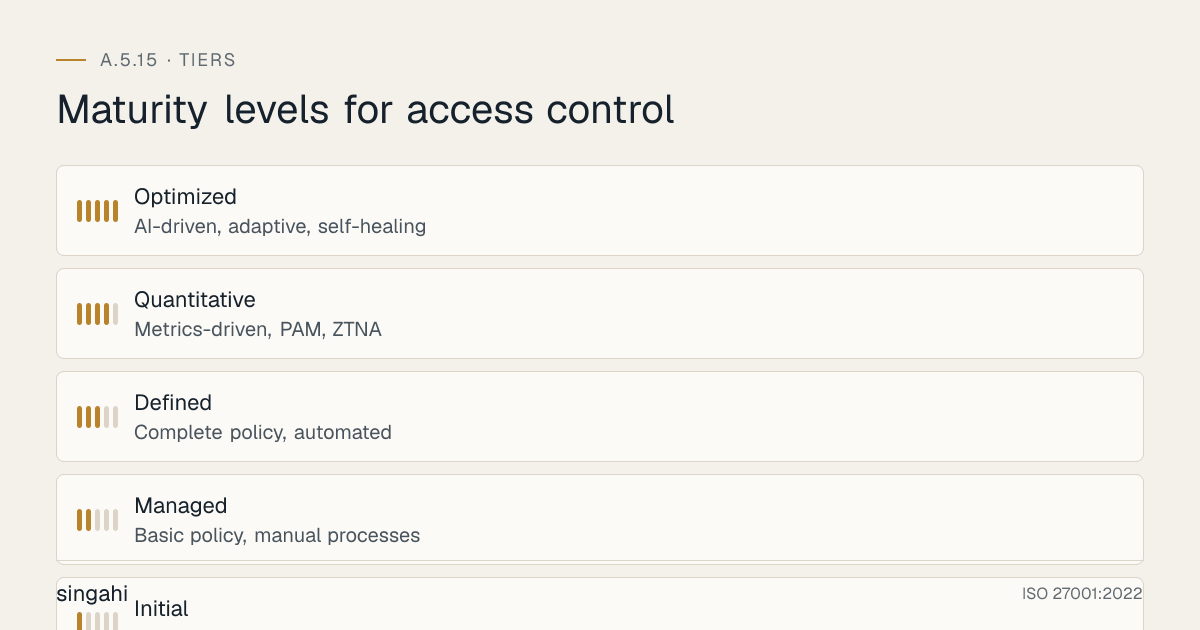
| Level | Name | Access Control Characteristics | Authentication | Authorization | Monitoring |
|---|---|---|---|---|---|
| 1 | Initial | Ad hoc, no formal controls | Basic passwords | Ad hoc | None |
| 2 | Managed | Basic policy, manual processes | Passwords + some MFA | RBAC basics | Basic logging |
| 3 | Defined | Complete policy, automated | MFA for all | Full RBAC, SoD | Centralized logging |
| 4 | Quantitative | Metrics-driven, PAM, ZTNA | Passwordless/ hardware keys | ABAC, dynamic | SIEM, UEBA |
| 5 | Optimized | AI-driven, adaptive, self-healing | Continuous auth | AI-driven risk-based | Predictive analytics |
Progression Guidance:
- Level 1 → 2: Implement access control policy, basic RBAC, and MFA for admins. (Time: 2-4 weeks)
- Level 2 → 3: Full MFA for all users, PAM for privileged access, automated access reviews, and SIEM integration. (Time: 1-3 months)
- Level 3 → 4: Zero Trust architecture, passwordless authentication, ABAC, and UEBA. (Time: 3-6 months)
- Level 4 → 5: AI-driven access decisions, continuous authentication, and self-healing access controls. (Time: 6-12 months)
Access Control Metrics and KPIs
Figure · Measures
The measures that show A.5.15 is working
- MFA Enrollment Rate> 95%Monthly
- Privileged Access Coverage100%Monthly
- Access Review Completion100%Quarterly
- Orphan Account Rate< 1%Monthly
- Excessive Privilege Rate< 5%Quarterly
| Metric | Formula | Target | Frequency |
|---|---|---|---|
| MFA Enrollment Rate | (Users with MFA / Total users) × 100 | > 95% | Monthly |
| Privileged Access Coverage | (Privileged accounts in PAM / Total privileged accounts) × 100 | 100% | Monthly |
| Access Review Completion | (Reviews completed on time / Total reviews) × 100 | 100% | Quarterly |
| Orphan Account Rate | (Orphan accounts / Total accounts) × 100 | < 1% | Monthly |
| Excessive Privilege Rate | (Accounts with excessive privileges / Total accounts) × 100 | < 5% | Quarterly |
| Failed Access Attempts | Number of failed authentication attempts | Baseline + trend | Daily |
| Session Recording Coverage | (Privileged sessions recorded / Total privileged sessions) × 100 | 100% | Monthly |
| Break-Glass Usage | Number of emergency access activations | < 2 per month | Monthly |
| Access Request SLA | Average time to fulfill access requests | < 48 hours | Monthly |
| SoD Violation Rate | (SoD violations / Total access reviews) × 100 | 0% | Quarterly |
More Questions
Q: How do we implement access control for a hybrid workforce? A: Hybrid work requires: (1) ZTNA for all remote access, (2) MFA for every access regardless of location, (3) device compliance checks, (4) DLP for data exfiltration prevention, (5) VPN as a minimum, and (6) enhanced monitoring for remote sessions. Treat remote access as higher risk than on-site access.
Q: What is Attribute-Based Access Control (ABAC) and when should we use it? A: ABAC grants access based on attributes (user role, department, location, time, device health, data sensitivity). Use ABAC when: (1) RBAC is too rigid, (2) Dynamic access decisions are needed, (3) Complex environments with many variables, (4) Fine-grained control is required. ABAC is more complex to implement but more flexible than RBAC.
Q: How do we handle access control for contractors and temporary staff? A: Contractors require: (1) Time-limited accounts (auto-expire on contract end), (2) Supervised access (escorted or monitored), (3) Minimal privileges (need-to-know only), (4) Separate contractor domain or VLAN, (5) Signed security agreements, and (6) Immediate de-provisioning on contract termination. Never give contractors privileged access without enhanced controls.
Q: Can we use biometric authentication for ISO 27001? A: Yes, biometrics (fingerprint, face, iris) are acceptable and often more secure than passwords. However: (1) Under the DPDP Act, employee biometrics for attendance and access fall under employment-related legitimate use (s.7(i)), but tell staff what you collect and why, (2) Implement secure biometric storage (templates, not raw images), (3) Provide fallback authentication (biometric + PIN), (4) Document biometric data handling in privacy policy, and (5) Allow users to opt out if legally required.
Q: How do we handle access control during a disaster or emergency? A: Maintain an emergency access procedure: (1) Pre-defined emergency access accounts (vaulted, require dual approval), (2) Break-glass procedures with automatic alerting, (3) Offline access control lists (if systems are down), (4) Physical access procedures for emergency personnel, and (5) Post-incident review of all emergency access. Test emergency procedures during DR drills.
Illustrative Scenario: Chennai NBFC, Access Control Breach to Compliance Success
Background
A Chennai-based non-banking financial company (NBFC) with 300 employees had grown rapidly over 3 years. Their access control was ad-hoc: shared admin passwords, no MFA, manual access provisioning via email, and no access reviews. Employees had access to systems they didn't need, and former employees' accounts were occasionally forgotten.
The Incident
Last year, a former employee used a shared admin password (that was never changed after their departure) to log into the loan management system. They accessed 5,000 customer records, downloaded a partial database, and attempted to sell the data on a dark web forum. The breach was detected when a cybersecurity firm monitoring dark web markets flagged the data for sale.
Root Cause Analysis
- Shared Admin Passwords: The "admin123" password was shared among 8 IT staff and 2 managers. It was never rotated.
- No De-Provisioning Process: When employees left, HR sent an email to IT, but there was no tracking or confirmation. 12 former employees still had active accounts 6 months after departure.
- No MFA: All systems used single-factor authentication. Compromised passwords provided full access.
- No Access Reviews: Access rights were granted once and never reviewed. Employees accumulated access across multiple roles and projects.
- No PAM: Database admin, server admin, and application admin credentials were stored in an Excel sheet on a shared drive.
- No Logging: The loan management system had no centralized logging. The unauthorized access was not detected internally.
Impact
- Data Breach: 5,000 customer records (names, PAN, Aadhaar, phone numbers, loan details) exposed
- Regulatory: RBI imposed a monetary penalty for inadequate cyber security controls. The NBFC reported the breach to CERT-In within 6 hours, as the 2022 Directions require.
- Customer Trust: 400+ customers closed their accounts. Social media coverage damaged the brand.
- Legal: Customers complained to the NBFC and the RBI Ombudsman. Once the DPDP Act's duties apply, a breach like this can draw Data Protection Board penalties of up to ₹250 crore; the Act gives individuals no compensation claim, so customers would sue under other law.
Remediation
The NBFC implemented a complete access control program:
Phase 1 (Week 1-2):
- Emergency password reset for all admin accounts
- Immediate de-provisioning of all 12 former employee accounts
- Deployment of MFA for all systems (starting with privileged access)
- Quick audit of all active accounts and access rights
Phase 2 (Month 1-2):
- Implementation of PAM (CyberArk) for all privileged accounts
- RBAC redesign with role definitions for each department
- Access review process with quarterly recertification
- Centralized logging with SIEM (Splunk) for all access events
Phase 3 (Month 3-4):
- Automated user provisioning and de-provisioning via HR-IT integration
- ZTNA deployment for remote access
- Passwordless authentication pilot for executives
- Security awareness training for all staff
Phase 4 (Month 5-6):
- ABAC implementation for sensitive customer data
- UEBA deployment to detect anomalous access patterns
- Third-party access management portal
- Annual penetration testing and access control audit
Results:
- Zero unauthorized access incidents in 12 months post-implementation
- Passed RBI cyber security review with full compliance
- 100% MFA enrollment across all 300 employees
- Access review completion rate: 100% quarterly
- Orphan accounts: 0 (automated de-provisioning within 24 hours of HR termination)
- PAM coverage: 100% of privileged accounts
Key Lessons
- Shared Passwords are a Ticking Time Bomb: Every shared password is a liability. Implement individual accounts and PAM immediately.
- De-Provisioning is Non-Negotiable: Automated de-provisioning is the only reliable way to prevent former employee access.
- Access Reviews Prevent Privilege Creep: Without regular reviews, employees accumulate unnecessary access over time.
- MFA is the Best ROI: MFA prevents 99.9% of automated attacks. It is the highest-impact, lowest-cost security control.
- Detection is as Important as Prevention: Without logging and monitoring, breaches go undetected for months. Implement SIEM and UEBA.
Emerging Trends in Access Control
Zero Standing Privileges (ZSP): Instead of granting standing admin access, ZSP provides just-in-time (JIT) access that is requested, approved, time-limited, and automatically revoked. This eliminates the risk of persistent privileged accounts being compromised.
Continuous Authentication: Traditional authentication is a one-time gate. Continuous authentication verifies identity throughout the session using behavioral biometrics, device posture, and location analytics. If behavior deviates from baseline, the session is challenged or terminated.
Decentralized Identity: Verifiable credentials let users prove facts (employment, qualifications, age) without revealing the underlying data. In India, DigiLocker already issues digitally verifiable documents; W3C verifiable credentials are the emerging standard.
AI-Powered Access Decisions: Machine learning models analyze user behavior, resource sensitivity, threat intelligence, and business context to make dynamic access decisions. AI can detect anomalies and automatically restrict access or trigger step-up authentication.
Passwordless-First Strategies: FIDO2/WebAuthn, Windows Hello, and hardware security keys are making passwords obsolete. Google, Microsoft, and Apple have all committed to passwordless futures. Organizations should plan a 3-year passwordless migration roadmap.
References
- ISO/IEC 27001:2022, Annex A 5.15; ISO/IEC 27002:2022, 5.15 (consulted, paraphrased)
- NIST SP 800-53 Rev. 5 (AC-1, AC-3, AC-6); NIST SP 800-63B (Digital Identity Guidelines)
- NIST Cybersecurity Framework 2.0 (2024)
- PCI DSS v4.0.1, Requirements 7 and 9
- CIS Controls v8, Control 6
- RBI Cyber Security Framework in Banks (2016) and Master Direction on IT Governance, Risk, Controls and Assurance Practices (2023)
- SWIFT Customer Security Controls Framework
- Digital Personal Data Protection Act, 2023 and DPDP Rules, 2025
- Verizon Data Breach Investigations Reports 2024 and 2025
Document Control
- Version: 1.1
- Review Cycle: Annual + event-triggered
- Next Review: June 2027