
On this page
- Quick Reference (60 Seconds)
- What the Control Asks For
- Why Authentication Information Matters
- Password Policy Design
- Password Storage and Hashing
- Password Reset and Recovery
- Multi-Factor Authentication (MFA)
- Passwordless Authentication
- Biometric Authentication
- Certificate-Based Authentication
- Token-Based Authentication
- API Authentication
- Service Account Authentication
- Authentication Monitoring and Analytics
- Tool Comparison
- Implementation Roadmap: 4 Weeks
- Common Audit Failures and Fixes
- Illustrative Scenarios
- Multi-Framework Mapping
- FAQ
- Indian Regulatory Context
- Continuous Improvement
- Additional Illustrative Scenarios: Indian Authentication Incidents
- Relationship to Other Controls
- References
Quick Reference (60 Seconds)
Figure · At a glance
A.5.17 at a glance
- Standard Reference
- ISO/IEC 27001:2022, Annex A, Control 5.17
- 27002 Guidance
- ISO/IEC 27002:2022, Clause 5.17
- Objective
- Ensure authentication credentials
- Key Requirement
- A managed process for issuing, delivering
- Who It Applies
- All authentication credentials: passwords
- Audit Focus
- Password policy, hashing, MFA, passwordless
ISO 27001:2022 Annex A 5.17 asks for the allocation and management of authentication information to be controlled by a management process, including advising personnel on how to handle it.
| Element | What You Need to Know |
|---|---|
| Standard Reference | ISO/IEC 27001:2022, Annex A, Control 5.17 |
| 27002 Guidance | ISO/IEC 27002:2022, Clause 5.17, Authentication information |
| Objective | Ensure authentication credentials are securely created, distributed, stored, and managed |
| Key Requirement | A managed process for issuing, delivering, storing, changing and revoking authentication information, plus user guidance |
| Who It Applies To | All authentication credentials: passwords, tokens, certificates, biometrics, API keys |
| Audit Focus | Password policy, hashing, MFA, passwordless, credential vault, rotation, monitoring |
| Typical Failures | Default credentials left unchanged, passwords sent in clear email, no identity check before resets, plaintext storage, shared credentials |
| ISO 27002 attributes | Control type: Preventive · Properties: Confidentiality, Integrity, Availability · Concepts: Protect · Capabilities: Identity and access management · Domains: Protection |
The Bottom Line: Authentication information is the keys to your kingdom. If you don't protect how credentials are created, stored, and used, nothing else matters.
What the Control Asks For
The Control in Brief
In short:
ISO 27001:2022 Annex A 5.17 asks organizations to control the allocation and management of authentication information through a formal process.
Do you need this control?
A.5.17 is not mandatory in itself: under clause 6.1.3 you include it if your risk assessment calls for it, and record the decision in your Statement of Applicability. Include it wherever passwords, keys, tokens or other authentication secrets are issued, which is almost everyone. You can adapt it toward passwordless or MFA-first approaches; the control is about managing authentication information, whatever form it takes.
What ISO 27002:2022 Adds
ISO/IEC 27002 guidance for 5.17 (paraphrased):
Allocating authentication information
- temporary passwords or PINs issued at enrolment are unique, hard to guess and must be changed at first use
- the user's identity is verified before new, replacement or temporary credentials are issued
- credentials are delivered over a secure channel, never in clear-text email
- users acknowledge receipt
- vendor default credentials are changed immediately after installation
- significant events in allocating and managing credentials are recorded, confidentially, using an approved method such as a password vault
User responsibilities (also written into terms of employment, A.6.2)
- keep secret authentication information confidential; never share personal credentials; share credentials of shared or non-personal identities only with authorised people
- change credentials immediately if they may be compromised
- choose strong passwords: not based on personal details or dictionary words, easy-to-remember passphrases, a minimum length
- do not reuse the same password across services
Password management systems should let users choose and change their own passwords (with a confirmation step), enforce strong passwords, force a change at first login and when needed (after an incident, or when someone who knew a shared password leaves), prevent reuse and the use of common or breached passwords, hide passwords as they are typed, and store and transmit them in protected form using approved techniques (A.8.24).
27002 also notes that frequent forced password changes can be counter-productive: users pick weak variations or write passwords down. MFA, passwordless methods and credential rotation are covered by A.8.5 (secure authentication) and your risk assessment rather than by 5.17 itself.
What Auditors Usually Look For
None of these is mandated by ISO; they are what auditors typically ask to see for A.5.17.
| Evidence | What it shows | Common failure |
|---|---|---|
| Issue and reset procedure | Identity checked before issue or reset; secure delivery; change at first use; acknowledgement | Help desk resets passwords for anyone who calls |
| Default credentials changed | Build checklists and scans show no vendor defaults | Default admin passwords on network devices or portals |
| User guidance | Rules in the policy, training and terms of employment | Rules exist only in the IT handbook |
| Password system settings | Length, blocklist, no reuse, masked entry, protected storage | Old complexity-and-expiry settings with no breached-password check |
| Secret storage | Vault for shared and service credentials; records of significant events | Passwords in spreadsheets or code |
| Compromise response | Credentials changed and sessions revoked on any sign of compromise | No trigger to reset after a breach notice |
Why Authentication Information Matters
Credential Compromise Statistics
| Statistic | Source | Impact |
|---|---|---|
| Credential abuse was the most common initial access vector (22% of breaches) | Verizon DBIR 2025 | Credentials remain a primary way in |
| 23.2 million breached accounts used the password "123456" | UK NCSC analysis of breach data (2019) | Weak, common passwords persist |
| MFA blocks over 99.9% of automated account-compromise attacks | Microsoft (2019) | Highly effective against bulk attacks; targeted phishing needs phishing-resistant MFA |
| Billions of breached passwords are searchable | Have I Been Pwned (Pwned Passwords) | Check new passwords against breach corpora |
Password Policy Design
Password Policy Requirements by Role
ISO 27001 sets no password values. The table follows NIST SP 800-63B (Rev. 4) and 27002's warning about frequent forced changes.
| Account type | Minimum length | Composition | Expiry | Second factor | Notes |
|---|---|---|---|---|---|
| Standard user | 15 characters if password-only; 8 if MFA is enforced (longer passphrases encouraged) | No forced character classes; block common and breached passwords | No periodic expiry; change on compromise | MFA (app or push with number matching) | Allow password managers and paste |
| Administrator | 15+ characters | As above | Change on compromise, or when someone who knew a shared credential leaves | Phishing-resistant (FIDO2 key or certificate) | Separate admin account from daily account |
| Service account | Long random secret or key | Random | Rotated automatically from the vault; prefer workload identities with no static secret | Not applicable | Non-interactive; owner recorded |
| Third-party user | As standard user | As standard user | Account expires with the contract | MFA | Time-bound account |
| Customer | 8+ characters | Block common and breached passwords | No periodic expiry | Offer MFA or passkeys | Rate-limit and monitor logins |
| Break-glass | Long random secret | Random | Review and rotate after every use | FIDO2 key held in a safe | Alert on every use |
Password Policy Best Practices
| Practice | Implementation | Rationale | Tool |
|---|---|---|---|
| Passphrase | 4+ random words, 16+ characters | Easier to remember, harder to crack | User education, password generator |
| No periodic expiry | Change passwords on evidence of compromise, not on a calendar (NIST SP 800-63B) | Forced changes lead to weak variations | Microsoft Entra ID, Okta |
| Compromised check | Check against HaveIBeenPwned on creation and login | Prevents use of breached passwords | Microsoft Entra ID, Okta, HIBP API |
| No common passwords | Block top 10,000 common passwords | Prevents weak passwords | Microsoft Entra ID, Okta, custom list |
| No username in password | Block password containing username | Prevents guessable passwords | Microsoft Entra ID, Okta |
| No organization name | Block password containing company name | Prevents guessable passwords | Microsoft Entra ID, Okta, custom list |
| No keyboard walks | Block qwerty, 123456, abcdef | Prevents pattern passwords | Microsoft Entra ID, Okta, custom list |
| Password manager | Require or strongly recommend password manager | Strong unique passwords, no reuse | 1Password, Bitwarden, Keeper |
| Self-service password reset (SSPR) | Enable SSPR with MFA verification | Reduce help desk, user empowerment | Microsoft Entra ID, Okta |
| Password masking | Hide passwords by default; an optional user-activated "show" toggle is acceptable (document the decision) | 27002 says not to display passwords as typed; NIST allows an optional reveal | Modern UI |
| Password strength meter | Show password strength during creation | Guide users to stronger passwords | Modern UI, zxcvbn |
| No password hints | Disable password hints | Prevent social engineering | Group Policy, Microsoft Entra ID |
| No security questions | Disable or limit security questions | Prevent social engineering | Microsoft Entra ID, Okta |
| Password generator | Provide strong password generator | Encourage strong passwords | Password manager, browser |
| Password education | Train users on passphrase creation | User awareness, behavioral change | Training, awareness |
| Admin password policy | Stronger policy for admin accounts | Higher security for privileged accounts | Microsoft Entra ID, GPO, PAM |
| Service account policy | Random 32+ char, vault, rotation | Non-human, automated, secure | PAM, Vault, Secrets Manager |
| API key policy | Random, vault, rotation, scoped | Secure API authentication | API Gateway, Vault |
| Certificate policy | Validity period, rotation, revocation | Secure certificate lifecycle | PKI, CA |
| Token policy | Short-lived, refresh token rotation, revocation | Secure session management | OAuth server, IAM |
Password Storage and Hashing
Password Hashing Algorithms
| Algorithm | Security Level | Speed | Salt | Memory Hard | Recommended |
|---|---|---|---|---|---|
| bcrypt | High | Slow | Yes | No | Yes (cost factor 12+) |
| scrypt | High | Slow | Yes | Yes | Yes (for memory-hard) |
| Argon2id | Very High | Slow | Yes | Yes | Yes (OWASP recommended) |
| PBKDF2 | Medium-High | Slow (with iterations) | Yes | No | Acceptable (600k+ iterations) |
| SHA-256 | Low | Fast | Optional | No | No (not for password hashing) |
| SHA-512 | Low | Fast | Optional | No | No (not for password hashing) |
| MD5 | Very Low | Very Fast | Optional | No | No (deprecated, insecure) |
| SHA-1 | Very Low | Fast | Optional | No | No (deprecated, insecure) |
| LM hash | None | Instant | No | No | No (Windows legacy, insecure) |
| NTLM hash | Very Low | Fast | No | No | No (Windows, insecure) |
| AES encryption | Not applicable | N/A | N/A | N/A | No (encryption ≠ hashing) |
| Base64 | None | N/A | N/A | N/A | No (encoding ≠ security) |
| Plaintext | None | N/A | N/A | N/A | No (never store plaintext) |
Hashing Implementation
| Parameter | bcrypt | scrypt | Argon2id | PBKDF2 |
|---|---|---|---|---|
| Cost/Iterations | Cost factor 12+ (2^12 = 4096 iterations) | N=2^17, r=8, p=1 (OWASP minimum) | m=65536, t=3, p=4 | 600,000+ iterations |
| Salt | 16 bytes random | 16 bytes random | 16 bytes random | 16 bytes random |
| Pepper | Optional (server-side secret) | Optional | Optional | Optional |
| Algorithm | Eksblowfish | Block mix | Memory-hard | HMAC-SHA256 |
| Library | bcrypt (Python), bcrypt (Node), BCrypt (Java), BCrypt.Net | scrypt (Python), scrypt (Node), Scrypt (Java) | Argon2 (Python), argon2 (Node), Argon2 (Java) | PBKDF2HMAC (Python), pbkdf2 (Node), PBKDF2 (Java) |
| Output | 60 characters (including salt) | Variable | Variable | Variable |
| Migration | If using old algorithm, rehash on next login | Same | Same | Same |
Credential Storage Best Practices
| Credential Type | Storage Method | Encryption | Key Management | Rotation | Evidence |
|---|---|---|---|---|---|
| User passwords | Hashed (Argon2id/bcrypt) | N/A (hashing) | N/A | User-initiated | Hash database |
| Admin passwords | PAM or password vault (encrypted, retrievable; hashes are for verification only) | Vault encryption | HSM/KMS | 90 days or per policy | Vault logs |
| Service account passwords | Vault (HashiCorp, CyberArk) | Vault encryption | HSM/KMS | 90 days or automated | Vault logs |
| API keys | Vault or secrets manager | Vault encryption | HSM/KMS | 90 days or automated | Vault logs |
| Database passwords | Vault or secrets manager | Vault encryption | HSM/KMS | 90 days or automated | Vault logs |
| Application secrets | Vault or secrets manager | Vault encryption | HSM/KMS | 90 days or automated | Vault logs |
| TLS certificates | Certificate store (PKI) | Encrypted store | HSM/KMS | Per validity period | Certificate logs |
| SSH keys | SSH agent, vault | Encrypted at rest | HSM/KMS | 90 days or automated | Key logs |
| OAuth tokens | Token store, encrypted | Encrypted at rest | HSM/KMS | Short-lived, refresh rotated | Token logs |
| Biometric templates | Encrypted storage, not raw | AES-256, separate from other data | HSM/KMS | N/A (template doesn't change) | Storage config |
| MFA seeds | Encrypted storage, HSM | HSM encryption | HSM | N/A (seed is static) | HSM config |
| Recovery codes | Encrypted, printed, distributed | AES-256 | HSM/KMS | Single use | Distribution record |
| Backup codes | Encrypted, limited distribution | AES-256 | HSM/KMS | Single use | Distribution record |
| Shared secrets | Vault, encrypted | Vault encryption | HSM/KMS | 90 days or per policy | Vault logs |
| Encryption keys | HSM, KMS, key vault | HSM encryption | HSM | Per key rotation policy | Key rotation logs |
Password Reset and Recovery
Secure Password Reset Process
| Step | Action | Verification | Security | Evidence |
|---|---|---|---|---|
| 1 | User initiates password reset | Click "Forgot Password" | Rate limiting, CAPTCHA | Request log |
| 2 | Verify identity | MFA challenge (TOTP, push, email) | MFA required, no security questions | MFA log |
| 3 | Send reset link/code | Email or SMS with time-limited link | Expires in 15 minutes, single use | Delivery log |
| 4 | User clicks link/enters code | Link opens reset page or code accepted | HTTPS, no HTTP, valid domain | Access log |
| 5 | User creates new password | Password strength enforced, compromised check | Policy enforcement, HIBP check | Creation log |
| 6 | Password updated | Old password invalidated immediately | Immediate invalidation | Update log |
| 7 | Notify user | Email notification of password change | Alert if not initiated by user | Notification log |
| 8 | Audit | Log all reset actions | Immutable audit trail | Audit log |
| 9 | Session invalidation | All existing sessions invalidated | Force re-login | Session log |
| 10 | Optional: Manager notification | Notify manager of admin password reset | Enhanced monitoring for admin | Notification log |
Password Reset Security Requirements
| Requirement | Implementation | Best Practice | Tool |
|---|---|---|---|
| MFA required | Require MFA for password reset | TOTP, push, or hardware key | Microsoft Entra ID, Okta |
| No security questions | Disable security questions | Security questions are insecure | Microsoft Entra ID, Okta |
| Rate limiting | Limit reset attempts per user/IP | 3 attempts per hour, 5 per day | Microsoft Entra ID, Okta, custom |
| Time-limited link | Reset link expires quickly | 15 minutes maximum | Microsoft Entra ID, Okta, custom |
| Single-use link | Link can only be used once | One-time use, invalidated after use | Microsoft Entra ID, Okta, custom |
| HTTPS only | All reset communication over HTTPS | TLS 1.3, valid certificate | Web server, CDN |
| No password in email | Never send password in email | Send link only, not password | Email gateway |
| Notification | Notify user of password change | Email to user, SMS optional | Email gateway, SMS gateway |
| Session invalidation | Invalidate all sessions on password change | Force re-login everywhere | IAM, session management |
| Audit trail | Log all password reset actions | Immutable log, SIEM integration | SIEM, IAM |
| Compromised check | Check new password against HIBP | Block breached passwords | HIBP API, Microsoft Entra ID, Okta |
| Admin approval | Manager approval for admin password reset | Manager approval, security notification | ServiceNow, IAM |
| Break-glass | Break-glass for admin lockout | Pre-approved emergency accounts, HSM | PAM, HSM |
| Self-service | Enable self-service for all users | Reduce help desk, empower users | Microsoft Entra ID SSPR, Okta |
| Help desk verification | If help desk reset, verify identity strongly | MFA + manager approval + employee ID | Help desk procedure |
Multi-Factor Authentication (MFA)
MFA Factor Types
| Factor | Type | Examples | Security Level | Cost | User Experience | Best For |
|---|---|---|---|---|---|---|
| Knowledge | Something you know | Password, PIN, security question | Low | Free | Easy | Base factor |
| Possession | Something you have | Phone, hardware key, smart card, certificate | Medium-High | Low-High | Easy-Hard | Second factor |
| Inherence | Something you are | Fingerprint, face, iris, voice, behavior | High | Medium | Easy | Second factor |
| Location (risk signal, not a factor) | Where the request comes from | IP address, network location | Signal only | Low | Transparent | Conditional access input |
| Time (risk signal, not a factor) | When the request is made | Time windows | Signal only | Free | Transparent | Conditional access input |
| Behavior | Something you do | Keystroke dynamics, mouse patterns, device handling | Medium | Medium | Transparent | Risk factor |
MFA Implementation by Risk Level
| Risk Level | Required Factors | Example | Implementation |
|---|---|---|---|
| Low | Password + SMS/TOTP (optional) | Public website, newsletter | Optional MFA |
| Medium | Password + TOTP/Push | Standard employee, internal apps | Enforced MFA |
| High | Phishing-resistant authenticator (FIDO2 key, passkey or certificate) | Admin, finance, sensitive data | Enforced, no bypass |
| Very High | Device-bound FIDO2 key with PIN or biometric (meets AAL3) | Critical infrastructure, top-tier admins | Enforced, no bypass |
| API/System | Workload identity or mTLS certificate | Service-to-service, API | mTLS or cloud workload identity; IP restriction as an extra network control |
| Customer | Password + TOTP (optional) | Customer portal, B2C | Optional MFA, recommended |
| Third-party | Password + TOTP/Push | Vendor, contractor, consultant | Enforced MFA |
| Remote | Password + Push + Device compliance | Remote worker, VPN | MFA + device compliance |
| Privileged | Phishing-resistant authenticator | Admin, DBA, security | Enforced, no bypass |
| Emergency | FIDO2 key held in a safe | Break-glass, emergency | Alert on every use; review afterwards |
Passwordless Authentication
Passwordless Methods
| Method | Technology | Security Level | User Experience | Cost | Best For | Implementation |
|---|---|---|---|---|---|---|
| FIDO2/WebAuthn | Public key cryptography, hardware-backed | Very High | Easy (touch/scan) | Medium-High | All users, especially admin | YubiKey, Windows Hello, Apple Touch ID, Android |
| Windows Hello | Biometric + PIN + TPM | Very High | Easy (face/fingerprint/PIN) | Included (Windows 10/11) | Windows users | Windows 10/11, Microsoft Entra ID |
| Apple Touch ID/Face ID | Biometric + Secure Enclave | Very High | Easy (touch/scan) | Included (Apple devices) | Apple users | macOS, iOS, Safari |
| Android Biometric | Biometric + Keystore | Very High | Easy (fingerprint/face) | Included (Android) | Android users | Android, Chrome |
| Passkeys | FIDO2, synced across devices, cloud-backed | High (synced passkeys meet AAL2; device-bound keys are needed for AAL3) | Easy (biometric/PIN) | Free | All users, modern replacement for passwords | Google, Apple, Microsoft, 1Password, Dashlane |
| Certificate-based | X.509, PKI, smart card | High | Moderate (insert card) | Medium | Enterprise, government, high-security | Smart card, PKI, YubiKey PIV |
| Magic link | Email link, time-limited | Medium | Easy (click link) | Low | Low-risk, temporary, customer | Email gateway, custom |
| Push notification | Mobile app push, biometric confirmation | High | Easy (tap approve) | Low | Standard MFA, mobile-first | Duo, Microsoft Authenticator, Okta |
| Phone authentication | Phone call + PIN | Medium | Moderate (answer call) | Low | Backup, accessibility | Phone gateway |
| QR code | QR scan + mobile app | Medium | Easy (scan code) | Low | Mobile login, temporary | QR generator, mobile app |
| Email OTP | Email one-time code | Medium | Easy (check email) | Free | Low-risk, backup | Email gateway |
| SMS OTP | SMS one-time code | Low-Medium | Easy (check SMS) | Low | Backup, low-risk, customer | SMS gateway |
| Hardware OTP | Hardware token generates OTP | High | Moderate (read token) | Medium | High-security, air-gapped | RSA SecurID, YubiKey OTP |
| Software OTP | TOTP app generates code | Medium-High | Easy (open app) | Free | Standard MFA, widely supported | Google Authenticator, Microsoft Authenticator, Authy |
Passwordless Implementation Roadmap
| Step | Action | Owner | Tool | Timeline |
|---|---|---|---|---|
| 1 | Assess passwordless readiness | Security | IdP assessment | 1 week |
| 2 | Pilot with IT team | IT | FIDO2 keys, Windows Hello | 1-2 weeks |
| 3 | Deploy FIDO2 keys for admin | Security | YubiKey, Titan | 2-4 weeks |
| 4 | Enable Windows Hello for Windows users | IT | Windows Hello, Microsoft Entra ID | 2-4 weeks |
| 5 | Enable passkeys for mobile users | IT | Apple, Google, Microsoft passkeys | 2-4 weeks |
| 6 | Enable passwordless for standard users | IT | FIDO2, passkeys, push | 4-8 weeks |
| 7 | Train users on passwordless | HR + IT | Training, documentation | 1-2 weeks |
| 8 | Monitor and support | IT | Help desk, analytics | Ongoing |
| 9 | Retire passwords for passwordless users | Security | IdP policy | 1-2 weeks |
| 10 | Full passwordless for all users | Security | IdP policy, conditional access | 8-12 weeks |
Biometric Authentication
Biometric Methods
| Biometric | Accuracy | Spoof Resistance | Cost | Best For | Privacy Risk | Implementation |
|---|---|---|---|---|---|---|
| Fingerprint | High | High (with liveness) | Low | Mobile, laptop, access control | Medium | Touch ID, Windows Hello, Android |
| Facial recognition | High | High (with liveness) | Medium | Mobile, laptop, access control, surveillance | High | Face ID, Windows Hello, Amazon Rekognition |
| Iris recognition | Very High | Very High | High | High-security, border control, data center | High | Iris scanners, Samsung, custom |
| Voice recognition | Medium | Low | Low | Call center, phone authentication | Medium | Voice biometrics, Nuance, Pindrop |
| Behavioral | Medium | Medium | Medium | Continuous authentication, risk scoring | Low | Typing cadence, mouse patterns, device handling |
| Palm vein | Very High | Very High | High | High-security, healthcare, financial | Low | Palm vein scanners, Fujitsu |
| Retina scan | Very High | Very High | Very High | Military, high-security | High | Retina scanners, military |
| Hand geometry | Medium | Medium | Medium | Physical access, time attendance | Low | Hand geometry scanners |
| Signature dynamics | Medium | Low | Low | Document signing, legal | Low | Signature pads, tablets |
| Gait recognition | Medium | Medium | Medium | Surveillance, continuous | High | Camera-based, mobile sensors |
| Heartbeat | Medium | High | Medium | Wearables, continuous | Low | Wearable devices, Nymi |
| DNA | Very High | N/A | Very High | Forensic, legal, extreme security | Very High | Lab-based, not practical for daily use |
Biometric Storage and Privacy
| Requirement | Implementation | Best Practice | Regulation | Evidence |
|---|---|---|---|---|
| Template storage | Store template, not raw biometric | Template (mathematical representation), not image | DPDP Act, GDPR | Storage config |
| Encryption | Encrypt templates at rest and in transit | AES-256, TLS 1.3 | DPDP Act, GDPR | Encryption config |
| Separation | Store biometrics separately from other data | Separate database, separate encryption key | DPDP Act, GDPR | Architecture |
| No centralization | Prefer on-device biometric over central | On-device (Face ID, Touch ID) vs. server | DPDP Act, GDPR | Architecture |
| Lawful basis | Consent, or for employees the employment legitimate use (DPDP s.7(i)) | Tell people what is collected and why; purpose limitation | DPDP Act (GDPR: explicit consent or another Art. 9 condition) | Notice and consent records |
| Right to erasure | Delete templates when no longer needed or on a valid request | Template deletion, revocation | DPDP s.8(7) and s.12; GDPR Art. 17 | Deletion records |
| No sharing | Do not share biometric data with third parties | Strict no-sharing policy | DPDP Act, GDPR | Policy |
| Audit | Audit biometric access and use | Access logs, usage logs, audit trail | DPDP Act, GDPR | Audit logs |
| Accuracy | Ensure biometric accuracy and fairness | Regular testing, bias testing, accuracy metrics | DPDP Act, GDPR | Accuracy reports |
| Fallback | Provide non-biometric fallback | PIN, password, token as fallback | DPDP Act, GDPR | Fallback policy |
| Spoof detection | Implement liveness detection | Anti-spoofing, liveness detection, challenge-response | Best practice | Liveness config |
| DPIA | Assess high-risk biometric processing | DPIA | Mandatory for Significant Data Fiduciaries (DPDP s.10) and under GDPR Art. 35; good practice otherwise | DPIA document |
| Cross-border | Know where templates are stored | Prefer on-device or in-country storage | DPDP s.16 (restricted-country list), sector rules, GDPR Chapter V | Transfer records |
| Children | Special protection for children's biometric | Verifiable parental consent, enhanced protection | DPDP Act s.9, GDPR | Consent records |
| Transparency | Clear privacy notice for biometric | Explain collection, use, storage, retention, rights | DPDP Act, GDPR | Privacy notice |
Certificate-Based Authentication
Certificate Types
| Certificate Type | Use Case | Key Size | Validity | Storage | Best Practice |
|---|---|---|---|---|---|
| User certificate | User authentication, VPN, email signing | RSA 2048+ or ECC 256+ | 1-3 years | Smart card, USB token, TPM, HSM | TPM/smart card preferred |
| Machine certificate | Device authentication, network access, WiFi | RSA 2048+ or ECC 256+ | 1-3 years | TPM, device keystore, certificate store | TPM preferred |
| Service certificate | Service-to-service authentication, API | RSA 2048+ or ECC 256+ | 1-2 years | Vault, HSM, secrets manager | Vault + HSM |
| Admin certificate | Admin authentication, privileged access | RSA 4096 or ECC 256+ | 1 year | Smart card, HSM, hardware token | Hardware token + HSM |
| Email certificate | S/MIME email signing and encryption | RSA 2048+ | 1-3 years | Email client, smart card, OS store | Smart card preferred |
| Code signing certificate | Software signing, integrity | RSA 2048+ or ECC 256+ | 1-3 years | HSM, hardware token, secure build pipeline | HSM mandatory |
| SSL/TLS certificate | Website, API encryption | RSA 2048+ or ECC 256+ | Public CA maximum 200 days from 15 Mar 2026, 100 days from 2027, 47 days from 2029 (CA/B Forum SC-081): automate renewal | Web server, load balancer, CDN | Let's Encrypt, auto-renewal |
| Client certificate | mTLS, API authentication | RSA 2048+ or ECC 256+ | 1-3 years | Client device, application store | Device store |
| Root CA certificate | Certificate chain trust | RSA 4096+ | 10-20 years | HSM, offline, air-gapped | HSM, offline, strict access |
| Intermediate CA certificate | Certificate issuance | RSA 4096+ | 5-10 years | HSM, online, strict access | HSM, strict access |
| IoT device certificate | IoT device authentication | ECC 256+ (preferred for IoT) | 1-3 years | Device secure storage, TPM | Secure provisioning |
| VPN certificate | VPN authentication | RSA 2048+ or ECC 256+ | 1-3 years | VPN client, device store, smart card | Smart card + MFA |
| Document signing certificate | PDF, document signing | RSA 2048+ | 1-3 years | Smart card, HSM, secure signing device | HSM for high-value |
| Timestamp certificate | Digital timestamping | RSA 2048+ | 1-3 years | Timestamp server, HSM | HSM |
| OCSP certificate | Certificate status verification | RSA 2048+ | 1-3 years | OCSP responder, HSM | HSM |
Certificate Lifecycle Management
| Stage | Action | Owner | Tool | Timeline | Evidence |
|---|---|---|---|---|---|
| Request | Submit certificate request (CSR) | User/IT | PKI, CA | 1 day | CSR record |
| Verify | Verify identity and authorization | CA admin | PKI, CA | 1-3 days | Verification record |
| Issue | Issue certificate | CA | PKI, CA | 1 day | Certificate record |
| Distribute | Securely distribute certificate | IT | Secure delivery, smart card | 1 day | Distribution record |
| Install | Install certificate on device | User/IT | OS, application, device | 1 day | Installation record |
| Use | Use certificate for authentication | User | Application, OS | Ongoing | Usage logs |
| Monitor | Monitor certificate validity and usage | Security | PKI, SIEM, monitoring | Ongoing | Monitoring logs |
| Renew | Renew before expiry | IT/Auto | PKI, auto-renewal | 30 days before expiry | Renewal record |
| Revoke | Revoke if compromised or no longer needed | Security/CA | PKI, CRL, OCSP | Immediate | Revocation record |
| Archive | Archive certificate for audit/legal | IT | Archive, encrypted | Post-expiry | Archive record |
| Audit | Audit certificate lifecycle | Security | PKI, audit tool | Annual | Audit record |
Token-Based Authentication
Token Types
| Token Type | Format | Validity | Use Case | Security | Implementation |
|---|---|---|---|---|---|
| JWT (JSON Web Token) | JSON, signed (JWS) or encrypted (JWE) | Short (15 min - 1 hour) | API auth, SSO, stateless sessions | Medium-High (if signed + encrypted) | OAuth 2.0, OIDC, custom |
| Refresh token | Opaque or JWT | Long (7-90 days) | Obtain new access token | High (must be stored securely, rotated) | OAuth 2.0, OIDC |
| Session token | Cookie, JWT, opaque | Session duration | Web session | Medium (HTTPS, HttpOnly, Secure, SameSite) | Web framework, session manager |
| API key | Random string, UUID | Long (90 days - 1 year) | API authentication, integration | Medium (if rotated, scoped, monitored) | API gateway, IAM |
| OAuth access token | JWT or opaque | Short (15 min - 1 hour) | Delegated access, API auth | Medium-High (scopes, short-lived) | OAuth 2.0 server |
| SAML assertion | XML, signed | Short (minutes) | Enterprise SSO, federation | High (XML signature, encrypted) | SAML 2.0 |
| Kerberos ticket | Binary, encrypted | Short (hours) | Windows network auth | High (Kerberos protocol, mutual auth) | Kerberos, AD |
| NTLM token | Binary, hashed | Session | Windows legacy auth | Low (deprecated, insecure) | Windows legacy |
| Basic auth token | Base64(username:password) | Per request | Legacy API auth, simple systems | Very Low (plaintext, no encryption) | HTTP Basic |
| Digest auth token | MD5 hash challenge-response | Per request | Legacy auth, slightly better than basic | Low (MD5, susceptible) | HTTP Digest |
| Bearer token | Any token type (JWT, opaque) | Varies | OAuth 2.0, API auth | Medium-High (must be protected in transit) | OAuth 2.0, API |
| MAC token | HMAC-signed request | Per request | OAuth 1.0a, legacy | Medium (HMAC, no TLS required) | OAuth 1.0a |
| PKCE (code exchange, not a token) | Code verifier + challenge | Short | OAuth 2.0 public clients (mobile, SPA) | High (prevents authorization code interception) | OAuth 2.0 + PKCE |
| Device code | Short code + polling | Short (15 min) | Device login (TV, IoT) | Medium (user completes on other device) | OAuth 2.0 Device Code |
| Push token | FCM/APNs token | Long (until revoked) | Mobile push notification | Medium (must be protected, rotated) | FCM, APNs |
| WebSocket token | JWT or opaque | Session | WebSocket authentication | Medium-High (same as API token) | WebSocket server |
| GraphQL token | JWT or opaque | Session | GraphQL API authentication | Medium-High (same as API token) | GraphQL server |
| gRPC token | JWT or opaque | Per request | gRPC API authentication | Medium-High (TLS + token) | gRPC server |
| mTLS certificate | X.509 certificate | 1-3 years | Service-to-service, API, device | High (mutual TLS, certificate-based) | PKI, API gateway |
API Authentication
API Authentication Methods
| Method | Security Level | Best For | Implementation | Tool |
|---|---|---|---|---|
| OAuth 2.0 + OIDC | High | Modern APIs, mobile, web, third-party | Authorization server, JWT, scopes | Auth0, Okta, Microsoft Entra ID, Keycloak |
| API Key | Medium | Internal APIs, simple integrations, low-risk | API gateway, key management | AWS API Gateway, Kong, Azure APIM |
| mTLS | High | Service-to-service, IoT, high-security | Certificate-based, mutual TLS | Istio, Nginx, API gateway |
| JWT | Medium-High | Stateless APIs, microservices, SSO | JWT signing, validation, expiration | Auth0, Okta, custom JWT library |
| HMAC | Medium | Legacy APIs, AWS-style authentication | HMAC-SHA256 signature, timestamp | AWS Signature, custom |
| Basic Auth | Low | Internal, legacy, low-risk, development | Base64 encoding, HTTPS only | HTTP Basic, nginx |
| Digest Auth | Low | Legacy, slightly better than basic | Challenge-response, MD5 | HTTP Digest |
| Bearer Token | Medium-High | OAuth 2.0, API auth, standard | Bearer token in Authorization header | OAuth 2.0, JWT |
| Cookie/Session | Medium | Web APIs, same-origin | Session cookie, CSRF protection, HttpOnly | Web framework, session manager |
| SAML | High | Enterprise APIs, federation | SAML assertion, XML signature | SAML 2.0, Shibboleth |
| Kerberos/SPNEGO | High | Internal Windows APIs | Kerberos ticket, SPNEGO | Kerberos, AD, Windows |
| LDAP/AD | Medium | Internal APIs, directory-based | LDAP bind, AD authentication | LDAP, AD, Spring Security |
| API Gateway Auth | Medium-High | All APIs behind gateway | Gateway handles auth, forwards claims | Kong, AWS API Gateway, Azure APIM |
| Biometric | High | Mobile APIs, high-security | Biometric + device binding + token | FIDO2, mobile SDK |
| Hardware token | High | Financial, high-security, legacy | RSA SecurID, YubiKey OTP | RSA, YubiKey |
| Rate limiting + auth | Medium-High | All public APIs | Rate limiting + authentication + authorization | API gateway, WAF |
IP allow-lists, geo-restriction and zero-trust architecture are network or policy controls that complement authentication; they do not authenticate the caller.
Service Account Authentication
Service Account Authentication Best Practices
| Practice | Implementation | Tool | Risk Mitigation |
|---|---|---|---|
| No interactive login | Service accounts cannot log in interactively | IAM, OS policy | Prevent human misuse |
| Vault storage | Credentials stored in vault, not hardcoded | HashiCorp Vault, AWS Secrets Manager, Azure Key Vault | No credential leakage |
| Runtime injection | Credentials injected at runtime, not in config | Vault agent, Kubernetes secrets, CI/CD | No credential in code/config |
| Rotation | Automated rotation of credentials | Vault, PAM, cloud secrets manager | Limit exposure window |
| Short-lived tokens | Use short-lived tokens where possible | OAuth 2.0, AWS STS, Azure managed identities | Limited exposure |
| Managed identities | Use cloud-managed identities instead of keys | Azure Managed Identities, AWS IAM roles, GCP service accounts | No credential management |
| Least privilege | Minimal permissions for service account | IAM, RBAC, ABAC | Limit blast radius |
| Monitoring | Monitor all service account activity | SIEM, DAM, cloud monitoring | Detect anomalies |
| Naming convention | Clear naming indicating purpose and scope | Naming policy (svc-app-env-purpose) | Accountability |
| Documentation | Document owner, purpose, systems, permissions | CMDB, service registry | Ownership and accountability |
| No email | Service accounts have no email | Exchange, Google Workspace | Prevent phishing |
| No shared secrets | Each service account has unique credentials | IAM, vault | Accountability |
| Certificate auth | Use certificates instead of passwords where possible | PKI, mTLS | Stronger authentication |
| API key governance | Scoped API keys, rotation, monitoring | API gateway, vault | Secure API access |
| Workload identity | Kubernetes workload identity, pod identity | Kubernetes, cloud IAM | Pod-level identity |
| SPIFFE/SPIRE | Universal workload identity framework | SPIFFE, SPIRE | Cross-platform workload identity |
| Service mesh | mTLS between services, identity-based access | Istio, Linkerd, Consul | Service-to-service security |
| No long-lived credentials | Avoid long-lived keys and passwords | STS, managed identities, short-lived tokens | Reduce exposure |
| Credential scanning | Scan code and config for hardcoded credentials | GitLeaks, TruffleHog, GitHub secret scanning | Prevent credential leakage |
| Break-glass service accounts | Pre-approved emergency service accounts | PAM, vault, enhanced logging | Emergency access with control |
Authentication Monitoring and Analytics
Authentication Monitoring Requirements
| Event | What to Monitor | Alert Trigger | Response | Tool |
|---|---|---|---|---|
| Failed login | Count, source IP, username, time | >5 failures in 5 minutes | Lock account, alert, investigate | SIEM, IAM |
| Successful login | User, time, location, device, MFA status | From new location/device | Alert, review | SIEM, IAM |
| MFA failure | User, method, failure reason | Repeated MFA failures | Alert, investigate, possible compromise | SIEM, IAM |
| Password change | User, time, source, method | Change from unusual location | Alert, verify with user | SIEM, IAM |
| Password reset | User, time, method, success | Unusual reset pattern | Alert, investigate | SIEM, IAM |
| Account lockout | User, time, reason, source | Multiple lockouts | Alert, investigate, brute force check | SIEM, IAM |
| Account unlock | User, time, admin, reason | Unusual unlock pattern | Alert, verify | SIEM, IAM |
| New device | User, device, time, location | First-time device | Alert, require MFA, notify user | SIEM, IAM |
| New location | User, location, time | Impossible travel, new country | Alert, block, require MFA | SIEM, IAM |
| Off-hours login | User, time, location | Login outside business hours | Alert, require MFA, notify manager | SIEM, IAM |
| Privileged login | Admin, time, location, method | Any admin login | Log + alert + session recording | SIEM, PAM |
| Break-glass use | Account, time, reason, admin | Any break-glass use | Immediate alert, session recording, post-review | SIEM, PAM |
| Service account login | Account, time, source, method | Interactive login | Alert, block, investigate | SIEM, IAM |
| Certificate use | Certificate, time, source, result | Expired certificate, revoked certificate | Alert, block, renew | SIEM, PKI |
| Token use | Token, time, source, result | Expired token, revoked token, unusual use | Alert, block, investigate | SIEM, IAM |
| API key use | Key, time, source, endpoint, result | Unusual endpoint, rate limit hit, revoked key | Alert, block, rotate | SIEM, API gateway |
| Impersonation | Impersonator, target, time, reason | Unauthorized impersonation | Alert, block, investigate | SIEM, IAM |
| Credential stuffing | Multiple failed logins, different users, same IP | >10 failed logins from same IP | Block IP, alert, investigate | SIEM, WAF |
| Password spray | Multiple failed logins, same password, different users | Pattern detected | Block IP, alert, investigate | SIEM, WAF |
| Brute force | Multiple failed logins, same user, different passwords | >5 failures in 5 minutes | Lock account, alert, investigate | SIEM, IAM |
| Session hijacking | Session from new location, unusual activity | Session anomaly | Block session, alert, force re-auth | SIEM, IAM |
| Account takeover | Impossible travel, password change + MFA disable | Multiple anomalies | Block account, alert, IR | SIEM, UEBA |
| Insider threat | Unusual data access, privilege escalation, bulk export | Behavioral anomaly | Alert, investigate, DLP | SIEM, UEBA, DLP |
| Third-party risk | Third-party user unusual activity | Anomaly for third-party | Alert, review, restrict access | SIEM, CASB, UEBA |
| Compromised credential | Credential found in breach database | HIBP match | Force password change, alert, MFA | HIBP, IAM |
| Authentication bypass | Attempt to bypass MFA, password check | Bypass attempt detected | Block, alert, investigate | SIEM, WAF |
| Man-in-the-middle | Certificate anomaly, TLS downgrade | MITM indicators | Alert, block, investigate | SIEM, NDR |
| Replay attack | Reused token, replayed request | Replay detected | Block, alert, investigate | SIEM, API gateway |
SIEM Rules for Authentication
Illustrative SPL; adapt index and field names to your data. Distance is calculated with the haversine formula in eval.
## Splunk: Detect impossible travel (successive logins faster than ~900 km/h)
index=authentication action=success earliest=-24h
| iplocation src_ip
| sort 0 user _time
| streamstats current=f last(lat) as prev_lat last(lon) as prev_lon last(_time) as prev_time by user
| where isnotnull(prev_lat)
| eval rlat1=prev_lat*pi()/180, rlat2=lat*pi()/180, dlat=rlat2-rlat1, dlon=(lon-prev_lon)*pi()/180
| eval a=pow(sin(dlat/2),2)+cos(rlat1)*cos(rlat2)*pow(sin(dlon/2),2)
| eval distance_km=6371*2*atan2(sqrt(a), sqrt(1-a)), hours=(_time-prev_time)/3600
| where hours>0 AND distance_km/hours > 900

## Splunk: Detect brute force (more than 5 failures in 5 minutes)
index=authentication action=failure earliest=-5m
| stats count by user, src_ip
| where count > 5

## Splunk: Detect off-hours admin login
index=authentication action=success user_role=admin earliest=-24h
| eval hour=tonumber(strftime(_time, "%H"))
| where hour < 6 OR hour >= 22
| stats count by user, src_ip, hour

## Splunk: Detect credential stuffing (many users tried from one IP)
index=authentication action=failure earliest=-15m
| stats dc(user) as user_count, count as attempt_count by src_ip
| where user_count > 10 AND attempt_count > 20
Tool Comparison
| Tool | Type | Best For | Key Features |
|---|---|---|---|
| Microsoft Entra ID | Identity provider | Microsoft 365 organisations | Password protection with banned lists, MFA, passkeys, SSPR |
| Okta Workforce Identity | Identity provider | Mixed SaaS estates | Adaptive MFA, FastPass, password policies |
| Google Cloud Identity | Identity provider | Google Workspace organisations | 2-Step Verification, passkeys, security keys |
| 1Password / Bitwarden / Keeper | Enterprise password manager | All organisations | Shared vaults, breach monitoring, admin reporting |
| HashiCorp Vault / AWS Secrets Manager / Azure Key Vault | Secrets management | Engineering teams | Dynamic secrets, rotation, audit logs |
| CyberArk / Delinea / BeyondTrust | PAM vault | Privileged and service credentials | Check-out, rotation, session recording |
| YubiKey / Feitian / Google Titan | FIDO2 security keys | Admins and high-risk users | Phishing-resistant, device-bound authentication |
| Have I Been Pwned (Pwned Passwords) | Breached-password check | All | k-anonymity API for checking passwords |
| zxcvbn | Password strength estimation | Developers | Realistic strength meter |
| Let's Encrypt / Certbot / ACME | Certificate automation | Web and API endpoints | Automated issuance and renewal |
| Smallstep (step-ca) | Private CA | DevOps, internal PKI | Short-lived certificates, ACME |
| Keycloak / Authentik | Open-source IAM | Self-hosted, engineering-led teams | SSO, MFA, identity brokering |
| Open Policy Agent / Cerbos / OpenFGA | Authorisation engines | Application teams | Policy- and relationship-based authorisation |
Implementation Roadmap: 4 Weeks
Figure · Timeline
Rollout in order
- Week 1Password policy + MFA
- Week 2Credential vault + rotation
- Week 3Passwordless pilot + monitoring
- Week 4Rollout + training
| Week | Focus | Deliverable | Owner |
|---|---|---|---|
| 1 | Password policy + MFA | Strong password policy, MFA enabled for all | Security |
| 2 | Credential vault + rotation | Vault deployed, service accounts rotated, admin creds vaulted | Security Engineer |
| 3 | Passwordless pilot + monitoring | Passwordless pilot for IT, authentication monitoring setup | Security + IT |
| 4 | Rollout + training | Passwordless for admins and pilot groups (wider rollout over 8–12 weeks), training, monitoring operational | HR + Security |
Common Audit Failures and Fixes
| Failure | Auditor's Question | Fix | Timeline |
|---|---|---|---|
| Weak password policy | "What is your password policy?" | Strengthen password policy, enable compromised check | 1-2 weeks |
| No MFA | "How do you verify user identity?" | Deploy MFA for all users | 2-4 weeks |
| Plaintext password storage | "How are passwords stored?" | Implement secure hashing (Argon2id/bcrypt) | 2-4 weeks |
| No credential vault | "Where are service account passwords stored?" | Deploy credential vault (HashiCorp, CyberArk) | 2-4 weeks |
| No rotation of secrets | "When do you rotate service credentials?" | Rotate service-account secrets and API keys automatically; change user passwords on compromise, not on a calendar | 2-4 weeks |
| Shared credentials | "Who has access to this admin password?" | Use individual accounts; vault any unavoidable shared credential and record check-outs | 2-4 weeks |
| No authentication monitoring | "How do you detect authentication anomalies?" | Implement SIEM rules for authentication events | 2-4 weeks |
| Weak password reset | "How do users reset passwords?" | Implement secure SSPR with MFA | 1-2 weeks |
| No compromised password check | "Do you check for breached passwords?" | Enable HIBP check or similar | 1-2 weeks |
| Service account hardcoded credentials | "Are service account credentials hardcoded?" | Move to vault, implement runtime injection | 2-4 weeks |
| No certificate management | "How do you manage certificates?" | Implement certificate lifecycle management | 2-4 weeks |
| No biometric privacy controls | "How do you protect biometric data?" | Implement biometric privacy controls, templates only, encryption | 2-4 weeks |
| Weak API authentication | "How do you authenticate API calls?" | Implement OAuth 2.0 + mTLS for APIs | 2-4 weeks |
| No break-glass authentication | "How do you handle emergency access?" | Implement break-glass with enhanced logging | 1-2 weeks |
Illustrative Scenarios
Illustrative scenario, a composite example for guidance, not a specific Singahi engagement or a verified outcome.
Illustrative Scenario 1: SaaS Company Implements Passwordless for 800 Users
Company: 800-employee SaaS, weak passwords, no MFA, frequent credential stuffing attacks
Challenge: Credential stuffing attacks, weak passwords, no MFA, audit finding on A.5.17
Solution:
- Implemented strong password policy with HIBP compromised check
- Deployed MFA for all users (TOTP app + push notification)
- Deployed YubiKey FIDO2 keys for all 50+ admin accounts
- Implemented passwordless (FIDO2 + passkeys) for all users via Microsoft Entra ID
- Deployed HashiCorp Vault for 200+ service accounts with automated rotation
- Implemented self-service password reset with MFA verification
- Deployed SIEM rules for authentication monitoring (50+ rules)
- Implemented certificate-based authentication for service-to-service APIs
- Trained all users on passwordless and passkey usage
- Implemented break-glass procedure with pre-approved emergency accounts
Outcome: 100% MFA enrollment. 85% passwordless adoption within 6 months. Credential stuffing attacks reduced by 95%. Service account credentials never hardcoded. Authentication incidents reduced by 90%. Passed ISO 27001 audit with zero findings on A.5.17.
Illustrative Scenario 2: Bank Implements Hardware MFA and Vault for 2,000 Employees
Company: 2,000-employee bank, SMS OTP for MFA, no hardware keys, service accounts in spreadsheets
Challenge: The bank's risk assessment rated SMS OTP too weak for staff access to core systems (SIM-swap risk), and service account passwords lived in spreadsheets
Solution:
- Replaced SMS OTP with hardware tokens (YubiKey 5 NFC) for all employees
- Issued device-bound FIDO2 keys with PIN for high-risk roles (admins, finance)
- Deployed CyberArk for PAM and credential vault (500+ service accounts)
- Implemented automated rotation for all service accounts (90 days)
- Implemented certificate-based authentication for all internal APIs
- Implemented passwordless for customer-facing applications (FIDO2 + passkeys)
- Deployed SIEM with 100+ authentication monitoring rules
- Implemented adaptive authentication (risk-based step-up MFA)
- Implemented break-glass accounts with FIDO2 keys held in a safe and alerting on use
- Trained all employees on hardware key usage and security
Outcome: 100% hardware MFA adoption. Zero SMS OTP usage. 500+ service accounts in vault with automated rotation. API authentication fully certificate-based. Authentication incidents reduced by 88%. RBI audit passed with no findings. Customer authentication fraud reduced by 75%.
Multi-Framework Mapping
| Framework | Reference | Relationship |
|---|---|---|
| NIST SP 800-53 Rev 5 | IA-5 Authenticator Management (incl. IA-5(1) password-based authentication) | Direct match |
| NIST SP 800-63B | Authenticator and verifier requirements | Current password and MFA guidance |
| NIST CSF 2.0 | PR.AA-01, PR.AA-03 | Credentials managed; users and services authenticated |
| SOC 2 | CC6.1 | Logical access security, including credentials |
| PCI DSS v4.0.1 | 8.3.x (authentication factors, password length and change rules), 8.4–8.5 (MFA), 8.6 (system and application accounts) | Credential rules for the cardholder data environment |
| CIS Controls v8 | 5.2 (unique passwords), 6.3–6.5 (MFA) | Password and MFA safeguards |
| COBIT 2019 | DSS05.04 | Manage user identity and logical access |
FAQ
Q: Does A.5.17 require MFA for all users or just privileged users?
A: A.5.17 is about managing authentication information; MFA requirements come from A.8.5 and your risk assessment. In practice auditors expect MFA for privileged, remote and internet-facing access, and MFA for all users is now normal good practice.
Q: What is the best password hashing algorithm?
A: Argon2id is the current best practice (OWASP recommendation). bcrypt is also excellent and widely supported. scrypt is good for memory-hard requirements. PBKDF2 is acceptable with high iteration counts. Never use MD5, SHA-1, or SHA-256 for password hashing.
Q: Can we store passwords in plaintext for any reason?
A: No. Never store plaintext passwords. Always hash passwords with a strong algorithm (Argon2id, bcrypt). If you need to verify passwords (e.g., for integration), use a secure vault or delegated authentication.
Q: Does A.5.17 require passwordless authentication?
A: Not required, but highly recommended. Passwordless (FIDO2, passkeys, Windows Hello) is stronger than passwords and is acceptable for ISO 27001. Many auditors view passwordless as a sign of mature security.
Q: How do we handle legacy systems that don't support modern authentication?
A: Use PAM for legacy system access, implement MFA at the gateway level, use VPN with MFA for remote access, and plan migration. Document the compensating controls and migration plan.
Q: What is the minimum evidence for A.5.17?
A: Password policy, hashing algorithm documentation, MFA enrollment records, credential vault records, rotation logs, authentication monitoring logs, and passwordless implementation records (if applicable).
Q: Can we use SMS OTP for MFA?
A: SMS OTP is acceptable for low-risk access but is not recommended for high-risk or privileged access due to SIM swapping and interception risks. Use TOTP apps, push notifications, or hardware keys for better security.
Q: How do we handle biometric data privacy?
A: Store templates (not raw images), encrypt, separate from other data, rely on consent or (for employees) DPDP s.7(i) legitimate use, allow deletion, and assess the risk; a formal DPIA is mandatory only for Significant Data Fiduciaries under DPDP and where GDPR applies.
Q: Does A.5.17 require certificate-based authentication?
A: Not required for all users, but certificate-based auth is recommended for high-security environments, service-to-service communication, and admin access. At minimum, use certificates for API and service account authentication.
Q: How often should we rotate passwords?
A: User and admin passwords: no periodic expiry; change them on any sign of compromise (27002 warns that frequent forced changes backfire, and NIST SP 800-63B agrees). For service accounts: 90 days or automated rotation. For API keys: 90 days or automated rotation. For certificates: per validity period (typically 1-2 years).
Q: What is the difference between A.5.17 and A.8.5? A: A.5.17 covers the lifecycle of authentication information (creation, distribution, storage, rotation, revocation). A.8.5 covers the actual authentication process (how users prove their identity). A.5.17 is the "key management" while A.8.5 is the "door lock." Both are required for complete authentication security.
Q: How do we handle authentication information for third-party contractors? A: Create dedicated accounts with time-bound access, enforce MFA, use conditional access (location, time), monitor all activity, revoke immediately upon contract end, and review their access quarterly (see A.5.18). Never share internal employee credentials with contractors.
Q: What is a credential vault and why do we need one? A: A credential vault (HashiCorp Vault, CyberArk, Azure Key Vault, AWS Secrets Manager) is a secure system for storing and managing credentials. It provides encryption, access controls, rotation, audit logging, and API access. Essential for service accounts, API keys, and shared credentials. Without a vault, credentials are often hardcoded in code or stored in spreadsheets.
Q: How do we handle authentication information during mergers and acquisitions? A: Integrate identity systems, harmonize password policies, migrate credentials to the acquiring organization's vault, conduct access reviews for all inherited accounts, revoke redundant accounts, and ensure consistent MFA enforcement across the merged entity.
Q: What is adaptive authentication and how does it relate to A.5.17? A: Adaptive authentication adjusts authentication strength based on risk signals (location, device, behavior, time). It requires dynamic credential management, different credentials or factors for different risk levels. Adaptive authentication itself belongs to A.8.5 (secure authentication); A.5.17 covers managing the credentials and factors it relies on.
Q: How do we handle authentication information for IoT devices? A: IoT devices should use certificates (X.509) or TPM-based authentication, not passwords. Use device-specific credentials, store in vault, rotate via automated processes, and monitor for anomalous authentication. Never use default passwords on IoT devices.
Q: What is the role of A.5.17 in Zero Trust architecture? A: Zero Trust requires strong, verifiable authentication for every access request. A.5.17 ensures the credentials used in Zero Trust are properly managed, rotated, and protected. Without proper credential management, Zero Trust cannot function securely.
Indian Regulatory Context
DPDP Act 2023 and Authentication Information
| DPDP Act Requirement | Authentication Information Implication | Implementation |
|---|---|---|
| Section 8(5), reasonable security safeguards | Weak or exposed credentials undermine every safeguard | Credential process, MFA, vaulting, breached-password checks |
| Section 8(6), breach intimation | A credential compromise that exposes personal data is a personal data breach | Detect and assess quickly; notify the Board and affected people once the Rules' breach duties apply |
| Section 9, children's data | Verifiable parental consent needs a reliable way to authenticate the parent | Use the verification methods set out in the DPDP Rules |
| Sections 11–13, Data Principal rights | Rights requests must reach the right person | Authenticate requesters proportionately before releasing data |
| Schedule, penalties | Failure to take reasonable safeguards can draw penalties of up to ₹250 crore | Treat credential controls as core safeguards |
RBI Expectations for Authentication Information (practice under the 2016 Cyber Security Framework and the 2023 IT Governance Master Direction; not prescribed values)
| RBI Expectation | Authentication Requirement | Implementation |
|---|---|---|
| Strong authentication | MFA for privileged, remote and critical-system access | Phishing-resistant MFA for admins |
| Password and credential management | Strong passwords, no default credentials, secure storage | NIST-aligned password policy; vault for shared and service credentials |
| Privileged access | Controlled, logged privileged credentials | PAM or vault with session logging |
| Audit logging | Authentication events logged and reviewed | SIEM with alerting; retain logs at least 180 days in India for CERT-In |
SEBI and IRDAI Authentication Requirements
| Regulator | Authentication Requirement | Implementation |
|---|---|---|
| SEBI (CSCRF 2024) | MFA for privileged and remote access and for critical systems | Phishing-resistant MFA for admins; MFA for remote and trading-system access |
| IRDAI (2023 guidelines) | Strong authentication and access management for insurers' systems | MFA for privileged and remote access; strong authentication on customer portals |
| CERT-In | Advisories and its 2023 guidelines for government entities recommend MFA, especially for privileged and remote access | MFA everywhere practical; phishing-resistant (AAL3) for admins |
Continuous Improvement
Figure · Tiers
Maturity levels for authentication information
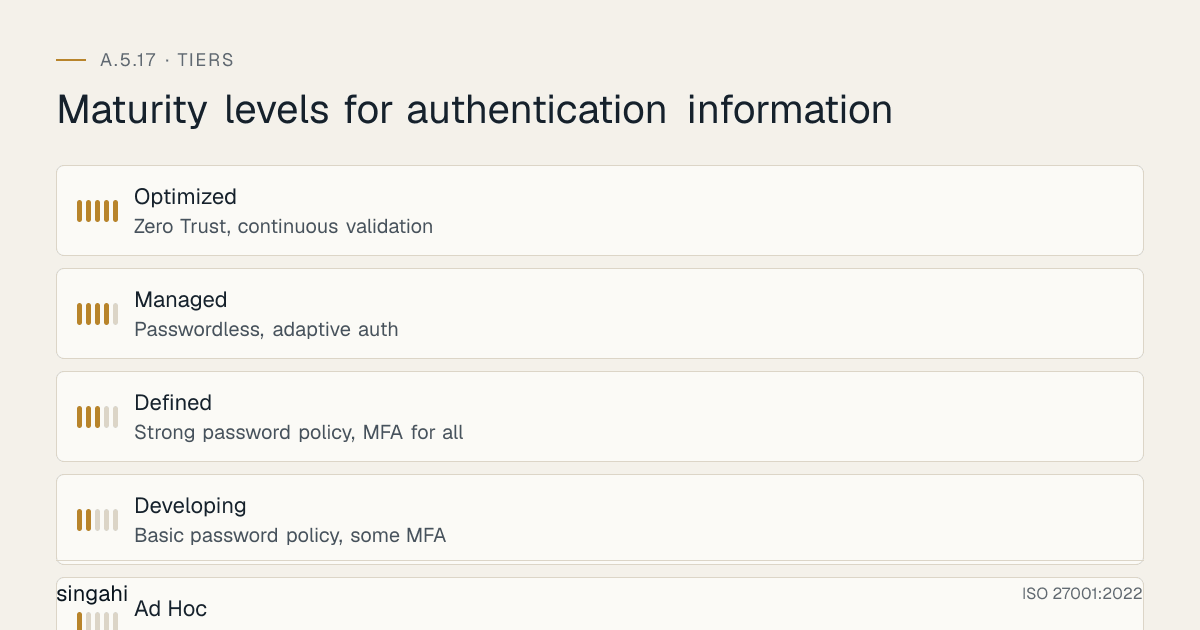
Authentication Information Maturity Model
| Level | Name | Characteristics | Credential Management |
|---|---|---|---|
| 1 | Ad Hoc | No password policy, shared credentials, no vault | Passwords in spreadsheets, no rotation |
| 2 | Developing | Basic password policy, some MFA, manual rotation | Some service accounts in vault, quarterly rotation |
| 3 | Defined | Strong password policy, MFA for all, credential vault | All service accounts in vault, automated rotation |
| 4 | Managed | Passwordless, adaptive auth, automated lifecycle | Full automation, predictive rotation, AI monitoring |
| 5 | Optimized | Zero Trust, continuous validation, self-healing | Self-healing credentials, AI-driven anomaly detection |
Annual Improvement Agenda
| Month | Focus | Activities | Deliverable |
|---|---|---|---|
| January | Password policy review | Update policy based on NIST, industry trends | Updated password policy v2.X |
| February | MFA enrollment push | Target non-enrolled users, enforce MFA | 100% MFA enrollment report |
| March | Credential vault audit | Review all credentials, rotation compliance, access | Vault audit report |
| April | Passwordless pilot | Expand passwordless to additional user groups | Passwordless adoption report |
| May | Authentication monitoring review | Tune SIEM rules, reduce false positives | Tuned SIEM rule set |
| June | Mid-year metrics review | Analyze trends, identify improvement areas | Mid-year metrics dashboard |
| July | Service account review | Inventory, rotation, privilege review | Service account review report |
| August | Certificate renewal cycle | Renew expiring certificates, update automation | Certificate renewal report |
| September | Training refresh | Update training materials, new hire onboarding | Updated training program |
| October | Audit preparation | Gather evidence, mock audit, fix gaps | Audit-ready evidence package |
| November | Incident response drill | Test authentication incident response | Incident response test report |
| December | Year-end review | Complete review, plan next year | Annual improvement plan |
Q: How do we handle authentication information for DevOps pipelines? A: DevOps pipelines require service accounts, API keys, and deployment credentials. Use dedicated CI/CD service accounts, store credentials in vault with short-lived tokens, implement OIDC for cloud deployments, rotate pipeline credentials automatically, and audit all pipeline access. Never store credentials in pipeline configuration files or environment variables in plain text.
Q: What is the role of A.5.17 in cloud security? A: Cloud environments rely heavily on API keys, service principals, and IAM roles. A.5.17 ensures these credentials are properly managed: cloud provider API keys stored in vault, IAM roles scoped with least privilege, cross-account roles reviewed quarterly, and cloud credentials rotated per provider best practices (AWS: 90 days, Azure: 1 year for SP secrets, GCP: 90 days for service account keys).
Q: How do we handle authentication information for disaster recovery? A: DR systems need authentication credentials that work independently of primary systems. Store DR credentials in a separate vault, ensure DR credentials are not dependent on primary infrastructure (e.g., don't store DR vault credentials in primary AD), test DR authentication quarterly, and document DR credential recovery procedures.
Q: What is the impact of quantum computing on authentication information? A: Quantum computing threatens current asymmetric encryption (RSA, ECC) used in certificates and key exchange. NIST published the first post-quantum standards (FIPS 203, 204 and 205) in August 2024; organizations should: track vendor support for them, plan for certificate algorithm migration (RSA → lattice-based), and ensure crypto-agility (ability to switch algorithms quickly).
Additional Illustrative Scenarios: Indian Authentication Incidents
Illustrative Scenario 3: Indian E-commerce, Credential Stuffing Attack (composite)
What happened: An Indian e-commerce platform with 5 million users suffered a credential stuffing attack. Attackers used 2 million leaked credentials from other breaches to attempt logins. The platform had no MFA, no breach detection, and no rate limiting. 15,000 accounts were compromised.
Impact:
- 15,000 customer accounts compromised
- Fraudulent orders placed on compromised accounts
- Customer data access (addresses, partial card numbers, order history)
- CERT-In report within 6 hours; DPDP Board and customer notification once the Rules' breach duties apply
- Card networks and the payment aggregator notified under their contracts
- Customer churn in the affected segment
- Remediation effort: MFA deployment, incident response, customer communication, legal
Root causes:
- No MFA on customer accounts
- No credential breach detection (Have I Been Pwned integration)
- No rate limiting on login endpoints
- No account takeover detection
- No monitoring for impossible travel or anomalous login patterns
- Weak password policy (8 characters, no breach detection)
Lessons:
- Implement MFA on all accounts (customer + employee)
- Integrate breach detection (Have I Been Pwned API, SpyCloud)
- Implement rate limiting (5 attempts per 15 minutes, CAPTCHA after 3 failures)
- Deploy account takeover detection (UEBA, impossible travel, new device alerts)
- Implement progressive authentication (stronger auth for sensitive actions)
- Monitor for credential stuffing patterns (same password across multiple accounts)
- Force password reset for breached credentials
Illustrative Scenario 4: Indian Government Portal, Default Admin Credentials (composite)
What happened: A state government portal for citizen services was found to have default admin credentials (admin/admin123) on the administrative backend. The portal had been live for 2 years without changing defaults. A security researcher discovered and responsibly disclosed the issue.
Impact:
- 2 years of potential unauthorized admin access
- 500,000+ citizen records potentially accessible
- Portal taken offline for 3 weeks for security remediation
- CERT-In notification required
- Reputational damage for government digital initiatives
- Remediation effort: security audit, penetration testing, new authentication system, monitoring
Root causes:
- Default credentials never changed after deployment
- No initial security configuration review
- No periodic authentication review
- No penetration testing before launch or annually
- No security awareness among deployment team
- No change management process for security configurations
Lessons:
- Change all default credentials before deployment (Day 1 checklist)
- Conduct security configuration review before go-live
- Implement annual penetration testing for all internet-facing systems
- Deploy automated scanning for default credentials (Nessus, OpenVAS)
- Include authentication security in change management process
- Train deployment teams on security baselines
- Implement break-glass admin accounts with MFA only (no default passwords)
Relationship to Other Controls
| Control | Relationship |
|---|---|
| A.5.16 Identity Management | Credentials are issued only to verified, managed identities |
| A.5.18 Access Rights | Credentials unlock the access rights granted under A.5.18 |
| A.6.2 Terms and Conditions of Employment | User duties for credentials are written into terms of employment |
| A.8.2 Privileged Access Rights | Privileged credentials need stronger handling |
| A.8.5 Secure Authentication | How authentication works, including MFA |
| A.8.24 Use of Cryptography | Approved techniques for hashing and protecting credentials |
| A.8.28 Secure Coding | No secrets in source code |
References
- ISO/IEC 27001:2022, Annex A 5.17; ISO/IEC 27002:2022, 5.17 (consulted, paraphrased)
- NIST SP 800-63B (Digital Identity Guidelines: Authentication and Lifecycle Management)
- NIST SP 800-53 Rev. 5, IA-5
- OWASP Password Storage Cheat Sheet
- CA/Browser Forum Ballot SC-081 (certificate validity reduction)
- NIST FIPS 203, 204 and 205 (post-quantum cryptography, 2024)
- Verizon Data Breach Investigations Report 2025; UK NCSC breached-password analysis (2019)
Document Control
- Version: 1.1
- Review Cycle: Annual + event-triggered
- Next Review: June 2027