
On this page
- Quick Reference
- What the Control Asks For
- Why It Matters
- Scope and Applicability
- Key Definitions
- Relationship to Other Controls
- Implementation Roadmap
- Detailed Guidance
- Tools and Technologies
- Policy Templates and Documentation
- Risk Assessment
- Audit and Assessment Checklist
- Metrics and KPIs
- Common Pitfalls and How to Avoid Them
- Illustrative Scenarios
- Multi-Framework Mapping
- Regulatory and Compliance Context
- RACI Matrix
- Documentation and Record Keeping
- Continuous Improvement
- Toolkit Download
- Frequently Asked Questions
- References and Further Reading
Quick Reference
| Attribute | Detail |
|---|---|
| Control Number | A.5.10 |
| Control Title | Acceptable Use of Information and Other Associated Assets |
| ISO 27001:2022 Domain | Organizational Controls (5) |
| Control Type | Preventive |
| Information Security Attribute | Confidentiality, Integrity, Availability |
| Maturity Model Level | Level 1–5 (see the maturity model below) |
| Typical Implementation Time | 2–4 weeks for policy; 2–3 months for full rollout |
| Main cost drivers | Training, DLP and monitoring tools |
| Primary Owner | CISO / Head of Information Security |
| Key Stakeholders | HR, Legal, IT, Compliance, All Employees, Contractors |
| Audit Frequency | Annual policy review + ongoing monitoring |
| ISO 27002 attributes | Control type: Preventive · Properties: Confidentiality, Integrity, Availability · Concepts: Protect · Capabilities: Asset management, Information protection · Domains: Governance and ecosystem, Protection |
What the Control Asks For
In short:
ISO 27001:2022 Annex A 5.10 asks organizations to identify, document, and implement rules for the acceptable use and handling of information and associated assets.
Do you need this control?
A.5.10 is not mandatory in itself: under clause 6.1.3 you include it if your risk assessment calls for it, and record the decision in your Statement of Applicability. Almost every organisation with staff who handle information includes it. You can adapt it to your context, for example combining acceptable use with your code of conduct, as long as the rules are documented and acknowledged.
This control requires organizations to:
- Identify acceptable use rules: Define what constitutes proper and improper use of organizational information and assets
- Document the rules: Create a formal Acceptable Use Policy (AUP) that is clear, complete, and accessible
- Implement the rules: Communicate, enforce, and monitor compliance with the acceptable use rules
- Set handling procedures: Define how information and other associated assets are handled through their life cycle, in line with their classification (the half of the control most AUPs miss; see below)
Two practices are not in the control text but are what auditors usually look for as evidence: reviewing the rules on a schedule and when threats or technology change, and having users acknowledge them.
The acceptable use policy is the contract between the organization and its users, it sets boundaries, clarifies expectations, and provides the basis for enforcement when misuse occurs.
Handling procedures: the half most AUPs miss
The control covers procedures for handling information and other associated assets, not only rules of use. ISO/IEC 27002 suggests building these procedures around the information life cycle and your classification scheme (A.5.12), considering:
- access restrictions that match each classification level
- a record of who is authorised to use each information asset
- protecting temporary and permanent copies (exports, downloads, printouts) to the same level as the original
- storing media and equipment as the manufacturer specifies (A.7.8)
- clearly marking copies of storage media for the authorised recipient (A.7.10)
- authorising disposal and using an approved deletion method (A.8.10)
27002 also expects the acceptable use policy itself to state expected and unacceptable behaviour, permitted and prohibited use, and the monitoring the organisation carries out. It notes that some assets are not yours (public cloud services, for example), so the rules should cover their use too.
Why It Matters
The Human Factor is the Leading Cause of Security Incidents
Despite billions spent on technical security controls, human behavior remains the top cause of security breaches. Verizon's 2024 Data Breach Investigations Report found that 68% of breaches involved a non-malicious human element (the 2023 edition put the human element at 74%), whether through error, misuse, social engineering, or malicious intent. Acceptable use policies directly address this by establishing behavioral boundaries and consequences.
An Indian IT services company with 2,000 employees found that a large share of its security incidents in a year stemmed from acceptable use policy violations: employees using personal cloud storage for client data, sharing credentials, visiting malicious websites, and installing unauthorized software. After implementing a strong AUP with monitoring and enforcement, incident rates fell markedly within 12 months. (This is an illustrative composite, not a measured result.)
Legal and Regulatory Protection
A well-documented acceptable use policy provides legal protection for the organization:
- Employee monitoring: no Indian statute sets a general employee-monitoring notice rule, but monitoring is processing of personal data under the DPDP Act (employment purposes are a legitimate use under s.7(i)), and clear prior notice and proportionality are what make monitoring defensible in a dispute. The AUP gives that notice.
- Disciplinary action: The AUP provides the documented basis for disciplinary action when misuse occurs, reducing legal challenges.
- Data protection compliance: DPDP Act and sectoral regulations require organizations to implement safeguards for personal data, the AUP is a core safeguard.
- Intellectual property protection: The AUP establishes that organizational data and IP belong to the organization, not the employee.
- Liability limitation: The AUP can limit organizational liability for employee misuse if properly implemented and communicated.
Protection Against Insider Threats
Not all security threats come from outside. Insider threats, whether malicious or negligent, are a significant risk. The AUP:
- Defines what constitutes authorized vs. unauthorized data access and transfer
- Prohibits activities that facilitate data exfiltration (personal email, cloud storage, USB drives)
- Establishes consequences for policy violations, creating deterrence
- Provides monitoring authorization for detecting suspicious behavior
- Creates a framework for investigating and responding to insider incidents
A Mumbai-based financial services firm prevented a potential data breach when an employee attempted to download customer data to a personal laptop. The AUP explicitly prohibited this, and the DLP system (authorized by the AUP) triggered an alert, enabling intervention before data left the organization.
Productivity and Resource Protection
Acceptable use policies protect not just security but also productivity and resources:
- Bandwidth management: Prohibiting streaming, gaming, and excessive personal use preserves network bandwidth for business purposes
- License compliance: Prohibiting unauthorized software installation prevents license violations and malware exposure
- Resource availability: Preventing misuse of systems ensures they remain available for legitimate business use
- Reputation protection: Prohibiting inappropriate use of organizational systems (hate speech, illegal content) protects the organization's reputation
Third-Party and Contractor Management
Contractors, temporary staff, vendors, and business partners who access organizational systems must also comply with acceptable use rules. The AUP:
- Extends to all authorized users, not just employees
- Is often incorporated into contractor agreements and NDAs
- Provides a basis for terminating third-party access when misuse occurs
- Ensures consistent security expectations across the extended workforce
Foundation for Technical Controls
Technical controls (DLP, web filtering, application control) are more effective when supported by policy:
- DLP systems require policy authorization to monitor and block data transfers
- Web filtering is justified by the AUP's prohibition of inappropriate sites
- Application control enforces the AUP's software installation rules
- Email monitoring is authorized by the AUP's communication rules
- USB device control implements the AUP's removable media restrictions
Without an AUP, technical controls may be challenged as invasive or unauthorized. With an AUP, they become policy enforcement mechanisms.
Cultural and Behavioral Impact
The AUP shapes organizational security culture:
- Sets expectations: Employees understand what is expected from the first day
- Creates accountability: Clear rules mean clear consequences
- Encourages reporting: Employees know what to report and why
- Builds trust: Transparent rules create confidence in organizational security practices
- Normalizes security: Security becomes part of daily work, not an afterthought
Incident Response and Investigation Support
When incidents occur, the AUP provides:
- Clear violation definitions: What exactly was violated and how
- Evidence authorization: Documentation that monitoring was authorized and users were informed
- Escalation framework: Defined consequences based on violation severity
- Forensic support: Basis for examining user activity, devices, and data handling
- Legal admissibility: Properly implemented AUPs support legal proceedings
Scope and Applicability
In Scope
The acceptable use policy applies to:
Users:
- All employees (full-time, part-time, interns)
- Contractors and consultants
- Temporary staff and agency workers
- Third-party vendors with system access
- Business partners with shared system access
- Board members and executives
- Guests and visitors with temporary access
- Former employees (for post-employment obligations)
Systems and Assets:
- Organizational computers, laptops, and tablets
- Mobile devices (organizational and BYOD with organizational access)
- Network infrastructure and internet access
- Email systems and communication platforms
- Cloud services and SaaS applications
- File servers and document repositories
- Databases and data processing systems
- Printers, scanners, and peripherals
- VoIP and telecommunication systems
- Remote access systems and VPNs
- Development and testing environments
- Physical facilities and workspaces
Information:
- All organizational data regardless of classification
- Customer and client data
- Employee and HR data
- Financial and accounting data
- Intellectual property and trade secrets
- Marketing and strategic information
- Personal data subject to privacy regulations
- Third-party data under the organization's care
Usage Contexts:
- In-office use
- Remote work and home use
- Travel and mobile use
- Off-hours and personal use of organizational assets
- BYOD use for organizational purposes
- Cloud and internet-based access
- Social media and public communication
Organizational Size Considerations
Small Organizations (≤50 employees):
- Simple, concise AUP (2–4 pages)
- Focus on high-risk behaviors: data sharing, passwords, unauthorized software
- Annual acknowledgment and brief training
- Basic monitoring (web filtering, antivirus)
- Owner/manager enforcement
Medium Organizations (50–500 employees):
- Complete AUP (5–10 pages) covering all asset types
- Department-specific addendums if needed
- Annual refresher training and awareness, plus briefings when the AUP changes
- Technical enforcement (DLP, application control, web filtering)
- HR and IT joint enforcement
- Incident tracking and trending
Large Organizations (≥500 employees):
- Detailed AUP with multiple supporting policies
- Role-based acceptable use rules (developers, executives, HR, finance)
- Regular training with testing and certification
- Complete technical enforcement and monitoring
- Automated policy violation detection and response
- Dedicated compliance team for monitoring and enforcement
- Integration with HR systems for acknowledgment tracking
- Annual complete policy review with legal and board input
Special Considerations
Remote Work:
- Home network security expectations
- Family member access restrictions
- Physical security of devices at home
- Use of personal devices for work (BYOD)
- Split tunneling and VPN requirements
- Printing and document handling at home
BYOD (Bring Your Own Device):
- Minimum security requirements for personal devices
- Organizational data handling on personal devices
- MDM enrollment requirements
- Separation of personal and organizational data
- Device wipe authorization for lost/stolen devices
- Exit procedures for data removal from personal devices
Social Media:
- Prohibition on sharing confidential information
- Guidelines on representing the organization
- Restrictions on discussing customers or projects
- Personal opinion vs. organizational position
- Photography and recording restrictions
Cloud and SaaS:
- Approved vs. unapproved cloud services
- Data storage location requirements
- Sharing and collaboration rules
- Account creation and credential requirements
- Data deletion and retention
Key Definitions
| Term | Definition |
|---|---|
| Acceptable Use Policy (AUP) | A documented set of rules and guidelines that define how organizational information and assets may and may not be used by authorized users |
| Authorized User | Any individual (employee, contractor, vendor, partner) who has been granted access to organizational information or assets |
| Misuse | Any use of organizational information or assets that violates the Acceptable Use Policy |
| Personal Use | Use of organizational assets for non-business purposes, which may be permitted within defined limits |
| BYOD (Bring Your Own Device) | The practice of allowing employees to use personally owned devices for work purposes |
| Shadow IT | The use of information technology systems, devices, software, applications, and services without explicit IT approval |
| Data Exfiltration | The unauthorized transfer of data from within an organization to an external destination or recipient |
| Removable Media | Portable storage devices (USB drives, external hard drives, SD cards, CDs/DVDs) that can be connected to and removed from a computer |
| Monitoring | The observation, recording, or analysis of user activity, system usage, or network traffic for security, compliance, or operational purposes |
| Privileged Use | Access to or use of systems, data, or functions that exceed standard user permissions, typically requiring elevated authorization |
| Conflict of Interest | A situation where personal interests could compromise or influence professional judgment or actions |
| Intellectual Property (IP) | Creations of the mind, including inventions, literary and artistic works, designs, symbols, names, and images used in commerce |
| Work Product | Any output, creation, or deliverable produced during employment or engagement with the organization |
| Encryption | The process of converting information into a code to prevent unauthorized access |
| Multi-Factor Authentication (MFA) | A security mechanism requiring two or more verification methods to authenticate a user |
| Clean Desk Policy | A security measure requiring that sensitive information be removed from desks and secured when not in use |
| Social Engineering | The psychological manipulation of people into performing actions or divulging confidential information |
Relationship to Other Controls
Directly Related Controls
| Control | Relationship |
|---|---|
| A.5.9 Inventory of Information and Other Assets | The AUP defines the rules for using the assets identified in the inventory. |
| A.5.12 Classification of Information | The AUP enforces handling rules based on information classification levels. |
| A.5.13 Labeling of Information | The AUP requires users to respect and maintain information labels. |
| A.5.15 Access Control | The AUP defines what users may do with their authorized access. |
| A.8.32 Managing Changes | The AUP prohibits unauthorized changes to systems and configurations. |
| A.5.23 Cloud Services | The AUP defines approved cloud services and data handling rules for cloud use. |
| A.6.2 Terms and Conditions of Employment | The AUP is often incorporated into employment terms and signed by employees. |
| A.6.3 Information Security Awareness Training | The AUP is a primary training topic; training reinforces acceptable use expectations. |
| A.6.4 Disciplinary Process | The AUP provides the documented basis for disciplinary action when violations occur. |
| A.8.9 Secure Configuration | The AUP prohibits users from changing secure configurations. |
| A.6.8 Information Security Event Reporting | The AUP instructs users on what to report and how. |
| A.7.8 Equipment Siting and Protection | The AUP includes physical security expectations for users. |
| A.8.1 User Endpoint Devices | The AUP defines acceptable use of endpoint devices. |
| A.8.2 Privileged Access Rights | The AUP includes special rules for users with privileged access. |
| A.8.8 Management of Technical Vulnerabilities | The AUP prohibits actions that introduce vulnerabilities (unauthorized software, disabling controls). |
| A.8.13 Information Backup | The AUP may include user responsibilities for backing up local data. |
| A.8.23 Web Filtering | The AUP defines prohibited web categories, and web filtering enforces the AUP. |
| A.8.24 Use of Cryptography | The AUP may require users to use encryption for sensitive data. |
| A.8.30 Outsourced Development | The AUP extends to contractors and outsourced personnel with system access. |
Indirectly Related Controls
| Control | Relationship |
|---|---|
| A.5.7 Threat Intelligence | The AUP helps users recognize and report threats. |
| A.5.21 Information Security in ICT Supply Chain | The AUP extends to supply chain partners with system access. |
| A.5.24 Information Security Incident Management | The AUP supports incident response by defining expected behavior and reporting requirements. |
| A.5.34 Privacy and Protection of PII | The AUP includes privacy obligations for handling personal data. |
| A.7.1 Physical Security Perimeters | The AUP supports physical security by defining user responsibilities. |
| A.7.2 Physical Entry | The AUP prohibits tailgating and unauthorized access. |
| A.8.3 Access Restriction | The AUP defines boundaries for authorized access. |
| A.8.15 Logging | The AUP authorizes monitoring that generates logs. |
| A.8.16 Monitoring Activities | The AUP provides the policy basis for user activity monitoring. |
| A.8.21 Security of Network Services | The AUP sets user rules for approved network services (VPN, Wi-Fi, remote access). |
Implementation Roadmap
Figure · Timeline
Rollout in order
- Week 1Define scope, stakeholders
- Week 2Draft AUP with legal, HR, and IT input
- Week 3Legal review, executive approval
Phase 1: Policy Development (Weeks 1–3)
| Week | Activity | Deliverable |
|---|---|---|
| 1 | Define scope, stakeholders, and policy requirements | Policy requirements document |
| 2 | Draft AUP with legal, HR, and IT input | AUP draft v1.0 |
| 3 | Legal review, executive approval, and communication plan | Approved AUP, communication plan |
Phase 2: Rollout and Communication (Weeks 4–6)
| Week | Activity | Deliverable |
|---|---|---|
| 4 | Publish AUP, announce rollout, provide access | Published AUP, announcement records |
| 5 | Conduct awareness sessions and training | Training records, attendance logs |
| 6 | Collect signed acknowledgments from all users | Acknowledgment records, compliance tracking |
Phase 3: Technical Enforcement (Weeks 7–10)
| Week | Activity | Deliverable |
|---|---|---|
| 7 | Implement web filtering aligned with AUP | Web filtering rules, blocked categories |
| 8 | Deploy DLP policies for data exfiltration prevention | DLP policies, monitoring rules |
| 9 | Implement application control for unauthorized software | Application whitelist/blacklist |
| 10 | Configure email monitoring and USB device control | Monitoring rules, device control policies |
Phase 4: Monitoring and Improvement (Ongoing)
| Frequency | Activity | Deliverable |
|---|---|---|
| Monthly | Review violation reports and trends | Monthly violation report |
| Quarterly | Investigate significant violations, update enforcement | Quarterly enforcement review |
| Annually (and on major change) | Refresher training and re-acknowledgment | Training records, updated acknowledgments |
| Annually | Complete policy review and update | Annual policy review report, updated AUP |
| Event-triggered | Update AUP for new technologies, threats, or regulations | Updated AUP, communication records |
Detailed Guidance
Figure · Tiers
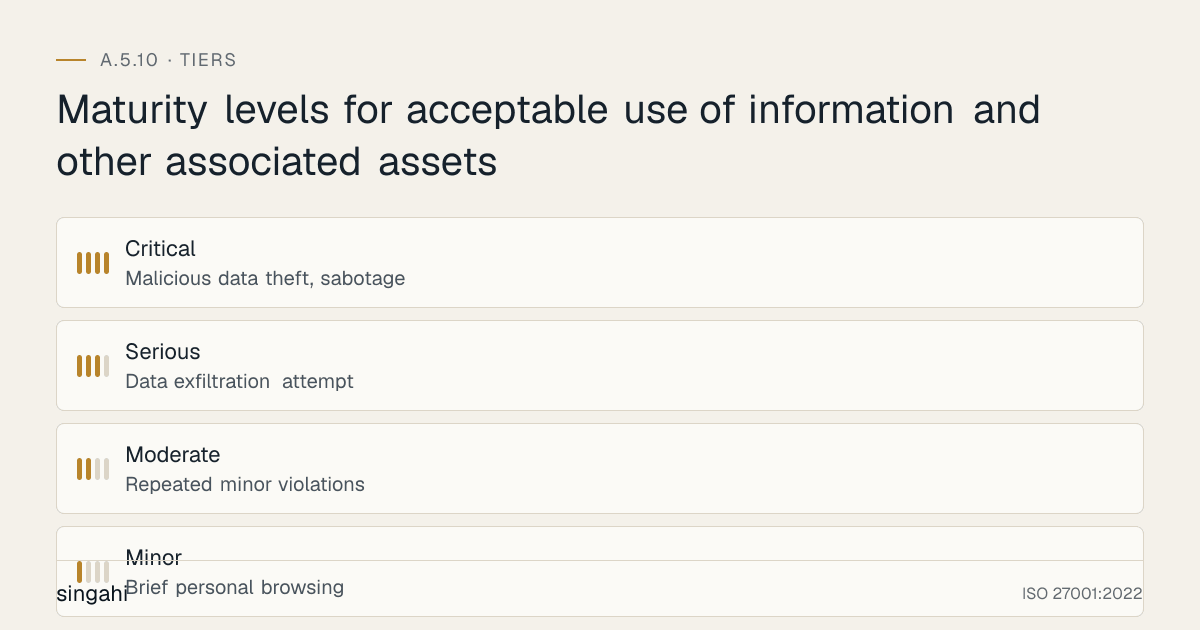
Maturity levels for acceptable use of information and other associated assets
Core Policy Elements
A complete Acceptable Use Policy should include:
1. Purpose and Scope:
- Why the policy exists and what it aims to achieve
- Who the policy applies to (employees, contractors, vendors, guests)
- What assets and systems it covers
- The relationship to other policies (employment terms, security policy, privacy policy)
2. General Use Principles:
- Organizational assets are for business purposes
- Users are responsible for protecting assets they use
- Users must comply with all applicable laws and regulations
- Users must respect the confidentiality and privacy of data
- Users must report security incidents and violations
- Monitoring and logging are authorized and ongoing
3. Authorized Use:
- Using assets for job-related tasks and responsibilities
- Accessing information required for legitimate business purposes
- Communicating with colleagues, customers, and partners for business purposes
- Using approved software, services, and cloud applications
- Working remotely using approved methods and security controls
- Limited personal use (if permitted) within defined boundaries
4. Prohibited Use:
- Accessing, creating, storing, or transmitting illegal content
- Using organizational assets for personal business or commercial gain
- Harassment, discrimination, or hate speech using organizational systems
- Unauthorized access to systems, data, or accounts
- Sharing credentials or allowing others to use your accounts
- Disabling or circumventing security controls
- Installing unauthorized software or hardware
- Using personal cloud storage for organizational data
- Sending organizational data to personal email accounts
- Using unauthorized encryption or anonymization tools
- Connecting unauthorized devices to the network
- Excessive personal use (streaming, gaming, social media) that impacts bandwidth or productivity
- Representing personal opinions as organizational positions
- Photographing or recording sensitive areas without authorization
5. Data Handling Rules:
- Classification-based handling requirements
- Prohibition on transferring confidential data to unauthorized locations
- Encryption requirements for sensitive data
- Email and communication rules (attachments, external recipients, auto-forwarding)
- Removable media restrictions
- Printing and physical document handling
- Social media and public sharing restrictions
6. System and Network Use:
- Password and authentication requirements (MFA, password complexity)
- Software installation restrictions
- System configuration restrictions (no disabling antivirus, firewall, etc.)
- Network scanning and probing prohibitions
- VPN and remote access requirements
- Wireless network usage rules
- Guest network restrictions
7. Internet and Communication:
- Web browsing restrictions and prohibited categories
- Email use rules (personal email, bulk email, chain letters)
- Instant messaging and collaboration tools rules
- Social media use during work hours
- File sharing and cloud storage rules
- Download restrictions (executable files, pirated content)
- Encryption and privacy tool usage
8. Mobile and Remote Work:
- Mobile device security requirements (PIN, encryption, MDM)
- Remote work network security (no public Wi-Fi without VPN)
- Physical security of devices outside office
- Family member access restrictions
- Lost or stolen device reporting
- Travel security requirements (border crossings, hotel networks)
9. Monitoring and Privacy:
- Authorization for monitoring user activity
- Types of monitoring (email, web, network, file access). Keystroke logging and screen recording are highly intrusive: use them only exceptionally, for a defined investigation, after legal review
- Purpose of monitoring (security, compliance, operational)
- User privacy expectations and limitations
- Data retention for monitoring records
- Access to monitoring data
10. Violations and Consequences:
- Definition of policy violations
- Violation severity levels (minor, moderate, serious, critical)
- Consequences by severity (verbal warning, written warning, suspension, termination, legal action)
- Investigation procedures
- Appeal process (if applicable)
- Reporting mechanisms for suspected violations
11. Acknowledgment and Training:
- Requirement for all users to read, understand, and acknowledge the policy
- Training requirements (initial and refresher)
- Frequency of re-acknowledgment
- Consequences of refusal to acknowledge
- How to ask questions or seek clarification
Role-Based Acceptable Use Rules
Different roles may require different rules:
General Staff:
- Standard AUP applies with no special exceptions
- Limited access to sensitive systems
- Standard web and email filtering
- No administrative privileges
- No software installation rights
IT and Security Staff:
- May have elevated access but with enhanced monitoring
- May use specialized tools (packet sniffers, vulnerability scanners) with authorization
- Must follow change management for system modifications
- Must maintain separation between personal and administrative accounts
- Must not use privileged access for personal purposes
- Must document all privileged actions
Developers and Engineers:
- May install development tools with approval
- Must not use production data in development environments
- Must follow secure coding practices
- Must not introduce unauthorized open-source components without review
- Must use approved repositories and version control
- Must not deploy code without proper review and authorization
Executives and Board Members:
- Subject to the same AUP as all staff, with no exemptions
- May have access to the most sensitive data, requiring enhanced protection
- Must use approved devices and communication channels
- Must not circumvent security for convenience
- Must model compliance behavior for the organization
HR and Finance Staff:
- Handle highly sensitive data (salary, personal information, financial records)
- Must use enhanced encryption and access controls
- Must not share sensitive data outside approved channels
- Must follow strict data retention and disposal rules
- Must report any attempts to access sensitive data without authorization
Contractors and Vendors:
- Must sign and acknowledge AUP before receiving access
- Access limited to specific systems and time periods
- Must use organizational-provided accounts and devices where possible
- Must not access data beyond scope of engagement
- Must return or destroy data upon contract completion
- Must report security incidents involving organizational data
Remote Workers:
- Must use VPN for all organizational access
- Must secure home workspace from family and visitors
- Must not use public Wi-Fi without VPN
- Must maintain physical security of devices
- Must report lost or stolen devices immediately
- Must not print sensitive documents at home without approval
Personal Use Boundaries
The AUP should clarify what personal use is permitted:
Permitted Personal Use (Examples):
- Limited personal web browsing during breaks and lunch
- Personal email checking (via webmail, not organizational email) during breaks
- Personal phone calls on work phones (reasonable duration)
- Personal software that does not interfere with work or security (with approval)
- Personal social media use during breaks (not on work accounts)
- Using organizational Wi-Fi for personal devices (guest network, if available)
Prohibited Personal Use (Examples):
- Running a personal business using organizational assets
- Mining cryptocurrency using organizational computing resources
- Operating personal e-commerce or trading accounts during work hours
- Downloading or streaming pirated content
- Excessive streaming or gaming that impacts bandwidth
- Personal file sharing or torrenting
- Using organizational email for personal mass communication
- Political campaigning or fundraising using organizational resources
- Religious or charitable solicitation using organizational systems
Key Principle: Personal use should be reasonable, infrequent, non-disruptive, and non-contradictory to organizational interests. When in doubt, prohibit it or require explicit approval.
Social Media and Public Communication Rules
Social media presents unique risks:
Prohibitions:
- Sharing confidential, proprietary, or customer information
- Posting photos of organizational facilities, equipment, or documents
- Discussing customers, projects, or partners without authorization
- Making false or misleading statements about the organization
- Posting content that could damage the organization's reputation
- Engaging in online disputes that could create liability
- Using organizational logos or branding on personal accounts without authorization
- Creating accounts that appear to represent the organization without authorization
Guidelines for Authorized Representatives:
- Only designated spokespersons may represent the organization officially
- Social media posts must align with organizational messaging and values
- Responses to customer complaints must follow organizational protocols
- Crisis communication must be coordinated with PR and legal
- Personal opinions must be clearly distinguished from organizational positions
Employee Personal Accounts:
- Employees may have personal social media accounts
- Must not imply organizational endorsement of personal views
- Must include disclaimer ("views are my own, not my employer's") if discussing work-related topics
- Must not share organizational confidential information, even on "private" accounts
- Must not use organizational email or branding on personal accounts
Cloud and External Service Use
Approved Cloud Services:
- Maintain a list of approved cloud services and SaaS applications
- Require security assessment before approval
- Define data types permitted on each service
- Define sharing and collaboration rules
- Require organizational accounts (not personal accounts) for work use
Prohibited Cloud Services:
- Personal cloud storage (Google Drive personal, Dropbox personal, OneDrive personal) for organizational data
- Personal email for organizational communication
- Unapproved file sharing services
- Unapproved collaboration tools
- Consumer-grade messaging apps for sensitive communication (WhatsApp, Telegram for confidential data)
- Unapproved video conferencing for confidential meetings
Data Residency and Compliance:
- Cloud services must comply with any data localization requirements that apply (sector rules such as RBI's payment-data storage directive and SEBI's cloud framework; CERT-In log retention in India). The DPDP Act itself only bars transfers to countries the government restricts
- Customer data must not be stored on consumer-grade cloud services
- Encryption must be used for cloud data transfers
- Multi-factor authentication must be enabled for cloud accounts
BYOD Policy Integration
If BYOD is permitted, the AUP must include:
Minimum Device Requirements:
- Up-to-date operating system with security patches
- Device-level encryption enabled
- Screen lock with PIN/password/biometric
- Antivirus/endpoint protection installed
- Mobile Device Management (MDM) enrollment
Organizational Data on Personal Devices:
- Must use approved containerization or workspace apps
- Must not mix personal and organizational data in unsecured apps
- Must not back up organizational data to personal cloud accounts
- Must not transfer organizational data to personal storage
- Must allow remote wipe of organizational data (not personal data)
Exit Procedures:
- Upon termination or contract end, organizational data must be removed from personal devices
- MDM can enforce data removal
- User must verify data removal and sign confirmation
- Access to organizational accounts must be revoked immediately
Liability and Privacy:
- Organization is not liable for damage to personal devices used for work
- Organization may access organizational data on personal devices for security or legal reasons
- Personal data on BYOD devices is generally private but may be affected by remote wipe
- User must maintain device security; lost or stolen devices must be reported immediately
Monitoring and Privacy Balance
The AUP must address monitoring transparently:
What is Monitored:
- Internet usage and web browsing
- Email content and attachments (sent and received)
- File access, transfers, and downloads
- Application usage and installation attempts
- Network connections and data flows
- System logins and authentication attempts
- USB and removable media connections
- Print jobs and document printing
- VPN and remote access sessions
- Instant messaging and collaboration tool usage (if organizational platforms)
What is NOT Monitored (or Limited):
- Personal devices without MDM enrollment (unless accessing organizational systems)
- Personal email accounts accessed through personal networks
- Personal social media on personal devices (unless using organizational accounts)
- Personal browsing on personal devices (unless using organizational network)
- Personal phone calls and text messages on personal phones
- Personal activities during non-work hours on personal devices
Privacy Commitments:
- Monitoring is for security, compliance, and operational purposes, not for performance evaluation (unless separately authorized)
- Monitoring data is accessed only by authorized personnel
- Monitoring records are retained for defined periods and then securely destroyed
- Personal information discovered during monitoring is handled according to privacy policy
- Users will be informed of monitoring scope during onboarding and through the AUP
Enforcement Framework
Violation Severity Levels:
| Level | Examples | Typical Response |
|---|---|---|
| Minor | Brief personal browsing, minor software installation attempt | Verbal warning, retraining, note in file |
| Moderate | Repeated minor violations, sharing a password with a colleague, storing personal data on work systems, using unapproved cloud for non-sensitive data | Written warning, mandatory retraining, temporary restriction of privileges |
| Serious | Data exfiltration attempt, disabling security controls, unauthorized access to sensitive data, knowingly entering credentials on a reported phishing site, using unauthorized software that introduces malware | Suspension, investigation, potential termination, legal review |
| Critical | Malicious data theft, sabotage, selling data to competitors, criminal activity, nation-state espionage, ransomware deployment | Immediate termination, legal action, criminal prosecution, regulatory reporting |
Investigation Procedures:
- Security team or designated investigator reviews violation evidence
- Legal counsel consulted for serious violations
- HR involved for employee-related violations
- Violator is informed of allegation and given opportunity to respond (for serious violations)
- Evidence is preserved and documented
- Decision is made based on facts, severity, and precedent
- Appeal process is available (if defined in policy)
Progressive Discipline:
- First violation: Warning and education
- Second violation: Written warning and enhanced monitoring
- Third violation: Suspension or termination (depending on severity)
- Serious violations may bypass progressive discipline and result in immediate action
Tools and Technologies
Policy Distribution and Acknowledgment
| Tool | Purpose | Notes |
|---|---|---|
| HR Information Systems (HRIS) | Policy distribution, acknowledgment tracking, employee onboarding | Workday, SAP SuccessFactors, BambooHR, Zoho People |
| Document Management Systems | Policy storage, version control, access tracking | SharePoint, Confluence, Google Drive (organizational) |
| E-Signature Platforms | Electronic acknowledgment collection | DocuSign, Adobe Sign, Zoho Sign |
| Learning Management Systems (LMS) | Policy training delivery and testing | Moodle, TalentLMS, SAP Litmos, Docebo |
| Policy Management Software | End-to-end policy lifecycle management | NAVEX One (formerly PolicyTech), ConvergePoint |
Technical Enforcement Tools
| Tool | Purpose | Examples |
|---|---|---|
| Web Filtering / Secure Web Gateway | Block prohibited websites and categories | Cisco Umbrella, Zscaler, Palo Alto URL Filtering, Fortinet |
| Data Loss Prevention (DLP) | Prevent unauthorized data exfiltration | Symantec DLP, Microsoft Purview DLP, Digital Guardian, Forcepoint |
| Application Control / Whitelisting | Prevent unauthorized software installation | Microsoft AppLocker, VMware Carbon Black, CrowdStrike Falcon |
| Email Security Gateway | Monitor email content, block sensitive data exfiltration | Mimecast, Proofpoint, Microsoft Defender for Office 365 |
| Endpoint Detection and Response (EDR) | Monitor endpoint behavior and detect policy violations | CrowdStrike, SentinelOne, Microsoft Defender for Endpoint |
| USB/Device Control | Control removable media usage | DeviceLock, Microsoft Defender for Endpoint, Endpoint Protector |
| CASB (Cloud Access Security Broker) | Monitor and control cloud service usage | Netskope, Microsoft Defender for Cloud Apps, Skyhigh Security |
| User and Entity Behavior Analytics (UEBA) | Detect anomalous user behavior | Splunk UBA, Microsoft Sentinel UEBA, Exabeam |
| Network Access Control (NAC) | Control device access to network | Cisco ISE, Aruba ClearPass, FortiNAC |
| Mobile Device Management (MDM) | Enforce policies on mobile devices | Microsoft Intune, Omnissa Workspace ONE (formerly VMware), Jamf Pro, Ivanti Neurons for MDM |
| Print Management | Monitor and control printing | PaperCut, Pharos, PrintManager |
| SIEM | Centralized logging and monitoring of policy violations | Splunk, QRadar, Sentinel, LogRhythm |
Open-Source and lightweight Options
| Tool | Purpose | Cost |
|---|---|---|
| pfSense / OPNsense | Firewall with web filtering | Free (self-hosted) |
| Squid Proxy | Web proxy with access control | Free |
| Wazuh | Endpoint monitoring and detection | Free (open-source) |
| Snort / Suricata | Network intrusion detection | Free (open-source) |
| Graylog | Log management and analysis | Free (open-source) |
| n8n / Node-RED | Automation for policy violation alerts | Free (open-source) |
| Moodle | Learning management for training | Free (open-source) |
Policy Templates and Documentation
Acceptable Use Policy (Template)
Template
Acceptable Use Policy (AUP)
Organization: [Organization Name]
Effective Date: [Date]
Version: [Version Number]
Last Reviewed: [Date]
Next Review: [Date]
Policy Owner: CISO / [Name]
1. Purpose and Scope
1.1 Purpose
This Acceptable Use Policy (AUP) defines the rules and guidelines for the acceptable use of [Organization Name]'s information, information processing facilities, and other assets. It establishes the standards for protecting our information assets and ensuring compliance with legal, regulatory, and contractual obligations.
1.2 Scope
This policy applies to:
- All employees, contractors, consultants, temporary staff, and third-party vendors
- All organizational assets, including computers, networks, systems, data, and facilities
- All usage contexts, including in-office, remote work, travel, and mobile access
- All information, regardless of classification or format
2. General Principles
- Organizational assets are provided for business purposes and must be used responsibly.
- All users are responsible for protecting the confidentiality, integrity, and availability of information they access or handle.
- Users must comply with all applicable laws, regulations, and organizational policies.
- Users must respect the privacy and confidentiality of customer, employee, and business data.
- Security incidents, policy violations, and suspicious activities must be reported promptly.
- The organization reserves the right to monitor the use of its systems and assets for security, compliance, and operational purposes.
3. Authorized Use
You may use organizational assets for:
- Performing your job duties and responsibilities
- Communicating with colleagues, customers, partners, and vendors for legitimate business purposes
- Accessing information and systems required for your role
- Using approved software, services, and applications
- Working remotely using approved security controls (VPN, MFA, encryption)
- Limited personal use as defined in Section 7
4. Prohibited Use
The following activities are strictly prohibited:
4.1 Illegal and Unethical Activities
- Accessing, creating, storing, or transmitting illegal, obscene, or offensive content
- Engaging in harassment, discrimination, hate speech, or threats
- Violating any local, national, or international law
- Infringing intellectual property rights (software piracy, unauthorized distribution)
4.2 Unauthorized Access and Misuse
- Accessing systems, data, or accounts without authorization
- Sharing your credentials with anyone or allowing others to use your accounts
- Attempting to bypass, disable, or circumvent security controls
- Impersonating other users or misrepresenting your identity
- Using another person's credentials or accessing their accounts
4.3 Data Mishandling
- Transferring organizational data to personal email, cloud storage, or removable media without authorization
- Printing, copying, or photographing sensitive information without approval
- Sending confidential information to unauthorized recipients
- Using unauthorized encryption or anonymization tools
- Failing to classify or label information according to organizational standards
4.4 System Misuse
- Installing unauthorized software, applications, or hardware
- Modifying system configurations, security settings, or network parameters without authorization
- Running unauthorized network scans, penetration testing, or vulnerability assessments
- Using organizational computing resources for cryptocurrency mining, personal business, or commercial purposes
- Introducing malware, viruses, or malicious code
4.5 Communication Misuse
- Using organizational email for personal mass communication, chain letters, or spam
- Sending confidential information through unauthorized channels (personal WhatsApp, personal email)
- Auto-forwarding organizational email to personal accounts
- Using organizational communication tools for unauthorized purposes
- Representing personal opinions as organizational positions without authorization
4.6 Internet and Network Misuse
- Accessing prohibited websites (gambling, adult content, illegal sites, extremist content)
- Excessive personal streaming, gaming, or downloading that impacts bandwidth or productivity
- Using peer-to-peer file sharing, torrents, or unauthorized download sites
- Connecting unauthorized devices to the organizational network
- Using unauthorized wireless networks or hotspots for work purposes
5. Data Handling Requirements
5.1 Classification-Based Handling
- Handle all information according to its classification level (Public, Internal, Confidential, Restricted)
- Confidential and Restricted data must be encrypted in transit and at rest
- Do not share Confidential or Restricted data with unauthorized individuals
- Label documents and emails according to classification
- Access to each classification level is limited to people who need it; asset owners keep a record of who is authorised
- Copies (exports, downloads, screenshots, printouts) get the same protection as the original
- Store media and equipment as the manufacturer specifies; mark copies of storage media for the authorised recipient
- Dispose of information and assets only with authorisation and by an approved deletion or destruction method
5.2 Email and Communication
- Use organizational email for business communication only
- Do not send Confidential or Restricted information to external email addresses without encryption and authorization
- Be cautious with "Reply All" and distribution lists
- Verify recipient addresses before sending sensitive information
- Do not open suspicious attachments or click unknown links
5.3 Removable Media and Printing
- Do not use personal USB drives or external storage for organizational data without authorization
- Use only organizationally approved and encrypted removable media for sensitive data
- Do not print sensitive documents on unauthorized printers or in public locations
- Securely dispose of printed sensitive materials (shredding)
5.4 Social Media and Public Sharing
- Do not share organizational confidential information on social media
- Do not post photos of organizational facilities, equipment, or documents
- Do not discuss customers, projects, or partners without authorization
- Distinguish personal opinions from organizational positions
- Do not use organizational logos or branding on personal accounts without authorization
6. System and Security Requirements
6.1 Authentication and Access
- Use strong, unique passwords for all accounts (minimum 12 characters, complex)
- Enable multi-factor authentication (MFA) where available
- Do not write down passwords or store them in unencrypted files
- Lock your screen when away from your device (automatic lock after 5 minutes)
- Do not share credentials or allow password auto-save on shared devices
6.2 Software and Configuration
- Do not install unauthorized software or applications
- Do not disable or modify antivirus, firewall, or endpoint protection
- Keep all software updated with security patches
- Use only approved software repositories and app stores
- Report suspicious software or pop-ups to IT/security
6.3 Remote Work and Mobile Devices
- Use VPN for all remote access to organizational systems
- Do not use public Wi-Fi for work without VPN
- Secure devices physically when working remotely or traveling
- Do not allow family members or others to access your work devices
- Report lost or stolen devices immediately to IT/security
- Use MDM-enrolled devices for organizational data access
6.4 Physical Security
- Follow clean desk policy, secure sensitive documents when not in use
- Do not leave devices unattended in public or unsecured areas
- Do not tailgate or allow unauthorized individuals into secure areas
- Report suspicious individuals or activities to security
- Securely store backup media and sensitive documents
7. Personal Use
Limited personal use of organizational assets is permitted within the following boundaries:
- Personal web browsing during breaks and lunch hours (must not violate prohibited categories)
- Personal email checking via webmail during breaks (not using organizational email)
- Personal phone calls on work phones (reasonable duration and frequency)
- Personal software that does not interfere with work or security (with IT approval)
Personal use is prohibited if it:
- Interferes with work responsibilities or productivity
- Consumes excessive bandwidth or resources
- Violates any prohibited use category
- Creates security risks or legal liability
- Involves commercial or business activities for personal gain
8. Monitoring and Privacy
[Organization Name] monitors the use of its systems and assets for:
- Security incident detection and response
- Compliance with this policy and legal/regulatory requirements
- Operational performance and troubleshooting
- Investigation of suspected violations
Monitoring may include:
- Internet and web browsing activity
- Email content and attachments
- File access, transfers, and storage
- Application usage and installation
- Network connections and data flows
- System logins and authentication
- USB and removable media connections
- Print jobs
This section is your notice of monitoring. Monitoring is limited to the purposes above, proportionate to them, and relies on the organisation's employment-related legitimate use under applicable law (DPDP Act s.7(i)), not on your consent. Personal use of organisational assets is still covered by monitoring. Monitoring data is accessed only by authorized personnel and retained in accordance with organizational policies.
9. Violations and Consequences
Violations of this policy will be addressed according to severity:
Minor Violations: Verbal warning, mandatory retraining, note in personnel file
Moderate Violations: Written warning, temporary suspension of privileges, enhanced monitoring
Serious Violations: Suspension pending investigation, potential termination, legal review
Critical Violations: Immediate termination, legal action, criminal prosecution, regulatory reporting
The organization reserves the right to bypass progressive discipline for serious or critical violations. All violations are investigated fairly, and employees have the right to respond to allegations (for serious violations).
10. Reporting
Report suspected violations, security incidents, or policy questions to:
- Security Team: security@[organization].com
- IT Help Desk: [contact details]
- HR Department: [contact details]
- Anonymous Reporting: [hotline/portal if applicable]
You will not be retaliated against for reporting violations in good faith.
11. Acknowledgment
By signing below, I acknowledge that:
- I have read, understood, and agree to comply with this Acceptable Use Policy
- I understand the consequences of violating this policy
- I have read the monitoring notice in Section 8
- I understand that this policy may be updated and that I am responsible for staying current
- I will report violations and security concerns promptly
Employee/Contractor Name: _________________________
Signature: _________________________
Date: _________________________
Employee ID: _________________________
Department: _________________________
Manager: _________________________
Policy Owner: [CISO Name]
Approved By: [CEO/MD Name]
Approval Date: [Date]
Next Review Date: [Date]
Supporting Documents
Remote Work Addendum:
- Home network security requirements
- VPN and MFA requirements
- Physical security of devices and documents at home
- Family member access restrictions
- Printing and disposal at home
- Reporting requirements for remote workers
BYOD Addendum:
- Approved device types and minimum requirements
- MDM enrollment and configuration
- Organizational data containerization
- Remote wipe authorization and scope
- Personal privacy protections
- Exit procedures for data removal
Social Media Addendum:
- Authorized organizational accounts and representatives
- Content approval workflows
- Crisis communication protocols
- Personal account guidelines for employees
- Photography and recording restrictions
- Customer interaction rules
Third-Party Access Addendum:
- Scope and duration of access
- Approved systems and data
- Security requirements and compliance obligations
- Monitoring and audit rights
- Termination and data return procedures
- Incident reporting obligations
Risk Assessment
Figure · Risk grid
Acceptable use of information and other associated assets risks by likelihood and impact
Likelihood across · impact up
- Shadow IT proliferationHigh/High
- Employee resistance and non-complianceHigh/Medium
- Difficulty enforcing unrealistic rulesHigh/Medium
- Reduced productivity from excessiveMedium/Medium
- Talent attraction and retention impactMedium/Medium
Figure · Matrix
How the options compare: Data exfiltration to Shadow IT
Risks of NOT Having an Acceptable Use Policy
| Risk | Likelihood | Impact | Risk Score | Mitigation |
|---|---|---|---|---|
| Unauthorized data exfiltration | High | Very High | Critical | Implement AUP with DLP enforcement |
| Malware introduction | High | High | Critical | AUP prohibits unauthorized software; application control enforces |
| Insider threats | Medium | Very High | Critical | AUP defines prohibited behavior; monitoring detects violations |
| Legal liability for employee misuse | Medium | High | High | AUP provides legal notice and limits liability |
| Regulatory non-compliance | Medium | High | High | AUP implements required safeguards for data protection |
| Reputational damage from employee actions | Medium | High | High | AUP prohibits behavior that could damage reputation |
| Productivity loss from personal misuse | High | Medium | Medium | AUP defines permitted personal use boundaries |
| Inability to enforce disciplinary action | High | Medium | Medium | AUP provides documented basis for enforcement |
| Evidence inadmissibility | Medium | Medium | Medium | AUP authorizes monitoring and evidence collection |
Risks of Overly Restrictive AUP
| Risk | Likelihood | Impact | Risk Score | Mitigation |
|---|---|---|---|---|
| Employee resistance and non-compliance | High | Medium | Medium | Balance security with usability; involve employees in policy development |
| Shadow IT proliferation | High | High | High | Provide approved alternatives; understand user needs |
| Reduced productivity from excessive restrictions | Medium | Medium | Medium | Business-aligned restrictions; role-based rules |
| Talent attraction and retention impact | Medium | Medium | Medium | Competitive and reasonable policies |
| Difficulty enforcing unrealistic rules | High | Medium | Medium | Realistic, enforceable rules with clear rationale |
Risk Treatment Plan
| Risk | Treatment | Owner | Timeline |
|---|---|---|---|
| Data exfiltration | Deploy DLP, implement AUP, train users | CISO | 1 month |
| Malware introduction | Application control, AUP, email security | IT Director | 1 month |
| Insider threats | UEBA, monitoring, AUP enforcement | Security Manager | 2 months |
| Employee resistance | Involve employees, communicate rationale, provide alternatives | HR / CISO | 2 months |
| Shadow IT | CASB, approved alternatives, user education | Security Manager | 2 months |
Audit and Assessment Checklist
Documentation Review
- Is there a documented, approved Acceptable Use Policy?
- Is the AUP current (reviewed within the last 12 months)?
- Does the AUP cover all user types (employees, contractors, vendors, guests)?
- Does the AUP cover all asset types and usage contexts?
- Are there role-based addendums or sections (if applicable)?
- Does the AUP define prohibited activities clearly?
- Does the AUP include monitoring and privacy provisions?
- Does the AUP define consequences for violations?
- Is there a policy acknowledgment and tracking process?
- Is there evidence of training delivery on the AUP?
- Are there supporting addendums (remote work, BYOD, social media)?
- Is the AUP aligned with legal, regulatory, and sector requirements?
Implementation Review
- Is there evidence that all users have acknowledged the AUP?
- What percentage of users have current acknowledgments? (Target: ≥95%)
- Is there evidence of AUP training delivery?
- Are technical controls (web filtering, DLP, application control) aligned with AUP?
- Is there evidence of AUP violation monitoring and reporting?
- Are violations tracked, investigated, and addressed?
- Is there evidence of AUP communication to new employees during onboarding?
- Are contractors and third parties required to acknowledge the AUP?
- Is there a process for reporting violations and concerns?
- Are there records of AUP violation investigations and outcomes?
Effectiveness Review
- Has the number of AUP violations trended over time?
- Are there recurring violation types indicating policy gaps or training needs?
- Have serious incidents been prevented or detected through AUP compliance?
- Is the AUP referenced in incident response and investigation?
- Are employees aware of the AUP and able to describe key rules?
- Is there evidence that the AUP is enforced consistently across all levels?
- Have there been legal challenges to enforcement? (Should be minimal if policy is clear)
- Is the AUP integrated with HR processes (onboarding, termination, disciplinary)?
Metrics and KPIs
Figure · Measures
The measures that show A.5.10 is working
- AUP Acknowledgment Rate≥95%Monthly
- New Employee Acknowledgment Time≤5 daysPer employee
- Contractor Acknowledgment Rate100%Quarterly
- Training Completion Rate≥95%Quarterly
- Policy Currency≤365 daysQuarterly
Policy Coverage Metrics
| KPI | Formula | Target | Frequency |
|---|---|---|---|
| AUP Acknowledgment Rate | % of users with current signed acknowledgment | ≥95% | Monthly |
| New Employee Acknowledgment Time | Days from hire to AUP acknowledgment | ≤5 days | Per employee |
| Contractor Acknowledgment Rate | % of contractors/vendors with acknowledged AUP | 100% | Quarterly |
| Training Completion Rate | % of users who completed AUP training | ≥95% | Quarterly |
| Policy Currency | Days since last AUP review | ≤365 days | Quarterly |
Violation Metrics
| KPI | Formula | Target | Frequency |
|---|---|---|---|
| Total Violations | Count of AUP violations detected | Decreasing trend | Monthly |
| Violation Rate per User | Violations / Total users | ≤0.1 per user/year | Quarterly |
| Serious Violation Count | Count of serious or critical violations | ≤2 per year | Annual |
| Repeat Violation Rate | % of violations by repeat offenders | ≤20% | Quarterly |
| Violation Detection Time | Hours from violation to detection | ≤24 hours | Per violation |
| Violation Resolution Time | Days from detection to resolution | ≤7 days | Per violation |
Technical Enforcement Metrics
| KPI | Formula | Target | Frequency |
|---|---|---|---|
| DLP Block Rate | % of DLP policy violations blocked | ≥90% | Monthly |
| Web Filter Block Rate | % of prohibited access attempts blocked | ≥95% | Monthly |
| Unauthorized Software Detection | Count of unauthorized software installations detected | ≤5 per month | Monthly |
| USB Block Rate | % of unauthorized USB connections blocked | ≥95% | Monthly |
| Email Policy Violation Rate | % of emails violating AUP data handling rules | ≤1% | Monthly |
| Shadow IT Discovery Rate | Number of unauthorized cloud services discovered | Decreasing trend | Quarterly |
Training and Awareness Metrics
| KPI | Formula | Target | Frequency |
|---|---|---|---|
| Training Pass Rate | % of users passing AUP knowledge test | ≥90% | Per training |
| Phishing Simulation Failure Rate | % of users failing phishing simulation (AUP-related) | ≤15% | Quarterly |
| Security Report Rate | Number of user-reported security concerns per month | ≥1 per 100 users | Monthly |
| Policy Question Volume | Number of policy clarification requests | Indicator of clarity | Monthly |
Compliance and Risk Metrics
| KPI | Formula | Target | Frequency |
|---|---|---|---|
| Incident Attribution to AUP Violation | % of security incidents involving AUP violation | ≤30% | Quarterly |
| Legal Challenge Rate | Number of legal challenges to AUP enforcement | 0 | Annual |
| Regulatory Audit Finding | Number of audit findings related to AUP | 0 | Annual |
| Data Exfiltration Incidents | Count of confirmed data exfiltration incidents | 0 | Annual |
| Malware Incidents from User Action | Count of malware incidents caused by user behavior | ≤2 per year | Annual |
Common Pitfalls and How to Avoid Them
Policy is Too Vague
Pitfall: The AUP uses vague language like "use good judgment" or "be reasonable" without specific examples. Impact: Users don't know what is expected; enforcement is subjective; legal challenges succeed. Solution: Use specific, concrete language. Include examples of prohibited activities. Define boundaries numerically where possible (e.g., "personal calls under 10 minutes"). Test the policy with a focus group of users before finalizing.
Policy is Too Restrictive
Pitfall: The AUP prohibits everything, creating an environment where employees cannot work effectively or are forced to circumvent rules. Impact: Shadow IT proliferation, employee dissatisfaction, reduced productivity, widespread non-compliance. Solution: Balance security with usability. Provide approved alternatives for common needs. Use role-based rules rather than one-size-fits-all. Involve employees in policy development to understand their needs.
No Acknowledgment Tracking
Pitfall: The AUP is published but there is no systematic process to ensure users have read, understood, and acknowledged it. Impact: Cannot prove users were aware of the rules; enforcement is weakened; legal protection is reduced. Solution: Implement electronic acknowledgment collection. Track acknowledgment status in HRIS. Make acknowledgment a mandatory step in onboarding and access provisioning. Conduct periodic re-acknowledgment.
Lack of Enforcement
Pitfall: The AUP exists but violations are ignored or inconsistently addressed. Impact: Policy becomes meaningless; employees learn that rules are not real; security culture deteriorates; serious incidents occur because minor violations were tolerated. Solution: Implement automated technical enforcement where possible. Establish clear violation handling workflow. Train managers on enforcement. Apply consequences consistently across all levels, including executives. Document all enforcement actions.
No Monitoring Authorization
Pitfall: The AUP does not explicitly inform users that their activity may be monitored. Impact: Monitoring may be legally challenged; evidence collected may be inadmissible; employee privacy expectations create conflict. Solution: Include clear monitoring provisions in the AUP. Specify what is monitored and why. Obtain explicit acknowledgment of monitoring. Ensure monitoring is proportionate and justified. Consult legal counsel on monitoring scope and notice requirements.
Outdated Policy
Pitfall: The AUP is not updated for new technologies, threats, or work arrangements (remote work, BYOD, cloud, AI). Impact: Policy becomes irrelevant; new risks are unaddressed; employees use new technologies without guidance. Solution: Conduct annual complete reviews. Update policy for major technology changes (e.g., AI tool adoption, new cloud services). Monitor industry trends and emerging risks. Maintain an event-triggered update process.
Executive Exemptions
Pitfall: Executives and senior leaders are exempt from AUP requirements, creating a dual standard. Impact: Undermines security culture; employees lose respect for the policy; executives become the weakest security link; creates legal liability if executives are compromised. Solution: Executives must follow the same AUP as all employees. Any necessary exceptions should be documented, risk-assessed, and approved by the board/CISO, not granted by default. Executives should model compliance behavior.
Ignoring Cultural Context
Pitfall: AUP is copied from a Western template without adaptation to Indian cultural and legal context. Impact: Policy may be culturally inappropriate or legally non-compliant; employees may not relate to examples; enforcement may conflict with local norms. Solution: Adapt the AUP to Indian context. Use local examples and scenarios. Ensure compliance with Indian labor laws and IT Act. Consider local communication norms (e.g., WhatsApp usage in Indian workplaces). Translate the policy if needed for non-English-speaking staff. Consult Indian legal counsel.
No Training or Communication
Pitfall: AUP is published but never communicated or explained to users. Impact: Users are unaware of the policy; acknowledgments are signed without understanding; violations are unintentional but frequent. Solution: Conduct mandatory training sessions. Use multiple communication channels (email, intranet, posters, team meetings). Provide scenario-based examples. Make the policy accessible and easy to read. Offer Q&A sessions. Use micro-learning and periodic reminders.
No Integration with HR and Legal
Pitfall: AUP is a standalone security document not integrated with employment terms, disciplinary procedures, or legal frameworks. Impact: Difficult to enforce through HR; disciplinary action lacks legal basis; termination for violations may be challenged; onboarding process does not include AUP acceptance. Solution: Integrate AUP into employment contracts and offer letters. Reference AUP in employee handbook. Align with HR disciplinary procedures. Ensure legal review of policy and enforcement procedures. Include AUP in onboarding checklist.
Illustrative Scenarios
Illustrative scenario, a composite example for guidance, not a specific Singahi engagement or a verified outcome.
Illustrative Scenario 1: Indian IT Services Company, AUP-Driven Security Culture Transformation
Organization: Mid-sized IT services company (400 employees) providing software development and support to global clients, including banks and healthcare organizations Sector: Information Technology / IT Services Challenge: The organization had experienced a series of security incidents caused by employee behavior: a developer had shared client source code on GitHub personal account, a support engineer had forwarded customer data to personal email for "easier access," and multiple employees had fallen for phishing emails. The existing AUP was a 2-page generic document that most employees had never read. The CISO recognized that technical controls alone could not prevent behavioral incidents.
Implementation:
-
Month 1: CISO formed a cross-functional team (Security, HR, Legal, IT, and employee representatives) to redesign the AUP
-
Conducted focus groups with employees to understand pain points and common questions
-
Reviewed incident records to identify the most common behavioral risks
-
Benchmarked against client requirements (one major banking client required AUP compliance as part of contract)
-
Drafted a complete, role-based AUP with specific examples relevant to Indian IT professionals
-
Month 2: Legal review and executive approval obtained
-
AUP was translated into Hindi for non-English-speaking support staff
-
Created addendums for remote work, BYOD, and client-specific requirements
-
Developed training materials with real-world scenarios from the organization's own incident history (anonymized)
-
Month 3: Rollout and communication
-
All-hands meeting with the CEO emphasizing that AUP applies to everyone, including executives
-
Mandatory training sessions (2 hours) with knowledge test
-
Electronic acknowledgment collection through HRIS
-
Posters and reminders in office areas
-
Integration with onboarding process for new hires
-
Month 4–6: Technical enforcement alignment
-
Deployed Microsoft Purview DLP for client data protection
-
Implemented application control to prevent unauthorized software
-
Enhanced email security with attachment scanning and external recipient warnings
-
Deployed web filtering aligned with AUP categories
-
Implemented UEBA for anomaly detection
Outcomes (12 months post-implementation):
Incident Reduction:
- Phishing click rates dropped from 28% to 8% (industry average is 15–20%)
- Data exfiltration attempts detected by DLP dropped from 45 per month to 6 per month
- Unauthorized software installations dropped from 30 per month to 2 per month
- Security incidents attributed to user behavior dropped by 65%
Compliance and Business Impact:
- Passed a major banking client's vendor security audit with zero findings related to AUP
- Won a new healthcare client who specifically cited the organization's security culture as a deciding factor
- Cyber insurance premium reduced by 12% due to improved security posture
- Employee security awareness scores improved from 42% to 87% on annual assessment
Cultural Transformation:
- Employees began proactively reporting suspicious emails and policy questions
- Security team received positive feedback on clarity and fairness of the AUP
- No legal challenges to AUP enforcement despite several disciplinary actions
- AUP was referenced as a model by a client CISO in an industry forum
Key Success Factors:
- Cross-functional development ensured buy-in and relevance
- Employee involvement in focus groups created ownership and reduced resistance
- Role-based rules made the policy practical for different job functions
- Real-world scenarios from the organization's own incidents made training compelling
- CEO and executive endorsement demonstrated that the policy applied to everyone
- Technical enforcement provided automated compliance for common violations
- Regular communication and micro-learning kept the policy top-of-mind
Lessons Learned:
- AUP redesign is as much about culture change as policy writing
- Generic policies copied from the internet are ineffective, customization is essential
- Training with real internal examples is far more effective than generic scenarios
- Executive endorsement is essential for cultural adoption
- Technical enforcement must be deployed alongside policy to be effective
- Re-acknowledgment and refresher training are necessary to maintain awareness
- The policy must be a living document, not a one-time exercise
Illustrative Scenario 2: Indian Manufacturing Company, AUP Enforcement Prevents Industrial Espionage
Organization: Precision manufacturing company (250 employees) in Pune, producing specialized automotive components for Indian and international OEMs Sector: Manufacturing Challenge: The company was preparing for a major contract with a European automotive OEM that required strict intellectual property protection and supply chain security. The company's existing "computer use policy" was a 1-page document from 2015 that did not address modern risks. The OEM's security audit identified significant gaps in user behavior controls, threatening the contract.
Implementation:
-
Week 1–2: CISO (newly hired for this contract) conducted a rapid AUP development process
-
Mapped all intellectual property assets: CAD designs, proprietary process documentation, supplier lists, pricing algorithms, quality control data
-
Identified high-risk user groups: design engineers, R&D staff, procurement managers, quality engineers
-
Consulted with the European OEM's security team to understand their expectations
-
Drafted AUP with specific protections for IP, design data, and trade secrets
-
Week 3–4: Legal review and board approval
-
AUP was integrated into employment contracts and contractor agreements
-
IP protection clauses were strengthened with specific consequences for data theft
-
Monitoring provisions were added with explicit employee notification
-
Exit procedures for IP return and data deletion were formalized
-
Week 5–6: Technical controls deployment
-
DLP deployed to protect CAD files, design documents, and proprietary data
-
USB device control implemented for design workstations
-
Application control to prevent unauthorized software on engineering systems
-
Email monitoring for attachments containing design data
-
Print management and watermarking for sensitive documents
-
Network segmentation to isolate design systems from general office network
-
Week 7–8: Training and rollout
-
Mandatory training for all employees, with enhanced sessions for engineering and R&D
-
Scenario-based training: "What would you do if a competitor offered to pay for our designs?"
-
Signed acknowledgments from all employees and contractors
-
Manager training on recognizing signs of IP theft and insider threat
Incident (6 months post-implementation): A design engineer with 3 years of service was approached by a competitor with an offer of 2x salary plus a "signing bonus" that included bringing proprietary CAD designs. The engineer attempted to:
- Copy CAD files to a personal USB drive (blocked by USB device control)
- Email design files to personal Gmail (blocked by DLP with alert to security team)
- Upload files to a personal cloud storage account (blocked by CASB)
- Print designs to take home (blocked by print management; watermark would have identified source)
The security team received multiple alerts within hours and investigated immediately. The investigation confirmed the attempted IP theft. The employee was terminated, and the competitor was identified through email headers and investigation. Legal action was initiated under the IT Act and trade secret protection laws.
Outcome:
- Legal Deterrence: The case became known in the local industry, deterring future recruitment attempts by competitors
- Policy Validation: The AUP and technical controls were validated as effective
- Insurance: Cyber insurance claim for investigation costs was approved because the AUP and controls were documented and enforced
- Employee Trust: Other employees appreciated that the company protected their collective work and competitive position
Key Success Factors:
- The AUP was designed specifically for IP protection, not generic computer use
- Technical controls were layered to prevent multiple exfiltration methods
- Rapid implementation was possible because the business case was clear (contract preservation)
- Manager training enabled early detection of behavioral changes (the engineer's sudden interest in "career development" was noted by his manager)
- Legal integration ensured that termination and prosecution had strong documented basis
Lessons Learned:
- Manufacturing companies must treat IP as their most valuable asset and protect it accordingly
- AUPs must be specific to the organization's critical assets, not generic
- Layered controls are essential, no single control prevents all exfiltration methods
- The AUP creates the legal and cultural foundation; technical controls provide the enforcement
- Insider threats often begin with external recruitment, AUP training should include this scenario
- The business case for AUP investment (contract preservation, IP protection) is often stronger than compliance alone
Multi-Framework Mapping
NIST CSF 2.0 Mapping
| NIST CSF Function | Category | Subcategory | Mapping to A.5.10 |
|---|---|---|---|
| GOVERN (GV) | GV.PO | GV.PO-01 | AUP informs organizational security policy |
| GOVERN (GV) | GV.PO | GV.PO-02 | AUP establishes security rules and expectations |
| GOVERN (GV) | GV.RM | GV.RM-01 | AUP supports risk management by defining acceptable behavior |
| IDENTIFY (ID) | ID.AM | ID.AM-07 | AUP defines how data assets may be used |
| PROTECT (PR) | PR.AT | PR.AT-01 | AUP is a key component of security awareness training |
| PROTECT (PR) | PR.DS | PR.DS-01 | AUP supports data protection through usage rules |
| GOVERN (GV) | GV.PO | GV.PO-01 | AUP is a policy set from organisational context and communicated to users |
| GOVERN (GV) | GV.PO | GV.PO-02 | AUP is reviewed and updated as requirements, threats and technology change |
| DETECT (DE) | DE.CM | DE.CM-01 | AUP authorizes monitoring for anomaly detection |
| GOVERN (GV) | GV.RR | GV.RR-04 | AUP acknowledgement and sanctions are built into HR practices |
PCI DSS v4.0.1 Mapping
| PCI DSS Requirement | Mapping to A.5.10 |
|---|---|
| 12.1 Security policy | AUP is a required component of the security policy |
| 12.2.1 Acceptable use policies for end-user technologies | Directly met: documented, approved acceptable use rules with approved uses and products |
| 12.1.3 Security roles and responsibilities | AUP defines user responsibilities, acknowledged by personnel |
| 12.6.3.2 Awareness training covers acceptable use | Training must cover acceptable use of end-user technologies per 12.2.1 |
SOC 2 Type II Mapping
| TSC Category | Mapping to A.5.10 |
|---|---|
| CC1.1 Integrity and ethical values | AUP establishes ethical use expectations |
| CC1.2 Board independence | AUP applies to board members, demonstrating commitment |
| CC1.3 Management philosophy | AUP reflects management's security philosophy |
| CC2.1 Relevant, quality information | AUP supports information quality by prohibiting misuse |
| CC2.2 Internal communication | AUP communicates security responsibilities internally |
| CC2.3 External communication | AUP addenda communicate expectations to contractors and third parties |
| CC6.1 Logical access security | AUP defines how logical access may be used |
| CC6.2 Prior to access | AUP acknowledgment is often required before access |
| CC7.2 System monitoring | AUP authorizes system monitoring |
COBIT 2019 Mapping
| COBIT Domain | COBIT Component | Mapping to A.5.10 |
|---|---|---|
| APO01 Managed I&T Management Framework | APO01.03 | AUP is part of the management framework |
| APO09 Managed Service Agreements | APO09.02 | AUP extends to service provider usage |
| APO12 Managed Risk | APO12.05 | AUP supports risk management |
| APO13 Managed Security | APO13.01 | AUP is part of security management |
| APO14 Managed Data | APO14.02 | AUP supports data usage management |
| DSS01 Managed Operations | DSS01.04 | AUP defines operational usage rules |
| DSS05 Managed Security Services | DSS05.02 | AUP supports security service usage |
| MEA01 Managed Performance and Conformance Monitoring | MEA01.03 | AUP compliance is measured as performance |
CIS Controls v8 Mapping
| CIS Control | Safeguard | Mapping to A.5.10 |
|---|---|---|
| Control 4: Secure Configuration of Enterprise Assets and Software | 4.1 | AUP supports configuration security by prohibiting unauthorized changes |
| Control 7: Continuous Vulnerability Management | 7.1 | AUP supports vulnerability management by prohibiting risky behavior |
| Control 14: Security Awareness and Skills Training | 14.1 | AUP is a primary training topic |
| Control 14: Security Awareness and Skills Training | 14.2 | AUP training for all users |
| Control 14: Security Awareness and Skills Training | 14.5 | AUP supports phishing and social engineering training |
| Control 16: Application Software Security | 16.1 | AUP prohibits unauthorized software |
| Control 17: Incident Response Management | 17.1 | AUP supports incident response by defining expected behavior |
RBI Cybersecurity Framework Mapping
| RBI Requirement | Mapping to A.5.10 |
|---|---|
| Cybersecurity Policy | AUP is a component of the cybersecurity policy framework |
| IT Governance | AUP defines user governance and accountability |
| Cybersecurity Operations | AUP supports operational security through user behavior rules |
| Compliance | AUP demonstrates compliance with user security obligations |
SEBI CSCRF Mapping
| SEBI Requirement | Mapping to A.5.10 |
|---|---|
| Security Policy | AUP is part of the security policy framework |
| User Awareness | AUP is the foundation for user security awareness |
| Access Management | AUP defines how authorized access may be used |
| Incident Management | AUP supports incident response by defining prohibited behavior |
DPDP Act 2023: Relevant Provisions
| DPDP Act Provision | Mapping |
|---|---|
| Section 8(5) Reasonable security safeguards | Protect personal data through the safeguards in this control |
| Section 8(6) Personal data breach intimation | Detect and notify relevant breaches to the Board and affected principals |
Regulatory and Compliance Context
Indian Legal Framework
Information Technology Act, 2000:
- Section 43 (Penalty for damage to computer, computer system, etc.), AUP establishes user accountability for system misuse
- Section 66 (Computer-related offenses), AUP prohibits hacking, data theft, and unauthorized access
- Section 66C (Identity theft), AUP prohibits credential sharing and impersonation
- Section 66E (Violation of privacy), AUP includes privacy protections for sensitive data
- Section 72 (Breach of confidentiality and privacy), AUP enforces confidentiality obligations
Digital Personal Data Protection Act, 2023:
- Section 8 (General obligations of Data Fiduciary), AUP implements "reasonable security safeguards"
- Section 9 (Processing of personal data of children), AUP may include special rules for handling children's data
- Data breach notification requirements, AUP supports breach prevention and detection
- Data subject rights (access, correction, deletion), AUP ensures staff handle such requests appropriately
Indian Contract Act, 1872:
- Employment contracts can incorporate AUP obligations
- Breach of AUP may constitute breach of contract
- AUP can be referenced in termination and disciplinary proceedings
Bharatiya Nyaya Sanhita, 2023 (BNS, which replaced the Indian Penal Code on 1 July 2024):
- Theft (s.303), criminal breach of trust (s.316) and cheating (s.318) may apply to data theft and misuse, alongside IT Act ss.43 and 66
- AUP documentation supports criminal proceedings by establishing intent and authorization boundaries
Sectoral Regulatory Requirements
| Sector | Regulatory Body | AUP-Related Requirements |
|---|---|---|
| Banking | RBI | AUP for employees handling customer data; prohibition on data sharing; monitoring authorization; disciplinary framework |
| Securities | SEBI | AUP for market infrastructure and intermediaries; employee trading restrictions; confidentiality obligations; monitoring requirements |
| Insurance | IRDAI | AUP for handling customer and policy data; data protection obligations; employee conduct rules |
| Telecom | DoT/TRAI | AUP for network and customer data access; lawful interception compliance; employee monitoring rules |
| Healthcare | MoHFW/NABH | AUP for patient data handling; staff confidentiality; DPDP duties for health data |
| Government | MeitY/NCIIPC | AUP for government employees and contractors; classified data handling; national security obligations |
| IT/ITeS | MeitY/STPI | AUP for customer data handling under client contracts; client-imposed location and access restrictions; CERT-In reporting |
| E-commerce | MeitY/Consumer Affairs | AUP for customer data handling; payment data security; seller data protection |
| Education | UGC/AICTE | AUP for student data handling; online platform security; research data protection |
| Manufacturing | Industry Bodies | AUP for IP protection; trade secret handling; competitor interaction rules |
Labor Law Considerations
Industrial Relations Code 2020 (standing orders; replaced the Industrial Employment (Standing Orders) Act 1946):
- AUP violations may be incorporated into standing orders as misconduct
- Proper procedure must be followed for disciplinary action (show cause notice, enquiry, etc.)
OSH Code 2020 (replaced the Factories Act 1948):
- For manufacturing organizations, AUP may intersect with health and safety provisions
Shops and Establishments Acts (State-level):
- Working hours and monitoring provisions must align with state labor laws
Employment Contracts:
- AUP should be referenced in employment contracts or offer letters
- Post-employment obligations (confidentiality, data return) should be binding
Privacy and Monitoring Legal Framework
Monitoring must be conducted within legal boundaries:
- Employees must be informed of monitoring (AUP provides this notice)
- Monitoring should be proportionate and justified (security, compliance, not voyeurism)
- Personal communications on personal devices (without organizational access) are generally not subject to monitoring
- Unionized workplaces may require consultation with worker representatives
- Data collected through monitoring must be protected and retained appropriately
- Whistleblower and vigil-mechanism protections must be respected (Companies Act s.177 where it applies); RTI duties apply only if the organisation is a public authority
RACI Matrix
AUP Activities RACI
| Activity | Board | CISO | HR | Legal | IT | All Employees | Managers |
|---|---|---|---|---|---|---|---|
| Strategy and Policy | |||||||
| Define AUP strategy and scope | A | R | C | C | C | I | I |
| Draft AUP content | C | A | C | R | C | I | I |
| Legal review of AUP | C | A | C | R | I | I | I |
| Approve AUP | A | R | C | C | I | I | I |
| Communication and Training | |||||||
| Develop training materials | C | A | C | C | C | I | I |
| Deliver training sessions | I | A | R | I | C | R | C |
| Collect acknowledgments | I | C | A | I | C | R | I |
| Communicate policy updates | I | A | R | I | C | R | C |
| Enforcement and Monitoring | |||||||
| Monitor policy compliance | C | A | I | C | R | I | C |
| Investigate violations | C | A | C | R | C | I | C |
| Implement disciplinary action | I | C | A | C | I | I | R |
| Manage technical enforcement | I | A | I | C | R | I | I |
| Review and Improvement | |||||||
| Conduct annual policy review | A | R | C | C | C | I | I |
| Analyze violation trends | C | A | C | C | R | I | I |
| Update policy for new threats | C | A | C | C | C | I | I |
| Report to management | A | R | C | C | I | I | I |
R = Responsible, A = Accountable, C = Consulted, I = Informed
Documentation and Record Keeping
Suggested Records
ISO 27001 sets no retention periods. The periods below are examples; set yours from legal, contractual and DPDP erasure obligations.
| Document | Purpose | Retention Period | Owner |
|---|---|---|---|
| Acceptable Use Policy | Primary policy document | 7 years | CISO |
| AUP Addendums | Role-specific and context-specific rules | 7 years | CISO |
| Training Materials | AUP training content and presentations | 3 years | CISO / HR |
| Training Records | Attendance, completion, test scores | Duration of employment + 7 years | HR |
| Acknowledgment Records | Signed/user acceptance of AUP | Duration of employment + 7 years | HR |
| Violation Records | Documented policy violations and outcomes | 7 years | Security / HR |
| Investigation Records | Violation investigation documentation | 7 years | Security / Legal |
| Monitoring Records | Evidence of monitoring and detection | 1–3 years (as per policy) | Security |
| Annual Review Reports | Policy review and update documentation | 7 years | CISO |
| Communication Records | Policy announcements, reminders, updates | 3 years | HR / Communications |
| Technical Enforcement Configs | DLP, web filter, app control rules | 3 years | IT / Security |
| Exception Records | Documented AUP exceptions and approvals | 3 years | CISO |
Record Keeping Best Practices
- Legal Privilege: Violation investigation records may be subject to legal privilege, mark and protect appropriately
- Access Control: Violation records and monitoring data are sensitive, restrict access to authorized personnel
- Audit Trail: Maintain complete audit trails for violation detection, investigation, and resolution
- HR Integration: Ensure violation records are properly integrated with HR systems for disciplinary proceedings
- Privacy Compliance: Monitoring records must be handled in accordance with privacy policy and DPDP Act requirements
- Retention: Retain records for the period required by legal and regulatory obligations, not indefinitely
- Destruction: Securely destroy records when retention periods expire
- Cross-Border: For multinational organizations, ensure record retention aligns with all applicable jurisdictions
Continuous Improvement
Maturity Model for A.5.10
| Level | Name | Characteristics | Evidence |
|---|---|---|---|
| 1 | Initial | No formal AUP; ad-hoc rules communicated verbally; no acknowledgment tracking; enforcement is inconsistent | Verbal instructions, no documentation, no tracking |
| 2 | Developing | Basic AUP exists; generic or copied template; some acknowledgment collection; limited enforcement; annual review | Basic policy document, some acknowledgment records, occasional enforcement |
| 3 | Defined | Complete AUP covering all asset types and user categories; systematic acknowledgment tracking; mandatory training; defined enforcement; role-based addendums | Complete policy, training records, acknowledgment tracking, violation records, annual review |
| 4 | Managed | AUP integrated with HR and legal; technical enforcement aligned with policy; proactive monitoring and violation detection; trend analysis; regular refresher training; manager accountability | HR integration, DLP/web filter alignment, UEBA, violation trends, manager reports, bi-annual training |
| 5 | Optimizing | AUP drives security culture; predictive analytics for insider threats; adaptive policy based on real-time risk; industry leadership in user behavior security; policy contributes to business value and competitive advantage | Cultural metrics, predictive analytics, adaptive policy, industry recognition, business metrics |
Improvement Cycle
Plan:
- Annual AUP review with cross-functional input
- Violation trend analysis to identify emerging risks
- Technology and threat landscape assessment for policy updates
- Benchmarking against industry standards and client requirements
- Employee feedback collection on policy clarity and fairness
Do:
- Implement policy updates and new addendums
- Deploy enhanced technical enforcement
- Deliver refresher training and micro-learning campaigns
- Integrate AUP with new systems, technologies, and processes
- Expand acknowledgment and compliance tracking
Check:
- Monthly violation and compliance metric reviews
- Quarterly training effectiveness assessment
- Annual complete policy effectiveness review
- Audit findings and external assessment results
- Employee feedback and cultural indicators
- Incident attribution analysis (how many incidents involved AUP violations)
Act:
- Update policy based on findings and emerging risks
- Enhance enforcement for recurring violation types
- Improve training for areas with low comprehension
- Invest in technical controls for high-risk behaviors
- Report improvements to leadership and board
- Share best practices and lessons learned
Toolkit Download
The A.5.10 Control Pack contains the AUP template from this page (with handling procedures and the monitoring notice), a rollout and handling procedure, training materials with a knowledge check, an audit evidence checklist, a RACI, metrics and a regulatory mapping.
Frequently Asked Questions
Q1: Is an Acceptable Use Policy mandatory for ISO 27001 certification?
A: Not automatically. No Annex A control is mandatory. Under clause 6.1.3 you choose the controls your risk assessment calls for, then record A.5.10 in your Statement of Applicability as included (and how) or excluded (and why). Almost every organisation with staff who handle information includes it, because without written acceptable-use rules most people-related risks have no treatment. If you include it, auditors will ask to see the rules, how staff acknowledged them and how you handle breaches.
Q2: Can we use a generic AUP template from the internet?
A: You can use a template as a starting point, but a generic AUP will not be effective. It must be customized for your organization: your assets, your risks, your sector, your culture, and your regulatory environment. Auditors can tell when a policy is copied and not implemented. Invest in customization, it makes the difference between a checkbox exercise and real security improvement.
Q3: How long should the AUP be?
A: It depends on your organization. Small companies may have a 2–4 page AUP. Large enterprises with complex environments may need 10–15 pages with multiple addendums. The key is clarity and completeness, not length. A 20-page AUP that no one reads is worse than a 4-page AUP that everyone understands. Use addendums for detailed role-specific rules to keep the main policy accessible.
Q4: Do we need separate AUPs for employees and contractors?
A: Not necessarily separate documents, but contractors should have specific rules in an addendum or in their contract. Contractor AUP addendums typically cover: scope of access, approved systems, duration of access, data handling restrictions, monitoring authorization, incident reporting, and return/destruction of data upon contract completion. Contractors must acknowledge the AUP before receiving any system access.
Q5: Can we enforce the AUP without technical controls?
A: You can try, but it is extremely difficult. Technical controls (DLP, web filtering, application control) provide automated enforcement that reduces the burden on human monitoring and increases consistency. Policy without enforcement is merely a suggestion. The best approach is policy + technical enforcement + training + monitoring. Small organizations can start with basic web filtering and antivirus, then add DLP and application control as they grow.
Q6: How do we handle employees who refuse to sign the AUP?
A: Make AUP acknowledgment a condition of employment and system access. An employee who refuses to sign should not be granted access to organizational systems. For existing employees, work with HR and legal to address refusal through the employment framework. In most cases, refusal to sign is a disciplinary matter because it prevents the employee from performing their duties. Document the refusal and the organizational response.
Q7: Is WhatsApp use for work allowed under the AUP?
A: This is a common question in Indian organizations. The answer depends on risk:
- Consumer WhatsApp (personal accounts) should generally not be used for sensitive organizational communication. Data is not controlled by the organization, backup is limited, and e-discovery is difficult.
- WhatsApp Business or WhatsApp API may be acceptable for customer communication if properly configured and monitored.
- Enterprise messaging platforms (Microsoft Teams, Slack, Zoho Cliq, Mattermost) are preferred for internal communication.
- If WhatsApp is used for work (common in Indian SMEs), the AUP should define: approved use cases, data types that may be shared, group management, retention requirements, and monitoring limitations.
- For regulated sectors (banking, healthcare, securities), using consumer WhatsApp for sensitive communication may violate regulatory requirements.
Q8: How do we balance monitoring with employee privacy?
A: Transparency is key. The AUP must clearly state what is monitored and why. Monitoring should be proportionate, more intensive for sensitive roles and data, less intensive for general staff. Personal devices without organizational access are generally not monitored. Personal communications on organizational systems may be monitored but should be handled sensitively. Avoid reading personal emails or messages unless there is a specific security reason. Consult legal counsel on monitoring scope. Employees who feel their privacy is respected are more likely to comply with the policy.
Q9: What should we do when an employee violates the AUP unintentionally?
A: Distinguish between intentional and unintentional violations. Unintentional violations (e.g., clicking a phishing link, accidentally sending a file to the wrong recipient) should be handled with education and coaching rather than punishment. The response should be: (1) investigate to confirm it was unintentional, (2) contain any security impact, (3) retrain the employee on the specific issue, (4) document the violation and response, (5) consider whether the policy or training was unclear and needs improvement. Repeated unintentional violations may require escalation. Intentional violations (e.g., deliberate data theft, disabling security controls) should be treated seriously with disciplinary or legal action.
Q10: How often should we update the AUP?
A: At minimum, annually. Additionally, update the AUP when: (1) new technology is adopted (AI tools, new cloud services, remote work tools), (2) new threats emerge (new phishing techniques, new data exfiltration methods), (3) regulatory requirements change (DPDP Act rules, sectoral updates), (4) significant incidents reveal policy gaps, (5) business changes (new services, M&A, new markets), (6) client or partner requirements change. An event-triggered update process should be defined.
Q11: Can the AUP be used to limit employee rights under Indian labor law?
A: No. The AUP cannot override labor law protections. It must be reasonable, proportionate, and enforceable. Disciplinary action must follow proper procedure (show cause, enquiry, natural justice). Monitoring must be lawful and disclosed. The AUP should be reviewed by legal counsel to ensure it does not conflict with labor law, union agreements, or employee rights. A well-drafted AUP enhances security while respecting employee rights.
Q12: How do we handle AUP for remote workers in different Indian states?
A: The core AUP applies uniformly. However, consider: (1) state-specific labor laws (e.g., Karnataka, Maharashtra have specific IT sector regulations), (2) language requirements (translate AUP if local staff are not fluent in English), (3) network security guidance (home network security varies by region), (4) physical security (urban vs. rural home security concerns), (5) local support (IT support availability for remote locations). The policy should be consistent but communication and training should be localized.
Q13: Should we include AI tool usage (ChatGPT, Copilot, etc.) in the AUP?
A: Yes, absolutely. AI tools are a major emerging risk. The AUP should address: (1) approved vs. unapproved AI tools, (2) prohibition on sharing confidential data with public AI tools (e.g., ChatGPT without enterprise controls), (3) requirements for AI-generated content review, (4) data leakage risks from AI prompts, (5) intellectual property risks from AI outputs, (6) customer data restrictions for AI processing, (7) approval process for new AI tools. Many organizations have created separate "AI Acceptable Use Policy" addendums. This is rapidly becoming a standard requirement.
Q14: How do we measure if our AUP is effective?
A: Key effectiveness indicators: (1) violation trends (should decrease over time), (2) incident attribution (fewer incidents caused by user behavior), (3) training scores (high knowledge retention), (4) phishing simulation results (lower click rates), (5) security reporting rate (more employees reporting concerns), (6) audit findings (zero or minimal AUP-related findings), (7) legal challenges (minimal), (8) employee feedback (positive perception of fairness and clarity), (9) business impact (client trust, contract wins, insurance benefits). Measure before and after implementation to demonstrate ROI.
Q15: Can we have different AUPs for different subsidiaries or business units?
A: Yes, but maintain a "master AUP" at the corporate level with subsidiary-specific addendums. Different business units may have different risks (e.g., a bank's IT subsidiary vs. its insurance subsidiary). However, core principles (data protection, monitoring, prohibited activities) should be consistent. This ensures both flexibility and corporate governance. Subsidiary AUPs should be reviewed by the corporate CISO for alignment.
The following toolkit assets are available for this control:
| # | Toolkit File | Description |
|---|---|---|
| 1 | 01-acceptable-use-of-information-policy-template.md | Policy Template |
| 2 | 02-acceptable-use-of-information-procedure.md | Procedure |
| 3 | 03-acceptable-use-of-information-checklist.md | Checklist |
| 4 | 04-audit-evidence-checklist.md | Audit Evidence Checklist |
| 5 | 05-implementation-roadmap.md | Implementation Roadmap |
| 6 | 06-quick-reference-card.md | Quick Reference Card |
| 7 | 07-training-materials.md | Training Materials |
| 8 | 08-incident-response-playbook.md | Incident Response Playbook |
| 9 | 09-risk-assessment-template.md | Risk Assessment Template |
| 10 | 10-vendor-security-template.md | Vendor Security Template |
| 11 | 11-metrics-and-kpi-dashboard.md | Metrics and KPI Dashboard |
| 12 | 12-gap-analysis-template.md | Gap Analysis Template |
| 13 | 13-raci-matrix.md | RACI Matrix |
| 14 | 14-tool-comparison-matrix.md | Tool Comparison Matrix |
| 15 | 15-communication-plan.md | Communication Plan |
| 16 | 16-roles-and-responsibilities.md | Roles and Responsibilities |
| 17 | 17-regulatory-mapping.md | Regulatory Mapping |
References and Further Reading
Standards and Frameworks
- ISO/IEC 27001:2022, Information Security, Cybersecurity and Privacy Protection, Information Security Management Systems, Requirements
- ISO/IEC 27002:2022, Information Security, Cybersecurity and Privacy Protection, Information Security Controls
- NIST Cybersecurity Framework 2.0 (2024)
- NIST SP 800-53, Security and Privacy Controls for Information Systems and Organizations
- NIST SP 800-171, Protecting Controlled Unclassified Information in Nonfederal Systems
- CIS Controls v8, Controls 4, 14, 16, 17
Indian Legal and Regulatory References
- Information Technology Act, 2000 (as amended)
- Digital Personal Data Protection Act, 2023
- Industrial Relations Code 2020 (standing orders; replaced the Industrial Employment (Standing Orders) Act 1946)
- OSH Code 2020 (replaced the Factories Act 1948)
- Indian Contract Act, 1872
- Bharatiya Nyaya Sanhita, 2023 (replaced the Indian Penal Code from 1 July 2024): theft s.303, criminal breach of trust s.316
- RBI Cybersecurity Framework for Banks
- SEBI CSCRF (2024)
- IRDAI Cybersecurity Guidelines
Industry and Research Sources
- Verizon Data Breach Investigations Report (2024), Human element statistics
- SANS Institute, Security Awareness and Policy Resources
- ISACA, Policy Framework Guidance
- ISC², Security Awareness Best Practices
Tool Documentation and Resources
- Microsoft Purview DLP Documentation
- Cisco Umbrella / Web Filtering Documentation
- CrowdStrike Falcon / EDR Documentation
- Netskope CASB Documentation
- Zscaler Documentation
- Forcepoint DLP Documentation
- Various open-source tool documentation (Wazuh, Snort, pfSense, Moodle)
Additional Reading
- "The Art of Deception" by Kevin Mitnick, Social engineering and user behavior
- "Ghost in the Wires" by Kevin Mitnick, Insider threats and social engineering
- "Security Culture" by Kai Roer, Building security culture in organizations
- NIST SP 800-50 Rev. 1 (2024), Building a Cybersecurity and Privacy Learning Program
- ENISA, Security Awareness and Training Resources
Document Control
- Version: 1.0
- Author: Singahi, ISO 27001 Implementation Experts
- Review Cycle: Annual + Event-Triggered
- Next Review: June 2027 (annual) / Event-triggered for technology/regulatory changes
- Classification: TLP:CLEAR, Public Information