
On this page
- Quick Reference
- What the Control Asks For
- Why It Matters
- Scope and Applicability
- Key Definitions
- Relationship to Other Controls
- Implementation Roadmap
- Detailed Guidance
- Tools and Technologies
- Policy Templates and Documentation
- Risk Assessment
- Audit and Assessment Checklist
- Metrics and KPIs
- Common Pitfalls and How to Avoid Them
- Illustrative Scenarios
- Multi-Framework Mapping
- Regulatory and Compliance Context
- RACI Matrix
- Documentation and Record Keeping
- Continuous Improvement
- Toolkit Download
- Frequently Asked Questions
- References and Further Reading
Quick Reference
| Attribute | Detail |
|---|---|
| Control Number | A.5.13 |
| Control Title | Labelling of Information |
| ISO 27001:2022 Domain | Organizational Controls (5) |
| Control Type | Preventive |
| Information Security Attribute | Confidentiality, Integrity, Availability |
| Maturity Model Level | Level 1–5 (see the maturity model below) |
| Typical Implementation Time | 2–4 weeks for basic; 2–3 months for enterprise rollout |
| Main cost drivers | Tools, templates, training |
| Primary Owner | CISO or Data Governance Lead (scheme owner); the Information Protection Lead runs labelling tools |
| Key Stakeholders | Data Owners, IT, Legal, Compliance, All Employees, Document Management |
| Audit Frequency | Quarterly + annual complete assessment |
| ISO 27002 attributes | Control type: Preventive · Properties: Confidentiality, Integrity, Availability · Concepts: Protect · Capabilities: Information protection · Domains: Protection, Defence |
What the Control Asks For
In short:
ISO 27001:2022 Annex A 5.13 asks organizations to develop and implement procedures to label information in line with the classification scheme.
Do you need this control?
A.5.13 is not mandatory in itself: under clause 6.1.3 you include it if your risk assessment calls for it, and record the decision in your Statement of Applicability. If you include A.5.12, you will usually include labelling too, because labels let people recognise the classification. ISO 27002 allows exceptions, for example leaving public or internal information unlabelled, so the scheme can stay light.
This control requires organizations to:
- Develop labelling procedures that follow the classification scheme adopted under A.5.12
- Implement them: labels are actually applied and used, not just documented
ISO/IEC 27002 guidance on what the procedures should cover (paraphrased):
- which information is labelled and where labelling can be omitted, for example non-confidential information, to reduce workload
- how to attach labels for each type of storage media and format: physical and electronic documents, email, databases, removable media, system outputs
- labels on system outputs such as reports and exports that contain sensitive information
- metadata labels that support searching and let systems make decisions (DLP, encryption, access) based on the label, including metadata that systems add as they process information
- making personnel and other relevant interested parties aware of the procedures, so they label correctly and recognise labels on what they receive
Labeling is the visible expression of classification. While classification is the intellectual decision about sensitivity, labeling is the practical mechanism that makes that decision visible to everyone who handles the information. Without labeling, classification is invisible and therefore ineffective.
Why It Matters
Visibility Drives Behavior
Humans are visual creatures. A document labeled "CONFIDENTIAL" in red header text triggers immediate behavioral awareness. The same document without a label is treated as ordinary. The label serves as a constant, subconscious reminder of protection obligations.
An Indian pharmaceutical company with 1,200 employees implemented visual labels on all documents and observed that employees were noticeably more likely to question unusual requests for sensitive documents. The label made security visible and actionable rather than abstract and forgettable.
Prevents Accidental Mishandling
Most data breaches are not malicious, they are accidental. An employee emails a document to the wrong recipient, prints a sensitive file to a public printer, or saves a confidential file to a personal cloud drive. Labels prevent these accidents by making sensitivity obvious at the point of handling.
A Mumbai-based financial services firm prevented repeated misdirected-email incidents after implementing email subject line classification labels. Employees noticed the "[CONFIDENTIAL]" prefix before hitting "send" and caught themselves before emailing sensitive data to external recipients.
Enables Technical Enforcement
Digital labels (metadata tags) enable automated security controls:
- DLP systems read labels and enforce policies (e.g., block external sharing of "RESTRICTED")
- Email gateways read labels and apply encryption or blocking
- Access control systems use labels to determine permissions
- Cloud storage uses labels to enforce sharing restrictions
- SIEM systems use labels to prioritize alerts
Without labels, technical enforcement is blind, it cannot distinguish between a public marketing brochure and a confidential financial statement. Labels provide the machine-readable signal that enables automated protection.
Legal and Regulatory Evidence
Labels provide evidence of intent and awareness in legal and regulatory contexts:
- Contract disputes: A labeled "CONFIDENTIAL" document demonstrates that the recipient knew the information was sensitive
- Regulatory investigations: Labels show the organization had a system for identifying and protecting sensitive data
- Insider threat cases: An employee who emails a "RESTRICTED" document to a competitor cannot claim ignorance of its sensitivity
- Data breach notifications: Labels help quickly identify the scope and sensitivity of breached data for accurate notification
An Indian e-commerce platform facing a data breach lawsuit used document labels to demonstrate that the employee who leaked customer data had clear knowledge that the information was classified as "CONFIDENTIAL." This evidence strengthened the organization's position in the legal proceedings.
Third-Party and Supply Chain Protection
When information is shared with third parties, labels extend protection beyond organizational boundaries:
- A vendor receiving a "CONFIDENTIAL" labeled document knows it must be protected
- A partner receiving a "RESTRICTED" labeled file knows it cannot be further shared
- Legal contracts can reference classification labels ("All documents marked CONFIDENTIAL or RESTRICTED must be returned or destroyed upon contract termination")
- Third-party DLP systems can read labels and enforce equivalent policies
A Bengaluru-based SaaS company included label requirements in all customer contracts. When a customer requested data exports, the exports automatically included classification labels, reminding the customer of their protection obligations. This reduced customer-related data mishandling.
Supports Incident Response and Forensics
During security incidents, labels enable rapid scoping and prioritization:
- Incident responders can quickly identify which documents are most sensitive
- Forensic investigators can prioritize recovery of "RESTRICTED" documents over "PUBLIC" ones
- Legal teams can assess notification requirements based on labeled classification
- PR teams can prepare appropriate communications based on the sensitivity of leaked information
Physical Document Security
In Indian offices where physical documents are still common (contracts, government filings, medical records, legal papers), physical labels are essential:
- Color-coded folders enable instant visual identification of sensitive documents
- Stamped labels on physical files prevent misplacement and unauthorized access
- Printed headers/footers on every page ensure that sensitive pages are not accidentally left on printers or copiers
- Watermarks on "RESTRICTED" documents deter unauthorized photography and copying
A Delhi-based law firm with 150 attorneys implemented color-coded labels on physical case files and sharply reduced misfiled confidential documents within three months. Attorneys could instantly see which files required locked storage versus standard filing cabinets.
Cultural and Behavioral Impact
Labels create a "security culture" through constant visual reinforcement:
- New employees learn the organization's security expectations immediately through visible labels
- Visitors and contractors understand sensitivity levels without extensive training
- Executive modeling (leaders using labels on their documents) demonstrates organizational commitment
- Regular exposure to labels keeps security awareness active without requiring constant training
Scope and Applicability
In Scope, Information Formats to be Labeled
Digital Documents:
- Microsoft Office documents (Word, Excel, PowerPoint)
- PDF documents
- Google Workspace documents (Docs, Sheets, Slides)
- OpenDocument formats (LibreOffice, OpenOffice)
- Text files and RTF documents
- Image files containing sensitive information (scanned documents, screenshots, diagrams)
- CAD files and engineering drawings
- Source code files and repositories
- Configuration files and scripts
Email and Communication:
- Email subject lines and body text
- Email attachments (automatically inherit classification)
- Instant messages and chat transcripts (if containing classified information)
- Video call recordings and transcripts
- Voicemail recordings containing sensitive information
Databases and Structured Data:
- Database table metadata tags
- Data catalog labels
- Data warehouse column classifications
- ETL pipeline data classifications
- API response data labeling
Physical Documents:
- Printed reports and presentations
- Contracts and legal agreements
- Financial statements and invoices
- Medical records and prescriptions
- Government forms and filings
- Meeting minutes and board materials
- Handwritten notes containing sensitive information
- Photographs and physical media (CDs, DVDs, tapes)
Cloud and Online Content:
- Cloud storage files and folders (OneDrive, Google Drive, SharePoint)
- Wiki and knowledge base articles
- Intranet pages and internal websites
- Collaboration tool documents (Confluence, Notion, Wiki)
- CRM records and customer data entries
- ERP system data entries
Special Formats:
- Audio recordings (board meetings, legal proceedings, customer calls)
- Video recordings (surveillance, training, executive presentations)
- Source code repositories (GitHub, GitLab, Bitbucket)
- Design files (Adobe Creative Suite, Figma, Sketch)
- 3D models and engineering files
- Scientific datasets and research data
Organizational Size Considerations
Small organizations (up to 50 employees):
- Simple manual labels (file names, folder names, email subject prefixes)
- Basic header/footer templates for documents
- Color-coded folders for physical documents
- Minimal training (30 minutes)
Medium organizations (51 to 500 employees):
- Standardized templates for digital documents
- Automated email labeling rules
- Document management system with classification fields
- Color-coded physical labeling system
- Regular training and spot checks
Large organizations (over 500 employees):
- Enterprise labelling tools (Microsoft Purview, Fortra Data Classification)
- Automated metadata tagging across all systems
- DLP integration with label-based policies
- Physical document labeling with barcode/RFID integration
- Complete training program with certification
- Label compliance monitoring and enforcement
Labeling Methods by Format
| Format | Labeling Method | Examples |
|---|---|---|
| Word/Excel/PowerPoint | Header/footer, document properties, watermark | "CONFIDENTIAL, [Company Name]" in header |
| Header/footer, metadata, watermark | Red stamp on every page | |
| Subject prefix, banner, footer | "[CONFIDENTIAL] Subject Line" | |
| Physical Document | Color stamp, header/footer, folder color | Red "RESTRICTED" stamp on cover page |
| Database | Metadata tags, column comments, data catalog | "classification: confidential" in metadata |
| Cloud File | File properties, folder name, tags | "[Internal] filename" or tagged folder |
| Source Code | File header comments, repository labels | "// CONFIDENTIAL, Internal Use Only" |
| Physical Media | Stickers, markers, case labels | Red label on USB drive case |
Key Definitions
| Term | Definition |
|---|---|
| Information Label | A visible or machine-readable indicator applied to information to denote its classification level and handling requirements |
| Classification Scheme | The defined set of categories used to classify information (e.g., Public, Internal, Confidential, Restricted) |
| Visual Label | A human-readable marking such as text, color, stamp, or icon that indicates classification |
| Metadata Label | A machine-readable tag embedded in digital files or systems that indicates classification for automated enforcement |
| Header | A label appearing at the top of each page or screen of a document |
| Footer | A label appearing at the bottom of each page or screen of a document |
| Watermark | A semi-transparent marking overlaid on document content, visible when viewed or printed |
| Banner | A prominent label displayed at the top of emails, applications, or screens |
| Subject Line Prefix | A classification indicator added to the beginning of email subject lines |
| Color Coding | The use of specific colors to represent classification levels for instant visual recognition |
| Stamp | A physical or digital marking applied to documents to indicate classification |
| Tag | A metadata label attached to digital files, databases, or cloud resources |
| Sensitivity Label | A Microsoft-specific term for classification labels that integrate with Microsoft 365 security tools |
| Labeling Procedure | A documented process describing how, when, and by whom labels are applied to information |
| Inheritance | The principle that copies, derivatives, or transformations of labeled information retain the original label unless explicitly reclassified |
| Auto-Labeling | The automated application of labels based on content analysis, rules, or machine learning |
| Manual Labeling | The application of labels by users based on their judgment and training |
| Default Label | A pre-assigned label applied to information in the absence of explicit classification |
| Label Policy | A technical configuration that enforces labeling rules in applications and systems |
| Downgrade Labeling | The process of changing a label to a lower classification when sensitivity decreases |
| Upgrade Labeling | The process of changing a label to a higher classification when sensitivity increases |
Relationship to Other Controls
Directly Related Controls
| Control | Relationship |
|---|---|
| A.5.12 Classification of Information | Labeling is the practical implementation of classification decisions. A.5.12 determines what the classification is; A.5.13 makes it visible. |
| A.5.14 Information Transfer | Labels determine how information may be transferred and to whom. Labels are checked during transfer authorization. |
| A.5.15 Access Control | Labels support access control decisions by making sensitivity visible to access management systems. |
| A.5.10 Acceptable Use of Information and Other Associated Assets | Labels inform users of handling requirements, which the AUP enforces. |
| A.5.34 Privacy and Protection of PII | Labels identify personal data requiring enhanced privacy protection. |
| A.6.3 Information Security Awareness Training | Training includes labeling procedures and employee responsibilities. |
| A.8.13 Information Backup | Labels on backup media identify which backups require enhanced protection. |
| A.8.15 Logging | Labels help prioritize logging and monitoring of sensitive information access. |
| A.8.16 Monitoring Activities | Labels enable monitoring systems to prioritize alerts based on sensitivity. |
| A.8.24 Use of Cryptographic Controls | Labels indicate which information requires encryption. |
| A.8.23 Web Filtering | Labels can be used to restrict web uploads of sensitive information. |
| A.8.25 Secure Development Life Cycle | Labels on source code and design documents indicate security requirements. |
| A.8.30 Outsourced Development | Labels on shared documents inform third-party developers of protection requirements. |
Indirectly Related Controls
| Control | Relationship |
|---|---|
| A.5.9 Inventory of Information and Other Associated Assets | Asset identification discovers what information exists to be labeled. |
| A.5.9 Inventory of Information and Other Assets | The inventory records the classification and labeling status of assets. |
| A.5.11 Return of Assets | Labels on returned assets indicate the required handling and disposal procedures. |
| A.5.21 Information Security in ICT Supply Chain | Labels extend to information shared with supply chain partners. |
| A.5.23 Information Security for Use of Cloud Services | Labels tell cloud tools (DLP, CASB) how to treat information. |
| A.5.24 Information Security Incident Management Planning and Preparation | Labels help scope incidents and identify affected information. |
| A.7.1 Physical Security Perimeters | Physical labels identify which documents require secure physical storage. |
| A.7.2 Physical Entry | Badges can show which secure zones a person may enter. |
| A.8.1 User Endpoint Devices | Labels on endpoint data indicate required protection levels. |
| A.8.8 Management of Technical Vulnerabilities | Labels help prioritize patching for systems handling sensitive data. |
| A.8.31 Development, Testing & Production Environments | Labels distinguish data across environments. |
| A.8.28 Secure Coding | Labels on code repositories indicate security requirements. |
Implementation Roadmap
Figure · Matrix
Comparison: Monthly to Event-triggered
Figure · Timeline
Rollout in order
- Week 5Train employees on labeling procedures
- Week 6Deploy physical labeling supplies
- Week 7Implement digital labeling tools
- Week 8Monitor compliance and address gaps
Phase 1: Design (Weeks 1–2)
| Week | Activity | Deliverable |
|---|---|---|
| 1 | Define labeling procedures aligned with classification scheme | Labeling procedure document |
| 2 | Design label formats (visual and metadata) for all information types | Label design guide |
Phase 2: Tool Development (Weeks 3–4)
| Week | Activity | Deliverable |
|---|---|---|
| 3 | Develop document templates with embedded labels | Labeled templates (Word, Excel, PowerPoint, PDF) |
| 4 | Configure email auto-labeling and DLP integration | Email labeling rules, DLP policies |
Phase 3: Rollout (Weeks 5–8)
| Week | Activity | Deliverable |
|---|---|---|
| 5 | Train employees on labeling procedures | Training completion records |
| 6 | Deploy physical labeling supplies (stamps, folders, stickers) | Physical labeling system live |
| 7 | Implement digital labeling tools and policies | Digital labeling system live |
| 8 | Monitor compliance and address gaps | Compliance report, gap remediation |
Phase 4: Continuous Improvement (Ongoing)
| Frequency | Activity | Deliverable |
|---|---|---|
| Monthly | Review labeling compliance metrics | Monthly compliance report |
| Quarterly | Audit label accuracy and coverage | Quarterly audit report |
| Bi-annually | Refresher training | Training records |
| Annually | Complete procedure review | Annual review report |
| Event-triggered | Update for new systems, formats, regulations | Updated procedures |
Detailed Guidance
Figure · Tiers
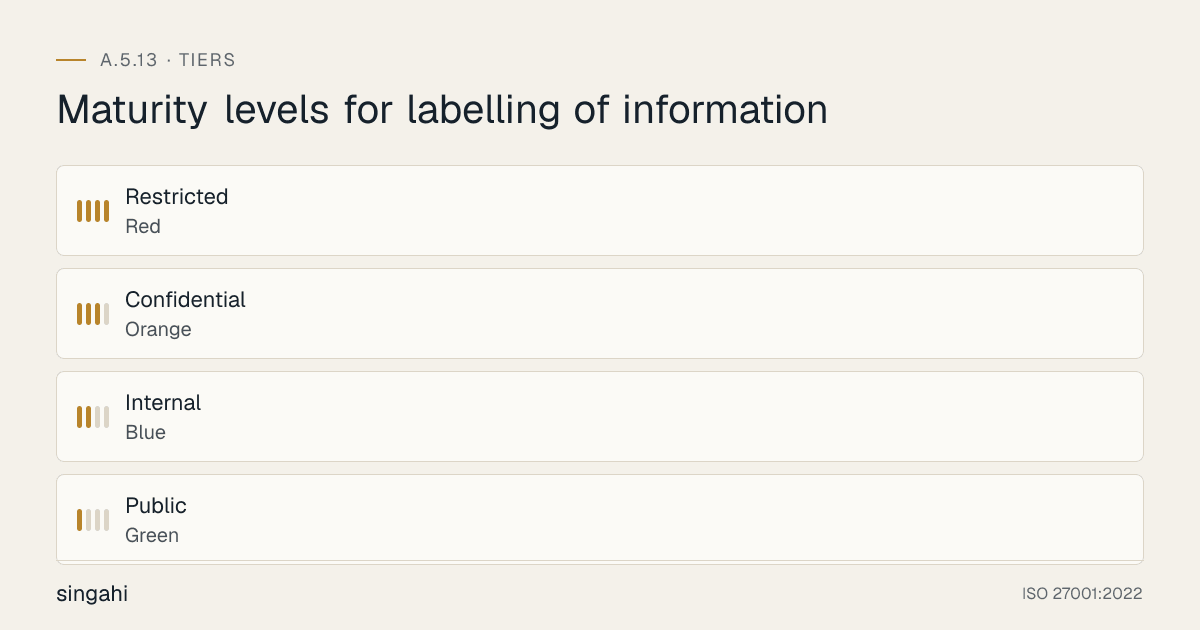
Maturity levels for labelling of information
Label Design Principles
Effective labels must be:
Visible:
- Large enough to be noticed at a glance
- Positioned where users will see them (headers, subject lines, banners)
- Contrasting colors for immediate recognition
- Present on every page or screen (not just the first page)
Consistent:
- Same format across all document types and systems
- Same terminology aligned with classification scheme
- Same color coding across all departments
- Same placement across all formats
Actionable:
- Include handling guidance, not just classification name (e.g., "CONFIDENTIAL, Do Not Share Externally")
- Link to specific procedures (e.g., "See Confidential Handling Procedure")
- Include contact information for questions (e.g., "Questions: security@company.com")
- Indicate required controls (e.g., "CONFIDENTIAL, Encryption Required")
Durable:
- Remain visible when printed, photocopied, or scanned
- Survive format conversions (e.g., Word to PDF)
- Persist when documents are copied or forwarded
- Resist removal or tampering (watermarks, embedded metadata)
Machine-Readable:
- Include metadata tags for automated enforcement
- Use standard formats that DLP and security tools can parse
- Maintain compatibility across email systems, document management systems, and cloud storage
- Enable automated inheritance when documents are copied or derived
Digital Label Implementation
Document Templates: Create standardized templates for each classification level:
Microsoft Office Templates:
- Pre-configured headers, footers, and watermarks
- Document properties with classification metadata
- Color schemes matching classification levels
- Sensitivity-label visual markings applied by the labelling tool (avoid macro-enabled templates: Office blocks internet macros by default, see A.8.7)
- Quick Parts and AutoText for easy label insertion
Google Workspace Templates:
- Standardized headers and footers in Docs, Sheets, Slides
- Document naming conventions with classification prefix
- Folder structure organized by classification
- Add-ons for automated labeling
PDF Templates:
- Master templates with embedded headers/footers
- Watermark configurations for each classification
- Metadata fields for classification tags
- Batch processing tools for applying labels to existing PDFs
Email Labeling:
- Subject line prefixes for Confidential and Restricted: [CONFIDENTIAL], [RESTRICTED]
- Email banners or footers with classification
- Auto-labeling rules based on content keywords, sender department, or recipient domain
- Transport rules that apply labels based on sender or content
- DLP integration that blocks or warns on unlabeled sensitive emails
Database Labeling:
- Metadata columns for classification in database schemas
- Data catalog tags and classifications
- Column-level labels for sensitive fields (e.g., "Aadhaar number, RESTRICTED"; Aadhaar numbers should be stored masked or in an Aadhaar Data Vault)
- Table-level labels for sensitive tables
- API metadata headers for data classification
Cloud Storage Labeling:
- Folder naming conventions with classification (e.g., "Confidential, Customer Data")
- File tags and properties in cloud storage platforms
- SharePoint/OneDrive sensitivity labels (Microsoft Purview)
- Google Drive labeling and access warnings
- Dropbox classification tags and sharing restrictions
Source Code Labeling:
- File header comments with classification
- Repository labels and tags (GitHub, GitLab, Bitbucket)
- Package and module naming conventions
- Build artifact labeling in CI/CD pipelines
- Container image labels (Docker, Kubernetes)
Physical Label Implementation
Document Stamps:
- Self-inking stamps for each classification level (color-coded)
- Stamp placement standards (top-right corner of cover page, bottom-right of all pages)
- Stamp text: "[LEVEL], [Organization Name], Handle Per Policy"
- Stamp size: Large enough to be visible but not so large as to obscure content
Color Coding:
| Classification | Primary Color | Secondary Color | Usage |
|---|---|---|---|
| Public | Green | White | Green folders, green stamp ink, green tabs |
| Internal | Blue | White | Blue folders, blue stamp ink, blue tabs |
| Confidential | Orange | Black | Orange folders, orange stamp ink, orange tabs |
| Restricted | Red | White | Red folders, red stamp ink, red tabs, red watermarks |
Folder and Binder Labeling:
- Color-coded folders for each classification level
- Spine labels with classification level and content description
- Clear plastic sleeves for easy label visibility
- Locked storage labels for Confidential and Restricted folders
Physical Media Labeling:
- USB drives and external hard drives: Color-coded stickers or cases
- CDs/DVDs: Color-coded labels with classification and date
- Backup tapes: Color-coded spine labels with classification
- Printed materials: Color-coded header/footer on every page
Whiteboard and Meeting Room Labels:
- "Please erase all whiteboards after meetings, Do not leave sensitive information visible"
- Color-coded markers for different sensitivity levels (optional)
- Meeting room signs: "Restricted meetings must be held in closed conference rooms"
- "Clean desk policy" reminders at workstations
Visitor and Public Area Labels:
- "Do not leave sensitive documents in public areas"
- "Shred sensitive documents, Do not discard in regular trash"
- "This printer is for Internal use only, Confidential documents require secure printing"
- "All documents on this table are Public, Free to take"
Automated Labeling Tools and Configuration
Microsoft Purview Sensitivity Labels:
- Create labels for each classification level
- Configure visual markings (headers, footers, watermarks)
- Set protection settings (encryption, access restrictions)
- Define auto-labeling policies based on content types
- Deploy labels to Microsoft 365 apps (Word, Excel, PowerPoint, Outlook, Teams)
- Configure DLP policies triggered by labels
- Monitor label usage and compliance through admin console
Email Auto-Labeling Rules:
- Transport rules that apply labels based on:
- Sender department (e.g., Finance emails default to Confidential)
- Content keywords (e.g., "budget," "salary," "contract")
- Attachment types (e.g., financial spreadsheets default to Confidential)
- Recipient domains (e.g., external recipients trigger higher classification)
- Client-side rules that suggest labels before sending
- Warning messages when unlabeled emails contain sensitive keywords
DLP Integration:
- DLP policies that read labels and enforce rules:
- Block external sharing of RESTRICTED documents
- Encrypt external sharing of CONFIDENTIAL documents
- Warn on external sharing of INTERNAL documents
- Audit all sharing of CONFIDENTIAL and RESTRICTED documents
- DLP discovery that identifies unlabeled sensitive data and suggests classification
- DLP incident management that prioritizes alerts based on document labels
Document Management System Integration:
- Mandatory classification fields before document check-in
- Classification-based workflow routing (e.g., RESTRICTED documents require approval before publication)
- Retention rules from the retention schedule (A.5.33), applied using labels
- Classification-based search and filtering
- Label-based access control (e.g., only groups authorised for CONFIDENTIAL content can search it)
Labeling for Special Scenarios
Mergers and Acquisitions:
- Due diligence documents labeled "RESTRICTED, M&A, Do Not Disclose"
- Separate classification levels for M&A-specific information
- Time-limited labels (e.g., "CONFIDENTIAL, Valid until [Date]")
- Recipient-specific labels (e.g., "CONFIDENTIAL, For Acquirer Only")
Incident Response:
- Active incident documents labeled "RESTRICTED, Incident Response, Active Investigation"
- Post-incident reports labeled "CONFIDENTIAL, Incident Response, Internal Only"
- Forensic evidence labeled "RESTRICTED, Legal Hold, Do Not Destroy"
- Customer notification drafts labeled "CONFIDENTIAL, Draft, Not for Distribution"
Regulatory Submissions:
- Draft regulatory filings labeled "CONFIDENTIAL, Draft, Regulatory Submission"
- Final submissions labeled "INTERNAL, Regulatory Filing, Embargoed until [Date]"
- Supporting data labeled "CONFIDENTIAL, Regulatory Support Data"
Product Development:
- Unreleased product specifications labeled "CONFIDENTIAL, Product Development, Not for External Release"
- Beta documentation labeled "INTERNAL, Beta, Subject to Change"
- Launch plans labeled "RESTRICTED, Product Launch, Competitive Sensitivity"
Legal and Privileged:
- Attorney-client privileged documents labeled "RESTRICTED, Attorney-Client Privileged, Do Not Disclose"
- Litigation materials labeled "RESTRICTED, Litigation, Subject to Discovery Rules"
- Settlement negotiations labeled "RESTRICTED, Settlement, Confidential Negotiations"
Label Inheritance and Change Management
Label Inheritance Rules:
- When a document is copied, the copy retains the original label
- When data is exported from a database, the export retains the database classification
- When an email is forwarded, the forwarded email retains the original label (if the system supports it)
- When a document is converted to another format (Word to PDF), the label should persist
- When a document is printed, the physical copy should have the same label as the digital original
Label Change Procedures:
- Upgrade: When information becomes more sensitive, the label must be upgraded immediately. Notify all holders of the previous version.
- Downgrade: When information becomes less sensitive (e.g., after public announcement), the label may be downgraded with the data owner's approval (consulting the CISO where needed). Document the reason and date.
- Removal: When information is no longer sensitive (e.g., historical public information), the label may be removed with approval. This is rare, most information retains some classification.
- Version Control: When a label changes, document the version history with old label, new label, date, reason, and approver.
Change Triggers:
- Public announcement of previously internal information (downgrade to Public)
- Regulatory filing making information public (downgrade to Public)
- Discovery of additional sensitive data in a document (upgrade)
- M&A event making strategic plans sensitive (upgrade)
- Contract expiration removing confidentiality obligations (downgrade or remove)
- Legal settlement resolving litigation (downgrade legal documents)
Tools and Technologies
Enterprise Labeling Platforms
| Platform | Type | Key Features | Notes |
|---|---|---|---|
| Microsoft Purview Information Protection | Sensitivity labels | Manual and auto-labelling, visual markings, encryption, DLP integration | Manual labels in Business Premium/E3; auto-labelling needs E5 or an add-on |
| Fortra Data Classification (formerly Titus and Boldon James) | User-driven labelling | Office and Outlook add-ins, visual markings, metadata for DLP | Suits label-heavy regulated organisations |
| Google Workspace labels | Drive labels | Labels that drive sharing and DLP rules | Enterprise editions |
Document and Email Labeling Tools
| Tool | Focus | Key Features |
|---|---|---|
| Microsoft Purview Sensitivity Labels | Microsoft 365 | Native integration, auto-labeling, visual markings, encryption, DLP policies |
| Fortra Data Classification (formerly Titus and Boldon James) | Office, Outlook, files | Add-ins and server-side classification; visual markings; metadata |
| Adobe Acrobat Pro | Header/footer, watermark, metadata, redaction, certificate-based encryption | |
| Microsoft Word/PowerPoint | Office documents | Header/footer, watermark, document properties, built-in templates |
| Google Docs/Sheets | Google Workspace | Header/footer, document naming, folder organization, add-ons |
Physical Labeling Supplies
| Supply | Purpose |
|---|---|
| Self-inking stamps | Physical document stamping |
| Color-coded folders | Physical document organization |
| Color-coded labels/stickers | Media, binders, and folder labeling |
| Label printers | Printed adhesive labels for media and equipment |
| Watermarked paper | Pre-printed watermarked paper for Restricted documents |
| Secure shredding bins | Labeled bins for Confidential/Restricted document disposal |
| Badge holders and lanyards | Color-coded for access levels |
Open-Source and lightweight Options
| Tool | Purpose |
|---|---|
| Custom Word/Excel templates | Document labeling with headers/footers |
| Custom email signatures | Email footer labeling |
| PDFtk / iText | PDF header/footer/watermark automation |
| Python scripts | Bulk document labeling and metadata insertion |
| PowerShell scripts | Windows file metadata tagging |
| Google Apps Script | Google Workspace automation |
| Open-source DLP | OpenDLP with custom labeling rules |
Policy Templates and Documentation
Information Labeling Policy (Template)
Template
Information Labeling Policy
1. Purpose
This policy establishes the requirements for labeling organizational information according to its classification to ensure visible, consistent, and actionable handling guidance for all users.
2. Scope
Applies to all information created, received, processed, stored, or transmitted by the organization, in all formats and media, including digital and physical documents, emails, databases, and communications.
3. Policy Statements
3.1 Labeling Requirements
- Information is labelled under this procedure when it is created or received. Labels may be omitted for Public information (and, where the procedure says so, Internal information); unlabelled information is treated as Internal
- Labels must reflect the classification assigned per the Information Classification Policy (A.5.12)
- Labels must be visible, consistent, and actionable
- Labels must persist when information is copied, converted, or printed
- Unlabeled information should be treated as "Internal" by default
3.2 Label Formats
Digital Documents
- Header or footer showing the classification (on every page for Confidential and Restricted)
- Document properties/metadata with classification tag
- Watermark for Confidential and Restricted documents
- Email subject line prefix for all classification levels above Internal
Physical Documents
- Stamp or sticker on cover page and all pages for Confidential and Restricted
- Color-coded folders or binders
- Header and footer when printed from digital source
- Watermark for Restricted documents
Databases and Systems
- Metadata tags in data catalogs and schemas
- Column-level labels for sensitive fields
- Table-level labels for sensitive tables
- API metadata headers for data exchange
Cloud and Online
- File and folder naming conventions with classification prefix
- Cloud storage tags and properties
- Collaboration tool labels and access warnings
3.3 Labeling by Classification Level
| Level | Digital Label | Physical Label | Email Label | Database Label |
|---|---|---|---|---|
| Public | "PUBLIC, [Org]" header/footer (optional) | Green stamp or none | No prefix | "public" |
| Internal | "INTERNAL, [Org]" header/footer | Blue stamp or folder | No prefix | "internal" |
| Confidential | "CONFIDENTIAL, [Org]" header/footer + watermark | Orange stamp + header/footer | "[CONFIDENTIAL]" prefix | "confidential" |
| Restricted | "RESTRICTED, [Org]" header/footer + watermark | Red stamp + header/footer + watermark | "[RESTRICTED]" prefix | "restricted" |
3.4 Labeling Responsibilities
- Information Creator: Apply appropriate label at creation
- Information Recipient: Verify label is present and appropriate; escalate if missing or incorrect
- Data Owner: Validate labels for information in their domain; approve label changes
- IT: Deploy and maintain labeling tools and templates; enforce technical label policies
- CISO: Monitor labeling compliance; investigate violations; update policy
3.5 Label Changes
- Labels must be upgraded immediately if information becomes more sensitive
- Labels may be downgraded with the data owner's approval, consulting the CISO where needed
- Label changes must be documented with reason and approval
- All holders of information must be notified of label changes
3.6 Unlabeled Information
- Unlabeled digital information should be treated as Internal by default
- Unlabeled physical information in secure areas should be investigated
- Employees should report unlabeled sensitive information to their data owner or CISO
- Unlabeled information found in public areas should be treated as a potential incident
4. Training
- All employees receive labeling training during onboarding
- Annual refresher training on labeling procedures
- Specialized training for data creators and data owners
- Training on recognizing and handling mislabeled information
5. Violations
- Failure to label information, mislabeling, or removal of labels may result in disciplinary action
- Intentional removal of labels to circumvent controls is a serious violation
- Failure to report unlabeled sensitive information may result in disciplinary action
6. Review
This policy is reviewed annually and updated as needed.
Approved by: _______________ Date: _______________ CISO / Board
Supporting Document Templates
Document Label Template (Word):
[Header: CONFIDENTIAL — [Organization Name] — Handle Per Information Security Policy]

[Document Content]

[Footer: CONFIDENTIAL — [Organization Name] — Printed copies are uncontrolled. Verify latest version digitally.]
Email Label Template:
Subject: [CONFIDENTIAL] Q3 Financial Review — Board Discussion

[Banner: This email and any attachments are classified as CONFIDENTIAL. Do not forward, copy, or share without authorization.]

[Email Body]

[Footer: CONFIDENTIAL — [Organization Name] — If you received this in error, notify security@company.com and delete immediately.]
Physical Document Stamp:
RESTRICTED
[Organization Name]
Handle Per Information Security Policy
Unauthorized disclosure prohibited
Risk Assessment
Figure · Risk grid
Labelling of information risks by likelihood and impact
Likelihood across · impact up
- Accidental mishandling of sensitive dataCritical/High
- Inconsistent protectionHigh/High
- Inability to enforce technical controlsHigh/High
- Legal inability to prove dataMedium/High
- Third-party mishandlingMedium/High
- Regulatory non-complianceMedium/High
- Delayed incident responseHigh/Medium
- Employee security awareness gapsHigh/Medium
Risks of Inadequate Labeling
| Risk | Likelihood | Impact | Risk Score | Mitigation |
|---|---|---|---|---|
| Accidental mishandling of sensitive data | Very High | High | Critical | Implement visible labels on all information |
| Inconsistent protection across departments | High | High | Critical | Standardize labels organization-wide |
| Inability to enforce technical controls | High | High | Critical | Implement metadata labels for DLP integration |
| Legal inability to prove data sensitivity | Medium | High | High | Document labels as evidence of awareness |
| Third-party mishandling | Medium | High | High | Extend labels to shared documents |
| Regulatory non-compliance | Medium | High | High | Align labels with regulatory requirements |
| Delayed incident response | High | Medium | High | Enable rapid scoping through labels |
| Employee security awareness gaps | High | Medium | High | Visual labels serve as constant reminders |
Risks of Labeling Process
| Risk | Likelihood | Impact | Risk Score | Mitigation |
|---|---|---|---|---|
| Label fatigue (employees ignoring labels) | Medium | Medium | Medium | Keep labels simple, automate where possible |
| Over-labeling (everything labeled highest) | Medium | Medium | Medium | Training, validation, enforcement of scheme |
| Under-labeling (sensitive data unlabeled) | Medium | High | High | Auto-discovery, DLP, audits, spot checks |
| Label removal or tampering | Low | High | Medium | Watermarks, metadata, technical enforcement |
| Inconsistent label application | Medium | Medium | Medium | Templates, automation, training, monitoring |
Risk Treatment Plan
| Risk | Treatment | Owner | Timeline |
|---|---|---|---|
| Accidental mishandling | Deploy visible labels on all information formats | CISO | 1 month |
| Under-labeling | Deploy auto-discovery and DLP to identify unlabeled sensitive data | Security Manager | 2 months |
| Inconsistent protection | Standardize labels across all departments and systems | CISO | 2 months |
| Label fatigue | Automate labeling, simplify scheme, train effectively | HR / CISO | 2 months |
Audit and Assessment Checklist
Documentation Review
- Is there a documented Information Labeling Policy?
- Are labeling procedures aligned with the classification scheme?
- Are label formats defined for all information types?
- Is there a labeling responsibility matrix?
- Are there document templates with embedded labels?
- Is there email labeling configuration documentation?
- Is there physical labeling supply inventory?
- Is there training material on labeling procedures?
- Is there a label change procedure with approval requirements?
- Is there a process for handling unlabeled information?
Implementation Review
- Is there evidence that digital documents are being labeled?
- Is there evidence that emails are being labeled?
- Is there evidence that physical documents are being labeled?
- Are labels visible and consistent across the organization?
- Are labels aligned with the classification scheme?
- Is there evidence of DLP or technical enforcement using labels?
- Are database and cloud resources labeled?
- Is there evidence of labeling training delivery?
- Are labeling tools and templates deployed and accessible?
- Is there evidence of label compliance monitoring?
Effectiveness Review
- What percentage of documents are labeled? (Target: ≥95%)
- What is the label accuracy rate? (Target: ≥90%)
- How many unlabeled sensitive documents are discovered per quarter? (Target: 0)
- Are there fewer accidental data mishandling incidents since labeling was implemented?
- Is DLP enforcement effective based on labels?
- Do employees understand and correctly apply labels?
- Are there any recurring labeling issues or gaps?
- Is the labeling scheme still appropriate for the business?
Metrics and KPIs
Figure · Measures
The measures that show A.5.13 is working
- Document Label Coverage≥95%Monthly
- Email Label Coverage≥90%Monthly
- Physical Document Label Coverage≥95%Quarterly
- Database Label Coverage≥95%Quarterly
- Cloud File Label Coverage≥90%Monthly
Label Coverage Metrics
| KPI | Formula | Target | Frequency |
|---|---|---|---|
| Document Label Coverage | % of documents with visible labels | ≥95% | Monthly |
| Email Label Coverage | % of Confidential and Restricted emails carrying the prefix (sampled) | ≥90% | Monthly |
| Physical Document Label Coverage | % of physical documents with stamps/labels | ≥95% | Quarterly |
| Database Label Coverage | % of sensitive tables/columns with metadata labels | ≥95% | Quarterly |
| Cloud File Label Coverage | % of cloud files with classification tags | ≥90% | Monthly |
Label Accuracy Metrics
| KPI | Formula | Target | Frequency |
|---|---|---|---|
| Label Accuracy | % of labels verified as correct during audit | ≥90% | Quarterly |
| Mislabeled Document Rate | % of documents with incorrect labels | ≤5% | Quarterly |
| Unlabeled Sensitive Data | Count of sensitive documents found without labels | 0 | Quarterly |
| Label Change Rate | Number of reclassifications per quarter | Stable or decreasing | Quarterly |
Operational Metrics
| KPI | Formula | Target | Frequency |
|---|---|---|---|
| DLP Policy Alignment | % of DLP policies using labels for enforcement | ≥90% | Monthly |
| Auto-Labeling Coverage | % of documents automatically labeled | ≥70% | Monthly |
| Template Usage Rate | % of new documents created from labeled templates | ≥80% | Monthly |
| Training Compliance | % of employees completing labeling training | ≥95% | Quarterly |
| Labeling Question Volume | Number of help desk questions about labeling | Indicator of clarity | Monthly |
Business Impact Metrics
| KPI | Formula | Target | Frequency |
|---|---|---|---|
| Accidental Mishandling Reduction | % reduction in incidents since labeling | ≥30% | Annual |
| Incident Response Time | Time to identify affected data scope during incidents | ≤30 minutes | Per incident |
| Audit Finding Reduction | Number of labeling-related audit findings | 0 | Annual |
| Third-Party Compliance | % of shared documents with labels | ≥90% | Quarterly |
| Employee Awareness Score | % of employees correctly identifying labels in test | ≥90% | Quarterly |
Common Pitfalls and How to Avoid Them
Labels Are Invisible or Inconsistent
Pitfall: Labels are too small, poorly placed, or vary across departments, making them ineffective. Impact: Employees don't notice labels; mishandling continues; audit failures. Solution: Standardize label size, placement, color, and format across all departments. Use templates and automation. Conduct visual audits.
Labels Only on First Page
Pitfall: Documents are labeled only on the cover page, not on subsequent pages. Impact: When pages are separated, copied, or printed individually, the label is lost. Solution: Require headers and footers on every page. Use watermarks that appear on all pages. For emails, ensure labels are in the body and subject line.
No Metadata Labels for Technical Enforcement
Pitfall: Labels are only visual (human-readable) with no machine-readable metadata. Impact: DLP, email gateways, and access controls cannot read or enforce based on labels. Solution: Implement metadata tags alongside visual labels. Use Microsoft Purview, Fortra Data Classification or similar tools that embed both visual and machine-readable labels.
Over-Labeling Everything as Confidential
Pitfall: Employees default to the highest classification to avoid responsibility, making labels meaningless. Impact: Label inflation reduces the effectiveness of higher classifications; resources are wasted; employees ignore labels. Solution: Provide clear criteria for each classification. Use auto-classification tools to suggest correct labels. Validate labels during audits. Educate on the cost and impact of over-classification.
No Labels on Physical Documents
Pitfall: Labeling focuses only on digital documents, ignoring printed materials. Impact: Sensitive printed documents are left on printers, desks, and in public areas. Solution: Implement physical stamping standards. Use color-coded folders. Include label requirements in printing procedures. Train on physical document handling.
Labels Removed During Format Conversion
Pitfall: When documents are converted from Word to PDF, or printed to physical copies, labels are lost. Impact: Sensitive documents circulate without labels, creating uncontrolled exposure. Solution: Use PDF templates with embedded labels. Configure print settings to include headers/footers. Use watermarks that persist across formats. Test format conversion to verify label retention.
No Training on Label Meaning
Pitfall: Employees are told to label documents but not taught what each label means or how to handle labeled documents. Impact: Labels are applied mechanically without understanding; handling errors persist. Solution: Training must include not just how to label but what each label means in practice. Use scenario-based training. Provide quick reference cards. Include handling rules in the label itself.
Ignoring Email and Communication Labels
Pitfall: Email labeling is neglected because it's harder to implement than document labeling. Impact: Most data leaks occur through email; unlabeled emails are a major vulnerability. Solution: Implement email subject line prefixes. Use auto-labeling based on content and sender. Deploy email banners for high-sensitivity emails. Integrate with email security gateways.
No Monitoring or Enforcement
Pitfall: Labels are applied but there is no monitoring of compliance or enforcement of handling rules. Impact: Labels become voluntary; employees ignore them; the system becomes ineffective. Solution: Implement DLP policies that enforce handling rules based on labels. Conduct regular audits of label compliance. Include labeling in performance reviews. Investigate and address violations.
No Labels for Third-Party Sharing
Pitfall: Documents shared with customers, vendors, and partners are not labeled, so recipients don't know the sensitivity. Impact: Third parties mishandle sensitive information because they are unaware of its classification. Solution: Include labels on all shared documents. Reference labels in contracts and NDAs. Educate key partners on your labeling scheme. Use watermarks on shared documents that cannot be easily removed.
Illustrative Scenarios
Illustrative scenario, a composite example for guidance, not a specific Singahi engagement or a verified outcome.
Illustrative Scenario 1: Indian Financial Services Firm, Email Labeling Prevents Data Leakage and Regulatory Penalty
Organization: Mid-sized financial advisory firm (180 employees) in Mumbai, managing investment portfolios for 3,000+ HNI clients Sector: Financial Services (Regulated by SEBI) Challenge: The firm had experienced three incidents in 12 months where sensitive client financial data was accidentally emailed to incorrect recipients. In one case, a portfolio summary for 12 clients was emailed to the wrong client. In another, a salary spreadsheet was sent to an external recruitment consultant. The firm had classification policies but no practical labeling mechanism, so employees forgot to apply sensitivity awareness in their daily email workflow. SEBI's upcoming cybersecurity audit was a concern.
Implementation:
- Week 1–2: CISO designed a simple email labeling scheme with subject line prefixes: [INTERNAL], [CONFIDENTIAL], [RESTRICTED]. Developed clear criteria for each level based on SEBI requirements and client data sensitivity.
- Week 3–4: Deployed Microsoft Exchange transport rules that auto-applied labels based on sender department and content keywords. Finance emails auto-labeled [CONFIDENTIAL]; HR emails with salary data auto-labeled [RESTRICTED]; general operations emails auto-labeled [INTERNAL]. Client emails were manually labeled by relationship managers.
- Week 5–6: Configured DLP policies that:
- Blocked external sending of [RESTRICTED] emails without CISO approval
- Encrypted [CONFIDENTIAL] emails sent externally
- Warned senders when [CONFIDENTIAL] emails were sent to external recipients without encryption
- Flagged unlabeled emails containing sensitive keywords ("portfolio value," "AUM," "salary," "PAN")
- Week 7–8: Trained all employees on the new email labeling system. Created a 10-minute video with real examples from the firm's past incidents. Distributed quick reference cards to every desk. Relationship managers received additional training on client email labeling.
- Week 9–10: Rolled out physical document labeling with stamps and color-coded folders for printed financial reports, client contracts, and regulatory filings.
Results:
- Incident reduction: Zero accidental email data leaks in the 18 months following implementation (down from 3 in 12 months prior). Two near-misses were caught by the warning system before sending.
- Regulatory compliance: Passed SEBI cybersecurity audit with zero findings related to information handling.
- Employee adoption: 94% of emails were labeled correctly within 3 months. Help desk questions about labeling dropped from 15 per week to 2 per week after 6 months.
- Client trust: A client specifically praised the firm for sending encrypted, labeled reports, noting that their previous advisor sent sensitive documents as unencrypted plain emails. The firm won 2 new HNI clients who cited "data security professionalism" as a decision factor.
- One data leak could have led to SEBI enforcement action plus reputational damage.
Key Success Factors:
- Auto-labeling reduced the burden on employees and improved consistency
- DLP integration made labels actionable rather than just decorative
- Training used real firm incidents, making it immediately relevant
- The warning system (not blocking) for external CONFIDENTIAL emails reduced friction while improving security
- Physical document labeling addressed the remaining vulnerability after email was secured
Lessons Learned:
- Email is the highest-risk channel for most organizations, prioritize email labeling
- Auto-labeling is essential for adoption; relying on manual labeling alone fails
- The warning system ("Are you sure?") is more effective than blocking for cultural adoption
- Practical, visible controls are easier to evidence in audits than policies alone
- Client-facing security measures can be a competitive differentiator in financial services
Illustrative Scenario 2: Indian Government Contractor, Physical and Digital Labeling Protects Classified Project Data
Organization: Defense technology contractor (450 employees) in Hyderabad, developing avionics systems for Indian defense programs Sector: Defense / Government (bound by contract to the Ministry of Defence's security instructions) Challenge: The organization handled a mix of public research, proprietary technology, and government-classified defense data across multiple programs. The physical and digital environments were not clearly segregated, leading to risks of cross-contamination. A recent internal audit found classified documents on shared network drives accessible to all employees, and printed classified documents in unsecured common areas. The organization was at risk of losing government contracts and facing prosecution under the Official Secrets Act.
Implementation:
- Phase 1 (Weeks 1–3): Formed a security classification committee with the CISO, Program Directors, Government Liaison Officer, and Legal Counsel. Kept the government grades (Top Secret, Secret, Confidential, Restricted) exactly as prescribed for classified programme material, and used a separate commercial scheme (Public, Internal, Proprietary) for the company's own information. The two were never mixed. Each tier had specific handling, storage, and transmission rules.
- Phase 2 (Weeks 4–8): Implemented a complete labeling system:
- Digital: Deployed Microsoft Purview with custom sensitivity labels for each tier. Implemented mandatory labels before saving documents. Watermarks for CONFIDENTIAL and RESTRICTED. Metadata tags for all classification levels. Integration with DLP to prevent cross-tier data movement.
- Physical: Deployed color-coded stamps (green, blue, orange, red, black) for each tier. Color-coded folders and secure cabinets. Printed headers and footers on all documents. Watermarked paper for RESTRICTED documents. Secure shredding bins for each tier.
- Email: Implemented subject line prefixes with clear color indicators. Auto-labeling based on sender program and content. Encryption requirements for CONFIDENTIAL and RESTRICTED external emails. Complete blocking of RESTRICTED external emails.
- Environment: Segregated network shares by classification tier with visual indicators. Physical workspace zoning with color-coded badge access. Printer restrictions by classification (RESTRICTED documents only print on secure printers with logging).
- Phase 3 (Weeks 9–12): Trained all 450 employees with program-specific scenarios. Employees in classified programs received enhanced training and signed additional security agreements. Conducted tabletop exercises for classified document mishandling scenarios. Implemented spot checks and random audits of workspaces and digital environments.
- Phase 4 (Weeks 13–16): Integrated labeling with government reporting requirements. Classified documents were registered as the defence security instructions require. Implemented chain-of-custody tracking for classified documents. Established formal downgrade and declassification procedures for program transitions.
Results:
- Security improvement: Zero incidents of classified data found in unsecured locations in the 24 months following implementation. Previous average was 2–3 incidents per quarter.
- Contract compliance: The labelling system helped the company meet its contractual security obligations for classified programme material.
- Operational efficiency: The color-coded system made it immediately obvious which documents required special handling. Employees no longer needed to read documents to determine sensitivity, the color told them everything. This reduced handling errors and improved workflow speed.
- Audit success: Internal audits showed high label compliance; exceptions were remediated promptly.
- Cross-program protection: The labeling system prevented accidental mixing of data between programs. A proprietary program employee could not accidentally access or copy RESTRICTED classified documents because the labels and access controls were aligned.
Key Success Factors:
- Using the government's own grades for classified material, rather than a home-grown equivalent, avoided disputes with the programme's security officers
- Physical and digital labeling were implemented together, not sequentially
- Color coding provided instant visual recognition that transcended language barriers
- Environment segregation (network shares, printers, workspaces) reinforced labeling
- Mandatory labels before saving prevented the "I'll label it later" problem
- Program-specific training made scenarios relevant to each employee's work
Lessons Learned:
- Defense and government contractors need more granular classification than commercial organizations
- Physical labeling is as important as digital labeling in environments with printed classified documents
- Color coding is more effective than text-only labels for rapid visual recognition
- Mandatory labeling (cannot save without label) is essential for compliance
- Environment segregation must match labeling, labels without access controls are incomplete
- Government contracts depend on demonstrable security, not just policies
Multi-Framework Mapping
NIST CSF 2.0 Mapping
| NIST CSF Function | Category | Subcategory | Mapping to A.5.13 |
|---|---|---|---|
| IDENTIFY (ID) | ID.AM | ID.AM-07 | Labels identify and mark data assets |
| PROTECT (PR) | PR.DS | PR.DS-01 | Labels support data protection through visible handling guidance |
| IDENTIFY (ID) | ID.AM | ID.AM-07 | Labels record classification as metadata in data inventories |
| PROTECT (PR) | PR.AA | PR.AA-01 | Labels support access control decisions |
| PROTECT (PR) | PR.AT | PR.AT-01 | Labels are part of security awareness training |
| DETECT (DE) | DE.CM | DE.CM-01 | Labels enable monitoring and detection prioritization |
| RESPOND (RS) | RS.MA | RS.MA-03 | Labels help categorise and prioritise incidents |
| GOVERN (GV) | GV.PO | GV.PO-01 | Labeling policy is part of organizational security policy |
| GOVERN (GV) | GV.PO | GV.PO-02 | Labels establish security rules and expectations |
PCI DSS v4.0.1 Mapping
| PCI DSS Requirement | Mapping to A.5.13 |
|---|---|
| 9.4.2 Media with cardholder data is classified by sensitivity | Directly supported: labels show the classification on the media |
| 3.2.1 Account data storage kept to a minimum | Labels identify where account data sits so retention limits can be enforced |
| 12.5.1 Inventory of in-scope system components | Labels are recorded with the inventory |
| 12.2.1 Acceptable use policies | Labels tell users how cardholder data may be handled |
SOC 2 Type II Mapping
| TSC Category | Mapping to A.5.13 |
|---|---|
| C1.1 Confidential information is identified and maintained | Labels identify confidential information |
| CC2.1 Relevant, quality information | Labels support information quality by identifying sensitivity |
| CC2.2 Internal communication | Labels communicate handling expectations |
| CC6.1 Logical access security | Labels support logical access decisions |
| CC7.1 System monitoring | Labels enable monitoring prioritization |
| CC7.2 Incident detection | Labels support incident detection and scoping |
| CC9.1 Risk identification | Labels identify risks related to data sensitivity |
COBIT 2019 Mapping
| COBIT Domain | COBIT Component | Mapping to A.5.13 |
|---|---|---|
| APO12 Managed Risk | APO12.01 | Labels support risk identification |
| APO13 Managed Security | APO13.01 | Labels are part of security management |
| APO14 Managed Data | APO14.01 | Data management strategy and roles |
| APO14 Managed Data | APO14.03 | Metadata management (labels as metadata) |
| DSS01 Managed Operations | DSS01.04 | Operational security through labeling |
| DSS05 Managed Security Services | DSS05.02 | Security service labeling |
| MEA01 Managed Performance | MEA01.02 | Performance monitoring of labeling effectiveness |
CIS Controls v8 Mapping
| CIS Control | Safeguard | Mapping to A.5.13 |
|---|---|---|
| Control 3: Data Protection | 3.2 | Data inventory records labels |
| Control 3: Data Protection | 3.7 | Data classification scheme (labels implement it) |
| Control 3: Data Protection | 3.11 | Encrypt sensitive data at rest, identified by labels |
| Control 3: Data Protection | 3.13 | Data loss prevention driven by labels |
| Control 14: Security Awareness | 14.1 | Training on data labeling and handling |
| Control 17: Incident Response | 17.1 | Incident response using labels for prioritization |
RBI Cybersecurity Framework Mapping
| RBI Requirement | Mapping to A.5.13 |
|---|---|
| Asset Management | RBI requires banks to label assets based on criticality and sensitivity |
| Cybersecurity Operations | RBI requires visible handling guidance for sensitive customer data |
| IT Governance | RBI requires labeling governance and accountability |
| Compliance | RBI requires labeling to demonstrate compliance coverage |
SEBI CSCRF Mapping
| SEBI Requirement | Mapping to A.5.13 |
|---|---|
| Information Classification | SEBI requires labeling of market-sensitive information |
| Access Management | SEBI requires access controls based on labeled sensitivity |
| Incident Management | SEBI requires prioritization based on data sensitivity |
| Compliance | SEBI requires demonstration of appropriate data handling |
DPDP Act 2023: Relevant Provisions
| DPDP Act Provision | Mapping |
|---|---|
| Section 8(5) Reasonable security safeguards | Protect personal data through the safeguards in this control |
| Section 8(6) Personal data breach intimation | Detect and notify relevant breaches to the Board and affected principals |
Regulatory and Compliance Context
Indian Regulatory Requirements for Labeling
Digital Personal Data Protection Act, 2023:
- While the DPDP Act does not explicitly mandate labeling, the requirement for "reasonable security safeguards" for personal data is practically impossible without visible identification of such data
- Organizations must be able to identify personal data to respond to Data Principal rights requests, breach notifications, and security audits
- Labels provide the visible mechanism for identifying and protecting personal data
- Significant Data Fiduciaries must implement enhanced security measures that labeling supports
Information Technology Act, 2000:
- Section 43A (in force until DPDP Act s.44(2) commences, about May 2027) requires protection of sensitive personal data
- Section 72 requires protection of confidentiality and privacy
- For government and defence work, classification grades and markings come from the MHA's Manual of Departmental Security Instructions and defence security instructions; the Official Secrets Act 1923 penalises wrongful disclosure but does not set labels
- Wrongful disclosure of official secrets can lead to imprisonment
RBI Cybersecurity Framework for Banks:
- Banks must implement clear identification and handling guidance for customer data
- Classification and labeling must support the protection of customer financial data
- UCBs and NBFCs have proportionate requirements
SEBI CSCRF (2024):
- Market infrastructure institutions must clearly identify and protect market-sensitive information
- Intermediaries must label and protect client data and trading information
IRDAI Cybersecurity Guidelines:
- Insurance companies must identify and protect customer and policy data
- Labeling supports the protection of sensitive insurance information
- Health and financial data require enhanced protection and visible identification
Defense and Government:
- Contractors apply the grades and markings the contracting ministry prescribes (Top Secret, Secret, Confidential, Restricted), under the MHA's Manual of Departmental Security Instructions and defence security instructions
- Do not replace government grades with your own commercial scheme; keep the two separate
- Wrongful disclosure of official secrets is an offence under the Official Secrets Act 1923
Sector-Specific Labeling Requirements
| Sector | Regulatory Body | Key Labeling Requirements |
|---|---|---|
| Banking | RBI | Customer data labels, financial data identification, visible handling guidance, audit trail |
| Securities | SEBI | Market-sensitive information labels, client data identification, trading data protection |
| Insurance | IRDAI | Customer and policy data labels, health data identification, claim data protection |
| Telecom | DoT/TRAI | Customer data labels, network security data identification, lawful interception data |
| Healthcare | ABDM participants / NABH | Patient data labels, health record identification, prescription data protection |
| Government | NCIIPC/CERT-In | Classified information labels, critical data identification, national security marking |
| Defense | MHA/Defence | Government grades from the MHA and defence security instructions; classified document marking; clearance alignment |
| IT/ITeS | MeitY | Customer data identification; client-specified labels under outsourcing contracts |
| E-commerce | MeitY/Consumer Affairs | Customer data labels, payment data identification, seller data protection |
| Education | UGC/AICTE | Student data labels, research data identification, examination data protection |
| Manufacturing | Industry Bodies | IP and trade secret labels, patent document marking, design data protection |
RACI Matrix
Labeling Activities RACI
| Activity | Board | CISO | Data Owner | Security Manager | IT | All Employees | Legal |
|---|---|---|---|---|---|---|---|
| Strategy and Policy | |||||||
| Define labeling strategy | I | A | C | R | I | I | C |
| Approve labeling policy | A | R | C | C | I | I | C |
| Design label formats | C | A | C | R | C | I | I |
| Implementation | |||||||
| Develop templates | I | A | C | C | R | I | I |
| Configure email labeling | I | A | C | C | R | I | I |
| Deploy physical labels | I | A | C | R | C | I | I |
| Configure DLP integration | I | A | C | R | C | I | I |
| Develop training | C | A | C | R | I | I | I |
| Deliver training | I | A | C | R | I | I | I |
| Operations | |||||||
| Apply labels at creation | I | C | A | I | I | R | I |
| Validate labels | I | C | A/R | C | I | I | I |
| Monitor compliance | I | A | C | R | C | I | I |
| Investigate violations | I | A | C | R | C | I | C |
| Audit and Compliance | |||||||
| Prepare audit evidence | I | A | R | R | C | I | I |
| Respond to findings | I | A | R | R | I | I | C |
| Report to management | I | A | C | R | I | I | I |
R = Responsible, A = Accountable, C = Consulted, I = Informed
Documentation and Record Keeping
Suggested Records
ISO 27001 sets no retention periods. The periods below are examples; set yours from legal, contractual and DPDP erasure obligations.
| Document | Purpose | Retention Period | Owner |
|---|---|---|---|
| Information Labeling Policy | Defines labeling requirements and procedures | 7 years | CISO |
| Label Design Guide | Specifications for visual and metadata labels | 3 years | CISO |
| Document Templates | Pre-labeled templates for each classification | 3 years | IT |
| Email Labeling Configuration | Technical rules for email auto-labeling | 3 years | IT |
| DLP Label Policies | DLP policies based on labels | 3 years | Security Manager |
| Physical Labeling Inventory | Records of stamps, folders, and supplies | 1 year | Facilities |
| Training Records | Employee training on labeling procedures | 3 years | HR |
| Label Compliance Reports | Monthly/quarterly compliance metrics | 3 years | Security Manager |
| Label Audit Reports | Annual audit of label accuracy and coverage | 7 years | CISO |
| Label Change Records | Documentation of reclassifications | 7 years | CISO |
| Incident Records | Labeling-related incident investigations | 7 years | Security Manager |
| Third-Party Label Agreements | Contractual labeling requirements | Duration + 7 years | Legal |
Record Keeping Best Practices
- Centralized Repository: Maintain labeling policy and records in a centralized system
- Access Control: Restrict access to labeling configuration and compliance records
- Version Control: Track version history for label designs and templates
- Audit Trail: Maintain complete audit trails for label changes and compliance monitoring
- Backup: Labeling records are important for compliance and must be backed up
- Privacy Compliance: Handle personal data in labeling records per DPDP Act
- Legal Privilege: Protect labeling records related to litigation or investigation
- Cross-Reference: Link labeling records to classification policy and asset inventory
- Retention Compliance: Align retention with legal and regulatory requirements
- Secure Destruction: Securely destroy records when retention periods expire
Continuous Improvement
Maturity Model for A.5.13
| Level | Name | Characteristics | Evidence |
|---|---|---|---|
| 1 | Initial | No formal labeling; ad-hoc markings; no consistency; no policy; no training | No documentation, inconsistent markings, no enforcement |
| 2 | Developing | Basic labeling exists; some templates; manual application; limited formats; basic training | Some templates, some labeled documents, basic training |
| 3 | Defined | Complete labeling policy; standardized templates; visual and metadata labels; email labeling; physical labeling; training; quarterly review | Complete policy, templates, email rules, physical stamps, training records |
| 4 | Managed | Automated labeling; DLP integration; auto-labeling based on content; compliance monitoring; cloud labeling; third-party labeling; metrics-driven | Automation, DLP, auto-labeling, monitoring, cloud integration, metrics |
| 5 | Optimizing | AI-driven labeling; real-time compliance analytics; self-healing label gaps; predictive labeling; industry-leading practices; labeling drives strategic security decisions; continuous optimization | AI classification, real-time analytics, predictive labeling, strategic integration |
Improvement Cycle
Plan:
- Annual labeling policy and procedure review
- Benchmarking against industry standards and peer organizations
- Regulatory change assessment and alignment
- Technology evaluation for automation and enhancement
- Maturity assessment and target setting
- Incident analysis for labeling lessons
Do:
- Implement new label formats and templates
- Deploy enhanced automated labeling tools
- Expand labeling coverage to new formats and systems
- Enhance integration with DLP and security tools
- Deliver refresher training and awareness campaigns
- Update third-party labeling requirements
Check:
- Monthly label compliance metrics
- Quarterly label accuracy audits
- Annual complete labeling effectiveness review
- Compliance audit preparation and results
- Employee feedback and comprehension assessment
- Cost optimization and ROI measurement
- Incident response effectiveness with labels
Act:
- Update labeling policy based on findings and emerging risks
- Refine label designs based on user feedback and incidents
- Invest in tools that improve automation and accuracy
- Expand training for high-risk roles and new formats
- Report improvements to leadership and board
- Share best practices and lessons learned
- Benchmark against industry standards
Toolkit Download
The A.5.13 Control Pack contains a policy template, a step-by-step procedure, checklists, an audit evidence checklist, training materials, an issue playbook, a RACI, a metrics dashboard and a regulatory mapping.
Frequently Asked Questions
Q1: Is information labeling mandatory for ISO 27001 certification?
A: Not automatically. No Annex A control is mandatory. Under clause 6.1.3 you choose the controls your risk assessment calls for, then record A.5.13 in your Statement of Applicability as included (and how) or excluded (and why). If you include A.5.12 (classification), you will usually include labelling too, because labels are how people recognise the classification when they handle information. The labelling can be light: ISO 27002 itself allows exceptions, such as leaving public information unlabelled.
Q2: Do we need to label every single document and email?
A: Ideally, yes. Every document and email should have a label. However, in practice, organizations often start with a phased approach: (1) label all new documents and emails going forward, (2) label all existing sensitive documents (Confidential and Restricted), (3) label Internal documents as they are reviewed or updated, (4) Public documents may not need explicit labels if they are clearly public. The goal is complete labeling, but a phased approach is acceptable during implementation. Unlabeled information should be treated as "Internal" by default.
Q3: What is the best way to label emails?
A: The most effective email labeling methods are: (1) Subject line prefix, [INTERNAL], [CONFIDENTIAL], [RESTRICTED] at the beginning of the subject line, visible before opening the email; (2) Email banner: a colored banner at the top of the email body stating the classification and handling rules; (3) Footer: a brief classification notice at the bottom of the email; (4) Auto-labeling: rules that automatically apply labels based on sender, department, or content keywords. The subject line prefix is the most effective because it is visible in the inbox before the email is opened.
Q4: Should we label documents that are shared externally with customers or partners?
A: Absolutely yes. External sharing is when labels are most important. The recipient may not know your classification scheme, so the label should include handling guidance. For example: "CONFIDENTIAL, For [Customer Name] Only, Do Not Share." Watermarks are particularly effective for external documents because they persist if the document is copied or printed. Including your organization's name on the label also reminds the recipient of the source and their obligations.
Q5: How do we prevent employees from removing labels?
A: You cannot completely prevent removal, but you can make it difficult and detectable: (1) Watermarks: embedded in the document content and difficult to remove without affecting readability; (2) Metadata: embedded in document properties and not visible to casual users, but readable by DLP and security tools; (3) DLP monitoring: detect when labeled documents are sent without labels; (4) Training: explain that removing labels is a policy violation; (5) Technical controls: some tools (Microsoft Purview, Titus) can enforce labels and prevent removal; (6) Audit: periodic spot checks for unlabeled sensitive documents. For high-risk environments, use technical controls that make label removal impossible or trigger alerts.
Q6: Can we use different labels for different countries or subsidiaries?
A: Yes, but maintain consistency where possible. If subsidiaries operate in different regulatory environments, they may need different labeling schemes. However, a parent company should define a master scheme that subsidiaries can adapt. For example, a US subsidiary might use "Public, Internal, Confidential, Secret" while an Indian subsidiary uses "Public, Internal, Confidential, Restricted." The key is to map the schemes so that cross-border sharing is clear. Document the mapping and train employees on both schemes if they interact across borders.
Q7: How do we label information in shared drives and collaborative workspaces?
A: Shared drives should be organized by classification: (1) Folder-level labeling: top-level folders named with classification (e.g., "Confidential, Customer Data"), (2) File-level labeling: individual files within folders should also have labels, (3) Access controls: folders should have access controls aligned with their classification, (4) Collaboration tools: SharePoint, Google Drive, Confluence, and similar tools should have classification fields or tags, (5) Naming conventions: require classification prefix in file names (e.g., "[CONFIDENTIAL] Q3 Financial Report"), (6) DLP monitoring: scan shared drives for unlabeled sensitive data. The folder provides the default classification; individual files should be labeled if they deviate from the folder default.
Q8: Should we label information in development and test environments?
A: Yes. Dev and test environments often contain copies of production data. (1) Label dev/test data with the same classification as production, (2) Use data masking or synthetic data to reduce classification where possible, (3) Label test documents and configurations, (4) Ensure dev/test environments have equivalent access controls to production for the classification level, (5) Label build artifacts and deployment packages, (6) Include classification in code comments for sensitive modules.
Q9: How do we handle legacy documents that were created before labeling?
A: Legacy documents require a phased approach: (1) Discovery: scan file shares, email archives, and databases for sensitive unlabeled data, (2) Prioritization: focus on Confidential and Restricted documents first, (3) Bulk labeling: use automated tools to apply labels based on content, location, or file name, (4) Manual review: sample and verify automated labels, (5) Retention-based: label documents as they are accessed or reviewed, (6) Archive: for truly old documents, consider archiving with bulk labels rather than individual review. Do not let the legacy backlog prevent new documents from being labeled. The goal is progress, not perfection.
Q10: Can labeling be automated, or does it require manual effort?
A: Both. The best approach is a hybrid: (1) Auto-labeling for common scenarios (emails from Finance = Confidential, files in "Board" folder = Restricted, documents with "salary" or "PAN" = Confidential), (2) Suggested labels: tools suggest labels based on content, and users confirm or override, (3) Manual labeling for complex or ambiguous documents where human judgment is needed, (4) Default labels: documents default to a baseline (e.g., Internal) if no label is selected, (5) Validation: periodic audits verify that auto and manual labels are correct. The goal is to automate the routine and manualize the exceptions.
Q11: How do we handle information that contains multiple classifications?
A: The entire document or file should be labeled at the highest classification of any content it contains. For example, a report containing both Public marketing data and Confidential financial data should be labeled Confidential. For databases, consider field-level classification if the system supports it. When mixing data types, apply the "highest common denominator" principle. If the document is later split or sections are extracted, the extracted sections should retain the original classification or be re-evaluated.
Q12: Should we include handling instructions in the label itself?
A: Yes, especially for higher classifications. A label that says only "CONFIDENTIAL" tells the user the classification but not what to do. A label that says "CONFIDENTIAL, Do Not Share Externally Without Encryption and Approval" tells the user both the classification and the required action. Handling instructions in the label are particularly important for external sharing, physical documents, and email. Keep instructions brief but specific. For example: "RESTRICTED, Internal Only, No External Sharing" or "CONFIDENTIAL, Encrypt Before Email."
Q13: How do we ensure labels are culturally appropriate across India?
A: India has diverse languages, literacy levels, and work cultures. Considerations: (1) Language: labels in English are standard for corporate India, but consider vernacular translations for factory floors or rural operations, (2) Symbols: use color coding and symbols alongside text for instant recognition across language barriers, (3) Literacy: in environments with varying literacy, color and symbol labels are more effective than text-only, (4) Training: adapt training to local context and language, (5) Regional regulations: some states may have specific requirements for data handling in local languages. The goal is that any employee, regardless of language or literacy, can understand the label's meaning.
Q14: How do we measure if our labeling program is effective?
A: Key effectiveness indicators: (1) Coverage: percentage of documents and emails with labels, (2) Accuracy: percentage of labels verified as correct during audits, (3) Incident reduction: decrease in accidental data mishandling since labeling implementation, (4) DLP effectiveness: DLP policies successfully using labels to prevent violations, (5) Employee awareness: test scores on label recognition and handling, (6) Audit findings: zero or minimal labeling-related audit findings, (7) Response time: faster incident scoping because labels identify affected data, (8) Cost: ROI from reduced incidents and optimized security spend. Measure baseline before implementation and track trends over time. Report improvements to leadership quarterly.
The following toolkit assets are available for this control:
| # | Toolkit File | Description |
|---|---|---|
| 1 | 01-labeling-of-information-policy-template.md | Policy Template |
| 2 | 02-labeling-of-information-procedure.md | Procedure |
| 3 | 03-labeling-of-information-checklist.md | Checklist |
| 4 | 04-audit-evidence-checklist.md | Audit Evidence Checklist |
| 5 | 05-implementation-roadmap.md | Implementation Roadmap |
| 6 | 06-quick-reference-card.md | Quick Reference Card |
| 7 | 07-training-materials.md | Training Materials |
| 8 | 08-incident-response-playbook.md | Incident Response Playbook |
| 9 | 09-risk-assessment-template.md | Risk Assessment Template |
| 10 | 10-vendor-security-template.md | Vendor Security Template |
| 11 | 11-metrics-and-kpi-dashboard.md | Metrics and KPI Dashboard |
| 12 | 12-gap-analysis-template.md | Gap Analysis Template |
| 13 | 13-raci-matrix.md | RACI Matrix |
| 14 | 14-tool-comparison-matrix.md | Tool Comparison Matrix |
| 15 | 15-communication-plan.md | Communication Plan |
| 16 | 16-roles-and-responsibilities.md | Roles and Responsibilities |
| 17 | 17-regulatory-mapping.md | Regulatory Mapping |
References and Further Reading
Standards and Frameworks
- ISO/IEC 27001:2022, Information Security, Cybersecurity and Privacy Protection, Information Security Management Systems, Requirements
- ISO/IEC 27002:2022, Information Security, Cybersecurity and Privacy Protection, Information Security Controls
- NIST Cybersecurity Framework 2.0 (2024)
- NIST SP 800-53, Security and Privacy Controls for Information Systems and Organizations
- NIST SP 800-60, Guide for Mapping Types of Information and Information Systems to Security Categories
- CIS Controls v8, Controls 3 (Data Protection)
- COBIT 2019, APO14 (Managed Data)
- ITIL 4, Information Security Management Practice
Indian Legal and Regulatory References
- Digital Personal Data Protection Act, 2023
- Information Technology Act, 2000 (as amended through 2008)
- Official Secrets Act, 1923 (for government and defense classified information)
- CERT-In Directions under section 70B(6) of the IT Act (28 April 2022)
- RBI Cybersecurity Framework for Banks (2016, updated)
- SEBI Cybersecurity and Cyber Resilience Framework (CSCRF) for SEBI Regulated Entities, circular of 20 August 2024
- IRDAI Information and Cyber Security Guidelines (2023)
- NCIIPC Guidelines for Protection of Critical Information Infrastructure
- Bharatiya Nyaya Sanhita, 2023 (replaced the Indian Penal Code from 1 July 2024): theft s.303, criminal breach of trust s.316
Industry and Research Sources
- SANS Institute, Data Protection and Labeling Resources
- ISACA, Data Classification and Information Governance Guidance
- Ponemon Institute, Cost of Data Breach Studies (labeling impact on breach costs)
- Verizon Data Breach Investigations Report (data handling and labeling statistics)
- IAPP (International Association of Privacy Professionals), Classification and Labeling Resources
- Microsoft Documentation, Purview Sensitivity Labels and Auto-Labeling
Tool Documentation
- Microsoft Purview Documentation, Sensitivity Labels, Auto-Labeling, and DLP Integration
- Titus Classification Suite Documentation, Visual Markings and Metadata Tagging
- Boldon James Classifier Documentation, Email and Document Labeling
- Adobe Acrobat Pro Documentation, PDF Watermarking, Headers, Footers, and Metadata
- Microsoft Exchange Documentation, Transport Rules and Email Classification
- Various open-source tool documentation for custom labeling solutions
Open Source Resources
- OpenMetadata, Open-source metadata management and data labeling
- Apache Atlas, Open-source metadata management and governance
- Custom Python/Regex scripts for bulk document labeling and metadata insertion
- Custom PowerShell scripts for Windows file metadata tagging and email rule configuration
Document Control
- Version: 1.0
- Author: Singahi, ISO 27001 Implementation Experts
- Review Cycle: Quarterly + Annual
- Next Review: June 2027
- Classification: TLP:CLEAR, Public Information