
On this page
- Quick Reference (60 Seconds)
- What the Control Asks For
- Why Security Testing in Development and Acceptance Matters
- Scope and Applicability
- Key Definitions and Terminology
- Relationship to Other Controls
- Implementation Roadmap (Week-by-Week)
- Detailed Implementation Guidance
- Tools, Technologies, and Solutions
- Policy and Procedure Templates
- Risk Assessment and Treatment
- Audit and Compliance Checklist
- Metrics and KPIs
- Common Pitfalls and How to Avoid Them
- Illustrative Scenarios
- Multi-Framework Mapping
- Regulatory and Industry Context
- Roles and Responsibilities (RACI)
- Documentation and Evidence Requirements
- Continuous Improvement
- FAQ
- References and Further Reading
Quick Reference (60 Seconds)
Control: A.8.29, Security Testing in Development and Acceptance
Purpose: Ensure applications are tested for security vulnerabilities during development and before acceptance into production, catching flaws before they reach live environments.
ISO 27002 attributes: Control type: Preventive · Properties: Confidentiality, Integrity, Availability · Concepts: Identify · Capabilities: Application security, Information security assurance, System and network security · Domains: Protection
Who it applies to: All organizations that develop, acquire, or customize software applications.
Minimum viable actions:
- Define security testing requirements for all applications before acceptance
- Implement SAST in CI/CD for automated code security scanning
- Conduct DAST on staging/pre-production environments
- Perform manual security testing (penetration testing) for critical applications before go-live
- Establish security acceptance criteria that must be met before deployment approval
Key deliverables: Security Test Plan, Security Test Report, Acceptance Criteria Checklist, Vulnerability Remediation Tracker, Security Sign-off Document.
Audit questions you should be able to answer:
- What security testing is performed before applications go live?
- Who approves security testing results?
- Can you show me the security test report for [application name]?
- What happens if security testing finds critical vulnerabilities before go-live?
What the Control Asks For
Do you need this control?
A.8.29 is not mandatory in itself: under clause 6.1.3 you include it if your risk assessment calls for it, and record the decision in your Statement of Applicability. Include it if you develop or acquire systems that need security testing before acceptance. Buyers of software still need acceptance testing for what they deploy.
Annex A 8.29 asks organizations to define and carry out security testing during the development and acceptance process.
What ISO 27002:2022 Adds
ISO/IEC 27002:2022 (8.29), paraphrased:
- Test thoroughly new systems, upgrades and new versions during development; security testing is part of normal testing.
- Test against requirements (functional and non-functional), including: (a) security functions such as authentication, access restriction and cryptography; (b) secure coding; (c) secure configurations of operating systems, firewalls and other security components.
- Plan tests in proportion to the system's importance and the impact of the change. A test plan includes: (a) a schedule of activities and tests; (b) inputs and expected outputs under a range of conditions; (c) criteria to evaluate results; (d) decisions on further action.
- Automated tools (code analysis, vulnerability scanners) help; verify that security defects have been fixed.
- For in-house development, the development team tests first, then independent acceptance testing checks that the system works as expected and only as expected (5.8). Consider code review (including unexpected inputs), vulnerability scanning and penetration testing.
- For outsourced development and purchased components, follow an acquisition process: put the security requirements in the contract (5.20) and evaluate products against them before buying.
- Test in an environment that matches production as closely as possible (8.31), so tests are reliable and the system does not bring new vulnerabilities into your estate.
- Test and monitor the test environments and tools themselves, as far as the sensitivity of the systems justifies.
What the Standard Does NOT Require
- The standard does not mandate a specific testing methodology (black box, white box, gray box)
- It does not require 100% vulnerability-free code (impossible), but rather systematic testing and acceptable risk
- It does not specify particular tools, but requires that testing be performed and documented
- It does not require manual penetration testing for every minor change, but rather risk-based testing
Why Security Testing in Development and Acceptance Matters
The Cost of Late Discovery
When security testing is skipped or deferred:
- Vulnerabilities reach production where they are exploitable by attackers
- Remediation becomes exponentially more expensive due to production constraints, downtime, and rollback complexity
- Customer trust erodes when security flaws are discovered by customers or attackers rather than internal testing
- Compliance failures occur when auditors discover untested applications in production
- Incident response costs skyrocket because vulnerabilities are unknown and unpatched
The Shift-Left Imperative
"Shift-left" security testing moves testing earlier in the development lifecycle:
| Phase | Testing Type | Relative cost to fix | Effectiveness |
|---|---|---|---|
| Requirements | Threat modeling, abuse cases | Lowest | Preventive |
| Design | Architecture review | Low | Preventive |
| Coding | SAST, unit security tests | Low to moderate | Detective |
| Integration | SCA, integration security tests | Moderate | Detective |
| System Testing | DAST, functional security tests | Higher | Detective |
| Acceptance | Penetration testing, UAT | High | Detective |
| Production | Breach, incident response | Highest | Reactive |
Exact multipliers ("100 times" and similar) are widely quoted but hard to trace to primary sources; the direction is what matters. Security testing in development and acceptance is the last line of defense before vulnerabilities reach production. It is where the organization's investment in secure requirements, architecture, and coding is validated.
The Indian Context
Indian organizations face unique security testing challenges:
- Rapid digital transformation: UPI processing 10+ billion transactions monthly requires rigorous testing of payment applications
- Fintech compliance: RBI mandates security testing for payment systems and banking applications
- DPDP Act 2023: Organizations must demonstrate security testing for personal data processing systems
- Startup ecosystem: Limited security budgets mean testing must be efficient and automated
- Outsourced development: Offshore teams may not perform adequate security testing; acceptance testing becomes critical
- AI/ML adoption: New attack surfaces (adversarial examples, model extraction) require specialized testing
- Government Digital India: government applications usually need a security audit by a CERT-In-empanelled auditor before hosting
India Testing Requirements (VAPT)
- CERT-In empanelment. Many Indian regulators and government bodies require vulnerability assessment and penetration testing (VAPT) or security audits by CERT-In-empanelled information security auditing organisations. Check the current empanelled list on the CERT-In website before you appoint a tester.
- SEBI. The Cybersecurity and Cyber Resilience Framework (CSCRF, 2024) requires VAPT by CERT-In-empanelled auditors at the frequency set for your entity category, with findings closed and revalidated within set timelines. Check the circular for your category.
- RBI. The Cybersecurity, Technology: Risk, Resilience and Assurance Framework Directions, 2026 (31 July 2026) expect regular VA/PT of critical and internet-facing systems. Several RBI directions (for example for payment aggregators) ask for audits by CERT-In-empanelled auditors.
- IRDAI and others. The IRDAI Information and Cyber Security Guidelines (2023) and other sector rules set their own audit and testing expectations.
- Government hosting. Applications hosted in government data centres generally need an application security audit and a "safe to host" clearance from a CERT-In-empanelled auditor first.
- Evidence to keep: scope, methodology, the report, the remediation tracker, the retest report and the closure certificate, plus any submission to the regulator.
Scope and Applicability
In Scope
This control applies to:
- All new applications: In-house developed, outsourced, or COTS with customizations
- Major enhancements: New modules, significant feature additions, architecture changes
- Integration projects: APIs, middleware, third-party connectors
- Cloud-native applications: Serverless, containerized, microservices
- Mobile applications: iOS, Android, cross-platform
- AI/ML applications: Models, inference pipelines, training systems
- Infrastructure as Code: Terraform, CloudFormation, Kubernetes manifests
- Database changes: Stored procedures, schema changes, data migration scripts
- Security patch validation: Testing that patches don't introduce new vulnerabilities
Out of Scope (with caveats)
- Minor bug fixes: Patches that don't change security architecture (but security regression testing is recommended)
- Cosmetic changes: UI updates with no security impact
- Configuration-only changes: Settings adjustments (covered by A.8.9)
- Emergency patches: Critical security patches may have expedited testing, but must be tested
Caveat: Even minor changes can introduce security regressions. Automated regression testing should catch these, but manual review of change impact is recommended.
Applicability by Organization Type
| Organization Type | Applicability | Typical Testing Focus |
|---|---|---|
| Software product companies | Critical | SaaS platforms, APIs, customer-facing apps |
| Financial services | Critical | Payment systems, trading platforms, core banking |
| Healthcare | Critical | PHI systems, clinical apps, telemedicine |
| E-commerce | Critical | Payment processing, customer data, inventory |
| Government | Critical | Citizen portals, Aadhaar integration, UPI |
| Manufacturing | High | OT/IT integration, supply chain apps, IoT |
| Startups | High | Cloud-native apps, rapid deployment, API security |
| NGOs | Moderate | Donor data, grant management, web apps |
Key Definitions and Terminology
| Term | Definition |
|---|---|
| Security Testing | The process of evaluating software for security vulnerabilities and weaknesses |
| Static Application Security Testing (SAST) | Analysis of source code or compiled code without executing it |
| Dynamic Application Security Testing (DAST) | Testing of running applications by simulating attacks |
| Interactive Application Security Testing (IAST) | Testing that combines SAST and DAST by instrumenting the application during runtime |
| Software Composition Analysis (SCA) | Analysis of third-party dependencies for known vulnerabilities |
| Penetration Testing | Simulated cyberattack against an application to identify exploitable vulnerabilities |
| Security Acceptance Testing (SAT) | Testing performed to confirm that security requirements are met before acceptance |
| Fuzzing | Automated testing that provides invalid, unexpected, or random data as inputs to discover crashes or vulnerabilities |
| Regression Testing | Testing to ensure that changes have not introduced new vulnerabilities or broken existing security controls |
| Smoke Testing | Basic security tests run after deployment to verify critical security controls are functioning |
| Vulnerability Assessment | Systematic review of security weaknesses using automated tools and manual verification |
| Red Team Testing | Adversarial testing that simulates real-world attack scenarios |
| Blue Team Testing | Defensive testing that validates detection and response capabilities |
| Security Test Case | A specific test designed to verify that a security requirement is implemented correctly |
| Test Oracle | A mechanism for determining whether a test has passed or failed |
| Exploitability | The ease with which a vulnerability can be exploited by an attacker |
| Security Sign-off | Formal approval from security stakeholders that an application is acceptable for deployment |
| Go/No-Go Decision | The decision to proceed with or halt deployment based on security test results |
Relationship to Other Controls
Directly Related Controls
| Control | Relationship |
|---|---|
| A.5.8, Information security in project management | Independent acceptance testing at project gates |
| A.5.20, Supplier agreements | Security requirements in contracts for outsourced and purchased components |
| A.8.3 / A.8.5 / A.8.24, Access restriction, authentication, cryptography | Security functions that must be tested |
| A.8.8, Management of technical vulnerabilities | Findings tracked and fixed |
| A.8.9 / A.8.20 / A.8.22, Configuration, networks, segregation | Secure configurations that must be tested |
| A.8.25, Secure development life cycle | Testing is an SDLC phase |
| A.8.26, Application security requirements | Tests verify the requirements |
| A.8.28, Secure coding | Code review and SAST check the coding |
| A.8.30, Outsourced development | Testing supplier code before acceptance |
| A.8.31, Separation of environments | Test in an environment like production |
| A.8.33, Test information | Protect data used in testing |
| A.8.34, Protection during audit testing | Plan tests on live systems carefully |
Framework Mapping
| Framework | Relevant Control / Reference |
|---|---|
| NIST CSF 2.0 | ID.RA-01 (vulnerabilities identified), PR.PS-06 (secure development), ID.IM-02 (improvements from tests and exercises) |
| NIST SP 800-53 Rev 5 | SA-11 (developer testing and evaluation), RA-5 (vulnerability monitoring and scanning), CA-8 (penetration testing), SA-4 (acquisition: evaluate against requirements) |
| NIST SP 800-218 (SSDF) | PW.7 (review code), PW.8 (test executable code) |
| PCI DSS v4.0.1 | 6.2.3–6.2.4 (code review; attack prevention), 6.4.1–6.4.3 (public-facing web apps; payment-page scripts), 11.3 (vulnerability scanning), 11.4 (penetration testing, incl. 11.4.5 segmentation) |
| COBIT 2019 | BAI03.07 (prepare for solution testing), BAI03.08 (execute solution testing), BAI07.05 (perform acceptance tests) |
| CIS Controls v8 | 16.12 (code-level security checks), 16.13 (application penetration testing), Control 7 (vulnerability management), Control 18 (penetration testing) |
| OWASP | WSTG, ASVS, MASVS/MASTG (mobile), API Security Top 10 |
| GDPR | Art 32(1)(d) (regularly testing effectiveness of measures) |
| DPDP Act 2023 | Section 8(5) (reasonable security safeguards) |
Implementation Roadmap (Week-by-Week)
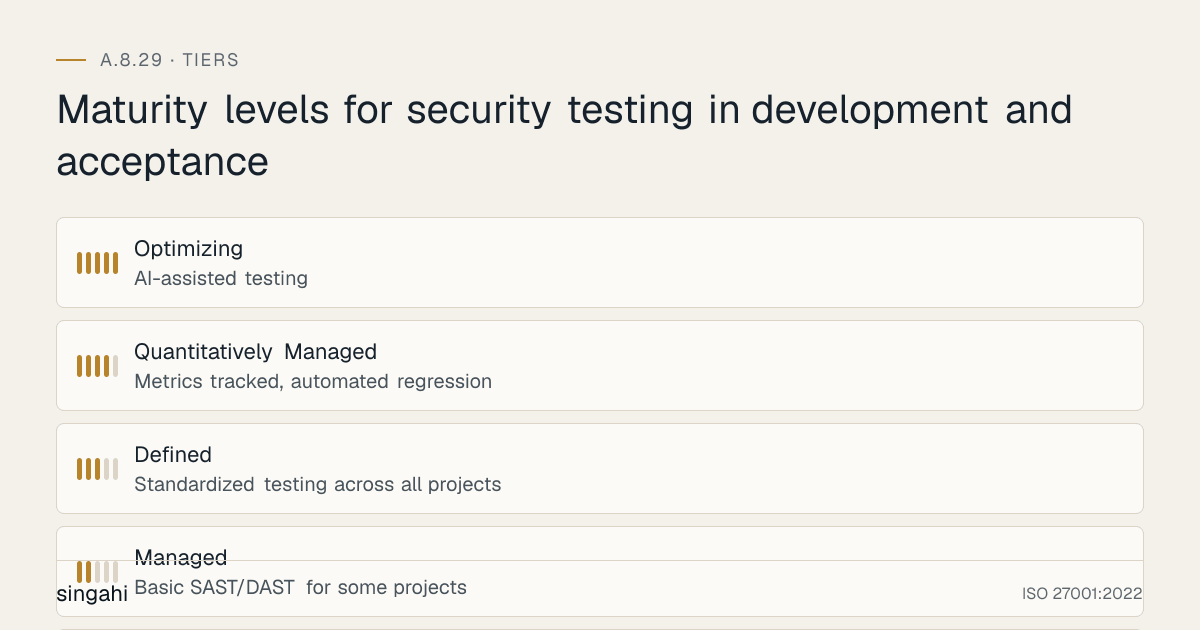
Figure · Tiers
Maturity levels for security testing in development and acceptance
Phase 1: Foundation (Weeks 1–3)
Week 1: Policy and Scope Definition
- Draft the Security Testing Policy
- Define testing scope (what applications, what types of testing)
- Define testing triggers (new app, major change, periodic, emergency patch)
- Establish risk-based testing tiers
Week 2: Test Strategy and Tool Selection
- Select SAST, DAST, SCA tools for automated testing
- Define manual testing approach (penetration testing, red teaming)
- Create the Security Test Plan template
- Define acceptance criteria and security sign-off process
Week 3: Baseline and Environment Setup
- Establish testing environments (staging, pre-production)
- Run baseline SAST/DAST on existing applications
- Create vulnerability inventory
- Set up testing tools and integrate with CI/CD
Deliverables: Security Testing Policy, Test Strategy, Tool Selection, Baseline Report, Test Environment
Phase 2: Pilot (Weeks 4–6)
Week 4-5: Pilot Application Testing
- Select one critical application for pilot security testing
- Conduct full security testing: SAST, DAST, SCA, manual penetration test
- Document findings and create remediation plan
- Validate acceptance criteria process
Week 6: Process Refinement
- Refine test plan template based on pilot findings
- Update acceptance criteria thresholds
- Improve vulnerability triage process
- Train testers on tools and methodology
Deliverables: Pilot Test Report, Remediation Plan, Updated Templates, Trained Testers
Phase 3: Rollout (Weeks 7–12)
Week 7-9: Organization-Wide Deployment
- Apply security testing to all new applications and major changes
- Integrate SAST/SCA into all CI/CD pipelines
- Establish DAST scheduling for all staging environments
- Implement security acceptance gates
Week 10-12: Manual Testing Program
- Establish penetration testing schedule (quarterly for critical, annually for high)
- Engage external penetration testers for independent validation
- Implement red team exercises for critical applications
- Create vulnerability remediation workflow
Deliverables: Organization-wide testing, CI/CD integration, Penetration Testing Schedule, Remediation Workflow
Phase 4: Optimization (Weeks 13–16)
Week 13-14: Metrics and Monitoring
- Define and collect KPIs (see Section 13)
- Conduct first internal audit of testing process
- Identify gaps and improvement opportunities
Week 15-16: Continuous Improvement
- Implement automated regression testing
- Add fuzzing and advanced testing for critical apps
- Integrate threat intelligence into testing (new CVEs trigger new tests)
- Update testing methodology with emerging techniques
Deliverables: KPI Dashboard, Internal Audit Report, Automated Regression, Updated Methodology
Maturity Model
| Level | Description | Typical Timeline |
|---|---|---|
| 1, Ad-hoc | No systematic testing, occasional penetration tests, no integration | Pre-implementation |
| 2, Managed | Basic SAST/DAST for some projects, annual pen testing, manual process | Weeks 1–3 |
| 3, Defined | Standardized testing across all projects, CI/CD integration, risk-based testing, acceptance criteria | Weeks 4–8 |
| 4, Quantitatively Managed | Metrics tracked, automated regression, integrated IAST, continuous testing | Weeks 9–12 |
| 5, Optimizing | AI-assisted testing, predictive vulnerability detection, chaos engineering for security, automated red teaming | Ongoing |
Detailed Implementation Guidance
Security Testing Lifecycle
The security testing lifecycle follows these phases:
Plan Tests → Prepare Environment → Execute Tests → Analyze Results →
Report Findings → Remediate Vulnerabilities → Re-test → Sign Off → Deploy
Phase 1: Plan Security Tests
For every application or major change, define:
Testing Scope:
- What components will be tested (frontend, backend, API, database, infrastructure)
- What types of testing will be performed (SAST, DAST, SCA, manual, fuzzing)
- What will NOT be tested (scope exclusions)
Testing Triggers:
- New application: Full testing suite (SAST + DAST + SCA + penetration test)
- Major enhancement: SAST + DAST + targeted manual testing for changed components
- Minor change: SAST + automated regression testing
- Emergency patch: Smoke testing + targeted SAST for patch area
- Periodic: Full DAST + penetration test (quarterly/annually)
Risk-Based Testing Tiers:
| Risk Tier | SAST | DAST | SCA | Manual Pen Test | Frequency |
|---|---|---|---|---|---|
| Critical | Every commit | Weekly | Daily | Quarterly | Continuous |
| High | Every commit | Bi-weekly | Daily | Bi-annually | Per release |
| Medium | Every commit | Monthly | Weekly | Annually | Per release |
| Low | Every commit | Quarterly | Weekly | As needed | Per major release |
Phase 2: Prepare Testing Environment
Environment Requirements:
- Testing environment must mirror production (same OS, same versions, same configurations)
- Test data must be representative but not production data (see A.8.33)
- Testing environment must be isolated from production
- Test environment must have appropriate monitoring and logging
- Access to testing environment must be controlled (testers only)
Test Data Preparation:
- Use synthetic data that covers edge cases, boundary conditions, and attack patterns
- Include known malicious inputs for injection and XSS testing
- Include oversized inputs for buffer overflow and DoS testing
- Include encoded/escaped inputs for filter evasion testing
Tool Configuration:
- SAST rules tuned for the technology stack
- DAST scan configured with authentication credentials
- SCA configured with the organization's vulnerability thresholds
- Penetration testing tools updated to latest versions
Phase 3: Execute Security Tests
Automated Testing (CI/CD):
Developer Commit → Build → Unit Tests → SAST → SCA → Integration Tests →
Deploy to Staging → DAST → Security Smoke Test → Report Findings
SAST Execution:
- Run on every commit/merge request
- Scan all source files in the application
- Scan infrastructure as code (Terraform, CloudFormation, Kubernetes YAML)
- Generate SARIF output for integration with GitHub/GitLab security dashboards
- Block build on critical/high findings (configurable threshold)
DAST Execution:
- Run on staging environment after deployment
- Authenticated scanning (with test credentials for all user roles)
- Crawl all application paths and API endpoints
- Test for OWASP Top 10 vulnerabilities
- Generate report with exploitability assessment
SCA Execution:
- Run on every build
- Scan all dependency files (package.json, requirements.txt, pom.xml, etc.)
- Check against vulnerability databases (NVD, OSV, GitHub Advisory Database)
- Block build on critical CVEs above threshold
- Generate SBoM for compliance
Manual Testing:
- Penetration Testing: Simulated attack by certified ethical hackers
- Business Logic Testing: Testing for flaws that automated tools cannot find (race conditions, workflow bypasses, privilege escalation)
- API Testing: Specialized testing for REST, GraphQL, SOAP APIs
- Mobile Testing: Testing for mobile-specific vulnerabilities (insecure storage, certificate pinning, code obfuscation)
- Social Engineering Testing: Testing human vulnerabilities (phishing, pretexting) as part of red team exercises
Fuzzing:
- Input fuzzing for API endpoints, file uploads, and form fields
- Protocol fuzzing for network services
- Format fuzzing for file parsers (PDF, XML, JSON, images)
- Memory fuzzing for C/C++ applications (AFL, libFuzzer)
Phase 4: Analyze Results
Vulnerability Triage:
- Validate findings: Confirm that automated findings are real (not false positives)
- Assess severity: Use CVSS v3.1 or custom scoring based on exploitability, impact, and likelihood
- Assess business impact: Consider data sensitivity, regulatory requirements, and business criticality
- Prioritize for remediation: Critical and high findings first, then medium, then low
Severity Classification:
| Severity | CVSS Score | Action Required | Timeline |
|---|---|---|---|
| Critical | 9.0-10.0 | Immediate fix, block deployment | 24 hours |
| High | 7.0-8.9 | Fix before deployment or risk acceptance | 7 days |
| Medium | 4.0-6.9 | Fix in next release | 30 days |
| Low | 0.1-3.9 | Fix when convenient | 90 days |
| Informational | 0.0 | Document, no fix required | N/A |
False Positive Management:
- Document false positives with justification
- Suppress in tool with documented reason
- Review suppression decisions quarterly
- Track false positive rate as a KPI
Phase 5: Report Findings
Security Test Report Contents:
- Executive summary (risk score, critical findings count, go/no-go recommendation)
- Testing scope and methodology
- Findings detailed report (vulnerability description, severity, evidence, impact, remediation)
- Vulnerability matrix (all findings with severity and status)
- Remediation guidance (specific, actionable steps with code examples where applicable)
- Risk acceptance documentation (for findings that will not be fixed)
- Re-testing results (for remediated findings)
- Security sign-off (or conditions for sign-off)
Phase 6: Remediate Vulnerabilities
Remediation Workflow:
- Vulnerability assigned to development team
- Developer fixes the vulnerability
- Fix verified by peer review
- Re-test to confirm fix (automated or manual)
- Vulnerability closed in tracking system
- Metrics updated
Risk Acceptance:
- If a vulnerability cannot be fixed within timeline, risk acceptance is required
- Risk acceptance requires documented justification, compensating controls, and approver
- Critical vulnerabilities require CISO approval for risk acceptance
- Risk acceptance is reviewed quarterly
Phase 7: Re-test
- All remediated critical/high vulnerabilities must be re-tested
- Re-testing can be automated (SAST/DAST) or manual (penetration test)
- Re-test confirms the fix works and doesn't introduce new vulnerabilities
- Re-test results are documented in the final report
Phase 8: Security Sign-off and Deployment
Security Sign-off Criteria:
- All critical vulnerabilities are remediated or risk-accepted with CISO approval
- All high vulnerabilities are remediated or risk-accepted with security lead approval
- Medium and low vulnerabilities are tracked for future remediation
- Security test report is complete and approved
- Acceptance criteria are met
Go/No-Go Decision:
- Go: Security sign-off obtained, application approved for deployment
- No-Go: Critical vulnerabilities remain unaddressed, deployment delayed until fixed
- Go with Conditions: Deployment approved with monitoring, compensating controls, or accelerated remediation timeline
Types of Security Testing
Static Application Security Testing (SAST)
When: During development, on every commit/merge request
What: Source code analysis for vulnerability patterns
Strengths: Finds code-level issues early, integrates into CI/CD, covers all code paths
Weaknesses: High false positive rate, cannot find runtime issues, cannot test business logic
Best Practices:
- Tune rules for your technology stack
- Suppress false positives with documented justification
- Use high-confidence rules for build blocking
- Train developers to interpret and fix SAST findings
- Track SAST coverage (percentage of code scanned)
Dynamic Application Security Testing (DAST)
When: On staging/pre-production environment, after deployment
What: Runtime testing by simulating attacks against running application
Strengths: Finds runtime issues, tests actual deployed configuration, low false positives
Weaknesses: Cannot find code-level issues, limited coverage of application paths, requires running environment
Best Practices:
- Use authenticated scanning for full coverage
- Configure scan to cover all user roles and API endpoints
- Run DAST after every deployment to staging
- Integrate DAST results into vulnerability tracking system
- Use DAST to validate SAST findings (are they actually exploitable?)
Software Composition Analysis (SCA)
When: During build, on every dependency change
What: Analysis of third-party libraries and frameworks for known vulnerabilities
Strengths: Finds known CVEs, easy to automate, low false positives
Weaknesses: Only finds known vulnerabilities, cannot find custom code issues, license compliance focus
Best Practices:
- Integrate into CI/CD pipeline
- Block builds on critical CVEs
- Use automated dependency updates (Dependabot, Renovate)
- Generate SBoM for compliance and audit
- Monitor for new CVEs affecting your dependencies
Interactive Application Security Testing (IAST)
When: During functional testing, in testing environment
What: Instrumented testing that combines SAST and DAST by monitoring application during runtime
Strengths: High accuracy, low false positives, finds both code and runtime issues, integrates with functional testing
Weaknesses: Requires application instrumentation, may impact performance, requires running application
Best Practices:
- Integrate with QA functional testing
- Use for critical applications where accuracy is paramount
- Combine with SAST and DAST for complete coverage
- Monitor performance impact during testing
Manual Penetration Testing
When: Before acceptance for critical/high-risk applications, quarterly/annually for ongoing applications
What: Simulated cyberattack by certified ethical hackers
Strengths: Finds business logic flaws, validates real-world exploitability, tests human factors, provides context
Weaknesses: expensive, time-consuming, point-in-time, cannot test all paths
Best Practices:
- Use certified testers (certified, GPEN, GWAPT)
- Define scope clearly (in-scope/out-of-scope)
- Include both black box (no knowledge) and white box (full knowledge) testing
- Test for business logic vulnerabilities (automated tools cannot find these)
- Include social engineering if scope allows
- Conduct re-test after remediation
- Obtain independent testing for compliance (PCI DSS, RBI)
API Security Testing
When: For every API release, after deployment to staging
What: Specialized testing for REST, GraphQL, SOAP, and gRPC APIs
Focus Areas:
- Authentication and authorization (JWT, OAuth, API keys, mTLS)
- Input validation (JSON schema validation, content-type enforcement)
- Rate limiting and throttling bypass
- Mass assignment, injection, and deserialization
- Business logic flaws (BOLA, Broken Object Level Authorization)
- Error handling and information disclosure Tools: OWASP ZAP, Postman + security tests, Burp Suite, RESTler, Nuclei
Mobile Security Testing
When: For every mobile app release, before app store submission
What: Specialized testing for iOS and Android applications
Focus Areas:
- Local storage security (keychain, shared preferences, SQLite)
- Network security (certificate pinning, TLS, intercepting proxy)
- Code obfuscation and anti-tampering
- Biometric authentication implementation
- Deep linking and intent handling
- Clipboard and keyboard security
- Screenshot and screen recording protection Tools: MobSF, Frida, Objection, Burp Suite Mobile Assistant, QARK
AI/ML Security Testing
When: For every AI/ML model release, before deployment to production
What: Specialized testing for AI/ML applications
Focus Areas:
- Adversarial strength (evasion attacks, poisoning attacks)
- Model extraction and inversion attacks
- Prompt injection (for LLMs)
- Data leakage in training data
- Bias and fairness testing
- Model drift and performance degradation
- RAG/Vector DB security (retrieval filtering, access control) Tools: Foolbox, ART (Adversarial Strength Toolbox), CleverHans, TextAttack, Giskard
Fuzzing
When: For critical input handlers, file parsers, and API endpoints
What: Automated testing with random, malformed, or unexpected inputs
Types:
- Black-box fuzzing: No knowledge of internal structure
- White-box fuzzing: Knowledge of code structure (coverage-guided)
- Mutation-based fuzzing: Mutates existing valid inputs
- Generation-based fuzzing: Generates inputs from protocol/format specification Tools: AFL, libFuzzer, Peach Fuzzer, Boofuzz, RESTler, jsfuzz
Security Regression Testing
When: After every code change, before every deployment
What: Testing to ensure that changes have not broken existing security controls or introduced new vulnerabilities
Approach:
- Automated security unit tests for critical security functions
- Automated DAST baseline comparison (compare current scan to previous scan)
- Automated SAST comparison (new findings since last scan)
- Automated SCA comparison (new vulnerabilities since last build)
- Manual regression testing for security-critical workflows
API and Mobile Testing
Most Indian fintech and edtech products are API- and mobile-first. Add:
- APIs: test against the OWASP API Security Top 10 (broken object-level authorisation, broken authentication, excessive data exposure, lack of rate limiting, mass assignment and others). Test every endpoint with each role, and with no token.
- Mobile: test against OWASP MASVS using the MASTG: local data storage, certificate validation, root/jailbreak handling, hard-coded secrets in the app package, and the APIs the app calls.
Security Acceptance Criteria
Before an application is accepted into production, the following criteria must be met:
| Criterion | Requirement | Verification Method |
|---|---|---|
| SAST Pass | Zero critical findings, high findings below threshold | SAST report |
| DAST Pass | Zero critical findings, high findings below threshold | DAST report |
| SCA Pass | Zero critical CVEs, high CVEs below threshold | SCA report |
| Penetration Test | No critical findings, all high findings remediated or risk-accepted | Pen test report |
| Only as expected | Negative and abuse-case tests show the system rejects what it should not do (unexpected inputs, privilege escalation, business-logic abuse) | Abuse-case test results |
| Remediation verified | Every fixed finding retested and closed | Retest report |
| Production-like environment | Tests ran in an environment matching production configuration | Environment record |
| Security Requirements | All "must" security requirements are implemented and tested | Requirements traceability matrix |
| Authentication | Authentication works correctly for all user roles | Functional security test |
| Authorization | Authorization enforced correctly for all resources | Access control test |
| Input Validation | All input validation is working correctly | Input validation test |
| Output Encoding | All output encoding is working correctly | XSS test |
| Session Management | Session timeout, rotation, invalidation work correctly | Session test |
| Cryptography | Encryption in transit and at rest is working correctly | Cryptography test |
| Logging | Security events are logged correctly | Log review |
| Error Handling | Error handling does not expose sensitive information | Error handling test |
| Configuration | Production configuration is secure (no debug mode, no default credentials) | Configuration review |
| Dependencies | All dependencies are up-to-date and vulnerability-free | SCA report |
| Performance | Security controls do not degrade performance beyond acceptable thresholds | Performance test |
| Compliance | All regulatory requirements are met | Compliance checklist |
Tools, Technologies, and Solutions
SAST Tools
| Tool | Languages | Best For |
|---|---|---|
| SonarQube | 25+ | Code quality + security, CI/CD integration |
| Checkmarx | 25+ | Enterprise, deep analysis |
| Fortify | 25+ | Enterprise, complete |
| CodeQL | 10+ | GitHub-native, deep analysis |
| Bandit | Python | Python-specific, fast |
| Brakeman | Ruby | Ruby on Rails |
| ESLint Security Plugin | JavaScript | JS/Node.js |
| gosec | Go | Go-specific |
| SpotBugs (FindSecBugs) | Java | Java-specific |
| SonarCloud | 25+ | Cloud-based, SaaS |
DAST Tools
| Tool | Best For | Pricing model |
|---|---|---|
| OWASP ZAP | Free, web apps, CI/CD | Free |
| Netsparker (Invicti) | Accurate, automated, CI/CD | Commercial |
| Nuclei | Fast, template-based, CI/CD | Free / Commercial |
| Probely | API security, developer-friendly | Commercial |
| AppSpider | Enterprise, complete | Enterprise pricing |
| CrackMapExec | Network + application | Free |
| W3AF | Open source, web application | Free |
SCA Tools
| Tool | Best For | Pricing model |
|---|---|---|
| OWASP Dependency-Check | Free, open source, multi-language | Free |
| Sonatype Nexus Lifecycle | Enterprise, policy enforcement | Enterprise pricing |
| WhiteSource (Mend) | Enterprise, complete | Enterprise pricing |
| GitHub Dependabot | GitHub-native, automatic PRs | Free |
| Renovate | Open source, multi-platform | Free |
| FOSSA | Compliance-focused | Free / Commercial |
| Black Duck | Enterprise, deep analysis | Enterprise pricing |
| Jfrog Xray | Artifact repository integration | Commercial |
IAST Tools
| Tool | Best For | Pricing model |
|---|---|---|
| Contrast Security | IAST + RASP, developer-friendly | Commercial |
| Hdiv | IAST + RASP, Java | Commercial |
| Seeker | IAST, enterprise | Enterprise pricing |
| Checkmarx IAST | IAST, enterprise | Enterprise pricing |
| AcuSensor | Acunetix IAST, web apps | Commercial |
Penetration Testing Tools
| Tool | Best For |
|---|---|
| Cobalt Strike | Red team operations, adversary simulation |
| Nmap | Network scanning, port scanning |
| OpenVAS | Open source vulnerability scanning |
| SQLMap | SQL injection testing |
| XSStrike | XSS testing |
| Commix | Command injection testing |
| FFUF | Fast web fuzzer |
| Gobuster | Directory and file brute-forcing |
| Amass | Attack surface mapping |
| Recon-ng | Web reconnaissance |
API Security Testing Tools
| Tool | Best For | Pricing model |
|---|---|---|
| Postman | API testing + security tests | Free / Pro |
| OWASP ZAP | API scanning, free | Free |
| RESTler | REST API fuzzing, Microsoft | Free |
| Nuclei | API vulnerability scanning | Free / Commercial |
| 42Crunch | API security platform | Commercial |
| Kong Security | API gateway security | Commercial |
Mobile Security Testing Tools
| Tool | Best For |
|---|---|
| MobSF | Mobile security framework, automated |
| Frida | Dynamic instrumentation, mobile |
| Objection | Mobile runtime exploration |
| QARK | Android security testing |
| Needle | iOS security testing |
| AppSweep | Mobile app security scanning |
| NowSecure | Mobile app security platform |
AI/ML Security Testing Tools
| Tool | Best For |
|---|---|
| Foolbox | Adversarial strength, Python |
| ART (Adversarial Strength Toolbox) | IBM, complete |
| CleverHans | Adversarial examples, Google |
| TextAttack | NLP adversarial testing |
| Giskard | ML model testing, bias, strength |
| Strength Gym | NLP strength testing |
| CheckList | NLP behavioral testing |
| MLflow | ML lifecycle + security tracking |
Fuzzing Tools
| Tool | Best For |
|---|---|
| AFL (American Fuzzy Lop) | Coverage-guided fuzzing, C/C++ |
| libFuzzer | In-process fuzzing, LLVM |
| Peach Fuzzer | Protocol fuzzing, enterprise |
| Boofuzz | Network protocol fuzzing |
| RESTler | REST API fuzzing, Microsoft |
| jsfuzz | JavaScript fuzzing |
| ClusterFuzz | Google, scalable fuzzing |
| Honggfuzz | Multi-platform fuzzing |
| Syzkaller | OS kernel fuzzing |
Policy and Procedure Templates
Security Testing Policy (Template)
Template
Security Testing Policy
Document ID: POL-SEC-TEST-001 Version: 1.0 Effective Date: [DATE] Owner: CISO / Security Lead Approved By: [Name], [Title] Review Cycle: Annual
1. Purpose
This policy establishes the requirement for security testing of all software applications during development and before acceptance into production.
2. Scope
This policy applies to:
- All new applications developed, acquired, or customized
- Major enhancements to existing applications
- Integration projects and API releases
- Cloud-native, mobile, and AI/ML applications
- Infrastructure as Code changes
- Security patches and emergency fixes
3. Policy Statements
3.1 Security Testing Requirements
- All applications must undergo security testing before acceptance into production.
- Security testing must be risk-based, with more rigorous testing for critical/high-risk applications.
- Testing must include automated testing (SAST, DAST, SCA) and manual testing (penetration testing) where required.
- Testing must be integrated into the SDLC and CI/CD pipeline.
3.2 Testing Types and Triggers
- SAST: Run on every commit/merge request for all applications.
- DAST: Run on staging environment after every deployment.
- SCA: Run on every build for all dependencies.
- Penetration Testing: Conducted quarterly for critical applications, bi-annually for high-risk, annually for medium-risk.
- API Testing: Conducted for every API release.
- Mobile Testing: Conducted for every mobile app release.
- AI/ML Testing: Conducted for every model release.
- Regression Testing: Conducted after every code change.
3.3 Acceptance Criteria
- Applications must meet defined security acceptance criteria before deployment.
- Critical vulnerabilities must be remediated before deployment (no exceptions).
- High vulnerabilities must be remediated or risk-accepted before deployment.
- Risk acceptance requires documented justification and security lead approval.
- Security sign-off is required before production deployment.
3.4 Vulnerability Management
- All vulnerabilities found during testing must be tracked and remediated.
- Remediation SLAs:
- Critical: 24 hours
- High: 7 days
- Medium: 30 days
- Low: 90 days
- Vulnerabilities must be re-tested after remediation.
- False positives must be documented and suppressed with justification.
3.5 Testing Environment
- Testing must be conducted in environments separate from production.
- Test environments must mirror production configuration.
- Test data must be protected and not use production data (see A.8.33).
- Testing must not compromise production systems or data.
3.6 Outsourced Testing
- External penetration testing must be conducted by certified testers (certified, or equivalent).
- Vendor testing must follow this policy and use approved methodologies.
- External testing requires legal agreements (scope, liability, confidentiality).
3.7 Documentation and Reporting
- All testing must be documented with scope, methodology, findings, and remediation.
- Security test reports must be retained for the period in the retention schedule.
- Executive summaries must be provided to management for critical applications.
4. Roles and Responsibilities
- CISO: Owns the policy, ensures compliance, approves risk acceptance for critical
- Security Lead: Defines testing strategy, selects tools, manages external testers
- QA Lead: Integrates security testing into QA processes, validates fixes
- Development Lead: Ensures vulnerabilities are remediated within SLA
- DevOps Lead: Integrates testing into CI/CD, maintains testing environments
- Security Tester: Executes tests, documents findings, verifies remediation
- Developer: Fixes vulnerabilities, participates in re-testing
5. Exceptions
Exceptions require written CISO approval with documented risk acceptance and compensating controls.
6. Enforcement
Non-compliance may result in blocked deployments, audit findings, or disciplinary action.
7. Related Documents
- Secure Coding Policy (POL-SEC-CODE-001)
- Secure Development Life Cycle Policy (POL-SDLC-001)
- Application Security Requirements Policy (POL-APP-SEC-001)
- Vulnerability Management Policy (POL-VULN-001)
8. Revision History
| Version | Date | Author | Changes |
|---|---|---|---|
| 1.0 | [DATE] | [Name] | Initial version |
Security Test Plan Template (Template)
Template
Security Test Plan
Document ID: STP-[APP]-[VERSION] Application: [Application Name] Version: [Version Number] Date: [Date] Tester: [Name] Approver: [Name]
1. Scope
- In Scope: [Components to be tested]
- Out of Scope: [Components excluded from testing]
- Testing Types: [SAST, DAST, SCA, Penetration Test, API Test, etc.]
2. Testing Environment
- Environment: [Staging URL, API endpoints, mobile app build]
- Test Data: [Description of test data used]
- Credentials: [Test accounts for all user roles]
- Tools: [List of testing tools and versions]
3. Testing Schedule
| Activity | Start Date | End Date | Owner |
|---|---|---|---|
| SAST | [Date] | [Date] | [Name] |
| DAST | [Date] | [Date] | [Name] |
| SCA | [Date] | [Date] | [Name] |
| Penetration Test | [Date] | [Date] | [Name] |
| Remediation | [Date] | [Date] | [Name] |
| Re-test | [Date] | [Date] | [Name] |
4. Inputs, Expected Outputs and Evaluation Criteria
| Test | Inputs / conditions | Expected output | Pass criteria |
|---|---|---|---|
| [e.g. login brute force] | [100 wrong passwords] | [Account locked; alert raised] | [Lock within N attempts] |
| [e.g. access another user's record] | [Valid token, other user's ID] | [403] | [No data returned] |
5. Acceptance Criteria
- Zero critical vulnerabilities
- Maximum [X] high vulnerabilities (must be risk-accepted)
- All medium vulnerabilities tracked for remediation
- Security sign-off obtained
6. Next Actions
- [Decision: accept, fix and retest, or risk-accept; owner; date]
7. Risks and Assumptions
- [List any risks or assumptions that may affect testing]
8. Approval
| Role | Name | Signature | Date |
|---|---|---|---|
| Security Lead | |||
| Development Lead | |||
| QA Lead |
Risk Assessment and Treatment
Risk Assessment for Security Testing
| Risk ID | Risk Description | Likelihood | Impact | Risk Level | Mitigation |
|---|---|---|---|---|---|
| R-001 | Security testing is skipped to meet deadlines | High | High | Critical | Non-bypassable testing gates, management commitment, metrics visibility |
| R-002 | Testing environment does not mirror production | Medium | High | High | Environment parity checklist, automated environment validation, infrastructure as code |
| R-003 | False positives from SAST cause alert fatigue | High | Medium | High | Rule tuning, false positive suppression, developer training, threshold management |
| R-004 | Penetration testing scope is incomplete | Medium | High | High | Scope definition checklist, complete scoping workshop, threat model-driven testing |
| R-005 | Vulnerabilities are not remediated within SLA | Medium | High | High | SLA enforcement, automated tracking, escalation process, management reporting |
| R-006 | Testing tools are outdated or misconfigured | Medium | High | High | Tool maintenance schedule, regular updates, configuration review, tool validation |
| R-007 | Testers lack skills for advanced testing | Medium | High | High | Tester certification requirements, training program, external expertise for advanced testing |
| R-008 | API security testing is overlooked | Medium | High | High | API testing checklist, automated API security scanning, dedicated API testing in scope |
| R-009 | Mobile security testing is overlooked | Medium | High | High | Mobile testing checklist, mobile-specific tools, dedicated mobile testing in scope |
| R-010 | AI/ML security testing is not performed | Medium | High | High | AI/ML testing guidelines, specialized tools, adversarial testing requirements |
Risk Treatment Options
| Risk | Treatment | Residual Risk |
|---|---|---|
| R-001 | Mandatory gates + governance + metrics | Low |
| R-002 | Environment parity + IaC + validation | Low |
| R-003 | Tuning + training + threshold management | Low |
| R-004 | Scope checklist + workshop + threat model | Low |
| R-005 | SLA enforcement + automated tracking | Low |
| R-006 | Maintenance schedule + configuration review | Low |
| R-007 | Certification + training + external expertise | Low |
| R-008 | API checklist + automated scanning | Low |
| R-009 | Mobile checklist + specialized tools | Low |
| R-010 | AI/ML guidelines + specialized testing | Low |
Audit and Compliance Checklist
Pre-Audit Self-Assessment
| # | Question | Evidence | Status |
|---|---|---|---|
| 1 | Is there a documented Security Testing Policy? | Policy document | ☐ |
| 2 | Is security testing performed before production deployment? | Test records | ☐ |
| 3 | Is SAST integrated into CI/CD? | CI/CD pipeline config | ☐ |
| 4 | Is DAST performed on staging environments? | DAST reports | ☐ |
| 5 | Is SCA performed for dependencies? | SCA reports | ☐ |
| 6 | Is penetration testing conducted for critical applications? | Pen test reports | ☐ |
| 7 | Are security acceptance criteria defined? | Acceptance criteria document | ☐ |
| 8 | Is security sign-off required before deployment? | Sign-off records | ☐ |
| 9 | Are vulnerabilities tracked to remediation? | Vulnerability tracking system | ☐ |
| 10 | Are remediation SLAs defined and enforced? | SLA document + tracking | ☐ |
| 11 | Are test environments separate from production? | Environment documentation | ☐ |
| 12 | Are test results documented and retained? | Test reports | ☐ |
| 13 | Is regression testing performed after changes? | Regression test records | ☐ |
| 14 | Are external testers certified? | Tester certifications | ☐ |
| 15 | Is API security testing performed? | API test records | ☐ |
| 16 | Is mobile security testing performed? | Mobile test records | ☐ |
| 17 | Is AI/ML security testing performed? | AI/ML test records | ☐ |
| 18 | Are false positives managed? | False positive records | ☐ |
| 19 | Is testing integrated into the SDLC? | SDLC documentation | ☐ |
| 20 | Are testers trained on security testing? | Training records | ☐ |
| 21 | Is fuzzing performed for critical applications? | Fuzzing records | ☐ |
| 22 | Are security unit tests written? | Unit test records | ☐ |
| 23 | Is there a process for emergency patch testing? | Emergency test procedure | ☐ |
| 24 | Are testing tools maintained and updated? | Tool maintenance records | ☐ |
| 25 | Are testing metrics tracked? | Metrics dashboard | ☐ |
| 26 | Are vendor applications tested before acceptance? | Vendor test records | ☐ |
| 27 | Are test results communicated to stakeholders? | Communication records | ☐ |
| 28 | Is there a risk acceptance process for vulnerabilities? | Risk acceptance records | ☐ |
| 29 | Are testing findings used to improve development? | Improvement records | ☐ |
| 30 | Are testing environments protected? | Environment security records | ☐ |
Auditor Interview Questions
Be prepared to answer:
- "What security testing is performed before applications go live?"
- "Can you show me the security test report for [application]?"
- "Who approves security testing results?"
- "What happens if critical vulnerabilities are found before go-live?"
- "How do you handle false positives from automated testing?"
- "Are external penetration testers used? What are their qualifications?"
- "How do you test API security?"
- "How do you test mobile application security?"
- "Are security tests repeated after vulnerability remediation?"
- "How do you ensure testing environments don't compromise production?"
Common Audit Findings and How to Avoid Them
| Finding | Cause | Prevention |
|---|---|---|
| "No security testing before deployment" | Process gap | Mandatory testing gates, non-bypassable |
| "SAST not integrated into CI/CD" | Tool gap | CI/CD integration, automated enforcement |
| "No penetration testing conducted" | Budget/process gap | Scheduled pen testing, budget allocation |
| "Vulnerabilities not tracked to closure" | Tracking gap | Vulnerability management system, SLA enforcement |
| "No security acceptance criteria" | Criteria gap | Define and enforce acceptance criteria |
| "Test environment mirrors production" | Environment gap | Environment parity checklist, IaC |
| "No security sign-off before deployment" | Governance gap | Mandatory sign-off process |
| "False positives not managed" | Management gap | False positive process, suppression with justification |
| "Outdated testing tools" | Maintenance gap | Tool maintenance schedule, regular updates |
| "No regression testing" | Testing gap | Automated regression testing, change management |
Metrics and KPIs
Figure · Measures
The measures that show A.8.29 is working
- Testing Coverage100%Monthly
- SAST Coverage100%Monthly
- DAST Coverage100%Monthly
- SCA Coverage100%Monthly
- Pen Test Coverage100%Quarterly
Process Metrics
| Metric | Formula | Target | Frequency |
|---|---|---|---|
| Testing Coverage | (# of apps tested / # of apps deployed) × 100 | 100% | Monthly |
| SAST Coverage | (# of apps with SAST / # of apps) × 100 | 100% | Monthly |
| DAST Coverage | (# of apps with DAST / # of apps) × 100 | 100% | Monthly |
| SCA Coverage | (# of apps with SCA / # of apps) × 100 | 100% | Monthly |
| Pen Test Coverage | (# of critical/high apps with pen test / # of critical/high apps) × 100 | 100% | Quarterly |
| Security Sign-off Rate | (# of apps with sign-off / # of apps deployed) × 100 | 100% | Monthly |
| Vulnerability SLA Compliance | (# of vulns fixed within SLA / # of vulns) × 100 | > 90% | Monthly |
| False Positive Rate | (# of false positives / # of SAST findings) × 100 | < 20% | Quarterly |
| Re-test Rate | (# of remediated vulns re-tested / # of remediated vulns) × 100 | 100% | Monthly |
| Testing Cycle Time | Average days from test start to security sign-off | < 10 days | Per release |
Outcome Metrics
| Metric | Formula | Target | Frequency |
|---|---|---|---|
| Production Vulnerability Rate | Critical/high vulnerabilities found in production per quarter | < 2 | Quarterly |
| Vulnerability Density | Critical/high vulnerabilities per 1000 LOC | < 0.5 | Per release |
| Mean Time to Remediate (MTTR) | Average days from discovery to fix | < 7 days (critical) | Monthly |
| Exploitation Rate | (# of exploited vulnerabilities / # of vulnerabilities found) × 100 | < 5% | Quarterly |
| Compliance Audit Findings | Testing-related audit findings | 0 | Per audit |
| Security Test Pass Rate | (# of apps passing acceptance criteria / # of apps tested) × 100 | > 95% | Monthly |
| Cost of Testing | Cost of security testing per application | Decreasing | Quarterly |
| Tester Productivity | (# of vulnerabilities found / # of tester hours) | Track trend | Monthly |
| Time to Security Sign-off | Average days from test completion to sign-off | < 3 days | Monthly |
| Customer-Reported Vulnerabilities | Vulnerabilities reported by customers or external researchers | < 2 per quarter | Quarterly |
Dashboard Sample
┌─────────────────────────────────────────────────────────────────────┐
│              SECURITY TESTING IN DEVELOPMENT & ACCEPTANCE           │
│                    [Organization] — [Month Year]                    │
├─────────────────────────────────────────────────────────────────────┤
│  TESTING COVERAGE: 100%      ██████████████████████  Target: 100%  │
│  SAST COVERAGE: 100%         ██████████████████████  Target: 100%  │
│  DAST COVERAGE: 98%          ████████████████████░░  Target: 100%  │
│  SCA COVERAGE: 100%          ██████████████████████  Target: 100%  │
│  SIGN-OFF RATE: 100%         ██████████████████████  Target: 100%  │
│  SLA COMPLIANCE: 94%         ███████████████████░░░  Target: 90%  │
│  PROD VULN RATE: 1/q       █░░░░░░░░░░░░░░░░░░░░  Target: <2/q  │
│  MTTR (CRITICAL): 3.2 days  ███░░░░░░░░░░░░░░░░░░  Target: <7   │
│  FALSE POSITIVE: 15%         ███░░░░░░░░░░░░░░░░░░  Target: <20% │
│  TEST PASS RATE: 96%         ████████████████████░░  Target: 95%  │
└─────────────────────────────────────────────────────────────────────┘
Common Pitfalls and How to Avoid Them
Pitfall 1: "Testing Slows Down Deployment"
Symptom: Security testing is skipped or rushed to meet deadlines.
Reality: Testing prevents production vulnerabilities that cost 100x more to fix. Automated testing in CI/CD adds minutes, not hours.
Solution:
- Automate testing in CI/CD (SAST, SCA run in minutes)
- Use parallel testing (DAST on staging while developers work on next feature)
- Streamline manual testing for low-risk changes
- Show time-to-fix data: testing vs. production
Pitfall 2: "We Only Need Penetration Testing"
Symptom: Organization relies solely on annual penetration tests.
Reality: Penetration testing is point-in-time and cannot cover all code changes. Automated testing (SAST, DAST, SCA) provides continuous coverage.
Solution:
- Use automated testing for continuous coverage
- Use penetration testing for deep, adversarial testing
- Combine both for complete security validation
- Test after every major change, not just annually
Pitfall 3: "Automated Tools Find Everything"
Symptom: Organization relies solely on SAST/DAST and skips manual testing.
Reality: Automated tools find known patterns but miss business logic flaws, race conditions, and novel vulnerabilities. Manual testing is essential.
Solution:
- Use automated tools for scale and consistency
- Use manual testing for business logic and adversarial scenarios
- Use red team exercises for realistic attack simulation
- Combine automated and manual for complete coverage
Pitfall 4: "We Tested It Once, It's Fine"
Symptom: Security testing is performed once at launch and never repeated.
Reality: New vulnerabilities are discovered constantly. Code changes, new dependencies, and new attack techniques create new risks.
Solution:
- Continuous testing in CI/CD (SAST on every commit, DAST on every deployment)
- Periodic penetration testing (quarterly for critical apps)
- Re-test when new CVEs affect your stack
- Annual complete security testing
Pitfall 5: "Test Environment Doesn't Matter"
Symptom: Testing is performed on environments that don't mirror production.
Reality: Vulnerabilities may be masked by configuration differences. A vulnerability in production may not be reproducible in a different environment.
Solution:
- Use Infrastructure as Code to ensure environment parity
- Validate environment configuration before testing
- Include configuration security testing in scope
- Test on production-like data volumes and loads
Pitfall 6: "We Only Test Our Code"
Symptom: Third-party components and APIs are not tested.
Reality: Third-party vulnerabilities are the #1 attack vector for many breaches. Log4j, Spring4Shell, and similar vulnerabilities were in third-party components.
Solution:
- SCA for all dependencies (every build)
- Penetration testing of third-party integrations
- Vendor security testing requirements
- Continuous monitoring for new CVEs affecting dependencies
Pitfall 7: "Vulnerabilities Can Wait"
Symptom: Medium and low vulnerabilities are never fixed.
Reality: Attack chains often combine medium vulnerabilities to achieve critical impact. Unpatched vulnerabilities accumulate into technical debt.
Solution:
- Fix all vulnerabilities within SLA, not just critical
- Use risk-based prioritization that considers attack chains
- Track vulnerability age as a KPI
- Include vulnerability remediation in sprint planning
Pitfall 8: "Security Testing Is the Security Team's Job"
Symptom: Developers write code and "throw it over the wall" to security for testing.
Reality: Developers who write code must own its security. Security testing validates developer work; it doesn't replace developer responsibility.
Solution:
- Developer-driven security testing (SAST in IDE, unit security tests)
- Security champion program
- Make security testing results visible to developers
- Reward teams with low vulnerability density
Illustrative Scenarios
Hypothetical scenarios: composite examples for guidance, not real organisations or verified outcomes.
Scenario 1: Personal-Finance App With No Pre-Release Testing
Situation. A fintech's mobile app and Node.js API have never been tested before release. The first external penetration test finds SQL injection and an authentication bypass in production.
What applying 8.29 looks like.
- SAST and SCA in CI; DAST against staging on every release candidate.
- A test plan per major release with inputs, expected outputs and pass criteria, including negative tests ("only as expected") for every API role.
- Mobile testing against MASVS and API testing against the OWASP API Security Top 10.
- An external VAPT before major releases; for RBI-regulated work, by a CERT-In-empanelled auditor where the direction requires it; every fix retested and closed.
Lesson. Testing finds problems only if it is planned, run before release, and followed by verified fixes.
Scenario 2: Hospital EHR Integrations
Situation. A hospital group is rolling out a new electronic health record with links to lab, pharmacy and insurer systems. The core application has been tested, but the integrations have not.
What applying 8.29 looks like.
- Risk-based test tiers: patient-data systems get SAST, DAST, SCA and penetration testing; integrations are tested as separately as the core.
- Acceptance criteria include logging of every patient-record access and negative tests on each integration.
- Testing in a production-like environment with masked data (A.8.33).
- Security sign-off before go-live, and regression tests for every update.
Lesson. Integration points are often the weakest part of a system, so test them as carefully as the core application.
Multi-Framework Mapping
Figure · Matrix
Comparison: SA-11 to CM-4
NIST SP 800-53 Rev 5 Mapping
| NIST Control | Description | A.8.29 Mapping |
|---|---|---|
| SA-11 | Developer testing and evaluation | Testing during development |
| SA-4 | Acquisition process | Evaluate purchased products against requirements |
| RA-5 | Vulnerability monitoring and scanning | Vulnerability scans |
| CA-8 | Penetration testing | Penetration testing |
| CM-4 | Impact analyses | Security regression testing for changes |
COBIT 2019 Mapping
| COBIT Practice | Description | A.8.29 Mapping |
|---|---|---|
| BAI03.07 | Prepare for solution testing | Test plans |
| BAI03.08 | Execute solution testing | Security testing |
| BAI07.05 | Perform acceptance tests | Independent acceptance testing |
PCI DSS v4.0.1 Mapping
| PCI DSS Requirement | Security Testing Focus |
|---|---|
| 6.2.3 | Code reviewed before release |
| 6.2.4 | Software engineering techniques prevent common attacks |
| 6.4.1–6.4.2 | Public-facing web applications protected (assessment or automated solution) |
| 6.4.3 | Payment-page scripts authorised and integrity-checked |
| 11.3 | Internal and external vulnerability scanning |
| 11.4 | Penetration testing (11.4.5 segmentation testing) |
DPDP Act 2023: Testing Implications
| DPDP Act Section | Security Testing Implication |
|---|---|
| Section 8(5) | Reasonable security safeguards, testing must validate safeguards |
| Section 8(4) | Appropriate technical and organisational measures, testing validates design implementation |
| Section 8(6) | Personal data breach intimation, testing validates breach detection |
OWASP SAMM Mapping
| SAMM Practice | Maturity Level | A.8.29 Mapping |
|---|---|---|
| Verification - Security Testing | Level 1-3 | SAST, DAST, pen testing, security test cases |
| Verification - Architecture Assessment | Level 1-3 | Architecture security testing |
| Verification - Requirements-driven Testing | Level 1-3 | Testing against security requirements |
CIS Controls v8 Mapping
| CIS Safeguard | Implementation Group | A.8.29 Mapping |
|---|---|---|
| 16.12 Code-level security checks | IG3 | SAST and code analysis |
| 16.13 Application penetration testing | IG3 | Penetration testing of applications |
| 7.x Continuous vulnerability management | IG1–IG3 | Vulnerability scanning |
| 18.x Penetration testing | IG2–IG3 | Organisation-wide penetration testing programme |
Regulatory and Industry Context
India
| Regulation | Testing Relevance | Key Mandates |
|---|---|---|
| DPDP Act 2023 | Critical | Section 8(5) (Reasonable security safeguards) must be tested; Section 8(4) (Appropriate technical and organisational measures) must be validated |
| IT Act 2000 | High | Section 43A: Reasonable security practices include testing |
| RBI | Critical for banks and payment firms | RBI Cybersecurity Directions 2026; CERT-In-empanelled audits where directions require |
| SEBI CSCRF (2024) | Critical for markets | VAPT by CERT-In-empanelled auditors at the frequency set for the entity category |
| IRDAI Guidelines | Critical for insurance | Information security requires testing for customer data systems |
| CERT-In | High | Empanels information security auditing organisations; 6-hour incident reporting |
| Government hosting | Critical for government | Application security audit and clearance before hosting in government data centres |
International
| Regulation | Relevance | Key Mandates |
|---|---|---|
| PCI DSS v4.0.1 | Critical for card data | 11.3 vulnerability scanning; 11.4 penetration testing; 6.4 public-facing web apps |
| GDPR | High | Art 32: Security of processing requires testing |
| HIPAA | Critical for health | Security Rule: Technical safeguards require testing |
| SOX | High for public companies | IT general controls require testing |
| NIST CSF 2.0 | High | ID.RA-01, ID.IM-02 |
| CCPA/CPRA | High | Security requirements require testing |
| LGPD | High | Security measures require testing |
| PDPA | High | Protection obligations require testing |
Roles and Responsibilities (RACI)
RACI Matrix for Security Testing
| Activity | CISO | Security Lead | QA Lead | Dev Lead | DevOps Lead | Security Tester | Developer |
|---|---|---|---|---|---|---|---|
| Define testing policy | A | R | C | I | I | C | I |
| Select testing tools | A | R | C | I | C | C | I |
| Design test plan | I | R/A | C | C | I | C | I |
| Configure CI/CD testing | I | C | I | I | R/A | C | I |
| Execute SAST/SCA | I | C | I | I | C | R/A | I |
| Execute DAST | I | R/A | C | I | C | R | I |
| Execute penetration test | I | R/A | I | I | C | R | I |
| Analyze results | I | A | C | C | I | R | C |
| Report findings | I | R/A | C | I | I | R | I |
| Remediate vulnerabilities | I | C | I | A | I | C | R |
| Verify fixes | I | A | C | C | I | R | C |
| Security sign-off | A | R | C | I | I | C | I |
| Track metrics | R/A | C | I | I | I | C | I |
| External testing management | A | R | I | I | I | C | I |
| Tool maintenance | I | C | I | I | R/A | C | I |
| Training | A | R | C | I | I | C | I |
Legend: R = Responsible, A = Accountable, C = Consulted, I = Informed
Role Descriptions
| Role | Key Responsibilities | Required Skills |
|---|---|---|
| CISO | Policy ownership, governance, risk acceptance for critical, board reporting | Security leadership, risk management, business acumen |
| Security Lead | Defines testing strategy, selects tools, manages external testers, reviews results | Application security, testing methodologies, tool management, risk assessment |
| QA Lead | Integrates security testing into QA, validates fixes, manages test environments | Testing methodologies, QA management, security awareness |
| Development Lead | Ensures vulnerabilities are remediated, allocates developer time, supports testing | Development management, security awareness, team leadership |
| DevOps Lead | Integrates testing into CI/CD, maintains testing environments, manages tool infrastructure | DevOps, CI/CD, infrastructure, security tools |
| Security Tester | Executes tests, documents findings, verifies remediation, maintains test cases | Security testing, vulnerability assessment, tool proficiency, reporting |
| Developer | Fixes vulnerabilities, participates in re-testing, writes security unit tests | Software development, secure coding, debugging |
| Penetration Tester | Conducts manual testing, simulates attacks, provides exploitability assessment | Penetration testing, exploitation, adversarial thinking, certification |
Documentation and Evidence Requirements
Recommended Documentation
ISO 27001 does not mandate specific documents for this control. If you select it, keep the documented information you need to show it is planned and working (clause 7.5), and set retention in your own retention schedule. Typical records:
| Document | Purpose | Suggested retention | Owner |
|---|---|---|---|
| Security Testing Policy | Governance framework | Per retention schedule | CISO |
| Security Test Plan | Per-application test plan | Life of app + your retention period | Security Lead |
| Security Test Report | Test findings and results | Life of app + your retention period | Security Tester |
| Vulnerability Tracking Records | Vulnerability lifecycle | Per retention schedule | Security Lead |
| Remediation Verification Records | Fix confirmation | Per retention schedule | Security Tester |
| Security Sign-off Document | Approval for deployment | Per retention schedule | Security Lead |
| Risk Acceptance Records | Approved deviations | Per retention schedule | CISO |
| Penetration Test Report | External testing results | Per retention schedule | Security Lead |
| SAST/DAST/SCA Reports | Automated testing results | 1 year | DevOps Lead |
| Test Environment Documentation | Environment configuration | Current version | DevOps Lead |
| False Positive Records | Suppressed findings | Per retention schedule | Security Lead |
| Testing Metrics Reports | KPI tracking | Per retention schedule | Security Lead |
| Tester Certifications | External tester qualifications | Per retention schedule | Security Lead |
| Training Records | Staff competency | Per retention schedule | HR / Security |
| Tool Configuration Records | Testing tool setup | Current version | DevOps Lead |
| Annual Testing Review | Complete review | Per retention schedule | Security Lead |
| Audit Records | Audit findings and remediation | Per retention schedule | CISO |
| Regression Test Records | Post-change testing | 1 year | QA Lead |
| Emergency Test Records | Emergency patch testing | Per retention schedule | Security Lead |
| Vendor Test Records | Third-party testing | Per retention schedule | Security Lead |
Evidence for Audit
| Audit Question | Evidence Required |
|---|---|
| "Show me the security testing policy" | Approved Security Testing Policy |
| "Show me test results for [application]" | Security Test Report, SAST/DAST/SCA reports |
| "Who approved security testing?" | Sign-off records, approval documentation |
| "How do you handle critical vulnerabilities?" | Remediation records, SLA tracking, risk acceptance |
| "Are external testers certified?" | Tester certifications, engagement contracts |
| "How do you test API security?" | API test records, API security test plans |
| "Are testing environments separate?" | Environment documentation, network diagrams |
| "How do you handle false positives?" | False positive records, suppression justifications |
| "Are vulnerabilities re-tested after fix?" | Re-test records, verification documentation |
| "How do you handle vendor application testing?" | Vendor test records, acceptance criteria, sign-off |
Continuous Improvement
Improvement Cycle
Plan → Implement → Measure → Review → Improve
Plan: Set targets for testing coverage, vulnerability density, MTTR, sign-off rate.
Implement: Deploy tests, execute testing, track vulnerabilities, obtain sign-offs.
Measure: Track KPIs, conduct surveys, analyze audit results, monitor incidents.
Review: Monthly metrics review, quarterly process review, annual complete review.
Improve: Update test plans, tune tools, enhance training, adopt new techniques, automate.
Improvement Triggers
| Trigger | Action |
|---|---|
| New CVE affecting your stack | Add tests for new vulnerability type, re-test all applications |
| New vulnerability type discovered | Update test cases, train testers, add to testing scope |
| Security incident | Root cause analysis, update testing if testing gap contributed |
| Audit finding | Update process, policy, or testing to address finding |
| Tool update | Evaluate new features, update test configuration, train testers |
| New technology adopted | Create testing methodology for new technology, train testers |
| Industry benchmark | Compare metrics, set improvement targets |
| Tester feedback | Refine test plans, improve tools, enhance documentation |
| Regulatory change | Update compliance testing checklist, add new requirements |
| Customer-reported vulnerability | Add test case for missed vulnerability, investigate testing gap |
Maturity Advancement Path
| From Level | To Level | Key Actions | Typical Timeline |
|---|---|---|---|
| 1 (Ad-hoc) | 2 (Managed) | Create policy + test plan template; deploy SAST for pilot; conduct first pen test | 1–2 months |
| 2 (Managed) | 3 (Defined) | Standardize across all apps; CI/CD integration; risk-based testing tiers; acceptance criteria | 3–4 months |
| 3 (Defined) | 4 (Quantified) | Metrics tracked; automated regression; IAST for critical apps; quarterly pen testing | 3–4 months |
| 4 (Quantified) | 5 (Optimizing) | AI-assisted testing; predictive vulnerability detection; continuous red teaming; automated remediation | 6–12 months |
FAQ
Q1: What is the difference between SAST, DAST, and IAST?
A: SAST (Static Application Security Testing) analyzes source code without running it. DAST (Dynamic Application Security Testing) tests running applications by simulating attacks. IAST (Interactive Application Security Testing) instruments the application during runtime to combine the accuracy of SAST with the runtime context of DAST. Use SAST for code-level issues, DAST for runtime issues, and IAST for high-accuracy testing when you need both.
Q2: Do we need manual penetration testing if we have automated testing?
A: Yes. Automated tools find known patterns but miss business logic flaws, race conditions, and novel vulnerabilities. Penetration testing simulates real-world adversaries who think creatively. Both are essential for complete security.
Q3: How often should we conduct penetration testing?
A: Quarterly for critical applications, bi-annually for high-risk, annually for medium-risk. Also conduct penetration testing after major architecture changes, before go-live for new applications, and when new threat intelligence suggests new attack vectors.
Q4: What if security testing finds critical vulnerabilities right before go-live?
A: The application should not go live until critical vulnerabilities are fixed. If business pressure is extreme, implement compensating controls (WAF rules, additional monitoring, restricted access) and obtain CISO risk acceptance. However, the default position is: no go-live with critical vulnerabilities.
Q5: How do we handle false positives from SAST?
A: Document false positives with justification and suppress them in the tool. Tune rules for your technology stack. Train developers to recognize and report false positives. Track false positive rate as a KPI. Review suppression decisions quarterly.
Q6: What is the minimum viable security testing program?
A: For small organizations: SAST in CI/CD (free tools like Semgrep or SonarQube Community), SCA (free tools like OWASP Dependency-Check or Dependabot), manual code review for security-critical code, and annual penetration testing for critical applications.
Q7: How do we test API security?
A: Use API-specific DAST tools (StackHawk, Nuclei), manual API penetration testing (Burp Suite, Postman with security tests), and fuzzing (RESTler). Test all endpoints, all HTTP methods, all authentication mechanisms, and all user roles. Test for BOLA (Broken Object Level Authorization), injection, and rate limiting bypass.
Q8: How do we test mobile application security?
A: Use MobSF for automated scanning, Frida/Objection for runtime analysis, Burp Suite for network interception, and manual testing for business logic. Test local storage, network security, code obfuscation, biometric auth, and deep linking.
Q9: How do we test AI/ML application security?
A: Use adversarial strength testing (Foolbox, ART), prompt injection testing (for LLMs), model extraction testing, data poisoning testing, and bias testing. Test the full pipeline: data ingestion, training, model serving, and inference.
Q10: What is security regression testing?
A: Testing to ensure that code changes have not broken existing security controls or introduced new vulnerabilities. Includes automated security unit tests, DAST baseline comparison, and SAST new findings detection.
Q11: Should we test third-party code?
A: Yes. Use SCA for dependency vulnerabilities. Include third-party integrations in penetration testing scope. Test vendor APIs and webhooks. Require vendors to provide their own security test results.
Q12: What is the difference between vulnerability assessment and penetration testing?
A: Vulnerability assessment uses automated tools to find vulnerabilities. Penetration testing simulates real attacks to determine if vulnerabilities are exploitable and what impact they would have. Vulnerability assessment is broader; penetration testing is deeper and adversarial.
Q13: How do we integrate security testing into Agile/Scrum?
A: SAST and SCA run automatically in CI/CD on every commit. DAST runs after each sprint deployment to staging. Security testing is part of the Definition of Done. Penetration testing is scheduled for major releases. Security findings are tracked as sprint backlog items.
Q14: What is the role of QA in security testing?
A: QA teams can execute DAST, validate security fixes, and perform security regression testing. QA should include security test cases in their test plans. Security testing should be integrated into QA processes, not treated as a separate activity.
Q15: How do we measure security testing effectiveness?
A: Track production vulnerability rate, vulnerability density, MTTR, customer-reported vulnerabilities, compliance audit findings, and testing coverage. See Section 13 for a full KPI framework.
References and Further Reading
Standards and Guidelines
- ISO/IEC 27001:2022: Information Security, Cybersecurity and Privacy Protection, Information Security Management Systems, Requirements. ISO, 2022.
- ISO/IEC 27002:2022: Information Security, Cybersecurity and Privacy Protection, Information Security Controls. ISO, 2022.
- NIST SP 800-53 Rev 5: Security and Privacy Controls for Information Systems and Organizations. NIST, 2020.
- NIST SP 800-115: Technical Guide to Information Security Testing and Assessment. NIST, 2008.
- OWASP Testing Guide v4.2: Web Security Testing Guide. OWASP, 2020.
- OWASP Top 10:2025 (final January 2026; the 2021 edition is still widely referenced). OWASP.
- OWASP Application Security Verification Standard (ASVS) 5.0 (2025); v4.0.3 (2021) is still widely used.
- OWASP Software Assurance Maturity Model (SAMM) v2.0. OWASP, 2020.
- CWE Top 25: Most Dangerous Software Weaknesses. MITRE, 2023.
- PCI DSS v4.0.1: Payment Card Industry Data Security Standard. PCI SSC, 2024. Also: OWASP API Security Top 10 (2023) and OWASP MASVS / MASTG (mobile).
- CIS Controls v8: Center for Internet Security, 2021.
Testing Methodologies and Books
- "The Web Application Hacker's Handbook": Dafydd Stuttard and Marcus Pinto, Wiley, 2011.
- "The Art of Software Security Assessment": Mark Dowd et al., Addison-Wesley, 2006.
- "Penetration Testing: A Hands-On Introduction to Hacking": Georgia Weidman, No Starch Press, 2014.
- "Hacking: The Art of Exploitation": Jon Erickson, No Starch Press, 2008.
- "Metasploit: The Penetration Tester's Guide": David Kennedy et al., No Starch Press, 2011.
- "The Tangled Web: A Guide to Securing Modern Web Applications": Michal Zalewski, No Starch Press, 2012.
- OWASP Testing Guide: https://owasp.org/www-project-web-security-testing-guide/
- OWASP Cheat Sheet Series: https://cheatsheetseries.owasp.org/
- NIST SP 800-115: https://nvlpubs.nist.gov/nistpubs/Legacy/SP/nistspecialpublication800-115.pdf
Training and Certification
- OSCP (OffSec Certified Professional): OffSec, https://www.offsec.com/
- CEH (Certified Ethical Hacker): EC-Council, https://www.eccouncil.org/
- GWAPT (GIAC Web Application Penetration Tester): GIAC, https://www.giac.org/
- GPEN (GIAC Penetration Tester): GIAC, https://www.giac.org/
- OSWE (OffSec Web Expert): OffSec, https://www.offsec.com/
- eWPT (eLearnSecurity Web Application Penetration Tester): INE, https://ine.com/
Indian Regulatory Resources
- Digital Personal Data Protection Act 2023: Government of India, 2023.
- RBI Cybersecurity, Technology: Risk, Resilience and Assurance Framework Directions, 2026: Reserve Bank of India, 31 July 2026.
- SEBI Cybersecurity and Cyber Resilience Framework (CSCRF) for SEBI Regulated Entities, circular of 20 August 2024.
- IRDAI Guidelines on Information and Cybersecurity: Insurance Regulatory and Development Authority of India, 2023.
- IT Act 2000 (as amended): Ministry of Electronics and Information Technology, India. Also: CERT-In list of empanelled information security auditing organisations: https://www.cert-in.org.in/
Industry Research
- IBM Cost of a Data Breach Report 2024: IBM Security and Ponemon Institute, 2024.
- Verizon Data Breach Investigations Report 2024: Verizon, 2024.
- BSIMM: Building Security In Maturity Model (use the latest edition).
- OWASP Testing Guide v4.2: https://owasp.org/www-project-web-security-testing-guide/