
On this page
- Quick Reference (60 Seconds)
- What the Control Asks For
- Why Protection During Audit Testing Matters
- Scope and Applicability
- Key Definitions and Terminology
- Relationship to Other Controls
- Implementation Roadmap (Week-by-Week)
- Detailed Implementation Guidance
- Tools, Technologies, and Solutions
- Policy and Procedure Templates
- Risk Assessment and Treatment
- Audit and Compliance Checklist
- Metrics and KPIs
- Common Pitfalls and How to Avoid Them
- Illustrative Scenarios
- Multi-Framework Mapping
- Regulatory and Industry Context
- Roles and Responsibilities (RACI)
- Documentation and Evidence Requirements
- Continuous Improvement
- FAQ
- References and Further Reading
Quick Reference (60 Seconds)
Control: A.8.34, Protection of Information Systems During Audit Testing
Purpose: Ensure that audit and testing activities do not compromise the security, availability, or integrity of operational information systems.
ISO 27002 attributes: Control type: Preventive · Properties: Confidentiality, Integrity, Availability · Concepts: Protect · Capabilities: System and network security, Information protection · Domains: Governance and ecosystem, Protection
Who it applies to: All organizations that conduct internal audits, external audits, penetration testing, vulnerability assessments, or any testing that interacts with live production systems.
Minimum viable actions:
- Establish a policy requiring audit and testing activities to be planned, approved, and executed without compromising production systems
- Require pre-audit impact assessments for all testing that touches production
- Implement a change freeze or controlled testing window for production systems during audits
- Maintain detailed audit logs of all testing activities performed on production systems
- Require post-audit verification that systems remain secure and operational after testing
Key deliverables: Audit Testing Policy, Pre-Audit Impact Assessment, Testing Authorization Form, Post-Audit Verification Report, Audit Testing Log.
Audit questions you should be able to answer:
- How do you ensure audit testing does not disrupt production systems?
- Is there an approval process before testing production systems?
- What controls prevent auditors from compromising security during testing?
- How do you verify systems remain secure after audit testing?
What the Control Asks For
Do you need this control?
A.8.34 is not mandatory in itself: under clause 6.1.3 you include it if your risk assessment calls for it, and record the decision in your Statement of Applicability. Include it if auditors, testers or assessors access your operational systems, which happens to most organisations (internal audit, VAPT, regulators).
Annex A 8.34 asks organizations to plan and agree audit tests that assess operational systems, to minimize disruption to the business.
What ISO 27002:2022 Adds
ISO/IEC 27002:2022 (8.34), paraphrased: plan and agree audit tests and other assurance activities on operational systems between the tester and appropriate management. Observe these guidelines:
- (a) agree audit requests for access to systems and data with management;
- (b) agree and control the scope of technical audit tests;
- (c) limit tests to read-only access; where that is not enough, have an experienced administrator run the test on the auditor's behalf;
- (d) if access is granted, check the security of the auditor's devices (for example anti-malware and patching) before allowing access;
- (e) allow anything other than read-only access only to isolated copies of system files, delete them after the audit, or protect them if audit documentation rules require keeping them;
- (f) identify and agree requests for special or additional processing, such as running audit tools;
- (g) run tests that could affect availability outside business hours;
- (h) monitor and log all access for audit and test purposes.
Audits and assurance activities on development and test systems need the same care, because they can expose source code and data.
What the Standard Does NOT Require
- The standard does not prohibit all testing on production systems (some testing requires production access)
- It does not require that auditors be denied all access to systems (controlled access is acceptable)
- It does not specify particular audit tools or methodologies
- It does not require a separate audit environment for every system (though this is recommended where feasible)
Why Protection During Audit Testing Matters
The Audit Testing Risk Paradox
Audits are meant to improve security, but the audit process itself can introduce risks:
- Auditors have elevated access to systems they are testing, which creates a temporary privilege escalation
- Testing tools can be intrusive: vulnerability scanners, penetration testing tools, and configuration auditors can crash systems, fill logs, or trigger security alerts
- Audit data exposure: Audit findings, logs, and screenshots collected during testing may contain sensitive data
- Residual access: Audit accounts and credentials may remain active after the audit concludes
- Audit-induced incidents: The audit itself can trigger production incidents (e.g., a DDoS test overwhelming a system, or a SQL injection test corrupting data)
Cases and patterns:
- RBS, NatWest and Ulster Bank (June 2012), a real case: a software failure during routine maintenance (the FCA called it a software compatibility problem) left more than 6.5 million customers unable to use accounts or make payments properly, some for weeks; the FCA and PRA fined the group £56 million in 2014. It was not an audit test, but it shows how routine technical work on live systems can cause serious harm.
- Hypothetical pattern: a vulnerability scan run during business hours overloads a legacy core system and takes it down.
- Hypothetical pattern: an aggressive automated scan during a sale triggers rate limiting that blocks real customers.
- Hypothetical pattern: an auditor's account created for last year's audit is still active and is later used by an attacker.
The Business Impact of Audit Testing Gone Wrong
| Impact Type | Description | Quantifiable Cost |
|---|---|---|
| System downtime | Testing causes system failure or degradation | Lost transactions and revenue for the outage period |
| Data corruption | Test modifies or deletes production data | Recovery cost + business impact + regulatory fines |
| Security breach | Audit credentials stolen or misused | Average breach cost USD 4.88 million worldwide (IBM Cost of a Data Breach Report 2024) |
| Regulatory penalties | Audit causes compliance failure | Regulator action; possible reporting duties |
| Reputational damage | Public disclosure of audit-induced incident | Customer trust erosion, stock price impact |
| False security confidence | Audit misses issues because testing was too restricted | Breach occurs after "clean" audit |
The Indian Context
Indian organizations face unique audit testing challenges:
- Regulatory audit activity: RBI inspections, IS audits and VAPT at frequencies set by regulators, SEBI CSCRF cyber audits by CERT-In-empanelled auditors, and IRDAI audits all need controlled access to live systems
- Peak hour sensitivity: UPI, stock markets, and government portals have critical peak hours where testing must be avoided
- Legacy infrastructure: Many government and PSU systems have fragile infrastructure that cannot withstand aggressive testing
- Multi-tenancy: Shared infrastructure (cloud, data centers) means audit testing on one tenant can affect others
- DPDP Act 2023: Audit testing that accesses personal data must comply with data protection requirements
- Digital India: Government e-services must remain available during audit periods; testing-induced outages affect citizens
- Cost sensitivity: Organizations may skip proper testing controls to save on audit costs, creating long-term risk
Scope and Applicability
In Scope
This control applies to all testing activities that interact with production systems:
- Internal audits: Security audits, compliance audits, operational audits
- External audits: Third-party auditor access, certification body audits (ISO 27001, SOC 2, PCI DSS)
- Vulnerability assessments: Automated scanning of production systems
- Penetration testing: Adversarial testing against production systems
- Configuration audits: Review of production system configurations
- Access control reviews: Testing of authentication and authorization systems
- Disaster recovery drills: Testing of failover and recovery procedures on production or near-production systems
- Performance testing: Load and stress testing on production or staging systems
- Security monitoring testing: Validation of SIEM, IDS, and alerting systems
- Change validation testing: Post-change verification testing on production
- Cloud security assessments: Configuration reviews, CSPM scans, cloud penetration tests
- Red team exercises: Adversarial simulation exercises that may touch production
Out of Scope (with caveats)
- Testing on isolated lab environments: Dedicated test environments with no production connectivity (though data handling still applies)
- Read-only passive monitoring: Non-intrusive monitoring that does not interact with systems
- Documentation review: Audits that review documents, policies, and procedures without system access
- Interviews and observation: Audits that do not require technical system access
Caveat: Even "read-only" audits can create risk if the auditor accesses sensitive data or screenshots. Access controls and data handling still apply.
Applicability by Organization Type
| Organization Type | Applicability | Typical Audit Testing Scenarios |
|---|---|---|
| Financial services | Critical | RBI audit, PCI DSS audit, penetration testing of banking systems |
| Healthcare | Critical | HIPAA audit, clinical system testing, PHI access reviews |
| E-commerce | Critical | PCI DSS audit, security testing, performance testing |
| Government | Critical | CERT-In audit, Digital India system audits, citizen service testing |
| Software/SaaS | Critical | SOC 2 audit, customer data access reviews, infrastructure testing |
| Manufacturing | High | OT/IT audit, industrial control system testing, supply chain audits |
| Startups | High | Investor due diligence, security assessments, compliance audits |
| NGOs | Moderate | Donor audit, grant compliance, security assessments |
Key Definitions and Terminology
| Term | Definition |
|---|---|
| Audit Testing | Activities performed during an audit that involve interacting with or evaluating information systems |
| Penetration Testing | Simulated cyberattack against a system to identify exploitable vulnerabilities |
| Vulnerability Assessment | Systematic review of security weaknesses using automated scanning tools |
| Audit Scope | The defined boundaries of what systems, processes, and data will be audited |
| Production Environment | The live environment where software serves real users and processes real data |
| Change Freeze | A period during which no changes are permitted to production systems |
| Testing Window | A pre-approved time period during which testing is permitted on production systems |
| Audit Credentials | Temporary accounts and credentials created specifically for audit activities |
| Residual Risk | Risk that remains after audit testing controls are implemented |
| Rollback Plan | A documented procedure to revert systems to a previous state if testing causes issues |
| Post-Audit Verification | Activities performed after testing to confirm systems remain secure and operational |
| Audit Trail | A record of all activities performed during an audit for accountability and review |
| Passive Testing | Testing that observes systems without actively interacting with them |
| Active Testing | Testing that sends inputs to or modifies systems to evaluate responses |
| Business Impact Analysis (BIA) | Assessment of the potential impact of testing on business operations |
| Separation of Duties | Dividing audit responsibilities among multiple people to prevent abuse |
| Observer Principle | Having a system owner or security team member observe audit testing on production |
| Just-in-Time Audit Access | Temporary access granted only during the audit period and revoked immediately after |
| Audit Log Tampering | Unauthorized modification of audit logs to hide testing activities |
| Scope Creep | Unauthorized expansion of audit testing beyond the approved scope |
Relationship to Other Controls
Directly Related Controls
| Control | Relationship |
|---|---|
| A.5.1, Policies for information security | Audit testing policy must align with the overarching information security policy |
| A.5.8, Information security in project management | Audit testing must be planned as a project with security controls |
| A.5.24, Information security incident management planning and preparation | ICT services used for audit testing must be managed securely |
| A.5.25, Assessment and decision on information security events | Audit testing risks must be assessed and treated |
| A.5.36, Compliance with policies, rules and standards | Audit testing must comply with organizational policies |
| A.5.37, Documented operating procedures | Audit testing procedures must be documented |
| A.6.1, Screening | Auditors and testers must be screened before access to production systems |
| A.6.2, Terms and conditions of employment | Auditor contracts should include confidentiality and security clauses |
| A.6.3, Information security awareness, education and training | Auditors must be trained on organizational security policies |
| A.8.1, User endpoint devices | Auditor devices accessing production must be secured |
| A.8.2, Privileged access rights | Audit access is a form of privileged access that must be controlled |
| A.8.5, Secure authentication | Audit credentials must be securely managed |
| A.8.9, Configuration management | Audit testing must not alter production configurations without authorization |
| A.8.15, Logging | Audit activities must be logged |
| A.8.16, Monitoring activities | Audit testing on production must be monitored |
| A.8.20, Networks security | Network testing must not disrupt production networks |
| A.8.22, Segregation in networks | Audit testing must respect network segmentation |
| A.8.24, Use of cryptography | Audit data collection must protect sensitive information |
| A.8.25, Secure development life cycle | Testing during development must not affect production |
| A.8.29, Security testing in development and acceptance | Production testing is distinct from development testing |
| A.8.30, Outsourced development | Third-party audit testing must be controlled |
| A.8.31, Separation of environments | Audit testing must respect environment boundaries |
| A.8.33, Test data | Data collected during audit testing must be protected |
| Clause 10.2 and A.5.27 | Audit findings and test-induced incidents need root-cause analysis and corrective action |
Framework Mapping
| Framework | Relevant Control / Reference |
|---|---|
| NIST CSF 2.0 | ID.IM-02 (improvements from tests and exercises), DE.CM-01 (monitoring), PR.AA-05 (least privilege) |
| NIST SP 800-53 Rev 5 | CA-2 (control assessments), CA-8 (penetration testing, with rules of engagement), AC-6 (least privilege for auditor accounts), AU-12 (audit record generation), RA-5 (vulnerability scanning) |
| PCI DSS v4.0.1 | 11.4.1 (penetration testing methodology, scope and rules), 11.3 (vulnerability scanning), 10.2 (audit logs) |
| COBIT 2019 | MEA02.05 (perform internal control assurance initiatives), MEA04 (managed assurance), APO12.02 (analyse risk) |
| CIS Controls v8 | 18.x (penetration testing programme and rules), 8.x (audit log management) |
| GDPR | Art 32 (security of processing) |
| DPDP Act 2023 | Section 8(5) (reasonable security safeguards) |
Implementation Roadmap (Week-by-Week)
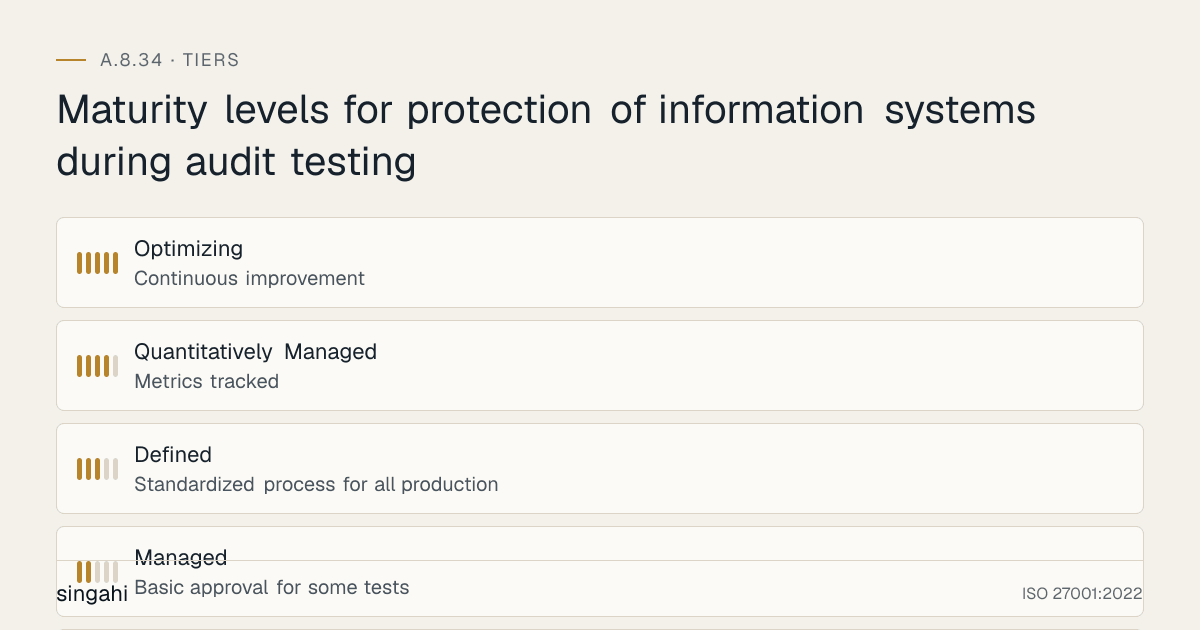
Figure · Tiers
Maturity levels for protection of information systems during audit testing
Phase 1: Foundation (Weeks 1–3)
Week 1: Policy and Scope Definition
- Draft the Audit Testing Protection Policy
- Define scope of audit testing activities (internal, external, automated, manual)
- Define approval workflow for production testing
- Establish audit testing risk assessment criteria
- Create audit testing log template
Week 2: Process and Controls Design
- Design pre-audit impact assessment process
- Design testing authorization workflow
- Design testing window and change freeze procedures
- Design post-audit verification process
- Design audit credential lifecycle (creation, use, revocation)
Week 3: Baseline Assessment
- Inventory all audit testing activities currently performed
- Identify which tests touch production systems
- Assess current controls for production testing
- Document gaps and high-risk testing activities
- Establish baseline metrics
Deliverables: Policy draft, Process design, Baseline assessment, Gap analysis
Phase 2: Pilot (Weeks 4–6)
Week 4-5: Pilot with One Audit
- Select an upcoming audit or penetration test for pilot
- Conduct full pre-audit impact assessment
- Implement testing authorization and controlled window
- Implement monitoring and logging for all audit activities
- Conduct post-audit verification
Week 6: Refinement
- Review pilot findings and feedback
- Refine impact assessment template
- Refine authorization workflow
- Improve monitoring and alerting
- Update policy and procedures
Deliverables: Pilot audit report, Refined templates, Updated procedures, Improved controls
Phase 3: Rollout (Weeks 7–10)
Week 7-8: Organization-Wide Deployment
- Apply controls to all audit testing activities
- Train internal audit team, external auditors, and security testing team
- Implement automated monitoring for audit testing
- Establish audit testing calendar and blackout periods
- Integrate with change management and incident management
Week 9-10: Tool Deployment
- Deploy audit testing management platform or tool
- Configure SIEM to detect and alert on audit testing activities
- Implement automated credential provisioning and revocation
- Deploy audit testing dashboard and reporting
Deliverables: Organization-wide deployment, Training completion, Tool deployment, Integration complete
Phase 4: Optimization (Weeks 11–14)
Week 11-12: Metrics and Monitoring
- Define and collect KPIs (see Section 13)
- Conduct first internal audit of audit testing controls
- Identify gaps and improvement opportunities
Week 13-14: Continuous Improvement
- Update policy based on lessons learned
- Refine testing windows based on business feedback
- Enhance monitoring for new testing techniques
- Update training materials
- Implement predictive monitoring for audit testing impact
Deliverables: KPI dashboard, Internal audit report, Updated policy, Enhanced monitoring
Maturity Model
| Level | Description | Typical Timeline |
|---|---|---|
| 1, Ad-hoc | No formal controls, testing occurs without approval, no monitoring, no post-audit verification | Pre-implementation |
| 2, Managed | Basic approval for some tests, informal testing windows, manual logging | Weeks 1–3 |
| 3, Defined | Standardized process for all production testing, formal authorization, testing windows, monitoring, post-audit verification | Weeks 4–8 |
| 4, Quantitatively Managed | Metrics tracked, automated credential management, SIEM integration, testing calendars, impact prediction | Weeks 9–12 |
| 5, Optimizing | Continuous improvement, AI-powered impact prediction, automated rollback, zero-downtime testing, real-time monitoring | Ongoing |
Detailed Implementation Guidance
Figure · Matrix
Comparison: Critical to Minimal
The Audit Testing Protection Lifecycle
Audit Planning → Pre-Audit Impact Assessment → Authorization →
Preparation → Execution (Monitoring) → Post-Audit Verification →
Credential Revocation → Report and Follow-up
Step 1: Audit Planning
Audit Testing Plan Contents:
- Scope: What systems, data, and processes will be tested
- Objectives: What the audit aims to achieve
- Methodology: What testing techniques will be used (passive, active, intrusive, non-intrusive)
- Timeline: When testing will occur, including specific dates and times
- Resources: Who will perform testing, their qualifications, and contact information
- Risk Assessment: Identified risks to production systems and mitigation plans
- Rollback Plan: How to revert if testing causes issues
- Communication Plan: Who to notify before, during, and after testing
- Data Handling: How audit data, logs, and findings will be collected, stored, and protected
Planning Controls:
- All testing touching production must have a documented plan
- Plans must be reviewed by system owners before approval
- Plans must be reviewed by security team for risk assessment
- Plans must identify business-critical periods to avoid (month-end, quarter-end, peak hours, festivals, tax season)
- Plans must specify the maximum acceptable downtime or degradation
Step 2: Pre-Audit Impact Assessment
Impact Assessment Framework:
| Assessment Area | Questions | Rating |
|---|---|---|
| System Criticality | Is this system business-critical? What is the RTO/RPO? | Critical/High/Medium/Low |
| Test Intrusiveness | Will the test send traffic? Modify data? Change configurations? | Intrusive/Moderate/Non-intrusive |
| Timing Risk | Is this testing during business hours? Peak load? Critical period? | High/Medium/Low |
| Data Sensitivity | Will the test access sensitive data? Modify databases? | Critical/High/Medium/Low |
| Failure Impact | What happens if the test causes system failure? | Catastrophic/High/Medium/Low |
| Recovery Complexity | How complex is recovery if something goes wrong? | Complex/Moderate/Simple |
| Network Impact | Will the test affect network performance? Other systems? | High/Medium/Low |
| Compliance Risk | Could the test violate compliance requirements? | Yes/No |
Risk-Based Testing Authorization:
| Risk Score | Authorization Level | Controls Required |
|---|---|---|
| Critical (80-100) | CISO + Board/CEO for critical systems | Change freeze, full monitoring, dedicated support team, observer, rollback ready, business approval |
| High (60-79) | CISO + System Owner | Testing window, monitoring, support team on standby, rollback plan |
| Medium (40-59) | Security Lead + System Owner | Testing window, monitoring, notification to operations |
| Low (20-39) | Security Lead | Standard testing window, monitoring |
| Minimal (0-19) | Self-authorized (standard procedure) | Log and notify |
Step 3: Authorization and Testing Window
Authorization Workflow:
- Auditor/Tester submits Testing Authorization Request with impact assessment
- System Owner reviews and approves (or rejects with conditions)
- Security Team reviews for security risk
- Operations Team reviews for operational impact
- Business Owner approves for business-critical systems
- CISO approves for high/critical risk testing
- Authorization issued with specific testing window, scope, and conditions
Testing Window Definition:
- Standard Window: Pre-approved recurring testing times (e.g., every Sunday 2 AM – 6 AM)
- Ad-hoc Window: One-time approval for specific testing
- Emergency Window: Expedited approval for critical security testing (e.g., CVE verification)
- Blackout Periods: Times when testing is explicitly prohibited (peak hours, month-end, festivals, election periods)
Change Freeze Coordination:
- For critical audits, implement a change freeze on the target system during testing
- Prevent conflicting changes during the audit window
- Ensure stable baseline for testing and post-audit verification
Step 4: Preparation
Pre-Testing Checklist:
- Audit credentials provisioned with least privilege and time limits
- Testing tools validated and approved (no malware, no unauthorized tools)
- Backup taken of critical systems before testing (if intrusive)
- Rollback plan documented and tested
- Support team on standby (for high/critical testing)
- Monitoring and alerting configured for the testing window
- Business stakeholders notified of testing window
- Communication channels established (incident response, escalation)
- Observer assigned (for critical production testing)
- Emergency stop procedure documented (how to abort testing immediately)
Audit Credential Management:
- Create dedicated audit accounts (never use shared admin accounts)
- Set expiration time on credentials (auto-expire after testing window)
- Enable MFA for all audit accounts
- Assign least privilege (only permissions needed for testing scope)
- Log all audit credential usage
- Revoke immediately after testing
- Monitor for credential misuse during testing window
Step 5: Execution and Monitoring
Active Monitoring During Testing:
- System performance monitoring (CPU, memory, disk, network)
- Application performance monitoring (response times, error rates, throughput)
- Security monitoring (SIEM alerts for unusual activity)
- Business operations monitoring (transaction volumes, user complaints)
- Network monitoring (bandwidth, latency, packet loss)
- Database monitoring (query performance, lock contention, replication lag)
Real-Time Alerting:
- Alert if system performance degrades beyond threshold
- Alert if error rates increase beyond baseline
- Alert if unauthorized testing activity detected (scope creep)
- Alert if business metrics drop (e.g., transaction volume, success rate)
- Alert if security events triggered by testing tools
Observer Protocol:
- A system owner or security team member must be present during critical production testing
- Observer has authority to pause or stop testing if issues arise
- Observer documents all testing activities and observations
- Observer communicates with operations team in real-time
Emergency Stop Procedure:
- Designated contact has authority to immediately halt testing
- Pre-defined communication channel for stop request (phone, Slack, pager)
- Testing team must acknowledge stop request within 5 minutes
- Post-stop assessment required before any testing resumes
Step 6: Post-Audit Verification
Verification Activities:
- System functionality verification (all critical functions tested)
- Security control verification (firewall rules, access controls, encryption still active)
- Configuration verification (no unauthorized changes)
- Data integrity verification (no corruption, no unauthorized modifications)
- Performance baseline verification (system performance at or above pre-test levels)
- Log review (all audit activities accounted for, no suspicious activity)
- Vulnerability re-scan (no new vulnerabilities introduced by testing)
- Credential verification (all audit credentials revoked)
Post-Testing Checklist:
- All audit credentials revoked or expired
- All testing tools removed from systems
- All temporary accounts deleted
- All temporary firewall rules or network changes removed
- All test data/logs collected from systems deleted (if not needed for audit)
- System owner confirms system is operational and secure
- Security team confirms no new vulnerabilities introduced
- Operations team confirms no ongoing issues
- Post-test monitoring continues for 24-48 hours (watch for delayed effects)
- Audit report received and reviewed for security findings
Step 7: Credential Revocation and Cleanup
Credential Revocation:
- All audit accounts disabled immediately after testing
- All audit credentials (passwords, tokens, keys) invalidated
- VPN or remote access for auditors terminated
- Any temporary network access rules removed
- Any temporary firewall rules deleted
- Any temporary system permissions revoked
- Revocation logged and verified
Data Cleanup:
- Audit logs collected during testing archived securely
- Any audit data stored on production systems removed
- Any screenshots or recordings of production systems secured
- Audit findings report protected (confidential classification)
- Any test data created during audit destroyed if not needed
Step 8: Reporting and Follow-Up
Audit Report Security Review:
- Security team reviews audit findings for accuracy and completeness
- Audit report is classified and protected (may contain vulnerability details)
- Findings are triaged and assigned to remediation owners
- Remediation timeline established based on severity
- Re-testing scheduled for verification of remediation
Lessons Learned:
- Document what worked well and what did not during testing
- Update testing procedures based on experience
- Update risk assessment for future testing of same systems
- Share lessons learned with audit and security teams
- Update testing windows and blackout periods if needed
Auditor Access Checklist
Use for internal audit, certification-body audits, regulator inspections and VAPT:
| Step | Check |
|---|---|
| 1 | Access request agreed with the system owner and management (27002 8.34(a)) |
| 2 | Scope letter signed: systems, tests, tools, window, contacts, stop conditions (b), (f) |
| 3 | Read-only account, or an administrator runs commands on the auditor's behalf (c) |
| 4 | Auditor device checked: supported OS, patched, anti-malware, disk encryption (d) |
| 5 | Any write access only to isolated copies, deleted or protected afterwards (e) |
| 6 | Tests that may affect availability scheduled outside business hours (g) |
| 7 | Account time-boxed to expire automatically; MFA on |
| 8 | Monitoring and logging of all audit access; observer for critical systems (h) |
| 9 | After the audit: access removed, logs reviewed, copies deleted, system health checked |
Certification-body audits: ISO 27001 auditors usually need evidence, not system access. Show screens, run reports for them, and share exports; do not hand over credentials.
India regulator and VAPT audits: RBI inspections and IS audits, SEBI CSCRF cyber audits and VAPT by CERT-In-empanelled auditors, and CERT-In requests should each start with a written scope and rules of engagement, read-only accounts where possible, and agreed testing windows.
Special Testing Scenarios
Penetration Testing on Production
Additional Controls:
- Scope agreement: Explicitly define what is in and out of scope (e.g., no DDoS, no social engineering, no physical testing)
- Rules of Engagement (ROE): Documented agreement on testing methods, timing, escalation, and emergency procedures
- Legal review: Ensure testing has legal authorization and liability coverage
- Insurance verification: Confirm cyber insurance covers testing activities
- Get-out-of-jail-free card: Written authorization that testers can show if detected by law enforcement or security teams
- Canary tokens: Deploy canary tokens to detect if testers access unauthorized areas
- Dual authorization: Two-person rule for critical testing actions
- Rate limiting: Configure testing tools to send traffic at controlled rates
- Exclusion list: Explicitly exclude business-critical transactions from testing
Penetration Testing ROE Template:
Rules of Engagement for Penetration Testing

Organization: [Name]
Test Date: [Start] to [End]
Tester: [Name, Company, Certification]

IN SCOPE:
- [List of systems, IP ranges, applications]

OUT OF SCOPE:
- [List of systems not to be tested]
- [Types of testing not permitted: DDoS, social engineering, physical]

TESTING WINDOW:
- [Start time] to [End time]
- [Days of week]

AUTHORIZED TESTING METHODS:
- [e.g., Web application testing, API testing, network scanning]

PROHIBITED TESTING METHODS:
- [e.g., Denial of service, data destruction, ransomware simulation]

DATA HANDLING:
- Tester will not exfiltrate data beyond what is necessary to prove vulnerability
- All findings will be reported securely to [contact]
- Tester will delete all collected data within 30 days

ESCALATION:
- If critical vulnerability found: Immediate notification to [contact]
- If system disruption occurs: Immediate notification to [contact]
- Emergency stop contact: [Name, Phone, Email]

AUTHORIZATION:
Signed by CISO: _______________ Date: _______________
Signed by System Owner: _______________ Date: _______________
Signed by Tester: _______________ Date: _______________
Vulnerability Scanning on Production
Additional Controls:
- Scan scheduling: Scan during maintenance windows or low-traffic periods
- Scan rate limiting: Limit scan speed to avoid overwhelming systems
- Authenticated vs. unauthenticated: Prefer authenticated scanning (less intrusive, more accurate)
- Exclusion of sensitive systems: Do not scan systems that cannot tolerate any disruption (e.g., life-support systems, SCADA)
- Scan validation: Validate scan results to eliminate false positives before acting
- Patch validation scanning: After patching, verify the fix without re-scanning the full system if possible
Automated Security Testing (CI/CD)
Additional Controls:
- Production testing gates: Automated tests must be approved before running on production
- Canary deployments: Test changes on a small subset of production before full deployment
- Feature flags: Enable new features only for test users before general release
- Blue/green testing: Test on the inactive environment, then switch traffic
- Circuit breakers: Automatically stop testing if error rates spike
- Rollback automation: Automatic rollback if testing reveals issues
Cloud Security Assessments
Additional Controls:
- Cloud-native monitoring: Use cloud provider monitoring during assessments (AWS CloudTrail, Azure Monitor, GCP Operations)
- IAM policy validation: Ensure assessment tools do not have overly permissive IAM policies
- Resource quotas: Set resource quotas to prevent assessment tools from consuming excessive resources
- Cost monitoring: Monitor cloud costs during assessments to prevent runaway spending
- Multi-tenancy isolation: Ensure assessment of one tenant does not affect others
- Data residency compliance: Ensure assessment data stays within approved regions
Tools, Technologies, and Solutions
Audit Management and GRC Platforms
| Need | Typical options |
|---|---|
| Audit planning and evidence tracking | Internal-audit or GRC modules in existing ITSM/GRC tools; a shared tracker for small organisations |
| Testing authorisation workflow | Change or service-request workflow in the ITSM tool |
| Time-boxed auditor accounts | Identity provider or PAM with expiring, just-in-time accounts |
Penetration Testing and Vulnerability Scanning Tools
| Tool | Best For | Pricing model |
|---|---|---|
| OpenVAS | Open source vulnerability scanning | Free |
| Qualys | Enterprise vulnerability management | Enterprise pricing |
| Rapid7 InsightVM | Enterprise vulnerability management | Enterprise pricing |
| OWASP ZAP | Web application testing, free | Free |
| Cobalt Strike | Red team operations | Commercial |
| Nmap | Network scanning | Free |
| Nuclei | Fast vulnerability scanning | Free / Commercial |
| Netsparker (Invicti) | Automated web scanning | Commercial |
Monitoring and SIEM Tools for Audit Testing
| Tool | Best For | Pricing model |
|---|---|---|
| Splunk | Enterprise SIEM, audit monitoring | Enterprise pricing |
| Elastic Security | Open source SIEM, scalable | Free / Enterprise |
| Microsoft Sentinel | Azure-native SIEM, SOAR | Pay per ingestion |
| IBM QRadar | Enterprise SIEM, AI-powered | Enterprise pricing |
| LogRhythm | Enterprise SIEM, UEBA | Enterprise pricing |
| ArcSight | Enterprise SIEM, correlation | Enterprise pricing |
| New Relic | Application performance monitoring | Free / Commercial |
| Dynatrace | AI-powered observability | Commercial |
| AppDynamics | Application performance monitoring | Commercial |
Credential and Access Management for Auditors
| Tool | Best For | Pricing model |
|---|---|---|
| CyberArk | Enterprise PAM, audit credential management | Enterprise pricing |
| BeyondTrust | Enterprise PAM, session management | Enterprise pricing |
| Delinea (Thycotic) | Enterprise PAM, secret server | Enterprise pricing |
| Azure AD Privileged Identity Management | Azure-native JIT access | Included in Azure AD P2 |
| AWS IAM Identity Center | AWS-native SSO + JIT | Free |
| Google Cloud IAM | GCP-native conditional access | Free |
| HashiCorp Vault | Dynamic credentials, secret management | Free / Enterprise |
| Teleport | Modern access management, audit logging | Free / Enterprise |
| Boundary by HashiCorp | Secure access to dynamic infrastructure | Free / Enterprise |
| One Identity | PAM, access governance | Enterprise pricing |
Policy and Procedure Templates
Audit Testing Protection Policy (Template)
Template
Audit Testing Protection Policy
Document ID: POL-AUDIT-TEST-001 Version: 1.0 Effective Date: [DATE] Owner: CISO / Security Lead Approved By: [Name], [Title] Review Cycle: Annual
1. Purpose
This policy establishes the requirements for protecting information systems from unauthorized access, damage, or disruption during audit testing activities.
2. Scope
This policy applies to:
- All internal audits (security, compliance, operational)
- All external audits (third-party, certification, regulatory)
- All vulnerability assessments on production systems
- All penetration testing on production systems
- All configuration audits on production systems
- All performance testing on production systems
- All disaster recovery drills on production systems
- All security monitoring validation on production systems
- All red team exercises that touch production systems
3. Policy Statements
3.1 Planning and Authorization
- All audit testing on production systems must have a documented plan.
- All production testing must undergo a pre-audit impact assessment.
- All production testing must be formally authorized before execution.
- Authorization must be obtained from the system owner, security team, and (for high/critical risk) the CISO.
- Testing must be conducted within an approved testing window.
- Testing outside the approved window or scope is prohibited.
3.2 Risk Assessment
- Pre-audit impact assessments must evaluate system criticality, test intrusiveness, timing risk, data sensitivity, failure impact, and recovery complexity.
- Testing rated as critical or high risk requires additional controls including change freeze, dedicated support team, and observer presence.
- Business-critical periods must be identified and avoided (blackout periods).
3.3 Credential Management
- Audit testing must use dedicated audit accounts, not shared admin accounts.
- Audit credentials must have least privilege and time-limited expiration.
- MFA must be enabled for all audit accounts.
- Credentials must be revoked immediately after testing concludes.
- Credential usage must be logged and monitored.
3.4 Monitoring and Control
- All audit testing on production must be actively monitored.
- Performance, security, and business metrics must be tracked during testing.
- An observer must be present for critical production testing.
- An emergency stop procedure must be documented and communicated.
- Testing must be paused or stopped if system degradation exceeds thresholds.
3.5 Data Protection
- Audit testing must not access or collect sensitive data beyond the minimum necessary for the audit.
- Any audit data collected must be classified and protected.
- Audit findings and reports must be classified and access-controlled.
- Screenshots and logs containing sensitive data must be handled securely.
- Test data collected during audits must be destroyed when no longer needed.
3.6 Post-Audit Verification
- Post-audit verification must confirm system functionality, security, configuration, data integrity, and performance.
- All audit credentials must be verified as revoked.
- All temporary changes must be verified as reverted.
- Post-test monitoring must continue for 24-48 hours after testing.
- System owner must confirm system is operational and secure before sign-off.
3.7 Third-Party Audit Testing
- External auditors and penetration testers must comply with this policy.
- External testers must sign rules of engagement and confidentiality agreements.
- External testers must be screened before access to production systems.
- External testing must be observed by internal security personnel.
- External testing tools must be validated before use on production systems.
3.8 Blackout Periods
- Business-critical periods are defined as blackout periods when testing is prohibited.
- Blackout periods include: month-end, quarter-end, year-end, tax filing periods, peak business hours, festival seasons, and election periods.
- Emergency security testing may be exempted with CISO approval and compensating controls.
4. Roles and Responsibilities
- CISO: Owns the policy, approves critical/high-risk testing, approves exceptions
- Security Lead: Reviews testing plans, assesses security risk, monitors testing
- System Owner: Approves testing on their systems, verifies post-test security
- Operations Lead: Assesses operational impact, provides support during testing
- Business Owner: Approves testing on business-critical systems
- Auditor/Tester: Follows the policy, adheres to scope, reports issues immediately
- Observer: Monitors testing, can stop testing if issues arise
- Compliance Officer: Ensures regulatory compliance during testing
5. Exceptions
Exceptions require written CISO approval with documented risk acceptance and compensating controls.
6. Enforcement
Non-compliance may result in revoked testing authorization, audit findings, or disciplinary action.
7. Related Documents
- Information Security Policy (POL-INFO-001)
- Change Management Policy (POL-CHANGE-001)
- Incident Response Policy (POL-INCIDENT-001)
- Access Control Policy (POL-ACCESS-001)
- Data Protection Policy (POL-DATA-001)
- Penetration Testing Policy (POL-PEN-TEST-001)
- Vulnerability Management Policy (POL-VULN-001)
8. Revision History
| Version | Date | Author | Changes |
|---|---|---|---|
| 1.0 | [DATE] | [Name] | Initial version |
Testing Authorization Procedure (Template)
Template
Testing Authorization Procedure
Document ID: PROC-TEST-AUTH-001 Version: 1.0 Effective Date: [DATE] Owner: Security Lead
1. Purpose
To define the procedure for authorizing testing on production systems.
2. Scope
All testing activities that interact with production systems.
3. Procedure Steps
Step 1: Test Request Submission (Day 1)
- Tester submits Testing Authorization Request Form including:
- Tester name, organization, and contact
- System(s) to be tested
- Testing objectives
- Testing methodology and tools
- Proposed testing window
- Impact assessment
- Risk mitigation plan
- Rollback plan
- Data handling approach
Step 2: Impact Assessment Review (Day 2)
- Security Lead reviews impact assessment.
- System Owner reviews operational impact.
- Operations Lead reviews resource and support requirements.
- Business Owner reviews business impact (for critical systems).
- Risk score is calculated and documented.
Step 3: Authorization Approval (Day 3)
- Low risk: Security Lead approves.
- Medium risk: Security Lead + System Owner approve.
- High risk: Security Lead + System Owner + CISO approve.
- Critical risk: CISO + Business Owner + Board-level approval.
- Approval includes specific testing window, scope, and conditions.
Step 4: Pre-Testing Preparation (Day 4)
- Audit credentials provisioned.
- Testing tools validated.
- Backup taken (if required).
- Monitoring configured.
- Support team notified.
- Observer assigned (if high/critical).
Step 5: Testing Execution (Testing Window)
- Testing conducted within approved window and scope.
- Monitoring active.
- Observer present (if required).
- Issues reported immediately.
- Emergency stop available.
Step 6: Post-Testing Verification (Within 24 hours)
- Post-test verification checklist completed.
- Credentials verified as revoked.
- System owner confirms operational status.
- Security team confirms no new vulnerabilities.
- Monitoring continues for 24-48 hours.
Step 7: Documentation and Closure (Within 48 hours)
- Testing log completed.
- Findings report received and secured.
- Lessons learned documented.
- Authorization closed in system.
4. Roles
- Requester: Tester or auditor
- Reviewer: Security Lead, System Owner, Operations Lead
- Approver: Depends on risk level
- Observer: System Owner or Security Team (for high/critical)
- Support: Operations Team
5. Records
- Testing Authorization Request Form
- Impact Assessment
- Approval documentation
- Testing log
- Post-test verification report
- Credential revocation confirmation
- Lessons learned
Risk Assessment and Treatment
Risk Assessment for Audit Testing
| Risk ID | Risk Description | Likelihood | Impact | Risk Level | Mitigation |
|---|---|---|---|---|---|
| R-001 | Testing causes production system downtime | Medium | Critical | Critical | Testing windows, change freeze, monitoring, rollback plan, observer |
| R-002 | Testing corrupts or deletes production data | Low | Critical | High | Backups, non-intrusive testing preference, data validation, observer |
| R-003 | Testing introduces new vulnerabilities | Low | High | High | Scope control, tool validation, post-test vulnerability scan, monitoring |
| R-004 | Auditor credentials compromised or misused | Low | Critical | High | Time-limited credentials, MFA, least privilege, monitoring, immediate revocation |
| R-005 | Audit data collected contains sensitive information and is leaked | Medium | High | High | Data minimization, classification, encryption, access controls, destruction |
| R-006 | Testing triggers security alerts causing false incident response | Medium | Medium | Medium | Pre-notification to SOC, testing window coordination, alert suppression |
| R-007 | Scope creep, testing goes beyond approved scope | Medium | High | High | Scope documentation, monitoring, canary tokens, observer |
| R-008 | Testing during peak hours disrupts business | Medium | High | High | Blackout periods, testing windows, business owner approval, monitoring |
| R-009 | Third-party tester introduces malware or unauthorized tools | Low | Critical | High | Tool validation, security screening, monitoring, sandboxed execution |
| R-010 | Post-test verification misses residual issues | Medium | High | High | Complete verification checklist, 24-48 hour monitoring, automated validation |
| R-011 | Testing on shared infrastructure affects other tenants | Medium | High | High | Multi-tenancy isolation, resource quotas, monitoring, coordination |
| R-012 | Emergency testing bypasses controls due to time pressure | Medium | High | High | Emergency procedure, dual authorization, post-test review, management approval |
| R-013 | Audit findings report is not secured and leaks vulnerability details | Medium | High | High | Classification, access controls, encryption, secure distribution |
| R-014 | Testing reveals compliance gaps that create regulatory exposure | Medium | High | High | Pre-audit compliance review, legal review, controlled disclosure |
| R-015 | Automated testing tools overwhelm systems with traffic | Medium | Medium | Medium | Rate limiting, scan scheduling, resource monitoring, throttling |
Risk Treatment Options
| Risk | Treatment | Residual Risk |
|---|---|---|
| R-001 | Testing windows + change freeze + monitoring + rollback + observer | Low |
| R-002 | Backups + non-intrusive preference + data validation + observer | Low |
| R-003 | Scope control + tool validation + post-test scan + monitoring | Low |
| R-004 | Time-limited credentials + MFA + least privilege + monitoring + revocation | Low |
| R-005 | Data minimization + classification + encryption + access controls + destruction | Low |
| R-006 | Pre-notification + testing window + alert suppression | Low |
| R-007 | Scope documentation + monitoring + canary tokens + observer | Low |
| R-008 | Blackout periods + testing windows + business approval + monitoring | Low |
| R-009 | Tool validation + screening + monitoring + sandbox | Low |
| R-010 | Complete checklist + monitoring + automated validation | Low |
| R-011 | Multi-tenancy isolation + quotas + monitoring + coordination | Low |
| R-012 | Emergency procedure + dual authorization + post-review + management approval | Low |
| R-013 | Classification + access controls + encryption + secure distribution | Low |
| R-014 | Pre-audit compliance review + legal review + controlled disclosure | Low |
| R-015 | Rate limiting + scheduling + monitoring + throttling | Low |
Audit and Compliance Checklist
Pre-Audit Self-Assessment
| # | Question | Evidence | Status |
|---|---|---|---|
| 1 | Is there a documented Audit Testing Protection Policy? | Policy document | ☐ |
| 2 | Is there a pre-audit impact assessment process? | Procedure document | ☐ |
| 3 | Is testing authorization required before production testing? | Authorization records | ☐ |
| 4 | Are testing windows defined and communicated? | Testing calendar | ☐ |
| 5 | Are blackout periods defined for business-critical times? | Blackout schedule | ☐ |
| 6 | Are audit credentials dedicated, time-limited, and with least privilege? | Credential management records | ☐ |
| 7 | Is MFA required for audit credentials? | MFA configuration | ☐ |
| 8 | Are audit credentials revoked immediately after testing? | Revocation records | ☐ |
| 9 | Is testing on production actively monitored? | Monitoring records | ☐ |
| 10 | Is an observer present for critical production testing? | Observer records | ☐ |
| 11 | Is there an emergency stop procedure for testing? | Emergency procedure | ☐ |
| 12 | Is post-audit verification conducted? | Verification reports | ☐ |
| 13 | Are audit data and findings classified and protected? | Classification records | ☐ |
| 14 | Are third-party testers subject to policy compliance? | Vendor agreements | ☐ |
| 15 | Are testing tools validated before use on production? | Tool validation records | ☐ |
| 16 | Are backups taken before intrusive testing? | Backup records | ☐ |
| 17 | Is there a rollback plan for testing? | Rollback documentation | ☐ |
| 18 | Are audit testing logs maintained? | Audit logs | ☐ |
| 19 | Are lessons learned from testing documented? | Lessons learned records | ☐ |
| 20 | Are testing-related incidents tracked and investigated? | Incident records | ☐ |
| 21 | Is there a testing authorization workflow system? | Workflow records | ☐ |
| 22 | Are business owners involved in approving testing on critical systems? | Approval records | ☐ |
| 23 | Are automated testing activities on production controlled? | CI/CD controls | ☐ |
| 24 | Are shared infrastructure tenants protected during testing? | Multi-tenancy records | ☐ |
| 25 | Is there a communication plan for testing activities? | Communication records | ☐ |
| 26 | Are auditors and testers trained on the policy? | Training records | ☐ |
| 27 | Are testing activities integrated with change management? | Change records | ☐ |
| 28 | Are testing activities integrated with incident management? | Incident records | ☐ |
| 29 | Are testing metrics tracked and reported? | Metrics dashboard | ☐ |
| 30 | Are regulatory compliance requirements considered during testing? | Compliance records | ☐ |
Auditor Interview Questions
Be prepared to answer:
- "How do you ensure audit testing does not disrupt production systems?"
- "Is there an approval process before testing production systems?"
- "Can you show me the testing authorization for the last audit?"
- "How do you prevent auditors from compromising security during testing?"
- "What happens if testing causes a system outage?"
- "How are audit credentials managed and revoked?"
- "Are there blackout periods when testing is prohibited?"
- "How do you verify systems remain secure after audit testing?"
- "How do you handle third-party penetration testing?"
- "Are testing activities logged and monitored?"
Common Audit Findings and How to Avoid Them
| Finding | Cause | Prevention |
|---|---|---|
| "No approval for production testing" | Process gap | Mandatory authorization workflow |
| "Testing occurred during business hours without approval" | Timing gap | Testing windows, blackout periods, calendar enforcement |
| "Audit credentials not revoked after testing" | Credential gap | Automated revocation, time-limited accounts, verification checklist |
| "No impact assessment before testing" | Planning gap | Mandatory pre-audit impact assessment template |
| "Testing caused production outage" | Control gap | Change freeze, monitoring, observer, emergency stop, rate limiting |
| "No post-test verification" | Verification gap | Mandatory post-test checklist, system owner sign-off |
| "Third-party testing without rules of engagement" | Vendor gap | ROE requirement, contractual clause, validation before testing |
| "Testing tools not validated" | Tool gap | Tool validation process, approved tool list, sandbox testing |
| "No monitoring during testing" | Monitoring gap | SIEM alerts, performance monitoring, business metrics tracking |
| "Audit findings report not secured" | Data gap | Classification, access controls, encryption, secure distribution |
Metrics and KPIs
Figure · Measures
The measures that show A.8.34 is working
- Testing Authorization Rate100%Monthly
- Impact Assessment Completion100%Monthly
- Testing Window Compliance100%Monthly
- Blackout Period Violations0Monthly
- Credential Revocation Rate100%Monthly
Process Metrics
| Metric | Formula | Target | Frequency |
|---|---|---|---|
| Testing Authorization Rate | (# of authorized tests / # of production tests) × 100 | 100% | Monthly |
| Impact Assessment Completion | (# of tests with impact assessment / # of tests) × 100 | 100% | Monthly |
| Testing Window Compliance | (# of tests within window / # of tests) × 100 | 100% | Monthly |
| Blackout Period Violations | Number of tests during blackout periods | 0 | Monthly |
| Credential Revocation Rate | (# of credentials revoked on time / # of credentials) × 100 | 100% | Monthly |
| Observer Presence Rate | (# of critical tests with observer / # of critical tests) × 100 | 100% | Monthly |
| Post-Test Verification Rate | (# of tests with verification / # of tests) × 100 | 100% | Monthly |
| Testing Incident Rate | Incidents caused by testing per quarter | < 1 | Quarterly |
| Scope Creep Incidents | Tests that exceeded approved scope per quarter | 0 | Quarterly |
| Emergency Stop Activations | Number of emergency stops per quarter | < 1 | Quarterly |
| Third-Party Compliance | (# of third-party tests compliant / # of third-party tests) × 100 | 100% | Quarterly |
| Training Completion | (# of trained testers / # of testers) × 100 | 100% | Quarterly |
| Testing Metrics Reporting | (# of tests with metrics / # of tests) × 100 | 100% | Monthly |
| Credential MFA Coverage | (# of audit accounts with MFA / # of audit accounts) × 100 | 100% | Monthly |
| Audit Data Classification | (# of audit reports classified / # of audit reports) × 100 | 100% | Monthly |
Outcome Metrics
| Metric | Formula | Target | Frequency |
|---|---|---|---|
| Production Downtime from Testing | Hours of downtime caused by testing per quarter | 0 | Quarterly |
| Data Corruption Incidents | Incidents of data corruption from testing per quarter | 0 | Quarterly |
| Security Incidents from Testing | Security incidents caused by testing per quarter | 0 | Quarterly |
| Mean Time to Recover | Average time to recover from testing-induced incident | < 1 hour | Per incident |
| Business Impact Score | Average business impact rating of testing incidents | 0 | Quarterly |
| Compliance Audit Findings | Testing-related findings per audit | 0 | Per audit |
| Tester Satisfaction | Survey score on testing process and controls | > 4.0/5.0 | Quarterly |
| System Owner Satisfaction | Survey score on post-test system state | > 4.0/5.0 | Quarterly |
| Cost of Testing Incidents | Financial impact of testing incidents per quarter | Decreasing | Quarterly |
| False Positive Rate | Security alerts triggered by authorized testing | < 5% | Monthly |
Dashboard Sample
┌─────────────────────────────────────────────────────────────────────┐
│           AUDIT TESTING PROTECTION DASHBOARD                        │
│                    [Organization] — [Month Year]                      │
├─────────────────────────────────────────────────────────────────────┤
│  AUTHORIZATION: 100%         ██████████████████████  Target: 100%  │
│  IMPACT ASSESSMENT: 100%     ██████████████████████  Target: 100%  │
│  WINDOW COMPLIANCE: 98%      ████████████████████░░  Target: 100%  │
│  BLACKOUT VIOLATIONS: 0      ░░░░░░░░░░░░░░░░░░░░░░  Target: 0     │
│  CRED REVOCATION: 100%       ██████████████████████  Target: 100%  │
│  OBSERVER PRESENCE: 100%     ██████████████████████  Target: 100%  │
│  POST-TEST VERIFY: 100%      ██████████████████████  Target: 100%  │
│  TESTING INCIDENTS: 0        ░░░░░░░░░░░░░░░░░░░░░░  Target: <1/q  │
│  SCOPE CREEP: 0              ░░░░░░░░░░░░░░░░░░░░░░  Target: 0     │
│  EMERGENCY STOPS: 0          ░░░░░░░░░░░░░░░░░░░░░░  Target: <1/q  │
│  DOWNTIME: 0 hours           ░░░░░░░░░░░░░░░░░░░░░░  Target: 0     │
│  FALSE POSITIVES: 3%         █░░░░░░░░░░░░░░░░░░░░░  Target: <5%  │
└─────────────────────────────────────────────────────────────────────┘
Common Pitfalls and How to Avoid Them
Pitfall 1: "Audits Are Read-Only, So They're Safe"
Symptom: Organization assumes audit testing is non-intrusive and requires no controls.
Reality: Even "read-only" audits can cause system crashes (e.g., a complex SQL query locking a database table), performance degradation, and data exposure. Auditors with read access to sensitive data can screenshot, photograph, or memorize credentials.
Solution:
- Treat all production testing as potentially intrusive
- Implement access controls even for "read-only" audits
- Monitor resource consumption during "read-only" testing
- Limit data access to the minimum necessary
- Require NDAs and data handling agreements for all auditors
Pitfall 2: "We Can't Test Because We Might Break Something"
Symptom: Organization avoids all production testing due to fear of disruption.
Reality: Avoiding testing on production creates a false sense of security. Real-world vulnerabilities exist in production and can only be found by testing the actual environment. The solution is controlled testing, not no testing.
Solution:
- Implement controlled testing windows
- Use non-intrusive testing methods first
- Start with passive testing, move to active testing gradually
- Use staging environments that mirror production for initial testing
- Implement complete monitoring and rollback capabilities
- Build organizational confidence through successful controlled testing
Pitfall 3: "The Auditor Needs Admin Access"
Symptom: Auditors are given full admin access "to do their job effectively."
Reality: Admin access is rarely necessary for most audit activities. Auditors with admin access can accidentally or intentionally modify systems, install backdoors, or access data outside their scope. If admin access is needed, it should be time-limited, monitored, and observed.
Solution:
- Define the minimum access required for each audit activity
- Use read-only accounts where possible
- Use role-based access aligned with audit scope
- Time-limit admin access to specific testing windows
- Monitor all admin access in real-time
- Have an observer present when admin access is used
Pitfall 4: "We Forgot to Revoke the Auditor's Access"
Symptom: Auditor credentials remain active weeks or months after the audit concludes.
Reality: Lingering audit credentials are a significant security risk. Former auditors, compromised credentials, or credential reuse can lead to unauthorized access long after the audit is over.
Solution:
- Set time-limited expiration on all audit credentials (auto-expire)
- Implement automated credential revocation workflows
- Include credential revocation in the post-audit checklist
- Conduct quarterly access reviews to catch lingering credentials
- Use JIT access that expires automatically after the testing window
Pitfall 5: "Testing Tools Are Safe Because We Bought Them"
Symptom: Organization assumes commercial testing tools are inherently safe for production.
Reality: Testing tools can be buggy, misconfigured, or used incorrectly. A vulnerability scanner can crash a web server, a penetration testing tool can delete data, and a configuration auditor can accidentally modify settings.
Solution:
- Validate all testing tools in a non-production environment first
- Read tool documentation for production usage warnings
- Configure tools with conservative settings (rate limits, safe modes)
- Monitor tool behavior during testing
- Have a rollback plan for tool-induced issues
- Keep tool versions updated to avoid known bugs
Pitfall 6: "We Don't Need to Monitor, We Trust the Auditor"
Symptom: No monitoring is implemented during audit testing because "the auditor is a professional."
Reality: Even professional auditors can make mistakes, exceed their scope, or trigger unexpected system behaviors. Monitoring is not about distrusting the auditor, it's about detecting unintended consequences before they become incidents.
Solution:
- Implement monitoring for all production testing regardless of who performs it
- Use monitoring to detect system degradation, not just malicious activity
- Share monitoring dashboards with the auditor so they can see the impact
- Use monitoring to validate that testing is within the approved scope
Pitfall 7: "We Tested, We Passed, We're Done"
Symptom: No post-audit verification is performed after testing.
Reality: Testing can leave systems in a modified state, introduce new vulnerabilities, or degrade performance. Without post-audit verification, these issues may not be discovered until they cause a production incident.
Solution:
- Mandatory post-audit verification checklist
- System owner must sign off that the system is operational and secure
- Security team must confirm no new vulnerabilities introduced
- Operations team must confirm no performance degradation
- Continue monitoring for 24-48 hours after testing
- Re-run baseline security scans after testing
Pitfall 8: "The Penetration Tester Found a Critical Bug, Let's Fix It Immediately"
Symptom: Organization rushes to fix a critical vulnerability found during penetration testing without proper change management.
Reality: Emergency patching during an active penetration test can interfere with the test, create new vulnerabilities, or introduce instability. Fixes must go through proper change management even if the finding is critical.
Solution:
- Document the finding and complete the penetration test
- Schedule emergency patching through the change management process
- If the vulnerability is actively exploitable, implement a temporary compensating control (WAF rule, IPS signature, access restriction) while planning the fix
- Do not make unplanned changes during an active test
- Re-test the fix after deployment
Illustrative Scenarios
Hypothetical scenarios: composite examples for guidance, not real organisations or verified outcomes.
Scenario 1: Bank With Standing Auditor Accounts
Situation. A private bank undergoes RBI inspection, IS audits, PCI DSS assessments and VAPT each year. Past auditors still have active admin accounts; a scan once crashed the core banking system during business hours.
What applying 8.34 looks like.
- Every audit or test starts with an agreed scope letter and approval by the system owner.
- Old auditor accounts removed; new ones read-only where possible, time-boxed and with MFA.
- Auditor laptops checked before connecting; write access only to isolated copies.
- Availability-affecting tests in agreed windows outside business hours, with blackout periods (month-end, festivals).
- Monitoring of audit accounts, an observer for critical systems, and a health check afterwards.
Lesson. Controlled audits are safer and smoother for both sides: the auditor gets clear access, the business keeps running.
Scenario 2: Penetration Test During a Sale
Situation. An e-commerce company's external testers schedule automated scanning during a major sale.
What applying 8.34 looks like.
- Rules of engagement set testing windows, rate limits, excluded systems and an emergency stop contact.
- Load-sensitive tests run against a production-like staging copy where possible.
- Production tests outside peak hours, with monitoring and a named operations contact.
Lesson. Agree when and how hard to test before testing starts.
Multi-Framework Mapping
NIST SP 800-53 Rev 5 Mapping
| NIST Control | Description | A.8.34 Mapping |
|---|---|---|
| AU-6 | Audit review | Review of audit activities |
| AU-9 | Audit log protection | Protection of audit logs during testing |
| CA-2 | Security assessments | Control of security assessments |
| CA-7 | Continuous monitoring | Monitoring during testing |
| SA-11 | Developer security testing | Testing controls in development |
| SI-4 | System monitoring | Monitoring during audit testing |
| SC-7 | Boundary protection | Network boundaries during testing |
| AC-3 | Access enforcement | Access control during testing |
| CM-4 | Security impact analysis | Impact analysis before testing |
| IR-4 | Incident handling | Handling of testing-induced incidents |
COBIT 2019 Mapping
| COBIT Practice | Description | A.8.34 Mapping |
|---|---|---|
| MEA02.05 | Perform internal control assurance initiatives | Planned, controlled assurance activities |
| MEA04.04 | Plan assurance initiatives | Scope and approach agreed before testing |
| APO12.02 | Analyse risk | Risk of the test to operations assessed |
PCI DSS v4.0.1 Mapping
| PCI DSS Requirement | Audit Testing Focus |
|---|---|
| 11.4.1 | Penetration testing methodology defined, documented and implemented, including scope |
| 11.3 | Vulnerability scanning performed as planned |
| 10.2 | Audit logs capture tester and auditor activity |
DPDP Act 2023: Relevant Provisions
| DPDP Act Section | Audit Testing Implication |
|---|---|
| Section 8(5) | Reasonable security safeguards, testing must maintain safeguards |
| Section 8(4) | Appropriate technical and organisational measures, testing must not compromise design |
| Section 6(1) | Consent covers only the data needed for the stated purpose; testing must access minimum data |
| Sections 5–6 | Notice and consent define the purposes; testing must be for authorized purpose |
| Section 8(6) | Personal data breach intimation, testing-induced breaches must be reported |
OWASP SAMM Mapping
| SAMM Practice | Maturity Level | A.8.34 Mapping |
|---|---|---|
| Verification - Security Testing | Level 1-3 | Controlled security testing |
| Verification - Architecture Assessment | Level 1-3 | Architecture testing protection |
| Operations - Incident Management | Level 1-3 | Incident management during testing |
| Governance - Strategy & Metrics | Level 1-3 | Testing strategy and metrics |
CIS Controls v8 Mapping
| CIS Control | Implementation Group | A.8.34 Mapping |
|---|---|---|
| Control 7 | IG2 | Continuous vulnerability management, controlled testing |
| Control 18 | IG3 | Penetration testing, authorized and monitored |
| Control 8 | IG2 | Audit log management, testing logs protected |
| Control 13 | IG2 | Network monitoring, testing monitored |
| Control 16 | IG2 | Application software security, testing controlled |
| Control 17 | IG1 | Incident response management, if testing causes an incident |
Regulatory and Industry Context
India
| Regulation | Audit Testing Relevance | Key Mandates |
|---|---|---|
| DPDP Act 2023 | Critical | Section 8(5): Testing must not compromise security safeguards; Section 8(4): Testing must respect technical and organisational measures |
| IT Act 2000 | High | Section 43A: Reasonable security practices include controlled testing |
| RBI | Critical for banks | Inspections, IS audit and VA/PT under the CSF 2016 and MD IT Governance 2023, with controlled access |
| SEBI CSCRF (2024) | Critical for markets | Cyber audits and VAPT by CERT-In-empanelled auditors |
| IRDAI Guidelines | Critical for insurance | Information security requires controlled testing for customer data systems |
| CERT-In | High | Empanels auditing organisations; may request information and logs under the 2022 Directions |
| Digital India | Critical for government | Citizen services must not be disrupted by audit testing |
International
| Regulation | Relevance | Key Mandates |
|---|---|---|
| PCI DSS v4.0.1 | Critical for card data | 11.4.1: pen-test methodology and scope; 10.2: logging |
| GDPR | High | Art 32: Testing must not compromise security of processing |
| HIPAA | Critical for health | Security Rule: Testing must not compromise PHI protection |
| SOX | High for public companies | IT general controls require controlled testing |
| NIST CSF 2.0 | High | ID.IM-02; NIST SP 800-53 CA-2, CA-8 |
| CCPA/CPRA | High | Testing must not compromise personal information security |
| LGPD | High | Testing must respect security measures |
| PDPA | High | Testing must not compromise protection obligations |
Roles and Responsibilities (RACI)
RACI Matrix for Audit Testing Protection
| Activity | CISO | Security Lead | System Owner | Operations Lead | Business Owner | Auditor/Tester | Observer | Compliance Officer |
|---|---|---|---|---|---|---|---|---|
| Define testing policy | A | R | C | I | I | C | I | C |
| Conduct impact assessment | I | R/A | C | C | I | C | I | I |
| Approve testing (low) | I | R/A | C | I | I | I | I | I |
| Approve testing (medium) | I | R/A | C | C | I | I | I | I |
| Approve testing (high) | R/A | C | C | C | C | I | I | C |
| Approve testing (critical) | R/A | C | C | C | R | I | I | C |
| Provision credentials | I | A | I | C | I | I | I | I |
| Monitor testing | I | A | C | C | I | C | C | I |
| Observe testing | I | C | I | I | I | I | R/A | I |
| Execute testing | I | C | I | I | I | R/A | I | I |
| Post-test verification | I | A | R | C | I | I | C | I |
| Revoke credentials | I | A | I | C | I | I | I | I |
| Handle incidents | A | R | C | C | I | C | C | I |
| Report findings | I | C | I | I | I | R | I | I |
| Audit the process | R/A | C | I | I | I | I | I | C |
| Track metrics | R/A | C | I | I | I | I | I | C |
| Train staff | A | R | I | I | I | C | I | I |
| Third-party compliance | A | R | C | I | I | C | C | C |
| Manage blackout periods | I | A | C | C | C | I | I | I |
| Emergency stop | A | C | C | R | I | C | C | I |
Legend: R = Responsible, A = Accountable, C = Consulted, I = Informed
Role Descriptions
| Role | Key Responsibilities | Required Skills |
|---|---|---|
| CISO | Policy ownership, approves critical/high-risk testing, exception approval, incident oversight, board reporting | Security leadership, risk management, governance, crisis management |
| Security Lead | Impact assessment, testing authorization, monitoring, credential management, incident investigation, post-test verification | Security assessment, risk analysis, monitoring, penetration testing, incident response |
| System Owner | Approves testing on their systems, assesses operational impact, verifies post-test security, provides observer | System knowledge, operational awareness, security basics, risk assessment |
| Operations Lead | Assesses operational impact, provides support during testing, monitors system health, coordinates with infrastructure | Operations management, system administration, monitoring, incident response |
| Business Owner | Approves testing on business-critical systems, assesses business impact, defines blackout periods | Business knowledge, risk awareness, decision-making, communication |
| Auditor/Tester | Follows policy, adheres to scope, reports issues, completes testing within window, maintains professionalism | Technical testing skills, professionalism, communication, ethics |
| Observer | Monitors testing, can stop testing if issues arise, documents observations, communicates with operations | System knowledge, security awareness, communication, decisiveness |
| Compliance Officer | Ensures regulatory compliance, reviews testing for compliance impact, supports audits, regulatory reporting | Regulatory knowledge, compliance frameworks, audit, risk assessment |
Documentation and Evidence Requirements
Recommended Documentation
ISO 27001 does not mandate specific documents for this control. If you select it, keep the documented information you need to show it is planned and working (clause 7.5), and set retention in your own retention schedule. Typical records:
| Record | Purpose | Owner |
|---|---|---|
| Audit testing rules (policy or procedure) | How audits and tests on live systems are agreed and controlled | CISO |
| Scope letter / rules of engagement per audit or test | Agreed scope, tools, window, contacts, stop conditions | Security Lead |
| Auditor access records | Account created, device check, read-only or admin-run, expiry, removal | Security Lead |
| Monitoring and access logs for the test window | Evidence that audit access was monitored and logged | Operations Lead |
| Post-test check and sign-off | System healthy; copies deleted; access removed | System Owner |
| Incidents caused by testing (if any) | Handling and lessons learned | Security Lead |
Evidence for Audit
| Audit Question | Evidence Required |
|---|---|
| "How do you ensure audit testing does not disrupt production?" | Testing Authorization Policy, Impact Assessment, Testing Window Schedule |
| "Can you show me the testing authorization for the last audit?" | Authorization Request Form, Approval Documentation |
| "How do you prevent auditors from compromising security?" | ROE, Credential Management Records, Monitoring Records |
| "What happens if testing causes a system outage?" | Rollback Plan, Incident Records, Emergency Procedure |
| "How are audit credentials managed?" | Credential Provisioning and Revocation Records |
| "Are there blackout periods when testing is prohibited?" | Blackout Period Schedule |
| "How do you verify systems remain secure after testing?" | Post-Test Verification Report, System Owner Sign-off |
| "How do you handle third-party penetration testing?" | ROE, Third-Party Compliance Records, Tool Validation |
| "Are testing activities logged and monitored?" | Testing Log, Monitoring Records, SIEM Configuration |
| "How do you handle testing-induced incidents?" | Incident Records, Incident Response Procedure, Lessons Learned |
Continuous Improvement
Improvement Cycle
Plan → Implement → Measure → Review → Improve
Plan: Set targets for testing authorization coverage, incident rate, downtime, credential revocation, and compliance.
Implement: Deploy authorization workflow, impact assessments, testing windows, monitoring, credential management, and post-test verification.
Measure: Track KPIs, conduct surveys, analyze audit results, monitor incidents, and assess system owner satisfaction.
Review: Monthly metrics review, quarterly process review, annual complete review, post-incident review, and lessons learned sessions.
Improve: Update policy, refine testing windows, enhance monitoring, adopt new tools, improve training, and automate processes.
Improvement Triggers
| Trigger | Action |
|---|---|
| Testing incident | Root cause analysis, update controls, retrain staff, revise procedures |
| New regulation | Update compliance requirements, retrain staff, review testing calendar |
| New testing technique | Evaluate and add to approved methods, update ROE templates |
| Tool update | Validate new tool versions, update tool validation records |
| Business change | Update blackout periods, testing windows, business owner contacts |
| System change | Update impact assessment criteria, system owner assignments |
| Audit finding | Update process, policy, or control to address finding |
| Industry benchmark | Compare metrics, set improvement targets |
| Technology evolution | Evaluate new monitoring, automation, or credential management tools |
| Staff feedback | Refine procedures, improve training, clarify expectations |
| Customer complaint | Review testing impact, adjust windows, improve monitoring |
| Regulatory guidance | Update compliance procedures, retrain staff, review policies |
Maturity Advancement Path
| From Level | To Level | Key Actions | Typical Timeline |
|---|---|---|---|
| 1 (Ad-hoc) | 2 (Managed) | Create policy, implement basic authorization for critical tests, establish informal testing windows | 1–2 months |
| 2 (Managed) | 3 (Defined) | Standardize across all tests, formal authorization workflow, impact assessment, monitoring, post-test verification, credential management | 3–4 months |
| 3 (Defined) | 4 (Quantitatively Managed) | Metrics tracked, automated credential management, SIEM integration, testing calendar, automated monitoring, self-service portal | 3–4 months |
| 4 (Quantitatively Managed) | 5 (Optimizing) | Continuous improvement, AI-powered impact prediction, automated rollback, zero-downtime testing, real-time monitoring, predictive analytics | 6–12 months |
FAQ
Q1: Can we do penetration testing on production systems?
A: Yes, but it must be controlled. You need a signed Rules of Engagement (ROE), approved testing window, impact assessment, monitoring, observer presence for critical systems, and emergency stop procedures. Prefer staging/production-like environments for initial testing, then validate critical findings on production with full controls.
Q2: What is the difference between an audit and a penetration test?
A: An audit evaluates compliance with policies, standards, and regulations. It may include testing but is primarily an assessment of controls and documentation. A penetration test is an active, adversarial simulation of an attack. Both require controls when touching production systems, but penetration testing typically requires more stringent controls due to its intrusive nature.
Q3: How do we handle emergency security testing that can't wait for a testing window?
A: Implement an emergency testing procedure: (1) CISO approval required, (2) dual authorization (two people must approve), (3) minimal scope (only what's necessary), (4) maximum monitoring, (5) immediate post-test verification, (6) mandatory post-incident review within 24 hours. Track emergency testing rate as a KPI, should be <5% of all testing.
Q4: Can auditors access sensitive data during testing?
A: Only if absolutely necessary for the audit and with proper controls. Access should be minimized (data minimization principle). Data must not be downloaded to auditor devices. Screenshots must be secured. Access must be logged. Data handling agreements must be in place. If possible, use masked/anonymized data for audit testing.
Q5: How do we prevent scope creep during penetration testing?
A: Define scope explicitly in the ROE. Use canary tokens to detect out-of-scope access. Monitor for testing activity outside the approved scope. Have an observer who can question out-of-scope activities. Include contractual penalties for scope violations in vendor agreements. Conduct post-test scope compliance review.
Q6: What if a vulnerability scan crashes a production system?
A: This is why pre-audit impact assessment and controlled testing are critical. If it happens: (1) Immediately stop the scan, (2) Invoke incident response, (3) Restore from backup if needed, (4) Document what happened, (5) Update the vulnerability scanning policy to exclude that system or scan type, (6) Test the scanning configuration in a non-production environment before resuming.
Q7: Do we need an observer for every test on production?
A: No. Observers are required for high and critical risk testing. For low-risk testing, monitoring is sufficient. For medium-risk testing, remote monitoring + on-call support is sufficient. The observer requirement is risk-based, not universal.
Q8: How do we handle automated security testing in CI/CD that touches production?
A: Automated testing in CI/CD must have gates: (1) Staging testing must pass before production testing, (2) Production testing must be rate-limited and time-boxed, (3) Canary deployments limit blast radius, (4) Automated rollback triggers if metrics degrade, (5) All automated testing must be logged and reviewed.
Q9: What should be in a Rules of Engagement (ROE)?
A: An ROE should include: scope (in/out), testing window, authorized methods, prohibited methods, data handling rules, escalation contacts, emergency stop procedure, authorization signatures, and liability clauses. See Section 8.2 for a full template.
Q10: How do we manage testing on shared cloud infrastructure?
A: Coordinate with cloud provider and other tenants. Use resource quotas to prevent testing from consuming shared resources. Test in isolated environments where possible. Monitor for cross-tenant impact. Notify cloud provider of testing. Use cloud-native monitoring (CloudTrail, Azure Monitor) to track testing impact.
Q11: Can we use the same testing tools for production and non-production?
A: Yes, but production tool configurations must be more conservative (lower scan rates, non-intrusive modes, safe checks only). Test tools in non-production first. Validate tool versions and settings before production use. Some tools have specific "production-safe" modes that should be enabled.
Q12: How do we handle testing during a compliance audit by a regulator (RBI, SEBI)?
A: Regulator audits are mandatory and often cannot be rescheduled. Implement: (1) Pre-audit preparation to minimize testing needs, (2) Dedicated testing environment that mirrors production for regulator demonstrations, (3) Controlled read-only access to production with observer, (4) Documentation review first (minimize system access), (5) Post-audit verification and credential revocation.
Q13: How do we measure the effectiveness of our audit testing controls?
A: Track: testing authorization rate, testing window compliance, incident rate, downtime from testing, credential revocation rate, post-test verification completion, system owner satisfaction, and audit findings related to testing controls. See Section 13 for a full KPI framework.
Q14: What is the "get out of jail free card" for penetration testers?
A: A formal, signed authorization document that testers can present if their activities are detected by security teams, law enforcement, or monitoring systems. It demonstrates that the testing is authorized and legitimate. It should include: organization name, tester name, testing dates, scope, authorization signatures, and emergency contact.
Q15: Should we test our own testing controls?
A: Yes. Conduct periodic audits of your testing authorization process, credential management, and monitoring. Test whether unauthorized testing is detected and stopped. Validate that credentials are revoked on time. Test the emergency stop procedure. This is a meta-control that ensures your testing controls actually work.
References and Further Reading
Standards and Guidelines
- ISO/IEC 27001:2022: Information Security, Cybersecurity and Privacy Protection, Information Security Management Systems, Requirements. ISO, 2022.
- ISO/IEC 27002:2022: Information Security, Cybersecurity and Privacy Protection, Information Security Controls. ISO, 2022.
- NIST SP 800-53 Rev 5: Security and Privacy Controls for Information Systems and Organizations. NIST, 2020.
- NIST SP 800-115: Technical Guide to Information Security Testing and Assessment. NIST, 2008.
- PCI DSS v4.0: Payment Card Industry Data Security Standard. PCI SSC, 2022.
- CIS Controls v8: Center for Internet Security, 2021.
- OWASP Testing Guide v4.2: Web Security Testing Guide. OWASP, 2020.
- OWASP Software Assurance Maturity Model (SAMM) v2.0. OWASP, 2020.
- COBIT 2019: Control Objectives for Information and Related Technologies. ISACA, 2019.
- BSIMM: Building Security In Maturity Model (use the latest edition).
Penetration Testing and Audit Resources
- "The Web Application Hacker's Handbook": Dafydd Stuttard and Marcus Pinto, Wiley, 2011.
- "Penetration Testing: A Hands-On Introduction to Hacking": Georgia Weidman, No Starch Press, 2014.
- "Metasploit: The Penetration Tester's Guide": David Kennedy et al., No Starch Press, 2011.
- "The Hacker Playbook": Peter Kim, Secure Planet, 2014.
- "Red Team Field Manual": Ben Clark, CreateSpace, 2014.
- PTES (Penetration Testing Execution Standard): http://www.pentest-standard.org/
- OWASP Testing Guide: https://owasp.org/www-project-web-security-testing-guide/
- CISA Penetration Testing Guidance: https://www.cisa.gov/
Audit and GRC Resources
- "Internal Auditing: Assurance & Advisory Services": Kurt F. Reding et al., Internal Audit Foundation, 2020.
- ISACA Audit Standards: https://www.isaca.org/
- IIA Standards: https://www.theiia.org/
- ISO 19011: Guidelines for auditing management systems. ISO, 2018.
Indian Regulatory Resources
- Digital Personal Data Protection Act 2023: Government of India, 2023.
- RBI Master Direction on Information Technology Governance, Risk, Controls and Assurance Practices: Reserve Bank of India, 7 November 2023 (in force from 1 April 2024); and RBI Cyber Security Framework in Banks: circular of 2 June 2016.
- SEBI Cybersecurity and Cyber Resilience Framework (CSCRF) for SEBI Regulated Entities, circular of 20 August 2024.
- IRDAI Guidelines on Information and Cybersecurity: Insurance Regulatory and Development Authority of India, 2023.
- IT Act 2000 (as amended): Ministry of Electronics and Information Technology, India.
- CERT-In Security Guidelines: https://www.cert-in.org.in/
- MeitY Cybersecurity Guidelines: Ministry of Electronics and Information Technology, India.
Industry Research
- IBM Cost of a Data Breach Report 2024: IBM Security and Ponemon Institute, 2024.
- Verizon Data Breach Investigations Report 2024: Verizon, 2024.
- NIST SP 800-115: Technical Guide to Information Security Testing and Assessment. NIST, 2008.
- SANS Penetration Testing Survey: SANS Institute, 2023.