
On this page
- Quick Reference (60 Seconds)
- What the Control Asks For
- Why Remote Working Security Matters
- Scope and Applicability
- Key Definitions and Terminology
- Relationship to Other Controls
- Implementation Roadmap (Week-by-Week)
- Detailed Implementation Guidance
- Tools, Technologies, and Solutions
- Policy and Procedure Templates
- Risk Assessment and Treatment
- Audit and Compliance Checklist
- Metrics and KPIs
- Common Pitfalls and How to Avoid Them
- Illustrative Scenarios
- Multi-Framework Mapping
- Regulatory and Industry Context
- Roles and Responsibilities (RACI)
- Documentation and Evidence Requirements
- Continuous Improvement
- FAQ
- References and Further Reading
Quick Reference (60 Seconds)
| Attribute | Detail |
|---|---|
| Control ID | A.6.7 |
| Title | Remote Working |
| Objective | Implement security measures for personnel working remotely |
| Domain | People |
| ISO 27001:2022 Clause | Annex A.6.7 |
| What You Must Do | Define, implement, and monitor security controls for remote work environments |
| Owner | CISO / IT / HR |
| Maturity Level 1 | Ad-hoc remote work; no security controls; personal devices; no VPN |
| Maturity Level 2 | Basic VPN; some policy; informal monitoring; BYOD without controls |
| Maturity Level 3 | Remote work policy; VPN; device management; secure communication; home office guidelines; monitoring; incident response |
| Maturity Level 4 | Zero-trust remote access; MDM; EDR; DLP; automated compliance; secure home office kits; behavioral monitoring; endpoint encryption |
| Maturity Level 5 | Phishing-resistant MFA (passkeys or FIDO2); device-bound sessions; conditional access on device health; outcomes measured and fed back |
| ISO 27002 attributes | Control type: Preventive · Properties: Confidentiality, Integrity, Availability · Concepts: Protect · Capabilities: Asset management, Information protection, Physical security, System and network security · Domains: Protection |
What the Control Asks For
Do you need this control?
A.6.7 is not mandatory in itself: under clause 6.1.3 you include it if your risk assessment calls for it, and record the decision in your Statement of Applicability. Include it if anyone works away from your premises, at home, client sites or while travelling. A fully on-site organisation could exclude it with that reason, though this is rare today.
The Control in Brief
Annex A 6.7 asks organizations to implement security measures when personnel work remotely, to protect information accessed, processed or stored outside the organization's premises.
Implementation Guidance (ISO 27002:2022, paraphrased)
Issue a topic-specific remote working policy setting conditions and restrictions. Consider, where applicable:
- (a) the physical security of the remote site and its surroundings, including the jurisdictions where people are located
- (b) rules for the remote physical environment: lockable storage, secure transport, clear desk, printing, disposal, and event reporting (A.6.8)
- (c) the expected remote environments (home, client site, travel)
- (d) communications security, given the sensitivity of the information and systems accessed
- (e) virtual desktop or similar access that keeps processing and storage off privately owned equipment
- (f)–(g) the threat of access by family, friends and people in public places
- (h) home and public networks, with requirements or restrictions on wireless configuration
- (i) firewalls and malware protection; (j) secure remote deployment and initialisation of systems
- (k) secure authentication, recognising the weakness of single-factor authentication for remote access
Measures to consider include: suitable equipment where personal devices are not allowed; defining the work permitted, the classification of information that may be held and the systems that may be accessed; training for remote workers and those who support them; screen locks, inactivity timers, location tracking and remote wipe; physical security; rules on family and visitor access; hardware and software support; insurance; backup and business continuity; audit and monitoring; and revoking access and returning equipment when remote work ends. 27002 notes that some measures may not be lawful in every jurisdiction, which matters for monitoring.
"Shall" vs "Should" Analysis
- Shall (once you have selected this control): security measures for remote working are implemented
- Should: Specific measures, tools, and procedures are flexible based on context
Common Misinterpretations
| Misinterpretation | Reality |
|---|---|
| "Remote work security is just VPN" | Remote work security includes device, physical, network, data, access, and monitoring controls beyond VPN |
| "Employees can use personal devices for remote work" | Personal devices must be managed (MDM/BYOD policy) or company devices should be provided |
| "Home network security is the employee's problem" | Organization must provide guidance and controls for home network security |
| "Remote work is temporary so we don't need formal policy" | Remote work is permanent for many; formal policy and controls are mandatory |
| "Remote work security only applies to full-time remote workers" | Applies to any remote work: occasional, hybrid, full-time, travel, client site |
| "We can't monitor remote employees due to privacy" | Monitoring is allowed for security purposes with proper notice and within legal limits |
| "Public Wi-Fi is fine with VPN" | With VPN or ZTNA and TLS, public Wi-Fi is acceptable for most work; avoid sensitive work in public view and never use captive portals to enter work credentials |
Why Remote Working Security Matters
The Business Risk Narrative
Remote work has exploded in India, creating massive security exposure:
- Hybrid and remote work are now normal for Indian IT, ITeS and SaaS companies, which moves information outside the office perimeter
- Unmanaged personal devices, home networks shared with family, and lost or stolen laptops are the recurring remote-work risks
- DPDP Act 2023: failing to take reasonable security safeguards, including for remote work, can attract a penalty of up to ₹250 crore
- Home burglary and theft of work devices are a real risk for remote workers
- Family members using work devices is a common way information is exposed
Regulatory Landscape in India
| Regulation | Remote Work Requirement | Consequence |
|---|---|---|
| DPDP Act 2023 | Reasonable security safeguards for personal data wherever it is processed, including at home (s.8(5)) | Up to ₹250 crore for failing to take reasonable safeguards |
| IT Act 2000 (Section 43A, SPDI Rules) | Reasonable security practices for sensitive personal data, until DPDP s.44(2) commences | Compensation claims |
| CERT-In Directions 2022 | 6-hour incident reporting (a stolen unencrypted laptop with personal data is a data breach); logs kept 180 days in India; VPN providers must keep subscriber records | Imprisonment up to 1 year, fine up to ₹1 lakh, or both (s.70B(7)) |
| SEZ Rules 2006, Rule 43A (as amended in 2022) | Work from home for SEZ unit employees needs Development Commissioner approval, with conditions on equipment and data security | Approval conditions; SEZ compliance |
| DoT Other Service Provider (OSP) guidelines (liberalised 2020–21) | Registration abolished; work-from-anywhere allowed for OSPs, with security left to the company | None specific |
| RBI Cybersecurity Directions 2026 | Secure remote access (MFA, device controls) for staff of banks, NBFCs and co-operative banks | Supervisory action |
| SEBI CSCRF (2024) | Secure remote access for SEBI-regulated entities | Supervisory action |
| POSH Act 2013 | The workplace includes places visited during employment and, by interpretation, remote work; virtual harassment complaints are covered | Employer liability |
Industry-Specific Consequences
| Industry | Remote Work Failure Scenario |
|---|---|
| BFSI | Bank employee works from home on unsecured Wi-Fi; credentials stolen; account drained; RBI audit failure; customer loss |
| Healthtech | Doctor accesses patient records from home on personal laptop; laptop stolen; patient data breach; DPDP penalty exposure; CERT-In report |
| SaaS / B2B | Developer works from cafe on public Wi-Fi; source code leaked; credential harvested; customer data breach; DPDP penalty |
| E-commerce | Customer service rep works from home; family member accesses customer data; unauthorized orders; fraud; customer lawsuit |
| Manufacturing | Engineer accesses OT system remotely from home; home network compromised; OT system breached; production halt; safety incident |
| Government | Officer works from home with classified data; home network insecure; data leaked; Official Secrets Act prosecution |
| Telecom | Engineer accesses network management system from home; weak home router password; system compromised; service outage |
| Education | Teacher accesses student records from home; shared computer; student data leaked; privacy breach; DPDP action (children's data, s.9) |
| Pharma | Scientist accesses drug formulation data from home; personal device; data exfiltrated; competitor launch; patent loss |
| Consulting | Consultant works from client site cafe; confidential client data on laptop; laptop stolen; client breach; professional liability |
Scope and Applicability
What the Control Covers
- Remote work authorization: Formal process for approving remote work
- Remote work policy: Documented policy covering all remote work scenarios
- Device security: Company devices or managed BYOD for remote work
- Network security: VPN, secure home Wi-Fi, public Wi-Fi restrictions
- Physical security: Home office privacy, device storage, access restrictions
- Data protection: No printing, secure storage, data deletion, DLP
- Access control: MFA, least privilege, session timeout, conditional access
- Communication security: Encrypted email, secure messaging, video conferencing
- Monitoring: Activity monitoring, compliance verification, incident detection
- Incident response: Remote-specific incident reporting and response
- Home office equipment: Company-provided equipment, secure setup, return process
- Family and visitor access: Restrictions on unauthorized access to work devices
- Travel security: Working from hotels, cafes, airports, client sites
- Termination: Remote work termination, equipment return, access revocation
- Training: Remote work security awareness and training
- Compliance: Regulatory compliance for remote work (DPDP, RBI, etc.)
Who It Applies To
| Role | Responsibility |
|---|---|
| CISO | Remote work security policy, controls, monitoring, incident response, compliance |
| IT | VPN, device provisioning, MDM, network security, remote access, technical support |
| HR | Remote work authorization, policy communication, training, home office guidelines, incident coordination |
| Line Manager | Remote work approval, team security, incident reporting, compliance monitoring, performance |
| Employee | Complying with remote work policy, securing devices and data, reporting incidents, maintaining home office security |
| Legal | Remote work contract terms, DPDP compliance, liability, equipment agreements, privacy |
| Compliance | Remote work regulatory compliance, audit, evidence preparation |
| Facilities | Home office equipment provision, return, asset management |
| Security Team | Remote activity monitoring, threat detection, incident investigation, forensics |
| Finance | Remote work expense reimbursement, equipment depreciation, insurance |
| Procurement | Home office equipment procurement, vendor management, insurance |
What It Does NOT Cover
- General remote work HR policy (flexibility, hours, performance), covered by HR
- Remote work compensation and benefits, covered by HR/Finance
- General IT support, covered by IT helpdesk
- Physical office security, covered by physical security controls
- General cybersecurity, covered by technical controls (but remote-specific security is covered here)
Size-Based Applicability
| Organization Size | Approach |
|---|---|
| Startups (< 50) | Simple remote work policy (2-3 pages); VPN for all; company laptop; basic MDM; secure Wi-Fi guidance; incident reporting |
| SMB (50-500) | Formal remote work policy; VPN; company devices or managed BYOD; MDM; home office checklist; secure Wi-Fi requirements; DLP; monitoring |
| Mid-market (500-5000) | Complete remote work program; zero-trust remote access; EDR; DLP; secure home office kits; behavioral monitoring; automated compliance; regular audits |
| Enterprise (5000+) | Enterprise remote work framework; SASE/ZTNA; conditional access; global consistency |
Key Definitions and Terminology
| Term | Definition | Source |
|---|---|---|
| Remote Working | Working from a location other than the organization's premises | ISO 27002 |
| Hybrid Working | Combination of remote and on-site work | HR Management |
| Teleworking | Working from home using telecommunications | ILO |
| VPN (Virtual Private Network) | Encrypted tunnel for secure remote access to organizational network | Networking |
| ZTNA (Zero Trust Network Access) | Security model requiring verification for every access request | Security |
| SASE (Secure Access Service Edge) | Cloud-delivered security and networking for remote access | Networking |
| MDM (Mobile Device Management) | Software for managing mobile devices remotely | Security |
| EDR (Endpoint Detection and Response) | Security solution for monitoring and responding to endpoint threats | Security |
| DLP (Data Loss Prevention) | Technology preventing unauthorized data exfiltration | Security |
| BYOD (Bring Your Own Device) | Policy allowing employees to use personal devices for work | IT Policy |
| COPE (Corporate-Owned, Personally Enabled) | Company device with limited personal use allowed | IT Policy |
| MFA (Multi-Factor Authentication) | Authentication requiring multiple verification factors | Security |
| Conditional Access | Access policy based on conditions (location, device, risk) | Security |
| Home Office | Workspace in employee's residence for remote work | HR |
| Secure Home Network | Home Wi-Fi network with security controls (WPA3, strong password, firewall) | Security |
| Split Tunneling | VPN configuration routing some traffic through VPN and some directly | Networking |
| Full Tunneling | VPN configuration routing all traffic through VPN | Networking |
| Screen Privacy | Preventing unauthorized viewing of work screens | Physical Security |
| Clean Desk Policy (Remote) | Policy requiring work materials be secured when not in use | Security |
| Shadow IT (Remote) | Unauthorized software/services used by remote employees | Security |
| Remote Incident Response | Incident response procedures for remote work security incidents | Security |
| Home Office Equipment | Equipment provided by organization for remote work (laptop, monitor, chair, etc.) | HR |
| Remote Work Authorization | Formal approval process for remote work | HR |
| Remote Work Termination | Process for ending remote work arrangement | HR |
| Geofencing | Technology restricting access based on geographic location | Security |
| Device Compliance | Ensuring remote devices meet security requirements before access | Security |
Relationship to Other Controls
Upstream Controls (Prerequisites)
| Control ID | Relationship | Why It Matters |
|---|---|---|
| A.5.1 | Policies for Information Security | Security policy must include remote work provisions |
| A.6.1 | Screening | Screened remote workers must have security clearance |
| A.6.2 | Terms and Conditions of Employment | Employment terms must include remote work security obligations |
| A.6.3 | Information Security Awareness | Remote workers must be trained on remote work security |
| A.6.6 | Confidentiality Agreements | NDA must cover remote work data protection obligations |
| A.8.1 | User Endpoint Devices | Device security for remote work endpoints |
| A.8.2 | Privileged Access Rights | Remote access to privileged accounts requires enhanced controls |
Downstream Controls (Enabled By)
| Control ID | Relationship | Why It Matters |
|---|---|---|
| A.8.5 | Secure Authentication | MFA for remote access |
| A.8.7 | Protection Against Malware | Remote devices need malware protection |
| A.8.8 | Management of Technical Vulnerabilities | Remote device patching and vulnerability management |
| A.5.9 | Inventory of Assets | Remote devices must be tracked in asset inventory |
| A.8.10 | Information Deletion | Remote data deletion upon termination |
| A.8.12 | Data Leakage Prevention | DLP for remote data exfiltration |
| A.8.15 | Logging | Remote activity logging |
| A.8.16 | Monitoring Activities | Remote activity monitoring |
| A.8.20 | Networks Security | Remote network security |
| A.8.24 | Use of Cryptography | Encryption for remote data and communication |
| A.8.10 / A.7.14 | Information Deletion / Secure Disposal or Re-use | Secure deletion and disposal of remote work data and devices |
| A.7.9 | Security of Assets Off-Premises | Equipment used at home or while travelling |
| A.7.7 | Clear Desk and Clear Screen | Clear desk and screen at home and in public |
| A.6.8 | Information Security Event Reporting | Remote workers report events and lost devices |
| A.8.13 | Information Backup | Remote devices backed up |
Parallel Controls (Work Alongside)
| Control ID | Relationship | Why It Matters |
|---|---|---|
| A.6.5 | Responsibilities after Termination | Remote work termination triggers exit procedures |
| A.5.19 | Information Security in Supplier Relationships | Vendor remote access security |
| A.8.30 | Outsourced Development | Remote developer security |
| A.8.5 | Secure Authentication | MFA for remote access |
| A.8.21 | Security of Network Services | VPN and remote network security |
| A.8.22 | Segregation of Networks | Remote access network segmentation |
| A.8.23 | Web Filtering | Remote web filtering for security |
Implementation Roadmap (Week-by-Week)
Phase 1: Discovery and Assessment (Weeks 1-2)
Week 1: Remote Work Inventory
- Deliverable: Remote work inventory and risk assessment
- Owner: CISO + IT + HR
- Activities:
- Identify all remote workers (full-time, hybrid, occasional, travel, client site)
- Inventory all remote devices (company-owned, BYOD, personal)
- Inventory all remote access methods (VPN, RDP, cloud, SaaS, direct)
- Assess home network security (Wi-Fi, router, ISP)
- Assess home office physical security (privacy, access, storage)
- Assess remote data handling (printing, storage, USB, cloud)
- Assess remote communication security (email, messaging, video)
- Assess remote monitoring and logging
- Assess remote incident response capability
- Benchmark against ISO 27001 requirements and industry practices
Week 2: Risk Analysis
- Deliverable: Remote work risk analysis report
- Owner: CISO + IT + HR + Compliance
- Activities:
- Map remote work scenarios to risks (device theft, network compromise, data leakage, unauthorized access)
- Identify high-risk remote workers (access to sensitive data, admin rights, customer data)
- Assess remote work compliance gaps (DPDP, RBI, SEBI, industry-specific)
- Identify Shadow IT used by remote workers
- Assess remote work authorization process (formal vs. informal)
- Assess remote work training gaps
- Identify unmanaged devices with work access
- Define target state for remote work security maturity
- Create gap closure plan
Phase 2: Design and Planning (Weeks 3-4)
Week 3: Remote Work Policy and Controls Design
- Deliverable: Remote Work Policy + Home Office Security Guide + Remote Work Security Checklist
- Owner: CISO + IT + HR + Legal
- Activities:
- Design remote work authorization process (request, approval, security review, agreement)
- Design remote work policy (scope, eligibility, security requirements, prohibited activities)
- Design device policy (company devices vs. BYOD vs. no personal devices)
- Design VPN/remote access policy (mandatory VPN, split vs. full tunnel, geofencing)
- Design home network security requirements (WPA3, strong password, router security)
- Design physical security requirements (privacy, clean desk, device lock, storage)
- Design data protection requirements (no printing, DLP, secure storage, encryption)
- Design access control (MFA, conditional access, session timeout, least privilege)
- Design communication security (encrypted email, approved messaging, secure video)
- Design monitoring requirements (activity monitoring, compliance checks, DLP)
- Design incident response for remote work (reporting, investigation, containment)
- Design home office equipment provision (company laptop, monitor, peripherals, chair)
- Design travel security (public Wi-Fi, hotel, cafe, airport, client site)
- Design termination process (remote work end, equipment return, access revocation)
- Legal review for DPDP compliance and liability
Week 4: Technical Architecture and Tools Design
- Deliverable: Remote Work Technical Architecture + Tool Selection + Implementation Plan
- Owner: CISO + IT + Security Team
- Activities:
- Design remote access architecture (VPN, ZTNA, SASE, direct cloud)
- Select remote access solution (VPN, ZTNA, SASE) based on organization size
- Select MDM/EDR solution for remote device management
- Select DLP solution for remote data protection
- Select MFA solution for remote authentication
- Select remote monitoring solution (activity, compliance, security)
- Design home office equipment standard kit
- Design remote device provisioning and deprovisioning process
- Design remote device compliance check (before access grant)
- Design secure remote communication stack (email, messaging, video, file sharing)
- Design remote logging and SIEM integration
- Design remote incident response playbooks
Phase 3: Implementation (Weeks 5-8)
Week 5: Remote Work Policy Rollout
- Deliverable: Remote work policy published and communicated
- Owner: HR + CISO + IT
- Activities:
- Finalize remote work policy with Legal review
- Obtain management approval
- Publish policy on employee portal and intranet
- Communicate to all remote workers (email, town hall, video)
- Create remote work security agreement for employees to sign
- Create home office security checklist
- Create remote work FAQ (30 questions)
- Update employee handbook with remote work security section
- Track employee acknowledgment of policy
Week 6: Technical Controls Implementation
- Deliverable: Remote access, MDM, DLP, MFA operational
- Owner: IT + Security Team
- Activities:
- Deploy VPN/ZTNA solution for all remote workers
- Configure MFA for all remote access (mandatory, no exceptions)
- Deploy MDM on all company devices and managed BYOD devices
- Deploy EDR on all remote endpoints
- Deploy DLP for remote endpoints and cloud
- Configure conditional access policies (device compliance, location, risk)
- Configure remote activity logging and SIEM integration
- Configure geofencing if applicable (restrict access from certain countries)
- Test all technical controls with pilot group of remote workers
- Create remote access troubleshooting guide for IT helpdesk
Week 7: Home Office Setup and Equipment
- Deliverable: Remote workers equipped with secure home office setup
- Owner: IT + Facilities + HR
- Activities:
- Define home office equipment standard kit (laptop, monitor, keyboard, mouse, webcam, headset, UPS)
- Procure and distribute equipment to remote workers
- Configure equipment with security baseline (encryption, MDM, EDR, VPN, MFA)
- Create home office setup guide (ergonomics, security, network)
- Provide home network security guidance (router setup, Wi-Fi security, password)
- Provide screen privacy guidance (positioning, privacy filters, shoulder surfing prevention)
- Provide clean desk policy guidance for home office
- Verify home office setup compliance (self-assessment + manager verification)
- Create equipment return process
Week 8: Training and Monitoring
- Deliverable: All remote workers trained; monitoring operational
- Owner: HR + CISO + Training Team
- Activities:
- Create remote work security training module (1 hour, e-learning or live)
- Train all remote workers on policy, controls, and responsibilities
- Create remote work security awareness materials (posters, videos, intranet)
- Create remote work incident reporting guide
- Create remote work self-assessment checklist (monthly/quarterly)
- Implement remote activity monitoring (compliance, not surveillance)
- Create remote work compliance dashboard
- Create remote work incident response playbooks
- Test incident response with mock remote work incident
Phase 4: Testing and Validation (Weeks 9-10)
Week 9: Technical Testing
- Deliverable: Technical validation report
- Owner: IT + Security Team + Internal Audit
- Activities:
- Test VPN/ZTNA from various locations (home, cafe, hotel, client site)
- Test MFA enforcement (no access without MFA)
- Test MDM compliance (non-compliant device blocked)
- Test DLP effectiveness (data exfiltration simulation)
- Test EDR detection (malware simulation on remote endpoint)
- Test conditional access (device compliance, location, risk)
- Test remote logging and SIEM integration
- Test remote device wipe (if lost/stolen)
- Test secure communication (email encryption, messaging, video)
- Test remote incident response (report, investigation, containment)
Week 10: Compliance and Audit Validation
- Deliverable: Compliance validation report
- Owner: Compliance + CISO + Legal
- Activities:
- Validate remote work policy against ISO 27001 requirements
- Verify DPDP compliance for remote work (personal data protection)
- Verify RBI compliance for remote banking work (if applicable)
- Verify SEBI compliance for remote trading (if applicable)
- Verify employee training completion
- Verify policy acknowledgment
- Verify equipment provision and return process
- Verify monitoring compliance (privacy, DPDP, labor law)
- Prepare compliance evidence package
- Conduct internal audit of remote work program
Phase 5: Documentation and Certification Prep (Weeks 11-12)
Week 11: Documentation
- Deliverable: Complete remote work security documentation
- Owner: CISO + Compliance Manager
- Activities:
- Document all policies, procedures, and checklists
- Create illustrative scenarios and examples
- Create training materials and videos
- Create FAQ and quick reference guides
- Create metrics dashboard and reporting templates
- Create evidence repository for audits
- Document technical architecture and configuration
Week 12: Certification Readiness
- Deliverable: Audit-ready evidence package
- Owner: CISO + Compliance Manager
- Activities:
- Conduct internal audit of remote work program
- Prepare evidence for external ISO 27001 auditor
- Remediate any gaps found
- Conduct management review
- Present program to certification body
Detailed Implementation Guidance
Figure · Matrix
How the options compare: Full-Time Remote to Contractor Remote
Step-by-Step Implementation
Step 1: Remote Work Authorization
| Authorization Type | Eligibility | Security Review | Approval |
|---|---|---|---|
| Full-Time Remote | Role suitable for remote work; performance history; home office suitable | Security assessment of home office; device readiness; network security | Manager + HR + CISO |
| Hybrid Remote | Role partially suitable for remote work | Security assessment; device readiness | Manager + HR |
| Occasional Remote | Ad-hoc remote work (sick day, weather, travel) | Basic security check; VPN ready | Manager |
| Travel Remote | Work from hotel, cafe, airport, client site | Travel security briefing; device security; VPN or ZTNA | Manager + Security |
| Client Site | Work at client/customer location | Client site security assessment; NDA; device security | Manager + Security |
| Contractor Remote | Contractor working remotely | Contractor security assessment; third-party NDA; limited access | Procurement + Security |
Authorization Process:
- Employee submits remote work request (form, reason, duration, location)
- Manager reviews role suitability and performance
- HR reviews eligibility and policy compliance
- Employee completes a home-office self-assessment with photo or attestation (no in-person inspections)
- IT reviews device and network readiness
- Legal reviews contract and liability (if applicable)
- Approval granted with conditions and security requirements
- Employee signs remote work security agreement
- IT provisions remote access and equipment
- Employee completes remote work security training
- Remote work begins with monitoring
Step 2: Remote Work Policy
Template
Remote Work Security Policy
1. Purpose
To define security requirements for all personnel working remotely from locations outside [Organization] premises.
2. Scope
This policy applies to all employees, contractors, and temporary staff working remotely full-time, hybrid, occasionally, or while traveling.
3. Policy Statements
3.1 Authorization
- Remote work must be formally authorized before commencement
- Authorization is role-based and subject to security review
- Remote work authorization can be revoked for security violations
3.2 Devices
- Remote work must be performed on company-provided devices or managed BYOD devices
- Personal devices without MDM are not permitted for work (unless approved exception)
- All remote devices must be encrypted (full disk encryption)
- All remote devices must have lock screens with strong passwords/PINs/biometrics
- All remote devices must have EDR and antivirus
- All remote devices must be enrolled in MDM
- Remote devices must be returned upon termination or remote work end
3.3 Network Security
- Remote access to internal systems uses VPN or zero-trust (ZTNA) access; SaaS is accessed through SSO with MFA and device-health conditional access
- Public Wi-Fi is used only with VPN or ZTNA; no sensitive work in public view
- Home Wi-Fi must use WPA3 (or WPA2 minimum) with strong password
- Home router must have firmware updated and default password changed
- Guest network should be used for personal devices (separate from work devices)
- Mobile hotspot is acceptable if secure and company-approved
3.4 Physical Security
- Remote workspace must be private and secure (no unauthorized viewing)
- Work devices must be locked when unattended
- Work devices must be stored securely when not in use (not left in vehicles)
- Screen privacy must be maintained (position away from windows, use privacy filter if needed)
- Confidential documents must not be printed at home without approval
- Confidential documents must be stored securely (locked drawer, safe) if printed
- Work devices must not be used by family members or visitors
- Clean desk policy applies to home office (secure materials when not working)
3.5 Data Protection
- Organizational data must not be stored on personal devices or personal cloud accounts
- Organizational data must be accessed only through approved channels (VPN, approved cloud)
- USB drives must be encrypted and approved for work use
- Printing of confidential data at home is prohibited without approval
- Screenshots of confidential data must not be saved to personal devices
- Email forwarding to personal email is prohibited
- DLP policies apply to remote work (data exfiltration prevention)
- Data deletion from remote devices upon termination or remote work end
3.6 Access Control
- MFA is mandatory for all remote access (no exceptions)
- Remote access is granted on least privilege basis
- Session timeout after 15 minutes of inactivity
- Remote access is logged and monitored
- Conditional access applies (device compliance, location, risk)
- Shared accounts are not permitted for remote access
- Admin access from remote is restricted and requires additional approval
3.7 Communication Security
- Organizational email must be used for all work communication
- Approved messaging apps must be used (Slack, Teams, not WhatsApp for work unless approved)
- Video conferencing must use approved platforms with security features
- File sharing must use approved platforms (SharePoint, Google Drive, not personal Dropbox)
- Communication must be encrypted in transit and at rest
3.8 Monitoring
- Remote activity is monitored for security and compliance
- DLP monitors data handling on remote devices
- EDR monitors endpoint security on remote devices
- VPN logs remote access activity
- Monitoring is for security purposes and complies with DPDP and labor law
- Employees are informed of monitoring (no covert surveillance)
3.9 Incident Reporting
- Remote workers must report security incidents immediately (lost device, suspected breach, unauthorized access)
- Incident reporting hotline is available 24/7
- Remote incident response procedures are documented
- Remote workers must report lost or stolen devices within 1 hour, so Security can decide on remote wipe and on CERT-In and DPDP notification (an unencrypted device holding personal data is a reportable data breach: CERT-In within 6 hours)
3.10 Travel Security
- Public Wi-Fi only with VPN or ZTNA (a mobile hotspot is preferred for sensitive work)
- Devices must be carried as hand luggage (not checked in)
- Devices must be powered off or locked during travel
- Hotel room safes should be used for devices when not in use
- Cafes should be avoided for confidential work
- Screen privacy must be maintained in public spaces
- Bluetooth must be disabled in public spaces
3.11 Home Office Equipment
- Company provides laptop, monitor, keyboard, mouse, webcam, headset for full-time remote workers
- Equipment is company property and must be returned upon termination
- Equipment must be used for work purposes only (COPE model)
- Personal equipment is not reimbursed unless pre-approved
- Equipment is insured by company
- Equipment return process is defined
3.12 Termination
- Remote work can be terminated for security violations or policy breaches
- Remote access is revoked upon remote work termination
- Equipment is returned upon remote work termination or employment termination
- Data is deleted from remote devices upon termination
- Exit security procedures apply (A.6.5)
3.13 Roles and Responsibilities
- CISO: Remote work security policy, controls, monitoring, incident response
- IT: VPN, device provisioning, MDM, EDR, technical support, remote access
- HR: Remote work authorization, policy communication, training, home office guidelines
- Line Manager: Remote work approval, team security, incident reporting, compliance monitoring
- Employee: Complying with policy, securing devices and data, reporting incidents, maintaining home office security
- Legal: Remote work contract terms, DPDP compliance, liability, equipment agreements
- Compliance: Regulatory compliance, audit, evidence preparation
3.14 Review
This policy is reviewed annually by CISO, IT, HR, and Legal.
Step 3: Implement Remote Access Architecture
| Organization Size | Remote Access Solution | Features |
|---|---|---|
| Startup (<50) | Cloud VPN (WireGuard, OpenVPN) or cloud-based ZTNA | Simple, lightweight, cloud-delivered, easy management |
| SMB (50-500) | Commercial VPN (Fortinet, Palo Alto) or ZTNA (Zscaler, Cloudflare) | MFA, device compliance, logging, DLP integration |
| Mid-market (500-5000) | ZTNA or SASE (Zscaler, Palo Alto Prisma, Netskope) | Zero trust, cloud-native, no VPN needed, app access |
| Enterprise (5000+) | SASE + SD-WAN (Palo Alto Prisma, Cato Networks, VMware VeloCloud) | Full SASE, SD-WAN, global PoPs, AI-driven security, integration |
Remote Access Architecture Components:
- VPN/ZTNA Gateway: Entry point for remote access; encrypted tunnel
- Identity Provider: Authentication and MFA (Azure AD, Okta, Google)
- Device Compliance Check: MDM verification before access grant
- Conditional Access Engine: Policy-based access decisions (device, location, risk, user)
- Micro-Segmentation: Internal network segmentation for remote users
- Cloud Access Security Broker (CASB): Cloud application security and DLP
- Secure Web Gateway (SWG): Web filtering and security for remote users
- Firewall-as-a-Service (FWaaS): Cloud-delivered firewall for remote users
- SIEM Integration: Remote activity logging and monitoring
Step 4: Implement Device Security
| Device Type | Security Controls |
|---|---|
| Company Laptop | Full disk encryption (BitLocker/FileVault), MDM enrollment, EDR, VPN client, MFA, lock screen, auto-update, DLP agent, backup |
| Company Mobile | MDM enrollment, encryption, VPN, MFA app, remote wipe, app whitelist, EDR, lock screen, auto-update |
| BYOD Laptop | MDM enrollment (if supported), containerization, VPN, MFA, lock screen, minimum OS version, no admin rights, DLP agent |
| BYOD Mobile | MDM enrollment (container), work profile, VPN, MFA app, app whitelist, remote wipe (work data only), no admin rights |
| Tablet | Same as mobile; MDM, VPN, MFA, encryption, remote wipe |
Step 5: Implement Home Network Security
| Control | Implementation | Verification |
|---|---|---|
| Wi-Fi Encryption | WPA3 (or WPA2 minimum); no WEP | Self-assessment + IT check |
| Wi-Fi Password | Strong password (16+ chars); not default; changed periodically | Self-assessment |
| Router Admin Password | Changed from default; strong password | Self-assessment |
| Router Firmware | Updated to latest version | Self-assessment |
| Firewall | Router firewall enabled; inbound blocked | IT remote check |
| Guest Network | Separate guest network for personal devices | Self-assessment |
| UPnP Disabled | Disable UPnP on router (security risk) | IT remote check |
| Remote Management Disabled | Disable remote router management | IT remote check |
| WPS Disabled | Disable WPS (security risk) | Self-assessment |
| DNS Security | Use secure DNS (Cloudflare, Quad9) | IT configuration |
Step 6: Implement Physical Security
| Control | Requirement | Verification |
|---|---|---|
| Private Workspace | Work area not visible to visitors/family; separate room preferred | Manager check (photo or video call) |
| Screen Privacy | Screen positioned away from windows/doors; privacy filter if needed | Self-assessment |
| Device Lock | Auto-lock after 5 minutes; manual lock when leaving desk | MDM policy |
| Device Storage | Devices stored securely when not in use (not left in car) | Self-assessment |
| Clean Desk | Confidential materials secured when not working | Self-assessment |
| No Family Access | Work devices not used by family members | Policy + monitoring |
| No Visitor Access | Work devices not accessed by visitors | Policy + monitoring |
| Secure Printing | Confidential documents not printed at home without approval | DLP policy |
| Shredding | Printed documents shredded when no longer needed | Self-assessment |
| Backup Power | UPS for critical work (power outage protection) | Equipment provision |
Step 7: Implement Data Protection
| Control | Implementation |
|---|---|
| DLP | Endpoint DLP on all remote devices; cloud DLP for cloud access |
| No Personal Storage | Organizational data not stored on personal devices or cloud accounts |
| Approved Cloud Only | File sharing only through approved platforms (SharePoint, Google Drive) |
| Encrypted USB | USB drives must be encrypted and approved for work use |
| No Email Forwarding | Organizational email forwarding to personal email prohibited |
| No Screenshots to Personal | Screenshots of confidential data not saved to personal devices |
| Secure Backup | Remote device backup to approved cloud backup (not personal) |
| Data Deletion | Data deletion from remote devices upon termination or remote work end |
| Print Approval | Confidential printing at home requires manager approval |
| Cloud Access Control | CASB controlling cloud access and data handling |
Step 8: Implement Access Control
| Control | Implementation |
|---|---|
| MFA | Mandatory for all remote access; hardware token or authenticator app preferred |
| Least Privilege | Remote access granted on minimum necessary basis |
| Session Timeout | 15-minute inactivity timeout; re-authentication required |
| Conditional Access | Device compliance, location, risk-based access decisions |
| No Shared Accounts | Remote access with shared accounts prohibited |
| Admin Access Restriction | Admin remote access requires additional approval and MFA |
| Geofencing | Access restricted to approved countries/regions (if applicable) |
| Risk-Based Access | High-risk sign-ins (new location, new device) trigger additional verification |
| Just-in-Time Access | Temporary elevated access for remote admin tasks |
| Access Reviews | Quarterly review of remote access rights |
Step 9: Implement Communication Security
| Communication Type | Approved Platform | Security Features |
|---|---|---|
| Company email (Microsoft 365, Google Workspace) | Encryption, DLP, archiving, MFA | |
| Messaging | Microsoft Teams, Slack (enterprise), Cisco Webex | E2EE, DLP, retention, admin controls |
| Video Conferencing | Microsoft Teams, Zoom (enterprise), Google Meet | Password, waiting room, encryption, recording policy |
| File Sharing | SharePoint, Google Drive (enterprise), OneDrive | Encryption, DLP, access controls, versioning |
| Voice Calls | Company phone system, Teams voice, Zoom phone | Encryption, recording policy |
| SMS/WhatsApp | Prohibited for confidential work (unless approved business account) | Not approved for confidential data |
Step 10: Implement Monitoring
| Monitoring Type | Purpose | Privacy Compliance |
|---|---|---|
| VPN Logging | Track remote access (who, when, from where, duration) | DPDP compliance; notice to employees |
| DLP Alerts | Detect data exfiltration, unauthorized sharing, printing | DPDP compliance; work data only |
| EDR Alerts | Detect malware, suspicious activity, endpoint threats | Security monitoring; no personal surveillance |
| MDM Compliance | Verify device compliance (encryption, OS version, patch level) | Work device only; no personal data access |
| Application Usage | Monitor approved vs. unapproved applications (Shadow IT) | Work applications only |
| Access Logs | Log system access, failed attempts, privilege escalation | Security monitoring |
| Network Traffic | Monitor network traffic for threats and compliance | Work traffic only; no personal traffic inspection |
| UEBA | Behavioral analytics for anomaly detection | Security-focused; no personal profiling |
Step 11: Implement Incident Response
| Incident Type | Remote Response |
|---|---|
| Lost/Stolen Device | Remote wipe via MDM (work data); revoke access; report to police; notify manager; insurance claim |
| Suspected Breach | Isolate device (disconnect network); preserve evidence; report to security; investigation; containment |
| Unauthorized Access | Revoke access immediately; investigate; change passwords; review logs; notify affected parties |
| Malware Infection | Isolate device; run EDR scan; remove malware; restore from backup if needed; root cause analysis |
| Phishing/Social Engineering | Report to security; change credentials if compromised; training; block sender; report to email security |
| Data Leakage | DLP investigation; contain leak; assess scope; notify affected parties; regulatory reporting if required |
| Public Wi-Fi Compromise | Disconnect immediately; change VPN credentials; scan device; report; avoid public Wi-Fi in future |
| Family Member Access | Revoke access if compromised; retrain employee; disciplinary action if repeated; device wipe if needed |
| Physical Security Breach | Assess data exposure; change credentials; review logs; physical security improvements; report |
| Network Compromise | Disconnect from home network; use mobile hotspot; investigate router compromise; reset router; IT support |
Step 12: Implement Travel Security
| Travel Scenario | Security Measures |
|---|---|
| Airport | Device in hand luggage; lock screen; no confidential work; VPN if using airport Wi-Fi; Bluetooth off |
| Hotel | Use mobile hotspot preferred; hotel Wi-Fi only with VPN; use hotel safe for devices; no confidential work in public areas |
| Cafe | Avoid confidential work; prefer mobile hotspot; VPN or ZTNA; screen privacy; no shoulder surfing |
| Client Site | Follow client site security; use VPN; no printing without approval; secure devices; NDA compliance |
| Co-Working Space | Use VPN; no confidential work in open areas; screen privacy; lock devices; secure storage |
| Conference | VPN or ZTNA; no confidential work in public sessions; secure devices; no unattended devices |
| Taxi/Transport | Devices in bag; no visible work; lock screen; no confidential calls |
Step 13: Implement Termination and Return
| Termination Type | Actions |
|---|---|
| Remote Work End | Revoke remote access; collect equipment; delete data; update HRIS; review remote access logs |
| Employment Termination | Full exit procedure (A.6.5); remote access revocation; equipment return; data deletion; full and final settlement |
| Device Return | Ship device with tracking; IT wipes and verifies; asset inventory update; condition check |
| Data Return | Verify no data on personal devices; data deletion affidavit; DLP scan; cloud data transfer |
Step 14: Implement Training
| Training Topic | Audience | Duration | Frequency |
|---|---|---|---|
| Remote Work Security Basics | All remote workers | 1 hour | Annual |
| Home Office Security | All remote workers | 30 minutes | Annual |
| Travel Security | Frequent travelers | 30 minutes | Annual |
| BYOD Security | BYOD users | 30 minutes | Annual |
| Incident Reporting | All remote workers | 15 minutes | Annual |
| Manager Remote Security | Managers of remote teams | 1 hour | Annual |
| IT Remote Support | IT helpdesk | 2 hours | Annual |
| New Hire Remote Security | New remote hires | 1 hour | Onboarding |
Step 15: Implement Metrics and Reporting
- Track remote worker count (full-time, hybrid, occasional, travel)
- Track remote device inventory (company, BYOD, managed, unmanaged)
- Track VPN usage (who, when, duration, compliance)
- Track MFA compliance (100% remote MFA enforcement)
- Track MDM enrollment rate (target: 100% of remote devices)
- Track DLP alerts for remote workers (trending down)
- Track EDR alerts for remote endpoints (trending down)
- Track remote incident count and type (trending down)
- Track remote work authorization compliance (100% authorized)
- Track home office security assessment completion (100% for full-time remote)
- Track remote training completion (100% of remote workers)
- Track remote device return rate (100% upon termination)
- Report quarterly to management and board
Tools, Technologies, and Solutions
Complete Tool Comparison
| Tool | Category | Best For | Pricing model | Key Features | Integration |
|---|---|---|---|---|---|
| WireGuard | VPN | Open-source, simple VPN | Free | Fast, simple, modern cryptography, easy setup | Linux, Windows, macOS |
| OpenVPN | VPN | Open-source, flexible VPN | Free / + | Flexible, widely supported, enterprise options | Multi-platform |
| Fortinet FortiClient | VPN | SMB-Growing-company VPN | Commercial | VPN, MFA, EDR, web filtering, SD-WAN | Fortinet ecosystem |
| Palo Alto GlobalProtect | VPN/ZTNA | Enterprise VPN/ZTNA | Commercial | VPN, ZTNA, MFA, EDR, SD-WAN, SASE | Palo Alto ecosystem |
| Zscaler Private Access | ZTNA | Cloud-native ZTNA | Commercial | Zero trust, cloud-delivered, no VPN needed, app access | Zscaler ecosystem |
| Cloudflare Access | ZTNA | SMB-Growing-company ZTNA | Commercial | ZTNA, WAF, DDoS, CDN, easy setup | Cloudflare ecosystem |
| Netskope | SASE | Enterprise SASE | Commercial | CASB, SWG, ZTNA, DLP, RBI | Enterprise |
| Palo Alto Prisma Access | SASE | Enterprise SASE | Commercial | Full SASE, SD-WAN, ZTNA, CASB, DLP, SWG | Palo Alto ecosystem |
| Cato Networks | SASE | Growing-company SASE | Commercial | Cloud-native SASE, SD-WAN, security, global | Multi-platform |
| Microsoft Intune | MDM | Microsoft ecosystem | Commercial | Device management, compliance, app management, remote wipe | Microsoft 365 |
| Omnissa Workspace ONE (formerly VMware) | MDM | Enterprise MDM | Commercial | Device management, EMM, UEM, compliance, remote wipe | VMware ecosystem |
| Jamf | MDM | Apple device management | Commercial | Apple device management, remote wipe, policy | Apple ecosystem |
| Google Endpoint Management | MDM | Google ecosystem | Commercial | Android/Chrome device management, remote wipe | Google Workspace |
| Ivanti Neurons for MDM (formerly MobileIron) (Ivanti) | MDM | Enterprise MDM | Commercial | Device management, UEM, zero trust, compliance | Multi-platform |
| CrowdStrike Falcon | EDR | Enterprise EDR | Commercial | EDR, threat hunting, forensics, remote monitoring, IT hygiene | Security |
| Carbon Black | EDR | Enterprise EDR | Commercial | EDR, threat hunting, behavioral analytics, remote forensics | Security |
| SentinelOne | EDR | AI-driven EDR | Commercial | AI-driven EDR, autonomous response, remote monitoring, rollback | Security |
| Microsoft Defender for Endpoint | EDR | Microsoft ecosystem | Commercial | EDR, antivirus, vulnerability management, device control | Microsoft 365 |
| Symantec DLP | DLP | Enterprise DLP | Commercial | Endpoint, network, cloud DLP, remote monitoring, discovery | Enterprise |
| Forcepoint DLP | DLP | Enterprise DLP | Commercial | Endpoint, network, cloud DLP, behavioral analytics, remote | Enterprise |
| Microsoft Purview DLP | DLP | Microsoft ecosystem | Commercial | DLP, eDiscovery, compliance, monitoring, insider risk | Microsoft 365 |
| Proofpoint DLP | DLP | Email and cloud DLP | Commercial | Email DLP, cloud DLP, CASB, insider threat, remote | Enterprise |
| Okta | IAM | Enterprise identity | Commercial | SSO, MFA, lifecycle management, adaptive MFA, remote access | 7,000+ integrations |
| Azure AD / Entra ID | IAM | Microsoft ecosystem | Commercial | Identity, conditional access, MFA, device compliance, remote | Microsoft ecosystem |
| Duo Security (Cisco) | MFA | SMB-Growing-company MFA | Commercial | MFA, device trust, adaptive authentication, remote access | Cisco ecosystem |
| Google Authenticator | MFA | Free MFA | Free | TOTP-based MFA, simple, widely supported | Google ecosystem |
| Microsoft Authenticator | MFA | Microsoft ecosystem | Free | TOTP, push notification, passwordless, Microsoft 365 | Microsoft 365 |
| YubiKey | MFA | Hardware token | per key | Hardware MFA token, phishing-resistant, FIDO2, U2F | Multi-platform |
| Netskope CASB | CASB | Cloud access security | Commercial | Cloud app security, DLP, shadow IT, remote access | Enterprise |
| Microsoft Defender for Cloud Apps | CASB | Microsoft ecosystem | Commercial | CASB, shadow IT, cloud app security, DLP, monitoring | Microsoft 365 |
| Zscaler CASB | CASB | Cloud-native CASB | Commercial | CASB, cloud app security, DLP, shadow IT, ZTNA | Zscaler ecosystem |
| Splunk | SIEM | Enterprise SIEM | Commercial | Log analysis, remote activity monitoring, incident detection, forensics | Enterprise |
| Elastic Security | SIEM | Open-source SIEM | Free / + | Log analysis, remote monitoring, incident detection, forensics | Open-source |
| IBM QRadar | SIEM | Enterprise SIEM | Commercial | SIEM, remote monitoring, UEBA, incident response, forensics | IBM ecosystem |
| Microsoft Sentinel | SIEM | Microsoft ecosystem | Commercial | Cloud SIEM, SOAR, remote monitoring, threat detection | Microsoft 365 |
| Teramind | Monitoring | User activity monitoring | Commercial | Remote activity monitoring, DLP, behavioral analytics, compliance | Security |
| Veriato | Monitoring | Insider threat monitoring | Commercial | Remote user monitoring, insider threat, forensics, compliance | Security |
| Proofpoint Insider Threat | Monitoring | Insider threat detection | Commercial | Remote insider threat, behavioral analytics, UEBA, detection | Enterprise |
| Microsoft Teams | Collaboration | Enterprise collaboration | Commercial | Messaging, video, file sharing, encryption, compliance | Microsoft 365 |
| Slack | Collaboration | Team messaging | Commercial | Messaging, file sharing, integrations, enterprise security | Multi-platform |
| Zoom | Video | Video conferencing | Commercial | Video, webinars, security, encryption, waiting room | Multi-platform |
| Google Meet | Video | Google ecosystem | Commercial | Video, messaging, encryption, Google Workspace integration | Google Workspace |
| Cisco Webex | Video | Enterprise video | Commercial | Video, messaging, security, encryption, enterprise features | Cisco ecosystem |
| NordLayer | VPN | SMB VPN | Commercial | Business VPN, easy setup, team management, secure remote | NordVPN ecosystem |
| Perimeter 81 | VPN/ZTNA | SMB-Growing-company ZTNA | Commercial | VPN, ZTNA, SASE, easy setup, cloud-delivered | Multi-platform |
| Twingate | ZTNA | Modern ZTNA | Commercial | Zero trust, easy setup, no VPN clients, cloud-native | Multi-platform |
| Tailscale | VPN | Developer-friendly VPN | Free / + | Mesh VPN, easy setup, identity-based, developer-friendly | Multi-platform |
| JumpCloud | IAM | SMB IAM | Commercial | Directory, SSO, MFA, device management, remote access | Multi-platform |
| 1Password | Password | Password management | Commercial | Password vault, sharing, MFA, remote access security | Multi-platform |
| Bitwarden | Password | Open-source password manager | Free / + | Password vault, sharing, open-source, self-hosted option | Open-source |
| LastPass | Password | Enterprise password manager | Commercial | Password vault, sharing, SSO, MFA, enterprise | Multi-platform |
| Backblaze | Backup | Cloud backup | Commercial | Unlimited backup, encryption, remote device backup, restore | Multi-platform |
| CrashPlan | Backup | Enterprise backup | Commercial | Endpoint backup, encryption, remote backup, restore | Enterprise |
| Veeam | Backup | Enterprise backup | Commercial | Data backup, endpoint backup, encryption, compliance | Multi-platform |
| Meraki | Network | Cloud-managed networking | Commercial | Cloud-managed routers, firewalls, Wi-Fi, SD-WAN, remote | Cisco ecosystem |
| Ubiquiti | Network | SMB network gear | Commercial | Wi-Fi, routers, switches, affordable, secure, remote | Multi-platform |
| Aruba (HPE) | Network | Enterprise networking | Commercial | Wi-Fi, routers, SD-WAN, security, Zero Trust, remote | HPE ecosystem |
| DuckDuckGo Privacy Browser | Browser | Privacy browser | Free | Privacy-focused browser, tracker blocking, encryption | Multi-platform |
| Brave Browser | Browser | Privacy browser | Free | Privacy-focused, ad/tracker blocking, HTTPS everywhere | Multi-platform |
Recommendations by Organization Size
| Size | VPN/ZTNA | MDM | EDR | DLP | MFA | SIEM | Collaboration | Backup |
|---|---|---|---|---|---|---|---|---|
| Startup (<50) | WireGuard/Tailscale or NordLayer | Microsoft Intune or Google | Microsoft Defender | Microsoft Purview | Microsoft/Google Authenticator | Microsoft Purview | Teams/Slack | Backblaze |
| SMB (50-500) | Fortinet/Perimeter 81 or Zscaler | Microsoft Intune or Workspace ONE | Microsoft Defender or CrowdStrike | Microsoft Purview or Forcepoint | Okta/Duo or Azure AD | Microsoft Sentinel or Splunk | Teams/Slack/Zoom | CrashPlan |
| Mid-market (500-5000) | Zscaler/Palo Alto or Cato Networks | Workspace ONE or Intune | CrowdStrike or SentinelOne | Symantec or Forcepoint | Okta or Azure AD | Splunk or Sentinel | Teams/Slack/Webex | Veeam |
| Enterprise (5000+) | Palo Alto Prisma/Cato Networks or Zscaler | Workspace ONE + Intune + Jamf | CrowdStrike + Carbon Black | Symantec + Forcepoint | Okta + Azure AD + YubiKey | Splunk + Sentinel + QRadar | Teams + Slack + Webex | Veeam + CrashPlan |
Policy and Procedure Templates
Remote Work Security Policy (Key Sections)
Template
Remote Work Security Policy
1. Purpose
To establish security requirements for all personnel working remotely from locations outside [Organization] premises.
2. Scope
This policy applies to all employees, contractors, and temporary staff working remotely full-time, hybrid, occasionally, or while traveling.
3. Policy Statements
3.1 Authorization
- Remote work must be formally authorized before commencement
- Authorization is role-based and subject to security review
- Remote work authorization can be revoked for security violations
3.2 Devices
- Remote work must be performed on company-provided devices or managed BYOD devices
- Personal devices without MDM are not permitted for work (unless approved exception)
- All remote devices must be encrypted (full disk encryption)
- All remote devices must have lock screens with strong passwords/PINs/biometrics
- All remote devices must have EDR and antivirus
- All remote devices must be enrolled in MDM
- Remote devices must be returned upon termination or remote work end
3.3 Network Security
- Remote access to internal systems uses VPN or zero-trust (ZTNA) access; SaaS is accessed through SSO with MFA and device-health conditional access
- Public Wi-Fi is used only with VPN or ZTNA; no sensitive work in public view
- Home Wi-Fi must use WPA3 (or WPA2 minimum) with strong password
- Home router must have firmware updated and default password changed
- Guest network should be used for personal devices (separate from work devices)
- Mobile hotspot is acceptable if secure and company-approved
3.4 Physical Security
- Remote workspace must be private and secure (no unauthorized viewing)
- Work devices must be locked when unattended
- Work devices must be stored securely when not in use (not left in vehicles)
- Screen privacy must be maintained (position away from windows, use privacy filter if needed)
- Confidential documents must not be printed at home without approval
- Confidential documents must be stored securely (locked drawer, safe) if printed
- Work devices must not be used by family members or visitors
- Clean desk policy applies to home office (secure materials when not working)
3.5 Data Protection
- Organizational data must not be stored on personal devices or personal cloud accounts
- Organizational data must be accessed only through approved channels (VPN, approved cloud)
- USB drives must be encrypted and approved for work use
- Printing of confidential data at home is prohibited without approval
- Screenshots of confidential data must not be saved to personal devices
- Email forwarding to personal email is prohibited
- DLP policies apply to remote work (data exfiltration prevention)
- Data deletion from remote devices upon termination or remote work end
3.6 Access Control
- MFA is mandatory for all remote access (no exceptions)
- Remote access is granted on least privilege basis
- Session timeout after 15 minutes of inactivity
- Remote access is logged and monitored
- Conditional access applies (device compliance, location, risk)
- Shared accounts are not permitted for remote access
- Admin access from remote is restricted and requires additional approval
3.7 Communication Security
- Organizational email must be used for all work communication
- Approved messaging apps must be used (Slack, Teams, not WhatsApp for work unless approved)
- Video conferencing must use approved platforms with security features
- File sharing must use approved platforms (SharePoint, Google Drive, not personal Dropbox)
- Communication must be encrypted in transit and at rest
3.8 Monitoring
- Remote activity is monitored for security and compliance
- DLP monitors data handling on remote devices
- EDR monitors endpoint security on remote devices
- VPN logs remote access activity
- Monitoring is for security purposes and complies with DPDP and labor law
- Employees are informed of monitoring (no covert surveillance)
3.9 Incident Reporting
- Remote workers must report security incidents immediately (lost device, suspected breach, unauthorized access)
- Incident reporting hotline is available 24/7
- Remote incident response procedures are documented
- Remote workers must report lost or stolen devices within 1 hour, so Security can decide on remote wipe and on CERT-In and DPDP notification (an unencrypted device holding personal data is a reportable data breach: CERT-In within 6 hours)
3.10 Travel Security
- Public Wi-Fi only with VPN or ZTNA (a mobile hotspot is preferred for sensitive work)
- Devices must be carried as hand luggage (not checked in)
- Devices must be powered off or locked during travel
- Hotel room safes should be used for devices when not in use
- Cafes should be avoided for confidential work
- Screen privacy must be maintained in public spaces
- Bluetooth must be disabled in public spaces
3.11 Home Office Equipment
- Company provides laptop, monitor, keyboard, mouse, webcam, headset for full-time remote workers
- Equipment is company property and must be returned upon termination
- Equipment must be used for work purposes only (COPE model)
- Personal equipment is not reimbursed unless pre-approved
- Equipment is insured by company
- Equipment return process is defined
3.12 Termination
- Remote work can be terminated for security violations or policy breaches
- Remote access is revoked upon remote work termination
- Equipment is returned upon remote work termination or employment termination
- Data is deleted from remote devices upon termination
- Exit security procedures apply (A.6.5)
3.13 Roles and Responsibilities
- CISO: Remote work security policy, controls, monitoring, incident response
- IT: VPN, device provisioning, MDM, EDR, technical support, remote access
- HR: Remote work authorization, policy communication, training, home office guidelines
- Line Manager: Remote work approval, team security, incident reporting, compliance monitoring
- Employee: Complying with policy, securing devices and data, reporting incidents, maintaining home office security
- Legal: Remote work contract terms, DPDP compliance, liability, equipment agreements
- Compliance: Regulatory compliance, audit, evidence preparation
3.14 Review
This policy is reviewed annually by CISO, IT, HR, and Legal.
Remote Work Security Procedure
Template
Procedure: Remote Work Security Management
1. Objective
To define the step-by-step process for managing remote work security.
2. Procedure Steps
Step 1: Remote Work Request
- Employee submits remote work request form (reason, duration, location, role suitability)
- Manager reviews role suitability and performance
- HR reviews eligibility and policy compliance
- Employee submits a home-office self-assessment (photo or attestation) for full-time remote work
- IT reviews device and network readiness
- Legal reviews contract and liability (if applicable)
Step 2: Remote Work Authorization
- If approved: authorization granted with conditions and security requirements
- If denied: reasons communicated; alternative arrangements discussed
- Authorization documented in HRIS and security system
- Remote work security agreement sent to employee for signature
Step 3: Device Provisioning
- IT provisions company device or configures BYOD enrollment
- Device configured with security baseline: encryption, MDM, EDR, VPN, MFA, lock screen, auto-update
- Device registered in asset inventory
- Device delivered to employee (ship or pickup)
- Employee verifies device receipt and functionality
Step 4: Home Office Setup
- Employee completes home office self-assessment (privacy, network, physical security)
- Manager verifies home office setup (video call or photo)
- IT provides home network security guidance
- Employee configures home Wi-Fi per security requirements
- IT verifies VPN connection and MFA setup
- Employee completes remote work security training
Step 5: Remote Access Configuration
- IT configures VPN/ZTNA account for employee
- MFA configured for employee (authenticator app or hardware token)
- Conditional access policy configured (device compliance, location, risk)
- Remote access rights granted per role (least privilege)
- Employee tests remote access from home
- IT verifies access logs and compliance
Step 6: Monitoring and Compliance
- Security team configures DLP for remote device
- EDR configured for remote endpoint
- MDM compliance policy configured
- Remote activity logging configured in SIEM
- Monthly/quarterly compliance check scheduled
- Employee completes self-assessment checklist
Step 7: Incident Response
- Remote worker reports incident via hotline/email/portal
- Security team assesses incident and initiates response
- Remote-specific response actions: remote wipe, access revocation, device isolation
- Investigation conducted with remote forensics
- Containment, eradication, recovery per incident response plan
- Lessons learned documented
Step 8: Travel Security
- Employee requests travel remote work approval
- Travel security briefing provided
- Mobile hotspot configured if needed
- Public Wi-Fi restrictions communicated
- Device security measures reinforced
- Post-travel security check conducted
Step 9: Remote Work Review
- Quarterly review of remote work security compliance
- Home office re-assessment if needed
- Device compliance check
- Access rights review
- Policy update if needed
- Training refresh if needed
Step 10: Remote Work Termination
- Remote work termination request submitted
- Remote access revoked immediately
- Equipment return arranged (ship or pickup)
- Data deletion verified (MDM remote wipe or employee affidavit)
- Asset inventory updated
- HRIS updated
- Exit security procedures applied (A.6.5)
3. Special Cases
3.1 Emergency Remote Work (Pandemic, Disaster)
- Emergency remote work activated for all employees
- VPN capacity scaled up
- Emergency device provisioning (ship to home)
- Relaxed security controls temporarily (with risk acceptance)
- Enhanced monitoring during emergency
- Return to normal controls when emergency ends
3.2 Contractor Remote Work
- Contractor remote work requires third-party NDA
- Limited access to systems and data
- Managed device or contractor's device with MDM
- Enhanced monitoring
- Contract termination includes access revocation and data return
3.3 High-Risk Remote Work (Admin, Finance, Customer Data)
- Additional security controls for high-risk roles
- Hardware MFA token required
- Enhanced DLP policies
- Restricted admin access from remote
- Additional monitoring
- Manager approval for each remote work session
3.4 International Remote Work
- Geofencing restrictions may apply
- Data residency requirements may restrict remote work from certain countries
- Legal and tax implications reviewed
- Enhanced monitoring for cross-border access
- VPN exit node restrictions
Risk Assessment and Treatment
Key Risks Addressed by This Control
| Risk ID | Risk Description | Likelihood | Impact | Risk Level | Treatment |
|---|---|---|---|---|---|
| R-001 | Remote device theft or loss | Medium | High | High | Mitigate, MDM, encryption, remote wipe, device tracking, insurance |
| R-002 | Home network compromise | Medium | High | High | Mitigate, VPN, home network guidance, router security, monitoring |
| R-003 | Data leakage from remote device | Medium | High | High | Mitigate, DLP, encryption, no personal storage, device compliance, monitoring |
| R-004 | Unauthorized access via stolen credentials | Medium | High | High | Mitigate, MFA, conditional access, session timeout, monitoring |
| R-005 | Public Wi-Fi compromise | Medium | Medium | Medium | Mitigate, VPN mandatory, public Wi-Fi prohibition, mobile hotspot, travel policy |
| R-006 | Family member access to work device | Medium | Medium | Medium | Mitigate, Policy, lock screen, MDM, monitoring, training, incident response |
| R-007 | Shadow IT on remote device | Medium | Medium | Medium | Mitigate, MDM, app whitelist, monitoring, approved software policy, education |
| R-008 | Physical security breach at home | Low | High | Medium | Mitigate, Privacy guidance, screen privacy, clean desk, secure storage, training |
| R-009 | Remote work without authorization | Medium | Medium | Low | Mitigate, Authorization process, monitoring, access controls, compliance checks |
| R-010 | Inadequate remote incident response | Medium | Medium | Low | Mitigate, Remote incident response procedures, remote wipe, 24/7 hotline, training |
| R-011 | Remote admin access compromise | Low | High | Medium | Mitigate, Restricted admin remote access, additional MFA, session recording, monitoring |
| R-012 | BYOD device compromise | Medium | High | Medium | Mitigate, MDM containerization, work profile, DLP, no admin rights, compliance |
| R-013 | Remote work termination gap | Low | High | Medium | Mitigate, Access revocation, equipment return, data deletion, exit procedures |
| R-014 | Travel-related security incident | Medium | Medium | Low | Mitigate, Travel security policy, VPN, device security, public Wi-Fi prohibition |
| R-015 | Remote worker non-compliance | Medium | Medium | Low | Mitigate, Training, monitoring, self-assessment, manager checks, disciplinary process |
Audit and Compliance Checklist
Audit Questions (25 Questions)
| # | Audit Question | Expected Evidence | Red Flags |
|---|---|---|---|
| 1 | Is there a formal remote work security policy? | Approved policy | No policy, ad-hoc remote work |
| 2 | Is remote work formally authorized? | Authorization records | Unauthorized remote work |
| 3 | Are remote devices encrypted? | MDM/device records | Unencrypted devices |
| 4 | Is remote access protected (VPN or ZTNA, or SSO with MFA and device checks for SaaS)? | Access logs, policy | Internal systems exposed without VPN/ZTNA |
| 5 | Is MFA enforced for remote access? | MFA logs, policy | No MFA, bypassed MFA |
| 6 | Are remote devices managed (MDM)? | MDM records | Unmanaged devices |
| 7 | Is DLP deployed on remote devices? | DLP records | No DLP for remote workers |
| 8 | Is EDR deployed on remote endpoints? | EDR records | No EDR for remote endpoints |
| 9 | Are remote workers trained on security? | Training records | No remote work training |
| 10 | Is there a home office security assessment? | Assessment records | No home office assessment |
| 11 | Are rules for public networks defined? | Policy, training | Public Wi-Fi used without VPN/ZTNA |
| 12 | Are home network security requirements defined? | Policy, guidance | No home network guidance |
| 13 | Is physical security addressed for remote work? | Policy, guidance | No physical security requirements |
| 14 | Is there remote incident response capability? | IR procedures, playbooks | No remote incident response |
| 15 | Is remote work monitored for security? | Monitoring records | No monitoring of remote workers |
| 16 | Is remote activity logged? | Log records | No remote activity logging |
| 17 | Is there travel security policy? | Travel policy | No travel security guidance |
| 18 | Is BYOD managed for remote work? | BYOD policy, MDM records | Unmanaged BYOD for remote work |
| 19 | Is home office equipment provided? | Equipment records | No equipment, personal devices only |
| 20 | Is equipment return process defined? | Return records | No equipment return process |
| 21 | Is data deletion verified on remote device return? | Deletion records | No data deletion verification |
| 22 | Is conditional access configured? | Conditional access policy | No conditional access |
| 23 | Is remote access least privilege? | Access review records | Excessive remote access |
| 24 | Is there emergency remote work procedure? | Emergency procedure | No emergency procedure |
| 25 | Is remote work policy reviewed annually? | Review records | No review, stale policy |
Metrics and KPIs
Figure · Measures
The measures that show A.6.7 is working
- Remote Work Authorization Rate100%Monthly
- VPN Usage Rate100%Monthly
- MFA Compliance100%Monthly
- MDM Enrollment100%Monthly
- EDR Coverage100%Monthly
Key Metrics Dashboard
| KPI | Formula | Target | Frequency |
|---|---|---|---|
| Remote Work Authorization Rate | (Authorized remote workers / Total remote workers) × 100 | 100% | Monthly |
| VPN Usage Rate | (Remote sessions with VPN / Total remote sessions) × 100 | 100% | Monthly |
| MFA Compliance (Remote) | (Remote logins with MFA / Total remote logins) × 100 | 100% | Monthly |
| MDM Enrollment (Remote Devices) | (Remote devices in MDM / Total remote devices) × 100 | 100% | Monthly |
| EDR Coverage (Remote) | (Remote endpoints with EDR / Total remote endpoints) × 100 | 100% | Monthly |
| DLP Coverage (Remote) | (Remote devices with DLP / Total remote devices) × 100 | 100% | Monthly |
| Device Encryption Rate | (Encrypted remote devices / Total remote devices) × 100 | 100% | Monthly |
| Remote Training Completion | (Remote workers trained / Total remote workers) × 100 | 100% | Quarterly |
| Home Office Assessment Completion | (Assessments completed / Full-time remote workers) × 100 | 100% | Quarterly |
| Remote Incident Count | Number of remote work security incidents | Trending down | Monthly |
| Remote Device Loss/Theft | Number of lost/stolen remote devices | Trending down | Monthly |
| Remote DLP Alerts | Number of DLP alerts from remote devices | Trending down | Monthly |
| Remote EDR Alerts | Number of EDR alerts from remote endpoints | Trending down | Monthly |
| Shadow IT Detection (Remote) | Number of unapproved apps/services on remote devices | Trending down | Quarterly |
| Remote Access Compliance | (Compliant remote access / Total remote access) × 100 | >98% | Monthly |
| Remote Device Return Rate | (Devices returned / Devices due for return) × 100 | 100% | Per termination |
| Remote Data Deletion Verification | (Devices with verified deletion / Total returned devices) × 100 | 100% | Per termination |
| Travel Security Incidents | Number of travel-related security incidents | Trending down | Monthly |
| Remote Work Policy Acknowledgment | (Employees acknowledging policy / Total remote workers) × 100 | 100% | Annual |
| Conditional Access Enforcement | (Access decisions via conditional access / Total remote access) × 100 | 100% | Monthly |
| Remote Admin Access Restrictions | (Admin remote access with additional controls / Total admin remote access) × 100 | 100% | Monthly |
| Remote Work Satisfaction | Remote worker satisfaction score (security) | >3.5/5 | Annual |
| Remote Work Security Audit Score | Internal audit score for remote work security | >95% | Annual |
Common Pitfalls and How to Avoid Them
| # | Pitfall | Why It Happens | How to Avoid |
|---|---|---|---|
| 1 | No remote work policy | Small company, informal culture, ad-hoc remote work | Create simple remote work policy even for small teams |
| 2 | Internal systems exposed to the internet | Cost, complexity, assumption of home network safety | Put internal systems behind VPN or ZTNA; use SSO, MFA and device checks for SaaS |
| 3 | No MFA for remote access | Cost, complexity, user resistance, assumption of password strength | Enforce MFA for all remote access; hardware tokens for high-risk roles |
| 4 | Unmanaged personal devices | BYOD without controls, employee preference | Company devices preferred; for personal devices use VDI or browser isolation, or app-level (MAM) controls rather than full MDM |
| 5 | No home office assessment | Privacy concerns, assumption of employee responsibility, no process | Self-assessment + manager verification; privacy-focused; not invasive |
| 6 | No rules for public networks | Employee convenience, no policy | Require VPN or ZTNA on public networks; provide a mobile hotspot for sensitive work |
| 7 | No remote monitoring | Privacy concerns, cost, assumption of trust | Security-focused monitoring (not surveillance); DPDP compliance; employee notice |
| 8 | No remote incident response | Assumption that IR is same as on-site, no remote-specific procedures | Remote IR playbooks; remote wipe; 24/7 hotline; device isolation procedures |
| 9 | No travel security | Assumption of same security as home, no travel policy | Travel security policy; VPN; mobile hotspot; device security; public Wi-Fi prohibition |
| 10 | No equipment return process | Informal process, no asset tracking, remote location | Formal return process; prepaid shipping; tracking; asset inventory update |
| 11 | Family access not addressed | Assumption of employee responsibility, privacy, no policy | Policy prohibition; lock screen; training; monitoring; incident response |
| 12 | Shadow IT on remote devices | No app whitelist, no monitoring, employee convenience | MDM app whitelist; monitoring; approved software policy; education |
| 13 | No remote training | Assumption that general training covers remote, no budget | Remote-specific training module; home office security; travel security; incident reporting |
| 14 | Remote admin access unrestricted | Convenience, no additional controls, assumption of MFA sufficiency | Restricted admin remote access; additional MFA; session recording; just-in-time access |
| 15 | No conditional access | Cost, complexity, no IAM platform | Conditional access via Azure AD, Okta, or similar; device compliance; location; risk |
| 16 | No data deletion on return | No process, no verification, trust-based | Data deletion verification; MDM remote wipe; employee affidavit; DLP scan |
| 17 | No remote work authorization | Informal culture, no process, assumption of role suitability | Formal authorization process; security review; role-based; documented |
| 18 | Home network not addressed | Assumption of employee responsibility, privacy, no technical control | Home network guidance; router security checklist; self-assessment; no technical enforcement |
| 19 | No remote work review | Set and forget, no process, no metrics | Quarterly remote work review; compliance check; access review; policy update |
| 20 | No emergency remote work plan | No anticipation, no disaster planning, reactive | Emergency remote work procedure; scalable VPN; emergency device provisioning |
| 21 | Remote work monitoring too invasive | Overreach, surveillance, privacy violation | Security-focused monitoring; work data only; no personal surveillance; DPDP compliance |
| 22 | No backup for remote devices | Assumption of cloud backup, no process, cost | Approved cloud backup for remote devices; encryption; regular backup verification |
| 23 | No screen privacy guidance | Assumption of employee awareness, no process | Screen privacy guidance; positioning; privacy filters; training |
| 24 | Remote work policy not reviewed | Set and forget, no regulatory changes, no incidents | Annual review; trigger-based review; regulatory update; industry benchmarking |
| 25 | No remote work metrics | No tracking, no dashboard, no improvement | Metrics dashboard; quarterly reporting; benchmarking; continuous improvement |
Illustrative Scenarios
Illustrative scenario, a composite example for guidance, not a specific Singahi engagement or a verified outcome.
Illustrative Scenario 1: Indian SaaS Company, CloudTech Solutions
Company Profile:
- Size: 140 employees (100 remote, 40 hybrid)
- Industry: B2B SaaS, Cloud Security Platform
- Location: Pune, India (remote workforce across India)
- Customers: 200 enterprise clients globally
- Regulatory Scope: DPDP Act 2023, SOC 2 Type II, ISO 27001, GDPR
Challenge: CloudTech was 70% remote but had minimal remote security:
- Employees used personal laptops for work without any MDM or security controls
- VPN was "optional" and only 40% of remote workers used it regularly
- No MFA for remote access; only password-based login
- Home networks were not assessed; many used default router passwords and WPA2 with weak passwords
- Public Wi-Fi was commonly used by employees working from cafes and co-working spaces
- No DLP on remote devices; employees stored customer data on personal Google Drive and Dropbox
- No EDR on remote endpoints; malware infections went undetected for weeks
- A developer working from a Mumbai cafe on public Wi-Fi had his credentials stolen via man-in-the-middle attack
- The attacker accessed the company's AWS console, deleted customer data backups, and created fraudulent resources
- The breach led to recovery costs, customer notification and a regulatory inquiry
- 3 customers churned citing "inadequate security practices"
- The company had no remote work policy, no home office guidance, no travel security, no incident response for remote
- Employees were unaware of security risks; no training had been provided since onboarding
Solution:
-
Week 1-2: Emergency Remote Security Assessment
- Engaged an external security consultant for emergency remote work security redesign
- Conducted remote security assessment of all 140 employees
- Found: 60% using personal devices, 60% not using VPN, 0% MFA, 0% MDM, 0% DLP, 0% EDR
- Found: 30% using public Wi-Fi for work, 25% sharing devices with family, 45% storing work data on personal cloud
- Created emergency remote work security policy (interim)
- Implemented emergency VPN for all employees (mandatory)
- Implemented emergency MFA for all remote access (Azure AD)
-
Week 3-4: Complete Remote Work Program
- Created complete Remote Work Security Policy
- Created home office security checklist (network, physical, device, data)
- Created travel security guide (public Wi-Fi, hotels, cafes, airports)
- Created remote work incident response playbook (lost device, breach, malware, unauthorized access)
- Created remote work authorization process (request, security review, approval, agreement)
- Created BYOD policy (MDM enrollment required; company devices preferred)
- Legal review for DPDP compliance and privacy
-
Week 5-6: Technical Controls Implementation
- Deployed Zscaler ZTNA for all remote access (no VPN client needed, cloud-delivered)
- Deployed Microsoft Intune MDM for all devices (company and BYOD)
- Deployed Microsoft Defender for Endpoint EDR on all remote endpoints
- Deployed Microsoft Purview DLP for remote devices and cloud
- Configured Azure AD conditional access (device compliance, location, risk)
- Configured geofencing (access restricted from certain countries)
- Configured remote activity logging in Microsoft Sentinel
- Created remote device compliance policy (encryption, OS version, patch level, antivirus)
-
Week 7-8: Home Office Setup and Training
- Provided home office equipment standard kit to all 100 remote workers (laptop, monitor, peripherals)
- Created home office setup guide (ergonomics, security, network)
- Created home network security guidance (router setup, Wi-Fi security, DNS)
- Conducted remote work security training for all 140 employees (1 hour, live + recorded)
- Training covered: VPN, MFA, device security, home network, physical security, data protection, incident reporting
- Created remote work security awareness campaign (posters, videos, intranet)
- Created remote work FAQ (30 questions)
- Created remote work self-assessment checklist (monthly)
-
Week 9-12: Monitoring, Compliance, and Culture
- Implemented remote activity monitoring (DLP, EDR, VPN logs, SIEM)
- Created quarterly remote work compliance dashboard
- Created remote work security scorecard for each employee (compliance, incidents, training)
- Conducted first quarterly remote work security review
- Found: 100% VPN usage, 100% MFA compliance, 100% MDM enrollment, 0% public Wi-Fi violations
- DLP detected 2 data exfiltration attempts in first month (prevented, employees retrained)
- EDR detected 1 malware infection on remote endpoint (contained, no data loss)
- Created remote work security champion program (5 employees recognized)
- Remote work security became part of organizational culture
Results:
- Remote security posture: From 0% to 100% VPN, MFA, MDM, EDR, DLP coverage
- Incidents: Zero remote breaches in 6 months (vs. 1 catastrophic breach before)
- DLP alerts: 2 data exfiltration attempts detected and prevented
- EDR alerts: 1 malware infection detected and contained
- Public Wi-Fi: work on public networks now always goes through VPN or ZTNA
- Family access: Zero incidents (from 25% before)
- Customer trust: Restored; won 2 new customers citing remote security program
- Compliance: Passed SOC 2 Type II audit with zero remote work findings
- Culture: Remote work security became part of daily practice
- Employee satisfaction: Remote work security score increased from 2.8/5 to 4.2/5
Illustrative Scenario 2: Large BFSI, Bharat National Bank (BNB)
Company Profile:
- Size: 8,500 employees, 3,200 branch staff
- Industry: Retail Banking and Financial Services
- Location: Delhi, India (branches nationwide)
- Customers: 6 million retail customers, 25,000 corporate clients
- Regulatory Scope: RBI, SEBI, IRDAI, DPDP Act 2023, ISO 27001, PCI DSS
- Union: Strong bank employees union; CBA every 3 years
Challenge: BNB had a critical remote work security problem in the post-pandemic era:
- During COVID-19, 4,000 employees were sent to work from home within 48 hours with no security preparation
- Employees used personal laptops with no security controls to access core banking systems
- VPN was overloaded and frequently failed; employees bypassed VPN to access cloud systems directly
- No MFA for remote access; core banking passwords were shared among team members
- Home networks were not assessed; many employees used default router passwords
- Public Wi-Fi was used by employees working from cafes and relatives' homes
- Family members accessed work devices for "just checking something"
- A customer service representative working from home had her laptop stolen from her home during a burglary
- The laptop had no encryption, no MDM, and no remote wipe
- Customer data of 2,000 customers was on the laptop (spreadsheet downloaded for "convenience")
- The theft of an unencrypted laptop with customer data was a personal data breach: the bank reported to CERT-In within 6 hours and to RBI as its directions require, and notified affected customers
- RBI's supervisory review required a complete remote work security overhaul
- The bank had no remote work policy, no home office security, no travel security, no incident response for remote
- Union resisted remote work security measures, fearing "surveillance" and "unfair restrictions"
- The bank had 3,200 branch staff who needed occasional remote work (training, meetings, system access)
- RBI Cybersecurity Directions 2026 required specific remote work security controls for banking
Solution:
-
Months 1-2: RBI Compliance and Union Alignment
- Engaged an external security consultant for RBI-compliant remote work security redesign
- Established Joint Remote Work Security Committee (3 management + 3 union representatives)
- Conducted 10 workshops with union leaders on remote work security risks in banking
- Presented RBI data: 1 remote breach could lead to license restrictions, affecting 8,500 jobs
- Shared industry examples: banks with remote breaches lost RBI approval, faced penalties, and closed branches
- Union agreed to remote work security terms if:
- Remote work security training is paid work time
- Company provides secure home office equipment (not employee expense)
- No surveillance of personal activity or personal network traffic
- Monitoring is for security only, not performance surveillance
- Union representative on security committee
- RBI-compliant garden leave for customer-facing remote roles
- RBI compliance plan created with 90-day remediation timeline
-
Months 3-4: Enterprise Remote Work Framework
- Created enterprise Remote Work Security Policy for 8,500 employees
- Created role-based remote work authorization (branch staff, customer service, admin, IT, management)
- Created home office security requirements (network, physical, device, data)
- Created travel security policy (public Wi-Fi, hotels, cafes, client sites)
- Created emergency remote work procedure (pandemic, disaster, lockdown)
- Created remote work incident response playbook (lost device, breach, unauthorized access, malware)
- Created RBI-specific remote work compliance checklist (RBI Cybersecurity Directions 2026 alignment)
- Created garden leave policy for remote customer-facing roles (RBI requirement)
- Created remote work security agreement for all employees
-
Months 5-6: Technical Controls Implementation
- Deployed Palo Alto Prisma Access SASE for all remote access (cloud-delivered, scalable)
- Deployed hardware MFA tokens (YubiKey) for all customer-facing and admin roles (RBI requirement)
- Deployed Microsoft Intune MDM for all 4,000 remote devices (company-provided)
- Deployed CrowdStrike Falcon EDR on all remote endpoints
- Deployed Forcepoint DLP for remote devices and cloud (customer data protection)
- Configured Azure AD conditional access (device compliance, location, risk, hardware MFA)
- Configured geofencing (access restricted from high-risk countries; RBI requirement)
- Configured remote activity logging in Splunk (SIEM integration)
- Created RBI reporting dashboard for remote work security metrics
- Created remote device compliance policy (encryption, OS version, patch level, antivirus, EDR, DLP)
-
Months 7-8: Home Office Setup and Training
- Provided secure home office kit to 4,000 remote workers (laptop, monitor, peripherals, UPS, webcam, headset)
- Created home office setup guide in Hindi and English (RBI multilingual requirement)
- Created home network security guidance (router setup, Wi-Fi security, DNS, guest network)
- Conducted remote work security training for all 8,500 employees (2 hours, paid work time, as per union agreement)
- Training covered: RBI remote work requirements, VPN, MFA, device security, home network, physical security, data protection, incident reporting, customer data protection
- Created visual posters on intranet: "Remote Work Security = RBI Compliance = Job Protection"
- Created remote work FAQ in Hindi and English (40 questions)
- Created remote work self-assessment checklist (monthly)
- Trained 500 branch managers on remote work security for their teams
-
Months 9-12: Monitoring, Compliance, and RBI Certification
- Implemented remote activity monitoring (DLP, EDR, VPN logs, SIEM, UEBA)
- Created quarterly remote work compliance dashboard for RBI
- Created remote work security scorecard for each employee (compliance, incidents, training)
- Conducted first quarterly remote work security review (RBI reporting)
- Found: 100% VPN usage, 100% MFA compliance (hardware tokens), 100% MDM enrollment, 100% EDR coverage, 100% DLP coverage
- DLP detected 12 data exfiltration attempts in first quarter (prevented, employees retrained)
- EDR detected 3 malware infections on remote endpoints (contained, no data loss)
- Zero lost/stolen device incidents (due to encryption, MDM, and secure home office guidance)
- RBI audit: zero findings on remote work security; penalty lifted; commendation for improvement
- SEBI audit: zero findings on remote trading system access
- PCI DSS audit: zero findings on remote access to cardholder data environment
- Customer trust restored; no customer churn due to security concerns
Results:
- Remote security posture: From 0% to 100% VPN, MFA, MDM, EDR, DLP coverage for 4,000 remote workers
- RBI compliance: Zero findings; penalty lifted; RBI commendation
- Incidents: Zero remote breaches in 12 months (vs. 1 catastrophic breach before)
- DLP alerts: 12 data exfiltration attempts detected and prevented in first quarter
- EDR alerts: 3 malware infections detected and contained
- Device loss: Zero lost/stolen device incidents (from 1 major before)
- Customer data: Zero unauthorized customer data access from remote
- Union relations: First bank in India with union-approved remote work security terms
- Cost: program investment vs. RBI penalty + reputational damage + customer loss
- Industry recognition: Featured in RBI cybersecurity best practices for remote work in banking
- Employee satisfaction: Remote work security satisfaction increased from 2.5/5 to 4.0/5
Multi-Framework Mapping
The references below genuinely overlap with A.6.7. Use them when one set of evidence must satisfy several frameworks.
| Framework | Reference | How it relates |
|---|---|---|
| NIST SP 800-53 Rev 5 | AC-17 Remote access; AC-19 Access control for mobile devices; PE-17 Alternate work site | Secure remote access, devices and home or alternate work sites |
| PCI DSS v4.0.1 | 8.4.3 (MFA for remote network access), 1.5.1 (controls on devices that connect to untrusted networks and the CDE) | Remote access to the cardholder data environment |
| SOC 2 (2017 TSC) | CC6.6, CC6.7 | Protection against threats from outside the system boundary and during transmission |
| CIS Controls v8 | 6.4 (MFA for remote network access), 12.7 (remote devices connect through VPN and AAA), 4.10–4.12 (lockout, remote wipe, separate workspaces on mobile devices) | Remote access and device safeguards |
| DPDP Act 2023 | s.8(5) safeguards | Personal data handled at home needs the same safeguards |
| Indian regulation | SEZ Rules 2006, rule 43A (work from home for SEZ units) | Conditions for remote work by SEZ unit staff |
Regulatory and Industry Context
India Regulatory Framework
| Regulation | Remote Work Requirement | Consequence |
|---|---|---|
| DPDP Act 2023 | Reasonable security safeguards for personal data wherever it is processed, including at home (s.8(5)) | Up to ₹250 crore for failing to take reasonable safeguards |
| IT Act 2000 (Section 43A, SPDI Rules) | Reasonable security practices for sensitive personal data, until DPDP s.44(2) commences | Compensation claims |
| CERT-In Directions 2022 | 6-hour incident reporting (a stolen unencrypted laptop with personal data is a data breach); logs kept 180 days in India; VPN providers must keep subscriber records | Imprisonment up to 1 year, fine up to ₹1 lakh, or both (s.70B(7)) |
| SEZ Rules 2006, Rule 43A (as amended in 2022) | Work from home for SEZ unit employees needs Development Commissioner approval, with conditions on equipment and data security | Approval conditions; SEZ compliance |
| DoT Other Service Provider (OSP) guidelines (liberalised 2020–21) | Registration abolished; work-from-anywhere allowed for OSPs, with security left to the company | None specific |
| RBI Cybersecurity Directions 2026 | Secure remote access (MFA, device controls) for staff of banks, NBFCs and co-operative banks | Supervisory action |
| SEBI CSCRF (2024) | Secure remote access for SEBI-regulated entities | Supervisory action |
| POSH Act 2013 | The workplace includes places visited during employment and, by interpretation, remote work; virtual harassment complaints are covered | Employer liability |
International Regulations
| Regulation | Remote Work Requirement |
|---|---|
| GDPR (EU) | Article 32, security measures including remote; Article 28, processor security; Article 5, accountability |
| HIPAA (US) | §164.308(a)(4), Information access management; remote access security; §164.312(e), Transmission security |
| SOX (US) | Internal controls including remote access and device security |
| UK Employment Rights Act 1996 | Remote work rights; health and safety; equipment provision |
| EU Remote Work Directive | Worker rights and employer obligations for remote work |
| ILO Convention | Home-based worker protections; safety; equipment |
| CCPA (California) | Employee data privacy for remote workers |
| NIST Cybersecurity Framework | Remote work security guidance; telework security |
| NIST SP 800-46 | Guide to Enterprise Telework, Remote Access, and Bring Your Own Device (BYOD) Security |
| NIST SP 800-114 | User's Guide to Telework and Bring Your Own Device (BYOD) Security |
Sector-Specific Requirements
| Sector | Remote Work-Specific Requirements |
|---|---|
| BFSI | RBI-mandated remote work security; VPN; MFA; hardware tokens; device encryption; garden leave; customer data protection; RBI reporting; branch staff remote access |
| Healthcare | Clinical staff remote access; patient data protection; DPDP compliance; Telemedicine Practice Guidelines (2020); telemedicine security; clinical handover; no personal device for patient data |
| Telecom | DOT security clearance; network management remote access; subscriber data protection; lawful interception; no international remote access for core systems |
| Manufacturing | OT system remote access; IP protection; process security; standing orders; union CBA remote work terms; factory worker remote training; safety data |
| Government | Service rules remote work; classified data; Official Secrets Act; security clearance; no international remote work; CVC clearance; no personal devices for classified data |
| Defence | Security clearance; classified data; Official Secrets Act; export control; no international remote work; foreign contact; no personal devices for defence data |
| Aviation | DGCA security; airside access remote management; safety data; substance testing; no remote work for safety-critical roles; security clearance |
| Education | Teacher remote access; student data protection; DPDP (children's data); research data; IP; no personal device for student data; virtual classroom security |
| SaaS / B2B | Source code remote access; customer data protection; SOC 2 compliance; developer remote security; API security; cloud-native remote work; no source code on personal devices |
| E-commerce | Customer data remote access; payment data protection; warehouse remote management; delivery personnel remote access; vendor remote access; no payment data on personal devices |
| Pharma | Drug formula remote access; clinical trial data; patent data; no drug formula on personal devices; regulatory data protection; no international remote for core R&D |
| Consulting | Client data remote access; non-solicitation; professional liability; client confidentiality; no client data on personal devices; travel security; client site security |
Roles and Responsibilities (RACI)
| Activity | Accountable | Responsible | Consulted | Informed |
|---|---|---|---|---|
| Remote Work Policy | CISO | CISO Team | IT, HR, Legal | Board |
| Remote Work Authorization | HR | HR Manager | CISO, IT, Manager | Employee |
| Home Office Assessment | CISO | Security Team | HR, Manager | Employee |
| Device Provisioning | IT | IT Team | CISO, HR | Employee |
| VPN/ZTNA Configuration | IT | Network Team | CISO | All Remote Workers |
| MDM Deployment | IT | Device Management Team | CISO | All Remote Workers |
| EDR Deployment | CISO | Security Team | IT | All Remote Workers |
| DLP Deployment | CISO | Security Team | IT | All Remote Workers |
| MFA Configuration | IT | Identity Team | CISO | All Remote Workers |
| Conditional Access | IT | Identity Team | CISO | All Remote Workers |
| Remote Training | CISO | Training Team | HR | All Remote Workers |
| Remote Monitoring | CISO | Security Team | Legal, HR | Management |
| Remote Incident Response | CISO | Security Team | IT, HR, Legal | Board |
| Travel Security | CISO | Security Team | HR | Traveling Employees |
| Home Office Equipment | HR | Facilities/IT | Finance | Remote Workers |
| Equipment Return | IT | IT Admin | HR, Finance | Employee |
| Data Deletion Verification | CISO | Security Team | IT | Employee |
| Remote Work Review | CISO | Security Team | HR, IT, Legal | Management |
| Remote Work Termination | HR | HR Manager | CISO, IT | Employee |
| Compliance Audit | Compliance | Compliance Team | CISO, HR, IT | Board |
| RBI Reporting | Compliance | Compliance Team | CISO | RBI |
| Union Liaison | Legal | HR Head | CISO | Union |
| Policy Review | CISO | CISO Team | HR, IT, Legal | Board |
| Metrics and Reporting | CISO | Security Analyst | Compliance | Board |
| Technical Architecture | CISO | IT Architect | Security Team | Management |
| Vendor Selection | IT | Procurement | CISO | Management |
| Budget and Finance | Finance | Finance Manager | CISO, IT | Board |
| Emergency Remote Work | CISO | Security Team | HR, IT, Legal | All Employees |
| Contractor Remote Work | Procurement | Procurement Manager | CISO, Legal | Contractor |
| International Remote Work | Legal | Legal Team | CISO, HR, Compliance | Employee |
| Remote Work Culture | CISO | Security Team | HR, Management | All Employees |
Documentation and Evidence Requirements
Required Documents
| Document | Owner | Retention Period | Format |
|---|---|---|---|
| Remote Work Security Policy | CISO | 7 years | PDF + Word |
| Remote Work Security Procedure | CISO | 7 years | PDF + Word |
| Remote Work Authorization Records | HR | 7 years | System records |
| Remote Work Security Agreement | HR | 7 years | Signed form |
| Home Office Assessment Records | CISO | 3 years | Assessment forms |
| Home Office Security Checklist | CISO | 3 years | Checklist |
| Travel Security Policy | CISO | 7 years | PDF + Word |
| Travel Security Guide | CISO | 3 years | Guide |
| BYOD Policy | CISO | 7 years | PDF + Word |
| BYOD Enrollment Records | IT | 3 years | System records |
| Device Provisioning Records | IT | 7 years | System records |
| Device Inventory (Remote) | IT | 7 years | Inventory |
| Equipment Return Records | IT | 7 years | System records |
| Data Deletion Verification | CISO | 7 years | Verification records |
| VPN Configuration | IT | 3 years | Configuration |
| VPN Usage Logs | IT | 3 years | System logs |
| ZTNA/SASE Configuration | IT | 3 years | Configuration |
| MFA Configuration | IT | 3 years | Configuration |
| MFA Usage Logs | IT | 3 years | System logs |
| MDM Configuration | IT | 3 years | Configuration |
| MDM Compliance Records | IT | 3 years | System records |
| EDR Configuration | CISO | 3 years | Configuration |
| EDR Alert Records | CISO | 3 years | Alert logs |
| DLP Configuration | CISO | 3 years | Configuration |
| DLP Alert Records | CISO | 3 years | Alert logs |
| Conditional Access Policy | IT | 3 years | Policy |
| Access Control Matrix (Remote) | IT | 3 years | Matrix |
| Remote Access Logs | IT | 3 years | System logs |
| Remote Activity Monitoring Records | CISO | 3 years | Monitoring records |
| SIEM Integration Records | CISO | 3 years | Configuration |
| Remote Incident Response Playbooks | CISO | 3 years | Playbooks |
| Remote Incident Records | CISO | 7 years | Incident records |
| Remote Training Records | HR | 5 years | LMS records |
| Remote Work FAQ | CISO | 3 years | FAQ document |
| Remote Work Quick Reference Card | CISO | 3 years | Card |
| Remote Work Self-Assessment Checklist | CISO | 3 years | Checklist |
| Remote Work Metrics Dashboard | CISO | 3 years | Dashboard |
| Remote Work Audit Evidence | Internal Audit | 5 years | Audit reports |
| RBI Remote Work Compliance Records | Compliance | 5 years | Compliance records |
| Union Remote Work Agreement | Legal | 7 years | Agreement |
| Emergency Remote Work Procedure | CISO | 3 years | Procedure |
| Home Office Equipment Standard | HR | 3 years | Standard |
| Remote Work Culture Materials | CISO | 3 years | Materials |
| Remote Work Communication Records | HR | 3 years | Communication |
| Remote Work Vendor Contracts | Procurement | 7 years | Contracts |
| Remote Work Tool Comparison | CISO | 3 years | Comparison |
| Remote Work Vendor Guide | Procurement | 3 years | Guide |
| Remote Work Assessment Guide | CISO | 3 years | Guide |
| Remote Work Documentation Template | CISO | 3 years | Template |
| Remote Work KPI Tracker | CISO | 3 years | Tracker |
| Remote Work Incident Response Guide | CISO | 3 years | Guide |
| Remote Work Training Plan | HR | 3 years | Plan |
| Remote Work Communication Template | HR | 3 years | Template |
| Remote Work Vendor Management Guide | Procurement | 3 years | Guide |
| Remote Work Risk Assessment Template | CISO | 3 years | Template |
| Remote Work Compliance Checklist | Compliance | 3 years | Checklist |
| Remote Work Procedure Template | CISO | 3 years | Template |
| Remote Work Policy Template | CISO | 3 years | Template |
| Remote Work Audit Checklist | Internal Audit | 3 years | Checklist |
| Remote Work RACI Matrix | CISO | 3 years | Matrix |
| Remote Work Maturity Model | CISO | 3 years | Model |
| Remote Work value Analysis | Finance | 3 years | Analysis |
| Remote Work Quick Reference Card | CISO | 3 years | Card |
Continuous Improvement
Figure · Tiers
Maturity levels for remote working
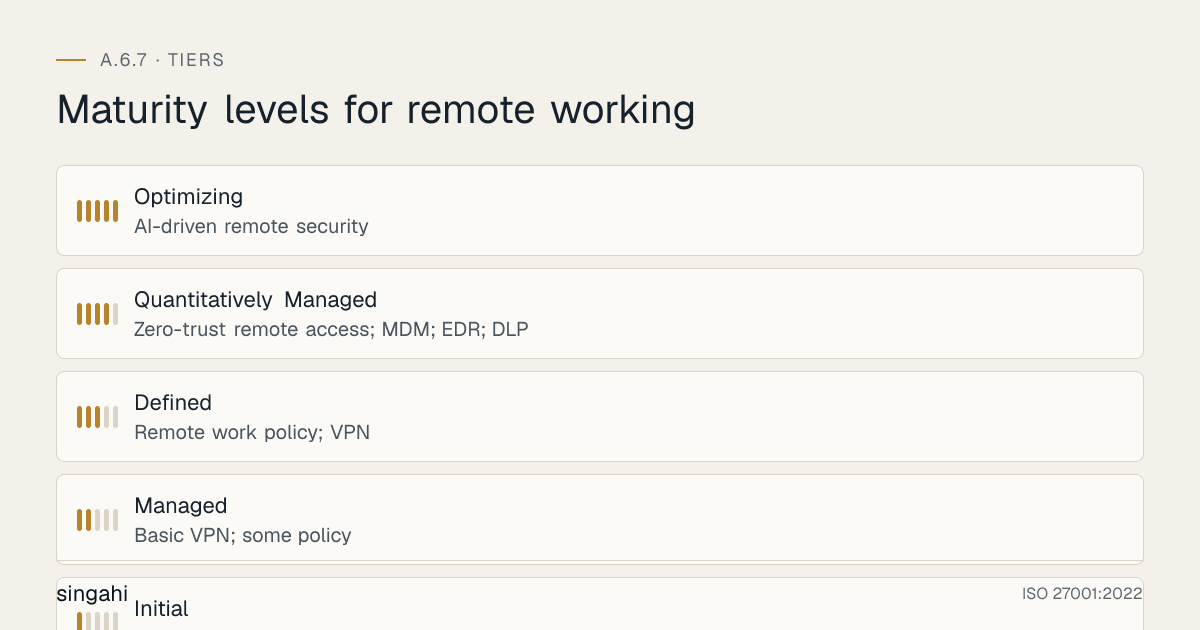
Maturity Model (Level 1-5)
| Level | Name | Description |
|---|---|---|
| 1 | Initial | Ad-hoc remote work; no security controls; personal devices; no VPN; no policy |
| 2 | Managed | Basic VPN; some policy; informal monitoring; BYOD without controls; basic MFA |
| 3 | Defined | Remote work policy; VPN; device management; secure communication; home office guidelines; monitoring; incident response; training; authorization |
| 4 | Quantitatively Managed | Zero-trust remote access; MDM; EDR; DLP; automated compliance; secure home office kits; behavioral monitoring; endpoint encryption; conditional access; travel security |
| 5 | Optimizing | Phishing-resistant MFA; device-bound sessions; conditional access on device health; measured outcomes; continuous improvement |
Improvement Cycle
- Plan: Annual review of remote work policy; quarterly metrics; industry benchmarking; regulatory updates; employee feedback; threat intelligence; technology trends
- Do: Deploy new tools; update remote access architecture; enhance monitoring; improve automation; update training; refine DLP; enhance EDR; improve home office security
- Check: Measure remote security posture; audit compliance; benchmark; gather feedback; review incidents; analyze threats; technology assessment
- Act: Standardize; communicate; update procedures; report to management; share best practices; union collaboration; regulatory reporting; industry leadership
Technology Trends
- SASE Adoption: Secure Access Service Edge becoming standard for remote work security
- Zero Trust Architecture: Zero trust replacing traditional VPN for remote access
- AI-Driven Remote Security: AI predicting and preventing remote work security incidents
- Biometric Remote Authentication: Fingerprint, face recognition, behavioral biometrics for remote access
- Home Network Security Integration: Organization providing home network security appliances or services
- Predictive Threat Analytics: Predicting remote worker security incidents before they occur
- Continuous Adaptive Trust: Real-time risk assessment for remote access decisions
- Edge Security: Security at the network edge for remote workers
- Remote Work Security as a Service: Managed security services for remote work
- Quantum-Safe Remote Encryption: Preparing remote encryption for quantum computing threats
FAQ
Frequently Asked Questions (20 Questions)
Q1: Is a remote work security policy required for ISO 27001 certification? A: Not automatically. No Annex A control is mandatory. Under clause 6.1.3 you choose the controls your risk assessment calls for, then record A.6.7 in your Statement of Applicability as included (and how) or excluded (and why). If anyone works from home, client sites or while travelling, you will normally include it. An organisation where nobody works remotely could exclude it with that justification. If you include it, auditors will look for remote-working rules and evidence that the technical measures are in place.
Q2: Do we need to provide company devices for remote work, or can employees use personal devices? A: Company-provided devices are preferred for security and control. If BYOD is used, it must be managed (MDM enrollment, containerization, compliance checks). Personal devices without any management should not be used for work.
Q3: Is VPN mandatory for all remote work? A: Yes, VPN is mandatory for remote access to organizational systems. ZTNA (Zero Trust Network Access) is an alternative that provides even stronger security. Public Wi-Fi should be avoided or used only with VPN.
Q4: Can we monitor remote employees without violating privacy? A: Yes, but monitoring must be for security purposes only, not performance surveillance. Employees must be informed of monitoring. Monitoring should focus on work data and devices, not personal activities. DPDP and labor law compliance must be maintained.
Q5: What is the difference between VPN and ZTNA? A: VPN creates an encrypted tunnel to the network; once connected, user has broad network access. ZTNA provides application-level access based on identity, device compliance, and risk; no broad network access. ZTNA is more secure and is the modern replacement for VPN.
Q6: How do we secure home networks for remote work? A: Provide guidance: WPA3/WPA2 encryption, strong Wi-Fi password, change router admin password, update firmware, enable firewall, disable UPnP/WPS, use guest network for personal devices. Do not enforce technically (privacy) but require self-assessment.
Q7: What should we do if a remote worker loses a device? A: (1) Remote wipe via MDM immediately, (2) Revoke access, (3) Report to police, (4) Notify manager, (5) Insurance claim, (6) Assess data exposure, (7) Notify affected parties if data breach, (8) Replace device, (9) Retrain employee on device security.
Q8: Is MFA mandatory for remote access? A: Yes, MFA is mandatory for all remote access with no exceptions. Password-only remote access is a major security risk. Hardware tokens (YubiKey) are recommended for high-risk roles (BFSI, admin, customer data).
Q9: How do we handle remote work for contractors and third parties? A: Contractors require third-party NDA, limited access, managed device or MDM-enrolled BYOD, enhanced monitoring, and contract termination includes access revocation and data return.
Q10: What is conditional access and why is it important? A: Conditional access makes access decisions based on conditions: device compliance, location, user risk, time of day. Example: block access from non-compliant devices or high-risk countries. It adds an intelligent security layer beyond just VPN and MFA.
Q11: How do we prevent family members from accessing work devices? A: Policy prohibition, lock screen with auto-lock, MDM, employee training, and incident response. If family access occurs, treat as security incident: assess exposure, retrain, disciplinary action if repeated.
Q12: What is SASE and should we use it? A: SASE (Secure Access Service Edge) combines network security functions (SWG, CASB, FWaaS, ZTNA) with WAN capabilities (SD-WAN) in a cloud-delivered service. It is ideal for organizations with significant remote workforces. For 500+ remote workers, SASE is highly recommended.
Q13: Do we need different security controls for occasional remote work vs. full-time remote work? A: Full-time remote workers need more complete controls: company devices, home office assessment, secure equipment, VPN, MFA, MDM, EDR, DLP. Occasional remote workers may use lighter controls but still require VPN, MFA, and device security.
Q14: How do we handle remote work during emergencies (pandemic, disaster)? A: Emergency remote work procedure: scalable VPN, emergency device provisioning, relaxed controls temporarily (with risk acceptance), enhanced monitoring, return to normal controls when emergency ends. Plan ahead; do not wait for emergency.
Q15: What travel security measures should remote workers follow? A: Avoid public Wi-Fi (use mobile hotspot or VPN), carry devices as hand luggage, lock devices, use hotel safe, avoid confidential work in public spaces, disable Bluetooth, maintain screen privacy.
Q16: How do we verify data deletion from remote devices upon return? A: MDM remote wipe for company devices, employee data deletion affidavit for BYOD, DLP scan, and verification of cloud data removal. For high-risk roles, device may be scanned or forensically imaged.
Q17: Can we allow remote admin access to critical systems? A: Remote admin access should be restricted and require additional controls: hardware MFA, session recording, just-in-time access, additional approval, enhanced monitoring, and limited time windows.
Q18: What is Shadow IT and how do we prevent it for remote workers? A: Shadow IT is unauthorized software/services used by employees. Prevent it with MDM app whitelist, approved software policy, monitoring, CASB for cloud apps, and employee education on approved tools.
Q19: How do we ensure DPDP compliance for remote work? A: Remote work policy must include DPDP data protection obligations: no personal data on personal devices, encryption, secure transmission, access controls, data deletion, incident reporting, and employee training on DPDP.
Q20: What will an ISO 27001 auditor look for in A.6.7? A: The auditor will verify: (1) remote work security policy exists, (2) remote work is authorized, (3) security measures are implemented (VPN, MFA, device security, network security, physical security, data protection), (4) remote devices are managed, (5) remote access is monitored, (6) remote incidents are responded to, (7) remote workers are trained, (8) there is evidence of implementation (logs, records, compliance checks), and (9) the policy is reviewed.
References and Further Reading
ISO Standards
- ISO 27001:2022: Information Security Management Systems
- ISO 27002:2022: Information Security Controls
- ISO/IEC 27701:2025: Privacy information management systems
Indian Law
- DPDP Act 2023
- IT Act 2000
- RBI Cybersecurity Directions 2026: Remote work security for banking
- SEBI CSCRF (2024): Remote trading system access
- IRDAI Guidelines: Remote access to insurance data
- Companies Act 2013
- OSH Code 2020 (replaced the Factories Act 1948)
- Shops and Establishments Act
- POSH Act 2013
- Labour Laws: Home-based worker protections
International
- GDPR (EU): Articles 5, 28, 32
- HIPAA (US): §164.308(a)(4), §164.312(e)**
- SOX (US): Internal controls
- UK Employment Rights Act 1996
- EU Remote Work Directive
- ILO Convention: Home-based worker protections
- FCRA (US): Background checks
- CCPA (California): Employee data privacy
- NIST Cybersecurity Framework: Telework security guidance
- NIST SP 800-46: Guide to Enterprise Telework, Remote Access, and Bring Your Own Device (BYOD) Security
- NIST SP 800-114: User's Guide to Telework and Bring Your Own Device (BYOD) Security
Industry
- NASSCOM: Remote work best practices for IT industry
- ISACA: Remote work security guidance
- Data Security Council of India: Remote work data protection
- Verizon DBIR: Remote work breach statistics
- Kaspersky: Remote work security research
- Proofpoint: Remote work phishing and threat research
- Microsoft: Remote work security guidance
- Google: Remote work security best practices
- Cisco: Remote work security architecture
- Palo Alto: SASE and remote work security
- Zscaler: ZTNA and remote work
- Netskope: SASE and remote work
- CrowdStrike: Remote endpoint security
- IDC: Remote work security market data