
On this page
- Quick Reference: A.6.8 in 60 Seconds
- What the Control Asks For
- What Counts as a Security Event?
- The Incident Classification Matrix
- Building the Reporting Culture
- Reporting Channels
- The Reporting Form
- The Reporting Workflow
- First Response Procedures
- Incident Response Team Structure
- Communication Plan
- Evidence Collection & Preservation
- Root Cause Analysis
- Remediation & Recovery
- Post-Incident Review
- Metrics & KPIs
- Integration with Other Controls
- Incident Management Tools
- Regulatory Notification Requirements
- Industry-Specific Incident Types
- Automation & SOAR
- Tabletop Exercise Guide
- Implementation Roadmap: 4 Weeks
- Common Audit Failures & Fixes
- Case Studies: Real Breaches Shaped by Reporting
- Multi-Framework Mapping
- FAQ
Quick Reference: A.6.8 in 60 Seconds
| Question | Answer |
|---|---|
| What is it? | A control requiring organizations to establish a formal process for reporting information security events through appropriate channels as quickly as possible. |
| Why does it matter? | The average breach took 194 days to identify in 2024 (IBM Cost of a Data Breach Report), and IBM consistently finds that faster identification and containment lowers cost. Reports from people are often the first signal. |
| Minimum requirement | Documented procedure for event reporting; defined reporting channels; evidence that staff know how to report; evidence that reports are acted upon. |
| Audit red flag | No documented procedure; staff interviewed cannot describe how to report an event; reports go unanswered; no evidence of event logging or tracking. |
| Quick win | Create a one-page reporting guide with email, phone, and Slack bot; send it to all staff this week; test it with a simulated phishing event. |
| Time to implement | 1–2 weeks for basic process; 4–6 weeks for mature program with automation and metrics. |
| Control type | Detective (27002 concept: Detect; domain: Defence) |
| Related controls | A.5.24 (Incident management planning and preparation), A.5.25 (Assessment and decision on events), A.5.26 (Response to incidents), A.8.15 (Logging), A.8.32 (Change Management), A.5.35 (Independent Review) |
| ISO 27002 attributes | Control type: Detective · Properties: Confidentiality, Integrity, Availability · Concepts: Detect · Capabilities: Information security event management · Domains: Defence |
The 5-Second Rule: If an employee sees something suspicious, they must be able to report it in under 5 seconds without searching for contact details or filling out a 20-field form.
What the Control Asks For
ISO 27001:2022 A.6.8 Text
ISO 27001:2022 Annex A 6.8 asks organizations to give personnel a way to report observed or suspected security events promptly.
Do you need this control?
A.6.8 is not mandatory in itself: under clause 6.1.3 you include it if your risk assessment calls for it, and record the decision in your Statement of Applicability. Almost always included, because every organisation needs a way for people to report security events quickly. It is about the reporting channel and culture; the response itself sits in A.5.24 to A.5.26.
Purpose: To ensure that information security events are reported, allowing timely corrective action to be taken.
ISO 27002:2022 Implementation Guidance (Section 6.8)
ISO 27002 6.8 (paraphrased): make all personnel and users aware of their responsibility to report information security events as quickly as possible, of the procedure, and of the point of contact. The reporting mechanism should be as easy, accessible and available as possible. Events include incidents, breaches and vulnerabilities.
Situations to report include: (a) ineffective controls; (b) breaches of confidentiality, integrity or availability expectations; (c) human errors; (d) non-compliance with policies or standards; (e) physical security breaches; (f) system changes that bypassed change management; (g) malfunctions or abnormal system behaviour; (h) access violations; (i) vulnerabilities; (j) suspected malware.
People should be told not to try to prove a suspected vulnerability: testing it can look like misuse, damage systems, destroy evidence and create legal liability for them.
Good practice that builds on this: multiple channels, a short reporting form, a no-blame commitment for good-faith reports, and feedback to the reporter. This page also covers what happens after a report (classification, response, review); those steps belong to A.5.24–A.5.28, and A.6.8 itself is about making reporting easy and expected.
What Changed from ISO 27001:2013
| 2013 Version | 2022 Version | Implication |
|---|---|---|
| A.16.1.1, Responsibilities and procedures | A.6.8, Event reporting | Narrower focus: specifically on reporting, not full incident management |
| A.16.1.2, Reporting information security events | Absorbed into 6.8 | The reporting mechanism is now the primary control |
| A.16.1.3, Reporting information security weaknesses | Partially in 6.8 | Weakness reporting is now part of the event taxonomy |
Key implication: The 2022 standard separates reporting (A.6.8) from assessment and decision (A.8.15/A.8.16) and response (implied in other controls). A.6.8 is about the input, getting events into the system fast and accurately.
What Auditors Actually Check
| Auditor Action | What They Want to See |
|---|---|
| Review event reporting procedure | Documented process for reporting events through "appropriate channels" |
| Verify channel availability | Evidence that channels exist and are accessible (screenshots, URLs, phone numbers) |
| Test staff awareness | Random interviews: "How would you report a suspicious email?" |
| Check historical reports | Log of reported events with timestamps, reporter, and initial classification |
| Verify response evidence | Evidence that reported events were acknowledged and acted upon |
| Check feedback loop | Reporters received confirmation their report was received |
| Review no-blame policy | Documented policy that good-faith reports are not punished |
| Verify escalation evidence | Events that met criteria were escalated within defined timeframes |
| Check training records | Staff trained on reporting procedures within last 12 months |
| Test anonymous reporting | If claimed, verify anonymous channel works and preserves anonymity |
The "Appropriate Management Channels" Requirement
ISO 27001 uses the phrase "appropriate management channels" deliberately. This does not mean "tell your manager and hope they forward it." It means:
- Defined channels: Pre-established, documented, tested pathways
- Multiple channels: Redundancy so no single point of failure exists
- Escalation paths: If Channel A fails, Channel B activates automatically
- Management visibility: Events are visible to the people with authority to act
- Timeliness: "As quickly as possible" means minutes, not days
Practitioner insight: A common failure is telling staff to "report security issues to IT." That's not a channel. That's a department. A channel is a specific mechanism with a defined owner, SLA, and escalation rule.
What Counts as a Security Event?
The Complete Taxonomy
A.6.8 requires reporting of information security events. But what exactly is an event? The ISO 27000 vocabulary defines:
| Term | ISO 27000 Definition | Example |
|---|---|---|
| Information Security Event | An identified occurrence of a system, service, or network state indicating a possible breach of information security policy or failure of controls | A firewall log shows 10,000 failed login attempts from a single IP |
| Information Security Incident | A single or series of unwanted information security events that have a significant probability of compromising business operations and threatening information security | The failed logins were successful; attacker accessed customer database |
| Near-Miss | An event that could have caused harm but was prevented by a control or luck | Phishing email clicked, but link was blocked by email gateway |
| Anomaly | A deviation from baseline that may or may not be malicious | Database server CPU spiked to 95% at 2 AM on a Sunday |
| Policy Violation | An action that breaches a documented security policy | Employee stores customer data on personal USB drive |
| Weakness | A flaw in a control that could be exploited | Outdated Apache server with known CVE, no patch scheduled |
The 12 Categories of Reportable Events
1. Malware and Malicious Software
- Antivirus alert on endpoint
- Ransomware detection
- Suspicious PowerShell or macro execution
- Browser redirect to phishing site
- Unauthorized software installation
2. Phishing and Social Engineering
- Suspicious email with urgent request
- Fake invoice or wire transfer request
- Impersonation of CEO or vendor
- Phone call requesting password reset
- USB drive left in parking lot (baiting)
3. Unauthorized Access
- Successful login from unusual location
- Account lockout after multiple failures
- Privilege escalation detected
- Shared credentials used simultaneously from two countries
- Guest account with unexpected permissions
4. Data Loss and Leakage
- Email sent to wrong recipient containing sensitive data
- File uploaded to personal cloud storage
- Printed documents left in public area
- Customer database copied to unknown location
- API returning more data than authorized
5. Insider Threat Indicators
- Employee accessing data outside their role
- Bulk download of files before resignation
- After-hours access to sensitive systems
- Attempt to disable logging or monitoring
- Unusual printing volume
6. Physical Security Events
- Unauthorized person in server room
- Missing laptop or mobile device
- Tailgating at building entrance
- Security camera offline
- Fire suppression system activation
7. Network and Infrastructure Anomalies
- Unusual outbound traffic volume
- DNS queries to known malicious domains
- Port scanning from internal IP
- Unexpected configuration change
- Certificate expiry or invalid certificate
8. Third-Party and Supply Chain Events
- Vendor notification of breach affecting your data
- SaaS platform experiencing outage with security implications
- Contractor losing device with company data
- Supplier's security certificate revoked
- API integration partner showing anomalous behavior
9. Environmental and Availability Events
- Data center cooling failure
- Power outage affecting primary site
- Cloud region degradation
- Backup failure for 3 consecutive days
- Replication lag exceeding RPO
10. Compliance and Policy Violations
- Missing encryption on sensitive data at rest
- Password written on sticky note
- Unapproved software in use
- BYOD device without MDM enrollment
- Unapproved cloud service shadow IT
11. Intelligence-Driven Events
- Threat intelligence indicates IOC match in environment
- Dark web mention of company credentials
- CERT-In advisory affecting your technology stack
- Vendor vulnerability disclosure requiring immediate action
- Red team exercise detection
12. Change-Related Events
- Unplanned change causing security control bypass
- Emergency change without post-implementation review
- Change window exceeded without rollback
- New system deployed without security review
- Configuration drift from approved baseline
Practitioner tip: Many organisations only report Category 1–3 (malware, phishing, unauthorized access). The best-performing incident management programs report all 12 categories. Aim for a reporting taxonomy that captures near-misses and anomalies, because those are the leading indicators of future incidents.
The Incident Classification Matrix
Figure · Tiers
Maturity levels for event reporting
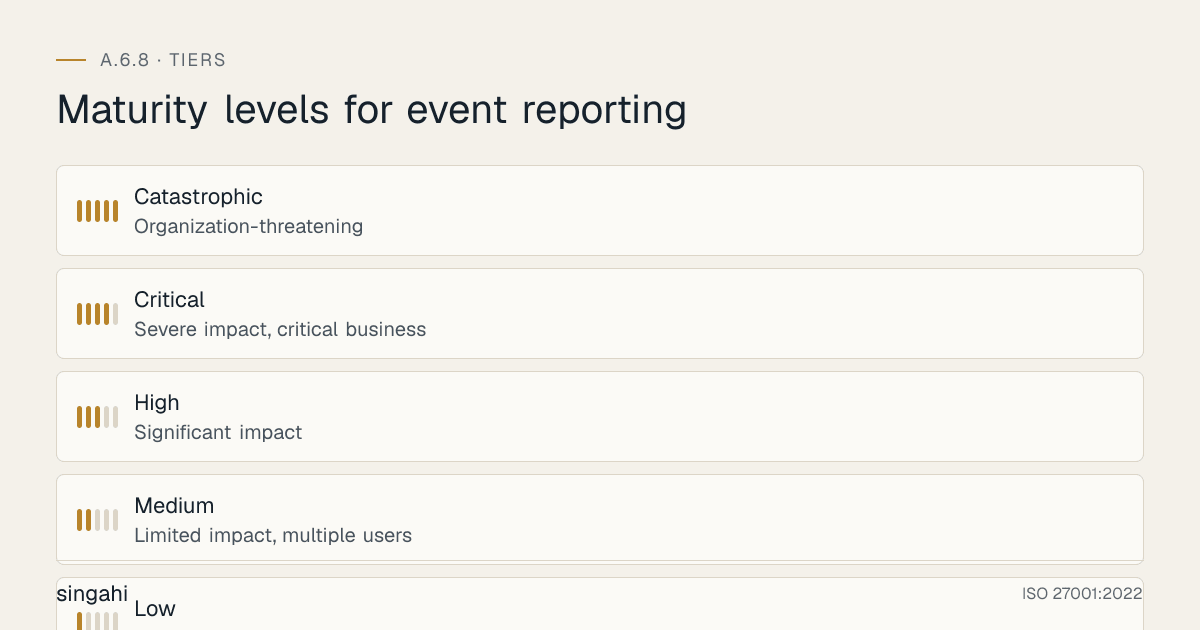
Classification happens at two points: Initial Triage (within 15 minutes of report) and Full Assessment (within 4 hours). A.6.8 is about reporting, but classification determines what happens to the report.
Severity Levels
| Severity | Definition | Response Time | Escalation To | Examples |
|---|---|---|---|---|
| Low | Minimal impact, single user, no data exposure | 4 hours | IT Help Desk | Phishing email not clicked; AV quarantined file; password policy reminder |
| Medium | Limited impact, multiple users, potential data exposure | 1 hour | Security Team Lead | Successful phishing with credential harvest; malware on 1 endpoint; unauthorized access to internal file share |
| High | Significant impact, business function impaired, confirmed data exposure | 30 minutes | CISO / Security Manager | Ransomware on 5+ endpoints; customer PII exposed; admin account compromised; DDoS affecting customer portal |
| Critical | Severe impact, critical business function down, large-scale data breach | 15 minutes | CISO + Legal + Executive Team | Active data exfiltration in progress; ransomware on domain controller; insider theft of trade secrets; regulatory notification likely |
| Catastrophic | Organization-threatening, existential risk, national security implications | Immediate | CEO + Board + External IR Firm | Nation-state APT in production; complete data center destruction; mass customer data breach >1M records; critical infrastructure compromise |
Classification Criteria Matrix
Use a weighted scoring model to eliminate subjectivity:
| Factor | Weight | 1 Point | 2 Points | 3 Points | 4 Points | 5 Points |
|---|---|---|---|---|---|---|
| Business Impact | 30% | Single user inconvenience | Department productivity loss | Business function impaired | Critical service unavailable | Business cannot operate |
| Data Sensitivity | 25% | Public data | Internal data | Confidential business data | Customer personal data | Restricted data (per your classification, A.5.12) |
| Number Affected | 15% | 1 user | 2–10 users | 11–100 users | 101–1000 users | >1000 users / all customers |
| Regulatory Exposure | 15% | None | Internal compliance risk | Sector regulator notification | National regulator notification | International regulator + media |
| Attack Sophistication | 10% | Script kiddie / opportunistic | Automated tool | Targeted attack | Advanced persistent threat | Nation-state APT |
| Containment Difficulty | 5% | Single click fix | Standard procedure | Custom response required | External IR firm needed | Multiple agencies involved |
Score Calculation: Weighted average (sum of factor scores × weights). Map to severity:
- 1.0–1.9 = Low
- 2.0–2.9 = Medium
- 3.0–3.9 = High
- 4.0–4.9 = Critical
- 5.0 = Catastrophic
Priority vs. Severity
Severity = Impact × Urgency. Priority = Severity × Resources Available.
| Severity | High Urgency | Medium Urgency | Low Urgency |
|---|---|---|---|
| High | P1: Drop everything | P2: Next available analyst | P3: Queue for today |
| Medium | P2: Next available analyst | P3: Queue for today | P4: Queue this week |
| Low | P3: Queue for today | P4: Queue this week | P5: Next sprint |
Practitioner insight: We see organizations conflate severity and priority. A ransomware attack on a test environment (High severity, Low urgency = P3) should not get the same response as ransomware on the production billing system (High severity, High urgency = P1). Build the distinction into your procedure.
Building the Reporting Culture
Figure · Matrix
How the options compare: Web form to Encrypted chat
A.6.8 is not just about procedures and channels. It's about culture. The best reporting mechanism in the world fails if employees are afraid to use it.
The Reporting Culture Maturity Model
| Level | Name | Characteristics | Reporting Rate |
|---|---|---|---|
| 1 | Fear-Based | Reporting punished; blame assigned; low trust | <5% of events reported |
| 2 | Compliance-Driven | Reporting required by policy; no punishment, no reward | 5–15% of events reported |
| 3 | Encouraged | Management asks for reports; recognition given | 15–30% of events reported |
| 4 | Normalized | Reporting is routine; no stigma; psychological safety | 30–60% of events reported |
| 5 | Proactive | Employees hunt for events; gamification; near-misses valued | 60–90% of events reported |
Psychological Safety Framework
The No-Blame Commitment (Document and Publish):
"[Organization Name] commits that any employee who reports a security event in good faith will not face disciplinary action, performance review penalty, or career consequence, even if the report turns out to be a false positive or the employee made an initial error that triggered the event."
Exceptions to No-Blame (Clearly Defined):
- Repeated identical errors after training (3+ times)
- Malicious intent (deliberately creating events to test the system)
- Criminal behavior (fraud, sabotage, espionage)
- Failure to report when the employee knew they should (suppression)
Anonymous Reporting Channels
| Channel | Anonymity Level | Setup Complexity | Best For |
|---|---|---|---|
| Web form (no login required) | Medium | Low | General events, insider threat indicators |
| Anonymous email (ProtonMail, Tutanota) | High | Medium | Sensitive events where reporter fears retaliation |
| Third-party hotline (Navex, EthicsPoint) | Very High | Medium-High | Whistleblowing, severe misconduct |
| Physical drop box | High | Low | Organizations with high physical security sensitivity |
| Encrypted chat (Signal, Session) | Very High | Medium | Technical teams comfortable with crypto tools |
Anonymous Reporting Commitments (promise only what you have technically verified: proxies, firewalls and SaaS tools may still log metadata):
- We do not try to identify anonymous reporters
- Channels are configured to minimise logging where technically possible
- No attempt to de-anonymize
- Response via public bulletin or reference number only
- No retaliation investigation if anonymity is maintained
Gamification and Recognition Programs
The Reporter Leaderboard (Monthly):
| Rank | Reporter | Events Reported | Valid/Total | Recognition |
|---|---|---|---|---|
| 1 | Priya S. | 12 | 10/12 | gift card + "Security Champion" badge |
| 2 | Rahul K. | 8 | 7/8 | gift card + LinkedIn shoutout |
| 3 | Ananya M. | 6 | 5/6 | gift card + team lunch |
Gamification Rules (To Prevent Abuse):
- Quality over quantity: Minimum 70% valid rate to qualify
- Near-misses count double (they're leading indicators)
- No points for duplicate reports of the same event
- No points for reporting your own mistake (that's just honesty, not vigilance)
- Team leaderboard alongside individual (encourages peer support)
Non-Monetary Recognition (Often More Effective):
- CEO email thanking the reporter (with their permission)
- Security team "save of the month" all-hands presentation
- Extra PTO day for reporting a critical event
- Name in the security newsletter (with permission)
- Priority access to new security tools or training
Training for Reporting Culture
New Hire Onboarding (30 minutes):
- The 12 categories of reportable events (Section 3)
- How to report: 3 channels, 5-second rule
- The no-blame policy: what it means for you
- Live demo: Report a simulated phishing email
- Q&A with security team member
Annual Refresher (15 minutes):
- New event types from the past year
- Reporting channel updates
- Illustrative Scenario: "This report saved us "
- Quiz: 5 scenarios, identify if and how to report
Just-in-Time Training (Microlearning):
- Slack/Teams bot: "You just received an external email. Here's how to check if it's phishing. Report suspicious emails using /securityreport."
- Lock screen wallpaper: "See something? Say something. security@example.com"
- Email footer: "If this email looks suspicious, forward to report-phishing@company.com"
Practitioner insight: A strong predictor of reporting culture maturity is whether the CISO personally hosts the new hire security session. When the security leader shows up, employees believe the no-blame policy is real. When it's a recorded video, they assume it's legal CYA.
Reporting Channels
"Appropriate channels" means multiple, redundant, accessible pathways. One channel is a single point of failure.
The Channel Architecture
┌─────────────────────────────────────────────────────────────┐
│                    EMPLOYEE DETECTS EVENT                    │
└─────────────────────────────────────────────────────────────┘
                              │
        ┌─────────────────────┼─────────────────────┐
        │                     │                     │
        ▼                     ▼                     ▼
┌───────────────┐   ┌───────────────┐   ┌───────────────┐
│   DIGITAL     │   │   PERSONAL    │   │   ANONYMOUS   │
│   CHANNELS    │   │   CHANNELS    │   │   CHANNELS    │
├───────────────┤   ├───────────────┤   ├───────────────┤
│ Email         │   │ Phone hotline │   │ Web form      │
│ Ticketing     │   │ Manager       │   │ Drop box      │
│ Chat bot      │   │ Walk-in       │   │ Third-party   │
│ Mobile app    │   │ On-call pager │   │ Encrypted msg │
└───────────────┘   └───────────────┘   └───────────────┘
        │                     │                     │
        └─────────────────────┼─────────────────────┘
                              │
                              ▼
┌─────────────────────────────────────────────────────────────┐
│              AUTOMATED TRIAGE & CLASSIFICATION               │
│         (SIEM, SOAR, or manual within 15 min)              │
└─────────────────────────────────────────────────────────────┘
Channel Details
1. Email
- Address:
security-events@company.com(not justsecurity@, that gets everything) - Auto-reply: "Your report has been received. Reference #IR-2026-0847. We'll respond within 1 hour."
- Integration: Forward to ticketing system automatically
- Backup: If ticketing system down, email is the failsafe
- SLA: Acknowledgment within 1 hour; initial triage within 4 hours
2. Phone / Hotline
- Number: Dedicated, not the general IT help desk
- Hours: 24/7 for critical events; business hours for non-critical
- Script: "Information Security Hotline. Please describe what you observed. Do not turn off your computer. An analyst will guide you."
- Backup: If primary number unreachable, auto-forward to on-call mobile
- SLA: Human answer within 3 rings; if voicemail, callback within 15 minutes
3. Ticketing System
- Portal: Dedicated security incident category, not mixed with "my printer is broken"
- Fields: Minimal (reporter, description, time, system, attachment), 5 fields max
- Visibility: Reporter can see status of their own report
- Integration: Auto-link to SIEM alerts, threat intelligence, asset database
- SLA: Auto-assignment within 15 minutes based on classification rules
4. Slack / Microsoft Teams Bot
- Command:
/securityreportor@securitybot report - Experience: 3-question wizard: What happened? When? Where?
- Auto-enrichment: Bot pulls user info, recent logins, device status
- Response: "Thanks. We've created incident IR-2026-0847. Priority: Medium. Assigned to: Rahul."
- Broadcast: Critical events auto-post to #security-incidents channel
- Backup: If bot is down, direct message to @security-team works
5. Mobile App
- Use case: Remote workers, sales teams, executives traveling
- Features: Photo capture (suspicious physical device), voice memo, GPS tag
- Push notification: "Critical security alert: Update your VPN client immediately. Tap to acknowledge."
- Offline mode: Queue reports, upload when connected
- Integration: Links to EDR console for remote device isolation
6. Anonymous Web Form
- URL:
https://security-report.company.com(no login required) - Fields: Event type, description, date, time, system/location (optional)
- No logging: IP addresses, user agents, and referrer headers not stored
- Response: Reference number displayed on screen; check status via public page
- Security: CAPTCHA to prevent spam; rate limiting to prevent abuse
7. Physical Mailbox / Drop Box
- Location: Near security desk, in break room, by HR office
- Label: "Security Event Reports, Anonymous OK"
- Collection: Daily at 9 AM by security officer; log date/time of collection
- Processing: Transcribed into ticketing system within 4 hours of collection
- Best for: Organizations with high physical security (manufacturing, government)
8. Manager Escalation
- Rule: If employee is unsure whether to report, they should tell their manager
- Manager duty: Manager must report within 1 hour of being told
- Training: Managers trained on what must be escalated vs. what can be handled locally
- Accountability: Manager performance review includes security escalation metrics
- Backup: If manager is unavailable or is the suspected threat, direct channel to CISO
Channel Selection Guide by Event Type
| Event Type | Primary Channel | Secondary Channel | Rationale |
|---|---|---|---|
| Phishing email | Forward to report-phishing@ | Slack /securityreport | Fast, preserves headers |
| Malware alert | EDR auto-creates ticket | Phone if unable to work | EDR already has telemetry |
| Data breach suspicion | Phone hotline | Ticketing system | Time-sensitive, needs voice guidance |
| Insider threat indicator | Anonymous web form | Third-party hotline | Reporter may fear retaliation |
| Physical intrusion | Phone (security desk) | Mobile app photo | Immediate response needed |
| Lost laptop | Phone + Ticketing | Mobile app (GPS) | Both reporting and recovery needed |
| Policy violation | Manager + Ticketing | Manager handles HR; security handles risk | |
| Third-party breach | Email to security-events@ | Phone if active | Email preserves vendor communication |
| System anomaly | SIEM auto-report | Slack bot | Technical team uses chat |
| Near-miss | Slack /securityreport | Anonymous form | Low friction encourages reporting |
Practitioner tip: Start with 3 channels (email, Slack bot, phone) and add more based on failure analysis. The most overlooked channel is the phone hotline. During a real incident, when an employee's laptop is encrypting files from ransomware, they are panicking. They will not calmly fill out a web form. They will call a human. If your only channel is a ticketing portal, you've already lost 30 minutes.
The Reporting Form
The 5-Field Rule
A reporting form should capture what's needed for triage in 5 fields or fewer. Every additional field reduces submission rate by 8–12%.
Mandatory Fields:
- What happened? (Free text, 500 chars max)
- When did it happen? (Date/time picker, default now)
- Where did it happen? (System, device, location, auto-fill if possible)
- Who are you? (Name, email, department, auto-fill; "Anonymous" option)
- How urgent is this? (Low/Medium/High/Critical, guide them with examples)
Optional Fields (Auto-Filled or Hidden):
- IP address, device ID, user agent (auto-captured)
- Screenshot attachment (drag-and-drop)
- Related system or application (dropdown)
- Have you told anyone else? (Yes/No)
The Complete Reporting Form Template
═══════════════════════════════════════════════════════════════
           INFORMATION SECURITY EVENT REPORT FORM
═══════════════════════════════════════════════════════════════

Reference Number: [Auto-generated: IR-YYYY-NNNN]
Date/Time Submitted: [Auto-generated]

─── REQUIRED INFORMATION ───

1. WHAT HAPPENED?
   [Describe what you observed. Be specific but brief.
    Examples: "I clicked a link in an email that looked like
    it was from our CEO." / "My laptop is showing a ransom
    message." / "I found a USB drive in the parking lot."]

   ___________________________________________________________
   ___________________________________________________________

2. WHEN DID IT HAPPEN?
   [Date/Time] _______________  [ ] Approximately  [ ] Exact

3. WHERE / ON WHAT SYSTEM?
   [Device name, system, location. E.g., "My laptop SING-1234",
    "Office 3rd floor", "Salesforce CRM"]

   ___________________________________________________________

4. YOUR CONTACT INFORMATION
   [Name] _______________  [Email] _______________  [Dept] ______
   [ ] I prefer to remain anonymous. If checked, we cannot
       contact you for follow-up, but we will still investigate.

5. URGENCY LEVEL (Check the best description)
   [ ] Low — Suspicious but not active. No immediate danger.
   [ ] Medium — Something happened. Might need attention soon.
   [ ] High — Active problem. Systems or data at risk now.
   [ ] Critical — Emergency. Organization is under attack or
                 critical systems are down.

─── OPTIONAL INFORMATION ───

6. SCREENSHOT OR ATTACHMENT
   [Drag file here or click to upload]

7. HAVE YOU TOLD ANYONE ELSE?
   [ ] No  [ ] Yes: _______________

8. IS THE EVENT STILL ONGOING?
   [ ] No, it stopped  [ ] Yes, it is happening now
       at: ___________

─── SUBMISSION ───

[ SUBMIT REPORT ]        [ SAVE DRAFT ]        [ CANCEL ]

After submission, you will receive a confirmation email with
your reference number within 5 minutes. If you do not, please
call the Security Hotline: +91-XXXX-XXXXXX

═══════════════════════════════════════════════════════════════
Filled Example: Phishing Report
═══════════════════════════════════════════════════════════════
Ref: IR-2026-0847
Date: 2026-06-15 09:23 IST

1. WHAT HAPPENED?
   "I received an email appearing to be from our CFO asking me
    to process an urgent wire transfer to a new vendor.
    The email address was cf0@company-secures.com (zero instead
    of 'o'). I noticed the domain was wrong and did not click
    the link or reply. I forwarded the email to this form."

2. WHEN: 2026-06-15 09:15 IST (Exact)

3. WHERE: My email (priya.sharma@company.com), Outlook Web

4. CONTACT: [Name], [email], [Department]

5. URGENCY: [x] Medium — Other employees may have received this.

6. ATTACHMENT: phishing_email_screenshot.png

7. TOLD ANYONE ELSE? Yes: My manager, Rahul, at 09:20.

8. ONGOING? Yes — email is still in my inbox.
═══════════════════════════════════════════════════════════════
Filled Example: Ransomware Report
═══════════════════════════════════════════════════════════════
Ref: IR-2026-0848
Date: 2026-06-15 14:47 IST

1. WHAT HAPPENED?
   "My laptop screen is showing a red message saying all files
    are encrypted and I need to pay 2 Bitcoin. I cannot open
    any documents. The message says 'LockBit 3.0'. I immediately
    disconnected from Wi-Fi and called the hotline."

2. WHEN: 2026-06-15 14:42 IST (Exact)

3. WHERE: Laptop SING-2047, Office 3rd Floor, Docking Station 7

4. CONTACT: Arjun Mehta, arjun.mehta@company.com, Engineering

5. URGENCY: [x] Critical — Active malware, cannot work, may spread.

6. ATTACHMENT: Photo of ransomware screen (IMG_2047.jpg)

7. TOLD ANYONE ELSE? No.

8. ONGOING? Yes — laptop is on but disconnected from network.
═══════════════════════════════════════════════════════════════
Auto-Enrichment: What the System Should Capture Automatically
When a report is submitted, the system should automatically query:
- User profile: Department, role, manager, access level, recent training
- Device profile: OS version, patch level, EDR agent status, last scan
- Network context: IP address, VPN status, location (office/remote), network segment
- Authentication context: Recent logins, MFA status, password age, SSO events
- Email context: Headers, sender reputation, URL sandbox results, attachment hash
- Threat intelligence: IOC matches, known malware signatures, campaign attribution
- Asset value: Data classification on affected systems, compliance scope
This enrichment should appear in the incident ticket within 2 minutes of submission, giving the analyst a full context picture without asking the reporter 20 follow-up questions.
Practitioner insight: The best reporting forms are invisible. For example, a chat bot can be set up so that when a user forwarded a phishing email to a channel, the bot automatically extracted the sender, subject, URL, and attachment hash, enriched it with VirusTotal and URL reputation, and created a ticket, all without the user filling out a single field. Reporting rate went from 12% to 67% in 90 days.
The Reporting Workflow
End-to-End Process Map
DETECTION → REPORT → ACKNOWLEDGE → TRIAGE → CLASSIFY →
RESPOND → RESOLVE → CLOSE → REVIEW
Step-by-Step Workflow
Step 1: Detection (T+0)
- Event is detected by user, system, or third party
- Reporter uses appropriate channel (Section 6)
- Auto-enrichment begins (Section 7)
Step 2: Report Submission (T+0 to T+5 min)
- Form submitted / phone call received / alert triggered
- System generates reference number (IR-YYYY-NNNN)
- Auto-reply sent to reporter: "Received. Reference #IR-2026-0847."
- Ticket created in incident management system
Step 3: Acknowledgment (T+5 min to T+15 min)
- Human or automated acknowledgment
- If Critical/Catastrophic: On-call paged immediately
- If Medium/High: Assigned to next available analyst
- If Low: Queued for next business day
- Reporter receives: "Your report is being reviewed by [Analyst Name]."
Step 4: Initial Triage (T+15 min to T+1 hour)
- Analyst reviews report + auto-enrichment
- Validates severity using classification matrix (Section 4)
- Determines if event is:
- True positive (real event requiring response)
- False positive (not a security event)
- Duplicate (already reported as IR-YYYY-NNNN)
- Non-security (redirect to IT, HR, or legal)
- Decision logged with rationale
Step 5: Classification & Escalation (T+1 hour)
- Severity confirmed or revised
- Escalation rules triggered:
- High → Security Manager notified
- Critical → CISO + Legal + Executive notified
- Catastrophic → CEO + Board + External IR firm activated
- War room / bridge call established for Critical+
- Regulatory clock starts (if applicable, Section 19)
Step 6: Response (T+1 hour onward)
- Containment actions initiated (Section 9)
- Evidence collection begins (Section 12)
- Communication plan activated (Section 11)
- All actions timestamped and logged
Step 7: Resolution (Variable)
- Event contained, eradicated, recovered (Section 14)
- Systems validated and returned to production
- Reporter notified of outcome (if not anonymous)
Step 8: Closure (T+resolution)
- Incident ticket closed with resolution summary
- Closure categories: Resolved, False Positive, Duplicate, Non-Security, Unresolved (transferred)
- Metrics updated (Section 16)
- Knowledge base updated if new threat type
Step 9: Post-Incident Review (T+7 days)
- Timeline reconstructed (Section 15)
- Root cause analysis completed (Section 13)
- Action items assigned and tracked
- Lessons learned distributed
SLA Matrix by Severity
| Activity | Low | Medium | High | Critical | Catastrophic |
|---|---|---|---|---|---|
| Acknowledgment | 4 hours | 1 hour | 15 min | 5 min | Immediate |
| Triage complete | 8 hours | 4 hours | 1 hour | 30 min | 15 min |
| Classification | 24 hours | 8 hours | 2 hours | 1 hour | 30 min |
| Containment start | 48 hours | 24 hours | 4 hours | 1 hour | 30 min |
| Evidence secured | 48 hours | 24 hours | 4 hours | 2 hours | 1 hour |
| Initial communication | 48 hours | 24 hours | 4 hours | 2 hours | 1 hour |
| Resolution target | 5 days | 3 days | 1 day | 12 hours | 4 hours |
| Post-incident review | 30 days | 14 days | 7 days | 3 days | 24 hours |
Workflow RACI Matrix
| Activity | Reporter | Analyst | Security Manager | CISO | Legal | Executive |
|---|---|---|---|---|---|---|
| Submit report | R | I | I | I | - | - |
| Acknowledge | I | R | I | - | - | - |
| Triage | C | R | A | - | - | - |
| Classify | I | R | A | C | - | - |
| Contain | I | R | A | C | - | - |
| Escalate | I | C | R | A | C | I |
| Communicate externally | - | C | R | A | R | A |
| Notify regulators | - | C | C | R | R | A |
| Post-incident review | C | R | A | R | - | - |
| Close ticket | - | R | A | - | - | - |
(R=Responsible, A=Accountable, C=Consulted, I=Informed)
Practitioner insight: The most common workflow failure we see is the "acknowledgment gap", a report is submitted but the reporter hears nothing for hours. In that silence, the reporter assumes the report was ignored, stops reporting future events, and sometimes takes unilateral action (like disconnecting a production server). We mandate that every report gets a human acknowledgment within 15 minutes, even if it's just "We got this. Stand by."
First Response Procedures
First response is the actions taken in the first 60 minutes after classification. This is where incidents are won or lost.
The Triage Decision Tree
IS THE EVENT ONGOING?
│
├─ YES → Can we contain without business impact?
│        ├─ YES → Immediate containment (isolate, block, disable)
│        └─ NO → Escalate to Critical, activate war room
│
└─ NO → Has damage already occurred?
        ├─ YES → High/Critical classification, evidence preservation
        └─ NO → Low/Medium classification, standard response
Initial Assessment Checklist (First 15 Minutes)
- Verify the report: Is this a real event or a false positive?
- Determine scope: One user? One system? One department? Entire organization?
- Identify affected assets: Which systems, data, services are involved?
- Assess data sensitivity: Public? Internal? Confidential? PII? Classified?
- Check for active exfiltration: Are attackers still moving data?
- Check for lateral movement: Have they moved to other systems?
- Preserve evidence: Before any remediation, capture logs, memory, disk images
- Document everything: Timestamp every action taken
- Notify stakeholders: Per communication plan (Section 11)
Containment Decision Matrix
| Containment Action | When to Use | Risk | Business Impact |
|---|---|---|---|
| Isolate endpoint | Malware on single device | Low | One user offline |
| Block IP/domain | C2 communication detected | Low | No business impact |
| Disable account | Compromised credentials | Low | One user locked out |
| Revoke session | Active unauthorized session | Low | User re-authenticates |
| Network segment isolation | Lateral movement suspected | Medium | Department offline |
| Disable VPN concentrator | VPN tunnel compromised | Medium | Remote workers offline |
| Shutdown affected server | Ransomware spreading | Medium-High | Service interruption |
| Failover to DR site | Primary site compromised | Medium | Brief transition period |
| Disconnect internet | Active nation-state attack | High | All external services down |
| Activate air gap | ICS/OT compromise | High | Manual operations only |
The "Do Not" List for First Response
Never do these in the first 60 minutes without Security Manager approval:
- Delete logs: This destroys evidence and may be illegal
- Confront the suspected insider: This tips them off and may violate labor law
- Pay a ransom: This is a business/legal decision, not a technical one
- Notify customers prematurely: Premature notification causes panic and may be inaccurate
- Restore from backup without verifying integrity: Backups may also be compromised
- Reboot compromised servers: This destroys volatile memory evidence
- Disable security tools: "The antivirus is slowing things down" is never the right answer
- Post on social media: "We think we were hacked" becomes a headline
Escalation Triggers
Escalate immediately if any of these are true:
- Ransomware on domain controller or backup server
- Customer data confirmed exfiltrated >100 records
- Attack attributed to APT or nation-state
- Insider threat with privileged access
- Physical breach of data center or server room
- Third-party breach affecting your environment
- Regulatory notification threshold likely met
- Media inquiry received about the event
- Legal hold or law enforcement involvement likely
Practitioner insight: We teach the "60-Minute Rule" in every IR training: If you can't contain the event within 60 minutes, you escalate to the CISO and consider activating the full incident response team. The first hour is the containment window. After that, the attacker has likely established persistence, and you need the full team.
Incident Response Team Structure
Core Team Roles
| Role | Responsibility | Typical Holder | Backup |
|---|---|---|---|
| Incident Commander (IC) | Overall decision-making, resource allocation, stakeholder communication | CISO or Security Manager | Deputy CISO |
| Technical Lead | Technical direction, containment strategy, evidence handling | Senior Security Engineer | Security Analyst II |
| Communications Lead | Internal and external messaging, media, customer communication | PR/Communications Manager | HR Manager |
| Legal Counsel | Regulatory obligations, breach notification, liability, law enforcement | General Counsel | External law firm |
| Forensics Lead | Evidence collection, chain of custody, analysis, reporting | DFIR Specialist | External IR firm |
| Business Lead | Business impact assessment, continuity decisions, customer operations | Operations Manager | Department Head |
| HR Representative | Insider threat handling, employee interviews, labor law compliance | HR Business Partner | HR Director |
| IT/Engineering Lead | System recovery, restoration, architecture changes | IT Director / CTO | Senior Sysadmin |
Extended Team (On-Demand)
| Role | When Needed | Engagement Trigger |
|---|---|---|
| External IR Firm | Critical/Catastrophic events | CISO authorization |
| Cyber Insurance Broker | Confirmed breach with financial impact | Legal Counsel notification |
| PR/Crisis Firm | Media attention or customer notification | Communications Lead decision |
| Law Enforcement Liaison | Criminal activity, nation-state, major fraud | Legal Counsel recommendation |
| Regulatory Consultant | Sector-specific notification requirements | Legal Counsel + Business Lead |
| Vendor Security Team | Third-party product or service involved | Technical Lead request |
| Board Representative | Catastrophic events, existential risk | CEO decision |
Contact Matrix
═══════════════════════════════════════════════════════════════
          INCIDENT RESPONSE CONTACT MATRIX
═══════════════════════════════════════════════════════════════

PRIMARY CONTACTS (24/7)
┌─────────────────────────────────────────────────────────────┐
│ Incident Commander    │ CISO              │ +91-98xxx-xxxxx │
│                       │                   │ ciso@company.com │
├─────────────────────────────────────────────────────────────┤
│ Technical Lead        │ Sr. Security Eng  │ +91-98xxx-xxxxx │
│                       │                   │ security-tech@   │
├─────────────────────────────────────────────────────────────┤
│ On-Call Analyst       │ Rotating          │ +91-98xxx-xxxxx │
│                       │                   │ oncall@company.com│
└─────────────────────────────────────────────────────────────┘

SECONDARY CONTACTS (Business Hours + On-Call for Critical+)
┌─────────────────────────────────────────────────────────────┐
│ Legal Counsel         │ General Counsel   │ +91-98xxx-xxxxx │
│ Communications Lead   │ PR Manager        │ +91-98xxx-xxxxx │
│ HR Representative     │ HR Business Partner│ +91-98xxx-xxxxx│
│ Business Lead         │ Operations Manager│ +91-98xxx-xxxxx │
│ IT/Engineering Lead   │ IT Director       │ +91-98xxx-xxxxx │
└─────────────────────────────────────────────────────────────┘

EXTERNAL CONTACTS (Pre-negotiated, retainer where applicable)
┌─────────────────────────────────────────────────────────────┐
│ External IR Firm      │ [Firm Name]       │ +91-98xxx-xxxxx │
│                       │                   │ retainer#: 12345  │
├─────────────────────────────────────────────────────────────┤
│ Cyber Insurance       │ [Broker Name]     │ Policy#: 67890  │
│                       │                   │ claims@broker.com│
├─────────────────────────────────────────────────────────────┤
│ Law Enforcement       │ Local Cyber Cell  │ 1930 (I4C)      │
│                       │                   │ cybercell@police.gov│
├─────────────────────────────────────────────────────────────┤
│ CERT-In              │ Incident Response  │ incident@cert-in.org│
│                       │                   │ 1800-11-4949     │
└─────────────────────────────────────────────────────────────┘
═══════════════════════════════════════════════════════════════
On-Call Rotation
| Tier | Coverage | Response Time | Composition |
|---|---|---|---|
| Tier 1 | 24/7/365 | 15 minutes | Security Analyst (rotating weekly) |
| Tier 2 | Business hours + on-call for High+ | 30 minutes | Security Engineer + Security Manager |
| Tier 3 | On-call for Critical+ | 1 hour | CISO + Technical Lead + Legal |
| Tier 4 | Standby for Catastrophic | 2 hours | Full IR team + External IR firm |
On-Call Handoff Protocol:
- Outgoing analyst: "3 open Medium incidents, 1 High pending containment, 0 Critical."
- Incoming analyst: Acknowledges, reviews ticket queue, confirms pager test.
- Escalation path: Tier 1 → Tier 2 (no answer in 15 min) → Tier 3 (no answer in 30 min) → Tier 4 (no answer in 1 hour)
RACI for IR Team Activities
| Activity | IC | Tech Lead | Comms | Legal | Forensics | Business | HR | IT Lead |
|---|---|---|---|---|---|---|---|---|
| Declare incident | A | R | C | C | I | I | - | I |
| Contain threat | A | R | I | C | C | I | - | C |
| Preserve evidence | A | C | I | R | R | I | - | C |
| Notify customers | A | C | R | R | I | C | - | I |
| Notify regulators | A | I | C | R | I | C | - | I |
| Handle insider | A | C | C | R | R | C | R | I |
| Restore systems | A | C | I | I | I | R | - | R |
| Post-incident review | A | R | C | C | R | C | C | C |
Practitioner insight: The #1 reason incident response teams fail is not technical, it's communication failure. We mandate that every IR team does a "contact matrix test" quarterly: Call every number on the matrix at 2 AM. If someone doesn't answer, their backup is promoted. If the external IR firm takes 45 minutes to return the call, their retainer is renegotiated. This is not paranoid. This is preparation.
Communication Plan
Internal Communication Matrix
| Audience | Low | Medium | High | Critical | Catastrophic | Channel |
|---|---|---|---|---|---|---|
| Reporter | Outcome summary | Outcome summary | Outcome + timeline | Outcome + timeline + next steps | Outcome + timeline + apology | Email/Slack |
| Security Team | Ticket update | Team chat | Team chat + meeting | War room + Slack + phone | War room + all channels | Slack/Teams |
| IT Team | Ticket CC | Notification | Notification + action request | War room + immediate action | War room + all hands | Email/Slack |
| CISO | Weekly digest | Daily digest | Immediate alert | Immediate + updates every 30 min | Continuous + all decisions | Phone/Slack |
| CEO/Board | Quarterly report | Monthly report | Immediate summary | Immediate + updates hourly | Continuous + media prep | Phone/in-person |
| Legal | - | Notify if data involved | Immediate | Immediate + continuous | Immediate + war room | Phone/Slack |
| HR | - | - | If insider | If insider | If insider or mass impact | Phone/Slack |
| All Staff | - | - | If operational impact | Security alert | All-hands briefing | Email/Slack |
External Communication Matrix
| Audience | Trigger | Timing | Owner | Message Template |
|---|---|---|---|---|
| Customers | Confirmed data exposure | After containment, before media | Comms + Legal | "We identified an incident affecting [data type]. We have contained it. Here is what we know, what we are doing, and what you should do." |
| Regulators | Notification threshold met | Per regulatory timeline (Section 19) | Legal + CISO | Formal notification with timeline, scope, impact, remediation |
| Media | Inbound inquiry or public impact | Within 1 hour of inquiry | Comms Lead | Pre-approved holding statement, then detailed briefing |
| Law Enforcement | Criminal activity | After legal review | Legal Counsel | Factual report with evidence summary |
| Partners/Vendors | Their data/system involved | After internal containment | Business Lead | "An incident affected our shared environment. Here is what we know about your exposure." |
| Cyber Insurance | Policy trigger met | Within 24 hours of declaration | Legal Counsel | Incident summary with financial impact estimate |
| Stock Exchange | Material event (listed companies) | Per SEBI LODR | Company Secretary | Material event disclosure |
Communication Templates
Template 1: Internal Security Alert (All Staff)
═══════════════════════════════════════════════════════════════
Subject: [SECURITY ALERT] Phishing Campaign Active — Action Required

Team,

We have identified an active phishing campaign targeting our
organization. Multiple employees have received emails impersonating
our CFO with fake wire transfer requests.

WHAT YOU NEED TO DO:
1. Do not click links or reply to emails from "cf0@company-secures.com"
2. If you received this email, forward it to report-phishing@company.com
3. If you clicked the link, call the Security Hotline immediately: +91-XXXX-XXXXXX

WHAT WE ARE DOING:
- Email gateway rules updated to block the campaign
- Affected users being contacted individually
- No customer data or systems have been compromised

This is a real alert. This is not a drill.

Questions? Contact security@company.com or call the hotline.

Security Team
IR-2026-0847
═══════════════════════════════════════════════════════════════
Template 2: Customer Notification (Data Breach)
═══════════════════════════════════════════════════════════════
Subject: Important Security Notice About Your Account

Dear [Customer Name],

We are writing to inform you of a security incident that may have
affected your account information.

WHAT HAPPENED:
On [Date], we identified unauthorized access to our customer
database. We immediately contained the incident and engaged a
forensic firm to investigate.

WHAT INFORMATION WAS INVOLVED:
The accessed data may have included your name, email address,
and phone number. Payment information and passwords were NOT
accessed (they are encrypted and stored separately).

WHAT WE ARE DOING:
- We have fixed the vulnerability that allowed the access
- We have engaged external security experts to validate our response
- We have notified the relevant authorities
- We are offering you 12 months of free credit monitoring

WHAT YOU SHOULD DO:
- Be vigilant for phishing emails claiming to be from us
- Do not click links in unsolicited emails
- Update your password on our platform (even though it was not accessed)

We sincerely apologize for this incident. We take your security
seriously and are strengthening our systems to prevent recurrence.

Questions? Contact our incident response line: security-incident@company.com

Sincerely,
[CEO Name]
Chief Executive Officer
═══════════════════════════════════════════════════════════════
Template 3: Regulatory Notification (CERT-In)
═══════════════════════════════════════════════════════════════
To: incident@cert-in.org.in
Subject: Security Incident Report — [Organization Name]

CERT-In,

Pursuant to the Information Technology Act, 2000 and CERT-In
directions, we report the following security incident:

Organization: [Name]
CIN/Registration: [Number]
Sector: [Financial/Healthcare/IT/etc.]

Incident Summary:
- Date/Time of Detection: [Date] [Time] IST
- Date/Time of Occurrence (if known): [Date] [Time] IST
- Incident Type: [Unauthorized Access / Data Breach / Malware / etc.]
- Affected Systems: [Description]
- Data Involved: [Type, volume, sensitivity]
- Impact Assessment: [Business, customer, regulatory impact]

Containment Status: [Contained / Containment in progress]
Root Cause (preliminary): [Description]
Actions Taken: [List]

Contact: [CISO Name], [Phone], [Email]

We will provide updates within 48 hours or as significant
developments occur.

Regards,
[Name], CISO
═══════════════════════════════════════════════════════════════
The Golden Hour of Communication
For Critical and Catastrophic incidents, the first hour of communication is as important as the first hour of technical response:
- Minute 0–15: Internal war room established. CISO notified. Legal and Comms paged.
- Minute 15–30: Initial facts gathered. Holding statement drafted. No external communication yet.
- Minute 30–45: CEO briefed. Decision on customer notification made. Regulatory clock confirmed.
- Minute 45–60: If media inquiry received, holding statement issued. Internal all-hands alert sent.
- Hour 1–4: Customer notification drafted (if required). Regulatory notification prepared.
- Hour 4–24: Customer notification sent. Regulatory notification filed. Media briefing (if needed).
Practitioner insight: The organizations that survive breaches with reputation intact are those that communicate faster than the rumor mill. When Uber concealed a breach for a year, the cover-up caused more damage than the breach. When Norsk Hydro was hit with ransomware, they held a press conference the same day and live-tweeted their recovery. Their stock price recovered in weeks. Communication speed is a competitive advantage.
Evidence Collection & Preservation
Evidence Types and Collection Methods
| Evidence Type | Collection Method | Collection Window | Storage Requirements |
|---|---|---|---|
| Volatile memory (RAM) | Memory dump tool (WinPMEM, LiME) | Before reboot or shutdown | Encrypted, write-once media |
| Disk images | Forensic imager (FTK, dd, Guymager) | After memory, before remediation | Bit-for-bit copy, hash verified |
| System logs | SIEM export, log forwarding, manual copy | Immediately (logs may rotate) | Immutable storage, 7-year retention |
| Network logs | Firewall, IDS, proxy, DNS logs | 24–72 hours after event | PCAP files, NetFlow records |
| Email artifacts | Message headers, body, attachments | Before user deletes or moves | Original format, metadata preserved |
| Endpoint telemetry | EDR query, process tree, file timeline | Continuous, query at detection | EDR console export |
| Cloud audit logs | AWS CloudTrail, Azure Activity Log, GCP Audit | 90 days native, immediate export | Centralized SIEM, separate account |
| Physical evidence | Photos, video, chain of custody form | Immediately | Sealed bag, logged, refrigerated if needed |
| Witness statements | Written statement, recorded interview | Within 24 hours | Signed, dated, witnessed |
| Threat intelligence | IOC lookups, sandbox reports, TI platform | During triage | Attribution reports, IOC lists |
Chain of Custody Procedure
Every piece of evidence must have an unbroken chain of custody:
┌─────────────────────────────────────────────────────────────┐
│           CHAIN OF CUSTODY LOG                              │
├─────────────────────────────────────────────────────────────┤
│ Evidence ID:      EVID-2026-0847-001                       │
│ Description:      Memory dump of laptop SING-2047           │
│ Hash (MD5):       a1b2c3d4e5f6...                          │
│ Hash (SHA-256):   1234abcd...                                │
│ Collected by:     [Name], [Signature], [Date/Time]        │
│ Location:         Office 3rd Floor, Docking Station 7       │
│ Method:           WinPMEM portable, USB write-blocked       │
│ Storage:          Encrypted external drive, tamper-evident bag│
│ Transferred to:   [Forensics Lead], [Signature], [Date]   │
│ Reason:           Forensic analysis                         │
│ Current location: Secure evidence locker, Building B, Rm 12│
│ Access log:       [Name, Date, Time, Purpose]               │
└─────────────────────────────────────────────────────────────┘
Chain of Custody Rules:
- Only trained personnel collect evidence
- Original evidence never analyzed directly, work from forensic copies
- Every transfer logged with signature, date, time, and purpose
- Evidence stored in tamper-evident container with access log
- Digital evidence hash-verified at collection and every transfer
- Retention period: 7 years or per legal hold requirements
- Destruction: Logged, witnessed, and documented after retention period
Screenshot and Digital Evidence Procedures
For Non-Technical Reporters:
- Press Print Screen or use Snipping Tool
- Save as PNG (lossless, no compression artifacts)
- Include URL bar, timestamp, and system tray in full screenshots
- Do not crop or annotate, analysis team will do that
- Send via secure channel, not personal email or WhatsApp
For Technical Staff:
- Use forensic tools (FTK Imager, KAPE) for evidence collection
- Capture full disk before any remediation
- Run Volatility or similar on memory dumps
- Export logs in original format, not PDF or screenshots of logs
- Preserve file timestamps (MAC times: Modified, Accessed, Created)
Log Retention Requirements
| Log Type | Minimum Retention | ISO 27001 Requirement | Regulatory Requirement |
|---|---|---|---|
| Authentication logs | 12 months | A.8.15 | Baseline |
| Network access logs | 12 months | A.8.15 | Baseline |
| System change logs | 12 months | A.8.32 | Baseline |
| Security event logs | 24 months | A.6.8 | CERT-In: 180 days minimum |
| Email logs | 24 months | A.8.15 | IT Act: 1 year |
| Cloud audit logs | 24 months | A.8.15 | RBI: 5 years for NBFCs |
| Database query logs | 12 months | A.8.15 | PCI DSS: 1 year |
| Physical access logs | 12 months | A.7.1 | Baseline |
| Incident case files | 7 years | A.6.8 | Legal hold may extend |
Practitioner insight: We've seen investigations fail because logs had rotated out. At one client, a breach occurred on January 1. The investigation started January 15. The firewall logs only retained 7 days. The attacker had been in the network for 11 days, but we only had evidence of the last 4. We now mandate 90-day hot storage + 2-year warm storage + 7-year cold storage for all security-relevant logs.
Root Cause Analysis
The 5 Whys Method
Applied to a real incident:
Problem: Ransomware encrypted the file server.
- Why was the file server encrypted? → Ransomware gained access via a compromised admin account.
- Why was the admin account compromised? → The password was reused from a breached personal account (credential stuffing).
- Why was the password reused? → The employee used the same password for work and personal accounts.
- Why did the employee reuse the password? → The password policy didn't enforce uniqueness or use a password manager.
- Why didn't the policy enforce this? → The password policy hadn't been updated in 3 years and didn't reflect current NIST guidance.
Root Cause: Outdated password policy + no password manager + no credential stuffing detection = systemic control failure.
Fishbone (Ishikawa) Diagram for Security Incidents
                            RANSOMWARE INCIDENT
                                   │
          ┌────────────┬──────────┴──────────┬────────────┐
          │            │                     │            │
          ▼            ▼                     ▼            ▼
    ┌─────────┐   ┌─────────┐          ┌─────────┐   ┌─────────┐
    │  PEOPLE │   │ PROCESS │          │TECHNOLOGY│   │  ENVIRONMENT│
    ├─────────┤   ├─────────┤          ├─────────┤   ├─────────┤
    │No training│  │No IR plan│         │No EDR    │   │Remote work│
    │on phishing│  │drilled   │         │on server │   │insecure   │
    │Weak password││No patch  │         │No MFA    │   │home WiFi  │
    │management  │ │management│         │for VPN   │   │           │
    │No reporting ││No asset  │         │No network│   │No physical│
    │culture     │ │inventory │         │segmentation│  │security   │
    └─────────┘   └─────────┘          └─────────┘   └─────────┘
FMEA (Failure Mode and Effects Analysis) for Prevention
| Failure Mode | Potential Cause | Current Control | Severity | Occurrence | Detection | RPN | Action |
|---|---|---|---|---|---|---|---|
| Ransomware on file server | Phishing → malware | Email gateway | 9 | 6 | 5 | 270 | Deploy EDR on servers |
| Credential stuffing | Password reuse | Password policy | 8 | 7 | 3 | 168 | Enforce password manager + MFA |
| Lateral movement | Flat network | VLAN segmentation | 7 | 5 | 4 | 140 | Implement micro-segmentation |
| Data exfiltration | No DLP | Manual monitoring | 9 | 4 | 3 | 108 | Deploy DLP + UEBA |
RPN = Severity × Occurrence × Detection. Actions prioritized for RPN > 100.
Timeline Reconstruction
Create a minute-by-minute timeline for every incident:
| Time (IST) | Event | Source | Evidence ID |
|---|---|---|---|
| 2026-06-15 09:15 | Phishing email received by [Finance user] | Email gateway log | EVID-001 |
| 09:17 | Priya clicks malicious link | Proxy log | EVID-002 |
| 09:17:30 | Payload downloaded (invoice.exe) | EDR alert | EVID-003 |
| 09:18 | Payload executed, PowerShell spawned | EDR process tree | EVID-004 |
| 09:19 | C2 beacon to 185.220.x.x | Firewall log | EVID-005 |
| 09:20 | Privilege escalation detected | EDR alert | EVID-006 |
| 09:25 | Lateral movement to file server | Network flow | EVID-007 |
| 09:30 | Ransomware deployment begins | File server log | EVID-008 |
| 09:42 | Arjun Mehta reports ransomware screen | Phone recording | EVID-009 |
| 09:45 | Incident declared (IR-2026-0848) | Incident ticket | EVID-010 |
| 09:47 | File server isolated | Change log | EVID-011 |
| 10:15 | C2 IP blocked at firewall | Firewall rule | EVID-012 |
| 10:30 | Domain admin account disabled | AD log | EVID-013 |
| 14:00 | Forensic imaging complete | Chain of custody | EVID-014 |
| 16:00 | Recovery from backup begins | Backup log | EVID-015 |
| 22:00 | File server restored | System log | EVID-016 |
Root Cause Analysis Report Template
═══════════════════════════════════════════════════════════════
         ROOT CAUSE ANALYSIS REPORT
═══════════════════════════════════════════════════════════════

Incident: IR-2026-0848
Date: 2026-06-15
Classification: Critical — Ransomware

IMMEDIATE CAUSE:
Employee clicked a phishing link, leading to ransomware execution.

ROOT CAUSE(S):
1. No EDR on file servers (only endpoints had EDR)
2. Network flat — no segmentation between user VLAN and server VLAN
3. Password policy outdated — no MFA for VPN, no password manager
4. No lateral movement detection (no NDR/IDS between segments)
5. Reporting culture weak — 6 employees received the same email,
   only 1 reported it

CONTRIBUTING FACTORS:
- Remote work environment with no network access control
- Backup was online and accessible from the file server
- Patch management gap: server had 6-month-old vulnerability

LESSONS LEARNED:
1. EDR must cover servers, not just endpoints
2. Network segmentation is non-negotiable for critical assets
3. MFA everywhere — especially VPN and admin accounts
4. Offline backups with immutable storage
5. Reporting culture saves hours — if all 6 had reported,
   containment would have been at 09:17, not 09:47

ACTION ITEMS:
| # | Action | Owner | Due Date | Status |
|---|---|---|---|---|
| 1 | Deploy EDR on all servers | IT Lead | 2026-07-15 | Open |
| 2 | Implement network segmentation | Net Eng | 2026-08-01 | Open |
| 3 | Enforce MFA for all VPN and admin | Security | 2026-07-01 | Open |
| 4 | Deploy password manager enterprise-wide | IT Lead | 2026-07-15 | Open |
| 5 | Move backups to immutable offline storage | IT Lead | 2026-07-30 | Open |
| 6 | Security awareness refresh training | HR | 2026-07-10 | Open |

APPROVED BY:
[CSO Name] _______________ Date: ___________
[CISO Name] _______________ Date: ___________
═══════════════════════════════════════════════════════════════
Practitioner insight: The best root cause analysis isn't a post-incident activity, it's a continuous process. Keep a "Failure Catalog": a living document of every near-miss, anomaly, and minor event with its root cause. When a major incident occurs, many of the root causes are often already in the catalog. The incident just connects them.
Remediation & Recovery
The Four Phases of Incident Response (NIST SP 800-61)
1. Containment
- Short-term: Stop the bleeding. Isolate affected systems. Block IOCs. Disable accounts.
- Long-term: Segment the network. Restrict access. Implement additional monitoring.
- Decision point: "Do we contain by disconnecting the system, or do we monitor to gather intelligence?", This is the "Contain vs. Collect" decision, and it requires CISO approval for Critical+ events.
2. Eradication
- Remove malware from all affected systems
- Remove attacker persistence mechanisms (backdoors, scheduled tasks, registry keys)
- Reset all compromised credentials
- Revoke all active sessions
- Patch exploited vulnerabilities
- Reimage systems that cannot be trusted (ransomware = reimage)
- Validate no IOCs remain via EDR scan and network monitoring
3. Recovery
- Restore systems from known-good backups (verify backup integrity first)
- Reconnect systems to production network in staged manner
- Monitor restored systems with enhanced logging for 72 hours
- Validate functionality: "Does the system work as it did before?"
- Validate security: "Are the controls working as they did before?"
- Gradually return to normal operations
4. Post-Incident Activity
- Lessons learned meeting (Section 15)
- Evidence archived with chain of custody
- Knowledge base updated
- Metrics updated (Section 16)
- Insurance claim filed if applicable
- Regulatory follow-up if required
Recovery Validation Checklist
- System boots successfully from restored image
- All services start and respond correctly
- Data integrity verified (spot-check critical records)
- Security controls active (antivirus, EDR, firewall, MFA)
- No IOCs detected in 72-hour post-recovery monitoring
- Performance baseline matches pre-incident metrics
- User acceptance testing passed for critical functions
- Backup integrity confirmed (next scheduled backup succeeds)
- Monitoring and alerting fully operational
- Change management ticket closed with documentation
The "Contain vs. Collect" Decision Framework
| Factor | Contain Immediately | Monitor and Collect |
|---|---|---|
| Threat type | Ransomware spreading, wipers | APT, espionage, insider |
| Data at risk | Active exfiltration in progress | No active exfiltration observed |
| System criticality | Non-critical system | Critical system where downtime is worse than monitoring |
| Legal/regulatory | Criminal destruction of evidence | Need intelligence for prosecution |
| Attribution value | Low, commodity malware | High, nation-state or targeted |
| Team capability | Junior team, can't monitor safely | Experienced DFIR team with monitoring tools |
| Business tolerance | Can afford downtime | Cannot afford system offline |
Practitioner insight: Consider a typical ransomware call at 3 AM: the instinct is to shut down every server. Isolating by network segment first, and observing briefly before shutting down, can show the attacker had not yet reached the backup server. We isolated the backup server first, preserving the recovery path. The 30-minute observation saved the company from a total data loss scenario.
Post-Incident Review
The 48-Hour Hot Wash
Within 48 hours of closure (24 hours for Critical/Catastrophic), conduct a "hot wash", a brief, emotional, unfiltered discussion:
Questions:
- What was the first thing you did? Was it the right thing?
- What was the hardest decision? What would you do differently?
- What information did you not have that you needed?
- What tool or access failed you?
- What communication broke down?
- What surprised you?
Ground rules:
- No blame, no performance evaluation
- No "you should have", only "next time we will"
- Everyone speaks, including the newest analyst
- Notes taken by a neutral facilitator, not the IC
The 7-Day Structured Review
Attendees: Incident Commander, Technical Lead, Forensics Lead, Business Lead, CISO, optional external facilitator
Agenda:
- Timeline Review (30 min): Walk through every minute from detection to closure. Identify delays.
- Decision Review (30 min): Review every major decision. What data was available? What was missing?
- Root Cause Presentation (30 min): Present 5 Whys, Fishbone, and FMEA (Section 13).
- Action Item Assignment (30 min): Assign owners, dates, and success criteria.
- Metrics Update (15 min): Update incident metrics, compare to baselines.
- Communication Review (15 min): What was said to whom, when? Was it accurate? Was it timely?
- Knowledge Base Update (15 min): Document new threat, new IOC, new procedure.
Action Item Tracking
| ID | Action | Owner | Due Date | Success Criteria | Status | Verified By |
|---|---|---|---|---|---|---|
| IR-0848-A1 | Deploy EDR on servers | IT Lead | 2026-07-15 | 100% server coverage, EDR alerts flowing | In Progress | CISO |
| IR-0848-A2 | Implement network segmentation | Net Eng | 2026-08-01 | User VLAN cannot reach server VLAN directly | In Progress | CISO |
| IR-0848-A3 | MFA for VPN and admin | Security | 2026-07-01 | 100% MFA enrollment, no bypass accounts | Complete | Audit |
| IR-0848-A4 | Immutable backups | IT Lead | 2026-07-30 | Backup policy changed, test restore monthly | In Progress | CISO |
| IR-0848-A5 | Security training refresh | HR | 2026-07-10 | 100% completion, phishing simulation next quarter | Scheduled | CISO |
Knowledge Base Update
After every Medium+ incident, update the security knowledge base:
- Threat profile: New attack vector, TTPs, IOCs
- Procedure update: What worked, what didn't, revised runbook
- Detection rule: New SIEM/EDR rule to detect similar events
- Training material: Illustrative Scenario for next security awareness session
- Vendor communication: If third-party involved, update vendor risk assessment
Practitioner tip: The best post-incident reviews are facilitated by someone who was NOT in the incident, because a neutral third party can ask the naive questions that uncover real gaps. "Why did you wait 20 minutes to call the CISO?" is a question that an internal employee might not feel comfortable asking the CISO directly.
Metrics & KPIs
Figure · Measures
The measures that show A.6.8 is working
- MTTD: Mean Time to Detect< 24 hoursPer incident
- MTTR: Mean Time to Respond< 1 hourPer incident
- MTTC: Mean Time to Contain< 4 hoursPer incident
- MTTR: Mean Time to Recover< 24 hoursPer incident
The Four Core Metrics (NIST CSF Aligned)
| Metric | Formula | Target | Measurement Frequency |
|---|---|---|---|
| MTTD: Mean Time to Detect | (Detection time − Event start time) across all incidents | < 24 hours | Per incident, monthly average |
| MTTR: Mean Time to Respond | (Containment time − Detection time) across all incidents | < 1 hour for High+ | Per incident, monthly average |
| MTTC: Mean Time to Contain | (Eradication complete − Detection time) across all incidents | < 4 hours for High+ | Per incident, monthly average |
| MTTR: Mean Time to Recover | (Full restoration − Detection time) across all incidents | < 24 hours for High+ | Per incident, monthly average |
Expanded Security Event Metrics Dashboard
| Category | Metric | Formula | Target | Source |
|---|---|---|---|---|
| Detection | Events detected by users vs. tools | (User-reported / Total) × 100 | 20–40% | Incident tickets |
| Events detected by automation | (Auto-detected / Total) × 100 | 50–70% | SIEM, EDR | |
| MTTD by severity | Average MTTD per severity tier | See above | Incident timeline | |
| Time to acknowledge | Average time from report to human acknowledgment | < 15 min | Ticket system | |
| Response | MTTR by severity | Average response time per severity | < 1 hour (High+) | Incident timeline |
| Escalation accuracy | (Correctly escalated / Total escalated) × 100 | > 90% | Post-incident review | |
| Containment success rate | (Contained without spread / Total) × 100 | > 95% | Incident records | |
| War room activation time | Time from Critical classification to war room active | < 15 min | Meeting logs | |
| Quality | False positive rate | (False positives / Total reports) × 100 | < 30% | Ticket closure codes |
| Duplicate rate | (Duplicates / Total reports) × 100 | < 10% | Ticket system | |
| Non-security redirect rate | (Redirected to IT/HR/Legal / Total) × 100 | < 15% | Ticket closure codes | |
| Evidence quality score | (Complete evidence / Total incidents) × 100 | > 90% | Evidence review | |
| Culture | Reporting rate per employee | Total reports / Number of employees | > 0.5 per employee/year | Ticket system |
| Anonymous reporting rate | (Anonymous / Total) × 100 | 5–15% | Ticket system | |
| Near-miss reporting rate | (Near-misses / Total) × 100 | > 20% | Ticket classification | |
| Training completion rate | (Trained / Total employees) × 100 | 100% | LMS | |
| Business | Incident cost | Sum of direct + indirect costs per incident | Decreasing trend | Finance |
| Business interruption hours | Sum of downtime hours per incident | < 4 hours (High+) | Business records | |
| Customer impact count | Number of customers affected per incident | 0 for Medium+ | Incident records | |
| Regulatory notification rate | (Incidents requiring notification / Total) × 100 | < 5% | Incident records | |
| Improvement | Action item closure rate | (Closed on time / Total action items) × 100 | > 90% | Action item tracker |
| Repeat incident rate | (Incidents with same root cause / Total) × 100 | < 5% | Incident records | |
| Control improvement rate | (New controls deployed / Lessons learned) × 100 | > 80% | Post-incident review | |
| SIEM rule effectiveness | (True positives / Total rule alerts) × 100 | > 70% | SIEM metrics |
Metrics Maturity Model
| Level | Name | Characteristics | Dashboard |
|---|---|---|---|
| 1 | Ad-hoc | Metrics collected manually after incidents | Spreadsheet |
| 2 | Defined | Core metrics (MTTD, MTTR) tracked automatically | Simple dashboard |
| 3 | Managed | Full metric suite tracked, targets set, trends visible | Grafana/Splunk dashboard |
| 4 | Measured | Metrics drive decisions, budget, staffing | Executive security scorecard |
| 5 | Optimized | Predictive analytics, automated reporting, benchmark comparison | ML-powered SOC dashboard |
Practitioner tip: Metrics are useless without context: "Don't just track MTTD. Track MTTD by attack vector." If your MTTD for phishing is 2 hours but your MTTD for insider threats is 45 days, that's not a single number problem, that's a detection gap problem. Segment your metrics by event type, severity, and business unit to find the real gaps.
Integration with Other Controls
A.6.8 → A.8.32 (Change Management)
| Integration Point | How A.6.8 Connects to A.8.32 |
|---|---|
| Change-triggered events | Changes that cause security events must be reported through A.6.8 channels AND reviewed through A.8.32 process |
| Emergency changes | Incident response may require emergency changes (firewall rules, account disables). These changes must be documented in the change register within 24 hours |
| Post-incident changes | Remediation action items often require infrastructure changes. These must go through A.8.32, not bypass it |
Procedure:
- Incident requires change (e.g., network segmentation)
- Security team creates emergency change request (A.8.32)
- Change implemented with verbal approval (A.8.32 emergency procedure)
- Change documented retroactively within 24 hours
- Post-implementation review scheduled within 1 week
A.6.8 → A.5.29 / A.5.30 (Continuity during disruption)
| Integration Point | How A.6.8 Connects to A.5.29 and A.5.30 |
|---|---|
| Incident activates BC | Critical/Catastrophic incidents may require BC plan activation |
| RTO/RPO validation | Recovery from incident tests whether RTO and RPO are achievable |
| BC plan gaps | Incident response reveals BC plan gaps (e.g., backup inaccessible) |
Procedure:
- Incident declared Critical or Catastrophic
- Incident Commander assesses if BC plan activation is needed
- If yes, BC team activated per A.5.29 and A.5.30 procedures
- Recovery operations use BC procedures (DR site, failover, communication)
- Post-incident review includes BC plan effectiveness assessment
A.6.8 → A.5.25 (Assessment and decision on events)
| Integration Point | How A.6.8 Connects to A.5.25 |
|---|---|
| Hand-off | Every report becomes an event that A.5.25 assesses and classifies |
| Timeliness | The CERT-In 6-hour clock can start when a report is received, so triage must be fast |
| Feedback | The outcome of the assessment goes back to the reporter |
A.6.8 → A.8.15 (Logging)
| Integration Point | How A.6.8 Connects to A.8.15 |
|---|---|
| Log-driven detection | A.8.15 logs are the primary input for automated event detection |
| Log integrity | Incident response requires log integrity; A.8.15 ensures logs are tamper-proof |
| Log analysis | Security events are often identified through A.8.15 log review |
| Log retention | A.8.15 retention requirements must support A.6.8 investigation timelines |
A.6.8 → A.5.35 (Independent Review)
| Integration Point | How A.6.8 Connects to A.5.35 |
|---|---|
| Audit of reporting process | A.5.35 auditors review A.6.8 procedures for independence and effectiveness |
| Post-incident review | A.5.35 requires independent review of major incidents |
| Evidence audit | A.5.35 may require examination of incident evidence for integrity |
Control Integration Map
                    A.6.8 EVENT REPORTING
                           │
        ┌──────────────────┼──────────────────┐
        │                  │                  │
        ▼                  ▼                  ▼
   A.8.15 LOGGING    A.8.32 CHANGE      A.5.24 BC PLANNING
        │             MANAGEMENT              │
        │                  │                  │
        └──────────────────┼──────────────────┘
                           │
                           ▼
                    A.5.25 ICT READINESS
                           │
                           ▼
                    A.5.35 INDEPENDENT REVIEW
Practitioner insight: The most common integration failure is A.6.8 and A.8.32 collision. Security teams make emergency changes during incidents and forget to document them. Six months later, the auditor finds a firewall rule with no change request. Our rule: "Every incident response action that changes a control is a change. Document it within 24 hours or the change is unauthorized." We build this into the incident runbook, not as a separate afterthought.
Incident Management Tools
Tool Comparison Matrix
| Tool | Type | Best For | Integration | ISO 27001 Fit |
|---|---|---|---|---|
| TheHive + Cortex | Open-source SOAR | Security teams, budget-conscious | Good (APIs) | Excellent |
Selection Criteria for A.6.8 Compliance
Must-Have:
- Ticket creation with custom fields for security events
- Reference number auto-generation (IR-YYYY-NNNN)
- Status tracking (New → Triage → In Progress → Resolved → Closed)
- SLA tracking with escalation rules
- Evidence attachment with access control
- Reporting and metrics (MTTD, MTTR, volume, severity trends)
- Role-based access (reporter sees only their ticket; analyst sees all)
- Audit trail (who changed what, when)
- API for automation (SIEM integration, Slack bot)
Nice-to-Have:
- Built-in playbook management
- Auto-enrichment (threat intel, asset lookup)
- Timeline visualization
- Communication template library
- Post-incident review workflow
- Knowledge base integration
- Mobile app
- Multi-tenant (for MSSPs)
Tool Architecture for Small Organizations (1–50 employees)
Stack:
- Ticketing: Jira (free tier for 10 users, or JSM for IT)
- Communication: Slack + custom bot
- SIEM/Logging: Microsoft Sentinel (free tier) or Elastic Security
- Automation: Zapier or Python scripts
- Documentation: Confluence or Notion
Capability: Medium maturity, fully A.6.8 compliant
Tool Architecture for Medium Organizations (50–500 employees)
Stack:
- Ticketing/SOAR: TheHive + Cortex (free) or D3 Security
- SIEM: Splunk or Sentinel
- Communication: Slack/Teams with SOAR integration
- EDR: CrowdStrike or SentinelOne
- Threat Intel: MISP (free) + commercial feeds
Capability: High maturity, automated triage, metrics dashboard
Tool Architecture for Large Enterprises (500+ employees)
Stack:
- SOAR: Cortex XSOAR or Splunk SOAR
- ITSM: ServiceNow SecOps
- SIEM: Splunk Enterprise or Google Chronicle
- EDR: CrowdStrike Falcon + Tanium
- Threat Intel: ThreatConnect + MISP + sector ISAC
- Case Management: Dedicated SOAR with custom playbooks
- Forensics: FTK, EnCase, Cellebrite
Capability: Optimized, predictive, integrated with risk management
Regulatory Notification Requirements
India-Specific Requirements
| Regulation | Trigger | Timeline | To Whom | Penalty for Late Notification |
|---|---|---|---|---|
| CERT-In Directions (2022) | Any of the 20 listed incident types (e.g. ransomware, compromise of systems, unauthorised access, data breach or leak, DDoS, targeted scanning), at any service providers, intermediaries, data centres, body corporates, government body | Within 6 hours of noticing the incident | incident@cert-in.org.in | Prosecution under IT Act; reputation damage; contract termination |
| DPDP Act (2023), s.8(6) | Any personal data breach (no risk threshold) | Without delay to the Board and each affected data principal; detailed report to the Board within 72 hours (DPDP Rules 2025; from about May 2027) | Data Protection Board of India + each affected data principal | Up to ₹200 crore for failure to notify |
| RBI Cybersecurity Directions 2026 | Unauthorized access, data breach, malware, ransomware, DDoS, APT, data leak affecting banking systems | Within six hours of detection to RBI | RBI + CERT-In | License restriction, penalty, business restriction |
| SEBI CSCRF (2024) | Cyber incident affecting a SEBI regulated entity | Within 6 hours to SEBI (and CERT-In) | SEBI + stock exchange | Trading restrictions, penalty, debarment |
| IRDAI Cyber Security Guidelines | Cyber incident affecting insurance operations, customer data | Within 6 hours to IRDAI (and CERT-In) | License suspension, penalty | |
| Telecom License (DoT) | Security incident affecting telecom infrastructure, customer data | As per license terms | DoT + CERT-In | License cancellation, penalty |
International Requirements
| Regulation | Trigger | Timeline | To Whom | Penalty |
|---|---|---|---|---|
| GDPR (EU) | Personal data breach likely to result in risk to rights and freedoms | 72 hours to supervisory authority; without undue delay to data subjects if high risk | Lead supervisory authority + data subjects | Up to €10M or 2% global turnover |
| UK GDPR | Personal data breach | 72 hours to ICO; without undue delay to data subjects if high risk | ICO + data subjects | Up to £8.7M or 2% global turnover |
| PCI DSS | Security incident affecting CHD environment | Immediate to acquiring bank + card brands | Acquiring bank + card brands + PCI SSC | Fines, forensic investigation, potential termination |
| DORA (EU Financial) | Major ICT-related incident | Initial notification within 4 hours of classification (and no later than 24 hours of detection); intermediate report within 72 hours; final report within one month | Competent authority | Penalties set by member states |
| APRA CPS 234 (Australia) | Information security incident affecting APRA-regulated entity | 72 hours to APRA | APRA | License conditions, penalty |
| PIPEDA (Canada) | Breach of security safeguards creating real risk of harm | "As soon as feasible" (no fixed hours) | OPC + affected individuals | Up to CAD 100,000 per violation |
Notification Decision Tree
DATA BREACH CONFIRMED?
│
├─ NO → Document internally, no regulatory notification needed
│
└─ YES → Is it one of CERT-In's 20 listed incident types?
        │   (ransomware, compromise, unauthorised access, data breach or leak,
        │    DDoS, targeted scanning, malicious code, etc.)
        │   └─ YES → CERT-In within 6 hours of noticing (any body corporate),
        │            whether or not personal data is involved
        │
        ├─ Personal data involved? → Which jurisdiction?
        │   ├─ India → DPDP Board + each affected data principal, without delay
        │   │          (detailed report within 72 hours; from about May 2027)
        │   ├─ EU → GDPR (72 hours to authority, to subjects if high risk)
        │   ├─ US/California → CCPA (without unreasonable delay)
        │   ├─ Healthcare (US) → HIPAA (60 days)
        │   └─ Multiple → Notify all applicable, use strictest timeline
        │
        ├─ Regulated sector? → RBI (six hours), SEBI CSCRF (6 hours),
        │                       IRDAI (6 hours), DoT licence terms
        ├─ PCI CHD → Card brands + acquiring bank (immediate)
        ├─ Financial fraud → 1930 / cybercrime.gov.in at once (funds can be frozen)
        └─ Contracts → customers as per agreed notification clauses
Notification Documentation Template
═══════════════════════════════════════════════════════════════
         REGULATORY NOTIFICATION RECORD
═══════════════════════════════════════════════════════════════

Incident: IR-2026-0848
Regulation: CERT-In Directions 2022
Notification Date/Time: 2026-06-15 15:30 IST

RECIPIENT:
incident@cert-in.org.in
1800-11-4949

NOTIFICATION METHOD:
[ ] Email  [ ] Portal  [ ] Phone  [ ] Fax
Confirmation received: [ ] Yes  [ ] No  [ ] Pending

NOTIFICATION CONTENT:
- Organization details
- Incident type and description
- Date/time of detection and occurrence
- Systems and data affected
- Impact assessment
- Containment status
- Actions taken
- Contact information

ATTACHMENTS:
- [ ] Initial incident report
- [ ] Evidence summary
- [ ] Timeline
- [ ] Forensic report (if available)

FOLLOW-UP REQUIRED:
- Next update due: [Date/Time]
- Responsible: [Name]
- Method: [Email/Portal/Phone]

NOTIFICATION LOG:
| Date | Action | By Whom | Notes |

═══════════════════════════════════════════════════════════════
Practitioner tip: The 6-hour CERT-In window is tight: a breach found at 11 PM must be reported by 5 AM. The only way to survive this is pre-preparation: have notification templates pre-filled with organization details, have a 24/7 legal contact on retainer, and have a "notification dry run" every quarter. We run these drills for clients, simulate a breach at 2 AM, see if the team can produce a notification-worthy report in 4 hours. Most organizations fail the first time. That's why you drill.
Industry-Specific Incident Types
Financial Services (Banks, NBFCs, Fintech)
| Event Type | Specific Examples | Reporting Trigger | Regulatory Impact |
|---|---|---|---|
| Wire transfer fraud | BEC attack redirecting vendor payment | Any suspicious transfer request | RBI notification, fraud register |
| Card fraud | Skimming, card-not-present fraud, BIN attack | Any unauthorized transaction > | RBI, card network dispute |
| Insider trading leak | MNPI shared via unauthorized channel | Any unauthorized MNPI access | SEBI, insider trading investigation |
| KYC data breach | Customer PII + financial data exposed | Any unauthorized KYC system access | RBI, DPDP, customer notification |
| UPI/Payment gateway fraud | Fake UPI app, merchant fraud | Any suspicious transaction pattern | NPCI, RBI, bank notification |
| SWIFT compromise | Unauthorized SWIFT message | Any anomalous SWIFT transaction | RBI, SWIFT CSP, correspondent banks |
| Algorithmic trading anomaly | Flash crash, rogue trading bot | Any trading algorithm deviation | SEBI, exchange notification |
SaaS / Cloud Technology
| Event Type | Specific Examples | Reporting Trigger | Business Impact |
|---|---|---|---|
| Tenant data breach | Customer A's data visible to Customer B | Any cross-tenant data exposure | Customer SLA breach, churn, lawsuit |
| API key compromise | Exposed API key in GitHub, log file | Any key exposure or unauthorized use | Customer data access, billing fraud |
| Supply chain attack | Compromised npm package, dependency hijack | Any malicious dependency detected | All customers affected, trust loss |
| Multi-tenant isolation failure | Container escape, hypervisor breach | Any escape from customer namespace | Mass customer exposure |
| Ransomware on backup | Ransomware encrypting customer backups | Any backup integrity compromise | Irreversible data loss for customers |
| DDoS on SaaS platform | 100 Gbps DDoS taking platform offline | Any SLA-impacting availability event | Customer credits, SLA penalties |
| Data residency violation | EU customer data replicated to US region | Any unauthorized data transfer | GDPR fine, customer termination |
Healthcare / Life Sciences
| Event Type | Specific Examples | Reporting Trigger | Regulatory Impact |
|---|---|---|---|
| PHI exposure | Patient records exposed on internet | Any unauthorized PHI access | HIPAA/DPDP, HHS notification, malpractice risk |
| Medical device compromise | Pacemaker, insulin pump firmware hack | Any unauthorized device access | FDA, device recall, patient safety |
| Ransomware on EMR | Hospital EMR encrypted, surgeries delayed | Any EMR unavailability | Patient safety, state health dept, HHS |
| Clinical trial data breach | Trial participant data exposed | Any unauthorized trial data access | FDA, IRB, sponsor notification |
| Insider research theft | Researcher exfiltrating trial data for new employer | Any bulk data exfiltration | Trade secret loss, IP litigation |
| Telehealth platform breach | Patient video consultation recorded | Any unauthorized session access | HIPAA, state medical board |
Government / Public Sector
| Event Type | Specific Examples | Reporting Trigger | Regulatory Impact |
|---|---|---|---|
| Classified information leak | Confidential document on public website | Any unauthorized classified access | National security, police investigation |
| Citizen database breach | Aadhaar-linked database exposed | Any unauthorized database access | DPDP, UIDAI, parliamentary scrutiny |
| Critical infrastructure attack | Power grid SCADA compromise | Any ICS/OT security event | NCIIPC, CERT-In, ministry-level response |
| Election system interference | Voter registration database tampered | Any unauthorized election system access | Election Commission, police, national security |
| E-governance platform breach | GST portal, income tax portal compromise | Any unauthorized platform access | Ministry notification, media, public trust |
Manufacturing / Industrial
| Event Type | Specific Examples | Reporting Trigger | Business Impact |
|---|---|---|---|
| OT/ICS compromise | PLC reprogrammed, production line stopped | Any unauthorized OT network access | Production halt, safety incident |
| Industrial espionage | CAD files, formulas, process IP exfiltrated | Any bulk IP exfiltration | Competitive loss, market share |
| Ransomware on MES | Manufacturing execution system encrypted | Any MES unavailability | Production stop, supply chain disruption |
| IoT device compromise | Sensor data manipulated, quality control bypassed | Any unauthorized IoT access | Product recall, safety liability |
E-commerce / Retail
| Event Type | Specific Examples | Reporting Trigger | Business Impact |
|---|---|---|---|
| Payment card breach | Card data skimmed from checkout page | Any unauthorized payment data access | PCI DSS fine, card brand penalties |
| Customer account takeover | Credential stuffing, mass ATO | Any mass ATO pattern | Fraud liability, customer trust |
| Inventory manipulation | Fraudulent orders, fake inventory | Any unauthorized inventory system access | Financial loss, stock inaccuracy |
| Dropshipping fraud | Supplier fraud, fake product listings | Any supplier-related fraud | Brand damage, customer complaints |
Practitioner insight: Industry-specific incident types require industry-specific reporting procedures. A hospital's ransomware incident is not the same as a SaaS company's. The hospital has patient safety implications, FDA obligations, and HHS notification. The SaaS company has multi-tenant isolation concerns and customer SLA implications. When we implement A.6.8, we start with the industry risk profile, not a generic template. The reporting form for a hospital includes "Patient safety impact" as a mandatory field. The SaaS form includes "Tenant isolation confirmed?" as a mandatory field. One size does not fit all.
Automation & SOAR
The Automation Maturity Curve for A.6.8
| Level | Name | Description | Example | Human Effort |
|---|---|---|---|---|
| 0 | Manual | Human reports, human triages, human responds | Email to security@, analyst reads and decides | 100% |
| 1 | Alert Aggregation | Tools detect, human reviews, human responds | SIEM alert → email to analyst → analyst investigates | 80% |
| 2 | Auto-Triage | Tools detect, auto-classify, human confirms | SIEM alert → SOAR playbook → severity auto-assigned → analyst validates | 60% |
| 3 | Auto-Enrichment | Tools detect, auto-enrich, human decides | Alert → auto-lookup asset, threat intel, user context → analyst decides action | 40% |
| 4 | Auto-Containment | Tools detect, auto-contain, human reviews | Alert → auto-isolate endpoint, block IP, disable account → analyst reviews in morning | 20% |
| 5 | Full SOAR | Tools detect, auto-respond, auto-close, human optimizes | Alert → full playbook execution → auto-close with summary → human tunes playbook weekly | 10% |
Automated Triage Playbook Example
Trigger: SIEM alert "Multiple failed logins from unusual location"
PLAYBOOK: Unusual Login Alert Triage
Trigger: SIEM alert ID: [Alert ID]

STEP 1: Auto-Enrich (30 seconds)
  ├─ Query Active Directory: User profile, department, manager, recent password change
  ├─ Query EDR: Device status, last seen location, patch level
  ├─ Query VPN: Current session status, source IP geo-location
  ├─ Query Threat Intel: Is source IP in known malicious list?
  └─ Query HR: Is user on vacation? (calendar integration)

STEP 2: Auto-Score (15 seconds)
  ├─ If user is admin AND source IP is foreign AND time is off-hours → Score: 8 (High)
  ├─ If user is standard AND source IP is domestic AND time is business hours → Score: 3 (Low)
  ├─ If source IP is known malicious → Score: 9 (Critical)
  └─ If user is on vacation AND login is from home country → Score: 2 (Low)

STEP 3: Auto-Route (5 seconds)
  ├─ Score 8-10: Page on-call analyst + create P1 ticket + auto-isolate session
  ├─ Score 4-7: Create P2 ticket, assign to next analyst
  ├─ Score 1-3: Create P3 ticket, queue for next business day
  └─ Log all decisions and enrichment data

STEP 4: Human Decision (Variable)
  ├─ Analyst reviews auto-enrichment and score
  ├─ Analyst validates true/false positive
  ├─ Analyst decides: contain, monitor, or close
  └─ Analyst updates knowledge base with outcome
Automated Response Playbook Example
Trigger: EDR alert "Ransomware behavior detected on endpoint"
PLAYBOOK: Ransomware Response
Trigger: EDR alert: Ransomware behavior
Severity: Critical (auto-classified)

IMMEDIATE (0-2 minutes):
  ├─ ISOLATE endpoint from network (EDR command)
  ├─ BLOCK C2 IP at firewall (SOAR → firewall API)
  ├─ DISABLE user account in AD (SOAR → AD API)
  ├─ REVOKE all active sessions for user (SOAR → SSO API)
  ├─ SNAPSHOT affected VM (cloud API) or TRIGGER memory dump (physical)
  └─ PAGE on-call analyst + CISO + Technical Lead

SHORT-TERM (2-15 minutes):
  ├─ Analyst confirms isolation successful
  ├─ Analyst initiates forensic disk image
  ├─ Analyst checks SIEM for lateral movement indicators
  ├─ If lateral movement detected → ISOLATE affected network segment
  └─ Analyst creates incident ticket with all auto-actions logged

COMMUNICATION (auto-triggered):
  ├─ Slack #security-incidents: "Critical incident IR-YYYY-NNNN. Ransomware
  │   isolated on [hostname]. Network segment [X] isolated. War room: [link]."
  ├─ SMS to CISO: "Critical: Ransomware detected. Isolated. War room active."
  └─ Email to Legal: "Regulatory notification may be required. Stand by for assessment."
Playbook Design Principles
1. Human-in-the-Loop for Critical Decisions
- Auto-containment is fine for single endpoints
- Auto-containment of network segments or production servers requires human approval
- Payment of ransom, customer notification, and law enforcement contact are never automated
2. Fail-Safe Design
- If automation fails, default to "alert human immediately"
- If enrichment data is missing, escalate rather than downgrade
- If two playbooks conflict, pause and alert human
3. Auditability
- Every automated action logged with timestamp, trigger, decision rationale
- Playbook version tracked (if playbook v2.3 had a bug, you can identify all incidents affected)
- Human override logged with reason
4. Testing
- Playbooks tested in staging environment quarterly
- Tabletop exercises include "automation failure" scenarios (Section 22)
- Playbook performance metrics: false positive rate, mean execution time, success rate
Common Automation Use Cases for A.6.8
| Use Case | Trigger | Automated Action | Human Action |
|---|---|---|---|
| Phishing auto-triage | Email gateway flags suspicious email | Auto-extract URL, sandbox it, check reputation, create ticket with enrichment | Analyst validates and decides to block/quarantine |
| Malware auto-containment | EDR detects malware | Auto-isolate endpoint, block hash, revoke sessions | Analyst confirms, initiates forensics, communicates |
| DLP auto-alert | DLP detects bulk data exfiltration | Auto-create ticket, flag user, snapshot activity | Analyst investigates intent, decides escalation |
| Brute force auto-response | SIEM detects 100 failed logins | Auto-block source IP, alert user, create ticket | Analyst reviews if IP is legitimate (VPN concentrator, partner) |
| Insider threat auto-flag | UEBA detects anomaly | Auto-create ticket, enrich with user history, flag for review | Analyst investigates, may involve HR |
| Third-party breach auto-check | Vendor notification received | Auto-query: what data shared, what systems integrated, what users affected | Analyst assesses impact, decides customer notification |
Insight: Automation is not a replacement for judgment. We tell clients: "Automate the 80% of events that are routine, so your humans can focus on the 20% that are existential." A SOAR playbook that auto-containments 95% of malware alerts but accidentally isolates the CEO's laptop during a board presentation is worse than no automation. Build escalation gates, test thoroughly, and never automate customer communication.
Tabletop Exercise Guide
Why Tabletop Exercises Matter for A.6.8
A.6.8 is about reporting, but reporting only works if the people receiving the reports know what to do. Tabletop exercises validate the entire chain: detection → reporting → triage → response → communication → recovery.
Exercise Planning Framework
Frequency:
- Basic: Quarterly, 1 scenario
- Intermediate: Bi-monthly, 2 scenarios
- Advanced: Monthly, rotating scenarios, with red team integration
Duration:
- Quick: 1 hour, single scenario, core team only
- Standard: 2–3 hours, multi-phase scenario, full IR team
- Complete: Full day, multiple scenarios, with external observers
Participants:
- Core: Incident Commander, Technical Lead, Comms Lead, Legal
- Extended: Business Lead, HR, IT Lead, External IR firm (optional)
- Observers: CEO, Board member, auditor (for advanced exercises)
Scenario Library
Scenario 1: Ransomware on Finance Server (High Severity)
Inject 1 (T+0): "It's 9:15 AM. The Finance Director calls the Security Hotline: 'My screen is red. All files are encrypted. There's a message demanding 5 Bitcoin. I can't access the payroll system. Payday is tomorrow.'"
Discussion Questions:
- How does the analyst verify this is real?
- What is the classification? Who is notified in the first 15 minutes?
- What containment actions are taken? Who approves them?
- Do you pay the ransom? Who decides?
- How do you communicate to 200 employees that payroll may be delayed?
- When do you notify regulators? What do you say?
Inject 2 (T+2 hours): "The forensics team finds that the attacker has been in the network for 30 days. They accessed the customer database on day 15."
Discussion Questions:
- Does this change the classification? The communication plan?
- What evidence do you need to determine what data was exfiltrated?
- When do you notify customers? What do you tell them?
- How do you handle media inquiries?
Inject 3 (T+24 hours): "Backup restoration reveals that the last 3 backups are also encrypted. The immutable backup is from 45 days ago."
Discussion Questions:
- What are your recovery options?
- How do you explain this to the board?
- What changes to backup policy are needed?
Scenario 2: Insider Threat, Senior Developer (Critical Severity)
Inject 1 (T+0): "DLP alert: Senior developer in Engineering downloaded the complete source code repository (2M lines) to a personal laptop at 11 PM on a Friday. The download completed. The developer resigned 2 days ago."
Discussion Questions:
- Who is notified? When? How do you handle the legal/HR implications?
- Do you contact the developer? If so, who does it and what do they say?
- What evidence do you need? How do you preserve it?
- Is this a criminal matter? Do you involve law enforcement?
- What is the customer notification requirement if the code contains API keys?
Inject 2 (T+1 week): "The developer has joined a competitor. Your sales team reports the competitor is offering features that match your unreleased roadmap."
Discussion Questions:
- What legal actions are available? What evidence do you need?
- How do you communicate this to investors?
- What controls should have prevented this?
Scenario 3: Supply Chain Attack, Compromised Vendor (High Severity)
Inject 1 (T+0): "Your SIEM vendor emails: 'We have detected unauthorized access to our support portal. Your organization's tenant data may have been accessed between March 1 and March 15.'"
Discussion Questions:
- What is your immediate response? Do you disable the SIEM?
- What data is in the SIEM? Could the attacker see your network topology, vulnerabilities, alerts?
- Do you notify your customers? What do you say?
- How do you assess whether the attacker used this intelligence to attack you further?
Inject 2 (T+3 days): "Your EDR detects anomalous behavior on your domain controller. The attacker used credentials that were in a password manager, the same password manager whose logs were in the SIEM."
Discussion Questions:
- How do you now classify the original vendor incident?
- What containment actions do you take? Do you assume the attacker has domain admin?
- How do you rotate every credential in the organization? What's the order of priority?
Scenario 4: Physical Breach + Social Engineering (Medium escalating to Critical)
Inject 1 (T+0): "Security guard reports: 'A man in a suit with a fake ID badge tailgated into the server room. He was there for 5 minutes. I confronted him and he left. I found a USB drive plugged into the backup server.'"
Discussion Questions:
- What is the classification? Is this physical or cyber?
- What do you do with the USB drive? Do you unplug it? Do you analyze it?
- Who is the primary response team? Physical security or cyber security?
- What is the legal implication? Do you call the police?
Inject 2 (T+2 hours): "The USB drive contains a sophisticated rootkit. It has been beaconing for 5 minutes. The backup server is your primary backup target for all customer data."
Discussion Questions:
- How does the classification change?
- What containment actions? Do you disconnect the backup server? What happens to backups?
- Is this an espionage case? Do you involve law enforcement or intelligence agencies?
- What customer notification is required?
Facilitation Guide
Before the Exercise:
- Define objectives (e.g., "Test communication plan" or "Validate escalation procedures")
- Select scenario based on current threat landscape
- Brief injectors (people who deliver the scenario pieces)
- Set ground rules: "This is a learning environment. No performance evaluation."
- Prepare observation sheet for each participant role
During the Exercise:
- Start with context: "Today is [Date]. You are in your normal roles. The scenario is realistic."
- Deliver injects one at a time. Allow discussion. Don't rush.
- If team gets stuck, provide a hint: "Remember, your escalation matrix says..."
- If team makes a decision that would be catastrophic in reality, let them, then discuss in debrief.
- Timebox each inject: 30–45 minutes max.
After the Exercise (Hot Debrief):
- What went well? (Capture these, they're your strengths)
- What was confusing? (These are your procedure gaps)
- What would you do differently? (These are your improvement items)
- What did you learn about A.6.8 specifically? (Reporting channels, classification, etc.)
After the Exercise (Formal Report):
- Exercise summary, scenario, participants
- Decisions made and rationale
- Gaps identified
- Action items with owners and dates
- Updated runbooks and procedures
Exercise Evaluation Rubric
| Criteria | Excellent (4) | Good (3) | Fair (2) | Poor (1) |
|---|---|---|---|---|
| Detection speed | Event detected within 5 minutes | Within 15 minutes | Within 1 hour | >1 hour or missed |
| Classification accuracy | Correct severity on first attempt | One level off, corrected | Two levels off | Completely wrong |
| Escalation timeliness | All right people notified in time | Minor delay, no impact | Significant delay | Wrong people or no notification |
| Containment decision | Correct action, no business impact | Minor over/under-reaction | Significant impact | Wrong action, made things worse |
| Communication quality | Clear, timely, accurate | Minor clarity issue | Delayed or inaccurate | Wrong message, wrong audience |
| Evidence handling | Perfect chain of custody | Minor documentation gap | Missing evidence | Evidence destroyed or ignored |
| Team coordination | Smooth collaboration | Minor confusion | Significant role confusion | Chaos, no leadership |
| Procedure adherence | Followed runbook perfectly | Minor deviation | Major deviation | No runbook used |
Practitioner insight: The best tabletop exercises are the ones that make the team uncomfortable. If everyone leaves the room feeling good, you didn't push hard enough. We design scenarios where the backup fails, the CISO is on a flight, the communication lead is the suspected insider, and the legal counsel is on vacation. Real incidents don't wait for your calendar. Neither should your exercises.
Implementation Roadmap: 4 Weeks
Week 1: Foundation
Day 1–2: Assessment
- Inventory current event reporting channels (what exists?)
- Interview 10 random employees: "How would you report a suspicious email?"
- Review last 12 months of security events (how many? How reported? How responded?)
- Identify gaps: missing channels, no procedure, no classification, no metrics
- Benchmark against this guide's maturity model
Day 3–4: Procedure Drafting
- Draft Information Security Event Reporting Procedure (use our template)
- Define the 12 event categories (Section 3)
- Create classification matrix (Section 4)
- Define SLAs by severity (Section 8)
- Define reporting channels (Section 6)
- Create reporting form (Section 7)
Day 5: Review & Approval
- CISO review of draft procedure
- Legal review (if regulatory notification involved)
- IT review (for technical feasibility)
- HR review (for no-blame policy and employee communication)
- Management approval
Week 1 Deliverable: Approved, documented Information Security Event Reporting Procedure.
Week 2: Build
Day 1–2: Channel Setup
- Create
security-events@email with auto-reply - Set up dedicated ticketing category in incident management tool
- Configure Slack/Teams bot or dedicated channel
- Set up phone hotline (or designate number)
- Create anonymous web form
- Test all channels: submit test reports, verify routing
Day 3–4: Team & Tools
- Define incident response team roles (Section 10)
- Create contact matrix (Section 10)
- Set up on-call rotation with escalation
- Configure SIEM alerting for automated detection
- Build initial playbooks for top 3 event types
- Set up metrics dashboard (even if spreadsheet-based)
Day 5: Communication
- Draft all-hands announcement about new reporting procedure
- Create one-page "How to Report" poster/guide
- Draft manager briefing (managers must know their role)
- Prepare training deck (30 min)
- Schedule all-hands session
Week 2 Deliverable: All channels operational, team trained, tools configured.
Week 3: Launch
Day 1: Training
- All-hands security event reporting training (30 min)
- Live demo: report a simulated phishing email
- Manager briefing: "Your role in event reporting" (15 min)
- Security team runbook training (2 hours)
- Test on-call handoff
Day 2: Soft Launch
- Send "How to Report" guide to all staff
- Post posters in office / set desktop wallpapers
- Launch Slack/Teams bot with announcement
- Monitor: are reports coming in? Are channels working?
- Fix any issues immediately
Day 3–4: First Tabletop Exercise
- Run Scenario 1: Ransomware on Finance Server (Section 22)
- Full IR team participation
- Hot debrief and gap identification
- Update procedures based on exercise findings
Day 5: Metrics Baseline
- Establish baseline metrics (even if zero initially)
- Set targets for Month 1, Month 3, Month 6
- Configure automated metric collection where possible
- Create weekly security metrics email for CISO
Week 3 Deliverable: Procedure live, staff trained, first exercise completed, metrics baseline set.
Week 4: Optimize & Audit Prep
Day 1–2: Refinement
- Review first week of live reports: Are channels working? Are reports being acted on?
- Survey 10 reporters: "How was your reporting experience?"
- Adjust classification matrix if too many/few escalations
- Tune SIEM rules if too many false positives
- Update runbooks based on real experience
Day 3: Documentation
- Finalize all procedures, runbooks, and templates
- Version control everything (v1.0, dated, approved)
- Create evidence folder structure for audit readiness
- Ensure all training records are saved
- Ensure all exercise records are saved
Day 4: Audit Preparation
- Self-assessment against A.6.8 audit checklist (Section 24)
- Gather evidence: procedure, training records, sample reports, response records
- Mock audit: Have someone external ask the auditor's questions
- Fix any gaps found
Day 5: Launch Celebration & Continuous Improvement
- Send all-hands email: "Our security reporting program is live. Thank you for being our first line of defense."
- Announce first "Security Champion of the Week"
- Schedule recurring tabletop exercises (quarterly)
- Schedule procedure review (quarterly)
- Set calendar reminders for metric reviews (weekly)
Week 4 Deliverable: Mature, documented, tested, and audit-ready A.6.8 program.
Post-Launch: Continuous Improvement
| Month | Activity | Goal |
|---|---|---|
| Month 1 | Weekly metrics review | Establish trends, fix immediate issues |
| Month 2 | First post-launch tabletop exercise | Test updated procedures |
| Month 3 | Quarterly procedure review | Update based on 3 months of experience |
| Month 4 | Add automation (SOAR playbook #1) | Reduce analyst workload by 20% |
| Month 5 | Expand event categories | Add near-miss and anomaly reporting campaigns |
| Month 6 | First audit readiness check | Full evidence package, mock audit pass |
| Month 9 | Second automation playbook | Reduce MTTR by 30% |
| Month 12 | Annual program review | Maturity assessment, budget for next year |
Practitioner insight: Most organizations stall at Week 2. They write the procedure, set up the email address, and declare victory. A.6.8 compliance requires evidence of operation, not just documentation. You need real reports, real responses, real training records, and real exercise records. We tell clients: "Launch is the beginning, not the end." The first 90 days after launch are where the culture is built or lost.
Common Audit Failures & Fixes
Top 10 Audit Failures for A.6.8
| # | Failure | Why It Happens | What the Auditor Finds | The Fix |
|---|---|---|---|---|
| 1 | No documented procedure | "Everyone knows to email IT" | Missing procedure document | Write procedure, get approved, publish |
| 2 | Staff can't describe reporting process | Procedure exists but wasn't communicated | Interview failure: "I don't know how to report" | Launch awareness campaign, training, test |
| 3 | Reports go unanswered | Procedure exists but no one monitors the channel | Emails to security@ unread for days | Assign owner, set SLA, auto-acknowledgment |
| 4 | No classification or triage | Everything treated as equal priority | All tickets same priority, no severity matrix | Implement classification matrix (Section 4) |
| 5 | No evidence of action | Reports logged but no response documented | Tickets open for months with no closure | Enforce closure codes, action documentation |
| 6 | No-blame policy missing or ignored | Fear culture prevents reporting | No anonymous channel; staff afraid to report | Publish no-blame policy, anonymous channel, recognition program |
| 7 | No training records | Procedure trained but not documented | "How do we know staff were trained?" | LMS records, sign-in sheets, email acknowledgments |
| 8 | No metrics or KPIs | "We handle incidents as they come" | No MTTD, MTTR, volume tracking | Implement metrics dashboard, even spreadsheet-based |
| 9 | No integration with other controls | IR team works in isolation | No links to A.8.32, A.5.24, A.8.15 | Build control integration map (Section 17) |
| 10 | No post-incident reviews | Incidents closed without learning | No lessons learned, repeat incidents | Mandate post-incident review for all Medium+ (Section 15) |
Auditor Interview Preparation
Common Auditor Questions and How to Answer Them:
Q: "How do your employees report security events?" Bad answer: "They email IT." Good answer: "We have four channels: email to security-events@ with auto-acknowledgment, a Slack bot with /securityreport, a 24/7 phone hotline, and an anonymous web form. Every new employee is trained on these channels during onboarding, and we test awareness with quarterly phishing simulations. Last quarter, 73% of our staff correctly reported the simulated phishing email."
Q: "Show me evidence that a reported event was acted upon." Bad answer: "We deleted the old tickets." Good answer: "Here is incident IR-2026-0847. It was reported at 09:23, acknowledged at 09:25, triaged at 09:40, classified Medium, assigned to Rahul, contained at 10:15, resolved at 14:00, and closed with a post-incident review on June 22. Here is the timeline, the evidence, the root cause analysis, and the action items. All are tracked in our ticketing system."
Q: "How do you ensure employees feel safe reporting?" Bad answer: "We have a nice culture." Good answer: "We have a published no-blame policy signed by the CEO. We have an anonymous reporting channel with no IP logging. We run a monthly recognition program where reporters receive gift cards and public recognition. Our anonymous reporting rate is 8%, which indicates employees trust the channel. We also survey reporters quarterly, and our satisfaction score is 4.6/5."
Q: "What is your MTTD and MTTR?" Bad answer: "We don't track that." Good answer: "Our MTTD for user-reported events is 0 minutes, the user reports it immediately. For tool-detected events, our MTTD is 4.2 hours. Our MTTR for High severity is 42 minutes. Here is our metrics dashboard with trends over the last 12 months. We review these weekly in our security operations meeting."
The "Audit-Ready" Evidence Package
Create a folder structure for A.6.8 audit evidence:
A.6.8_Evidence/
├── 01_Procedure/
│   ├── Information_Security_Event_Reporting_Procedure_v1.2.pdf
│   └── Management_Approval_Signoff.pdf
├── 02_Training/
│   ├── Security_Event_Reporting_Training_Deck.pdf
│   ├── Training_Attendance_Signin_Sheets/
│   └── LMS_Completion_Reports/
├── 03_Channels/
│   ├── Email_AutoReply_Screenshot.png
│   ├── Slack_Bot_Configuration.pdf
│   ├── Phone_Hotline_Number_Documentation.pdf
│   └── Anonymous_Web_Form_URL.pdf
├── 04_Incident_Records/
│   ├── IR-2026-0847/
│   │   ├── Ticket_Export.pdf
│   │   ├── Timeline.pdf
│   │   ├── Evidence_Log.pdf
│   │   ├── Root_Cause_Analysis.pdf
│   │   └── Post_Incident_Review.pdf
│   └── [Additional incidents]
├── 05_Metrics/
│   ├── Monthly_Security_Metrics_Dashboard.pdf
│   └── Quarterly_Metrics_Review_Meeting_Minutes.pdf
├── 06_Exercises/
│   ├── Tabletop_Exercise_2026_Q2_Ransomware.pdf
│   ├── Exercise_Hot_Debrief_Notes.pdf
│   └── Action_Items_Closeout.pdf
├── 07_Improvement/
│   ├── Procedure_Review_2026_Q1.pdf
│   └── Lessons_Learned_Register.pdf
└── 08_Integration/
    ├── A.6.8_to_A.8.32_Change_Management_Link.pdf
    └── A.6.8_to_A.8.15_Logging_Link.pdf
Practitioner insight: The difference between passing and failing an A.6.8 audit is often not the quality of the procedure, it's the quality of the evidence. We've seen beautiful procedures fail because there was no evidence anyone had ever used them. We tell clients: "Build the evidence package as you go, not at audit time." Every incident creates evidence. Every training session creates evidence. Every exercise creates evidence. Collect it in real-time, and the audit is a formality.
Case Studies: Real Breaches Shaped by Reporting
Summaries of publicly reported incidents. Sources include the US Senate Commerce Committee report on Target (2014), the US FTC settlement with Uber (2018) and Norsk Hydro's public statements (2019).
Case 1: Target (2013), The HVAC Vendor Report That Never Came
What happened: Target's HVAC vendor had access to the network for billing and maintenance. Attackers compromised the vendor's credentials and installed malware on Target's POS systems. The breach was detected by Target's own security tools (FireEye) but the alerts were ignored for 13 days.
The A.6.8 failure:
- FireEye detected the malware and the monitoring team in Bangalore flagged the alerts and escalated them to the security operations team in Minneapolis.
- The Minneapolis team did not act on the alerts (public reporting, including Bloomberg Businessweek in 2014 and the US Senate Commerce Committee report).
- The escalation reached the right team, but there was no rule forcing action on a high-severity alert.
- The "reporting channel" (SIEM → analyst) existed, but the "escalation decision" was broken.
The lesson: Detection without reporting is not detection. The tool reported the event, but the human reporting chain failed. A.6.8 requires not just channels, but escalation rules and decision criteria.
How A.6.8 would have prevented this:
- If FireEye alerts for POS malware had a mandatory action rule ("any alert on a POS system = page the on-call responder, who must open an incident"), the escalated alerts could not have been left unworked.
- If the escalation rule required US-based IR team notification within 15 minutes, the response would have started on Day 1, not Day 13.
Case 2: Uber (2016), The Breach That Was Reported to the Wrong People
The A.6.8 failure:
- The breach was discovered by the security team and reported internally.
- But the "appropriate management channel" for a breach of this magnitude should have been the CEO, Board, Legal, and regulators.
- Instead, the CISO and legal team made a unilateral decision to conceal it.
- The reporting channel existed, but the classification and escalation rules were ignored.
The lesson: A.6.8 is not just about technical event reporting. It's about ensuring that events of regulatory significance are reported to the right people, including legal and regulators, within the right timeframe.
How A.6.8 would have prevented this:
- A classification matrix that automatically flags "customer data >100,000 records = Critical = Legal + Regulatory notification required"
- A communication plan that mandates regulatory notification for Critical breaches, removing the option to conceal
- A no-blame policy that protects the reporter but does not protect concealment
Case 3: Norsk Hydro (2019), The Report That Saved a Company
What happened: Norsk Hydro, a Norwegian aluminum producer, was hit by LockerGoga ransomware at 4 AM. An employee in Hungary saw the ransomware screen and immediately called the IT help desk. The help desk escalated to the global security team within minutes. The company declared a major incident at 4:30 AM.
The A.6.8 success:
- The employee knew the reporting channel (phone) and used it immediately.
- The help desk had an escalation procedure and followed it.
- The security team had a classification matrix and war room activation plan.
- The company communicated transparently with employees, customers, and the media from Day 1.
The lesson: Fast reporting + good procedure + transparent communication = survivable breach. The employee who called at 4 AM is the hero of this story. Without that report, the ransomware would have spread to all 22,000 endpoints.
How A.6.8 enabled this:
- Clear, simple reporting channel (phone)
- Trained employees who knew what to do when they saw ransomware
- Escalation rules that worked at 4 AM
- War room activation within 30 minutes
- Communication plan that was ready before the incident
Multi-Framework Mapping
ISO 27001:2022 Annex A 6.8 in Other Frameworks
| Framework | Control / Requirement | Mapping Notes | How A.6.8 Satisfies It |
|---|---|---|---|
| SOC 2 Type II | CC7.3, System operations include detection of security events | SOC 2 requires event detection AND reporting. A.6.8's reporting channels satisfy the reporting half. | A.6.8 procedure + channels + evidence of operation |
| SOC 2 Type II | CC7.4, System operations include incident response | SOC 2 requires incident response capability. A.6.8 is the input to that response. | A.6.8 feeds into IR procedure (covered by A.6.8 + A.8.15 + A.8.16) |
| PCI DSS v4.0.1 | 12.10.1, Incident response plan | PCI DSS requires a formal incident response plan. A.6.8 is the reporting component. | A.6.8 procedure with cardholder data event specifics |
| PCI DSS v4.0.1 | 12.10.2, Incident response procedures | Requires documented procedures for responding to incidents. | A.6.8 + full IR procedure |
| PCI DSS v4.0.1 | 12.10.1 (incident response plan, including roles and communication); 12.10.4 (personnel trained) | Incident reporting and response. | A.6.8 channels + training |
| NIST SP 800-53 Rev 5 | IR-6, Incident Reporting | Requires reporting of incidents to designated authorities. | A.6.8 channels + escalation matrix |
| NIST SP 800-53 Rev 5 | IR-7, Incident Response Assistance | Requires support for incident response. | A.6.8 + IR team structure + external IR firm retainer |
| NIST SP 800-53 Rev 5 | IR-8, Incident Response Plan | Requires formal incident response plan. | A.6.8 + complete IR plan |
| NIST CSF | DE.AE-02, Notifications from detection systems are investigated | Requires investigation of alerts. | A.6.8 triage procedure |
| NIST CSF 2.0 | ID.RA-08, Processes for receiving, analysing and responding to vulnerability disclosures | Vulnerability reports are events to report. | A.6.8 covers reporting vulnerabilities |
| DORA (EU) | Arts. 17–19, ICT-related incident management, classification and reporting | Requires major ICT incident management procedures. | A.6.8 + DORA-specific notification timelines |
| COBIT 2019 | BAI03.02, Manage Emergency Changes | Emergency changes during incidents. | A.6.8 + A.8.32 integration |
| COBIT 2019 | DSS02.01–DSS02.02, Define classification schemes; record, classify and prioritise requests and incidents | Incident intake and classification. | A.6.8 channels + A.5.25 triage |
| ITIL 4 | Incident Management Practice | ITIL incident management is broader (includes IT service incidents). | A.6.8 is the security-specific subset of ITIL incident management |
| CIS Controls v8 | Control 17, Incident Response Management | 17.3: Establish and maintain an enterprise process for reporting incidents (the direct match); 17.2: contact information for reporting; 17.8: post-incident reviews. | A.6.8 channels + contacts + reporting process |
| CIS Controls v8 | Control 6, Access Control Management | Not directly A.6.8, but compromised access events are reported through A.6.8. | A.6.8 event taxonomy includes unauthorized access |
Framework Coverage Comparison
| What This Guide Maps | A.6.8 Alone | + SOC 2 | + PCI DSS | + NIST | + DORA | + COBIT |
|---|---|---|---|---|---|---|
| Event reporting procedure | ✓ | ✓ | ✓ | ✓ | ✓ | ✓ |
| Incident classification | ✓ | ✓ | ✓ | ✓ | ✓ | ✓ |
| Reporting channels | ✓ | ✓ | ✓ | ✓ | ✓ | ✓ |
| Response team structure | ✓ | ✓ | ✓ | ✓ | ✓ | ✓ |
| Communication plan | ✓ | ✓ | ✓ | ✓ | ✓ | ✓ |
| Evidence handling | ✓ | ✓ | ✓ | ✓ | ✓ | ✓ |
| Root cause analysis | ✓ | ✓ | ✓ | ✓ | ✓ | ✓ |
| Metrics and KPIs | ✓ | ✓ | ✓ | ✓ | ✓ | ✓ |
| Regulatory notification | ✓ | - | ✓ | ✓ | ✓ | - |
| Post-incident review | ✓ | ✓ | ✓ | ✓ | ✓ | ✓ |
| Automation / SOAR | ✓ | ✓ | ✓ | ✓ | ✓ | ✓ |
| Tabletop exercises | ✓ | ✓ | ✓ | ✓ | ✓ | ✓ |
Practitioner insight: If you're pursuing multiple frameworks simultaneously, A.6.8 is a force multiplier. One well-documented event reporting procedure, one set of metrics, one exercise program, and one post-incident review process can satisfy ISO 27001, SOC 2, PCI DSS, NIST, and DORA simultaneously. The frameworks differ in emphasis, but the core capability is the same. We map every client's A.6.8 implementation to their full framework portfolio, ensuring no duplicated effort.
FAQ
What is the minimum requirement for A.6.8?
Documented procedure + multiple channels + evidence of operation. The minimum is:
- A written procedure for reporting security events through "appropriate channels"
- At least 2 reporting channels (e.g., email + phone)
- Evidence that staff know how to report (training records, interview results)
- Evidence that reports are received and acted upon (ticket history, response records)
- No-blame policy or culture that encourages reporting
Can we just use email for reporting and pass the audit?
Technically yes, practically no. Email alone is a single point of failure. If the security mailbox is full, misconfigured, or the owner is on vacation, events go unreported. Auditors accept email as a channel, but they will ask: "What if the security team is unavailable?" You need redundancy. Minimum viable: email + phone + one digital channel (Slack/Teams).
How quickly is "as quickly as possible"?
ISO 27001 does not define a specific timeframe. But industry best practice and regulatory requirements (CERT-In: 6 hours) set the bar. Our recommendation:
- Report submission: Under 5 minutes from detection
- Acknowledgment: Under 15 minutes
- Triage complete: Under 1 hour for Medium+, under 15 minutes for High+
- Containment start: Under 4 hours for High+, under 1 hour for Critical
Do we need 24/7 coverage?
Not for all organizations. If you are a SaaS company with customers in multiple time zones, yes. If you are a single-location office with no weekend operations, business hours coverage may suffice for Low/Medium events, with on-call for High+. But Critical events don't wait for business hours. At minimum, have a Tier 1 on-call analyst who can be reached within 30 minutes.
What if an employee reports a false positive?
Thank them. The no-blame policy explicitly covers good-faith false positives. The reporter should receive a thank-you message: "Thank you for reporting. After investigation, this was not a security event. But we'd rather have 10 false positives than miss 1 real incident. Please keep reporting." If the false positive rate exceeds 30%, improve training or detection tools, don't blame the reporter.
How do we handle anonymous reports?
Anonymous reports must be investigated with the same rigor as identified reports. The trade-off is that you cannot ask follow-up questions. Mitigate this by:
- Asking more detailed questions in the anonymous form
- Using auto-enrichment to fill gaps
- Publishing a reference number so the reporter can check status
- Creating a public status page for anonymous reports ("Reference #ANON-1234: Under investigation")
What is the difference between an event and an incident?
An event is an observed occurrence that may indicate a security issue. An incident is an event (or series of events) that has caused or has significant probability of causing harm. A.6.8 requires reporting of events, which is broader. You want employees to report suspicious events, not wait until they're certain it's an incident. When in doubt, report it.
How do we report events detected by tools, not people?
Tool-detected events (SIEM, EDR, DLP) should auto-create reports through API integration. The "reporting channel" for tools is the SIEM → SOAR → ticketing system pipeline. A.6.8 does not require human reporting for tool-detected events, but it does require that those events are routed through "appropriate channels", which means your automated pipeline counts as a channel if it is documented, tested, and produces evidence.
How much does it cost to implement A.6.8?
| Cost Category | DIY (Templates) | Professional (Singahi) |
|---|---|---|
| Tool setup (ticketing, SIEM) | 20–40 hours | Done by Singahi |
| Procedure development | 40–60 hours | Done by Singahi |
| Training development and delivery | 20–30 hours | Done by Singahi |
| Tabletop exercise facilitation | 8–16 hours | Included |
| Audit preparation | 20–40 hours | Included |
For small organizations, DIY with our toolkit is sufficient. For medium and large organizations, professional implementation saves time and ensures audit readiness.
How often should we review the reporting procedure?
Quarterly at minimum. Additionally, review after:
- Every Major or Critical incident (within 7 days)
- Every tabletop exercise (incorporate lessons learned)
- Every audit (address findings)
- When tools change (new SIEM, new ticketing system)
- When organizational structure changes (new CISO, new departments)
- When regulatory requirements change (new CERT-In directions, DPDP rules)
Can we use Jira or ServiceNow for incident management?
Yes. Jira, ServiceNow, Zendesk, and any enterprise ticketing system can be configured for security incident management. The key is:
- Dedicated security project/ticket type (not mixed with IT help desk)
- Custom fields for security-specific data (severity, classification, evidence, IOCs)
- SLA tracking for security SLAs (not IT SLAs)
- Role-based access for sensitive incident data
- API integration for auto-creation from SIEM/EDR
What is the most common mistake organizations make with A.6.8?
Treating it as a documentation exercise, not an operational capability. Organizations write a beautiful procedure, publish it, and never test it. Then an incident occurs, the employee doesn't know how to report, the security team is slow to respond, and the auditor finds no evidence of operation. A.6.8 requires living procedures, exercised regularly, with real evidence of use.
How do we measure the maturity of our reporting culture?
Use the Reporting Culture Maturity Model (Section 5):
- Level 1: Fear-based (<5% reporting rate)
- Level 2: Compliance-driven (5–15%)
- Level 3: Encouraged (15–30%)
- Level 4: Normalized (30–60%)
- Level 5: Proactive (60–90%)
Measure reporting rate per employee per year, anonymous reporting rate, near-miss reporting rate, and reporter satisfaction survey scores.
Should we involve law enforcement in every incident?
No. Involve law enforcement only when:
- Criminal activity is confirmed (fraud, extortion, espionage)
- Nation-state or APT attribution is suspected
- The incident involves physical theft or break-in
- Required by regulatory mandate (e.g., CERT-In for any listed incident type, at any body corporate)
- Your legal counsel recommends it
For most incidents (malware, phishing, accidental data exposure), law enforcement is not necessary and may slow your response.
What is the relationship between A.6.8 and A.8.15 / A.8.16?
- A.6.8 = Reporting events (the input)
- A.8.15 = Logging and monitoring (the detection mechanism)
- A.8.16 = Monitoring activities (the continuous review)
Together, they form the detect-and-report chain: A.8.15 logs the data, A.8.16 reviews it, and A.6.8 reports it to the right people. The controls are designed to work together.
How do we handle reporting during a red team exercise?
Red team exercises test your reporting culture. The rules:
- Employees should report red team activity exactly as they would a real event
- The red team should not be told in advance to the IR team (this tests real detection)
- After the exercise, compare red team actions to reported events. The "detection gap" is what the red team did that was NOT reported.
- Do not punish employees for failing to detect red team activity, use it as training data
Can we outsource our incident response to an MSSP?
Yes, but A.6.8 remains your responsibility. The MSSP can handle triage, containment, and response, but:
- You must still have internal reporting channels for employees
- You must define escalation rules for when the MSSP engages your team
- You must have evidence of MSSP actions for your audit
- The MSSP contract must define SLAs, evidence handling, and regulatory notification responsibilities
What should our first tabletop exercise be?
Start with ransomware. It's the most common, most destructive, and most realistic scenario for most organizations. It tests:
- Detection and reporting speed (A.6.8)
- Containment decisions (Section 9)
- Communication (Section 11)
- Backup and recovery (Section 14)
- Regulatory notification (Section 19)
- Business continuity (A.5.24)
If you can handle ransomware in a tabletop, you can handle most incidents in reality.
How do we keep employees engaged with reporting long-term?
- Monthly security newsletter with "report of the month" and what was learned
- Quarterly phishing simulations with immediate feedback ("You reported it correctly!" or "You missed it, here's what to look for")
- Gamification with leaderboards, badges, and small rewards
- Executive visibility: CEO thanks reporters in all-hands meetings
- Real impact stories: "A colleague's report last month stopped a fraudulent payment. This is what she saw."
- Easy channels: If reporting becomes harder, engagement drops. Continuously optimize for friction reduction.