
On this page
- Quick Reference (60 Seconds)
- What the Control Asks For
- The Physical Security Threat Landscape
- The Defense in Depth Model for Physical Security
- Perimeter Security
- Building Entry Controls
- Access Control Technologies Comparison
- Visitor Management
- Secure Areas
- CCTV & Video Surveillance
- Intrusion Detection Systems (IDS)
- Environmental Controls
- Equipment Protection
- Clear Desk & Clear Screen Policy
- Off-Premises Security
- Shipping & Receiving Security
- Physical Security for Data Centers
- Physical Security for Cloud and Colocation (Shared Responsibility)
- Physical Security Audits
- Integration with Logical Security
- Physical Security Incident Response
- Tool & Vendor Comparison
- Implementation Roadmap: 8 Weeks
- Common Audit Failures & Fixes
- Illustrative Scenarios: Real Physical Breaches
- Multi-Framework Mapping
- FAQ
Quick Reference (60 Seconds)
ISO 27001:2022 Annex A 7.1, Physical Security Perimeters asks organizations to define and use security perimeters to protect areas that contain information and other associated assets.
| Element | What You Need to Know |
|---|---|
| Standard Reference | ISO/IEC 27001:2022, Annex A, Control 7.1 |
| 27002 Guidance | ISO/IEC 27002:2022, Clause 7.1, Physical security perimeters |
| Objective | Prevent unauthorized physical access, damage, and interference to information and facilities |
| Key Controls | Perimeter barriers, entry controls, secure areas, CCTV, intrusion detection, environmental protection |
| Who It Applies To | All organizations with physical premises, equipment, or personnel handling sensitive data |
| Audit Focus | Evidence of perimeters, access logs, visitor records, CCTV coverage, incident response |
| Typical Failures | Gaps in CCTV coverage, no visitor logs, tailgating, shared access cards, no secure areas defined |
| ISO 27002 attributes | Control type: Preventive · Properties: Confidentiality, Integrity, Availability · Concepts: Protect · Capabilities: Physical security · Domains: Protection |
The Bottom Line: If an unauthorized person can walk into your building and access sensitive information without being challenged, recorded, or stopped, your risk assessment has a gap, and if physical premises are in your ISMS scope an auditor will find it. This guide shows you how to fix that.
What the Control Asks For
The ISO 27001:2022 Text
In short:
ISO 27001:2022 Annex A 7.1 asks organizations to define and use security perimeters to protect areas that hold information and associated assets.
Do you need this control?
A.7.1 is not mandatory in itself: under clause 6.1.3 you include it if your risk assessment calls for it, and record the decision in your Statement of Applicability. Include it if you have premises in your ISMS scope that hold information or processing facilities. A fully remote organisation whose systems are all in the cloud can exclude it and rely on its providers' physical security, recording that reason.
This single sentence carries enormous weight. The control is written with "shall", which applies once your risk assessment has led you to select it (clause 6.1.3); no Annex A control is mandatory in itself. The standard does not say how to implement it, and leaves that to your risk assessment. If you include it, you need to:
- Define security perimeters (document them, map them, classify them)
- Use them (actually implement controls, not just write them down)
- Protect areas containing information and other associated assets
ISO/IEC 27002:2022 Deep Guidance
ISO 27002 7.1 (paraphrased) asks you to consider:
- (a) defining security perimeters, with the siting and strength of each matched to the security requirements of the assets inside
- (b) physically sound perimeters with no gaps or easy break-in points: solid exterior roofs, walls, ceilings and floors; external doors protected (bars, alarms, locks); doors and windows locked when unattended; external protection for windows, especially at ground level; and attention to ventilation points
- (c) fire doors on a perimeter alarmed, monitored and tested with the walls to the required resistance, operating in a fail-safe manner
27002 adds that a secure area can be a lockable office or several rooms inside a continuous internal barrier, that extra barriers may be needed between areas with different requirements, and that measures should be able to be strengthened when the threat level rises.
Related controls cover the rest of physical security: entry and reception (A.7.2), offices and rooms (A.7.3), monitoring and intrusion detection (A.7.4), environmental threats (A.7.5), work in secure areas (A.7.6), clear desk (A.7.7), equipment (A.7.8, A.7.9), utilities (A.7.11), cabling (A.7.12), maintenance and disposal (A.7.13, A.7.14). This guide touches all of them; map your evidence to the right control in the SoA.
What Auditors Actually Look For
Certification body auditors (from firms like BSI, DNV, SGS, Bureau Veritas, LRQA) will physically walk your premises. They will:
- Request perimeter documentation: Can you show a floor plan with security perimeters marked?
- Test entry controls: Will your reception challenge an unknown person? Can they tailgate?
- Check CCTV coverage: Are there blind spots? Is footage retained per policy?
- Review visitor logs: Are visitors signed in, badged, escorted? Are logs complete?
- Examine secure areas: Is the server room locked? Who has access? Is there a rack-level audit?
- Verify environmental controls: Is there fire suppression? Temperature monitoring? UPS?
- Ask for evidence of testing: When did you last test alarms? Intrusion detection? Badge deactivation?
Auditors will also interview staff. If an employee says, "Yeah, we prop the back door open for deliveries," expect a nonconformity (major if it is systemic, minor if isolated). It helps to conduct pre-audit physical security walkthroughs that mirror actual certification audits, identifying exactly what an auditor will find before they find it.
The Risk Assessment Connection
Annex A 7.1 is not implemented in isolation. It connects directly to:
- Clause 6.1.2 (Information security risk assessment): Your risk assessment must identify physical threats and vulnerabilities.
- Clause 6.1.3 (Information security risk treatment): Control 7.1 is one of your risk treatment options.
- Annex A 5.1 (Policies for information security): Your physical security policy must exist and be approved.
- Annex A 5.9 (Inventory of information and other associated assets): You cannot protect what you haven't inventoried.
- Annex A 5.10 (Acceptable use of information and other associated assets): Must include physical asset use.
- Annex A 6.3 (Information security awareness, education and training): Staff must know physical security policies.
- Annex A 8.1 (User endpoint devices): Physical protection of laptops, phones, etc.
- Annex A 8.2 (Privileged access rights): Physical access to privileged systems.
- Annex A 8.16 (Monitoring activities): CCTV and access logs are monitoring controls.
The Physical Security Threat Landscape
Before designing controls, you must understand the threats. Physical security is not about paranoia, it is about realistic threat modeling. The following threat categories represent the vast majority of physical security incidents worldwide.
Theft of Equipment and Media
Laptops, servers, hard drives, backup tapes, USB devices, and mobile phones are stolen every day from offices, vehicles, and homes. The cost is not just the hardware replacement, it is the data breach notification, regulatory fines, reputational damage, and operational downtime.
- Most common theft location: Unsecured desks, conference rooms, vehicles, and airports
- Targeted theft: High-value research equipment, prototype devices, crypto hardware wallets
Recommendation: Implement a Tiered Asset Protection Strategy, classify assets by sensitivity, and apply cable locks, secure storage, tracking devices, and encryption proportionally.
Unauthorized Access and Tailgating
Tailgating (or piggybacking) occurs when an unauthorized person follows an authorized person through a controlled entry point. It is the #1 physical security vulnerability in most organizations.
- Social engineering at the door: "I forgot my badge, can you let me in?"
- Delivery person following: A courier with a package gets waved through
- The "coffee cup" technique: Holding something that makes it hard to use a badge, hoping someone holds the door
- The friendly greeting: Dressed in business attire, smiling, and walking with confidence
Anti-tailgating controls include mantraps, turnstiles, security awareness training, and polite but firm enforcement policies. Singahi's Social Engineering Physical Penetration Testing specifically tests these vulnerabilities.
Social Engineering in Physical Spaces
Physical social engineering is far more effective than remote attacks because people are naturally helpful when face-to-face. Common tactics include:
- Impersonation: Pretending to be IT support, fire safety inspector, or cleaning staff
- USB drops: Leaving infected USB drives in parking lots (in a 2016 University of Illinois study, 98% of dropped drives were picked up and about 45% were plugged in)
- Dumpster diving: Retrieving sensitive documents from trash or recycling
- Shoulder surfing: Observing passwords being entered on screens or PINs at keypad doors
Natural Disasters and Environmental Threats
Floods, fires, earthquakes, hurricanes, and severe storms can destroy facilities and data. Physical security perimeters must account for environmental resilience:
- Flood plains: Data centers in basements without flood barriers
- Fire propagation: Shared walls with high-risk neighbors (restaurants, chemical storage)
- HVAC failures: Overheating servers can cause catastrophic data loss in hours
- Power outages: Extended outages can disable security systems, leaving facilities vulnerable
Insider Threats
Not all threats come from outside. Disgruntled employees, contractors with temporary access, or staff who have been terminated but retain badges pose significant risks.
- Malicious insiders: Stealing data before leaving, sabotaging equipment
- Negligent insiders: Propping doors open, sharing badges, letting strangers in
- Compromised insiders: Coerced or bribed employees granting access
Espionage and Competitive Intelligence
For organizations in technology, finance, pharmaceuticals, defense, and critical infrastructure, corporate espionage is a real threat:
- Covert surveillance: Hidden cameras, audio recording devices planted in meeting rooms
- Rogue access points: Unauthorized Wi-Fi devices plugged into network ports
- RF eavesdropping: Capturing wireless keyboard signals, Bluetooth transmissions
- Physical document theft: Taking photos of sensitive documents with smartphones
Terrorism and Civil Unrest
While rare for most organizations, government buildings, critical infrastructure, financial institutions, and high-profile targets must consider:
- Vehicle-borne threats: Car bombs, ramming attacks (mitigated by bollards and barriers)
- Protest and riot: Civil unrest can overwhelm standard security measures
- Active shooter scenarios: Requires lockdown procedures, secure safe rooms, and emergency communication
Supply Chain and Third-Party Threats
Your physical security is only as strong as your weakest vendor. Cleaning crews, maintenance contractors, catering staff, and security guards often have unrestricted after-hours access:
- Third-party badge issuance: Are vendor badges distinct from employee badges?
- Escort requirements: Are vendors supervised in secure areas?
- Background checks: Are third-party personnel vetted?
The Defense in Depth Model for Physical Security
Defense in depth is the foundational principle of physical security. Instead of relying on a single control, you layer multiple independent controls so that if one fails, others still protect the asset. For physical security, we model this as six concentric layers:
Layer 1: The Outer Perimeter (Property Boundary)
The outer perimeter is the first line of defense, the boundary of your property, campus, or building grounds. Controls at this layer include fencing, gates, lighting, signage, and vehicle barriers. The goal is deterrence and delay, make the target appear difficult and time-consuming to attack.
Key principle: A determined attacker should be visible and exposed for as long as possible before reaching any sensitive asset.
Layer 2: Building Shell (Exterior Walls and Roof)
The building itself is a perimeter. Reinforced doors, shatter-resistant glass, alarmed windows, and roof access controls prevent unauthorized entry. The no-gaps principle is critical here: dropped ceilings and raised floors create hidden pathways that bypass walls.
Layer 3: Floor and Zone Controls (Internal Segmentation)
Not everyone who enters the building should access every floor or department. Floor-level controls include elevator access restriction, stairwell door locks, and zone-based badge readers. This is where area classification becomes important, public areas, general office areas, restricted areas, and secure areas should have progressively stronger controls.
Layer 4: Room-Level Controls (Server Rooms, Labs, Executive Suites)
Individual rooms housing critical assets require dedicated protection. Server rooms, R&D labs, finance rooms, and executive offices should have independent locks, biometric readers, CCTV, and intrusion detection. Each room should have its own access control list (ACL) reviewed quarterly.
Layer 5: Rack and Cabinet Security (Infrastructure Level)
Inside the server room, individual racks and cabinets should be locked. High-density colocation environments use cage security to segregate customers. Rack-level locks prevent "insider-insider" threats, someone who legitimately entered the server room but should not access a specific rack.
Layer 6: Device and Asset Level (The Final Control)
Even if all five outer layers fail, the device itself should be protected:
- Cable locks on laptops and desktops
- Tamper-evident seals on critical servers
- Full-disk encryption on all storage media
- BIOS/UEFI passwords and TPM chips
- Remote wipe capability for mobile devices
Singahi's Defense in Depth Assessment evaluates all six layers, identifies single points of failure, and provides a prioritized remediation roadmap with cost estimates.
Perimeter Security
The outer perimeter is your opportunity to stop threats before they reach your building. It is also the most visible expression of your security posture to employees, visitors, and potential attackers.
Fencing and Barriers
Security fencing should be:
- At least 2.4 meters (8 feet) high for standard commercial properties
- Topped with anti-climb measures (barbed wire, razor wire, or rotating anti-climb toppers) for high-risk sites
- Constructed from mesh or palisade that provides visibility for CCTV monitoring while being difficult to cut or breach
- Buried or concreted at the base to prevent lifting or digging underneath
- Maintained regularly: rust, gaps, and vegetation overgrowth create vulnerabilities
For critical facilities, anti-ram fencing (K-rated per ASTM F2656) can stop vehicle-borne threats. K4, K8, and K12 ratings indicate stopping power against 15,000 lb vehicles at 30, 40, and 50 mph respectively.
Gates and Vehicle Control
Vehicle entry points are critical vulnerabilities. Controls include:
- Sliding or swing gates with electronic access control (card readers, RFID, or ANPR, Automatic Number Plate Recognition)
- Gate intercoms with video verification for visitors
- Vehicle inspection areas for high-security facilities
- Anti-ram barriers (bollards, wedges, or crash-rated gates) at vehicle approaches to buildings
- Speed reduction measures (speed bumps, chicanes) to prevent rapid approaches
Lighting
Lighting is one of the most efficient security controls. Criminals and intruders prefer darkness. Standards for security lighting include:
- Minimum 2-footcandles (20 lux) at perimeter boundaries and parking areas
- 5-10 footcandles (50-100 lux) at building entrances and loading docks
- Uniform illumination without dark shadows or blind spots
- Motion-activated supplemental lighting for areas that do not need continuous illumination
- Lighting timed or photocell-controlled to ensure activation at dusk
- Protection of lighting fixtures: tamper-resistant housings, difficult-to-reach mounting, and backup power
CCTV integration: Lighting must be designed with camera coverage in mind. Cameras need sufficient light to capture usable footage. Infrared (IR) illuminators can supplement visible lighting for night vision cameras.
Signage
Security signage serves both deterrent and legal functions:
- "No Trespassing" signs establish legal boundaries for prosecution
- "Premises Under Video Surveillance" signs deter casual intruders and fulfill privacy notice requirements in some jurisdictions
- "All Visitors Must Report to Reception" signs reinforce visitor management policy
- Area classification signs: "Restricted Area," "Authorized Personnel Only," "Secure Zone"
- Warning signs for hazards: electrified fencing, guard dogs, etc.
Signage should be visible, weather-resistant, multilingual where appropriate, and regularly inspected for damage or fading.
Bollards and Anti-Ram Barriers
Bollards are vertical posts designed to stop vehicle penetration. They come in several types:
- Fixed bollards: Permanently embedded in concrete; highest security; K-rated options available
- Removable bollards: Can be unlocked and removed for authorized vehicle access; good for occasional delivery areas
- Retractable bollards: Hydraulic or pneumatic systems that lower into the ground; ideal for emergency vehicle access or variable traffic patterns
- Flexible/post bollards: Plastic or rubber; not security bollards, they are visual markers only
Placement should consider:
- Setback distance: Bollards should be far enough from the building that a stopped vehicle cannot still detonate close to the structure (typically 50-100 feet for high-risk facilities)
- Spacing: No more than 1.2 meters (4 feet) apart to prevent vehicle passage
- Aesthetics: Decorative bollards (steel, stone, or bronze) can blend with architectural design while providing protection
Landscaping and Natural Surveillance
The Crime Prevention Through Environmental Design (CPTED) principles apply directly to perimeter security:
- Clear sight lines: Trim hedges and trees to eliminate hiding spots near building walls or windows
- Natural surveillance: Position pedestrian walkways and parking areas where they are naturally observed by building occupants and security staff
- Territorial reinforcement: Use landscaping, pavement changes, and signage to define "your space" versus public space
- Maintenance: Overgrown vegetation signals neglect and attracts criminal activity (the "broken windows" theory)
Parking Security
Employee and visitor parking areas are often overlooked:
- Employee parking should be separated from visitor parking where possible
- Secure parking for executives or high-risk personnel should be closer to the building with direct entry
- CCTV coverage of parking lots reduces vehicle break-ins and personal assaults
- Emergency call stations (blue light phones) in large parking areas
- Lighting must extend to all corners of the lot, especially pedestrian paths to the building
- Bicycle and motorcycle parking should also be secured with racks and CCTV
Building Entry Controls
Once someone reaches your building, entry controls determine whether they get inside. This is where most organizations either succeed or fail dramatically.
Doors and Locks
The humble door is the most common entry point. Yet astonishingly, many organizations still rely on standard mechanical key locks for sensitive areas.
Lock Grades and Standards:
- ANSI/BHMA Grade 1: Commercial heavy-duty; 1 million+ cycles; used for high-traffic commercial entry doors
- ANSI/BHMA Grade 2: Light commercial; 800,000 cycles; suitable for interior office doors
- ANSI/BHMA Grade 3: Residential grade; not suitable for commercial security
High-Security Locks:
- Pick-resistant cylinders: Medeco, ASSA Abloy, Mul-T-Lock cylinders with patented keyways
- Bump-resistant locks: Specialized pin configurations resist lock bumping attacks
- Electronic locks: Solenoid or motorized bolt locks integrated with access control systems
- Fail-safe vs. fail-secure: Fail-safe unlocks when power is lost (safe for egress); fail-secure stays locked when power is lost (used for high-security areas with backup power requirements)
Turnstiles and Optical Barriers
Turnstiles are the gold standard for anti-tailgating at building entrances:
- Full-height turnstiles: Like stadium turnstiles; one person at a time; highest security; cannot be climbed over or crawled under
- Tripod turnstiles: Three-arm rotating barrier; efficient; moderate anti-tailgating
- Optical turnstiles: Glass or acrylic barriers with sensors; aesthetically pleasing; detect tailgating via infrared sensors; common in corporate lobbies
- Speed gates: Swing or sliding glass panels; fast throughput; sensor-based tailgating detection; suitable for high-traffic buildings
Key feature: Optical turnstiles should have piggybacking detection, sensors that detect when two people attempt to pass on one authorization. Some advanced systems use machine learning to distinguish between a person carrying a bag and two people.
Mantraps (Security Vestibules)
A mantrap is a small space with two interlocking doors, only one door can be open at a time. The person enters the first door, which closes and locks behind them. They are authenticated (badge, biometric, or visual verification), and then the second door opens.
Mantrap benefits:
- 100% prevention of tailgating (if designed correctly)
- Visual verification opportunity for security staff
- Biometric authentication in a controlled environment
- Deterrent effect, attackers avoid them because they are difficult to defeat
Mantrap considerations:
- Must comply with fire codes (emergency egress override)
- Require adequate space (claustrophobia concerns)
- Need backup power and mechanical override for emergencies
- Higher throughput limitations (not suitable for high-traffic primary entrances)
Singahi typically recommends mantraps for data center entrances, R&D facilities, financial trading floors, and high-security government areas rather than general office lobbies.
Biometric Readers at Entry Points
Biometrics at building entry provide strong authentication because they are something you are, not something you have or know.
- Fingerprint readers: Fast, affordable, widely accepted. Concerns: surface hygiene, wear over time, spoofing with lifted prints (mitigated by liveness detection)
- Facial recognition: Contactless, fast, can work with existing cameras. Concerns: privacy regulations, accuracy with masks, lighting dependency, bias issues
- Iris recognition: Extremely accurate, stable over a lifetime, contactless. Concerns: user acceptance ("creepy" factor), cost, positioning requirements
- Palm vein: Contactless, internal pattern (very hard to spoof), high accuracy. Concerns: cost, less ecosystem support
For building entry, facial recognition with anti-spoofing (liveness detection) and fingerprint with capacitive + optical sensors are the most common deployments. We recommend multi-modal biometrics (fingerprint + face) for Tier 3 and 4 data centers.
PIN Pads and Key Cards
PIN pads (keypads): Simple, inexpensive, but highly vulnerable to shoulder surfing and code sharing. If used, they should be combined with another factor (card + PIN = two-factor authentication). Keypads should also have tamper detection and duress codes (a code that silently alerts security while granting access).
Key cards (proximity/smart cards):
- 13.56 MHz contactless smart cards (MIFARE, DESFire, iCLASS): Encrypted, much harder to clone; support multiple applications (access, payments, printing)
- Mobile credentials (Bluetooth, NFC): Smartphone-based access; convenient; supports remote provisioning and revocation; requires MDM policies
- Active RFID: Longer read range for hands-free vehicle/parking access
Critical practice: All card-based systems must support immediate deactivation when an employee is terminated. Delays of even 24 hours create significant vulnerability windows. Singahi's Identity Lifecycle Management service ensures physical access revocation is synchronized with HR termination workflows.
Mobile Access and Digital Credentials
The shift to mobile credentials is accelerating:
- Apple Wallet / Google Wallet integration: Employees tap their phone or watch; credentials are stored in the device's secure element
- Bluetooth Low Energy (BLE): Hands-free unlocking as the phone approaches the reader; no need to take the phone out
- Remote provisioning: New hires receive access credentials via email before their first day; no physical card shipment needed
- Remote revocation: Instant deactivation when an employee leaves or loses their phone
- Audit advantages: Phone-based credentials are tied to the individual device, creating strong attribution
Security considerations: Mobile access requires strong phone security (biometric lock, remote wipe enabled). If the phone is unlocked, the access credential is available. Organizations should mandate device encryption and biometric authentication on work phones.
Reception and Lobby Design
The reception desk is a critical control point. Best practices include:
- Physical placement: Reception should be positioned so that all building entrants must pass the desk to reach elevators, stairwells, or hallways
- Visitor check-in systems: Electronic systems (Envoy, Traction Guest, iLobby, Proxyclick) that print photo badges, notify hosts, and maintain digital logs
- Physical barrier: A desk or counter that prevents visitors from simply walking past while the receptionist is distracted
- Duress button: Silent alarm for receptionists facing threats
- CCTV: Camera covering the reception desk and entry area with clear facial capture
- Backup coverage: Reception should never be unmanned during business hours without an alternative control (e.g., locked lobby with buzzer entry)
Access Control Technologies Comparison
Selecting the right access control technology depends on your threat model, user volume, budget, regulatory requirements, and user experience goals. This section provides a detailed comparison.
Proximity Cards (125 kHz)
| Attribute | Assessment |
|---|---|
| Security | Poor. Easily cloned with cheap RFID readers. No encryption. |
| User Experience | Fast, reliable tap |
| Durability | Good; passive card with no battery |
| Best For | Low-security areas where convenience matters more than strong authentication; should be phased out for sensitive areas |
| Verdict | Legacy technology. Do not use for secure areas. |
Smart Cards (13.56 MHz, MIFARE DESFire, iCLASS SEOS)
| Attribute | Assessment |
|---|---|
| Security | Good to excellent. Mutual authentication, encryption, anti-cloning. SEOS and DESFire EV2/EV3 are highly secure. |
| User Experience | Fast tap; also supports contact (chip insertion) for high-security modes |
| Interoperability | Can integrate with PKI, digital signatures, and payment systems |
| Best For | General corporate access, multi-application campuses, government facilities |
| Verdict | The current standard for enterprise physical access control. |
Biometrics: Fingerprint
| Attribute | Assessment |
|---|---|
| Security | Good with liveness detection; poor without it (gummy bear attacks, lifted prints) |
| User Experience | Fast (<1 second); contact-based (hygiene concerns post-COVID) |
| Accuracy | False Accept Rate (FAR) can be 1:50,000+ with quality sensors; False Reject Rate (FRR) ~1-3% |
| Best For | High-security areas, data centers, clean rooms where contact is acceptable |
| Verdict | Mature, reliable, but address hygiene and spoofing concerns. |
Biometrics: Facial Recognition
| Attribute | Assessment |
|---|---|
| Security | Good with 3D/liveness detection; vulnerable to 2D photo attacks on cheap systems |
| User Experience | Contactless, fast, no card to carry |
| Privacy | Significant regulatory concerns (GDPR, BIPA, CCPA); requires explicit consent in many jurisdictions |
| Accuracy | Modern systems: 99.5%+ accuracy; struggles with masks, extreme lighting, age variation |
| Best For | High-traffic areas, airports, contactless environments, COVID-sensitive buildings |
| Verdict | The future of access control, but navigate privacy compliance carefully. |
Biometrics: Iris Recognition
| Attribute | Assessment |
|---|---|
| Security | Excellent. Extremely difficult to spoof. Stable over lifetime. |
| User Experience | Contactless; requires user to look at sensor; some find it intrusive |
| Accuracy | Among the highest biometrics; FAR 1:1,000,000+ |
| Best For | Ultra-high-security facilities, border control, nuclear facilities, data centers |
| Verdict | Strong accuracy but expensive and lower user acceptance. |
Biometrics: Palm Vein
| Attribute | Assessment |
|---|---|
| Security | Excellent. Internal vascular pattern; impossible to leave behind or photograph |
| User Experience | Contactless; hover hand over sensor; fast and hygienic |
| Accuracy | Very high; FAR ~1:10,000,000 |
| Best For | Healthcare, clean rooms, financial institutions, high-security corporate |
| Verdict | Outstanding balance of security, accuracy, and hygiene. Growing adoption. |
Behavioral Biometrics
Behavioral biometrics analyze how a person interacts with systems, gait recognition (how you walk), keystroke dynamics, or mouse movement patterns. These are emerging in physical security:
- Gait recognition: Cameras identify individuals by their walking pattern; useful in CCTV analytics
- Behavioral access: How a person approaches and uses a card reader (speed, hesitation, angle) can be anomalous
Currently, behavioral biometrics are primarily used as supplementary analytics rather than primary authentication in physical access.
Comparison Matrix
| Technology | Security | UX | Privacy | Best Use Case |
|---|---|---|---|---|
| Proximity (125kHz) | ★☆☆☆☆ | ★★★★★ | ★★★★★ | Legacy only; phase out |
| Smart Card (DESFire) | ★★★★☆ | ★★★★★ | ★★★★★ | Standard enterprise access |
| Fingerprint | ★★★★☆ | ★★★★☆ | ★★★★☆ | High-security, indoor |
| Facial Recognition | ★★★★☆ | ★★★★★ | ★★☆☆☆ | High-traffic, contactless |
| Iris | ★★★★★ | ★★★☆☆ | ★★★☆☆ | Ultra-high security |
| Palm Vein | ★★★★★ | ★★★★☆ | ★★★★☆ | Healthcare, finance, clean rooms |
| Mobile Credential | ★★★☆☆ | ★★★★★ | ★★★★☆ | Modern offices, mobile-first |
Singahi's Recommendation: For most organizations, a tiered approach is optimal: mobile credentials + smart cards for general access, and fingerprint or palm vein for secure areas (server rooms, data centers). Facial recognition can be deployed at main lobbies with proper privacy governance. Proximity cards should be deprecated entirely.
Visitor Management
Visitor management is one of the most scrutinized areas during ISO 27001 audits. Why? Because it is where the outside world meets your secure environment, and most organizations have gaps.
Registration and Pre-Registration
Pre-registration (the modern standard):
- Hosts enter visitor details into a system before arrival
- Visitors receive QR codes or confirmation emails with directions, parking instructions, and safety requirements
- Background checks can be initiated in advance for high-security facilities
- NDA or safety waivers can be signed electronically before arrival
Walk-in registration:
- All visitors must present government-issued photo ID
- ID should be scanned or photographed and retained in the system
- Visitor details are cross-checked against watchlists where applicable
- Purpose of visit, host name, and expected duration are recorded
Singahi Best Practice: Implement pre-registration for all non-emergency visits. It reduces lobby congestion, improves the visitor experience, and gives security time to flag concerning visitors before they arrive.
ID Verification and Authentication
ID verification is not just glancing at a driver's license. For sensitive facilities:
- ID scanning: Systems that read MRZ codes on passports or barcodes on driver's licenses to verify authenticity
- Watchlist screening: Compare visitor names against internal denied-persons lists or third-party databases
- Photo capture: Take a photo of the visitor at check-in and print it on the badge; this prevents badge transfer
- Two-factor host verification: Do not just take the visitor's word that "John in IT is expecting me." The system should notify John, and John should confirm.
Escort Policies
An escort policy requires visitors to be accompanied by an authorized employee while in secure or restricted areas. Escort policies should specify:
- Which areas require escorts: Server rooms, R&D labs, executive floors, financial departments, production floors
- Escort responsibilities: The escort must remain with the visitor at all times; the escort is accountable for the visitor's actions
- Escort qualification: Who can be an escort? Any employee? Only security-cleared staff? Managers only?
- Exceptions: Maintenance contractors with security clearances may be exempted; document all exceptions
Escort badges: Some organizations issue "escort required" badges in a distinct color (e.g., red) so that all staff can immediately identify unescorted visitors and challenge them.
Badge Issuance and Design
Visitor badges should be:
- Visually distinct from employee badges (different color, clearly marked "VISITOR")
- Non-transferable: printed with the visitor's photo, name, date, and expiration time
- Time-limited: expire automatically (e.g., turn red after 4 hours, or "VOID" appears)
- Area-limited: encoded to only open doors in public areas, not secure zones
- Returned upon exit: visitors must return badges; failure to return triggers an investigation
Visitor Logs and Audit Trails
Digital visitor management systems automatically create audit trails:
- Entry time, exit time, and duration
- Areas accessed (if using badged access for visitors)
- Host name and department
- Escort name (if applicable)
- Purpose of visit
These logs are critical for:
- Post-incident investigation ("Who was in the building when the server was tampered with?")
- Compliance reporting (SOC 2, PCI DSS, ISO 27001 audits)
- Pattern analysis (detecting unusual visit frequencies, after-hours visits, etc.)
Retention: Visitor logs should be retained for at least the duration required by your compliance frameworks (typically 1-3 years for ISO 27001; PCI DSS requires 1 year with 3 months immediately available).
Temporary Access and Contractor Management
Contractors who visit regularly (e.g., cleaning crews, HVAC technicians, IT consultants) blur the line between "visitor" and "employee." They should have:
- Their own badge class: distinct from both employees and one-day visitors
- Background checks: commensurate with the areas they will access
- Defined access schedules: cleaning crews should not have 24/7 access unless specifically required
- Quarterly access reviews: verify which contractors still need access; revoke promptly when contracts end
- Training requirements: temporary workers should acknowledge security policies before receiving access
Secure Areas
Figure · Tiers
Maturity levels for physical security perimeters
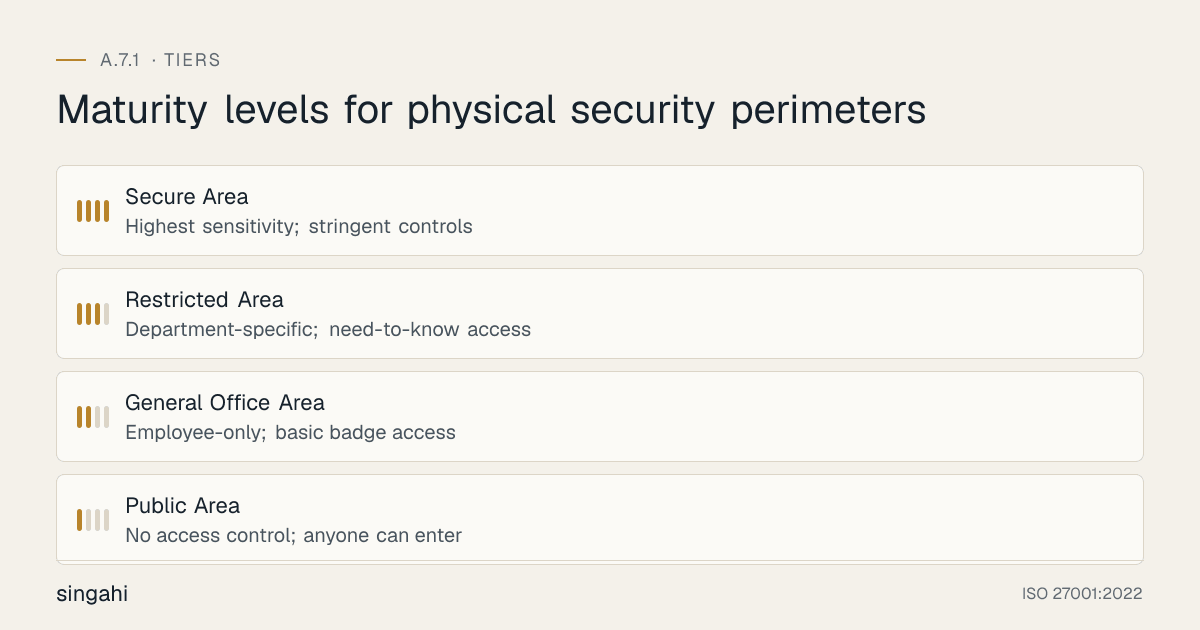
Secure areas are the spaces within your building where your most sensitive information and systems reside. The standard requires that these areas be defined, documented, and subject to stronger controls than general office space.
Definition and Classification
Not every room is a secure area. You should classify areas based on risk:
| Classification | Description | Examples |
|---|---|---|
| Public Area | No access control; anyone can enter | Lobby, public restrooms, conference room (when not in use) |
| General Office Area | Employee-only; basic badge access | Open-plan office, break room, general meeting rooms |
| Restricted Area | Department-specific; need-to-know access | HR department, finance office, legal department |
| Secure Area | Highest sensitivity; stringent controls | Server room, data center, R&D lab, executive suite, vault |
Secure area definition criteria:
- Contains information classified as Confidential or Secret
- Contains information processing systems that are critical to business operations
- Is subject to regulatory requirements (PCI DSS, HIPAA, etc.)
- Contains assets whose theft or damage would cause severe business impact
Identification and Marking
Secure areas must be clearly identified so that employees and visitors know they are entering a controlled zone:
- Signage at entry points: "Secure Area, Authorized Personnel Only"
- Color-coded door frames or card readers: Red for secure, yellow for restricted, green for general
- Floor markings: Different carpet colors or floor tape to demarcate zones
- Window treatments: Frosted or opaque glass to prevent visual surveillance into secure areas
Access Levels and Role-Based Access Control (RBAC)
Access to secure areas should be granted based on roles and need-to-know, not seniority or convenience:
- Server room access: Only IT infrastructure staff, CISO, and authorized vendors (escorted)
- Finance room access: Only finance staff, CFO, and internal audit (with scheduling)
- R&D lab access: Only R&D personnel and specific executives
- Executive suite access: Only C-suite, executive assistants, and facilities (with scheduling)
Access should be reviewed quarterly. The access control list (ACL) for each secure area should be maintained as a controlled document, with version history and approval signatures.
Control Measures for Secure Areas
Secure areas should have all of the following, at minimum:
- Independent access control: separate from the building's general system; ideally biometric or dual-factor
- CCTV coverage: camera inside the room covering entry and critical equipment; retained 30-90 days minimum (at least 3 months for PCI DSS sensitive areas)
- Intrusion detection: motion sensors, door contacts, glass break sensors
- Environmental monitoring: temperature, humidity, water leak detection, smoke detection
- Fire suppression: appropriate for the equipment (see Section 12)
- Logging: all access events logged with user ID, timestamp, and success/failure
- Regular audit: quarterly physical inspection of the room, access list review, and control testing
CCTV and Motion Sensors in Secure Areas
CCTV inside secure areas serves both deterrence and forensic purposes. Key considerations:
- Camera placement: One camera covering the entry door (for facial capture), one covering the primary equipment rack or work area
- Privacy balance: In some jurisdictions, continuous employee monitoring in workspaces requires notice and consent. Server rooms typically have no such concern because staff do not "work" there continuously.
- Motion-activated recording: Continuous recording is ideal but storage-intensive. Motion-activated recording with pre-event buffering (5-10 seconds before motion) is a practical compromise.
- Integration with access control: When the door opens, the camera should record at higher quality or frame rate. When the door closes and locks, the system should verify that the room is empty (no motion) before arming.
CCTV & Video Surveillance
Figure · Matrix
How the options compare: General detection to License plate capture
CCTV is both a deterrent and an investigation tool. It is also frequently cited by auditors as an area of weakness. A poorly designed CCTV system is worse than no system, it creates false confidence.
Camera Types and Technologies
| Camera Type | Best For | Considerations |
|---|---|---|
| Dome cameras | Indoor general surveillance; discreet; vandal-resistant | 360° coverage with PTZ models; hard to tell which direction they face |
| Bullet cameras | Outdoor perimeter; long corridors; deterrence (visible) | Weather-resistant housings; IR illuminators for night vision |
| PTZ cameras | Large areas where operator monitoring occurs; active tracking | Can cover wide areas but may miss events if not pointed correctly |
| Fisheye / 360° cameras | Open areas, lobbies, retail floors; one camera replaces many | Dewarping software required; lower resolution at edges |
| Thermal cameras | Perimeter night detection; zero-light environments; fire detection | Detect heat signatures; cannot identify faces; excellent for intrusion detection |
| Multi-sensor cameras | Large outdoor areas; corners; reducing cabling costs | Multiple lenses in one housing; each with independent direction |
| License Plate Recognition (LPR) | Parking entrances, loading docks, perimeter gates | Specialized optics and software; requires specific angles and lighting |
Camera Placement and Coverage Design
Effective CCTV coverage requires systematic design:
- The 5% rule: No camera should cover more than 5% of its maximum recommended range for identification purposes. At 30 feet, a 1080p camera can identify a face; at 100 feet, it can only detect presence.
- Layered coverage: Perimeter cameras detect approach; entrance cameras capture faces; hallway cameras track movement; secure area cameras record activity.
- The 20-foot rule: For facial recognition and identification, the subject's face should be within 20 feet of the camera and occupy at least 10% of the frame height.
- Blind spot elimination: Walk the facility and verify that no path exists that avoids all cameras. Use a camera coverage map (heat map overlay on floor plans).
- Vandal protection: Outdoor cameras and lobby cameras should be in vandal-resistant housings (IK10 rating). Mount cameras high enough to be out of easy reach but not so high that faces are unreadable.
- Lighting compatibility: Cameras should be positioned to avoid backlighting (e.g., a camera pointing toward a bright window). For outdoor cameras, ensure IR illuminators cover the full field of view.
Resolution, Frame Rate, and Storage
| Purpose | Resolution | Frame Rate | Storage per Camera/Day |
|---|---|---|---|
| General detection | 1080p (2MP) | 15 fps | ~20-30 GB |
| Identification | 4MP - 8MP | 25-30 fps | ~60-100 GB |
| Facial recognition | 4K (8MP+) | 30 fps | ~100-150 GB |
| License plate capture | Dedicated LPR camera | 30 fps | ~30-50 GB |
Storage calculation: For 30 days retention with 50 cameras at 1080p/15fps:
- 50 cameras × 25 GB/day × 30 days = 37,500 GB (~37.5 TB)
Add 20% overhead for redundancy. Modern systems use H.265+ or H.266 compression and motion-based recording to reduce storage by 50-70%.
Retention policies:
- General areas: 30 days minimum (CDE sensitive areas under PCI DSS 9.2.1.1: at least 3 months)
- Secure areas and entry points: 60-90 days
- Incident-related footage: Retained until investigation and legal proceedings are complete (possibly years)
Privacy, Legal Compliance, and Camera Sourcing
CCTV is subject to significant regulation:
- DPDP Act 2023 (India): CCTV footage of identifiable people is digital personal data. Give notice (signage), limit use to stated purposes such as security and safety, protect the footage (s.8(5)), and erase it when no longer needed (s.8(7)); employee monitoring can rest on the employment legitimate use (s.7(i)).
- PCI DSS v4.0.1 9.2.1.1: cameras or access-control records for sensitive areas in the cardholder data environment kept for at least three months.
- GDPR (EU): Video surveillance of employees requires legal basis, proportionality, transparency, and data retention limits. Data Protection Impact Assessment (DPIA) may be required.
- CCPA/CPRA (California): Consumers have rights to know what personal information is collected; CCTV footage of identifiable individuals may qualify.
- BIPA (Illinois): Biometric identifiers (including facial recognition data) require written consent, data retention policies, and destruction schedules.
- State surveillance laws: Many US states have specific wiretapping and surveillance statutes that apply to audio recording (not just video).
- Union and works council agreements: In unionized environments, CCTV deployment may require collective bargaining agreement provisions.
Camera sourcing: In India, CCTV cameras must meet MeitY's Essential Requirements for security testing and BIS compulsory registration, phased in from 2025; buy only certified models. If you serve US federal contracts, the US NDAA Section 889 also bars certain manufacturers (Dahua, Hikvision, Hytera, ZTE, Huawei).
Video Analytics and AI
Modern video surveillance systems include powerful analytics:
- Motion detection and line crossing: Alert when a person crosses a virtual boundary (e.g., fence line, rooftop edge)
- Object left behind / object removal: Detect suspicious packages or stolen equipment
- People counting: Track occupancy for safety and space planning
- Loitering detection: Alert when a person remains in an area longer than defined thresholds
- Facial recognition: Match faces against watchlists (employee databases, denied persons, missing persons)
- Behavioral analytics: Detect unusual patterns (running, fighting, falling, crowd formation)
- Gunshot detection: Acoustic sensors integrated with video to identify gunshots and auto-direct cameras
Privacy and bias concerns: AI analytics, especially facial recognition, have documented bias issues (higher error rates for women and people with darker skin). Organizations must validate vendor accuracy claims, conduct bias testing, and implement human-in-the-loop review for high-stakes decisions.
Network Security for CCTV (The Cyber-Physical Risk)
IP cameras are IoT devices, and they are notoriously insecure if not properly managed:
- Default passwords: Change all default passwords immediately; use unique, strong passwords per camera
- Firmware updates: Establish a quarterly firmware update cycle; unpatched cameras are vulnerable to Mirai-style botnets
- Network segmentation: Cameras should be on a dedicated VLAN, isolated from corporate networks and internet access (except for authorized remote viewing)
- HTTPS and encryption: Disable HTTP; enforce HTTPS; encrypt video streams where the system supports it
- Physical tampering: Secure camera cables and network connections; use tamper detection alerts
- NVR/DVR security: The recording server is the crown jewel, protect it with the same rigor as any critical server
Singahi's IP Camera Security Assessment scans for default credentials, unpatched firmware, open ports, and network misconfigurations, a common source of both cyber and physical vulnerabilities.
Intrusion Detection Systems (IDS)
Intrusion detection systems provide the alarm layer of physical security. They detect unauthorized entry, movement, or environmental anomalies and trigger alerts, sirens, and security dispatch.
Motion Sensors (PIR, Microwave, Dual-Tech)
Passive Infrared (PIR):
- Detects changes in infrared radiation (heat) caused by moving bodies
- Affordable, reliable, low false alarm rate in stable environments
- Vulnerable to: rapid temperature changes, HVAC air currents, small animals (if sensitivity set too high)
- Best for: indoor secure areas, hallways, server rooms
Microwave (MW):
- Emits microwave pulses and detects Doppler shift from moving objects
- Can detect through walls and glass (advantage and disadvantage)
- More sensitive to movement than PIR; can detect very slow movement
- Vulnerable to: electrical interference, moving objects outside the intended zone (curtains, hanging signs)
- Best for: large spaces, areas with known PIR issues
Dual-Tech (PIR + Microwave):
- Requires BOTH sensors to trigger simultaneously to generate an alarm
- Dramatically reduces false alarms from environmental causes
- The gold standard for high-security areas
- Best for: server rooms, vaults, data centers, after-hours arming
Advanced motion detection:
- Video analytics-based motion: Uses CCTV cameras to detect motion (no separate sensor needed; can be more precise with object classification)
- Beam detectors: Infrared or laser beams across large spaces (warehouses, museums, atriums)
- Seismic sensors: Detect vibrations from cutting, drilling, or jackhammering (for vaults and walls)
Glass Break Sensors
Glass break sensors detect the specific acoustic signature of breaking glass:
- Shock sensors: Mounted directly on the glass; detect vibration
- Acoustic sensors: Mounted on walls or ceilings; listen for the sound of breaking glass within a defined radius (typically 25 feet)
- Considerations: Heavy curtains, loud ambient noise, or laminated glass can reduce effectiveness. Test with actual glass break simulator (not just clapping hands)
All exterior windows and glass doors near ground level should have glass break detection. For high-risk facilities, consider laminated or polycarbonate security glass (resistant to breakage) combined with sensors.
Door and Window Contacts
Magnetic contacts are the simplest and most reliable intrusion detection devices:
- Reed switches: Two parts, a magnet on the moving door/window and a switch on the frame. When separated, the circuit opens and signals an alarm.
- Roller ball contacts: Installed in the door frame; the ball depresses when the door closes. Hidden and tamper-resistant.
- Overhead door contacts: Heavy-duty contacts for loading docks and garage doors
Critical installation detail: Contacts must be installed so that the door cannot be opened far enough for a person to enter before the contact opens. This is called the gap specification, typically no more than 0.5 inches (12mm) before the alarm triggers.
Pressure Mats and Specialized Sensors
- Pressure mats: Hidden under carpets or flooring; detect foot pressure. Useful for specific approach paths or in front of high-value displays.
- Photoelectric beams: Invisible beams across hallways or corridors; when broken, alarm triggers. Good for detecting movement in open spaces.
- Fence sensors: Vibration or strain sensors on fences detect climbing or cutting.
- Duress alarms: Panic buttons, foot rails, or pull cords for employees under threat (reception, bank tellers, pharmacies, executive offices)
Alarm Response and Monitoring
An alarm is useless without response. Alarm response models include:
-
Local alarm only: Siren and strobe on-site; relies on someone on-site hearing it and responding. High risk for ignored alarms ("alarm fatigue").
-
Central Station Monitoring (CSM): Alarms are transmitted to a 24/7 monitoring center (via telephone line, cellular, or IP). The center calls keyholders and dispatches police or private security.
-
Self-monitoring: Alerts go to mobile devices of designated staff. efficient but depends on staff availability.
-
Video-verified monitoring: When an alarm triggers, the monitoring center immediately views live CCTV footage to verify if it is a real intrusion before dispatching. This reduces false alarm fines and improves response priority.
-
Dual-tech sensors
-
Entry/exit delays (30-45 seconds to disarm after entering)
-
Graded user codes (cleaning crew gets a code that only works during scheduled hours)
-
Regular maintenance and testing
-
Video verification before dispatch
UL Listing: In North America, alarm systems should be UL-listed for burglary or hold-up. UL 681 (Installation and Classification of Burglar and Holdup Alarm Systems) and UL 827 (Central Station Alarm Services) provide industry-recognized standards.
Environmental Controls
Environmental threats, fire, flood, heat, humidity, power loss, can destroy information and systems more thoroughly than theft. ISO 27001 auditors expect evidence of environmental protection for information processing facilities.
Fire Detection and Suppression
Fire Detection:
- Smoke detectors: Ionization (fast-burning fires) and photoelectric (smoldering fires). Modern systems use dual-sensor detectors for both types.
- Heat detectors: Fixed temperature (activates at a set threshold, e.g., 135°F / 57°C) or rate-of-rise (activates when temperature increases rapidly). Used in dusty or smoky environments where smoke detectors would false-alarm.
- Aspiration (VESDA) systems: Highly sensitive air sampling systems that detect smoke particles at very low concentrations. The gold standard for data centers and clean rooms. Can detect fires before they are visible.
- Flame detectors: Detect infrared or ultraviolet radiation from flames. Used in industrial environments with high ceilings.
Fire Suppression for IT Environments:
| Agent | How It Works | Best For | Considerations |
|---|---|---|---|
| FM-200 (HFC-227ea) | Chemical agent that interrupts combustion at molecular level; leaves no residue | Data centers, server rooms, telecom facilities | Safe for occupied spaces; limited discharge time; ozone depletion concerns led to some restrictions (though FM-200 is still widely used) |
| FK-5-1-12 (Novec 1230; 3M ended Novec manufacture in 2025, other makers supply it) | Next-generation clean agent; similar to FM-200 but better environmental profile (low GWP, zero ODP) | Same as FM-200; preferred for green initiatives | Higher cost than FM-200; safer for occupied spaces |
| Inert gas (IG-55, IG-541, IG-100) | Mixtures of nitrogen, argon, and CO2 that reduce oxygen concentration below combustion levels but safe for humans | Data centers, archives, museums | Requires sealed room (hold time); larger storage tanks; safe for humans |
| CO2 | Displaces oxygen; suppresses fire rapidly | Unoccupied spaces, industrial, flammable liquid storage | Lethal to humans: cannot be used in occupied spaces without warning systems and evacuation delays |
| Water mist | Fine water droplets that cool and displace oxygen; minimal water damage compared to sprinklers | Heritage buildings, libraries, some mixed-use spaces | More water than clean agents; not ideal for energized electrical equipment unless specifically designed |
| Pre-action sprinkler system | Two-stage system: fire detection triggers valve to fill pipes; individual sprinkler head activation releases water. Prevents accidental water discharge from damaged heads. | Data centers, museums, high-value areas where accidental discharge is catastrophic | Slightly slower response than standard sprinklers; requires maintenance of both detection and valve systems |
| Standard wet pipe sprinklers | Always filled with water; heat triggers individual head | General office areas, warehouses, parking garages | Not for server rooms: water destroys electronics. However, if the building code requires sprinklers in the room, a pre-action system or clean agent system should be primary, with sprinklers as a backup |
Data center fire suppression best practice: Use VESDA early warning detection + FK-5-1-12 (formerly sold as Novec 1230) or inert gas (IG-541/IG-55) as the primary suppression system, with a pre-action sprinkler system as a backup (if required by local code). The pre-action system prevents accidental discharge but provides water suppression if the clean agent fails or the fire is too large.
Climate Control (HVAC) for IT Environments
Information processing equipment is extremely sensitive to temperature and humidity:
- Temperature: ASHRAE recommends 18°C to 27°C (64°F to 81°F) for data centers. Consistency matters more than the exact setpoint, rapid temperature swings cause thermal stress.
- Humidity: Recommended range 40% to 60% relative humidity (RH). Below 40% increases static electricity risk; above 60% increases corrosion and condensation risk.
- Dedicated HVAC: Server rooms should have dedicated, redundant HVAC systems separate from general building systems.
- Hot aisle / cold aisle containment: Standard data center layout that prevents mixing of hot exhaust air and cold supply air, improving efficiency and cooling consistency.
- Environmental monitoring: Continuous temperature and humidity sensors with SNMP/email/SMS alerting. Sensors at multiple heights (heat rises; the top of a rack can be 10°C hotter than the bottom).
- Remote monitoring: 24/7 monitoring of environmental conditions with escalation procedures for out-of-range conditions.
Uninterruptible Power Supply (UPS)
UPS systems provide:
- Ride-through: Bridge the gap between utility power failure and generator startup (typically 10-30 seconds)
- Power conditioning: Filter voltage sags, spikes, and noise that damage sensitive electronics
- Graceful shutdown: Provide enough runtime for orderly server shutdown if the generator fails or is not present
UPS Types:
- Offline / Standby: Switches to battery when power fails; simple, cheap, but switchover time (4-8ms) can affect sensitive equipment. Suitable for desktops, not servers.
- Line-Interactive: Regulates voltage without full battery conversion; faster response; good for small server rooms.
- Online / Double-Conversion: AC power is always converted to DC and back to AC; zero transfer time; complete isolation from utility power. The standard for data centers and critical IT loads.
UPS Sizing: Size UPS for the total critical load plus 20-30% growth margin. Calculate actual load (in kW) using power meters, not nameplate ratings (which are typically 2-3x actual consumption).
Battery Maintenance: UPS batteries last 3-5 years. They must be tested quarterly (load bank test or manufacturer-recommended test). Document battery replacement dates and keep spare batteries for critical systems.
Generators and Backup Power
For extended outages, a generator is essential:
- Diesel generators: Most common for data centers; reliable; fuel can be stored on-site. Runtime depends on fuel tank capacity (typically 24-72 hours standard; longer for critical facilities).
- Natural gas generators: Connected to utility gas lines; no fuel storage needed; runtime limited only by gas supply. However, earthquakes and some disasters can disrupt gas lines.
- Automatic Transfer Switch (ATS): Automatically switches load from utility to generator when power fails; switches back when utility returns. Test monthly.
- Load bank testing: Generators should be tested quarterly under load (not just "run for 15 minutes with no load"). Annual full load bank testing is best practice.
- Fuel management: Diesel fuel degrades; it requires treatment, filtration, and periodic rotation. Fuel polishing systems remove water and contaminants.
Redundancy levels:
- N: One generator serving the load (no redundancy)
- N+1: One extra generator beyond minimum requirement
- 2N: Two completely independent systems, each capable of handling the full load
- 2N+1: Two independent systems plus one spare
Data centers rated Tier III or Tier IV require N+1 or 2N generator configurations.
Equipment Protection
Physical security extends to the equipment itself, not just the room it sits in, but the devices, cables, and portable assets that can be stolen, damaged, or tampered with.
Cable Locks and Physical Anchors
Kensington locks / cable locks:
- Standard security slot (Kensington K-Slot or Noble Wedge Slot) on most laptops and some desktops
- Steel cable loops around a fixed anchor (desk leg, wall mount, rack post)
- Deterrent against opportunistic theft; can be defeated with bolt cutters or use attacks
- Best practice: Use in public areas, conference rooms, hot-desking environments, and trade shows
Desktop security:
- Lockable enclosures: Steel cages that cover the entire desktop computer, preventing access to ports, cables, and the power button
- Anchor plates: Adhesive steel plates bolted to desks that allow cable locks to be attached
- Screw-down brackets: Directly mount equipment to desks or walls with security screws (torx, tri-wing, or custom heads)
Secure Storage for Portable Devices and Media
Laptop safes and cabinets:
- Charging cabinets: Lockable cabinets with integrated charging for multiple laptops/tablets; common in schools and training centers
- Hotel safes: Small room safes for executives traveling with sensitive devices
- Secure cabinets: Steel cabinets with digital or key locks for backup media, hard drives, and portable devices
- Vaults and strong rooms: For highest sensitivity, classified documents, encryption key material, backup tapes for critical systems
Key management: The keys or combinations to secure storage must themselves be controlled. Do not leave cabinet keys in an unlocked drawer. Use key control systems (lock boxes with access logs, electronic key cabinets) or combination management (sealed envelopes in a safe, changed when personnel change).
Anti-Theft Devices and Tracking
- GPS tracking: Installed in high-value mobile equipment (fleet vehicles, construction equipment, prototype devices). Can trigger geofence alerts.
- Asset tracking tags: Bluetooth Low Energy (BLE) tags (e.g., Tile, Apple AirTag) or active RFID tags for locating equipment within a facility. Not strong security, but useful for inventory.
- Remote wipe / kill switch: For laptops and phones, ensure MDM (Mobile Device Management) supports remote wipe upon theft report. Some systems support "poison pill" data destruction that triggers after failed authentication attempts.
- BIOS/UEFI passwords: Prevent booting from alternative media or accessing firmware settings without a password. Combined with TPM and BitLocker/FileVault encryption, this makes stolen laptops significantly less valuable to thieves.
Cable and Network Port Protection
Cable protection:
- Conduit and raceways: Network and power cables should run through conduit, not exposed on floors where they can be tripped over, unplugged, or tapped.
- Cable trays in secure areas: Locked cable trays prevent unauthorized cable insertion or tapping
- Fiber optic security: Fiber is harder to tap without detection than copper, but it is possible. Intrusion detection systems for fiber (detecting micro-bends or light loss) exist for high-security environments.
- Labeling: Cables should be labeled, but labels should not reveal sensitive information (e.g., do not label a cable "CEO Office, Direct Link to Trading Floor"). Use coded labeling.
Network port security:
- Disable unused ports: On network switches, administratively disable ports that are not in use. When a conference room port is needed, enable it via change request.
- Port security (802.1X): Authenticate devices before granting network access. A rogue device plugged into a wall jack cannot communicate without valid credentials.
- Physical port locks: Plastic or metal locks that physically block unused Ethernet ports (e.g., RJ45 port blockers). Inexpensive but effective against casual rogue device insertion.
Equipment Maintenance and Disposal Security
Physical security includes the lifecycle of equipment:
- Maintenance access: When vendor technicians service equipment (printers, copiers, servers, HVAC), are they supervised? Do they have unescorted access to the server room? A printer technician with 30 minutes of unsupervised access to a copier could install a skimming device or access stored documents.
- Equipment disposal: Hard drives, SSDs, and mobile devices must be securely erased or destroyed before disposal. NIST SP 800-88 (Guidelines for Media Sanitization) defines Clear, Purge, and Destroy methods. For sensitive data, physical destruction (shredding, degaussing for magnetic media) is the gold standard.
- Chain of custody: When equipment is sent for repair or disposal, maintain a chain of custody document. If a laptop is sent to a vendor for repair, the hard drive should be removed and retained, or the vendor must provide secure handling guarantees.
- Spare parts security: Spare hard drives, RAM, and network cards stored in inventory are often overlooked. They should be in secure storage with access control.
Clear Desk & Clear Screen Policy
The Clear Desk and Clear Screen Policy is one of the most efficient physical security controls, it requires no technology, only discipline and culture. Yet it is also one of the most commonly failed audit areas.
Policy Design and Scope
A Clear Desk Policy should require that at the end of each workday (or when an employee leaves their desk for an extended period), all sensitive materials are removed from the desk and secured:
- Paper documents: Any document containing confidential, internal, or restricted information must be placed in a locked drawer or cabinet
- Removable media: USB drives, external hard drives, CDs/DVDs, backup tapes must be secured
- Mobile devices: Phones, tablets, personal laptops left at desks should be secured or taken
- Keys and badges: Access cards and keys should not be left on desks
- Passwords: Written passwords on sticky notes are a critical violation
- Whiteboards: Erased at the end of meetings; sensitive diagrams or architecture drawings should not remain visible
A Clear Screen Policy requires that:
- Screens are locked (Ctrl+Alt+Del / Windows+L or equivalent) whenever the user steps away from their desk, even for "just a minute"
- Sensitive data is not displayed on screens in positions visible to passersby (reception desks, screens facing windows, open-plan offices)
- Auto-lock timers are set to a maximum of 5 minutes of inactivity (15 minutes is too long for high-security environments)
- Privacy screens are used on monitors in high-traffic areas or open-plan offices
Enforcement and Accountability
Policy without enforcement is wishful thinking. Enforcement mechanisms include:
- Manager walkthroughs: Supervisors periodically walk the floor before end-of-day and note violations
- Security team audits: Monthly "clear desk checks" by security or facilities; violations documented and reported to management
- Positive reinforcement: Recognize teams or individuals with consistent compliance
- Progressive discipline: Clear policy should state that repeated violations result in disciplinary action (verbal warning, written warning, etc.)
- Integration with clean desk services: If your organization uses evening cleaning services, cleaners should be trained to report unattended sensitive materials they encounter (not to clean them up, but to report them)
Desk Audits and Compliance Measurement
Quantify compliance to demonstrate improvement:
- Monthly random audits: Check 10-20% of desks after hours; score compliance percentage
- Track trends: Is compliance improving or declining? What departments need attention?
- Audit during ISO 27001 internal audits: Make clear desk/screens a standard checklist item
- Photographic evidence: Audit reports can include photos (with names redacted) showing good and bad examples
Singahi's approach: We help clients design Clear Desk/Clear Screen KPIs that tie into the ISMS performance measurement framework (Clause 9.1), turning a behavioral policy into measurable, auditable evidence.
Screen Privacy Filters
Privacy filters (also called privacy screens) are polarized films that make screen content visible only to the person directly in front of the monitor. From an angle (e.g., someone looking over your shoulder or from the next airplane seat), the screen appears dark.
- Two-way vs. four-way privacy: Two-way filters restrict side-angle viewing; four-way also restrict top and bottom viewing (useful for open-plan offices with upper floors or glass-walled meeting rooms)
- Anti-glare and blue light reduction: Many privacy filters also reduce glare and eye strain
- Attachment methods: Adhesive, magnetic, or clip-on. Magnetic is preferred for easy removal and reattachment.
- Usage: Mandatory for all employees working in public spaces (airports, cafes, trains), open-plan offices, and any desk where the screen is visible from a corridor or window. Also mandatory for anyone working with PCI data, customer PII, or financial data in shared spaces.
Auto-Lock and Session Management
Technical controls reinforce the clear screen policy:
- Group Policy (Windows): Enforce screen saver with password after X minutes of inactivity via Active Directory Group Policy
- MDM policies (Mobile): Enforce device lock after 1-5 minutes of inactivity
- VDI and remote desktop: Session timeouts for idle connections; automatic disconnection after defined inactivity
- Smart card removal behavior: Configure systems to lock immediately when the smart card is removed (common in government and high-security environments)
- Proximity locks: Bluetooth devices (e.g., USB dongles) that lock the computer when the user walks away with their phone or badge, and unlock when they return. Products like GateKeeper, Keyless, and commercial options from PC manufacturers implement this.
Off-Premises Security
ISO 27001 A.7.1 applies to all areas containing sensitive information, not just your main office. Remote work, home offices, coworking spaces, and business travel create physical security challenges that must be addressed.
Remote Work and Home Office Security
The post-2020 shift to remote work made home offices an extension of the corporate security perimeter. Your policies must address:
- Workspace separation: Sensitive work should not be conducted in shared family spaces where screens and documents are visible to others. A dedicated room with a door is ideal.
- Screen privacy: Home offices with windows facing streets or neighbors should have blinds or privacy screens. Monitors should not be visible from doorways or windows.
- Document storage: Paper documents at home must be stored in a locked drawer or cabinet when not in use. At end of employment, all documents must be returned or securely destroyed.
- Visitor awareness: Family members, friends, repair workers, and cleaners should not have access to work devices or documents. Spouses and children should not use work laptops.
- Device security: Home office laptops should use cable locks when in use at home (if the home has external access or roommates). At minimum, devices should not be left in vehicles.
- Network security: Home Wi-Fi should use WPA3 (or WPA2 with strong password), router firmware updated, and guest network enabled for family/IoT devices. Corporate VPN must be mandatory.
- Physical destruction of home shredders: Employees should be provided cross-cut shredders for sensitive home documents, or have a "return for shredding" policy.
Home offices are covered by A.6.7 (remote working) and A.7.9 (assets off-premises); assess them through employee self-assessment questionnaires and photo submissions.
Coworking Spaces and Shared Offices
Coworking spaces (WeWork, Regus, local shared offices) present unique risks:
- Unknown neighbors: The person at the next desk is a competitor, journalist, or social engineer. You do not know.
- Shared networks: Coworking Wi-Fi is shared and often insecure. Always use a corporate VPN; never trust the local network.
- No access control: Most coworking spaces rely on a single badge for the entire building, anyone with a membership can enter. There is no floor-level or room-level control.
- Printer and meeting room risk: Documents left in shared printers, whiteboards not erased after use, meeting rooms without privacy
- Theft risk: Laptops and phones are stolen from coworking desks regularly. Never leave devices unattended, even "just for coffee."
Controls for coworking:
- Use privacy screens on all devices
- Use a personal mobile hotspot instead of shared Wi-Fi where possible
- Book private meeting rooms for sensitive calls (do not discuss confidential matters in open areas)
- Use Bluetooth headphones for sensitive calls to prevent eavesdropping
- Carry laptops with you; do not leave them at desks for breaks
- Use laptop locks when working at fixed desks for extended periods
Business Travel Security
Business travel introduces physical risks that do not exist in the office:
- Hotel room security: Hotel rooms are accessed by housekeeping, maintenance, and previous guests (if key cards are not properly reset). Use the in-room safe for devices and documents when not in the room. Consider portable door locks or door stops for additional security. Do not leave laptops or documents visible when leaving the room.
- Airport and lounge security: Airports are high-theft environments. Never check laptops or tablets in checked luggage. Keep devices in your carry-on, and keep the carry-on with you at all times. Do not leave devices in seatback pockets or on lounge tables while getting food.
- Working in public: Airports, cafes, trains, and planes are not secure spaces. Use privacy screens. Do not work on sensitive documents where shoulder surfing is possible. Be cautious of "shoulder surfers" watching your screen or listening to calls. Use noise-canceling headphones for calls.
- Rental cars: Do not leave devices, documents, or badges visible in rental cars. The trunk is better than the back seat, but hotel room safes are best. Rental car key fobs are sometimes cloned by criminals.
- International travel: Some countries have aggressive customs and border inspection that includes device searches. Consider "travel clean" devices that contain only the minimum necessary data. Use full-disk encryption. Power off devices (not just sleep) during border crossings to maximize encryption protection.
Mobile Device Protection in Public
Mobile devices, phones, tablets, laptops, are the most frequently stolen assets in public:
- Physical grip: Use cases with hand straps or loops to prevent snatching
- Tracking: Ensure "Find My Device" (Apple or Google) is enabled and active
- Remote wipe: MDM must support remote wipe upon theft report
- Biometric locks: Phones should require Face ID or fingerprint; PINs are shoulder-surfable
- Theft deterrent: Do not use devices in situations where snatch-and-grab is easy (standing near open train doors, walking on busy streets while on phone)
- Bag security: Use bags with slash-resistant straps and lockable zippers for carrying devices and documents
Off-Premises Policy Requirements
Your Information Security Policy (A.5.1) and Acceptable Use Policy (A.5.10) must explicitly cover off-premises security:
- Policy applicability: State that all physical security policies apply equally to remote work, travel, and off-site work locations
- Employee obligations: List specific requirements (secure storage, privacy screens, VPN use, device locks, reporting theft)
- Incident reporting: Employees must report lost or stolen devices within a defined timeframe (e.g., 1 hour)
- Termination procedures: Remote employees must return all equipment and documents upon termination; provide prepaid shipping and tracking
- Reimbursement: If employees are required to purchase security equipment (shredders, privacy screens, locks), the organization should reimburse
Shipping & Receiving Security
Loading docks, mailrooms, and shipping/receiving areas are classic physical security gaps. They are designed for throughput and convenience, not security, yet they are direct entry points to your building and handling points for your assets.
Loading Dock Security
Loading docks are a dual risk: unauthorized entry and theft of outbound/inbound goods:
- Physical separation: Loading docks should be physically separated from secure areas and office spaces. A dock worker or delivery driver should not be able to walk from the dock into the server room without passing multiple controlled access points.
- Access control: Dock doors should be locked when not actively receiving. Personnel should badge in and out.
- CCTV coverage: Cameras covering the dock exterior, interior, and any staging areas where goods are temporarily stored
- After-hours policy: The dock should not be open or accessible outside of scheduled receiving hours without security escort and management approval
- Driver containment: Drivers should remain in a designated waiting area or cab of their vehicle; they should not wander the facility
- Seal integrity: Inbound shipments with tampered seals should be documented, photographed, and reported before acceptance
Package and Mail Inspection
Mailrooms process packages from unknown external senders, a significant risk vector:
- X-ray screening: High-risk organizations (government, financial, high-profile corporations) should use X-ray scanners for all packages and mail
- Visual inspection: All packages should be opened with awareness of suspicious indicators (excessive tape, strange odors, unexpected origin, misspelled labels, no return address, excessive weight for size)
- Suspicious package protocol: Staff must be trained on "suspicious package indicators" and have a clear procedure (do not open, isolate, notify security and law enforcement, evacuate if necessary)
- Personal mail: Employees should not receive personal mail at the office; this reduces volume and risk
- Mailroom location: Ideally, the mailroom should be in a separate, ventilated area with the ability to isolate it from the rest of the building if a biological or chemical threat is suspected
Supply Chain Physical Security
Your supply chain includes couriers, freight forwarders, warehousing partners, and third-party logistics (3PL) providers. Their physical security is your physical security:
- Vendor assessments: Include physical security questions in vendor security assessments. Do their facilities have access control? CCTV? Intrusion detection? Environmental controls?
- Transit security: High-value shipments (servers, backup media, prototype devices) should use tamper-evident seals, GPS tracking, and trusted courier services with their own security controls
- Chain of custody: Maintain documentation of who handled the shipment at each stage. Unexpected delays or route deviations should trigger investigation.
- Receiving verification: Verify the count and condition of received equipment against the packing list before signing. Photograph any damage or tampering.
- Asset tagging: Tag new equipment with asset labels before it leaves the receiving area. If it is stolen before it reaches the IT department, it is already in the asset inventory and tracking system.
Outbound Shipment Security
When you ship equipment or media to vendors, partners, or remote employees:
- Encryption: All storage media shipped must be encrypted. A lost shipment of unencrypted backup tapes is a reportable breach.
- Tamper-evident packaging: Use seals that show visible evidence of opening
- Courier selection: Use couriers with tracking, signature confirmation, and insurance for high-value items. Avoid standard mail for sensitive equipment.
- Address verification: Verify the recipient address independently. "Equipment return" scams where attackers pose as vendors and request equipment shipments to fraudulent addresses are common.
- Documentation: Maintain a shipping log with item description, serial numbers, destination, courier, tracking number, and expected delivery date
Physical Security for Data Centers
Data centers represent the most critical physical security environment for most organizations. Whether you operate your own data center or colocate in a third-party facility, the physical security standards are the highest in the industry.
Tier I–IV Standards (Uptime Institute)
The Uptime Institute's Tier Classification System defines data center reliability and, by extension, the physical security infrastructure:
| Tier | Description | Physical Security Implications |
|---|---|---|
| Tier I | Basic capacity; single path for power and cooling; no redundancy | Basic security; mantrap not required; single entry control; basic CCTV |
| Tier II | Redundant capacity components; single path for power and cooling | Improved security; some redundancy in access systems; dual-factor for secure areas |
| Tier III | Concurrently maintainable; multiple power and cooling paths; no shutdowns for maintenance | Dual-factor authentication for all entry; mantrap for data hall; 90-day video retention; biometric for critical areas; N+1 generator |
| Tier IV | Fault tolerant; everything is 2N; highest availability | Maximum security; 2N access control systems; biometric + card for all entry; 90-180 day video retention; complete intrusion detection; anti-tailgating mantraps; 24/7 armed security |
Note: Uptime Institute Tier certification specifically evaluates electrical, mechanical, and structural design, not security alone. However, in practice, Tier III and IV facilities implement correspondingly strong physical security.
Cage Security in Colocation Facilities
In colocation (colo) environments, multiple customers share a data hall. Your security is partially dependent on the provider's outer layers, but you are responsible for your cage:
- Cage construction: Steel mesh or expanded metal cages from floor to true ceiling (not just dropped ceiling). Some providers use solid walls for high-security customers.
- Cage locks: High-security padlocks or electronic locks. If the provider offers electronic locks integrated with their access control, use them. If not, use high-security mechanical locks (Medeco, Abloy) and maintain key control.
- Cage access: Who has keys/combinations? How many people? Is there a log? Some providers offer "smart cage" solutions where the cage door is on the provider's access control system with individual credentials.
- Cage interior: Your own rack locks, CCTV inside your cage (if permitted by provider), and environmental monitoring are additional layers.
- Adjacent tenant risk: In shared data halls, sound, electromagnetic emissions, and visual access are minimal risks, but social engineering by an adjacent tenant's staff is possible. Verify your provider's customer segregation policies.
Rack-Level Security
Inside the data hall or your server room, individual racks and cabinets should be locked:
- Rack locks: Electronic rack locks (e.g., APC NetBotz, Raritan, Server Technology) integrate with DCIM and access control systems, logging who opened which rack and when
- Mechanical rack locks: Standard key locks on server cabinet doors. Keys must be controlled; do not leave them hanging on the rack.
- Rack access policies: Only authorized technicians should open racks. All rack access should be logged (electronic or manual log).
- Blind mating and cable management: Organized cabling not only improves airflow but makes unauthorized cable insertion or tampering visually obvious.
- Equipment labeling: Label equipment with asset tags, but avoid labels that reveal function (e.g., do not label a rack "Core Switch, Production Trading Network"). Use coded asset IDs.
Biometric Access for Data Centers
Data centers should use the strongest available authentication:
- Main entry: Two-factor authentication (card + biometric) is standard for Tier III/IV
- Data hall entry: Biometric (fingerprint or palm vein) + card
- Secure areas within data hall: Biometric only (for highest security zones, such as key management rooms)
- Mantrap integration: Biometric readers inside the mantrap; the inner door does not open until the biometric is verified and the outer door is confirmed closed and locked
- Biometric template protection: Biometric templates should be encrypted and stored in a secure element, not as plain images. If the access control database is breached, stolen templates cannot be used to spoof the biometric (because the system uses the template, not the raw image, for matching, but template protection is still best practice).
Physical Security for Cloud and Colocation (Shared Responsibility)
When you use cloud services (AWS, Azure, GCP) or colocation providers (Equinix, Digital Realty, CyrusOne), physical security becomes a shared responsibility. Understanding the boundary is essential for ISO 27001 compliance.
The Shared Responsibility Model
| Responsibility | Cloud Provider (AWS/Azure/GCP) | Customer |
|---|---|---|
| Physical building security | Provider fully responsible | Customer verifies via audit/assessment |
| Perimeter and entry controls | Provider fully responsible | Customer verifies |
| Server room / data hall security | Provider fully responsible | Customer verifies |
| Rack / cage security | Provider provides the rack/cage | Customer locks and controls access to their racks/cages |
| Equipment within the rack | Customer responsible (if IaaS) | Customer responsible |
| Data encryption at rest | Provider offers tools | Customer must implement |
| Visitor / employee access to provider facilities | Provider controls | Customer's employees must follow provider's access procedures |
Provider Assessment and Due Diligence
Your ISO 27001 risk assessment (Clause 6.1.2) must evaluate the physical security of your cloud and colocation providers. You cannot simply "trust" a major brand. You must verify:
- SOC 2 Type II report: Request the report; read the physical security controls section (CC6.1 through CC6.7 in the 2017 Trust Services Criteria). Note any exceptions or findings.
- ISO 27001 certificate: Is the provider certified? For which scopes? Does the scope cover the specific regions and services you use?
- PCI DSS AOC: If you handle cardholder data, the provider's physical security is evaluated under PCI DSS requirements 9.1–9.5.
- Site visits: For critical workloads, conduct a physical site visit. Walk the perimeter, see the mantrap, verify the CCTV coverage, inspect the generator, and review the fire suppression system. Major providers accommodate this for enterprise customers.
- Contractual security addendum: Ensure your contract or Data Processing Agreement (DPA) specifies the minimum physical security standards the provider must maintain. Include right-to-audit clauses where possible.
Singahi's Cloud Provider Physical Security Assessment evaluates the ISO 27001, SOC 2, and PCI DSS physical security controls of your cloud and colocation providers, identifying gaps between their certifications and your actual risk requirements.
Customer Obligations in Shared Facilities
Even in the best provider facility, your organization has obligations:
- Credential management: Your employees' access credentials to the colocation facility must be managed with the same rigor as your corporate access. Deactivate credentials immediately upon termination.
- Access logging: Review your access logs (most providers offer portal access to see who from your company entered the facility and when). Anomalies (after-hours visits, terminated employees still accessing) should be investigated.
- Visitor escort: If you bring visitors, auditors, or vendors to the colocation facility, you are responsible for their behavior and compliance with the provider's rules. Your NDA and security rules apply to them.
- Equipment handling: When you install or remove equipment, follow the provider's procedures. Do not leave packaging, tools, or loose cables in shared areas. Label your equipment properly.
- Incident reporting: If you observe a physical security incident at the provider (tailgating, unbadged person in data hall, broken door), report it to both the provider and your internal security team. Document it.
Physical Security Audits
Physical security audits are the mechanism by which you verify that your controls are designed appropriately and operating effectively. They are essential for ISO 27001 internal audits (Clause 9.2) and certification audits.
Audit Checklists and Frameworks
A complete physical security audit checklist should cover:
Perimeter:
- Fencing is intact, no gaps, anti-climb measures present
- Gates operate correctly and lock securely
- Lighting is adequate and operational at night
- Signage is visible and legible
- CCTV covers all perimeter approaches with no blind spots
- Vehicle barriers are present and functional (if applicable)
Building Entry:
- Reception challenges all unknown visitors
- Visitor management system is in use and logs are complete
- Visitor badges are distinct from employee badges and time-limited
- Entry controls (turnstiles, doors) operate correctly
- Tailgating is prevented or detected
- Emergency exits are alarmed and monitored; no propping
Secure Areas:
- All secure areas are defined and documented
- Access control lists are current and approved
- Access is role-based and need-to-know
- CCTV covers entry and interior
- Intrusion detection is armed after hours and tested
- Environmental controls are operational and monitored
- Fire suppression is appropriate and inspected
- True floor-to-ceiling barriers (no gaps above dropped ceilings or below raised floors)
Equipment and Operations:
- Clear desk / clear screen policy is enforced
- Laptop locks are used in shared areas
- Cable protection is adequate
- Secure storage exists for sensitive media and portable devices
- Printing areas are secured; no sensitive documents left in output trays
- Shredding bins are available and used
Off-Premises:
- Remote work policy addresses physical security
- Travel security guidelines exist
- Evidence of employee awareness (training records, acknowledgments)
Documentation:
- Physical security policy is current and approved
- Risk assessment includes physical threats
- Access review records exist (quarterly or annual)
- Incident logs are maintained
- Maintenance and testing records for alarms, fire suppression, generators
Physical Walkthroughs and Red Team Testing
A physical security audit is not just paperwork, it requires walking the premises:
- Walk the perimeter: At night. Are there dark spots? Is the fence climbable? Can you reach the roof? Are there unalarmed doors?
- Test the reception: Send an unknown person (or use a social engineering tester) to attempt entry without an appointment. Do they get challenged? Can they tailgate?
- Try the doors: Are exterior doors locked? Are secure area doors locked? Are server room doors locked? You would be surprised how often one is not.
- Check the ceiling and floor: In the server room, look above the dropped ceiling. Is there a gap to the next room? Look under the raised floor. Can you crawl from the server room to the adjacent office?
- Examine the trash: Is sensitive information in the trash or recycling? (Do this legally and with management approval, dumpster diving for audit purposes should be authorized.)
- Review the logs: Pick a random day last month. Pull the access logs, visitor logs, and CCTV footage. Are they consistent? If the log says 5 visitors, are there 5 visitor badges issued? Is there CCTV of 5 people entering?
Social Engineering at the Door: Professional physical penetration testers (red teamers) use techniques like:
- The uniform: Wearing a UPS, FedEx, or telecom uniform and carrying a box or clipboard
- The smoker: Following employees who go outside to smoke and re-entering with them
- The rush: Entering at busy morning hours when employees hold doors open for each other without looking
- The sympathy play: "I left my badge in my car / I forgot my badge / I'm new and my badge doesn't work yet"
- The authority play: "I'm from corporate IT / I'm the fire inspector / I'm here for a meeting with the CEO"
Singahi's Physical Penetration Testing service uses certified ethical hackers (certified, physical security specialists) to test your building's resistance to these attacks. We provide a detailed report with photos, videos (where permitted), and prioritized remediation.
Testing and Drills
Controls must be tested to prove they work:
- Alarm testing: Test intrusion alarms monthly. Verify that the monitoring center receives the signal and responds within the contracted timeframe. Document the test.
- Fire suppression inspection: Annual inspection by certified fire protection contractor. 5-year maintenance for clean agent systems (agent replacement, hydrostatic testing of cylinders). Document all inspections.
- Generator testing: Monthly no-load test; quarterly load bank test; annual full load test. Document fuel levels, run times, and any anomalies.
- UPS testing: Quarterly battery test; annual load transfer test.
- Access control fail testing: What happens when power is lost? Do doors fail-safe or fail-secure as designed? Is there a backup power supply for the access control system?
- Badge deactivation test: Terminate a test employee in the HR system. Time how long until their physical access is revoked. It should be under 1 hour; ideally under 15 minutes.
- Egress testing: During a fire drill, do emergency exits open freely? Do local alarms sound? Does the access control system log the emergency egress event?
CCTV and Log Review
Periodic review of CCTV and logs catches issues that real-time monitoring misses:
- Weekly spot checks: Security team reviews random hours of footage from different cameras to verify image quality, coverage, and any visible anomalies
- Monthly access log analysis: Run reports for after-hours access, failed access attempts, doors held open, and unknown badges
- Quarterly incident correlation: When a security incident occurs (theft, unauthorized access, policy violation), pull the relevant footage and logs immediately. 30-day retention is useless if you don't review it within 30 days.
- Annual coverage review: Walk the facility with the floor plan and camera map. Have any walls been added? Has furniture blocked camera views? Has new equipment created blind spots?
Integration with Logical Security
Physical security and logical (cyber) security are traditionally managed by separate teams with separate budgets and separate mindsets. ISO 27001 requires integration, physical access to systems must be correlated with logical access, and the two domains must reinforce each other.
Access Control System Synchronization
The same person who has logical access to the database should not have uncontrolled physical access to the server room, and vice versa. Integration points include:
- Single identity: The same user ID (e.g., Active Directory account) should control both logical access (VPN, applications) and physical access (badge, biometric). This ensures that when the account is disabled, both are disabled.
- Role-based correlation: If an employee's role changes from "Database Administrator" to "Marketing Manager," their physical access to the server room should be automatically reviewed and likely revoked, while their logical access to the CRM is granted.
- Time-based restrictions: Physical access can be restricted to business hours (e.g., no server room access after 7 PM unless on-call). Logical access can also be time-restricted. Correlating these reduces the risk of after-hours insider attacks.
- Alarm correlation: If a server room door opens at 2 AM, the SIEM should correlate this with logical access logs. Is there also a VPN login at 2 AM? If yes, this is expected (on-call work). If no, investigate immediately.
Mantrap + Multi-Factor Authentication
The most secure integration of physical and logical controls is the mantrap with embedded MFA station:
- Outer door: Badge reader (something you have)
- Inner authentication: Biometric reader (something you are) + PIN pad (something you know)
- The mantrap becomes a 3-factor authentication zone: The physical space itself enforces the sequential application of multiple factors, and the user cannot proceed until all are satisfied.
- Logical integration: The mantrap system can send an authentication event to the network access control (NAC) system. The user's device is only granted network access after successful physical mantrap authentication. This prevents badge theft from being used to gain network access.
Physical + Logical Correlation and SIEM
Modern Security Information and Event Management (SIEM) systems can ingest physical access control system (PACS) logs alongside logical logs:
- Impossible travel: If a user badges into the New York office at 9:00 AM and their VPN logs in from London at 9:15 AM, one of these is fraudulent (or the badge is being used by someone else).
- Badge sharing detection: If User A's badge enters the building, but User A's workstation login does not occur within a reasonable timeframe, the badge may be shared or stolen.
- After-hours anomaly: Physical access to the office at 11 PM combined with large data downloads or privilege escalation attempts is a high-fidelity alert.
- Terminated employee monitoring: If a terminated employee's badge is used after deactivation, the SIEM should generate a critical alert and trigger camera review.
API Integration: Most modern PACS (Genetec, Lenel, Honeywell, Brivo, Kisi) offer APIs or syslog output that can feed into SIEM platforms (Splunk, Sentinel, QRadar, Chronicle). This integration is no longer modern, it is best practice.
Singahi's Integrated Security Operations service designs and implements the correlation between your physical access control and your SIEM/SOC, creating a unified view of security that ISO 27001 auditors increasingly expect to see.
Physical Security Incident Response
When physical security fails, a break-in, a stolen laptop, a tailgating incident, a fire, your organization must respond with speed, precision, and documentation. ISO 27001 Clause 6.1.2 (risk assessment) and A.5.24 (information security incident management) require incident response procedures that include physical incidents.
Incident Classification and Response Procedures
Physical security incidents should be classified by severity:
| Severity | Examples | Response |
|---|---|---|
| Critical | Break-in at server room; theft of unencrypted backup tapes; active shooter; fire in data center | Immediate 112 / fire 101 / security dispatch; executive notification; incident commander activation; evidence preservation; full investigation |
| High | Unauthorized person in secure area; tailgating confirmed; stolen laptop with sensitive data; badge theft reported | Security response within 15 minutes; HR and IT notification; access revocation; forensics initiation; breach assessment |
| Medium | Lost laptop (encrypted); visitor in restricted area without escort; after-hours access anomaly; broken door lock | Security investigation within 1 hour; manager notification; access review; repair/replacement; incident report |
| Low | Propped door found; missing visitor badge; clear desk violation; minor environmental alarm (brief temperature spike) | Security/facilities log and close; corrective action; no escalation unless pattern |
Response procedures should define:
- Who is notified (phone numbers, escalation chains, 24/7 on-call rotations)
- Who has authority to make decisions (evacuate, shut down systems, call police)
- What evidence to preserve (CCTV footage, access logs, physical evidence, witness statements)
- How to contain the incident (lock doors, revoke badges, disable VPN accounts)
- How to communicate internally and externally (legal, PR, regulators, customers)
Evidence Preservation and Chain of Custody
Physical security incidents often have legal, insurance, or regulatory consequences. Evidence must be preserved correctly:
- CCTV footage: Export immediately upon incident discovery. Do not wait for the retention cycle to overwrite it. Save to write-once media or secure storage with hash verification (MD5/SHA-256). Document the camera ID, date, time, and exporting officer.
- Access logs: Export system logs immediately. Preserve the original format (do not convert to PDF and discard the original). Log files should be cryptographically signed or stored in a WORM (Write Once Read Many) system.
- Physical evidence: Fingerprints, broken locks, discarded tools, or suspicious packages should be handled by law enforcement. Do not touch or move them unless necessary for safety. Photograph everything before moving.
- Witness statements: Obtain written statements from employees, visitors, or security staff who observed the incident. Do this promptly while memories are fresh. Include date, time, location, and witness signature.
- Chain of custody: Document every person who handles evidence, when, and why. A broken chain of custody can make evidence inadmissible in court or insurance claims.
Investigation and Root Cause Analysis
After the immediate response, conduct a formal investigation:
- Timeline reconstruction: Map the exact sequence of events using CCTV, logs, and witness statements
- Root cause analysis: Use the 5 Whys or similar methodology. "Why did the unauthorized person enter the server room? Because the door was propped open. Why was it propped open? Because the HVAC technician needed repeated access. Why didn't the technician have a badge? Because the work order didn't specify access needs. Why wasn't the work order process complete? Because there's no security review step in the maintenance ticketing system." The root cause: absence of security review in maintenance workflows.
- Pattern analysis: Is this the first such incident, or one of several? Clustering of incidents suggests systemic failure.
- Control failure mapping: Which control was supposed to prevent this? Why did it fail? Was it a design failure, an implementation failure, or an operational failure?
- Corrective action: Actions that address the root cause, not just the symptom. "Prop open door" is a symptom; "No security review in maintenance workflow" is the root cause. The corrective action is to add a security review step to all maintenance work orders that require facility access.
Insurance and Legal Considerations
Physical security incidents often trigger insurance claims and legal obligations:
- Property insurance: Covers theft of equipment, damage from break-ins, fire damage. Review your policy for sub-limits (e.g., laptops may have a per-item limit; data center equipment may require specific valuation).
- Cyber insurance: May cover data breach response costs if the physical incident resulted in data theft (e.g., stolen unencrypted laptop). Some cyber policies explicitly exclude physical theft, review carefully.
- Business interruption insurance: Covers lost revenue if a fire or environmental disaster takes systems offline. The policy may require evidence of maintenance and testing (e.g., generator tests) to validate the claim.
- General liability: Covers bodily injury on premises (e.g., a visitor injured during a break-in or security response).
- Breach notification: If physical theft results in unauthorized access to personal data, you may have breach notification obligations under GDPR, CCPA, state laws, or sector regulations (HIPAA, PCI DSS). Document the timeline of discovery and notification to demonstrate compliance.
- Law enforcement coordination: For criminal incidents (break-in, theft, espionage), involve law enforcement early. Their evidence collection requirements may differ from your internal process; coordinate to avoid conflict.
Singahi's Incident Response Retainer includes physical security incident response. We provide on-call forensic investigators, evidence preservation protocols, and post-incident ISO 27001 documentation to support your management review and continual improvement processes.
Tool & Vendor Comparison
The physical security market is mature and fragmented. This section compares the leading vendors across categories to help you make informed procurement decisions aligned with ISO 27001 requirements.
Enterprise Access Control Systems (PACS)
| Vendor | Strengths | Weaknesses | Best For | NDAA Compliant |
|---|---|---|---|---|
| Honeywell (Pro-Watch, WIN-PAK) | Enterprise scale, deep integration with HVAC/fire, global support | Complex licensing, steep learning curve, higher cost | Large enterprises, multi-site, integrated building management | Yes |
| LenelS2 (OnGuard) | Strong in government and critical infrastructure, Mercury hardware compatibility | Acquired by Carrier; roadmap uncertainty; expensive | Government, airports, critical infrastructure, healthcare | Yes |
| Genetec (Synergis) | Unified platform (access + video + ALPR + analytics), strong cybersecurity focus, open architecture | Premium pricing; requires strong IT competency | Organizations wanting unified physical security platform; cybersecurity-conscious | Yes |
| AMAG (Symmetry) | Strong in financial and corporate; good visitor management integration | Smaller ecosystem; less global presence than Honeywell/Lenel | Financial services, corporate HQ | Yes |
| Brivo | Cloud-native, fast deployment, mobile-first, API-rich | Less suitable for high-security (no mantrap support, less biometric integration), subscription model | SMB to growing companies, multi-tenant, cloud-first organizations | Yes |
| Openpath (Acquired by Motorola) | Cloud-native, modern mobile credentials, sleek hardware, strong mobile app experience | Newer player; less proven in enterprise high-security | Tech companies, modern offices, mobile-first cultures | Yes |
| Swiftlane | Facial recognition + mobile access; touchless entry focus; cloud-native | Smaller company; less enterprise track record | COVID-conscious offices, touchless entry requirement, multi-family | Yes |
| Kisi | Cloud-native, strong software platform, modern API, mobile-first, easy to deploy | Less hardware variety; not for high-security mantrap environments | Startups, SMB, modern office, coworking, distributed teams | Yes |
Video Surveillance (VMS and Cameras)
| Vendor | Strengths | Weaknesses | Best For | NDAA Compliance |
|---|---|---|---|---|
| Axis Communications | Premium quality, open standards (ONVIF), strong cybersecurity, analytics platform | Premium pricing; not the cheapest option | Enterprise, high-security, NDAA-compliant requirement | Yes (Swedish) |
| Avigilon (Motorola) | AI analytics (Appearance Search, Unusual Motion Detection), high-resolution cameras, strong VMS | Premium pricing; proprietary aspects | Large enterprises, critical infrastructure, law enforcement | Yes (Canadian) |
| Genetec (Security Center) | Unified VMS + access + analytics, strong cybersecurity, open architecture, no backdoor policy | Higher cost; IT-centric deployment | Organizations wanting unified platform; high camera counts (1000+) | Yes (Canadian) |
| Hanwha Vision (Wisenet) | Excellent value, strong cybersecurity, NDAA-compliant, broad camera range | Smaller VMS ecosystem (relies on partners like Genetec, Milestone, or Wisenet WAVE) | Budget-conscious enterprise, NDAA compliance, growing companies | Yes (Korean) |
| i-PRO (formerly Panasonic) | Strong cybersecurity, AI cameras, NDAA-compliant, good low-light performance | Smaller market share in North America; fewer integrations | Enterprise, city surveillance, transportation | Yes (Japanese) |
| Hikvision | lightweight, broad product range, strong market presence | Banned by US NDAA; security vulnerabilities reported; government sanctions concerns | Not recommended for US or regulated organizations | No |
| Dahua | lightweight, broad range | Banned by US NDAA; security concerns; sanctions | Not recommended for US or regulated organizations | No |
| Milestone (XProtect) | Open VMS platform, supports thousands of camera models, strong partner ecosystem | Requires separate server infrastructure; less unified than Genetec | Large, multi-brand camera deployments; flexibility | VMS is Danish; camera compliance depends on camera brand |
Visitor Management Systems
| Vendor | Strengths | Weaknesses | Best For |
|---|---|---|---|
| Envoy | Modern UI, strong integrations (Slack, Okta, Active Directory), pre-registration, deliveries | Growing-company focus; less enterprise customization | Tech companies, modern offices, visitor experience priority |
| Proxyclick (now part of Honeywell?) | Enterprise visitor management, strong compliance features, global deployment | Enterprise pricing; complexity | Large enterprises, multi-site, compliance-driven |
| Traction Guest | Enterprise scale, strong security features, watchlist integration, customizable workflows | Higher cost; longer deployment | Enterprise, government, critical infrastructure, high-security |
| iLobby | Enterprise visitor + contractor + emergency mustering; strong in industrial | Less sleek than Envoy; functional over aesthetic | Manufacturing, industrial, logistics, high-volume visitor environments |
| Sine (now part of Honeywell Forge) | Simple, mobile-first, good for SMB and education | Less enterprise feature depth | Education, SMB, simple visitor needs |
Intrusion Detection and Alarm Monitoring
| Vendor | Strengths | Best For |
|---|---|---|
| Honeywell (Galaxy, Vista) | Reliable, proven, wide installer network, UL-listed options | General commercial, enterprise, multi-site |
| Bosch (B/G Series) | High quality, false alarm reduction technology, strong in Europe | Enterprise, high-security, European deployments |
| DSC (Tyco/Johnson Controls) | efficient, widely supported, residential to commercial | SMB, commercial, budget-conscious |
| DMP (Digital Monitoring Products) | American-made, strong cybersecurity, no backdoors, direct-to-dealer | Government, defense, security-conscious organizations |
| Ajax Systems | Wireless, modern app, easy install, strong European presence | SMB, residential, modern wireless installs |
Integrated Platform Selection Guidance
For ISO 27001 compliance, the best platform is one that you can manage, audit, and integrate effectively:
- Small to mid-market (1-5 sites, <100 doors, <200 cameras): Consider Brivo, Openpath, or Kisi for access control; Hanwha Wisenet + WAVE or Milestone for VMS; Envoy for visitor management. The cloud-native approach reduces IT overhead and provides automatic updates.
- Enterprise (5+ sites, 100+ doors, 200+ cameras): Consider Genetec for unified platform, or Honeywell / Lenel for access control with Avigilon or Axis + Milestone for video. Unified platforms reduce integration complexity and improve audit evidence collection.
- High-security / government: Consider Lenel, Genetec, or DMP with NDAA-compliant cameras (Axis, Hanwha, i-PRO, Avigilon). Require FICAM (Federal Identity, Credential, and Access Management) compliance if applicable.
- Cloud/colocation: Many cloud providers use Lenel or custom PACS integrated with biometrics. If you are building your own data center, Genetec or Honeywell with mantrap and biometric integration is standard.
Singahi's Vendor Selection Service analyzes your requirements, existing infrastructure, compliance obligations, and budget to recommend a vendor stack with implementation roadmap and overall value (vendor support) analysis.
Implementation Roadmap: 8 Weeks
This roadmap takes you from zero (or a partial state) to a fully implemented, auditable Annex A 7.1 physical security program in 8 weeks. It is aggressive but achievable with dedicated resources.
Week 1: Assessment & Planning
- Days 1-2: Conduct a complete physical security walkthrough of all facilities. Use the audit checklist from Section 19. Photograph everything. Document all gaps.
- Days 3-4: Review existing documentation (policies, access lists, visitor logs, CCTV retention, alarm records). Identify what exists and what is missing.
- Day 5: Risk assessment workshop. Identify assets, threats, vulnerabilities, and current controls. Map risks to Annex A 7.1 and other relevant controls.
- Deliverable: Physical Security Gap Assessment Report with risk-scored findings and a prioritized remediation plan.
Week 2: Policy & Documentation
- Days 1-2: Draft or update the Physical Security Policy. Include scope, roles, area classifications, access control rules, visitor management, clear desk/clear screen, off-premises security, and incident reporting.
- Days 3-4: Develop supporting procedures: Secure Area Access Procedure, Visitor Management Procedure, Clear Desk/Clear Screen Procedure, Off-Premises Security Procedure, Physical Security Incident Response Procedure.
- Day 5: Create templates and forms: Visitor Log, Access Control List, Secure Area Audit Checklist, Physical Security Incident Report Form, Equipment Disposal Form.
- Deliverable: Approved Physical Security Policy and Procedures (signed by management).
Week 3: Perimeter & Entry Controls
- Days 1-2: Address perimeter gaps: repair fencing, improve lighting, install or update signage, verify vehicle barriers.
- Days 3-4: Upgrade entry controls: replace Prox cards with smart cards or mobile credentials; install or upgrade turnstiles; implement reception controls; deploy visitor management system.
- Day 5: Test all entry controls: verify badge readers work, tailgating detection functions, visitor badges print correctly, and reception procedures are followed.
- Deliverable: Perimeter and entry controls operational; visitor management system live.
Week 4: Secure Areas & Access Control
- Days 1-2: Define and mark all secure areas. Install signage, update floor plans, and communicate area classifications to staff.
- Days 3-4: Implement or upgrade secure area access controls: biometric readers, dual-factor authentication, mantrap configuration (if applicable), rack locks, and cable locks.
- Day 5: Conduct access control list (ACL) review. Remove unauthorized access. Document approved access for each secure area.
- Deliverable: Secure areas defined, marked, and access-controlled; ACLs current and approved.
Week 5: CCTV & Intrusion Detection
- Days 1-2: Complete CCTV coverage assessment. Install or reposition cameras to eliminate blind spots. Upgrade resolution where necessary. Verify lighting compatibility.
- Days 3-4: Implement or test intrusion detection: motion sensors, glass break sensors, door contacts, alarm response procedures. Verify central monitoring station connectivity.
- Day 5: Configure CCTV retention and integrate with access control logs. Test alarm scenarios (door forced, motion detected, glass break).
- Deliverable: CCTV coverage complete with documented retention policy; intrusion detection tested and monitored.
Week 6: Environmental Controls & Equipment Protection
- Days 1-2: Verify fire detection and suppression. Schedule inspections. Ensure server rooms have appropriate suppression (clean agent or pre-action). Test smoke detectors.
- Days 3-4: Verify HVAC, UPS, and generator. Test environmental monitoring alerts. Test UPS failover and generator auto-start.
- Day 5: Implement equipment protection: cable locks, secure storage, port locks, asset tagging. Verify clear desk/clear screen enforcement mechanisms.
- Deliverable: Environmental controls tested and documented; equipment protection controls implemented.
Week 7: Off-Premises, Shipping, and Integration
- Days 1-2: Deploy remote work physical security guidance. Train managers on home office security expectations. Update travel security guidelines.
- Days 3-4: Secure shipping and receiving: implement loading dock controls, mail inspection procedures, and outbound shipment security.
- Day 5: Integrate physical and logical security: sync PACS with Active Directory, configure SIEM correlation, test badge deactivation workflow, and test impossible travel alerts.
- Deliverable: Off-premises policies distributed; shipping/receiving secured; physical-logical integration tested.
Week 8: Audit, Training, and Continuous Improvement
- Days 1-2: Conduct an internal audit of the entire physical security program. Use the checklist from Section 19. Test controls, review logs, interview staff, and walk the premises.
- Days 3-4: Conduct physical security awareness training for all staff. Cover tailgating, visitor procedures, clear desk/clear screen, off-premises security, and incident reporting. Document attendance and comprehension.
- Day 5: Management review. Present the internal audit findings, metrics (compliance rates, incident counts, test results), and recommendations for improvement. Update the risk register and Statement of Applicability.
- Deliverable: Internal audit report, training records, management review minutes, and updated ISMS documentation.
Singahi's 8-Week Fast Track Implementation provides a dedicated consultant to guide your team through this roadmap, conduct the gap assessment, draft all documentation, and prepare you for certification audit. Most organizations achieve audit-ready status within 8-12 weeks using this methodology.
Common Audit Failures & Fixes
After reviewing hundreds of ISO 27001 audits and certification reports, the following physical security failures appear with frustrating regularity. Avoid them.
| # | Common Failure | Why It Happens | The Fix | Evidence Required |
|---|---|---|---|---|
| 1 | No documented security perimeters | Organization never created floor plans with perimeters marked | Create floor plans with color-coded zones (Public, General, Restricted, Secure). Document the perimeter definition. | Approved floor plans, perimeter definition document |
| 2 | CCTV blind spots | Cameras installed without systematic design; walls/furniture added later | Conduct a coverage audit with a camera placement map. Fill gaps. Document the coverage map. | Camera coverage map, floor plan with camera locations, test photos |
| 3 | Visitor logs incomplete or missing | Paper logbooks with illegible entries; no visitor management system | Deploy an electronic visitor management system. Pre-register visitors. Require photo ID. | Visitor log export, system configuration, sample visitor records |
| 4 | Tailgating uncontrolled | No turnstiles; employees hold doors; no awareness | Install anti-tailgating controls (turnstiles or optical barriers). Train staff on "polite refusal." Test via social engineering. | Turnstile audit, training records, social engineering test report |
| 5 | Server room not a secure area | Server room treated like general office; too many people have access | Define server room as Secure Area. Implement biometric or dual-factor access. Maintain ACL. Review quarterly. | Secure area definition, ACL, access logs, biometric enrollment records |
| 6 | Badge not deactivated promptly after termination | HR termination process does not notify security/IT within 1 hour | Automate or formalize the termination workflow: HR notifies security/IT within 1 hour; badge and accounts disabled same day; audit quarterly. | Termination-to-deactivation SLA, workflow documentation, sample audit records |
| 7 | No clear desk/clear screen enforcement | Policy exists but is not enforced; no audits or consequences | Implement monthly audits with compliance scoring. Include in performance reviews. Use technical controls (auto-lock, privacy screens). | Audit records, compliance metrics, policy with enforcement clause, auto-lock GPO |
| 8 | Fire suppression inappropriate for IT | Wet pipe sprinklers in server room; no clean agent or pre-action | Install clean agent (FK-5-1-12) or inert gas suppression as primary. Pre-action sprinkler as backup if required by code. | Fire suppression system inspection report, vendor documentation, floor plan with suppression zones |
| 9 | No environmental monitoring | No temperature/humidity sensors; no alerting for HVAC failure | Install environmental sensors with SNMP/email/SMS alerting. Test alerts monthly. Document thresholds. | Sensor configuration, alert test records, incident response to out-of-range events |
| 10 | Physical access not reviewed quarterly | Access control lists are "set and forget"; former employees, contractors, and role changes create drift | Implement quarterly access review process. Manager reviews and approves each direct report's access. Security reviews secure area access. Remove unauthorized access. | Quarterly access review records with manager signatures, before/after access lists |
| 11 | No intrusion detection testing records | Alarms are installed but never tested; monitoring station may not respond | Test intrusion alarms monthly. Document the test date, time, result, and monitoring station response. | Alarm test log, monitoring station response records |
| 12 | Off-premises security not addressed | Policy covers the office but not remote work or travel | Update policy to explicitly cover remote work, home offices, coworking, and travel. Provide training and checklists. | Updated policy, remote work checklist, training records, home office assessment |
| 13 | Loading dock / shipping gap | Receiving area not secured; no inspection; packages not tracked | Implement dock access controls, package inspection procedures, and shipping logs. | Dock access log, package inspection procedure, shipping log samples |
| 14 | Emergency exits propped or unalarmed | Employees prop fire doors for convenience; alarms disabled due to false alarms | Install door alarms with brief delay (15-30 seconds). Educate staff that propping is a security violation. Supervise during high-traffic periods. | Door alarm test records, signage, incident logs for propped doors |
| 15 | No integration between physical and logical security | PACS and IT systems are separate silos; impossible to correlate events | Integrate PACS logs with SIEM. Correlate physical and logical access. Automate impossible travel alerts. | SIEM integration documentation, correlation rules, sample alert |
Illustrative Scenarios: Real Physical Breaches
Summaries of publicly reported incidents; facts are as reported in public sources (US Senate Commerce Committee report on Target; Coalfire and Iowa court statements; BA and Tesla public statements).
Theory is important, but real-world cases demonstrate what happens when physical security controls fail. These cases are well-documented and illustrate specific control failures.
Case: The Target Breach (2013), Third-Party Access
What happened: This was not a physical break-in. The attackers did not breach Target directly. They breached a third-party HVAC vendor (Fazio Mechanical Services) that had remote access to Target's network for energy management. The vendor's credentials were stolen via phishing. However, the deeper issue was that a small vendor with minimal security had network access to a major retailer's payment systems. There was no physical or logical segregation that would have prevented this.
The lesson for A.7.1: Third-party physical access and vendor management must be as rigorous as employee access. Vendor personnel should not have unescorted access to secure areas. Vendor network access should be severely restricted and monitored. The vendor's own physical security (their office, their laptops, their badges) becomes your security perimeter.
Case: The Coalfire Penetration Testers Arrested (2019), When Physical Security Testing Goes Wrong
What happened: Two security professionals from Coalfire (a respected cybersecurity firm) were hired to test the physical security of an Iowa courthouse. They were arrested at 1 AM after successfully breaking in, even though they had a signed contract authorizing the test. The sheriff was not informed by the county management who had hired them. The testers were charged with felony burglary and possession of burglary tools. Charges were later reduced and then dropped (January 2020).
The physical security failure: The courthouse had weak physical security (the testers breached it successfully), but the more profound failure was in governance and communication. The State Court Administration, which hired the testers did not inform the local sheriff or the building security team. When the alarm triggered, the testers were treated as criminals.
The lesson for A.7.1: Physical security testing must be authorized, documented, and communicated to all relevant stakeholders, building security, law enforcement, monitoring stations, and on-site staff. If you hire penetration testers (or conduct your own tests), create a "get out of jail free" letter signed by the property owner, and ensure local security and law enforcement are informed. Also, the fact that the testers succeeded demonstrates that the physical controls were inadequate.
Practice: Every physical penetration test should include a formal authorization process with client legal review, stakeholder notification, and a signed authorization letter carried by testers at all times.
Case: The British Airways Data Center Outage (2017), Physical Power Failure
The physical security failure: While this was primarily an operational and change management failure, the physical security aspect is critical: unauthorized or uncontrolled physical access to critical power infrastructure by a single individual caused catastrophic damage. There was no requirement for a second person to approve or witness the disconnection. There was no physical interlock preventing the action. The change management process did not adequately control physical access to critical systems during maintenance.
The lesson for A.7.1: Physical access to critical infrastructure (power, HVAC, fire suppression, network core) should require dual authorization or supervised access. Maintenance procedures should include physical security checks. The data center should have had procedures ensuring that no single person could inadvertently destroy the entire system.
Practice: Use two-person rules for server rooms, power rooms, and core network areas. We integrate maintenance ticketing with access control, so that only scheduled, approved personnel can access critical infrastructure during maintenance windows.
Case: The Tesla Insider Allegations (2018), The Insider Threat
What happened: In 2018, Tesla alleged (in a lawsuit and an internal email from Elon Musk) that an employee had sabotaged its manufacturing operating system; the employee publicly denied it, and the access involved was logical rather than physical. The allegation was that he changed code by changing code and exporting large amounts of sensitive data to unknown third parties. Elon Musk confirmed that the employee had made direct changes to the Tesla Manufacturing Operating System under false usernames and exported several gigabytes of data.
The physical security failure: The insider had authorized physical access to the manufacturing systems. He was not an intruder, he was a trusted employee who abused his access. The controls that failed were segregation of duties (one person could make critical changes alone), monitoring (the changes were detected, but not prevented), and access review (the employee's level of access may not have been appropriate for his role).
The lesson for A.7.1: Physical access to secure areas must be paired with logical access controls, monitoring, and segregation of duties. Just because someone can enter the server room does not mean they should have unilateral ability to change production code. Physical security is a necessary but not sufficient control against insiders.
Practice: Design integrated physical-logical access models where entry to secure areas requires dual authorization for sensitive systems, and all activity (physical entry + logical actions) is logged and correlated for anomaly detection.
Multi-Framework Mapping
ISO 27001 does not exist in a vacuum. Most organizations are subject to multiple compliance frameworks. This section maps Annex A 7.1 to other major standards, enabling you to build a single physical security program that satisfies multiple requirements simultaneously.
SOC 2 Trust Services Criteria (TSC 2017)
| SOC 2 Criterion | Requirement | A.7.1 Mapping |
|---|---|---|
| CC6.1 Logical access security | Implement logical access security controls | Physical access controls (A.7.1) support logical access by protecting endpoints and servers |
| CC6.2 Access removal | Remove access upon termination | Badge deactivation workflow maps directly to A.7.1 access control |
| CC6.3 Access establishment | Establish access based on authorization | Secure area ACLs and role-based physical access |
| CC6.4 Physical access to facilities | Restrict physical access to authorized personnel | Direct equivalent to A.7.1: perimeters, entry controls, visitor management |
| CC6.5 Discontinuing protection of physical assets | Protections removed only after data is unrecoverable | Supports A.7.14 disposal |
| A1.2 Environmental protections and recovery infrastructure | Protect against environmental threats | Fire suppression, HVAC, UPS, generators (A.7.5, A.7.11) |
| CC7.2 System monitoring | Monitor system components | CCTV, access logs, intrusion detection |
SOC 2 audit implication: SOC 2 auditors will test physical security controls. If you have already implemented A.7.1 completely, you have satisfied most of CC6.4 (physical access) and supported CC6.5 (disposal). The evidence is the same (floor plans, access lists, visitor logs, CCTV retention, testing records).
PCI DSS v4.0.1
| PCI DSS v4.0.1 Requirement | Requirement | A.7.1 Mapping |
|---|---|---|
| 9.1 Processes and mechanisms for restricting physical access | Policies and roles for physical security | Physical security policy |
| 9.2.1 Facility entry controls | Restrict and monitor physical access to systems in the CDE | Direct equivalent: perimeters and entry controls |
| 9.2.1.1 Monitoring of sensitive areas | Cameras and/or access-control records for sensitive areas, kept at least 3 months | CCTV and access logs (A.7.4) |
| 9.3.1–9.3.4 Personnel and visitor access | Authorise, identify, escort and log visitors; return badges | Visitor management (A.7.2) |
| 9.4.x Media | Physically secure, classify, transport and destroy media | Storage media (A.7.10, A.7.14) |
| 10.6.x Time synchronisation | Synchronise clocks | PACS and CCTV time sync (A.8.17) |
| 11.5.1 Intrusion detection | Network intrusion detection (physical IDS is good practice, not this requirement) | Alarm and IDS systems (A.7.4) |
| 12.6.x Security awareness | Awareness programme | Tailgating and clear-desk awareness |
PCI DSS audit implication: PCI DSS QSA auditors are notoriously rigorous on Requirement 9. They will physically inspect the CDE (Cardholder Data Environment), check if the server room is properly secured, review visitor logs, and verify that media is physically protected. A.7.1 implementation for the CDE must be even stronger than the general office.
NIST Cybersecurity Framework (CSF) 2.0
| CSF Function | Category | Subcategory | A.7.1 Mapping |
|---|---|---|---|
| Identify (ID) | Asset Management (ID.AM) | ID.AM-01/02: Inventories of hardware and software are maintained | Asset inventory includes physical location and security classification |
| Protect (PR) | Identity Management (PR.AA) | PR.AA-01: Identities and credentials are managed | Physical credentials (badges, biometrics) managed with identity lifecycle |
| Protect (PR) | Access Control (PR.AA) | PR.AA-02: Access is limited to authorized users | Physical access control lists, role-based access, visitor management |
| Protect (PR) | Awareness and Training (PR.AT) | PR.AT-01: Training is provided | Physical security awareness training |
| Protect (PR) | Identity Management, Authentication and Access Control (PR.AA) | PR.AA-06: Physical access to assets is managed, monitored and enforced commensurate with risk | Direct mapping: perimeters, entry, secure areas |
| Detect (DE) | Continuous Monitoring (DE.CM) | DE.CM-02: The physical environment is monitored to find potentially adverse events | CCTV, intrusion detection, access log monitoring, SIEM correlation |
| Respond (RS) | Incident Analysis (RS.AN) | RS.AN-03: Analysis is performed to establish what happened and the root cause | Physical security incident response procedures, evidence preservation |
DORA (Digital Operational Resilience Act), EU Regulation 2022/2554
DORA applies to financial entities in the EU and their ICT third-party providers. Physical security is relevant to DORA's operational resilience requirements:
| DORA Requirement | Article | A.7.1 Mapping |
|---|---|---|
| ICT Risk Management | Article 6; protection and prevention, Article 9 | Physical security risks must be included in the ICT risk management framework |
| ICT Business Continuity | Article 11 | Physical security supports business continuity (environmental controls, backup power, fire suppression) |
| ICT Third-Party Risk | Article 28 | Physical security of third-party providers (cloud, colo, outsourcing) must be assessed |
| Testing | Article 24 | Physical security controls should be included in resilience testing and threat-led penetration testing (TLPT) |
| Learning and Evolving | Article 13; major ICT-related incident reporting, Article 19 | Physical security incidents feed the post-incident review and, where major, the incident report |
DORA implication: Financial entities under DORA must ensure that their ICT third-party providers (cloud providers, data centers, outsourced IT operations) have adequate physical security. The entity remains responsible for resilience even when the service is outsourced. A.7.1 assessments of provider facilities are essential for DORA compliance.
Single Program, Multiple Frameworks
Instead of building separate physical security programs for each framework, build one program based on the most stringent requirements and map the evidence to all frameworks:
- Use ISO 27001 A.7.1 as the base: it is complete and well-structured.
- Strengthen for PCI DSS: if you have a CDE, apply stronger controls (mantrap, dual-factor, no visitor access, dedicated CCTV retention).
- Add SOC 2 evidence: SOC 2 wants quarterly access reviews and change management for physical access. Ensure your procedures produce this evidence.
- Align with NIST CSF: use the CSF categories to structure your risk assessment and reporting.
- Address DORA third-party requirements: if you are a financial entity, include physical security assessments in your ICT third-party due diligence.
Singahi's Multi-Framework Compliance Service maps your physical security controls across all applicable frameworks simultaneously, reducing duplication and audit fatigue. One set of controls, one set of evidence, multiple compliance attestations.
FAQ
Does A.7.1 apply to home offices and remote workers?
Yes, indirectly. The standard requires protecting areas containing sensitive information. If employees work from home with sensitive data, your organization must address the physical security of those environments through policy, training, and technical controls (encryption, remote wipe). While you cannot control the employee's home, you can set requirements, assess compliance, and provide guidance. See Section 15 for detailed guidance.
How detailed must my floor plan with security perimeters be?
It does not need to be an architectural blueprint, but it must clearly show the boundaries of each security zone (Public, General, Restricted, Secure). It should be a controlled document with version control and approval. Many organizations use a simplified floor plan with color-coded zones. The auditor wants to see that you have defined the perimeters and that the controls match the classification.
Do I need a mantrap for ISO 27001 certification?
No. A mantrap is not required by the standard. It is one option among many. The standard requires that perimeters be "defined and used" with controls commensurate with risk. A mantrap is appropriate for high-security areas (data centers, R&D labs) but not necessary for a standard office. However, you do need some form of anti-tailgating control at building entry if your risk assessment identifies tailgating as a significant risk.
Can I use cloud-based access control and still pass ISO 27001?
Yes. Cloud-based (SaaS) access control systems like Brivo, Openpath, and Kisi are acceptable for ISO 27001 provided that:
- The vendor has appropriate security certifications (SOC 2, ISO 27001)
- You have assessed the vendor's physical security (where their cloud infrastructure resides)
- The system supports your audit evidence requirements (logs, reports, retention)
- You have contractual data protection and availability commitments
Some traditional auditors prefer on-premises systems, but cloud-based PACS are increasingly common and accepted if properly governed.
How long must I retain CCTV footage?
ISO 27001 does not specify a retention period. Your retention period should be defined in your policy and based on risk, legal requirements, and storage capacity. Typical retention periods:
- General areas: 30 days
- Entry points and secure areas: 60-90 days
- Incident-related footage: Retained until the investigation and any legal proceedings are complete (potentially years)
If you are subject to PCI DSS, requirement 9.2.1.1 requires individual physical access to sensitive areas in the cardholder data environment to be monitored by cameras and/or access-control mechanisms, with the data kept for at least three months unless law restricts it. Outside PCI, set retention by purpose: long enough to investigate incidents (30 to 90 days is common in India), and no longer. CCTV footage is personal data under the DPDP Act, so give notice (signage), use it only for security, protect it (s.8(5)) and delete it when the purpose is served. Under GDPR, the EDPB expects routine footage to be deleted after a few days unless longer retention is justified.
What is the difference between a restricted area and a secure area?
These terms are organizational, not strictly defined by ISO 27001. We recommend this hierarchy:
- Public: Anyone can enter (lobby, waiting area)
- General: Employee-only but low sensitivity (open office, cafeteria)
- Restricted: Department-specific or moderate sensitivity (HR office, finance department, meeting rooms with confidential discussions)
- Secure: High sensitivity; critical systems or information (server room, data center, R&D lab, vault, executive records)
The key is that you have defined classifications, documented them, and applied proportionate controls. The auditor will check that your "Secure Area" has noticeably stronger controls than your "General Office Area."
Do I need armed security guards?
Almost certainly not for ISO 27001. Armed guards are for high-risk environments (banks, critical infrastructure, government facilities, jewelry stores). The standard requires appropriate controls based on your risk assessment. For a typical office, a receptionist, electronic access control, and CCTV are sufficient. If your risk assessment identifies a high threat of violence, espionage, or terrorism, then professional security officers (armed or unarmed) may be appropriate.
How do I handle emergency exits that must remain unlocked for safety but are also security vulnerabilities?
This is a classic tension. Fire codes require free egress; security wants controlled access. The solution is alarmed emergency exits:
- Install panic hardware (crash bars) that allow immediate egress
- Connect the door to the alarm system so that opening it triggers an alarm (with a brief delay if local codes allow)
- Cover the door with CCTV
- Post signage: "Emergency Exit Only, Alarm Will Sound"
- Use delayed egress locks where permitted by code (15-30 second delay before unlocking, with immediate override for fire alarm activation)
- Conduct regular drills to ensure employees know these are for emergencies only
- Propping these doors should be a disciplinary offense
What if I lease my office and cannot modify the building structure?
Most organizations lease. You are not expected to rebuild the building. You are expected to implement controls within your sphere of control:
- Work with the landlord to improve shared areas (lobby, parking, perimeter) if possible
- Implement controls within your suite: electronic locks, CCTV, visitor management, secure storage, clear desk/clear screen
- If the building's base controls are inadequate (e.g., no lobby security, propped exterior doors), document this as a risk in your risk assessment and apply compensating controls (e.g., stronger suite-level entry control, additional internal CCTV, employee awareness training)
- For ISO 27001, document your risk assessment and risk treatment decisions. The auditor understands leased space constraints.
How often should I test my physical security controls?
| Control | Testing Frequency | Evidence |
|---|---|---|
| Intrusion alarms | Monthly | Test log with monitoring station confirmation |
| CCTV | Monthly (spot check) | Image quality verification, coverage review |
| Fire suppression | Annual (by certified contractor) | Inspection certificate |
| Generator | Monthly (no-load), quarterly (load bank), annual (full load) | Test log with run time and fuel levels |
| UPS | Quarterly (battery test), annual (load transfer) | Test log |
| Access control fail-safe/secure | Annual | Power-fail test documentation |
| Badge deactivation | Quarterly (sample test) | HR-to-deactivation timing log |
| Emergency exits | Quarterly (drill) | Drill documentation, alarm verification |
| Environmental sensors | Monthly (alert test) | Alert test log |
| Physical penetration / social engineering | Annual | Penetration test report |
| Clear desk/clear screen | Monthly | Audit records with compliance rates |
| Access reviews | Quarterly | Signed access review records |
Can I use an existing building access control system, or do I need a new one for ISO 27001?
You can absolutely use your existing system, provided it meets the requirements: access logging, role-based access, visitor management, immediate revocation, and audit evidence generation. Many older systems lack these features. If your current system cannot produce access logs, cannot restrict access by time or area, or cannot revoke access immediately, you may need to upgrade or supplement it.
What is the "true floor to true ceiling" requirement?
ISO 27002:2022 does not use this phrase; it asks for perimeters with no gaps or easy break-in points. Extending walls from the true floor to the true ceiling (slab to slab) is the established good practice for meeting that in secure areas, because dropped ceilings (acoustic tile ceilings) and raised floors (access flooring in data centers) create hidden cavities that bypass walls. An attacker can remove a ceiling tile in a public hallway, crawl over the wall through the ceiling plenum, and enter a secure room from above. Similarly, raised floors in data centers allow under-floor passage. Secure area walls must extend to the structural elements above and below the finished surfaces, or the plenum must be secured with additional barriers.
How do I balance physical security with employee convenience and culture?
Physical security that frustrates employees will be circumvented. The most secure building is one that employees follow the rules for because the rules are reasonable and well-explained:
- Explain the "why": Employees who understand that tailgating risks a data breach that could cost jobs are more likely to challenge strangers.
- Design for flow: Turnstiles should not create morning bottlenecks. If they do, employees will bypass them. Size the entry controls for your peak traffic.
- Make compliance easy: Auto-lock after 5 minutes of inactivity is easier than asking employees to remember. Cable locks at every desk are easier than a policy that says "don't leave laptops unattended" with no tool to comply.
- Positive reinforcement: Thank employees who challenge tailgaters. Recognize teams with 100% clear desk compliance. Do not only punish.
- Leadership modeling: Executives must follow the same rules. If the CEO tailgates, no one else will take the policy seriously.
Does ISO 27001 require specific brands or certifications for locks, cameras, or alarms?
No. The standard is technology-neutral and brand-neutral. It requires appropriate controls based on risk. However, for specific industries or regulations, you may need certified equipment:
- UL-listed alarm systems for insurance or commercial monitoring
- NDAA-compliant cameras for US federal contractors or organizations wanting to avoid supply chain risk
- FICAM-compliant PACS for US federal facilities
- Fire suppression systems must meet the National Building Code of India 2016 (Part 4, Fire and Life Safety), the state fire NOC conditions and relevant IS standards (NFPA where your landlord or insurer requires it)
Your risk assessment should determine whether these certifications are necessary for your organization.
How do I prove to an auditor that my employees are aware of physical security policies?
Evidence of awareness includes:
- Training attendance records: Signed sheets or LMS completion records showing who attended physical security awareness training
- Training content: The actual slides or materials used, with date and version
- Policy acknowledgments: Signed or electronically confirmed acknowledgments that employees have read and understood the physical security policy
- Quiz results: If training includes a quiz, retain the scores
- Phishing/physical test results: Results from social engineering tests (e.g., "3 out of 50 employees allowed tailgating on the first test; after retraining, 0 out of 50 on the second test")
- Audit records: Internal audit findings showing that auditors observed employees following procedures (e.g., screens locked, desks clear, badges worn)
What should I do if my organization has multiple offices or international locations?
A.7.1 applies to all locations that contain sensitive information or information processing facilities. For multi-site organizations:
- Standardize the framework: Use the same area classifications (Public, General, Restricted, Secure) and control standards across all sites
- Allow for proportionality: A small satellite office may not need a mantrap, but it does need locked doors, visitor logging, and secure storage for laptops
- Centralize monitoring: Where possible, connect all sites to a central CCTV and access control management platform
- Local risk assessments: Each site should have its own physical security risk assessment that accounts for local threats (crime rates, natural disasters, political instability)
- Audit all sites: The certification audit will sample multiple sites. Do not let one weak site fail your entire certification
How do I protect against equipment theft without making the office feel like a prison?
- Cable locks are discreet and effective for laptops in shared spaces
- Secure cabinets for portable devices can be aesthetically designed (wood veneer, modern finishes) rather than industrial steel boxes
- Privacy screens are nearly invisible and do not change the office aesthetic
- CCTV can be designed with dome cameras that blend into the ceiling
- Policy-based controls (clear desk, no tailgating) require no hardware and no visual impact
- Access control can use sleek, modern readers (Openpath, Kisi, Swiftlane) that look like consumer technology rather than industrial hardware
Is a security guard required at reception?
Not for ISO 27001. A trained receptionist with a visitor management system, clear procedures, and a panic button is sufficient for most organizations. A professional security guard (unarmed) adds a deterrent layer and is recommended for:
- Large lobbies with high visitor volume
- Buildings in high-crime areas
- Organizations with high-threat profiles (financial, defense, critical infrastructure)
- 24/7 facilities where after-hours entry must be controlled
How do I handle physical security for BYOD (Bring Your Own Device)?
BYOD devices contain corporate data and must be subject to physical security policies:
- Policy applicability: The clear desk/clear screen and off-premises security policies explicitly state that they apply to BYOD devices when used for work
- MDM enrollment: BYOD devices must be enrolled in MDM to enable remote wipe, device encryption, and auto-lock policies
- Asset registration: BYOD devices used for work should be registered in the asset inventory with the employee's name
- Theft reporting: Employees must report BYOD theft immediately, just like corporate devices, because the device contains corporate data
- Home office security: BYOD policy should include the same home office security requirements as corporate devices
Can I get ISO 27001 certified if my physical security is weak but I have strong cybersecurity?
No. ISO 27001 is a complete standard. A major non-conformity in Annex A 7.1 can prevent certification. If your physical security is weak, you must either:
- Fix the physical security (implement the controls in this guide)
- Apply compensating controls (e.g., if the server room is in a shared building with weak perimeter security, implement extremely strong rack-level encryption, 24/7 CCTV, and immediate alarm response)
- Accept the risk and document it in your risk assessment (but the auditor may still raise a non-conformity if the risk is unacceptably high)
- If you are fully cloud-based with no on-premises servers and all employees are remote, your physical security scope is smaller, but you still need to address home office security, equipment protection, and any co-working spaces used
Indian Regulatory Context and Illustrative Scenario for A.7.1
Physical perimeter security in India must account for dense urban environments, shared commercial buildings, contracted security guards with high turnover, and monsoon-related infrastructure stress. Regulated entities have sector expectations on top of ISO: the RBI Cybersecurity Directions 2026 (31 July 2026) expect physical security for data centres and DR sites, and SEBI CSCRF (2024) covers physical security for regulated entities. Under the DPDP Act 2023, unauthorised physical access that compromises personal data (for example, a stolen unencrypted laptop) is a personal data breach to be intimated to the Board and affected people under Section 8(6) once the Rules apply. Leased offices add their own constraints: landlord-controlled lobbies and CCTV, the building's fire NOC, and guard agencies licensed under the PSARA 2005.
Illustrative Scenario, Bengaluru SaaS Office Intrusion (composite): A Series B SaaS company operating from a co-working space in Bengaluru discovered that an unknown person had entered the office after hours using a tailgating opportunity and spent 20 minutes in the server room before being challenged. The server room door had a PIN code that had not been changed in two years, CCTV retention was only 7 days, and visitor logs were incomplete. While no equipment was stolen, the incident exposed customer database servers to physical access. The company had to notify enterprise customers and faced a forensic audit by its largest client.
Corrective actions implemented:
- Replaced PIN access with RFID + biometric dual-factor entry for the server room.
- Installed door sensors and 24/7 CCTV with 90-day retention.
- Implemented anti-tailgating measures: mantrap entrance, security guard training, and "no tailgating" signage.
- Conducted quarterly physical access reviews and removed terminated employees from access lists on the same day.
- Added the server room to the ISMS internal audit scope.
About This Guide
While every effort has been made to ensure accuracy, this guide is for informational and educational purposes. It does not constitute legal advice. Organizations should consult with their certification body, legal counsel, and qualified security professionals when implementing controls.
Version: 1.1, October 2026 Published by: Singahi Security & Compliance License: This guide is free to share and use for internal organizational purposes. Commercial redistribution requires written permission from Singahi.
Feedback: We continuously improve this guide based on reader feedback, audit trends, and standard updates. If you have suggestions, corrections, or illustrative scenarios to share, contact us at feedback@singahi.com.
End of Guide