
On this page
- Quick Reference (60 Seconds)
- What the Control Asks For
- Why Physical Entry Controls Matter
- Scope and Applicability
- Key Definitions and Terminology
- Relationship to Other Controls
- Access Zones and Layered Entry Control
- Authentication Mechanisms and Anti-Tailgating
- Detailed Implementation Guidance
- Visitor and Delivery Management
- Physical Entry Policy (Template)
- Risk Assessment and Treatment
- Audit and Compliance Checklist
- Metrics and KPIs
- Common Pitfalls and Audit Failures
- Illustrative Scenarios
- 16A. Advanced Implementation Guidance
- Key Takeaways
- Multi-Framework Mapping
- Implementation Roadmap
- FAQ
- References and Further Reading
Quick Reference (60 Seconds)
ISO 27001:2022 Annex A 7.2 asks that secure areas be protected by appropriate entry controls and access points, so that only authorised people physically reach your information and other associated assets.
| Element | What You Need to Know |
|---|---|
| Control Number | A.7.2 |
| Control Name | Physical Entry |
| Standard Reference | ISO/IEC 27001:2022, Annex A, Control 7.2 |
| 27002 Guidance | ISO/IEC 27002:2022, Clause 7.2 |
| Control Type | Preventive |
| Objective | Ensure only authorised physical access to information and associated assets occurs |
| What You Must Do | Control entry points; authenticate access; log it; manage visitors and deliveries |
| Owner | Physical Security / Facilities (with CISO) |
| Maturity L1 → L5 | Open office → keys/locks → access cards + logs → biometrics/2FA + zones + visitor mgmt → integrated, monitored, anti-tailgating |
| Audit Red Flag | Tailgating into server rooms, no visitor log, shared access cards, no access-rights review for physical areas |
| Quick Win | Put the server room on its own badge group and start an access-and-visitor log this week |
| Time to Implement | 4–8 weeks for access control + zones + visitor process |
| Related Controls | A.7.1 Physical perimeters · A.7.3 Securing offices/rooms · A.7.4 Physical monitoring · A.7.6 Working in secure areas · A.5.18 Access rights |
| ISO 27002 attributes | Control type: Preventive · Properties: Confidentiality, Integrity, Availability · Concepts: Protect · Capabilities: Physical security, Identity and access management · Domains: Protection |
The Bottom Line: A.7.1 defines the perimeter; A.7.2 controls the doorway through it. The strongest wall is useless if anyone can tailgate through the door behind an employee. Physical entry control is where authorisation meets the physical world, access cards, biometrics, visitor escorts, and a log that proves who was where, and when.
What the Control Asks For
The ISO 27001:2022 Text
In short:
ISO 27001:2022 Annex A 7.2 asks organizations to control entry to secure areas so only authorized people can get in.
Do you need this control?
A.7.2 is not mandatory in itself: under clause 6.1.3 you include it if your risk assessment calls for it, and record the decision in your Statement of Applicability. Include it if you have offices or rooms in scope that need entry control. A fully remote, cloud-only organisation can exclude it with that reason.
What ISO 27002:2022 Adds
ISO 27002 7.2 (paraphrased) starts with access points: delivery and loading areas, and anywhere else an unauthorised person could get in, should be controlled and, where possible, kept apart from information processing facilities. It then asks you to consider:
- (a) limiting site and building access to authorised people, with physical access rights provisioned, reviewed, updated and revoked (see 5.18)
- (b) keeping and monitoring a logbook or electronic audit trail of all access, and protecting the logs (5.33) and any authentication secrets
- (c) a process and mechanisms for access to areas where information is processed or stored: access cards, biometrics or two-factor (card plus PIN), and double security doors for sensitive areas
- (d) a reception area staffed or otherwise controlled
- (e) inspecting personal belongings on entry and exit, noting that local law may limit this
- (f) visible identification for everyone, reporting of unescorted or unbadged people, and distinguishable badges for employees, suppliers and visitors
- (g) supplier personnel given restricted, authorised and monitored access to secure areas only when needed
- (h) special attention to buildings shared with other organisations (IT parks, co-working)
- (i) measures that can be strengthened when the likelihood of physical incidents rises
- (j) emergency exits and other entry points secured against unauthorised entry
- (k) a key management process for physical keys, lock codes and combinations, with a key log or annual key audit (see 5.17)
Visitors: verify identity, record entry and exit times, admit only for an authorised purpose with security and emergency instructions, and supervise unless an exception is approved.
Delivery and loading areas: restrict outside access to identified people; design them so couriers cannot reach the rest of the building; do not open the outer and inner doors together; inspect deliveries for hazardous material and for tampering (report tampering at once); register incoming items under asset management (5.9, 7.10); and separate incoming from outgoing shipments where possible.
The "shall vs should" Analysis
| Phrase | Force | Meaning |
|---|---|---|
| "shall be protected by appropriate entry controls" | Required once the control is selected | Secure areas must have working entry controls |
| Authorised-only access; logging; visitor control | Expected by auditors | Auditors expect cards, logs and a visitor process |
| The how (biometrics vs card+PIN, mantraps) | Recommended | Proportionate to area sensitivity |
What Auditors Actually Check
- Server room / sensitive areas require additional authentication and are logged.
- Access logs (electronic or physical) exist, are protected, and are reviewed.
- Visitor management: sign-in, escort, badges, departure recorded.
- Physical access rights are provisioned, reviewed and revoked (link 5.18), including for leavers.
- Tailgating is addressed (anti-tailgating measures, awareness).
Why Physical Entry Controls Matter
Figure · Matrix
Comparison: BFSI to Manufacturing
The Business Risk Narrative
Logical controls assume the attacker is remote. Physical entry control addresses the attacker (or careless insider) who simply walks in, to plug into a network port, steal a laptop or backup drive, photograph a screen, or access a server directly. A single tailgater in a server room can bypass millions of rupees of cyber defences. Physical entry is the control that ensures your digital perimeter isn't undone by an unlocked door.
Indian Regulatory Context
- DPDP Act 2023: "Reasonable security safeguards" (Section 8(5)) include physical safeguards for systems holding personal data; unauthorised physical access that compromises personal data is a personal data breach to intimate to the Board and affected people under s.8(6) once the Rules apply.
- RBI: Cybersecurity Directions 2026 and data-centre expectations require controlled physical access to facilities housing critical/customer data, with logging and review.
- SEBI / IRDAI: Physical access controls for systems and data centres of regulated entities.
- Data-centre standards (e.g. ANSI/TIA-942, Uptime Institute): Multi-layer physical access for colocation/DC, often demanded by enterprise customers.
- IT/ITeS client contracts: Global clients frequently mandate badge access, visitor logs, clean-floor and no-camera rules in delivery centres.
- Belongings checks (27002 (e)): bag and person checks need prior notice in the policy or standing orders, a documented purpose, and dignity safeguards: same-gender frisking in a screened area, no checks of personal phones' contents, and a record of what was checked.
- Guards: use agencies licensed under the Private Security Agencies (Regulation) Act 2005 (PSARA), with police-verified guards, and put post orders in writing.
- Emergency exits (27002 (j)): the National Building Code 2016 Part 4 and your fire NOC require exits that open freely. Secure them with alarmed or delayed-egress hardware approved by the fire authority, never with padlocks.
- Shared buildings (27002 (h)): in IT parks, SEZs and co-working spaces, the landlord runs the lobby, turnstiles and CCTV. Agree in the lease or service agreement who controls which entry points, how fast leaver badges are disabled, and how you get logs and footage after an incident.
Industry-Specific Consequences
| Sector | Failure mode | Consequence |
|---|---|---|
| BFSI | Unlogged access to DC/branch server room | RBI finding, fraud risk |
| IT/ITeS | Tailgating into a client's secure delivery floor | Client audit failure, contract loss |
| Healthcare | Open access to records rooms/servers | DPDP breach |
| Manufacturing | Uncontrolled access to control rooms | Safety + IP theft |
Impact of Non-Compliance
Physical entry failures are cheap to fix and expensive to suffer: a stolen unencrypted backup drive or a network tap placed by a walk-in can cause a full-scale data breach. Access cards, logs, and a disciplined visitor process are lightweight controls that protect against high-cost, hard-to-detect incidents.
Scope and Applicability
What the Control Covers
- Entry to sites, buildings, and secure areas (offices, server/comms rooms, data centres, records stores) and access points including reception, delivery/loading bays, fire exits, and car-park entries.
- Authentication, authorisation, logging, visitor and delivery management for physical access.
Who It Applies To
Every organisation with physical premises housing information or processing facilities, scaled to context. A small office secures its server cupboard and entrance; a data-centre operator runs multi-layer mantraps and biometrics.
Size-Based Applicability
| Size | Realistic implementation |
|---|---|
| Micro/SME | Locked premises; lockable server cupboard with restricted keys; visitor sign-in book; badge access if feasible |
| Growing companies | Card access with zones; electronic logs; server room on separate group; visitor management system |
| Enterprise / DC | Biometrics/2FA, mantraps, anti-tailgating, integrated CCTV (7.4), 24×7 monitoring, full visitor lifecycle |
Key Definitions and Terminology
Figure · At a glance
A.7.2 at a glance
- Access point
- Any controlled point of entry
- Secure area
- An area requiring controlled access
- Access control system
- Electronic system managing/recording
- Mantrap / double door /
- Interlocking doors allowing one
- Tailgating / piggybacking
- An unauthorised person following
- Two-factor
- Card + PIN, or card + biometric
| Term | Definition |
|---|---|
| Access point | Any controlled point of entry (door, gate, turnstile, loading bay) |
| Secure area | An area requiring controlled access (e.g. server room, records store) |
| Access control system (ACS) | Electronic system managing/recording physical access |
| Mantrap / double door / airlock | Interlocking doors allowing one authenticated person at a time |
| Tailgating / piggybacking | An unauthorised person following an authorised one through a door |
| Two-factor (physical) | Card + PIN, or card + biometric |
| Visitor management | Process for registering, badging, escorting and signing out visitors |
| Access rights (physical) | Authorisations granting entry to specific areas (managed per 5.18) |
| Anti-passback | Preventing a card being used to "pass back" for a second entry |
Relationship to Other Controls
| Control | Relationship to A.7.2 |
|---|---|
| A.7.1 Physical security perimeters | Upstream. Perimeters define the boundary; 7.2 controls passage through it |
| A.7.3 Securing offices, rooms and facilities | Parallel. Securing the areas behind the entry points |
| A.7.4 Physical security monitoring | Parallel. CCTV/alarms monitor the entry points 7.2 controls |
| A.7.6 Working in secure areas | Downstream. Rules for people once inside a secure area |
| A.5.18 Access rights | Parallel. Physical access rights provisioned/reviewed/revoked like logical ones |
| A.5.33 Protection of records | Parallel. Access logs are protected records |
| A.6.1 Screening | Upstream. Personnel granted access are screened |
The Physical-Security Family (7.1–7.4, 7.6)
Physical controls layer like the logical ones: 7.1 sets the perimeter, 7.2 controls entry through it, 7.3 secures the rooms/facilities inside, 7.4 monitors it all, and 7.6 governs behaviour within secure areas. A.7.2 is the access-control plane of the physical world, the direct analogue of logical access rights (5.18), applied to doors instead of systems.
Access Zones and Layered Entry Control
Apply defence in depth physically. Define concentric zones, each with stronger entry control:
| Zone | Example | Entry control |
|---|---|---|
| Public | Car park, reception lobby | Open / receptionist |
| Controlled | General office floor | Badge access |
| Restricted | Finance, HR, R&D, comms rooms | Badge + need-based authorisation |
| High-security | Server room, data hall, records vault | Badge + PIN/biometric, mantrap, logged, CCTV |
Each zone boundary is an access point under 7.2. The principle: the more sensitive the assets, the more layers and stronger authentication someone must pass, so a single failure (a tailgater into the lobby) does not reach the crown jewels.
Authentication Mechanisms and Anti-Tailgating
Authentication Options (by sensitivity)
| Mechanism | Strength | Use for |
|---|---|---|
| Mechanical key/lock | Low | Low-sensitivity rooms; manage key issue/return |
| Proximity/smart card | Medium | General controlled areas |
| Card + PIN (2FA) | High | Restricted areas |
| Biometric (or card + biometric) | High | High-security areas (server room, DC) |
| Mantrap / double door | Very high | Data halls, sensitive vaults |
Anti-Tailgating
The most common physical-entry failure. Counter with: mantraps/turnstiles allowing one person per authentication, anti-passback, tailgating-detection sensors, CCTV at doors (7.4), and, crucially, a culture of challenge where staff don't hold secure doors for unbadged strangers. Awareness (link A.6.3) is as important as hardware here.
Detailed Implementation Guidance
Isolate and Control Access Points (incl. Delivery/Loading)
Identify every way in, including delivery and loading bays, fire exits and roof access. Control them, and isolate loading/delivery areas from processing facilities so a delivery person cannot reach the server room (27002 General).
Manage Physical Access Rights Like Logical Ones (link 5.18)
Provision physical access by role/need; review periodically; revoke promptly on role change/exit (reclaim cards). A leaver whose badge still opens the server room is a finding, physical and logical offboarding must align.
Authenticate Proportionately and Use Mantraps for Sensitive Areas
Apply stronger authentication to more sensitive zones; use card+PIN or biometrics and double doors for server rooms/data halls (27002 (c)).
Log and Protect Access Records (link 5.33)
Maintain an electronic audit trail (or protected physical logbook) of all access to secure areas; protect the logs; review them (e.g. for after-hours or anomalous access) and retain per policy.
Run a Disciplined Visitor & Contractor Process
Verify identity, register, badge, escort and sign out visitors; restrict and monitor supplier access (27002 7.2 visitor guidance and (g)).
Require Visible ID and a Challenge Culture
All personnel and visitors wear visible identification; staff are trained to challenge/report unescorted strangers (27002 (f); link A.6.3 awareness).
Manage Keys, Codes and Emergency Exits
Keep a key register (who holds which key, lock code or combination, issued and returned dates) and audit it at least annually (27002 (k)). Change codes when someone who knew them leaves. Secure emergency exits with alarmed or delayed-egress hardware so they open freely in a fire but alert security if used otherwise (27002 (j)).
Plan for Heightened Threat
Decide in advance what you will tighten when risk rises (protests, a credible threat, a recent break-in): for example, close secondary entrances, add guard checks, suspend walk-in visitors, or require escort on all floors (27002 (i)).
Review and Test
Periodically review physical access rights and test entry controls (including tailgating attempts in physical pen-tests/red-teams).
Visitor and Delivery Management
| Step | Practice |
|---|---|
| Pre-registration | Host pre-registers expected visitors |
| Sign-in | Record name, organisation, host, purpose, date/time in |
| Identification | Issue a visibly distinct visitor badge |
| Escort | Escort visitors in controlled/restricted areas; no unescorted access to secure areas |
| Access scope | Grant access only to the area needed, for the purpose authorised |
| Sign-out | Record departure time; reclaim badge |
| Deliveries | Receive in an isolated loading area; do not allow couriers into processing areas |
| Contractors/support | Restricted, authorised, time-boxed, monitored access (27002 (g)) |
| Incoming items | Inspect for tampering and hazardous material; register under asset management; keep incoming and outgoing separate |
A complete, retained visitor log is one of the first artefacts a physical-security auditor asks for.
Physical Entry Policy (Template)
Illustrative extract (the toolkit has the full policy template):
Physical Entry Policy — [Organisation Name] (A.7.2)

1. Access points (including reception, delivery/loading bays, fire exits) shall be controlled;
   delivery/loading areas shall be isolated from information processing facilities.

2. Access to sites, buildings and secure areas shall be restricted to authorised personnel.
   Physical access rights shall be provisioned by role/need and reviewed at least [quarterly];
   access (incl. cards) shall be revoked on role change or exit within [24h].

3. Sensitive areas (server/comms rooms, data halls, records stores) shall require two-factor
   or biometric authentication; double security doors shall be used where warranted.

4. All access to secure areas shall be logged (electronic audit trail or protected logbook);
   logs shall be protected (A.5.33), reviewed, and retained for [period].

5. Visitors shall be registered, badged, escorted in controlled/restricted areas, and signed
   out. Third-party support access shall be restricted, authorised, time-boxed and monitored.

6. All personnel and visitors shall wear visible identification and challenge/report
   unescorted strangers.

7. Physical keys, lock codes and combinations shall be recorded in a key register and
   audited at least annually; codes shall be changed when a holder leaves.

8. Emergency exits shall open freely in an emergency and be alarmed or monitored against
   misuse.
Risk Assessment and Treatment
Figure · Risk grid
Physical entry risks by likelihood and impact
Likelihood across · impact up
- Tailgating into a secure areaHigh/High
- Ex-employee badge still activeMedium/High
- Unlogged access to server roomMedium/High
- Visitor unescorted in sensitive areaMedium/High
- Delivery person reaches processing areaMedium/Medium
- Lost/stolen access card misusedMedium/Medium
- Shared/borrowed access cardsMedium/Medium
| Risk | Likelihood | Impact | Risk Level | Treatment |
|---|---|---|---|---|
| Tailgating into a secure area | High | High | Critical | Mantrap/turnstile, anti-tailgating, awareness |
| Ex-employee badge still active | Medium | High | High | Revoke cards on exit; periodic access review |
| Unlogged access to server room | Medium | High | High | Electronic logging + review of secure-area access |
| Visitor unescorted in sensitive area | Medium | High | High | Escort policy + visitor badges |
| Delivery person reaches processing area | Medium | Medium | Medium | Isolate loading bay |
| Lost/stolen access card misused | Medium | Medium | Medium | Card+PIN; rapid deactivation; anti-passback |
| Shared/borrowed access cards | Medium | Medium | Medium | One card per person; no sharing; logging |
Audit and Compliance Checklist
| # | Audit Question | Expected Evidence | Red Flag |
|---|---|---|---|
| 1 | Are access points (incl. delivery/loading) controlled and isolated? | Site review | Open loading bay to server area |
| 2 | Is access restricted to authorised personnel? | ACS config, authorisation list | Open access |
| 3 | Are physical access rights reviewed and revoked? | Review records; leaver card returns | Ex-staff badges active |
| 4 | Are secure areas protected by stronger authentication? | Card+PIN/biometric on server room | Single-factor to data hall |
| 5 | Are double doors/mantraps used for sensitive areas? | Site review | Tailgating-prone single doors |
| 6 | Is access to secure areas logged and protected? | Audit trail; log protection | No/unprotected logs |
| 7 | Are access logs reviewed? | Review evidence | Logs never reviewed |
| 8 | Is there a visitor management process? | Visitor log, badges | No visitor records |
| 9 | Are visitors escorted in sensitive areas? | Escort policy + practice | Unescorted visitors |
| 10 | Is third-party/support access controlled? | Authorised, monitored access | Unmonitored contractor access |
| 11 | Do personnel/visitors wear visible ID? | Observation | No badges |
| 12 | Is tailgating addressed? | Anti-tailgating measures + awareness | No anti-tailgating |
| 13 | Are lost cards rapidly deactivated? | Deactivation records | Slow/no deactivation |
| 14 | Are deliveries handled in an isolated area? | Site review | Couriers in processing areas |
| 15 | Is physical access aligned with logical offboarding? | Joint JML evidence | Badge active after IT disabled |
| 16 | Are keys, lock codes and combinations controlled? | Key register; annual key audit | Unknown key holders; codes never changed |
| 17 | Are emergency exits secured against misuse? | Alarmed or monitored exits | Propped or padlocked exits |
| 18 | Are deliveries inspected and registered? | Delivery log; asset register entries | Unlogged equipment arriving |
| 19 | In a shared building, is landlord-controlled entry covered? | Lease or service agreement; log access | No access to landlord logs |
(The toolkit's audit evidence checklist maps each question to the records to show.)
Metrics and KPIs
Figure · Measures
The measures that show A.7.2 is working
- Leaver card-revocation SLA≥99%Monthly
- Unauthorized access attemptsTrend ↓Monthly
- Tailgating incidentsTrend ↓Monthly
- Secure-area access logging100%Monthly
- Access-log review currency100%Monthly
| # | KPI | Formula | Target | Frequency |
|---|---|---|---|---|
| 1 | Leaver card-revocation SLA | % leaver badges revoked within SLA | ≥99% | Monthly |
| 2 | Unauthorized access attempts | Count detected at secure areas | Trend ↓ | Monthly |
| 3 | Tailgating incidents | Count detected/reported | Trend ↓ | Monthly |
| 4 | Secure-area access logging | % secure-area accesses logged | 100% | Monthly |
| 5 | Access-log review currency | % periods reviewed | 100% | Monthly |
| 6 | Physical access review currency | % access rights reviewed on schedule | 100% | Quarterly |
| 7 | Visitor process compliance | % visitors with complete sign-in/out | 100% | Monthly |
| 8 | Active badges vs headcount | Active cards ÷ authorised persons | ≈1.0 | Quarterly |
| 9 | Lost-card deactivation time | Avg time to deactivate | ≤1h | Per event |
| 10 | Anti-tailgating coverage | % high-security doors with anti-tailgating | 100% | Quarterly |
| 11 | Failed physical-security test findings | Count from pen-test/red-team | Trend ↓ | Per test |
| 12 | Contractor access compliance | % support access authorised + monitored | 100% | Quarterly |
Common Pitfalls and Audit Failures
| Pitfall | Root Cause | Fix |
|---|---|---|
| Tailgating into secure areas | Single doors, no awareness | Mantraps/turnstiles + challenge culture |
| Ex-employee badges still work | Physical offboarding disconnected from HR/IT | Join physical to JML; reclaim cards |
| No visitor log | Informal reception | Visitor management system/book |
| Server room single-factor | Under-protected sensitive area | Card+PIN/biometric + logging |
| Loading bay opens to office | Poor layout/control | Isolate delivery/loading areas |
| Logs not reviewed | "Set and forget" | Periodic review of secure-area access |
| Shared/borrowed cards | Convenience | One card per person; no sharing |
| Contractors roam unescorted | Weak third-party control | Authorised, escorted, monitored access |
Illustrative Scenarios
Illustrative scenario, a composite example for guidance, not a specific Singahi engagement or a verified outcome.
Illustrative Scenario 1, Indian Private-Sector Bank (Data Centre, Mumbai): Layered Entry Control
Challenge. An RBI examination and an ISO 27001 audit both flagged the bank's primary data centre: single-factor card access to the data hall, an incomplete access log, vendor engineers entering unescorted, and ex-employees whose badges still worked. Any one of these could enable physical compromise of core-banking systems.
Solution (10 weeks).
- Re-zoned the facility (public → controlled → restricted → data hall) and installed card+biometric mantraps at the data hall (27002 (c)).
- Implemented a complete electronic audit trail for all secure-area access, with log protection (A.5.33) and monthly review.
- Built a visitor/vendor process: pre-registration, distinct badges, mandatory escort in restricted areas, time-boxed and monitored support access.
- Integrated physical access revocation into HR/IT offboarding so badges are reclaimed/deactivated on exit.
Results. Unescorted vendor access eliminated; ex-employee badge access reduced to 0; full logged, two-factor access to the data hall; the RBI observation and ISO nonconformity were both closed.
Illustrative Scenario 2, Indian IT/ITeS Delivery Centre (Hyderabad, 2,500 seats): Client-Mandated Secure Floors
Challenge. A global BFSI client required a dedicated secure delivery floor with badge-controlled entry, no personal devices/cameras, visitor logs, and anti-tailgating, and threatened to pull work after a walk-through found tailgating and an unmonitored side entrance.
Solution (8 weeks).
- Established the client floor as a restricted zone with turnstile + badge entry and anti-tailgating detection.
- Closed/controlled the side entrance and isolated the delivery/courier area.
- Implemented a visitor management system, visible ID for all, and a challenge-culture awareness campaign (link A.6.3).
- Connected entry controls with CCTV monitoring (A.7.4) at all access points.
Results. Tailgating findings dropped to near-zero in follow-up tests; the client audit passed and the engagement was retained and expanded. The secure-floor model became the company's standard across its delivery centres.
16A. Advanced Implementation Guidance
Figure · Tiers
Maturity levels for physical entry
16A.1 Designing Data-Centre / Server-Room Access (layered)
For your highest-security space, design entry as a sequence of strengthening layers: building entry (card) → floor/restricted zone (card) → server-room/data-hall (card + PIN or biometric, ideally through a mantrap that admits one authenticated person at a time) → cage/rack (lock or cabinet-level access). Each layer is logged. The principle is that a failure at an outer layer (a tailgater in the lobby) does not reach the crown jewels. Add anti-passback (a card cannot be re-used to "pass back" for a second entry without first exiting) and two-person requirements for the most sensitive rooms (links to A.7.6).
16A.2 Biometrics and Privacy (DPDP / Aadhaar considerations)
Biometric access control (fingerprint, face, iris) is common for high-security areas in India, but biometric data is sensitive personal data or information under the IT Act SPDI Rules (until DPDP Act s.44(2) commences). The DPDP Act 2023 has no sensitive category. For employees, the lawful basis is usually the employment legitimate use in s.7(i) rather than consent (consent from an employee is rarely free and can be withdrawn); for visitors, use notice and consent. Never use Aadhaar biometrics for access control: Aadhaar Act s.29(1) bars using core biometric information for anything other than Aadhaar generation and authentication. Process biometrics proportionately: give notice, store templates (not raw images) securely and encrypted, minimise retention, restrict access to the biometric database, and prefer on-device/template matching where possible. Enrol staff on your own access-control system instead. Document the lawful basis and the safeguards: an auditor (and a data-protection review) will ask.
16A.3 Integrating Entry Control with Monitoring (A.7.4)
Entry control and monitoring are stronger together. Position CCTV at every controlled door to provide visual verification and tailgating evidence; integrate the access-control system (ACS) with alarms so a forced door or door-held-open triggers an alert; and feed access events to your SIEM/monitoring (link A.8.16) so anomalous access, after-hours entry, repeated failed attempts, access to a zone outside someone's role, is detected. Logs (A.5.33) and footage together reconstruct any incident.
16A.4 Contractor, Vendor and Delivery Deep-Dive
Third parties are the most-overlooked entry risk because they have a legitimate reason to be inside. Operate a disciplined process: pre-authorise the specific work and personnel; issue time-boxed, distinctly-coloured badges; escort them in restricted/secure areas; restrict access to only the area required; log entry, work and exit; and inspect afterwards. For deliveries, receive goods in an isolated loading/delivery area that does not connect to processing facilities, so a courier can never reach the server room. Couriers, cleaners and maintenance staff should never have unescorted access to secure areas.
16A.5 Anti-Tailgating: Technology + Culture
Tailgating is the most common physical-entry failure, and it is half technology, half culture. Technology: optical turnstiles, full-height turnstiles, mantraps/airlocks, and tailgating-detection sensors that flag two bodies on one authentication. Culture: train staff (A.6.3) that holding a secure door for an unbadged stranger, however polite it feels, is a security failure, and that challenging or reporting is expected and supported. The best anti-tailgating door is undermined by a culture that props it open; the best culture is helped by a turnstile that physically enforces one-at-a-time.
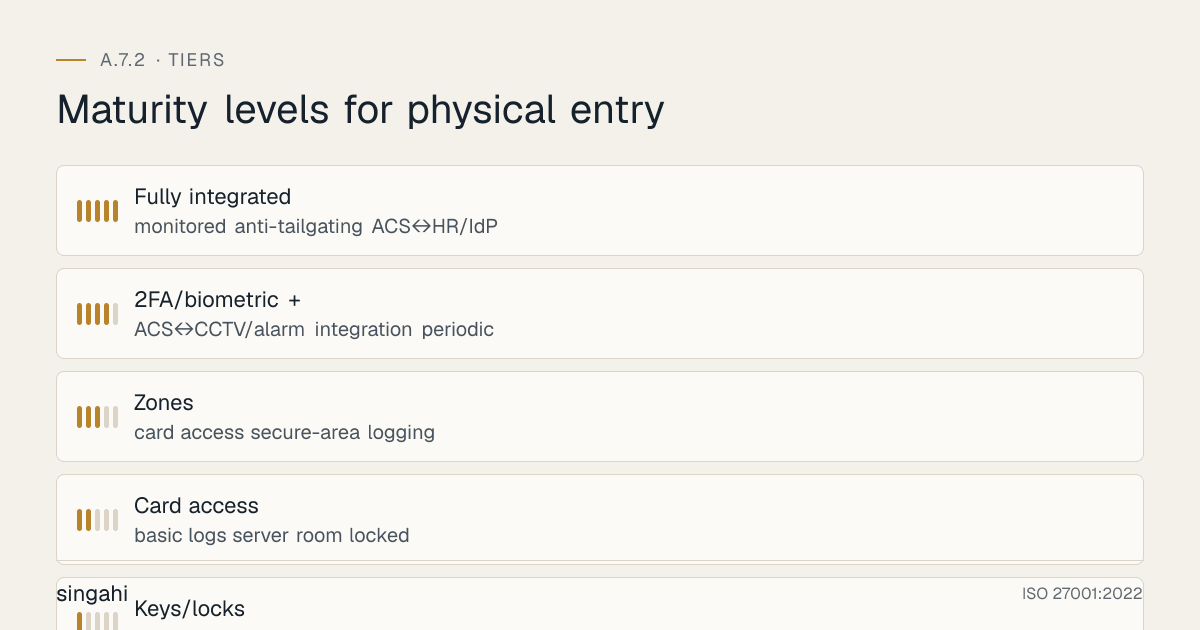
16A.6 Physical Entry Maturity Model (L1–L5)
| Level | Characteristics |
|---|---|
| L1 | Keys/locks; no logging; shared access; reliance on reception |
| L2 | Card access; basic logs; server room locked |
| L3 | Zones; card access; secure-area logging; visitor management; leaver card revocation |
| L4 | 2FA/biometric + mantraps for high-security; ACS↔CCTV/alarm integration; periodic access review; anti-tailgating |
| L5 | Fully integrated, monitored, anti-tailgating; ACS↔HR/IdP automation; continuous review |
Target L3 for certification; data-centre/critical facilities are typically expected at L4.
16A.7 Anatomy of a Physical-Entry Breach
An attacker (or malicious insider) tailgates an employee through a propped-open side door into the office, walks to an unattended desk, and either plugs a rogue device into a live network port or lifts an unencrypted backup drive from an unlocked server cupboard, bypassing every firewall and EDR in the organisation. Each link is an A.7.2 control: a controlled, non-propped access point; anti-tailgating and a challenge culture; a locked, logged server room; and visitor/stranger vigilance. Physical entry is where strong cyber defences are quietly undone by an open door, and where inexpensive controls (turnstiles, locks, logs, awareness) prevent expensive, hard-to-detect incidents.
Key Takeaways
- A.7.1 defines the perimeter; A.7.2 controls the doorway through it: including delivery/loading points, which must be isolated.
- Authenticate proportionately (card → card+PIN → biometric/mantrap) by area sensitivity, and log all secure-area access.
- Manage physical access rights like logical ones (A.5.18): provision by need, review, and revoke on exit (reclaim cards).
- Tailgating and ex-employee badges are the top findings, counter with mantraps/turnstiles, a challenge culture, and physical–logical offboarding integration.
- Run a disciplined visitor/contractor process and isolate deliveries.
- In India, A.7.2 supports DPDP physical safeguards and RBI/data-centre access expectations (handle biometrics per DPDP).
Multi-Framework Mapping
| Framework | Reference | Mapping to A.7.2 |
|---|---|---|
| ISO/IEC 27002:2022 | 7.2 | Physical entry controls |
| NIST SP 800-53 Rev 5 | PE-2 (Authorizations), PE-3 (Access Control), PE-6 (Monitoring), PE-8 (Visitor records) | Physical access authorisation, control, logging |
| NIST CSF 2.0 | PR.AA-06 | Physical access managed/monitored |
| CIS Controls v8 | Not covered | CIS v8 has no physical-access safeguard |
| PCI DSS v4.0.1 | Req 9.2 (facility entry, incl. 9.2.1.1 monitoring), 9.3 (personnel and visitor access) | Entry controls, visitor management |
| SOC 2 (TSC 2017) | CC6.4 | Physical access to facilities restricted |
| COBIT 2019 | DSS05.05 | Manage physical access to IT assets |
| ANSI/TIA-942, Uptime Institute | DC physical access | Multi-layer data-centre access |
| DPDP Act 2023 | Section 8(5) | Physical safeguards for personal data |
Implementation Roadmap
Phase 1, Foundation (Weeks 1–2)
- Map access points (incl. delivery/loading, fire exits); define access zones.
- Put sensitive areas (server room) on separate access groups; start an access + visitor log.
Phase 2, Control & Authenticate (Weeks 3–5)
- Deploy/upgrade card access; add card+PIN/biometric and mantraps for high-security zones.
- Isolate delivery/loading; implement visitor management.
Phase 3, Govern & Align (Weeks 6–7)
- Integrate physical access rights with HR/IT JML (provision/review/revoke; link 5.18).
- Protect and schedule review of access logs (link 5.33).
Phase 4, Assure (Weeks 8+)
- Awareness campaign (challenge culture); anti-tailgating measures.
- KPI dashboard; physical-security test (tailgating); internal audit dry-run.
FAQ
Q1: Is A.7.2 mandatory for certification? Not automatically: it is selected through risk treatment (clause 6.1.3) and recorded in your Statement of Applicability. Where you have premises with information or processing facilities in scope, you will normally include it, and auditors then inspect entry controls, logs and visitor processes.
Q2: How is A.7.2 different from A.7.1? 7.1 establishes the perimeter (walls, fences, the boundary); 7.2 controls entry through access points (doors, gates, the authentication and logging). They are complementary layers.
Q3: Do we need biometrics? Not necessarily. Authentication should be proportionate, card+PIN may suffice for restricted areas, biometrics/mantraps for data halls. Match the mechanism to the sensitivity.
Q4: What's the most common finding? Tailgating and ex-employee badges still active. Address tailgating with mantraps/turnstiles + a challenge culture, and integrate badge revocation into offboarding.
Q5: How does A.7.2 link to access rights (A.5.18)? Physical access rights are managed exactly like logical ones, provisioned by need, reviewed periodically, and revoked promptly. ISO 27002 explicitly cross-references 5.18.
Q6: Cloud-hosted, do we still need this? If you keep any office in scope, usually yes, for your own offices (laptops, network ports, screens), and you should confirm your cloud/colo provider's physical entry controls via their certifications (link A.5.20/5.23).
References and Further Reading
Primary standards
- ISO/IEC 27001:2022: Annex A control 7.2.
- ISO/IEC 27002:2022: Clause 7.2 (physical entry guidance); related §7.1, §7.3, §7.4, §7.6, §5.18, §5.33.
Supporting frameworks
- NIST SP 800-53 Rev 5: PE-2, PE-3, PE-6, PE-8.
- NIST CSF 2.0: PR.AA-06.
- PCI DSS v4.0.1: Requirement 9.2–9.3.
- SOC 2 (TSC 2017): CC6.4.
- COBIT 2019: DSS05.05.
- ANSI/TIA-942 / Uptime Institute: data-centre physical access.
Indian regulations
- Digital Personal Data Protection Act, 2023: Section 8(5), 8(6).
- Private Security Agencies (Regulation) Act, 2005; National Building Code of India 2016: Part 4.
- RBI: Cybersecurity Directions 2026; data-centre/physical security expectations.
- SEBI / IRDAI: physical access controls for regulated entities.
Singahi resources: the A.7.2 toolkit and related guides for A.7.1 Physical security perimeters, A.7.3 Securing offices, rooms and facilities, A.7.4 Physical security monitoring, and A.7.6 Working in secure areas.