
On this page
- Quick Reference (60 Seconds)
- What the Control Asks For
- Why Storage Media Matters
- Scope and Applicability
- Key Definitions and Terminology
- Relationship to Other Controls
- Implementation Roadmap (Week-by-Week)
- Detailed Implementation Guidance
- Tools, Technologies, and Solutions
- Policy and Procedure Templates
- Risk Assessment and Treatment
- Audit and Compliance Checklist
- Metrics and KPIs
- Common Pitfalls and How to Avoid Them
- Illustrative Scenarios
- Multi-Framework Mapping
- Regulatory and Industry Context
- Roles and Responsibilities (RACI)
- Documentation and Evidence Requirements
- Continuous Improvement
- FAQ
- Industry-Specific Media Management Requirements
- Media Management Maturity Model
- Media Management Metrics and KPIs
- Additional FAQ
- Illustrative Scenario (hypothetical): IT Services Company, Media Mismanagement to Data Breach
- Remote Work and Media Security
- References and Further Reading
Quick Reference (60 Seconds)
Figure · At a glance
A.7.10 at a glance
- Control ID
- A.7.10
- Control Name
- Storage Media
- ISO 27002:2022 Section
- 7.10
- Primary Purpose
- Manage storage media throughout its
- Key Activities
- Inventory media, classify sensitivity
- Typical Owners
- IT Security, Data Protection Officer
| Aspect | Summary |
|---|---|
| Control ID | A.7.10 |
| Control Name | Storage Media |
| ISO 27002:2022 Section | 7.10 |
| Primary Purpose | Manage storage media throughout its lifecycle to prevent unauthorized disclosure, modification, removal, or destruction |
| Key Activities | Inventory media, classify sensitivity, secure storage, restrict access, track movement, dispose securely |
| Typical Owners | IT Security, Data Protection Officer, IT Operations |
| Implementation Effort | Medium (4–6 weeks) |
| Main cost drivers | Encryption for removable media, sanitisation tools or a disposal vendor, secure off-site storage, and staff time for registers and checks |
| ISO 27002 attributes | Control type: Preventive · Properties: Confidentiality, Integrity, Availability · Concepts: Protect · Capabilities: Physical security, Asset management · Domains: Protection |
Bottom Line: Storage media is the physical container of your information. Every USB drive, tape, disk, and printout is a potential breach waiting to happen if not managed properly. This control ensures media is tracked, protected, and disposed of securely.
What the Control Asks For
In short:
ISO 27001:2022 Annex A 7.10 asks organizations to manage storage media through their life cycle of acquisition, use, transport, and disposal, in line with the classification scheme.
Do you need this control?
A.7.10 is not mandatory in itself: under clause 6.1.3 you include it if your risk assessment calls for it, and record the decision in your Statement of Applicability. Include it if you use removable or portable storage media (USB drives, external disks, tapes, paper files count too). Organisations that block removable media technically still need rules for the exceptions.
What ISO 27002:2022 Adds
27002 7.10 (paraphrased) asks you to manage storage media through acquisition, use, transport and disposal, in line with your classification scheme. Media includes paper.
Removable media:
- (a) a topic-specific policy on removable media, communicated to everyone who uses it
- (b) where necessary, authorise removal of media from the organisation and keep a record
- (c) store media securely by classification, protected from heat, moisture, humidity, electronic fields and ageing, as the manufacturer specifies
- (d) use cryptography where confidentiality or integrity matters
- (e) copy information to fresh media before old media degrades
- (f) keep multiple copies on separate media for valuable information
- (g) consider registering removable media
- (h) enable USB and SD ports only where there is a business reason
- (i) monitor transfers of information to removable media
- (j) remember that media is exposed during postal or courier transport; apply 5.14 to physical transfers
Secure reuse or disposal: proportionate to sensitivity:
- (a) if media will be reused inside the organisation, securely delete or format it first (see 8.10)
- (b) dispose of media securely when no longer needed (destroy, shred or securely delete)
- (c) have a way to identify items that need secure disposal
- (d) choose disposal suppliers with adequate controls and experience
- (e) log disposals of sensitive items
- (f) consider the aggregation effect: a large pile of individually non-sensitive media can become sensitive
Assess damaged devices holding sensitive data to decide whether to destroy them rather than repair or discard (see 7.14). Where confidential information on media is not encrypted, add physical protection.
Why Storage Media Matters
The Forgotten Attack Vector
In the digital age, organizations focus heavily on network security, cloud security, and endpoint security. But storage media, the physical disks, tapes, USB drives, and printouts that contain information, is often overlooked. A single lost USB drive or improperly disposed hard disk can cause a breach as severe as any sophisticated cyberattack.
How Media Incidents Happen
Common patterns (hypothetical examples):
- Backup media sent by courier goes missing, and nobody can prove it was encrypted.
- Old drives sold or recycled after a simple "delete" or quick format still hold recoverable data.
- A USB drive with a client file is left in a meeting room.
- Printouts go into ordinary recycling instead of locked shred bins.
Each is prevented by the same few controls: encryption, a register, controlled ports, a custody record and a proper sanitisation step before reuse or disposal.
Regulatory and Business Drivers
- DPDP Act 2023: reasonable security safeguards for personal data on any media (s.8(5)), erasure when the purpose is served (s.8(7)), and, once the Rules apply, breach intimation to the Board and affected people without delay with a detailed report within 72 hours (s.8(6))
- IT Act 2000 (s.43A): compensation for negligence in protecting sensitive personal data (until DPDP s.44(2) commences)
- E-Waste (Management) Rules 2022: electronic media disposed of through authorised recyclers
- PCI DSS v4.0.1: 9.4.x (media security, tracking and destruction) and 3.5.1 (PAN unreadable wherever stored)
- SOC 2 CC6.5 and CC6.7: protections removed only when data is unrecoverable; protection of data on removable media
Scope and Applicability
What Is Covered
- All physical storage media containing organizational information
- Magnetic media (hard drives, tapes, floppy disks)
- Optical media (CDs, DVDs, Blu-ray)
- Flash media (USB drives, SSDs, memory cards, SD cards)
- Printed documents and paper records
- Microfilm and microfiche
- Mobile devices with storage (smartphones, tablets, laptops)
- Backup media of all types
- Archive media and long-term storage
What Is Not Covered
- Empty media not yet assigned to store information (though procurement should be controlled)
- Media owned by employees and not used for work (though BYOD policies may extend coverage)
Applicability by Organization Type
| Organization Type | Applicability | Key Media Concerns |
|---|---|---|
| IT/Software Services | High | Source code repositories, customer data, dev backups |
| BFSI | Critical | Customer financial records, transaction logs, backup tapes |
| Healthcare | Critical | Patient records, medical images, lab results |
| Manufacturing | Medium | R&D designs, production plans, supplier contracts |
| Government/Defense | Critical | Classified documents, citizen records, strategic plans |
| Education | Medium | Student records, exam materials, research data |
| SaaS/Cloud | High | Customer tenant data, backup archives, log files |
| Legal/Consulting | High | Client confidential information, case files |
Key Definitions and Terminology
| Term | Definition |
|---|---|
| Storage Media | Any physical device or material capable of storing information, including magnetic, optical, flash, and paper media |
| Removable Media | Storage media that can be easily removed from a system, such as USB drives, external hard drives, CDs, and tapes |
| Media Lifecycle | The stages a media item goes through from procurement to disposal: procurement → assignment → use → archival → disposal |
| Media Sanitization | The process of removing data from media so that it cannot be recovered, ranging from overwriting to physical destruction |
| Degaussing | The process of using a strong magnetic field to erase data from magnetic media (tapes, hard drives) |
| Shredding | Physical destruction of media into small pieces, preventing data recovery |
| Incineration | Burning media to ash, ensuring complete destruction |
| Encryption at Rest | Encrypting data on media so that even if the media is stolen, the data cannot be read without the decryption key |
| Media Vault | A secure, climate-controlled facility for storing backup and archive media |
| Off-Site Storage | Storing backup media at a geographically separate location to protect against site-wide disasters |
| Rotation Scheme | A scheduled plan for rotating backup media (e.g., daily, weekly, monthly) to ensure recoverability and retention |
| Media Classification | Assigning a sensitivity label to media based on the data it contains, aligned with the information classification scheme |
Relationship to Other Controls
| Control | Relationship |
|---|---|
| A.5.9 Inventory of information and other associated assets | Media register is part of the asset inventory |
| A.5.12 / A.5.13 Classification and labelling | Media handled and labelled by classification |
| A.5.14 Information transfer | 27002 says to apply it to physical media transfers |
| A.5.33 Protection of records | Records held on media |
| A.7.9 Security of assets off-premises | Media taken outside the premises |
| A.7.14 Secure disposal or re-use of equipment | Disposal of equipment containing media |
| A.8.10 Information deletion | Secure deletion before reuse |
| A.8.12 Data leakage prevention | Monitoring copies to removable media |
| A.8.13 Information backup | Backup media |
| A.8.24 Use of cryptography | Encryption of media and crypto-erase |
Implementation Roadmap (Week-by-Week)
Week 1: Media Inventory and Classification
- Inventory all storage media in the organization
- Map media to the information classification scheme (Public, Internal, Confidential, Secret)
- Identify all media locations (on-site, off-site, employee possession, vendor possession)
- Document media types, quantities, and sensitivity levels
- Identify gaps in media control (untracked media, unclassified media, unprotected media)
Week 2: Policy and Procedure Development
- Draft storage media management policy
- Define media classification and labeling requirements
- Create secure storage requirements for each classification level
- Develop media transfer and movement procedures
- Create media disposal and destruction procedures
- Define backup media rotation and retention requirements
- Develop media audit and accountability procedures
Week 3: Secure Storage Implementation
- Designate secure storage areas for each media classification level
- Install lockable cabinets, safes, or media vaults
- Implement access controls for media storage areas (key cards, biometrics)
- Install environmental monitoring (temperature, humidity) for media storage
- Deploy fire-resistant safes for critical media
- Create off-site storage arrangement for backup media
Week 4: Access Control and Tracking
- Implement media checkout system (log who takes what, when, and why)
- Deploy media labeling system (classification, owner, date, contents)
- Configure encryption at rest for all removable media
- Implement DLP (Data Loss Prevention) to control media usage on endpoints
- Disable or restrict USB ports where not required
- Create media movement authorization process
Week 5: Disposal Process Setup
- Procure media destruction equipment (shredders, degaussers) or identify certified disposal vendors
- Create destruction certificates and logs
- Define disposal procedures for each media type
- Create witness requirements for destruction of highly sensitive media
- Establish chain of custody for media sent to disposal vendors
- Create disposal vendor evaluation criteria and contracts
Week 6: Backup Media Management
- Document backup media rotation scheme (daily, weekly, monthly, yearly)
- Create backup media catalog with retention periods
- Verify off-site storage provider security and compliance
- Implement backup media integrity testing (restore tests)
- Create backup media retrieval procedures
- Label all backup media with backup date, contents, and retention period
Week 7: Training and Communication
- Develop media management training for all staff
- Create quick reference cards for media handling
- Train IT staff on media classification, storage, and disposal
- Train managers on media audit and accountability
- Communicate policy to all employees via email and meetings
- Post reminders near printers, copiers, and shared storage areas
Week 8: Audit and Validation
- Conduct internal audit of media management controls
- Verify all media is classified, labeled, and stored appropriately
- Test disposal procedures with sample media
- Verify backup media integrity with restore tests
- Review access logs for media storage areas
- Prepare documentation for external audit
Detailed Implementation Guidance
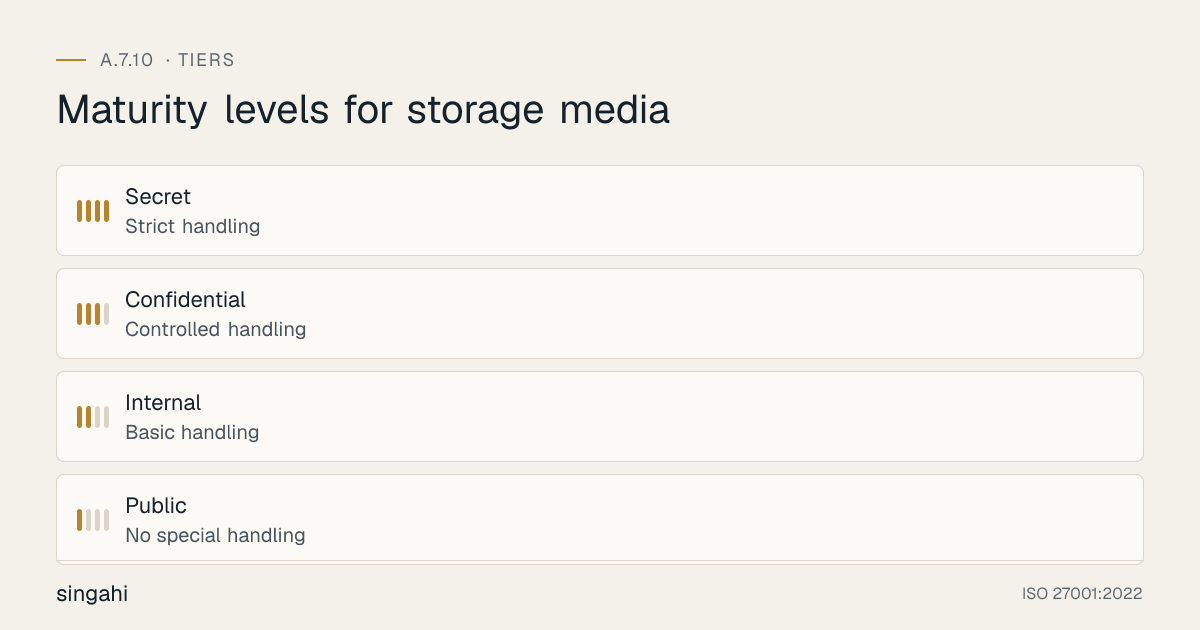
Figure · Tiers
Maturity levels for storage media
Media Classification and Labeling
Classification Levels:
| Classification | Media Handling | Storage | Transfer | Disposal |
|---|---|---|---|---|
| Public | No special handling | Standard storage | No restriction | Standard disposal |
| Internal | Basic handling | Lockable cabinet | Internal mail only | Shredding (paper) / Overwriting (digital) |
| Confidential | Controlled handling | Secure safe or vault | Authorized courier, encrypted | Secure destruction with certificate |
| Secret | Strict handling | Fire-resistant safe, vault | Escorted courier, encrypted, sealed | Witnessed destruction, certificate |
Labeling Requirements:
Every media item must be labeled with:
- Classification (Public, Internal, Confidential, Secret)
- Content description (e.g., "Customer Database Backup, March 2026")
- Date created
- Retention period (e.g., "Retain until 2027-03-31")
- Owner/department
- Unique identifier (for tracking)
Labeling Best Practices:
- Use color-coded labels (e.g., green for Public, yellow for Internal, orange for Confidential, red for Secret)
- Use tamper-evident labels for high-sensitivity media
- Label both the media and its storage container
- Use barcodes or QR codes for electronic tracking
- Include "Return to [owner] if found" on portable media
Secure Storage Requirements
On-Site Storage:
| Classification | Storage Type | Access Control | Environmental Control |
|---|---|---|---|
| Public | Standard shelves | Unrestricted | Standard office |
| Internal | Lockable cabinet | Key or badge access | Standard office |
| Confidential | Safe or media vault | Biometric or dual-key | Climate-controlled (18–24°C, 40–50% RH) |
| Secret | Fire-resistant safe, vault | Two-person rule, biometrics | Climate-controlled, monitored 24/7 |
Off-Site Storage:
- Off-site storage provider must be vetted and contractually bound to security requirements
- Off-site storage must have equivalent or greater security than on-site
- Off-site storage must have climate control for sensitive media
- Transport to off-site must use authorized couriers with tracking
- Off-site inventory must be reconciled with on-site records quarterly
Media Vault Requirements:
- Fire resistance: minimum 1 hour (2 hours for Secret media)
- Water resistance: sealed against flooding
- Climate control: 18–24°C, 40–50% relative humidity
- Access control: logged, restricted, monitored
- Intrusion detection: alarms, CCTV
- Inventory management: electronic tracking system
Media Transfer and Movement
Internal Transfer:
- Media must be transported in sealed, labeled containers
- Confidential and Secret media must be hand-carried, not sent via internal mail
- Transfer must be logged in the media movement register
- Recipient must acknowledge receipt
- Media must not be left unattended during transfer
External Transfer:
- Pre-approval from data owner and security team required
- Media must be encrypted with strong encryption (AES-256)
- Use authorized courier services with tracking and insurance
- Seal media with tamper-evident seals
- Document chain of custody
- Require signed receipt at destination
- Verify delivery within expected timeframe
Employee Transport:
- Employees should not transport Confidential or Secret media without authorization
- If transport is necessary, media must be encrypted
- Laptops and devices must use full-disk encryption
- Employees must report lost or stolen media immediately
- Media must not be left in vehicles unattended
Media Disposal and Destruction
Sanitisation and disposal by media type:
| Media type | Clear (reuse inside the organisation) | Purge (reuse outside, resale, donation) | Destroy | Notes |
|---|---|---|---|---|
| Hard disk drives (HDD) | Single overwrite with verified tool | ATA/SCSI sanitize (overwrite) or crypto-erase; or degauss (which also destroys the drive) | Shred, crush or disintegrate | Multi-pass overwrites (the old DoD 5220.22-M method) are not needed |
| Solid-state drives (SSD, NVMe) | Vendor secure-erase tool | Sanitize command (block erase or crypto-erase) verified by sampling | Shred or disintegrate to a small particle size | Overwriting and degaussing are not reliable on flash |
| USB drives, SD cards | Format only for low-sensitivity reuse | Rarely reliable: prefer destroy for confidential data | Shred or disintegrate | Encrypt in use so loss is less serious |
| Phones and tablets | Factory reset with encryption on | Factory reset (crypto-erase) verified by MDM | Shred | Remove SIM and memory cards |
| Magnetic tape | Overwrite | Degauss (rated degausser for the tape type) | Shred or incinerate | |
| Optical discs | n/a | n/a | Shred or disintegrate | |
| Paper | n/a | n/a | Cross-cut shred: DIN 66399 P-4 for personal and confidential data, P-5 for highly confidential | Locked bins until shredded |
Based on NIST SP 800-88 Rev. 2 (2025) and IEEE 2883-2022. Verify by sampling, record each item, and obtain a certificate when a vendor does the work. Crypto-erase is only as good as your key management (A.8.24).
Decide reuse or disposal first: reuse inside the organisation needs at least Clear (Purge for confidential data); resale, donation or return to a lessor needs Purge with verification; anything that cannot be purged reliably, or held highly confidential data, is destroyed. Damaged devices with sensitive data are risk-assessed before repair (7.14).
Disposal Procedures:
- Request: Media owner requests disposal with justification
- Approval: Data owner and security team approve disposal
- Inventory Update: Mark media as "pending disposal" in inventory
- Sanitisation: Clear, Purge or Destroy per the table above; verify by sampling
- Destruction (where required): physical destruction by an approved method or vendor
- Verification: Witness destruction for Secret media; photograph for Confidential
- Certificate: Issue certificate of destruction with media details, method, date, witness
- Inventory Update: Remove media from inventory; retain destruction record
Disposal Vendor Management:
- Vendors must be security-vetted and sign NDAs
- Vendors must provide certificates of destruction
- Vendors must allow audit of their destruction processes
- Vendors must have environmental licenses for e-waste disposal
- Chain of custody must be documented from handover to destruction
- In India, use recyclers authorised under the E-Waste (Management) Rules 2022 (registered with the CPCB or your State Pollution Control Board); R2 or e-Stewards certification adds assurance
Backup Media Management
Rotation Schemes:
| Type | Frequency | Retention | Storage Location | Example |
|---|---|---|---|---|
| Daily | Every business day | 7 days | On-site | Monday–Sunday overwrite |
| Weekly | End of week | 4 weeks | Off-site | Week 1, Week 2, Week 3, Week 4 rotation |
| Monthly | End of month | 12 months | Off-site | Month 1–12 rotation |
| Yearly | End of year | 7 years | Off-site vault | Year 1–7 retention |
| Grandfather | Monthly + Yearly | Per regulatory requirement | Off-site vault | Compliance retention |
Backup Media Integrity:
- Test restore from backup media at least quarterly
- Verify backup media is readable before sending off-site
- Document restore test results
- Replace media that fails integrity checks
- Maintain backup media catalog with test history
Tools, Technologies, and Solutions
Media Encryption Solutions
| Vendor | Product | Best For | Pricing model |
|---|---|---|---|
| Microsoft | BitLocker (Windows) | Full-disk encryption for Windows devices | Included in Windows Pro/Enterprise |
| Apple | FileVault (macOS) | Full-disk encryption for Mac devices | Included in macOS |
| VeraCrypt | Open-source encryption | Cross-platform, free | Free |
| Symantec | Endpoint Encryption | Enterprise, central management | Commercial, per endpoint |
| McAfee | Complete Data Protection | Enterprise, DLP + encryption | Commercial, per endpoint |
| Sophos | SafeGuard Encryption | Enterprise, easy deployment | Commercial, per endpoint |
Degaussing Equipment
| Product | Type | Capacity | Pricing model |
|---|---|---|---|
| Garner HD-2 | Hard drive degausser | HDDs, tapes | Commercial |
| Garner PD-5 | Physical destroyer + degausser | HDDs, SSDs | Commercial |
| Verity Systems SV91M | Degausser | Tapes, HDDs | Commercial |
| Proton T-1.5 | Degausser | Tapes, HDDs | Commercial |
Shredding Equipment
| Product | Type | Capacity | Pricing model |
|---|---|---|---|
| HSM Shredder | Cross-cut paper shredder | Up to 20 sheets | Commercial |
| Kobra Shredder | Heavy-duty paper + media | Paper, CDs, cards | Commercial |
| ** intimus** | Industrial shredder | Paper, media, hard drives | Commercial |
| Datastroyer | Media shredder | HDDs, SSDs, tapes | Commercial |
Media Inventory and Tracking Software
| Vendor | Product | Key Features | Pricing model |
|---|---|---|---|
| Wasp Barcode | AssetCloud | Barcode/RFID tracking, check-in/out | Commercial |
| Snipe-IT | Open-source asset management | Free, web-based, media tracking | Free (self-hosted) |
| Freshservice | IT Asset Management | Cloud-based, integrated with ITSM | Commercial |
| ServiceNow | IT Asset Management | Enterprise, complete | Commercial |
| ManageEngine | AssetExplorer | Growing companies, feature-rich | Commercial |
Data Loss Prevention (DLP)
| Vendor | Product | Key Features | Pricing model |
|---|---|---|---|
| Symantec | Data Loss Prevention | Endpoint, network, cloud | Commercial, per user |
| Forcepoint | DLP | User behavior analytics, cloud | Commercial, per user |
| Microsoft | Purview DLP | Integrated with M365 | Commercial, per user |
| Digital Guardian | DLP | Endpoint-focused, data classification | Commercial, per user |
| ManageEngine | Endpoint DLP Plus | Indian growing companies, efficient | Commercial, per user |
Policy and Procedure Templates
Storage Media Management Policy Template
Template
Storage Media Management Policy
1. Purpose
This policy establishes requirements for the management, handling, storage, transfer, and disposal of storage media to protect information from unauthorized disclosure, modification, or destruction.
2. Scope
This policy applies to all storage media containing organizational information, including magnetic, optical, flash, and paper media, regardless of location (on-site, off-site, or in transit).
3. Media Classification
All media must be classified according to the information classification scheme:
- Public: No special handling
- Internal: Basic handling, lockable storage
- Confidential: Controlled handling, secure storage, encrypted transfer
- Secret: Strict handling, vault storage, encrypted and escorted transfer
4. Media Labeling
All media must be labeled with:
- Classification level
- Content description
- Date created
- Retention period
- Owner/department
- Unique identifier
5. Secure Storage
- Internal media: Lockable cabinet
- Confidential media: Safe or media vault, climate-controlled
- Secret media: Fire-resistant safe, vault, two-person access
- Off-site storage: Vetted provider with equivalent security
6. Media Transfer
- Internal: Logged, sealed containers, hand-carried for Confidential/Secret
- External: Encrypted, authorized courier, tamper-evident seals, tracking
- Employee transport: Encrypted, authorization required, report if lost
7. Media Disposal
- All media must be securely disposed of at end of life
- Sanitization method must match media type and sensitivity
- Confidential/Secret media destruction requires certificate
- Secret media destruction requires witness
- Disposal vendors must be vetted and provide certificates
8. Backup Media
- Backup media rotation scheme must be documented
- Backup media must be tested quarterly
- Off-site storage must be secure and climate-controlled
- Backup media inventory must be maintained
9. Roles and Responsibilities
- Data Owner: Classify media, approve disposal, approve transfer
- IT Security: Policy, encryption, DLP, disposal oversight
- IT Operations: Inventory, storage, rotation, integrity testing
- All Employees: Comply with media handling rules, report lost media
10. Enforcement
- Non-compliance will result in disciplinary action
- Lost media must be reported within 1 hour
- Unauthorized media removal is a serious offense
11. Review
This policy is reviewed annually or after any media-related incident.
Media Disposal Procedure Template
Template
Media Disposal Procedure
1. Purpose
To ensure secure disposal of storage media to prevent unauthorized data recovery.
2. Authorization
- All media disposal requires approval from the data owner
- Confidential/Secret media disposal requires IT Security approval
- Secret media disposal requires CISO approval
3. Disposal Methods
Hard Drives (HDD)
- For reuse: Clear (one verified overwrite) or Purge (sanitize command or crypto-erase)
- For disposal of confidential data: Purge and verify, or physically destroy (shred or crush)
- Record serial number and destruction method
- Issue certificate of destruction
Solid-State Drives (SSD)
- For reuse: sanitize command (block erase or crypto-erase), verified by sampling; do not rely on overwriting or degaussing
- For disposal of confidential data, or if sanitize is not supported: physically destroy (shred or disintegrate)
- Record serial number and destruction method
- Issue certificate of destruction
USB/Flash Media
- Overwriting is unreliable on flash; for confidential data, destroy
- Physically destroy (shred or disintegrate)
- Record identifier and destruction method
- Issue certificate of destruction
Tapes
- Degauss with certified degausser
- Physically destroy (shred or incinerate)
- Record identifier and destruction method
- Issue certificate of destruction
Paper Documents
- Cross-cut shred to DIN 66399 P-4 for personal and confidential data (P-5 for highly confidential)
- For Confidential/Secret: use industrial shredder or secure disposal service
- Record quantity and destruction method
- Issue certificate of destruction
4. Vendor Disposal
- Vendor must be security-vetted and sign NDA
- Chain of custody must be documented
- Vendor must provide certificate of destruction
- Vendor must allow audit of destruction process
- Vendor must comply with E-Waste (Management) Rules, 2022
5. Documentation
- Maintain destruction log with: media ID, type, contents, method, date, witness, certificate
- Retain destruction records for duration + 3 years
- Quarterly review of destruction records for completeness
Risk Assessment and Treatment
Risk Assessment Matrix for Storage Media
| Risk ID | Threat | Vulnerability | Likelihood | Impact | Risk Level | Treatment |
|---|---|---|---|---|---|---|
| R1 | Lost USB drive with customer data | No encryption on removable media | High | High | Critical | Encrypt all removable media; DLP controls |
| R2 | Backup tape stolen from off-site | No encryption on backup tapes | Medium | High | High | Encrypt backup tapes; vet off-site provider |
| R3 | Hard drive sold with recoverable data | Improper sanitization before disposal | Medium | High | High | Secure erase + physical destruction; certificate |
| R4 | Employee takes confidential documents home | No media checkout control | Medium | High | High | Media checkout system; employee agreement |
| R5 | Printed documents left in recycling | No secure disposal for paper | High | Medium | High | Shredding bins; secure disposal procedures |
| R6 | Media damaged by environmental factors | No climate control for storage | Medium | Medium | Medium | Climate-controlled storage; monitoring |
| R7 | Unauthorized media access in storage | Weak access controls | Medium | High | High | Biometric access; CCTV; access logs |
| R8 | Backup media fails during restore | No integrity testing | Medium | High | High | Quarterly restore tests; replace failing media |
| R9 | Media lost in transit | Unencrypted transfer; no tracking | Medium | High | High | Encrypt; authorized courier; tracking |
| R10 | Employee copies data to personal media | No DLP; unrestricted USB ports | High | High | Critical | DLP; USB port restrictions; awareness |
Audit and Compliance Checklist
Internal Audit Checklist (30 Questions)
Policy and Documentation (5 Questions)
- Is a storage media management policy documented and approved?
- Is the media classification scheme aligned with the information classification scheme?
- Are media disposal procedures documented?
- Is the backup media rotation scheme documented?
- Is the policy reviewed annually?
Inventory and Classification (5 Questions)
- Is there a complete inventory of all storage media?
- Is all media classified and labeled?
- Are media locations documented and current?
- Is media ownership assigned?
- Is the inventory reconciled quarterly?
Secure Storage (5 Questions)
- Is media stored according to classification?
- Are Confidential/Secret media in secure storage?
- Is access to media storage controlled and logged?
- Is off-site storage secure and climate-controlled?
- Is media storage protected from fire, water, and theft?
Transfer and Movement (5 Questions)
- Is media transfer logged and authorized?
- Is external media transfer encrypted?
- Are authorized couriers used for external transfer?
- Is chain of custody documented?
- Are employees trained on media transport rules?
Disposal (5 Questions)
- Is media disposal authorized and documented?
- Are destruction methods appropriate for media type?
- Are certificates of destruction issued and retained?
- Is Secret media destruction witnessed?
- Are disposal vendors vetted and audited?
Backup and Integrity (5 Questions)
- Is backup media rotated according to scheme?
- Are backup media integrity tests conducted quarterly?
- Is off-site backup inventory reconciled?
- Are backup media retention periods documented?
- Are backup media protected during transport?
Audit Scoring
- 30–27: Excellent (Green), Full compliance
- 26–22: Good (Yellow), Minor gaps, address within 30 days
- 21–15: Needs Improvement (Orange), Significant gaps, address within 60 days
- 14–0: Critical (Red), Major non-compliance, immediate action required
Metrics and KPIs
Figure · Measures
The measures that show A.7.10 is working
- Media Classification Coverage100%Quarterly
- Media Inventory Accuracy>= 98%Quarterly
- Encryption Coverage100%Monthly
- Media Disposal Compliance100%Monthly
- Certificate of Destruction Coverage100%Monthly
Key Performance Indicators
| KPI | Formula | Target | Measurement Frequency |
|---|---|---|---|
| Media Classification Coverage | (Classified media / Total media) x 100 | 100% | Quarterly |
| Media Inventory Accuracy | (Accurate records / Total records checked) x 100 | >= 98% | Quarterly |
| Encryption Coverage (Removable Media) | (Encrypted media / Total removable media) x 100 | 100% | Monthly |
| Media Disposal Compliance | (Properly disposed media / Total disposed media) x 100 | 100% | Monthly |
| Certificate of Destruction Coverage | (Media with certificates / Total destroyed media) x 100 | 100% | Monthly |
| Lost Media Incidents | Count of lost or stolen media incidents | 0 | Monthly |
| Lost Media Reporting Time | Average time from loss to report | <= 1 hour | Per incident |
| Backup Media Integrity Test Pass Rate | (Passed tests / Total tests) x 100 | 100% | Quarterly |
| Off-Site Storage Reconciliation | (Reconciled quarters / Total quarters) x 100 | 100% | Quarterly |
| DLP Block Rate (USB) | (Blocked USB transfers / Attempted USB transfers) x 100 | >= 90% | Monthly |
| Media Transfer Authorization Rate | (Authorized transfers / Total transfers) x 100 | 100% | Monthly |
| Media Storage Access Audit | (Access logs reviewed / Required reviews) x 100 | 100% | Monthly |
| Policy Review Cycle Adherence | (Reviews on time / Required reviews) x 100 | 100% | Annually |
| Audit Finding Closure Rate | (Closed findings / Total findings) x 100 | 100% within 60 days | Per audit |
| E-Waste Disposal Compliance | (Compliant disposals / Total disposals) x 100 | 100% | Quarterly |
Common Pitfalls and How to Avoid Them
Pitfall 1: No Media Inventory
Problem: The organization has no idea how many USB drives, tapes, or external hard drives exist. Media is purchased, used, and lost without any tracking. Solution: Implement a media inventory system. Use barcode or RFID tracking. Require check-in/check-out for all removable media. Conduct periodic physical audits. Start with the most sensitive media and expand coverage.
Pitfall 2: Unencrypted Removable Media
Problem: USB drives and external hard drives are used without encryption. When lost, the data is immediately accessible. Solution: Mandate encryption for all removable media. Use centrally managed encryption (BitLocker, FileVault, or enterprise solutions). Deploy DLP to block unencrypted transfers. Provide approved encrypted media to staff. Make encryption the default, not optional.
Pitfall 3: Inadequate Disposal
Problem: Hard drives are "deleted" using standard delete or format, which is easily recoverable. Paper is thrown in regular trash. Old devices are sold on the secondary market without proper sanitization. Solution: Follow NIST SP 800-88 Rev. 2: Clear, Purge or Destroy by media type. Remember that degaussing does nothing to SSDs and flash. Physically destroy media that cannot be securely erased. Use cross-cut shredders for paper. Vet and contract certified disposal vendors. Never sell equipment without verified destruction of all storage components.
Pitfall 4: Weak Off-Site Storage Controls
Problem: Backup tapes are sent to a "storage company" with no security vetting. The storage company has no climate control, no access controls, and no accountability. Tapes are lost or damaged without detection. Solution: Vet off-site storage providers rigorously. Require security certifications (ISO 27001, SOC 2). Visit the facility. Require chain of custody documentation. Verify climate control and access controls. Reconcile inventory quarterly. Encrypt all backup media before sending off-site.
Pitfall 5: No Backup Media Integrity Testing
Problem: Backup media is created and stored but never tested. When disaster strikes, the backups are corrupted, incomplete, or unreadable. Solution: Test restore from backup media quarterly. Document test results. Replace media that fails testing. Maintain a backup media catalog with test history. Rotate media before end of life. Use backup software that verifies integrity automatically.
Pitfall 6: Ignoring Paper Media
Problem: Organizations focus on digital media but neglect printed documents. Board resolutions, financial statements, and customer lists are printed and left unsecured. Solution: Extend media management to paper. Use secure print (pull printing). Provide shredding bins. Train staff on paper security. Include printers and copiers in spot checks. Consider going paperless where possible.
Pitfall 7: Personal Devices as Media
Problem: Employees use personal USB drives, external hard drives, and smartphones to store work data. These devices are not managed, encrypted, or inventoried. Solution: Prohibit personal media for work data (or allow only with MDM and encryption). Provide approved, managed, encrypted media. Use DLP to detect unauthorized transfers. Include personal device media in policy and awareness training.
Pitfall 8: Vendor and Contractor Media
Problem: Third-party vendors and contractors bring their own media into the organization, or take organizational media off-site, without controls. Solution: Include media management in vendor contracts and NDAs. Require encryption for any vendor media containing organizational data. Monitor vendor access to sensitive areas. Require return or destruction of all media at contract end. Audit vendor media handling.
Illustrative Scenarios
Illustrative scenario, a composite example for guidance, not a specific Singahi engagement or a verified outcome.
Illustrative Scenario 1: Indian Healthcare Provider, Backup Tape Transformation (Growing company)
Organization: A 500-bed hospital chain in South India with 3 hospitals, 2,000 employees Challenge: The hospital had been using backup tapes for 10 years without a proper management system. Tapes were stored in a unlocked cabinet in the IT office. There was no inventory, no encryption, no rotation scheme, and no integrity testing. When the IT office was renovated, 47 tapes were found under a desk, covered in dust. The labels were faded; no one knew what data they contained. A ransomware incident revealed that the "active" backup tapes were corrupted and unreadable. Before State:
- 200+ backup tapes with no inventory
- Tapes stored in unlocked cabinet, no climate control
- No encryption on any tape
- No rotation scheme; tapes overwritten randomly
- No integrity testing in 5 years
- Off-site storage: one IT employee took tapes home in his backpack
Implementation: Month 1: Inventoried all tapes. Classified by contents. Destroyed 47 unlabeled tapes with certificate. Month 2: Implemented new backup media policy. Defined rotation scheme (daily, weekly, monthly, yearly). Month 3: Purchased encrypted tape drives (LTO-8 with encryption). Deployed new backup software with integrity verification. Month 4: Contracted with professional off-site storage provider (vetted, ISO 27001 certified). Implemented chain of custody. Month 5: Conducted quarterly restore tests. Replaced failing tapes. Month 6: Trained all IT staff on media management. Created quick reference guides.
Results (After 12 Months):
- 100% of backup media encrypted
- 100% inventory accuracy (tracked via barcode system)
- Restore test pass rate: 100% (quarterly)
- Off-site storage: professional vault with climate control, 24/7 security
- Zero lost or unaccounted media incidents
- Ransomware recovery successful: 4-hour RTO, 1-hour RPO achieved
- NABH accreditation achieved (media management was a requirement)
Investment: (tape drives, encryption, off-site storage contract, inventory system, training)
Key Lesson: Backup media is not "set and forget." It requires active management, integrity testing, and professional storage. The hospital's decade of neglect created a ticking time bomb that nearly destroyed the organization.
Illustrative Scenario 2: Large Indian IT Services Company, Global Media Standardization
Organization: An IT services company with 8,000+ employees, 5 delivery centers across India, and clients in 15 countries Challenge: The company had grown through acquisition, resulting in 5 delivery centers with completely different media management practices. The Bengaluru center had excellent controls (encrypted media, professional disposal, DLP). The Pune center (acquired 3 years ago) had no controls, employees freely used USB drives, no encryption, no inventory, and hard drives were sold to a local scrap dealer without sanitization. A client audit of the Pune center discovered the gap and threatened contract termination. Before State:
- 5 delivery centers with varying media controls
- Bengaluru: excellent controls; Pune: no controls
- No global media management policy
- 3,000+ employees with uncontrolled USB access
- No DLP deployment in 3 of 5 centers
- Hard drives from retired equipment sold to scrap dealers without sanitization
- No centralized media inventory or tracking
Implementation: Phase 1 (Months 1–2): Developed global media management policy. Defined minimum standards for all centers. Phase 2 (Months 3–4): Deployed DLP across all 5 centers (Symantec DLP). Restricted USB ports where not required. Phase 3 (Months 5–6): Deployed centrally managed encryption (BitLocker for Windows, FileVault for Mac). Issued approved encrypted USB drives to staff who needed them. Phase 4 (Months 7–8): Implemented centralized media inventory (ServiceNow Asset Management). Barcoded all media. Phase 5 (Months 9–10): Contracted with certified e-waste disposal vendor for all centers. Implemented destruction certificate process. Phase 6 (Months 11–12): Trained all 8,000 employees. Conducted global internal audit. Client re-audit.
Results (After 12 Months):
- 100% of delivery centers compliant with global media policy
- DLP deployment: 100% coverage
- Encryption: 100% of removable media and endpoint devices
- Media inventory: 95%+ accuracy
- E-waste disposal: 100% certified destruction
- Client re-audit: passed with zero findings
- Two new clients signed, citing security maturity
Investment: (DLP, encryption, inventory system, disposal vendor, training, audit)
Key Lesson: Growth through acquisition creates security gaps. The weakest center becomes the liability for the entire organization. Global companies need global standards, centralized enforcement, and consistent accountability.
Multi-Framework Mapping
Figure · Matrix
Comparison: NIST SP 800-53 Rev 5 to COBIT 2019
ISO 27001:2022 A.7.10 to Other Frameworks
| Framework | Reference | How it relates to A.7.10 |
|---|---|---|
| NIST SP 800-53 Rev 5 | MP-2 Media access; MP-3 Media marking; MP-4 Media storage; MP-5 Media transport; MP-6 Media sanitization; MP-7 Media use | Direct |
| NIST SP 800-88 Rev. 2 | Clear / Purge / Destroy | Sanitisation method |
| PCI DSS v4.0.1 | 9.4.1–9.4.7 (secure, classify, track, inventory and destroy media); 3.5.1 (PAN unreadable) | Direct for card data |
| CIS Controls v8 | 3.9 Encrypt data on removable media; 10.3 Disable autorun for removable media; 3.5 Securely dispose of data | Direct |
| SOC 2 (2017 TSC) | CC6.5, CC6.7 | Disposal; removable media protection |
| COBIT 2019 | DSS05.06 Manage sensitive documents and output devices; DSS05.05 Physical access | Supports |
Regulatory and Industry Context
India-Specific Regulatory Requirements
Digital Personal Data Protection Act 2023:
- s.8(5): reasonable security safeguards for personal data on any media
- s.8(7): erase personal data once the purpose is served, unless law requires retention
- s.8(6): once the Rules apply (about May 2027), intimate breaches to the Board and each affected person without delay, with a detailed report within 72 hours
- Penalty of up to ₹250 crore for failing to take reasonable security safeguards
Information Technology Act 2000:
- s.43A: compensation for negligence with sensitive personal data (until DPDP s.44(2) commences)
- s.72A: disclosure of personal information in breach of a lawful contract
E-Waste (Management) Rules 2022:
- Dispose of electronic media through authorised recyclers and keep records of what was handed over
CERT-In Directions (2022):
- A lost or improperly disposed medium that leads to a data breach or leak is reportable within 6 hours of noticing
Sector regulators:
- RBI, SEBI CSCRF (2024) and IRDAI (2023) expect regulated entities to protect data at rest and dispose of media securely; record-retention periods come from the relevant laws and directions (for example Companies Act s.128 books of account for 8 years), so set them in your retention schedule rather than by media type
Industry-Specific Context
- BFSI: encrypted backup media, tracked couriers or vaults, documented sanitisation for retired drives; payment system data must stay in India under RBI's 2018 storage direction.
- Healthcare: patient records and imaging on removable media should be encrypted and logged; follow the retention periods your state and accreditation bodies set.
- IT/ITeS: client contracts often ban removable media on delivery floors or require client approval and logging.
- Manufacturing and OT: engineering laptops and USB transfers to air-gapped systems need scanning stations and logging.
Roles and Responsibilities (RACI)
| Activity | CISO | Data Protection Officer | IT Operations | IT Security | Facility Mgmt | All Employees |
|---|---|---|---|---|---|---|
| Policy Development | A | R | C | R | I | I |
| Media Classification | C | A | C | R | I | C |
| Inventory Management | C | C | R | C | I | I |
| Secure Storage | C | C | R | C | R | I |
| Encryption Deployment | A | C | R | R | I | I |
| Media Transfer | C | C | R | R | I | I |
| Disposal Oversight | A | R | C | R | C | I |
| Backup Media Management | C | C | R | C | I | I |
| Integrity Testing | C | C | R | C | I | I |
| Training and Awareness | A | R | C | R | I | R |
| Incident Response | A | R | C | R | I | I |
| Audit and Compliance | A | C | C | R | I | I |
| Vendor Management | C | C | R | R | I | I |
| Continuous Improvement | A | R | C | C | I | I |
Documentation and Evidence Requirements
| Document | Purpose | Retention Period | Owner |
|---|---|---|---|
| Storage Media Management Policy | Defines requirements | Duration + 3 years | CISO |
| Media Inventory | Asset tracking | Duration + 3 years | IT Operations |
| Media Classification Matrix | Sensitivity mapping | Duration + 3 years | DPO |
| Media Transfer Log | Movement tracking | 1 year | IT Operations |
| Destruction Certificates | Disposal evidence | Duration + 3 years | IT Security |
| Destruction Log | Disposal tracking | Duration + 3 years | IT Security |
| Backup Media Catalog | Backup tracking | Duration + 3 years | IT Operations |
| Restore Test Results | Integrity evidence | Duration + 3 years | IT Operations |
| Off-Site Storage Agreement | Vendor contract | Duration + 3 years | IT Operations |
| Off-Site Inventory Reconciliation | Accuracy verification | 1 year | IT Operations |
| Access Control Logs | Storage access evidence | 1 year | IT Security |
| Training Records | Awareness evidence | Duration + 3 years | HR |
| Audit Checklist and Results | Audit evidence | Duration + 3 years | Internal Audit |
| Risk Assessment | Risk treatment evidence | Duration + 3 years | CISO |
| Exception Log | Approved exceptions | Duration + 3 years | CISO |
| E-Waste Disposal Records | Environmental compliance | Duration + 3 years | Facility |
Continuous Improvement
Maturity Model for A.7.10
| Level | Name | Characteristics | Evidence |
|---|---|---|---|
| 1 | Initial | No media inventory; no controls; media lost and disposed of ad-hoc | No policy; no inventory; no encryption; no disposal records |
| 2 | Developing | Basic inventory; some controls; reactive management | Partial inventory; some encryption; informal disposal |
| 3 | Defined | Full inventory; all controls implemented; proactive management | Complete inventory; all media encrypted; secure storage; disposal certificates |
| 4 | Managed | Metrics-driven; automated tracking; predictive management | Automated inventory; DLP; quarterly integrity tests; trend analysis |
| 5 | Optimized | Fully automated; self-managing; integrated with enterprise systems | AI-powered classification; blockchain tracking; automated disposal; zero incidents |
Continuous Improvement Activities
Monthly:
- Media inventory reconciliation
- Disposal certificate review
- Lost media incident review
- DLP reporting analysis
Quarterly:
- Backup media integrity testing
- Off-site inventory reconciliation
- Internal audit of media controls
- Vendor performance review
- Training effectiveness assessment
Annually:
- Full policy review
- Complete risk assessment refresh
- Technology and tool review
- Benchmark against industry standards
- External audit preparation
- Maturity assessment against target level
Trigger-Based:
- After any media-related incident
- Upon new media technology adoption
- When regulatory requirements change
- After significant audit findings
- Upon organizational change (merger, acquisition)
FAQ
Q1: What types of media does A.7.10 cover? A: All physical storage media containing organizational information: hard drives, SSDs, USB drives, CDs/DVDs, tapes, memory cards, paper documents, microfilm, and mobile devices with storage. If it holds information, it is in scope.
Q2: Do we need to encrypt backup tapes? A: Yes, strongly recommended. Backup tapes are frequently transported and stored off-site, making them high-risk. Encryption ensures that even if a tape is lost or stolen, the data is unreadable. Modern LTO tapes (LTO-4 and later) support hardware encryption. Software encryption is also effective.
Q3: How do we securely dispose of SSDs? A: SSDs are challenging because traditional overwrite methods may not reach all flash cells. The most reliable methods are: (1) Cryptographic erase (if the SSD supports it), (2) Physical destruction (shredding, crushing, or incineration). Degaussing does not work on SSDs (they are not magnetic). Always verify destruction and obtain a certificate.
Q4: Can we use cloud backup instead of physical media? A: Cloud backup is an excellent complement or replacement for physical backup media, but it does not eliminate all media management concerns. You still need to manage the physical devices that access cloud data, ensure encryption in transit and at rest, verify cloud provider security, and maintain offline/offline backup capability. Cloud does not eliminate A.7.10, it changes the implementation.
Q5: What is the retention period for destruction certificates? A: Retain destruction certificates for the duration of the information's retention period plus 3 years. For example, if financial records must be retained for 7 years, retain destruction certificates for 10 years. This provides audit evidence and legal protection.
Q6: Do we need to manage printed documents? A: Yes. Printed documents are a form of storage media. They must be classified, stored securely, and disposed of via shredding. Many breaches involve printed documents left in meeting rooms, at printers, or in recycling bins. Include paper in your media management program.
Q7: How do we handle media in employee home offices? A: Extend media management to remote work. Provide approved encrypted media for remote employees. Prohibit personal USB drives for work data. Use DLP to detect unauthorized transfers. Include remote media in inventory. Require secure storage at home (locked drawer). Include remote media in policy and training.
Q8: What is the best DLP solution for a growing Indian company? A: For growing companies, consider: Microsoft Purview DLP (if using M365), ManageEngine Endpoint DLP Plus (efficient, good for Indian market), or Symantec DLP (complete but more expensive). The best choice depends on your existing infrastructure, budget, and specific requirements. A phased approach is often most effective.
Q9: How do we verify that a disposal vendor actually destroys media? A: (1) Vet the vendor before contracting (visit their facility, check certifications). (2) Require certificates of destruction with serial numbers. (3) Conduct periodic audits of their processes. (4) Use your own witnessing for Secret media. (5) For high volumes, consider on-site destruction using your own equipment. (6) Verify their environmental licenses (e-waste rules compliance).
Q10: What is the most common audit finding for A.7.10? A: Unencrypted removable media. Auditors will check USB drives, external hard drives, and backup tapes for encryption. They will also verify disposal certificates and inventory accuracy. The most common failure is having no evidence that media is encrypted, no inventory, or no disposal certificates.
Q11: How do we manage media for legacy systems? A: Legacy systems often use obsolete media (floppy disks, ZIP drives, tape formats). These must be included in media management. Transfer data to modern media if possible. If legacy media must be retained, store it in climate-controlled conditions (older media is more fragile). Document the contents and retention requirements. Plan for eventual migration or destruction.
Q12: What about media in copiers and printers? A: Modern copiers and printers have hard drives that store copies of every document processed. This is a frequently overlooked media risk. Include printer/copier hard drives in your media management program. When disposing of printers, remove and destroy the hard drive. Some manufacturers offer hard drive encryption for printers, enable it.
Q13: How do we handle media during office relocation? A: Office relocation is a high-risk event for media. Create a media relocation plan: (1) Inventory all media before packing, (2) Use tamper-evident containers, (3) Transport Confidential/Secret media with escort, (4) Verify chain of custody, (5) Reconcile inventory at the new location, (6) Verify environmental controls at new storage areas before moving media. Do not leave media unattended during the move.
Q14: How much does implementing A.7.10 cost? A: For a 200-person growing company: encryption (–), DLP (–), inventory system (–), secure storage (–), disposal equipment/vendor (–), training (–). Total: –This is one of the highest-ROI security investments.
Q15: Can we use personal cloud storage (Google Drive, Dropbox) for work data? A: No, not without proper controls. Personal cloud storage is not part of your organization's media management program. If employees need cloud storage, provide approved enterprise solutions (OneDrive, Google Workspace, Dropbox Business) with MDM, DLP, and encryption. Prohibit personal accounts for work data. Include cloud storage in your media and data management policies.
Industry-Specific Media Management Requirements
The sector notes in Regulatory and Industry Context above cover the main points. Two common mistakes to avoid:
- Treating "data localisation" as a general Indian rule: localisation applies to specific data, such as RBI's 2018 direction on payment system data, not to all customer data. The DPDP Act has no general localisation duty.
- Copying retention periods from another sector: set retention from the laws and contracts that apply to you, and erase on schedule (DPDP s.8(7)).
Media Management Maturity Model
| Level | Name | Media Characteristics | Encryption | Inventory | Disposal | Documentation |
|---|---|---|---|---|---|---|
| 1 | Initial | Ad hoc, no tracking | None | None | Ad hoc | None |
| 2 | Managed | Basic inventory, some encryption | Partial | Spreadsheet | Basic wiping | Basic logs |
| 3 | Defined | Full inventory, all encrypted | All media | CMDB/ITSM | Certified destruction | Full SOPs |
| 4 | Quantitative | Automated tracking, DLP | All + keys managed | Automated | Audited, metrics | Automated reports |
| 5 | Optimized | Media use minimised by design; ports locked by default | All media encrypted, keys rotated | Real-time from DLP and MDM | Verified sanitisation with sampling | Trends drive improvements |
Progression Guidance:
- Level 1 → 2: Create media inventory, implement basic encryption for laptops/USBs, establish disposal process. (Time: 2-4 weeks)
- Level 2 → 3: Full inventory in CMDB, all media encrypted, certified disposal vendor, complete SOPs. (Time: 1-2 months)
- Level 3 → 4: Automated discovery, DLP integration, disposal metrics, quarterly audits. (Time: 2-4 months)
- Level 4 → 5: Remove removable media where it is not needed, automate registration and port control, and verify sanitisation by sampling. (Time: 6-12 months)
Media Management Metrics and KPIs
| Metric | Formula | Target | Frequency |
|---|---|---|---|
| Media Inventory Accuracy | (Accurate records / Total media items) × 100 | > 98% | Monthly |
| Encryption Coverage | (Encrypted media / Total media) × 100 | 100% | Monthly |
| Media Disposal SLA | (Disposals on time / Total disposals) × 100 | 100% | Monthly |
| Lost Media Incidents | Number of lost or stolen media incidents | 0 | Monthly |
| DLP Block Rate | (Blocked exfiltration attempts / Total attempts) × 100 | > 95% | Monthly |
| Retention Compliance | (Media within retention / Total media) × 100 | 100% | Quarterly |
| Disposal Certificate Rate | (Media with certificates / Total disposed) × 100 | 100% | Monthly |
| Unused Media Recovery | (Reclaimed unused media / Total provisioned) × 100 | > 20% | Quarterly |
| Cloud Storage Cost | Cost per GB of cloud storage | Optimized | Monthly |
| Media-Related Breaches | Number of breaches caused by media mishandling | 0 | Monthly |
Additional FAQ
Q16: How do we handle media for AI/ML training datasets? A: AI/ML datasets require massive storage (petabytes for large models). Use object storage for raw data, high-performance storage for training workloads, and version control for dataset versioning. Ensure training data containing PII is anonymized or used with appropriate consent under DPDP Act 2023. Implement data lineage tracking so you can trace which media contains which datasets.
Q17: What is the difference between media sanitization and destruction? A: Sanitisation removes data so the media can be reused (Clear or Purge, including cryptographic erase). Destruction makes the media unusable (shredding, disintegration, incineration; degaussing also destroys hard drives). Choose by sensitivity and by whether the media can be purged reliably: 27002 explicitly allows reuse after secure deletion. For less sensitive data, sanitization may be acceptable. Follow NIST 800-88 guidelines for appropriate methods based on data classification.
Q18: How do we manage media in a Bring Your Own Device (BYOD) environment? A: BYOD devices are personal media that contain work data. Require: (1) MDM enrollment for all BYOD devices, (2) Full-disk encryption enabled, (3) Remote wipe capability, (4) Containerization to separate work and personal data, (5) DLP to prevent data exfiltration, (6) Regular security updates, and (7) Clear policy on what happens to work data when employment ends (remote wipe of work container).
Q19: What about media used by third-party vendors and contractors? A: Third-party media containing your data must be covered by contract: (1) Encryption requirements, (2) Inventory and tracking obligations, (3) Disposal procedures and certificates, (4) Breach notification requirements, (5) Right to audit, and (6) Data return or destruction upon contract termination. Do not assume vendors handle media securely, verify and audit.
Q20: How do we prepare for quantum computing threats to media encryption? A: Quantum computers may eventually break current encryption (RSA, ECC). Prepare by: (1) Monitoring NIST post-quantum cryptography standards, (2) Implementing crypto-agility (ability to swap algorithms without re-architecting), (3) Increasing key lengths where possible, (4) Planning for quantum-resistant algorithms (lattice-based, hash-based), and (5) Protecting long-term archived data with additional layers of security. This is a 5-10 year horizon, not immediate, but worth planning for.
Illustrative Scenario (hypothetical): IT Services Company, Media Mismanagement to Data Breach
Background
A 200-employee IT services company in Delhi provided software development and data processing for clients in India and the US. They had no formal media management program. USB drives were shared freely, laptops were not encrypted, and old hard drives were sold on the secondary market without data wiping.
The Incident
An old laptop hard drive sold on an online marketplace contained unencrypted customer data from a previous project. The buyer, a cybersecurity enthusiast, discovered the data and reported it to the company. Investigation revealed that 47 hard drives, 12 laptops, and 200+ USB drives had been disposed of without proper sanitization over the past 3 years. The data included:
- 15,000 customer records (names, emails, phone numbers)
- 2,000 payment card numbers (partial, but still sensitive)
- Proprietary client source code and database schemas
- Internal financial documents
Root Cause Analysis
- No Media Policy: There was no policy governing how storage media should be handled, inventoried, or disposed of.
- No Encryption: Full-disk encryption was not required on laptops. USB drives were not encrypted. Sensitive data was frequently copied to unencrypted media.
- No Disposal Process: Old equipment was sold to employees or on second-hand markets without any data wiping. IT staff assumed "deleting files" was sufficient.
- No Inventory: The company had no inventory of storage media. They didn't know how many USB drives, external hard drives, or laptops existed.
- No Vendor Vetting: A recycling vendor was used once, but there was no verification of their sanitization process or certificates of destruction.
- No DLP: Data Loss Prevention was not implemented. Employees could copy sensitive data to any media without restriction.
Impact
- Data Breach: 15,000 customer records exposed, triggering notification requirements under US state laws (California CCPA) and DPDP Act 2023
- Regulatory: regulatory scrutiny of the data handling; US clients threatened legal action under their contracts.
- Client Loss: 3 major US clients terminated contracts citing inadequate data handling practices.
- Reputational: News coverage in Indian tech media. Difficulty hiring talent due to damaged reputation.
- Total cost: fines, legal fees, client compensation, remediation and lost revenue.
Remediation
The company engaged an external security consultant to implement a complete media management program:
Phase 1 (Immediate):
- Emergency inventory of all current storage media (laptops, desktops, servers, USB drives, external drives, tapes, mobile devices)
- Immediate deployment of full-disk encryption on all laptops (BitLocker for Windows, FileVault for Mac)
- Purchase of approved encrypted USB drives for all staff
- DLP deployment (Microsoft Purview) to prevent unauthorized copying
- Immediate halt of all equipment disposal until proper process is established
Phase 2 (Month 1-2):
- Media management policy drafted and approved
- CMDB implementation for tracking all media assets
- Secure disposal vendor selected and contracted (with certificate of destruction)
- Staff training on media handling, encryption, and disposal procedures
- Old equipment recovery: attempt to retrieve and properly destroy all previously disposed media
Phase 3 (Month 3-4):
- Automated media discovery tools deployed
- Cloud storage governance (approved providers, encryption, access controls)
- Regular media audits (quarterly physical verification)
- Integration with procurement (new equipment automatically enrolled in inventory)
- Backup media encryption and off-site storage with chain of custody
Results:
- 100% of laptops encrypted within 60 days
- 100% of USB drives replaced with approved encrypted models
- Zero unauthorized media disposal incidents in 12 months
- Passed client security audits (regained 2 of 3 lost clients)
- DLP blocked 450+ attempted unauthorized data copies in the first quarter
Key Lessons
- Media Management is Not Optional: Every storage device is a potential breach vector. Treat media with the same seriousness as network security.
- Encryption is the First Line of Defense: If the disposed hard drive had been encrypted, the data would have been unreadable. Encryption is non-negotiable.
- Disposal is Part of the Lifecycle: Media security doesn't end when equipment is retired. Proper disposal is as important as proper use.
- Inventory Enables Control: You cannot protect what you don't know exists. Automated discovery is essential.
- DLP Prevents Accidents: Most data leaks are accidental (wrong USB drive, email to wrong recipient). DLP catches these before they become breaches.
Remote Work and Media Security
The shift to hybrid and remote work has dramatically expanded the media attack surface. Employees now work from home offices, cafes, co-working spaces, and client sites, often using personal devices and public networks. This creates unique media security challenges:
Home Office Risks:
- Personal Printers: Documents printed at home may be left unattended, seen by family members, or improperly disposed of. Implement print policies that restrict sensitive document printing to office locations or secure home printers.
- Home Networks: Home WiFi networks are typically less secure than corporate networks. Require VPN for all work-related data access and prohibit sensitive data downloads to personal devices.
- Shared Devices: Family members using work devices (or vice versa) can lead to accidental data exposure. Implement strict device-use policies and technical controls.
- Physical Theft: Laptops and mobile devices are more likely to be stolen from home or public places than from offices. Full-disk encryption and remote wipe are essential.
Co-Working Space Risks:
- Network Snooping: Public WiFi in co-working spaces is easily intercepted. Mandate VPN and prohibit sensitive data transfers on public networks.
- Visual Eavesdropping: Open floor plans allow anyone to see screens. Require privacy screens for laptops and prohibit work in high-traffic areas.
- Printer Security: Shared printers in co-working spaces retain copies of printed documents. Avoid printing sensitive materials in shared spaces.
- USB Charging Stations: Public USB charging stations can be compromised to steal data ("juice jacking"). Prohibit their use for work devices.
Travel Risks:
- Border Searches: Devices may be inspected at international borders. Encrypt all data and consider using travel-only devices with minimal data.
- Hotel Room Theft: Laptops left in hotel rooms are vulnerable. Require employees to carry devices or use hotel safes.
- Airport Security: Devices must go through X-ray machines. While generally safe, sensitive data should be encrypted.
- Lost Luggage: Checked luggage containing devices may be lost. Carry devices in cabin baggage only.
Remote Work Media Security Policy Checklist:
- Full-disk encryption required on all work devices
- VPN mandatory for all work-related data access
- Remote wipe enabled and tested
- USB ports disabled or restricted on work devices
- Cloud storage (approved provider only) used instead of local storage
- Sensitive data prohibited on personal devices
- Home printer restrictions defined
- Co-working space security guidelines provided
- Travel security guidelines provided
- Incident reporting procedures for lost/stolen devices
References and Further Reading
Standards and Frameworks
- ISO/IEC 27001:2022, Information Security, Cybersecurity and Privacy Protection, Information Security Management Systems, Requirements
- ISO/IEC 27002:2022, Information Security, Cybersecurity and Privacy Protection, Information Security Controls
- NIST SP 800-53 Rev 5, Security and Privacy Controls for Information Systems and Organizations
- NIST SP 800-88 Rev. 2 (2025), Guidelines for Media Sanitization; IEEE 2883-2022, Standard for Sanitizing Storage
- PCI DSS v4.0.1, Payment Card Industry Data Security Standard
- CIS Controls v8, CIS Controls Version 8
Indian Regulations
- Digital Personal Data Protection Act, 2023 (India)
- Information Technology Act, 2000 (as amended)
- E-Waste (Management) Rules, 2022 (India)
- RBI Cyber Security Framework for Banks
- SEBI Cybersecurity and Cyber Resilience Framework (CSCRF) for SEBI Regulated Entities, circular of 20 August 2024
Books and Publications
- ISO 27001/27002: A Pocket Guide by Alan Calder
- NIST 800-88: Guidelines for Media Sanitization (NIST)
- The Manager's Handbook for Corporate Security by Gerald L. Kovacich and Edward P. Halibozek
Indian Regulatory Context for Storage Media
India's regulatory framework places specific obligations on media handling and disposal. The E-Waste (Management) Rules, 2022 require environmentally sound disposal of electronic equipment, including storage media, through authorized recyclers and with documentation. The DPDP Act 2023 requires that personal data on media be protected by reasonable security safeguards (Section 8(5)) and erased when no longer needed (Section 8(7)), with breaches intimated to the Board and affected principals (Section 8(6)). Regulated entities should also follow RBI, SEBI or IRDAI expectations on data at rest and disposal. Use recyclers authorised under the E-Waste Rules (CERT-In empanels security auditors, not e-waste vendors); R2 or e-Stewards certification adds assurance. Obtain a certificate for every batch and keep the disposal register for the period your retention schedule sets.