
On this page
- Quick Reference (60 Seconds)
- What the Control Asks For
- Why Equipment Off-Site Matters
- Scope and Applicability
- Key Definitions and Terminology
- Relationship to Other Controls
- Implementation Roadmap (Week-by-Week)
- Detailed Implementation Guidance
- Tools, Technologies, and Solutions
- Policy and Procedure Templates
- Risk Assessment and Treatment
- Audit and Compliance Checklist
- Metrics and KPIs
- Common Pitfalls and How to Avoid Them
- Illustrative Scenarios
- Multi-Framework Mapping
- Regulatory and Industry Context
- Roles and Responsibilities (RACI)
- Documentation and Evidence Requirements
- Continuous Improvement
- FAQ
- References and Further Reading
- Off-Site Equipment Security by Scenario
- Off-Site Security Incident Response
- Additional Illustrative Scenarios: Indian Off-Site Equipment Incidents
Quick Reference (60 Seconds)
Figure · At a glance
A.7.9 at a glance
- Control ID
- A.7.9
- Control Name
- Security of Assets Off-Premises
- ISO 27002:2022 Section
- 7.9
- Primary Purpose
- Protect equipment and information when taken
- Key Activities
- Authorize off-site equipment
- Typical Owners
- IT Security, IT Operations, HR
| Aspect | Summary |
|---|---|
| Control ID | A.7.9 |
| Control Name | Security of Assets Off-Premises |
| ISO 27002:2022 Section | 7.9 |
| Primary Purpose | Protect equipment and information when taken off-site for work, maintenance, or other purposes |
| Key Activities | Authorize off-site equipment, protect during transport, secure at destination, track and monitor, manage return |
| Typical Owners | IT Security, IT Operations, HR, Facility Management |
| Implementation Effort | Low-Medium (2–4 weeks) |
| Main cost drivers | MDM and encryption licences (often already owned), tracking for media in transit, staff time for authorisation and checks |
| ISO 27002 attributes | Control type: Preventive · Properties: Confidentiality, Integrity, Availability · Concepts: Protect · Capabilities: Physical security, Asset management · Domains: Protection |
Bottom Line: When equipment leaves your premises, it leaves your controlled security environment. Whether it is a laptop for remote work, a server for maintenance, or a backup tape for off-site storage, off-site equipment requires explicit authorization, protection, and tracking.
What the Control Asks For
In short:
ISO 27001:2022 Annex A 7.9 asks organizations to protect assets that are used or stored off-site.
Do you need this control?
A.7.9 is not mandatory in itself: under clause 6.1.3 you include it if your risk assessment calls for it, and record the decision in your Statement of Applicability. Include it if laptops, phones or other assets leave your premises, which is almost everyone today. It works with A.6.7 (remote working) and A.8.1 (endpoint devices).
What ISO 27002:2022 Adds
27002 7.9 (paraphrased) says any device used outside the organisation's premises to store or process information, including personally owned (BYOD) devices, needs protection, and management should authorise the use of such devices off-site. It suggests:
- (a) not leaving equipment or media unattended in public or unsecured places
- (b) following manufacturers' instructions for protecting equipment (for example from electromagnetic fields, water, heat, humidity and dust)
- (c) where equipment passes between people or parties, keeping a log of custody (names and organisations of those responsible), and securely deleting information that does not need to travel with it
- (d) where necessary, authorising and recording removal of equipment and media and its return (see 5.14)
- (e) protecting against viewing on public transport and shoulder surfing
- (f) location tracking and remote wipe
Permanently installed equipment outside your premises (27002 gives antennas and ATMs as examples) faces a higher risk of damage, theft and eavesdropping. Protect it with monitoring (7.4), environmental protection (7.5), physical access controls and tamper resistance, and logical access controls.
Why Equipment Off-Site Matters
The Extended Perimeter
Your organization's physical security perimeter ends at the building boundary. When equipment crosses that boundary, it enters an uncontrolled environment, public transport, hotel rooms, client offices, home offices, coffee shops, and vehicles. Each of these environments presents risks that do not exist within your controlled premises.
Typical Ways Things Go Wrong
Lost and stolen laptops, phones and media are a long-standing cause of reported breaches. The usual pattern is simple: a device left in a car, a hotel room or a client meeting room; no encryption or a weak screen lock; no remote wipe; and a delay before anyone reports it. Hypothetical examples of how this plays out:
- A laptop stolen from a parked car holds an unencrypted customer export; the company must assess it as a personal data breach.
- Backup media sent by courier go missing; nobody can say whether they were encrypted, so the worst case must be assumed.
- A server sent for repair comes back with its drive intact, but nothing proves the vendor did not copy it.
- A tablet taken to a local repair shop exposes work email to the technician.
Full-disk encryption, remote wipe, a custody log and wiping data before hand-over turn most of these into lost hardware rather than lost data.
Regulatory and Business Drivers
- DPDP Act 2023 requires reasonable security safeguards for personal data wherever it is processed (s.8(5)), and breach intimation to the Board and affected people once the Rules apply (s.8(6))
- CERT-In Directions (2022) require reporting of listed incident types, which include data breaches and data leaks, within 6 hours of noticing
- RBI, SEBI CSCRF (2024) and IRDAI (2023) expect regulated entities to protect customer data on endpoints and media; check your sector's directions for specifics
- PCI DSS v4.0.1 9.4.3 and 9.4.4 require media sent outside the facility to be secured, tracked and approved by management
- SOC 2 CC6.1, CC6.4 and CC6.7 cover logical access, physical access and protection of data in transmission and on removable media
Scope and Applicability
What Is Covered
- All laptops and notebooks taken off-site for work, travel, or remote work
- All mobile devices (smartphones, tablets) used for work outside the office
- All backup media and storage devices transported to off-site locations
- All servers and equipment sent off-site for repair, maintenance, or relocation
- All portable IT equipment (projectors, demo kits, testing equipment) taken to client sites or events
- All equipment taken home by employees (even temporarily)
- All equipment taken to branch offices, disaster recovery sites, or data centers
What Is Not Covered
- Permanent equipment at remote offices or branch locations (covered by A.7.1, A.7.8, A.7.11)
- Personal devices not used for work (though BYOD policies may extend coverage)
- Equipment permanently installed at client sites (covered by contractual security requirements)
Applicability by Organization Type
| Organization Type | Applicability | Key Off-Site Concerns |
|---|---|---|
| IT/Software Services | High | Developer laptops, demo equipment, client-site installations, remote work |
| BFSI | Critical | Employee laptops with customer data, backup media transport, ATM maintenance equipment |
| Healthcare | High | Medical laptops with patient data, portable imaging devices, home care equipment |
| Manufacturing | Medium | Field service laptops, SCADA portable units, R&D equipment at partner sites |
| Government/Defense | Critical | Classified laptops, secure communication devices, field equipment |
| Education | Medium | Faculty laptops, student data on portable devices, research equipment |
| SaaS/Cloud | High | Employee laptops with admin access, portable demo environments, customer data on devices |
| Consulting/Legal | Critical | Client confidential data on laptops, portable file servers, trial presentation equipment |
Key Definitions and Terminology
| Term | Definition |
|---|---|
| Off-Site Equipment | Any information processing equipment or media that is taken or used outside the organization's physical premises |
| Remote Work | Work performed by employees at locations other than the organization's premises, including home offices, co-working spaces, and client sites |
| Mobile Workforce | Employees who regularly work from multiple locations, including travel, client sites, and remote locations |
| Equipment Authorization | The formal approval process for equipment to be taken off-site, including risk assessment and security requirements |
| Full-Disk Encryption (FDE) | Encryption of the entire storage device, protecting data if the device is lost or stolen |
| Mobile Device Management (MDM) | Software that enables organizations to manage, monitor, and secure mobile devices |
| Asset Tag | A physical label (barcode, RFID, or QR code) attached to equipment for tracking and identification |
| Equipment Register | A formal record of all equipment that has been authorized for off-site use |
| Return Verification | The process of verifying that off-site equipment is returned in good condition, with no unauthorized modifications, and with data intact |
| Geofencing | A technology that uses GPS or RFID to define a virtual geographic boundary, enabling or disabling features based on location |
| Remote Wipe | A security feature that allows an organization to erase data from a device remotely if it is lost or stolen |
| Tamper-Evident Seal | A seal that shows visible signs if someone has attempted to open or access equipment |
| Secure Transport Case | A hardened, lockable case used to transport sensitive equipment |
| Courier Authorization | The process of vetting and authorizing courier services used to transport equipment |
Relationship to Other Controls
| Control | Relationship |
|---|---|
| A.5.10 Acceptable use of information | Rules for using equipment off-site |
| A.5.14 Information transfer | 27002 7.9(d) points here for authorising and recording removals |
| A.6.7 Remote working | Remote-working rules cover off-site equipment use |
| A.7.4 / A.7.5 Monitoring; environmental threats | Apply to permanently installed off-site equipment (ATMs, kiosks, antennas) |
| A.7.8 Equipment siting and protection | Protecting equipment where it is used |
| A.7.10 Storage media | Media taken off-site |
| A.7.13 Equipment maintenance | Off-site repair and custody |
| A.7.14 Secure disposal or re-use of equipment | Wiping devices that are lost, returned or retired |
| A.8.1 User endpoint devices | Encryption, lock and MDM for endpoints |
| A.8.24 Use of cryptography | Full-disk and media encryption |
Implementation Roadmap (Week-by-Week)
Week 1: Equipment Inventory and Risk Assessment
- Inventory all equipment that may be taken off-site
- Identify equipment types, sensitivity levels, and typical off-site scenarios
- Assess current off-site practices and identify gaps
- Identify all off-site locations (home offices, client sites, branch offices, travel destinations)
- Assess transport risks (theft, damage, environmental, loss)
- Assess destination risks (unsecured networks, public spaces, shared facilities)
- Document current state and risks
Week 2: Policy and Procedure Development
- Draft equipment off-site policy
- Define authorization requirements for different equipment types and scenarios
- Define security requirements for off-site equipment (encryption, authentication, tracking)
- Create transport protection procedures (cases, locks, tamper seals)
- Create destination security requirements (secure networks, no public Wi-Fi, screen privacy)
- Define return verification procedures
- Create lost/stolen equipment response procedures
Week 3: Technical Controls Implementation
- Deploy full-disk encryption (FDE) on all laptops and mobile devices
- Deploy Mobile Device Management (MDM) for all off-site devices
- Configure remote wipe capability for all off-site devices
- Implement geofencing or location tracking for high-sensitivity devices
- Deploy VPN requirements for off-site network access
- Implement screen lock policies for off-site devices (shorter timeouts)
- Configure device tracking and find-my-device features
Week 4: Authorization and Tracking System
- Implement off-site equipment authorization process (form, workflow, approval)
- Create off-site equipment register with tracking
- Define authorization levels (manager, IT Security, CISO for high-sensitivity)
- Set up automated reminders for overdue returns
- Create equipment checkout/check-in system
- Implement asset tagging for all off-site equipment
Week 5: Transport and Destination Protection
- Procure secure transport cases for sensitive equipment
- Define packing and transport standards
- Vet and authorize courier services for equipment transport
- Create destination security guidelines for employees
- Define requirements for using equipment in public spaces (cafes, airports, hotels)
- Create hotel room security guidelines for traveling employees
Week 6: Training and Awareness
- Develop off-site equipment security training for all employees
- Create quick reference cards for off-site security
- Train managers on authorization procedures and responsibilities
- Train IT staff on MDM, remote wipe, and tracking tools
- Create awareness materials on the risks of off-site equipment
- Conduct simulated lost device response drill
Week 7: Lost/Stolen Equipment Response
- Document lost/stolen equipment response procedures
- Test remote wipe capability on sample devices
- Define notification requirements (IT Security, management, HR, legal)
- Create breach assessment procedures for lost/stolen devices
- Define insurance claim procedures
- Create post-incident review procedures
Week 8: Audit and Validation
- Conduct internal audit of off-site equipment controls
- Verify all off-site equipment is encrypted and enrolled in MDM
- Verify authorization records are complete and current
- Test remote wipe on a sample device
- Verify return verification procedures are followed
- Prepare documentation for external audit
- Plan for continuous improvement
Detailed Implementation Guidance
Figure · Tiers
Maturity levels for security of assets off-premises
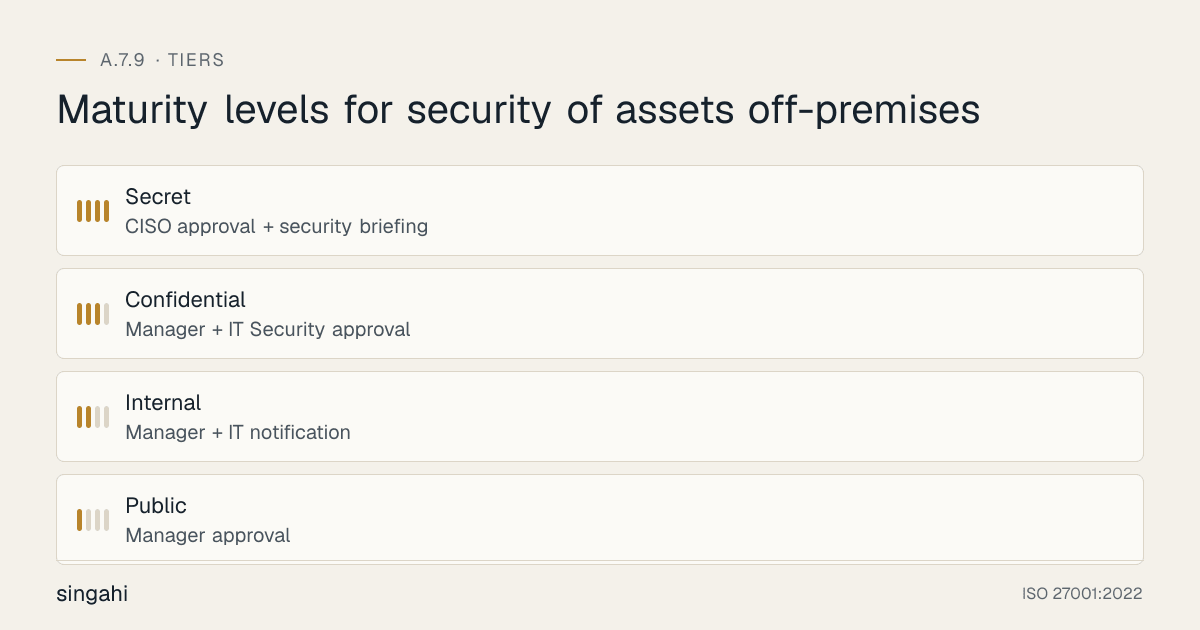
Figure · Matrix
Comparison: Daily remote work to Event/demo/conference
Equipment Authorization Levels
Authorization by Sensitivity:
| Classification | Authorization Required | Security Requirements | Tracking |
|---|---|---|---|
| Public | Manager approval | Basic password protection | Asset tag |
| Internal | Manager + IT notification | FDE, screen lock, VPN | Asset tag, MDM |
| Confidential | Manager + IT Security approval | FDE, MDM, remote wipe, VPN, privacy filter | Asset tag, MDM, tracking |
| Secret | CISO approval + security briefing | FDE, MDM, remote wipe, VPN, secure case, escort (if applicable), tamper-evident seal | Asset tag, MDM, tracking, return verification |
Authorization by Scenario:
| Scenario | Authorization | Additional Requirements |
|---|---|---|
| Daily remote work | Annual blanket authorization for eligible employees | Home office security checklist; annual reconfirmation |
| Business travel | Trip-specific authorization | Travel security briefing; destination risk assessment |
| Client site work | Project-specific authorization | Client site security requirements; NDA confirmation |
| Equipment repair off-site | Per-item authorization with CISO approval if sensitive | Vendor vetting; chain of custody; return verification |
| Backup media transport | Per-transport authorization | Encryption; secure case; courier authorization; tracking |
| Event/demo/conference | Event-specific authorization | Demo data sanitization; equipment security at venue; return verification |
Security Requirements for Off-Site Equipment
Mandatory for All Off-Site Laptops and Mobile Devices:
| Requirement | Implementation | Verification |
|---|---|---|
| Full-disk encryption | BitLocker (Windows), FileVault (macOS), or enterprise MDM | Verify encryption status before off-site authorization |
| Strong authentication | Password/PIN + biometric or hardware token | Enforce minimum complexity; no auto-login |
| Screen lock | Auto-lock after 5 minutes of inactivity (2 minutes for high-sensitivity) | Verify via MDM or GPO |
| VPN for network access | Required for all corporate network access off-site | Verify VPN client installed and configured |
| Firewall and antivirus | Enabled and updated | Verify via MDM or endpoint security tool |
| Remote wipe capability | MDM-enrolled with remote wipe enabled | Test remote wipe annually |
| Device tracking | Find My Device / Find My Mac / MDM tracking enabled | Verify tracking active before authorization |
| Backup | Recent backup verified before off-site | Check backup status |
Additional for High-Sensitivity Equipment:
| Requirement | Implementation |
|---|---|
| Dedicated VPN | Split tunneling disabled; all traffic through corporate VPN |
| Application whitelisting | Only approved applications can run |
| USB port control | USB ports disabled or restricted to approved devices |
| Privacy filter | Screen filter to prevent shoulder surfing |
| Secure boot | UEFI secure boot enabled to prevent boot-level attacks |
| TPM/Secure Enclave | Hardware security module enabled for key protection |
| Tamper-evident case | Laptop case with tamper-evident seal for transport |
| GPS tracking | Continuous GPS tracking for high-value/sensitive devices |
| Geofencing | Alert if device leaves authorized geographic area |
| Duress alarm | Panic button or duress code for high-risk travel |
Transport Protection
Personal Transport (Employee carrying equipment):
| Risk | Mitigation |
|---|---|
| Theft | Keep equipment in sight at all times; do not leave in vehicles; use secure case; avoid public displays of equipment |
| Damage | Use padded case; avoid extreme temperatures; protect from moisture; do not check laptops as baggage |
| Loss | Label with contact information; use tracking device; keep inventory of items carried; use carry-on only for flights |
| Environmental | Protect from dust, rain, and heat; use waterproof case in monsoon; avoid direct sunlight |
Courier/Logistics Transport:
| Requirement | Implementation |
|---|---|
| Authorized courier | Use only vetted, authorized courier services with insurance and tracking |
| Secure packaging | Hardened case with tamper-evident seals; shock protection; climate protection |
| Tracking | End-to-end tracking with signature requirement; GPS tracking for high-value shipments |
| Insurance | Adequate insurance coverage for the equipment value and data sensitivity |
| Chain of custody | Documented handover at each stage; receipt at each transfer point |
| Escort (if high-sensitivity) | Security escort for transport of Secret-classification equipment |
| No external labeling | Do not label packages with company name or equipment description; use coded labels |
Destination Security
Home Office Security:
| Requirement | Implementation |
|---|---|
| Secure workspace | Dedicated workspace with lockable storage; not shared with family or roommates |
| Network security | Home Wi-Fi must use WPA3/WPA2 encryption; separate guest network; no public Wi-Fi |
| Physical security | Equipment locked when unattended; no visible screens from windows; privacy filter if needed |
| Power protection | UPS or surge protector for equipment; backup power plan |
| Visitor policy | No visitors in work area during sensitive work; lock workspace when visitors present |
| Clear desk/screen | Same policy as office applies to home office |
| Child/pet access | Equipment must be protected from children and pets |
Public Space Security (Cafes, Airports, Hotels, Trains):
| Requirement | Implementation |
|---|---|
| No sensitive work in public | Do not view or process confidential information in public view |
| Screen privacy | Use privacy filter; position screen away from public view; avoid window seats |
| Physical security | Keep equipment in sight; use laptop lock if leaving briefly; do not leave in hotel rooms unsecured |
| Network security | Never use public Wi-Fi without VPN; use mobile hotspot instead; disable auto-connect to Wi-Fi |
| Shoulder surfing | Be aware of people around you; use privacy filter; avoid crowded spaces for sensitive work |
| Hotel room | Use hotel safe for equipment when not in use; do not leave equipment in plain sight; lock door |
| Airport security | Keep equipment with you through security; do not check laptops as baggage; be aware of theft at checkpoints |
Client Site Security:
| Requirement | Implementation |
|---|---|
| Client site rules | Follow client's security requirements; sign in; wear badge; escort rules |
| Network isolation | Do not connect to client network without authorization; use VPN back to corporate network |
| Data minimization | Only bring necessary data; use remote desktop rather than local storage if possible |
| Physical security | Secure equipment when unattended; follow client's clear desk policy; do not leave equipment overnight |
| Return verification | Verify no client data was transferred to or from your device; scan for malware |
Permanently Installed Off-Premises Equipment
Some equipment lives outside your premises all the time: ATMs and cash recyclers, POS terminals and payment soundboxes, micro-ATMs used by business correspondents, branch-edge routers, kiosks, cell-site and antenna equipment, and IoT gateways. 27002 treats these as higher-risk and asks for monitoring, environmental protection, physical access control and tamper resistance, plus logical access control.
| Control area | Practice |
|---|---|
| Physical | Anchoring, tamper-evident seals, locked enclosures, CCTV where feasible (A.7.4) |
| Tamper detection | Tamper switches and alerts to a monitoring centre; anti-skimming devices on card readers |
| Hardening | Application whitelisting, BIOS and boot passwords, disabled unused ports (USB), encrypted disks, current patches |
| Logical access | Unique credentials, no default passwords, remote management over secure channels only |
| Field inspection | Scheduled visits with a tamper checklist; photo record of seals; report anomalies at once |
| Environment | Protection from heat, water and dust as the manufacturer specifies (A.7.5) |
Banks should map this to RBI's ATM security directions (for example anti-skimming, whitelisting, and BIOS and port controls), and card environments to PCI DSS 9.5 (POI devices).
Return Verification
Return Checklist:
| Step | Action | Responsibility |
|---|---|---|
| 1 | Verify equipment is returned in good physical condition | IT Operations |
| 2 | Verify no unauthorized modifications (hardware, software, configuration) | IT Security |
| 3 | Verify all security settings are intact (encryption, authentication, VPN) | IT Security |
| 4 | Run malware scan | IT Security |
| 5 | Verify no unauthorized data was added to the device | Data Owner |
| 6 | Verify no sensitive data was left on the device inappropriately | Data Owner |
| 7 | Check for signs of tampering (screws, seals, BIOS settings) | IT Security |
| 8 | Verify device is re-enrolled in monitoring and management systems | IT Operations |
| 9 | Update off-site equipment register | IT Operations |
| 10 | Close authorization record | IT Operations |
Extended Absence Return:
- If equipment was off-site for more than 30 days, perform complete security review
- If equipment was in a high-risk location, perform enhanced verification
- If equipment was serviced off-site, follow maintenance return verification procedures
Tools, Technologies, and Solutions
Mobile Device Management (MDM)
| Vendor | Product | Key Features | Pricing model |
|---|---|---|---|
| Microsoft | Intune | Windows, iOS, Android, macOS; conditional access; remote wipe | Commercial, per device |
| VMware | Workspace ONE | Multi-platform; UEM; advanced tracking; geofencing | Commercial, per device |
| Jamf | Jamf Pro | macOS, iOS; Apple-focused; strong security features | Commercial, per device |
| Ivanti Neurons for MDM (formerly MobileIron) | Ivanti Neurons for MDM (formerly MobileIron) UEM | Enterprise; strong security; multi-platform | Commercial, per device |
| ManageEngine | Mobile Device Manager Plus | Indian market; efficient; multi-platform | Commercial, per device |
| SOTI | MobiControl | Rugged devices; strong tracking; kiosk mode | Commercial, per device |
Full-Disk Encryption (FDE)
| Solution | Platform | Management | Pricing model |
|---|---|---|---|
| Microsoft BitLocker | Windows | Group Policy, Intune, or standalone | Included in Windows Pro/Enterprise |
| Apple FileVault | macOS | MDM or standalone | Included in macOS |
| VeraCrypt | Cross-platform | Manual or scripted | Free (open-source) |
| Sophos SafeGuard | Windows, macOS | Central management | Commercial, per device |
| Symantec Endpoint Encryption | Windows, macOS | Central management | Commercial, per device |
| McAfee Complete Data Protection | Windows, macOS | Central management | Commercial, per device |
Device Tracking and Remote Wipe
| Solution | Platform | Features | Pricing model |
|---|---|---|---|
| Apple Find My | iOS, macOS | Location tracking, remote lock, remote wipe | Free (included) |
| Google Find My Device | Android | Location tracking, remote lock, remote wipe | Free (included) |
| Microsoft Find My Device | Windows | Location tracking, remote lock | Free (included with Microsoft account) |
| Prey Project | Cross-platform | Tracking, remote lock, evidence collection | Free or Commercial, per device |
| Absolute Software | Cross-platform | Firmware-embedded persistence; remote wipe | Commercial, per device |
| CrowdStrike Falcon | Cross-platform | EDR + remote wipe + tracking | Commercial, per device |
Secure Transport Cases
| Product | Best For | Pricing model |
|---|---|---|
| Pelican Case | High-value equipment; rugged transport | Commercial |
| Nanuk Case | Professional equipment; customizable | Commercial |
| Samsonite Laptop Case | Business travel; lightweight | Commercial |
| Kensington Laptop Lock | Physical theft prevention | Commercial |
| Targus Privacy Screen | Shoulder surfing prevention | Commercial |
| Tamper-Evident Bag | Media transport; courier | Commercial |
VPN Solutions for Off-Site Access
| Vendor | Product | Best For | Pricing model |
|---|---|---|---|
| Cisco | AnyConnect | Enterprise; complete; split tunneling control | Commercial, per user |
| Palo Alto | GlobalProtect | Enterprise; strong security integration | Commercial, per user |
| Fortinet | FortiClient | Growing companies; FortiGate integration | Commercial, per user |
| OpenVPN | OpenVPN Access Server | efficient; open-source | Free or Commercial, per user |
| WireGuard | WireGuard | Modern; lightweight; fast | Free (open-source) |
Policy and Procedure Templates
Equipment Off-Site Policy Template
Template
Equipment Off-Site Policy
1. Purpose
This policy establishes requirements for the authorization, protection, tracking, and management of information processing equipment that is taken or used outside the organization's premises.
2. Scope
This policy applies to all information processing equipment, including laptops, mobile devices, storage media, servers, and portable IT equipment, when taken off-site for any purpose.
3. Authorization Requirements
3.1 General Authorization
- All equipment taken off-site must be authorized before leaving the premises
- Authorization must be documented in the off-site equipment register
- Authorization is based on equipment sensitivity, destination, duration, and employee role
3.2 Authorization Levels
| Classification | Approver |
|---|---|
| Public | Manager |
| Internal | Manager + IT notification |
| Confidential | Manager + IT Security |
| Secret | CISO |
3.3 Annual Remote Work Authorization
- Eligible employees may receive annual blanket authorization for remote work
- Annual authorization requires completion of remote work security training
- Home office must meet minimum security requirements (secure workspace, network, storage)
4. Security Requirements
4.1 Mandatory for All Off-Site Devices
- Full-disk encryption (FDE) enabled and verified
- Strong authentication (password/PIN + biometric or token)
- Auto screen lock (5 minutes maximum)
- VPN required for all corporate network access
- Firewall and antivirus enabled and updated
- Remote wipe capability enabled and tested
- Device tracking enabled
- Recent backup verified
4.2 Additional for High-Sensitivity Equipment
- Application whitelisting
- USB port restrictions
- Privacy filter
- Secure boot enabled
- GPS tracking
- Geofencing alerts
- Tamper-evident transport case
5. Transport Protection
- Equipment must be transported in secure cases with padding
- Equipment must not be left unattended in vehicles or public spaces
- Laptops must be carried as hand luggage, not checked baggage
- High-sensitivity equipment must use tamper-evident seals
- Courier transport must use authorized vendors with tracking and insurance
6. Destination Security
6.1 Home Office
- Secure workspace with lockable storage
- WPA3/WPA2-encrypted Wi-Fi; no public Wi-Fi
- Equipment locked when unattended
- Clear desk/screen policy applies
- No visitors during sensitive work
6.2 Public Spaces
- No sensitive work in public view
- Privacy filter used
- Equipment in sight at all times
- No public Wi-Fi without VPN
- Laptop lock used if leaving briefly
6.3 Client Sites
- Follow client's security rules
- Do not connect to client network without authorization
- Minimize data on local device
- Secure equipment when unattended
6.4 Hotels
- Use hotel safe for equipment when not in use
- Do not leave equipment in plain sight
- Lock door when leaving room
- Verify door lock integrity
7. Return Verification
- Equipment must be verified upon return
- Verification includes: physical condition, security settings, malware scan, unauthorized modifications, data integrity
- Extended absence (>30 days) requires complete security review
- Return must be documented in the off-site register
8. Lost or Stolen Equipment
- Lost or stolen equipment must be reported within 1 hour
- Remote wipe must be initiated immediately
- IT Security must assess data breach risk
- Breach notification requirements must be evaluated (DPDP Act, RBI, etc.)
- Insurance claim must be filed
- Post-incident review must be conducted
9. Roles and Responsibilities
- Employee: Request authorization, comply with security requirements, protect equipment, report incidents
- Manager: Approve off-site requests, verify employee compliance, monitor overdue returns
- IT Security: Approve high-sensitivity requests, verify security settings, initiate remote wipe, assess breaches
- IT Operations: Maintain off-site register, verify return conditions, manage MDM and tracking
- CISO: Approve Secret-level requests, audit compliance, review incidents
10. Enforcement
- Unauthorized off-site equipment is subject to confiscation and disciplinary action
- Failure to comply with security requirements will result in revocation of off-site privileges
- Loss of equipment due to negligence will result in investigation and potential liability
- Failure to report lost/stolen equipment promptly is a serious offense
11. Review
This policy is reviewed annually or after any off-site equipment security incident.
Off-Site Equipment Request Form Template
Template
Off-Site Equipment Request Form
Employee Information
- Name: _______________
- Department: _______________
- Manager: _______________
- Contact Number: _______________
Equipment Information
- Asset ID: _______________
- Equipment Type: _______________
- Serial Number: _______________
- Data Classification: _______________
Off-Site Details
- Purpose: _______________ (Remote work / Travel / Client site / Event / Repair / Other)
- Destination: _______________
- Duration: From _______________ To _______________
- Transport Method: _______________ (Personal / Company vehicle / Public transport / Courier / Flight)
Security Verification
- Full-disk encryption verified
- Strong authentication enabled
- Screen lock configured (5 min or less)
- VPN installed and tested
- Firewall and antivirus active
- Remote wipe enabled and tested
- Device tracking enabled
- Recent backup verified
- Privacy filter (if high-sensitivity)
- Secure case provided (if applicable)
Approvals
- Manager Approval: _______________ Date: _______________
- IT Security Approval (if Confidential/Secret): _______________ Date: _______________
- CISO Approval (if Secret): _______________ Date: _______________
Return Record
- Returned Date: _______________
- Returned Condition: _______________
- Return Verification By: _______________ Date: _______________
- Security Scan Completed: _______________ Date: _______________
- Register Updated: _______________ Date: _______________
Risk Assessment and Treatment
Risk Assessment Matrix for Equipment Off-Site
| Risk ID | Threat | Vulnerability | Likelihood | Impact | Risk Level | Treatment |
|---|---|---|---|---|---|---|
| R1 | Laptop stolen from vehicle | Unencrypted laptop left in car | High | High | Critical | Mandatory FDE; no leaving in vehicles; training |
| R2 | Laptop stolen from hotel room | Unsecured laptop in hotel | Medium | High | High | Hotel safe; room lock; privacy filter; training |
| R3 | Data accessed via public Wi-Fi | No VPN; auto-connect to public Wi-Fi | High | High | Critical | Mandatory VPN; disable auto-connect; training |
| R4 | Shoulder surfing in public space | No privacy filter; screen visible | Medium | High | High | Privacy filter; screen positioning; training |
| R5 | Equipment lost in transit | No tracking; unsecured transport | Medium | High | High | Asset tracking; secure case; courier authorization |
| R6 | Unauthorized access to home office | Family/roommate access; no lock | Medium | High | High | Home office security checklist; lockable storage; training |
| R7 | Data breach from lost device | No remote wipe; no encryption | High | High | Critical | FDE + MDM + remote wipe; mandatory for all devices |
| R8 | Equipment serviced off-site without authorization | Unauthorized vendor; no chain of custody | Medium | High | High | Authorization required; vendor vetting; chain of custody |
| R9 | Malware introduced at client site | Client network exposure; no isolation | Medium | Medium | Medium | Network isolation; malware scan upon return; VPN |
| R10 | Equipment not returned | No tracking; no follow-up | Medium | Medium | Medium | Off-site register; automated reminders; return verification |
Audit and Compliance Checklist
Internal Audit Checklist (30 Questions)
Policy and Documentation (5 Questions)
- Is an equipment off-site policy documented and approved?
- Are authorization procedures documented?
- Are security requirements for off-site equipment documented?
- Are lost/stolen equipment procedures documented?
- Is the policy reviewed annually?
Authorization (5 Questions)
- Is all off-site equipment formally authorized?
- Is authorization documented in the off-site register?
- Are authorization levels appropriate to equipment sensitivity?
- Are annual remote work authorizations current?
- Is authorization revoked when employees leave or change roles?
Technical Controls (5 Questions)
- Is full-disk encryption enabled on all off-site laptops?
- Are all off-site devices enrolled in MDM?
- Is remote wipe capability enabled and tested?
- Is device tracking enabled on all off-site devices?
- Is VPN required and configured for off-site access?
Transport and Destination (5 Questions)
- Are secure transport cases provided for sensitive equipment?
- Are courier services vetted and authorized?
- Are home office security requirements defined and communicated?
- Are public space security guidelines communicated?
- Are client site security requirements defined?
Return and Monitoring (5 Questions)
- Is return verification performed for all off-site equipment?
- Is the off-site equipment register accurate and current?
- Are overdue returns tracked and escalated?
- Are lost/stolen incidents reported within 1 hour?
- Is remote wipe initiated promptly for lost/stolen devices?
Training and Awareness (5 Questions)
- Have all employees received off-site equipment security training?
- Are employees aware of lost/stolen reporting procedures?
- Have managers received authorization training?
- Are quick reference guides available?
- Is off-site security included in onboarding?
Audit Scoring
- 30–27: Excellent (Green), Full compliance
- 26–22: Good (Yellow), Minor gaps, address within 30 days
- 21–15: Needs Improvement (Orange), Significant gaps, address within 60 days
- 14–0: Critical (Red), Major non-compliance, immediate action required
Metrics and KPIs
Figure · Measures
The measures that show A.7.9 is working
- Off-Site Authorization Rate100%Monthly
- Encryption Coverage100%Monthly
- MDM Enrollment Rate100%Monthly
- Remote Wipe Test Pass Rate100%Annually
- Lost/Stolen Incident Rate<= 1%Monthly
Key Performance Indicators
| KPI | Formula | Target | Measurement Frequency |
|---|---|---|---|
| Off-Site Authorization Rate | (Authorized off-site equipment / Total off-site equipment) x 100 | 100% | Monthly |
| Encryption Coverage | (Encrypted off-site devices / Total off-site devices) x 100 | 100% | Monthly |
| MDM Enrollment Rate | (MDM-enrolled off-site devices / Total off-site devices) x 100 | 100% | Monthly |
| Remote Wipe Test Pass Rate | (Successful remote wipe tests / Total remote wipe tests) x 100 | 100% | Annually |
| Lost/Stolen Incident Rate | (Lost/stolen devices / Total off-site devices) x 100 | <= 1% | Monthly |
| Lost/Stolen Reporting Time | Average time from loss to report | <= 1 hour | Per incident |
| Overdue Return Rate | (Overdue returns / Total off-site authorizations) x 100 | <= 2% | Monthly |
| Return Verification Rate | (Verified returns / Total returns) x 100 | 100% | Monthly |
| Off-Site Register Accuracy | (Accurate records / Total records checked) x 100 | >= 98% | Quarterly |
| Home Office Security Compliance | (Compliant home offices / Total remote workers) x 100 | >= 90% | Annually |
| VPN Usage Rate (Off-Site) | (VPN-connected sessions / Total off-site sessions) x 100 | >= 95% | Monthly |
| Training Completion Rate | (Trained employees / Total employees with off-site equipment) x 100 | 100% | Quarterly |
| Policy Review Cycle Adherence | (Reviews on time / Required reviews) x 100 | 100% | Annually |
| Audit Finding Closure Rate | (Closed findings / Total findings) x 100 | 100% within 60 days | Per audit |
| Remote Wipe Activation Time | Average time from loss report to remote wipe initiation | <= 15 minutes | Per incident |
Common Pitfalls and How to Avoid Them
Pitfall 1: "It Won't Happen to Us"
Problem: Organizations assume their employees are careful and equipment won't be lost or stolen. They skip encryption, MDM, and tracking to save costs. Solution: Implement mandatory controls for all off-site equipment. Encryption and MDM are not optional, they are insurance. The cost of prevention is a fraction of the cost of a breach. Train employees on the real risks. Share statistics and illustrative scenarios. Make it a policy, not a choice.
Pitfall 2: Inadequate Home Office Security
Problem: Remote workers set up home offices with no security consideration. Equipment is shared with family, Wi-Fi is unsecured, and workspace is in a common area. Solution: Implement home office security requirements. Provide a checklist for remote workers. Require annual self-assessment. Provide guidance on secure Wi-Fi setup. Include home office security in remote work authorization. Do not assume that "home" means "secure."
Pitfall 3: No Tracking of Off-Site Equipment
Problem: Equipment is taken off-site with no tracking, no register, and no follow-up. Equipment is lost, forgotten, or never returned without detection. Solution: Maintain an off-site equipment register. Use automated check-in/check-out. Set up overdue reminders. Conduct periodic audits. Include off-site equipment in the asset inventory. Make tracking a routine part of IT operations, not an afterthought.
Pitfall 4: Ignoring the Return Verification
Problem: Equipment is returned but never checked for security, malware, or unauthorized modifications. A compromised device is reconnected to the corporate network. Solution: Implement mandatory return verification. Scan for malware. Verify security settings. Check for unauthorized software or data. Compare against baseline. Do not assume a returned device is "clean." Treat every returned device as potentially compromised until verified.
Pitfall 5: Overly Restrictive Off-Site Policy
Problem: Policy is so restrictive that employees cannot work effectively off-site. They find workarounds (personal devices, unauthorized cloud storage, paper notes) that create greater risk. Solution: Balance security with usability. Provide approved tools and methods for off-site work. Enable VPN, cloud access, and secure file sharing. Train employees on approved alternatives. The goal is to enable secure work, not prevent work.
Pitfall 6: No Response Plan for Lost/Stolen Devices
Problem: When a device is lost or stolen, there is confusion about who to notify, what to do, and whether to remote wipe. Valuable time is lost, and data exposure risk increases. Solution: Document and communicate a clear response plan. Include: who to notify (IT Security, manager, HR), how to initiate remote wipe, how to assess breach risk, whether to file police report, and how to handle insurance. Test the plan with a drill. Make sure every employee knows the 1-hour reporting requirement.
Pitfall 7: Forgetting Backup Media Transport
Problem: Backup tapes, USB drives, and external hard drives are transported off-site without authorization, encryption, or tracking. They are lost or stolen with no detection. Solution: Include all media in the off-site policy. Backup media must be encrypted. Transport must be authorized. Use secure cases. Use tracked couriers. Document chain of custody. Do not allow employees to casually carry backup media off-site without controls.
Pitfall 8: Assuming Cloud Eliminates Off-Site Risk
Problem: Organization assumes that because data is "in the cloud," off-site device risk is eliminated. Employees access cloud data from unsecured devices with no controls. Solution: Cloud data is still accessed via devices. Device security is still critical. Implement conditional access: only managed, encrypted, compliant devices can access corporate cloud resources. Use Zero Trust architecture. Do not let cloud adoption reduce endpoint security.
Illustrative Scenarios
Illustrative scenario, a composite example for guidance, not a specific Singahi engagement or a verified outcome.
Illustrative Scenario 1: Indian Consulting Firm, Remote Work Security Overhaul (Growing company)
Organization: A 300-employee management consulting firm in Delhi with consultants traveling to client sites across India and abroad Challenge: The firm's consultants routinely carried laptops with highly confidential client data (merger strategies, financial projections, organizational restructuring plans) to client sites, hotels, and co-working spaces. The laptops had no encryption, no MDM, and no tracking. A consultant's laptop was stolen from a hotel room in Mumbai during a client engagement. The laptop contained unencrypted merger plans for a major Indian conglomerate. The plans were leaked to the media, causing the deal to collapse and the client to sue the consulting firm for damages. Before State:
- 300 laptops with no encryption
- No MDM or remote wipe capability
- No off-site authorization process
- No tracking of off-site equipment
- No return verification
- Consultants used personal devices for client work without controls
- No VPN requirement; consultants connected directly to client networks or public Wi-Fi
- No lost/stolen device response plan
Implementation: Month 1: Emergency response. Engaged legal counsel. Negotiated with client. Implemented interim controls (password changes, account monitoring). Month 2: Deployed full-disk encryption (BitLocker) on all 300 laptops. Month 3: Deployed Microsoft Intune MDM with remote wipe, tracking, and conditional access. Month 4: Implemented off-site authorization process with security verification. Month 5: Deployed Cisco AnyConnect VPN with mandatory use for all off-site access. Month 6: Implemented return verification procedures. Month 7: Trained all consultants on off-site security, incident reporting, and home office security. Month 8: Conducted simulated lost device drill. Month 9: Internal audit. All controls passed.
Results (After 12 Months):
- 100% laptop encryption coverage
- 100% MDM enrollment
- 100% off-site authorization compliance
- 100% VPN usage for off-site access
- 2 subsequent lost devices; both recovered via tracking; remote wipe not needed
- Zero data breaches from off-site equipment
- Client trust restored; new clients signed citing security posture
Outcome: The firm's reputation took about 18 months to recover. The security investment was small compared with the cost of the incident.
Key Lesson: Consulting firms are high-risk for off-site equipment breaches because their business model involves carrying sensitive client data to third-party locations. Encryption, MDM, and authorization are not optional, they are essential business protections.
Illustrative Scenario 2: Large Indian Bank, Branch Equipment and Backup Media Transport Standardization
Organization: A national bank with 1,500 branches across India, 20,000+ employees Challenge: The bank's branches used laptops for manager mobility, backup tapes for daily backups, and portable hard drives for inter-branch data transfer. Equipment was transported without standard security controls. A backup tape was lost in a taxi in Chennai; the tape was unencrypted and contained daily transaction data for the branch. The incident was not reported for 3 days. The bank faced RBI inquiry and potential penalties. A review revealed that 40% of branches had no off-site equipment policy, 60% of backup tapes were unencrypted, and no branch tracked equipment taken off-site. Before State:
- 1,500 branches with inconsistent off-site equipment controls
- 3,000+ laptops with varying encryption status
- 1,500 backup tapes transported daily with no encryption
- No centralized off-site equipment register
- No remote wipe capability for branch laptops
- No courier authorization for backup tape transport
- No return verification for equipment taken off-site
Implementation: Phase 1 (Months 1–2): Developed national off-site equipment policy with branch-specific requirements. Phase 2 (Months 3–4): Assessed all 1,500 branches. Prioritized by transaction volume and risk. Phase 3 (Months 5–10): Deployed encryption on all 3,000+ laptops. Deployed MDM with remote wipe. Encrypted all backup tapes. Implemented secure courier service for tape transport. Phase 4 (Months 11–13): Implemented centralized off-site equipment register. Trained branch managers and IT staff. Phase 5 (Months 14–15): Conducted national internal audit. All branches compliant. Phase 6 (Month 16): RBI re-audit. All findings cleared.
Results (After 18 Months):
- 100% of branch laptops encrypted
- 100% of backup tapes encrypted
- 100% of branches with off-site equipment register
- 100% of branches with remote wipe capability
- 100% of courier services vetted and authorized
- Zero lost backup tape incidents
- 3 lost laptops; all recovered via MDM tracking within 24 hours
- RBI audit: zero off-site equipment deficiencies
- Customer trust scores improved; branch security ratings increased
Key Lesson: Distributed organizations (banks, retail, manufacturing) face compounded off-site equipment risk because every branch or location is a potential breach point. Standardization and centralized control are essential for managing risk at scale.
Multi-Framework Mapping
ISO 27001:2022 A.7.9 to Other Frameworks
| Framework | Reference | How it relates to A.7.9 |
|---|---|---|
| NIST SP 800-53 Rev 5 | MP-5 Media transport; PE-17 Alternate work site; AC-19 Access control for mobile devices; SC-28 Protection of information at rest | Transport, remote locations, mobile devices and encryption |
| PCI DSS v4.0.1 | 9.4.3 (media sent outside the facility secured and tracked); 9.4.4 (management approval); 9.5.1 (POI devices protected); 3.5.1 (PAN unreadable where stored) | Media in transit, payment devices in the field, stored card data |
| CIS Controls v8 | 3.6 Encrypt data on end-user devices; 4.11 Enforce remote wipe capability on portable end-user devices | Encryption and remote wipe |
| SOC 2 (2017 TSC) | CC6.1, CC6.4, CC6.7 | Logical access, physical access, data in transit and on removable media |
| COBIT 2019 | DSS05.03 Manage endpoint security; DSS05.05 Manage physical access to I&T assets | Endpoint and physical protection |
| DPDP Act 2023 | s.8(5) safeguards; s.8(6) breach intimation | Personal data on devices outside the office |
Regulatory and Industry Context
India-Specific Regulatory Requirements
Digital Personal Data Protection Act 2023:
- s.8(5): reasonable security safeguards for personal data on every device, wherever it is used
- s.8(6): once the Rules apply (about May 2027), intimate every personal data breach to the Data Protection Board and each affected person without delay, with a detailed report to the Board within 72 hours
- Penalty of up to ₹250 crore for failing to take reasonable security safeguards
CERT-In Directions (28 April 2022):
- A lost or stolen device that leads to a data breach or data leak is a reportable incident: report within 6 hours of noticing
- Encrypted devices with remote wipe usually reduce this to a lost-asset event; record the reasoning
Information Technology Act 2000:
- s.43A: compensation for negligence in protecting sensitive personal data (in force until DPDP s.44(2) commences)
- s.72A: disclosure of personal information in breach of a lawful contract
Sector regulators:
- RBI, SEBI CSCRF (2024) and IRDAI (2023) expect regulated entities to protect customer data on endpoints and media and to report incidents within their own timelines (typically 2 to 6 hours for cyber incidents); check your sector's directions for exact requirements
- Banks: RBI's ATM security directions cover permanently installed off-site equipment
Industry-Specific Context
BFSI:
- Encryption of laptops and mobile devices with customer data is the expected baseline
- Backup tape transport must use encrypted tapes and authorized couriers
- ATM maintenance equipment taken off-site must be secured and tracked
- Branch manager laptops must have remote wipe capability
Healthcare:
- Patient data on portable devices must be encrypted (equivalent to HIPAA requirements)
- Medical devices taken to patient homes must be secured
- Home care workers' devices must meet security standards
Consulting/Legal:
- Client confidential data on consultant laptops is a high-risk scenario
- Off-site work at client sites requires enhanced security
- Client contracts often require specific off-site security controls
- Professional liability insurance requires demonstrated security practices
SaaS/Cloud:
- Employee laptops with admin access to cloud infrastructure are critical assets
- Portable demo environments must be secured
- Customer data on off-site devices must meet contractual requirements
- Off-site device security is often audited by enterprise clients
Roles and Responsibilities (RACI)
| Activity | CISO | IT Operations | IT Security | HR | Employee | Manager |
|---|---|---|---|---|---|---|
| Policy Development | A | C | R | C | I | C |
| Authorization (General) | C | C | R | I | I | A |
| Authorization (High-Sensitivity) | A | C | R | I | I | C |
| Technical Controls (Encryption) | C | R | C | I | I | I |
| Technical Controls (MDM) | C | R | C | I | I | I |
| Off-Site Register | C | A | C | I | I | C |
| Transport Protection | C | C | C | I | R | I |
| Destination Security | C | C | C | I | R | I |
| Return Verification | C | R | C | I | I | C |
| Lost/Stolen Response | A | R | R | C | R | C |
| Training and Awareness | A | C | R | R | R | C |
| Audit and Compliance | A | C | R | I | I | C |
| Home Office Assessment | C | C | R | C | R | C |
| Continuous Improvement | A | R | C | I | C | C |
Documentation and Evidence Requirements
| Document | Purpose | Retention Period | Owner |
|---|---|---|---|
| Equipment Off-Site Policy | Defines requirements | Duration + 3 years | CISO |
| Off-Site Request Forms | Authorization evidence | Duration + 3 years | IT Operations |
| Off-Site Equipment Register | Tracking record | Duration + 3 years | IT Operations |
| Security Verification Records | Pre-off-site security checks | 1 year | IT Operations |
| Return Verification Records | Post-return security checks | 1 year | IT Operations |
| Encryption Status Reports | Evidence of device encryption | 1 year | IT Security |
| MDM Enrollment Records | Device management evidence | Duration + 3 years | IT Operations |
| Remote Wipe Test Records | Capability verification | 1 year | IT Security |
| Lost/Stolen Incident Reports | Incident documentation | Duration + 3 years | Security |
| Remote Wipe Activation Logs | Evidence of remote wipe | Duration + 3 years | IT Security |
| Home Office Security Assessments | Remote work compliance | 1 year | IT Security |
| Training Records | Awareness evidence | Duration + 3 years | HR |
| Audit Checklist and Results | Audit evidence | Duration + 3 years | Internal Audit |
| Risk Assessment | Risk treatment | Duration + 3 years | CISO |
Continuous Improvement
Maturity Model for A.7.9
| Level | Name | Characteristics | Evidence |
|---|---|---|---|
| 1 | Initial | No authorization; no encryption; no tracking; equipment lost frequently; no response plan | No policy; no register; no MDM; ad-hoc off-site use |
| 2 | Developing | Basic authorization; some encryption; informal tracking; reactive incident response | Paper authorization; some encrypted devices; basic MDM; no return verification |
| 3 | Defined | Full authorization; all devices encrypted; MDM deployed; tracking register; return verification | All devices encrypted; MDM; register; return verification; incident response plan |
| 4 | Managed | Metrics-driven; automated authorization; proactive monitoring; trend analysis; home office assessments | Automated workflows; KPI tracking; predictive analytics; quarterly home office audits |
| 5 | Optimized | Fully automated; Zero Trust architecture; self-service authorization; AI-powered anomaly detection; integrated with enterprise systems | Zero Trust conditional access; automated risk scoring; AI-powered threat detection; global standardization |
Continuous Improvement Activities
Monthly:
- Off-site register review and reconciliation
- Overdue return follow-up
- Lost/stolen incident review
- MDM compliance report review
Quarterly:
- Off-site equipment authorization audit
- Remote wipe capability testing
- Home office security assessment sampling
- Internal audit of off-site controls
- Training effectiveness assessment
Annually:
- Full policy review
- Complete risk assessment refresh
- Technology and tool evaluation
- Benchmark against industry best practices
- External audit preparation
- Maturity assessment against target level
Trigger-Based:
- After any lost/stolen equipment incident
- Upon new off-site work arrangement (new branch, new client, new travel program)
- Upon new technology adoption (new device types, new cloud services)
- After significant audit findings
- Upon regulatory change
FAQ
Q1: Do all laptops need encryption if they ever leave the office? A: Yes, and simpler still: encrypt every laptop, always. Full-disk encryption is a baseline control (CIS Controls v8 safeguard 3.6), not an add-on for travel. The risk of loss or theft exists from the first off-site trip. Encryption is the most effective control for protecting data on lost or stolen devices. Full-disk encryption should be mandatory for all laptops, regardless of how frequently they leave the office.
Q2: What about employees who occasionally work from home, do they need the same controls as frequent travelers? A: Yes, but with some flexibility. All remote workers need encryption, VPN, and screen lock. Home office security requirements apply to all remote workers, but the assessment can be less intensive for occasional remote workers. Frequent travelers need additional controls: privacy filters, secure transport cases, travel security briefings, and enhanced tracking. Apply risk-based controls: the more frequent and high-risk the off-site use, the more controls required.
Q3: Can we allow employees to use personal laptops for work instead of company laptops? A:** Not recommended for handling sensitive data. If you must allow BYOD (Bring Your Own Device), implement strict controls: (1) MDM enrollment with containerization, (2) Full-disk encryption, (3) VPN required, (4) Application control, (5) Remote wipe capability, (6) Regular security scans, (7) Clear separation of work and personal data, (8) Employee agreement on security requirements. BYOD is convenient but creates significant security and legal challenges. Company-managed devices are always preferable for sensitive work.
Q4: How do we handle equipment taken to high-risk countries? A:** High-risk countries (countries with high crime rates, political instability, or aggressive cyber espionage) require enhanced controls: (1) CISO approval required, (2) Dedicated high-security laptop with minimal data, (3) No sensitive data stored locally (use remote desktop), (4) Enhanced tracking and geofencing, (5) Travel security briefing, (6) Duress alarm or panic code, (7) Tamper-evident case, (8) Enhanced return verification including forensic analysis, (9) Consider "burner" devices that are wiped and reimaged after return. Some organizations prohibit taking company equipment to specific high-risk countries.
Q5: What is the difference between a VPN and a Zero Trust approach for off-site access? A:** A VPN creates an encrypted tunnel between the off-site device and the corporate network. All traffic goes through the tunnel. Zero Trust assumes no device or user is trusted by default, regardless of location. Zero Trust uses continuous authentication, device health checks, least-privilege access, and micro-segmentation. VPN is a network-level control. Zero Trust is an architecture-level approach. Both can be used together: VPN for network access, Zero Trust for application and data access. For modern security, Zero Trust is increasingly preferred over traditional VPN.
Q6: Do we need to insure off-site equipment? A:** Yes, equipment insurance is important for off-site devices. Check your current property insurance policy, it may not cover off-site equipment or may have limitations. Consider: (1) Cyber insurance that covers data breach costs from lost devices, (2) Equipment insurance that covers replacement costs, (3) Professional liability insurance if client data is exposed. Insurance does not replace security controls but provides financial protection when controls fail.
Q7: How do we track equipment that is permanently off-site (e.g., at a branch office)? A:** Permanently off-site equipment at branch offices or remote locations should be treated as a separate asset location, not as "off-site" in the traditional sense. It should be: (1) Included in the asset inventory with its permanent location, (2) Subject to the same security controls as on-site equipment (encryption, access control, monitoring), (3) Included in regular audits and inspections, (4) Subject to the same maintenance and disposal procedures. The key is that the equipment is not "traveling", it has a fixed off-site location with its own security controls.
Q8: What about equipment taken to conferences or trade shows? A:** Conferences and trade shows are high-risk environments for equipment theft and shoulder surfing. Requirements: (1) Conference-specific authorization, (2) Minimal data on demonstration devices (use sanitized demo data), (3) No sensitive work in conference spaces, (4) Equipment locked in hotel safe when not in use, (5) Privacy filters for any screens, (6) No public Wi-Fi without VPN, (7) Enhanced return verification, (8) Travel insurance for equipment. Consider using dedicated "conference laptops" that contain only demo data and are reimaged after each event.
Q9: How do we handle equipment that employees take home permanently (e.g., during COVID-19 remote work transition)? A:** Permanent home use requires the same controls as office use, plus home office security: (1) Encryption, MDM, VPN are mandatory, (2) Home office security assessment, (3) Dedicated workspace with lockable storage, (4) Secure Wi-Fi, (5) Clear desk/screen policy, (6) No family access, (7) Regular security scans, (8) Annual re-assessment of home office security. Do not treat permanent home use as "temporary", it requires the same rigor as a permanent office location.
Q10: What is the most common audit finding for A.7.9? A:** Inadequate authorization and tracking. Common findings: equipment taken off-site without authorization, no off-site equipment register, no encryption on laptops, no MDM enrollment, no return verification, and no lost/stolen response plan. Auditors will check the register, verify encryption status, test remote wipe, and review incident response procedures.
Q11: How do we enforce off-site security for employees who resist controls? A:** Make compliance a condition of off-site work privileges. If employees cannot or will not comply with security requirements, they do not receive off-site equipment authorization. Provide approved alternatives (desktop-only work, cloud-based remote desktop with no local data). Frame it as enabling secure work, not punishing employees. Most employees understand once the risks are explained. For persistent non-compliance, escalate to HR and management.
Q12: What about equipment taken by departing employees? A:** Departing employees must return all company equipment before their last day. Create a return checklist: (1) Laptop and charger, (2) Mobile devices, (3) USB drives and peripherals, (4) Access cards and keys, (5) Remote wipe any device that cannot be returned. Do not allow departing employees to "keep" old equipment without formal authorization, sanitization, and removal from inventory. Departing employees are a high-risk group for data exfiltration.
Q13: How do we handle equipment that is lost but we are not sure if it was stolen or just misplaced? A:** Treat all lost equipment as a potential security incident until proven otherwise. Initiate remote wipe immediately (you can cancel it if the device is found). Report it as lost/stolen to IT Security. Begin incident response procedures. If the device is found, perform enhanced return verification. If it is not found within a reasonable time (e.g., 24 hours), treat it as a confirmed loss and complete breach assessment. It is better to overreact to a misplaced device than underreact to a stolen one.
Q14: How much does implementing A.7.9 cost for a growing company? A:** Often less than expected. Disk encryption (BitLocker, FileVault) and device location and wipe come with the operating system or with Microsoft 365 or Google Workspace plans many companies already have. The main costs are MDM licences if you do not have them, secure transport for media, and staff time for authorisation, custody records and checks.
Q15: Can we use GPS tracking for all off-site devices? A:** GPS tracking is useful for high-value and high-sensitivity devices, but it raises privacy concerns for employees. Best practice: (1) Use GPS tracking for high-risk devices (e.g., devices with Secret data, demo kits with sensitive data), (2) Use MDM-based location tracking for general devices (coarse location, not continuous GPS), (3) Inform employees that tracking is enabled and why, (4) Use tracking only for security purposes, not employee monitoring, (5) Disable tracking when device is returned to the office. Balance security benefits with employee privacy expectations.
References and Further Reading
Standards and Frameworks
- ISO/IEC 27001:2022, Information Security, Cybersecurity and Privacy Protection, Information Security Management Systems, Requirements
- ISO/IEC 27002:2022, Information Security, Cybersecurity and Privacy Protection, Information Security Controls
- NIST SP 800-53 Rev 5, Security and Privacy Controls for Information Systems and Organizations
- NIST SP 800-114 Rev 1, User's Guide on Securing Mobile Devices
- PCI DSS v4.0.1, Payment Card Industry Data Security Standard
- CIS Controls v8, CIS Controls Version 8
Indian Regulations
- Digital Personal Data Protection Act, 2023 (India)
- Information Technology Act, 2000 (as amended)
- RBI Cyber Security Framework for Banks
- SEBI Cybersecurity and Cyber Resilience Framework (CSCRF) for SEBI Regulated Entities, circular of 20 August 2024
Books and Publications
- ISO 27001/27002: A Pocket Guide by Alan Calder
- NIST SP 800-114 Rev. 1: User's Guide to Telework and Bring Your Own Device (BYOD) Security (NIST)
- The Manager's Handbook for Corporate Security by Gerald L. Kovacich and Edward P. Halibozek
Off-Site Equipment Security by Scenario
Remote Work (Work From Home)
| Risk Factor | Security Measure | Implementation | Owner |
|---|---|---|---|
| Unsecured home network | Corporate VPN mandatory, split tunneling disabled, home network scan | VPN client on all devices, network policy | IT Security |
| Family member access | Dedicated work space, screen privacy, automatic lock (5 min) | Policy + training + MDM enforcement | HR + IT |
| Device theft at home | Full disk encryption, device tracking, remote wipe | BitLocker/FileVault, Find My Device, MDM | IT Security |
| Unencrypted data transfer | Corporate cloud only (OneDrive/SharePoint/Google Drive), DLP | Cloud policy, DLP rules, no personal cloud | IT Security |
| Physical environment | Secure workspace, no public areas, cable locks for laptops | Remote work policy, training, spot checks | HR + IT |
| Printing at home | Prohibit printing of sensitive documents, virtual print queue | Print policy, DLP, secure print release | IT Security |
| Disposal of work papers | Shred all work documents, no personal trash for sensitive data | Policy, shredder provision, training | HR + IT |
Business Travel
| Risk Factor | Security Measure | Implementation | Owner |
|---|---|---|---|
| Airport security (theft) | Carry-on only, never check devices, secure bag, TSA-friendly lock | Travel policy, secure luggage provision | HR + IT |
| Hotel room security | Use hotel safe, cable lock, do not leave devices unattended | Travel policy, training, device accessories | Travel + IT |
| Public Wi-Fi (airports, hotels) | Corporate VPN mandatory, no public Wi-Fi without VPN | VPN policy, always-on VPN, training | IT Security |
| Device theft while traveling | Travel insurance, device tracking, remote wipe, backup before travel | Insurance policy, MDM, travel checklist | Travel + IT |
| Border crossing (inspection) | Encrypt all devices, minimal sensitive data, travel with clean device | Encryption policy, travel device option, training | Legal + IT |
| Lost/stolen luggage | Carry devices in personal bag, not checked luggage, backup before travel | Travel policy, backup verification | Travel + IT |
| Conference/demo events | Demo devices with no real data, secure when not in use, no unattended demos | Demo device policy, dedicated demo kit | IT + Marketing |
Off-Site Maintenance and Repair
| Risk Factor | Security Measure | Implementation | Owner |
|---|---|---|---|
| Data on device during repair | Remove HDD/SSD before sending, use spare drive for repair | Repair policy, drive removal procedure | IT Operations |
| Third-party technician access | Escort technician, supervise all work, limit access | Escort policy, NDA for technicians | Facility + IT |
| Replacement parts (data on old parts) | Retain old parts with data, sanitize before disposal, certificate | Parts retention policy, sanitization | IT Operations |
| Loaner devices during repair | Clean loaner with no data, encrypt before issue, return sanitization | Loaner device policy, clean image | IT Operations |
| Repair at a vendor facility | Back up, then securely delete information that does not need to go, or remove the drive; keep encryption on; record custody at hand-over and return | Pre-repair checklist, backup verification | IT Operations |
| Remote repair (remote access) | Supervised remote sessions, limit access, log all actions, no unsupervised access | Remote support policy, session logging | IT Operations |
Off-Site Storage (Backup Tapes, Archives)
| Risk Factor | Security Measure | Implementation | Owner |
|---|---|---|---|
| Physical theft of storage media | Secure transport (armored vehicle, GPS tracking), secure storage facility (vault), access controls | Transport policy, vault specification, insurance | IT + Facility |
| Environmental damage (fire, flood) | Climate-controlled storage, fire suppression, off-site replication | Storage facility audit, environmental controls | IT + Facility |
| Unauthorized access to archives | Access controls, logging, dual control, need-to-know access | Archive access policy, audit logs | IT Security |
| Media degradation | Regular media integrity checks, refresh cycles (3-5 years), format migration | Media audit, refresh schedule, migration plan | IT Operations |
| Lost/misplaced media | Barcode tracking, inventory management, regular audits, chain of custody | Tracking system, inventory policy, audits | IT Operations |
| Return and retrieval | Authorization required, logging, verification of returned media, integrity check | Retrieval policy, check-out/check-in system | IT Operations |
Off-Site Security Incident Response
Incident Response Playbook for Lost/Stolen Off-Site Equipment
INCIDENT: Off-Site Device Lost or Stolen

IMMEDIATE RESPONSE (0-6 hours; CERT-In clock starts when the loss is noticed):
1. REPORT: Employee reports loss to IT Security immediately
2. ASSESS: Determine device classification, data sensitivity, encryption status
3. WIPE: Initiate remote wipe if device is online and MDM-enabled
4. LOCK: Disable all accounts associated with device (AD, VPN, cloud)
5. TRACK: Attempt device tracking (Find My Device, MDM location)
6. NOTIFY: Notify CISO, Legal, HR, and relevant data owners

SHORT-TERM RESPONSE (4-24 hours):
7. INVESTIGATE: Determine how loss occurred, timeline, potential data exposure
8. EVIDENCE: Preserve logs, screenshots, tracking data, police report
9. DPDP: If personal data may be exposed (unencrypted or unknown), treat as a possible personal data breach: once the Rules apply, intimate the Board and affected people without delay (detailed report within 72 hours)
10. REGULATORY: If the event is a CERT-In listed incident (for example a data breach or leak), report to CERT-In within 6 hours of noticing; sector regulators within their own windows (RBI, SEBI, IRDAI)
11. POLICE: File police report (FIR) for stolen devices
12. COMMUNICATION: Prepare internal and external communication if needed

MEDIUM-TERM RESPONSE (1-7 days):
13. REPLACE: Issue replacement device (clean image, encrypted, configured)
14. REVIEW: Review off-site security policy, identify gaps
15. TRAINING: Retrain employee on off-site security practices
16. LESSONS: Conduct post-incident review, document lessons learned
17. UPDATE: Update policy, procedures, and training based on findings

LONG-TERM RESPONSE (1-4 weeks):
18. AUDIT: Conduct audit of all off-site devices, verify compliance
19. ENHANCE: Implement additional controls if needed (GPS tracking, better cases)
20. MONITOR: Enhanced monitoring for affected accounts and data
21. CLOSURE: Close incident, archive evidence, update risk register
Additional Illustrative Scenarios: Indian Off-Site Equipment Incidents
Illustrative Scenario 3 (hypothetical): Consultant's Laptop Stolen at a Client Site
What happened: A management consultant from a Delhi-based consulting firm had their laptop stolen from a client conference room during a lunch break. The laptop contained confidential strategy documents for 5 clients, including a major competitor analysis for a listed company.
Impact:
- 5 client confidentiality breaches
- If unpublished price-sensitive information about a listed client leaked, the listed company would have to run its inquiry and inform SEBI under the PIT Regulations
- Client contracts cancelled (3 clients)
- Legal action from clients for breach of NDA
- Consultant terminated, firm faced reputational damage
- Remediation costs for legal advice, client notification, system changes and the insurance claim
Root causes:
- Laptop left unattended in client conference room
- No cable lock used (available but not mandatory)
- No automatic screen lock (set to 30 minutes)
- No full disk encryption (IT policy required but not enforced)
- No remote wipe capability (MDM not deployed)
- No incident response plan for off-site device theft
Lessons:
- Never leave devices unattended in client areas (even for short breaks)
- Mandate cable locks for all laptops at client sites
- Enforce 5-minute screen lock on all devices (MDM policy)
- Enforce full disk encryption on all devices (no exceptions)
- Deploy MDM with remote wipe on all off-site devices
- Develop incident response playbook specifically for off-site incidents
- Include off-site security in client onboarding (client premises rules)
- Provide secure carrying cases with locks for consultants
Illustrative Scenario 4 (hypothetical): Backup Tapes Lost in Transit
What happened: A bank in Mumbai was transporting backup tapes to an off-site storage facility. The courier vehicle was involved in a traffic accident, and the backup tapes (in a supposedly locked container) were stolen from the vehicle while the driver was dealing with the accident. The tapes contained 6 months of customer transaction data.
Impact:
- 6 months of customer transaction data potentially exposed
- The bank reported to RBI and CERT-In late (after 24 hours), which drew supervisory criticism
- Customer notification required (50,000+ customers)
- Media coverage, customer trust erosion
- Remediation costs for investigation, notification, legal advice and system changes
- Bank changed to encrypted cloud backup, discontinued tape transport
Root causes:
- Backup tapes not encrypted (despite policy requiring encryption)
- Transport container lock was a standard padlock (easily cut)
- No GPS tracking on transport vehicle
- No courier escort (single driver)
- No chain of custody documentation
- No real-time tracking of transport
- Incident response delayed (24 hours instead of 2 hours)
Lessons:
- Encrypt all backup tapes before transport (no exceptions)
- Use tamper-evident seals and secure containers for transport
- Implement GPS tracking on all transport vehicles carrying sensitive media
- Use dual-courier escort for high-sensitivity media transport
- Implement chain of custody documentation (sign-off at each handover)
- Use real-time tracking with alerts for route deviations or delays
- Consider cloud backup as alternative to physical tape transport
- Report within the regulator's window (CERT-In 6 hours; RBI as its directions require)
- Regular audit of transport security (quarterly)
- Insurance for transport-related data loss
This guide is part of the Singahi ISO 27001:2022 Annex A Control Guide Series.