
On this page
- Quick Reference (60 Seconds)
- What the Control Asks For
- Why Cabling Security Matters
- Scope and Applicability
- Key Definitions and Terminology
- Relationship to Other Controls
- Implementation Roadmap (Week-by-Week)
- Detailed Implementation Guidance
- Tools, Technologies, and Solutions
- Policy and Procedure Templates
- Risk Assessment and Treatment
- Audit and Compliance Checklist
- Metrics and KPIs
- Common Pitfalls and How to Avoid Them
- Illustrative Scenarios
- Multi-Framework Mapping
- Regulatory and Industry Context
- Roles and Responsibilities (RACI)
- Documentation and Evidence Requirements
- Continuous Improvement
- FAQ
- Industry-Specific Cabling Requirements
- Expanded Illustrative Scenarios: Indian Cabling Incidents
- Additional Metrics and KPIs
- References and Further Reading
Quick Reference (60 Seconds)
Figure · At a glance
A.7.12 at a glance
- Control ID
- A.7.12
- Control Name
- Cabling Security
- ISO 27002:2022 Section
- 7.12
- Primary Purpose
- Protect power and data cables from damage
- Key Activities
- Route cables securely
- Typical Owners
- IT Infrastructure, Facility Management
| Aspect | Summary |
|---|---|
| Control ID | A.7.12 |
| Control Name | Cabling Security |
| ISO 27002:2022 Section | 7.12 |
| Primary Purpose | Protect power and data cables from damage, interception, unauthorized access, and disruption |
| Key Activities | Route cables securely, separate power and data, label and inventory, protect from damage, prevent interception |
| Typical Owners | IT Infrastructure, Facility Management, Network Engineering |
| Implementation Effort | Medium (4–8 weeks) |
| Main cost drivers | Conduits, trays and locked cabinets, labelling and documentation, network access control for ports, and periodic inspections |
| ISO 27002 attributes | Control type: Preventive · Properties: Confidentiality, Availability · Concepts: Protect · Capabilities: Physical security · Domains: Protection |
Bottom Line: Cables are the arteries of your information systems. If they are damaged, intercepted, or improperly routed, your systems fail or leak data. This control ensures cables are physically protected, properly separated, and managed throughout their lifecycle.
What the Control Asks For
In short:
ISO 27001:2022 Annex A 7.12 asks organizations to protect power and telecommunications cabling that carries data or supports information services.
Do you need this control?
A.7.12 is not mandatory in itself: under clause 6.1.3 you include it if your risk assessment calls for it, and record the decision in your Statement of Applicability. Include it if you own or control power and data cabling, for example in your offices or server rooms. In a fully serviced or shared building, part of this is the landlord's responsibility; agree who does what.
What ISO 27002:2022 Adds
27002 7.12 (paraphrased) asks you to protect cables carrying power, data or supporting services from interception, interference or damage, and suggests:
- (a) running power and telecom lines into facilities underground where possible, or protecting them in other ways (floor cable protectors, utility poles); protecting underground cables against accidental cuts with armoured conduit or markers
- (b) segregating power cables from communications cables to prevent interference
- (c) for sensitive or critical systems, considering:
- armoured conduit, locked rooms or boxes, and alarms at inspection and termination points
- electromagnetic shielding of cables
- periodic technical sweeps and physical inspections for unauthorised devices attached to cables
- controlled access to patch panels and cable rooms (keys or PINs)
- fibre-optic cable
- (d) labelling cables at each end with enough source and destination detail to identify and inspect them
It also advises getting specialist advice on cabling risks, and notes that cabling is sometimes shared with other organisations in co-located premises: in Indian IT parks and multi-tenant towers, shared risers and meet-me rooms are the norm, so agree responsibilities with the landlord and lock your own cabinets.
Why Cabling Security Matters
The Hidden Infrastructure
Cables are the most overlooked component of information security. They are buried in walls, run through ceilings, hidden under floors, and stretched across open spaces. Because they are "out of sight," they are often "out of mind", until they fail, are damaged, or are intercepted.
Typical Ways Cabling Fails
Hypothetical but common patterns:
- Construction work cuts an unmarked underground duct and takes out every link that shares it.
- Someone plugs a laptop or rogue access point into an open port in a meeting room or lobby, and nothing stops it joining the network.
- Power and data cables share a tray; electrical noise causes intermittent errors that take months to trace.
- Wrong or missing labels lead a technician to unplug a live system.
- Rodents chew through unprotected cables in a false ceiling.
Regulatory and Business Drivers
- PCI DSS v4.0.1 9.2.2 (restrict physical access to publicly accessible network jacks) and 9.2.3 (restrict physical access to networking hardware and telecommunication lines)
- DPDP Act 2023: reasonable security safeguards (s.8(5)); it says nothing cabling-specific, but intercepted or disrupted links can lead to breaches
- Sector regulators (RBI, SEBI CSCRF 2024, IRDAI 2023) expect regulated entities to protect network infrastructure as part of their cyber security frameworks
- TIA-942 and Uptime Institute standards specify cabling requirements for data centers
- National Building Code 2016 provides electrical and communication cabling safety standards
Scope and Applicability
What Is Covered
- All data cables (fiber optic, copper Ethernet, coaxial, serial, console cables)
- All power cables (mains, UPS, generator, PDU, extension cords)
- All telecommunications cables (telephone, ISDN, PRI, SIP trunking physical connections)
- All cable infrastructure (conduits, trays, raceways, raised floors, cable managers)
- All cable termination points (patch panels, wall jacks, server racks, network ports)
- All cable documentation and labeling
- All external cabling (building-to-building, campus, WAN connections)
What Is Not Covered
- Wireless communication (covered by A.8.20, A.8.21)
- Power distribution within utility company infrastructure (outside organizational control)
- Telecommunications infrastructure owned by service providers (outside organizational control, though contractual requirements apply)
Applicability by Organization Type
| Organization Type | Applicability | Key Cabling Concerns |
|---|---|---|
| IT/Software Services | High | Data center cabling, office network, dev lab connections |
| BFSI | Critical | Core banking networks, ATM connectivity, trading floor, WAN |
| Healthcare | High | Medical imaging networks, patient monitoring, hospital LAN |
| Manufacturing | High | SCADA/ICS cabling, production floor networks, control systems |
| Government/Defense | Critical | Classified network isolation, secure conduits, anti-tapping |
| Education | Medium | Campus networks, lab connections, classroom cabling |
| SaaS/Cloud | Critical | Data center inter-rack, cross-connect, WAN, fiber trunking |
| Retail/E-commerce | High | POS networks, warehouse connectivity, store-to-HQ WAN |
Key Definitions and Terminology
| Term | Definition |
|---|---|
| Cable Tray | A rigid structure used to support and route cables, typically mounted on walls or ceilings |
| Conduit | A tube or channel used to protect and route cables through walls, floors, or underground |
| Raceway | An enclosed channel designed to hold wires, cables, or busbars, similar to a conduit but often surface-mounted |
| Raised Floor | An elevated floor system that creates a space beneath for cable routing, airflow, and utilities |
| Electromagnetic Interference (EMI) | Disturbance generated by an external source that affects electrical circuits through electromagnetic induction, electrostatic coupling, or conduction |
| Cross-Talk | Undesired transfer of signals between communication channels, often caused by poor cable separation or shielding |
| Cable Tapping | The unauthorized physical connection to a cable to intercept or inject data |
| Fiber Optic Cable | A cable containing one or more optical fibers that transmit data as light pulses, immune to EMI |
| Shielded Twisted Pair (STP) | Ethernet cable with shielding to reduce EMI and cross-talk, used in high-interference environments |
| Unshielded Twisted Pair (UTP) | Standard Ethernet cable without shielding, suitable for low-interference environments |
| Patch Panel | A mounted hardware assembly containing ports used to connect and manage cable runs |
| Cable Manager | A device (often a vertical or horizontal bar with rings or fingers) used to organize cables in racks |
| Demarcation Point | The point where telecommunications company cabling ends and organizational cabling begins |
| Cable Ladder | A cable support system similar to a cable tray but with an open ladder-like design |
| Fiber Distribution Panel | A panel that organizes and terminates fiber optic cables, often with splice trays and adapter panels |
Relationship to Other Controls
| Control | Relationship |
|---|---|
| A.7.1 Physical security perimeters | Cables crossing perimeter boundaries require special protection |
| A.7.2 Physical entry controls | Cable access points (risers, telecom rooms) must be secured |
| A.7.3 Securing offices, rooms and facilities | Cable infrastructure is part of facility security |
| A.7.6 Working in secure areas | Cable work in secure areas requires access controls and escort |
| A.7.8 Equipment siting and protection | Equipment placement affects cable routing and protection |
| A.7.11 Supporting utilities | Cables are supporting utilities and must be protected together |
| A.7.13 Equipment maintenance | Cable maintenance is part of infrastructure maintenance |
| A.8.1 User endpoint devices | Cables connect to endpoint devices; port security is critical |
| A.8.5 Secure authentication | Network ports must require authentication to prevent unauthorized access |
| A.8.9 Configuration management | Network port configurations must be managed and secured |
| A.7.4 Physical security monitoring | Alarms and CCTV for cable rooms and termination points |
| A.8.20 / A.8.22 Network security; segregation | Port-based access control (802.1X) and network segregation |
| A.8.16 Monitoring activities | Cable and network monitoring detects unauthorized connections |
| A.8.20 Networks security | Network security includes physical cabling infrastructure |
Implementation Roadmap (Week-by-Week)
Week 1: Cable Inventory and Mapping
- Inventory all cable types, quantities, and locations
- Create/update cable infrastructure diagrams (floor plans, rack elevations, topology maps)
- Identify all cable access points (risers, telecom rooms, data centers, network closets)
- Assess current cable protection (conduits, trays, raceways, raised floors)
- Identify exposed cables, unprotected runs, and security gaps
- Document current labeling and identify inconsistencies
- Assess power and data cable separation
Week 2: Policy and Standard Development
- Draft cabling security policy and standards
- Define cable routing standards (conduit requirements, tray specifications, separation rules)
- Define labeling standards (format, color coding, location)
- Define documentation standards (diagrams, inventories, change records)
- Define access control requirements for cable infrastructure areas
- Define inspection and maintenance schedules
- Define cable installation and change management procedures
Week 3: Physical Protection Implementation
- Install conduits, trays, or raceways for unprotected cable runs
- Secure cable access points (lock telecom rooms, secure risers)
- Separate power and data cables where they currently run together
- Install cable managers and organizers in racks
- Protect external cables (armored conduit, buried conduit, aerial protection)
- Seal cable entry/exit points to prevent unauthorized access and pest intrusion
- Install cable locks or port security devices on exposed network ports
Week 4: Labeling and Documentation
- Label all cables according to standard (both ends, every 5 meters in long runs)
- Label all patch panels, wall jacks, and termination points
- Update cable infrastructure diagrams
- Create cable inventory database (type, length, route, purpose, owner)
- Document cable tests and certifications (especially for new installations)
- Create "as-built" documentation for all cable infrastructure
- Store documentation in a secure, accessible location (with backup)
Week 5: Access Control and Port Security
- Implement physical access controls for all cable infrastructure rooms (telecom rooms, data centers, network closets)
- Implement network port security (802.1X, MAC address filtering, port shutdown for unused ports)
- Disable unused network ports
- Install physical port locks or covers on unused ports in public areas
- Implement visitor/contractor access controls for cable areas
- Log all access to cable infrastructure areas
- Install CCTV in cable infrastructure areas (telecom rooms, data centers)
Week 6: Testing and Verification
- Test all cable runs for continuity, performance, and interference
- Verify power and data separation with EMI testing (for critical runs)
- Verify cable protection integrity (no exposed runs, no damage)
- Verify labeling accuracy with spot checks
- Verify access control effectiveness
- Test network port security (attempt unauthorized connection, verify blocking)
- Document test results and address deficiencies
Week 7: Training and Handover
- Train IT infrastructure staff on cable security standards and procedures
- Train facilities staff on cable protection and maintenance
- Train network administrators on port security configuration
- Create quick reference guides for cable work
- Establish cable change management process
- Define roles for cable infrastructure maintenance and security
- Hand over documentation to operations team
Week 8: Audit and Continuous Monitoring
- Conduct internal audit of cable security controls
- Establish periodic inspection schedule (monthly for critical areas, quarterly for general)
- Configure network monitoring for unauthorized connections
- Set up cable infrastructure change management process
- Review and approve all cable documentation
- Prepare for external audit
- Plan for continuous improvement
Detailed Implementation Guidance
Figure · Matrix
Comparison: Unshielded data to Telephone/telecom
Cable Routing Standards
Indoor Cable Routing:
| Environment | Recommended Protection | Minimum Standard |
|---|---|---|
| Data center/server room | Raised floor + cable tray + cable manager | All cables in raised floor or overhead tray; cable managers in racks; labeled at both ends |
| Telecom/network closet | Wall-mounted tray or conduit + patch panel | All cables in tray or conduit; patch panels organized; locked room |
| Office workspace | Wall conduit or surface raceway | Data cables in conduit or raceway; power in separate conduit; wall jacks labeled |
| Conference room | Floor box or wall conduit + port security | Cables concealed; exposed ports have security locks; labeled |
| Public/reception area | Surface raceway + port security | All cables in locked raceway; exposed ports disabled or locked; no exposed copper |
| Riser (vertical shaft) | Fire-rated conduit or tray + locked access | Cables in fire-rated conduit; shaft locked; labeled at each floor |
| Underground/basement | Armored conduit + waterproofing | Cables in armored, waterproof conduit; sealed entry points; labeled |
Outdoor Cable Routing:
| Environment | Recommended Protection | Minimum Standard |
|---|---|---|
| Buried | Armored conduit + concrete encasement (if required) | Depth: 60 cm minimum; warning tape 30 cm above; armored conduit; pull boxes every 100 m |
| Aerial | Messenger wire + aerial cable + pole security | Proper sag and tension; secured to poles; height: 5.5 m minimum over roads; 4.5 m over ground |
| Building-to-building | Underground conduit + armored cable | Same as buried; sealed building penetrations; labeled at both ends |
| Road crossing | HDD (horizontal directional drilling) + conduit + encasement | Deep burial (90 cm+); concrete encasement; warning tape; marker posts |
| Railway crossing | Deep conduit + encasement + permission | As per railway authority requirements; typically 120 cm+ depth |
Power and Data Separation
Separation Requirements:
| Cable Type | Minimum Separation from Power | Separation Method |
|---|---|---|
| Unshielded data (UTP Cat 5e/6) | 30 cm from power cables (<20A) | Physical separation in trays/conduits; perpendicular crossing preferred |
| Unshielded data (UTP Cat 5e/6) | 60 cm from power cables (20A–100A) | Separate trays/conduits; maintain separation throughout run |
| Shielded data (STP/FTP) | 15 cm from power cables (<20A) | Shielding reduces requirement; still maintain separation |
| Fiber optic | No separation required (immune to EMI) | Best practice: separate routing for maintenance and safety |
| Coaxial | 30 cm from power cables | Physical separation; shielding helps but does not eliminate requirement |
| Telephone/telecom | 30 cm from power cables | Separate trays or conduits |
Crossing Rules:
- Power and data cables should cross at 90 degrees (perpendicular) when possible
- If parallel runs are necessary, maintain minimum separation throughout
- Do not run power and data in the same conduit, raceway, or cable tray without a physical divider
- Use shielded cables in environments where separation is not possible
Cable Labeling Standards
Labeling Requirements:
| Element | Requirement | Format Example |
|---|---|---|
| Cable identifier | Unique ID per cable | CAB-001, FIB-BLDG-A-001 |
| Cable type | Cable category and specification | Cat 6A UTP, OM4 MMF, SMF OS2 |
| Origin | Where the cable starts | From: RACK-01-P24 (Patch Panel 24, Rack 1) |
| Destination | Where the cable ends | To: WS-245 (Workstation 245) |
| Purpose/service | What the cable carries | DATA-VLAN-10, VOICE-PRI-1, CCTV-CAM-12 |
| Installation date | When the cable was installed | Installed: 2026-03-15 |
| Installer | Who installed the cable | By: Network Team / Contractor ABC |
Labeling Best Practices:
- Label both ends of every cable
- Label cables every 5 meters in long runs (e.g., risers, underfloor)
- Use durable, legible labels (Teflon, polyester, or vinyl; not paper)
- Use consistent color coding: Blue = Data, Yellow = Voice, Red = Security, Green = CCTV, Orange = Fiber, White = Power
- Place labels where they are visible but not in the way of maintenance
- Update labels immediately when cables are moved or repurposed
- Include barcode or QR code on labels for electronic inventory management
Cable Protection from Interception and Tapping
Interception Risks:
| Risk | Description | Mitigation |
|---|---|---|
| Copper cable tapping | Attaching a device to copper cable to intercept or inject data | Use fiber optic for sensitive runs; use shielded cable; monitor for impedance changes; use encrypted protocols |
| Fiber tapping | Bending fiber to extract light signals (requires specialized equipment) | Use armored fiber; monitor optical power levels; use encrypted protocols; use fiber in secure conduits |
| Unauthorized port connection | Plugging into an exposed network jack | Disable unused ports; implement 802.1X; use port locks; monitor for new MAC addresses |
| Cable theft | Removing cable to disrupt service or resell | Secure cables in locked conduits; use armored cable; monitor for outages; install tamper detection |
| Cable replacement | Replacing a legitimate cable with a malicious one (e.g., with a hidden tap) | Use tamper-evident seals; verify cable integrity; use cable certification testers; document and verify cable specifications |
Anti-Tapping Measures for High-Security Environments:
- Use fiber optic cables (much harder to tap without detection)
- Use armored cables with tamper-evident seals
- Install cable integrity monitoring systems (detect impedance changes, optical power loss)
- Use end-to-end encryption for all data transmission
- Conduct periodic physical cable audits
- Use secure, locked conduits with limited access points
- Implement intrusion detection for cable infrastructure areas
Cable Documentation and Change Management
Documentation Requirements:
- Cable infrastructure diagrams: Floor plans showing cable routes, tray locations, conduit paths, and termination points
- Rack elevation diagrams: Showing cable connections within each rack
- Patch panel documentation: Port-to-port mapping for all patch panels
- Cable inventory: Database of all cables with type, length, route, purpose, origin, destination, installation date, and test results
- As-built drawings: Updated after every installation, modification, or removal
- Test reports: Certification test results for all new cable installations
Change Management for Cables:
- Request: Submit cable work request with justification, scope, and risk assessment
- Approval: Approved by IT Infrastructure Manager and Facility Manager
- Planning: Plan route, protection, labeling, and documentation updates
- Execution: Install cable according to standards; label and test
- Verification: Verify installation, testing, and labeling; inspect for security
- Documentation: Update all diagrams, inventories, and records
- Closure: Close change request with documentation attached
Tools, Technologies, and Solutions
Cable Testing and Certification Tools
| Vendor | Product | Key Features | Pricing model |
|---|---|---|---|
| Fluke Networks | DSX-5000 CableAnalyzer | Cat 6A/8 certification, fiber testing, cloud reporting | Commercial |
| Fluke Networks | MicroScanner PoE | Cable verification, PoE testing, port discovery | Commercial |
| Trend Networks | LanTEK IV | Copper and fiber certification, cloud reporting | Commercial |
| Ideal Networks | SignalTEK NT | Transmission testing, bandwidth verification | Commercial |
| T3 Innovation | Net Chaser | Cable testing, PoE, network testing | Commercial |
Cable Management Infrastructure
| Product Type | Use Case | Pricing model |
|---|---|---|
| Cable tray (metal, ladder) | Data center, telecom room ceiling | Commercial, per meter |
| Cable tray (metal, solid bottom) | Office, wall-mounted | Commercial, per meter |
| Conduit (PVC, 25mm) | Wall, floor, underground | Commercial, per meter |
| Conduit (metal, 25mm) | High-security, fire-rated | Commercial, per meter |
| Surface raceway (PVC) | Office, retrofit | Commercial, per meter |
| Raised floor system | Data center | Commercial |
| Cable manager (vertical, 42U) | Server rack | Commercial |
| Cable manager (horizontal, 1U) | Server rack | Commercial |
| Patch panel (Cat 6, 24-port) | Rack termination | Commercial |
| Fiber patch panel (12-port LC) | Fiber termination | Commercial |
| Port lock/security lock | Public area port security | Commercial |
| Cable label printer (Dymo/Brady) | Label production | Commercial |
Cable Types and Specifications
| Cable Type | Best For | Key Specifications | Pricing model |
|---|---|---|---|
| Cat 6 UTP | General office, Gigabit Ethernet | 1 Gbps, 100 m max, 250 MHz | Commercial |
| Cat 6A UTP | 10 Gigabit Ethernet, high density | 10 Gbps, 100 m max, 500 MHz | Commercial |
| Cat 6A STP | High-interference environments | 10 Gbps, shielded, 500 MHz | Commercial |
| Cat 7 SSTP | 10G+ with high shielding | 10 Gbps, double-shielded, 600 MHz | Commercial |
| OM3 Multimode Fiber | Data center, short runs (<300m) | 10 Gbps, 300 m, laser-optimized | Commercial |
| OM4 Multimode Fiber | Data center, 40/100G short runs | 100 Gbps, 100 m, laser-optimized | Commercial |
| OS2 Single-mode Fiber | Long runs, campus, WAN | 100 Gbps, 10+ km | Commercial |
| Armored Fiber | Outdoor, rodent-prone, high-risk | OS2 or OM4 with steel armor | Commercial |
Network Port Security Solutions
| Solution | Technology | Best For | Pricing model |
|---|---|---|---|
| 802.1X (RADIUS) | Network authentication | Enterprise, all ports | Commercial |
| MAC address filtering | Layer 2 access control | Small/medium, simple control | Included in switches |
| Port security (Cisco) | Dynamic MAC locking | Cisco environments | Included in Cisco switches |
| Port lock (physical) | Physical lock on RJ45 port | Public areas, conference rooms | Commercial |
| Port cover (plastic) | Physical cover on unused port | Unused ports, temporary disable | Commercial |
| Network Access Control (NAC) | Complete access control | Enterprise, BYOD, IoT | Commercial |
Policy and Procedure Templates
Cabling Security Policy Template
Template
Cabling Security Policy
1. Purpose
This policy establishes requirements for the physical security, routing, protection, and management of all power and data cables to prevent damage, interception, interference, and unauthorized access.
2. Scope
This policy applies to all data cables, power cables, telecommunications cables, and cable infrastructure owned, operated, or managed by the organization.
3. Cable Routing Standards
3.1 Indoor Routing
- All cables must be routed through protected pathways: conduits, trays, raceways, or raised floors
- Cables must not be exposed in public areas, hallways, or unsecured spaces
- Cables crossing walkways must be in floor boxes, ramps, or underfloor conduit
- Cable risers (vertical shafts) must be fire-rated and locked
3.2 Outdoor Routing
- Buried cables must be in armored conduit at minimum 60 cm depth with warning tape
- Aerial cables must meet height and clearance requirements; secured to poles
- Building penetrations must be sealed against water, pests, and unauthorized entry
3.3 Power and Data Separation
- Power and data cables must be separated by minimum 30 cm (15 cm for shielded data, 60 cm for high-power)
- Power and data cables must not share the same conduit or tray without a physical divider
- Power and data cables crossing must be at 90 degrees where possible
4. Cable Protection
- All cables must be protected from physical damage, environmental hazards, and rodent damage
- Critical cables must use armored or shielded cable
- External cables must use armored conduit and waterproofing
- Cable entry points must be sealed and tamper-evident
5. Cable Labeling
- All cables must be labeled at both ends and every 5 meters in long runs
- Labels must include: unique ID, cable type, origin, destination, purpose, installation date, installer
- Color coding must be consistent: Blue = Data, Yellow = Voice, Red = Security, Green = CCTV, Orange = Fiber, White = Power
- Labels must be durable (Teflon, polyester, or vinyl) and legible
6. Documentation
- Cable infrastructure diagrams must be maintained and updated
- Cable inventory database must be maintained with all cable details
- As-built drawings must be updated after every installation or modification
- Test reports must be retained for all new cable installations
- Documentation must be stored securely with backup
7. Access Control
- All cable infrastructure rooms (telecom rooms, data centers, network closets) must be locked and access-controlled
- Access logs must be maintained for all cable infrastructure areas
- Visitor and contractor access to cable areas requires escort and authorization
- CCTV must cover cable infrastructure areas
8. Network Port Security
- Unused network ports must be disabled or physically locked
- Active ports must require authentication (802.1X or MAC filtering)
- Public area ports must have physical security locks
- New device connections must be detected and authorized
9. Inspection and Maintenance
- Cable infrastructure must be inspected monthly for damage, unauthorized connections, and labeling accuracy
- Cable testing must be performed annually for critical infrastructure
- Cable maintenance must follow change management procedures
- Rodent and pest control must be maintained in cable areas
10. Roles and Responsibilities
- IT Infrastructure: Cable design, installation, testing, documentation, port security
- Facility Management: Cable pathways, physical protection, building penetrations, pest control
- Security: Access control for cable areas, CCTV, intrusion detection
- Network Engineering: Port security configuration, monitoring, unauthorized connection detection
- CISO: Policy approval, risk acceptance, audit
11. Enforcement
- Unauthorized cable modifications are prohibited and subject to disciplinary action
- Cable damage caused by negligence must be investigated and remediated
- Non-compliance with labeling and documentation standards must be corrected
12. Review
This policy is reviewed annually or after any cable-related incident.
Cable Change Management Procedure Template
Template
Cable Change Management Procedure
1. Purpose
To ensure all cable installations, modifications, and removals are planned, authorized, executed securely, and documented.
2. Change Request
- Submit cable change request with: justification, scope, cable type, route, protection method, impact assessment
- Risk assessment: environmental, security, operational, safety
- Approval required from: IT Infrastructure Manager, Facility Manager, Security Manager (for secure areas)
3. Planning
- Plan cable route following cabling security standards
- Verify separation from power cables
- Identify required protection (conduit, tray, armored cable)
- Plan labeling and documentation updates
- Schedule work during low-impact windows
- Notify affected stakeholders
4. Execution
- Install cable according to planned route and protection standards
- Label cable at both ends and every 5 meters (long runs)
- Test cable for continuity, performance, and certification (new installations)
- Verify no interference with existing cables or systems
- Secure all cable entry points and protection
5. Verification
- Verify cable installation matches plan
- Verify labeling accuracy and completeness
- Verify testing and certification results
- Verify physical security (no exposed runs, proper protection)
- Verify no unauthorized access points created
6. Documentation
- Update cable infrastructure diagrams
- Update cable inventory database
- Update rack elevation diagrams (if applicable)
- Update patch panel documentation
- Attach test reports and certification to change record
- Update as-built drawings
7. Closure
- Close change request with documentation attached
- Notify stakeholders of completion
- Schedule follow-up inspection (1 week after installation)
- Add to maintenance and inspection schedule
Risk Assessment and Treatment
Risk Assessment Matrix for Cabling Security
| Risk ID | Threat | Vulnerability | Likelihood | Impact | Risk Level | Treatment |
|---|---|---|---|---|---|---|
| R1 | Construction damage to buried cables | Unmarked, unprotected cable runs | High | High | Critical | Armored conduit; warning tape; marker posts; as-built maps |
| R2 | EMI from power cables causing data errors | Power and data cables unseparated | High | Medium | High | Separate cables; use shielded cable; test for interference |
| R3 | Unauthorized network access via exposed port | Unused ports enabled in public areas | Medium | High | High | Disable unused ports; 802.1X; port locks; monitor for new connections |
| R4 | Cable tapping for data interception | Unprotected copper cables in accessible areas | Low | High | Medium | Use fiber for sensitive runs; armored cable; encryption; monitor integrity |
| R5 | Rodent damage to cables | Unprotected cables in ceiling/floor | Medium | Medium | Medium | Armored cable; metal conduit; pest control; regular inspection |
| R6 | Cable theft for resale or disruption | Exposed cables in accessible areas | Medium | Medium | Medium | Secure in locked conduits; armored cable; monitor for outages; tamper detection |
| R7 | Incorrect cable disconnection during maintenance | Inaccurate labeling | Medium | High | High | Accurate labeling; documentation; lockout procedures; verification before disconnection |
| R8 | Water damage to cables | Unsealed building penetrations; flooded conduits | Medium | High | High | Seal penetrations; waterproof conduit; flood detection; elevation |
| R9 | Fire damage to cables | Non-fire-rated cable pathways | Low | High | Medium | Fire-rated conduit and tray; intumescent seals; fire stopping; compartmentation |
| R10 | Cable replacement with malicious device | No tamper detection; no verification | Low | High | Medium | Tamper-evident seals; cable integrity monitoring; periodic audits; encryption |
Audit and Compliance Checklist
Internal Audit Checklist (30 Questions)
Policy and Documentation (5 Questions)
- Is a cabling security policy documented and approved?
- Are cable routing standards defined and documented?
- Are labeling standards defined and documented?
- Is cable documentation (diagrams, inventory) current and accurate?
- Is change management procedure documented for cable work?
Cable Routing and Protection (5 Questions)
- Are all cables routed through protected pathways (conduit, tray, raceway, raised floor)?
- Are there no exposed cable runs in public or unsecured areas?
- Are power and data cables separated by minimum required distances?
- Are external cables properly protected (armored, buried depth, warning tape)?
- Are cable access points (risers, telecom rooms) secured and locked?
Labeling and Identification (5 Questions)
- Are all cables labeled at both ends?
- Are long cable runs labeled every 5 meters?
- Are labels legible, durable, and accurate?
- Is color coding consistent across all cables?
- Are patch panels, wall jacks, and termination points labeled?
Documentation (5 Questions)
- Are cable infrastructure diagrams current and accurate?
- Is cable inventory database maintained and complete?
- Are as-built drawings updated after changes?
- Are test reports retained for new installations?
- Is documentation stored securely with backup?
Access Control and Port Security (5 Questions)
- Are cable infrastructure rooms locked and access-controlled?
- Are access logs maintained for cable infrastructure areas?
- Are unused network ports disabled or physically locked?
- Is 802.1X or MAC filtering implemented for port security?
- Are public area ports physically secured?
Inspection and Maintenance (5 Questions)
- Are cable infrastructure inspections conducted monthly?
- Is cable testing performed annually for critical infrastructure?
- Are cable damage or unauthorized connection incidents documented and investigated?
- Is pest control maintained in cable areas?
- Are cable maintenance records retained?
Audit Scoring
- 30–27: Excellent (Green), Full compliance
- 26–22: Good (Yellow), Minor gaps, address within 30 days
- 21–15: Needs Improvement (Orange), Significant gaps, address within 60 days
- 14–0: Critical (Red), Major non-compliance, immediate action required
Metrics and KPIs
Figure · Measures
The measures that show A.7.12 is working
- Cable Protection Coverage>= 98%Quarterly
- Cable Labeling Accuracy>= 95%Quarterly
- Power-Data Separation Compliance>= 95%Quarterly
- Documentation Currency100%Monthly
- Unused Port Security100%Monthly
Key Performance Indicators
| KPI | Formula | Target | Measurement Frequency |
|---|---|---|---|
| Cable Protection Coverage | (Protected cable runs / Total cable runs) x 100 | >= 98% | Quarterly |
| Cable Labeling Accuracy | (Accurately labeled cables / Total cables checked) x 100 | >= 95% | Quarterly |
| Power-Data Separation Compliance | (Compliant separations / Total separations checked) x 100 | >= 95% | Quarterly |
| Documentation Currency | (Updated diagrams / Total diagrams) x 100 | 100% | Monthly |
| Unused Port Security | (Secured unused ports / Total unused ports) x 100 | 100% | Monthly |
| Network Port Authentication Coverage | (Authenticated ports / Total active ports) x 100 | >= 95% | Monthly |
| Cable Infrastructure Access Control | (Access-controlled rooms / Total cable rooms) x 100 | 100% | Monthly |
| Cable Inspection Completion | (Inspections completed / Planned inspections) x 100 | 100% | Monthly |
| Cable-Related Incident Rate | (Cable-related incidents / Total incidents) x 100 | <= 5% | Monthly |
| Cable Certification Pass Rate | (Passed certifications / Total certifications) x 100 | 100% | Per installation |
| Cable Change Documentation Rate | (Documented changes / Total changes) x 100 | 100% | Monthly |
| Cable Infrastructure Room CCTV Coverage | (Rooms with CCTV / Total cable rooms) x 100 | 100% | Quarterly |
| External Cable Protection | (Protected external runs / Total external runs) x 100 | 100% | Quarterly |
| Cable-Related Downtime | Hours of downtime caused by cable issues | <= 4 hours/year | Annually |
| Audit Finding Closure Rate | (Closed findings / Total findings) x 100 | 100% within 60 days | Per audit |
Common Pitfalls and How to Avoid Them
Pitfall 1: "It Works, So It Must Be Fine"
Problem: Cables are installed without proper protection, separation, or labeling, but the network works. The organization assumes all is well until problems arise. Solution: Cable issues are often intermittent and difficult to diagnose. Implement standards from the start. Test for EMI, cross-talk, and signal integrity. Document everything. Regular inspections catch problems before they cause outages.
Pitfall 2: Ad-Hoc Cable Installations
Problem: Cables are installed reactively for immediate needs without planning, protection, or documentation. Over time, the cable infrastructure becomes a tangled, unmanageable mess. Solution: Enforce change management for all cable work. Plan routes, protection, and documentation before installation. Use cable trays and managers. Remove abandoned cables. Conduct periodic cable infrastructure audits and cleanup.
Pitfall 3: Ignoring Power and Data Separation
Problem: Power and data cables are run together for convenience, causing intermittent network errors, slow performance, and data corruption. The problem is often blamed on software or network configuration. Solution: Maintain proper separation. Use shielded cables where separation is limited. Test for EMI when problems arise. Educate installers on the importance of separation. Include separation checks in cable inspections.
Pitfall 4: Neglecting Cable Documentation
Problem: Cables are installed without labeling or documentation. Years later, no one knows what cable goes where. Maintenance becomes risky and time-consuming. Solution: Label every cable at both ends and at intervals. Document every installation in diagrams and inventory. Update documentation immediately when changes are made. Use electronic cable management tools. Make documentation a mandatory part of every cable installation.
Pitfall 5: Unsecured Network Ports in Public Areas
Problem: Conference rooms, lobbies, and public areas have live network ports that anyone can plug into. This is a direct entry point for unauthorized network access. Solution: Disable unused ports in public areas. Implement 802.1X authentication for all active ports. Use physical port locks or covers. Monitor for new MAC addresses. Include public area ports in security audits.
Pitfall 6: No Protection for External Cables
Problem: Cables running between buildings, across campuses, or underground are not properly protected. They are damaged by construction, vehicles, rodents, or weather. Solution: Use armored conduit for all external cables. Bury at proper depth with warning tape. Use aerial messenger wire for overhead cables. Seal building penetrations. Mark cable routes with posts or signs. Maintain as-built maps. Coordinate with local authorities for road crossings.
Pitfall 7: Cable Infrastructure Rooms Left Unsecured
Problem: Telecom rooms, network closets, and riser shafts are left unlocked or accessible to anyone. Unauthorized persons can access, damage, or tap cables. Solution: Lock all cable infrastructure rooms. Implement access control (key cards, biometrics). Maintain access logs. Install CCTV. Restrict visitor access. Include cable rooms in security patrols.
Pitfall 8: No Cable Integrity Monitoring
Problem: Cables are tapped, damaged, or replaced without detection. The organization relies on network monitoring but misses physical-layer attacks. Solution: For high-security environments, implement cable integrity monitoring. Use fiber optic (harder to tap undetected). Monitor optical power levels and impedance. Use end-to-end encryption so that even if a cable is tapped, the data is unreadable. Conduct periodic physical cable audits.
Illustrative Scenarios
Illustrative scenario, a composite example for guidance, not a specific Singahi engagement or a verified outcome.
Illustrative Scenario 1: Indian Manufacturing Company, Cable Infrastructure Overhaul (Growing company)
Organization: A 600-employee automotive parts manufacturer in Pune with 3 production plants, 1 office, and a data center Challenge: The company's network infrastructure had grown organically over 15 years. Cables were installed ad-hoc by various contractors and IT staff. The production floor had cables running across the floor (trip hazards), exposed to oil and chemicals, with no protection. The office had power and data cables running together in the same trunking, causing intermittent network errors. The data center had no cable management, with cables hanging loosely from racks. A cable was accidentally severed during maintenance, causing a 6-hour production line shutdown that overhead Before State:
- 1,200+ cables with no inventory, no labeling, no documentation
- Production floor: cables on floor, unprotected, exposed to oil, chemicals, and forklifts
- Office: power and data in same trunking; EMI causing daily network errors
- Data center: no cable managers; cables hanging from racks; no airflow management
- Telecom rooms: unlocked, no access control, no CCTV
- External: building-to-building cables buried at 20 cm depth, no conduit, no warning tape
- Network ports: all ports enabled, no authentication, no port security
Implementation: Month 1: Complete cable inventory and mapping. Document all cables, routes, and endpoints. Month 2: Develop and approve cabling security policy and standards. Month 3: Install cable trays, conduits, and protection in production floor. Elevate all cables off the floor. Use armored cable in chemical areas. Month 4: Separate power and data in office. Install new raceways. Replace UTP with STP in high-interference areas. Month 5: Implement cable management in data center (vertical and horizontal cable managers, patch panel organization, airflow management). Month 6: Secure telecom rooms (electronic locks, access logs, CCTV). Implement 802.1X for all network ports. Disable unused ports. Month 7: Re-bury external cables at 60 cm depth with armored conduit and warning tape. Install marker posts. Month 8: Label all cables according to standard. Create cable inventory database. Update all diagrams. Month 9: Train all IT and facilities staff on new standards. Implement cable change management. Month 10: Conduct internal audit. Address findings.
Results (After 12 Months):
- 100% cable inventory accuracy; all cables labeled and documented
- Production floor: zero cable-related safety incidents; zero trip hazards
- Office: network errors reduced by 95% after power-data separation
- Data center: organized cable management; improved airflow; temperature reduced by 3°C
- Telecom rooms: 100% access-controlled; CCTV coverage; no unauthorized access incidents
- External cables: fully protected; no damage incidents
- Network security: 802.1X deployed; unauthorized port access eliminated
- Cable-related downtime: reduced from 40 hours/year to 2 hours/year
Investment: (cable trays, conduits, cable managers, locks, CCTV, 802.1X, labeling, documentation, training) ROI: Prevented production shutdown recurrence. Improved network reliability reduced IT support tickets by 60%. Improved data center cooling reduced energy costs by 8%. Improved safety eliminated liability risks.
Key Lesson: Organic cable growth creates invisible risk. What "works" is often barely functional, unsafe, and insecure. A systematic overhaul of cable infrastructure delivers immediate operational, safety, and security benefits.
Illustrative Scenario 2: Large Indian Bank, WAN Cable Security for Branch Network
Organization: A national bank with 2,000+ branches across India, WAN connectivity via MPLS and leased lines Challenge: The bank's WAN infrastructure connected branches to the data center and regional offices. Cables were primarily managed by the telecom service provider, but the bank was responsible for the "last mile", cables from the demarcation point to the branch router, and internal branch cabling. A series of incidents revealed serious gaps: a branch in Mumbai had its WAN cable cut by a construction crew (no conduit, no warning tape); a branch in Delhi had an unauthorized device connected to an exposed network port in the customer waiting area; a branch in Chennai had power and data cables running together, causing daily transaction failures. The RBI audit flagged 120 branches for cabling deficiencies. Before State:
- 2,000+ branches with inconsistent cabling standards
- Last-mile cables: many unprotected, shallow burial, no conduit
- Branch network ports: all enabled, no authentication, some exposed in public areas
- Internal branch cabling: power and data unseparated in many branches
- No cable inventory or documentation for branch infrastructure
- Telecom rooms at branches: often unlocked, shared with storage, no access control
Implementation: Phase 1 (Months 1–2): Developed national cabling security standard for all branches. Defined minimum requirements for last-mile, internal, and branch cabling. Phase 2 (Months 3–5): Conducted cabling assessment at all 2,000+ branches. Prioritized by risk and deficiency severity. Phase 3 (Months 6–10): Implemented fixes in waves (200 branches per month). Protected last-mile cables with conduit and warning tape. Secured telecom rooms with locks and CCTV. Separated power and data. Implemented port security. Phase 4 (Months 11–12): Deployed centralized cable inventory and documentation system. Trained branch staff and regional IT. Conducted internal audit. Phase 5 (Month 13): RBI re-audit. All deficiencies cleared.
Results (After 18 Months):
- 100% of branches compliant with cabling security standard
- Last-mile cable damage incidents: reduced from 15/month to 1/month
- Unauthorized port access incidents: zero (down from 3/month)
- Power-data separation: 95% compliance (up from 40%)
- Branch network uptime: improved from 99.2% to 99.9%
- Telecom room security: 100% locked, access-controlled, CCTV-covered
- RBI audit: zero cabling deficiencies
- Customer transaction failure rate: reduced by 70%
Key Lesson: For distributed organizations, cabling security is often "someone else's problem" (the service provider). But the last mile and internal infrastructure are the organization's responsibility. Standardization, systematic assessment, and wave-based implementation are essential for large-scale distributed infrastructure.
Multi-Framework Mapping
ISO 27001:2022 A.7.12 to Other Frameworks
| Framework | Reference | How it relates to A.7.12 |
|---|---|---|
| NIST SP 800-53 Rev 5 | PE-4 Access control for transmission; PE-9 Power equipment and cabling; IA-3 Device identification and authentication; CM-8 System component inventory | Direct |
| PCI DSS v4.0.1 | 9.2.2 Publicly accessible network jacks; 9.2.3 Networking hardware and telecom lines | Direct for card environments |
| CIS Controls v8 | 1.4 Use DHCP logging to update the asset inventory; 13.9 Deploy port-level access control | Port control and detection of unknown devices |
| SOC 2 (2017 TSC) | CC6.4 Physical access; CC6.6 Logical access from outside | Supports |
| COBIT 2019 | DSS05.05 Manage physical access to I&T assets | Supports |
| ANSI/TIA-568, TIA-606, TIA-942 | Structured cabling, labelling, data-centre cabling | Design reference |
Regulatory and Industry Context
India-Specific Regulatory Requirements
National Building Code 2016: fire-stopping where cables pass through fire-rated walls and floors, separation of electrical and communications services, and safe pathways.
CEA (Measures relating to Safety and Electric Supply) Regulations 2023: electrical cabling and earthing safety.
Telecommunications Act 2023 and IT Act 2000 (s.69): interception is lawful only under government authorisation; unauthorised tapping is an offence. (The Indian Telegraph Act 1885 has been replaced by the Telecommunications Act 2023.)
Sector regulators: RBI, SEBI CSCRF (2024) and IRDAI (2023) expect regulated entities to protect network infrastructure; they do not prescribe cabling designs.
Industry-Specific Context
- BFSI: protect branch and ATM links and the last mile you control; document cabling for audits; use diverse routes for core links.
- Manufacturing: separate control-system cabling from IT and from high-power cables; use armoured or chemical-resistant cable on factory floors; segment OT networks with zones and conduits (IEC 62443).
- Government and defence: follow the client's or government's classified-cabling rules (for example red-black separation and shielding).
- SaaS and data centres: follow TIA-942 and the colocation provider's cross-connect process; document every cross-connect.
Roles and Responsibilities (RACI)
| Activity | CISO | IT Infrastructure | Network Engineering | Facility Mgmt | Security | All Staff |
|---|---|---|---|---|---|---|
| Policy Development | A | R | C | C | C | I |
| Cable Design and Routing | C | R | R | C | I | I |
| Cable Installation | I | R | C | R | I | I |
| Cable Protection | C | R | I | R | C | I |
| Cable Labeling | I | R | C | I | I | I |
| Documentation | C | R | C | I | I | I |
| Access Control (Cable Rooms) | C | C | I | R | R | I |
| Port Security | C | C | R | I | C | I |
| Inspection and Maintenance | C | R | C | R | I | I |
| Incident Response | A | R | R | C | R | I |
| Audit and Compliance | A | C | C | C | R | I |
| Training | C | R | R | C | C | R |
| Vendor Management | C | R | C | R | I | I |
| Continuous Improvement | A | R | C | C | C | I |
Documentation and Evidence Requirements
| Document | Purpose | Retention Period | Owner |
|---|---|---|---|
| Cabling Security Policy | Defines requirements | Duration + 3 years | CISO |
| Cable Routing Standards | Installation standards | Duration + 3 years | IT Infrastructure |
| Cable Labeling Standards | Labeling requirements | Duration + 3 years | IT Infrastructure |
| Cable Infrastructure Diagrams | Physical layout documentation | Duration + 3 years | IT Infrastructure |
| Rack Elevation Diagrams | Rack-level cabling | Duration + 3 years | IT Infrastructure |
| Cable Inventory Database | Asset tracking | Duration + 3 years | IT Infrastructure |
| Patch Panel Documentation | Port mapping | Duration + 3 years | Network Engineering |
| As-Built Drawings | Post-installation documentation | Duration + 3 years | IT Infrastructure |
| Cable Test and Certification Reports | Performance verification | Duration + 3 years | IT Infrastructure |
| Cable Change Records | Change management | Duration + 3 years | IT Infrastructure |
| Access Logs (Cable Rooms) | Security evidence | 1 year | Security |
| Inspection Records | Maintenance evidence | 1 year | IT Infrastructure |
| Incident Reports | Security and operational | Duration + 3 years | Security |
| Audit Checklist and Results | Audit evidence | Duration + 3 years | Internal Audit |
| Risk Assessment | Risk treatment | Duration + 3 years | CISO |
Continuous Improvement
Figure · Tiers
Maturity levels for cabling security
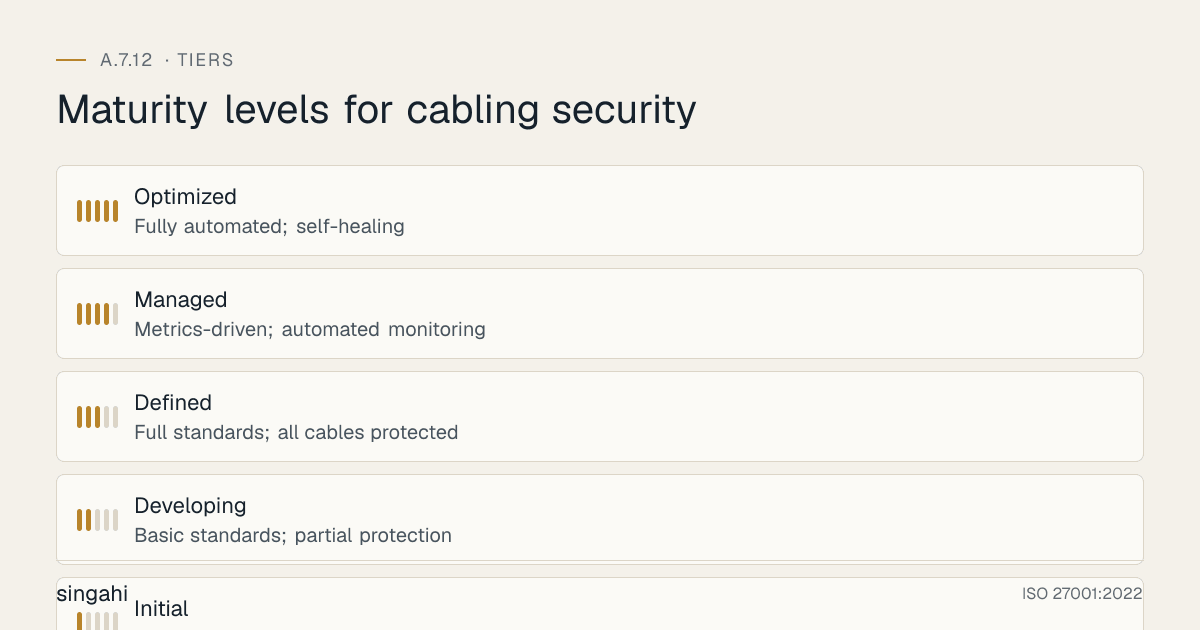
Maturity Model for A.7.12
| Level | Name | Characteristics | Evidence |
|---|---|---|---|
| 1 | Initial | Ad-hoc cabling; no standards; no documentation; frequent outages and security issues | No policy; exposed cables; no labeling; no inventory |
| 2 | Developing | Basic standards; partial protection; some documentation; reactive maintenance | Some conduits/trays; partial labeling; basic diagrams; reactive fixes |
| 3 | Defined | Full standards; all cables protected; complete documentation; proactive maintenance | All cables in protected pathways; labeled; documented; inspected regularly |
| 4 | Managed | Metrics-driven; automated monitoring; predictive maintenance; optimized performance | KPIs tracked; automated port monitoring; trend analysis; 99.9%+ uptime |
| 5 | Optimized | Fully automated; self-healing; integrated with enterprise systems; industry-leading | Automated cable integrity monitoring; dynamic routing; AI-powered anomaly detection; zero incidents |
Continuous Improvement Activities
Monthly:
- Cable infrastructure inspections
- Access log review for cable rooms
- Port security monitoring and reporting
- Documentation currency review
Quarterly:
- Cable inventory accuracy audit
- Labeling spot checks and updates
- Power-data separation verification
- External cable protection inspection
- Internal audit of cabling controls
Annually:
- Full policy review
- Cable performance testing (critical infrastructure)
- Complete risk assessment refresh
- Technology and tool review
- Benchmark against TIA-942, Uptime Institute standards
- External audit preparation
- Maturity assessment against target level
Trigger-Based:
- After any cable-related incident (damage, outage, unauthorized access)
- Upon new cable installation or major modification
- Upon building renovation or construction nearby
- When regulatory requirements change
- After significant audit findings
FAQ
Q1: Do we need to protect all cables, or just network cables? A: All cables carrying information or supporting utilities (power) are in scope. This includes data cables (Ethernet, fiber), power cables (mains, UPS), telecommunications cables (telephone, PRI), and any other cable that supports information processing. Even power cables are in scope because their damage can cause information system outages.
Q2: What is the minimum depth for burying cables? A: For standard data/telecom cables in India: 60 cm minimum depth for direct burial (conduit recommended). For road crossings: 90 cm minimum. For railway crossings: 120 cm minimum (or as per railway authority). Always use armored conduit, warning tape 30 cm above the cable, and marker posts at changes in direction.
Q3: Can we run power and data in the same conduit if we use shielded cable? A: No, not recommended. Even with shielded cable, running power and data in the same conduit creates safety risks (electrical fault affecting data equipment), maintenance difficulties, and potential fire hazards. Use separate conduits with a physical divider as a minimum. Maintain the separation distances specified in the standard.
Q4: How do we secure network ports in public areas like conference rooms? A: Best approach: (1) Disable unused ports at the switch, (2) Implement 802.1X authentication on active ports, (3) Use physical port locks on exposed jacks, (4) Monitor for new MAC addresses, (5) Include public area ports in security audits. Conference rooms should have ports that are only enabled when needed (managed via network admin).
Q5: What is 802.1X and do we need it for all ports? A: 802.1X is a network access control protocol that requires devices to authenticate before accessing the network. It is the gold standard for port security. For high-security environments, implement 802.1X on all ports. For general office environments, implement 802.1X on at least all ports in public areas and sensitive areas. For small organizations, MAC address filtering is a simpler (though less secure) alternative.
Q6: How do we protect cables from rodent damage? A: Rodents are a significant issue in India, especially in false ceilings and under raised floors. Use armored cables (metal or steel braided). Use metal conduits rather than PVC. Seal all entry points. Implement pest control programs. Use rodent deterrents in cable areas. Inspect cables regularly for damage. Fiber optic cables are less attractive to rodents but still vulnerable.
Q7: What cable type should we use for new installations? A: For data: Cat 6A UTP for standard office (supports 10Gbps). Cat 6A STP for high-interference environments. For data centers: Cat 6A or Cat 7, plus fiber (OM4 or OS2) for high-speed and long-distance runs. For outdoor: armored fiber (OS2 for long distances, OM4 for short). For power: use appropriate gauge and insulation rated for the environment.
Q8: How do we manage cable documentation for a large, distributed organization? A: Use a centralized cable management system (CMDB, DCIM, or specialized cable management software). Maintain electronic diagrams that are accessible to authorized staff. Use barcodes or QR codes on labels linked to the database. Update documentation as part of the cable change management process. For very large organizations, consider GIS (Geographic Information System) integration for external cable mapping.
Q9: What is the most common audit finding for A.7.12? A: Inadequate cable protection and documentation. Common findings: exposed cables in public areas, power and data cables running together, no cable inventory, inaccurate labeling, unlocked telecom rooms, and no port security. Auditors will physically inspect cable runs, check documentation, and test port security.
Q10: Do we need to protect fiber optic cables from EMI? A: Fiber optic cables are immune to electromagnetic interference (EMI), which is one of their major advantages. However, they still need physical protection from damage, moisture, and bending. They should still be routed through conduits and trays for protection. Note that the fiber optic transceivers and equipment at the ends are still electronic and can be affected by EMI, so equipment placement matters.
Q11: How often should we inspect cable infrastructure? A: Monthly for critical areas (data centers, telecom rooms, server rooms). Quarterly for general office areas. Annually for external cable runs. After any construction, renovation, or incident in the vicinity of cables. Inspections should check for: physical damage, unauthorized connections, labeling accuracy, protection integrity, and environmental hazards.
Q12: What is the cost of implementing A.7.12 for a growing company? A: For a 200-person company with 1 data center and 1 office: cable trays and conduits (–), cable managers and organizers (–), labeling system (–), port security (–), documentation system (–), telecom room locks and CCTV (–), training (–). Total: –This is a modest investment for significant operational and security benefits.
Q13: How do we handle cable security in a leased building? A: In leased buildings, you may have limited control over building infrastructure. Focus on what you can control: (1) Internal cabling within your leased space, (2) Cable protection from demarcation to your equipment, (3) Telecom room security within your space, (4) Port security on your network, (5) Documentation of your infrastructure. Work with the landlord for shared infrastructure (risers, conduits) and ensure cabling meets standards.
Q14: What about wireless vs. wired cabling? A: Wireless reduces cabling but does not eliminate it. Wireless access points need power (PoE) and data cables. Wireless is subject to interference, eavesdropping, and range limitations. For security-critical and high-performance applications, wired connections are preferred. Use wireless as a complement, not a replacement, for secure wired infrastructure. Ensure wireless is properly secured (WPA3, VLANs, monitoring).
Q15: How do we prevent cable theft? A: Cable theft is a real issue in some areas, particularly for copper cables (which have scrap value). Prevention measures: (1) Use fiber optic (no scrap value) for external runs where possible, (2) Use armored cables and metal conduits, (3) Bury cables deeply with warning tape, (4) Install tamper detection or alarm systems on cable access points, (5) Use CCTV in cable areas, (6) Monitor for outages that could indicate theft, (7) Mark cables with permanent identification (not easily removed for resale).
Q16: How do we secure cables in a co-working space? A: Co-working spaces present unique challenges because you share infrastructure with other organizations. Key measures: (1) Use dedicated VLANs for your network segment, (2) Implement 802.1X on all ports, (3) Encrypt all data in transit (TLS 1.3, VPN), (4) Use your own firewall/router between shared infrastructure and your devices, (5) Avoid using shared printers or file servers without encryption, (6) Conduct regular scans for unauthorized devices on your segment, (7) Document the demarcation point where shared infrastructure ends and your infrastructure begins.
Q17: What is the impact of 5G on cabling security? A: 5G reduces the need for some wired connections but increases security requirements for remaining infrastructure. 5G base stations and edge computing nodes require strong backhaul cabling. As wireless increases, the criticality of remaining wired infrastructure increases, these cables carry aggregated traffic from multiple wireless access points. Protect 5G backhaul with the same rigor as core network infrastructure.
Q18: How do we handle cable security during office renovations? A: Renovations are a high-risk period for cable security. Best practices: (1) Pre-renovation cable survey and documentation, (2) Temporary protection for cables that remain active, (3) Secure disposal of cables being removed (data destruction), (4) Post-renovation verification that all cables are properly secured and labeled, (5) Inspection for unauthorized additions during renovation, (6) Re-certification of cable infrastructure before going live, (7) Update all documentation to reflect changes.
Q19: What about undersea and submarine cables in India? A: India relies heavily on submarine cables for international connectivity. While most organizations don't own submarine cables, understanding their importance is critical for business continuity. India has landing stations in Mumbai, Chennai, Cochin, and Trivandrum. Organizations should: (1) Use multiple ISPs with diverse submarine cable routes, (2) Understand your ISP's cable diversity, (3) Plan for submarine cable outages (which affect entire regions), (4) Consider satellite backup for critical international connectivity.
Q20: How do we secure PoE (Power over Ethernet) installations? A: PoE combines power and data on the same cable, which requires special consideration: (1) Use PoE-compatible switches with proper power budgeting, (2) Ensure cable gauge supports power delivery (Cat 6A minimum for high-power PoE), (3) Protect PoE switches in secure locations, (4) Monitor for unauthorized PoE devices (IP cameras, access points), (5) Use PoE midspan injectors only when necessary, (6) Ensure proper grounding to prevent electrical hazards, (7) Document all PoE devices and their power requirements.
Q21: What is the role of cable security in Zero Trust architecture? A: Zero Trust assumes breach and verifies every access request. Cable security is foundational because if an attacker gains physical access to cables, they can bypass many network-level controls. In Zero Trust, cable security ensures that the physical layer is not the weakest link. Organizations should implement port security, cable monitoring, and physical access controls as part of their Zero Trust strategy.
Industry-Specific Cabling Requirements
See Industry-Specific Context above. Sector regulators set outcomes (protect network infrastructure, keep services resilient) rather than cabling specifications; avoid citing specific RBI or healthcare "cabling requirements" unless you can point to the clause.
Expanded Illustrative Scenarios: Indian Cabling Incidents
Illustrative Scenario 4 (hypothetical): IT Park, Cable Damage During Construction
What happened: A major IT park in Hyderabad was undergoing expansion. Construction crews accidentally severed multiple fiber optic cables running through an unmarked underground conduit. The cables served 15 companies in the park, including 3 fintech startups and 1 healthtech company. The outage lasted 14 hours.
Impact:
- 15 companies offline for 14 hours
- Significant business losses across the affected companies
- A healthtech company's patient monitoring system was disrupted (regulatory reporting required)
- A fintech company missed payment-processing SLAs and paid contractual penalties
- The construction company faced liability claims
Root causes:
- No cable marking or warning signs on underground conduits
- No as-built drawings shared with construction crews
- No cable locator survey before excavation
- No redundant cable paths for critical infrastructure
- No notification protocol between IT park management and tenants
Lessons:
- Always mark underground cables with warning tape and signs
- Share cable infrastructure maps with any construction teams
- Conduct cable locator surveys before any excavation
- Implement redundant cable paths for critical infrastructure
- Establish notification protocols for infrastructure disruptions
- Include cable protection clauses in construction contracts
Illustrative Scenario 5 (hypothetical): Manufacturing Plant, EMI from Power Cables
What happened: A manufacturing plant in Pune installed new high-power machinery. The power cables for the machinery were run in the same cable tray as the network cables for the plant's industrial control systems. The electromagnetic interference from the power cables caused intermittent network errors in the control systems, leading to production line shutdowns and quality control failures.
Impact:
- 3 months of intermittent production issues
- Quality control failures in rejected products
- 2 weeks of downtime for cable rerouting
- Emergency consulting fees for EMI diagnosis and remediation
Root causes:
- Power and data cables in same cable tray (no separation)
- No EMI testing after machinery installation
- Unshielded Cat 5e cables used for industrial environment
- No cable management standards for industrial areas
- Maintenance team lacked EMI awareness
Lessons:
- Always separate power and data cables (minimum 30cm separation)
- Use shielded cables (STP/FTP) in industrial environments
- Conduct EMI testing after any power infrastructure changes
- Establish cable management standards for all environments (office, industrial, outdoor)
- Train maintenance teams on EMI basics and cable separation requirements
- Use fiber optic for industrial control networks (immune to EMI)
Illustrative Scenario 6 (hypothetical): University, Unauthorised Network Access
What happened: A university in Delhi had network ports in all classrooms and lecture halls for faculty use. These ports were not secured, anyone could plug in a device. A student plugged a rogue access point into a classroom port, creating an open Wi-Fi network that bypassed the university's security controls. The rogue AP was used for 3 months before detection, during which time attackers accessed student records and research data.
Impact:
- 15,000 student records potentially exposed
- Research data for 3 funded projects compromised
- University faced DPDP Act 2023 notification requirements
- Reputational damage, media coverage
- Remediation costs for port security, incident response and legal advice
Root causes:
- Unsecured network ports in public areas
- No 802.1X or MAC authentication on ports
- No monitoring for unauthorized devices
- No regular security audits of physical infrastructure
- No port security policy
Lessons:
- Implement 802.1X on all network ports, especially in public areas
- Disable unused ports at the switch level
- Use physical port locks on exposed jacks
- Monitor for new MAC addresses and unauthorized access points
- Include physical port security in regular security audits
- Educate faculty and staff on the risks of unauthorized devices
Additional Metrics and KPIs
Advanced Cabling Security Metrics
| Metric | Target | Formula | Owner | Frequency |
|---|---|---|---|---|
| Cable documentation accuracy | >98% | (Accurately labeled cables / Total cables) × 100 | Network Engineer | Quarterly |
| Power-data separation compliance | 100% | (Compliant cable runs / Total cable runs) × 100 | Facility Manager | Monthly |
| Port security coverage | >95% | (Secured ports / Total ports) × 100 | Network Engineer | Monthly |
| Telecom room security score | 100% | (Secure rooms / Total rooms) × 100 | Facility Manager | Monthly |
| Cable inspection completion | 100% | (Inspected areas / Scheduled areas) × 100 | Facility Manager | Monthly |
| Cable incident response time | <2 hours | Mean time to resolve cable incidents | Network Engineer | Per incident |
| Cable-related downtime | <0.1% | (Cable downtime / Total uptime) × 100 | Network Engineer | Monthly |
| Unauthorized device detection | 0 | Count of unauthorized devices detected | SOC | Monthly |
| Cable theft incidents | 0 | Count of cable theft incidents | Security | Monthly |
| Cable inventory completeness | >95% | (Documented cables / Total cables) × 100 | Network Engineer | Quarterly |
| External cable inspection completion | 100% | (Inspected external runs / Total external runs) × 100 | Facility Manager | Quarterly |
| Renovation cable protection compliance | 100% | (Protected projects / Total renovation projects) × 100 | Facility Manager | Per project |
| EMI incident count | 0 | Count of EMI-related incidents | Network Engineer | Monthly |
| Cable audit findings | 0 major | Count of major audit findings | Compliance Manager | Quarterly |
References and Further Reading
Standards and Frameworks
- ISO/IEC 27001:2022, Information Security, Cybersecurity and Privacy Protection, Information Security Management Systems, Requirements
- ISO/IEC 27002:2022, Information Security, Cybersecurity and Privacy Protection, Information Security Controls
- NIST SP 800-53 Rev 5, Security and Privacy Controls for Information Systems and Organizations
- TIA-942, Telecommunications Infrastructure Standard for Data Centers
- Uptime Institute Tier Standard: Topology
- National Building Code 2016 (India)
- IS 732, Electrical Installations
- IS 3043, Code of Practice for Earthing
Books and Publications
- Data Center Handbook by Hwaiyu Geng
- ISO 27001/27002: A Pocket Guide by Alan Calder
- Telecommunications Distribution Methods Manual (TDMM) by BICSI
Indian Regulatory Context for Cabling Security
Monsoon flooding, rodents and unauthorised digging regularly damage cables in Indian cities and IT parks. Use armoured fibre and marked routes outdoors, keep accurate route maps, coordinate with the landlord and municipal bodies before any digging, and inspect trays, risers and manholes on a schedule. Interception is lawful only under government authorisation (Telecommunications Act 2023 and IT Act s.69). Under the DPDP Act 2023, a tap or exposed cabling that leads to unauthorised access to personal data is a personal data breach to be intimated under s.8(6) once the Rules apply. Factories also follow the OSH Code 2020 and the CEA Safety Regulations 2023 for electrical installations.