
On this page
- Quick Reference (60 Seconds)
- What the Control Asks For
- Why Equipment Maintenance Matters
- Scope and Applicability
- Key Definitions and Terminology
- Relationship to Other Controls
- Implementation Roadmap (Week-by-Week)
- Detailed Implementation Guidance
- Tools, Technologies, and Solutions
- Policy and Procedure Templates
- Risk Assessment and Treatment
- Audit and Compliance Checklist
- Metrics and KPIs
- Common Pitfalls and How to Avoid Them
- Illustrative Scenarios
- Multi-Framework Mapping
- Regulatory and Industry Context
- Roles and Responsibilities (RACI)
- Documentation and Evidence Requirements
- Continuous Improvement
- FAQ
- Industry-Specific Maintenance Requirements
- Maturity Model for A.7.13
- Additional FAQ
- Illustrative Scenario (hypothetical): Bengaluru IT Company, Maintenance Failure to Security Incident
- Maintenance Security Metrics and KPIs
- References and Further Reading
Quick Reference (60 Seconds)
Figure · At a glance
A.7.13 at a glance
- Control ID
- A.7.13
- Control Name
- Equipment Maintenance
- ISO 27002:2022 Section
- 7.13
- Primary Purpose
- Ensure equipment is maintained to preserve
- Key Activities
- Schedule maintenance
- Typical Owners
- IT Operations, Facility Management
| Aspect | Summary |
|---|---|
| Control ID | A.7.13 |
| Control Name | Equipment Maintenance |
| ISO 27002:2022 Section | 7.13 |
| Primary Purpose | Ensure equipment is maintained to preserve information integrity, availability, and security |
| Key Activities | Schedule maintenance, perform authorized maintenance only, protect data during maintenance, verify integrity after maintenance |
| Typical Owners | IT Operations, Facility Management, Asset Management |
| Implementation Effort | Medium (4–8 weeks) |
| Main cost drivers | Maintenance contracts (IT and facilities), a maintenance schedule and log (often in the ITSM tool), escorts for on-site work, and data protection for equipment sent away |
| ISO 27002 attributes | Control type: Preventive · Properties: Confidentiality, Integrity, Availability · Concepts: Protect · Capabilities: Physical security, Asset management · Domains: Protection, Resilience |
Bottom Line: Equipment maintenance is not just about keeping things running, it is about ensuring that maintenance activities do not introduce security vulnerabilities, data loss, or unauthorized access. Proper maintenance preserves both availability and security.
What the Control Asks For
In short:
ISO 27001:2022 Annex A 7.13 asks organizations to maintain equipment properly to keep information available and intact.
Do you need this control?
A.7.13 is not mandatory in itself: under clause 6.1.3 you include it if your risk assessment calls for it, and record the decision in your Statement of Applicability. Include it if you own equipment that needs maintenance. It matters most where maintenance staff could access sensitive data, such as servers, storage and medical or industrial devices.
What ISO 27002:2022 Adds
27002 7.13 (paraphrased) suggests:
- (a) maintaining equipment to the supplier's recommended service intervals and specifications
- (b) an organisation-run maintenance programme that is monitored
- (c) only authorised maintenance personnel carrying out repairs and maintenance
- (d) records of all suspected or actual faults and of all preventive and corrective maintenance
- (e) controls suited to whether maintenance is on site or external, with maintenance personnel under a suitable confidentiality agreement
- (f) supervising maintenance personnel on site
- (g) authorising and controlling remote maintenance access
- (h) applying off-premises protections (7.9) when equipment holding information leaves for maintenance
- (i) complying with maintenance requirements set by insurance policies
- (j) inspecting equipment before it returns to operation to make sure it has not been tampered with and works correctly
- (k) applying secure disposal or re-use (7.14) when equipment is to be disposed of
27002 notes that "equipment" includes information processing components and supporting facilities: UPS and batteries, generators, alternators and converters, physical intrusion detection systems and alarms, smoke detectors, fire extinguishers, air conditioning and lifts. Many pages treat maintenance as an IT-only topic; auditors also ask about the facilities kit.
Why Equipment Maintenance Matters
The Maintenance-Security Connection
Maintenance is often viewed as an operational activity separate from security. In reality, maintenance activities create significant security exposure: maintenance personnel have physical access to equipment, may bypass security controls, and may inadvertently or intentionally compromise data.
Typical Ways Maintenance Goes Wrong
Third-party involvement is common in breaches: the Verizon DBIR 2025 found a third party involved in 30% of breaches (that covers all suppliers, not only maintenance). Hypothetical maintenance-specific patterns:
- A technician resets firmware settings and silently disables disk encryption or Secure Boot.
- A vendor keeps a failed drive that still holds readable data.
- A firmware update applied without testing takes down network switches.
- Nobody can say which vendor had access to a system during an incident, because no log was kept.
- Remote support access is left permanently open "for convenience".
Regulatory and Business Drivers
- DPDP Act 2023: reasonable security safeguards (s.8(5)) apply while equipment is maintained, and processor contracts (s.8(2)) cover vendors who handle personal data
- Sector regulators (RBI IT Outsourcing Master Direction 2023, SEBI CSCRF 2024, IRDAI 2023) expect regulated entities to control vendor access and keep records
- PCI DSS v4.0.1 9.5.1.2 asks for periodic inspection of point-of-interaction devices for tampering, including after maintenance
- SOC 2 CC6.4 and CC7.1 cover physical access and detecting unauthorised changes
- ISO 55000 (Asset Management) provides a framework for systematic equipment maintenance
Scope and Applicability
What Is Covered
- All information processing equipment (servers, workstations, storage, network devices)
- All peripheral equipment (printers, scanners, kiosks, ATMs)
- All security equipment (firewalls, IDS/IPS, CCTV, access control systems)
- All utility equipment (UPS, generators, HVAC, fire suppression)
- All cabling infrastructure (patch panels, switches, routers)
- All mobile and endpoint devices (laptops, tablets, smartphones)
- All maintenance activities, whether performed by internal staff or external vendors
What Is Not Covered
- Non-IT equipment not associated with information processing (e.g., general office furniture, kitchen appliances)
- Personal devices not used for work (though BYOD policies may extend coverage)
Applicability by Organization Type
| Organization Type | Applicability | Key Maintenance Concerns |
|---|---|---|
| IT/Software Services | High | Server farms, dev environments, network infrastructure, cloud hardware |
| BFSI | Critical | ATMs, core banking servers, trading infrastructure, security systems |
| Healthcare | Critical | Medical devices, patient record systems, imaging equipment, life support IT |
| Manufacturing | High | SCADA/ICS systems, production control servers, IoT devices |
| Government/Defense | Critical | Classified systems, citizen data servers, secure communications |
| Education | Medium | Campus networks, lab equipment, student systems, research compute |
| SaaS/Cloud | Critical | Data center infrastructure, customer-facing servers, network equipment |
| Retail/E-commerce | High | POS systems, inventory servers, payment terminals, warehouse automation |
Key Definitions and Terminology
| Term | Definition |
|---|---|
| Preventive Maintenance | Scheduled maintenance activities designed to prevent equipment failures before they occur |
| Corrective Maintenance | Maintenance performed in response to an equipment failure or malfunction |
| Predictive Maintenance | Maintenance based on condition monitoring and data analysis to predict when maintenance is needed |
| Authorized Maintenance | Maintenance performed by personnel who have been approved and authorized by the organization |
| Maintenance Window | A scheduled period of time during which maintenance activities are performed, typically with reduced service impact |
| Change Management | A formal process for managing changes to IT systems, including maintenance-related changes |
| Service Level Agreement (SLA) | A contract between the organization and a maintenance vendor defining response times, service levels, and responsibilities |
| Mean Time Between Failures (MTBF) | The average time between equipment failures, used to schedule preventive maintenance |
| Mean Time to Repair (MTTR) | The average time required to repair equipment after a failure |
| Firmware | Software embedded in hardware devices that controls their operation |
| BIOS/UEFI | The firmware interface between a computer's hardware and its operating system |
| Sanitization | The process of removing data from equipment before disposal or repurposing |
| Spare Parts Inventory | A stock of critical components kept on-site to minimize repair time |
| Maintenance Log | A record of all maintenance activities performed on a piece of equipment |
Relationship to Other Controls
| Control | Relationship |
|---|---|
| A.5.9 Inventory of information and other assets | Maintenance must be tracked against the asset inventory |
| A.5.33 Protection of records | Maintenance records must be protected |
| A.7.2 Physical entry controls | Maintenance personnel require controlled access to equipment areas |
| A.7.6 Working in secure areas | Maintenance in secure areas requires additional controls |
| A.7.8 Equipment siting and protection | Equipment siting affects maintenance accessibility and safety |
| A.7.11 Supporting utilities | Utility maintenance is essential for equipment operation |
| A.7.14 Secure disposal or re-use of equipment | 27002 7.13(k): apply when equipment is disposed of |
| A.7.9 Security of assets off-premises | 27002 7.13(h): equipment sent away for repair |
| A.5.19–A.5.22 Supplier relationships | Maintenance vendors are suppliers |
| A.8.8 Management of technical vulnerabilities | Firmware and patch maintenance |
| A.8.32 Change management | Maintenance windows and changes |
| A.8.1 User endpoint devices | Endpoint devices require maintenance and patch management |
| A.8.9 Configuration management | Maintenance may change configurations; must be managed |
| A.8.13 Information backup | Backups before maintenance protect against data loss |
| A.5.14 Information transfer | Maintenance may involve data transfer for remote support |
| A.8.24 Use of cryptography | Maintenance must not disable or compromise encryption |
| A.8.25 Secure development life cycle | Maintenance may involve software updates and patches |
| A.5.29 Information security during disruption | Maintenance windows are planned disruptions that must be managed |
Implementation Roadmap (Week-by-Week)
Week 1: Equipment Inventory and Maintenance Assessment
- Inventory all equipment requiring maintenance
- Identify manufacturer maintenance recommendations for each asset
- Review current maintenance practices and identify gaps
- Identify all maintenance vendors and contracts
- Assess maintenance personnel authorization and training
- Review maintenance records and documentation quality
- Identify critical equipment with no maintenance plan
Week 2: Policy and Procedure Development
- Draft equipment maintenance policy
- Define maintenance scheduling standards (preventive, predictive, corrective)
- Define authorization requirements for internal and external maintenance personnel
- Create maintenance procedures for different equipment types
- Define data protection requirements during maintenance
- Create maintenance logging and documentation standards
- Define post-maintenance verification requirements
- Create maintenance window and change management procedures
Week 3: Maintenance Scheduling System Implementation
- Implement maintenance scheduling system (CMMS, ITSM, or calendar-based)
- Create maintenance schedules for all equipment based on manufacturer recommendations and criticality
- Define maintenance windows (low-impact times for different systems)
- Set up automated reminders and escalations for overdue maintenance
- Create maintenance calendar and communicate to stakeholders
- Integrate maintenance scheduling with change management
Week 4: Vendor Management and Authorization
- Vet all maintenance vendors (security background, insurance, certifications)
- Establish SLAs with all maintenance vendors
- Create vendor access procedures (escort, badging, access limitations)
- Require NDAs and security agreements for all external maintenance vendors
- Create vendor performance monitoring process
- Define vendor authorization and de-authorization procedures
Week 5: Data Protection During Maintenance
- Create pre-maintenance checklist (backup verification, data protection measures)
- Define data handling requirements for maintenance personnel (no data removal, no photography, etc.)
- Create post-maintenance verification checklist (functionality, security settings, data integrity)
- Define requirements for maintenance of encrypted devices (key management, decryption procedures)
- Create procedures for maintenance involving component replacement (hard drives, memory, etc.)
- Define secure disposal requirements for components replaced during maintenance
Week 6: Maintenance Execution and Logging
- Perform first scheduled maintenance using new procedures
- Log all maintenance activities in the maintenance system
- Document any issues, deviations, or lessons learned
- Verify post-maintenance functionality and security
- Collect feedback from maintenance personnel and equipment owners
- Refine procedures based on practical experience
Week 7: Training and Communication
- Train all IT staff on maintenance procedures and documentation
- Train all maintenance vendors on organizational requirements
- Create quick reference guides for common maintenance tasks
- Communicate maintenance windows and schedules to all stakeholders
- Train security staff on maintenance monitoring and incident response
- Create maintenance awareness materials for general staff
Week 8: Audit and Validation
- Conduct internal audit of maintenance controls
- Verify all equipment has maintenance schedules
- Verify all maintenance is being logged and documented
- Verify post-maintenance verification is occurring
- Verify vendor authorization and access controls
- Prepare documentation for external audit
- Plan for continuous improvement
Detailed Implementation Guidance
Maintenance Types and Scheduling
Preventive Maintenance (PM):
| Equipment Type | PM Frequency | Typical Activities |
|---|---|---|
| Servers | Monthly | Dust cleaning, fan inspection, temperature check, log review, firmware check |
| Storage arrays | Monthly | Health check, SMART review, cache battery check, firmware update |
| Network switches | Quarterly | Port inspection, firmware update, configuration backup, log review |
| Firewalls | Quarterly | Rule review, firmware update, log review, performance check |
| UPS | Monthly | Battery test, voltage check, fan inspection, alarm test |
| Generator | Monthly | Start test, fuel check, coolant check, battery check |
| HVAC | Quarterly | Filter replacement, coil cleaning, refrigerant check, airflow check |
| Printers | Monthly | Cleaning, consumable check, firmware update, security setting review |
| Laptops/Workstations | Quarterly | Disk cleanup, malware scan, patch check, physical inspection |
| CCTV | Quarterly | Camera cleaning, lens check, recording review, storage check |
| Access control | Quarterly | Reader test, card check, log review, backup test |
| Fire suppression | Annually | Detector test, suppression test, pressure check, inspection certificate |
Predictive Maintenance (PdM):
- Use sensor data and analytics to predict failures before they occur
- Monitor: temperature trends, vibration, power consumption, error rates, performance degradation
- Use tools: IPMI, SNMP monitoring, SMART data, BMS/DCIM analytics, AI-powered prediction
- Schedule maintenance based on predicted failure probability, not fixed intervals
Corrective Maintenance (CM):
- Respond to failures, alarms, or detected issues
- Document root cause for all corrective maintenance
- Analyze trends to identify systemic issues
- Update preventive maintenance schedules based on corrective findings
Maintenance Personnel Authorization
Internal Maintenance Staff:
- Must be employees with appropriate technical skills and certifications
- Must have background verification completed
- Must sign confidentiality and security agreements
- Must be trained on organizational security policies and maintenance procedures
- Must have access rights limited to the equipment they maintain
- Must be supervised when working in secure areas
External Maintenance Vendors:
- Must be security-vetted before engagement (background checks, financial checks, reference checks)
- Must sign NDAs and security agreements
- Must provide proof of insurance and certifications
- Must be escorted when working in secure areas (unless pre-approved and security-cleared)
- Must have access limited to the specific equipment being maintained
- Must not be left unattended with equipment containing sensitive data
- Must return all replaced components to the organization (for secure disposal)
- Must not photograph, record, or remove data from equipment
Authorization Process:
- Vendor/staff submits application with credentials, certifications, and references
- Security team conducts background verification
- Legal/Procurement reviews and signs NDA/security agreement
- IT Operations reviews technical qualifications
- CISO or designated authority approves authorization
- Authorization is time-limited (typically 1 year, renewable)
- Authorization is revoked immediately upon contract termination or security incident
- Authorized list is reviewed quarterly
Data Protection During Maintenance
Pre-Maintenance Checklist:
| Step | Action | Responsibility |
|---|---|---|
| 1 | Verify recent backup of all data on the equipment | IT Operations |
| 2 | Verify backup integrity (restore test if possible) | IT Operations |
| 3 | Document current security settings (encryption, authentication, access controls) | IT Security |
| 4 | Remove or secure sensitive data if maintenance does not require access to it | Data Owner |
| 5 | Disable remote access and network connectivity if not required for maintenance | IT Security |
| 6 | Assign maintenance escort for secure areas | Security |
| 7 | Verify maintenance personnel authorization | Security |
| 8 | Brief maintenance personnel on data protection requirements | IT Operations |
| 9 | Record maintenance start time and personnel in maintenance log | IT Operations |
During Maintenance:
| Requirement | Description |
|---|---|
| No data removal | Maintenance personnel must not remove data, media, or components containing data without authorization |
| No photography/recording | Photography, video recording, or audio recording of equipment, screens, or documents is prohibited without authorization |
| Supervision | Maintenance in secure areas must be supervised by an authorized employee |
| Access limitation | Maintenance personnel must only access the specific equipment being maintained |
| Tool control | Personal tools may be subject to inspection; organization may provide approved tools |
| Network isolation | Equipment under maintenance should be isolated from production networks if possible |
| Encryption preservation | Maintenance must not disable, bypass, or compromise encryption without authorization and documentation |
Post-Maintenance Checklist:
| Step | Action | Responsibility |
|---|---|---|
| 1 | Verify equipment powers on and functions correctly | IT Operations |
| 2 | Verify all security settings are restored (encryption, authentication, access controls) | IT Security |
| 3 | Verify network connectivity and security configurations | IT Security |
| 4 | Verify data integrity (checksums, database consistency, file integrity) | IT Operations |
| 5 | Verify no unauthorized software or configurations were installed | IT Security |
| 6 | Collect all replaced components for secure disposal or inventory | IT Operations |
| 7 | Verify maintenance area is cleared and secure | Security |
| 8 | Record maintenance completion, activities performed, and verification results | IT Operations |
| 9 | Close change request and maintenance ticket | IT Operations |
Component Replacement and Sanitization
Hard Drive Replacement:
- Failed hard drives must be returned to the organization, not retained by the vendor
- Failed hard drives must be sanitized (degaussed or physically destroyed) before disposal
- New hard drives must be encrypted before data is written (if encryption is required)
- RAID rebuild must be monitored and verified after replacement
- Data must be restored from backup if the failed drive was not in a redundant array
Memory Replacement:
- Memory modules may retain data for a short period after power loss
- For sensitive environments, memory must be cleared before removal (power off, wait, discharge)
- Replaced memory modules should be inventoried and securely disposed of if faulty
Motherboard/BIOS Replacement:
- BIOS settings must be documented before replacement
- TPM/encryption keys must be backed up or recovered if the motherboard contains the TPM
- Secure boot settings must be reconfigured after replacement
- BitLocker recovery keys must be available if the motherboard is replaced
Network Component Replacement:
- Configuration must be backed up before replacement
- New component must be configured with the same security settings as the old one
- Firmware must be updated to the latest secure version
- Default passwords must be changed immediately
- Component must be tested for proper security operation before being placed into production
Maintenance in Secure Areas
Additional Requirements for Secure Areas:
- Maintenance personnel must be escorted at all times
- Maintenance personnel must surrender personal devices (phones, cameras) before entering
- Maintenance must be scheduled during supervised hours
- Security personnel must be present during maintenance of security-critical equipment (firewalls, access control, CCTV)
- All tools and equipment brought into secure areas must be inspected and logged
- All replaced components must be inspected and logged before leaving the secure area
- Maintenance activities must be recorded in the secure area access log
Tools, Technologies, and Solutions
Computerized Maintenance Management Systems (CMMS)
| Vendor | Product | Key Features | Pricing model |
|---|---|---|---|
| Fiix | CMMS | Cloud-based, preventive maintenance, reporting | Commercial |
| UpKeep | CMMS | Mobile-first, work orders, asset management | Commercial |
| Hippo CMMS | CMMS | Easy to use, preventive maintenance, vendor management | Commercial |
| eMaint | CMMS | Enterprise, complete, integration | Commercial |
| Limble CMMS | CMMS | Growing companies, intuitive, mobile | Commercial |
IT Service Management (ITSM) Tools with Maintenance
| Vendor | Product | Key Features | Pricing model |
|---|---|---|---|
| ServiceNow | ITSM | Enterprise, complete, CMDB, change management | Commercial |
| Freshservice | ITSM | Growing companies, asset management, CMDB, change management | Commercial |
| ManageEngine | ServiceDesk Plus | Indian market, efficient, ITSM, asset management | Commercial |
| Jira Service Management | ITSM | Development-focused, agile, integration | Commercial |
Remote Maintenance and Monitoring Tools
| Vendor | Product | Key Features | Pricing model |
|---|---|---|---|
| SolarWinds | NPM/SAM | Network and server monitoring, remote diagnostics | Commercial |
| Nagios | Nagios XI | Open-source monitoring, alerting, remote checks | Free or Commercial |
| PRTG | PRTG Network Monitor | Complete monitoring, remote probes | Commercial |
| Datadog | Infrastructure Monitoring | Cloud-native, AI-powered, predictive analytics | Commercial |
| Zabbix | Zabbix | Open-source, scalable, remote monitoring | Free or Commercial |
Asset Management and Inventory Tools
| Vendor | Product | Key Features | Pricing model |
|---|---|---|---|
| Snipe-IT | Open Source Asset Management | Free, web-based, maintenance tracking | Free (self-hosted) |
| Wasp Barcode | AssetCloud | Barcode/RFID, maintenance tracking, reporting | Commercial |
| ServiceNow | IT Asset Management | Enterprise, CMDB, lifecycle management | Commercial |
| ManageEngine | AssetExplorer | Growing companies, feature-rich, maintenance history | Commercial |
| Freshservice | Asset Management | Cloud-based, integrated with ITSM | Commercial |
Policy and Procedure Templates
Equipment Maintenance Policy Template
Template
Equipment Maintenance Policy
1. Purpose
This policy establishes requirements for the maintenance of information processing equipment to ensure continued availability, reliability, and security.
2. Scope
This policy applies to all information processing equipment, security equipment, utility equipment, and peripheral devices owned or operated by the organization.
3. Maintenance Types
3.1 Preventive Maintenance
- Scheduled maintenance performed at manufacturer-recommended intervals
- Includes: cleaning, inspection, testing, firmware updates, component replacement
- Frequency determined by equipment type, criticality, and manufacturer guidance
3.2 Predictive Maintenance
- Maintenance triggered by condition monitoring and predictive analytics
- Uses sensor data, performance metrics, and trend analysis
- Reduces unnecessary maintenance while preventing failures
3.3 Corrective Maintenance
- Maintenance performed in response to failures or detected issues
- Must include root cause analysis
- Must update preventive maintenance schedules based on findings
4. Maintenance Authorization
4.1 Internal Staff
- Must be qualified and certified for the equipment they maintain
- Must have completed background verification
- Must have signed security and confidentiality agreements
- Must have access limited to authorized equipment and areas
4.2 External Vendors
- Must be security-vetted before engagement
- Must sign NDAs and security agreements
- Must provide proof of insurance and certifications
- Must be escorted in secure areas unless individually cleared
- Must return all replaced components to the organization
- Authorization is time-limited and reviewed annually
5. Data Protection During Maintenance
5.1 Pre-Maintenance
- Verify recent backup of all equipment data
- Document current security settings
- Assign escort for secure areas
- Verify maintenance personnel authorization
5.2 During Maintenance
- Maintenance personnel must not remove data or media without authorization
- Photography and recording are prohibited without authorization
- Supervision is required in secure areas
- Network isolation is recommended for production equipment
- Encryption must not be disabled without authorization
5.3 Post-Maintenance
- Verify equipment functionality and security settings
- Verify data integrity
- Verify no unauthorized software or configurations
- Collect replaced components for secure disposal
- Document all activities in maintenance log
6. Maintenance Logging
- All maintenance activities must be logged with: date, time, equipment ID, personnel, activities performed, components replaced, verification results
- Maintenance logs must be retained for the life of the equipment plus 3 years
- Maintenance logs must be protected from unauthorized modification
7. Change Management
- Maintenance that changes equipment configuration, firmware, or software must follow change management procedures
- Maintenance windows must be scheduled to minimize business impact
- Rollback procedures must be documented for all maintenance changes
8. Roles and Responsibilities
- IT Operations: Schedule maintenance, perform authorized maintenance, document activities
- IT Security: Verify security settings before and after maintenance, monitor for unauthorized changes
- Facility Management: Maintain utility equipment, coordinate physical access
- Security: Escort maintenance personnel, verify authorization, monitor secure areas
- CISO: Approve policy, authorize vendors, audit compliance
9. Enforcement
- Unauthorized maintenance is prohibited and subject to disciplinary action
- Maintenance that compromises security must be investigated and remediated
- Failure to document maintenance activities will result in corrective action
10. Review
This policy is reviewed annually or after any maintenance-related security incident.
Maintenance Log Template
Template
Equipment Maintenance Log
Equipment Details
- Equipment ID: _______________
- Equipment Type: _______________
- Manufacturer/Model: _______________
- Serial Number: _______________
- Location: _______________
- Asset Owner: _______________
Maintenance Record
| Date | Time | Type (PM/PdM/CM) | Personnel | Activities Performed | Components Replaced | Security Verification | Notes |
|---|---|---|---|---|---|---|---|
Maintenance Schedule
| Maintenance Type | Frequency | Next Due Date | Last Completed | Status |
|---|---|---|---|---|
| Preventive | ||||
| Predictive | ||||
| Firmware Update | ||||
| Battery Replacement |
Vendor Authorization
| Vendor Name | Authorization Date | Expiry Date | Scope | Status |
|---|---|---|---|---|
Signatures
- Log Maintained By: _______________ Date: _______________
- Reviewed By: _______________ Date: _______________
Risk Assessment and Treatment
Risk Assessment Matrix for Equipment Maintenance
| Risk ID | Threat | Vulnerability | Likelihood | Impact | Risk Level | Treatment |
|---|---|---|---|---|---|---|
| R1 | Unauthorized vendor accesses sensitive data | No vendor vetting; no supervision | Medium | High | High | Vendor vetting; NDAs; escort; access limitation |
| R2 | Maintenance disables encryption | Untrained personnel; poor procedures | Low | High | High | Pre/post verification; training; encryption monitoring |
| R3 | Data lost during maintenance | No backup; no verification | Medium | High | High | Pre-maintenance backup; post-maintenance integrity check |
| R4 | Replaced components contain recoverable data | Components not returned; not sanitized | Medium | High | High | Component return; secure disposal; inventory |
| R5 | Maintenance introduces malware | Untrusted tools; unauthorized software | Low | High | Medium | Tool control; software whitelist; post-scan verification |
| R6 | Equipment failure due to missed maintenance | No maintenance schedule; no tracking | High | High | Critical | CMMS/ITSM; automated scheduling; reminders; escalation |
| R7 | Maintenance window causes business disruption | Unscheduled maintenance; no rollback | Medium | Medium | Medium | Change management; maintenance windows; rollback procedures |
| R8 | Secure area breached during maintenance | No escort; no access control | Medium | High | High | Escort requirement; access logs; CCTV; device surrender |
| R9 | Configuration drift after maintenance | No configuration backup; no verification | Medium | Medium | Medium | Configuration backup; baseline comparison; automated verification |
| R10 | Maintenance vendor contract terminated but access not revoked | Poor access management | Low | High | Medium | Quarterly access review; immediate revocation on termination |
Audit and Compliance Checklist
Internal Audit Checklist (30 Questions)
Policy and Documentation (5 Questions)
- Is an equipment maintenance policy documented and approved?
- Are maintenance schedules defined for all critical equipment?
- Are maintenance authorization procedures documented?
- Are data protection procedures during maintenance documented?
- Is the policy reviewed annually?
Maintenance Scheduling (5 Questions)
- Is all equipment in a maintenance scheduling system?
- Are preventive maintenance schedules aligned with manufacturer recommendations?
- Are maintenance windows defined and communicated?
- Are overdue maintenance items tracked and escalated?
- Is maintenance integrated with change management?
Authorization and Vendors (5 Questions)
- Are all maintenance vendors security-vetted?
- Do all vendors have signed NDAs and security agreements?
- Are vendor authorizations time-limited and reviewed annually?
- Is vendor access controlled and logged?
- Are vendors escorted in secure areas?
Data Protection (5 Questions)
- Is backup verified before maintenance of critical equipment?
- Are security settings documented before maintenance?
- Is post-maintenance verification performed and documented?
- Are replaced components collected and securely disposed of?
- Is encryption preserved during maintenance?
Logging and Records (5 Questions)
- Are all maintenance activities logged?
- Do maintenance logs include personnel, activities, and verification?
- Are maintenance logs protected from tampering?
- Are maintenance logs retained for the required period?
- Are maintenance logs reviewed periodically?
Secure Area Maintenance (5 Questions)
- Is maintenance in secure areas supervised?
- Do maintenance personnel surrender devices in secure areas?
- Are tools and components logged in and out of secure areas?
- Is maintenance in secure areas recorded in the access log?
- Are security personnel present during maintenance of security equipment?
Audit Scoring
- 30–27: Excellent (Green), Full compliance
- 26–22: Good (Yellow), Minor gaps, address within 30 days
- 21–15: Needs Improvement (Orange), Significant gaps, address within 60 days
- 14–0: Critical (Red), Major non-compliance, immediate action required
Metrics and KPIs
Figure · Measures
The measures that show A.7.13 is working
- Maintenance Schedule Compliance>= 95%Monthly
- Overdue Maintenance Rate<= 5%Monthly
- Vendor Authorization Currency100%Quarterly
- Pre-Maintenance Backup Compliance100%Monthly
- Post-Maintenance Verification Rate100%Monthly
Key Performance Indicators
| KPI | Formula | Target | Measurement Frequency |
|---|---|---|---|
| Maintenance Schedule Compliance | (On-time maintenance / Total scheduled maintenance) x 100 | >= 95% | Monthly |
| Overdue Maintenance Rate | (Overdue items / Total scheduled items) x 100 | <= 5% | Monthly |
| Vendor Authorization Currency | (Current authorizations / Total active vendors) x 100 | 100% | Quarterly |
| Pre-Maintenance Backup Compliance | (Backups verified before maintenance / Total maintenance events) x 100 | 100% | Monthly |
| Post-Maintenance Verification Rate | (Verification completed / Total maintenance events) x 100 | 100% | Monthly |
| Component Secure Disposal Rate | (Securely disposed components / Total replaced components) x 100 | 100% | Monthly |
| Encryption Preservation Rate | (Encryption maintained / Total maintenance events on encrypted devices) x 100 | 100% | Monthly |
| Equipment Uptime | (Available hours / Total hours) x 100 | >= 99.5% | Monthly |
| Mean Time Between Failures (MTBF) | Average time between equipment failures | Trending upward | Quarterly |
| Mean Time to Repair (MTTR) | Average time to repair after failure | Trending downward | Quarterly |
| Maintenance-Related Security Incidents | Count of security incidents caused by maintenance | 0 | Monthly |
| Corrective Maintenance Ratio | (Corrective maintenance / Total maintenance) x 100 | <= 30% | Quarterly |
| Vendor Escort Compliance | (Escorted vendors in secure areas / Total vendors in secure areas) x 100 | 100% | Monthly |
| Policy Review Cycle Adherence | (Reviews on time / Required reviews) x 100 | 100% | Annually |
| Audit Finding Closure Rate | (Closed findings / Total findings) x 100 | 100% within 60 days | Per audit |
Common Pitfalls and How to Avoid Them
Pitfall 1: Maintenance as an Afterthought
Problem: Maintenance is reactive, not proactive. Equipment fails, then maintenance is called. There is no schedule, no tracking, and no accountability. Solution: Implement a CMMS or ITSM system with automated scheduling. Start with critical equipment and expand. Set maintenance calendars. Assign ownership. Escalate overdue items. Make maintenance a KPI, not an afterthought.
Pitfall 2: "Trusted Vendor" Syndrome
Problem: Vendors who have worked with the organization for years are given unrestricted access without ongoing verification, background checks, or access reviews. Solution: Vet all vendors, regardless of tenure. Require annual re-authorization. Review access rights quarterly. Do not allow vendors to work unsupervised in secure areas. Trust but verify, continuously.
Pitfall 3: No Backup Before Maintenance
Problem: Maintenance is performed without verifying backups, assuming "nothing will go wrong." When something does go wrong, data is lost. Solution: Make pre-maintenance backup verification a mandatory step. Automate backup verification where possible. Include it in the maintenance checklist. Do not allow maintenance to proceed without verified backup. This is non-negotiable.
Pitfall 4: Post-Maintenance Verification Skipped
Problem: After maintenance, equipment is assumed to be "fine" because it powers on. Security settings, data integrity, and configurations are not verified. Solution: Create a post-maintenance verification checklist. Verify functionality, security settings, data integrity, and configurations. Compare against pre-maintenance baselines. Automate verification where possible (e.g., configuration compliance tools). Document verification results.
Pitfall 5: Replaced Components Not Secured
Problem: Failed hard drives, memory, or other components are given to the vendor for disposal or "recycling" without verification of secure destruction. Solution: All replaced components must be returned to the organization. Inventory them. Sanitize or destroy them securely. Obtain certificates of destruction. Do not trust vendors to dispose of components containing your data. This is a direct data protection issue.
Pitfall 6: Maintenance Windows Not Scheduled
Problem: Maintenance is performed during business hours without planning, causing unexpected disruptions, service outages, and user complaints. Solution: Define maintenance windows for different systems. Schedule maintenance during low-impact times. Communicate maintenance windows to stakeholders. Use change management to coordinate. Have rollback procedures. Plan for worst-case scenarios.
Pitfall 7: Insecure Remote Maintenance
Problem: Vendors access equipment remotely for maintenance without proper controls, logging, or supervision. Remote access credentials are shared or not revoked. Solution: Use secure remote access tools (VPN, jump servers, session recording). Limit remote access to specific equipment and time windows. Monitor and record all remote sessions. Require multi-factor authentication. Revoke remote access immediately after maintenance. Do not share credentials.
Pitfall 8: Maintenance Logs Not Maintained
Problem: No records are kept of who performed maintenance, what was done, or what components were replaced. When an incident occurs, there is no audit trail. Solution: Maintain detailed maintenance logs for all equipment. Log who, what, when, where, and why. Use electronic systems to prevent tampering. Retain logs for the required period. Review logs periodically for anomalies. Logs are not just compliance documents, they are security evidence.
Illustrative Scenarios
Illustrative scenario, a composite example for guidance, not a specific Singahi engagement or a verified outcome.
Illustrative Scenario 1: Indian SaaS Company, Maintenance Transformation (Growing company)
Organization: A 350-employee SaaS company in Hyderabad with 200+ servers, 500+ endpoints, and a small data center Challenge: The company had grown rapidly from 50 to 350 employees in 2 years. The IT team was focused on scaling and feature delivery, with maintenance treated as a low priority. Servers were never proactively maintained. A vendor replacing a failed hard drive in a database server was not supervised, did not verify backups, and did not return the failed drive. The failed drive was later found for sale online with recoverable customer data. The company faced a DPDP Act investigation and potential penalty. Before State:
- No maintenance policy or schedule
- No vendor vetting process; vendors were hired based on price alone
- No maintenance logs; no one could say when a server was last serviced
- No pre-maintenance backup verification
- No post-maintenance verification
- Replaced components were given to vendors for "disposal"
- No CMMS or ITSM system
- Secure area maintenance was unsupervised
Implementation: Month 1: Emergency response to the data breach. Engaged forensic investigators. Notified affected customers. Began remediation. Month 2: Developed and approved equipment maintenance policy. Defined all procedures. Month 3: Implemented Freshservice ITSM for maintenance scheduling, logging, and vendor management. Month 4: Vetted all existing vendors. Terminated 3 vendors who could not meet security requirements. Signed NDAs with all remaining vendors. Month 5: Implemented pre-maintenance and post-maintenance checklists. Enforced backup verification. Month 6: Deployed configuration management tools (Ansible) for automated post-maintenance verification. Month 7: Implemented secure component disposal process with certificates. Month 8: Trained all IT staff and vendors on new procedures. Month 9: Conducted internal audit. Addressed findings.
Results (After 12 Months):
- 100% maintenance schedule compliance for critical equipment
- 100% vendor vetting and authorization coverage
- 100% pre-maintenance backup verification
- 100% post-maintenance verification
- 100% secure component disposal with certificates
- Zero maintenance-related security incidents
- DPDP Act investigation resolved with no fine (demonstrated corrective action)
- Customer trust recovered; only 2% customer churn (vs. projected 15%)
Investment: (ITSM, CMMS, vendor vetting, training, disposal process, forensic investigation)
Key Lesson: Maintenance is a security control, not just an operational task. The "failed hard drive" incident was entirely preventable with basic maintenance security procedures. The cost of prevention is always lower than the cost of a breach.
Illustrative Scenario 2: Large Indian Manufacturing Conglomerate, Industrial Equipment Maintenance Standardization
Organization: A manufacturing conglomerate with 12 plants across India, 20,000+ employees, 5,000+ industrial devices including SCADA, PLCs, IoT sensors, and traditional IT Challenge: The conglomerate had grown through decades of organic growth and acquisition. Each plant managed its own maintenance independently. A maintenance vendor at another plant replaced a network switch and left the default password active, which was later exploited by an attacker who gained access to the SCADA network. The board mandated standardization of maintenance across all plants within 18 months. Before State:
- 12 plants with completely different maintenance maturity
- No corporate maintenance policy or standards
- 3 plants with no maintenance logs
- Vendor management: ad-hoc, no vetting, no NDAs at 4 plants
- No pre/post maintenance verification at 6 plants
- SCADA and IT maintenance were managed by different teams with no coordination
- No centralized visibility into maintenance status
Implementation: Phase 1 (Months 1–2): Developed corporate maintenance policy and standards for all equipment types (IT, SCADA, industrial, security). Phase 2 (Months 3–4): Assessed all 12 plants. Created maturity scorecards. Prioritized by risk. Phase 3 (Months 5–10): Deployed standardized CMMS (eMaint) across all plants. Implemented maintenance schedules for all 5,000+ devices. Trained plant staff. Phase 4 (Months 11–13): Standardized vendor management. Vetted all vendors. Implemented NDAs and access controls. Implemented escort procedures for secure areas. Phase 5 (Months 14–16): Implemented pre/post maintenance verification. Deployed configuration management for IT and SCADA devices. Implemented secure component disposal. Phase 6 (Months 17–18): Conducted corporate internal audit. All plants passed. Board review.
Results (After 18 Months):
- 100% of plants compliant with corporate maintenance standards
- 5,000+ devices in maintenance scheduling system
- Maintenance schedule compliance: 94% (up from 45%)
- Unplanned downtime due to equipment failure: reduced by 70%
- Vendor authorization: 100% coverage
- Maintenance-related security incidents: zero (down from 2/year)
- PLC and SCADA maintenance: standardized and coordinated with IT
Outcome: The kind of PLC failure that had caused lost production did not recur. Standardized maintenance across 12 plants improved operational efficiency and security. The network switch incident would have been prevented by the new verification procedures.
Key Lesson: Industrial and OT (Operational Technology) maintenance is often separated from IT maintenance, creating security gaps. Standardization across a distributed manufacturing enterprise requires strong corporate policy, centralized tools, and local accountability. Maintenance is not just about uptime, it is about security.
Multi-Framework Mapping
ISO 27001:2022 A.7.13 to Other Frameworks
| Framework | Reference | How it relates to A.7.13 |
|---|---|---|
| NIST SP 800-53 Rev 5 | MA-2 Controlled maintenance; MA-3 Maintenance tools; MA-4 Nonlocal maintenance; MA-5 Maintenance personnel; MA-6 Timely maintenance | Direct |
| PCI DSS v4.0.1 | 9.5.1.2 Periodic inspection of POI devices for tampering | Payment devices |
| SOC 2 (2017 TSC) | CC6.4 Physical access; CC7.1 Detection of configuration changes | Supports |
| CIS Controls v8 | 4.1 Secure configuration process; 7.4 Automated application patch management | Supports |
| COBIT 2019 | BAI09.02 Manage critical assets; BAI09.03 Manage the asset life cycle | Direct |
| ISO 55000 | Asset management | Maintenance programme design |
Regulatory and Industry Context
India-Specific Regulatory Requirements
Digital Personal Data Protection Act 2023: reasonable security safeguards (s.8(5)) while equipment holding personal data is maintained; vendors processing personal data need a contract (s.8(2)); breaches are intimated to the Board and affected people without delay once the Rules apply (s.8(6)).
Information Technology Act 2000: s.43A (until DPDP s.44(2) commences) and s.72A (disclosure in breach of a lawful contract) apply to vendors who mishandle personal information.
Sector regulators: RBI's Master Direction on Outsourcing of IT Services (2023), SEBI CSCRF (2024) and IRDAI (2023) expect due diligence, access control and records for vendors, including maintenance providers. They do not prescribe maintenance windows or patch timelines in the way some guides claim; set yours by risk and follow any specific direction that applies to you.
Safety rules: lifts, pressure vessels, electrical installations and fire equipment have their own statutory inspection regimes (state lift rules, CEA Safety Regulations 2023, fire NOC conditions, OSH Code 2020 for factories).
Industry-Specific Context
- BFSI: ATM and branch equipment maintenance by vetted vendors with logged access; post-maintenance tamper checks on ATMs and POS devices.
- Healthcare: medical device maintenance follows the manufacturer and the Medical Device Rules 2017 where they apply; legacy systems that cannot be patched need isolation. The 2017 WannaCry attack, which disrupted NHS England (about 19,000 appointments cancelled, according to the UK National Audit Office), showed the cost of unmaintained systems.
- Manufacturing: OT maintenance coordinated with IT; test changes before applying them to control systems.
- SaaS and cloud: providers maintain the hardware; you maintain images, configurations and patches, and watch provider maintenance notices.
Roles and Responsibilities (RACI)
| Activity | CISO | IT Operations | Facility Mgmt | Security | Asset Owner | Maintenance Vendor |
|---|---|---|---|---|---|---|
| Policy Development | A | R | C | C | C | I |
| Maintenance Scheduling | C | A | C | I | C | I |
| Preventive Maintenance | I | R | R | I | C | R |
| Corrective Maintenance | I | R | R | I | C | R |
| Vendor Vetting | A | C | C | R | I | C |
| Vendor Authorization | A | C | C | R | I | C |
| Maintenance Execution | I | R | R | I | C | R |
| Data Protection (Pre) | C | R | I | C | R | I |
| Data Protection (Post) | C | R | I | C | R | I |
| Secure Disposal | A | R | I | C | I | C |
| Logging and Documentation | C | R | I | I | C | C |
| Change Management | C | A | C | I | C | I |
| Audit and Compliance | A | C | C | R | I | I |
| Continuous Improvement | A | R | C | C | C | I |
Documentation and Evidence Requirements
| Document | Purpose | Retention Period | Owner |
|---|---|---|---|
| Equipment Maintenance Policy | Defines requirements | Duration + 3 years | CISO |
| Maintenance Schedules | Preventive maintenance calendar | Duration + 3 years | IT Operations |
| Maintenance Logs | Activity records | Life of equipment + 3 years | IT Operations |
| Vendor Authorization Records | Vendor approval documentation | Duration + 3 years | Security |
| Vendor NDAs and Agreements | Contractual security requirements | Duration + 3 years | Legal |
| Pre-Maintenance Checklists | Backup and security verification | 1 year | IT Operations |
| Post-Maintenance Checklists | Verification records | 1 year | IT Operations |
| Component Disposal Records | Secure disposal evidence | Duration + 3 years | IT Security |
| Configuration Backups | Pre-maintenance configuration | Duration + 3 years | IT Operations |
| Change Records | Maintenance change documentation | Duration + 3 years | IT Operations |
| Test Results | Maintenance verification | Duration + 3 years | IT Operations |
| Incident Reports | Maintenance-related incidents | Duration + 3 years | Security |
| Audit Checklist and Results | Audit evidence | Duration + 3 years | Internal Audit |
| Risk Assessment | Risk treatment | Duration + 3 years | CISO |
Continuous Improvement
Figure · Tiers
Maturity levels for equipment maintenance
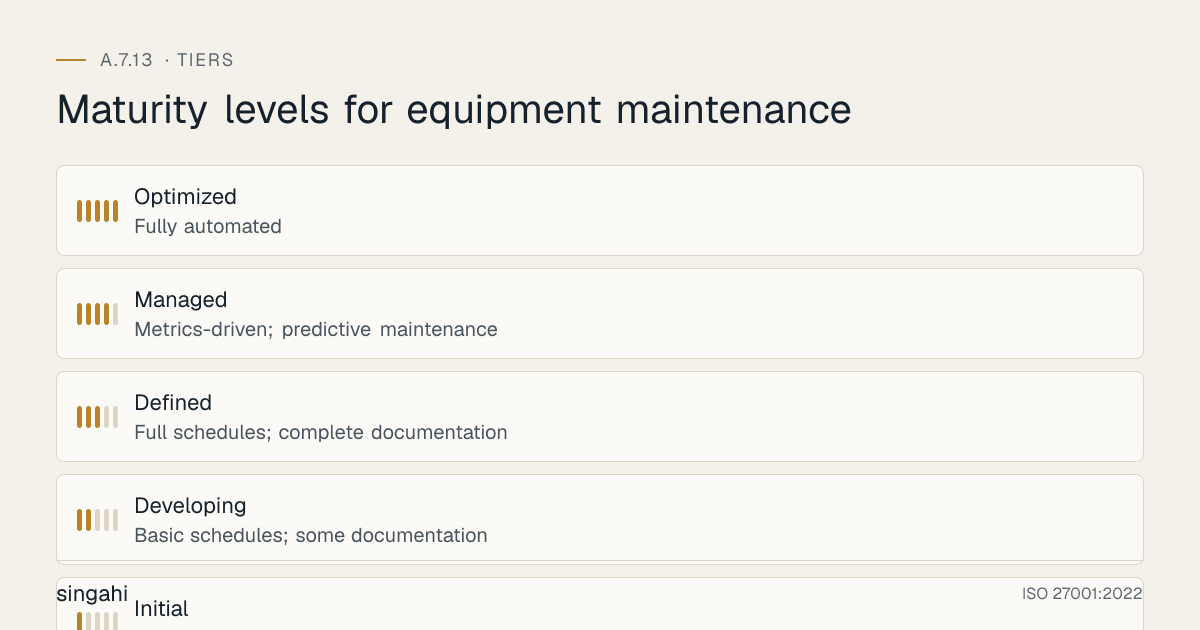
Maturity Model for A.7.13
| Level | Name | Characteristics | Evidence |
|---|---|---|---|
| 1 | Initial | Reactive maintenance; no schedule; no documentation; vendors unvetted | No policy; no logs; no CMMS; ad-hoc fixes |
| 2 | Developing | Basic schedules; some documentation; informal vendor management | Calendar-based scheduling; paper logs; basic vendor contracts |
| 3 | Defined | Full schedules; complete documentation; vetted vendors; verified procedures | CMMS/ITSM; preventive maintenance; vendor NDAs; pre/post verification |
| 4 | Managed | Metrics-driven; predictive maintenance; automated scheduling; vendor performance monitoring | Automated CMMS; predictive analytics; SLA monitoring; trend analysis |
| 5 | Optimized | Fully automated; AI-powered predictive maintenance; self-healing systems; integrated with enterprise systems | IoT-based condition monitoring; AI failure prediction; automated vendor dispatch; zero incidents |
Continuous Improvement Activities
Monthly:
- Maintenance schedule compliance review
- Overdue maintenance escalation and resolution
- Vendor performance review
- Maintenance log review for anomalies
Quarterly:
- Preventive maintenance effectiveness analysis
- Corrective maintenance trend analysis
- Vendor re-authorization and access review
- Internal audit of maintenance controls
- Configuration drift detection
Annually:
- Full policy review
- Complete maintenance program review
- Technology and tool evaluation
- Benchmark against industry standards
- External audit preparation
- Maturity assessment against target level
Trigger-Based:
- After any maintenance-related security incident
- Upon equipment failure that maintenance should have prevented
- Upon vendor contract change or termination
- After significant audit findings
- Upon new equipment technology adoption
FAQ
Q1: What types of equipment need maintenance under A.7.13? A: All information processing equipment: servers, workstations, storage, network devices, security devices, printers, peripherals, and utility equipment (UPS, generators, HVAC). If it processes, stores, or transmits information, it needs maintenance.
Q2: How often should we maintain servers? A: At minimum, monthly preventive maintenance (dust cleaning, log review, temperature check, fan inspection). Quarterly for firmware updates and deep inspection. Annually for complete hardware assessment. Follow manufacturer recommendations (e.g., Dell, HP, Cisco provide specific maintenance schedules). Adjust based on criticality and environment (dusty environments need more frequent cleaning).
Q3: Do we need to supervise all vendor maintenance? A: Supervision is required for all maintenance in secure areas and for all maintenance of sensitive or critical equipment. For routine maintenance of non-critical equipment in general areas, supervision may be reduced to periodic checks rather than continuous escort. However, the vendor must still be authorized, vetted, and their activities logged. Use risk-based judgment: the more sensitive the equipment or data, the more supervision required.
Q4: What if a vendor insists on keeping a failed component for warranty or analysis? A: The vendor can analyze the component on-site or in your presence. If the component must leave the site, the data must be sanitized first (degaussed, wiped, or physically destroyed). If the component cannot be sanitized (e.g., a failed SSD that cannot be erased), document the risk acceptance, require the vendor to sign a data protection agreement, and verify their disposal process. Better yet, choose vendors who do not require component retention.
Q5: How do we maintain equipment in a remote office with no IT staff? A: Use remote monitoring and management (RMM) tools for remote diagnostics and software maintenance. Schedule on-site vendor visits for hardware maintenance. Use cloud-managed devices that can be remotely maintained. Train a local employee (even non-IT) to perform basic tasks (checking lights, rebooting, checking cables). Have a "remote hands" vendor for physical intervention. Ship replacement equipment with pre-configuration for swap-out maintenance.
Q6: What is predictive maintenance and how do we implement it? A: Predictive maintenance uses data (sensor readings, performance metrics, error logs) to predict when equipment will fail, allowing maintenance just before failure. Implementation: (1) Deploy monitoring tools (IPMI, SNMP, SMART, BMS), (2) Collect and analyze data for trends, (3) Set thresholds for intervention, (4) Use AI/ML tools for advanced prediction, (5) Schedule maintenance based on predictions rather than fixed intervals. Predictive maintenance reduces costs and downtime compared to traditional preventive maintenance.
Q7: How do we handle emergency maintenance when there is no time for backup? A: Emergency maintenance is a risk. If the equipment is failing and immediate action is needed: (1) Assess if the data is already backed up (most organizations have automated backups), (2) If no recent backup, take a quick backup if possible, (3) Document the emergency and why normal procedures could not be followed, (4) After emergency maintenance, perform full verification, (5) Update procedures to prevent similar emergencies. Do not let "emergency" become an excuse for skipping security.
Q8: What about firmware updates? Are they maintenance? A: Yes, firmware updates are maintenance. They are critical for security (firmware often contains security patches). Treat firmware updates as high-priority maintenance: (1) Verify the update is from the manufacturer (checksum verification), (2) Test in a non-production environment first, (3) Have a rollback plan, (4) Schedule during a maintenance window, (5) Verify functionality and security after update, (6) Document the update in the maintenance log. Never apply firmware updates without planning and verification.
Q9: How do we maintain legacy equipment that the manufacturer no longer supports? A: Legacy unsupported equipment is a security risk. Options: (1) Replace with modern equipment, (2) If replacement is not possible, implement compensating controls (air-gap, additional monitoring, restricted access), (3) Maintain the equipment yourself using available documentation and spare parts, (4) Consider third-party maintenance vendors who specialize in legacy equipment, (5) Document the risk and accept it with management approval. Legacy equipment should be on a retirement plan, do not let it become permanent.
Q10: What is the most common audit finding for A.7.13? A: Incomplete maintenance records and lack of vendor management. Auditors will check: Are maintenance schedules documented? Are they being followed? Are maintenance logs complete? Are vendors vetted? Are components securely disposed of? The most common failure is having no evidence of maintenance, no logs, no schedules, no vendor records.
Q11: Do we need to maintain employee personal devices (BYOD)? A: BYOD devices used for work should be included in maintenance policy, but the organization typically cannot perform physical maintenance on personal devices. Instead: (1) Require employees to keep devices updated and patched, (2) Use MDM to enforce security updates, (3) Include device maintenance requirements in BYOD policy, (4) Prohibit use of unsupported or unmaintained devices for work. The organization maintains control over what devices can access corporate data, even if it does not maintain the devices themselves.
Q12: How do we track maintenance for equipment in the cloud? A: Cloud infrastructure (IaaS, PaaS) maintenance is typically the provider's responsibility for the underlying hardware. However, the organization is responsible for: (1) VM and application maintenance, (2) Configuration management, (3) Security patching, (4) Monitoring and alerting. Use cloud-native tools (AWS Systems Manager, Azure Update Manager, Google Cloud OS Patch Management) to schedule and track maintenance. Include cloud maintenance in your CMDB/ITSM. Verify cloud provider maintenance windows and security practices via SOC 2 reports and audit rights.
Q13: How much does implementing A.7.13 cost for a growing company? A: Mostly time rather than tools. Many organisations use their existing ITSM tool for the maintenance schedule and log. The main costs are maintenance contracts, escort time for on-site work, and secure handling of equipment that leaves for repair.
Q14: Can we use the same maintenance vendor for all equipment? A: Using a single vendor is simpler but creates risk: vendor lock-in, single point of failure, and potential compromise if the vendor is breached. Best practice: use multiple vendors for different equipment types (one for servers, one for network, one for facilities). Ensure all vendors meet your security standards. Diversify to reduce risk while maintaining efficiency.
Q15: What is the difference between maintenance and repair? A: Maintenance is proactive (preventive, predictive) or scheduled (corrective). Repair is reactive, fixing something that has already broken. ISO 27001 A.7.13 covers both. The goal is to move from reactive repair to proactive maintenance. Proactive maintenance reduces failures, improves security, and provides better audit evidence.
Industry-Specific Maintenance Requirements
See Industry-Specific Context above. Set maintenance windows, patch timelines and vendor checks from your risk assessment and any direction that actually applies to you; avoid copying figures (for example "72-hour notice to RBI" or "48-hour patching") that no regulator has set.
Maturity Model for A.7.13
| Level | Name | Maintenance Approach | Tools | Documentation | Vendor Management |
|---|---|---|---|---|---|
| 1 | Initial | Reactive (break-fix) | None | Ad hoc | No vetting |
| 2 | Managed | Scheduled preventive | Spreadsheet | Basic logs | Basic contracts |
| 3 | Defined | Preventive + predictive | CMMS/ITSM | Full SOPs | Security clauses |
| 4 | Quantitative | Predictive + automated | CMMS + analytics | Automated reports | Continuous monitoring |
| 5 | Optimized | AI-driven, self-healing | AI/ML platform | Real-time dashboards | Integrated risk management |
Progression Guidance:
- Level 1 → 2: Implement scheduled maintenance, basic CMDB, and maintenance contracts.
- Level 2 → 3: Deploy CMMS/ITSM, add security vetting to vendor contracts, implement full documentation.
- Level 3 → 4: Add predictive maintenance, automated monitoring, and continuous vendor assessment.
Additional FAQ
Q16: How do we handle maintenance for legacy equipment that vendors no longer support? A: Legacy equipment is a common challenge. Options: (1) Extended support contracts (expensive but available), (2) Third-party maintenance providers (ensure security vetting), (3) Upgrade/replacement (best long-term solution), (4) Compensating controls (network isolation, enhanced monitoring, strict access controls). Document the risk and obtain management acceptance. Plan for replacement within a defined timeline.
Q17: What is predictive maintenance and how does it improve security? A: Predictive maintenance uses sensors, IoT, and analytics to predict equipment failures before they occur. It improves security by: (1) Reducing unexpected failures that create vulnerabilities, (2) Enabling planned maintenance windows with proper security controls, (3) Identifying anomalies that may indicate tampering or cyber-physical attacks, (4) Optimizing equipment lifespan to reduce emergency replacements. Typical tools: vibration analysis, thermal imaging, oil analysis, and electrical signature analysis.
Q18: How do we maintain security during vendor maintenance visits? A: Implement a vendor access protocol: (1) Pre-visit notification and approval, (2) Background check verification, (3) Escorted access at all times, (4) Signed NDA and security briefing, (5) Restricted network access (guest WiFi only), (6) Tool and device inspection (no unauthorized USB drives, cameras), (7) Activity logging (what was accessed, what was changed), (8) Post-visit review and sign-off. Use temporary badges that expire automatically.
Q19: How do we balance maintenance costs with security requirements? A: Prioritize based on risk: critical systems (core banking, patient monitors) get the highest maintenance priority and budget. Use risk assessment to justify spending. Consider vendor support (overall value), cheap equipment with poor maintenance costs more in the long run. Use leasing or managed service models to convert CapEx to OpEx. Group maintenance contracts for volume discounts. Negotiate SLAs that include security requirements at no extra cost.
Q20: How do we document maintenance for ISO 27001 audit evidence? A: Maintain these records: (1) Equipment inventory with maintenance schedules, (2) Maintenance contracts with security clauses, (3) Vendor vetting records, (4) Maintenance logs (date, technician, work performed, parts replaced), (5) Test results after maintenance, (6) Patch management records, (7) Configuration change records, (8) Security review records after maintenance, (9) Incident records related to maintenance failures, (10) Management review of maintenance program. Store for at least 3 years (or longer per regulatory requirements).
Illustrative Scenario (hypothetical): Bengaluru IT Company, Maintenance Failure to Security Incident
Background
A 500-employee software company in Bangalore outsourced server maintenance to a third-party vendor. The vendor had access to the server room, performed quarterly maintenance, and replaced faulty hardware. The company had no formal vendor vetting process, no escort requirements, and no activity logging.
The Incident
A maintenance technician (contracted through the vendor) installed a hardware monitoring tool on three production servers. The tool was legitimate but was downloaded from an unofficial source and contained a backdoor. The backdoor allowed remote access to the servers, which the attacker used to exfiltrate customer data over 6 weeks. The breach affected 12,000 customer records, including names, email addresses, and partial payment data.
Root Cause Analysis
- No Vendor Vetting: The vendor was selected based on price alone. No background checks, no security questionnaire, no reference verification.
- Unescorted Access: The technician was given unsupervised access to the server room during after-hours maintenance.
- No Device Inspection: The technician's laptop and USB drives were not inspected. The unauthorized software was installed via USB.
- No Activity Logging: The company had no logs of what the technician did during the maintenance window. The backdoor installation was not detected until the data exfiltration triggered a DLP alert.
- No Post-Maintenance Review: After maintenance, no one verified what was changed or installed. The backdoor persisted for 6 weeks.
Impact
- Data Exfiltration: 12,000 customer records stolen and sold on dark web forums
- Regulatory: exposure to DPDP Act penalties once the fiduciary duties commence
- Customer Notification: Mandatory breach notification to affected customers and the Data Protection Board
- Reputational: Customer churn increased 18%, new sales dropped 30% for 2 quarters
- Legal: Class action lawsuit filed by affected customers
- Total cost: legal fees, notification, remediation and lost business
Remediation
After the incident, the company implemented a complete maintenance security program:
- Vendor Vetting: All maintenance vendors now undergo security questionnaires, background checks, and reference verification. Contracts include security clauses and liability for breaches caused by vendor actions.
- Escorted Access: All vendor personnel are escorted by an internal employee at all times. No unsupervised access to critical areas.
- Device Inspection: All vendor devices (laptops, USB drives, tools) are inspected before and after maintenance. Unauthorized devices are prohibited.
- Activity Logging: Maintenance activities are logged in real-time. Network monitoring captures all traffic during maintenance windows. Screen recording is used for remote maintenance sessions.
- Post-Maintenance Review: Every maintenance session is followed by a security review: verify installed software against approved list, scan for malware, review configuration changes, and sign off.
- Network Segmentation: Vendor maintenance is performed on an isolated VLAN with no access to production data. Remote access is through a bastion host with MFA and session recording.
- Incident Response: The company developed a maintenance-specific incident response playbook. Maintenance windows are treated as high-risk periods with enhanced monitoring.
Key Lessons
- Trust but Verify: Even trusted vendors can be compromised. Always verify vendor actions.
- Maintenance Windows are High-Risk: The time when external personnel have physical access is the most vulnerable period. Implement enhanced controls during maintenance.
- Log Everything: Without logs, you cannot detect, investigate, or prove what happened. Logging is essential for both security and compliance.
- Vendor Security is Your Security: A vendor breach is your breach. Vendor security standards must match your own.
- Post-Maintenance Verification: Always verify what was done. The cost of verification is minimal compared to the cost of a breach.
Maintenance Security Metrics and KPIs
| Metric | Formula | Target | Frequency |
|---|---|---|---|
| Preventive Maintenance Completion Rate | (Completed PM tasks / Scheduled PM tasks) × 100 | > 95% | Monthly |
| Mean Time Between Failures (MTBF) | Total operational hours / Number of failures | Increasing | Quarterly |
| Vendor Security Score | (Vendors meeting security standards / Total vendors) × 100 | 100% | Quarterly |
| Maintenance-Related Incidents | Number of security incidents caused by maintenance | 0 | Monthly |
| Patch Compliance Rate | (Systems patched on time / Total systems) × 100 | > 98% | Monthly |
| Vendor Access Reviews | Number of vendor access reviews conducted | All vendors reviewed | Quarterly |
| Equipment Uptime | (Total uptime / Total time) × 100 | > 99.5% | Monthly |
| Maintenance Cost per Asset | Total maintenance cost / Number of assets | Optimized | Quarterly |
| Post-Maintenance Verification Rate | (Verified maintenance sessions / Total sessions) × 100 | 100% | Monthly |
| Legacy Equipment Risk Score | Risk rating of unsupported equipment | Decreasing | Quarterly |
References and Further Reading
Standards and Frameworks
- ISO/IEC 27001:2022, Information Security, Cybersecurity and Privacy Protection, Information Security Management Systems, Requirements
- ISO/IEC 27002:2022, Information Security, Cybersecurity and Privacy Protection, Information Security Controls
- NIST SP 800-53 Rev 5, Security and Privacy Controls for Information Systems and Organizations
- ISO 55000, Asset Management, Overview, Principles and Terminology
- PCI DSS v4.0.1, Payment Card Industry Data Security Standard
- CIS Controls v8, CIS Controls Version 8
Indian Regulations
- Digital Personal Data Protection Act, 2023 (India)
- Information Technology Act, 2000 (as amended)
- RBI Cyber Security Framework for Banks
- SEBI Cybersecurity and Cyber Resilience Framework (CSCRF) for SEBI Regulated Entities, circular of 20 August 2024
- OSH Code 2020 (replaced the Factories Act 1948) (India)
Books and Publications
- ISO 27001/27002: A Pocket Guide by Alan Calder
- The Manager's Handbook for Corporate Security by Gerald L. Kovacich and Edward P. Halibozek
- Maintenance Engineering Handbook by Lindley R. Higgins
Indian Regulatory Context for Equipment Maintenance
In India, maintenance is often outsourced through annual maintenance contracts (AMCs). Write security into the AMC: named and verified technicians, confidentiality terms, escorted on-site work, remote access only when approved, "keep your drive" (defective media retention) clauses so failed disks stay with you, and post-maintenance checks before equipment returns to service. Facilities equipment (UPS, generators, fire systems, lifts) has its own statutory inspections; keep those certificates with your maintenance records.