
On this page
- Quick Reference (60 Seconds)
- What the Control Asks For
- Why Secure Disposal of Equipment Matters
- Scope and Applicability
- Key Definitions and Terminology
- Relationship to Other Controls
- Implementation Roadmap (Week-by-Week)
- Detailed Implementation Guidance
- Tools, Technologies, and Solutions
- Policy and Procedure Templates
- Risk Assessment and Treatment
- Audit and Compliance Checklist
- Metrics and KPIs
- Common Pitfalls and How to Avoid Them
- Illustrative Scenarios
- Multi-Framework Mapping
- Regulatory and Industry Context
- Roles and Responsibilities (RACI)
- Documentation and Evidence Requirements
- Continuous Improvement
- FAQ
- References and Further Reading
- Equipment Disposal by Device Type
- Equipment Disposal Workflow
- Additional Illustrative Scenarios: Indian Equipment Disposal Incidents
Quick Reference (60 Seconds)
Figure · At a glance
A.7.14 at a glance
- Control ID
- A.7.14
- Control Name
- Secure Disposal or Re-use of Equipment
- ISO 27002:2022 Section
- 7.14
- Primary Purpose
- Ensure equipment is securely disposed
- Key Activities
- Identify equipment for disposal
- Typical Owners
- IT Operations, IT Security
| Aspect | Summary |
|---|---|
| Control ID | A.7.14 |
| Control Name | Secure Disposal or Re-use of Equipment |
| ISO 27002:2022 Section | 7.14 |
| Primary Purpose | Ensure equipment is securely disposed of when no longer needed, preventing unauthorized access to data |
| Key Activities | Identify equipment for disposal, sanitize data, verify destruction, document disposal, comply with e-waste regulations |
| Typical Owners | IT Operations, IT Security, Facility Management, Procurement |
| Implementation Effort | Low-Medium (2–4 weeks) |
| Main cost drivers | Sanitisation tools or an IT asset disposition (ITAD) vendor, destruction for media that cannot be purged, secure storage before disposal, and staff time for records |
| ISO 27002 attributes | Control type: Preventive · Properties: Confidentiality · Concepts: Protect · Capabilities: Physical security, Asset management · Domains: Protection |
Bottom Line: Every piece of equipment you dispose of is a potential data breach if not properly sanitized. Hard drives, SSDs, phones, printers, and even copiers contain recoverable data. Secure disposal is the final line of defense for data protection.
What the Control Asks For
In short:
ISO 27001:2022 Annex A 7.14 asks organizations to verify that equipment with storage media has sensitive data and licensed software removed or securely overwritten before disposal or re-use.
Do you need this control?
A.7.14 is not mandatory in itself: under clause 6.1.3 you include it if your risk assessment calls for it, and record the decision in your Statement of Applicability. Include it if you dispose of or re-use equipment that stores data, which is almost everyone. The key decision is the sanitisation method for each media type (NIST SP 800-88 Rev 2 is the usual reference).
What ISO 27002:2022 Adds
27002 7.14 (paraphrased):
- Check whether equipment contains storage media before disposal or re-use (printers, copiers, network devices, medical and industrial equipment often do).
- Media holding confidential or copyrighted information should be physically destroyed, or the information destroyed, deleted or overwritten so it cannot be retrieved: not simply deleted. See 7.10 for media and 8.10 for information deletion.
- Remove labels and markings that identify the organisation, classification, owner, system or network before disposal, including resale or donation.
- Licensed software must be removed or overwritten (the control itself says so): harvest and de-register licences (A.5.32).
- At the end of a lease or when moving out, consider removing security controls such as access-control systems and surveillance equipment, weighing (a) the lease's restore-to-original clause, (b) the risk of leaving user access lists, video or images for the next tenant, and (c) whether you can reuse them at the new site.
- Damaged equipment with storage media may need a risk assessment to decide between destruction and repair or disposal.
Why Secure Disposal of Equipment Matters
The Forgotten End of the Lifecycle
Organizations invest heavily in securing data while it is in use, firewalls, encryption, access controls, DLP. But when equipment reaches end-of-life, that focus often disappears. Equipment is sold, donated, recycled, or thrown away without proper data sanitization. This is where breaches happen.
Why Disposal Goes Wrong
Studies of second-hand drives keep finding readable data: a 2019 Blancco and Ontrack study found sensitive data on 42% of used drives bought on eBay. In India, the Central Pollution Control Board has reported e-waste generation of roughly 1.6 to 1.75 million tonnes a year in recent years, so a great deal of equipment passes through informal channels. Hypothetical patterns to avoid:
- Old PCs sold to a scrap dealer with drives still inside.
- Laptops donated with only a quick format.
- Leased copiers returned with years of scanned documents on their internal drives.
- Servers sent to a recycler that resells them unwiped.
- An access-control server left behind for the next tenant, still holding staff records and badge logs.
Regulatory and Business Drivers
- DPDP Act 2023: reasonable security safeguards (s.8(5)) and erasure when the purpose is served (s.8(7)); failing to take safeguards can attract a penalty of up to ₹250 crore
- E-Waste (Management) Rules, 2022: Mandates proper e-waste handling, authorized recyclers, and records
- IT Act 2000 (Section 43A): Compensation for failure to protect sensitive personal data
- Sector regulators (RBI, SEBI CSCRF 2024, IRDAI 2023) expect secure disposal of equipment holding customer data
- PCI DSS v4.0.1: 9.4.6 (hard-copy materials destroyed) and 9.4.7 (electronic media destroyed or rendered unrecoverable)
- SOC 2 CC6.5: protections are discontinued only after data can no longer be read or recovered
Scope and Applicability
What Is Covered
- All computers (desktops, laptops, servers, tablets)
- All storage devices (hard drives, SSDs, USB drives, memory cards, tapes, CDs/DVDs)
- All mobile devices (smartphones, feature phones, smartwatches)
- All printers, copiers, scanners, and multifunction devices (which contain hard drives)
- All network equipment (routers, switches, firewalls, wireless access points)
- All security equipment (CCTV systems, access control systems, biometric devices)
- All peripheral devices (keyboards with memory, mice with memory, webcams, microphones)
- All backup media and archive media
- All components removed from equipment during maintenance or upgrade (hard drives, memory, motherboards)
What Is Not Covered
- General office furniture (unless it contains embedded electronics)
- Non-electronic equipment not capable of storing data
- Personal devices of employees not used for work (though BYOD policies may extend coverage)
Applicability by Organization Type
| Organization Type | Applicability | Key Disposal Concerns |
|---|---|---|
| IT/Software Services | High | Source code repositories, customer data, dev environments, cloud hardware |
| BFSI | Critical | Customer financial records, transaction logs, ATM hard drives, core banking systems |
| Healthcare | Critical | Patient records, medical images, lab results, prescription data |
| Manufacturing | Medium | R&D designs, production plans, SCADA configurations, IoT data |
| Government/Defense | Critical | Classified documents, citizen records, strategic communications, secure keys |
| Education | Medium | Student records, exam materials, research data, financial aid information |
| SaaS/Cloud | High | Customer tenant data, backup archives, infrastructure configurations, log files |
| Retail/E-commerce | High | Customer purchase history, payment data, inventory records, supplier contracts |
Key Definitions and Terminology
| Term | Definition |
|---|---|
| Sanitization | The process of removing data from storage media so that it cannot be recovered using normal system functions or standard data recovery tools |
| Clearing | A sanitization method that removes data in a way that prevents recovery by standard operating system commands or commercial software tools; typically achieved by overwriting |
| Purging | A sanitization method that makes data recovery infeasible using state-of-the-art laboratory techniques; typically achieved by degaussing or cryptographic erase |
| Destruction | A sanitization method that physically destroys the media, making data recovery impossible |
| Degaussing | The process of using a strong magnetic field to erase data from magnetic media (hard drives, tapes) |
| Cryptographic Erase | A sanitization method that destroys the encryption key, rendering encrypted data unreadable without erasing the actual data |
| Overwriting | A sanitization method that writes new data (typically zeros or random patterns) over the existing data |
| Certificate of Destruction | A formal document certifying that a specific item of equipment or media has been securely disposed of or destroyed |
| E-Waste | Electronic waste, discarded electronic or electrical devices, including computers, servers, phones, and peripherals |
| Authorized Recycler | A vendor approved by the Central Pollution Control Board (CPCB) or State Pollution Control Board (SPCB) to handle e-waste in India |
| Chain of Custody | A documented record of the transfer of equipment from the organization to the disposal vendor, ensuring accountability at each step |
| End-of-Life (EOL) | The stage in an equipment's lifecycle when it is no longer usable or supported by the manufacturer |
| End-of-Support (EOS) | The date when the manufacturer stops providing updates, patches, or support for a product |
| Asset Retirement | The process of removing an asset from active service and preparing it for disposal or repurposing |
Relationship to Other Controls
| Control | Relationship |
|---|---|
| A.5.9 Inventory of information and other assets | Equipment must be removed from inventory upon disposal |
| A.5.33 Protection of records | Disposal records must be retained as evidence |
| A.7.2 Physical entry controls | Disposal equipment must be stored securely before disposal |
| A.7.6 Working in secure areas | Disposal of equipment from secure areas requires additional controls |
| A.7.8 Equipment siting and protection | Equipment must be protected until disposal |
| A.7.10 Storage media | Media disposal is a subset of equipment disposal |
| A.7.13 Equipment maintenance | Maintenance may generate components requiring disposal |
| A.8.10 Information deletion | 27002 7.14 points here for deletion methods |
| A.5.32 Intellectual property rights | Licensed software removed and licences de-registered |
| A.5.11 Return of assets | Equipment returned by leavers before re-use |
| A.8.1 User endpoint devices | Endpoint devices must be securely disposed of |
| A.8.13 Information backup | Backups must be considered when disposing of equipment (backup media may need separate disposal) |
| A.8.24 Use of cryptography | Cryptographic erase can be used for sanitization |
Implementation Roadmap (Week-by-Week)
Week 1: Equipment Inventory and Disposal Assessment
- Inventory all equipment scheduled for or approaching end-of-life
- Identify equipment with storage components (hard drives, SSDs, memory)
- Assess current disposal practices and identify gaps
- Identify all disposal vendors and their security practices
- Review e-waste compliance status
- Document current state and risks
Week 2: Policy and Procedure Development
- Draft secure disposal policy
- Define sanitization methods for each equipment type
- Define verification requirements for sanitization
- Create disposal authorization procedures
- Create vendor evaluation and selection criteria
- Define chain of custody requirements
- Create documentation and certificate requirements
Week 3: Sanitization Capability Setup
- Procure or contract sanitization tools (degaussers, shredders, wiping software)
- Procure or contract destruction services (shredding, crushing, incineration)
- Set up secure storage area for equipment awaiting disposal
- Train staff on sanitization methods and verification
- Create sanitization checklists and logs
- Test sanitization methods on sample equipment
Week 4: Vendor Selection and Contracting
- Identify and evaluate disposal vendors (security, e-waste license, insurance, references)
- Conduct security assessment of shortlisted vendors
- Negotiate contracts with security requirements, SLAs, and certificates
- Require NDAs and data protection agreements
- Establish chain of custody procedures with vendors
- Create vendor performance monitoring process
Week 5: Disposal Execution and Documentation
- Execute disposal of first batch of equipment using new procedures
- Perform sanitization and verification for each item
- Document chain of custody for each item
- Obtain certificates of destruction for each item
- Update asset inventory to reflect disposal
- Review and refine procedures based on practical experience
Week 6: E-Waste Compliance Setup
- Register with CPCB/SPCB if required by e-waste rules
- Ensure all disposal vendors have valid e-waste licenses
- Set up e-waste record keeping (generation, collection, disposal)
- Create e-waste manifest system for tracking
- Plan for annual e-waste compliance reporting
- Train staff on e-waste regulatory requirements
Week 7: Training and Communication
- Train all IT staff on disposal procedures and data sanitization
- Train all managers on disposal authorization and risk
- Create quick reference guides for common disposal scenarios
- Communicate policy to all employees
- Create awareness materials on the risks of improper disposal
- Post disposal procedures in equipment storage areas
Week 8: Audit and Validation
- Conduct internal audit of disposal controls
- Verify all disposal is documented and certificates are retained
- Verify e-waste compliance records are complete
- Verify vendor contracts and authorizations are current
- Review and approve all documentation
- Prepare for external audit
- Plan for continuous improvement
Detailed Implementation Guidance
Figure · Matrix
How the options compare: Hard Disk Drive to CD/DVD/Blu-ray
Sanitization Methods by Equipment Type
Computers (Desktops, Laptops, Servers):
| Step | Action | Method | Verification |
|---|---|---|---|
| 1 | Remove and sanitise storage drives (HDD/SSD) | Purge (sanitize command or crypto-erase) or destroy, per the A.7.10 matrix | Verify erase certificate; inspect physical destruction |
| 2 | Sanitize motherboard/BIOS | Reset BIOS/UEFI to defaults; clear TPM | Boot and verify no residual configuration |
| 3 | Sanitize memory (if removable) | Power off, discharge, remove | Visual inspection |
| 4 | Sanitize network/BIOS configurations | Reset all network settings; clear MAC address bindings | Verify no stored credentials |
| 5 | Physical destruction (if required) | Shred or crush entire unit or storage components | Certificate of destruction |
Storage Devices (HDDs, SSDs, USB Drives, Memory Cards):
| Media Type | Clearing Method | Purging Method | Destruction Method |
|---|---|---|---|
| Hard Disk Drive (HDD) | Single verified overwrite | Sanitize command or crypto-erase; or degauss (which also destroys the drive) | Shred, crush or disintegrate |
| Solid State Drive (SSD) | Vendor secure-erase tool | Sanitize command (block erase or crypto-erase), verified by sampling; overwriting and degaussing are not reliable | Shred, crush, or incinerate |
| USB Flash Drive | Overwrite (full capacity) | Cryptographic erase (if supported) | Shred or incinerate |
| Memory Card (SD, microSD) | Overwrite | Not applicable | Shred or incinerate |
| Magnetic Tape | Degauss with certified degausser | Degauss + overwrite | Shred or incinerate |
| CD/DVD/Blu-ray | Not applicable (read-only after write) | Not applicable | Shred or incinerate |
Mobile Devices (Smartphones, Tablets):
| Step | Action | Verification |
|---|---|---|
| 1 | Factory reset (if device is functional) | Boot device and verify no data remains |
| 2 | Remove and destroy SIM card and memory card | Visual inspection |
| 3 | Remove battery (if removable) | Visual inspection |
| 4 | For high-security disposal: physical destruction | Shred or crush; certificate of destruction |
| 5 | For MDM-enrolled devices: deprovision from MDM first | Verify in MDM console |
Printers, Copiers, Scanners, MFPs:
| Step | Action | Verification |
|---|---|---|
| 1 | Remove and sanitize internal hard drive (most modern printers have HDDs) | Degauss, overwrite, or destroy drive |
| 2 | Clear device memory (RAM and NVRAM) | Power cycle and verify no stored jobs |
| 3 | Reset to factory defaults | Verify no network settings, credentials, or stored documents |
| 4 | Clear scan/fax storage | Verify no stored scans or faxes |
| 5 | Remove and destroy any stored font or form data | Verify in configuration menu |
Network Equipment (Routers, Switches, Firewalls, APs):
| Step | Action | Verification |
|---|---|---|
| 1 | Backup configuration (for reference, not for reuse) | Document backup location |
| 2 | Reset to factory defaults | Verify no residual configuration |
| 3 | Clear NVRAM and flash memory | Verify no stored certificates, keys, or passwords |
| 4 | For equipment with storage: sanitize storage | Verify no logs or packet captures remain |
| 5 | For high-security: physical destruction of storage components | Certificate of destruction |
Sanitization Verification
Verification Requirements:
| Sanitization Level | Verification Method | Documentation |
|---|---|---|
| Clearing (Overwrite) | Software verification scan (read sectors, verify zeros/random data) | Sanitization log with software report |
| Purging (Degauss) | Magnetic field strength verification with gauss meter | Degaussing log with field strength reading |
| Cryptographic Erase | Verify key destruction; attempt decryption with destroyed key | Cryptographic erase certificate |
| Destruction (Physical) | Visual inspection of destroyed media; photograph if required | Certificate of destruction; photo |
Verification Best Practices:
- Use reputable sanitization software (DBAN, Blancco, Parted Magic) that provides verification reports
- For degaussing, verify the degausser's field strength meets the media manufacturer's requirements
- For physical destruction, witness the destruction for high-sensitivity media
- For cryptographic erase, verify in the device's management console that keys are destroyed
- Retain all verification reports and certificates for the required retention period
Disposal Vendor Management
Vendor Selection Criteria:
| Criterion | Requirement | Verification |
|---|---|---|
| E-waste license | Valid CPCB/SPCB authorization | Check license number on CPCB website |
| Security certifications | ISO 27001, SOC 2, or equivalent | Request certificate and verify validity |
| Insurance | Adequate liability and cyber insurance | Request certificate of insurance |
| Security practices | Documented sanitization and destruction procedures | Audit or request documentation |
| Chain of custody | Documented pickup, transport, and processing tracking | Review their process |
| Certificates | Provides certificates of destruction for all items | Sample certificate review |
| References | Positive references from similar organizations | Contact references |
| NDA capability | Willing to sign NDA and data protection agreement | Contract review |
| Environmental compliance | Complies with E-Waste Rules 2022 and other environmental laws | License and compliance review |
| On-site services | Offers on-site destruction for high-sensitivity items | Service catalog review |
Vendor Contract Requirements:
- Data protection and confidentiality clauses
- Requirement for certificates of destruction for all items
- Right to audit vendor's facilities and processes
- Notification requirement if data is discovered during processing
- Liability and indemnification clauses
- Requirement to use only authorized sub-contractors
- E-waste compliance commitments
Vendor Performance Monitoring:
- Quarterly review of certificates and documentation
- Annual site visit or audit (if feasible)
- Incident tracking (any lost equipment, delayed certificates, data discovery)
- Contract renewal based on performance and compliance
Chain of Custody
Chain of Custody Process:
- Identification: Equipment is identified and approved for disposal by asset owner and IT Security
- Inventory: Equipment is logged in the disposal inventory with asset ID, type, serial number, and sanitization method
- Secure Storage: Equipment is stored in a locked, access-controlled area awaiting disposal
- Sanitization: Sanitization is performed internally or by vendor; method and verification are documented
- Handover: Equipment is handed over to disposal vendor with signed transfer document
- Transport: Vendor transports equipment securely with tracking
- Processing: Vendor processes equipment (recycling, destruction, resale); processing is documented
- Certificate: Vendor provides certificate of destruction or recycling
- Verification: Organization verifies certificate and updates inventory
- Retention: All records are retained for the required period
Chain of Custody Documentation:
| Document | Purpose | Retention |
|---|---|---|
| Disposal approval form | Authorizes disposal | Duration + 3 years |
| Disposal inventory | Lists all items for disposal | Duration + 3 years |
| Sanitization log | Records sanitization method and verification | Duration + 3 years |
| Transfer document | Records handover to vendor | Duration + 3 years |
| Transport tracking | Tracks shipment to vendor | Duration + 3 years |
| Certificate of destruction | Certifies secure disposal | Duration + 3 years |
| Vendor audit report | Records vendor compliance assessment | Duration + 3 years |
| E-waste manifest | Records e-waste disposal for regulatory compliance | Duration + 3 years |
E-Waste Compliance in India
E-Waste (Management) Rules, 2022:
| Requirement | Applicability | Compliance Action |
|---|---|---|
| Registration | All manufacturers, producers, refurbishers, recyclers | Register on CPCB portal; obtain EPR authorization |
| EPR targets | Producers of electrical/electronic equipment | Meet annual collection and recycling targets based on sales |
| Hand-over to registered entities | Bulk consumers (see the Rules' definition, which covers most companies, banks, institutions and healthcare facilities above small thresholds) | Hand e-waste only to registered producers, refurbishers or recyclers |
| E-waste records | All bulk consumers | Maintain records of e-waste generation, collection, and disposal |
| Transfer records | When handing e-waste over | Keep documents for each hand-over; file returns on the CPCB portal where the Rules require |
| Prohibited disposal | All | Do not dispose of e-waste in regular trash or through unauthorized channels |
| Hazardous substances | All | Ensure proper handling of batteries, CRTs, mercury-containing devices |
EPR (Extended Producer Responsibility) for Organizations:
- EPR obligations sit with producers; as a bulk consumer your duty is to hand e-waste only to registered entities and keep records
- Organizations should verify their disposal vendor's CPCB/SPCB authorization
- Organizations should maintain records of e-waste disposal for regulatory inspection
- Penalties for non-compliance can include fines and operational restrictions
Tools, Technologies, and Solutions
Data Sanitization Software
| Product | Type | Best For | Pricing model |
|---|---|---|---|
| Blancco | Enterprise sanitization | Large organizations, certified erasure, audit reports | Commercial |
| DBAN (Darik's Boot and Nuke) | Open-source | Free, basic overwriting, non-certified | Free |
| Parted Magic | Bootable disk utility | SSD secure erase, disk partitioning, cloning | Commercial |
| Eraser | Windows utility | Free, scheduled overwriting, Windows integration | Free |
| KillDisk | Bootable utility | HDD/SSD overwrite, verification reports | Commercial |
| Apple Disk Utility | macOS built-in | macOS devices, secure erase | Free (included) |
| Microsoft Secure Erase | Windows built-in | Windows devices, BitLocker-encrypted drives | Free (included) |
Physical Destruction Equipment
| Product | Type | Capacity | Pricing model |
|---|---|---|---|
| Garner HD-2 | Hard drive degausser | HDDs, tapes | Commercial |
| Garner PD-5 | Physical destroyer + degausser | HDDs, SSDs, phones | Commercial |
| Verity Systems SV91M | Degausser | Tapes, HDDs | Commercial |
| Datastroyer | Media shredder | HDDs, SSDs, tapes, phones | Commercial |
| ** intimus** | Industrial shredder | Paper, media, hard drives | Commercial |
| HSM Shredder | Cross-cut shredder | Paper, CDs, cards | Commercial |
Disposal Vendor Services (India)
| Vendor | Services | Coverage | Key Features |
|---|---|---|---|
| Attero Recycling | E-waste recycling, data destruction | Pan-India | CPCB authorized, ISO 27001, certificates |
| Envirocare Recycle | E-waste recycling, ITAD | Pan-India | CPCB authorized, data wiping, asset recovery |
| Ecoreco | E-waste management, recycling | Pan-India | CPCB authorized, EPR compliance |
| TES (Sims Lifecycle Services) | ITAD, data destruction, recycling | Global, India | Industry leader, certified processes |
| Iron Mountain | ITAD, data destruction, storage | Global, India | Enterprise-grade, complete certificates |
| Cashify | Device buyback, recycling | Pan-India | Consumer/small business, data wipe |
| ReGlobe (Yaantra) | Device buyback, refurbishment | Pan-India | Consumer/small business, data wipe |
Asset Management and Disposal Tracking
| Vendor | Product | Key Features | Pricing model |
|---|---|---|---|
| Snipe-IT | Open Source Asset Management | Disposal tracking, depreciation, reporting | Free (self-hosted) |
| ServiceNow | IT Asset Management | Enterprise, full lifecycle, disposal workflows | Commercial |
| Freshservice | Asset Management | Cloud-based, disposal tracking, vendor management | Commercial |
| ManageEngine | AssetExplorer | Growing companies, disposal tracking, maintenance history | Commercial |
| Wasp Barcode | AssetCloud | Disposal tracking, barcode/RFID, reporting | Commercial |
Policy and Procedure Templates
Secure Disposal Policy Template
Template
Secure Disposal of Equipment Policy
1. Purpose
This policy establishes requirements for the secure disposal of information processing equipment to prevent unauthorized access to data and ensure compliance with environmental regulations.
2. Scope
This policy applies to all equipment capable of storing, processing, or transmitting information, including computers, storage devices, mobile devices, printers, network equipment, and security devices.
3. Disposal Authorization
- All equipment disposal must be approved by the asset owner and IT Security
- Disposal must be documented in the asset disposal register
- Equipment must be removed from active inventory before disposal
- Disposal of equipment containing sensitive or classified data requires CISO approval
4. Data Sanitization
4.1 Before Disposal
- All data must be removed from equipment using approved sanitization methods
- Sanitization must be verified before equipment leaves the organization's control
- Default methods (delete, format, factory reset) are NOT sufficient for secure disposal
4.2 Sanitization Methods
| Equipment Type | Minimum Method | High-Sensitivity Method |
|---|---|---|
| Hard Disk Drive (HDD) | Overwrite (3 passes) | Degauss or physical destruction |
| Solid State Drive (SSD) | Cryptographic erase or overwrite | Physical destruction |
| USB/Flash Drive | Overwrite (full capacity) | Physical destruction |
| Mobile Device | Factory reset + MDM deprovision | Physical destruction |
| Printer/Copier | Remove and sanitize HDD | Physical destruction of HDD |
| Network Equipment | Reset to factory defaults + NVRAM clear | Physical destruction of storage |
4.3 Verification
- Sanitization must be verified using appropriate methods (software scan, degaussing meter, visual inspection)
- Verification results must be documented
- For physical destruction, a certificate of destruction must be obtained
5. Disposal Methods
5.1 Internal Sanitization + External Recycling
- Equipment is sanitized internally
- Sanitized equipment is handed to authorized e-waste recycler
- Certificate of recycling obtained
5.2 Vendor-Managed Sanitization and Disposal
- Equipment is handed to certified ITAD vendor
- Vendor performs sanitization and/or destruction
- Certificate of destruction obtained
- Vendor must be security-vetted and CPCB authorized
5.3 On-Site Destruction
- For high-sensitivity equipment, destruction is performed on-site
- Organization witnesses destruction
- Certificate of destruction issued
- Residual materials are handed to authorized recycler
6. Vendor Management
- All disposal vendors must be security-vetted and CPCB/SPCB authorized
- Vendors must sign NDAs and data protection agreements
- Vendors must provide certificates of destruction for all items
- Vendor performance must be reviewed annually
- Organization has the right to audit vendor processes
7. Chain of Custody
- All equipment disposal must follow the documented chain of custody
- Equipment must be stored securely before disposal
- Handover to vendor must be documented with signed transfer records
- Transport must be tracked and verified
- Processing and destruction must be documented with certificates
8. E-Waste Compliance
- All e-waste disposal must comply with E-Waste (Management) Rules, 2022
- Disposal must be through authorized recyclers only
- E-waste records must be maintained for regulatory compliance
- E-waste manifests must be used for disposal tracking
9. Roles and Responsibilities
- Asset Owner: Initiates disposal request, verifies data removal
- IT Security: Approves disposal, verifies sanitization, audits vendor
- IT Operations: Performs sanitization, maintains disposal records
- Procurement: Manages vendor contracts and performance
- Facility Management: Manages e-waste compliance and environmental aspects
- CISO: Approves disposal of high-sensitivity equipment, audits compliance
10. Enforcement
- Unauthorized disposal is prohibited and subject to disciplinary action
- Disposal without proper sanitization is a serious security violation
- Failure to document disposal will result in corrective action
- Non-compliance with e-waste regulations will be escalated to management
11. Review
This policy is reviewed annually or after any disposal-related security incident.
Disposal Request Form Template
Template
Equipment Disposal Request Form
Equipment Information
- Asset ID: _______________
- Equipment Type: _______________
- Manufacturer/Model: _______________
- Serial Number: _______________
- Asset Owner/Department: _______________
- Original Purchase Date: _______________
- Reason for Disposal: _______________ (End of life / Obsolete / Damaged / Upgrade / Other)
Data Classification
- Data Classification on Equipment: _______________ (Public / Internal / Confidential / Secret)
- Contains Personal Data: _______________ (Yes / No)
- Contains Customer Data: _______________ (Yes / No)
- Contains Financial Data: _______________ (Yes / No)
- Contains Classified Data: _______________ (Yes / No)
Sanitization Plan
- Sanitization Method: _______________ (Overwrite / Degauss / Cryptographic Erase / Physical Destruction)
- Sanitization Tool/Vendor: _______________
- Verification Method: _______________
- Estimated Sanitization Date: _______________
Disposal Method
- Disposal Method: _______________ (Internal Recycling / Vendor Disposal / On-Site Destruction)
- Disposal Vendor: _______________
- Vendor Authorization: _______________
Approvals
- Asset Owner Approval: _______________ Date: _______________
- IT Security Approval: _______________ Date: _______________
- CISO Approval (if Secret/Confidential): _______________ Date: _______________
- Finance Approval (if asset value > threshold): _______________ Date: _______________
Post-Disposal
- Sanitization Completed: _______________ Date: _______________
- Verification Completed: _______________ Date: _______________
- Certificate of Destruction Received: _______________ Date: _______________
- Asset Removed from Inventory: _______________ Date: _______________
- Disposal Completed By: _______________ Date: _______________
Risk Assessment and Treatment
Risk Assessment Matrix for Secure Disposal
| Risk ID | Threat | Vulnerability | Likelihood | Impact | Risk Level | Treatment |
|---|---|---|---|---|---|---|
| R1 | Sold equipment contains recoverable data | No sanitization; basic delete only | High | High | Critical | Mandatory sanitization; verification; certificate |
| R2 | Disposal vendor resells equipment without wiping | Untrusted vendor; no audit | Medium | High | High | Vendor vetting; CPCB authorization; right to audit |
| R3 | Employee takes home equipment without sanitization | No disposal controls; no authorization | Medium | High | High | Disposal authorization; secure storage; inventory |
| R4 | Printer hard drive not removed before disposal | No awareness; no procedure | Medium | High | High | Printer disposal checklist; HDD removal; destruction |
| R5 | Mobile device MDM not deprovisioned | Forgotten MDM enrollment | Medium | Medium | Medium | MDM deprovisioning checklist; verification |
| R6 | Equipment lost before disposal | Insecure storage; no tracking | Medium | High | High | Secure storage; inventory; chain of custody |
| R7 | E-waste non-compliance | Unauthorized recycler; no records | Medium | Medium | Medium | CPCB-authorized vendors; record keeping; manifests |
| R8 | SSD data recoverable after overwrite | Wear leveling; no cryptographic erase | Medium | High | High | Cryptographic erase for SSDs; physical destruction if needed |
| R9 | Cloud equipment returned to provider without wiping | Cloud-hosted VMs; shared hardware | Medium | Medium | Medium | Verify cloud provider sanitization; encrypted data at rest |
| R10 | Disposal documentation lost | Poor record keeping | Medium | Medium | Medium | Centralized disposal register; backup; retention |
Audit and Compliance Checklist
Internal Audit Checklist (30 Questions)
Policy and Documentation (5 Questions)
- Is a secure disposal policy documented and approved?
- Are sanitization methods defined for all equipment types?
- Are disposal authorization procedures documented?
- Is chain of custody documented?
- Is the policy reviewed annually?
Disposal Execution (5 Questions)
- Is all equipment disposal authorized by asset owner and IT Security?
- Is data sanitization performed before equipment leaves the organization?
- Is sanitization verified and documented?
- Are certificates of destruction obtained for all disposed equipment?
- Is equipment removed from inventory upon disposal?
Vendor Management (5 Questions)
- Are all disposal vendors security-vetted?
- Are all disposal vendors CPCB/SPCB authorized?
- Do all vendors have signed NDAs and data protection agreements?
- Do vendors provide certificates of destruction?
- Is vendor performance reviewed annually?
Secure Storage (5 Questions)
- Is equipment awaiting disposal stored in a secure, access-controlled area?
- Is disposal inventory maintained and accurate?
- Is access to disposal equipment logged?
- Is disposal equipment protected from theft or unauthorized access?
- Is disposal equipment stored separately from active equipment?
E-Waste Compliance (5 Questions)
- Is e-waste disposed of through authorized recyclers only?
- Are e-waste manifests maintained for all disposal?
- Are e-waste records retained for regulatory compliance?
- Is the organization registered with CPCB/SPCB if required?
- Is annual e-waste compliance reporting completed?
Special Equipment (5 Questions)
- Are printer/copier hard drives removed and sanitized before disposal?
- Are mobile devices deprovisioned from MDM before disposal?
- Are network devices reset to factory defaults and NVRAM cleared?
- Are SSDs sanitized with cryptographic erase or physical destruction?
- Are high-sensitivity equipment destructions witnessed?
Audit Scoring
- 30–27: Excellent (Green), Full compliance
- 26–22: Good (Yellow), Minor gaps, address within 30 days
- 21–15: Needs Improvement (Orange), Significant gaps, address within 60 days
- 14–0: Critical (Red), Major non-compliance, immediate action required
Metrics and KPIs
Figure · Measures
The measures that show A.7.14 is working
- Disposal Authorization Rate100%Monthly
- Sanitization Compliance Rate100%Monthly
- Sanitization Verification Rate100%Monthly
- Certificate of Destruction Coverage100%Monthly
- Disposal Inventory Accuracy>= 98%Quarterly
Key Performance Indicators
| KPI | Formula | Target | Measurement Frequency |
|---|---|---|---|
| Disposal Authorization Rate | (Authorized disposals / Total disposals) x 100 | 100% | Monthly |
| Sanitization Compliance Rate | (Sanitized before disposal / Total disposals) x 100 | 100% | Monthly |
| Sanitization Verification Rate | (Verified sanitization / Total sanitized) x 100 | 100% | Monthly |
| Certificate of Destruction Coverage | (Equipment with certificates / Total disposed) x 100 | 100% | Monthly |
| Disposal Inventory Accuracy | (Accurate records / Total records checked) x 100 | >= 98% | Quarterly |
| Secure Storage Compliance | (Equipment in secure storage / Total awaiting disposal) x 100 | 100% | Monthly |
| Vendor Authorization Currency | (Current authorizations / Total active vendors) x 100 | 100% | Quarterly |
| E-Waste Compliance Rate | (Compliant disposals / Total disposals) x 100 | 100% | Quarterly |
| Printer HDD Removal Rate | (HDDs removed from printers / Total printers disposed) x 100 | 100% | Monthly |
| MDM Deprovisioning Rate | (MDM deprovisioned / Total mobile devices disposed) x 100 | 100% | Monthly |
| Disposal Documentation Completeness | (Complete records / Total disposal records) x 100 | 100% | Monthly |
| Disposal-Related Security Incidents | Count of incidents caused by improper disposal | 0 | Monthly |
| Policy Review Cycle Adherence | (Reviews on time / Required reviews) x 100 | 100% | Annually |
| Audit Finding Closure Rate | (Closed findings / Total findings) x 100 | 100% within 60 days | Per audit |
| Average Disposal Cycle Time | Average days from approval to certificate receipt | <= 30 days | Monthly |
Common Pitfalls and How to Avoid Them
Pitfall 1: "Delete" or "Format" Is Enough
Problem: Staff believe that deleting files or formatting a drive removes data. It does not. Deleted files are easily recoverable with free tools. Formatting only removes the file system, not the data. Solution: Train all staff that delete and format are NOT secure disposal methods. Mandate overwrite, degauss, cryptographic erase, or physical destruction. Use automated tools for verification. Make it a policy: no equipment leaves the organization without proper sanitization and verification.
Pitfall 2: Ignoring Printer and Copier Hard Drives
Problem: Modern printers and copiers have hard drives that store copies of every document processed. Organizations dispose of printers without removing or sanitizing these drives. Solution: Include printer/copier hard drives in your disposal policy. Train staff to remove hard drives before disposal. Use a printer disposal checklist. If the drive cannot be removed, engage a vendor who will sanitize it. Do not throw printers in the trash without addressing the drive.
Pitfall 3: Trusting the Vendor Blindly
Problem: Equipment is handed to a disposal vendor with no verification of their security practices. The vendor resells equipment without wiping data, or subcontracts to an unauthorized recycler. Solution: Vet all vendors before engagement. Verify CPCB/SPCB authorization. Visit their facility if possible. Require certificates of destruction. Include right-to-audit clauses in contracts. Monitor vendor performance. Do not select vendors based solely on price.
Pitfall 4: No Secure Storage Before Disposal
Problem: Equipment awaiting disposal is left in hallways, storerooms, or accessible areas. It is stolen, scavenged, or accidentally reissued without sanitization. Solution: Designate a secure, locked, access-controlled area for equipment awaiting disposal. Maintain an inventory of items in disposal storage. Limit access to authorized personnel. Do not mix disposal equipment with active equipment. Dispose of items promptly, do not let them accumulate.
Pitfall 5: Employee "Take-Home" Disposal
Problem: Employees are allowed to take old equipment home for personal use without sanitization. The equipment contains work data that is now in an uncontrolled environment. Solution: Prohibit employees from taking work equipment without IT Security approval and verified sanitization. If employees are allowed to purchase or receive old equipment, it must be sanitized first, documented, and removed from inventory. Personal use of work equipment is a data protection risk.
Pitfall 6: Forgetting Cloud and Virtual Equipment
Problem: Organizations focus on physical equipment but forget that virtual machines, cloud instances, and storage volumes also need secure disposal. A "deleted" VM may leave traces in backups, snapshots, or storage. Solution: Extend disposal policy to virtual and cloud resources. Ensure VMs are removed from all backups and snapshots. Ensure cloud storage is permanently deleted (not just moved to trash). Verify cloud provider's data deletion practices. Use encryption for cloud data so that deletion of keys effectively sanitizes data.
Pitfall 7: Inadequate Record Keeping
Problem: Disposal is not documented, or records are lost. When an audit or investigation occurs, there is no evidence that equipment was properly disposed of. Solution: Maintain a centralized disposal register. Log every item with asset ID, sanitization method, verification, vendor, date, and certificate. Retain certificates for the required period. Back up disposal records. Use electronic systems to prevent tampering. Records are your proof of compliance.
Pitfall 8: Ignoring E-Waste Regulations
Problem: Equipment is thrown in regular trash, given to scrap dealers, or disposed of through unauthorized channels, violating E-Waste Rules 2022 and creating environmental liability. Solution: Use only CPCB/SPCB authorized recyclers. Maintain e-waste manifests. Register with pollution control boards if required. Train staff on e-waste requirements. Environmental compliance is not just about ethics, it is a legal requirement with penalties.
Illustrative Scenarios
Illustrative scenario, a composite example for guidance, not a specific Singahi engagement or a verified outcome.
Illustrative Scenario 1: Indian Financial Services Firm, Disposal Disaster Recovery (Growing company)
Organization: A 250-employee financial services firm in Mumbai providing wealth management and insurance brokerage Challenge: The firm had been upgrading employee laptops every 3 years. Old laptops were given to a local computer shop for "recycling" without any sanitization, verification, or documentation. The shop resold the laptops to a second-hand dealer. A purchased laptop was found to contain unencrypted customer financial records, KYC documents, and transaction histories. The customer who bought the laptop reported it to the media. The firm faced regulatory scrutiny, including an RBI inquiry, and potential DPDP penalties once the Act's fiduciary duties commence. Before State:
- 400+ laptops and desktops disposed of over 5 years without sanitization
- No disposal policy, no procedures, no authorization process
- No disposal vendor vetting; local shop chosen based on convenience
- No certificates of destruction; no disposal records
- No awareness of printer hard drives, mobile device risks, or e-waste rules
- Disposal equipment left in a hallway closet with no security
Implementation: Week 1: Emergency response. Engaged forensic investigators to trace all disposed equipment. Notified affected customers. Prepared breach response. Week 2: Developed and approved secure disposal policy. Defined all procedures and responsibilities. Week 3: Procured degausser and shredder for on-site destruction of sensitive media. Contracted with CPCB-authorized recycler for bulk disposal. Week 4: Created secure disposal storage area with access control and inventory. Week 5: Implemented disposal request form, authorization process, and chain of custody. Week 6: Trained all IT staff and managers on disposal procedures. Created awareness campaign for all employees. Week 7: Conducted internal audit of all remaining equipment and disposal records. Week 8: Disposed of all pending equipment using new procedures, obtaining certificates.
Results (After 6 Months):
- 100% of new disposals authorized, sanitized, verified, and documented
- 100% of disposal vendors vetted and CPCB-authorized
- 100% of certificates of destruction obtained and retained
- Zero disposal-related security incidents
- DPDP Act investigation resolved with no fine (demonstrated corrective action and policy implementation)
- Customer trust gradually recovered through transparent communication
- RBI inquiry closed with no enforcement action
Investment: (degausser, shredder, secure storage, vendor contracts, training, forensic investigation)
Key Lesson: Disposal is not an afterthought, it is a critical security control. The "local computer shop" approach is a breach waiting to happen. Every piece of equipment that leaves your control must be verified as data-free.
Illustrative Scenario 2: Large Indian IT Services Company, Global ITAD Standardization
Organization: An IT services company with 10,000+ employees, 8 delivery centers across India, and clients in 20 countries Before State:
- 8 delivery centers with independent disposal practices
- No global disposal policy or standards
- 3 centers using scrap dealers without security vetting
- No disposal inventory or tracking system
- No certificates of destruction for most disposals
- Printer hard drives not addressed at any center
- No e-waste compliance program
- Mobile device disposal managed by HR with no IT Security involvement
Implementation: Phase 1 (Months 1–2): Developed global secure disposal policy and standards. Defined minimum requirements for all centers and all equipment types. Phase 2 (Months 3–4): Assessed all 8 delivery centers. Identified 5 centers with inadequate practices. Prioritized by risk and client exposure. Phase 3 (Months 5–8): Implemented standardized disposal program across all centers. Deployed secure disposal storage. Contracted with global ITAD vendor (TES) for consistent service. Implemented disposal tracking system (ServiceNow Asset Management). Phase 4 (Months 9–10): Trained all center staff and managers. Created disposal awareness program for all employees. Phase 5 (Months 11–12): Conducted global internal audit. All centers passed. Client re-audit. Phase 6 (Month 13): Implemented continuous improvement program with quarterly vendor audits.
Results (After 18 Months):
- 100% of delivery centers compliant with global disposal standards
- 100% of equipment disposal authorized, sanitized, and documented
- 100% of disposal vendors vetted and authorized
- 100% of certificates of destruction obtained and retained
- 100% of printer/copier hard drives addressed
- 100% of mobile devices deprovisioned from MDM before disposal
- New business: two clients cited the company's disposal program as a reason for signing
- E-waste compliance: 100% CPCB-authorized disposal; records maintained
Key Lesson: For global service companies, disposal is a client-facing compliance issue. Clients audit disposal practices because they know the risk. A single center's failure can jeopardize the entire global brand. Standardization, centralized tracking, and reputable global vendors are essential.
Multi-Framework Mapping
ISO 27001:2022 A.7.14 to Other Frameworks
| Framework | Reference | How it relates to A.7.14 |
|---|---|---|
| NIST SP 800-53 Rev 5 | MP-6 Media sanitization; CM-8 System component inventory | Direct |
| NIST SP 800-88 Rev. 2 (2025); IEEE 2883-2022 | Clear / Purge / Destroy | Sanitisation method |
| PCI DSS v4.0.1 | 9.4.6 Hard-copy destruction; 9.4.7 Electronic media destroyed or unrecoverable | Direct for card data |
| SOC 2 (2017 TSC) | CC6.5 Discontinue protections only after data is unrecoverable | Direct |
| CIS Controls v8 | 3.5 Securely dispose of data | Direct |
| COBIT 2019 | BAI09.03 Manage the asset life cycle | Direct |
| E-Waste (Management) Rules 2022 (India) | Hand-over to registered entities; records | Environmental compliance |
Regulatory and Industry Context
India-Specific Regulatory Requirements
Digital Personal Data Protection (DPDP) Act 2023:
- Section 8(5): Reasonable security safeguards for personal data throughout lifecycle, including disposal
- Once the Rules apply (about May 2027), breaches are intimated to the Board and affected people without delay, with a detailed report within 72 hours (s.8(6))
- Penalties up to ₹250 crore for failing to take reasonable security safeguards for personal data
- Data fiduciaries must ensure personal data is irrecoverable after disposal
E-Waste (Management) Rules, 2022:
- All e-waste must be disposed of through authorized recyclers (CPCB/SPCB registered)
- Bulk consumers must maintain records of e-waste generation and disposal
- E-waste manifests (Form 1) must be used for tracking
- Producers have EPR (Extended Producer Responsibility) targets
- Unauthorized disposal can result in fines and legal action
- Hazardous components (batteries, CRTs, mercury) require special handling
Information Technology Act 2000 (as amended):
- Section 43A: Compensation for failure to protect sensitive personal data
- Section 72: Breach of confidentiality
- Applicable to data exposure through improper disposal
RBI Cyber Security Framework:
- Equipment containing customer data must be securely disposed of
- Disposal records must be maintained for audit
- Vendor disposal must be supervised and documented
- Encryption must not be compromised during disposal process
SEBI CSCRF (2024):
- Trading infrastructure disposal must be documented and secure
- No recoverable trading data should remain on disposed equipment
- Vendor disposal must meet security standards
OSH Code 2020 (replaced the Factories Act 1948):
- Industrial equipment disposal must comply with safety and environmental standards
- Hazardous equipment disposal requires special handling
Industry-Specific Context
- BFSI: sanitise or destroy ATM, branch and data-centre drives with documented approval and certificates; regulators and auditors review disposal records.
- Healthcare: imaging and lab equipment often store patient data internally; sanitise before resale or return.
- Government and defence: follow witnessed-destruction rules for classified equipment.
- IT/ITeS: clients often audit disposal; keep certificates mapped to asset tags.
- SaaS and cloud: providers handle hardware disposal (check their SOC 2 or ISO 27001 reports); you handle data deletion when instances, snapshots and backups are retired (A.8.10).
Roles and Responsibilities (RACI)
| Activity | CISO | IT Operations | IT Security | Facility Mgmt | Procurement | Asset Owner | Disposal Vendor |
|---|---|---|---|---|---|---|---|
| Policy Development | A | C | R | C | I | C | I |
| Disposal Authorization | A (if high-sensitivity) | C | R | I | I | R | I |
| Sanitization Execution | I | R | C | I | I | C | R |
| Sanitization Verification | C | C | R | I | I | C | R |
| Vendor Selection | A | C | R | C | R | I | C |
| Vendor Vetting | A | C | R | C | C | I | C |
| Chain of Custody | C | R | C | C | I | I | R |
| Certificate Management | C | R | C | I | I | I | R |
| Inventory Update | I | R | C | I | I | C | I |
| E-Waste Compliance | C | C | I | R | C | I | R |
| Audit and Compliance | A | C | R | C | I | I | I |
| Training and Awareness | A | R | C | C | I | C | I |
| Continuous Improvement | A | R | C | C | I | C | I |
Documentation and Evidence Requirements
| Document | Purpose | Retention Period | Owner |
|---|---|---|---|
| Secure Disposal Policy | Defines requirements | Duration + 3 years | CISO |
| Disposal Request Forms | Authorization evidence | Duration + 3 years | IT Operations |
| Disposal Inventory | Asset tracking | Duration + 3 years | IT Operations |
| Sanitization Logs | Method and verification | Duration + 3 years | IT Operations |
| Sanitization Verification Reports | Proof of data removal | Duration + 3 years | IT Security |
| Certificates of Destruction | Disposal proof | Duration + 3 years | IT Operations |
| Chain of Custody Records | Transfer tracking | Duration + 3 years | IT Operations |
| Vendor Authorization Records | Vendor approval | Duration + 3 years | IT Security |
| Vendor Contracts | Security requirements | Duration + 3 years | Procurement |
| E-Waste Manifests | Regulatory compliance | Duration + 3 years | Facility |
| E-Waste Records | Generation and disposal tracking | Duration + 3 years | Facility |
| Audit Checklist and Results | Audit evidence | Duration + 3 years | Internal Audit |
| Risk Assessment | Risk treatment | Duration + 3 years | CISO |
| Incident Reports | Disposal-related incidents | Duration + 3 years | Security |
Continuous Improvement
Figure · Tiers
Maturity levels for secure disposal or re-use of equipment
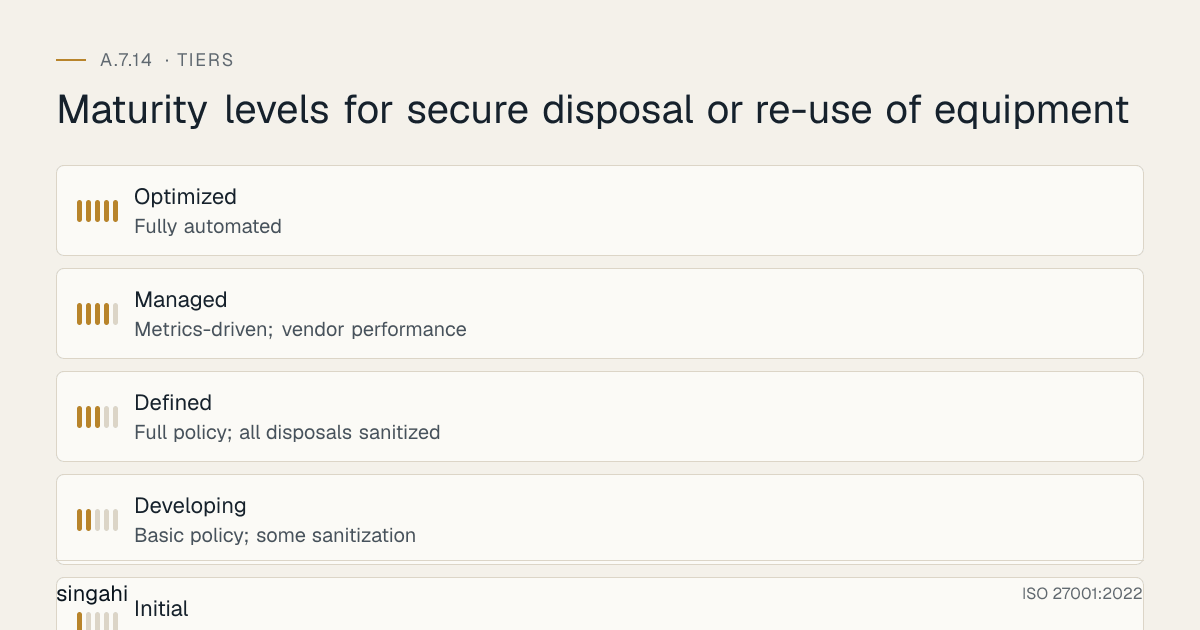
Maturity Model for A.7.14
| Level | Name | Characteristics | Evidence |
|---|---|---|---|
| 1 | Initial | No disposal policy; no sanitization; equipment thrown away or given away; no records | No policy; no records; no vendor management; ad-hoc disposal |
| 2 | Developing | Basic policy; some sanitization; informal vendor relationships; minimal records | Some disposals sanitized; paper logs; basic vendor contracts; no verification |
| 3 | Defined | Full policy; all disposals sanitized and verified; vetted vendors; complete documentation | All disposals authorized; sanitization verified; certificates retained; e-waste compliant |
| 4 | Managed | Metrics-driven; vendor performance monitoring; quarterly audits; predictive disposal planning | KPIs tracked; vendor SLAs; trend analysis; disposal forecasting; automated tracking |
| 5 | Optimized | Fully automated; integrated with asset lifecycle; self-service disposal requests; zero incidents | Automated disposal workflows; integrated CMDB/ITSM; AI-powered asset lifecycle; global standardization |
Continuous Improvement Activities
Monthly:
- Disposal execution review
- Certificate verification and filing
- Vendor performance monitoring
- Secure storage inspection
Quarterly:
- Disposal inventory audit
- Vendor re-authorization review
- Sanitization method effectiveness review
- Internal audit of disposal controls
- E-waste compliance check
Annually:
- Full policy review
- Complete vendor assessment
- Technology and tool evaluation
- Benchmark against industry best practices
- External audit preparation
- Maturity assessment against target level
- Disposal volume and trend analysis
Trigger-Based:
- After any disposal-related security incident
- Upon new equipment technology adoption (may require new sanitization methods)
- Upon vendor contract change or termination
- After significant audit findings
- Upon regulatory change (e-waste rules updates)
- Upon client audit findings related to disposal
FAQ
Q1: What is the safest way to dispose of a hard drive? A: Physical destruction (shredding, crushing, or incineration) is the safest method. For magnetic hard drives, degaussing followed by physical destruction is also highly secure. Overwriting (3+ passes) is sufficient for lower-risk scenarios but requires verification. For hard drives containing highly sensitive data, never rely solely on software methods, use physical destruction.
Q2: How do we securely dispose of SSDs? A: SSDs are tricky because overwriting is less reliable due to wear leveling and over-provisioning. The most reliable methods are: (1) Cryptographic erase (if the SSD supports full-disk encryption and secure erase), (2) Physical destruction (shredding or crushing). Degaussing does NOT work on SSDs (they are flash memory, not magnetic). For SSDs with sensitive data, physical destruction is the gold standard.
Q3: Can we donate old computers to schools or charities? A: Yes, but only after verified sanitization. The computers must be wiped, verified, and documented before donation. The recipient should sign an acknowledgment that the devices have been sanitized. Do not donate equipment containing sensitive data without proper sanitization. For high-sensitivity equipment, physical destruction is safer than donation.
Q4: What about cloud equipment? We don't physically dispose of cloud servers. A: True, but you are still responsible for your data. When terminating cloud instances: (1) Ensure data is deleted from all storage (volumes, buckets, databases), (2) Ensure backups and snapshots are deleted, (3) Verify with the provider that their hardware disposal practices are secure (review their SOC 2/ISO 27001 reports), (4) Use encryption so that provider-side disposal is less critical. Include cloud resource termination in your disposal policy.
Q5: Do we need to destroy RAM (memory) modules? A: RAM is volatile memory, data is lost when power is removed. However, "cold boot attacks" can potentially recover data from RAM shortly after power loss. For extreme security environments (government, defense), RAM may be physically destroyed. For most commercial organizations, RAM can be reused or recycled without special destruction. If RAM is being disposed of, standard e-waste handling is sufficient.
Q6: What about equipment that won't power on? How do we sanitize it? A: If the device cannot power on, software sanitization is impossible. Options: (1) Remove the storage drive and sanitize it using another device or degausser, (2) If the drive cannot be removed, physically destroy the entire device, (3) Engage a vendor with specialized equipment for non-functional device sanitization. Do not assume a non-functional device is safe to dispose of, the storage may still be readable.
Q7: How do we handle disposal of equipment with embedded storage (IoT devices, smart TVs, projectors)? A: Many modern devices have embedded storage that is not easily removable. For such devices: (1) Reset to factory defaults if possible, (2) For devices with network connectivity, disconnect from all networks and accounts, (3) For high-sensitivity devices, physical destruction may be necessary, (4) Consult the manufacturer for sanitization guidance, (5) Include such devices in your disposal policy and procedures. Do not overlook "smart" devices, they store data too.
Q8: What is the cost of implementing A.7.14 for a growing company? A: Usually modest. Most cost is a sanitisation tool or an ITAD vendor, destruction for drives that cannot be purged, a locked cage for equipment awaiting disposal, and staff time for records. That is small compared with the cost of a breach from improper disposal.
Q9: Can we use the same vendor for IT equipment and general office equipment disposal? A: Only if the vendor is security-vetted and CPCB-authorized. General office equipment (furniture, non-electronic items) can go to any disposal vendor. IT equipment must go to a security-vetted, authorized recycler. Do not mix IT and non-IT disposal streams, maintain separation to ensure IT equipment receives proper sanitization.
Q10: What is the most common audit finding for A.7.14? A: Lack of documentation. Organizations often sanitize equipment but fail to document the sanitization, obtain certificates, or maintain disposal records. Auditors require evidence: certificates of destruction, sanitization logs, disposal inventory, and vendor contracts. Without documentation, the auditor cannot verify that disposal was secure.
Q11: How do we handle disposal of equipment in a remote office? A: Remote office disposal requires: (1) Local staff trained on disposal procedures, (2) Secure storage for equipment awaiting disposal, (3) Scheduled vendor pickup or shipping to central disposal facility, (4) If shipping, use tracked, insured courier with tamper-evident packaging, (5) Document chain of custody from remote office to disposal, (6) Do not allow remote staff to dispose of equipment independently without authorization and verification.
Q12: What about equipment that is lost or stolen before disposal? A: Lost or stolen equipment is a security incident, not a disposal. Follow your incident response procedures: (1) Report immediately, (2) Assess data sensitivity, (3) If encrypted, the risk is lower but still reportable, (4) If unencrypted, consider breach notification (DPDP Act requires notification within 72 hours if personal data is involved), (5) Update asset inventory, (6) Conduct post-incident review. Do not classify lost/stolen equipment as "disposed", it is an active security incident.
Q13: Do we need to dispose of equipment that is end-of-life but still functional? A: End-of-life (EOL) or end-of-support (EOS) equipment is a security risk because it no longer receives security patches. Even if functional, it should be retired and replaced. The retired equipment can then be sanitized and disposed of, or repurposed for non-sensitive uses (e.g., testing lab) after sanitization. Do not keep EOL equipment in production environments, the security risk outweighs the efficiency gains.
Q14: How do we track equipment that has been sanitized but is awaiting physical disposal? A: Use a "disposal inventory" or "quarantine inventory." Log each item with asset ID, sanitization date, method, verification, and status ("awaiting destruction" or "ready for recycling"). Store in a secure, locked area. Do not mix sanitized and unsanitized equipment. Update status when final disposal occurs. Retain records for the required period.
Q15: What is the retention period for disposal records? A: Retain disposal records for the duration of the information's retention period plus 3 years. For example, if financial records are retained for 7 years, retain disposal records for 10 years. This provides audit evidence and legal protection. For highly sensitive or regulated data, consider longer retention or permanent retention of destruction certificates.
References and Further Reading
Standards and Frameworks
- ISO/IEC 27001:2022, Information Security, Cybersecurity and Privacy Protection, Information Security Management Systems, Requirements
- ISO/IEC 27002:2022, Information Security, Cybersecurity and Privacy Protection, Information Security Controls
- NIST SP 800-53 Rev 5, Security and Privacy Controls for Information Systems and Organizations
- NIST SP 800-88 Rev. 2 (2025), Guidelines for Media Sanitization; IEEE 2883-2022
- PCI DSS v4.0.1, Payment Card Industry Data Security Standard
- CIS Controls v8, CIS Controls Version 8
Indian Regulations
- Digital Personal Data Protection Act, 2023 (India)
- Information Technology Act, 2000 (as amended)
- E-Waste (Management) Rules, 2022 (India)
- Hazardous and Other Wastes (Management and Transboundary Movement) Rules, 2016
- RBI Cyber Security Framework for Banks
- SEBI Cybersecurity and Cyber Resilience Framework (CSCRF) for SEBI Regulated Entities, circular of 20 August 2024
Books and Publications
- NIST 800-88: Guidelines for Media Sanitization (NIST)
- ISO 27001/27002: A Pocket Guide by Alan Calder
- The Manager's Handbook for Corporate Security by Gerald L. Kovacich and Edward P. Halibozek
Equipment Disposal by Device Type
Hard Drives and SSDs
| Device Type | Sanitization Method | Verification | Destruction Method |
|---|---|---|---|
| HDD (Mechanical) | Secure erase (ATA), degaussing, or physical destruction | Boot verification, cryptographic erase confirmation | Shredding, crushing, drilling |
| SSD (Flash) | Cryptographic erase (ATA Secure Erase), NVMe sanitize | Verify with vendor tool (Samsung Magician, Intel SSD Toolbox) | Shredding (industrial shredder only) |
| NVMe SSD | NVMe Sanitize command, cryptographic erase | Verify with NVMe CLI tool | Industrial shredding |
| Hybrid SSHD | Combine HDD and SSD methods | Verify both components | Physical destruction |
Note: SSDs cannot be reliably wiped with traditional overwrite methods due to wear-leveling and over-provisioning. Always use cryptographic erase or physical destruction.
Mobile Devices and Tablets
| Device Type | Sanitization Method | Verification | Special Considerations |
|---|---|---|---|
| iOS (iPhone/iPad) | Factory reset + Apple ID removal + Find My disable | Verify iCloud removal, device no longer appears in Apple ID | Remove SIM card, eSIM must be deactivated |
| Android | Factory reset + Google Account removal + FRP disable | Verify device can be set up without previous credentials | Remove SD card, SIM card |
| Corporate MDM devices | Remote wipe via MDM + deregistration from MDM | Verify MDM console shows device removed | Re-enrollment test |
| Tablets | Same as corresponding OS above | Same as corresponding OS above | Check for cellular models |
Network Equipment
| Device Type | Sanitization Method | Verification | Special Considerations |
|---|---|---|---|
| Routers/Switches | Factory reset, clear NVRAM, remove configurations | Verify default configuration, no VLANs, no passwords | Check for SD cards, USB storage |
| Firewalls | Factory reset, clear logs, remove certificates | Verify no policies, no certificates, no logs | Backup certificates if needed |
| Wireless APs | Factory reset, clear SSID configs, remove certificates | Verify default SSID, no custom configs | Check for mesh configurations |
| Load Balancers | Factory reset, clear VIP configs, remove certificates | Verify no VIPs, no pools, no certs | Backup SSL certificates |
| VPN concentrators | Factory reset, clear user databases, remove certificates | Verify no user configs, no certs | Check for hardware tokens |
Printers and Copiers
| Device Type | Sanitization Method | Verification | Special Considerations |
|---|---|---|---|
| Network printers | Factory reset, clear job logs, clear address books | Verify no stored jobs, no address books | Check hard drives in MFPs |
| MFPs (Multi-Function) | Factory reset, clear scan/print/fax logs, clear HDD | Verify HDD wiped or removed | MFPs have hard drives storing copies |
| Copiers | Factory reset, clear document feeder memory | Verify no stored documents | Check for document storage |
| Fax machines | Clear memory, clear speed dials, clear logs | Verify memory cleared | Check for stored faxes |
Critical: Many organizations forget that printers and copiers have hard drives that store images of every document scanned, copied, or printed. These must be sanitized or physically destroyed.
Cloud and Virtual Infrastructure
| Resource Type | Sanitization Method | Verification | Special Considerations |
|---|---|---|---|
| Virtual Machines | Secure delete of VHD/VMDK, deregister from management | Verify storage account shows no VHD, no snapshots | Check for cross-region replication |
| Cloud Storage | Delete all objects, delete versions, delete metadata | Verify bucket/container is empty, versioning disabled | Check for lifecycle policies |
| Database instances | Delete instance, delete backups, delete snapshots | Verify no automated backups, no snapshots | Check for cross-region backups |
| Container images | Delete from registry, delete tags, purge | Verify registry shows no images | Check for image signing keys |
| Kubernetes clusters | Delete PVCs, delete secrets, delete configmaps | Verify etcd has no sensitive data | Backup etcd before deletion |
Equipment Disposal Workflow
Step-by-Step Disposal Process
┌─────────────────────────────────────────────────────────────┐
│  STEP 1: IDENTIFICATION                                      │
│  • Asset identified for disposal (end-of-life, upgrade,      │
│    damage, obsolescence)                                       │
│  • Asset owner submits disposal request                        │
│  • IT Asset Management reviews and approves                      │
└─────────────────────────────────────────────────────────────┘
                              │
                              ▼
┌─────────────────────────────────────────────────────────────┐
│  STEP 2: DATA INVENTORY                                       │
│  • Identify all data storage components (HDD, SSD, RAM,        │
│    firmware, cache, configuration)                           │
│  • Classify data sensitivity (Public, Internal, Confidential,  │
│    Highly Confidential, Restricted)                           │
│  • Determine sanitization method based on classification       │
└─────────────────────────────────────────────────────────────┘
                              │
                              ▼
┌─────────────────────────────────────────────────────────────┐
│  STEP 3: AUTHORIZATION                                        │
│  • Data owner approves disposal                                │
│  • Security team approves sanitization method                  │
│  • IT Asset Management approves physical disposal                │
│  • Legal/Compliance approves for regulated data                │
└─────────────────────────────────────────────────────────────┘
                              │
                              ▼
┌─────────────────────────────────────────────────────────────┐
│  STEP 4: SANITIZATION                                         │
│  • Execute approved sanitization method                        │
│  • Document sanitization process (who, when, how)               │
│  • Verify sanitization (boot test, cryptographic verification)│
│  • If sanitization fails, escalate to physical destruction   │
└─────────────────────────────────────────────────────────────┘
                              │
                              ▼
┌─────────────────────────────────────────────────────────────┐
│  STEP 5: VERIFICATION                                         │
│  • Independent verification of sanitization (second person)  │
│  • Attempt data recovery (forensic verification)              │
│  • Document verification results                               │
│  • If verification fails, repeat sanitization or destroy       │
└─────────────────────────────────────────────────────────────┘
                              │
                              ▼
┌─────────────────────────────────────────────────────────────┐
│  STEP 6: PHYSICAL DESTRUCTION (if required)                   │
│  • Transport to secure destruction facility                    │
│  • Witness destruction (physical or video)                  │
│  • Obtain certificate of destruction                           │
│  • Verify destruction facility certifications (R2, e-Stewards) │
└─────────────────────────────────────────────────────────────┘
                              │
                              ▼
┌─────────────────────────────────────────────────────────────┐
│  STEP 7: E-WASTE DISPOSAL                                     │
│  • Transport to authorized e-waste recycler                    │
│  • Verify recycler authorization (CPCB/SPCB)                  │
│  • Obtain e-waste disposal certificate                         │
│  • Verify hazardous material handling (batteries, mercury)     │
└─────────────────────────────────────────────────────────────┘
                              │
                              ▼
┌─────────────────────────────────────────────────────────────┐
│  STEP 8: DOCUMENTATION                                        │
│  • Update asset register (mark as disposed)                    │
│  • File sanitization certificate                               │
│  • File destruction certificate (if applicable)                │
│  • File e-waste disposal certificate                           │
│  • Retain records per retention policy                         │
│  • Notify finance for asset write-off                          │
└─────────────────────────────────────────────────────────────┘
Additional Illustrative Scenarios: Indian Equipment Disposal Incidents
Illustrative Scenario 3 (hypothetical): Hospital, Medical Data on a Disposed X-Ray Machine
What happened: A hospital in Delhi sold an old X-ray machine to a second-hand equipment dealer without sanitizing the built-in computer. The machine's hard drive contained 50,000 patient X-ray images with patient names, dates, and medical record numbers. The second-hand dealer discovered the data and notified the hospital.
Impact:
- 50,000 patient images potentially exposed
- Assessed as a personal data breach (DPDP Act intimation once the Rules apply; IT Act s.43A meanwhile)
- National Medical Commission complaint filed
- Patient trust erosion, media coverage
- Remediation costs for investigation, notification, legal advice and system changes
- Hospital implemented strict medical equipment disposal policy
Root causes:
- Medical equipment treated as "hardware" not "data storage device"
- No sanitization process for medical imaging equipment
- No awareness that medical devices contain patient data
- No vendor requirement for data sanitization before disposal
- No asset classification for medical equipment (should be classified as sensitive)
Lessons:
- All medical equipment must be classified as sensitive data storage
- Sanitize all embedded systems before disposal (X-ray, MRI, CT, ultrasound)
- Include data sanitization clause in equipment sale/lease agreements
- Engage specialized medical equipment sanitization vendors
- Train biomedical engineering staff on data sanitization requirements
- Include medical equipment in asset inventory with data classification
Illustrative Scenario 4 (hypothetical): IT Company, Copier Hard Drive Data Leak
What happened: An IT company in Bengaluru returned a leased multi-function printer (MFP) to the leasing company at the end of the contract. The MFP had a hard drive that stored images of every document scanned, copied, or printed over 3 years. The leasing company refurbished the MFP and leased it to another company. The new tenant discovered the previous tenant's documents on the hard drive.
Impact:
- 3 years of company documents exposed (contracts, financials, employee data)
- Client confidentiality breach (contracts with 20+ clients visible)
- Employee PII exposure (PAN, Aadhaar, salary details from HR documents)
- Legal action from clients for confidentiality breach
- Remediation costs for legal advice, client notification, system changes and new equipment
- Company had to notify all affected clients and employees
Root causes:
- No awareness that MFPs have hard drives storing document images
- No sanitization process for returned leased equipment
- Leasing company had no sanitization policy for returned equipment
- No verification of data removal before returning equipment
- No asset classification for MFPs (treated as peripherals, not data storage)
Lessons:
- All MFPs, printers, and copiers must be classified as data storage devices
- Sanitize or remove hard drives before returning leased equipment
- Verify leasing company has data sanitization policy for returned equipment
- Include data sanitization requirement in lease agreements
- Document all MFP sanitization before disposal or return
- Train IT staff on MFP data storage capabilities
- Consider purchasing MFPs with automatic data overwrite features
This guide is part of the Singahi ISO 27001:2022 Annex A Control Guide Series.