
On this page
- Quick Reference: A.8.1 in 60 Seconds
- What the Control Asks For
- The Endpoint Security Stack
- Device Inventory & Asset Management
- Full Disk Encryption (FDE) by Platform
- Endpoint Protection: EDR vs. AV
- Patch Management & Vulnerability Remediation
- Device Hardening by OS
- Mobile Device Management (MDM/UEM)
- BYOD & Personal Device Governance
- Access Controls on Endpoints
- Physical Security for Endpoints
- Remote Work & Hybrid Endpoint Security
- Network Security for Endpoints
- Data Loss Prevention (DLP) on Endpoints
- Application Control & Whitelisting
- USB & Removable Media Control
- Endpoint Backup & Recovery
- Device Lifecycle Management
- Lost/Stolen Device Response
- Shadow IT & Rogue Device Detection
- Implementation Roadmap: 8 Weeks
- Common Audit Failures & How to Fix Them
- Illustrative Scenarios: Endpoint Breaches
- Metrics & KPIs
- Multi-Framework Mapping
- FAQ
- Endpoint Security for Specific Industries
- Additional Illustrative Scenarios: Indian Endpoint Security Incidents
Quick Reference: A.8.1 in 60 Seconds
| Question | Answer |
|---|---|
| What is it? | A control requiring protection of information on user endpoint devices (laptops, phones, tablets, desktops). |
| Why does it matter? | Endpoints are the #1 attack vector. 70% of breaches start on an endpoint. |
| Minimum requirement | Device policy + inventory + encryption + anti-malware + patching + screen lock + remote wipe + MDM for mobile. |
| Audit red flag | Unencrypted laptops, no device inventory, local admin on all devices, unmanaged BYOD, no patch management. |
| Quick win | Enable BitLocker/FileVault on all laptops today. Enroll all devices in MDM. |
| Time to implement | 4–8 weeks for full deployment. |
| Related controls | A.5.9 (Asset Inventory), A.8.5 (Secure Authentication), A.8.7 (Malware Protection), A.8.9 (Configuration Management), A.8.16 (Monitoring), A.7.9 (Assets Off-Premises) |
| ISO 27002 attributes | Control type: Preventive · Properties: Confidentiality, Integrity, Availability · Concepts: Protect · Capabilities: Asset management, Information protection · Domains: Protection |
What the Control Asks For
ISO 27001:2022 A.8.1 Text
ISO 27001:2022 Annex A 8.1 asks organizations to protect information stored on, processed by, or accessible through user endpoint devices.
Do you need this control?
A.8.1 is not mandatory in itself: under clause 6.1.3 you include it if your risk assessment calls for it, and record the decision in your Statement of Applicability. Almost every organisation includes it, because laptops and phones hold or reach company data. The approach varies: company-owned devices under MDM, BYOD with app-level controls, or virtual desktops.
ISO 27002:2022 Implementation Guidance (Section 8.1)
ISO 27002 8.1 (paraphrased) asks for a topic-specific policy on secure configuration and handling of endpoint devices, communicated to everyone concerned, covering:
- (a) the types and classification of information the device may handle
- (b) registration of devices
- (c) physical protection
- (d) restriction of software installation
- (e) required software versions and updates (for example automatic updating)
- (f) rules for connecting to information services, public networks and other networks off premises (for example a personal firewall)
- (g) access controls
- (h) storage encryption
- (i) malware protection
- (j) remote disabling, deletion or lockout
- (k) backups
- (l) use of web services and web applications
- (m) end-user behaviour analytics (see 8.16)
- (n) removable devices, and the option to disable physical ports such as USB
- (o) partitioning to separate the organisation's information from other information on the device
27002 also suggests deciding whether some information is so sensitive it may be accessed but not stored on endpoints (for example by disabling downloads and SD cards), and enforcing the policy through configuration management (8.9) or automated tools wherever possible.
User responsibilities: log off sessions that are no longer needed; protect devices with physical and logical controls and do not leave them unattended; take care in public places (privacy filters); protect devices against theft in cars, hotels and meeting places. A theft or loss procedure should take account of legal, regulatory, contractual and insurance requirements.
Personal devices (BYOD): (a) separate personal and business use, with software to protect business data; (b) give access only after users accept their duties, waive ownership of business data and allow remote wipe, considering privacy law; (c) policies to prevent disputes over intellectual property created on personal devices; (d) recognise that access to a private device for checks or investigations may be restricted by law; (e) watch for software licensing liability for client software on personal devices.
Wireless: procedures for configuring wireless connections (for example disabling weak protocols) and for using connections with enough bandwidth for backups and updates.
What Auditors Actually Check
| Auditor Action | What They Want to See |
|---|---|
| Device inventory | Complete list of all endpoints with owner, type, OS version |
| Spot-check device | Verify encryption, antivirus, screen lock on a random device |
| MDM dashboard | Show compliance status across all enrolled devices |
| Patch status | Are devices up to date? What's the patching SLA? |
| BYOD policy | How do you manage personal devices? Containerization? |
| Lost device log | Show a recent incident and response actions |
| Leaver process | Was device returned? Was it wiped? |
| User training records | Do users know endpoint security requirements? |
The Endpoint Security Stack
Think of endpoint security as 7 layers. Weakness in any layer creates a gap.
┌─────────────────────────────────────────────────────────────┐
│  LAYER 7: USER (Training, Awareness, Responsibility)        │
│  "The user is the last line of defense"                     │
├─────────────────────────────────────────────────────────────┤
│  LAYER 6: DATA (Encryption, DLP, Classification)             │
│  "Protect the data regardless of device state"              │
├─────────────────────────────────────────────────────────────┤
│  LAYER 5: APPLICATION (Whitelisting, App Control, Browser)   │
│  "Only approved software runs on the device"                │
├─────────────────────────────────────────────────────────────┤
│  LAYER 4: NETWORK (VPN, Firewall, Wi-Fi Security, ZTNA)     │
│  "Secure every connection from the device"                   │
├─────────────────────────────────────────────────────────────┤
│  LAYER 3: ENDPOINT PROTECTION (EDR, AV, Behavioral Analysis)  │
│  "Detect and respond to threats on the device"              │
├─────────────────────────────────────────────────────────────┤
│  LAYER 2: CONFIGURATION (Hardening, CIS, Patching, Baseline)│
│  "Secure the device before it touches the network"          │
├─────────────────────────────────────────────────────────────┤
│  LAYER 1: HARDWARE (Encryption, TPM, Secure Boot, BIOS)     │
│  "Physical security starts at the chip level"               │
└─────────────────────────────────────────────────────────────┘
Device Inventory & Asset Management
The Device Inventory Template
| Asset ID | Device Type | Make/Model | Serial | OS | OS Version | Owner | Department | Classification | Encryption | EDR | MDM Enrolled | Last Patch | Status |
|---|---|---|---|---|---|---|---|---|---|---|---|---|---|
| LAP-001 | Laptop | Dell XPS 15 | SN12345 | Windows 11 | 23H2 | John Smith | Engineering | Confidential | ✅ BitLocker | ✅ CrowdStrike | ✅ Intune | 2026-06-10 | Active |
| MAC-002 | Laptop | MacBook Pro M3 | SN67890 | macOS | 14.5 | Jane Doe | Finance | Highly Confidential | ✅ FileVault | ✅ SentinelOne | ✅ Jamf | 2026-06-08 | Active |
| MOB-003 | Phone | iPhone 15 Pro | SN11111 | iOS | 17.5 | John Smith | Engineering | Confidential | ✅ (Built-in) | N/A | ✅ Intune | 2026-06-12 | Active |
| TAB-004 | Tablet | Samsung Galaxy Tab | SN22222 | Android | 14 | Mike Chen | Sales | Internal | ✅ ( Knox ) | N/A | ✅ Intune | 2026-06-05 | Active |
| LIN-005 | Desktop | Lenovo ThinkStation | SN33333 | Ubuntu | 24.04 | Dev Team | Engineering | Confidential | ✅ LUKS | ✅ Wazuh | ✅ Ansible | 2026-06-11 | Active |
Inventory Best Practices
- 100% coverage, Every device that accesses corporate data must be in the inventory
- Asset tagging, Physical asset tag on every device (barcode/QR code)
- Ownership tracking, Who is responsible for this device?
- Classification mapping, What data can this device access? (Public/Internal/Confidential/Highly Confidential)
- Compliance status, Encryption, EDR, patch level, MDM enrollment
- Lifecycle tracking, Purchase date, warranty expiry, retirement date
- Reconciliation, Monthly reconciliation between MDM, asset register, and finance records
- Decommissioned devices, Separate list of retired devices with wipe verification
Full Disk Encryption (FDE) by Platform
Encryption Requirements by Device Type
| Device Type | OS | Encryption Tool | Key Escrow | Recovery Key |
|---|---|---|---|---|
| Laptop/Desktop | Windows 10/11 | BitLocker (TPM 2.0 + PIN) | Active Directory / Entra ID | Stored in AD, IT can recover |
| Laptop/Desktop | macOS | FileVault 2 | Jamf / MDM | Institutional recovery key |
| Laptop/Desktop | Linux | LUKS (dm-crypt) | Centralized key management | Admin key escrow |
| Mobile | iOS | AES-256 (built-in) | Apple Business Manager | iCloud or MDM escrow |
| Mobile | Android | File-Based Encryption (FBE) | Android Enterprise / Samsung Knox | MDM escrow |
| Tablet | iPad | AES-256 (built-in) | Apple Business Manager | MDM escrow |
| Tablet | Android | FBE + Knox | Android Enterprise / Knox | MDM escrow |
BitLocker Configuration (Windows)
## Group Policy Settings for BitLocker
## Computer Configuration > Policies > Administrative Templates > Windows Components > BitLocker Drive Encryption

## Require TPM + PIN
Set-ItemProperty -Path "HKLM:\SOFTWARE\Policies\Microsoft\FVE" -Name "UseAdvancedStartup" -Value 1
Set-ItemProperty -Path "HKLM:\SOFTWARE\Policies\Microsoft\FVE" -Name "UseTPMPIN" -Value 1
Set-ItemProperty -Path "HKLM:\SOFTWARE\Policies\Microsoft\FVE" -Name "MinimumPIN" -Value 6

## Escrow recovery key to AD/Entra ID
Set-ItemProperty -Path "HKLM:\SOFTWARE\Policies\Microsoft\FVE" -Name "OSRecovery" -Value 1
Set-ItemProperty -Path "HKLM:\SOFTWARE\Policies\Microsoft\FVE" -Name "OSActiveDirectoryBackup" -Value 1
## Prefer configuring these through Group Policy or Intune rather than editing registry values directly

## Recovery-key escrow for fixed data drives (escrow only: it does not force encryption)
Set-ItemProperty -Path "HKLM:\SOFTWARE\Policies\Microsoft\FVE" -Name "FDVRecovery" -Value 1
Set-ItemProperty -Path "HKLM:\SOFTWARE\Policies\Microsoft\FVE" -Name "FDVActiveDirectoryBackup" -Value 1
## To enforce encryption, use Intune's "Require device encryption" or the
## "Deny write access to fixed drives not protected by BitLocker" policy
FileVault Configuration (macOS)
## Enable FileVault via Jamf Pro / MDM
## Configuration Profile: Security & Privacy

## Enable FileVault

## Add institutional recovery key
sudo fdesetup add -usertoadd admin -keychain

## Verify FileVault status
sudo fdesetup status

## Enable escrow to MDM
## In Jamf Pro: Configuration Profile > Security & Privacy > FileVault > Escrow to Jamf Pro
LUKS Configuration (Linux)
## Check if LUKS is already configured
sudo cryptsetup luksDump /dev/sda1

## If not encrypted, encrypt during provisioning:
## During installation, select "Encrypt the new Ubuntu installation for security"

## Verify encryption status
lsblk -f
## Should show crypto_LUKS type

## Backup LUKS header (critical!)
Endpoint Protection: EDR vs. AV
EDR vs. Traditional Antivirus
| Feature | Traditional AV | Modern EDR | Recommendation |
|---|---|---|---|
| Signature-based detection | ✅ Yes | ✅ Yes | Both |
| Behavioral analysis | ❌ No | ✅ Yes | EDR |
| Machine learning | ⚠️ Basic | ✅ Advanced | EDR |
| Threat hunting | ❌ No | ✅ Yes | EDR |
| Incident response | ❌ Manual | ✅ Automated | EDR |
| Forensic investigation | ❌ No | ✅ Yes | EDR |
| MITRE ATT&CK mapping | ❌ No | ✅ Yes | EDR |
| Cloud-native | ❌ No | ✅ Yes | EDR |
EDR Tool Comparison (2026)
| Tool | Best For | Windows | macOS | Linux | Mobile | Key Feature | Pricing model |
|---|---|---|---|---|---|---|---|
| Wazuh | Open source, budget | ✅ | ✅ | ✅ | ⚠️ | Free, SIEM + EDR combined | Free |
| OSQuery | Developer-friendly | ✅ | ✅ | ✅ | ❌ | Query endpoint like a database | Free |
Minimum EDR Configuration
| Setting | Requirement | Rationale |
|---|---|---|
| Real-time protection | Enabled | Block threats in real-time |
| Behavioral monitoring | Enabled | Detect fileless attacks, zero-days |
| Memory scanning | Enabled | Detect in-memory threats |
| Network inspection | Enabled | Block malicious network connections |
| USB scanning | Enabled | Block malware on removable media |
| Cloud-delivered protection | Enabled | Latest threat intelligence |
| Automatic sample submission | Enabled | Improve detection (with privacy controls) |
| Tamper protection | Enabled | Prevent users from disabling EDR |
| Alert threshold | Medium+ | Don't alert on low-risk PUPs |
| Response mode | Semi-automated | Auto-isolate, notify SOC for confirmation |
| Integration with SIEM | Enabled | Centralize alerts |
| Exclusions | Documented | Only for known good, approved by security |
Patch Management & Vulnerability Remediation
Figure · Tiers
Maturity levels for user endpoint devices
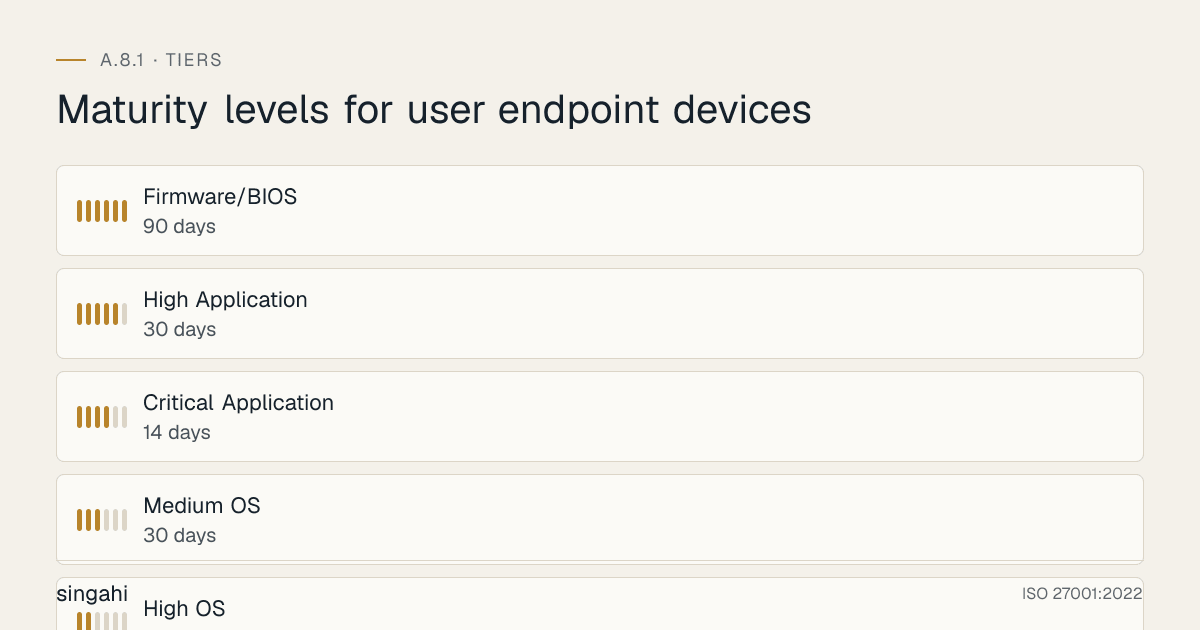
The Patch Management SLA
| Severity | SLA | Example |
|---|---|---|
| Critical OS | 7 days | Windows zero-day, macOS security update |
| High OS | 14 days | Monthly Patch Tuesday, macOS point release |
| Medium OS | 30 days | Feature updates, non-security patches |
| Critical Application | 14 days | Chrome zero-day, Firefox CVE |
| High Application | 30 days | Office updates, Adobe patches |
| Firmware/BIOS | 90 days | TPM updates, microcode patches |
Patch Management by Platform
Windows (WSUS + Intune):
## Intune Windows Update Ring Settings
## Devices > Windows > Windows Update rings

## Settings:
## - Update deferral period (feature updates): 14 days
## - Update deferral period (quality updates): 7 days
## - Servicing channel: General Availability Channel
## - Microsoft product updates: Allow
## - Windows drivers: Allow
## - Automatic update behavior: Auto install at maintenance time
## - Active hours: 9 AM - 6 PM IST
## - Restart checks: Skip if active user
## - Delivery optimization: Allow downloads from other PCs
## - Deadline for feature updates: 14 days
## - Deadline for quality updates: 7 days
## - Grace period: 2 days
macOS (Jamf Pro + Nudge):
## Nudge configuration for macOS patching
## https://github.com/macadmins/nudge

## Nudge enforces update installation with increasing urgency:
## - Days 0-7: Friendly notification
## - Days 8-14: Urgent notification
## - Day 15+: Blocking notification (can't dismiss)
## - Day 17+: Forced restart
Linux (Unattended Upgrades + Ansible):
## /etc/apt/apt.conf.d/50unattended-upgrades
## Enable automatic security updates
Unattended-Upgrade::Allowed-Origins {
};
Unattended-Upgrade::AutoFixInterruptedDpkg "true";
Unattended-Upgrade::MinimalSteps "true";
Unattended-Upgrade::InstallOnShutdown "false";
Unattended-Upgrade::Remove-Unused-Dependencies "true";
Unattended-Upgrade::Remove-New-Unused-Dependencies "true";
Unattended-Upgrade::Automatic-Reboot "true";
Unattended-Upgrade::Automatic-Reboot-Time "02:00";
iOS/Android (MDM):
## Intune / Jamf / MDM OS Update Policy
## - Automatically install OS updates: Enabled
## - Update deferral: 7 days
## - Force update after deferral: 14 days
## - Block device if not updated: Enabled (after 21 days)
Device Hardening by OS
Windows Hardening (CIS Benchmarks)
| CIS Control | Setting | Implementation |
|---|---|---|
| 1.1.1 | Enforce password history | 24 passwords remembered |
| 1.1.2 | Max password age | 60 days (or 0 for NIST-aligned) |
| 1.1.3 | Min password age | 1 day |
| 1.1.4 | Min password length | 14 characters |
| 2.3.1 | Account lockout threshold | 5 invalid attempts |
| 2.3.2 | Account lockout duration | 30 minutes |
| 2.3.3 | Reset lockout counter | 30 minutes |
| 9.1.1 | Windows Firewall: Domain profile | Enabled |
| 9.1.2 | Windows Firewall: Private profile | Enabled |
| 9.1.3 | Windows Firewall: Public profile | Enabled |
| 17.1.1 | Audit account logon events | Success and Failure |
| 17.1.2 | Audit account management | Success and Failure |
| 17.2.1 | Audit logon events | Success and Failure |
| 18.1.1 | Prevent access to registry editing tools | Enabled |
| 18.2.1 | Do not display last user name | Enabled |
| 18.3.1 | Require Ctrl+Alt+Delete | Enabled |
| 18.4.1 | Interactive logon: Smart card removal behavior | Lock workstation |
| 18.9.1 | Disable Windows Defender Tamper Protection | No, keep enabled |
Apply via: Group Policy, Microsoft Intune, LGPO, or CIS-CAT Pro
macOS Hardening (CIS Benchmarks)
| CIS Control | Setting | Implementation |
|---|---|---|
| 1.1 | Verify all Apple-provided software is current | Auto-update enabled |
| 2.1.1 | Turn off Bluetooth if no paired device exists | MDM enforcement |
| 2.2.1 | Enable "Set time and date automatically" | NTP enabled |
| 2.3.1 | Set an inactivity interval of 20 minutes or less | Screen saver 5 min |
| 2.3.2 | Require password to wake from sleep or screen saver | Enabled |
| 2.4.1 | Disable Remote Login (SSH) | Unless required |
| 2.4.2 | Disable Remote Management | Unless required |
| 2.5.1 | Enable Gatekeeper | MDM enforced |
| 2.5.2 | Enable Firewall | MDM enforced |
| 2.6.1 | Enable FileVault | MDM enforced |
| 2.6.4 | Ensure system is set to hibernate | Hibernate after 1 hour |
| 3.1 | Enable security auditing | MDM enforced |
| 5.1 | Configure account lockout threshold | 5 attempts, 15 min lockout |
| 5.2 | Complex password required | 12+ characters |
| 5.3 | Password history | 15 passwords |
| 5.4 | Max password age | 90 days |
| 5.5 | Require password immediately after sleep or screen saver | 5 minutes or less |
Apply via: Jamf Pro, Mosyle, or Kandji configuration profiles
Linux Hardening (CIS Ubuntu Benchmarks)
| CIS Control | Setting | Command/Config |
|---|---|---|
| 1.1.1 | Disable unused filesystems | modprobe -r cramfs freevxfs jffs2 hfs hfsplus squashfs udf |
| 1.3.1 | Ensure AIDE is installed | apt install aide |
| 1.4.1 | Ensure bootloader password is set | grub-mkpasswd-pbkdf2 |
| 1.5.1 | Ensure address space layout randomization (ASLR) is enabled | sysctl kernel.randomize_va_space=2 |
| 1.5.2 | Ensure prelink is disabled | prelink -ua |
| 2.1.1 | Ensure xinetd is not installed | apt remove xinetd |
| 2.2.1 | Ensure time synchronization is in use | apt install chrony |
| 3.1.1 | Ensure IP forwarding is disabled | sysctl net.ipv4.ip_forward=0 |
| 3.5.1 | Ensure UFW is installed | apt install ufw |
| 3.5.2 | Ensure UFW service is enabled | ufw enable |
| 4.1.1 | Ensure auditd is installed | apt install auditd |
| 4.1.2 | Ensure auditd service is enabled | systemctl enable auditd |
| 5.1.1 | Ensure cron daemon is enabled | systemctl enable cron |
| 5.2.1 | Ensure sudo is installed | apt install sudo |
| 5.2.2 | Ensure sudo commands use pty | Defaults use_pty in /etc/sudoers |
| 5.3.1 | Ensure PAM is installed | apt install libpam-runtime |
| 5.3.2 | Ensure password creation requirements are configured | pam_cracklib or pam_pwquality |
| 5.4.1 | Ensure password hashing algorithm is SHA-512 | pam_unix sha512 |
| 5.4.2 | Ensure password expiration is 365 days or less | PASS_MAX_DAYS 365 in /etc/login.defs |
| 5.4.3 | Ensure minimum days between password changes is 1 or more | PASS_MIN_DAYS 1 |
| 5.4.4 | Ensure password expiration warning days is 7 or more | PASS_WARN_AGE 7 |
| 5.4.5 | Ensure inactive password lock is 30 days or less | useradd -D -f 30 |
| 5.5.1 | Ensure minimum password length is 12 or more | minlen=12 in pam_pwquality |
| 5.5.2 | Ensure password complexity is required | minclass=4 in pam_pwquality |
| 5.6 | Ensure SSH is configured securely | Protocol 2, PermitRootLogin no, PasswordAuthentication no |
| 6.1 | Ensure system file permissions are configured | chmod per CIS guidance |
| 6.2 | Ensure no world-writable files exist | find / -xdev -type f -perm -0002 |
| 6.3 | Ensure no unowned files or directories exist | find / -xdev -nouser -o -nogroup |
Apply via: Ansible playbooks, Chef, Puppet, or OpenSCAP
iOS/iPadOS Hardening (Apple Configuration Profile)
| Setting | Requirement | Implementation |
|---|---|---|
| Passcode | 6+ digits or alphanumeric | MDM enforced |
| Auto-lock | 5 minutes | MDM enforced |
| Max failed attempts | 10 (then wipe) | MDM enforced |
| Face ID / Touch ID | Allowed for device unlock | MDM enforced |
| Find My | Enabled | MDM enforced |
| Activation Lock | Enabled | MDM enforced |
| Supervised mode | Required for full control | Apple Business Manager |
| Restrict App Store | Allow only managed apps | MDM enforced |
| Restrict iCloud | Disable iCloud Backup for corporate data | MDM enforced |
| VPN | Always-on VPN for corporate data | MDM enforced |
| Wi-Fi | Enterprise Wi-Fi with certificates only | MDM enforced |
| Certificate pinning | For corporate apps | MDM enforced |
| Jailbreak detection | Block jailbroken devices | MDM + conditional access |
| OS update | Auto-install within 14 days | MDM enforced |
Android Hardening (Android Enterprise / Samsung Knox)
| Setting | Requirement | Implementation |
|---|---|---|
| Work Profile | Mandatory for BYOD | Android Enterprise |
| Device Owner | Mandatory for corporate devices | Android Enterprise |
| Screen lock | PIN/password, 6+ digits | MDM enforced |
| Auto-lock | 5 minutes | MDM enforced |
| Encryption | Mandatory (File-Based Encryption) | MDM enforced |
| Factory reset protection | Enabled | MDM enforced |
| OEM unlocking | Disabled | MDM enforced |
| USB debugging | Disabled | MDM enforced |
| Unknown sources | Disabled | MDM enforced |
| Play Protect | Enabled | MDM enforced |
| Samsung Knox | Enable for Samsung devices | Knox MDM |
| Certificate management | Deploy client certs for Wi-Fi/VPN | MDM enforced |
| App allowlist | Only managed apps | MDM enforced |
| OS update | Auto-install within 14 days | MDM enforced |
| Safe mode | Block | Knox |
| Developer mode | Block | MDM enforced |
Mobile Device Management (MDM/UEM)
MDM Tool Comparison (2026)
| Feature | Microsoft Intune | Jamf Pro | Kandji | Mosyle | Omnissa Workspace ONE (formerly VMware) | Google Endpoint Management |
|---|---|---|---|---|---|---|
| Windows | ✅ Native | ❌ | ❌ | ❌ | ✅ | ⚠️ Limited |
| macOS | ✅ | ✅ Native | ✅ Native | ✅ | ✅ | ❌ |
| iOS/iPadOS | ✅ | ✅ | ✅ | ✅ | ✅ | ✅ |
| Android | ✅ | ❌ | ❌ | ❌ | ✅ | ✅ Native |
| Linux | ⚠️ Limited | ❌ | ❌ | ❌ | ⚠️ | ❌ |
| Zero-touch | ✅ | ✅ (DEP) | ✅ | ✅ | ✅ | ✅ |
| Conditional Access | ✅ Entra ID | ✅ | ✅ | ✅ | ✅ | ✅ |
| Compliance Policies | ✅ Advanced | ✅ | ✅ | ✅ | ✅ | ✅ |
| Remote Wipe | ✅ | ✅ | ✅ | ✅ | ✅ | ✅ |
| App Management | ✅ | ✅ | ✅ | ✅ | ✅ | ✅ |
| Patch Management | ✅ | ✅ | ✅ | ✅ | ✅ | ✅ |
| Script/Custom Profiles | ✅ PowerShell | ✅ Bash/Python | ✅ | ✅ | ✅ | ❌ |
| Best For | Microsoft shops | Apple shops | Apple SMB | Apple education | Multi-platform | Google shops |
Intune Compliance Policy (Windows Example)
{
  "displayName": "Windows Corporate Compliance",
  "platform": "windows10AndLater",
  "rules": [
    {
      "ruleType": "deviceProperties",
      "property": "osMinimumVersion",
      "value": "10.0.19045.0"
    },
    {
      "ruleType": "deviceHealth",
      "requireBitLocker": true,
      "requireSecureBoot": true,
      "requireCodeIntegrity": true
    },
    {
      "ruleType": "configuration",
      "passwordRequired": true,
      "passwordMinimumLength": 12,
      "passwordRequiredType": "alphanumeric",
      "passwordMinutesOfInactivityBeforeLock": 5,
      "passwordExpirationDays": 0,
      "passwordPreviousPasswordCountToPreventReuse": 24,
      "requirePassword": true
    },
    {
      "ruleType": "systemSecurity",
      "firewallRequired": true,
      "antivirusRequired": true,
      "antispywareRequired": true,
      "defenderEnabled": true
    }
  ]
}
BYOD & Personal Device Governance
Figure · Risk grid
User endpoint devices risks by likelihood and impact
Likelihood across · impact up
- Outdated OSHigh/Medium
- Personal cloud syncHigh/Medium
- Device jailbroken/rootedMedium/High
- No encryptionMedium/High
- Lost deviceMedium/High
- Malware on personal deviceMedium/High
- Privacy concernsHigh/Low
- Data leakage via screenshotsMedium/Medium
BYOD Risk Matrix
| Risk | Likelihood | Impact | Mitigation |
|---|---|---|---|
| Device jailbroken/rooted | Medium | High | MDM detection + conditional access block |
| No encryption | Medium | High | MDM enforcement + compliance block |
| Outdated OS | High | Medium | Auto-update enforcement + compliance block |
| Personal cloud sync | High | Medium | DLP + containerization |
| Lost device (no remote wipe) | Medium | High | Containerization + selective wipe |
| Malware on personal device | Medium | High | MDM app scanning + conditional access |
| Privacy concerns (employee resistance) | High | Low | Clear BYOD agreement, selective wipe only |
| Data leakage via screenshots | Medium | Medium | DLP + screen capture restrictions |
BYOD Agreement Template (Key Clauses)
BYOD AGREEMENT — [Organization Name]

1. DEVICE ELIGIBILITY
   • Minimum OS version: iOS 16, Android 14, Windows 10 22H2, macOS 14
   • Must not be jailbroken, rooted, or modified
   • Must support MDM enrollment

2. MDM ENROLLMENT
   • Employee agrees to enroll device in [MDM Name]
   • MDM can: enforce passcode, encrypt corporate data, install corporate apps,
     update OS, configure VPN, block non-compliant apps
   • MDM cannot: access personal photos, messages, browsing history, personal apps

3. DATA SEPARATION
   • Corporate data stored in managed container (Work Profile / Managed Apps)
   • Personal data remains separate and private
   • Organization can only wipe corporate data, not personal data

4. SECURITY REQUIREMENTS
   • Minimum 6-digit PIN or biometric
   • Auto-lock after 5 minutes
   • Automatic OS updates within 14 days
   • No jailbreaking/rooting
   • Report lost device within 1 hour

5. REMOTE WIPE
   • Employee agrees to selective remote wipe of corporate data on:
     - Termination of employment
     - Device loss or theft
     - Device no longer meets compliance requirements
   • Organization will NOT wipe personal data

6. PRIVACY
   • Organization will not monitor personal usage
   • Organization will not access personal apps or data
   • MDM logs are limited to compliance status, not content

7. TERMINATION
   • On employment termination, employee must allow corporate data wipe
   • Employee may unenroll device from MDM after termination

8. ACKNOWLEDGMENT
   I understand and agree to the above terms.

Employee Signature: _________________________ Date: __________
Employee Name: _________________________
Device Type: _________________________
Device Serial: _________________________
Containerization Technologies
| Platform | Technology | How It Works |
|---|---|---|
| iOS | Managed Apps + Apple User Enrollment | Corporate apps in managed state, personal apps untouched |
| iOS | Apple Business Manager (Supervised) | Full device control for corporate-owned |
| Android | Android Enterprise Work Profile | Separate work container with work apps and data |
| Android | Android Enterprise Fully Managed | Full device control for corporate-owned |
| Android | Samsung Knox Container | Hardware-level separation with Knox security |
| Windows | Intune app protection (MAM) policies, Purview endpoint DLP, Edge for Business work profile | Protects corporate data in managed apps (Windows Information Protection was deprecated by Microsoft in 2022) |
| Windows | AppLocker + Windows Defender Application Control | Controls which apps can run |
| macOS | macOS User Enrollment | Managed apps and settings, personal data untouched |
Access Controls on Endpoints
Figure · Matrix
How the options compare: Corporate Laptop to Kiosk/Shared
Endpoint Authentication Requirements
| Device Type | Authentication | Session Timeout | MFA |
|---|---|---|---|
| Corporate Laptop | Password + Biometric | 5 min idle lock | For VPN/cloud access |
| Corporate Desktop | Password + Smart Card (optional) | 5 min idle lock | For remote access |
| Corporate Phone | PIN/Biometric | 5 min idle lock | For app access |
| BYOD Laptop | Password + Biometric | 5 min idle lock | Mandatory for all access |
| BYOD Phone | PIN/Biometric | 5 min idle lock | Mandatory for all access |
| Kiosk/Shared | Auto-login to restricted account | 2 min idle lock | N/A (no user data) |
Screen Lock Policy
MINIMUM SCREEN LOCK REQUIREMENTS:

• All devices must lock automatically after 5 minutes of inactivity
• Unlock requires: password (12+ chars) OR PIN (6+ digits) OR biometric
• Biometric alone is acceptable for mobile devices (with backup PIN)
• Biometric + password required for laptops with Highly Confidential data
• Screensaver with password protection must be enabled
• "Require password on wake" must be enabled
• Display last logon info: Enabled (helps users detect unauthorized access)
Physical Security for Endpoints
Physical Security Checklist
| Control | Implementation | For |
|---|---|---|
| Cable lock | Kensington lock on all laptops | Office, co-working, public spaces |
| Privacy screen | 3M privacy filter on all laptops | Public transport, cafes, airports |
| Bag with laptop compartment | Padded, lockable bag | Travel |
| Never leave unattended | Training + policy | All public spaces |
| Hotel safe | Store laptop in room safe when not in use | Business travel |
| Car trunk | Never visible in car | Commute, travel |
| Screen auto-lock | 5 minutes | All devices |
| USB port locks | Physical lock on unused USB ports | Kiosks, shared workstations |
| Webcam cover | Physical cover or disconnect | All laptops |
| Mic mute | Hardware mute switch when not in use | Conferencing laptops |
Remote Work Physical Security
| Scenario | Risk | Mitigation |
|---|---|---|
| Home office | Theft, family access | Lockable desk, separate room, no shared passwords |
| Coffee shop | Theft, shoulder surfing, Wi-Fi sniffing | Cable lock, privacy screen, VPN, never leave unattended |
| Co-working space | Theft, network compromise | Cable lock, privacy screen, VPN, verify Wi-Fi SSID |
| Airport lounge | Theft, shoulder surfing, charger attacks | Never leave bag, privacy screen, use own charger |
| Hotel room | Theft, hidden cameras, insecure Wi-Fi | Use hotel safe, verify Wi-Fi, VPN always on |
| Client site | Theft, unknown network, shoulder surfing | Cable lock, VPN, privacy screen, no confidential docs |
Remote Work & Hybrid Endpoint Security
Remote Work Security Stack
┌─────────────────────────────────────────────────────────────┐
│  USER (Home, Cafe, Client Site, Airport)                     │
│  ┌─────────────────────────────────────────────────────┐   │
│  │  DEVICE (Laptop, Phone, Tablet)                      │   │
│  │  • Full Disk Encryption                              │   │
│  │  • EDR / Anti-malware                                │   │
│  │  • Screen lock 5 min                                 │   │
│  │  • Host firewall                                     │   │
│  │  • Patching current                                  │   │
│  └─────────────────────────────────────────────────────┘   │
│                           │                                  │
│                           ▼                                  │
│  ┌─────────────────────────────────────────────────────┐   │
│  │  NETWORK (Home Wi-Fi, Public Wi-Fi, Mobile)        │   │
│  │  • VPN Always-On (corporate traffic only)            │   │
│  │  • Split tunnel: Corp → VPN, Internet → Direct       │   │
│  │  • Wi-Fi: WPA3 at home, no public Wi-Fi without VPN │   │
│  │  • DNS filtering (malware, phishing blocks)          │   │
│  └─────────────────────────────────────────────────────┘   │
│                           │                                  │
│                           ▼                                  │
│  ┌─────────────────────────────────────────────────────┐   │
│  │  ACCESS (Zero Trust, Conditional Access)              │   │
│  │  • Device must be compliant to access apps           │   │
│  │  • MFA required for all access                      │   │
│  │  • Risk-based step-up (new location = extra check)   │   │
│  │  • Block access from non-compliant devices          │   │
│  └─────────────────────────────────────────────────────┘   │
│                           │                                  │
│                           ▼                                  │
│  ┌─────────────────────────────────────────────────────┐   │
│  │  CORPORATE RESOURCES (Apps, Data, Services)          │   │
│  │  • Cloud apps via SSO (no direct password)            │   │
│  │  • Data in cloud (OneDrive, SharePoint, GDrive)      │   │
│  │  • No local storage of Highly Confidential data      │   │
│  │  • DLP prevents download to non-compliant device    │   │
│  └─────────────────────────────────────────────────────┘   │
└─────────────────────────────────────────────────────────────┘
VPN Requirements for Remote Work
| Requirement | Setting | Why |
|---|---|---|
| Always-on VPN | Corporate traffic routes through VPN | Protects all corporate data in transit |
| Split tunneling | Internet direct, corporate via VPN | Reduces VPN load, improves performance |
| Kill switch | Block internet if VPN drops | Prevents data leakage |
| Certificate-based auth | Device cert + user cert | No passwords, phishing-resistant |
| Multi-factor VPN | Cert + MFA | Defense in depth |
| DNS filtering | Block malware/phishing domains | Layered protection |
| No split DNS | Corporate DNS only | Prevents DNS hijacking |
| Maximum session | 8 hours | Force re-authentication |
| Idle timeout | 30 minutes | Re-authenticate after inactivity |
| Geo-restriction | Block high-risk countries | Reduce attack surface |
Network Security for Endpoints
Wi-Fi Security Requirements
| Wi-Fi Type | Security Standard | Minimum Requirements | Corporate Use? |
|---|---|---|---|
| Home Wi-Fi | WPA3-Personal | 12+ char passphrase, router firmware updated | ✅ With VPN |
| Home Wi-Fi (old) | WPA2-Personal | 12+ char passphrase, disable WPS, strong SSID | ✅ With VPN |
| Public Wi-Fi | Open | NEVER use without VPN | ❌ Directly |
| Corporate Wi-Fi | WPA3-Enterprise | 802.1X + certificate auth, RADIUS, hidden SSID | ✅ Primary |
| Guest Wi-Fi | WPA2-Personal (isolated) | Isolated VLAN, no corporate access, bandwidth limit | ✅ For visitors |
| IoT Wi-Fi | WPA2-Personal (isolated) | Isolated VLAN, no internet access unless needed | ✅ Isolated |
Host Firewall Configuration
Windows Defender Firewall:
## Enable all profiles
Set-NetFirewallProfile -Profile Domain,Public,Private -Enabled True

## Block all inbound by default
Set-NetFirewallProfile -Profile Domain,Public,Private -DefaultInboundAction Block

## Allow outbound by default (with monitoring)
Set-NetFirewallProfile -Profile Domain,Public,Private -DefaultOutboundAction Allow

## Enable logging
Set-NetFirewallProfile -Profile Domain,Public,Private -LogBlocked True -LogAllowed True
Set-NetFirewallProfile -Profile Domain,Public,Private -LogFileName "%systemroot%\system32\LogFiles\Firewall\pfirewall.log"
macOS PF Firewall:
## Enable application firewall
sudo /usr/libexec/ApplicationFirewall/socketfilterfw --setglobalstate on

## Enable stealth mode
sudo /usr/libexec/ApplicationFirewall/socketfilterfw --setstealthmode on

## Block all incoming connections (except signed apps)
sudo /usr/libexec/ApplicationFirewall/socketfilterfw --setblockall on
Linux UFW:
## Default deny incoming, allow outgoing
sudo ufw default deny incoming
sudo ufw default allow outgoing

## Allow SSH from corporate IP only
sudo ufw allow from 10.0.0.0/8 to any port 22

## Allow VPN
sudo ufw allow out 1194/udp  # OpenVPN
sudo ufw allow out 443/tcp   # HTTPS/VPN

## Enable
sudo ufw enable
Data Loss Prevention (DLP) on Endpoints
Endpoint DLP Controls
| Control | Implementation | Blocks |
|---|---|---|
| USB mass storage | Disable USB storage via GPO/MDM | Data copy to USB drives |
| Bluetooth file transfer | Disable Bluetooth file transfer | Data exfiltration via Bluetooth |
| AirDrop (macOS) | Disable AirDrop for corporate devices | Data exfiltration to personal devices |
| Cloud sync apps | Block Dropbox, Google Drive, OneDrive (personal) | Data sync to personal cloud |
| Email DLP | Microsoft Purview / Google Workspace DLP | Sending sensitive data via email |
| Print restrictions | Block print for Highly Confidential docs | Physical data exfiltration |
| Screenshot restrictions | Block screenshots in sensitive apps | Visual data exfiltration |
| Clipboard restrictions | Block copy-paste between corp and personal | Clipboard data leakage |
| Web upload restrictions | Block file upload to non-approved sites | Web-based data exfiltration |
| Cloud app proxy | CASB (Microsoft Defender for Cloud Apps) | Shadow IT, unauthorized cloud usage |
USB Device Control Policy
USB DEVICE CONTROL POLICY

ALLOWED:
• USB keyboard and mouse (HID class only)
• USB headset and speakers (audio class only)
• USB smart card readers (for authentication)
• USB YubiKeys and hardware security keys
• USB webcams (corporate-issued only)

BLOCKED:
• USB mass storage devices (thumb drives, external HDDs)
• USB SD card readers
• USB cameras (personal)
• USB charging cables from unknown sources (juice jacking risk)
• USB Bluetooth adapters
• USB wireless adapters

EXCEPTIONS:
• IT Security team may approve specific USB devices for business need
• Approval requires: business justification, device serial, time limit
• Approved devices are whitelisted by serial number in MDM
• All USB storage access is logged and audited

JACKING PROTECTION:
• Never use public USB charging stations (use power outlet + own adapter)
• USB data blockers ("USB condoms") for travel charging
• Disable USB ports on kiosks and shared workstations physically
Application Control & Whitelisting
Application Control Strategies
| Strategy | Implementation | Restriction Level | Maintenance |
|---|---|---|---|
| AppLocker (Windows) | Allow only approved apps by path, publisher, hash | High | Medium |
| Windows Defender Application Control (WDAC) | Code integrity policy, signed apps only | Very High | High |
| Gatekeeper (macOS) | Allow App Store + identified developers | Medium | Low |
| System Integrity Protection (macOS) | Kernel-level protection, can't disable | High | Low |
| Android Enterprise App Allowlist | Only approved apps from managed Google Play | High | Medium |
| iOS App Allowlist | Only managed apps via MDM | High | Medium |
| Linux AppArmor/SELinux | Mandatory access control for apps | High | High |
| Software Restriction Policies (Windows) | Legacy, use AppLocker instead | Medium | Medium |
AppLocker Policy (Windows Example)
## AppLocker rules: Default deny, allow specific
## Path: Computer Configuration > Policies > Windows Settings > Security Settings > Application Control Policies > AppLocker

## Executable Rules (EXE, DLL)
## Allow: %PROGRAMFILES%\* (all apps in Program Files)
## Allow: %WINDIR%\* (Windows system apps), but EXCLUDE user-writable folders such as
##   %WINDIR%\Temp and %WINDIR%\Tasks, a known AppLocker bypass; or use WDAC
## Allow: C:\CompanyApps\* (custom corporate apps)
## Deny: everything else

## Windows Installer Rules (MSI)
## Allow: %PROGRAMFILES%\*
## Allow: %WINDIR%\Installer\*
## Deny: everything else

## Script Rules (PS1, BAT, CMD, VBS, JS)
## Allow: %PROGRAMFILES%\*\*.ps1
## Allow: C:\Scripts\* (approved script directory)
## Deny: %TEMP%\* (block scripts in temp)
## Deny: %USERPROFILE%\* (block scripts in user profile)
USB & Removable Media Control
USB Control by Device Class
| USB Class | Example | Default Action | Exception Process |
|---|---|---|---|
| HID (Human Interface) | Keyboard, mouse | ✅ Allow | No exception needed |
| Mass Storage | Thumb drive, external HDD | ❌ Block | Security approval + serial whitelist |
| Smart Card | YubiKey, smart card reader | ✅ Allow | No exception needed |
| Audio | Headset, speakers | ✅ Allow | No exception needed |
| Video | Webcam | ⚠️ Allow corporate-issued | Block personal, approve corporate |
| Printer | USB printer | ❌ Block | Network printer preferred |
| Bluetooth | USB Bluetooth dongle | ❌ Block | No exception |
| Wireless | USB Wi-Fi adapter | ❌ Block | No exception |
| Serial/COM | USB-to-serial adapter | ⚠️ Conditional | Dev/engineering approval |
| Imaging | USB document scanner | ⚠️ Conditional | Department approval |
Endpoint Backup & Recovery
Endpoint Backup Requirements
| Data Type | Backup Frequency | Retention | Location | Encryption |
|---|---|---|---|---|
| User documents | Continuous (cloud sync) | 30 days version history | OneDrive/SharePoint/Google Drive | ✅ In transit + at rest |
| Desktop/laptop image | Monthly | 3 months | Corporate backup server | ✅ At rest |
| Mobile device data | Continuous (cloud sync) | 30 days | iCloud/Google/iTunes | ✅ (provider-managed) |
| Local application data | Weekly | 3 months | Corporate backup server | ✅ At rest |
| Continuous | 7 years (compliance) | Exchange Online/Google Workspace | ✅ At rest | |
| Encryption keys | On creation | Permanent | Separate vault (not with backup) | ✅ Hardware-backed |
Backup Best Practices
- Cloud-first, Primary storage is cloud (OneDrive, Google Drive), not local
- Automatic, Backup happens without user intervention
- Versioned, Multiple versions retained for recovery
- Encrypted, Backup data encrypted at rest and in transit
- Tested, Quarterly restore test from backup
- Off-site, Backup stored in different location from primary
- RTO defined, Recovery Time Objective documented (e.g., 4 hours for laptop)
- RPO defined, Recovery Point Objective documented (e.g., 1 hour for documents)
Device Lifecycle Management
The Device Lifecycle
┌─────────┐    ┌─────────┐    ┌─────────┐    ┌─────────┐    ┌─────────┐
│PROCUREMENT│ → │PROVISION│ → │OPERATE  │ → │REFRESH  │ → │RETIRE   │
│          │    │         │    │         │    │         │    │         │
│ • Security│    │ • MDM   │    │ • Monitor│    │ • Evaluate│    │ • Wipe   │
│   specs   │    │   enroll│    │   compliance│   │   need  │    │   verify │
│ • Vendor  │    │ • Baseline│   │ • Patch  │    │ • Order  │    │ • Dispose│
│   audit   │    │   config│    │ • Support│    │   new    │    │   securely│
│ • Purchase│    │ • Encrypt│    │ • Train  │    │   device │    │ • Certify│
│   order   │    │ • EDR   │    │   users  │    │ • Migrate│    │   destruction│
│ • Asset tag│   │ • User  │    │ • Review │    │   data   │    │          │
│           │    │   setup │    │   access │    │          │    │          │
└─────────┘    └─────────┘    └─────────┘    └─────────┘    └─────────┘
Procurement Security Standards
| Requirement | Specification | Why |
|---|---|---|
| TPM 2.0 | Required | Encryption, secure boot, credential guard |
| Secure Boot | Enabled | Prevents boot-level malware |
| UEFI (not BIOS) | Required | Modern security features |
| Hardware encryption | OPAL 2.0 SSD | Faster encryption, better performance |
| Minimum RAM | 16 GB | Modern OS + security tools |
| Minimum storage | 256 GB SSD | Fast boot, fast encryption |
| Biometric | Fingerprint or Face | Better than PIN alone |
| Webcam privacy shutter | Physical | Privacy protection |
| Kensington lock slot | Physical | Theft deterrence |
| Warranty | 3 years minimum | Support lifecycle |
| Vendor security | ISO 27001 / SOC 2 | Supply chain security |
Secure Disposal Process
| Step | Action | Evidence |
|---|---|---|
| 1 | Verify device in asset register | Asset tag match |
| 2 | Revoke all access credentials | Ticket showing credential revocation |
| 3 | Trigger remote wipe | MDM log showing wipe command |
| 4 | Verify wipe completion | MDM confirmation or manual verification |
| 5 | Physical destruction (if required) | NIST 800-88 Clear/Purge/Destroy |
| 6 | Certificate of destruction | Signed document from disposal vendor |
| 7 | Update asset register | Mark as retired/destroyed |
| 8 | Remove from MDM | Device unenrolled |
| 9 | Remove from backup systems | No further backups |
| 10 | Audit trail retention | Keep disposal records for 1 year |
NIST 800-88 Sanitization Methods:
| Method | Description | When to Use |
|---|---|---|
| Clear | Overwrite with non-sensitive data | Low-risk devices, internal reuse |
| Purge | Overwrite with random data + verify | Medium-risk devices, external reuse |
| Destroy | Physical destruction (shred, degauss, incinerate) | High-risk devices, Highly Confidential data |
Lost/Stolen Device Response
Lost Device Response Playbook
LOST/STOLEN DEVICE RESPONSE — 1-Hour SLA

T+0: USER REPORTS
• User calls IT Security or submits incident ticket
• Information collected: device type, asset tag, location lost, last seen
• Incident ticket created automatically

T+5: IMMEDIATE ACTIONS
• Remote lock device (MDM command)
• Revoke all access credentials (Entra ID, VPN, SaaS)
• Force password reset on all user accounts
• Disable device certificate
• Alert SOC for monitoring

T+15: INVESTIGATION
• Check device location (Find My, MDM location)
• Review last known IP address
• Check recent login activity for anomalies
• Determine if device was locked at time of loss
• Assess data classification on device

T+30: CONTAINMENT
• If device was unlocked: trigger remote wipe
• If device was locked: assess risk of encryption bypass
• Notify manager and HR if employee negligence suspected
• File police report if required by insurance
• Document all actions in incident ticket

T+60: ASSESSMENT
• Data exposure assessment: what data was on the device?
• CERT-In: if the loss may lead to a data breach or leak (for example an unencrypted
  device with data), report within 6 hours of noticing it
• DPDP Act s.8(6) (once the Rules apply): intimate the Data Protection Board and
  each affected person without delay; detailed report within 72 hours
• Sector regulators (RBI, SEBI, IRDAI): report within their windows
• GDPR and customer contracts where they apply; notify DPO and legal
• Document lessons learned

T+24h: RECOVERY
• Provision replacement device (from pre-staged pool)
• Restore user data from cloud backup
• Re-enroll in MDM
• User training on physical security (refresher)
• Update incident ticket with resolution

T+1W: REVIEW
• Incident post-mortem
• Was the device compliant at time of loss? (encryption, lock)
• Update procedures if gaps found
• Share anonymized lessons learned with team
Shadow IT & Rogue Device Detection
Detecting Unmanaged Devices
| Method | Tool | How It Works |
|---|---|---|
| Network Access Control (NAC) | Cisco ISE, Aruba ClearPass, PacketFence | Block unregistered devices from network |
| MDM enrollment check | Intune, Jamf | Only compliant devices access corporate apps |
| Conditional Access | Entra ID, Okta | Block non-compliant devices from SSO apps |
| Cloud app proxy | Microsoft Defender for Cloud Apps | Detect unsanctioned cloud app usage |
| DNS monitoring | Umbrella, Cloudflare Gateway | Detect devices using non-corporate DNS |
| DHCP logs | SIEM | Identify unknown MAC addresses |
| Wi-Fi monitoring | Wireless controller | Detect unauthorized APs and clients |
| Endpoint discovery | Lansweeper, Nmap | Scan network for unmanaged endpoints |
| Cloud identity logs | Entra ID / Okta | Detect personal accounts accessing corporate data |
Shadow IT Response
| Discovery | Action | Timeline |
|---|---|---|
| Unmanaged laptop on network | Block from network, notify user to enroll | Immediate |
| Personal Dropbox syncing corporate data | Block Dropbox, migrate to corporate OneDrive | 24 hours |
| Unsanctioned SaaS app | Add to sanctioned list or block, notify user | 48 hours |
| Personal email forwarding corporate data | Disable forwarding, investigate, train user | 24 hours |
| Unknown device in MDM | Investigate, enroll or block | Immediate |
| Personal printer on network | Remove from network, provide network printer | 24 hours |
Implementation Roadmap: 8 Weeks
| Week | Focus | Key Activities | Deliverable |
|---|---|---|---|
| 1 | Inventory | Discover all endpoints, create asset register | Complete device inventory |
| 2 | Policy | Draft endpoint policy, define BYOD rules | Signed policy v1.0 |
| 3 | Encryption | Enable FDE on all laptops, verify escrow | 100% encryption coverage |
| 4 | EDR/AV | Deploy EDR on all endpoints, configure | 100% EDR coverage |
| 5 | MDM | Enroll all mobile devices, configure compliance | 100% MDM enrollment |
| 6 | Hardening | Apply CIS benchmarks, configure baselines | All devices hardened |
| 7 | Patching | Configure auto-update, define SLA | Patch management operational |
| 8 | Monitoring | Deploy conditional access, configure alerts | Compliance monitoring live |
Common Audit Failures & How to Fix Them
| # | Finding | Severity | Why It's Wrong | How to Fix | Timeline |
|---|---|---|---|---|---|
| 1 | Unencrypted laptops | 🔴 Major | Lost/stolen device = data breach | Enable BitLocker/FileVault on all devices | 1 week |
| 2 | No device inventory | 🔴 Major | Can't protect what you don't know | Create inventory, reconcile with MDM | 2 weeks |
| 3 | Local admin on all devices | 🔴 Major | Users can install malware, bypass controls | Remove local admin, use standard user | 2 weeks |
| 4 | No anti-malware/EDR | 🔴 Major | No threat detection on endpoints | Deploy EDR on all devices | 2 weeks |
| 5 | Unmanaged BYOD | 🔴 Major | Personal devices with corporate data, no control | Implement MDM + containerization | 4 weeks |
| 6 | No screen lock | 🟡 Minor | Unattended device = unauthorized access | Enforce 5-minute auto-lock | 1 week |
| 7 | Outdated OS | 🟡 Minor | Known vulnerabilities unpatched | Enable auto-update, define SLA | 2 weeks |
| 8 | No remote wipe capability | 🟡 Minor | Can't protect lost device data | Enable MDM remote wipe | 1 week |
| 9 | No patch management | 🟡 Minor | Devices running vulnerable software | Deploy patch management | 2 weeks |
| 10 | USB not restricted | 🟡 Minor | Data exfiltration via removable media | Disable USB storage via GPO/MDM | 1 week |
| 11 | No endpoint policy | 🔴 Major | No documented rules for device security | Draft, approve, communicate policy | 2 weeks |
| 12 | No user training | 🟡 Minor | Users don't know security responsibilities | Annual endpoint security training | 2 weeks |
Illustrative Scenarios: Endpoint Breaches
Summaries of publicly reported incidents; facts as reported by regulators and in public sources. The "lessons" are our analysis.
Case 1: The Heathrow Airport USB Loss (2017)
What happened: An unencrypted USB stick holding security information about Heathrow Airport was found on a London street in 2017. The UK Information Commissioner's Office fined Heathrow Airport Ltd £120,000 in 2018, finding that few staff had been trained in data protection and that removable media were not adequately controlled.
Endpoint failures (per the ICO):
- The USB stick was not encrypted
- Use of removable media was not adequately controlled
- Few staff had data protection training
Lessons for A.8.1:
- All removable media must be encrypted (BitLocker To Go, hardware-encrypted USB)
- DLP must block sensitive data transfer to USB
- USB mass storage should be disabled by default
- User training on removable media risks
Case 2: The Morgan Stanley Data Breach (2015)
What happened: A Morgan Stanley financial adviser downloaded data on about 730,000 wealth-management accounts to a personal server at home between 2011 and 2014; part of it was later posted online after the server was apparently hacked. In 2016 the US SEC fined Morgan Stanley $1 million for failing to have adequate policies and procedures to protect customer data. The adviser was convicted.
Control gaps (per the SEC order):
- Authorisation modules did not restrict access properly in some portals
- The firm did not audit or test those controls
- No monitoring caught the bulk downloads
Lessons for A.8.1:
- DLP must monitor and block large data exports
- Data access should be logged and alerted
- Personal devices should not access highly confidential data
- Anomaly detection for unusual data access patterns
Case 3: The Anthem Health Breach (2015)
What happened: Attackers gained access to Anthem's network after a spear-phishing email, then moved laterally and stole records of about 78.8 million people. In 2018 Anthem agreed a $16 million settlement with the US Department of Health and Human Services.
What it shows for endpoints: phishing on one endpoint can lead to an enterprise-wide breach; detection on endpoints, MFA and limiting lateral movement reduce that path.
Lessons for A.8.1:
- EDR is essential for detecting endpoint threats
- MFA prevents credential theft from being reused
- Application control blocks unknown malware
- Regular phishing training reduces click rates
Metrics & KPIs
Figure · Measures
The measures that show A.8.1 is working
- Device inventory accuracy>98%Monthly
- Encryption coverage100%Weekly
- EDR coverage100%Weekly
- MDM enrollment100%Weekly
- Patch compliance>95%Weekly
Endpoint Security Scorecard
| Metric | Target | How to Measure | Frequency |
|---|---|---|---|
| Device inventory accuracy | >98% | (MDM enrolled / Total known devices) | Monthly |
| Encryption coverage | 100% | (Encrypted devices / Total devices) | Weekly |
| EDR coverage | 100% | (EDR installed / Total devices) | Weekly |
| MDM enrollment | 100% | (MDM enrolled / Total mobile devices) | Weekly |
| Patch compliance | >95% | (Compliant devices / Total devices) | Weekly |
| Critical patch SLA | <7 days | Days from release to 95% deployment | Per patch |
| Screen lock compliance | 100% | (Auto-lock enabled / Total devices) | Monthly |
| Local admin removal | 100% | (Standard users / Total users) | Monthly |
| BYOD compliance | >95% | (Compliant BYOD / Total BYOD) | Weekly |
| Lost device response time | <1 hour | Time from report to remote lock | Per incident |
| Shadow IT devices detected | Trend down | Count of unmanaged devices per month | Monthly |
| Device compliance score | >90% | Average compliance score across MDM | Weekly |
| Audit findings | 0 major | Internal audit results | Quarterly |
Sample Dashboard Layout
┌──────────────────────────────────────────────────────────────┐
│  ENDPOINT SECURITY DASHBOARD — June 2026                     │
├──────────────────────────────────────────────────────────────┤
│                                                              │
│  Encryption Coverage          100% ██████████████████████    │
│  EDR Coverage               100% ██████████████████████    │
│  MDM Enrollment              98% █████████████████████░    │
│  Patch Compliance (Critical)  92% ████████████████████░░    │
│  Patch Compliance (High)        87% ███████████████████░░░    │
│  Local Admin Removed          100% ██████████████████████    │
│  BYOD Compliance               94% █████████████████████░    │
│                                                              │
├──────────────────────────────────────────────────────────────┤
│  NON-COMPLIANT DEVICES (Last 7 Days)                         │
│  🔴 3 Devices not encrypted → auto-enforcement triggered    │
│  🟡 12 Devices with critical patches >7 days → pushed        │
│  🟡 5 BYOD devices not enrolled → access blocked           │
│  🟡 2 Devices with EDR disabled → ticket created            │
├──────────────────────────────────────────────────────────────┤
│  TOP RISKS                                                   │
│  1. 8 Linux servers not in MDM → Ansible hardening planned  │
│  2. 3 users with local admin rights → LAPS deployment        │
│  3. 2 legacy Windows 10 devices → refresh scheduled          │
└──────────────────────────────────────────────────────────────┘
Multi-Framework Mapping
| ISO 27001:2022 | SOC 2 Type II | PCI DSS 4.0 | NIST 800-53 Rev 5 | DORA | COBIT 2019 |
|---|---|---|---|---|---|
| A.8.1 | CC6.1, CC6.6, CC6.8, CC7.1 | 1.5.1, 2.2.1, 5.2.1, 5.3.x, 6.3.3, 8.2.8 | AC-19, SC-28, SI-3, CM-8 | Art. 9 | BAI09.01, DSS05.03 |
| A.5.9 | CC6.1 | 12.3.4 | CM-8 | Art. 9 | BAI09.01 |
| A.8.5 | CC6.1 | 8.4.2 | IA-2, IA-5 | Art. 12 | BAI06.01 |
| A.8.7 | CC7.1 | 5.2.1 | SI-3, SC-28 | Art. 12 | DSS05.01 |
| A.8.9 | CC7.1 | 2.2.1 | CM-2, CM-6 | Art. 9 | BAI10.01 |
| A.8.16 | CC7.2 | 10.4.1 | SI-4, AU-6 | Art. 13 | DSS05.01 |
| A.7.9 | CC6.4 | 9.4.3 (media off-site) | PE-17, MP-5 | Art. 9 | BAI09.02 |
FAQ
Is MDM mandatory for ISO 27001?
Not explicitly required by name, but practically necessary. Without MDM, you cannot technically enforce encryption, patch management, remote wipe, or compliance policies. Auditors expect to see centralized management. For small organizations, manual enforcement with evidence may suffice, but it's harder to sustain.
Do we need to encrypt personal devices (BYOD)?
Yes, if they access corporate data. The control applies to any device that stores, processes, or accesses organizational information. For BYOD, use containerization so only the corporate data partition is encrypted and managed.
What about Linux devices?
Linux is often the most neglected endpoint. Apply the same controls: LUKS encryption, EDR (Wazuh, CrowdStrike, SentinelOne), patch management (unattended-upgrades), CIS hardening, and centralized management (Ansible, Chef, Puppet).
Can we allow users to use their own software?
With restrictions. Maintain an approved software list. Users can request software via service desk. Use application control (AppLocker, Gatekeeper) to block unapproved software. Allow "software centers" (Company Portal, Self Service) for approved app installation.
What is the fastest path to A.8.1 compliance?
- Week 1: Inventory all devices (you'll find some you forgot)
- Week 2: Enable encryption on all laptops (BitLocker/FileVault)
- Week 3: Deploy EDR on all endpoints
- Week 4: Enroll all mobile devices in MDM
- Week 5: Configure auto-update for OS and apps
- Week 6: Enforce screen lock and remove local admin
- Week 7: Configure conditional access (block non-compliant devices)
- Week 8: Document policy and train users
This gets you to 90% compliance in 8 weeks.
How much does full A.8.1 implementation cost?
| Cost Category | Small (10–50 devices) | Medium (50–500) | Large (500+) |
|---|---|---|---|
| Encryption | Built-in (free) | Built-in (free) | Built-in (free) |
| EDR / MDM licences | Often included in Microsoft 365 Business Premium or similar | Per device | Per device |
| Staff time | Policy, rollout, monitoring | Plus a part-time endpoint owner | Dedicated team |
What about IoT devices (smart speakers, cameras)?
IoT devices are endpoints too. They often have weak security. Isolate them on a separate VLAN, no access to corporate network, change default passwords, update firmware regularly, and disable unused features.
What is endpoint security monitoring and how does it relate to A.8.1?
Endpoint security monitoring is the continuous observation of endpoint activity to detect threats, anomalies, and policy violations. It is a critical component of A.8.1 because it provides visibility into what happens on endpoints after they're deployed. Key monitoring capabilities include: process execution monitoring, file integrity monitoring, network connection monitoring, USB device tracking, privilege escalation detection, credential access monitoring, and lateral movement detection. Integrate endpoint monitoring with SIEM for centralized visibility and automated response.
How do we handle endpoint security for contractors and temporary staff?
Contractors and temporary staff require the same endpoint security as employees. Provide corporate-managed devices where possible. If BYOD is required, enforce MDM enrollment, containerization, and enhanced monitoring. Implement time-bound access that automatically expires when contracts end. Conduct enhanced monitoring for contractor endpoints (all activity logged, no local admin, restricted network access). Include endpoint security requirements in contractor agreements.
Endpoint Security for Specific Industries
Banking and Financial Services (recommended baseline; check your RBI directions)
| Requirement | Endpoint Security Control | Implementation |
|---|---|---|
| Data encryption | Full disk encryption on all devices | BitLocker/FileVault on all endpoints |
| Patch management | Critical patches applied quickly, by risk (RBI does not set a single day count) | Automated patching with a defined SLA |
| EDR deployment | Endpoint detection and response on all devices | Any capable EDR (for example Microsoft Defender for Endpoint, CrowdStrike, SentinelOne, Trellix) |
| DLP | Data loss prevention for customer data | USB blocking, cloud upload monitoring |
| Screen lock | Auto-lock after a short idle period | MDM policy (for example 15 minutes or less) |
| Local admin | No local admin rights | Standard user accounts, UAC enabled |
| VPN / ZTNA | Secure remote access | Always-on VPN or ZTNA; split tunnelling by risk |
| Audit logging | All endpoint activity logged | Sysmon, Windows Event Logs, EDR telemetry |
| Device inventory | Complete asset inventory | CMDB, automated discovery |
| Device disposal | Secure disposal before redeployment | Sanitization certificate |
Healthcare (recommended baseline; HIPAA applies only to US health data)
| Requirement | Endpoint Security Control | Implementation |
|---|---|---|
| ePHI encryption | FDE + file-level encryption | BitLocker + EFS/sensitive folder encryption |
| Access controls | Role-based access to ePHI systems | RBAC, need-to-know, automatic logout |
| Audit logging | All ePHI access logged | Application logging, database auditing |
| Anti-malware | Real-time protection on all devices | EDR with anti-malware |
| Patch management | Critical patches within 30 days | Automated patching for medical systems |
| Device tracking | Asset tracking for all devices | MDM, barcode/RFID tracking |
| BYOD prohibition | No personal devices for ePHI | Corporate devices only, no BYOD |
| Secure disposal | Sanitization before disposal | NIST 800-88, certificate of destruction |
Government and Defense
| Requirement | Endpoint Security Control | Implementation |
|---|---|---|
| Device classification | Security classification labeling | Color-coded labels, classification markings |
| Air-gapped systems | No internet connectivity | Physical network separation |
| USB control | Strict USB device control | Whitelist only, no removable media |
| Screen privacy | Privacy filters, no shoulder surfing | 3M privacy filters, workspace positioning |
| Biometric auth | Fingerprint/face for device access | Windows Hello, fingerprint readers |
| Tamper detection | Hardware tamper detection | TPM, chassis intrusion detection |
| Secure boot | UEFI Secure Boot mandatory | Secure Boot enabled, measured boot |
| TPM | TPM 2.0 mandatory | TPM for BitLocker key storage, attestation |
Additional Illustrative Scenarios: Indian Endpoint Security Incidents
Illustrative Scenario 4 (hypothetical): Pharma Company, Ransomware via Phishing Email
What happened: An employee at a pharmaceutical company in Hyderabad clicked a phishing email on their corporate laptop. The ransomware encrypted the laptop and spread to the corporate network via cached credentials, encrypting 200+ endpoints and the file server. The company had no EDR, no network segmentation, and no offline backups.
Impact:
- 200+ endpoints encrypted
- File server encrypted (5TB of research data, formulations, clinical trial data)
- Production halted for 2 weeks
- Ransom demanded in cryptocurrency (the company refused to pay)
- Data loss: 3 months of research data (no offline backups)
- Regulatory notification to CDSCO (clinical trial data affected)
- Remediation costs for rebuild, recovery, legal and regulatory work
Root causes:
- No EDR deployed (antivirus only, signature-based, missed ransomware)
- No email security (phishing email reached inbox)
- No network segmentation (lateral movement unchecked)
- No offline backups (all backups on network, encrypted by ransomware)
- Local admin rights on endpoints (ransomware had full access)
- No application control (ransomware executed freely)
- No security awareness training (employee clicked phishing link)
Lessons:
- Deploy EDR on all endpoints (behavioral detection, not just signatures)
- Implement email security (Microsoft Defender, Proofpoint, Mimecast)
- Network segmentation (VLANs, micro-segmentation, zero trust)
- 3-2-1 backup strategy with offline/air-gapped backups
- Remove local admin rights (standard user accounts)
- Application control (AppLocker, WDAC, allow-listing)
- Security awareness training (phishing simulation, quarterly)
- Incident response plan tested quarterly
- Privileged access management (no cached admin credentials)
Illustrative Scenario 5 (hypothetical): Manufacturer, Industrial IoT Endpoint Compromise
What happened: A manufacturing plant in Pune had IoT sensors and controllers connected to the corporate network (not isolated). Attackers compromised an IoT thermostat via default credentials, then moved laterally to the corporate network, and finally to the industrial control systems (ICS). The attackers altered temperature settings in the production line, causing a batch of products to be defective.
Impact:
- 10,000 defective units
- Production line downtime: 1 week
- IoT botnet detected (device used for DDoS attacks against external targets)
- Regulatory notification for industrial safety
- Remediation cost: (network redesign, IoT security, ICS isolation)
- Insurance claim for production loss (partially denied due to inadequate security)
Root causes:
- IoT devices on corporate network (no isolation)
- Default credentials on IoT devices (never changed)
- No network segmentation between IT and OT
- No monitoring for IoT anomalies
- No IoT security policy
- Legacy IoT devices with no patch capability
- No inventory of IoT devices
Lessons:
- Isolate IoT devices on dedicated VLAN (no corporate network access)
- Change all default IoT credentials before deployment
- Implement network segmentation (IT/OT separation, Purdue Model)
- Deploy IoT-specific monitoring (anomaly detection, behavior analysis)
- Create IoT security policy (inventory, credentials, updates, monitoring)
- Replace legacy IoT devices that cannot be patched
- Maintain IoT device inventory (discover, classify, monitor)
- Implement ICS-specific security (ISA-99/IEC 62443)
- Consider IoT security platforms (Armis, Claroty, Dragos)
What is the role of endpoint security in Zero Trust?
Endpoint security is foundational to Zero Trust. In a Zero Trust architecture, endpoints are not trusted by default, every device must prove its identity, health, and compliance before accessing resources. Endpoint security provides: device identity (certificates, TPM), device health (patch status, EDR status, compliance), continuous validation (re-authentication on risk signals), and least privilege access (only required resources). Implement conditional access policies that block non-compliant devices, require MFA from all endpoints, and monitor endpoint behavior continuously.
How do we handle endpoint security for M&A integrations?
M&A endpoint security requires harmonization of disparate environments. Conduct endpoint inventory of acquired company, assess security posture (patch level, encryption, EDR), harmonize policies (single endpoint policy for merged entity), migrate to corporate MDM, standardize security tools, and conduct security baseline remediation for all acquired endpoints. Plan for 90-day integration timeline for endpoint security standardization.
How do we measure endpoint security effectiveness?
Measure endpoint security through quantitative metrics: encryption coverage percentage, EDR detection rate, patch compliance rate, device compliance score, incident response time, malware detection rate, unauthorized software detection rate, and device loss rate. Report these metrics monthly to the CISO and quarterly to the board. Use these metrics to drive continuous improvement and demonstrate security posture to auditors and customers.
Indian Regulatory Context for Endpoint Security
Indian enterprises face endpoint risks from a large mobile-first workforce, BYOD culture and widespread use of regional-language phishing. The DPDP Act 2023 requires reasonable security safeguards (Section 8(5)) for personal data processed on endpoints, and breach intimation (Section 8(6)) when endpoint loss or compromise affects personal data. CERT-In Directions (2022) require listed incidents, including data breaches and leaks from lost or compromised devices, to be reported within 6 hours of noticing. Collecting device telemetry through MDM, especially from personal devices, is processing of personal data: give notice (DPDP s.5) and rely on the employment legitimate use (s.7(i)) for staff. Regulated entities should also follow RBI, SEBI CSCRF (2024) and IRDAI (2023) endpoint expectations. We recommend that Indian organizations adopt a zero-trust endpoint strategy: enforce device health checks before network access, restrict local admin rights, block unauthorized USB storage, and run phishing simulations in English, Hindi and regional languages.