
On this page
- Quick Reference (60 Seconds)
- What the Control Asks For
- Why Information backup Matters
- Scope and Applicability
- Key Definitions and Terminology
- Relationship to Other Controls
- Implementation Roadmap (Week-by-Week)
- Detailed Implementation Guidance
- Tools, Technologies, and Solutions
- Policy and Procedure Templates
- Risk Assessment and Treatment
- Audit and Compliance Checklist
- Metrics and KPIs
- Common Pitfalls and How to Avoid Them
- Illustrative Scenarios
- Multi-Framework Mapping
- Regulatory and Industry Context
- Roles and Responsibilities (RACI)
- Documentation and Evidence Requirements
- Continuous Improvement
- FAQ
- References and Further Reading
Quick Reference (60 Seconds)
Figure · At a glance
A.8.13 at a glance
- Control ID
- A.8.13
- Control Name
- Information backup
- ISO 27002:2022 Section
- 8.13
- Primary Purpose
- Ensure that information and systems can
- Key Activities
- Define backup policy, schedule backups
- Typical Owners
- IT Operations Manager, Backup Administrator
| Aspect | Summary |
|---|---|
| Control ID | A.8.13 |
| Control Name | Information backup |
| ISO 27002:2022 Section | 8.13 |
| Primary Purpose | Ensure that information and systems can be recovered in the event of data loss, corruption, or disaster through regular, tested backups |
| Key Activities | Define backup policy, schedule backups, test recovery, secure backups, document procedures, monitor backup health, plan for disaster recovery |
| Typical Owners | IT Operations Manager, Backup Administrator, Disaster Recovery Manager, CISO |
| Implementation Effort | Medium (4–8 weeks) |
| Main cost drivers | Backup software and storage (including an immutable or offline copy), a daily India-located copy of electronic books for companies, SaaS backup, and time for restore tests |
| ISO 27002 attributes | Control type: Corrective · Properties: Integrity, Availability · Concepts: Recover · Capabilities: Continuity · Domains: Protection |
Bottom Line: Backups are your insurance policy against data loss. Ransomware, hardware failure, human error, natural disasters, and cyberattacks can destroy your data. Without tested backups, recovery is impossible. With proper backups, you can recover from almost anything. Backup is not just about copying data, it is about ensuring you can restore it when you need it, where you need it, and how you need it.
What the Control Asks For
In short:
ISO 27001:2022 Annex A 8.13 asks organizations to maintain and regularly test backups of information, software, and systems in line with the backup policy.
Do you need this control?
A.8.13 is not mandatory in itself: under clause 6.1.3 you include it if your risk assessment calls for it, and record the decision in your Statement of Applicability. Almost every organisation includes it. Indian companies keeping books of account electronically must also keep a daily backup on servers in India (Companies (Accounts) Rules, rule 3(5)).
What ISO 27002:2022 Adds
27002 8.13 (paraphrased): set a topic-specific backup policy covering retention and security, provide adequate backup facilities so all essential information and software can be recovered, and plan how information, software and systems are backed up. Consider:
- (a) accurate, complete records of backup copies and documented restore procedures
- (b) extent (full or differential) and frequency driven by business needs, including the recovery point objective (5.30), security needs and criticality
- (c) storing backups at a safe remote location, far enough away to escape a disaster at the main site
- (d) physical and environmental protection for backups equal to the main site
- (e) regularly testing backup media, restoring onto a test system rather than over the original in case the restore fails
- (f) encrypting backups according to risk
- (g) making sure accidental data loss is detected before the backup is taken, so a corrupted or encrypted copy does not replace good ones
Also monitor backup jobs and handle failures; check restores against the recovery times in continuity plans; back up whole systems for critical services so they can be recovered fully; in the cloud, decide whether the provider's backup service meets your requirements; and delete backups when retention ends (8.10).
Why Information backup Matters
The Data Loss Threat
Data loss is one of the most common and devastating IT incidents. It can occur due to hardware failure, software corruption, human error, malware (especially ransomware), natural disasters, and cyberattacks. Without backups, data loss is permanent. With backups, recovery is possible.
Key Statistics
- Ransomware targets backups: attackers routinely try to delete or encrypt backup repositories, which is why an immutable or offline copy matters
- Restores fail more often than expected: industry surveys (for example Veeam's annual Data Protection Trends reports) repeatedly find that a significant share of restores do not fully succeed, which is why regular restore tests matter more than backup job success rates
- Indian companies have a specific legal duty: electronic books of account need a daily back-up on servers in India (Companies (Accounts) Rules 2014, rule 3(5))
How It Goes Wrong (hypothetical patterns)
- A hospital in Mumbai was hit by ransomware that encrypted all patient records, including the backup server (which was on the same network). The hospital had no offline or air-gapped backups. Surgeries were postponed, and patients had to be transferred to other hospitals.
- A manufacturing company in Chennai had a server room flood during monsoon season. The flood destroyed all servers and the backup NAS (which was on the floor next to the servers). The company had no off-site backups. They lost 10 years of production data, inventory records, and supplier contracts. The company shut down within 6 months.
- An IT services company in Bangalore accidentally deleted a client's production database during a routine maintenance task. The deletion was discovered 48 hours later. The backup had been failing for 3 weeks due to a disk space issue, but no one had noticed. The client terminated the contract, and the company faced a lawsuit.
- A bank in Delhi had a fire in its data center that destroyed the primary storage and the backup tapes (which were stored in the same room). The bank had no off-site backup. All customer transaction records for the past 2 years were lost. The RBI imposed a monetary penalty and restricted the bank's ability to open new accounts until the issue was resolved.
- A school in Hyderabad had a ransomware attack that encrypted all student records, exam data, and financial records. The school had backups, but they had never been tested. When they tried to restore, they discovered the backup files were corrupted. The school had to manually recreate all records from paper archives, taking 6 months. The incident was widely reported, and enrollment dropped by 40%.
Regulatory and Business Drivers
- Companies (Accounts) Rules 2014, rule 3(5) (as amended in 2022): every company that keeps its books of account electronically must keep a back-up on servers physically located in India, on a daily basis, even if the primary system is abroad. This applies to foreign-hosted ERP and accounting systems
- RBI Cyber Security Framework (2016) and IT Governance Master Direction (2023) expect regular, protected backups with off-site copies and tested recovery for banking systems
- SEBI CSCRF (2024) expects backups and recovery testing aligned to defined RTO and RPO for regulated entities
- DPDP Act 2023 requires data fiduciaries to protect personal data, including through backup and recovery measures
- IT Act 2000 requires reasonable security practices, including backup and recovery for sensitive data
- Companies Act 2013 s.128 requires books of account to be kept for 8 years; rule 3(5) (above) governs where and how often electronic books are backed up
- ISO 27001: A.8.13 is one of the Annex A controls you consider when treating risk (clause 6.1.3). If your risk assessment calls for it, it goes in your Statement of Applicability with how it is implemented; if not, you record why it is excluded
- Business Continuity requires backups as a foundation for disaster recovery and business continuity planning
- Cyber Insurance policies increasingly require proof of backup and recovery testing as a condition of coverage
Scope and Applicability
What Is Covered
- All electronic data (files, databases, documents, emails, configurations, code)
- All application software and configurations
- All system images and virtual machine snapshots
- All operating system configurations and patches
- All network device configurations (firewalls, routers, switches, load balancers)
- All database schemas, stored procedures, and configurations
- All cloud resources (IaaS VMs, PaaS data, SaaS configurations)
- All container images and Kubernetes configurations
- All security tool configurations (SIEM, DLP, EDR, firewall rules)
- All authentication systems (Active Directory, LDAP, IAM configurations)
- All log data (if retention requires backup)
- All physical records that have been digitized
What Is Not Covered
- Physical records that are not digitized (covered by physical records management)
- Temporary data that is not needed for recovery (cache, temp files, swap)
- Data that is explicitly excluded by backup policy (with documented justification)
- Data that is backed up by third parties under contractual arrangement (but must be verified)
Applicability by Organization Type
| Organization Type | Applicability | Key Backup Concerns |
|---|---|---|
| IT/Software Services | Critical | Source code, client data, project files, cloud resources, dev environments, CI/CD pipelines |
| BFSI | Critical | Core banking data, transaction records, KYC data, trading data, customer records, RBI compliance |
| Healthcare | Critical | Patient records, EMR data, medical images, lab results, prescription data, NABH compliance |
| Manufacturing | High | Production data, ERP data, inventory, supplier contracts, R&D designs, SCADA configs |
| Government/Defense | Critical | Citizen records, tax data, classified information, defense systems, critical infrastructure |
| Education | Medium | Student records, exam data, research data, financial records, LMS data |
| SaaS/Cloud | Critical | Customer tenant data, application code, database snapshots, multi-region backup, API configs |
| Retail/E-commerce | High | Customer data, transaction data, inventory, payment records, supplier data, marketing data |
Key Definitions and Terminology
| Term | Definition |
|---|---|
| Backup | A copy of data made for the purpose of recovery in case the original data is lost or damaged |
| Full Backup | A complete copy of all data in a system or dataset |
| Incremental Backup | A backup that only copies data that has changed since the last backup (full or incremental) |
| Differential Backup | A backup that copies all data changed since the last full backup |
| Snapshot | A point-in-time copy of data, often used for virtual machines and databases |
| Image Backup | A complete copy of a system including operating system, applications, and data |
| Recovery Point Objective (RPO) | The maximum acceptable amount of data loss measured in time (e.g., 1 hour of data) |
| Recovery Time Objective (RTO) | The maximum acceptable time to restore a system after a failure (e.g., 4 hours) |
| Retention Period | The length of time backups are kept before deletion |
| Backup Window | The period of time during which backups are performed |
| Grandfather-Father-Son (GFS) | A backup rotation scheme: daily (son), weekly (father), monthly (grandfather) |
| Tower of Hanoi | A backup rotation scheme with multiple media sets rotating at different frequencies |
| 3-2-1 Backup Rule | Keep 3 copies of data, on 2 different media types, with 1 copy off-site |
| 3-2-1-1 Backup Rule | 3 copies, 2 different media, 1 off-site, 1 offline/air-gapped/immutable |
| Air-Gapped Backup | A backup that is physically or logically isolated from the network, preventing remote access |
| Immutable Backup | A backup that cannot be modified, deleted, or encrypted by ransomware |
| Off-Site Backup | A backup stored at a different physical location from the primary data |
| Cloud Backup | A backup stored in a cloud service provider's infrastructure |
| Disaster Recovery (DR) | The process of restoring systems and data after a catastrophic event |
| Business Continuity (BC) | The process of maintaining essential business functions during and after a disaster |
| Backup Verification | The process of confirming that a backup is complete, uncorrupted, and restorable |
| Backup Catalog | An index of all backups with metadata (date, time, contents, location) |
| Replication | The real-time or near-real-time copying of data to a secondary location |
| Failover | The automatic switching to a backup system when the primary system fails |
| Restore | The process of recovering data from a backup to the original or new location |
| Bare Metal Restore | Restoring a complete system (OS, applications, data) to new hardware |
| Point-in-Time Recovery (PITR) | Restoring a database to a specific moment in time using transaction logs and backups |
| Backup Encryption | The encryption of backup data to protect confidentiality |
| Backup Compression | The reduction of backup size to save storage space and transfer time |
| Deduplication | The elimination of redundant data across backups to reduce storage |
Relationship to Other Controls
| Control | Relationship |
|---|---|
| A.5.1 Policies for information security | Backup policy aligns with overall security policy |
| A.5.30 ICT readiness for continuity | Backups are essential for ICT continuity and disaster recovery |
| A.8.10 Information deletion | Backup deletion must align with primary data deletion policy |
| A.8.14 Redundancy of information processing facilities | Backups support redundancy and failover |
| A.8.15 Logging | Backup activities must be logged |
| A.8.16 Monitoring activities | Backup health and success must be monitored |
| A.8.24 Use of cryptography | Backup encryption protects data confidentiality |
| A.5.29 Information security during disruption | Backups protect data during disruptions |
| A.7.10 Storage media | Backup media storage and transport |
| A.5.33 Protection of records | Records retention drives backup retention |
| A.7.13 Equipment disposal | Backup media must be sanitized before disposal |
| A.8.7 Protection against malware | Immutable backups protect against ransomware |
| A.8.9 Configuration management | System configurations must be backed up |
| A.8.9 Configuration of information systems | System configurations must be backed up and recoverable |
Implementation Roadmap (Week-by-Week)
Week 1: Data and System Inventory
- Inventory all critical systems, applications, and databases
- Identify data owners for each system
- Classify data by criticality (critical, high, medium, low)
- Identify RPO and RTO requirements for each system
- Map current backup practices (what is backed up, how often, where stored)
- Identify backup gaps (systems not backed up, outdated backups, single points of failure)
- Document current backup infrastructure (hardware, software, cloud, tape)
- Assess backup storage capacity and growth trends
Week 2: Backup Policy and Strategy Development
- Draft backup policy
- Define backup schedules by data criticality:
- Critical systems: Continuous replication or hourly backup
- High-priority systems: Daily backup
- Medium-priority systems: Weekly backup
- Low-priority systems: Monthly backup or as needed
- Define backup types (full, incremental, differential, snapshot)
- Define retention periods (for example daily: 7 days, weekly: 4 weeks, monthly: 12 months, annual: set from statutory floors such as Companies Act 8 years for books, CGST 72 months, PMLA 5 years)
- Define storage locations (on-site, off-site, cloud, air-gapped)
- Define RPO and RTO targets for each system
- Define backup encryption requirements
- Define backup testing schedule (monthly test restores, annual DR drill)
- Approve policy by IT leadership and CISO
Week 3: Backup Infrastructure Setup
- Select backup software (Veeam, Commvault, Acronis, AWS Backup, Azure Backup, etc.)
- Select backup storage (on-premise NAS/SAN, cloud storage, tape, optical)
- Set up backup servers and infrastructure
- Configure backup network (dedicated backup VLAN, bandwidth allocation)
- Set up off-site backup location (secondary data center, cloud region, tape vault)
- Set up air-gapped or immutable backup storage (tape, WORM, cloud immutable)
- Configure backup encryption (AES-256, key management)
- Configure backup compression and deduplication
- Test backup infrastructure connectivity and performance
Week 4: Backup Job Configuration and Scheduling
- Configure backup jobs for all critical systems
- Schedule backups within backup windows (minimize production impact)
- Configure full backups (weekly or monthly)
- Configure incremental or differential backups (daily or hourly)
- Configure snapshot backups for databases and VMs
- Configure application-aware backups (VSS, database quiescing)
- Configure backup alerting (success, failure, warnings)
- Configure backup cataloging and indexing
- Test backup jobs on non-production systems
Week 5: Cloud Backup and Replication Setup
- Configure cloud backup for on-premise systems (AWS, Azure, GCP)
- Configure cross-region replication for cloud-native systems
- Configure cloud-to-cloud backup (SaaS backup: Office 365, Google Workspace, Salesforce)
- Configure cloud snapshot policies (VMs, databases, storage)
- Configure cloud immutability (object lock, legal hold, retention policies)
- Test cloud backup uploads and downloads
- Verify cloud backup encryption and access controls
- Document cloud backup architecture and procedures
Week 6: Immutable and Air-Gapped Backup Setup
- Configure immutable backups (cannot be modified or deleted)
- Set up air-gapped backup (physically disconnected from network)
- Configure tape backup with offline rotation
- Configure WORM (Write Once Read Many) storage
- Configure cloud object lock (AWS S3 Object Lock, Azure Blob Immutable)
- Test immutable backup behavior (attempt to modify/delete)
- Verify air-gapped backup isolation (no network connectivity)
- Document immutable and air-gapped backup procedures
Week 7: Backup Testing and Recovery Procedures
- Document recovery procedures for each system type
- Conduct test restore of critical system (file-level restore)
- Conduct test restore of critical system (full system restore)
- Conduct test restore of database (point-in-time recovery)
- Conduct test restore of virtual machine (full VM restore)
- Conduct test restore of cloud resource (cloud-to-cloud restore)
- Conduct test restore from off-site backup (verify off-site accessibility)
- Conduct test restore from immutable backup (verify immutability does not prevent recovery)
- Measure actual RTO and compare to target
- Document test results and any gaps
Week 8: Monitoring, Documentation, and Audit
- Set up backup monitoring dashboard (success rate, failure rate, storage use)
- Configure automated backup health checks
- Configure backup failure alerts and escalation
- Document all backup procedures (schedules, retention, recovery, testing)
- Create quick reference guides for common recovery scenarios
- Train IT staff on backup operations and recovery procedures
- Conduct internal audit of backup implementation
- Prepare documentation for external audit
- Plan for continuous improvement
Detailed Implementation Guidance
Figure · Matrix
How the options compare: Copy 1 to Copy 4
Backup Strategy by Data Criticality
Backup Schedule Matrix:
| Data Criticality | RPO | RTO | Backup Frequency | Backup Type | Retention | Storage |
|---|---|---|---|---|---|---|
| Critical (e.g., core banking, EMR, trading) | 1 hour | 2 hours | Hourly incremental; daily full; continuous replication | Incremental + Full + Replication | Daily: 7 days; Weekly: 4 weeks; Monthly: 12 months | On-site + Off-site + Cloud + Immutable |
| High (e.g., ERP, CRM, customer portal) | 4 hours | 8 hours | Every 4 hours incremental; daily full | Incremental + Full | Daily: 14 days; Weekly: 8 weeks; Monthly: 6 months | On-site + Off-site + Cloud |
| Medium (e.g., HRIS, finance, intranet) | 24 hours | 24 hours | Daily incremental; weekly full | Incremental + Full | Daily: 7 days; Weekly: 4 weeks; Monthly: 3 months | On-site + Off-site |
| Low (e.g., archives, old projects, non-critical files) | 1 week | 1 week | Weekly full | Full | Weekly: 4 weeks; Monthly: 3 months; Annual: 1 year | On-site + Off-site |
3-2-1-1 Backup Rule Implementation:
| Copy | Location | Media | Purpose |
|---|---|---|---|
| Copy 1 | On-site | Primary storage (SAN/NAS) | Operational recovery (fast restore) |
| Copy 2 | On-site | Backup server / NAS | Backup recovery (local restore) |
| Copy 3 | Off-site | Secondary data center / cloud | Disaster recovery (site failure) |
| Copy 4 | Air-gapped / Immutable | Tape / WORM / Cloud Object Lock | Ransomware protection (cannot be encrypted) |
Backup Types and Use Cases
| Backup Type | Description | Pros | Cons | Best For |
|---|---|---|---|---|
| Full Backup | Complete copy of all data | Fastest restore; simple recovery | Longest backup time; most storage | Weekly baseline; small datasets |
| Incremental Backup | Only data changed since last backup (any type) | Fastest backup; least storage | Slower restore (must restore full + all incrementals) | Frequent backups; large datasets |
| Differential Backup | All data changed since last full backup | Faster restore than incremental (full + 1 differential) | Slower backup than incremental; more storage than incremental | Daily backups with moderate storage |
| Snapshot | Point-in-time copy of data (often at block level) | Instant creation; minimal performance impact | Not true backup (depends on underlying storage); may not protect against storage failure | VMs, databases; quick recovery points |
| Image Backup | Complete system image (OS + apps + data) | Complete system recovery; bare metal restore | Large storage; long backup time | Critical servers; disaster recovery |
| Replication | Real-time or near-real-time copy to secondary site | Minimal RPO; fast failover | Not a backup (corruption replicates); expensive | Critical systems; high availability |
| Cloud Backup | Backup to cloud storage | Off-site by default; scalable; managed | Bandwidth dependent; ongoing costs; security considerations | Off-site protection; cloud-native systems |
Hybrid Backup Strategy (Recommended):
- Use full backups weekly (Sunday night)
- Use incremental backups daily (Monday–Saturday)
- Use snapshots hourly for critical databases and VMs
- Use replication for critical systems requiring minimal RPO
- Use cloud backup for off-site protection
- Use immutable backup for ransomware protection
Ransomware-Resistant Backup Strategy
Ransomware Protection for Backups:
| Layer | Control | Implementation |
|---|---|---|
| Immutable backups | Backups cannot be modified or deleted by ransomware | S3 Object Lock, Azure Blob Immutable, tape WORM, immutable NAS |
| Air-gapped backups | Backups physically or logically disconnected from production network | Tape rotation, offline NAS, disconnected cloud account |
| Network segmentation | Backup network isolated from production network | Separate VLAN, firewall rules, no direct connectivity |
| Access controls | Strict access to backup systems (no domain admin, separate credentials) | Separate backup domain, MFA, role-based access, audit logging |
| Monitoring | Monitor backup systems for ransomware indicators | SIEM alerts, backup integrity checks, anomaly detection |
| Regular testing | Test restores frequently to verify backup integrity | Monthly test restores, integrity checks, catalog verification |
| Offline credentials | Backup credentials not stored on production systems | Separate credential vault, hardware token, break-glass procedure |
| Backup encryption | Encrypt backups so ransomware cannot read them even if accessed | AES-256, key management, encryption at rest and in transit |
Immutable Backup Technologies:
| Technology | Vendor/Platform | How It Works | Best For |
|---|---|---|---|
| S3 Object Lock | AWS | WORM at object level; retention mode (compliance/governance) | Cloud-native, AWS environments |
| Immutable Blob Storage | Azure Azure | Immutable containers with time-based retention | Microsoft environments |
| Retention Lock | Google Cloud | Bucket-level WORM policies | GCP environments |
| Immutable Backup | Veeam | Backup files marked immutable; cannot be deleted or modified | Veeam deployments |
| WORM Tape | Various (IBM, HPE, Quantum) | Physical tape with write-once capability | Air-gapped, long-term archive |
| Immutable NAS | Various (Synology, QNAP, NetApp) | Snapshot immutability; cannot be deleted or modified | On-premise NAS backup |
| Immutable Object Storage | MinIO, Ceph, Cloudian | Object-level immutability with retention policies | Self-hosted object storage |
Cloud Backup and SaaS Backup
Cloud-Native Backup:
| Cloud Service | Backup Target | Native Backup | Third-Party Backup |
|---|---|---|---|
| AWS EC2 | VMs, volumes | AWS Backup, EBS snapshots | Veeam, Commvault, N2WS |
| AWS RDS | Databases | Automated backups, manual snapshots | Veeam, Commvault |
| AWS S3 | Object storage | Versioning, cross-region replication | Veeam, Commvault, CloudBerry |
| Azure VMs | Virtual machines | Azure Backup, snapshots | Veeam, Commvault |
| Azure SQL | Databases | Automated backups, long-term retention | Veeam, Commvault |
| Azure Blob | Object storage | Soft delete, versioning, immutable | Veeam, Commvault |
| GCP Compute | VMs | Snapshots, persistent disk backups | Veeam, Commvault |
| GCP Cloud SQL | Databases | Automated backups, point-in-time recovery | Veeam, Commvault |
| GCP Cloud Storage | Object storage | Versioning, lifecycle, retention | Veeam, Commvault |
| Office 365 | Email, SharePoint, Teams, OneDrive | Retention policies, eDiscovery | Veeam, AvePoint, Commvault |
| Google Workspace | Gmail, Drive, Calendar, Sites | Vault, Takeout | Veeam, Spanning, Backupify |
| Salesforce | CRM data | Data Export, Backup & Restore | OwnBackup, Veeam, Commvault |
| SAP | ERP data | SAP BR*Tools, DBA Cockpit | Veeam, Commvault, Backint |
SaaS Backup Considerations:
- SaaS providers (Microsoft, Google, Salesforce) do not guarantee backup of your data
- Their "retention" is for their operational needs, not your recovery needs
- Accidental deletion, ransomware, and malicious insiders can delete SaaS data permanently
- Third-party SaaS backup tools are essential for business-critical SaaS data
- SaaS backups should include: emails, files, contacts, calendars, configurations, metadata
Backup Testing and Verification
Testing Schedule:
| Test Type | Frequency | Scope | Responsible |
|---|---|---|---|
| Backup integrity check | Daily (automated) | Verify backup file integrity, checksums, catalog consistency | Backup software (automated) |
| File-level restore test | Weekly | Restore 1–2 files from each backup job to verify accessibility | Backup Administrator |
| Folder-level restore test | Monthly | Restore a folder or dataset from each critical system | Backup Administrator |
| Database restore test | Monthly | Restore a critical database and verify data consistency | DBA + Backup Administrator |
| VM restore test | Monthly | Restore a critical VM and verify it boots and functions | IT Operations |
| Full system restore test | Quarterly | Restore a complete system (OS + apps + data) to test hardware | IT Operations |
| Off-site restore test | Quarterly | Restore from off-site backup to verify accessibility and integrity | Backup Administrator |
| Immutable restore test | Quarterly | Restore from immutable backup to verify immutability doesn't prevent recovery | Backup Administrator |
| DR drill | Annually | Full disaster recovery simulation (failover, restore, verify, failback) | DR Team + IT Operations |
| RTO/RPO validation | Annually | Measure actual recovery time and data loss against targets | DR Team + IT Operations |
Backup Verification Checklist:
- Backup completed successfully (no errors or warnings)
- Backup size is reasonable (not too small or too large)
- Backup catalog is updated and accurate
- Backup checksum/hash matches (integrity verified)
- Backup is accessible (can be mounted or read)
- Backup is not corrupted (scan for corruption)
- Backup contains expected data (sample verification)
- Backup encryption is intact (verify key accessibility)
- Backup retention is correct (not expired, not overwritten)
- Backup storage has sufficient capacity (no imminent exhaustion)
Tools, Technologies, and Solutions
Enterprise Backup Software
| Vendor | Product | Key Features | Pricing model |
|---|---|---|---|
| Veeam | Backup & Replication | VM backup, physical backup, cloud backup, immutable backup, replication, DR orchestration | Commercial, per VM |
| Commvault | Complete Data Protection | Complete backup, cloud, SaaS, DR, analytics, edge data | Commercial, per VM |
| Veritas | NetBackup / Backup Exec | Enterprise backup, cloud, SaaS, tape, deduplication, DR | Commercial, per VM |
| Acronis | Cyber Backup | Backup, disaster recovery, cyber protection, anti-ransomware, blockchain verification | Commercial, per VM |
| Rubrik | Cloud Data Management | Cloud-native, immutable, ransomware protection, SaaS backup, DR | Commercial, per VM |
| Cohesity | DataProtect | Hyperconverged backup, cloud, ransomware protection, dev/test provisioning | Commercial, per VM |
| Dell EMC | Avamar / Networker | Enterprise backup, deduplication, cloud, tape, DR | Commercial, per VM |
| IBM | Spectrum Protect | Enterprise backup, tape, cloud, deduplication, DR | Commercial, per VM |
| Arcserve | Unified Data Protection | Backup, DR, high availability, ransomware protection, cloud | Commercial, per VM |
| ** Nakivo** | Backup & Replication | VM backup, physical, cloud, affordable, easy to use | Commercial, per VM |
| ManageEngine | RecoveryManager Plus | Active Directory backup, VM backup, affordable | Commercial, per VM |
| Bacula | Enterprise Backup | Open-source, enterprise, tape, cloud, scalable | Free (open-source) or Commercial, per VM |
| UrBackup | Backup Solution | Open-source, client/server, image backup, file backup | Free (open-source) |
Cloud Backup Services
| Service | Cloud | Key Features | Pricing model |
|---|---|---|---|
| AWS Backup | AWS | Centralized backup, cross-region, cross-account, policy-based, compliant | Commercial, per VM |
| Azure Backup | Azure | VM backup, SQL backup, file share backup, SAP HANA, cross-region | Commercial, per VM |
| Google Cloud Backup | GCP | VM backup, database backup, cross-region, policy-based | Commercial, per VM |
| Veeam Backup for AWS | AWS | Cloud-native, immutable, DR, cross-region, policy-based | Commercial, per VM |
| Veeam Backup for Azure | Azure | Cloud-native, immutable, DR, cross-region, policy-based | Commercial, per VM |
| Veeam Backup for GCP | GCP | Cloud-native, immutable, DR, cross-region, policy-based | Commercial, per VM |
| Commvault Metallic | Multi-cloud | SaaS backup, cloud-native, no infrastructure, simple | Commercial, per VM |
| Druva | Multi-cloud | SaaS backup, cloud-native, no hardware, ransomware protection | Commercial, per VM |
| Clumio | AWS | SaaS backup, cloud-native, no infrastructure, S3, EC2, RDS | Commercial, per VM |
SaaS Backup Tools
| Vendor | Product | Key Features | Pricing model |
|---|---|---|---|
| Veeam | Backup for Microsoft 365 | Email, SharePoint, Teams, OneDrive, immutable, eDiscovery | Commercial, per user |
| AvePoint | Cloud Backup | Microsoft 365, Google Workspace, Salesforce, complete | Commercial, per user |
| Spanning (Kaseya) | Backup | Google Workspace, Microsoft 365, Salesforce, point-in-time restore | Commercial, per user |
| Backupify (Datto) | Backup | Google Workspace, Microsoft 365, Salesforce, automated | Commercial, per user |
| OwnBackup | Salesforce Backup | Salesforce backup, sandbox seeding, compare, restore | Commercial, per user |
| DropSuite | Backup | Microsoft 365, Google Workspace, immutable, encrypted | Commercial, per user |
| SpinOne (Spin.ai) | Backup | Google Workspace, Microsoft 365, ransomware protection, DLP | Commercial, per user |
| SysCloud | Backup | Google Workspace, Microsoft 365, automated, compliance | Commercial, per user |
Immutable and Air-Gapped Storage
| Vendor | Product | Key Features | Pricing model |
|---|---|---|---|
| AWS | S3 Glacier Deep Archive + Object Lock | Immutable, air-gapped by design, extremely lightweight, long-term | Commercial, per GB |
| Azure | Blob Archive + Immutable | Immutable containers, WORM, legal hold, long-term | Commercial, per GB |
| Google Cloud | Archive Storage + Retention Lock | Immutable, long-term, lightweight, compliance | Commercial, per GB |
| Quantum | Scalar Tape Library | Air-gapped, WORM tape, long-term, ransomware-proof | Commercial (hardware) |
| IBM | TS4300 Tape Library | Air-gapped, WORM tape, enterprise, long-term | Commercial (hardware) |
| HPE | StoreEver Tape | Air-gapped, WORM, enterprise, long-term archive | Commercial (hardware) |
| Synology | NAS with Snapshot Replication | Immutable snapshots, air-gapped replication, affordable | Commercial (hardware) |
| MinIO | Object Storage | S3-compatible, object lock, immutable, self-hosted | Free (open-source) or Commercial |
Policy and Procedure Templates
Information Backup Policy Template
Template
Information Backup Policy
1. Purpose
This policy establishes requirements for backing up information, software, and systems to ensure recoverability in the event of data loss, corruption, or disaster.
2. Scope
This policy applies to all information systems, applications, databases, cloud resources, and data within the organization.
3. Backup Principles
3.1 Regular and Reliable Backups
- Backups shall be performed regularly according to defined schedules
- Backup jobs shall be monitored for success, failure, and warnings
- Failed backups shall be investigated and re-run promptly
- Backup reliability is paramount, a backup that cannot be restored is not a backup
3.2 3-2-1-1 Backup Strategy
- At least 3 copies of data shall be maintained
- Data shall be stored on at least 2 different media types (e.g., disk and tape, or disk and cloud)
- At least 1 copy shall be stored off-site (physically separated from the primary location)
- At least 1 copy shall be immutable or air-gapped (protected against ransomware and modification)
3.3 Tested and Verified Backups
- Backups shall be tested regularly to verify integrity and recoverability
- Backup testing is not optional, untested backups are assumed to be failed
- Recovery procedures shall be documented and practiced
- RTO and RPO shall be validated through testing
3.4 Secure and Encrypted Backups
- Backups shall be encrypted at rest and in transit
- Backup encryption keys shall be managed securely and separately from backups
- Backup access shall be restricted to authorized personnel
- Backup storage shall be physically and logically secured
3.5 Retention and Compliance
- Backup retention shall align with business requirements and regulatory obligations
- Retention periods shall be documented and enforced
- Backup deletion shall be automated and documented when retention expires
- Legal hold requirements may extend retention for specific data
4. Backup Schedules
4.1 Critical Systems
| System | Backup Type | Frequency | Retention | Storage |
|---|---|---|---|---|
| Core banking database | Incremental + Full + Replication | Hourly incremental; daily full; continuous replication | Daily: 7 days; Weekly: 4 weeks; Monthly: 12 months; Annual: 7 years | On-site NAS + Off-site DC + Cloud + Immutable |
| EMR system | Snapshot + Full + Replication | Hourly snapshot; daily full; continuous replication | Daily: 7 days; Weekly: 4 weeks; Monthly: 12 months; Annual: 7 years | On-site NAS + Off-site DC + Cloud + Immutable |
| Trading system | Incremental + Full + Replication | Hourly incremental; daily full; continuous replication | Daily: 7 days; Weekly: 4 weeks; Monthly: 12 months; Annual: 7 years | On-site NAS + Off-site DC + Cloud + Immutable |
| Active Directory | System State + Image | Daily system state; weekly image | Daily: 14 days; Weekly: 8 weeks; Monthly: 6 months | On-site + Off-site + Immutable |
4.2 High-Priority Systems
| System | Backup Type | Frequency | Retention | Storage |
|---|---|---|---|---|
| ERP system | Incremental + Full | Every 4 hours incremental; daily full | Daily: 14 days; Weekly: 8 weeks; Monthly: 6 months | On-site + Off-site + Cloud |
| CRM system | Incremental + Full | Daily incremental; weekly full | Daily: 7 days; Weekly: 4 weeks; Monthly: 3 months | On-site + Off-site |
| Customer portal | Snapshot + Full | Daily snapshot; weekly full | Daily: 7 days; Weekly: 4 weeks; Monthly: 3 months | On-site + Cloud |
| File server | Incremental + Full | Daily incremental; weekly full | Daily: 7 days; Weekly: 4 weeks; Monthly: 3 months | On-site + Off-site |
4.3 Medium and Low-Priority Systems
| System | Backup Type | Frequency | Retention | Storage |
|---|---|---|---|---|
| HRIS | Incremental + Full | Daily incremental; weekly full | Daily: 7 days; Weekly: 4 weeks; Monthly: 3 months | On-site + Off-site |
| Intranet | Full | Weekly full | Weekly: 4 weeks; Monthly: 3 months | On-site + Off-site |
| Development environments | Snapshot | Weekly snapshot | Weekly: 4 weeks | On-site |
| Archives | Full | Monthly full | Monthly: 3 months; Annual: 1 year | Off-site + Immutable |
5. Backup Testing Requirements
5.1 Testing Schedule
| Test Type | Frequency | Responsible | Documentation |
|---|---|---|---|
| Automated integrity check | Daily | Backup software (automated) | Backup log |
| File-level restore | Weekly | Backup Administrator | Restore log |
| Database restore | Monthly | DBA + Backup Administrator | Restore test report |
| VM restore | Monthly | IT Operations | Restore test report |
| Full system restore | Quarterly | IT Operations | DR test report |
| Off-site restore | Quarterly | Backup Administrator | DR test report |
| Immutable restore | Quarterly | Backup Administrator | DR test report |
| DR drill | Annually | DR Team | DR drill report |
| RTO/RPO validation | Annually | DR Team | DR assessment report |
5.2 Testing Requirements
- All restore tests must be documented with date, system, data volume, restore time, and success/failure
- Failed tests must be investigated and remediated
- RTO and RPO must be measured during each test and compared to targets
- Test results must be reported to IT leadership quarterly
- Annual DR drill must include full failover, restore, and failback
6. Backup Storage and Security
6.1 On-Site Storage
- On-site backups stored on dedicated backup NAS/SAN in a secure location
- Backup storage physically separated from production servers (different room or rack)
- Backup storage accessible only to backup administrators
- Backup storage protected by UPS and environmental controls
6.2 Off-Site Storage
- Off-site backups stored at a secondary data center or secure facility
- Off-site location at least 50 km from primary site (for disaster separation)
- Off-site backups encrypted and access-controlled
- Off-site backup accessibility tested quarterly
6.3 Cloud Storage
- Cloud backups stored in encrypted form with access controls
- Cloud backups replicated across multiple availability zones or regions
- Cloud immutable backups configured with object lock or retention policies
- Cloud backup costs monitored and optimized (lifecycle policies, tiering)
6.4 Immutable and Air-Gapped Storage
- Immutable backups configured on WORM storage, tape, or cloud object lock
- Air-gapped backups physically disconnected from the network after creation
- Tape rotation schedule: weekly tapes rotated to off-site vault; monthly tapes retained for 1 year
- Immutable backup retention: minimum 30 days for ransomware protection
6.5 Encryption
- All backups encrypted with AES-256 encryption
- Encryption keys managed separately from backups (HSM or KMS)
- Key backup and recovery procedures documented and tested
- Key access restricted to authorized personnel with MFA
7. Recovery Procedures
7.1 Recovery Types
| Recovery Type | Scenario | Procedure | RTO |
|---|---|---|---|
| File restore | Accidental file deletion | Restore from latest backup; verify file integrity | 1 hour |
| Folder restore | Folder corruption or deletion | Restore folder from backup; verify contents | 2 hours |
| Database restore | Database corruption or failure | Restore database from backup; apply transaction logs; verify consistency | 4 hours |
| VM restore | VM failure or corruption | Restore VM from image backup; verify boot and functionality | 2 hours |
| System restore | Server hardware failure | Restore system image to new hardware; verify all services | 8 hours |
| Site recovery | Complete site disaster | Activate DR site; restore from off-site backups; verify operations | 24 hours |
| Ransomware recovery | Ransomware encryption | Isolate infected systems; restore from immutable backups; verify clean state | 12 hours |
7.2 Recovery Documentation
- All recovery procedures documented in runbooks
- Runbooks include step-by-step instructions, required credentials, and verification steps
- Runbooks stored in printed form and in a secure location accessible during DR
- Runbooks reviewed and updated quarterly
8. Roles and Responsibilities
- IT Operations Manager: Overall backup program, budget, strategy, vendor management, DR planning
- Backup Administrator: Daily backup operations, job configuration, monitoring, troubleshooting, restore execution
- Database Administrator: Database backup validation, database restore testing, transaction log management
- System Administrator: System image backups, VM restore testing, system recovery execution
- Cloud Architect: Cloud backup configuration, cross-region replication, cloud DR, cost optimization
- Security Manager: Backup encryption, key management, access control, security monitoring
- DR Manager: DR planning, DR drills, RTO/RPO validation, BCP coordination
- CISO: Policy approval, incident oversight, audit compliance, risk assessment
- Data Owners: RPO/RTO requirements, backup verification, data criticality input
9. Enforcement
- Failed backups that are not addressed within 24 hours are escalated to IT Operations Manager
- Untested backups are considered non-compliant and must be tested within 30 days
- Backup violations (unencrypted backups, unauthorized access, missing backups) are investigated
- Systems without defined backup are considered at risk and must be addressed immediately
10. Review
This policy is reviewed annually or after any major data loss incident or disaster recovery event.
Backup Testing and Recovery Runbook Template
Template
Backup Testing and Recovery Runbook
System: [System Name]
System Owner: [Owner Name]
Backup Administrator: [Admin Name]
Last Updated: [Date]
1. System Overview
- System Type: [Database / VM / File Server / Application]
- Criticality: [Critical / High / Medium / Low]
- RPO: [Time]
- RTO: [Time]
- Backup Schedule: [Frequency]
- Backup Location: [On-site / Off-site / Cloud]
- Immutable Backup: [Yes / No]
2. Backup Details
- Backup Software: [Software Name]
- Backup Job Name: [Job Name]
- Backup Type: [Full / Incremental / Differential / Snapshot]
- Backup Time: [Schedule]
- Backup Storage: [Path / Location]
- Backup Retention: [Period]
- Backup Encryption: [Yes / No; Key Location]
- Backup Catalog: [Location / Access Method]
3. Recovery Procedures
3.1 File-Level Restore
- Identify the file to restore and the backup version needed
- Access backup console / catalog
- Locate the backup containing the file
- Select the file and initiate restore
- Specify restore location (original or alternate)
- Verify restored file (checksum, content, permissions)
- Document restore in backup log
3.2 Full System Restore
- Prepare replacement hardware or VM
- Boot from recovery media or restore image
- Select backup image to restore
- Initiate restore process
- Monitor restore progress
- Verify system boot and basic functionality
- Verify application services start correctly
- Verify data consistency and integrity
- Verify network connectivity and access
- Document restore in DR log
3.3 Database Restore (Point-in-Time)
- Identify target recovery point (date/time)
- Restore full backup from before target point
- Apply incremental/differential backups up to target point
- Apply transaction logs to reach exact point-in-time
- Verify database consistency (DBCC, checksum)
- Verify application connectivity and functionality
- Document restore in DR log
4. Verification Steps
- System/application boots successfully
- All services start correctly
- Data is present and accessible
- Data integrity is verified (checksums, record counts)
- Application functionality is verified (smoke tests)
- Network connectivity is verified
- User access is verified
- Performance is acceptable
- RTO is met (restore completed within target time)
- RPO is met (data loss within target window)
5. Escalation
- If restore fails: Escalate to Backup Administrator immediately
- If restore exceeds RTO: Escalate to IT Operations Manager
- If data corruption is found: Escalate to CISO and System Owner
- If immutable backup is needed: Escalate to CISO (ransomware suspected)
6. Documentation
- Record all restore activities in backup log
- Record RTO and RPO measurements
- Record any issues and resolutions
- Update runbook if procedures change
- Report test results to IT Operations Manager
Risk Assessment and Treatment
Risk Assessment Matrix for Information backup
| Risk ID | Threat | Vulnerability | Likelihood | Impact | Risk Level | Treatment |
|---|---|---|---|---|---|---|
| R1 | Ransomware encrypts all data including backups | Backup on same network; no immutable backup; no air-gapping | High | Critical | Critical | Immutable backup; air-gapped backup; network segmentation; offline credentials |
| R2 | Hardware failure destroys primary and backup storage | Backup on same hardware; no off-site backup; single point of failure | Medium | Critical | Critical | Off-site backup; cloud backup; separate hardware; redundant storage |
| R3 | Natural disaster destroys primary site and on-site backups | No off-site backup; no DR site; backup in same building | Medium | Critical | Critical | Off-site backup; cloud backup; DR site; geographic separation |
| R4 | Human error deletes or overwrites critical data | No backup; outdated backup; backup failure unnoticed | High | High | Critical | Regular backup; backup monitoring; retention; versioning; point-in-time recovery |
| R5 | Backup corruption makes restore impossible | No backup testing; no integrity checks; silent backup failures | Medium | High | High | Regular testing; integrity checks; monitoring; catalog verification |
| R6 | Backup failure goes unnoticed | No monitoring; no alerting; no verification; manual backup | High | High | High | Automated monitoring; alerting; daily health checks; dashboard |
| R7 | Insufficient backup storage capacity | No capacity planning; no growth forecasting; storage full | Medium | High | High | Capacity monitoring; growth planning; storage tiering; deduplication; compression |
| R8 | Slow recovery exceeds RTO | No DR planning; untested procedures; inadequate infrastructure; large data volume | Medium | High | High | DR planning; regular testing; pre-staged DR infrastructure; incremental restore |
| R9 | Backup data breach (confidentiality) | Unencrypted backups; weak access controls; backup media lost/stolen | Medium | High | High | Backup encryption; access controls; secure storage; media tracking; chain of custody |
| R10 | Cloud backup failure or vendor lock-in | Single cloud provider; no exit strategy; cloud outage; vendor failure | Low | High | Medium | Multi-cloud strategy; data portability; exit strategy; cloud DR testing |
Audit and Compliance Checklist
Internal Audit Checklist (30 Questions)
Policy and Governance (5 Questions)
- Is a backup policy documented and approved?
- Does the policy define backup schedules, retention, and testing?
- Are RPO and RTO defined for all critical systems?
- Is the policy reviewed annually?
- Are roles and responsibilities for backup defined?
Backup Operations (5 Questions)
- Are backups performed according to defined schedules?
- Are backup jobs monitored for success and failure?
- Are failed backups investigated and re-run promptly?
- Are backup logs maintained and reviewed?
- Is backup storage capacity monitored?
Backup Security (5 Questions)
- Are backups encrypted at rest?
- Are backups encrypted in transit?
- Are backup encryption keys managed securely?
- Is backup access restricted to authorized personnel?
- Is backup storage physically secure?
Off-Site and Immutable (5 Questions)
- Are off-site backups stored at a sufficient distance from the primary site?
- Are off-site backups encrypted and access-controlled?
- Are immutable backups configured for critical systems?
- Are air-gapped backups maintained for ransomware protection?
- Is off-site backup accessibility tested regularly?
Testing and Recovery (5 Questions)
- Are backups tested regularly (monthly minimum)?
- Are recovery procedures documented and tested?
- Are RTO and RPO validated through testing?
- Is a DR drill conducted annually?
- Are test results documented and reviewed?
Documentation and Compliance (5 Questions)
- Are backup catalogs maintained and accurate?
- Are backup retention periods enforced?
- Is backup deletion documented and automated?
- Are legal hold requirements accommodated in backup retention?
- Are backup audit trails maintained?
Audit Scoring
- 30–27: Excellent (Green), Full compliance
- 26–22: Good (Yellow), Minor gaps, address within 30 days
- 21–15: Needs Improvement (Orange), Significant gaps, address within 60 days
- 14–0: Critical (Red), Major non-compliance, immediate action required
Metrics and KPIs
Figure · Measures
The measures that show A.8.13 is working
- Backup Success Rate>= 99%Daily
- Backup Failure Resolution Time<= 4 hoursPer failure
- Backup Integrity Check Pass Rate100%Daily
- Test Restore Success Rate100%Monthly
- RTO Achievement Rate>= 95%Quarterly
Key Performance Indicators
| KPI | Formula | Target | Measurement Frequency |
|---|---|---|---|
| Backup Success Rate | (Successful backups / Total backup jobs) x 100 | >= 99% | Daily |
| Backup Failure Resolution Time | Average time to resolve failed backup | <= 4 hours | Per failure |
| Backup Integrity Check Pass Rate | (Integrity checks passed / Total checks) x 100 | 100% | Daily |
| Test Restore Success Rate | (Successful test restores / Total test restores) x 100 | 100% | Monthly |
| RTO Achievement Rate | (Tests meeting RTO / Total tests) x 100 | >= 95% | Quarterly |
| RPO Achievement Rate | (Tests meeting RPO / Total tests) x 100 | >= 95% | Quarterly |
| Off-Site Backup Accessibility | (Off-site backups accessible / Total off-site backups tested) x 100 | 100% | Quarterly |
| Immutable Backup Integrity | (Immutable backups verified / Total immutable backups) x 100 | 100% | Quarterly |
| Backup Storage Use | (Used backup storage / Total backup storage) x 100 | <= 80% | Weekly |
| Backup Cost per TB | Total backup cost / Total backup storage | Trending downward | Monthly |
| DR Drill Completion | (DR drills completed / Planned drills) x 100 | 100% | Annually |
| DR Drill Pass Rate | (DR drills passed / Total drills) x 100 | >= 90% | Annually |
| Backup Coverage | (Systems with defined backup / Total systems) x 100 | 100% | Monthly |
| Backup Encryption Coverage | (Encrypted backups / Total backups) x 100 | 100% | Monthly |
| Policy Review Cycle Adherence | (Reviews on time / Required reviews) x 100 | 100% | Annually |
| Audit Finding Closure Rate | (Closed findings / Total findings) x 100 | 100% within 60 days | Per audit |
Common Pitfalls and How to Avoid Them
Pitfall 1: "We Have Backups, We're Fine"
Problem: Organizations assume that having backups is sufficient. They never test restores. When disaster strikes, they discover backups are corrupted, incomplete, or unrecoverable. The backup was a false sense of security. Solution: Test backups regularly. A backup is not a backup until it has been successfully restored. Implement monthly test restores, quarterly full system restores, and annual DR drills. Document test results. Fix any issues immediately. The only way to know a backup works is to restore from it. Untested backups are Schrödinger's backups, they simultaneously exist and don't exist until you try to restore.
Pitfall 2: Backups on the Same Network as Production
Problem: Backup servers are on the same network as production systems, using the same credentials, and accessible from the same endpoints. When ransomware hits production, it encrypts the backup server too. The backup and production are destroyed together. Solution: Isolate backups from production: (1) Separate backup VLAN with firewall rules, (2) Different credentials for backup systems (not domain admin), (3) Immutable backups that cannot be encrypted, (4) Air-gapped backups physically disconnected from the network, (5) Offline credentials stored separately. Ransomware is designed to find and encrypt backups, make it impossible to reach them.
Pitfall 3: No Off-Site Backup
Problem: Backups are stored in the same building as production. A fire, flood, earthquake, or explosion destroys both production and backups. The organization has no way to recover. Solution: Maintain off-site backups at least 50 km from the primary site. Use cloud backup for geographic separation. Use tape rotation to an off-site vault. Test off-site restore quarterly. India is prone to floods, earthquakes, and cyclones, off-site backup is not optional. The 2015 Chennai floods and 2023 Himachal Pradesh floods destroyed many on-site backups. Off-site backup saved organizations that had it.
Pitfall 4: Backup Failure Ignored
Problem: Backup jobs fail silently or generate warnings that are ignored. Disk space runs out. Network issues interrupt backups. Backup software licenses expire. No one notices until a restore is needed. Solution: Implement automated backup monitoring with alerting. Send alerts for any backup failure, warning, or anomaly. Review backup dashboards daily. Set up escalation for unaddressed failures. Implement backup integrity checks (checksums, catalog verification). Monitor backup storage capacity. A backup failure is a critical incident, not a minor issue.
Pitfall 5: No Immutable Backup
Problem: Backups can be modified, deleted, or encrypted by ransomware or attackers. The backup is only as secure as the system it protects. If an attacker gains admin access, they can destroy backups. Solution: Implement immutable backups that cannot be modified or deleted for a defined retention period. Use S3 Object Lock, Azure Blob Immutable, tape WORM, or immutable NAS snapshots. Maintain air-gapped backups (physically disconnected). Test immutable restore to ensure immutability doesn't prevent recovery. Immutable backup is the single most effective defense against ransomware.
Pitfall 6: Over-Reliance on Cloud Backup Without Testing
Problem: Organizations assume cloud backup is infallible. They never test cloud restores. When needed, they discover slow download speeds, unexpected costs, or data corruption. The cloud backup exists but cannot be recovered in time. Solution: Test cloud restores regularly. Measure actual download speeds and restore times. Verify cloud backup integrity. Understand cloud egress costs for large restores. Maintain a local copy for fast recovery. Cloud backup is not magic, it is just another storage location that requires testing and verification.
Pitfall 7: No Backup for SaaS Data
Problem: Organizations assume SaaS providers (Microsoft 365, Google Workspace, Salesforce) back up their data. They don't. When an employee accidentally deletes emails, or ransomware encrypts SharePoint files, or a malicious admin deletes data, the organization has no backup. Solution: Implement third-party SaaS backup for all business-critical SaaS data. Backup Office 365 (email, SharePoint, Teams, OneDrive). Backup Google Workspace (Gmail, Drive, Calendar). Backup Salesforce. Backup any other SaaS that contains critical data. SaaS providers offer retention, not backup. Retention is for their operational needs; backup is for your recovery needs. They are not the same.
Pitfall 8: No Disaster Recovery Plan
Problem: Organizations have backups but no DR plan. When a disaster occurs, they don't know who does what, in what order, with what resources. Recovery is chaotic, slow, and incomplete. The backup exists, but the recovery process doesn't. Solution: Develop a formal DR plan: (1) Define DR team roles and responsibilities, (2) Define recovery procedures for each system type, (3) Define failover and failback procedures, (4) Pre-stage DR infrastructure (warm standby, pilot light, or cold standby), (5) Document runbooks with step-by-step instructions, (6) Conduct annual DR drills, (7) Measure and improve RTO and RPO. Backup is the fuel; DR is the engine. Both are needed to recover from disaster.
Illustrative Scenarios
Illustrative scenario, a composite example for guidance, not a specific Singahi engagement or a verified outcome.
Illustrative Scenario 1: Indian SME, Ransomware Recovery via Immutable Backups (Growing company)
Organization: A 200-employee manufacturing SME in Ahmedabad with ERP, file servers, and email Challenge: The company was hit by LockBit ransomware that encrypted all 50 servers, 200 endpoints, and the file server. The attackers demanded a ransom in Bitcoin. The company had backups but they were on a NAS connected to the same network. The ransomware encrypted the NAS backups too. The company had no immutable backups, no air-gapped backups, and no off-site backups. The company faced a existential crisis, pay the ransom (with no guarantee of recovery) or lose all data and potentially shut down. The CEO had 48 hours to decide. Before State:
- 50 servers and 200 endpoints encrypted by ransomware
- Backup NAS on same network, encrypted by ransomware
- No immutable backups
- No air-gapped backups
- No off-site backups
- No cloud backup
- No DR plan
- No backup testing (last test was 2 years ago)
- No backup monitoring (backup had been failing for 2 weeks due to disk space; unnoticed)
- Ransom demand:
- Company had 2 days of cash reserves; would shut down if data not recovered
Emergency Response: Hour 1: Engaged an external security consultant for emergency incident response. Isolated all infected systems. Preserved evidence for forensics. Assessed backup situation. Hour 2: Discovered that the backup NAS was encrypted but the backup software catalog was partially intact. Identified that 3-month-old tape backups existed in a storage closet (forgotten, never rotated). Tapes were not connected to the network and were not encrypted by ransomware. Hour 3–12: Engaged tape recovery vendor. Restored tape backups to clean hardware. Restored ERP database (3 months old). Restored file server (3 months old). Restored email from cloud (Office 365 retention saved 30 days of email). Hour 12–48: Rebuilt all servers from scratch. Installed clean OS and applications. Restored data from tape and cloud. Verified data integrity. Rebuilt endpoints with clean images. Implemented emergency security controls (MFA, EDR, network segmentation). Week 1: Company operational with 3-month-old data. Lost 3 months of transactions and documents. Re-entered data from paper records and customer confirmations. Contacted customers to reconcile orders. Week 2–4: Implemented proper backup infrastructure. Deployed Veeam with immutable backups. Implemented cloud backup (AWS S3 with Object Lock). Implemented air-gapped tape rotation. Implemented backup monitoring and testing. Trained staff on new procedures.
Results (After 6 Months):
- 100% immutable backup coverage (Veeam + AWS S3 Object Lock + tape)
- 100% off-site backup coverage (cloud + off-site tape vault)
- 100% backup monitoring (daily health checks, alerting)
- 100% backup testing (monthly test restores, quarterly DR drill)
- 100% backup encryption (AES-256 at rest and in transit)
- Zero backup failures in 6 months (automated monitoring and alerting)
- DR drill completed successfully (RTO: 8 hours, RPO: 1 hour, targets met)
- Company survived the ransomware attack (lost 3 months of data, but survived)
- Customer trust maintained (transparent communication about incident and recovery)
- New customers signed citing "strong backup and recovery practices"
Outcome: The company recovered without paying the ransom and kept operating; the backup investment was small compared with the ransom demand.
Key Lesson: Immutable and air-gapped backups are the difference between surviving ransomware and shutting down. The forgotten tape backups saved the company, but the lack of recent, tested, immutable backups caused massive data loss. For growing companies, backup is not an IT expense, it is business insurance.
Illustrative Scenario 2: Large Indian Bank, Complete Backup and DR Transformation
Organization: A large public sector bank with 3,000 branches, 30 million customers, and 5,000 servers Challenge: The bank had a fragmented backup infrastructure with 15 different backup tools across various departments and branches. Core banking system (CBS) backups were failing 30% of the time due to network issues at rural branches. The bank had no immutable backups. The DR site had outdated data (last updated 6 months ago). The RBI cyber audit found 20 critical backup deficiencies and required a complete overhaul within 9 months. The bank faced potential operational restrictions if not resolved. A recent ransomware incident at a peer bank (which paid ) highlighted the existential risk of inadequate backup. Before State:
- 15 different backup tools with no central management
- CBS backup failure rate: 30% (rural branches with poor connectivity)
- No immutable backups on any system
- DR site with 6-month-old data (no replication, manual updates)
- No cloud backup
- No backup testing program (last test was 2 years ago)
- No backup monitoring (failures unnoticed for weeks)
- No off-site backup for 500 branch servers
- Tape backups stored in the same building as servers
- RBI audit: 20 critical backup findings
- Peer bank ransomware incident: the peer paid a ransom
Implementation: Phase 1 (Months 1–3): Centralized backup infrastructure. Replaced 15 tools with Commvault as the enterprise backup platform. Deployed Commvault across all 3,000 branches (centralized management with local caching for rural branches). Implemented deduplication and compression to reduce network load. Implemented bandwidth throttling for rural branches. Reduced CBS backup failure rate from 30% to 2%. Phase 2 (Months 4–5): Immutable and cloud backup. Implemented Commvault immutable backups for all critical systems (CBS, core networks, AD, email). Implemented AWS S3 Object Lock for cloud backup. Implemented tape WORM for air-gapped backups. Implemented 3-2-1-1 strategy for all critical systems. Phase 3 (Months 6–7): DR site modernization. Upgraded DR site with current infrastructure. Implemented continuous replication for CBS (RPO: 15 minutes). Implemented automated DR failover for critical systems. Implemented network monitoring and bandwidth optimization for DR replication. Updated DR site data from 6 months old to real-time. Phase 4 (Months 7–8): Testing and validation. Implemented automated backup testing (weekly integrity checks, monthly restore tests, quarterly DR drills). Conducted first DR drill for CBS (failover: 2 hours, restore: 4 hours, failback: 6 hours). Conducted ransomware recovery drill (restore from immutable backup: 8 hours). All tests passed. Phase 5 (Months 8–9): RBI audit and compliance. RBI empanelled auditor conducted complete backup and DR audit. All 20 previous findings resolved. New audit: zero critical findings. RBI satisfied; no operational restrictions. Bank passed RBI cyber security audit with "commendable" rating for backup practices.
Results (After 18 Months):
- 100% centralized backup coverage (5,000 servers, 3,000 branches, all critical systems)
- 100% immutable backup coverage for critical systems
- 100% cloud backup coverage (AWS S3 with Object Lock)
- 100% off-site backup coverage (DR site + cloud + tape vault)
- 100% air-gapped backup coverage (tape rotation)
- CBS backup failure rate: 2% (down from 30%)
- DR site: real-time replication (RPO: 15 minutes, RTO: 2 hours)
- 100% automated backup testing (weekly integrity, monthly restore, quarterly DR drill)
- Zero RBI audit findings related to backup
- Ransomware recovery capability: tested and validated (8 hours from immutable backup)
- DR drill completion: 100% (4 drills in 18 months, all passed)
- Backup cost optimization: 25% reduction through deduplication and compression
Key Lesson: For large, distributed organizations like banks, backup is not just about copying data, it is about ensuring recoverability across thousands of locations, managing network constraints, and meeting regulatory requirements. The RBI's mandate accelerated transformation, but the bank's complete approach (centralized management, immutable backups, real-time DR, automated testing) created a resilient foundation for any future disaster.
Multi-Framework Mapping
ISO 27001:2022 A.8.13 to Other Frameworks
| Framework | Reference | How it relates to A.8.13 |
|---|---|---|
| NIST SP 800-53 Rev 5 | CP-9 System backup (incl. CP-9(1) testing, CP-9(8) cryptographic protection); CP-10 Recovery and reconstitution; CP-6 Alternate storage site | Direct |
| SOC 2 (2017 TSC) | A1.2 Backup and recovery infrastructure; A1.3 Recovery plan testing | Direct |
| PCI DSS v4.0.1 | 9.4.1.1 Offline backup media secured; 12.10.1 Backup in the incident response plan | Supports |
| CIS Controls v8 | 11.1 Data recovery process; 11.2 Automated backups; 11.3 Protect recovery data; 11.4 Isolated instance of recovery data; 11.5 Test data recovery | Direct |
| COBIT 2019 | DSS04.07 Manage backup arrangements | Direct |
| NIST CSF 2.0 | PR.DS-11 Backups of data are created, protected, maintained and tested | Direct |
Regulatory and Industry Context
India-Specific Regulatory Requirements
Companies (Accounts) Rules 2014, rule 3(5) (as amended in 2022): companies keeping books of account and other papers electronically must keep a back-up on servers physically located in India, on a daily basis, even if the main system is abroad. Design implication: if your ERP or accounting platform is hosted outside India, arrange a daily India-located backup and keep evidence.
Companies Act 2013 s.128: books of account kept for 8 years (with the backup arrangements above).
RBI: the Cyber Security Framework (2016) and the Master Direction on IT Governance, Risk, Controls and Assurance Practices (2023) expect regular, protected backups, off-site copies, tested restoration and business continuity and DR aligned to defined RTO and RPO; follow the frequencies your direction sets.
SEBI: CSCRF (2024) and SEBI's business continuity and DR circulars for market infrastructure institutions set backup, DR site and drill requirements; check the circular that applies to you.
IRDAI (2023): backup and DR for insurers' core systems.
CERT-In: advisories recommend offline or immutable backups against ransomware; ransomware incidents are reportable within 6 hours.
DPDP Act 2023: losing access to personal data is a personal data breach (s.2(u)); backups are part of reasonable security safeguards (s.8(5)). Erasure duties (s.8(7)) extend to backups, usually by letting backups expire on a short schedule.
Industry-Specific Context
BFSI:
- RBI mandates backup and DR for all critical banking systems
- CBS backup failure is a critical RBI audit finding
- Core banking DR must have RPO <= 1 hour and RTO <= 4 hours
- Payment systems (UPI, RTGS, NEFT) require real-time backup and DR
- Trading systems require sub-minute RPO and sub-hour RTO
- Customer data backup must be encrypted and access-controlled
- Ransomware-resistant backup is a top priority for banks
- Public sector banks face additional scrutiny from RBI and Ministry of Finance
Healthcare:
- NABH requires backup and DR for patient data systems
- EMR data must be backed up with RPO <= 4 hours and RTO <= 8 hours
- Medical images (PACS) require large-scale backup (petabytes)
- Patient data backup must be encrypted and HIPAA-equivalent (DPDP Act)
- Telemedicine data must be backed up (video recordings, chat logs)
- Research data must be backed up with long-term retention
- Health data backup must be immutable for ransomware protection
- NABH accreditation requires DR drill evidence
Government/Defense:
- Government records must be backed up per the Public Records Act
- Citizen data portals must have DR capabilities
- Classified data backup requires air-gapping and physical security
- Defense systems require backup with strict access controls
- RTI data must be backed up and accessible
- Election data must be backed up with immutable storage
- Aadhaar data backup must follow UIDAI guidelines
- Government exam portals must have DR for high-traffic events
SaaS/Cloud:
- Multi-tenant SaaS must back up customer data with tenant isolation
- Cloud-native systems must use cloud backup services (AWS Backup, Azure Backup)
- SaaS providers must offer backup SLAs to customers
- Customer data must be backed up across multiple regions
- API and configuration data must be backed up (not just customer data)
- SOC 2 and ISO 27001 require backup and DR evidence
- Customer audit rights often require backup and DR documentation
- Ransomware-resistant backup is essential for SaaS providers
Retail/E-commerce:
- Customer transaction data must be backed up in real-time or near-real-time
- Payment data backup must comply with PCI DSS
- Inventory data must be backed up frequently (hourly or daily)
- E-commerce platform configurations must be backed up
- Marketing data and customer lists must be backed up
- Supplier and pricing data must be backed up
- Peak season (Diwali, year-end) requires pre-season backup verification
Roles and Responsibilities (RACI)
| Activity | CISO | IT Operations Manager | Backup Administrator | DBA | System Admin | Cloud Architect | DR Manager | Data Owner |
|---|---|---|---|---|---|---|---|---|
| Policy Development | A | R | C | C | C | C | R | C |
| Backup Strategy | C | R | R | C | C | R | R | C |
| Backup Scheduling | I | R | R | C | C | C | I | I |
| Backup Execution | I | C | R | C | C | C | I | I |
| Backup Monitoring | C | R | R | I | I | I | I | I |
| Backup Security | A | C | R | I | I | C | I | I |
| Off-Site Management | C | R | R | I | I | C | R | I |
| Immutable Backup | C | R | R | I | I | C | C | I |
| Restore Testing | C | R | R | R | R | C | R | I |
| DR Planning | C | R | C | C | C | C | R | C |
| DR Drill | C | R | C | R | R | C | R | I |
| RTO/RPO Validation | C | R | C | C | C | C | R | R |
| Incident Response | A | R | R | C | C | C | R | I |
| Audit | A | R | C | C | C | C | R | I |
| Continuous Improvement | A | R | R | C | C | C | R | C |
Documentation and Evidence Requirements
| Document | Purpose | Retention Period | Owner |
|---|---|---|---|
| Backup Policy | Defines backup requirements | Duration + 3 years | CISO |
| Backup Schedule | Documents all backup jobs | Duration + 3 years | Backup Administrator |
| Backup Logs | Evidence of backup execution | 1 year | Backup Administrator |
| Backup Test Reports | Evidence of restore testing | Duration + 3 years | Backup Administrator |
| DR Plan | Documents disaster recovery procedures | Duration + 3 years | DR Manager |
| DR Drill Reports | Evidence of DR testing | Duration + 3 years | DR Manager |
| RTO/RPO Assessment | Evidence of recovery objectives | Duration + 3 years | DR Manager |
| Backup Storage Records | Evidence of storage locations and capacity | 1 year | Backup Administrator |
| Backup Encryption Records | Evidence of encryption and key management | Duration + 3 years | CISO |
| Off-Site Backup Records | Evidence of off-site storage and rotation | Duration + 3 years | Backup Administrator |
| Immutable Backup Records | Evidence of immutable backup configuration | Duration + 3 years | Backup Administrator |
| Recovery Runbooks | Step-by-step recovery procedures | Duration + 3 years | IT Operations |
| Audit Checklist and Results | Audit evidence | Duration + 3 years | Internal Audit |
| Risk Assessment | Risk treatment evidence | Duration + 3 years | CISO |
| Training Records | Awareness evidence | Duration + 3 years | HR |
Continuous Improvement
Figure · Tiers
Maturity levels for information backup
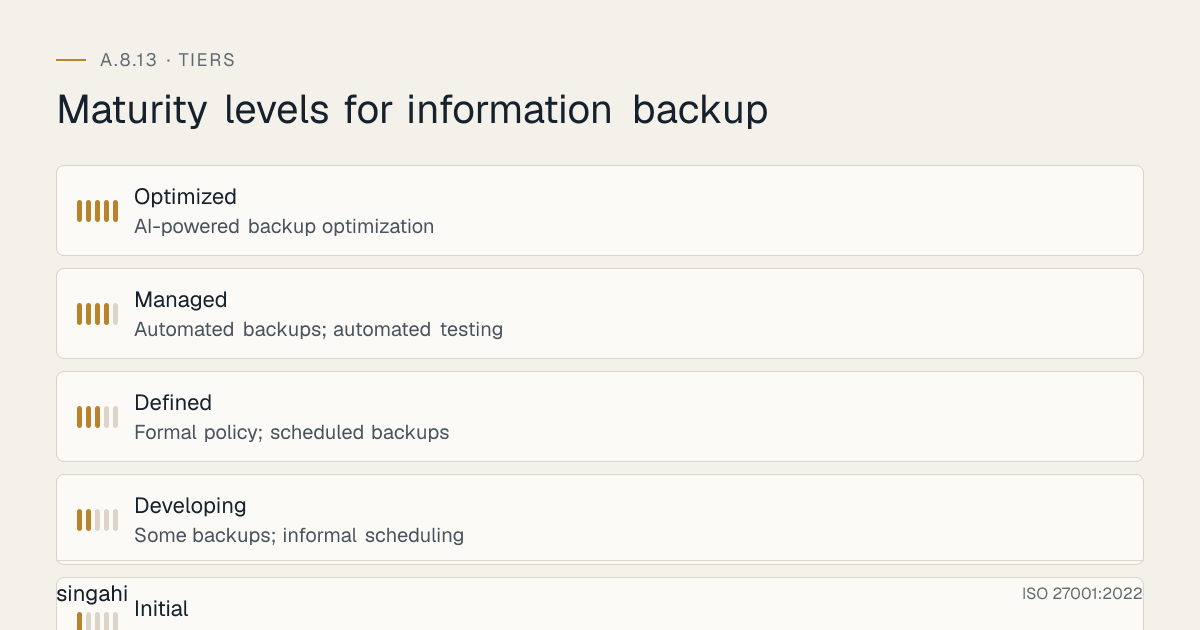
Maturity Model for A.8.13
| Level | Name | Characteristics | Evidence |
|---|---|---|---|
| 1 | Initial | No backup policy; ad-hoc backups; no testing; no off-site; no monitoring; no DR; backup failures unnoticed | No policy; no schedule; no testing; no off-site; no monitoring; no DR plan |
| 2 | Developing | Some backups; informal scheduling; occasional testing; no off-site; basic monitoring; no DR; manual processes | Partial backups; informal schedule; rare testing; no off-site; basic monitoring; no DR |
| 3 | Defined | Formal policy; scheduled backups; regular testing; off-site storage; monitoring; DR plan; documented procedures; encryption | Policy; schedule; monthly testing; off-site; monitoring; DR plan; procedures; encryption; quarterly DR drill |
| 4 | Managed | Automated backups; automated testing; immutable backups; cloud backup; DR drills; metrics-driven; RTO/RPO validated; centralized management; cost optimization | Automation; immutable; cloud; quarterly DR drills; metrics; validated RTO/RPO; centralized; cost optimization |
| 5 | Optimized | AI-powered backup optimization; self-healing backups; predictive failure detection; autonomous DR; zero RPO for critical systems; continuous testing; fully integrated BC/DR; immutable by default; air-gapped as standard | AI optimization; self-healing; predictive detection; autonomous DR; zero RPO; continuous testing; integrated BC/DR; immutable default; air-gapped standard |
Continuous Improvement Activities
Monthly:
- Backup success rate review and trend analysis
- Backup failure investigation and remediation
- Backup storage capacity review
- Backup integrity check review
- Backup cost analysis and optimization
- Off-site backup rotation verification
Quarterly:
- Backup policy review
- Backup test restore execution and review
- Immutable backup verification
- DR site data currency verification
- Cloud backup performance review
- Backup encryption and key management review
- Internal audit of backup controls
- RTO/RPO assessment and validation
Annually:
- Full backup policy review
- Complete DR drill (full failover, restore, failback)
- Technology evaluation (new backup tools, new cloud services)
- Benchmark against industry best practices
- External audit preparation
- Maturity assessment against target level
- Vendor security assessment (backup software vendors, cloud providers)
- BC/DR plan integration review
- Regulatory compliance review (RBI, SEBI, DPDP Act updates)
Trigger-Based:
- After any data loss incident or ransomware attack
- After any failed restore or backup corruption
- Upon new system or application introduction
- Upon significant infrastructure change (cloud migration, data center move)
- After any DR drill or test
- Upon new regulatory requirement
- After significant audit findings
- Upon merger, acquisition, or divestiture
- After industry peer incident ("could this happen to us?")
FAQ
Q1: What is the difference between backup and disaster recovery? A: Backup is the process of copying data to protect against loss. Disaster Recovery (DR) is the process of restoring systems and operations after a catastrophic event. Backup is the "what" (data protection); DR is the "how" (recovery execution). You need both: backup provides the data, and DR provides the plan and infrastructure to use that data. Backup without DR is like having a spare tire but no jack. DR without backup is like having a jack but no spare tire.
Q2: How often should we test our backups? A: At minimum: daily automated integrity checks, weekly file-level restore tests, monthly database and VM restore tests, quarterly full system restore tests and off-site restore tests, and annual DR drills. More frequent testing is better. Critical systems should be tested monthly. After any infrastructure change, test immediately. The only way to know a backup works is to restore from it. Testing is not optional, it is the most important part of backup.
Q3: What is the 3-2-1-1 backup rule, and why is the extra "1" important? A: The 3-2-1 rule: 3 copies of data, on 2 different media types, with 1 copy off-site. The extra "1" in 3-2-1-1 is 1 immutable or air-gapped copy. The extra "1" is critical because ransomware and sophisticated attackers can destroy or encrypt all online backups. An immutable or air-gapped backup cannot be modified, providing a last-resort recovery option. For 2024 and beyond, 3-2-1-1 is the minimum standard, not 3-2-1. The extra "1" is your ransomware insurance policy.
Q4: Should we use tape backup in the cloud era? A: Yes, tape remains relevant for specific use cases: (1) Air-gapped backup (tape is naturally offline when not in the drive), (2) Long-term archive (7+ years retention), (3) efficient bulk storage (tape is cheaper than disk for long-term), (4) Ransomware protection (tape is immune to network-based ransomware), (5) Compliance (some regulators prefer tape for audit trails). However, tape is slow for restore, requires physical handling, and needs environmental control. Best practice: Use disk/cloud for operational recovery (fast), and tape for archive and air-gapped backup (secure). Tape is not dead, it is a specialized tool in the backup toolkit.
Q5: What is the most common audit finding for A.8.13? A: The most common findings are: (1) No backup testing (backups never restored), (2) No off-site backup, (3) No immutable backup, (4) Backup failure not addressed, (5) No DR plan, (6) No DR drill conducted, (7) RTO and RPO not defined or validated, (8) Backup on same network as production, (9) No backup encryption, (10) No backup monitoring. Auditors will check backup schedules, test results, DR plans, drill reports, and storage locations.
Q6: How do we handle backup for cloud-native systems (containers, serverless, microservices)? A: Cloud-native backup requires cloud-native tools: (1) Use cloud provider backup services (AWS Backup, Azure Backup, GCP Backup) for IaaS/PaaS, (2) Use container image registries with backup for container images, (3) Use configuration management tools (Terraform, Ansible) with state backup for infrastructure, (4) Use Git for code and configuration backup (with repository backup), (5) Use database backup tools for cloud databases (RDS automated backups, Cloud SQL backups), (6) Use object storage versioning and replication for S3/Blob buckets, (7) Use Kubernetes etcd backup for cluster state. Cloud-native systems are ephemeral, backup the data, configuration, and state, not just the running instances.
Q7: What is the cost of implementing A.8.13 for a growing company? A: The main costs are backup software, storage (including an immutable or offline copy), SaaS backup for Microsoft 365 or Google Workspace, any DR capacity, and staff time for restore tests. For Indian companies with books on a foreign-hosted ERP, add a daily India-located backup.
Q8: How do we handle backup for large databases (terabytes or petabytes)? A: Large databases require specialized backup approaches: (1) Use incremental backups with block-level change tracking (reduces backup time), (2) Use database-native backup tools (Oracle RMAN, SQL Server Backup, PostgreSQL pg_basebackup) for efficiency, (3) Use snapshot-based backup for storage-level consistency, (4) Use parallel backup streams to maximize throughput, (5) Use deduplication to reduce storage (essential for large databases), (6) Use compression to reduce transfer time and storage, (7) Use dedicated backup network to avoid production impact, (8) Use cloud tiering for older backups (hot storage for recent, cold storage for old), (9) Use database replication for near-zero RPO (not a substitute for backup, but complementary). Large database backup is an engineering challenge, plan for capacity, bandwidth, and time.
Q9: How do we balance backup frequency with production impact? A: Backup impact on production can be minimized: (1) Use incremental backups (faster than full), (2) Use application-aware backup (VSS for Windows, quiescing for databases) to ensure consistency without downtime, (3) Use snapshots (near-instant, minimal impact), (4) Schedule backups during low-usage periods (nights, weekends), (5) Use dedicated backup network (isolated from production traffic), (6) Use throttling to limit backup bandwidth, (7) Use changed block tracking (CBT) to minimize data transfer, (8) Use storage-level replication (offloads backup from application servers). The goal is to protect data without disrupting business. Modern backup tools are designed to minimize impact, use their features.
Q10: What is the relationship between backup and business continuity planning (BCP)? A: Backup is a component of BCP, but BCP is broader. BCP includes: (1) Backup and recovery (data restoration), (2) Disaster recovery (system restoration), (3) Business processes (how to operate during disruption), (4) Communication (internal and external communication during crisis), (5) Personnel (who does what during disruption), (6) Facilities (alternative work locations), (7) Supply chain (alternative suppliers and logistics), (8) Crisis management (leadership decision-making during crisis). Backup provides the data foundation for BCP, but BCP requires planning for all aspects of business continuity. Do not confuse having backups with having a BCP. Backup is necessary but not sufficient for business continuity.
Q11: How do we handle backup for remote and branch offices? A: Remote and branch office backup requires: (1) Local backup appliance at each branch (for fast local recovery), (2) Replication to central data center or cloud (for DR), (3) Bandwidth optimization (deduplication, compression, WAN acceleration), (4) Backup scheduling that accommodates limited bandwidth (nights, weekends, incremental only), (5) Cloud backup as primary for small branches (no local infrastructure), (6) Centralized management (manage all branch backups from HQ), (7) Remote testing capability (test restores without shipping media). For banks with 3,000 branches, branch backup is a major challenge, use appliances with local caching, deduplication, and cloud replication.
Q12: How do we handle backup for mobile devices and BYOD? A: Mobile and BYOD backup requires: (1) Mobile device backup via MDM (backup corporate data, not personal data), (2) Containerization (backup only the corporate container, not the entire device), (3) Cloud sync for corporate apps (Office 365, Google Drive corporate), (4) Endpoint backup tools for laptops (Veeam Endpoint, Acronis), (5) Remote wipe capability for lost/stolen devices, (6) Backup of mobile app configurations and data, (7) Separate backup policies for BYOD vs. corporate devices. BYOD backup is tricky, respect user privacy while protecting corporate data. Backup corporate data only, with user consent and transparency.
Q13: What is the difference between backup and archiving? A: Backup is for recovery (restoring data after loss or corruption). Archive is for long-term retention (keeping data for compliance, legal, or historical purposes). Backup is active and operational; archive is passive and historical. Backup is typically stored on fast, accessible storage for quick recovery. Archive is typically stored on slow, cheap storage (tape, cold cloud) for long-term retention. Backup retention is short (days to months); archive retention is long (years to decades). Backup data is current; archive data is historical. Both are necessary but serve different purposes. Do not use archive as backup (too slow for recovery) or backup as archive (too expensive for long-term).
Q14: How do we handle backup when migrating to cloud or changing infrastructure? A: Infrastructure changes require backup planning: (1) Before migration: ensure current backups are complete and tested, (2) During migration: maintain backup of both source and destination until migration is verified, (3) After migration: implement new backup for cloud infrastructure, (4) Test new backup immediately after migration, (5) Update DR plan to reflect new infrastructure, (6) Retain old backups until new backups are validated, (7) Update backup runbooks and procedures, (8) Train staff on new backup tools and procedures. Never migrate without a verified backup. Migration is a high-risk period for data loss, backup is your safety net.
Q15: What is the future of backup? A: Backup is evolving rapidly: (1) AI-powered backup optimization (predictive scheduling, anomaly detection, self-healing), (2) Immutable backup as default (all backups protected against ransomware by design), (3) Continuous data protection (CDP) for near-zero RPO, (4) Backup as a service (BaaS), fully managed backup without infrastructure, (5) Integration with SASE and Zero Trust (backup as part of unified security architecture), (6) Blockchain verification for backup integrity (proof that backup has not been tampered with), (7) Instant recovery (boot directly from backup without restore), (8) Backup-driven dev/test (use backup copies for development and testing). The future of backup is intelligent, immutable, instant, and integrated.
References and Further Reading
Standards and Frameworks
- ISO/IEC 27001:2022, Information Security, Cybersecurity and Privacy Protection, Information Security Management Systems, Requirements
- ISO/IEC 27002:2022, Information Security, Cybersecurity and Privacy Protection, Information Security Controls
- NIST SP 800-53 Rev 5, Security and Privacy Controls for Information Systems and Organizations
- PCI DSS v4.0.1, Payment Card Industry Data Security Standard
- CIS Controls v8, CIS Controls Version 8
- COBIT 2019, Control Objectives for Information and Related Technologies
- ISO 22301:2019, Security and Resilience, Business Continuity Management Systems
Indian Regulations
- RBI Cyber Security Framework for Banks
- SEBI Cybersecurity and Cyber Resilience Framework (CSCRF) for SEBI Regulated Entities, circular of 20 August 2024
- CERT-In Guidelines for Information Security Practices
- Information Technology Act, 2000 (as amended)
- Digital Personal Data Protection Act, 2023 (India)
- Company Act, 2013
Books and Publications
- ISO 27001/27002: A Pocket Guide by Alan Calder
- Backup & Recovery: Inexpensive Backup Solutions for Open Systems by W. Curtis Preston
- Disaster Recovery Planning: Preparing for the Unthinkable by Jon William Toigo
- The Backup Book: Disaster Recovery from Desktop to Data Center by Dorian Cougias
- Veeam Best Practices Guide (Veeam)
Backup Resources
- Veeam: https://www.veeam.com
- Commvault: https://www.commvault.com
- AWS Backup: https://aws.amazon.com/backup
- Azure Backup: https://azure.microsoft.com/services/backup
- Google Cloud Backup: https://cloud.google.com/backup
- NIST SP 800-34: Contingency Planning Guide for Federal Information Systems