
On this page
- Quick Reference (60 Seconds)
- What the Control Asks For
- Why Redundancy of information processing facilities Matters
- Scope and Applicability
- Key Definitions and Terminology
- Relationship to Other Controls
- Implementation Roadmap (Week-by-Week)
- Detailed Implementation Guidance
- Tools, Technologies, and Solutions
- Policy and Procedure Templates
- Risk Assessment and Treatment
- Audit and Compliance Checklist
- Metrics and KPIs
- Common Pitfalls and How to Avoid Them
- Illustrative Scenarios
- Multi-Framework Mapping
- Regulatory and Industry Context
- Roles and Responsibilities (RACI)
- Documentation and Evidence Requirements
- Continuous Improvement
- FAQ
- References and Further Reading
Quick Reference (60 Seconds)
Figure · At a glance
A.8.14 at a glance
- Control ID
- A.8.14
- Control Name
- Redundancy of information processing
- ISO 27002:2022 Section
- 8.14
- Primary Purpose
- Ensure that information processing
- Key Activities
- Identify critical systems
- Typical Owners
- IT Operations Manager
| Aspect | Summary |
|---|---|
| Control ID | A.8.14 |
| Control Name | Redundancy of information processing facilities |
| ISO 27002:2022 Section | 8.14 |
| Primary Purpose | Ensure that information processing facilities have sufficient redundancy so that critical operations can continue in the event of a primary facility failure |
| Key Activities | Identify critical systems, define redundancy requirements, implement redundancy (HA, DR, clustering, load balancing), test failover, monitor failover, maintain redundancy, document procedures |
| Typical Owners | IT Operations Manager, Infrastructure Architect, DR Manager, Cloud Architect, CISO |
| Implementation Effort | High (8–16 weeks for implementation; ongoing for maintenance) |
| Main cost drivers | Duplicate infrastructure or cloud capacity in a second zone or region, second network and power feeds, standby licences, and failover testing time |
| ISO 27002 attributes | Control type: Preventive · Properties: Availability · Concepts: Protect · Capabilities: Continuity, Asset management · Domains: Protection, Resilience |
Bottom Line: If your primary data center, server, network, or application fails, can your business continue to operate? Redundancy is the answer. A.8.14 requires organizations to implement sufficient redundancy for critical information processing facilities so that a single point of failure does not bring down critical operations. From RAID disks to multi-region cloud deployments, redundancy is the foundation of resilience. Without redundancy, a single hardware failure, power outage, or natural disaster can halt operations.
What the Control Asks For
In short:
ISO 27001:2022 Annex A 8.14 asks organizations to provide enough redundancy in information processing facilities to meet availability requirements.
Do you need this control?
A.8.14 is not mandatory in itself: under clause 6.1.3 you include it if your risk assessment calls for it, and record the decision in your Statement of Applicability. Include it where availability requirements justify redundant facilities. Your business impact analysis decides how much redundancy you need.
What ISO 27002:2022 Adds
27002 8.14 (paraphrased): identify availability requirements for business services and systems first, then design architecture with enough redundancy to meet them. Redundancy can duplicate facilities in part or in full. Plan procedures to activate redundant components, stating whether they are always active, or activated automatically or manually in an emergency. Redundant components must give the same security level as the primary ones. Have mechanisms to alert on failures, run the planned procedure and keep services available while the failed part is repaired.
Consider:
- (a) two or more suppliers of networks and critical facilities (for example ISPs)
- (b) redundant networks
- (c) two geographically separate data centres with mirrored systems
- (d) physically redundant power supplies or sources
- (e) multiple parallel software instances with automatic load balancing
- (f) duplicated components (CPUs, disks, memory, firewalls, routers, switches)
Test failover: preferably in production mode where it is safe. 27002 also links redundancy to ICT readiness (5.30) and warns that redundancy can introduce integrity and confidentiality risks (for example data copied to a less protected site).
DR Security Parity Check
A DR site or secondary region is only as safe as its weakest control. Check that it has the same patch level, EDR, logging and SIEM feed, access controls and MFA, encryption and key management, and network segmentation as the primary, and include it in vulnerability scans and access reviews.
Why Redundancy of information processing facilities Matters
The Single Point of Failure Threat
A single point of failure (SPOF) is any component whose failure causes the entire system to fail. Without redundancy, every component is a potential SPOF. Redundancy eliminates SPOFs by providing backup components that can take over when primary components fail. The difference between a minor incident and a catastrophic outage often comes down to whether redundancy was implemented.
Key Statistics
- Outages are frequent and costly: the Uptime Institute's annual outage analyses consistently find that a large share of significant outages cost over US$100,000, and that power and network failures are leading causes
- Human error contributes to many outages: often through failed procedures, so redundancy must be paired with tested runbooks
- Cloud regions and zones do fail: provider status histories show several significant regional incidents each year, so single-region designs carry real risk for critical services
How It Goes Wrong (hypothetical patterns)
- A leading e-commerce platform in India experienced a complete data center failure during a peak festival sale (Diwali). The single data center had no redundancy. The platform was down for 18 hours during the highest-traffic period of the year. Customer trust was severely damaged, and the platform lost market share to competitors.
- A bank in Mumbai had its primary data center flooded during monsoon season. The bank had no DR site, no redundant data center, and no cloud backup. All banking operations halted for 5 days. Customers could not access accounts, ATMs, or digital banking. RBI took supervisory action, including restrictions on the bank's digital banking expansion for 18 months.
- A hospital in Delhi had a single server failure in its EMR system. No redundancy, no HA, no DR. The hospital reverted to paper records for 3 days. Surgeries were postponed, medication errors increased, and patient safety was compromised. The incident was reported to the National Human Rights Commission.
- A SaaS company in Bangalore had a single AWS region outage that took down their entire platform. The company had no multi-region deployment. All 500 customers were affected for 6 hours. The company faced SLA penalties, customer churn, and had to offer service credits. The company lost 3 major enterprise customers who cited "lack of redundancy" as the reason for switching.
- A manufacturing plant in Chennai had a single PLC (Programmable Logic Controller) failure that stopped the entire production line. No redundant PLC, no backup control system. The plant was down for 12 hours. The plant had to air-ship products to meet customer commitments, damaging an additional .
Regulatory and Business Drivers
- RBI (Master Direction on IT Governance 2023; BCP/DR expectations) expects DR arrangements and tested failover for critical systems, with RTO and RPO set by the entity and reviewed by its board
- SEBI: the BCP-DR framework for market infrastructure institutions requires a DR site in a different seismic zone, near-site arrangements and regular live drills; SEBI CSCRF (2024) adds resilience requirements for other regulated entities
- IRDAI (2023): business continuity and DR for insurers' critical systems
- DORA (EU): for financial entities serving the EU, requires ICT business continuity and redundancy (Articles 11 and 12)
- ISO 27001: A.8.14 is one of the Annex A controls you consider when treating risk (clause 6.1.3). If your risk assessment calls for it, it goes in your Statement of Applicability with how it is implemented; if not, you record why it is excluded
- ISO 22301 (Business Continuity) requires redundancy as part of business continuity strategy
- SLA commitments to customers often require 99.9% or 99.99% uptime, which is impossible without redundancy
- Cyber Insurance increasingly requires redundancy as a condition of coverage
Scope and Applicability
What Is Covered
- All information processing facilities that support critical business operations
- Servers (physical and virtual), compute redundancy, clustering, failover
- Storage systems, RAID, replication, SAN/NAS redundancy, multi-site storage
- Network infrastructure, routers, switches, firewalls, load balancers, WAN links, ISP redundancy
- Power infrastructure, UPS, generators, dual power supplies, multiple power feeds
- Cooling infrastructure, redundant HVAC, multiple cooling units, environmental monitoring
- Data centers, primary and secondary data centers, DR sites, multi-region cloud
- Applications, load-balanced application servers, database clustering, microservices
- Cloud resources, multi-AZ, multi-region, auto-scaling, failover groups
- Databases, primary-replica, active-active, clustering, synchronous replication
- Network connections, multiple ISPs, diverse paths, MPLS, SD-WAN
- Communication systems, redundant phone lines, redundant internet, satellite backup
- Security infrastructure, redundant firewalls, redundant SIEM, redundant access controls
- Backup systems, redundant backup infrastructure, redundant backup storage
- Monitoring systems, redundant monitoring, redundant alerting
What Is Not Covered
- Non-critical systems where downtime is acceptable (but should still be considered)
- Personal devices and workstations (covered by endpoint management, not redundancy)
- Facilities not related to information processing (but may be covered by A.8.34 or BCP)
- Software-level redundancy (covered by application architecture, but infrastructure redundancy supports it)
- Data redundancy (covered by A.8.13, backup, but related to facility redundancy)
Applicability by Organization Type
| Organization Type | Applicability | Key Redundancy Concerns |
|---|---|---|
| BFSI | Critical | Core banking DR, ATM network, payment systems (UPI, RTGS, NEFT), trading platforms, RBI compliance |
| Healthcare | Critical | EMR systems, PACS, patient monitoring, surgical systems, hospital operations, NABH compliance |
| IT/Software Services | High | Customer SaaS platforms, development environments, CI/CD pipelines, cloud infrastructure |
| SaaS/Cloud | Critical | Multi-tenant platforms, customer data, API infrastructure, SLA compliance, multi-region |
| Retail/E-commerce | High | E-commerce platforms, payment gateways, inventory systems, customer portals, peak season resilience |
| Manufacturing | High | SCADA/ICS systems, production line control, ERP, quality control systems, IoT sensors |
| Government/Defense | Critical | Citizen services, defense systems, critical infrastructure, emergency response systems |
| Telecom | Critical | Network infrastructure, towers, switches, data centers, TRAI 99.99% availability mandate |
| Education | Medium | LMS, student portals, exam systems, research computing, online learning platforms |
| Media/OTT | High | Streaming platforms, content delivery, CDN, live events, subscriber platforms |
Key Definitions and Terminology
| Term | Definition |
|---|---|
| Redundancy | The duplication of critical components or functions of a system with the intention of increasing reliability and availability |
| High Availability (HA) | A system design approach that ensures a system is operational and accessible for a high percentage of time (typically 99.9% or higher) |
| Disaster Recovery (DR) | The process of restoring systems and operations after a catastrophic event, typically using a secondary site |
| Failover | The automatic or manual switching to a redundant or standby component when the primary component fails |
| Failback | The process of returning operations to the primary component after a failover event |
| Load Balancing | The distribution of workload across multiple computing resources to optimize use and maximize throughput |
| Clustering | A group of interconnected servers that operate as a single system, with automatic failover between nodes |
| Active-Active | A configuration where all redundant components are actively processing workloads simultaneously |
| Active-Passive | A configuration where the primary component is active and the secondary is on standby, taking over only on failure |
| Hot Standby | A redundant system that is running and ready to take over immediately (RTO: minutes to seconds) |
| Warm Standby | A redundant system that is partially running and can be brought online within a short time (RTO: minutes to hours) |
| Cold Standby | A redundant system that is not running but can be brought online within a longer time (RTO: hours to days) |
| Recovery Point Objective (RPO) | The maximum acceptable amount of data loss measured in time (how much data can you afford to lose?) |
| Recovery Time Objective (RTO) | The maximum acceptable time to restore a system after a failure (how long can you afford to be down?) |
| Mean Time Between Failures (MTBF) | The average time between system failures, indicating reliability |
| Mean Time To Repair (MTTR) | The average time to restore a system after failure, indicating recovery speed |
| Availability | The percentage of time a system is operational and accessible (e.g., 99.9% = 8.76 hours downtime/year) |
| Single Point of Failure (SPOF) | A component whose failure causes the entire system to fail |
| N+1 Redundancy | A system with one more component than needed (e.g., 3 servers for 2-server workload) |
| N+N Redundancy | A system with a full duplicate of all components (e.g., 2 data centers each capable of handling full load) |
| RAID (Redundant Array of Independent Disks) | A storage technology that combines multiple disk drives for redundancy and performance |
| SAN (Storage Area Network) | A dedicated network for storage devices, often with built-in redundancy |
| NAS (Network Attached Storage) | File-level storage accessible over a network, with redundancy features |
| Replication | The real-time or near-real-time copying of data to a secondary location |
| Synchronous Replication | Data is written to both primary and secondary locations simultaneously; zero data loss but higher latency |
| Asynchronous Replication | Data is written to primary first, then replicated to secondary; lower latency but potential data loss |
| Multi-AZ (Availability Zone) | Deployment across multiple physically separated data centers within a cloud region |
| Multi-Region | Deployment across multiple geographically separated cloud regions |
| CDN (Content Delivery Network) | A distributed network of servers that delivers content with redundancy and low latency |
| UPS (Uninterruptible Power Supply) | A device that provides emergency power when the main power fails |
| Generator | A backup power source that provides electricity during outages |
| Dual Power Supply | A server or device with two independent power supplies for redundancy |
| Diverse Path | Network connections that follow different physical routes to avoid simultaneous failure |
| SD-WAN | Software-defined wide area network that enables redundant network paths and intelligent routing |
| Auto-Scaling | Automatic adjustment of computing resources based on demand, providing redundancy through elasticity |
| Service Level Agreement (SLA) | A commitment between service provider and customer regarding availability and performance |
| Service Level Objective (SLO) | Internal availability targets that are more stringent than external SLAs |
| Graceful Degradation | A system design that reduces functionality rather than failing completely when components are lost |
| Circuit Breaker | A pattern that prevents cascading failures by stopping requests to a failing component |
| Bulkhead | A pattern that isolates failures to prevent them from affecting the entire system |
| Chaos Engineering | The practice of intentionally introducing failures to test system resilience |
| DR Site | A secondary location with infrastructure for recovering operations after a disaster |
| Data Center Tier | A classification system for data center reliability (Tier I = basic, Tier IV = fully redundant) |
| UPS Runtime | The duration a UPS can power systems without main power |
| Generator Startup Time | The time it takes a generator to start providing power after a power outage |
| Split Brain | A scenario in a clustered system where nodes lose communication and each believes it is the primary |
| Quorum | The minimum number of nodes that must agree in a cluster to prevent split brain |
| Virtual IP (VIP) | A floating IP address that moves between redundant servers during failover |
| Heartbeat | A periodic signal between redundant components to monitor health and trigger failover |
| Watchdog | A hardware or software timer that triggers recovery if a system becomes unresponsive |
| Canary Deployment | A deployment strategy that routes a small percentage of traffic to a new version to test before full rollout |
| Blue-Green Deployment | A deployment strategy with two identical environments, switching between them for zero-downtime updates |
Relationship to Other Controls
| Control | Relationship |
|---|---|
| A.5.1 Policies for information security | Redundancy policy aligns with overall security policy |
| A.5.30 ICT readiness for continuity | Redundancy is essential for ICT continuity and disaster recovery |
| A.8.13 Information backup | Backups support recovery after a facility failure; redundancy reduces the need for recovery |
| A.8.15 Logging | Redundancy events must be logged |
| A.8.16 Monitoring activities | Redundancy health and failover must be monitored |
| A.5.29 Information security during disruption | Security maintained during failover |
| A.7.11 Supporting utilities | Power and network redundancy |
| A.5.23 Cloud services | Multi-zone and multi-region responsibilities |
| A.8.9 Configuration management | Redundant systems must be identically configured |
| A.8.24 Use of cryptography | Redundant systems must have identical encryption configurations |
| A.7.14 Secure disposal or re-use of equipment | Redundant equipment disposal follows the same procedures |
| A.8.10 Information deletion | Data deletion must be synchronized across redundant systems |
| A.8.11 Data masking | Masking must be applied consistently across redundant systems |
| A.8.31 Separation of development, test and production environments | Redundancy must be maintained for each environment |
| A.8.22 Segregation in networks | Redundant networks must be properly segregated |
| A.8.21 Security of network services | Redundant network services must be secured |
| A.8.20 Network security | Redundant network paths must be secured |
Implementation Roadmap (Week-by-Week)
Phase 1: Assessment and Planning (Weeks 1–4)
Week 1: Critical System Inventory
- Inventory all information processing facilities (servers, storage, network, power, cooling, data centers)
- Identify critical systems (business impact analysis)
- Classify systems by availability requirement (99%, 99.9%, 99.99%, 99.999%)
- Identify single points of failure (SPOFs) for each critical system
- Map current redundancy (HA, DR, clustering, load balancing, RAID, UPS, generators)
- Identify redundancy gaps (systems with no redundancy, single data center, single ISP, single power feed)
- Document current RTO and RPO for each critical system
- Assess data center tier (Tier I, II, III, IV) and redundancy level
Week 2: Availability Requirements Definition
- Define availability targets for each critical system (e.g., 99.9% = 8.76 hours downtime/year; 99.99% = 52.56 minutes/year)
- Define RTO for each critical system (maximum downtime acceptable)
- Define RPO for each critical system (maximum data loss acceptable)
- Define acceptable degradation levels (graceful degradation scenarios)
- Define peak load requirements (Diwali, year-end, IPO, exam season)
- Document availability requirements with business justification
- Obtain approval from business stakeholders and CISO
Week 3: Redundancy Architecture Design
- Design redundancy architecture for each critical system:
- Server level: clustering, load balancing, N+1 or N+N
- Storage level: RAID, replication, multi-site storage
- Network level: dual ISP, diverse paths, SD-WAN, redundant firewalls
- Data center level: dual data center, DR site, cloud multi-region
- Power level: dual UPS, dual generators, dual power feeds
- Cooling level: redundant HVAC, multiple cooling units
- Select redundancy model: active-active, active-passive, hot standby, warm standby, cold standby
- Design failover mechanisms (automatic, manual, hybrid)
- Design failback procedures (return to primary after recovery)
- Design monitoring and alerting for redundancy health
- Estimate cost for redundancy implementation
- Obtain budget approval
Week 4: DR Site Selection and Design
- Select DR site location far enough to avoid shared disasters (different seismic zone, flood plain and power grid; SEBI requires a different seismic zone for MII DR sites)
- Define DR site type: hot (real-time), warm (periodic sync), cold (backup only)
- Design DR site infrastructure (network, storage, compute, power, cooling)
- Design data replication to DR site (synchronous, asynchronous, snapshot-based)
- Design network connectivity to DR site (dedicated link, VPN, MPLS, SD-WAN)
- Design DR site security (physical security, network security, access controls)
- Design DR site staffing (onsite team, remote management, automation)
- Obtain DR site budget and approval
Phase 2: Infrastructure Implementation (Weeks 5–10)
Week 5: Server and Storage Redundancy
- Implement server clustering (Windows Failover Cluster, Linux Pacemaker, VMware HA, Kubernetes)
- Implement load balancing (F5, Nginx, HAProxy, AWS ALB, Azure Load Balancer)
- Implement storage redundancy (RAID 6/10, SAN replication, NAS replication, storage mirroring)
- Implement database clustering (SQL Server Always On, Oracle RAC, PostgreSQL streaming replication, MySQL Group Replication)
- Implement application redundancy (microservices, container orchestration, auto-scaling)
- Test failover between redundant servers
- Verify failover time meets RTO target
Week 6: Network and Power Redundancy
- Implement dual ISP connections (different providers, different paths)
- Implement redundant network paths (diverse fiber routes, redundant routers/switches)
- Implement redundant firewalls (active-passive or active-active)
- Implement redundant load balancers (active-passive or active-active)
- Implement UPS redundancy (N+1 UPS, dual UPS systems)
- Implement generator redundancy (dual generators, automatic transfer switches)
- Implement dual power feeds (from different substations)
- Implement redundant cooling (N+1 HVAC, multiple cooling units)
- Test power failover (simulate power outage, verify UPS and generator response)
- Test network failover (simulate ISP failure, verify traffic rerouting)
Week 7: Cloud Redundancy
- Implement multi-AZ deployment for cloud resources (AWS, Azure, GCP)
- Implement multi-region deployment for critical systems (cross-region replication, global load balancing)
- Implement cloud auto-scaling for elasticity and redundancy
- Implement cloud failover groups (Azure Traffic Manager, AWS Route 53, GCP Global Load Balancer)
- Implement cloud backup and DR (AWS DR, Azure Site Recovery, GCP DR)
- Implement SaaS redundancy (multi-region SaaS, redundant API endpoints)
- Test cloud failover (simulate AZ failure, verify automatic failover)
- Test cloud DR (simulate region failure, verify DR site activation)
Week 8: DR Site Implementation
- Set up DR site infrastructure (servers, storage, network, power, cooling)
- Implement data replication to DR site (synchronous or asynchronous)
- Implement network connectivity to DR site (dedicated link, VPN, SD-WAN)
- Implement DR site security (firewall, IDS/IPS, access controls, monitoring)
- Implement DR site monitoring (health checks, replication lag monitoring, failover readiness)
- Install and configure applications at DR site (same versions as primary)
- Synchronize configurations between primary and DR (use infrastructure as code)
- Test DR site readiness (health checks, replication verification, application startup)
Week 9: Application-Level Redundancy
- Implement application clustering (session replication, stateless design)
- Implement database read replicas (offload reads, provide failover)
- Implement message queue redundancy (RabbitMQ cluster, Kafka replication, SQS multi-region)
- Implement cache redundancy (Redis cluster, Memcached replication)
- Implement CDN for content redundancy and edge delivery
- Implement API gateway redundancy (multiple gateways, health checks)
- Implement microservices redundancy (Kubernetes auto-scaling, pod replication, service mesh)
- Implement graceful degradation (reduce features rather than fail completely)
- Test application failover (simulate component failure, verify graceful handling)
Week 10: Security Redundancy
- Implement redundant firewalls (active-passive or active-active)
- Implement redundant IDS/IPS (multiple sensors, central correlation)
- Implement redundant SIEM (log forwarding to secondary SIEM)
- Implement redundant DLP (multiple DLP engines)
- Implement redundant access control (multiple RADIUS/TACACS+ servers, multiple LDAP/AD)
- Implement redundant VPN (multiple VPN gateways, multiple protocols)
- Implement redundant certificate authorities (internal PKI redundancy)
- Test security failover (simulate security component failure, verify continued protection)
Phase 3: Testing and Validation (Weeks 11–14)
Week 11: Component-Level Testing
- Test server failover (shutdown primary, verify secondary takes over)
- Test storage failover (disconnect primary storage, verify secondary storage)
- Test network failover (disconnect primary ISP, verify secondary ISP)
- Test power failover (simulate power outage, verify UPS and generator)
- Test database failover (fail primary database, verify replica promotion)
- Test load balancer failover (fail primary LB, verify secondary LB)
- Test firewall failover (fail primary firewall, verify secondary firewall)
- Test application failover (fail application instance, verify traffic rerouting)
- Measure failover time for each component and compare to RTO
Week 12: DR Drill
- Conduct full DR drill (simulate primary site disaster, activate DR site)
- Execute DR plan step-by-step (follow runbook exactly)
- Verify DR site activation (data replication, application startup, network connectivity)
- Verify business operations at DR site (users can access systems, transactions work)
- Verify data integrity at DR site (no corruption, no data loss)
- Verify security at DR site (firewall, access controls, monitoring active)
- Measure RTO (time from disaster declaration to operational DR site)
- Measure RPO (amount of data lost, if any)
- Document drill results and any gaps
- Conduct lessons learned session
Week 13: Failback Testing
- Test failback from DR site to primary site (after primary is restored)
- Verify data synchronization from DR to primary (reverse replication)
- Verify application functionality at primary site after failback
- Verify user traffic returns to primary site (DNS update, routing)
- Measure failback time and compare to target
- Document failback procedures and any issues
- Update runbooks with lessons learned
Week 14: Chaos Engineering
- Implement chaos engineering practice (intentional failure injection)
- Conduct controlled chaos experiments (terminate random instances, simulate AZ failure, network latency)
- Verify system resilience under failure conditions
- Identify unexpected dependencies and SPOFs
- Measure system behavior under degraded conditions (graceful degradation)
- Document chaos experiment results and improvements
- Plan regular chaos engineering (monthly or quarterly)
Phase 4: Documentation, Monitoring, and Audit (Weeks 15–16)
Week 15: Documentation and Runbooks
- Document all redundancy architecture (diagrams, component lists, configurations)
- Document all failover procedures (step-by-step, with decision trees)
- Document all failback procedures (step-by-step, with verification steps)
- Document all DR procedures (activation, operations, deactivation)
- Create quick reference cards for common failover scenarios
- Create escalation procedures for redundancy failures
- Create communication templates for redundancy incidents
- Store documentation in printed form and secure digital location accessible during DR
- Train all relevant staff on redundancy procedures and runbooks
- Conduct tabletop exercises (walk through scenarios without actual failover)
Week 16: Monitoring, Audit, and Continuous Improvement
- Set up redundancy monitoring dashboard (component health, replication status, failover readiness)
- Configure automated health checks for all redundant components
- Configure failover alerting (immediate alert on any failover event)
- Configure redundancy failure alerting (alert if redundancy is compromised)
- Configure replication lag monitoring (alert if lag exceeds RPO)
- Configure DR site readiness monitoring (daily health check)
- Conduct internal audit of redundancy implementation (checklist-based)
- Prepare documentation for external audit (ISO 27001, RBI, SEBI)
- Plan for continuous improvement (quarterly review, annual DR drill, technology refresh)
- Plan for redundancy maintenance (patching, testing, hardware refresh, capacity planning)
Detailed Implementation Guidance
Figure · Tiers
Maturity levels for redundancy of information processing facilities
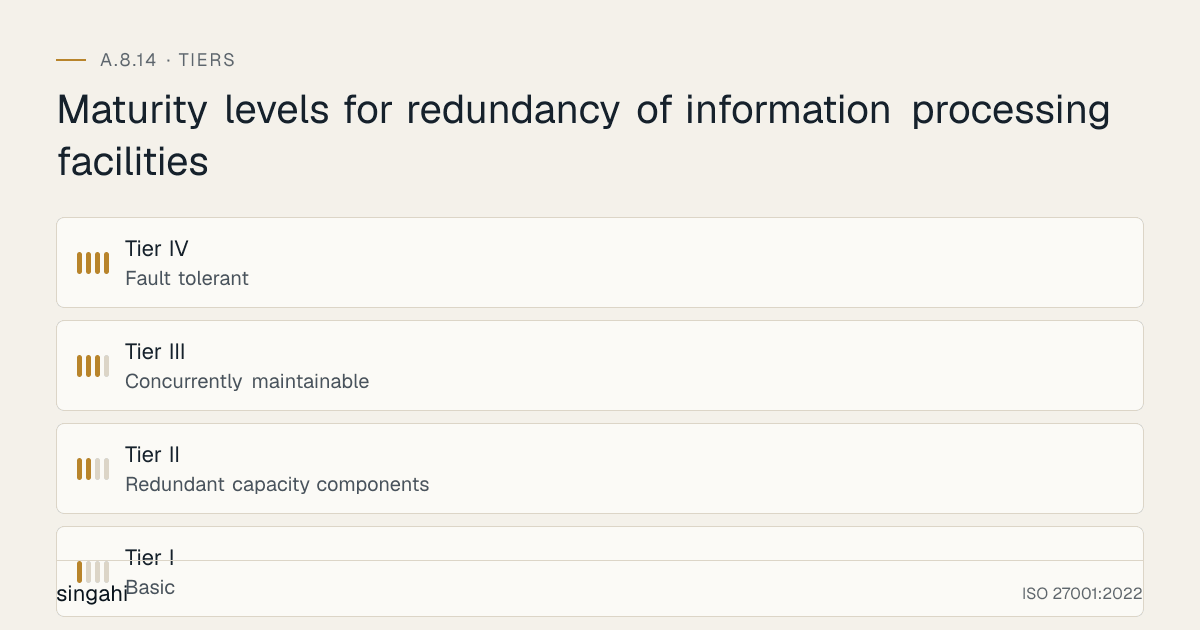
Redundancy Levels by System Criticality
Redundancy Matrix:
| System Criticality | Availability Target | RTO | RPO | Server Redundancy | Storage Redundancy | Network Redundancy | Power Redundancy | Data Center Redundancy |
|---|---|---|---|---|---|---|---|---|
| Critical (e.g., core banking, trading, EMR) | 99.999% (5.26 min/year) | 0–15 min | 0–1 min | Active-active cluster (N+N) | Synchronous replication (SAN/NAS) | Dual ISP + diverse paths + SD-WAN | N+1 UPS + dual generators + dual feeds | Hot DR site (real-time sync) + multi-region cloud |
| High (e.g., ERP, CRM, e-commerce) | 99.99% (52.56 min/year) | 15 min–1 hour | 1–15 min | Active-passive cluster (N+1) | Asynchronous replication (SAN/NAS) | Dual ISP + redundant paths | N+1 UPS + generator | Warm DR site (hourly sync) + multi-AZ cloud |
| Medium (e.g., HRIS, intranet, email) | 99.9% (8.76 hours/year) | 1–4 hours | 15 min–1 hour | Load-balanced (N+1) | RAID + periodic replication | Single ISP + redundant router | UPS + generator | Cold DR site (daily backup) + cloud backup |
| Low (e.g., archives, dev/test, non-critical) | 99% (87.6 hours/year) | 4–24 hours | 1–24 hours | No redundancy (or N+1 optional) | RAID only | Single ISP | UPS only | Cloud backup only (no DR site) |
Server Redundancy Architectures
| Architecture | Description | Pros | Cons | Best For | Cost |
|---|---|---|---|---|---|
| Active-Active Cluster | Multiple servers actively processing all requests simultaneously; load balanced | Zero downtime on failover; load distribution; high performance | Complex; requires shared storage or stateless design; expensive | Core banking, trading, e-commerce | High |
| Active-Passive Cluster | One primary server active; one or more standby servers ready to take over | Simple; efficient for standby; good for stateful applications | Standby resources idle; failover time (seconds to minutes); some downtime | ERP, CRM, database | Medium |
| Hot Standby | Standby server is running and synchronized in real-time; failover is instant (seconds) | Minimal RTO; always ready; minimal data loss | Standby resources fully used; expensive; requires synchronous replication | Trading, core banking, EMR | High |
| Warm Standby | Standby server is partially running and periodically synchronized; failover time (minutes to hours) | efficient; lower resource usage than hot standby | Longer RTO; potential data loss (last sync) | Medium-priority systems, development environments | Medium |
| Cold Standby | Standby server is not running but can be brought online from backup; failover time (hours to days) | Lowest cost; minimal resource usage | Longest RTO; significant data loss; manual failover | Low-priority systems, archives, non-critical | Low |
| Load Balanced (N+1) | Multiple servers share load; one extra server for redundancy | efficient; scalable; good use | Not true HA if application stateful; session handling needed | Web servers, API servers, application servers | Medium |
| Microservices with Auto-Scaling | Containerized microservices with automatic scaling across multiple nodes | Highly scalable; resilient; cloud-native; cost-optimized | Complex; requires orchestration (Kubernetes); stateless design | SaaS, cloud-native applications, modern apps | Medium-High |
| Virtual Machine HA | Hypervisor-level HA (VMware vSphere HA, Hyper-V HA, KVM HA) | Automatic VM restart on host failure; hypervisor-managed | VM restart time (minutes); not application-aware | General server virtualization | Low-Medium |
Storage Redundancy
| Technology | Description | Redundancy Level | Pros | Cons | Best For |
|---|---|---|---|---|---|
| RAID 1 | Disk mirroring (2 disks, identical copies) | 1 disk can fail | Simple; fast read; good for OS | 50% capacity overhead; slow write | OS drives, small databases |
| RAID 5 | Striping with parity (3+ disks) | 1 disk can fail | Good capacity; read performance | Slow write; rebuild time; not for large disks | File servers, general storage |
| RAID 6 | Striping with double parity (4+ disks) | 2 disks can fail | Better fault tolerance than RAID 5 | Slower write; more overhead | Large file servers, video storage |
| RAID 10 | Striped mirrors (4+ disks) | 1 disk per mirror can fail | Fast read/write; excellent performance; quick rebuild | 50% capacity overhead; expensive | Databases, high-performance applications |
| SAN Replication | Storage array replication to secondary SAN | Array-level redundancy | Block-level; synchronous or async; enterprise | expensive; requires dedicated network; complex | Enterprise databases, core systems |
| NAS Replication | NAS replication to secondary NAS | File-level redundancy | File-level; simple; efficient | Not block-level; potential consistency issues | File servers, shared storage |
| Object Storage Replication | Cloud object storage with cross-region replication (S3, Blob, GCS) | Region-level redundancy | Automatic; multi-region; lightweight; durable | Eventual consistency; latency | Cloud-native apps, backups, archives |
| Database Replication | Database-native replication (streaming, log shipping, always-on) | Database-level redundancy | Transaction-level; application-aware; failover automation | Database-specific; requires expertise; potential lag | All databases (critical) |
| Software-Defined Storage | Ceph, GlusterFS, MinIO with distributed replication | Node-level redundancy | Scalable; software-based; commodity hardware | Complex; requires expertise; performance tuning | Large-scale storage, cloud environments |
Network Redundancy
| Component | Redundancy Approach | Implementation | Best For |
|---|---|---|---|
| Internet Connectivity | Dual ISP (different providers, different paths) | Primary ISP + secondary ISP; BGP for automatic routing; SD-WAN for intelligent routing | All organizations with internet-dependent operations |
| WAN Links | MPLS + broadband + 4G/5G backup | Primary MPLS + secondary broadband + cellular backup; SD-WAN for intelligent failover | Multi-site organizations, branch offices |
| Routers | Redundant routers (HSRP, VRRP, GLBP) | Primary router + standby router; virtual IP; automatic failover | Enterprise networks, data centers |
| Switches | Redundant switches (stacking, VPC, MLAG) | Core switch redundancy; access switch redundancy; link aggregation | Enterprise networks, data centers |
| Firewalls | Active-passive or active-active firewall pair | Two firewalls with synchronized state; automatic failover; load balancing | All organizations (security-critical) |
| Load Balancers | Active-passive or active-active LB pair | Two LBs with health checks; session synchronization; automatic failover | Web applications, APIs, high-traffic systems |
| DNS | Multiple DNS servers (internal + external redundancy) | Primary DNS + secondary DNS; anycast DNS; cloud DNS (Route 53, Cloudflare) | All organizations |
| Diverse Paths | Physically separate network paths | Different fiber routes; different building entries; different cable trays | Critical infrastructure, data centers |
| SD-WAN | Software-defined WAN with multiple paths | Intelligent path selection; automatic failover; application-aware routing; quality of service | Multi-site organizations, cloud connectivity |
Power and Cooling Redundancy
| Component | Redundancy Approach | Implementation | Best For |
|---|---|---|---|
| UPS | N+1 UPS configuration | Multiple UPS units with load sharing; each UPS can handle full load if one fails | All data centers, server rooms |
| Generator | Dual generators with automatic transfer | Primary generator + secondary generator; automatic start; fuel supply redundancy | Data centers, critical facilities |
| Power Feed | Dual power feeds from different substations | Two separate electrical feeds; automatic transfer switch; different grid segments | Data centers, critical facilities |
| Dual Power Supplies | Server with two power supplies | Each server has two power supplies connected to different power sources | All servers in data centers |
| PDU Redundancy | Redundant power distribution units | A-side and B-side PDUs; each server connected to both | Data centers, server rooms |
| Cooling | N+1 HVAC or redundant cooling units | Multiple cooling units; each can handle full load; redundant chillers | Data centers, server rooms |
| Environmental Monitoring | Redundant temperature/humidity sensors | Multiple sensors; automatic alerts; automatic cooling adjustment | All data centers |
Data Center Redundancy
| Tier | Description | Redundancy | Availability | Cost | Best For |
|---|---|---|---|---|---|
| Tier I | Basic | No redundancy; single path for power and cooling | 99.671% | Low | Small offices, non-critical |
| Tier II | Redundant capacity components | Redundant power and cooling components; single path | 99.741% | Low-Medium | Small businesses, non-critical servers |
| Tier III | Concurrently maintainable | All components are redundant; one path active, one path maintainable; no shutdown for maintenance | 99.982% | Medium | Medium businesses, most enterprise applications |
| Tier IV | Fault tolerant | All components are redundant; multiple active paths; fault tolerance; no single point of failure | 99.995% | High | Banks, hospitals, critical infrastructure, cloud providers |
Data Center Redundancy Strategies:
| Strategy | Description | RTO | RPO | Cost | Best For |
|---|---|---|---|---|---|
| Hot Site (Active-Active) | DR site is fully operational and running; real-time synchronization; automatic failover | 0–15 min | 0–1 min | Very High | Core banking, trading, critical healthcare |
| Warm Site (Active-Passive) | DR site is partially running; periodic synchronization; manual or semi-automatic failover | 15 min–4 hours | 15 min–1 hour | High | ERP, CRM, e-commerce, important applications |
| Cold Site | DR site has infrastructure but no running systems; data restored from backup; manual activation | 4–48 hours | 1–24 hours | Medium | Medium-priority systems, development environments |
| Cloud DR (Pilot Light) | Minimal resources running in cloud; full environment scaled up on demand; backup restored | 1–4 hours | 1–4 hours | Medium | Cloud-native applications, variable workloads |
| Cloud DR (Warm Standby) | Scaled-down version running in cloud; scaled up on demand; continuous replication | 15 min–1 hour | 15 min–1 hour | Medium-High | Cloud-native applications, SaaS |
| Multi-Region Cloud | Active deployment across multiple cloud regions with global load balancing | 0–5 min | 0–1 min | High | SaaS, global applications, cloud-native |
| Backup and Restore | No DR site; restore from backup to new infrastructure (cloud or on-premise) | 4–48 hours | 1–24 hours | Low | Low-priority systems, value-focused organizations |
Cloud Redundancy
Multi-AZ Deployment:
- Deploy resources across multiple Availability Zones within a region
- Each AZ is a separate data center with independent power, cooling, and network
- AWS: Subnets in multiple AZs; RDS Multi-AZ; ELB across AZs; EBS snapshots across AZs
- Azure: Availability Sets; Availability Zones; Zone Redundant Storage (ZRS)
- GCP: Zones within a region; regional resources; Zonal and Regional persistent disks
Multi-Region Deployment:
- Deploy resources across multiple geographic regions
- Each region is completely independent (different power grid, network, seismic zone)
- AWS: Route 53 for global DNS; CloudFront for CDN; DynamoDB Global Tables; RDS Cross-Region Read Replicas
- Azure: Azure Traffic Manager; Azure Front Door; Cosmos DB multi-region; SQL Database active geo-replication
- GCP: Global Load Balancer; Cloud CDN; Cloud Spanner multi-region; Cloud SQL cross-region replication
Cloud DR Strategies:
| Strategy | Cloud Service | RTO | RPO | Cost | Best For |
|---|---|---|---|---|---|
| Pilot Light | Minimal resources running; full environment scaled up on demand | 1–4 hours | 1–4 hours | Low-Medium | Variable workloads, value-focused |
| Warm Standby | Scaled-down version running; scaled up on demand | 15 min–1 hour | 15 min–1 hour | Medium | SaaS, applications requiring quick recovery |
| Hot Standby (Multi-Region Active-Active) | Full deployment in multiple regions; active-active | 0–5 min | 0–1 min | High | Global SaaS, critical applications |
| Backup and Restore | Backup to cloud; restore on demand | 4–48 hours | 1–24 hours | Low | Low-priority, non-critical |
| Azure Site Recovery | Automated replication and orchestration of on-premise to Azure | 15 min–2 hours | 15 min–1 hour | Medium | Hybrid environments, Azure-centric |
| AWS Elastic Disaster Recovery | Automated replication and orchestration to AWS | 15 min–2 hours | 15 min–1 hour | Medium | Hybrid environments, AWS-centric |
| GCP Disaster Recovery | Automated replication and orchestration to GCP | 15 min–2 hours | 15 min–1 hour | Medium | Hybrid environments, GCP-centric |
Tools, Technologies, and Solutions
High Availability and Clustering
| Vendor | Product | Key Features | Pricing model |
|---|---|---|---|
| VMware | vSphere HA / vSAN | VM-level HA, storage virtualization, automated failover, stretched clusters | Commercial |
| Microsoft | Windows Server Failover Cluster / Azure Stack HCI | Server clustering, storage spaces direct, Azure integration | Commercial |
| Red Hat | Pacemaker / RHCS | Open-source clustering, resource management, fencing, multi-node | Commercial |
| SUSE | SUSE Linux Enterprise HA | Linux clustering, Geo Clustering for DR, SAP HANA integration | Commercial |
| Oracle | Oracle RAC | Database clustering, active-active, scalable, enterprise | Commercial |
| Microsoft | SQL Server Always On | Database availability groups, readable secondaries, automatic failover | Included with SQL Server |
| PostgreSQL | Streaming Replication / Patroni | Open-source database replication, automatic failover, HA | Free (open-source) or Commercial |
| MySQL | Group Replication / InnoDB Cluster | Native MySQL clustering, automatic failover, group communication | Free (open-source) or Commercial |
| MongoDB | MongoDB Atlas / Replica Sets | Document database replication, automatic failover, sharding | Commercial |
| Redis | Redis Enterprise / Redis Cluster | In-memory database clustering, automatic failover, multi-region | Commercial |
| Kubernetes | Kubernetes / OpenShift | Container orchestration, auto-scaling, self-healing, multi-region | Free (open-source) or Commercial |
| RabbitMQ | RabbitMQ Cluster | Message queue clustering, mirrored queues, HA | Free (open-source) or Commercial |
| Apache Kafka | Kafka / Confluent Platform | Distributed streaming, replication, multi-region, high throughput | Free (open-source) or Commercial |
Load Balancing
| Vendor | Product | Key Features | Pricing model |
|---|---|---|---|
| F5 | BIG-IP / NGINX Plus | Enterprise LB, application delivery, security, global server LB | Commercial |
| Citrix | ADC (NetScaler) | Application delivery, LB, GSLB, security, multi-cloud | Commercial |
| AWS | Elastic Load Balancer (ALB/NLB/CLB) | Cloud-native LB, auto-scaling, health checks, SSL termination | Commercial |
| Azure | Azure Load Balancer / Application Gateway | Cloud LB, layer 7 routing, WAF integration, auto-scaling | Commercial |
| GCP | Cloud Load Balancing | Global LB, SSL proxy, TCP proxy, health checks, CDN integration | Commercial |
| Nginx | Nginx (Open Source) / Nginx Plus | High-performance LB, reverse proxy, SSL, caching, health checks | Free (open-source) or Commercial |
| HAProxy | HAProxy | Open-source LB, TCP/HTTP, health checks, SSL, high performance | Free (open-source) or Commercial |
| Kemp | LoadMaster | Affordable LB, GSLB, application delivery, multi-cloud | Commercial |
Disaster Recovery and Replication
| Vendor | Product | Key Features | Pricing model |
|---|---|---|---|
| Veeam | Backup & Replication / Veeam DR | VM replication, DR orchestration, automated failover, cloud DR | Commercial |
| Zerto | Zerto Platform | Continuous data protection, journal-based recovery, multi-cloud DR, RPO of seconds | Commercial |
| Commvault | Complete Data Protection / DR | Complete backup, replication, DR orchestration, cloud DR | Commercial |
| Azure | Azure Site Recovery | Automated replication and orchestration to Azure, multi-region, testing | Commercial |
| AWS | AWS Elastic Disaster Recovery | Automated replication and orchestration to AWS, point-in-time recovery | Commercial |
| GCP | GCP Disaster Recovery | Automated replication and orchestration to GCP, multi-region | Commercial |
| Rubrik | Cloud Data Management / DR | Immutable, cloud-native, DR orchestration, ransomware protection | Commercial |
| Cohesity | DataProtect / DR | Hyperconverged backup, DR orchestration, cloud DR, dev/test provisioning | Commercial |
| Dell EMC | RecoverPoint / VPLEX | Storage replication, synchronous/async, continuous, application-consistent | Commercial |
| IBM | Spectrum Virtualize / FlashCopy | Storage virtualization, replication, snapshots, DR | Commercial |
| HPE | Nimble / Primera / 3PAR | Storage replication, synchronous/async, application-aware | Commercial |
| NetApp | SnapMirror / MetroCluster | Storage replication, synchronous, metro cluster, zero RPO | Commercial |
| Oracle | Data Guard / GoldenGate | Database replication, synchronous/async, active-active, zero downtime | Commercial |
SD-WAN and Network Redundancy
| Vendor | Product | Key Features | Pricing model |
|---|---|---|---|
| Cisco | Cisco SD-WAN (Viptela) | Enterprise SD-WAN, security, cloud integration, application-aware routing | Commercial |
| VMware | VeloCloud | Cloud-delivered SD-WAN, application performance, multi-cloud, zero-touch | Commercial |
| Fortinet | FortiGate SD-WAN | Secure SD-WAN, NGFW integration, application control, ZTNA | Commercial |
| Palo Alto | Prisma SD-WAN | Cloud-native SD-WAN, security, SASE integration, AI-powered | Commercial |
| Juniper | Juniper Session Smart | SD-WAN, session-based routing, security, cloud-native | Commercial |
| Aryaka | SmartConnect | Managed SD-WAN, global backbone, application acceleration, security | Commercial |
| Cato Networks | Cato SASE | SASE with built-in SD-WAN, security, global backbone, cloud-native | Commercial |
| Cloudflare | Magic WAN | Cloud-native WAN, security, DDoS protection, global network | Commercial |
Monitoring and Chaos Engineering
| Vendor | Product | Key Features | Pricing model |
|---|---|---|---|
| Datadog | Infrastructure Monitoring | Cloud monitoring, redundancy health, failover detection, alerting | Commercial |
| New Relic | Infrastructure Monitoring | Application and infrastructure monitoring, redundancy health, SLO tracking | Commercial |
| Dynatrace | Dynatrace | AI-powered monitoring, automatic dependency mapping, root cause analysis | Commercial |
| PagerDuty | PagerDuty | Incident management, on-call, redundancy failure alerting, automation | Commercial |
| Opsgenie | Opsgenie (Atlassian) | Incident management, on-call, alerting, redundancy failure response | Commercial |
| Grafana | Grafana + Prometheus | Open-source monitoring, redundancy dashboards, alerting, efficient | Free (open-source) or Commercial |
| Netflix | Chaos Monkey / Gremlin | Chaos engineering, intentional failure injection, resilience testing | Commercial |
| AWS | AWS Fault Injection Simulator | Managed chaos engineering for AWS, failure injection, resilience testing | Commercial |
| Azure | Azure Chaos Studio | Managed chaos engineering for Azure, fault injection, resilience testing | Commercial |
Policy and Procedure Templates
Redundancy Policy Template
Template
Redundancy and High Availability Policy
1. Purpose
This policy establishes requirements for redundancy and high availability of information processing facilities to ensure business continuity and meet availability targets.
2. Scope
This policy applies to all information processing facilities, including servers, storage, network, power, cooling, data centers, cloud resources, and applications.
3. Redundancy Principles
3.1 No Single Point of Failure for Critical Systems
- Critical systems (availability target >= 99.99%) must have no single point of failure
- All components (server, storage, network, power, cooling) must have redundant counterparts
- Redundancy must be validated through testing and monitoring
- SPOF analysis must be conducted annually and after any infrastructure change
3.2 Availability by Design
- Availability requirements must be defined during system design, not after deployment
- Redundancy must be designed into the architecture, not bolted on later
- Graceful degradation must be implemented where full redundancy is not feasible
- Recovery procedures must be documented and tested before production deployment
3.3 Automated Failover
- Critical systems must have automated failover (RTO <= 15 minutes)
- High-priority systems must have automated or semi-automated failover (RTO <= 1 hour)
- Manual failover is acceptable only for non-critical systems with documented procedures
- Failover must be monitored and alerted immediately
3.4 Redundancy Testing
- All redundant components must be tested quarterly for failover functionality
- DR drills must be conducted at least annually for all critical systems, or more often where a regulator requires (for example SEBI's drill frequency for MIIs)
- Chaos engineering experiments must be conducted for cloud-native systems
- Test results must be documented and reviewed by IT leadership
3.5 DR Site Readiness
- DR site must have current data (RPO <= target)
- DR site must be tested quarterly for activation readiness
- DR site must have same security controls as primary site
- DR site must be accessible and operational within RTO target
4. Availability Requirements by System Criticality
| Criticality | Availability Target | RTO | RPO | Redundancy Level | DR Site |
|---|---|---|---|---|---|
| Critical | 99.999% | 0–15 min | 0–1 min | N+N active-active | Hot (real-time) |
| High | 99.99% | 15 min–1 hour | 1–15 min | N+1 active-passive | Warm (hourly sync) |
| Medium | 99.9% | 1–4 hours | 15 min–1 hour | N+1 load-balanced | Cold (daily backup) |
| Low | 99% | 4–24 hours | 1–24 hours | RAID only | Cloud backup |
5. Redundancy Requirements by Component
5.1 Server Redundancy
- Critical servers: Active-active cluster or hot standby (N+N)
- High-priority servers: Active-passive cluster or load-balanced (N+1)
- Medium-priority servers: Load-balanced or VM HA (N+1)
- Low-priority servers: RAID only (optional N+1)
- All servers must have dual power supplies
- All servers must have redundant network connections (dual NICs)
5.2 Storage Redundancy
- Critical storage: Synchronous replication to secondary storage (RAID 10 or RAID 6)
- High-priority storage: Asynchronous replication to secondary storage (RAID 6)
- Medium-priority storage: RAID 6 or RAID 5 with periodic backup
- Low-priority storage: RAID 5 or RAID 1 with backup
- All storage arrays must have hot spare disks
- All storage replication must be monitored for lag and health
5.3 Network Redundancy
- Internet: Dual ISP with different providers and different paths
- WAN: MPLS + broadband + cellular backup (SD-WAN recommended)
- Routers: Redundant routers with HSRP/VRRP/GLBP
- Switches: Redundant core and access switches with link aggregation
- Firewalls: Active-passive or active-active firewall pair
- Load Balancers: Active-passive or active-active LB pair
- DNS: Multiple DNS servers (internal + cloud DNS)
- All network paths must be diverse (different physical routes)
5.4 Power Redundancy
- Data center: N+1 UPS, dual generators, dual power feeds from different substations
- Server room: UPS + generator, dual power feeds
- Server: Dual power supplies connected to different PDUs
- PDU: A-side and B-side redundancy
- UPS runtime must cover generator startup time + 15 minutes buffer
- Generator fuel supply must be redundant and tested monthly
5.5 Cooling Redundancy
- Data center: N+1 HVAC, multiple cooling units, redundant chillers
- Server room: Redundant cooling units, environmental monitoring
- Environmental sensors: Multiple sensors with automatic alerting
- Cooling failure must trigger automatic shutdown of non-critical systems if temperature exceeds threshold
5.6 Data Center Redundancy
- Critical systems: Tier IV data center or equivalent (no single point of failure)
- High-priority systems: Tier III data center or equivalent (concurrently maintainable)
- Medium-priority systems: Tier II data center or equivalent (redundant components)
- DR site: far enough from the primary to avoid shared disasters (different seismic zone, flood plain and power grid); follow any sector rule (for example SEBI's different-seismic-zone requirement for MIIs)
- Cloud systems: Multi-AZ deployment minimum; multi-region for critical systems
5.7 Application Redundancy
- Critical applications: Active-active deployment across multiple instances
- High-priority applications: Load-balanced with health checks and auto-failover
- Database: Primary-replica with automatic failover (Patroni, Always On, RAC)
- Message queue: Clustered with mirrored queues and replication
- Cache: Clustered with replication and failover
- CDN: Multi-CDN for global redundancy
- API: Multiple API gateways with health checks and failover
6. DR Site Requirements
6.1 DR Site Types
- Hot Site: Real-time synchronization; fully operational; automatic failover; RTO <= 15 min; RPO <= 1 min
- Warm Site: Periodic synchronization; partially operational; semi-automatic failover; RTO <= 4 hours; RPO <= 1 hour
- Cold Site: Backup-based; not operational; manual activation; RTO <= 48 hours; RPO <= 24 hours
6.2 DR Site Infrastructure
- DR site must have equivalent or scaled-down infrastructure matching primary site
- DR site must have same network topology and security controls as primary
- DR site must have same software versions and configurations as primary
- DR site must have tested and documented activation procedures
- DR site must have dedicated network connectivity to primary (dedicated link, VPN, SD-WAN)
6.3 DR Site Testing
- DR site must be tested quarterly for activation readiness
- DR drill must be conducted at least annually for all critical systems, or more often where a regulator requires
- DR drill must include full failover, operations verification, and failback
- DR drill results must be documented and reviewed by IT leadership and CISO
- Failed DR drills must be investigated and remediated before next drill
7. Failover and Failback Procedures
7.1 Failover Triggers
- Automatic failover: Primary component failure detected by health monitoring
- Semi-automatic failover: Primary component degraded but not failed; manual confirmation required
- Manual failover: Planned maintenance or disaster declaration; manual initiation
- Emergency failover: CISO or DR Manager can declare disaster and initiate failover
7.2 Failover Procedures
- Health monitoring detects failure or degradation
- Alert is sent to IT Operations and DR Manager
- If automatic failover is configured, failover is initiated automatically
- If manual failover is required, IT Operations or DR Manager initiates failover
- Failover procedures are executed step-by-step (follow runbook)
- Users and systems are redirected to redundant component or DR site
- Business operations resume at redundant component or DR site
- RTO is measured and compared to target
- Incident is documented and investigated
7.3 Failback Procedures
- Primary component or site is restored and verified
- Data synchronization from DR to primary is initiated (reverse replication)
- Application functionality at primary is verified
- User traffic is redirected back to primary (DNS update, routing change)
- DR site is maintained in standby mode for future failover
- Failback time is measured and documented
- Lessons learned are documented and improvements are implemented
8. Roles and Responsibilities
- CISO: Policy approval, incident oversight, audit compliance, risk assessment
- IT Operations Manager: Overall redundancy program, budget, strategy, vendor management, DR planning
- Infrastructure Architect: Redundancy architecture design, technology selection, capacity planning
- Cloud Architect: Cloud redundancy, multi-region, auto-scaling, cloud DR
- DR Manager: DR planning, DR drills, RTO/RPO validation, BCP coordination
- Network Engineer: Network redundancy, dual ISP, SD-WAN, firewall redundancy, diverse paths
- System Administrator: Server redundancy, clustering, load balancing, VM HA, failover testing
- Database Administrator: Database clustering, replication, failover, consistency verification
- Storage Administrator: Storage redundancy, RAID, replication, SAN/NAS management
- Security Manager: Security redundancy, firewall redundancy, SIEM redundancy, access control redundancy
- Application Owner: Application redundancy requirements, graceful degradation, RTO/RPO input
- Data Center Manager: Data center redundancy, power redundancy, cooling redundancy, environmental monitoring
9. Enforcement
- Systems deployed without defined redundancy are considered non-compliant
- Critical systems with SPOFs must be remediated within 30 days
- Failed DR drills must be investigated and re-tested within 60 days
- Redundancy failures must be treated as critical incidents
- Redundancy testing that is not conducted per schedule is escalated to IT Operations Manager
10. Review
This policy is reviewed annually or after any major failover incident, DR drill, or infrastructure change.
DR Runbook Template
Template
Disaster Recovery Runbook
System: [System Name]
System Owner: [Owner Name]
DR Manager: [DR Manager Name]
Last Updated: [Date]
1. System Overview
- System Type: [Database / VM / Application / Network / Data Center]
- Criticality: [Critical / High / Medium / Low]
- RTO: [Time]
- RPO: [Time]
- DR Site: [Hot / Warm / Cold / Cloud]
- DR Site Location: [Location]
- Replication Type: [Synchronous / Asynchronous / Snapshot]
- Replication Frequency: [Frequency]
- Failover Type: [Automatic / Semi-Automatic / Manual]
2. DR Site Details
- DR Site Infrastructure: [Servers, storage, network, power, cooling]
- DR Site Network: [IP addresses, subnets, VPN, MPLS, SD-WAN]
- DR Site Security: [Firewall, IDS/IPS, access controls, monitoring]
- DR Site Access: [Remote access, VPN, credentials, 2FA]
- DR Site Staff: [Onsite team, remote team, contact details]
- DR Site Vendor: [Hosting provider, cloud provider, contact details]
3. Failover Procedures
3.1 Automatic Failover
- Health monitoring detects primary failure
- Automatic failover is initiated by clustering or orchestration tool
- DR site is activated automatically
- Verify DR site activation (health checks, application status, network connectivity)
- Verify data integrity at DR site (checksums, record counts, consistency checks)
- Verify user access to DR site (DNS, routing, authentication)
- Verify business operations at DR site (smoke tests, transaction tests)
- Notify stakeholders (IT Operations, DR Manager, CISO, business stakeholders, customers if applicable)
- Measure RTO and document
3.2 Manual Failover (Disaster Declaration)
- DR Manager or CISO declares disaster and authorizes failover
- Notify DR team (phone, email, SMS, pager)
- Access DR site (VPN, remote desktop, physical access if needed)
- Activate DR site (start servers, activate storage, enable network)
- Initiate data replication catch-up (if replication lag exists)
- Verify data integrity at DR site
- Verify application functionality at DR site
- Update DNS or routing to point to DR site
- Verify user access and business operations
- Notify stakeholders and customers
- Measure RTO and document
4. Failback Procedures
- Verify primary site is restored and stable
- Synchronize data from DR site to primary site (reverse replication)
- Verify data integrity at primary site
- Verify application functionality at primary site
- Update DNS or routing to point back to primary site
- Verify user access and business operations at primary site
- Maintain DR site in standby mode
- Measure failback time and document
- Conduct lessons learned session
5. Verification Steps
- DR site is accessible and operational
- Data is present and consistent (checksums, record counts)
- Application services are running and functional
- Network connectivity is verified (internal and external)
- User authentication is working (AD, LDAP, SSO)
- Security controls are active (firewall, IDS/IPS, monitoring)
- Business operations are functional (smoke tests, transaction tests)
- RTO is met (failover completed within target time)
- RPO is met (data loss within target window)
- Monitoring and alerting are active at DR site
6. Communication Plan
- Internal: IT Operations, DR Manager, CISO, IT leadership, business stakeholders
- External: Customers (if SLA affected), regulators (if required), vendors, partners
- Communication Channels: Email, phone, SMS, status page, social media (if public)
- Communication Templates: Pre-drafted templates for different scenarios (failover, failback, extended DR)
- Status Updates: Every 30 minutes during active DR; every 4 hours during extended DR
7. Escalation
- If failover exceeds RTO: Escalate to DR Manager and CISO immediately
- If data integrity issues found: Escalate to CISO and System Owner immediately
- If DR site fails: Escalate to CISO and IT Operations Manager; consider backup DR options
- If failback fails: Escalate to DR Manager and CISO; maintain DR operations until resolved
8. Documentation
- Record all failover and failback activities in DR log
- Record RTO and RPO measurements
- Record any issues and resolutions
- Update runbook if procedures change
- Report results to IT leadership and CISO
- Conduct lessons learned session within 1 week of DR event
Risk Assessment and Treatment
Risk Assessment Matrix for A.8.14
| Risk ID | Threat | Vulnerability | Likelihood | Impact | Risk Level | Treatment |
|---|---|---|---|---|---|---|
| R1 | Primary data center failure (fire, flood, earthquake) destroys all operations | Single data center; no DR site; no off-site redundancy | Medium | Critical | Critical | DR site (hot/warm/cold); multi-region cloud; off-site backup; business continuity plan |
| R2 | Single server failure causes critical system outage | No server redundancy; no clustering; no HA; single power supply | High | High | Critical | Server clustering (active-active or active-passive); load balancing; VM HA; dual power supplies |
| R3 | Storage failure causes data loss or system outage | No RAID; no storage replication; single storage array; no backup | Medium | Critical | Critical | RAID (RAID 6 or 10); storage replication; backup; hot spare disks |
| R4 | Network failure causes complete connectivity loss | Single ISP; single router; single firewall; no diverse paths | High | High | Critical | Dual ISP; redundant routers; redundant firewalls; diverse paths; SD-WAN |
| R5 | Power failure causes data center outage | Single UPS; single generator; single power feed; no environmental monitoring | Medium | High | High | N+1 UPS; dual generators; dual power feeds; environmental monitoring; automatic shutdown |
| R6 | Cooling failure causes server overheating and shutdown | Single HVAC; no environmental monitoring; no automatic shutdown | Medium | High | High | N+1 cooling; environmental monitoring; automatic shutdown; redundant chillers |
| R7 | Database failure causes application outage | Single database server; no replication; no clustering; no automatic failover | High | High | Critical | Database clustering; replication; automatic failover; read replicas; backup |
| R8 | Application failure causes service outage | Single application server; no load balancing; no health checks; stateful design | High | High | High | Load balancing; health checks; auto-scaling; stateless design; graceful degradation |
| R9 | DR site failure when needed | DR site not tested; DR site outdated; DR site not accessible; DR site not secure | Medium | High | High | Regular DR testing; current data at DR site; accessible DR site; secure DR site |
| R10 | Cloud region failure affects cloud-native systems | Single cloud region; no multi-region; no multi-AZ; no cloud DR | Medium | High | High | Multi-AZ; multi-region; cloud DR; global load balancing; auto-scaling |
| R11 | Split brain in clustered system | No quorum configuration; network partition; fencing not configured; manual intervention | Low | High | Medium | Quorum configuration; fencing; network redundancy; automatic resolution; monitoring |
| R12 | Cascading failure due to dependency | Single dependency; no circuit breaker; no bulkhead; no graceful degradation | Medium | High | High | Circuit breaker; bulkhead; graceful degradation; dependency mapping; chaos engineering |
| R13 | Redundancy cost exceeds budget | Over-engineering; unnecessary redundancy for non-critical systems; poor capacity planning | High | Medium | Medium | Right-size redundancy; criticality-based approach; value analysis; cloud for cost optimization |
| R14 | Complexity of redundant systems causes misconfiguration | Complex architecture; insufficient documentation; insufficient training; manual configuration | Medium | Medium | Medium | Infrastructure as code; automation; documentation; training; configuration management |
| R15 | Redundancy bypassed during maintenance | Maintenance bypasses redundancy; no maintenance procedures; no change management | Medium | High | High | Maintenance procedures; change management; maintenance windows; redundancy protection during maintenance |
Audit and Compliance Checklist
Internal Audit Checklist (30 Questions)
Policy and Governance (5 Questions)
- Is a redundancy and HA policy documented and approved?
- Does the policy define availability targets by system criticality?
- Are RTO and RPO defined for all critical systems?
- Is the policy reviewed annually?
- Are roles and responsibilities for redundancy defined?
Redundancy Implementation (5 Questions)
- Are critical systems free of single points of failure?
- Is server redundancy implemented (clustering, load balancing, HA)?
- Is storage redundancy implemented (RAID, replication)?
- Is network redundancy implemented (dual ISP, redundant routers, firewalls)?
- Is power redundancy implemented (UPS, generator, dual feeds)?
Data Center and DR (5 Questions)
- Is the data center tier appropriate for system criticality?
- Is a DR site maintained for critical systems?
- Is the DR site at a sufficient distance from the primary site?
- Is the DR site tested quarterly for readiness?
- Is the DR site secure and has equivalent controls to the primary site?
Cloud Redundancy (5 Questions)
- Are cloud resources deployed across multiple availability zones?
- Are critical cloud resources deployed across multiple regions?
- Is cloud auto-scaling configured for elasticity and redundancy?
- Is cloud DR implemented and tested?
- Is cloud failover automated and monitored?
Testing and Validation (5 Questions)
- Are redundant components tested quarterly for failover?
- Is a DR drill conducted annually for critical systems?
- Is RTO validated through testing?
- Is RPO validated through testing?
- Are test results documented and reviewed?
Documentation and Monitoring (5 Questions)
- Are failover and failback procedures documented?
- Are DR runbooks maintained and accessible?
- Is redundancy health monitored continuously?
- Is failover alerting configured?
- Are redundancy incidents investigated and documented?
Audit Scoring
- 30–27: Excellent (Green), Full compliance
- 26–22: Good (Yellow), Minor gaps, address within 30 days
- 21–15: Needs Improvement (Orange), Significant gaps, address within 60 days
- 14–0: Critical (Red), Major non-compliance, immediate action required
Metrics and KPIs
Figure · Measures
The measures that show A.8.14 is working
- System Availability>= 99.9%Monthly
- Planned Downtime<= 8 hours/ye…Monthly
- Unplanned Downtime0 hoursPer incident
- Mean Time Between FailuresTrending upwa…Monthly
- Mean Time To Repair<= 30 minPer incident
Key Performance Indicators
| KPI | Formula | Target | Measurement Frequency |
|---|---|---|---|
| System Availability | (Uptime / Total time) x 100 | >= 99.9% for medium; >= 99.99% for high; >= 99.999% for critical | Monthly |
| Planned Downtime | Total planned maintenance downtime | <= 8 hours/year for medium; <= 4 hours/year for high; <= 1 hour/year for critical | Monthly |
| Unplanned Downtime | Total unplanned outage time | 0 hours (target) | Per incident |
| Mean Time Between Failures (MTBF) | Total operational time / Number of failures | Trending upward | Monthly |
| Mean Time To Repair (MTTR) | Total repair time / Number of repairs | <= 30 min for critical; <= 2 hours for high; <= 4 hours for medium | Per incident |
| Failover Time | Time from failure detection to redundant component takeover | <= 15 min for critical; <= 1 hour for high; <= 4 hours for medium | Per failover |
| Failover Success Rate | (Successful failovers / Total failovers) x 100 | 100% | Per failover |
| DR Drill Completion Rate | (DR drills completed / Planned drills) x 100 | 100% | Annually |
| DR Drill Pass Rate | (DR drills passed / Total drills) x 100 | >= 90% | Annually |
| RTO Achievement Rate | (Tests meeting RTO / Total tests) x 100 | >= 95% | Quarterly |
| RPO Achievement Rate | (Tests meeting RPO / Total tests) x 100 | >= 95% | Quarterly |
| DR Site Readiness | (DR site health checks passed / Total checks) x 100 | 100% | Weekly |
| Replication Lag | Time difference between primary and secondary data | <= RPO target | Continuous |
| SPOF Count | Number of single points of failure identified | 0 for critical systems | Monthly |
| Redundancy Coverage | (Systems with defined redundancy / Total systems) x 100 | 100% | Monthly |
| Redundancy Testing Coverage | (Systems tested per schedule / Total systems requiring testing) x 100 | 100% | Quarterly |
| Chaos Experiment Completion | (Chaos experiments completed / Planned experiments) x 100 | 100% | Quarterly |
| Chaos Experiment Findings Closed | (Findings closed / Total findings) x 100 | 100% within 30 days | Per experiment |
| Redundancy Cost per System | Total redundancy cost / Number of systems | Trending downward (optimization) | Monthly |
| Policy Review Cycle Adherence | (Reviews on time / Required reviews) x 100 | 100% | Annually |
| Audit Finding Closure Rate | (Closed findings / Total findings) x 100 | 100% within 60 days | Per audit |
Common Pitfalls and How to Avoid Them
Pitfall 1: "We Have a Backup, We Don't Need Redundancy"
Problem: Organizations confuse backup with redundancy. They believe that because they have backups, they don't need redundant systems. When a server fails, they plan to restore from backup. But restoration takes hours or days, during which the system is down. Backup is for recovery after a disaster; redundancy is for continuity during a failure. They serve different purposes. Solution: Implement both redundancy and backup. Redundancy provides immediate failover (minutes to seconds of downtime). Backup provides recovery after a catastrophic failure (hours to days of downtime). For critical systems, redundancy is essential; backup is the safety net. For example, a banking core system must have active-active clustering (redundancy) plus backup and DR. Backup alone is not sufficient for 99.99% availability. The RTO for backup-based recovery is typically 4–48 hours, which is unacceptable for critical systems. The RTO for redundancy-based failover is typically 0–15 minutes. Both are needed, but for different scenarios.
Pitfall 2: "Our Cloud Provider Handles Redundancy"
Problem: Organizations assume that cloud providers (AWS, Azure, GCP) automatically provide redundancy for all resources. They deploy single EC2 instances, single RDS databases, and single-region applications. When an AZ or region fails, their application goes down. Cloud providers offer redundancy tools, but they are not automatically applied to all resources. Solution: Understand cloud redundancy is opt-in, not automatic. For AWS: Use Multi-AZ for RDS, Auto Scaling Groups for EC2, S3 cross-region replication, Route 53 for DNS failover, CloudFront for CDN. For Azure: Use Availability Zones, Azure Load Balancer, Azure Traffic Manager, Azure Site Recovery, Zone Redundant Storage. For GCP: Use multi-region for Cloud SQL, Global Load Balancer, multi-region for Cloud Storage, Cloud Spanner. Cloud redundancy requires architectural decisions and implementation. Do not assume the cloud provider will do it for you. Read the SLAs: AWS EC2 single instance has 99.5% SLA; AWS RDS Multi-AZ has 99.95% SLA. The difference is your redundancy implementation.
Pitfall 3: Redundancy Without Testing
Problem: Organizations implement redundancy but never test it. They assume that because they have a DR site, it will work when needed. When a real disaster occurs, they discover the DR site has outdated data, incorrect configurations, network issues, or missing dependencies. The redundancy exists on paper but not in reality. Solution: Test redundancy regularly. Quarterly component failover tests, annual DR drills, and continuous chaos engineering. Testing is not optional, it is the only way to know if redundancy works. The first test should not be during a real disaster. Document test results, measure RTO and RPO, identify gaps, and fix them. Make testing a habit, not an event. The most expensive redundancy is the one that doesn't work when you need it. Testing is the only insurance that your redundancy will actually work.
Pitfall 4: "Active-Passive is Good Enough"
Problem: Organizations implement active-passive redundancy (one primary, one standby) and assume they have high availability. But they don't test the standby regularly, the standby is not kept current, or the failover is manual and takes too long. When the primary fails, the standby is not ready or the failover is delayed. The RTO is not met. Solution: For critical systems, active-active is preferred over active-passive. Active-active means all nodes are actively processing requests, so there is no failover time, traffic is automatically rerouted. Active-passive requires a failover event, which introduces downtime (seconds to minutes). If active-active is not feasible, ensure active-passive is properly implemented: (1) Standby must be kept current (real-time or near-real-time sync), (2) Failover must be automatic (health checks trigger failover), (3) Standby must be tested regularly (monthly failover tests), (4) RTO must be validated through testing. Active-passive can work, but it requires discipline and testing.
Pitfall 5: Ignoring Application-Level Redundancy
Problem: Organizations implement infrastructure redundancy (servers, storage, network) but ignore application-level redundancy. The application is designed as a monolith with a single database, single session store, and stateful design. When any component fails, the entire application fails, even though the infrastructure is redundant. Solution: Design applications for redundancy from the start: (1) Stateless application design (no session state stored on the server), (2) Session replication or external session store (Redis, database), (3) Database clustering and read replicas, (4) Message queue clustering, (5) Cache clustering, (6) Microservices with independent scaling and failover, (7) Graceful degradation (reduce features rather than fail completely), (8) Circuit breaker pattern (prevent cascading failures). Application redundancy is as important as infrastructure redundancy. A redundant infrastructure running a non-redundant application is still a single point of failure at the application level.
Pitfall 6: No Monitoring of Redundancy Health
Problem: Organizations implement redundancy but don't monitor the health of redundant components. The standby server fails silently, the replication lag grows, or the DR site becomes inaccessible. When the primary fails, the redundant component is not available. The redundancy was implemented but not maintained. Solution: Monitor redundancy health continuously: (1) Health checks for all redundant components (heartbeat, ping, service checks), (2) Replication lag monitoring (alert if lag exceeds RPO), (3) DR site accessibility monitoring (daily health check), (4) Failover readiness monitoring (verify standby is ready to take over), (5) Capacity monitoring (ensure redundant components have sufficient capacity), (6) Configuration drift monitoring (ensure primary and standby configurations are synchronized). Redundancy is not a one-time implementation, it is a continuous operational practice. A redundant component that is not monitored is a liability, not an asset.
Pitfall 7: Over-Engineering Redundancy for Non-Critical Systems
Problem: Organizations implement the same level of redundancy for all systems, regardless of criticality. They spend heavily on redundant infrastructure for development environments, test systems, and low-priority applications. The cost of redundancy exceeds the business value of the systems being protected. The redundancy budget is wasted on non-critical systems, leaving insufficient budget for critical systems. Solution: Right-size redundancy based on criticality. Use the criticality matrix: Critical systems get 99.999% with active-active, hot DR, multi-region. High-priority systems get 99.99% with active-passive, warm DR, multi-AZ. Medium-priority systems get 99.9% with load balancing, cold DR, backup. Low-priority systems get 99% with RAID and cloud backup. Not every system needs Tier IV data center and hot DR. Match the redundancy to the business impact. A development environment does not need the same redundancy as core banking. Use the money saved on non-critical systems to invest in better redundancy for critical systems. Redundancy is a business decision, not a technical decision.
Pitfall 8: No Failback Plan
Problem: Organizations plan for failover but not for failback. After a failover to DR, they don't know how to return to the primary site. They stay on the DR site indefinitely, or they attempt a messy failback that causes another outage. The DR site becomes the permanent production site, which is often suboptimal. Solution: Plan failback as carefully as failover. Failback is not just reversing failover, it requires: (1) Data synchronization from DR to primary (reverse replication), (2) Verification of primary site functionality before switching, (3) Gradual traffic migration (canary or blue-green), (4) Rollback plan if failback fails, (5) Monitoring during failback, (6) Communication plan for failback. Document failback procedures in the DR runbook. Test failback during DR drills. Failback is often more complex than failover because it involves data synchronization and verification. Do not neglect it.
Pitfall 9: Redundancy Without Security
Problem: Organizations implement redundancy but don't secure the redundant components. The DR site has weaker security than the primary site. The standby server has outdated patches. The replication link is unencrypted. The redundant firewall has misconfigured rules. When an attacker compromises the primary, they can also compromise the standby or DR site because the security is weaker there. Solution: Apply the same security controls to redundant components as to primary components: (1) Same patching and vulnerability management, (2) Same firewall rules and network segmentation, (3) Same encryption for replication links, (4) Same access controls and MFA, (5) Same monitoring and logging, (6) Same backup and recovery. The DR site must be as secure as the primary site. An attacker who knows you have a DR site will target the DR site if it is weaker. Redundancy without security is a vulnerability multiplier, not a resilience enhancer.
Pitfall 10: "We Did a DR Drill 2 Years Ago, We're Fine"
Problem: Organizations conduct a DR drill once and then never test again. Infrastructure changes, applications change, data volumes grow, and the DR site becomes outdated. The DR drill from 2 years ago is no longer valid. When a disaster occurs, the DR procedures are outdated and the DR site is not ready. Solution: Test DR regularly. Quarterly DR site readiness tests (activate DR site, verify data, test applications). Annual full DR drills (complete failover, operations, failback). Continuous chaos engineering (inject failures, verify resilience). After any infrastructure change, test DR immediately. Update DR runbooks after each test. DR testing is not a one-time event, it is a continuous practice. The only valid DR test is the most recent one. Everything else is history. Infrastructure changes invalidate old tests. Applications change invalidate old tests. Data growth invalidates old tests. Test, test, and test again. The cost of DR testing is negligible compared to the cost of a failed DR during a real disaster.
Illustrative Scenarios
Illustrative scenario, a composite example for guidance, not a specific Singahi engagement or a verified outcome.
Illustrative Scenario 1: Indian SaaS Startup, From Single Point of Failure to Multi-Region Resilience (Growing company)
Organization: A 150-employee SaaS startup in Bangalore providing HR tech platform to 500+ Indian companies Challenge: The startup had a single AWS region deployment (Mumbai region) with no multi-AZ, no load balancing, and no DR. All services, application servers, database, cache, message queue, file storage, were on single EC2 instances and single RDS databases. The CTO believed that "AWS is reliable, we don't need redundancy." During a peak usage period (month-end payroll processing), the Mumbai region experienced a network outage that affected the startup's availability zone. The entire platform went down for 4 hours. All 500 customers were affected. Payroll processing was delayed. Customers were furious. The startup faced SLA penalties, customer churn, and negative reviews on social media. The incident was a wake-up call for the founders and investors. Before State:
- Single AWS region (Mumbai)
- Single AZ within Mumbai
- Single EC2 instances (no auto-scaling, no load balancing)
- Single RDS database (no Multi-AZ, no read replicas)
- Single ElastiCache Redis (no cluster mode)
- Single S3 bucket (no cross-region replication)
- Single NAT gateway, single internet gateway
- No CDN, no DNS failover, no health checks
- No DR plan, no DR site, no DR testing
- RTO: undefined (in reality 4+ hours)
- RPO: undefined (in reality 4+ hours of data loss)
- Customer SLA: 99.9% (but actual availability was 97% due to the outage)
- Customer churn threat: 20% of customers indicated they would switch to a competitor
- Investor concern: Series B funding round at risk due to reliability concerns
Implementation: Month 1: Engaged an external security consultant for architecture review and redundancy design. Conducted full SPOF analysis. Identified 47 single points of failure. Designed multi-AZ, multi-region architecture. Month 2: Implemented multi-AZ deployment. Deployed EC2 instances across 3 AZs with Auto Scaling Groups and Application Load Balancer. Implemented RDS Multi-AZ with read replicas. Implemented ElastiCache Redis cluster mode. Implemented NAT gateway and internet gateway in each AZ. Implemented health checks and auto-failover. Month 3: Implemented multi-region deployment. Deployed secondary environment in AWS Hyderabad region. Implemented cross-region RDS read replica. Implemented S3 cross-region replication. Implemented Route 53 DNS failover with health checks. Implemented CloudFront CDN for static content. Implemented global load balancing between Mumbai and Hyderabad. Month 4: Implemented DR and chaos engineering. Implemented AWS Elastic Disaster Recovery for critical instances. Implemented automated DR drills (monthly). Implemented chaos engineering with AWS Fault Injection Simulator (terminate random instances, simulate AZ failure). Implemented monitoring and alerting for redundancy health (Datadog). Implemented auto-scaling policies for peak load handling. Month 5: Implemented application-level redundancy. Refactored application to stateless design. Implemented external session store (Redis cluster). Implemented database read replicas for read scaling. Implemented message queue clustering (RabbitMQ cluster). Implemented circuit breaker and graceful degradation. Implemented canary deployments for zero-downtime updates. Month 6: Implemented network and security redundancy. Implemented dual ISP (primary + backup). Implemented redundant firewalls (AWS Network Firewall in both regions). Implemented AWS WAF in both regions. Implemented redundant SIEM (log forwarding to secondary SIEM). Implemented MFA for all DR site access.
Results (After 12 Months):
- 99.99% availability (52 minutes of planned downtime per year for maintenance)
- Zero unplanned downtime in 12 months (4 AZ failures handled automatically)
- RTO: 5 minutes (automatic failover between regions)
- RPO: 1 minute (synchronous replication for critical data, asynchronous for non-critical)
- Multi-AZ deployment: 100% of resources across 3 AZs
- Multi-region deployment: 100% of critical resources in 2 regions (Mumbai + Hyderabad)
- Auto-scaling: Handles 10x peak load without manual intervention
- DR drill completion: 100% (4 drills in 12 months, all passed)
- Chaos engineering: 12 experiments completed, 15 resilience improvements implemented
- Customer SLA: 99.99% (exceeded)
- Customer churn: 2% (down from 20% threat)
- Series B funding closed, with redundancy noted as a due-diligence strength
- New enterprise customers: 5 signed specifically citing "multi-region resilience" as a decision factor
Key Lesson: For SaaS companies, redundancy is not just about avoiding downtime, it is about enabling enterprise sales. Enterprise customers require SLAs, DR capabilities, and multi-region resilience. A SaaS startup without redundancy cannot win enterprise deals. The investment in redundancy pays for itself through customer acquisition and retention. Redundancy is a competitive advantage, not just an insurance policy.
Illustrative Scenario 2: Large Indian Bank, Building a Tier IV Data Center with Hot DR Site (Enterprise)
Organization: A large private sector bank with 5,000 branches, 50 million customers, and 10,000+ servers Challenge: The bank's primary data center was a Tier II facility with significant single points of failure (single power feed, single UPS, single cooling, no fire suppression). The DR site was a cold site with 6-month-old data, no network connectivity, and no tested procedures. The RBI cyber audit identified 25 critical deficiencies related to redundancy and DR. The bank was at risk of operational restrictions. A recent peer bank incident (data centre fire, 3-day outage, supervisory action) highlighted the existential risk. The bank's board mandated a complete redundancy and DR transformation within 18 months, with no budget constraints. Before State:
- Primary data center: Tier II (redundant components but single path for power and cooling)
- Single power feed from single substation
- Single UPS (no redundancy)
- Single generator (no redundancy)
- Single cooling system (no redundancy)
- No fire suppression (only portable extinguishers)
- No environmental monitoring
- DR site: Cold site, 6-month-old data, no network, no tested procedures
- DR site location: 20 km from primary (insufficient distance)
- No redundant ISP (single ISP, single router, single firewall)
- No server clustering (all standalone servers)
- No storage replication (RAID only, no off-site replication)
- No database clustering (all standalone databases)
- No load balancing (all single instances)
- No cloud redundancy (no cloud deployment)
- No automated failover (all manual)
- RTO: undefined (in reality 48+ hours)
- RPO: undefined (in reality 6 months)
- RBI audit: 25 critical findings
- Peer bank incident: 3-day outage and supervisory action
- Board mandate: Complete transformation in 18 months
Implementation: Phase 1 (Months 1–6): Primary data center upgrade to Tier IV. Upgraded to dual power feeds from different substations. Installed N+1 UPS (4 UPS units, each capable of handling full load). Installed dual diesel generators (2,000 kVA each) with automatic transfer switches and 72-hour fuel supply. Installed N+1 cooling (6 chillers, each capable of full load). Installed FM-200 fire suppression system with smoke detection. Installed environmental monitoring (temperature, humidity, water, smoke) with automatic alerting. Installed redundant firewalls (active-active), redundant routers (HSRP), redundant switches (stacking). Implemented server clustering (VMware vSphere HA) for 80% of servers. Implemented storage replication (SAN synchronous replication to DR site). Implemented database clustering (Oracle RAC for core banking, SQL Server Always On for other systems). Implemented load balancing (F5 BIG-IP) for all web applications. Implemented dual ISP (Airtel + Tata) with BGP and SD-WAN (Cisco). Phase 2 (Months 4–9): DR site transformation. Selected new DR site location: 200 km from primary, different seismic zone, different power grid. Built Tier III DR site (concurrently maintainable). Installed equivalent infrastructure (scaled-down but capable of handling full load). Implemented real-time synchronous replication for core banking (Oracle Data Guard). Implemented asynchronous replication for other systems (Veeam replication). Implemented dedicated MPLS link between primary and DR (1 Gbps, diverse path). Implemented SD-WAN for WAN redundancy. Implemented same security controls at DR (firewall, IDS/IPS, SIEM, access controls). Implemented DR site monitoring (daily health checks, replication lag monitoring). Implemented automated DR orchestration (Veeam DR orchestration for 50% of systems, manual for others). Hired DR site staff (3 onsite engineers, remote management). Phase 3 (Months 7–12): Cloud redundancy and multi-region. Implemented hybrid cloud strategy (Azure for non-critical, on-premise for critical). Implemented Azure Site Recovery for 200+ VMs. Implemented Azure Traffic Manager for DNS failover. Implemented multi-region cloud for customer-facing applications (Azure India Central + India South). Implemented cloud backup for all systems (Azure Backup + Veeam Cloud Connect). Implemented cloud DR for SaaS applications (Azure DR for Office 365, Salesforce backup). Phase 4 (Months 10–15): Testing and validation. Conducted quarterly component failover tests (server, storage, network, power, database). Conducted first DR drill (Month 12): Full failover to DR site, 4-hour operations, failback. RTO: 2 hours (target: 4 hours). RPO: 0 minutes (synchronous replication for core banking). Conducted second DR drill (Month 14): Simulated primary data center fire. RTO: 1.5 hours. RPO: 0 minutes. Implemented chaos engineering (AWS Fault Injection Simulator for cloud resources). Conducted 6 chaos experiments, identified 8 unexpected dependencies, fixed all. Phase 5 (Months 13–18): RBI audit and compliance. RBI empanelled auditor conducted complete redundancy and DR audit. All 25 previous findings resolved. New audit: zero critical findings, 2 minor findings (addressed within 30 days). RBI satisfied; no operational restrictions. Bank received "Best Cyber Resilience Practices" award from Indian Banks' Association. DR drill results shared with RBI as part of compliance reporting.
Results (After 24 Months):
- Primary data center: Tier IV (99.995% availability)
- DR site: Tier III hot site (real-time sync, 200 km from primary)
- Cloud DR: Azure Site Recovery for 200+ VMs
- Multi-region cloud: Azure India Central + India South for customer-facing apps
- Server clustering: 100% of critical servers, 80% of all servers
- Storage replication: 100% of critical storage (synchronous to DR)
- Database clustering: 100% of critical databases (Oracle RAC, SQL Server Always On)
- Load balancing: 100% of web applications (F5 BIG-IP)
- Dual ISP: 100% (Airtel + Tata + SD-WAN)
- Power redundancy: N+1 UPS, dual generators, dual feeds
- Cooling redundancy: N+1 chillers, environmental monitoring
- Fire suppression: FM-200 with smoke detection
- RTO: 1.5 hours for core banking (target: 4 hours)
- RPO: 0 minutes for core banking (synchronous replication)
- DR drill completion: 100% (4 drills in 24 months, all passed)
- Chaos engineering: 12 experiments, 20 improvements implemented
- RBI audit: Zero critical findings (down from 25)
- Unplanned downtime: Zero in 24 months
- Planned downtime: 4 hours/year (Tier IV concurrent maintainability)
- Customer trust: Maintained (no incidents reported to customers)
- Regulatory standing: Excellent (RBI "commendable" rating)
- Industry recognition: "Best Cyber Resilience Practices" award
- Revenue protection: outage costs of the kind seen at a peer bank avoided
Investment: (data center upgrade, DR site, cloud, SD-WAN, F5, Veeam, Oracle, consulting, training, audit)
Key Lesson: For large, regulated organizations like banks, redundancy is not optional, it is a regulatory mandate and a business imperative. The RBI's strict requirements force banks to invest in redundancy, but the investment protects against existential risk. The peer bank incident was a powerful motivator, it showed what could happen without proper redundancy. The bank's complete approach (Tier IV primary, Tier III hot DR, multi-region cloud, real-time replication, quarterly testing, chaos engineering) created a resilient foundation that could withstand any disaster. The investment was large, but the cost of not investing was catastrophic.
Multi-Framework Mapping
ISO 27001:2022 A.8.14 to Other Frameworks
| Framework | Reference | How it relates to A.8.14 |
|---|---|---|
| NIST SP 800-53 Rev 5 | CP-6 Alternate storage site; CP-7 Alternate processing site; CP-8 Telecommunications services; SC-36 Distributed processing and storage; PE-11 Emergency power | Direct |
| SOC 2 (2017 TSC) | A1.2 Environmental protections, backup and recovery infrastructure | Direct |
| COBIT 2019 | DSS04 Managed continuity; BAI04 Managed availability and capacity | Direct |
| NIST CSF 2.0 | PR.IR-03 Mechanisms achieve resilience requirements | Direct |
| DORA (EU) | Articles 11–12 | Financial entities serving the EU |
| PCI DSS v4.0.1 | No redundancy requirement as such; 12.10.1 (business recovery in the IR plan) | n/a |
Regulatory and Industry Context
India-Specific Regulatory Requirements
RBI: the Master Direction on IT Governance, Risk, Controls and Assurance Practices (2023) and RBI's business continuity expectations require DR arrangements, defined RTO and RPO approved by the board, and periodic DR drills for critical systems; specific figures come from the entity's own BCP and any directions for particular systems.
SEBI: the BCP-DR framework for market infrastructure institutions requires a DR site in a different seismic zone, a near site, defined RTO and RPO, and regular live trading from the DR site; SEBI CSCRF (2024) adds resilience requirements for other regulated entities.
IRDAI (2023): business continuity and DR for insurers.
Telecom: telecom licence conditions and TRAI quality-of-service regulations set network availability parameters for licensees; check the regulation and parameter that applies.
CERT-In: advisories recommend resilience planning; attacks on critical systems are reportable within 6 hours.
DPDP Act 2023: loss of access to personal data is a personal data breach (s.2(u)); resilience is part of reasonable security safeguards (s.8(5)).
Industry-Specific Context
BFSI:
- RBI mandates redundancy and DR for all critical banking systems
- CBS DR must have RTO <= 4 hours and RPO <= 1 hour
- Payment systems (UPI, RTGS, NEFT) require real-time redundancy
- ATM network must have redundant connectivity and power
- Trading systems require sub-minute RTO and sub-minute RPO
- Customer data must be recoverable with defined RTO and RPO
- Cyber insurance requires redundancy as a condition
- RBI can impose monetary penalties under the Banking Regulation Act and issue supervisory restrictions for weak redundancy
- Public sector banks face additional scrutiny from Ministry of Finance and CAG
- Digital banking expansion requires strong redundancy (customers expect 24/7 availability)
Healthcare:
- NABH requires redundancy and DR for patient data systems
- EMR must have RTO <= 8 hours and RPO <= 4 hours
- PACS (medical images) requires large-scale storage redundancy (petabytes)
- Patient monitoring systems require real-time redundancy (life-critical)
- Telemedicine systems require redundancy for video and chat
- Hospital operations (ERP, billing, inventory) require redundancy for business continuity
- NABH accreditation requires DR drill evidence
- Health data must be recoverable after any disaster
Government/Defense:
- Government citizen services must have redundancy (passport, tax, Aadhaar)
- Defense systems require extreme redundancy (no single point of failure)
- Critical infrastructure (power, water, transport) requires redundancy
- Emergency response systems require 24/7 availability
- RTI data must be recoverable
- Election data must be backed up and recoverable
- Aadhaar data requires multi-region redundancy
- Government exam portals require DR for high-traffic events (UPSC, SSC, JEE, NEET)
SaaS/Cloud:
- Multi-tenant SaaS must have redundancy for all customer data
- Customer SLAs often require 99.9% or 99.99% availability
- Multi-region deployment is a competitive advantage for global SaaS
- API availability requires load balancing and auto-scaling
- Cloud-native applications must use cloud redundancy (Multi-AZ, multi-region)
- SOC 2 and ISO 27001 require redundancy and DR evidence
- Customer audit rights often require redundancy documentation
- Ransomware-resistant redundancy is essential for SaaS providers
Retail/E-commerce:
- E-commerce platforms must have redundancy for peak season (Diwali, year-end)
- Payment gateways require redundancy for transaction processing
- Inventory systems require redundancy for real-time stock management
- Customer portals require redundancy for 24/7 access
- CDN redundancy is essential for global reach
- Mobile app backend requires redundancy for app availability
- Downtime during peak season is catastrophic for revenue and reputation
Roles and Responsibilities (RACI)
| Activity | CISO | IT Operations Manager | Infrastructure Architect | Cloud Architect | DR Manager | Network Engineer | System Admin | DBA | Security Manager | Application Owner | Data Center Manager |
|---|---|---|---|---|---|---|---|---|---|---|---|
| Policy Development | A | R | C | C | R | C | C | C | C | C | C |
| Redundancy Architecture | C | R | R | R | C | R | C | C | C | R | R |
| Server Redundancy | I | R | R | C | I | C | R | C | I | I | C |
| Storage Redundancy | I | R | C | C | I | I | C | R | I | I | C |
| Network Redundancy | I | R | C | C | I | R | C | I | C | I | C |
| Cloud Redundancy | I | R | C | R | C | C | C | C | C | I | I |
| DR Site Planning | C | R | R | C | R | C | C | C | C | C | R |
| DR Site Implementation | I | R | R | C | R | C | C | C | C | C | R |
| Failover Testing | C | R | C | C | R | C | R | R | C | I | C |
| DR Drill | C | R | C | C | R | C | R | R | C | I | R |
| RTO/RPO Validation | C | R | C | C | R | C | C | C | I | R | C |
| Chaos Engineering | C | R | C | R | C | C | C | C | I | I | I |
| Incident Response | A | R | C | C | R | C | R | C | R | I | C |
| Audit | A | R | C | C | R | C | C | C | R | I | C |
| Continuous Improvement | A | R | R | C | R | C | C | C | C | R | C |
Documentation and Evidence Requirements
| Document | Purpose | Retention Period | Owner |
|---|---|---|---|
| Redundancy and HA Policy | Defines redundancy requirements | Duration + 3 years | CISO |
| Availability Requirements Matrix | Documents availability targets by system | Duration + 3 years | IT Operations Manager |
| Redundancy Architecture Diagrams | Visual representation of redundancy | Duration + 3 years | Infrastructure Architect |
| RTO and RPO Definitions | Recovery objectives for each system | Duration + 3 years | DR Manager |
| DR Plan | Disaster recovery procedures | Duration + 3 years | DR Manager |
| DR Runbooks | Step-by-step DR procedures | Duration + 3 years | DR Manager |
| DR Drill Reports | Evidence of DR testing | Duration + 3 years | DR Manager |
| Failover Test Reports | Evidence of failover testing | Duration + 3 years | IT Operations Manager |
| Failback Test Reports | Evidence of failback testing | Duration + 3 years | DR Manager |
| RTO/RPO Validation Reports | Evidence of recovery objective validation | Duration + 3 years | DR Manager |
| SPOF Analysis | Single point of failure assessment | Duration + 3 years | Infrastructure Architect |
| Redundancy Health Monitoring | Continuous monitoring evidence | 1 year | IT Operations Manager |
| Chaos Engineering Reports | Evidence of resilience testing | Duration + 3 years | Cloud Architect |
| Change Management Records | Evidence of redundancy changes | Duration + 3 years | IT Operations Manager |
| Audit Checklist and Results | Audit evidence | Duration + 3 years | Internal Audit |
| Risk Assessment | Risk treatment evidence | Duration + 3 years | CISO |
| Training Records | Awareness evidence | Duration + 3 years | HR |
Continuous Improvement
Maturity Model for A.8.14
| Level | Name | Characteristics | Evidence |
|---|---|---|---|
| 1 | Initial | No redundancy; no DR; single points of failure everywhere; no testing; no monitoring; outages are frequent and catastrophic | No redundancy; no DR; no testing; frequent outages |
| 2 | Developing | Some redundancy for critical systems; informal DR; occasional testing; basic monitoring; manual failover; untested DR | Partial redundancy; informal DR; rare testing; basic monitoring; manual failover |
| 3 | Defined | Formal redundancy policy; redundancy for critical and high-priority systems; formal DR plan; regular testing; monitoring; documented procedures; automated failover for some systems | Policy; defined redundancy; DR plan; quarterly testing; monitoring; documented procedures; some automation |
| 4 | Managed | Redundancy for all systems by criticality; automated failover; hot/warm DR; quarterly DR drills; metrics-driven; validated RTO/RPO; chaos engineering; cloud multi-region; SD-WAN | Full redundancy by criticality; automation; DR drills; metrics; validated RTO/RPO; chaos engineering; multi-region |
| 5 | Optimized | AI-powered redundancy optimization; predictive failure detection; self-healing systems; autonomous DR; zero RPO for critical systems; continuous chaos engineering; fully integrated BC/DR; cost-optimized redundancy; global resilience | AI optimization; predictive detection; self-healing; autonomous DR; zero RPO; continuous chaos; integrated BC/DR; cost-optimized |
Continuous Improvement Activities
Monthly:
- Redundancy health review and trend analysis
- SPOF analysis review
- Failover test execution and review
- DR site readiness verification
- Replication lag review
- Redundancy incident review
- Redundancy cost analysis and optimization
- Capacity planning review (ensure redundant components have sufficient capacity)
Quarterly:
- Redundancy policy review
- Component failover tests (server, storage, network, power, database)
- DR site activation test (verify DR site is ready)
- Cloud redundancy test (simulate AZ or region failure)
- Chaos engineering experiment
- Internal audit of redundancy controls
- Technology evaluation (new redundancy tools, new cloud services)
- RTO/RPO assessment and validation
- Configuration drift review (ensure primary and standby are synchronized)
Annually:
- Full redundancy policy review
- Complete DR drill (full failover, operations, failback)
- DR plan review and update
- Maturity assessment against target level
- External audit preparation
- Benchmark against industry best practices
- Vendor security assessment (data center provider, cloud provider, DR vendor)
- BC/DR integration review
- Regulatory compliance review (RBI, SEBI, TRAI updates)
- Technology refresh planning (hardware, software, cloud)
- Cost optimization review (right-sizing redundancy, cloud cost optimization)
Trigger-Based:
- After any redundancy failure or incident
- After any failed DR drill or failover test
- Upon new system or application introduction
- Upon significant infrastructure change (data center move, cloud migration, network upgrade)
- After any change management activity affecting redundancy
- Upon new regulatory requirement
- After significant audit findings
- Upon merger, acquisition, or divestiture
- After industry peer incident ("could this happen to us?")
- After natural disaster in the region (review geographic risk)
FAQ
Q1: What is the difference between redundancy and backup? A: Redundancy is for continuity during a failure (failover to redundant components, minimal downtime). Backup is for recovery after a catastrophic failure (restore from backup, longer downtime). Redundancy provides RTO of minutes; backup provides RTO of hours to days. Both are needed: redundancy for operational failures (hardware failure, software crash), backup for catastrophic failures (ransomware, site destruction, major corruption). For example, a server crash is handled by redundancy (failover to standby). A data center fire is handled by backup and DR (restore from off-site backup to DR site). Redundancy is your first line of defense; backup is your last line of defense. Use redundancy for frequent, small failures; use backup for rare, large failures. They are complementary, not substitutable.
Q2: How much does redundancy cost, and how do we justify the investment? Justify the investment by calculating the cost of downtime: Revenue per hour x expected downtime hours per year without redundancy. But more importantly, redundancy enables customer trust, regulatory compliance, and enterprise sales. The ROI is not just in efficiency gains, it is in revenue protection and growth enablement. For SaaS companies, redundancy is a competitive advantage that enables enterprise deals. For banks, redundancy is a regulatory mandate that avoids penalties. The cost of not having redundancy is often catastrophic.
Q3: What is the difference between RTO and RPO, and how do we set them? A: RTO (Recovery Time Objective) is the maximum time you can afford to be down after a failure. RPO (Recovery Point Objective) is the maximum data loss you can afford (measured in time). For a bank's core banking system: RTO might be 1 hour (cannot be down for more than 1 hour), RPO might be 0 minutes (cannot lose any transactions). For a company's intranet: RTO might be 24 hours (can be down for a day), RPO might be 24 hours (can lose a day of updates). Set RTO and RPO by analyzing business impact: (1) How much revenue is lost per hour of downtime? (2) How much productivity is lost per hour? (3) What are the regulatory penalties for downtime? (4) What is the customer impact? (5) What is the reputational impact? (6) What is the operational impact? (7) What are the contractual penalties (SLA)? Use a Business Impact Analysis (BIA) to quantify the impact. Then set RTO and RPO based on the quantified impact. Validate RTO and RPO through testing, if you cannot meet the target, either improve the redundancy or adjust the target (with business approval). RTO and RPO are not arbitrary, they are business-driven targets that must be validated technically.
Q4: What is the best DR strategy for a growing company? A: For a growing company with limited budget, the best DR strategy is a hybrid approach: (1) Cloud DR for critical systems (AWS/Azure DR, pilot light or warm standby, efficient, no infrastructure investment), (2) Backup and restore for non-critical systems (restore from backup to cloud or new hardware, lowest cost), (3) SaaS for non-critical applications (move to SaaS where possible, SaaS provider handles DR), (4) Cold DR site for critical systems (minimal infrastructure, data restored from backup, lower cost than hot DR), (5) Multi-AZ cloud for cloud-native applications (automatic, built-in, minimal cost). The key is right-sizing: hot DR for the most critical 20% of systems, warm DR for the next 30%, and cold DR/backup for the remaining 50%. Do not try to implement hot DR for everything, it is too expensive. Focus on the systems that would cause business failure if down. For a growing company, cloud DR is often the most efficient because it eliminates the need for a physical DR site. AWS/Azure DR costs are pay-per-use, so you only pay when you need it. This makes DR affordable for growing companies.
Q5: What is chaos engineering, and should we do it? A: Chaos engineering is the practice of intentionally introducing failures into a system to test its resilience. Netflix pioneered it with "Chaos Monkey," which randomly terminates production instances to ensure the system can handle failure. You should do chaos engineering if: (1) You have a distributed system (microservices, cloud-native, multi-region), (2) You have automated failover and redundancy, (3) You want to find unexpected dependencies and SPOFs, (4) You want to validate your redundancy in production (not just in tests). Chaos engineering is not for everyone, it requires mature systems, automated recovery, and a culture that accepts controlled failure. For traditional monolithic systems with manual failover, chaos engineering is not appropriate (you might cause a real outage). For cloud-native SaaS companies with automated failover, chaos engineering is essential. Start with "game days" (controlled exercises in a staging environment), then move to production chaos engineering with blast radius control. Tools: AWS Fault Injection Simulator, Azure Chaos Studio, Gremlin, Chaos Monkey. The goal is not to break things randomly, but to validate that your system can handle failure gracefully. Chaos engineering is the vaccination of IT, a small controlled failure prevents a large uncontrolled failure.
Q6: How do we handle redundancy for legacy systems that cannot be clustered? A: Legacy systems that cannot be clustered (old monolithic applications, proprietary software, unsupported OS) are challenging: (1) Virtualize the legacy system (VMware, Hyper-V) and use VM HA for host-level redundancy, (2) Use storage-level replication (SAN replication) to replicate the VM to a standby host, (3) Use application-level load balancing (if the application supports multiple instances), (4) Use rapid restore (backup + restore to standby host within RTO), (5) Use warm standby (keep a standby VM updated via replication, manual failover), (6) Consider application modernization (refactor to microservices, containerize, replace with SaaS). The key is to provide the best possible redundancy within the constraints of the legacy system. VM HA and storage replication are the most common approaches for legacy systems. They provide host-level and storage-level redundancy without changing the application. If the legacy system is critical, consider modernization as a long-term strategy. Legacy systems are often the weakest link in redundancy, they are the SPOF that cannot be easily eliminated. Plan for their eventual replacement or retirement.
Q7: What is the difference between active-active and active-passive redundancy? A: Active-active means all redundant components are actively processing requests simultaneously. Traffic is distributed across all components, and if one fails, the others continue without interruption. There is no failover time, traffic is automatically rerouted. Active-active provides the highest availability and performance but is complex and expensive. Active-passive means one component is active (processing requests) and the other is passive (on standby). When the active component fails, the passive component takes over. There is a failover time (seconds to minutes), and the passive component is idle until needed. Active-passive is simpler and cheaper but has downtime during failover. Active-active is best for critical, high-traffic systems (e.g., core banking, e-commerce, trading). Active-passive is best for systems where some downtime is acceptable (e.g., ERP, CRM, email). Active-active requires shared state or stateless design. Active-passive is easier for stateful systems (e.g., traditional databases). The choice depends on the RTO requirement, the system's architecture, and the budget. For 99.999% availability, active-active is required. For 99.99% availability, active-passive may be sufficient if tested and validated.
Q8: How do we ensure our DR site is secure? A: DR site security must be equivalent to primary site security: (1) Same physical security (access controls, CCTV, guards, mantraps), (2) Same network security (firewall rules, IDS/IPS, network segmentation, VPN), (3) Same data security (encryption at rest and in transit, key management, DLP), (4) Same access controls (MFA, RBAC, least privilege, audit logging), (5) Same monitoring (SIEM, log aggregation, alerting, anomaly detection), (6) Same patching and vulnerability management (same patch level, same scanning), (7) Same backup and recovery (DR site must also be backed up), (8) Same compliance (same certifications, same audit requirements). The DR site is not a "second-class" site, it is a potential production site. If an attacker knows your DR site is weaker, they will target it. If your primary site is compromised, the attacker will try to compromise the DR site too. Secure the DR site as if it were the primary site. In fact, during a DR event, the DR site IS the primary site. Its security must be ready for that role.
Q9: What is the most common audit finding for A.8.14? A: The most common findings are: (1) No DR plan or untested DR plan, (2) DR site with outdated data (RPO not met), (3) Single points of failure in critical systems (SPOF not eliminated), (4) No redundancy for network or power (only server redundancy), (5) No automated failover (manual failover takes too long), (6) No DR site testing in the past year, (7) DR site with weaker security than primary, (8) No RTO or RPO defined, (9) No failover procedures documented, (10) No failback procedures documented. Auditors will check: SPOF analysis, redundancy architecture, DR plan, DR drill reports, RTO/RPO validation, failover test results, and monitoring evidence. They will also physically inspect the DR site if possible, or review remote access evidence.
Q10: How do we handle redundancy for cloud costs? A: Cloud redundancy can be expensive if not managed: (1) Right-size instances (don't over-provision redundant components), (2) Use auto-scaling (scale up during peak, scale down during off-peak), (3) Use reserved instances or savings plans for predictable workloads (save 30–60% vs. on-demand), (4) Use spot instances for non-critical redundant components (save up to 90%), (5) Use cloud DR (pilot light or warm standby) instead of hot DR (pilot light is cheapest, only minimal resources running, full environment scaled up on demand), (6) Use object storage lifecycle policies (move old backups to cheaper tiers), (7) Use cross-region replication selectively (only for critical data, not all data), (8) Monitor cloud costs continuously (set budgets, alerts, and optimization recommendations), (9) Use multi-cloud cost management tools (CloudHealth, Flexera, Cloudability), (10) Review cloud bills monthly and optimize. Cloud redundancy is not inherently expensive, poor management makes it expensive. A well-managed multi-region cloud deployment can be efficient, especially compared to maintaining a physical DR site. The key is continuous cost optimization, not one-time architecture design.
Q11: What is the role of SD-WAN in redundancy? A: SD-WAN (Software-Defined Wide Area Network) is critical for network redundancy in modern organizations. SD-WAN provides: (1) Multiple WAN paths (MPLS, broadband, 4G/5G) with intelligent routing, (2) Automatic failover between paths (if primary fails, traffic reroutes to secondary in milliseconds), (3) Application-aware routing (critical apps get priority path, non-critical apps get backup path), (4) Quality of Service (QoS) for voice, video, and critical data, (5) Cloud connectivity optimization (direct cloud access, bypassing backhaul to HQ), (6) Security integration (SASE, Secure Access Service Edge), (7) Centralized management (configure all branch networks from a single console), (8) Cost optimization (use cheaper broadband instead of expensive MPLS for non-critical traffic). For organizations with multiple branches (banks, retail, manufacturing), SD-WAN is essential for network redundancy. It replaces the traditional "single MPLS" model with a resilient, intelligent, multi-path network. SD-WAN is not just a network upgrade, it is a redundancy enabler.
Q12: How do we handle redundancy for microservices and containerized applications? A: Microservices and containers require application-level redundancy: (1) Kubernetes auto-scaling (Horizontal Pod Autoscaler, scale pods based on load; Cluster Autoscaler, scale nodes based on pod demand), (2) Self-healing (Kubernetes automatically restarts failed pods, reschedules to healthy nodes), (3) Rolling updates (deploy new versions without downtime, old pods stay running until new pods are ready), (4) Circuit breaker (prevent cascading failures by stopping requests to failing services), (5) Bulkhead (isolate failures to prevent them from affecting the entire system), (6) Service mesh (Istio, Linkerd) for traffic management, retries, timeouts, and failover, (7) Multi-region Kubernetes (federated clusters, global load balancing), (8) Stateless design (no session state on pods; state stored in external database/cache), (9) Database per service (each microservice has its own database, reducing dependency), (10) Event-driven architecture (message queues for asynchronous communication, decoupling services). Microservices redundancy is not just about infrastructure, it is about designing the application to be resilient by default. The infrastructure (Kubernetes, cloud) provides the platform, but the application must be designed to use it.
Q13: What is the future of redundancy and DR? A: Redundancy and DR are evolving rapidly: (1) AI-powered predictive failure detection (predict hardware failure before it happens, preemptively failover), (2) Self-healing systems (automatically detect and repair failures without human intervention), (3) Autonomous DR (AI-driven DR orchestration, automatic disaster detection, automatic failover, automatic failback), (4) Zero RPO for all systems (synchronous replication becoming efficient with cloud), (5) Global resilience (multi-region, multi-cloud, edge computing for ultimate resilience), (6) Backup as a service (BaaS) and DR as a service (DRaaS) making enterprise redundancy accessible to growing companies, (7) Chaos engineering as standard practice (all organizations test resilience continuously), (8) Immutable infrastructure (infrastructure as code, containers, no mutable servers, replace rather than repair), (9) Serverless redundancy (serverless functions automatically redundant by design), (10) Quantum-resistant redundancy (preparing for quantum computing threats to encryption and security). The future of redundancy is intelligent, autonomous, and ubiquitous. Redundancy will become invisible, it will be built into every system by default, not added as an afterthought.
Q14: How do we handle redundancy during maintenance windows? A: Maintenance is when redundancy is most vulnerable: (1) Plan maintenance during low-traffic periods (nights, weekends), (2) Use rolling maintenance (maintain one node at a time while others continue running), (3) Use blue-green deployment (maintain the green environment while blue is live; switch after maintenance), (4) Use canary maintenance (maintain a small percentage of nodes, verify, then maintain the rest), (5) Use maintenance windows with automated rollback (if maintenance fails, automatically revert to previous state), (6) Ensure redundant components are not maintained simultaneously (maintain primary first, then standby), (7) Use maintenance mode (gracefully degrade functionality during maintenance, inform users), (8) Use automated maintenance tools (Ansible, Puppet, Chef, Terraform) to reduce human error, (9) Test maintenance procedures in staging before production, (10) Have rollback plan ready before starting maintenance. Maintenance is the most common cause of outages, proper redundancy and maintenance procedures prevent this. Never maintain all redundant components at the same time. Always maintain one while the other is running.
Q15: How do we handle redundancy for third-party SaaS providers? A: Third-party SaaS providers (Office 365, Salesforce, Google Workspace, Slack) have their own redundancy, but you are still responsible for your data: (1) Implement third-party backup for SaaS data (Veeam, AvePoint, OwnBackup), (2) Understand SaaS provider's SLA and redundancy (read their SLA, understand their RTO and RPO), (3) Have an exit strategy (can you migrate to another provider if this one fails?), (4) Monitor SaaS provider's status (subscribe to status pages, set up alerts), (5) Have alternative communication channels (if Slack is down, use email or phone), (6) Have offline copies of critical data (export key reports, documents, and data regularly), (7) Negotiate SLA with SaaS provider (for enterprise customers, negotiate custom SLA with penalties), (8) Consider multi-SaaS strategy (use multiple providers for critical functions, e.g., multiple communication tools). SaaS provider redundancy is not your redundancy, it is their redundancy. You still need your own backup, exit strategy, and contingency plan. Do not rely solely on SaaS provider redundancy. The SaaS provider's DR is for their operational needs, not your business continuity needs. You need both.
References and Further Reading
Standards and Frameworks
- ISO/IEC 27001:2022, Information Security, Cybersecurity and Privacy Protection, Information Security Management Systems, Requirements
- ISO/IEC 27002:2022, Information Security, Cybersecurity and Privacy Protection, Information Security Controls
- ISO/IEC 22301:2019, Security and Resilience, Business Continuity Management Systems
- NIST SP 800-53 Rev 5, Security and Privacy Controls for Information Systems and Organizations
- PCI DSS v4.0.1, Payment Card Industry Data Security Standard
- CIS Controls v8, CIS Controls Version 8
- COBIT 2019, Control Objectives for Information and Related Technologies
- Uptime Institute Tier Standard
Indian Regulations
- RBI Cyber Security Framework for Banks
- SEBI Cybersecurity and Cyber Resilience Framework (CSCRF) for SEBI Regulated Entities, circular of 20 August 2024
- IRDAI Guidelines on Information and Cyber Security for Insurers
- TRAI Regulations on Network Availability and Quality of Service
- CERT-In Guidelines for Information Security Practices
- Information Technology Act, 2000 (as amended)
- Digital Personal Data Protection Act, 2023 (India)
- Company Act, 2013
Books and Publications
- ISO 27001/27002: A Pocket Guide by Alan Calder
- Disaster Recovery Planning: Preparing for the Unthinkable by Jon William Toigo
- The Business Continuity Management Desk Reference by Alan Berman
- Site Reliability Engineering by Google (SRE Book)
- Chaos Engineering: System Resiliency in Practice by Casey Rosenthal and Nora Jones
- Building Microservices by Sam Newman
- Cloud Native Infrastructure by Justin Garrison and Kris Nova
- High Availability and Disaster Recovery for Databases by Michael Otey
Cloud Resources
- AWS Well-Architected Framework (Reliability Pillar): https://aws.amazon.com/architecture/well-architected
- Azure Reliability documentation: https://docs.microsoft.com/azure/reliability
- Google Cloud Architecture Center (Reliability): https://cloud.google.com/architecture
- NIST SP 800-34: Contingency Planning Guide for Federal Information Systems