
On this page
- Quick Reference (60 Seconds)
- What the Control Asks For
- Why Logging Matters
- Scope and Applicability
- Key Definitions and Terminology
- Relationship to Other Controls
- Implementation Roadmap (Week-by-Week)
- Detailed Implementation Guidance
- Tools, Technologies, and Solutions
- Policy and Procedure Templates
- Risk Assessment and Treatment
- Audit and Compliance Checklist
- Metrics and KPIs
- Common Pitfalls and How to Avoid Them
- Illustrative Scenarios
- Multi-Framework Mapping
- Regulatory and Industry Context
- Roles and Responsibilities (RACI)
- Documentation and Evidence Requirements
- Continuous Improvement
- FAQ
- References and Further Reading
Quick Reference (60 Seconds)
Figure · At a glance
A.8.15 at a glance
- Control ID
- A.8.15
- Control Name
- Logging
- ISO 27002:2022 Section
- 8.15
- Primary Purpose
- Generate, store, protect
- Key Activities
- Define logging policy, configure log sources
- Typical Owners
- Security Operations Manager, SOC Manager
| Aspect | Summary |
|---|---|
| Control ID | A.8.15 |
| Control Name | Logging |
| ISO 27002:2022 Section | 8.15 |
| Primary Purpose | Generate, store, protect, and analyze logs to detect security incidents, support forensic investigations, and demonstrate compliance |
| Key Activities | Define logging policy, configure log sources, centralize logs, protect logs, analyze logs, correlate events, retain logs, monitor logs, respond to alerts |
| Typical Owners | Security Operations Manager, SOC Manager, CISO, IT Operations Manager, Compliance Officer |
| Implementation Effort | Medium (6–10 weeks) |
| Main cost drivers | Log collection and storage (180 days in India at minimum), SIEM or log analytics licences or open-source effort, and analyst time |
| ISO 27002 attributes | Control type: Detective · Properties: Confidentiality, Integrity, Availability · Concepts: Detect · Capabilities: Information security event management · Domains: Protection, Defence |
Bottom Line: If you cannot see what is happening in your systems, you cannot defend them. Logging is the foundation of security monitoring, incident response, and compliance. Without logs, you cannot detect attacks, investigate breaches, or prove compliance to regulators. A.8.15 requires organizations to generate, collect, protect, and analyze logs from all critical systems. From failed login attempts to data exfiltration, logs provide the evidence trail that separates a secure organization from a blind one. Logging is not optional, it is the eyes and memory of your security program.
What the Control Asks For
In short:
ISO 27001:2022 Annex A 8.15 asks organizations to generate, retain, protect, and review logs that capture activity, errors, faults, and other notable events.
Do you need this control?
A.8.15 is not mandatory in itself: under clause 6.1.3 you include it if your risk assessment calls for it, and record the decision in your Statement of Applicability. Almost every organisation includes it, and the CERT-In Directions separately require all body corporates to keep ICT logs for 180 days in India, so logging is needed regardless.
What ISO 27002:2022 Adds
27002 8.15 (paraphrased): decide why logs are created, what is logged and how log data is protected and handled, and document it in a topic-specific logging policy.
Event records should include, as applicable: (a) user IDs, (b) system activities, (c) dates, times and details of events, (d) device identity, system identifier and location, (e) network addresses and protocols.
Events to consider logging: (a) successful and rejected system access, (b) successful and rejected data and resource access, (c) configuration changes, (d) use of privileges, (e) use of utility programs and applications, (f) files accessed and type of access, including deletion of important files, (g) access control alarms, (h) activation and deactivation of security systems such as anti-virus and IDS, (i) creation, change or deletion of identities, (j) transactions in applications, including third-party services. Synchronised clocks (8.17) make correlation possible.
Protecting logs:
- Users, including privileged users, must not be able to delete or deactivate logs of their own activities; protect and review logs to keep administrators accountable
- protect against changes to the message types recorded, editing or deletion of log files, and failure to record or overwriting when storage fills
- consider cryptographic hashing, append-only and read-only files, or public transparency logs
- archive logs needed as evidence (5.28)
- de-identify logs (usernames, IP addresses, hostnames, organisation name) before sending them to vendors for debugging (8.11)
- logs contain personal data, so apply privacy measures (5.34)
Log analysis should consider analyst skills, a defined procedure, required event attributes, rule-based exceptions (SIEM, IDS), behaviour analytics (UEBA), trend analysis and threat intelligence. Supporting checks include access attempts to protected resources, DNS logs for connections to command-and-control servers, provider usage reports and invoices for unusual activity, physical access logs, and correlation across sources.
Why Logging Matters
The Visibility Threat
You cannot defend what you cannot see. Without logging, organizations are blind to the activities occurring in their systems. Attackers operate in the shadows of unmonitored systems. Insider threats go undetected. Policy violations are unnoticed. Compliance gaps are invisible. Logging illuminates these shadows and provides the evidence trail for detection, investigation, and compliance.
Key Statistics
- Breaches take months to find: IBM's Cost of a Data Breach Report 2024 put the average time to identify and contain a breach at 258 days; good logging and analysis shorten it
- Credential abuse was the most common initial access vector in the Verizon DBIR 2025 (22% of breaches), and authentication logs are how you see it
- Indian law requires logs: the CERT-In Directions (2022) make every body corporate keep logs of all ICT systems for 180 days, in India
How It Goes Wrong (hypothetical patterns)
- A bank in Mumbai was breached by an attacker who gained access to the core banking system. The bank had no centralized logging. Each system had local logs, but they were not collected or analyzed. The attacker operated undetected for 6 months, transferring funds to foreign accounts. When the breach was discovered (by a customer complaint), the bank had no logs to trace the attacker's actions. The forensic investigation was impossible. The bank paid the full amount, faced RBI penalties, and lost customer trust. A simple SIEM with log correlation would have detected the attack within days.
- A hospital in Delhi had a ransomware attack that encrypted all patient records. The hospital had logs but they were stored on the same server that was encrypted. The logs were lost. The hospital could not determine how the attacker entered, how long they were present, or what data was accessed. The forensic investigation was severely hampered. The hospital could not provide accurate breach notification to patients. The incident was reported to the National Human Rights Commission, and the hospital faced a lawsuit from affected patients.
- An IT services company in Bangalore had an insider threat, a disgruntled employee downloaded 10,000 customer records before resigning. The company had no data access logs. The theft was discovered 3 months later when a customer reported their data on the dark web. The company had no evidence of who accessed the data, when, or how. The employee could not be prosecuted. The company faced a lawsuit from affected customers and lost 5 major clients. The company had to implement DLP and logging retrospectively, but the damage was done.
- A government department could not answer an audit query about who changed payment records, because it had no logging policy and old logs had been overwritten. The audit finding forced it to put logging in place.
- A SaaS company in Hyderabad was hit by a credential stuffing attack. The company had authentication logs but they were not analyzed. The attacker successfully guessed 50 user passwords and accessed sensitive data. The attack was visible in the logs (thousands of failed login attempts from a single IP), but no one was watching the logs. The company discovered the breach only after a customer complained about unauthorized access. The company faced SLA penalties and lost 3 enterprise customers. A simple log analysis rule would have detected the credential stuffing attack within hours.
Regulatory and Business Drivers
- RBI (Cyber Security Framework 2016, including log monitoring through a SOC; IT Governance Master Direction 2023), SEBI CSCRF (2024) and IRDAI (2023) set logging and monitoring expectations for regulated entities, including log retention in their own directions
- CERT-In Directions (28 April 2022) require all service providers, intermediaries, data centres, body corporates and government organisations to enable logs of all ICT systems and keep them securely for a rolling 180 days within India, and to provide them with incident reports or on request
- IT Act 2000 requires reasonable security practices, including logging and monitoring for sensitive data
- DPDP Act 2023 requires data fiduciaries to maintain records of processing activities, including logs
- Company Act 2013 requires companies to maintain records and have audit trails
- ISO 27001: A.8.15 is one of the Annex A controls you consider when treating risk (clause 6.1.3). If your risk assessment calls for it, it goes in your Statement of Applicability with how it is implemented; if not, you record why it is excluded
- SOC 2 requires logging as part of system operations (CC6.1, CC7.2)
- PCI DSS requires logging for all systems in the cardholder data environment (Req 10)
- Cyber Insurance increasingly requires logging and SIEM as a condition of coverage
- SLA commitments to customers often require security monitoring and incident response capabilities supported by logging
Scope and Applicability
What Must Be Logged
- Authentication and access events: Successful and failed logins, logouts, password changes, MFA events, privilege escalation, session creation/termination
- User activity: Files accessed, data downloaded, data modified, data deleted, data copied, data transferred, emails sent, applications used
- System events: System startup/shutdown, service starts/stops, configuration changes, software installation/uninstallation, patch installation, system errors, hardware failures
- Network events: Firewall traffic (allowed/denied), VPN connections, proxy logs, DNS queries, DHCP assignments, network access, port scans, DDoS activity
- Security events: Antivirus alerts, IDS/IPS alerts, DLP alerts, EDR alerts, SIEM alerts, vulnerability scan results, penetration test findings
- Database events: Queries executed, schema changes, data exports, privilege changes, connection attempts, backup/restore operations, audit trail events
- Application events: API requests, business transactions, error events, input validation failures, rate limiting events, payment transactions, file uploads
- Cloud events: Cloud API calls, IAM changes, resource provisioning, access key usage, bucket access, cloud security events, auto-scaling events
- Administrative events: Privileged commands, administrator actions, policy changes, user provisioning, permission changes, role changes
- Physical access: Badge swipes, door access, biometric access, visitor logs, security camera logs (if integrated)
- Backup and recovery: Backup jobs, restore jobs, backup failures, data recovery events, DR activations
- Change management: Change requests, approvals, implementations, rollbacks, emergency changes
- Compliance events: Audit access, policy violations, data subject requests, legal hold activities, evidence collection
What Is Not Typically Required to Be Logged
- Non-security events: Routine system metrics that do not indicate security relevance (CPU usage, memory usage, unless used for anomaly detection)
- Debug logs: Application debug logs that do not contain security-relevant information (unless required for incident investigation)
- Personal usage: Personal browsing, personal email, personal device usage (unless on corporate devices and monitored by policy)
- Encrypted payload contents: The actual content of encrypted communications (unless decrypted for inspection)
- Performance metrics: Pure performance metrics without security context (unless anomaly detection requires them)
Applicability by Organization Type
| Organization Type | Applicability | Key Logging Concerns |
|---|---|---|
| BFSI | Critical | Core banking logs, payment logs, ATM logs, trading logs, customer access logs, RBI compliance, transaction audit trails |
| Healthcare | Critical | EMR access logs, patient data access, medical image access, prescription access, NABH compliance, audit trails |
| IT/Software Services | High | Customer access logs, source code access, deployment logs, CI/CD logs, cloud API logs, development environment logs |
| SaaS/Cloud | Critical | Multi-tenant logs, customer access logs, API logs, tenant isolation logs, data processing logs, SOC 2 compliance |
| Retail/E-commerce | High | Transaction logs, payment logs, customer access logs, inventory logs, fraud detection logs, PCI DSS compliance |
| Manufacturing | High | SCADA/ICS logs, production logs, ERP logs, IoT device logs, industrial control logs, safety system logs |
| Government/Defense | Critical | Citizen service logs, classified access logs, defense system logs, critical infrastructure logs, RTI access logs |
| Education | Medium | Student access logs, exam system logs, research data access, financial logs, LMS logs |
| Telecom | High | Call logs, network logs, customer access logs, billing logs, TRAI compliance, fraud detection logs |
| Media/OTT | Medium | Subscriber logs, content access logs, streaming logs, payment logs, DRM logs |
Key Definitions and Terminology
| Term | Definition |
|---|---|
| Log | A record of events that have occurred within a system or application |
| Log Source | A system, application, or device that generates logs (e.g., firewall, server, database) |
| Log Event | A single entry in a log, describing one action or occurrence |
| Log Format | The structure of a log entry (e.g., syslog, JSON, CEF, LEEF, Windows Event Log) |
| Centralized Logging | The collection of logs from multiple sources into a single repository |
| Log Aggregation | The process of collecting and combining logs from multiple sources |
| Log Correlation | The analysis of logs from multiple sources to identify related events or patterns |
| SIEM (Security Information and Event Management) | A system that collects, analyzes, and correlates security logs in real-time |
| Log Management | The process of collecting, storing, analyzing, and retaining logs |
| Log Retention | The period of time logs are kept before deletion |
| Log Rotation | The process of automatically archiving and deleting old logs to manage storage |
| Syslog | A standard protocol for logging (RFC 5424), commonly used on Unix/Linux systems |
| Windows Event Log | The native logging system for Windows operating systems |
| CEF (Common Event Format) | A standardized log format by ArcSight for interoperability |
| LEEF (Log Event Extended Format) | A standardized log format by IBM for interoperability |
| JSON Logging | Structured logging using JSON format for easy parsing and analysis |
| Log Parsing | The process of extracting structured data from unstructured log entries |
| Log Normalization | The process of converting different log formats into a common format |
| Log Enrichment | The process of adding context to logs (e.g., geolocation, threat intelligence, user identity) |
| Log Forwarding | The process of sending logs from the source to a central collector or SIEM |
| Log Agent | Software installed on a log source to collect and forward logs |
| Log Collector | A central server that receives and stores logs from multiple sources |
| Log Integrity | The assurance that logs have not been tampered with or modified |
| Log Immutability | The property of logs that prevents modification or deletion |
| Log Encryption | The encryption of logs at rest and in transit to protect confidentiality |
| Log Compression | The reduction of log size to save storage and bandwidth |
| Log Search | The ability to query logs for specific events, patterns, or time periods |
| Log Alerting | The generation of notifications when logs match predefined criteria |
| Log Dashboard | A visual representation of log data for monitoring and analysis |
| Log Analytics | The use of statistical and machine learning techniques to analyze log data |
| Log Forensics | The use of logs to reconstruct events during a security incident or investigation |
| Audit Trail | A chronological record of system activities that provides documentary evidence |
| Chain of Custody | The documentation of how evidence (logs) was handled from collection to presentation |
| Log Tampering | The unauthorized modification or deletion of logs to hide evidence |
| Log Flooding | An attack that generates excessive logs to overwhelm logging systems or hide malicious activity |
| Log Injection | An attack that inserts malicious data into logs to mislead analysis |
| Real-Time Log Analysis | The analysis of logs as they are generated, enabling immediate detection |
| Batch Log Analysis | The analysis of logs in batches, typically for historical review or reporting |
| Log Storage Tiering | The use of different storage types (hot, warm, cold) based on log age and access frequency |
| Log Archive | Long-term storage of logs for compliance, legal, or historical purposes |
| Log Quarantine | The isolation of suspicious logs for further investigation |
| Log Retention Policy | The documented rules for how long logs must be kept |
| Log Review | The manual or automated examination of logs for security or compliance purposes |
| Log Monitoring | The continuous observation of logs for security events or anomalies |
| False Positive | An alert triggered by a benign event that appears suspicious |
| False Negative | A malicious event that is not detected by logging or analysis |
| Baseline | The normal pattern of log activity used for anomaly detection |
| Anomaly Detection | The identification of deviations from normal log patterns |
| User Behavior Analytics (UBA) | The analysis of user activity patterns to detect insider threats |
| Threat Intelligence | External data about known threats used to enrich and contextualize logs |
| Attribution | The process of linking log events to specific users, systems, or attackers |
| Timeline Reconstruction | The use of logs to create a chronological sequence of events during an incident |
| Log Shippers | Tools that transport logs from sources to collectors (e.g., Filebeat, Fluentd, Logstash, NXLog) |
| Log Brokers | Intermediate systems that receive, process, and forward logs (e.g., Kafka, Redis, RabbitMQ) |
| Log Analytics Platform | A platform for analyzing logs (e.g., Splunk, Elasticsearch, LogRhythm, QRadar) |
| Cloud Logging | Logging services provided by cloud providers (e.g., AWS CloudTrail, Azure Monitor, GCP Cloud Logging) |
| API Logging | The logging of API requests, responses, and errors |
| Container Logging | The logging of containerized applications (e.g., Docker logs, Kubernetes logs) |
| Serverless Logging | The logging of serverless functions (e.g., AWS Lambda logs, Azure Functions logs) |
| Audit Logging | Logging specifically designed for compliance and audit purposes |
| Security Logging | Logging specifically designed for security monitoring and incident detection |
| Operational Logging | Logging for system operations, troubleshooting, and performance monitoring |
| Application Logging | Logging generated by applications for debugging, monitoring, and security |
| Infrastructure Logging | Logging generated by infrastructure components (servers, network, storage) |
| Compliance Logging | Logging required to meet regulatory or compliance requirements |
Relationship to Other Controls
| Control | Relationship |
|---|---|
| A.5.1 Policies for information security | Logging policy aligns with overall security policy |
| A.5.7 Threat intelligence | Logs provide threat intelligence data; threat intelligence enriches logs |
| A.5.24 Planning and preparation for information security continuity | Logs support continuity planning and incident response |
| A.5.30 ICT readiness for continuity | Logs help assess ICT readiness and track incidents during disruptions |
| A.8.1 User endpoint devices | Endpoint activity must be logged |
| A.8.5 Secure authentication | Authentication events must be logged (success, failure, MFA) |
| A.8.6 Capacity management | Log volume must be included in capacity planning |
| A.8.9 Configuration management | Configuration changes must be logged |
| A.8.10 Information deletion | Data deletion must be logged for audit trail |
| A.8.13 Information backup | Logs must be backed up and protected |
| A.8.16 Monitoring activities | Logging is a core component of monitoring |
| A.8.17 Synchronization of clocks | Clock synchronization is essential for accurate log timestamps |
| A.8.18 Use of privileged utility programs | Privileged utility usage must be logged |
| A.8.20 Network security | Network security events must be logged |
| A.8.24 Use of cryptography | Cryptographic operations must be logged |
| A.8.25 Secure development life cycle | Application logs must be designed into the SDLC |
| A.8.28 Secure coding | Secure coding must include proper logging practices |
| A.8.29 Security testing in development and acceptance | Logging must be tested during security testing |
| A.8.9 Configuration of information systems | Configuration changes must be logged |
| A.8.34 Protection of information systems during disruption | Logs help track and respond to disruptions |
| A.7.13 Equipment disposal | Log storage devices must be securely disposed |
| A.5.25 Assessment and decision on information security events | Logs provide the data for security event assessment |
| A.5.26 Response to information security incidents | Logs are the primary evidence for incident response |
| A.5.27 Learning from information security incidents | Logs provide the data for post-incident analysis |
| A.5.28 Collection of evidence | Logs are the primary source of digital evidence |
Implementation Roadmap (Week-by-Week)
Phase 1: Assessment and Planning (Weeks 1–3)
Week 1: Log Source Inventory
- Inventory all systems that can generate logs (servers, network devices, firewalls, databases, applications, cloud services, endpoints, IoT devices)
- Identify which systems are currently generating logs (and which are not)
- Identify current log formats (syslog, Windows Event Log, JSON, custom, etc.)
- Identify current log storage locations (local files, network shares, cloud, SIEM)
- Identify current log retention periods (if any)
- Identify current log analysis practices (if any)
- Map log sources to business criticality (which logs are most important for security and compliance?)
- Identify compliance requirements that mandate logging (RBI, SEBI, PCI DSS, CERT-In, etc.)
- Assess current log volume (GB/day, events/second)
- Identify gaps (systems not logging, logs not collected, logs not analyzed, logs not retained)
Week 2: Logging Policy Development
- Draft logging policy
- Define what events must be logged (authentication, access, changes, security events, etc.)
- Define log format standards (JSON, CEF, syslog, etc.)
- Define log retention periods (based on compliance and business needs):
- Set by purpose and legal floor: at least 180 days in India for ICT system logs (CERT-In); at least 12 months for PCI DSS scope (10.5.1); at least one year for personal-data processing logs once the DPDP Rules apply
- Keep longer only with a stated reason (for example an investigation, legal hold or contract), and remember that logs containing personal data are subject to DPDP erasure duties
- Debug logs: 30 days
- Define log storage requirements (centralized, encrypted, tamper-proof, accessible)
- Define log analysis requirements (real-time, daily, weekly, monthly)
- Define log protection requirements (encryption, integrity, access controls, immutability)
- Define roles and responsibilities (who configures, collects, analyzes, reviews, and responds to logs?)
- Approve policy by CISO and legal/compliance
Week 3: Log Architecture Design
- Design log architecture:
- Log sources (what generates logs)
- Log shippers (how logs are transported)
- Log brokers (intermediate processing)
- Log collectors (centralized storage)
- Log analytics (SIEM or log platform)
- Log archival (long-term storage)
- Select log management platform (SIEM, log analytics, or cloud-native)
- Design log forwarding (agents, syslog, API, cloud-native)
- Design log storage (hot, warm, cold tiers)
- Design log retention and rotation (automated archival and deletion)
- Design log encryption (at rest and in transit)
- Design log integrity protection (hashing, WORM, immutability)
- Design log access controls (who can read, modify, delete logs?)
- Design log analysis and alerting (rules, thresholds, correlation, ML)
- Design log dashboard and reporting (for SOC, management, compliance)
- Estimate log volume and storage requirements (capacity planning)
- Obtain budget approval
Phase 2: Infrastructure Implementation (Weeks 4–7)
Week 4: Centralized Log Collection Setup
- Deploy log collector(s) or SIEM platform
- Configure log collectors to receive logs (syslog, API, agent, cloud)
- Deploy log agents on critical systems (servers, endpoints, databases)
- Configure syslog forwarding on network devices (firewalls, routers, switches)
- Configure cloud logging (AWS CloudTrail, Azure Monitor, GCP Cloud Logging)
- Configure application logging (enable security-relevant logging in applications)
- Configure database logging (enable audit trails, query logging, connection logging)
- Configure OS logging (Windows Event Log, Linux auditd, macOS unified logging)
- Verify log collection (check that logs are arriving at the collector)
- Document log source inventory and configuration
Week 5: Log Parsing and Normalization
- Configure log parsing for each log source (extract fields, timestamps, user IDs, IP addresses, event types)
- Configure log normalization (convert different formats to common schema)
- Configure log enrichment (add geolocation, threat intelligence, user identity, asset context)
- Configure timestamp normalization (ensure all logs use consistent time format and timezone)
- Configure log categorization (assign logs to categories: authentication, access, security, system, network, etc.)
- Configure log severity mapping (map source-specific severity to common severity scale)
- Test parsing and normalization with sample logs
- Verify parsed data is accurate and complete
- Document parsing rules and normalization schema
Week 6: Log Storage and Protection
- Configure log storage tiers (hot: recent logs on fast storage; warm: older logs on slower storage; cold: archived logs on cheapest storage)
- Configure log retention policies (automated deletion after retention period)
- Configure log encryption at rest (AES-256, storage-level encryption)
- Configure log encryption in transit (TLS for log forwarding, VPN for sensitive logs)
- Configure log integrity protection (hashing, digital signatures, WORM storage)
- Configure log immutability (write-once storage, append-only, tamper-proof)
- Configure log access controls (RBAC, MFA, audit trail for log access)
- Configure log backup (backup logs to separate storage, test restoration)
- Configure log rotation and archival (automated compression, archival, deletion)
- Test log storage and protection (attempt to modify/delete logs, verify protection works)
- Document storage and protection configuration
Week 7: Log Analysis and Alerting
- Configure baseline analysis (establish normal patterns for authentication, access, network traffic, etc.)
- Configure correlation rules (link related events across multiple log sources)
- Configure security alerts:
- Authentication: multiple failed logins, impossible travel, off-hours login, new device login
- Access: unauthorized access, privilege escalation, access to sensitive data, bulk data access
- Network: port scans, DDoS, suspicious traffic, C2 communication, data exfiltration
- System: configuration changes, software installation, service changes, shutdown/restart
- Database: unauthorized queries, schema changes, privilege changes, large exports
- Application: SQL injection, XSS, rate limiting, input validation failures, API abuse
- Cloud: IAM changes, unauthorized API calls, resource provisioning, access key usage
- Malware: antivirus alerts, EDR detections, suspicious process execution, file changes
- Configure compliance alerts (policy violations, unauthorized access, data leakage)
- Configure anomaly detection (ML-based detection of unusual patterns)
- Configure threshold-based alerts (alert when events exceed defined thresholds)
- Configure alert escalation (low → medium → high → critical)
- Configure alert response procedures (automated response, ticket creation, notification)
- Test alerts with simulated events (generate test events, verify alerts trigger correctly)
- Tune alerts to reduce false positives (adjust thresholds, refine rules)
- Document alert rules, thresholds, and response procedures
Phase 3: Testing and Validation (Weeks 8–9)
Week 8: Log Analysis Testing
- Conduct daily log review (manual review of high-priority logs)
- Conduct weekly log review (review of summary reports, trend analysis)
- Conduct monthly log review (complete review of all log categories)
- Test log search capabilities (search for specific events, users, IPs, time periods)
- Test log correlation (verify that related events are correctly linked)
- Test log forensics (reconstruct a simulated incident using logs)
- Test log reporting (generate compliance reports, management reports, SOC reports)
- Test log retention (verify logs are retained for the required period and deleted after)
- Test log restoration (restore archived logs, verify integrity)
- Test log tamper resistance (attempt to modify logs, verify immutability)
- Document test results and any gaps
Week 9: Incident Response Integration
- Integrate logs with incident response process (logs feed into incident detection and investigation)
- Create log-based incident response playbooks (how to use logs during an incident)
- Train SOC analysts on log analysis and incident investigation
- Conduct simulated incident using logs (red team exercise, generate attack, detect via logs)
- Measure mean time to detect (MTTD) using logs (target: detect within hours, not days)
- Measure mean time to respond (MTTR) using logs (target: respond within hours)
- Document incident response procedures that use logs
- Create log-based forensic investigation procedures
- Create log-based evidence collection procedures (chain of custody)
- Document lessons learned and improve procedures
Phase 4: Documentation, Monitoring, and Audit (Weeks 10–12)
Week 10: Documentation and Runbooks
- Document all logging procedures (configuration, collection, parsing, storage, analysis, alerting)
- Create log analysis runbooks (daily, weekly, monthly review procedures)
- Create incident response runbooks that use logs (step-by-step log-based investigation)
- Create forensic investigation runbooks (log-based evidence collection, timeline reconstruction)
- Create compliance reporting runbooks (how to generate compliance reports from logs)
- Create quick reference cards for common log analysis tasks
- Create escalation procedures for critical log alerts
- Create communication templates for log-based incidents
- Store documentation in accessible location (accessible during incidents)
- Train all relevant staff on logging procedures and runbooks
Week 11: Monitoring and Dashboard Setup
- Set up log monitoring dashboard (log volume, alert volume, alert types, log source health)
- Configure log source health monitoring (alert if a log source stops sending logs)
- Configure log volume monitoring (alert if log volume spikes or drops unexpectedly)
- Configure log storage monitoring (alert if storage capacity is low)
- Configure log parsing health monitoring (alert if parsing fails or produces errors)
- Configure log retention monitoring (alert if retention policies are not enforced)
- Configure log integrity monitoring (alert if log tampering is detected)
- Configure compliance monitoring (track log coverage, retention, analysis, and reporting)
- Create management dashboards (executive summary of logging health, compliance status, incident detection metrics)
- Create SOC dashboards (real-time alert feed, investigation workspace, threat intelligence integration)
Week 12: Audit and Compliance Preparation
- Conduct internal audit of logging implementation (checklist-based)
- Verify all required log sources are generating logs
- Verify all logs are being collected and centralized
- Verify log retention policies are enforced
- Verify log protection is effective (encryption, integrity, access controls)
- Verify log analysis is being conducted (daily, weekly, monthly)
- Verify alerts are configured and responding
- Verify incident response integration is working
- Verify compliance reporting is accurate and complete
- Prepare documentation for external audit (ISO 27001, RBI, SEBI, PCI DSS)
- Plan for continuous improvement (quarterly review, technology refresh, tuning)
Detailed Implementation Guidance
What Events Must Be Logged
Mandatory Log Events by Category:
| Category | Events to Log | Criticality | Compliance |
|---|---|---|---|
| Authentication | Successful login, failed login, logout, password change, password reset, MFA attempt (success/failure), account lockout, account unlock, privilege escalation, session creation, session termination, credential change, Kerberos ticket events, certificate authentication | Critical | All |
| Access Control | Access granted, access denied, access revoked, permission change, role change, group membership change, policy change, ACL change, resource access (success/failure), file access (read/write/delete), directory access | Critical | All |
| User Activity | User action (create, read, update, delete), data download, data upload, data transfer, data deletion, email send/receive, application usage, file sharing, clipboard operations, print operations, screen capture, USB device connection | High | RBI, SEBI, PCI DSS, DPDP |
| System Events | System startup, system shutdown, service start, service stop, service restart, configuration change, registry change, software installation, software uninstallation, patch installation, driver installation, scheduled task creation, system error, hardware failure, disk full, memory exhaustion | High | All |
| Network Events | Firewall allow/deny, VPN connection (start/end), proxy access (allow/deny), DNS query, DHCP assignment, port scan detected, DDoS detected, suspicious traffic, C2 communication, data exfiltration attempt, network access (success/failure), routing change, NAT event | Critical | All |
| Security Events | Antivirus detection, EDR alert, IDS/IPS alert, DLP alert, SIEM alert, vulnerability scan result, penetration test finding, malware detection, ransomware detection, brute force detected, credential stuffing detected, impossible travel detected, anomaly detected | Critical | All |
| Database Events | Query execution (sensitive tables), schema change, table creation, table deletion, index change, privilege grant, privilege revoke, user creation, user deletion, connection attempt (success/failure), backup start, backup end, restore start, restore end, large data export, data modification (bulk) | Critical | RBI, SEBI, PCI DSS |
| Application Events | API request (success/failure), API key usage, rate limit exceeded, input validation failure, business transaction (create, update, delete), payment transaction, file upload, file download, error event, exception, timeout, retry, circuit breaker trigger, bulk operation | High | PCI DSS, SOC 2 |
| Cloud Events | API call (success/failure), IAM change, resource creation, resource deletion, resource modification, access key creation, access key usage, bucket access (allow/deny), policy change, role assumption, auto-scaling event, cloud security event, cost anomaly | Critical | All cloud |
| Administrative Events | Administrator command execution, privilege command execution, system command, shell access, remote access, configuration change, policy change, user provisioning, user deprovisioning, role assignment, emergency access, break-glass access | Critical | All |
| Backup/Recovery | Backup job start, backup job end, backup success, backup failure, restore job start, restore job end, restore success, restore failure, DR activation, DR deactivation, data recovery event, backup deletion | High | RBI, SEBI |
| Change Management | Change request creation, change approval, change implementation, change rollback, emergency change, change review, CAB meeting, change outcome (success/failure) | High | All |
| Compliance Events | Audit access, policy violation, data subject request, legal hold creation, legal hold removal, evidence collection, compliance report generation, auditor login, auditor access | High | RBI, SEBI, DPDP |
| Physical Access | Badge swipe (success/failure), door access (grant/deny), visitor entry, visitor exit, biometric authentication, tailgating detection, after-hours access, unauthorized access attempt | Medium | Physical security |
| IoT/OT Events | Device connection, device disconnection, sensor reading, actuator command, SCADA event, industrial control event, safety system event, PLC event, HMI event, alarm event, maintenance event | High | Manufacturing, utilities |
Log Content Requirements (What Must Be in Each Log Entry):
| Field | Description | Example |
|---|---|---|
| Timestamp | Date and time of the event (with timezone) | 2026-06-16T14:32:15+05:30 |
| Log Source | System or device that generated the log | WebServer01, Firewall-Primary, AD-DC01 |
| Event Type | Category of the event | Authentication, Access, Security, System |
| Event ID | Unique identifier for the event type | 4624 (Windows login), 4625 (Windows failed login) |
| Severity | Criticality of the event (Critical, High, Medium, Low, Info) | High |
| User ID | Identity of the user or account involved | john.doe@company.com, admin_account, SYSTEM |
| Source IP | IP address where the event originated | 192.168.1.100, 203.0.113.45 |
| Destination IP | IP address where the event was directed | 10.0.0.5, 198.51.100.20 |
| Source Port | Port number on the source | 54321 |
| Destination Port | Port number on the destination | 443, 22, 3389 |
| Protocol | Network protocol used | TCP, UDP, HTTP, HTTPS, SSH, RDP |
| Action | What happened (success, failure, allow, deny, create, delete, modify) | Success, Failure, Deny, Allow |
| Object | Resource or object affected | File: /data/customer.csv, Table: Users, VM: WebServer01 |
| Outcome | Result of the action | Success, Failure, Partial, Timeout |
| Reason | Explanation for failure or denial | Invalid password, Access denied, Rate limit exceeded |
| Session ID | Identifier for the user session | SessionID: abc123def456 |
| Transaction ID | Identifier for the business transaction | TxnID: TXN-2026-0616-001 |
| Correlation ID | Identifier to link related events across systems | CorrID: corr-789ghi012 |
| Additional Details | Context-specific information (query string, file hash, certificate thumbprint, etc.) | Query: SELECT * FROM Customers; Hash: SHA256:abc123... |
| Log Integrity Hash | Cryptographic hash of the log entry for integrity verification | SHA256: def456... |
Log Architecture Design
Log Architecture Components:
| Layer | Component | Function | Examples |
|---|---|---|---|
| Log Generation | Log sources | Generate raw logs | OS, applications, databases, network devices, firewalls, cloud services |
| Log Collection | Log agents/shippers | Collect and forward logs from sources | Filebeat, Fluentd, Logstash, NXLog, Splunk Universal Forwarder, AWS CloudWatch Agent, Azure Monitor Agent |
| Log Transport | Log brokers/queues | Buffer and transport logs reliably | Kafka, Redis, RabbitMQ, AWS Kinesis, Azure Event Hubs, Google Cloud Pub/Sub |
| Log Processing | Log processors | Parse, normalize, enrich, and filter logs | Logstash, Fluentd, Cribl, AWS Kinesis Data Analytics, Azure Stream Analytics |
| Log Storage | Log storage | Store logs for search and analysis | Elasticsearch, Splunk, Sumo Logic, Datadog Log Management, AWS S3, Azure Blob, Google Cloud Storage |
| Log Analytics | SIEM/Log Analytics | Analyze, correlate, and alert on logs | Splunk, QRadar, LogRhythm, Sentinel, Elastic Security, Datadog, Chronicle, Azure Sentinel |
| Log Archival | Cold storage | Long-term storage for compliance | AWS S3 Glacier, Azure Archive, Google Cloud Archive, Tape, Object Storage |
| Log Visualization | Dashboards | Visualize log data for monitoring | Grafana, Kibana, Splunk Dashboards, Datadog Dashboards, Azure Workbooks |
| Log Alerting | Alerting engine | Generate alerts from log analysis | SIEM alerting, PagerDuty, Opsgenie, custom webhooks |
| Log Response | SOAR/Incident Response | Automated and manual response to alerts | Splunk SOAR, Palo Alto XSOAR, Demisto, custom playbooks |
Architecture Patterns:
| Pattern | Description | Best For | Pros | Cons |
|---|---|---|---|---|
| Direct to SIEM | Logs sent directly from source to SIEM | Small organizations (< 50 sources) | Simple; minimal infrastructure | Single point of failure; no buffering; no preprocessing |
| Agent + Collector + SIEM | Agents on sources, collectors intermediate, SIEM analyzes | Mid-market (50–500 sources) | Reliable; scalable; preprocessing; buffering | More complex; requires management |
| Agent + Kafka + Processor + Storage + SIEM | Enterprise pipeline with message broker | Large enterprises (500+ sources) | Highly scalable; fault-tolerant; real-time processing; decoupled | Complex; requires expertise; higher cost |
| Cloud-Native | Cloud logging services integrated | Cloud-first organizations | Managed; scalable; integrated with cloud services; low maintenance | Vendor lock-in; egress costs; limited customization |
| Hybrid | On-premise + cloud combined | Hybrid organizations | Best of both worlds; flexibility; cloud DR for on-premise logs | Complex; requires integration; dual management |
Log Retention and Compliance
Log Retention Matrix by Regulation and Event Type:
| Regulation/Event Type | Retention Period | Encryption | Integrity | Access Control | Notes |
|---|---|---|---|---|---|
| CERT-In Directions 2022 (all body corporates), ICT system logs | 180 days, rolling, stored within India | Required | Required | Strict | Provide to CERT-In with incident reports or on request |
| DPDP Rules 2025 (Data Fiduciaries) | At least 1 year for logs and personal data needed to detect, investigate and remediate breaches (from about May 2027) | Required | Required | Strict | Plan now; supports breach intimation |
| PCI DSS v4.0.1 Req 10.5.1, audit logs | At least 12 months; the most recent 3 months immediately available | Required | Required | Strict | Reviewed daily (10.4.1) |
| RBI, banks and NBFCs | As set in your board-approved policy and RBI directions for your entity | Required | Required | Strict | Must support forensic investigation and supervisory review |
| SEBI CSCRF (2024) | As specified in CSCRF for your entity category | Required | Required | Strict | Check the current circular for your category |
| Companies Act 2013 s.128(5), books of account | 8 years | Recommended | Required | Controlled | Electronic books kept on servers in India (Companies (Accounts) Rules, rule 3) |
| ISO 27001 | No fixed period | Recommended | Required | Strict | Set by your policy from legal, contractual and investigative needs |
| Longer retention (any log) | Only with a stated reason (investigation, legal hold, contract) | Recommended | Required | Controlled | Logs with personal data fall under DPDP storage limits |
| General, Access logs | 1 year | Recommended | Recommended | Controlled | Best practice |
| General, System logs | 1 year | Recommended | Recommended | Controlled | Best practice |
| General, Network logs | 1 year | Recommended | Recommended | Controlled | Best practice |
| General, Application logs | 6 months | Recommended | Recommended | Controlled | Best practice |
| General, Debug logs | 30 days | Optional | Optional | Controlled | Best practice |
Log Analysis and Detection Use Cases
Authentication and Access Monitoring:
| Use Case | Detection Method | Log Sources | Alert Severity |
|---|---|---|---|
| Brute force attack | Multiple failed logins from same IP/user | Authentication logs, AD logs, VPN logs | High |
| Credential stuffing | Multiple failed logins with different usernames from same IP | Authentication logs, application logs | High |
| Impossible travel | Login from two geographically distant locations in impossible time | Authentication logs, VPN logs | Critical |
| Off-hours login | Login outside normal business hours (baseline deviation) | Authentication logs, AD logs | Medium |
| New device/location login | Login from never-before-seen device or location | Authentication logs, MFA logs | Medium |
| Privilege escalation | User gaining elevated privileges | AD logs, system logs, authorization logs | Critical |
| Account sharing | Multiple simultaneous logins from different locations for same account | Authentication logs | High |
| Terminated employee access | Login by deactivated or terminated account | AD logs, HR system logs | Critical |
| Service account abuse | Service account used for interactive login | AD logs, system logs | High |
| Password spray | Few failed logins across many accounts (low and slow) | Authentication logs | High |
Data Access and Exfiltration Monitoring:
| Use Case | Detection Method | Log Sources | Alert Severity |
|---|---|---|---|
| Unauthorized data access | Access to sensitive data by unauthorized user | Database logs, DLP logs, file server logs | Critical |
| Bulk data download | Large volume of data downloaded by a user | Database logs, file server logs, DLP logs | Critical |
| Data exfiltration | Data transferred to external destination (email, cloud, USB) | DLP logs, email logs, cloud logs, proxy logs | Critical |
| After-hours data access | Access to sensitive data outside business hours | Database logs, file server logs | High |
| Database query anomaly | Unusual query patterns (e.g., SELECT * on entire table) | Database logs, query logs | High |
| Schema change | Unauthorized database schema modification | Database logs, DDL logs | Critical |
| Privilege abuse | User with elevated privileges accessing data beyond their role | Database logs, access logs | High |
| Unusual file access pattern | Access to files not normally accessed by the user | File server logs, DLP logs | Medium |
| Cloud data transfer | Large data transfer to external cloud account | Cloud logs, DLP logs, proxy logs | Critical |
| USB device data copy | Data copied to USB device | DLP logs, endpoint logs | High |
Malware and Threat Detection:
| Use Case | Detection Method | Log Sources | Alert Severity |
|---|---|---|---|
| Malware execution | Execution of known malicious process | EDR logs, antivirus logs, system logs | Critical |
| Ransomware activity | Mass file encryption, file extension changes | EDR logs, file server logs, system logs | Critical |
| C2 communication | Outbound connection to known command-and-control server | Firewall logs, proxy logs, DNS logs, EDR logs | Critical |
| Lateral movement | Authentication or connection to multiple internal systems | Authentication logs, network logs, EDR logs | Critical |
| Persistence mechanism | New scheduled task, service, or registry run key | System logs, registry logs, EDR logs | High |
| PowerShell abuse | Execution of obfuscated or suspicious PowerShell | EDR logs, PowerShell logs, system logs | High |
| Living off the land | Use of legitimate tools for malicious purposes (e.g., certutil, wmic) | EDR logs, system logs, process logs | High |
| Phishing click | User accesses known phishing URL | Proxy logs, DNS logs, email logs | High |
| Exploit attempt | Web application attack (SQL injection, XSS, LFI) | WAF logs, application logs, web server logs | High |
| DDoS attack | Massive inbound traffic overwhelming systems | Firewall logs, CDN logs, network logs | High |
Insider Threat Detection:
| Use Case | Detection Method | Log Sources | Alert Severity |
|---|---|---|---|
| Data theft by employee | Bulk download of customer data before resignation | Database logs, DLP logs, file server logs, HR logs | Critical |
| Privilege abuse | Administrator accessing data outside their responsibilities | Admin logs, database logs, access logs | High |
| Sabotage | Mass deletion or modification of critical data by authorized user | Database logs, system logs, file server logs | Critical |
| Unauthorized access to competitor data | Employee accessing data of competitor or partner | Database logs, access logs | High |
| Financial fraud | Unauthorized financial transaction by employee | ERP logs, payment logs, application logs | Critical |
| Intellectual property theft | Download of source code, designs, or trade secrets | DLP logs, source code repository logs, file server logs | Critical |
| Policy violation | User accessing prohibited websites or content | Proxy logs, DLP logs | Medium |
| Account sharing | Multiple users sharing credentials | Authentication logs | Medium |
| Contractor abuse | Contractor accessing data beyond project scope | Access logs, database logs, DLP logs | High |
| Resignation risk | High-risk behavior before resignation (data access spike, cloud uploads) | DLP logs, database logs, cloud logs, HR logs | High |
Compliance and Policy Violation Detection:
| Use Case | Detection Method | Log Sources | Alert Severity |
|---|---|---|---|
| Unauthorized software installation | Software installed without approval | System logs, EDR logs, change management logs | Medium |
| Unauthorized configuration change | System or network configuration changed without approval | System logs, network logs, change management logs | High |
| Unauthorized access to audit logs | Someone accessing log files they should not access | Log access logs, system logs | High |
| Policy violation (web access) | Access to prohibited websites (gambling, adult, extremist) | Proxy logs, DNS logs | Medium |
| Data subject request violation | Failure to respond to data subject request within DPDP timeline | DPDP request logs, system logs | High |
| Unencrypted data transfer | Sensitive data transferred over unencrypted channel | DLP logs, network logs, proxy logs | High |
| Unapproved cloud service usage | User uploading company data to personal cloud (Shadow IT) | DLP logs, proxy logs, cloud access logs | Medium |
| Personal device access | Access from unapproved personal device (BYOD violation) | MDM logs, authentication logs, network logs | Medium |
| Unauthorized VPN usage | VPN connection from unauthorized location or device | VPN logs, authentication logs | High |
| Audit trail gap | Missing logs for a period (log source stopped sending) | Log health monitoring | High |
Tools, Technologies, and Solutions
SIEM Platforms
| Vendor | Product | Key Features | Pricing model |
|---|---|---|---|
| Splunk | Splunk Enterprise / Splunk Cloud | Enterprise SIEM, powerful search, ML, SOAR integration, extensive app ecosystem | Commercial |
| IBM | QRadar | Enterprise SIEM, correlation, threat intelligence, UBA, network flow analysis | Commercial |
| LogRhythm | LogRhythm SIEM | Enterprise SIEM, AI-driven analytics, UBA, SOAR, complete compliance | Commercial |
| Microsoft | Microsoft Sentinel | Cloud-native SIEM, AI, SOAR, integrated with Azure, efficient for Microsoft environments | Commercial |
| Elastic | Elastic Security (SIEM) | Open-source SIEM, scalable, search-powered, integrated with Elastic Stack, efficient | Free (open-source) or Commercial |
| Exabeam | Exabeam Fusion | UBA-focused, timeline analysis, advanced analytics, SME-friendly | Commercial |
| Rapid7 | InsightIDR | UBA, endpoint detection, deception technology, cloud-native, affordable | Commercial |
| Securonix | Securonix SIEM | UBA, SOAR, threat intelligence, cloud-native, scalable | Commercial |
| Sumo Logic | Sumo Logic SIEM | Cloud-native, scalable, DevOps-friendly, log analytics | Commercial |
| Datadog | Datadog Security Monitoring | Cloud-native, integrated with infrastructure monitoring, DevOps-friendly | Commercial |
| Chronicle | Google Chronicle (now part of Google Security Operations) | Cloud-native, threat intelligence, YARA-L rules, Google-scale analytics | Commercial |
| Fortinet | FortiSIEM | Integrated with Fortinet security fabric, UEBA, SOAR, affordable | Commercial |
| ManageEngine | Log360 | Affordable SIEM, compliance reports, log management, UEBA | Commercial |
| Wazuh | Wazuh | Open-source SIEM, XDR, EDR, compliance, affordable | Free (open-source) or Commercial |
| Graylog | Graylog | Open-source log management, SIEM features, efficient | Free (open-source) or Commercial |
| OSSIM | AlienVault OSSIM | Open-source SIEM, threat intelligence, vulnerability management | Free (open-source) |
Log Management and Analytics
| Vendor | Product | Key Features | Pricing model |
|---|---|---|---|
| Elastic | Elastic Stack (ELK) | Elasticsearch, Logstash, Kibana, Beats, open-source log management, search, visualization | Free (open-source) or Commercial |
| Splunk | Splunk Enterprise | Enterprise log management, search, analytics, visualization, alerting | Commercial |
| Datadog | Datadog Log Management | Cloud-native, integrated with APM and infrastructure monitoring, real-time | Commercial |
| Sumo Logic | Sumo Logic | Cloud-native log analytics, DevOps-friendly, scalable | Commercial |
| LogDNA | LogDNA (Mezmo) | Cloud-native, Kubernetes-friendly, real-time, affordable | Commercial |
| Papertrail | Papertrail (SolarWinds) | Simple, cloud-hosted, real-time, affordable for small teams | Commercial |
| Humio | Humio (now Falcon LogScale) | CrowdStrike, log management, observability, scalable | Commercial |
| New Relic | New Relic Logs | Integrated with APM, observability, cloud-native | Commercial |
| AWS | Amazon OpenSearch | Managed Elasticsearch/OpenSearch, scalable, AWS-integrated | Commercial |
| Azure | Azure Monitor Logs | Managed log analytics, Azure-integrated, efficient | Commercial |
| GCP | Google Cloud Logging | Managed logging, GCP-integrated, scalable | Commercial |
| Cribl | Cribl Stream | Log routing, reduction, enrichment, observability pipeline | Commercial |
| Fluentd | Fluentd | Open-source log collector, unified logging layer, extensible | Free (open-source) |
| Vector | Vector (Timber) | Open-source log collector and processor, high performance, Rust-based | Free (open-source) |
Log Shippers and Agents
| Tool | Type | Key Features | Best For |
|---|---|---|---|
| Filebeat | Log shipper (Elastic) | Lightweight, reliable, backpressure handling, module support | Elasticsearch/Splunk users |
| Fluentd | Log collector | Unified logging layer, 500+ plugins, extensible, cloud-native | Cloud-native, Kubernetes |
| Fluent Bit | Lightweight log processor | Fast, lightweight, C-based, embedded-friendly, Kubernetes | Edge, IoT, containers |
| Logstash | Log processor | Powerful filtering, parsing, enrichment, output to many destinations | Elastic Stack users |
| NXLog | Log collector | Multi-platform, high performance, structured data, Windows/Linux | Enterprise log collection |
| Splunk Universal Forwarder | Log agent | Splunk-native, reliable, data filtering, compression | Splunk users |
| Wazuh Agent | Security agent | HIDS, log collection, file integrity monitoring, vulnerability detection | Wazuh/SIEM users |
| Telegraf | Agent (InfluxData) | Plugin-driven, metrics and logs, 200+ plugins | InfluxDB/TICK stack |
| Promtail | Log agent (Grafana) | Grafana-native, Kubernetes service discovery, Loki integration | Grafana/Loki users |
| AWS CloudWatch Agent | Cloud agent | AWS-native, metrics and logs, EC2 and on-premise | AWS environments |
| Azure Monitor Agent | Cloud agent | Azure-native, metrics and logs, Azure and on-premise | Azure environments |
| Google Cloud Logging Agent | Cloud agent | GCP-native, logs and metrics, GCP and on-premise | GCP environments |
| OSquery | Endpoint agent | SQL-powered endpoint visibility, real-time query, security | Endpoint security |
| Auditbeat | Audit agent (Elastic) | Linux audit framework integration, file integrity, system call monitoring | Linux security |
| Winlogbeat | Windows log shipper (Elastic) | Windows Event Log collection, security events, PowerShell | Windows environments |
Cloud Logging Services
| Service | Cloud | Key Features | Pricing model |
|---|---|---|---|
| AWS CloudTrail | AWS | API activity logging, management events, data events, Insights, multi-region | Commercial |
| AWS CloudWatch Logs | AWS | Log ingestion, storage, search, alerts, metric filters, Insights | Commercial |
| Amazon OpenSearch | AWS | Managed Elasticsearch, log analytics, search, visualization | Commercial |
| Azure Monitor | Azure | Log Analytics, Application Insights, Activity Logs, diagnostic logs | Commercial |
| Azure Sentinel | Azure | Cloud-native SIEM, SOAR, threat intelligence, UEBA | Commercial |
| GCP Cloud Logging | GCP | Log ingestion, storage, search, alerts, log-based metrics, sinks | Commercial |
| GCP Security Command Center | GCP | Security insights, threat detection, vulnerability scanning, compliance | Commercial |
| OCI Logging | Oracle Cloud | Log ingestion, storage, search, alerts, integration with OCI services | Commercial |
| IBM Cloud Logging | IBM Cloud | Log ingestion, search, alerts, integration with IBM Cloud services | Commercial |
| Alibaba Cloud Log Service | Alibaba Cloud | Log ingestion, storage, search, alerts, real-time analytics | Commercial |
Policy and Procedure Templates
Logging Policy Template
Template
Logging and Log Management Policy
1. Purpose
This policy establishes requirements for generating, collecting, protecting, analyzing, and retaining logs to support security monitoring, incident response, forensic investigation, and compliance.
2. Scope
This policy applies to all information systems, applications, databases, network devices, cloud services, and endpoints that generate or process logs.
3. Logging Principles
3.1 Complete Logging
- All security-relevant events must be logged
- All critical systems must generate logs
- All privileged access must be logged with high detail
- All authentication events (success and failure) must be logged
- All data access to sensitive information must be logged
- All configuration changes must be logged
- All security events must be logged with high priority
- Logging must not be disabled or reduced without CISO approval
3.2 Centralized Log Collection
- All logs must be collected and stored in a centralized log management system
- Local logs must be forwarded to the central system in real-time or near real-time
- No system should rely solely on local logs
- Log forwarding must be encrypted and authenticated
- Log collection must be monitored (alert if a log source stops sending)
3.3 Log Integrity and Protection
- Logs must be protected against unauthorized access, modification, and deletion
- Logs must be encrypted at rest and in transit
- Logs must be immutable (append-only, tamper-proof)
- Log access must be restricted to authorized personnel (SOC, security, compliance, audit)
- Log modification must be impossible for all users, including administrators
- Log deletion must be automated based on retention policy, not manual
- Log integrity must be verified regularly (hashing, digital signatures)
- Log tampering must be detected and alerted immediately
3.4 Log Analysis and Review
- Logs must be analyzed continuously (real-time or near real-time) for security events
- Logs must be reviewed daily for critical alerts, weekly for security trends, and monthly for compliance
- Log analysis must include correlation across multiple log sources
- Log analysis must include anomaly detection and threat intelligence enrichment
- Log alerts must be responded to within defined SLAs (critical: 1 hour; high: 4 hours; medium: 24 hours)
- False positives must be tuned to minimize alert fatigue
- Log analysis results must be documented and reported to security leadership
3.5 Log Retention
- Log retention periods must comply with regulatory and business requirements
- Retention periods must be enforced automatically, not manually
- Retained logs must be accessible for investigation and audit
- Retained logs must be backed up to prevent loss
- After retention period, logs must be securely deleted (not recoverable)
- Legal holds may extend retention for specific logs or time periods
4. Log Content Requirements
4.1 Mandatory Log Fields
All log entries must contain the following fields:
- Timestamp (with timezone, synchronized to NTP)
- Log source (hostname, device name, application name)
- Event type (authentication, access, security, system, network, application, database, cloud, admin)
- Event ID (unique identifier for the event type)
- Severity (Critical, High, Medium, Low, Info)
- User ID (identity of user or account)
- Source IP (IP address where event originated)
- Destination IP (IP address where event was directed)
- Action (success, failure, allow, deny, create, delete, modify)
- Object (resource or object affected)
- Outcome (result of action)
- Reason (explanation for failure or denial)
- Session ID (if applicable)
- Transaction ID (if applicable)
- Correlation ID (to link related events)
4.2 Additional Context
Additional fields may be included based on the event type:
- Database events: query string, table name, row count, schema version
- Network events: port, protocol, packet size, direction, interface
- Application events: API endpoint, request method, response code, payload size
- Cloud events: resource ID, region, service, API version, access key ID
- Security events: threat signature, malware name, CVE, attack vector, IOC
- Admin events: command executed, privilege level, sudo usage, break-glass reason
5. Log Retention Schedule
| Log Type | Retention Period | Encryption | Integrity | Storage Tier |
|---|---|---|---|---|
| Security incident logs | 7 years | AES-256 | SHA-256 hash + digital signature | Cold (archive) |
| Authentication logs | 2 years | AES-256 | SHA-256 hash | Warm |
| Access logs (sensitive data) | 2 years | AES-256 | SHA-256 hash | Warm |
| Access logs (general) | 1 year | AES-256 | SHA-256 hash | Warm |
| System logs | 1 year | AES-256 | SHA-256 hash | Warm |
| Network logs | 1 year | AES-256 | SHA-256 hash | Warm |
| Application logs | 6 months | AES-256 | SHA-256 hash | Hot |
| Database logs | 1 year | AES-256 | SHA-256 hash | Warm |
| Cloud logs | 1 year | AES-256 | SHA-256 hash | Warm |
| Admin logs | 2 years | AES-256 | SHA-256 hash | Warm |
| Debug logs | 30 days | AES-256 | SHA-256 hash | Hot |
| Compliance logs | 7 years | AES-256 | SHA-256 hash + digital signature | Cold (archive) |
| Audit logs | 7 years | AES-256 | SHA-256 hash + digital signature | Cold (archive) |
| Forensic logs | 7 years | AES-256 | SHA-256 hash + digital signature | Cold (archive) |
6. Log Analysis Requirements
6.1 Real-Time Analysis
- SIEM must analyze logs in real-time for critical security events
- Critical alerts must be generated within 5 minutes of event occurrence
- Automated response must be configured for critical events (e.g., block IP, disable account, alert SOC)
- Real-time analysis must include:
- Authentication anomalies (brute force, impossible travel, off-hours login)
- Access anomalies (unauthorized access, bulk data access, privilege escalation)
- Malware detection (known signatures, behavior anomalies)
- Network anomalies (C2 communication, DDoS, port scans, data exfiltration)
- Cloud anomalies (unauthorized API calls, IAM changes, resource provisioning)
- Insider threats (data exfiltration, policy violations, resignation risk)
6.2 Daily Review
- SOC analysts must review critical and high alerts daily
- Daily review must include:
- All critical alerts from the past 24 hours
- All high alerts from the past 24 hours
- All authentication anomalies
- All access anomalies for sensitive data
- All malware detections
- All policy violations
- Any log source that stopped sending logs
- Daily review results must be documented in the SOC daily report
- Daily review must be completed within 24 hours of the alert
6.3 Weekly Review
- Security team must review security trends weekly
- Weekly review must include:
- Alert volume and trend analysis (increasing/decreasing)
- Top alert types and sources
- False positive rate and tuning opportunities
- Investigation outcomes and closed incidents
- Emerging threat patterns
- Log source health (any sources with issues)
- Weekly review results must be documented in the weekly security report
- Weekly report must be shared with CISO and security leadership
6.4 Monthly Review
- Compliance team must review compliance logs monthly
- Monthly review must include:
- Log coverage (all required sources are logging)
- Log retention compliance (all logs retained for required period)
- Log analysis compliance (all required analysis conducted)
- Policy violation trends
- Compliance gap identification
- Audit readiness assessment
- Monthly review results must be documented in the compliance report
- Monthly report must be shared with CISO, compliance officer, and audit committee
7. Log Protection
7.1 Access Controls
- Log access is restricted to authorized roles:
- SOC analysts: Read access to security logs for analysis
- Security engineers: Read/write access to SIEM configuration (not logs)
- Compliance officers: Read access to compliance and audit logs
- Auditors: Read access to audit logs (read-only, time-limited)
- CISO: Read access to all logs
- IT administrators: No access to logs (except their own system logs for troubleshooting)
- Log access requires MFA
- Log access is logged (who accessed what logs, when, for what purpose)
- Privileged log access (e.g., forensic investigation) requires approval and is time-limited
7.2 Encryption
- All logs must be encrypted in transit (TLS 1.2 or higher)
- All logs must be encrypted at rest (AES-256)
- Encryption keys must be managed by a dedicated key management system (HSM or KMS)
- Key access must be separate from log access (different credentials, different approval)
- Key rotation must be performed annually
7.3 Integrity
- All logs must have integrity verification (SHA-256 hash of each log entry)
- Hash must be stored separately from the log (different storage, different access)
- Digital signatures may be used for high-criticality logs (audit logs, compliance logs)
- Integrity checks must be performed weekly (verify hashes match)
- Any integrity failure must be alerted immediately and investigated as a potential tampering incident
7.4 Immutability
- Logs must be stored in append-only, write-once storage
- No user, including administrators, can modify or delete logs
- Log deletion is performed only by automated retention policy (not by users)
- Log storage must be physically or logically separated from production systems
- Immutable storage options: WORM tape, object lock (S3 Object Lock, Azure Blob Immutable), append-only databases, blockchain-based logging (for highest assurance)
7.5 Backup
- Logs must be backed up to a separate storage system
- Backup must be encrypted and access-controlled
- Backup must be tested for restoration (quarterly)
- Backup retention must match or exceed primary log retention
8. Roles and Responsibilities
- CISO: Policy approval, incident oversight, audit compliance, risk assessment, log protection oversight
- Security Operations Manager: SOC operations, log analysis, alert management, incident response, log tuning
- SOC Analysts: Daily log review, alert investigation, incident response, log search, correlation analysis
- Security Engineers: SIEM configuration, log parsing, correlation rules, alert tuning, integration, automation
- Compliance Officer: Compliance log review, retention policy enforcement, audit support, reporting
- IT Operations Manager: Log source management, agent deployment, infrastructure support, capacity planning
- System Administrators: Log source configuration, local log management, system-level logging, troubleshooting
- Application Owners: Application log configuration, business context for log analysis, incident coordination
- Database Administrators: Database audit logging, query logging, access logging, database-level log configuration
- Cloud Architect: Cloud logging configuration, CloudTrail/Monitor/Logging setup, cloud log forwarding, cloud log analysis
- Legal Counsel: Legal hold management, evidence preservation, litigation support, log retention legal requirements
- Auditors: Log audit, evidence review, compliance verification, audit trail examination
9. Enforcement
- Systems without logging enabled are considered non-compliant
- Log tampering is treated as a critical security incident
- Unauthorized log access is treated as a security violation
- Failure to review logs per schedule is escalated to Security Operations Manager
- Log retention policy violations are escalated to Compliance Officer
- Logging policy violations are included in performance reviews and disciplinary actions
10. Review
This policy is reviewed annually or after any major security incident, regulatory change, or technology change affecting logging.
Log Analysis Runbook Template
Template
Log Analysis Runbook
System/Event Type: [Authentication / Access / Network / Database / Application / Cloud]
Log Source: [SIEM / Log Platform / Specific System]
SOC Analyst: [Analyst Name]
Last Updated: [Date]
1. Event Description
- Event Type: [Event Type]
- Event Severity: [Critical / High / Medium / Low]
- Event Description: [What happened?]
- Affected System: [System Name]
- Affected User: [User ID]
- Affected Data: [Data/Object]
- Event Time: [Timestamp]
- Detection Time: [Timestamp]
- Alert Source: [SIEM Rule / Manual Review / Threat Intel / UBA]
2. Initial Assessment
- Verify alert is not a false positive (check baseline, historical context, known benign activity)
- Determine if this is a single event or part of a larger pattern
- Check if the user/system has had similar events in the past 30 days
- Check if there are related alerts from other systems (correlation)
- Assess potential impact (data loss, system compromise, compliance violation, reputational)
- Assign severity (if different from alert severity)
- Determine if immediate containment is required
3. Investigation Steps
- Search for related events in the past 24 hours (same user, same IP, same system)
- Search for related events in the past 7 days (broader pattern)
- Check user context (role, department, normal behavior, recent changes)
- Check system context (recent changes, known vulnerabilities, patch status)
- Check IP context (geolocation, reputation, threat intelligence, known malicious?)
- Check if the event was successful or failed (and what was the outcome?)
- Check for data access or modification (what data was accessed? was it sensitive?)
- Check for lateral movement (did the user/system access other systems?)
- Check for privilege escalation (did privileges change?)
- Check for persistence (new accounts, scheduled tasks, services, registry keys)
- Check for exfiltration (data transfers, email attachments, cloud uploads, USB)
- Check for anti-forensics (log deletion, log modification, time tampering)
4. Timeline Reconstruction
- Create chronological timeline of all related events
- Include events from all relevant log sources (authentication, access, network, system, application, cloud)
- Identify the earliest suspicious event (patient zero)
- Identify the sequence of events (what happened first, second, third)
- Identify gaps in the timeline (missing logs, unexplained gaps)
- Verify timeline with additional evidence (packet captures, memory dumps, disk images if needed)
5. Evidence Collection
- Export relevant logs (raw format, parsed format, CSV, JSON)
- Calculate hash of exported logs (SHA-256) for integrity verification
- Document chain of custody (who collected, when, from where, how stored)
- Store evidence in secure, encrypted location (evidence vault)
- Ensure evidence is preserved for legal hold if required
- Do not modify original logs (work with copies)
- Document any forensic tools used (versions, configurations)
6. Containment (if required)
- Disable affected user account (if compromised or insider threat)
- Block source IP address (if external attacker)
- Isolate affected system (if compromised)
- Revoke access tokens/sessions (if session hijacking)
- Reset compromised credentials (if credential theft)
- Disable affected API keys (if API abuse)
- Implement emergency firewall rule (if network attack)
- Notify affected users (if data breach)
- Notify management and legal (if critical incident)
7. Escalation
- Critical Incident (data breach, ransomware, insider threat, nation-state): Escalate to CISO immediately, initiate incident response team, consider legal hold
- High Incident (malware, credential compromise, unauthorized access): Escalate to Security Operations Manager within 1 hour, initiate investigation
- Medium Incident (policy violation, unusual access, suspicious activity): Escalate to Security Operations Manager within 4 hours, monitor for escalation
- Low Incident (false positive, benign anomaly, minor policy violation): Document and close, tune alert if needed
8. Documentation
- Document all investigation steps taken
- Document all findings (what happened, how, why, who, when, where)
- Document timeline of events
- Document evidence collected
- Document containment actions taken
- Document lessons learned and improvements needed
- Update runbook if procedures need improvement
- Report to Security Operations Manager and CISO
- Create incident report if this is a security incident
- Update threat intelligence (if new IOC or TTP discovered)
9. Closure
- Verify no ongoing threat (monitor for 48 hours after containment)
- Verify all containment actions are still in place
- Verify affected systems are restored and secure
- Verify no data loss or unauthorized access continues
- Close alert/incident in ticketing system
- Archive investigation records
- Schedule follow-up review (1 week, 1 month)
Risk Assessment and Treatment
Risk Assessment Matrix for A.8.15
| Risk ID | Threat | Vulnerability | Likelihood | Impact | Risk Level | Treatment |
|---|---|---|---|---|---|---|
| R1 | Attacker operates undetected for months because logs are not collected or analyzed | No logging; no log collection; no log analysis; no SIEM; no monitoring | High | Critical | Critical | Implement complete logging; deploy SIEM; configure real-time analysis; train SOC analysts |
| R2 | Attacker erases logs to cover their tracks | Logs stored locally; no log protection; no immutability; administrators can delete logs | High | Critical | Critical | Centralized logging; immutable storage; encryption; access controls; integrity hashing; tamper detection |
| R3 | Compliance audit fails because logs are missing or incomplete | No logging policy; incomplete logging; logs not retained; no audit trail | Medium | High | High | Logging policy; complete logging; retention enforcement; compliance review; audit preparation |
| R4 | Incident response is hampered because logs are not available or corrupted | Logs not centralized; logs lost; logs corrupted; logs not backed up; no log restoration | Medium | High | High | Centralized collection; backup; integrity verification; restoration testing; redundant storage |
| R5 | Insider threat goes undetected because user activity is not logged | No user activity logging; no DLP; no UBA; no access logging; no data access logs | High | High | Critical | User activity logging; DLP; UBA; database audit logging; file server logging; application logging |
| R6 | False positive alerts overwhelm SOC and cause alert fatigue | Poorly tuned SIEM; too many rules; no baseline; no anomaly detection; no correlation | High | Medium | High | Tune SIEM rules; establish baselines; implement anomaly detection; use correlation; reduce false positives |
| R7 | Log volume grows uncontrollably and causes storage exhaustion or cost overruns | No log retention policy; no log rotation; no tiering; no compression; no filtering | Medium | Medium | Medium | Retention policy; rotation; tiering; compression; filtering; capacity planning; cost monitoring |
| R8 | Log analysis is delayed because logs are not parsed or normalized correctly | Poor parsing; inconsistent formats; no normalization; no enrichment; manual analysis | Medium | High | High | Standardized formats; automated parsing; normalization; enrichment; automated analysis; SIEM tuning |
| R9 | Legal or forensic investigation fails because logs lack required detail or context | Insufficient log fields; missing context; no correlation IDs; no session IDs; no user context | Medium | High | High | Log content requirements; correlation IDs; session IDs; user context; transaction IDs; enrichment |
| R10 | Log forwarding fails silently and logs are lost | No monitoring of log forwarding; no health checks; no alerting for log source failure; no redundancy | Medium | High | High | Log source health monitoring; health checks; alerting for source failure; redundant log collection |
| R11 | Log tampering by privileged insider | Admin access to logs; no separation of duties; no immutability; no integrity checks; no audit of log access | Low | High | High | Immutability; integrity checks; separation of duties; audit of log access; WORM storage; blockchain |
| R12 | Cloud logs not collected because cloud logging is not configured | No CloudTrail; no Azure Monitor; no Cloud Logging; no API logging; no IAM logging; no cloud SIEM | High | High | Critical | Cloud logging configuration; CloudTrail/Monitor/Logging; cloud SIEM; cloud log forwarding; cloud log analysis |
| R13 | Log-based detection is bypassed because attackers know what is logged | Predictable logging; no behavioral analytics; no UBA; no deception; no honeytokens; no ML | Medium | High | High | UBA; behavioral analytics; ML-based anomaly detection; deception technology; honeytokens; adaptive detection |
| R14 | Log retention does not meet legal requirements for litigation or investigation | Retention too short; no legal hold capability; logs deleted before investigation; no archive | Medium | High | High | Legal hold process; extended retention for legal matters; archive; legal counsel involvement; litigation readiness |
| R15 | Clock skew causes incorrect timestamps and corrupts timeline | No NTP synchronization; different time zones; no timestamp normalization; clock drift; no A.8.17 | Medium | High | High | NTP synchronization (A.8.17); UTC timestamps; timezone normalization; clock drift monitoring; timestamp verification |
Audit and Compliance Checklist
Internal Audit Checklist (30 Questions)
Policy and Governance (5 Questions)
- Is a logging policy documented and approved?
- Does the policy define what events must be logged?
- Does the policy define log retention periods?
- Does the policy define log protection requirements?
- Are roles and responsibilities for logging defined?
Log Generation (5 Questions)
- Are all critical systems generating logs?
- Are authentication events (success and failure) logged?
- Are access events (success and failure) logged?
- Are security events (alerts, detections, anomalies) logged?
- Are administrative events (privileged commands, changes) logged?
Log Collection (5 Questions)
- Are logs collected centrally from all critical systems?
- Is log collection encrypted in transit?
- Are log sources monitored for health (alert if source stops)?
- Is there a log collection gap analysis (are any sources missing)?
- Is log collection documented and maintained?
Log Storage and Protection (5 Questions)
- Are logs encrypted at rest?
- Are logs protected against modification (immutable)?
- Are logs protected against unauthorized deletion?
- Is log access restricted to authorized personnel?
- Are log integrity checks performed regularly?
Log Analysis (5 Questions)
- Are logs analyzed in real-time or near real-time?
- Are critical alerts reviewed daily?
- Are security trends reviewed weekly?
- Are compliance logs reviewed monthly?
- Are log analysis results documented and reported?
Retention and Compliance (5 Questions)
- Are log retention policies enforced automatically?
- Are logs retained for the required regulatory period?
- Are archived logs accessible for investigation?
- Are logs backed up and restorable?
- Is there a legal hold process for extending retention?
Audit Scoring
- 30–27: Excellent (Green), Full compliance
- 26–22: Good (Yellow), Minor gaps, address within 30 days
- 21–15: Needs Improvement (Orange), Significant gaps, address within 60 days
- 14–0: Critical (Red), Major non-compliance, immediate action required
Metrics and KPIs
Figure · Measures
The measures that show A.8.15 is working
- Log Coverage100%Monthly
- Log Collection Rate>= 99%Daily
- Log Source Health100%Daily
- Log Parsing Success Rate>= 98%Daily
- Log Retention Compliance100%Monthly
Key Performance Indicators
| KPI | Formula | Target | Measurement Frequency |
|---|---|---|---|
| Log Coverage | (Systems generating required logs / Total systems) x 100 | 100% | Monthly |
| Log Collection Rate | (Logs successfully collected / Logs generated) x 100 | >= 99% | Daily |
| Log Source Health | (Healthy log sources / Total log sources) x 100 | 100% | Daily |
| Log Parsing Success Rate | (Logs successfully parsed / Total logs received) x 100 | >= 98% | Daily |
| Log Retention Compliance | (Logs retained per policy / Total logs required) x 100 | 100% | Monthly |
| Log Integrity Check Pass Rate | (Integrity checks passed / Total checks) x 100 | 100% | Weekly |
| Real-Time Analysis Coverage | (Log sources analyzed in real-time / Total critical sources) x 100 | 100% | Monthly |
| Alert Generation Rate | Total alerts generated per day | Baseline-dependent | Daily |
| Critical Alert Response Time | Average time from critical alert to initial response | <= 1 hour | Per alert |
| High Alert Response Time | Average time from high alert to initial response | <= 4 hours | Per alert |
| False Positive Rate | (False positives / Total alerts) x 100 | <= 10% | Monthly |
| Mean Time to Detect (MTTD) | Average time from event occurrence to detection | <= 4 hours | Per incident |
| Mean Time to Respond (MTTR) | Average time from detection to initial response | <= 1 hour for critical | Per incident |
| Log Review Completion Rate | (Reviews completed on schedule / Required reviews) x 100 | 100% | Monthly |
| Log Volume Growth Rate | (Current volume - Previous volume) / Previous volume | Trending predictably | Monthly |
| Log Storage Use | (Used storage / Total storage) x 100 | <= 80% | Weekly |
| Log Cost per GB | Total log management cost / Total log volume | Trending downward | Monthly |
| SIEM Rule Coverage | (Systems covered by SIEM rules / Total systems) x 100 | 100% | Monthly |
| SIEM Rule Accuracy | (True positives / Total alerts) x 100 | >= 90% | Monthly |
| Compliance Report Generation Time | Time to generate compliance report from logs | <= 4 hours | Per report |
| Forensic Investigation Support Time | Time to provide logs for forensic investigation | <= 1 hour | Per request |
| Log Tamper Detection Rate | (Tamper attempts detected / Total tamper attempts) x 100 | 100% | Per incident |
| Policy Review Cycle Adherence | (Reviews on time / Required reviews) x 100 | 100% | Annually |
| Audit Finding Closure Rate | (Closed findings / Total findings) x 100 | 100% within 60 days | Per audit |
Common Pitfalls and How to Avoid Them
Pitfall 1: "We Have Logs, We're Secure"
Problem: Organizations generate logs but never look at them. They have gigabytes of logs sitting on servers, but no one is analyzing them. Logs are a "check the box" exercise for compliance, not a security tool. When an incident occurs, they have logs but no insight. The logs are useless because they are not analyzed. Solution: Logs are only valuable if analyzed. Implement a SOC or dedicated security team to analyze logs daily. Use a SIEM to automate analysis and alerting. Set up real-time alerts for critical events. Review logs daily, weekly, and monthly. Train analysts to investigate logs. The most expensive log is the one that is never analyzed. A log without analysis is like a security camera without a monitor, it records but doesn't protect. Implement a "log analysis SLA", critical alerts must be reviewed within 1 hour, high alerts within 4 hours, daily review within 24 hours. Make log analysis a operational priority, not a compliance checkbox.
Pitfall 2: Logs Stored Locally and Not Protected
Problem: Logs are stored on the same server that generates them. When the server is compromised (ransomware, attacker access), the logs are also compromised. The attacker deletes the logs to cover their tracks. The organization has no record of the attack. Local logs are a single point of failure for logging. Solution: Centralize all logs to a separate, secure system. Use a SIEM or log management platform that is isolated from production systems. Implement log forwarding in real-time so logs are copied before an attacker can delete them. Implement immutable storage so logs cannot be modified or deleted. Implement encryption so logs cannot be read even if accessed. Implement access controls so only authorized SOC analysts can access logs. The log server should be more secure than the production servers it monitors. If an attacker compromises a production server, they should not be able to touch the logs. Centralized, immutable, encrypted logging is the foundation of incident detection and forensic investigation.
Pitfall 3: No Log Protection, Anyone Can Modify or Delete Logs
Problem: Logs are not protected against tampering. Administrators, attackers, or insiders can modify or delete logs to hide their tracks. The organization has no integrity verification, no immutability, no access controls. Logs are trusted without verification. When an incident occurs, the organization cannot prove that the logs are authentic and untampered. The logs may have been altered, and the organization cannot know. Solution: Implement complete log protection: (1) Immutable storage (append-only, WORM, object lock), no one can modify or delete logs, (2) Integrity hashing (SHA-256 hash of each log entry, stored separately), any modification is detectable, (3) Digital signatures for high-criticality logs (audit logs, compliance logs), cryptographic proof of authenticity, (4) Access controls (RBAC, MFA, least privilege), only authorized SOC analysts can read logs, (5) Audit trail of log access (who accessed what logs, when), detect unauthorized access, (6) Tamper detection and alerting (immediate alert if tampering is detected), respond to tampering attempts. Log protection is not optional, it is essential for legal admissibility, forensic integrity, and compliance. A log that can be tampered with is not evidence.
Pitfall 4: Retention Too Short for Compliance or Investigation
Problem: Logs are retained for 30 or 90 days, but regulatory requirements or investigation needs require 1, 2, or 7 years. When a breach is discovered 6 months later, the logs from the initial compromise are gone. The forensic investigation is impossible. The compliance audit fails. The legal hold cannot be satisfied because the logs were deleted. Solution: Define retention periods based on regulatory requirements and business needs, not storage convenience. Common retention periods: Authentication logs: 2 years. Access logs: 1–2 years. Security incident logs: 7 years. Compliance logs: 7 years. Audit logs: 7 years. Implement automated retention enforcement (do not rely on manual deletion). Implement tiered storage (hot for recent, warm for medium, cold for archive) to manage cost. Implement legal hold capability (suspend deletion for specific logs or time periods when litigation is anticipated). Document retention policy and enforce it. The cost of storing logs for 7 years is negligible compared to the cost of a failed investigation or compliance audit. Storage is cheap; compliance failures are expensive.
Pitfall 5: Over-Collection and Alert Fatigue
Problem: Organizations collect every possible log and generate alerts for every possible event. The SIEM generates 10,000 alerts per day. The SOC is overwhelmed. Critical alerts are lost in the noise. Analysts turn off alerts or ignore them. The organization has logs but no actionable intelligence. Alert fatigue is the #1 reason SOC analysts quit. Solution: Right-size log collection and alerting. Collect logs that are security-relevant, not all logs. Focus on critical systems first, then expand. Tune SIEM rules to reduce false positives (target < 10% false positive rate). Use correlation and anomaly detection to reduce noise. Implement risk-based alerting (alert on high-risk events, not low-risk). Implement baseline-driven alerting (alert on deviations from normal, not on every event). Use ML-based anomaly detection to find patterns humans miss. Prioritize alerts by severity and business impact. Implement automated response for known, low-risk alerts (auto-close, auto-ticket). The goal is not to collect all logs and generate all alerts, it is to detect and respond to real threats. Quality of detection matters more than quantity of logs. A SOC that reviews 50 high-quality alerts per day is more effective than a SOC that reviews 10,000 low-quality alerts per day.
Pitfall 6: No Cloud Logging
Problem: Organizations have extensive on-premise logging but no cloud logging. They move workloads to AWS, Azure, or GCP but don't enable CloudTrail, Monitor, or Cloud Logging. Cloud API calls are invisible. IAM changes are untracked. Resource provisioning is unlogged. Cloud attacks (credential abuse, resource hijacking, data exfiltration) go undetected because there are no cloud logs. Solution: Enable cloud-native logging immediately for all cloud accounts: (1) AWS: Enable CloudTrail for all regions, enable CloudTrail Insights, enable S3 data events, enable Lambda data events, enable VPC Flow Logs, enable Route 53 query logs, enable DNS logs, enable ELB access logs, enable WAF logs, (2) Azure: Enable Azure Monitor for all resources, enable Activity Logs, enable diagnostic logs for all services, enable NSG flow logs, enable Azure Firewall logs, enable Application Gateway logs, (3) GCP: Enable Cloud Logging for all projects, enable Cloud Audit Logs, enable VPC Flow Logs, enable Cloud DNS logs, enable Cloud Load Balancing logs, enable Cloud Armor logs. Forward cloud logs to your SIEM or log management platform. Analyze cloud logs with the same rigor as on-premise logs. Cloud is not "someone else's responsibility", it is your responsibility to log and monitor cloud activity. Cloud providers give you the tools; you must use them. Cloud breaches are often detected first in cloud logs, not on-premise logs.
Pitfall 7: No User Activity Logging (Insider Threat Blindness)
Problem: Organizations log system events and network traffic but not user activity. They cannot see what users are doing with data. They cannot detect insider threats. They cannot track data access. When an employee steals data, there is no log of what they accessed, downloaded, or transferred. The insider threat is invisible. Solution: Implement complete user activity logging: (1) Database audit logging (who queried what, when, from where), (2) File server access logging (who opened, copied, deleted, modified files), (3) DLP logging (who tried to transfer sensitive data, via what channel, to what destination), (4) Email logging (who sent sensitive data, to whom, with what attachments), (5) Cloud access logging (who accessed cloud resources, from where, what actions), (6) Endpoint logging (who ran what applications, what files were accessed, what USB devices were connected), (7) Application logging (who performed what business transactions, what data was viewed/modified). Combine user activity logs with UBA (User Behavior Analytics) to detect anomalies. An employee who suddenly downloads 10,000 customer records is an anomaly that should trigger an alert. Insider threats are the most common and damaging type of breach. User activity logging is the only way to detect them. Without user activity logs, you are blind to the biggest threat to your data.
Pitfall 8: No Correlation Across Log Sources
Problem: Organizations collect logs from many sources but analyze them in isolation. Firewall logs are analyzed separately from authentication logs, which are analyzed separately from database logs. An attacker who fails a firewall rule, then compromises a credential, then accesses a database, then exfiltrates data, each event is seen in isolation and dismissed as benign. The attack pattern is invisible because the logs are not correlated. Solution: Implement log correlation in your SIEM. Define correlation rules that link events across multiple sources: (1) Failed firewall connection + successful authentication + privileged access = potential lateral movement, (2) Multiple failed logins + successful login + bulk data access = potential credential compromise + data theft, (3) New device login + off-hours access + cloud data upload = potential insider threat or compromised account, (4) Port scan + vulnerability exploit + malware execution = potential attack chain. Use correlation IDs, session IDs, and transaction IDs to link related events across systems. Use time-based correlation (events within a window). Use entity-based correlation (same user, same IP, same system). Correlation is the difference between seeing events and seeing attacks. A SIEM without correlation is just a log repository, not a security tool. The power of a SIEM is in correlation, not collection.
Illustrative Scenarios
Illustrative scenario, a composite example for guidance, not a specific Singahi engagement or a verified outcome.
Illustrative Scenario 1: Indian Manufacturing Company, From Zero Visibility to Threat Detection in 90 Days (Growing company)
Organization: A 300-employee manufacturing company in Pune with ERP, SCADA, and office systems Challenge: The company had zero centralized logging. Each server had local logs, but they were not collected, analyzed, or protected. The IT team only looked at logs when a system failed, and even then, they only looked at the failing system. When a ransomware attack hit the company, the IT team had no visibility into how the attacker entered, how long they were present, or what they accessed. The attacker had been in the network for 45 days before encrypting files. The company had no logs to trace the attack. The forensic investigation was severely hampered. The company paid a ransom and still lost 2 weeks of production data. The incident was a wake-up call for the CEO and board. Before State:
- Zero centralized logging (all logs local, not collected)
- No SIEM or log management platform
- No log analysis (logs only viewed during system failures)
- No log protection (logs stored on same server, no encryption, no immutability)
- No log retention policy (logs rotated weekly, 30 days maximum)
- No authentication logging (failed logins not tracked)
- No access logging (file access, database access not logged)
- No network logging (firewall logs not collected, no proxy logs)
- No cloud logging (Office 365, cloud apps not logged)
- No SOC or security team (IT team handled security ad-hoc)
- Ransomware attack: 45 days of undetected presence, no logs to trace
- Ransom paid:
- Production data lost: 2 weeks
- Insurance claim denied: "inadequate logging and monitoring"
Implementation: Month 1: Engaged an external security consultant for emergency logging implementation. Deployed Wazuh (open-source SIEM) for immediate visibility. Configured log collection from all critical systems (ERP, SCADA, Active Directory, file servers, firewalls, endpoints). Implemented centralized log collection to a hardened Linux server. Configured basic alerting (failed logins, malware detection, critical system events). Trained IT team on log analysis and alert response. Implemented log protection (encryption, access controls, append-only storage). Month 2: Expanded logging coverage. Implemented database audit logging (ERP database queries, access, changes). Implemented file server access logging (who accessed what files, when). Implemented network logging (firewall logs, proxy logs, DNS logs). Implemented endpoint logging (EDR integration, USB device connection, process execution). Implemented cloud logging (Office 365 audit logs, cloud app logs). Implemented log enrichment (geolocation, threat intelligence, user identity). Implemented correlation rules (link authentication, access, network events). Implemented UBA (user behavior analytics) for insider threat detection. Tuned alerts to reduce false positives (from 500/day to 50/day). Month 3: Implemented advanced detection and response. Implemented anomaly detection (ML-based detection of unusual patterns). Implemented automated response (block IP, disable account, isolate endpoint for critical alerts). Implemented log backup and archival (7-year retention for security logs, automated archival to cold storage). Implemented compliance reporting (automated reports for ISO 27001, regulatory compliance). Implemented SOC dashboard (real-time view of security posture, threat landscape, incident status). Hired a dedicated security analyst (first security hire). Trained security analyst on advanced log analysis, incident investigation, and forensic procedures.
Results (After 12 Months):
- 100% log coverage for all critical systems (ERP, SCADA, AD, file servers, databases, network, endpoints, cloud)
- 99.5% log collection rate (logs successfully collected from all sources)
- 100% log source health monitoring (daily health checks, alert on failure)
- 100% log encryption (at rest and in transit)
- 100% log integrity protection (SHA-256 hashing, tamper detection)
- 100% log retention compliance (all logs retained per policy, automated enforcement)
- 50 alerts per day (down from 500/day after tuning, 90% true positive rate)
- Critical alert response time: 45 minutes (target: 1 hour)
- High alert response time: 3 hours (target: 4 hours)
- Mean Time to Detect (MTTD): 4 hours (down from 45 days, 270x improvement)
- Mean Time to Respond (MTTR): 2 hours (target: 4 hours)
- 3 insider threats detected via UBA (data access anomalies, off-hours access, cloud uploads)
- 2 malware infections detected and contained before spreading (via EDR log correlation)
- 1 credential compromise detected and remediated within 6 hours (impossible travel alert)
- 1 attempted ransomware attack detected and blocked (behavioral anomaly detection)
- Zero successful ransomware attacks in 12 months (vs. 1 successful attack before)
- Insurance claim approved: "adequate logging and monitoring" (premium reduced by 15%)
- Compliance audit passed: ISO 27001 audit with zero findings on logging
- Customer trust: 2 new enterprise customers signed citing "strong security monitoring"
Key Lesson: For growing companies with no logging, the transformation from zero visibility to complete detection is achievable in 90 days with open-source tools and focused effort. The key is not expensive tools, it is complete coverage, centralized collection, real-time analysis, and dedicated analysts. Wazuh (open-source) provided enterprise-grade SIEM capabilities at a fraction of the cost of commercial tools. The investment in a dedicated security analyst was the most important decision, tools are useless without people to analyze them. For manufacturing companies with OT/IT convergence, logging both IT and OT systems is essential for detecting attacks that cross the boundary.
Illustrative Scenario 2: Large Indian Bank, SIEM Transformation for Regulatory Compliance and Threat Detection (Enterprise)
Organization: A large public sector bank with 4,000 branches, 40 million customers, and 15,000+ systems Challenge: The bank had a legacy SIEM (Splunk) that was underutilized, poorly configured, and expensive. The SIEM collected logs from only 30% of systems. The remaining 70% of systems had no log collection. The SIEM had 2,000 rules, but 90% were disabled or generating false positives. The SOC had 5 analysts who were overwhelmed by 5,000 alerts per day (mostly false positives). The bank had no UBA, no anomaly detection, no automated response. The RBI cyber audit found 15 critical logging deficiencies and required a complete overhaul. The bank was at risk of operational restrictions. A recent peer bank incident (insider threat undetected for 2 years, with heavy losses) highlighted the existential risk of inadequate logging and monitoring. Before State:
- Legacy SIEM: Splunk, underutilized, expensive, poorly configured
- Log coverage: 30% of systems (4,500 out of 15,000 systems)
- No log collection from: 3,500 branch servers, 2,000 ATMs, 1,500 network devices, 1,000 cloud resources, 500 IoT/OT devices
- SIEM rules: 2,000 rules, 90% disabled or false positive
- Alert volume: 5,000 per day, 95% false positive
- SOC analysts: 5 analysts, overwhelmed, high turnover (3 analysts quit in 6 months)
- No UBA, no anomaly detection, no ML, no automated response
- No cloud logging (AWS, Azure, Office 365 not logged)
- No database audit logging (core banking database not audited)
- No insider threat detection
- No correlation across log sources (rules analyzed single sources only)
- Log retention: 90 days for all logs (insufficient for RBI 7-year requirement)
- Log protection: minimal (no immutability, no integrity checks, admin could delete logs)
- RBI audit: 15 critical logging findings
- Peer bank incident: insider threat undetected for 2 years, with heavy losses
- Board mandate: Complete SIEM transformation in 12 months
Implementation: Phase 1 (Months 1–3): SIEM replacement and log coverage expansion. Replaced legacy Splunk with IBM QRadar (enterprise SIEM, better correlation, UBA, more affordable for the bank's scale). Deployed QRadar across all 4,000 branches (centralized management with local collectors). Deployed log agents on all 15,000 systems (QRadar agents, syslog, API). Achieved 100% log coverage (all 15,000 systems generating and forwarding logs). Implemented log collection for previously uncovered systems: branch servers (3,500), ATMs (2,000), network devices (1,500), cloud resources (1,000), IoT/OT devices (500). Implemented database audit logging for core banking database (Oracle RAC audit trail, query logging, connection logging). Implemented cloud logging (AWS CloudTrail, Azure Monitor, Office 365 audit logs). Implemented network logging (firewall logs, proxy logs, DNS logs, NetFlow/sFlow). Phase 2 (Months 4–6): SIEM tuning and advanced detection. Replaced 2,000 legacy rules with 500 tuned rules (focused on high-value, low-noise detection). Implemented correlation rules linking authentication, access, network, and database events. Implemented UBA (User Behavior Analytics) for all users (bank employees, contractors, service accounts). Implemented anomaly detection (ML-based baseline deviation detection for authentication, access, network traffic). Implemented insider threat detection (data access anomalies, off-hours access, bulk data access, cloud uploads, resignation risk). Implemented automated response (block IP, disable account, quarantine endpoint for critical alerts). Reduced false positive rate from 95% to 8% (5,000 alerts/day to 200 alerts/day). Tuned alert thresholds based on baseline analysis of 3 months of historical data. Implemented risk-based scoring (each event scored by risk, alerts triggered only for high-risk scores). Phase 3 (Months 7–9): SOC transformation and incident response. Expanded SOC team from 5 to 15 analysts (3 tiers: L1 alert triage, L2 investigation, L3 threat hunting). Implemented 24/7 SOC operations (3 shifts, 8 hours each, with on-call for critical alerts). Implemented SOC runbooks (step-by-step procedures for each alert type). Implemented incident response integration (QRadar integrated with IBM Resilient SOAR for automated response). Implemented threat hunting (proactive searches for threats using QRadar search, threat intelligence, UBA anomalies). Implemented log-based forensic investigation procedures (timeline reconstruction, evidence collection, chain of custody). Implemented SOC dashboard (real-time view of bank's security posture, threat landscape, alert status, analyst workload). Trained all SOC analysts on advanced log analysis, QRadar usage, incident investigation, and forensic procedures. Implemented SOC quality metrics (MTTD, MTTR, false positive rate, investigation quality, closure rate). Phase 4 (Months 10–12): Log protection, retention, and compliance. Implemented log immutability (QRadar stored logs on WORM storage + S3 Object Lock for cloud logs). Implemented log integrity checks (SHA-256 hashing, weekly integrity verification). Implemented log encryption (AES-256 at rest and in transit). Implemented log retention policies (7 years for security and compliance logs, 2 years for authentication, 1 year for system and network, automated enforcement). Implemented legal hold capability (suspend deletion for litigation or investigation). Implemented compliance reporting (automated RBI, SEBI, PCI DSS reports from QRadar). Implemented audit trail for log access (who accessed what logs, when, for what purpose). Implemented log backup and archival (backup to secondary storage, quarterly restoration test). Implemented log storage tiering (hot: 30 days, warm: 1 year, cold: 7 years, automated movement). Implemented DR for logs (logs replicated to DR site, accessible during primary site failure).
Results (After 18 Months):
- 100% log coverage (15,000 systems, 4,000 branches, 2,000 ATMs, all network devices, all cloud resources, all IoT/OT)
- 100% database audit logging (core banking database, all transactional databases, all reporting databases)
- 100% cloud logging (AWS, Azure, Office 365, all SaaS applications)
- 100% log immutability (WORM storage, S3 Object Lock, no tampering possible)
- 100% log integrity protection (SHA-256 hashing, weekly verification, zero integrity failures)
- 100% log retention compliance (all logs retained per policy, automated, RBI 7-year requirement met)
- 200 alerts per day (down from 5,000/day, 92% true positive rate, 8% false positive rate)
- Critical alert response time: 30 minutes (target: 1 hour, down from 4+ hours)
- High alert response time: 2 hours (target: 4 hours, down from 8+ hours)
- Mean Time to Detect (MTTD): 2 hours (down from 45+ days, 540x improvement)
- Mean Time to Respond (MTTR): 1 hour (down from 8+ hours)
- 5 insider threats detected via UBA (data access anomalies, off-hours access, bulk downloads, cloud uploads, resignation risk)
- 12 malware infections detected and contained before spreading (via EDR + log correlation)
- 3 credential compromise attempts detected and blocked within 1 hour (impossible travel, brute force, credential stuffing)
- 1 attempted data exfiltration detected and blocked (DLP + log correlation)
- Zero successful ransomware attacks in 18 months (vs. 1 peer bank incident)
- Zero RBI audit findings on logging (down from 15 critical findings)
- SOC analyst turnover: 0% in 18 months (improved job satisfaction due to better tools and clear procedures)
- Bank received "Best SOC Practices" award from Indian Banks' Association
Investment: (QRadar, log storage, agents, cloud logging, SIEM tuning, UBA, SOC expansion, training, consulting, audit)
Key Lesson: For large, regulated organizations like banks, logging and SIEM transformation is not optional, it is a regulatory mandate and a business imperative. The RBI's strict requirements force banks to invest, but the investment pays for itself through fraud prevention, incident reduction, and regulatory compliance. The key to success was not just the SIEM tool (QRadar) but the complete approach: 100% coverage, advanced detection (UBA, anomaly detection, correlation), SOC transformation (15 analysts, 24/7, runbooks, quality metrics), and log protection (immutability, integrity, retention). The bank's transformation became a model for public sector banks. The investment was large, but the cost of not investing was catastrophic.
Multi-Framework Mapping
ISO 27001:2022 A.8.15 to Other Frameworks
| Framework | Reference | How it relates to A.8.15 |
|---|---|---|
| NIST SP 800-53 Rev 5 | AU-2 Event logging; AU-3 Content; AU-6 Review; AU-9 Protection; AU-11 Retention; AU-12 Generation; AU-8 Time stamps | Direct |
| PCI DSS v4.0.1 | 10.2 Audit logs; 10.3 Protection; 10.4 Review; 10.5.1 Retention (12 months, 3 months immediately available); 10.6 Time synchronisation; 10.7 Failure of logging detected | Direct for card environments |
| SOC 2 (2017 TSC) | CC7.2 Monitoring for anomalies; CC4.1 | Direct |
| CIS Controls v8 | 8.1 Log management process; 8.2 Collect audit logs; 8.3 Adequate storage; 8.4 Time synchronisation; 8.5 Detailed logs; 8.9 Centralise; 8.10 Retain (at least 90 days); 8.11 Review | Direct |
| COBIT 2019 | DSS05.07 Manage vulnerabilities and monitor the infrastructure for security events | Direct |
| NIST CSF 2.0 | DE.CM-01, DE.CM-03, DE.CM-09; PR.PS-04 Log records generated and available | Direct |
Regulatory and Industry Context
India-Specific Regulatory Requirements
CERT-In Directions (28 April 2022): all service providers, intermediaries, data centres, body corporates and government organisations must enable logs of all their ICT systems and keep them securely for a rolling 180 days, within Indian jurisdiction, and provide them to CERT-In with incident reports or when directed. If your SIEM or log platform is hosted abroad, keep a copy in India for at least 180 days.
DPDP Rules 2025 (from about May 2027): data fiduciaries must keep logs and personal data needed to detect, investigate and remediate breaches for at least one year (unless law requires otherwise). Logs that contain personal data are also subject to the Act's storage limits, so do not keep them indefinitely.
RBI: the Cyber Security Framework (2016) expects log collection and monitoring (including through a SOC) for critical systems; the Master Direction on IT Governance (2023) covers audit trails. Retention beyond CERT-In's floor follows your board-approved policy and any specific RBI direction.
SEBI CSCRF (2024): logging, monitoring and log retention requirements by entity category; check the framework for your category.
IRDAI (2023): audit logging and review for insurers.
IT Act 2000: s.43A (reasonable security practices, until DPDP s.44(2) commences); s.79 and the IT (Intermediary Guidelines) Rules for intermediaries' cooperation and information preservation; s.65 punishes tampering with computer source documents required to be kept by law.
Companies (Accounts) Rules 2014: accounting software must keep an audit trail (edit log) of every change, which cannot be disabled (rule 3(1), from 1 April 2023).
Industry-Specific Context
BFSI:
- RBI mandates complete logging for all critical banking systems
- CBS logs must include all transactions, queries, and administrative actions
- Payment system logs (UPI, RTGS, NEFT) must be immutable and retained for 7 years
- ATM logs must include all transactions, card usage, and maintenance activities
- Internet banking logs must include authentication, transactions, and session activities
- Trading logs must be retained for 7 years per SEBI requirements
- Customer data access logs must support DPDP compliance
- Fraud detection requires log analysis and UBA
- Cyber insurance requires logging and SIEM as a condition
- RBI can impose monetary penalties under the Banking Regulation Act and issue supervisory restrictions for weak logging
Healthcare:
- NABH requires logging for patient data access and system activities
- EMR logs must include all patient record access, modifications, and exports
- Medical image access (PACS) must be logged
- Prescription access and modification must be logged
- Telemedicine sessions must be logged (video, chat, file sharing)
- Research data access must be logged
- Health data access logs must support DPDP compliance
- NABH accreditation requires log review evidence
- Patient safety incidents require log-based investigation
Government/Defense:
- Government citizen service portals must have complete logging
- Classified data access must be logged with highest protection
- Defense system logs must be air-gapped and tamper-proof
- Critical infrastructure (power, water, transport) requires SCADA/ICS logging
- RTI data access must be logged
- Election data access must be logged with immutability
- Aadhaar data access must follow UIDAI logging requirements
- Government exam portals require logging for high-traffic events
- CAG audits require log evidence for all financial systems
SaaS/Cloud:
- Multi-tenant SaaS must log all customer activities with tenant isolation
- Cloud API calls must be logged (CloudTrail, Monitor, Cloud Logging)
- IAM changes must be logged and alerted
- Customer data access must be logged per customer request
- SOC 2 requires logging and log review evidence
- ISO 27001: A.8.15 is selected through risk treatment (clause 6.1.3); CERT-In's log-retention direction applies regardless
- Customer audit rights often require log access and reports
- Data breach notification requires log evidence
- Cloud-native logging is essential for detecting cloud-specific threats (credential abuse, resource hijacking)
Retail/E-commerce:
- Transaction logs must be retained for 7 years (financial compliance)
- Payment logs must comply with PCI DSS (Req 10)
- Customer data access must be logged for DPDP compliance
- Fraud detection requires log analysis (transaction patterns, device fingerprinting)
- Inventory system access must be logged
- E-commerce platform logs must include all user activities, transactions, and API calls
- Peak season logging must handle high volume without loss
- Customer trust requires transparent logging practices
Manufacturing:
- SCADA/ICS logs must be retained for safety and security
- Production line logs must be retained for quality and compliance
- ERP logs must include all transactions, changes, and access
- IoT device logs must be collected and analyzed
- Industrial control system logs require special handling (OT/IT convergence)
- Safety system logs must be immutable and retained for long periods
- OT/ICS logs must be separated from IT logs but correlated for security
- NIST Cybersecurity Framework for ICS requires logging
Roles and Responsibilities (RACI)
| Activity | CISO | Security Operations Manager | SOC Analysts | Security Engineers | Compliance Officer | IT Operations Manager | System Administrators | Application Owners | Database Administrators | Cloud Architect | Legal Counsel |
|---|---|---|---|---|---|---|---|---|---|---|---|
| Policy Development | A | R | C | C | R | C | C | C | C | C | C |
| Log Architecture Design | C | R | C | R | C | R | C | C | C | R | I |
| Log Source Configuration | I | C | I | C | I | R | R | R | R | R | I |
| Log Collection Setup | I | R | C | R | I | R | C | I | I | R | I |
| Log Parsing and Normalization | I | C | C | R | I | C | I | I | I | I | I |
| Log Storage and Protection | C | R | I | R | C | R | C | I | I | R | C |
| Log Analysis and Alerting | C | R | R | R | C | I | I | C | I | I | I |
| Daily Log Review | I | R | R | C | I | I | I | I | I | I | I |
| Weekly Log Review | C | R | R | C | C | I | I | I | I | I | I |
| Monthly Compliance Review | C | C | I | I | R | I | I | I | I | I | C |
| Incident Response (Log-Based) | A | R | R | C | I | C | C | C | C | C | C |
| Forensic Investigation | A | R | R | C | I | C | C | C | C | C | R |
| Evidence Collection | C | R | R | C | R | I | I | I | I | I | R |
| Audit Support | C | R | C | C | R | C | C | C | C | C | R |
| Legal Hold Management | C | I | I | I | R | I | I | I | I | I | R |
| Continuous Improvement | A | R | R | R | C | R | C | C | C | R | C |
Documentation and Evidence Requirements
| Document | Purpose | Retention Period | Owner |
|---|---|---|---|
| Logging and Log Management Policy | Defines logging requirements | Duration + 3 years | CISO |
| Log Source Inventory | Documents all log sources and their status | Duration + 3 years | Security Operations Manager |
| Log Architecture Diagram | Visual representation of log flow | Duration + 3 years | Security Engineer |
| Log Retention Schedule | Documents retention periods by log type | Duration + 3 years | Compliance Officer |
| Log Parsing Rules | Documents parsing and normalization rules | Duration + 3 years | Security Engineer |
| SIEM Rule Documentation | Documents detection rules and alert logic | Duration + 3 years | Security Engineer |
| Log Analysis Procedures | Documents daily, weekly, monthly review procedures | Duration + 3 years | Security Operations Manager |
| SOC Daily Reports | Evidence of daily log review | 1 year | SOC Analysts |
| SOC Weekly Reports | Evidence of weekly trend analysis | 1 year | Security Operations Manager |
| Compliance Monthly Reports | Evidence of compliance log review | Duration + 3 years | Compliance Officer |
| Alert Response Logs | Evidence of alert investigation and response | Duration + 3 years | SOC Analysts |
| Incident Investigation Reports | Evidence of log-based incident investigation | Duration + 3 years | Security Operations Manager |
| Forensic Investigation Reports | Evidence of log-based forensic investigation | Duration + 3 years | Security Operations Manager |
| Evidence Collection Records | Chain of custody for log evidence | Duration + 3 years | Legal Counsel |
| Log Integrity Check Records | Evidence of log integrity verification | Duration + 3 years | Security Engineer |
| Log Backup and Restoration Records | Evidence of log backup and restoration testing | Duration + 3 years | IT Operations Manager |
| Audit Checklist and Results | Audit evidence | Duration + 3 years | Internal Audit |
| Risk Assessment | Risk treatment evidence | Duration + 3 years | CISO |
| Training Records | Awareness evidence | Duration + 3 years | HR |
| Legal Hold Records | Evidence of litigation holds on logs | Duration + 7 years | Legal Counsel |
Continuous Improvement
Figure · Tiers
Maturity levels for logging
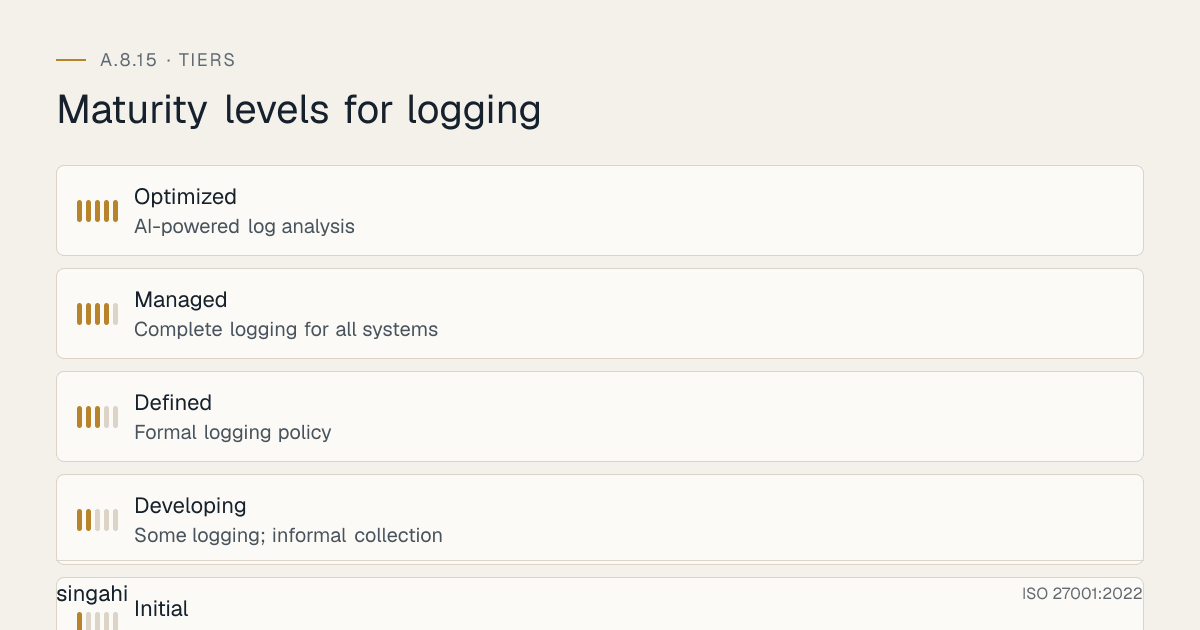
Maturity Model for A.8.15
| Level | Name | Characteristics | Evidence |
|---|---|---|---|
| 1 | Initial | No logging; no log collection; no analysis; no retention policy; logs are local and unprotected; no SOC; no monitoring; incidents are undetected | No policy; no collection; no analysis; no retention; no SOC |
| 2 | Developing | Some logging; informal collection; occasional manual review; no SIEM; basic retention; no protection; ad-hoc analysis; no SOC; reactive only | Partial logging; informal collection; rare review; no SIEM; basic retention; no protection |
| 3 | Defined | Formal logging policy; complete logging for critical systems; centralized collection; SIEM deployed; basic alerting; daily review; defined retention; basic protection; SOC established; proactive and reactive | Policy; complete logging; centralized collection; SIEM; basic alerting; daily review; defined retention; basic protection; SOC |
| 4 | Managed | Complete logging for all systems; advanced SIEM with correlation and UBA; real-time analysis; automated response; anomaly detection; advanced protection (immutability, integrity); 24/7 SOC; metrics-driven; threat hunting; proactive detection | Full coverage; advanced SIEM; correlation; UBA; real-time; automated response; anomaly detection; immutability; 24/7 SOC; metrics; threat hunting |
| 5 | Optimized | AI-powered log analysis; predictive threat detection; autonomous SOC; self-tuning SIEM; zero false positives; fully integrated threat intelligence; blockchain-based log integrity; continuous improvement; industry-leading detection and response times; proactive threat hunting | AI analysis; predictive detection; autonomous SOC; self-tuning; zero false positives; blockchain integrity; continuous improvement; industry-leading |
Continuous Improvement Activities
Monthly:
- Log coverage review and gap analysis
- Log source health review
- Alert volume and quality review (tuning opportunities)
- False positive rate analysis and tuning
- Log storage capacity review
- SOC performance metrics review (MTTD, MTTR, alert response times)
- Incident detection and response review
- Threat landscape update and rule adjustment
- Log parsing accuracy review
- Compliance reporting review
Quarterly:
- Logging policy review
- SIEM rule review (update for new threats, remove obsolete rules)
- UBA model review (update baselines, adjust sensitivity)
- Anomaly detection model review (retrain, adjust thresholds)
- Log retention compliance verification
- Log integrity verification
- Log backup and restoration test
- Log source configuration audit (ensure all sources are properly configured)
- Internal audit of logging controls
- Threat hunting campaign (proactive search for threats)
- Technology evaluation (new SIEM features, new log sources, new detection techniques)
- SOC training and skills assessment
- Log-based tabletop exercise (simulate incident, test log analysis and response)
Annually:
- Full logging policy review
- Complete SIEM health assessment
- Maturity assessment against target level
- External audit preparation
- Benchmark against industry best practices (MITRE ATT&CK coverage, detection benchmark)
- Vendor security assessment (SIEM vendor, log source vendors, cloud providers)
- Log architecture review (optimize for new systems, cloud migration, technology changes)
- Regulatory compliance review (RBI, SEBI, PCI DSS, DPDP updates)
- Threat intelligence integration review (update threat feeds, IOCs, TTPs)
- Legal hold process review
- Budget and resource planning for next year
- Board/security committee reporting on logging maturity and effectiveness
Trigger-Based:
- After any security incident or breach (improve detection based on lessons learned)
- After any failed audit or compliance finding
- After any new system or application introduction (ensure logging is configured)
- After any infrastructure change (cloud migration, data center move, network upgrade)
- After any new regulatory requirement (update retention, analysis, reporting)
- After any significant change in threat landscape (new attack techniques, new APT groups)
- After any SIEM vendor update or new feature release
- After any peer or industry incident ("could this happen to us?")
- After any log source failure or log collection gap
- After any legal hold or litigation event
- After any merger, acquisition, or divestiture (integrate logging for new entities)
FAQ
Q1: What is the difference between a log and an audit trail? A: A log is a record of events. An audit trail is a specific type of log that provides a chronological, tamper-evident record of activities for accountability and compliance. All audit trails are logs, but not all logs are audit trails. Audit trails are typically more formal, have higher integrity requirements, and are used for legal and regulatory purposes. For example, a web server access log is a log; a database audit trail showing who modified a financial record is an audit trail. In practice, the terms are often used interchangeably, but audit trails have stricter requirements for immutability, retention, and legal admissibility. When regulators ask for "audit trails," they mean tamper-evident, complete records of activities, not just routine logs.
Q2: How much storage do we need for logs? A: Log storage depends on volume, which depends on: (1) Number of log sources (servers, network devices, applications, cloud services), (2) Events per second per source (a busy web server may generate 1,000 events/second; a quiet desktop may generate 1 event/second), (3) Log size per event (syslog: ~200 bytes; JSON: ~500 bytes; verbose application log: ~2 KB), (4) Retention period (30 days vs. 7 years makes a huge difference). For a growing company with 100 servers, 50 network devices, 20 applications, and 1,000 endpoints: ~1–5 GB/day. For a large enterprise with 5,000 servers, 1,000 network devices, 500 applications, and 50,000 endpoints: ~100–500 GB/day. For a bank with 10,000 systems: ~1–5 TB/day. Storage costs: Hot storage (SSD): –100/GB/month. Warm storage (HDD): –20/GB/month. Cold storage (cloud archive): –5/GB/month. Plan for 20% annual growth. Use compression (reduces size by 50–70%). Use deduplication (reduces size by 10–30%). Use tiering (move old logs to cheaper storage). The cost of storage is minimal compared to the value of the logs.
Q3: What is the difference between a SIEM and a log management tool? A: A log management tool collects, stores, searches, and manages logs. A SIEM does all of that plus real-time analysis, correlation, alerting, and incident response. A SIEM is a log management tool with a security brain. Examples: Splunk started as a log management tool and added SIEM features (Splunk Enterprise Security). Elastic Stack (ELK) is a log management tool; Elastic Security adds SIEM features. Sumo Logic is a log management tool with SIEM capabilities. Graylog is a log management tool with basic SIEM features. For security-focused organizations, a SIEM is essential. For organizations that only need log storage and search, a log management tool may suffice. However, for ISO 27001 compliance, you need log analysis and alerting, which requires SIEM capabilities. If you have a log management tool but no SIEM, you are storing logs but not analyzing them effectively. The gap between log management and SIEM is the difference between "having logs" and "detecting threats."
Q4: How do we handle log volume from cloud-native applications (microservices, containers, serverless)? A: Cloud-native applications generate massive log volumes because every microservice, container, and serverless function generates logs. For a Kubernetes cluster with 100 microservices, each generating 1,000 events/second: ~100,000 events/second = ~8.6 billion events/day. Handling this volume requires: (1) Log aggregation at the edge (Fluentd/Fluent Bit as DaemonSet on each node, aggregating before sending), (2) Selective logging (only log security-relevant events, not all debug logs), (3) Log sampling (for high-volume, low-value logs, sample 1% instead of 100%), (4) Structured logging (JSON format for efficient parsing), (5) Log filtering at the source (drop low-value logs before sending to SIEM), (6) Cloud-native SIEM (Datadog, Sumo Logic, Splunk Cloud that scale automatically), (7) Log brokers (Kafka for buffering and throttling), (8) Cost monitoring (cloud SIEM charges by volume, so monitor and optimize). The key is to log smart, not log everything. Security-relevant logs are essential; debug logs are optional. Use sampling and filtering to manage volume without losing visibility.
Q5: What is the most common audit finding for A.8.15? A: The most common findings are: (1) No logging policy, (2) Logs not collected centrally (local only), (3) Logs not analyzed (stored but never reviewed), (4) Logs not protected (no encryption, no immutability, no integrity checks), (5) Log retention too short (not meeting regulatory requirements), (6) No log review (no daily, weekly, or monthly review), (7) No SIEM or log analysis tool, (8) Cloud logs not collected, (9) No user activity logging (insider threat blindness), (10) No correlation across log sources, (11) Clock skew (no NTP synchronization, timestamps are wrong), (12) Log source gaps (some systems not logging). Auditors will check: log coverage, collection, analysis, protection, retention, and review. They will also check for evidence of actual log review (reports, investigation records, alert response logs).
Q6: How do we prove logs have not been tampered with? A: Log tampering proof requires: (1) Immutable storage (append-only, WORM, object lock), proves logs cannot be modified or deleted, (2) Cryptographic hashing (SHA-256 of each log entry), any modification changes the hash, proving tampering, (3) Digital signatures (sign log entries with private key), cryptographic proof of authenticity, (4) Separate storage for hashes (hashes stored on different system from logs), attacker cannot modify both, (5) Blockchain-based logging (for highest assurance), distributed, immutable ledger, (6) Audit trail of log access (who accessed logs, when), proves no unauthorized access, (7) Regular integrity checks (weekly verification of hashes), detects tampering, (8) Third-party log verification (external auditor verifies integrity), independent confirmation. For legal admissibility, you need to demonstrate that logs were generated automatically, collected securely, stored immutably, and verified regularly. The chain of custody is essential: document who handled the logs, when, and how. Courts accept logs as evidence if you can prove they are authentic and untampered. Without these protections, logs are not admissible as evidence.
Q7: How do we balance privacy with logging? A: Logging can capture sensitive personal information, creating privacy risks. Balance privacy with logging by: (1) Log only what is necessary (do not log passwords, credit card numbers, health data, or other sensitive content), (2) Mask or tokenize sensitive data in logs (e.g., log last 4 digits of credit card, not full number), (3) Use pseudonymization (replace user IDs with pseudonyms in logs where possible), (4) Apply data minimization (collect minimum data needed for security), (5) Define log access controls strictly (only SOC analysts need access, not all IT staff), (6) Include logging in privacy impact assessments (DPIA under DPDP Act), (7) Inform users about logging in privacy policy (transparency requirement under DPDP), (8) Apply retention limits (delete logs when no longer needed for security or compliance), (9) Use anonymization for analytics (aggregate logs for trend analysis without individual identification), (10) Separate security logs from operational logs (different access, different retention). Privacy and logging are not mutually exclusive, you can have effective security logging while respecting privacy. The key is to be intentional about what you log, how you protect it, and how long you keep it. The DPDP Act requires data fiduciaries to protect personal data, including data in logs. Log data that contains personal information is subject to DPDP requirements.
Q8: What is the role of machine learning in log analysis? A: ML is transforming log analysis: (1) Anomaly detection (ML learns normal patterns and alerts on deviations, no rules needed), (2) User Behavior Analytics (ML learns user baselines and detects insider threats), (3) Entity behavior analytics (ML learns system baselines and detects compromised systems), (4) Threat intelligence integration (ML correlates logs with threat feeds to identify known threats), (5) Predictive analytics (ML predicts future threats based on historical patterns), (6) Automated triage (ML prioritizes alerts based on risk, reducing analyst workload), (7) Natural language processing (NLP analyzes unstructured logs for context), (8) Deep learning (neural networks detect complex attack patterns across millions of events). ML is not a replacement for human analysts, it is a force multiplier. ML handles the volume and finds patterns humans miss; humans handle the context and make decisions. For growing companies, ML-based SIEM features (e.g., Microsoft Sentinel, Elastic Security, Rapid7 InsightIDR) are affordable and effective. For large enterprises, advanced ML (UEBA, SOAR, threat hunting) is essential for managing massive log volumes. The future of log analysis is ML-assisted, not ML-only. The best SOC combines ML for detection with human expertise for investigation.
Q9: How do we handle logging for IoT and OT/ICS systems? A: IoT and OT/ICS systems are challenging for logging: (1) Limited computing power (many IoT devices cannot generate detailed logs), (2) Proprietary protocols (OT systems use industrial protocols like Modbus, DNP3, OPC-UA that standard SIEMs may not parse), (3) Air-gapped networks (OT networks are isolated from IT, making log collection difficult), (4) Safety-critical systems (logging must not impact system performance or safety), (5) Legacy systems (many OT systems are 20+ years old with no logging capability), (6) Vendor lock-in (OT vendors may not provide log access). Solutions: (1) Use network-level logging (mirror OT traffic to a monitoring port, analyze with IDS/IPS like Snort, Suricata, or industrial IDS like Claroty, Nozomi), (2) Use protocol gateways (convert OT protocols to standard formats for SIEM), (3) Use passive log collection (read-only access, no impact on OT systems), (4) Use dedicated OT log collectors (hardened, isolated, designed for OT environments), (5) Use OT-specific SIEM features (some SIEMs have OT parsers and dashboards), (6) Implement Purdue Model segmentation (Level 0–3 OT, Level 4–5 IT, logs collected at boundary), (7) Use data diodes for one-way log transfer from OT to IT (physical unidirectional transfer). OT logging is essential for detecting attacks on critical infrastructure (Stuxnet, TRITON, Industroyer all targeted OT). The convergence of IT and OT requires unified logging, but with OT-specific considerations. Do not ignore OT logs, they are the canary in the coal mine for industrial cyberattacks.
Q10: What is the future of logging? A: Logging is evolving rapidly: (1) AI-native SIEM (SIEM built from the ground up with AI, not bolted on, e.g., Microsoft Sentinel, Google Chronicle), (2) Extended Detection and Response (XDR), integrated logs from endpoint, network, cloud, email, identity in one platform, (3) Security Data Lakes (massive, cheap storage for all logs with ML analytics, e.g., Snowflake, Databricks for security), (4) OpenTelemetry (unified standard for logs, metrics, and traces, cloud-native observability), (5) eBPF (Extended Berkeley Packet Filter) for kernel-level logging without agents, revolutionizing Linux logging, (6) Zero Trust logging (every access logged, every transaction verified, continuous validation), (7) Automated response (SOAR + AI, detect, investigate, and respond without human intervention for known threats), (8) Federated logging (distributed log collection across multiple organizations for threat intelligence sharing), (9) Quantum-resistant logging (preparing for quantum threats to log integrity and encryption), (10) Real-time compliance (continuous compliance monitoring via automated log analysis, not periodic audits). The future of logging is AI-powered, XDR-integrated, cloud-native, and automated. Logging will become invisible to users but hyper-visible to security systems. The SIEM of the future will be an AI co-pilot that detects, investigates, and responds autonomously, with humans handling only novel, complex threats.
Q11: How do we handle log analysis during a major incident (ransomware, breach)? A: During a major incident, log analysis is critical but challenging: (1) Pre-incident: Have log analysis runbooks ready (pre-defined search queries, known IOCs, correlation rules), (2) During incident: Preserve logs immediately (export, hash, store securely) before attacker deletes them, (3) Use immutable logs (if implemented, logs are safe from tampering), (4) Focus on timeline reconstruction (what happened first, what happened next, what was the sequence), (5) Use correlation to find patient zero (the initial compromise point), (6) Use logs to track lateral movement (which systems were accessed, from where, by whom), (7) Use logs to identify data access (what data was accessed, modified, exfiltrated), (8) Use logs to identify persistence (new accounts, scheduled tasks, services), (9) Use logs for containment (identify all compromised systems, block access), (10) Use logs for evidence (collect logs for legal and forensic purposes), (11) Post-incident: Use logs for lessons learned (what detection gaps existed, how to improve), (12) Post-incident: Update detection rules based on new TTPs observed. During an incident, log analysis is the primary tool for understanding, containing, and responding. The quality of your log analysis determines the quality of your incident response. Prepare your log analysis capabilities before the incident, not during.
Q12: What is the difference between real-time and batch log analysis? A: Real-time analysis processes logs as they arrive, enabling immediate detection and response (seconds to minutes). Batch analysis processes logs in chunks (hourly, daily), enabling trend analysis and historical review but with delayed detection. Real-time is essential for: critical security events (brute force, malware, C2, data exfiltration), automated response (block IP, disable account), and immediate incident response. Batch is sufficient for: compliance reporting (daily/weekly reports), trend analysis (long-term patterns), and forensic investigation (historical reconstruction). Best practice: Real-time for critical events (automated SIEM analysis), batch for non-critical (compliance, trends). A hybrid approach is most effective: real-time for detection, batch for context and reporting. Real-time analysis requires more computing resources and more expensive SIEM licensing. Batch analysis is cheaper but slower. The right balance depends on your threat model, budget, and compliance requirements. For a bank, real-time is essential. For a small business, batch may be sufficient for most events with real-time for critical ones.
Q13: How do we handle logging in a multi-cloud environment (AWS + Azure + GCP)? A: Multi-cloud logging requires unified visibility across all clouds: (1) Enable cloud-native logging in all clouds (CloudTrail, Monitor, Cloud Logging), (2) Forward all cloud logs to a central SIEM ( Splunk, Elastic, Datadog, or cloud-agnostic SIEM), (3) Normalize cloud logs to a common schema (AWS, Azure, and GCP logs have different formats), (4) Correlate events across clouds (e.g., IAM change in AWS followed by data access in Azure = cross-cloud attack), (5) Use cloud-agnostic log shippers (Fluentd, Fluent Bit, Vector) to collect from all clouds, (6) Use cloud-agnostic SIEM (Splunk, Elastic, Datadog) that supports all cloud logs, (7) Implement unified alerting (same rules applied to all cloud logs), (8) Implement unified dashboards (single view of security across all clouds), (9) Use cloud security posture management (CSPM) tools that integrate with SIEM for multi-cloud visibility, (10) Ensure cloud logs are retained consistently across all clouds (same retention policy, same protection). Multi-cloud logging is complex but essential. An attacker who compromises one cloud may move to another. Without unified logging, cross-cloud attacks are invisible. The SIEM must be the single pane of glass for all cloud security events.
Q14: How do we handle logging cost optimization? A: Log management costs can grow quickly. Optimize costs: (1) Right-size log collection (only collect security-relevant logs, not all logs), (2) Use log filtering (drop low-value logs at the source before sending to SIEM), (3) Use log sampling (for high-volume, low-value logs, sample 1–10%), (4) Use compression (reduces storage and transfer costs by 50–70%), (5) Use deduplication (remove duplicate events), (6) Use tiered storage (hot for 30 days, warm for 1 year, cold for archive), (7) Use cloud archive (AWS S3 Glacier, Azure Archive, Google Coldline, cheapest for long-term), (8) Use reserved capacity (if predictable volume, reserved instances save 30–60%), (9) Monitor log volume trends (alert if volume spikes unexpectedly), (10) Use open-source tools (Wazuh, Graylog, Elastic Stack, reduce licensing costs), (11) Use cloud-native SIEM for cloud-only environments (Microsoft Sentinel for Azure, AWS Security Lake for AWS, efficient), (12) Negotiate volume discounts with SIEM vendors (enterprise deals often include volume pricing). Cost optimization is not about reducing logging, it is about logging smart. The goal is to maintain complete security visibility while controlling costs. A well-optimized logging program can be 50% cheaper than an unoptimized one without losing detection capability.
Q15: What is the difference between structured and unstructured logging, and why does it matter?
A: Structured logging (e.g., JSON, XML) has predefined fields and is machine-readable. Unstructured logging (e.g., free-text syslog, custom formats) is human-readable but requires parsing to be machine-readable. Structured logging matters because: (1) Faster parsing (no regex or pattern matching needed), (2) Better search (field-specific queries, e.g., user_id="john.doe" instead of full-text search), (3) Better correlation (link events by field values, e.g., same session_id across systems), (4) Better analytics (statistical analysis on specific fields, e.g., count of unique source_ip), (5) Better dashboards (visualize specific fields), (6) Better automation (scripts and SOAR playbooks can read fields directly). Unstructured logging requires more processing power, more storage, and more analyst effort. Structured logging is the modern standard. If your applications and systems generate unstructured logs, consider adding structured logging libraries (e.g., Logback for Java, Serilog for .NET, structlog for Python). If you cannot change the log format, use log parsers (Logstash, Fluentd) to convert unstructured to structured at collection time. The future of logging is structured. JSON is the de facto standard for structured logging. Adopt it for new applications and gradually convert legacy logs.
References and Further Reading
Standards and Frameworks
- ISO/IEC 27001:2022, Information Security, Cybersecurity and Privacy Protection, Information Security Management Systems, Requirements
- ISO/IEC 27002:2022, Information Security, Cybersecurity and Privacy Protection, Information Security Controls
- NIST SP 800-53 Rev 5, Security and Privacy Controls for Information Systems and Organizations
- PCI DSS v4.0.1, Payment Card Industry Data Security Standard
- CIS Controls v8, CIS Controls Version 8
- COBIT 2019, Control Objectives for Information and Related Technologies
- NIST SP 800-92, Guide to Computer Security Log Management
Indian Regulations
- RBI Cyber Security Framework for Banks
- SEBI Cybersecurity and Cyber Resilience Framework (CSCRF) for SEBI Regulated Entities, circular of 20 August 2024
- IRDAI Guidelines on Information and Cyber Security for Insurers
- CERT-In Directions under section 70B(6) of the IT Act, 28 April 2022 (and the CERT-In FAQs, May 2022)
- Information Technology Act, 2000 (as amended)
- Digital Personal Data Protection Act, 2023 (India)
- Company Act, 2013
Books and Publications
- ISO 27001/27002: A Pocket Guide by Alan Calder
- The SIEM Evaluation Guide by SANS Institute
- Logging and Log Management: The Authoritative Guide to Dealing with Syslog, Audit Logs, Alerts, and Other IT Noise by Anton Chuvakin and Kevin Schmidt
- The Practice of Network Security Monitoring by Richard Bejtlich
- Applied Network Security Monitoring by Chris Sanders and Jason Smith
- Security Information and Event Management (SIEM) Implementation by David R. Miller, Shon Harris, and Stephen VanDyke
SIEM and Log Management Resources
- Splunk: https://www.splunk.com
- IBM QRadar: https://www.ibm.com/qradar
- Elastic Security: https://www.elastic.co/security
- Microsoft Sentinel: https://azure.microsoft.com/services/microsoft-sentinel
- Wazuh: https://wazuh.com
- MITRE ATT&CK: https://attack.mitre.org
- SANS SEC555: SIEM with Tactical Analytics
Cloud Logging Resources
- AWS CloudTrail: https://aws.amazon.com/cloudtrail
- Azure Monitor: https://azure.microsoft.com/services/monitor
- GCP Cloud Logging: https://cloud.google.com/logging
- AWS Security Lake: https://aws.amazon.com/security-lake
- Azure Sentinel: https://azure.microsoft.com/services/microsoft-sentinel