
On this page
- Quick Reference
- What the Control Asks For
- Why It Matters
- Scope and Applicability
- Key Definitions
- Relationship to Other Controls
- Implementation Roadmap
- Detailed Guidance
- Tools and Technologies
- Policy Templates and Documentation
- Risk Assessment
- Audit and Assessment Checklist
- Metrics and KPIs
- Common Pitfalls and How to Avoid Them
- Illustrative Scenarios
- Multi-Framework Mapping
- Regulatory and Compliance Context
- RACI Matrix
- Documentation and Record Keeping
- Continuous Improvement
- Toolkit Download
- Frequently Asked Questions
- References and Further Reading
Quick Reference
| Attribute | Detail |
|---|---|
| Control Number | A.8.2 |
| Control Title | Privileged Access Rights |
| ISO 27001:2022 Domain | Technological Controls (8) |
| Control Type | Preventive |
| Information Security Attribute | Confidentiality, Integrity, Availability |
| Maturity Model Level | Level 1–5 (see the maturity model below) |
| Typical Implementation Time | 4–8 weeks for basic; 2–3 months for enterprise |
| Main cost drivers | PAM tools, MFA, training, monitoring |
| Primary Owner | CISO / IT Security Manager / Identity and Access Management (IAM) Manager |
| Key Stakeholders | IT Operations, Security Team, HR, Compliance, Auditors, All Employees with Privileged Access |
| Audit Frequency | Quarterly + annual complete assessment |
| ISO 27002 attributes | Control type: Preventive · Properties: Confidentiality, Integrity, Availability · Concepts: Protect · Capabilities: Identity and access management · Domains: Protection |
What the Control Asks For
In short:
ISO 27001:2022 Annex A 8.2 asks organizations to tightly restrict and oversee who is granted admin-level (privileged) access, and how that access is used.
Do you need this control?
A.8.2 is not mandatory in itself: under clause 6.1.3 you include it if your risk assessment calls for it, and record the decision in your Statement of Applicability. Almost every organisation has admin accounts, so almost every organisation includes it. A small team may meet it with MFA, separate admin accounts and logging, without a full PAM product.
This control requires organizations to:
- Restrict privileged access: Limit the allocation of privileged access rights to only those individuals who absolutely need them to perform their job functions, and only for the minimum necessary scope and duration
- Control privileged access: Implement technical and procedural controls to manage privileged access rights throughout their lifecycle, including request, approval, provisioning, use, review, and revocation
- Segregate privileged accounts: Separate privileged accounts from standard user accounts, and ensure that privileged accounts are not used for routine activities (e.g., email, web browsing, document editing)
- Monitor privileged access: Log and monitor all privileged access activities to detect misuse, abuse, or unauthorized actions
- Review privileged access: Periodically review all privileged access rights to ensure they are still necessary, appropriate, and aligned with current job responsibilities
Privileged access rights are the "keys to the kingdom", they provide administrative or superuser capabilities that can override normal security controls. If misused, stolen, or compromised, privileged access can cause catastrophic damage to an organization's information, systems, and operations. This control is one of the most critical in the entire ISO 27001 framework.
Why It Matters
Prevents Insider Threats and Abuse of Privilege
Insider threats, whether malicious or negligent, are among the most damaging security risks. Privileged users (administrators, database administrators, network engineers, developers with production access) have the ability to access, modify, or delete any data, install malware, create backdoors, or disable security controls. Without proper restriction and control, a single malicious insider can cause catastrophic damage.
Hypothetical example: an Indian IT services company with 500 employees discovers that a senior database administrator (DBA) with privileged access had been stealing customer data for 18 months. The DBA had legitimate privileged access to production databases for maintenance purposes but was using that access to extract customer records and sell them to a competitor. The DBA had created a hidden script that ran nightly, extracting data to a personal cloud storage account. The breach affected 50,000 customers the company s in remediation, customer notification, and legal fees. The DBA's privileged access was not monitored, reviewed, or restricted, the company had no PAM (Privileged Access Management) solution, no session recording, and no behavioral analytics. The DBA was a trusted employee with 8 years of service, demonstrating that trust is not a control.
Prevents Credential Theft and Lateral Movement by Attackers
Attackers who compromise standard user credentials (e.g., through phishing) immediately seek to escalate to privileged access. Once they gain privileged credentials, they can move laterally across the network, access any system, install persistent backdoors, and exfiltrate data. Privileged access is the primary target of advanced persistent threats (APTs) and ransomware operators.
The Verizon DBIR 2025 found credential abuse to be the most common initial access vector (22% of breaches), and CrowdStrike's Global Threat Reports measure attackers' "breakout time" from initial access to lateral movement in minutes rather than days. Privileged credentials are what attackers look for next.
Hypothetical example: a Mumbai hospital with 300 beds suffers a ransomware attack that encrypted all patient records, medical imaging, and billing systems. The attack started when a nurse clicked a phishing email, giving the attacker standard user access to a workstation. The attacker then used a privilege escalation exploit to gain domain administrator credentials within 2 hours. With domain admin access, the attacker deployed ransomware to all 200 computers and 20 servers in the hospital, causing a complete shutdown of medical services for 3 days. The hospital had to transfer emergency patients to other facilities and postpone 50 surgeries. The hospital had no PAM solution, no privileged account monitoring, and no MFA on administrator accounts. The attack demonstrated how quickly a single phishing click can become a catastrophic breach when privileged access is not controlled.
Prevents Configuration Errors and Accidental Damage
Privileged users can accidentally cause significant damage through misconfiguration, deletion, or incorrect commands. A single mistyped command by a root user can delete an entire database, a misconfigured firewall rule can open the network to attackers, and an accidental policy change can disable security controls for all users. Restricting and controlling privileged access reduces the number of people who can make such mistakes and provides safeguards (approvals, change control, session recording) to catch errors before they cause damage.
Hypothetical example: an e-commerce company with 200 employees suffers a 6-hour outage when a junior system administrator, trying to free up disk space on a production server, accidentally deleted the database directory instead of the log directory. The admin had root access to the production server (inappropriate for a junior admin) and was not following a documented procedure. The deletion removed 6 hours of transaction data, which could not be recovered from backups because the backup job had failed 3 days earlier (another issue caused by the lack of monitoring). The outage cost the company sales, and the data loss affected 2,000 customer orders. The company had to manually reconcile the orders, which took 2 weeks. The root cause was the unrestricted allocation of root access to a junior admin without proper training, procedures, or oversight.
Supports Regulatory Compliance and Audit Readiness
Privileged access control is a mandatory requirement in virtually every regulatory framework. Auditors and regulators will always review privileged access management as part of their assessments. A single unmonitored privileged account, a shared administrator password, or a privileged user without MFA can be a critical finding.
Key regulatory requirements for privileged access control:
- RBI, SEBI CSCRF (2024), IRDAI (2023): expect regulated entities to control, monitor and review privileged access; check your sector's directions for specifics
- PCI DSS v4.0.1: 7.2.x least privilege and reviews, 8.4.1 MFA for administrative access into the CDE, 8.6.x system and application accounts, 10.2 logging
- HIPAA (US health data) and SOX (US-listed companies): access and audit controls, segregation of duties
- GDPR: Requires access controls and monitoring for personal data processing systems
- DPDP Act 2023: Requires reasonable security safeguards, including access controls and monitoring for personal data
- ISO 27001: if you select A.8.2 through risk treatment, it asks for privileged access rights to be restricted and managed
Enables Forensic Investigation and Accountability
When a security incident occurs, forensic investigators need to determine who had access, what they did, and when. Without proper privileged access control, this is impossible. Shared administrator accounts, undocumented privileged access, and lack of logging make attribution impossible. Properly controlled privileged access provides:
- Individual accountability for every privileged action
- Complete audit trails of who accessed what, when, and from where
- Session recordings for reconstructing attacker or insider actions
- Change logs for tracking configuration modifications
- Alert logs for detecting suspicious privileged activity
Hypothetical example: a government agency with 1,000 employees discovers a data breach but could not determine the source because the agency used a single shared "admin" account for all system administration. Ten people knew the password, and there was no logging of who used it when. The forensic investigation was hampered by the inability to attribute actions to individuals. The agency had to assume the worst-case scenario (all 10 admins were potentially compromised) and reset all credentials, re-image all systems, and notify all affected parties. The cost was high, and the investigation was inconclusive. The root cause was the lack of individual privileged accounts and logging.
Reduces Attack Surface and Limits Blast Radius
Every privileged account is a potential attack vector. The more privileged accounts an organization has, the larger the attack surface. By restricting privileged access to the minimum necessary and controlling it tightly, organizations reduce the number of targets for attackers. Additionally, if a privileged account is compromised, the blast radius (the scope of potential damage) is limited by the principle of least privilege, the compromised account can only access the systems and data it legitimately needs, not everything.
Fewer privileged accounts, shorter-lived privileges (just-in-time access) and smaller scopes all shrink what an attacker gains from one compromised account.
Supports Zero Trust Architecture
Zero Trust is a security model that assumes no user, device, or network should be trusted by default, regardless of location or previous authentication. Privileged access control is a foundational component of Zero Trust because it enforces the principle of least privilege, continuous verification, and strict access controls for the most sensitive capabilities. Organizations implementing Zero Trust must have strong privileged access management as a prerequisite.
Scope and Applicability
Privileged Accounts and Rights In Scope
Operating System Privileged Accounts:
- Root accounts (Linux/Unix)
- Administrator accounts (Windows local and domain admin)
- Service accounts with elevated privileges
- SYSTEM/LocalSystem accounts
- sudo/su privileges
- Kernel-level access
- Boot-level access (BIOS, UEFI)
Database Privileged Accounts:
- Database administrator (DBA) accounts (sysadmin, sysdba, dba)
- Database owner accounts
- Database security administrator accounts
- Schema administrator accounts
- Database backup/restore accounts
- Database replication accounts
Network and Infrastructure Privileged Accounts:
- Network administrator accounts (router, switch, firewall, load balancer admin)
- DNS administrator accounts
- DHCP administrator accounts
- VPN administrator accounts
- Wireless network administrator accounts
- Cloud infrastructure administrator accounts (AWS root, Azure Global Admin, GCP Organization Admin)
- Virtualization platform administrator accounts (VMware vSphere, Hyper-V, KVM)
- Container platform administrator accounts (Kubernetes, Docker, OpenShift)
Application Privileged Accounts:
- Application administrator accounts (ERP, CRM, HRMS, CMS admin)
- Superuser accounts within applications
- Application owner accounts
- Application deployment accounts (CI/CD pipeline accounts)
- API administrative accounts
- Web server administrator accounts (Apache, Nginx, IIS)
- Middleware administrator accounts (WebLogic, WebSphere, JBoss)
Security and Monitoring Privileged Accounts:
- Security administrator accounts (SIEM, SOC platform, vulnerability scanner admin)
- Identity and access management (IAM) administrator accounts
- Privileged Access Management (PAM) administrator accounts
- Endpoint Detection and Response (EDR) administrator accounts
- Data Loss Prevention (DLP) administrator accounts
- Encryption and key management administrator accounts (HSM, KMS admin)
- Certificate authority administrator accounts
- Backup and disaster recovery administrator accounts
Cloud and SaaS Privileged Accounts:
- Cloud platform root/owner accounts (AWS root, Azure Global Admin, GCP Super Admin)
- Cloud billing/administrator accounts
- SaaS application administrator accounts (Microsoft 365 Global Admin, Google Workspace Super Admin, Salesforce admin)
- Cloud DevOps accounts with infrastructure deployment privileges (Terraform, CloudFormation, ARM)
- Cloud security accounts (IAM, security center, compliance admin)
Third-Party and Vendor Privileged Accounts:
- Vendor support accounts with remote access privileges
- Managed service provider (MSP) accounts with administrative access
- Contractor accounts with privileged access
- Outsourced IT support accounts with elevated privileges
Systems and Resources In Scope
Systems:
- Servers (physical, virtual, cloud)
- Workstations and endpoints (administrator access)
- Network devices (routers, switches, firewalls, load balancers, wireless access points)
- Database systems (relational, NoSQL, data warehouses)
- Storage systems (SAN, NAS, object storage)
- Cloud platforms (IaaS, PaaS, SaaS)
- Virtualization and container platforms
- Security systems (SIEM, EDR, DLP, IAM, PAM, firewall, IDS/IPS)
- Backup and disaster recovery systems
- Development and testing environments (when privileged access is used)
- Operational Technology (OT) systems (SCADA, PLCs, industrial control systems)
Resources:
- Data repositories (databases, data lakes, file shares, object storage)
- Configuration files and system settings
- Security policies and access control lists
- User directories and identity stores (Active Directory, LDAP, Azure AD)
- Encryption keys and certificates
- Source code repositories (when access grants deployment privileges)
- Audit logs and security monitoring data
- Backup and archive data
Organizational Size Considerations
Small Organizations (≤50 employees):
- Manual privileged access management (spreadsheet tracking, manual approval)
- Basic MFA for admin accounts (if budget allows)
- Manual access reviews (quarterly)
- Shared admin accounts limited to 2–3 people (with documented justification)
- Main costs: MFA (often already licensed), basic monitoring, staff time
Medium Organizations (50–500 employees):
- PAM solution or IAM with PAM features (basic vaulting, session recording)
- MFA for all privileged accounts (enforced)
- Automated provisioning and deprovisioning for privileged accounts
- Regular access reviews (monthly or quarterly)
- Just-in-Time (JIT) access for some privileged roles
- Main costs: a PAM tool, MFA, monitoring
Large Organizations (≥500 employees):
- Enterprise PAM solution (CyberArk, BeyondTrust, Delinea, or equivalent)
- MFA for all privileged accounts (enforced, hardware tokens or biometrics)
- Full JIT access, privilege elevation, and workflow approvals
- Complete session recording and behavioral analytics
- Automated access reviews and certification campaigns
- Integration with SIEM, SOAR, and ITSM
- Main costs: enterprise PAM, MFA, monitoring and integration
Key Definitions
| Term | Definition |
|---|---|
| Privileged Access Rights | Access rights that provide administrative, superuser, or elevated capabilities that override normal security controls and can access, modify, or delete any system or data |
| Privileged Account | An account with privileged access rights, such as administrator, root, DBA, or superuser accounts |
| Privileged Access Management (PAM) | A security discipline and set of technologies that manage, monitor, and secure privileged accounts and access |
| Principle of Least Privilege (PoLP) | The security principle that users should be granted the minimum level of access necessary to perform their job functions, and no more |
| Just-in-Time (JIT) Access | A PAM approach where privileged access is granted only for a specific time period, task, or session, and automatically revoked afterward |
| Just-Enough-Administration (JEA) | A Windows PowerShell feature that allows users to perform specific administrative tasks without having full administrator privileges |
| Privilege Elevation | The process of temporarily granting standard users elevated privileges for specific tasks, with approval and monitoring |
| Privileged Account Vault (Password Vault) | A secure repository for storing privileged account credentials, with controlled access, rotation, and session management |
| Session Recording | The capability to record and replay privileged user sessions (screen, keystrokes, commands) for auditing, forensics, and compliance |
| Credential Rotation | The automatic or periodic changing of privileged account passwords to reduce the risk of credential compromise |
| Break-Glass Account | An emergency privileged account used when normal access mechanisms are unavailable, with strict controls and immediate audit |
| Service Account | An account used by applications, services, or automated processes to access resources, often with privileged rights |
| Shared Account | An account used by multiple people, typically a privileged account with a shared password |
| Admin-by-Request | A model where users request temporary administrative access when needed, with approval workflow and time limits |
| Role-Based Access Control (RBAC) | An access control model where access rights are granted based on job roles, with predefined privileges for each role |
| Attribute-Based Access Control (ABAC) | An access control model where access rights are granted based on attributes (user, resource, environment, action) |
| Segregation of Duties (SoD) | The principle that no single person should have complete control over a critical process, requiring multiple people to complete sensitive tasks |
| Multi-Factor Authentication (MFA) | Authentication requiring two or more verification factors (something you know, have, or are) to access privileged accounts |
| Adaptive Authentication | Authentication that adjusts requirements based on risk context (location, device, behavior, time) |
| Behavioral Analytics | Analysis of user behavior patterns to detect anomalies that may indicate compromised credentials or insider threats |
| User and Entity Behavior Analytics (UEBA) | A security technology that uses machine learning to detect anomalous behavior by users and systems |
| Privileged Threat Analytics | Security analytics focused on detecting threats to privileged accounts and access |
| Access Certification | The process of periodically reviewing and confirming that users' access rights are still appropriate and necessary |
| Access Recertification | The periodic re-validation of access rights by managers or resource owners to ensure continued necessity |
| Provisioning | The process of creating, configuring, and granting access rights to accounts and resources |
| Deprovisioning | The process of removing access rights and disabling or deleting accounts when no longer needed |
| Entitlement | The specific access rights, permissions, and privileges granted to a user or account |
| Access Request Workflow | The formal process for requesting, approving, and granting access rights, including privileged access |
| Emergency Access | Temporary privileged access granted during emergencies (e.g., system outage, security incident), with strict controls and immediate audit |
| Standing Privilege | Permanent or long-term privileged access granted to a user (contrasted with JIT access, which is temporary) |
| Ephemeral Privilege | Privileged access that is automatically created and destroyed for a single session or task (used in zero trust and cloud-native environments) |
| Privilege Creep | The gradual accumulation of access rights over time as users change roles, take on projects, or receive temporary access that is never revoked |
| Credential Stuffing | An attack where stolen credentials from one breach are used to attempt login on other systems, often targeting privileged accounts |
| Pass-the-Hash | An attack technique where an attacker uses the hashed password (rather than the plaintext password) to authenticate as a privileged user |
| Kerberoasting | An attack technique that targets Kerberos service tickets to crack service account passwords |
| Golden Ticket | A forged Kerberos ticket that grants an attacker persistent domain administrator access |
| Silver Ticket | A forged Kerberos service ticket that grants an attacker access to a specific service |
| Lateral Movement | The technique used by attackers to move from one compromised system to others within the network, often using privileged credentials |
| Privilege Escalation | The process of gaining higher-level privileges from a lower-level account, often through exploits, misconfigurations, or credential theft |
| Compromise Assessment | A forensic investigation to determine if an attacker has gained access to privileged accounts or systems |
| Purple Team | A collaborative exercise where red team (attackers) and blue team (defenders) work together to test and improve privileged access controls |
Relationship to Other Controls
Directly Related Controls
| Control | Relationship |
|---|---|
| A.5.9 Inventory of Information and Other Associated Assets | Asset inventory identifies systems requiring privileged access protection |
| A.5.9 Inventory of Information and Other Assets | Inventory tracks privileged accounts and systems |
| A.5.10 Acceptable Use of Information | Privileged access acceptable use policies are part of this control |
| A.5.12 Classification of Information | Classification determines the level of privileged access protection needed |
| A.5.13 Labeling of Information | Labels help identify systems requiring privileged access protection |
| A.8.32 Managing Changes | Changes to privileged access must be managed through change control |
| A.5.20 Addressing Information Security Within Supplier Agreements | Supplier agreements must include privileged access requirements for vendor accounts |
| A.5.36 Compliance with Policies, Rules and Standards | Privileged access compliance is part of policy compliance |
| A.6.1 Screening | Personnel with privileged access must be screened |
| A.6.2 Terms and Conditions of Employment | Employment terms must include privileged access obligations and consequences |
| A.6.3 Information Security Awareness Training | Training must cover privileged access risks and responsibilities |
| A.6.4 Disciplinary Process | Disciplinary process must address privileged access misuse |
| A.7.1 Physical Security Perimeters | Physical security protects systems that host privileged access |
| A.7.2 Physical Entry Controls | Physical access controls protect systems with privileged access |
| A.7.8 Equipment Siting and Protection | Equipment siting protects systems hosting privileged access |
| A.8.1 User Endpoint Devices | Endpoint devices must be secured for users with privileged access |
| A.8.2 Privileged Access Rights | This is the core control |
| A.8.3 Information Access Restriction | Information access restrictions are implemented through privileged access controls |
| A.8.5 Secure Authentication | Authentication for privileged accounts must be especially strong (MFA, adaptive) |
| A.8.6 Capacity Management | Capacity management ensures systems can support PAM and monitoring |
| A.8.7 Protection Against Malware | Malware protection on privileged accounts and PAM systems |
| A.8.8 Management of Technical Vulnerabilities | Vulnerability management must include privileged access systems |
| A.8.9 Configuration Management | Configuration management ensures privileged access systems are securely configured |
| A.8.10 Information Deletion | Privileged access controls protect against unauthorized deletion |
| A.8.11 Data Masking | Privileged access to sensitive data may require masking |
| A.8.12 Data Leakage Prevention | DLP protects against data exfiltration by privileged users |
| A.5.14 Information Transfer | Privileged access controls protect information transfer mechanisms |
| A.8.15 Logging | Logging must capture all privileged access activities |
| A.8.16 Monitoring Activities | Monitoring must detect anomalous privileged access behavior |
| A.8.17 Clock Synchronization | Clock synchronization ensures accurate privileged access logs |
| A.8.18 Use of Specialised Test Systems | Test systems must not use production privileged credentials |
| A.8.20 Networks Security | Network security is complemented by privileged access controls |
| A.8.21 Security of Network Services | Network services must be protected by privileged access controls |
| A.8.22 Segregation of Networks | Network segregation reduces the blast radius of compromised privileged access |
| A.8.23 Web Filtering | Web filtering prevents phishing that leads to privileged credential compromise |
| A.8.24 Use of Cryptography | Cryptography protects privileged credentials and sessions |
| A.8.25 Secure Development | Development environments must not use production privileged credentials |
| A.8.31 Separation of Development, Test and Production Environments | Separation ensures privileged credentials are not shared across environments |
| A.8.32 Change Management | Changes to privileged access must be managed through change control |
| A.8.33 Test Information | Test information must be protected from privileged access misuse |
| A.8.34 Protection of Information Systems During Audit Testing | Audit testing must not compromise privileged access controls |
Indirectly Related Controls
| Control | Relationship |
|---|---|
| A.5.9 Inventory of Information and Other Associated Assets | Asset inventory identifies systems requiring privileged access |
| A.5.11 Return of Assets | Returned assets must have privileged access revoked |
| A.5.14 Information Transfer | Privileged access may be needed for secure transfer mechanisms |
| A.5.21 Information Security in ICT Supply Chain | Supply chain security includes privileged access for suppliers |
| A.5.24 Information Security Incident Management | Privileged access incidents trigger incident response |
| A.5.25 Assessment and Decision on Information Security Risks | Risk assessment includes privileged access risks |
| A.5.29 Information Security During Disruption | Privileged access may be needed during disruptions |
| A.5.31 Legal, Statutory, Regulatory and Contractual Requirements | Legal requirements may mandate privileged access controls |
| A.5.34 Privacy and Protection of PII | Privileged access to PII must be controlled |
| A.7.7 Clear Desk and Clear Screen | Privileged users must follow clear desk/screen policies |
| A.7.10 Storage Media | Privileged access to media storage systems must be controlled |
| A.7.10 Disposal of Media | Privileged access to media disposal systems must be controlled |
| A.8.4 Access to Source Code | Source code access is a form of privileged access |
| A.8.6 Capacity Management | Capacity management ensures PAM systems perform adequately |
| A.8.13 Information Backup | Privileged access to backup systems must be controlled |
| A.8.19 Installation of Software on Operational Systems | Privileged access is required for software installation |
| A.8.26 Application Security | Application security includes privileged access within applications |
| A.8.27 Secure System Architecture | Secure architecture includes privileged access design |
| A.8.28 Secure Coding | Secure coding prevents privilege escalation vulnerabilities |
| A.8.29 Security Testing | Security testing includes privileged access testing |
| A.8.30 Outsourced Development | Outsourced development privileged access must be controlled |
| A.8.32 Change Management | Changes to privileged access must be managed |
| A.8.33 Test Information | Test information must be protected from privileged access misuse |
| A.8.34 Protection of Information Systems During Audit Testing | Audit testing must not compromise privileged access |
Implementation Roadmap
Figure · Matrix
Comparison: Weekly to Event-triggered
Figure · Timeline
Rollout in order
- Week 5Deploy PAM solution or IAM with PAM
- Week 6Enforce MFA for all privileged accounts
- Week 7Implement vaulting, session recording
- Week 8Implement JIT access and workflow
Phase 1: Discovery and Assessment (Weeks 1–2)
| Week | Activity | Deliverable |
|---|---|---|
| 1 | Inventory all privileged accounts and systems | Privileged account inventory |
| 2 | Assess current privileged access risks and gaps | Risk assessment and gap analysis |
Phase 2: Policy and Design (Weeks 3–4)
| Week | Activity | Deliverable |
|---|---|---|
| 3 | Design privileged access policy and procedures | Policy document |
| 4 | Design PAM architecture and access model | PAM architecture design |
Phase 3: Technical Implementation (Weeks 5–8)
| Week | Activity | Deliverable |
|---|---|---|
| 5 | Deploy PAM solution or IAM with PAM features | PAM deployed |
| 6 | Enforce MFA for all privileged accounts | MFA enforced |
| 7 | Implement vaulting, session recording, and monitoring | Vaulting and recording operational |
| 8 | Implement JIT access and workflow approvals | JIT access operational |
Phase 4: Process Implementation (Weeks 9–10)
| Week | Activity | Deliverable |
|---|---|---|
| 9 | Implement access request, review, and recertification workflows | Workflows operational |
| 10 | Train all privileged users and administrators | Training completion records |
Phase 5: Continuous Improvement (Ongoing)
| Frequency | Activity | Deliverable |
|---|---|---|
| Weekly | Privileged access monitoring review | Monitoring reports |
| Monthly | Access review and recertification | Access review reports |
| Quarterly | Policy review and refinement | Quarterly review report |
| Bi-annually | Privileged access audit and assessment | Audit reports |
| Annually | Complete PAM program review | Annual review report |
| Event-triggered | Post-incident privileged access review | Incident review report |
Detailed Guidance
Privileged Access Policy Framework
Policy Statement:
"The allocation and use of privileged access rights shall be restricted to the minimum necessary for job functions, controlled through formal processes, and monitored for misuse. Privileged accounts shall be separate from standard user accounts, protected with multi-factor authentication, and subject to regular review and recertification."
Key Requirements:
- Principle of Least Privilege: Privileged access shall be granted only to the minimum necessary systems, resources, and permissions required for the user's job function
- Need-to-Know Basis: Privileged access shall be granted only to individuals with a legitimate business need, documented and approved by management
- Segregation of Privileged and Standard Accounts: Privileged accounts shall be separate from standard user accounts and shall not be used for routine activities (email, web browsing, document editing, general office work)
- Multi-Factor Authentication: All privileged accounts shall require MFA for authentication, with strong factors (hardware token, biometric, or push notification) rather than SMS or email
- Privileged Access Vaulting: Privileged account credentials shall be stored in a secure vault with automatic rotation, and users shall not know or use passwords directly
- Session Recording: All privileged sessions shall be recorded for audit, forensics, and compliance
- Just-in-Time Access: Where possible, privileged access shall be granted on a just-in-time basis (temporary, time-limited, task-specific) rather than standing (permanent) access
- Approval Workflow: All privileged access requests shall require approval from the user's manager and the resource owner or security team
- Regular Review and Recertification: All privileged access shall be reviewed at least quarterly by managers and resource owners to confirm continued necessity
- Immediate Revocation: Privileged access shall be revoked immediately upon termination, role change, or project completion
- Monitoring and Alerting: All privileged access activities shall be monitored, and anomalous behavior shall trigger alerts to the security team
- No Shared Accounts: Shared privileged accounts shall be eliminated or replaced with individual accounts with vaulting
- Service Account Management: Service accounts shall be inventoried, have minimal privileges, use strong passwords, and have credentials rotated regularly
- Break-Glass Procedures: Emergency privileged access (break-glass) shall be strictly controlled, audited, and reviewed after use
- Vendor and Third-Party Access: Vendor and third-party privileged access shall be time-limited, monitored, and require explicit approval for each session
Privileged Account Inventory and Classification
Account Inventory:
- Discover all privileged accounts across all systems, platforms, and environments
- Use automated discovery tools (PAM solutions, IAM platforms, Active Directory queries, cloud native tools) to identify privileged accounts
- Classify accounts by type (human, service, application, vendor, emergency)
- Classify accounts by privilege level (domain admin, local admin, DBA, application admin, operator)
- Classify accounts by environment (production, development, test, staging, DR)
- Document the owner, purpose, and business justification for each account
- Identify and eliminate unused or redundant accounts
- Identify and eliminate shared accounts (replace with individual vaulted accounts)
- Identify and eliminate default accounts (e.g., "admin", "root", "sa") or change default passwords
- Document the risk level of each account based on the systems it can access and the data it can touch
Account Classification Levels:
- Critical (Tier 0): Domain administrators, cloud platform owners, root accounts, superuser accounts, backup administrators, encryption key administrators, accounts that can compromise the entire organization
- High (Tier 1): Database administrators, server administrators, network administrators, security administrators, application administrators, accounts that can compromise critical systems or sensitive data
- Medium (Tier 2): Application operators, helpdesk administrators, development environment administrators, testing environment administrators, accounts that can compromise specific systems or data
- Low (Tier 3): Read-only administrative accounts, monitoring accounts, reporting accounts, accounts with limited privileged capabilities
Service Account Management:
- Inventory all service accounts (accounts used by applications, services, or automated processes)
- Document the application or service that uses each account, the systems it accesses, and the privileges it requires
- Apply the principle of least privilege to service accounts, grant only the minimum permissions needed
- Use dedicated service accounts (not shared with other applications or services)
- Use strong, complex passwords for service accounts (minimum 20 characters, random generation)
- Rotate service account credentials automatically and regularly (monthly or quarterly)
- Monitor service account usage for anomalies (unexpected usage times, unusual source systems, excessive access)
- Do not allow service accounts to be used for interactive logins by humans
- Use managed service identities (MSI) or managed service accounts (MSA/gMSA) where available (Windows, Azure, AWS)
- Use certificate-based authentication for service accounts where possible (more secure than passwords)
Multi-Factor Authentication (MFA) for Privileged Accounts
MFA Requirements:
- All privileged accounts shall require MFA for all authentication attempts, regardless of location or network
- MFA shall be enforced at the system level (not optional or configurable by the user)
- MFA factors shall be strong:
- Preferred: Hardware security keys (FIDO2/U2F), smart cards, biometric authentication
- Acceptable: Push notifications to registered mobile devices (authenticator apps), time-based one-time passwords (TOTP) from authenticator apps
- Not acceptable for privileged accounts: SMS-based OTP, email-based OTP, voice-based OTP (vulnerable to SIM swapping, phishing, and interception)
- MFA shall be required for:
- Initial login to privileged accounts
- Privilege elevation (e.g., sudo, UAC, run as administrator)
- Access to privileged access vaults or PAM systems
- Remote access to systems with privileged accounts (RDP, SSH, VPN)
- Access to cloud platform administrative consoles
- Adaptive MFA shall be used where available (additional factors required for high-risk contexts such as new locations, new devices, or unusual times)
- MFA shall be required for service accounts where interactive login is possible (though service accounts should ideally use non-interactive authentication)
- MFA shall be required for vendor and third-party privileged access
- MFA bypass methods (e.g., conditional access policies that exclude certain locations) shall not be applied to privileged accounts
- MFA recovery codes shall be stored securely (in a physical safe or secure vault) and never with the user
Privileged Access Vaulting and Credential Management
Password Vaulting:
- All privileged account credentials shall be stored in a secure password vault (PAM solution or enterprise password manager)
- Users shall not know privileged account passwords, they shall check out credentials from the vault for each session
- Vaults shall use strong encryption (AES-256 or equivalent) for credential storage
- Vaults shall require MFA for access
- Vaults shall provide session recording and monitoring for all checkouts
- Vaults shall automatically rotate credentials after each checkout or at defined intervals
- Vaults shall provide API access for automated credential rotation and service account management
- Vaults shall integrate with SIEM for logging and alerting
- Vaults shall support high availability and disaster recovery
- Vaults shall be physically and logically secured (dedicated server, access controls, monitoring)
- Vault administrators shall be a separate team from the users of vaulted credentials (segregation of duties)
Credential Rotation:
- All privileged account passwords shall be rotated automatically and regularly (minimum every 90 days, ideally every 30 days or after each session)
- Service account credentials shall be rotated automatically (monthly or quarterly)
- Default passwords shall be changed immediately upon deployment
- Hardcoded credentials in scripts, applications, and configuration files shall be eliminated and replaced with vault integration or secret management
- Passwords shall be complex and randomly generated (minimum 16 characters, mix of uppercase, lowercase, numbers, and symbols; no dictionary words or predictable patterns)
- Credential rotation shall not cause service disruption, rotation procedures must be tested and validated
- Credential rotation shall be logged and audited
- Credentials that are suspected of being compromised shall be rotated immediately
Session Recording and Monitoring
Session Recording:
- All privileged sessions shall be recorded (screen capture, keystroke logging, command logging)
- Recording shall be continuous for the entire session, not just at login
- Recording shall capture both input (commands, keystrokes) and output (screen, results)
- Recording shall be stored securely with access controls and tamper protection
- Recording shall be retained for a defined period (minimum 90 days for operational review, 1 year for compliance, longer for forensics)
- Recording shall be searchable and replayable for investigation and audit
- Recording shall not be disableable by the user being recorded
- Recording shall include metadata (user identity, timestamp, source IP, target system, session duration, commands executed)
- Users shall be notified that their sessions are being recorded (legal requirement in many jurisdictions)
- Recording shall be reviewed periodically (random sampling or triggered by alerts) for policy violations or suspicious activity
Real-Time Monitoring:
- Privileged sessions shall be monitored in real-time for suspicious or prohibited activities
- Alerts shall be triggered for:
- Login from unusual locations or outside business hours
- Multiple failed login attempts
- Privilege escalation attempts
- Access to systems or data outside the user's normal scope
- Execution of prohibited commands (e.g., deletion commands, password changes, network configuration changes)
- Data exfiltration attempts (large file transfers, unusual uploads to cloud storage)
- Session sharing or credential sharing (multiple users from same account simultaneously)
- Long-duration sessions (sessions exceeding defined time limits)
- Inactive sessions (sessions left open without activity)
- Alerts shall be sent to the security team and SOC for immediate response
- Automated responses shall be configured where possible (e.g., terminate session, disable account, require re-authentication)
- Monitoring shall be integrated with SIEM for correlation with other security events
Just-in-Time (JIT) Access and Privilege Elevation
Just-in-Time Access:
- JIT access shall be implemented for all privileged accounts where technically feasible
- Users request access for a specific time period, task, or system
- Access is granted after approval (manager + resource owner or security team)
- Access is automatically revoked after the defined time period or task completion
- Access is granted for the minimum necessary scope (specific system, specific permissions, specific time)
- Access requests and approvals are logged and audited
- JIT access reduces standing privileges and limits the window of opportunity for attackers
- JIT access is particularly effective for cloud platforms (AWS IAM, Azure PIM, GCP IAM) and modern PAM solutions
- JIT access requires workflow automation and integration with ITSM or ticketing systems
Privilege Elevation:
- Standard users shall not have standing privileged access
- Standard users shall request privilege elevation for specific tasks (e.g., software installation, system configuration, troubleshooting)
- Privilege elevation shall require approval (automated or manual, based on risk)
- Privilege elevation shall be time-limited (e.g., 1 hour, 4 hours, 1 day)
- Privilege elevation shall be session-based (elevated privileges are active only for the approved session)
- Privilege elevation shall be logged and audited
- Privilege elevation shall be monitored for abuse or misuse
- Windows Just-Enough-Administration (JEA) and User Account Control (UAC) shall be used for Windows privilege elevation
- Linux sudo shall be configured with restricted commands and time limits for privilege elevation
- Cloud platform role elevation (e.g., Azure PIM, AWS IAM) shall be used for cloud privilege elevation
Access Request, Review, and Recertification
Access Request Process:
- All privileged access requests shall be submitted through a formal request process (ticketing system, ITSM, or PAM workflow)
- Requests shall include: user identity, requested access (system, role, permissions), business justification, duration, and requester signature
- Requests shall require dual approval: the user's manager and the resource owner or security team
- Emergency access requests shall be approved by the CISO or designated security officer, with immediate documentation and post-incident review
- Requests shall be denied if the business justification is insufficient, the scope is excessive, or the risk is unacceptable
- Approved requests shall be provisioned automatically or manually, with confirmation to the user and their manager
- Denied requests shall be documented with the reason for denial
Access Review and Recertification:
- All privileged access shall be reviewed at least quarterly (monthly for Critical and High accounts)
- Reviews shall be conducted by the user's manager and the resource owner
- Reviews shall confirm that the access is still necessary, appropriate, and aligned with current job responsibilities
- Reviews shall identify and remove:
- Access for users who have changed roles or left the organization
- Access that is no longer needed due to project completion or task completion
- Excessive access that exceeds the principle of least privilege
- Privilege creep (accumulated access over time)
- Reviews shall be documented with approval or removal decisions
- Users who fail to recertify their access shall have their access suspended pending review
- Automated access review tools (certification campaigns, IAM platforms) shall be used to streamline the process
- Access review results shall be reported to the CISO and management
- Access reviews shall be integrated with HR systems (to detect role changes, terminations, transfers)
- Access reviews shall be a mandatory step in the annual compliance cycle
Segregation of Duties (SoD) for Privileged Access
SoD Requirements:
- No single individual shall have complete control over a critical process or system
- Privileged roles shall be divided among multiple individuals to prevent fraud, errors, and abuse
- Examples of SoD for privileged access:
- Database administration: Database creation and database deletion shall be separate roles
- Network administration: Firewall rule creation and firewall rule approval shall be separate roles
- Security administration: Security policy creation and security policy enforcement shall be separate roles
- Change management: Code deployment and production approval shall be separate roles
- Backup and recovery: Backup execution and backup verification/restoration shall be separate roles
- User management: User account creation and user account deletion shall be separate roles
- Audit and monitoring: Audit log generation and audit log review shall be separate roles
- SoD conflicts shall be identified and documented (automated SoD analysis in IAM/PAM platforms)
- SoD conflicts shall be mitigated through compensating controls (additional monitoring, manager approval, dual control) if complete separation is not feasible
- SoD shall be enforced technically (system-level restrictions) wherever possible, not just procedurally
- SoD exceptions shall be documented, approved by the CISO, and reviewed regularly
- SoD shall be validated during access reviews and audits
Vendor and Third-Party Privileged Access Management
Vendor Access Requirements:
- Vendor privileged access shall be governed by a formal agreement (contract, NDA, security addendum) that specifies access requirements, monitoring, and consequences
- Vendor access shall be time-limited (granted only for the duration of the engagement or specific session)
- Vendor access shall require explicit approval for each session or engagement
- Vendor access shall be granted through the PAM system with vaulting, session recording, and monitoring
- Vendor access shall require MFA (provided by the organization, not the vendor)
- Vendor access shall not use shared credentials or vendor-provided credentials
- Vendor access shall be monitored in real-time by the organization's security team
- Vendor access shall be terminated immediately upon engagement completion or contract termination
- Vendor access sessions shall be recorded and retained for the duration of the contract plus 1 year
- Vendor access shall be limited to the specific systems and data required for the engagement (no broad access)
- Vendor personnel shall be supervised or escorted during remote or on-site privileged access sessions
- Vendor access shall be reviewed in quarterly access reviews
- Vendor access shall not be granted to systems containing customer data or regulated data without additional safeguards (data masking, dedicated vendor environment, read-only access)
Managed Service Provider (MSP) Access:
- MSP access shall be governed by a complete security agreement with clear privileged access requirements
- MSP access shall be monitored as closely as internal privileged access (or more closely)
- MSP access shall be limited to the scope defined in the contract
- MSP access shall not include administrative access to the organization's IAM, PAM, or security systems (to prevent the MSP from hiding their tracks)
- MSP access credentials shall be vaulted and rotated regularly
- MSP access shall be subject to the same MFA, session recording, and monitoring requirements as internal access
- The organization shall retain the ability to audit, review, and terminate MSP access independently
- MSP access shall be included in the organization's incident response and forensic capabilities
Break-Glass and Emergency Access
Break-Glass Requirements:
- Break-glass accounts (emergency privileged accounts) shall be established for situations where normal access mechanisms are unavailable (e.g., PAM system failure, IAM system failure, major outage)
- Break-glass accounts shall be strictly controlled and limited in number (ideally 1–2 per domain or environment)
- Break-glass accounts shall have the highest level of privileges but shall be used only in true emergencies
- Break-glass account credentials shall be stored securely (e.g., in a sealed envelope in a physical safe, or in a separate offline vault)
- Break-glass account credentials shall be accessible only to designated senior personnel (CISO, CIO, IT Director)
- Use of break-glass accounts shall require immediate notification to the security team and CISO
- All break-glass account usage shall be logged, recorded, and audited
- Break-glass account credentials shall be changed immediately after each use
- Break-glass account usage shall trigger immediate incident response procedures (to verify the legitimacy of the emergency and detect misuse)
- Break-glass accounts shall be tested periodically (quarterly) to ensure they work when needed
- Break-glass accounts shall be monitored for unauthorized or unexpected use
- The process for obtaining and using break-glass credentials shall be documented and tested
- Break-glass accounts shall not be used for routine maintenance or convenience
Tools and Technologies
Privileged Access Management (PAM) Solutions
| Solution | Type | Key Features |
|---|---|---|
| CyberArk Privileged Access Manager | Enterprise PAM | Password vaulting, session recording, JIT access, threat analytics, cloud integration, AI-powered detection |
| BeyondTrust Privileged Remote Access | Enterprise PAM | Privileged access management, remote support, endpoint privilege management, password safe |
| Delinea (Thycotic + Centrify) | Enterprise PAM | Secret Server, privilege elevation, server suite, cloud suite, DevOps secrets |
| One Identity Safeguard | Enterprise PAM | Privileged access management, session recording, password management, analytics |
| Wallix Bastion | Enterprise PAM | Privileged access management, session recording, password vaulting, access control |
| Arcos PAM | Enterprise PAM | Privileged access management, password vaulting, session recording, compliance reporting |
| Foxpass (now Okta) | Cloud PAM | Cloud-based privileged access, LDAP, RADIUS, password management |
| StrongDM | Infrastructure Access | Dynamic access management, session recording, audit logging, infrastructure access |
| Teleport (Gravitational) | Open-Source PAM | Open-source infrastructure access, session recording, certificate-based auth, audit logging |
| OpenSSH + sudo | Open-Source | Basic privileged access control for Linux/Unix environments, free |
| Microsoft Azure AD PIM | Cloud-Native PAM | Just-in-time access, privileged identity management, approval workflows, Azure integration |
| AWS IAM + AWS Secrets Manager | Cloud-Native PAM | IAM roles, JIT access, secrets management, service accounts, rotation |
| Google Cloud IAM + Secret Manager | Cloud-Native PAM | IAM roles, JIT access, secrets management, service accounts, rotation |
| HashiCorp Vault | DevOps/Cloud PAM | Secrets management, dynamic credentials, encryption as a service, PKI |
| Keeper Enterprise | SMB PAM | Password management, privileged access, secrets management, zero-knowledge encryption |
| LastPass Enterprise | SMB PAM | Password management, shared folders, MFA, basic vaulting |
| 1Password Business | SMB PAM | Password management, secrets automation, privileged access, travel mode |
| ManageEngine PAM360 | Growing-company PAM | Privileged access management, password vaulting, session recording, compliance |
| Devolutions Password Hub | Growing-company PAM | Password vaulting, session recording, privileged access, compliance |
| WALLIX AdminBastion | Growing-company PAM | Privileged access management, session recording, password vaulting, compliance |
Identity and Access Management (IAM) Platforms with PAM Features
| Platform | Key Features |
|---|---|
| Microsoft Azure AD + Entra | Conditional access, PIM, MFA, identity protection, access reviews, lifecycle management |
| Okta | SSO, MFA, lifecycle management, access requests, privileged access (Foxpass) |
| Ping Identity | SSO, MFA, access management, API security, privileged access |
| SailPoint IdentityNow | Identity governance, access certification, provisioning, privileged access management |
| Saviynt | Identity governance, cloud security, privileged access, access certification |
| Oracle Identity Management | Identity governance, access management, privileged access, directory services |
| IBM Security Verify | IAM, identity governance, access management, privileged access, MFA |
| ForgeRock (now Ping) | Access management, identity governance, directory services, API security |
| Auth0 (now Okta) | Authentication, authorization, MFA, API security, identity management |
| JumpCloud | Directory-as-a-service, SSO, MFA, device management, privileged access |
| OneLogin | SSO, MFA, directory integration, privileged access, lifecycle management |
| ** miniOrange** | SSO, MFA, IAM, privileged access, adaptive authentication |
| AWS IAM + Identity Center | AWS-native identity, SSO, access management, privileged access |
| Google Cloud Identity | Google-native identity, SSO, access management, privileged access |
Multi-Factor Authentication (MFA) Solutions
| Solution | Type | Key Features |
|---|---|---|
| YubiKey (Yubico) | Hardware Token | FIDO2/U2F, OTP, smart card, PIV, waterproof, phishing-resistant |
| Feitian ePass | Hardware Token | FIDO2, OTP, smart card, PKI, affordable |
| Google Titan Key | Hardware Token | FIDO2, Bluetooth, NFC, USB, Google ecosystem |
| Microsoft Authenticator | Mobile App | Push notification, TOTP, passwordless, Microsoft ecosystem |
| Google Authenticator | Mobile App | TOTP, QR code setup, multi-account |
| Authy | Mobile App | TOTP, encrypted backup, multi-device, desktop app |
| Duo Security (Cisco) | Enterprise MFA | Push, TOTP, SMS, phone call, hardware tokens, adaptive policies, risk-based |
| RSA SecurID | Enterprise MFA | Hardware tokens, software tokens, push, risk-based, FIDO2 |
| Okta Verify | Enterprise MFA | Push, TOTP, biometric, risk-based, FIDO2, Okta ecosystem |
| Azure AD MFA | Enterprise MFA | Push, TOTP, SMS, phone call, hardware tokens, risk-based, FIDO2 |
| PingID | Enterprise MFA | Push, TOTP, biometric, FIDO2, adaptive, Ping ecosystem |
| Entrust Identity | Enterprise MFA | Push, TOTP, hardware tokens, smart cards, PKI, biometrics |
| Thales SafeNet | Enterprise MFA | Hardware tokens, software tokens, push, FIDO2, smart cards |
| HID Global | Enterprise MFA | Hardware tokens, smart cards, mobile OTP, FIDO2, PKI |
Session Recording and Monitoring Tools
| Tool | Type | Key Features |
|---|---|---|
| CyberArk Privileged Session Manager | Enterprise Session Recording | Session recording, live monitoring, session isolation, analytics, integration with PAM |
| BeyondTrust Privileged Session Management | Enterprise Session Recording | Session recording, live monitoring, session isolation, analytics |
| Delinea Session Monitoring | Enterprise Session Recording | Session recording, live monitoring, keystroke logging, analytics |
| Wallix Session Manager | Enterprise Session Recording | Session recording, live monitoring, session isolation, analytics |
| ObserveIT (Proofpoint) | User Activity Monitoring | Session recording, application monitoring, user behavior analytics, alerting |
| Teramind | User Activity Monitoring | Session recording, behavior analytics, DLP, productivity analysis, insider threat detection |
| Ekran System | User Activity Monitoring | Session recording, behavior analytics, insider threat detection, alerting, compliance |
| Veriato | User Activity Monitoring | Session recording, behavior analytics, insider threat detection, investigation |
| Aternity (Riverbed) | Digital Experience Monitoring | User activity monitoring, session recording, performance analytics |
| AuditBot | Compliance Monitoring | Session recording, compliance reporting, access monitoring, audit trails |
| Linux Audit (auditd) | Open-Source | Linux system call auditing, command logging, file access monitoring |
| Windows Event Log + Sysmon | Built-in | Windows security event logging, process monitoring, network monitoring, file system monitoring |
| Tmux/Script | Open-Source | Basic session recording for Linux/Unix terminals |
| Asciinema | Open-Source | Terminal session recording, sharing, playback |
Behavioral Analytics and UEBA Tools
| Tool | Type | Key Features |
|---|---|---|
| Splunk UBA | UEBA | User behavior analytics, anomaly detection, threat detection, ML-powered, Splunk integration |
| Exabeam | UEBA/SIEM | User and entity behavior analytics, timeline analysis, threat detection, automation |
| Securonix | UEBA/SIEM | User behavior analytics, threat detection, SOAR, risk scoring, ML-powered |
| Gurucul | UEBA | User behavior analytics, identity analytics, access intelligence, risk scoring |
| Rapid7 InsightIDR | UEBA/SIEM | User behavior analytics, endpoint detection, network monitoring, deception |
| Vectra AI | UEBA/NDR | Network detection and response, user behavior analytics, AI-powered, cloud-native |
| Darktrace | UEBA/AI | AI-driven threat detection, user behavior analytics, autonomous response, self-learning |
| Microsoft Sentinel UEBA | Cloud UEBA | User behavior analytics, anomaly detection, Microsoft ecosystem integration |
| Elastic Security | Open-Source UEBA | User behavior analytics, SIEM, threat detection, ML-powered, open-source |
| Apache Spot (incubating) | Open-Source UEBA | User behavior analytics, anomaly detection, threat intelligence, open-source |
| Prelude SIEM | Open-Source UEBA | User behavior analytics, SIEM, threat detection, open-source |
| Wazuh | Open-Source UEBA | Endpoint detection, user behavior analytics, SIEM, compliance, open-source |
Policy Templates and Documentation
Privileged Access Management Policy (Template)
Template
Privileged Access Management Policy
1. Purpose
This policy establishes the requirements for restricting, controlling, monitoring, and managing privileged access rights to protect the organization's information systems, data, and operations from unauthorized access, misuse, and abuse.
2. Scope
Applies to all privileged accounts, privileged users, and systems with privileged access rights, including human users, service accounts, application accounts, vendor accounts, and emergency accounts. Applies to all environments (production, development, test, staging, DR) and all platforms (on-premise, cloud, hybrid, SaaS).
3. Policy Statements
3.1 Principle of Least Privilege
- Privileged access shall be granted only to the minimum necessary systems, resources, and permissions required for the user's job function
- Privileged access shall be granted only to individuals with a legitimate business need, documented and approved by management
- Privileged access shall be reviewed regularly to ensure it remains necessary and appropriate
- Privileged access shall be revoked immediately when no longer needed
3.2 Segregation of Accounts
- Privileged accounts shall be separate from standard user accounts
- Privileged accounts shall not be used for routine activities (email, web browsing, document editing, general office work)
- Users with privileged accounts shall have separate standard accounts for daily work
- Privileged accounts shall be used only for administrative tasks requiring elevated privileges
3.3 Multi-Factor Authentication
- All privileged accounts shall require MFA for all authentication attempts
- MFA factors shall be strong (hardware tokens, smart cards, biometrics, or authenticator app push notifications)
- SMS, email, and voice-based OTP shall not be used for privileged accounts
- MFA shall be enforced at the system level and cannot be disabled by users
- MFA shall be required for login, privilege elevation, remote access, and vault access
3.4 Credential Vaulting and Rotation
- All privileged account credentials shall be stored in a secure password vault
- Users shall not know or use privileged account passwords directly, they shall check out credentials from the vault for each session
- Vaults shall require MFA for access and shall provide session recording and monitoring
- Privileged account credentials shall be rotated automatically after each session or at defined intervals (maximum 90 days, ideally 30 days)
- Service account credentials shall be rotated automatically (monthly or quarterly)
- Default passwords shall be changed immediately upon deployment
- Hardcoded credentials in scripts and applications shall be eliminated and replaced with vault integration or secret management
3.5 Session Recording and Monitoring
- All privileged sessions shall be recorded (screen, keystrokes, commands) for the entire session
- Recording shall be stored securely with access controls and tamper protection
- Recording shall be retained for a minimum of 90 days for operational review and 1 year for compliance
- Recording shall be searchable and replayable for investigation and audit
- Users shall be notified that their sessions are being recorded
- Privileged sessions shall be monitored in real-time for suspicious or prohibited activities
- Alerts shall be triggered for anomalous behavior, unusual access, and prohibited actions
- Automated responses shall be configured where possible (session termination, account disablement, re-authentication requirement)
3.6 Just-in-Time and Privilege Elevation
- Just-in-time (JIT) access shall be used for privileged accounts where technically feasible
- JIT access shall be time-limited, task-specific, and automatically revoked after the defined period
- Standard users shall request privilege elevation for specific tasks, with approval and time limits
- Privilege elevation shall be logged and monitored
- Standing (permanent) privileged access shall be minimized and reviewed regularly
3.7 Access Request and Approval
- All privileged access requests shall be submitted through a formal request process (ticketing system, ITSM, or PAM workflow)
- Requests shall include user identity, requested access, business justification, duration, and requester signature
- Requests shall require dual approval: the user's manager and the resource owner or security team
- Emergency access requests shall be approved by the CISO or designated security officer, with immediate documentation and post-incident review
- Requests shall be denied if the business justification is insufficient, the scope is excessive, or the risk is unacceptable
3.8 Access Review and Recertification
- All privileged access shall be reviewed at least quarterly (monthly for Critical and High accounts)
- Reviews shall be conducted by the user's manager and the resource owner
- Reviews shall confirm that the access is still necessary, appropriate, and aligned with current job responsibilities
- Reviews shall identify and remove unnecessary access, privilege creep, and access for users who have changed roles
- Users who fail to recertify their access shall have their access suspended pending review
- Access review results shall be reported to the CISO and management
3.9 Segregation of Duties
- No single individual shall have complete control over a critical process or system
- Privileged roles shall be divided among multiple individuals to prevent fraud, errors, and abuse
- SoD conflicts shall be identified and documented (automated SoD analysis)
- SoD conflicts shall be mitigated through compensating controls if complete separation is not feasible
- SoD exceptions shall be documented, approved by the CISO, and reviewed regularly
3.10 Vendor and Third-Party Access
- Vendor privileged access shall be governed by a formal agreement with access requirements, monitoring, and consequences
- Vendor access shall be time-limited, monitored, and require explicit approval for each session
- Vendor access shall be granted through the PAM system with vaulting, session recording, and monitoring
- Vendor access shall require MFA and shall not use shared credentials
- Vendor access shall be terminated immediately upon engagement completion or contract termination
- Vendor access shall be limited to the specific systems and data required for the engagement
3.11 Service Account Management
- Service accounts shall be inventoried, documented, and have minimal privileges
- Service accounts shall use strong, complex passwords and have credentials rotated regularly
- Service accounts shall not be used for interactive logins by humans
- Service account usage shall be monitored for anomalies
- Managed service identities (MSI, MSA, gMSA) shall be used where available
- Certificate-based authentication shall be used for service accounts where possible
3.12 Break-Glass and Emergency Access
- Break-glass accounts shall be established for emergencies when normal access mechanisms are unavailable
- Break-glass accounts shall be strictly controlled, limited in number, and used only in true emergencies
- Break-glass credentials shall be stored securely and accessible only to designated senior personnel
- Use of break-glass accounts shall require immediate notification to the security team and CISO
- Break-glass credentials shall be changed immediately after each use
- Break-glass accounts shall be tested quarterly and monitored for unauthorized use
3.13 Incident Response and Forensics
- All suspected misuse or compromise of privileged accounts shall trigger incident response procedures
- Incident response shall include immediate account disablement, credential rotation, and forensic investigation
- Session recordings and audit logs shall be preserved for forensic analysis
- The CISO shall be notified immediately of all privileged account incidents
- Post-incident review shall include analysis of how the incident occurred and improvements to prevent recurrence
4. Roles and Responsibilities
- CISO: Approve policy; ensure compliance; manage risk; oversee PAM program; report to management; approve break-glass usage
- IT Security Manager: Design and implement PAM controls; manage PAM systems; monitor privileged access; investigate incidents; conduct access reviews
- IAM Manager: Manage identity lifecycle; provision and deprovision privileged accounts; manage access workflows; conduct access reviews
- IT Operations Manager: Manage operational privileged accounts; ensure system availability; support PAM deployment; manage service accounts
- System Administrators: Comply with privileged access policies; use vaulted credentials; follow session recording requirements; report security concerns; participate in access reviews
- Database Administrators: Comply with privileged access policies; use vaulted credentials; follow session recording requirements; report security concerns; participate in access reviews
- Network Administrators: Comply with privileged access policies; use vaulted credentials; follow session recording requirements; report security concerns; participate in access reviews
- Security Analysts: Monitor privileged access alerts; investigate suspicious activity; review session recordings; respond to incidents; tune detection rules
- HR: Notify IT of role changes, terminations, and transfers; support access review and recertification; enforce policy in employment terms
- Managers: Approve privileged access requests; conduct access reviews for their team members; enforce compliance within their team; report violations
- Resource Owners: Approve privileged access to their resources; conduct access reviews for their resources; ensure least privilege for their resources
- All Employees: Comply with privileged access policies; report security concerns; never share credentials; never use privileged accounts for routine work
- Vendors and Contractors: Comply with privileged access policies; use organization-provided access methods; follow session recording requirements; never use personal credentials
5. Exceptions
- Break-glass accounts (emergency use only, with strict controls and immediate audit)
- Vendor emergency access (with CISO approval, time-limited, and monitored)
- Legacy systems that cannot support PAM or MFA (with compensating controls, risk acceptance, and migration plan)
- Exceptions must be documented, approved by the CISO, and reviewed quarterly
6. Review
This policy is reviewed quarterly and updated as needed. Changes in technology, threats, or regulations trigger immediate review.
Approved by: _______________ Date: _______________ CISO / Board / Executive Committee
Supporting Document Templates
Privileged Access Request Form:
Template
Privileged Access Request Form
Request ID: _______________ Date: _______________ Requester Name: _______________ Requester Department: _______________ Requester Manager: _______________
Requested Access:
- System/Platform: _______________
- Account Type: Administrator / DBA / Network Admin / Application Admin / Other: _______________
- Specific Permissions: _______________
- Environment: Production / Development / Test / Staging / DR
- Scope: Specific system(s): _______________ / All systems in environment
- Duration: Permanent / Temporary (end date: _______________)
Business Justification:
Risk Assessment:
- Risk Level: Critical / High / Medium / Low
- Data Sensitivity: Restricted / Confidential / Internal / Public
- Segregation of Duties Conflict: Yes / No (if yes, explain: _______________)
- Compensating Controls: _______________
Approvals:
- Manager Approval: _______________ Date: _______________
- Resource Owner Approval: _______________ Date: _______________
- Security Team Approval: _______________ Date: _______________
- CISO Approval (if Critical/High): _______________ Date: _______________
Provisioning Details:
- Account Name: _______________
- MFA Enrolled: Yes / No (enrollment date: _______________)
- Vaulted: Yes / No (vault name: _______________)
- Session Recording Enabled: Yes / No
- JIT Access Configured: Yes / No (if yes, time limit: _______________)
- Provisioning Date: _______________
- Provisioned By: _______________
Notes:
Privileged Access Review Checklist:
Template
Privileged Access Review Checklist
Review Period: _______________ Reviewer Name: _______________ Reviewer Role: Manager / Resource Owner / Security Team Date: _______________
For Each Privileged Account:
- Account name and owner identified
- Current role and responsibilities confirmed
- Access still necessary for current job function: Yes / No
- Access scope is appropriate (least privilege): Yes / No
- No segregation of duties conflicts: Yes / No (if no, explain: _______________)
- MFA is enabled and functional: Yes / No
- Account is vaulted (if applicable): Yes / No
- Session recording is enabled: Yes / No
- No suspicious activity in review period: Yes / No (if no, explain: _______________)
- Account is not shared: Yes / No
- Service account is properly documented and justified: Yes / N/A
Decision:
- Approve, access remains as-is
- Modify, access scope reduced (specify: _______________)
- Revoke, access no longer needed (effective date: _______________)
- Investigate, suspicious activity detected (details: _______________)
Reviewer Signature: _______________ Date: _______________
Security Team Verification:
- Changes implemented as approved: Yes / No
- Changes logged and audited: Yes / No
- Review completed and closed: Yes / No
Security Team Signature: _______________ Date: _______________
Risk Assessment
Risks of Inadequate Privileged Access Control
| Risk | Likelihood | Impact | Risk Score | Mitigation |
|---|---|---|---|---|
| Insider data theft by privileged users | Medium | Critical | Critical | PAM, vaulting, session recording, monitoring, JIT access, access reviews |
| Insider sabotage by privileged users | Low | Critical | High | PAM, vaulting, session recording, monitoring, SoD, access reviews |
| Privileged credential compromise by external attackers | High | Critical | Critical | MFA, vaulting, credential rotation, monitoring, JIT access, threat detection |
| Privilege escalation by external attackers | High | Critical | Critical | Least privilege, MFA, vulnerability management, EDR, network segmentation |
| Lateral movement using compromised privileged credentials | High | Critical | Critical | PAM, vaulting, JIT access, network segmentation, EDR, monitoring |
| Ransomware deployment via privileged access | Medium | Critical | High | PAM, MFA, vaulting, EDR, backup, network segmentation, monitoring |
| Accidental damage by privileged users | Medium | High | High | Training, procedures, change control, session recording, monitoring, SoD |
| Privilege creep over time | High | Medium | High | Regular access reviews, recertification, automated provisioning/deprovisioning |
| Shared privileged account misuse | Medium | High | High | Eliminate shared accounts, individual accounts, vaulting, logging |
| Vendor privileged access abuse | Medium | High | High | Vendor agreements, time-limited access, monitoring, vaulting, session recording |
| Service account compromise | Medium | High | High | Service account inventory, minimal privileges, credential rotation, monitoring |
| Break-glass account misuse | Low | Critical | High | Strict controls, secure storage, immediate audit, limited access, monitoring |
| Regulatory non-compliance | Medium | High | High | Policy, controls, monitoring, access reviews, documentation, audit readiness |
| Inability to attribute actions to individuals | Medium | High | High | Individual accounts, vaulting, session recording, logging, monitoring |
| Privileged access during off-hours without oversight | Medium | High | High | Time-based restrictions, monitoring, alerting, approval requirements |
Risk Treatment Plan
| Risk | Treatment | Owner | Timeline |
|---|---|---|---|
| Insider data theft | Deploy PAM, vaulting, session recording, monitoring, JIT access | CISO | 4–8 weeks |
| Privileged credential compromise | Enforce MFA, vaulting, credential rotation, threat detection | IT Security Manager | 2–4 weeks |
| Privilege escalation | Implement least privilege, vulnerability management, EDR, network segmentation | IT Security Manager | 4–8 weeks |
| Lateral movement | Deploy PAM, JIT access, network segmentation, EDR, monitoring | CISO | 4–8 weeks |
| Ransomware deployment | Deploy PAM, MFA, EDR, backup, network segmentation, monitoring | CISO | 4–8 weeks |
| Accidental damage | Implement training, procedures, change control, session recording | IT Operations Manager | 2–4 weeks |
| Privilege creep | Implement regular access reviews, recertification, automated provisioning | IAM Manager | 2–4 weeks |
| Shared account misuse | Eliminate shared accounts, deploy individual accounts and vaulting | IAM Manager | 2–4 weeks |
| Vendor access abuse | Implement vendor agreements, time-limited access, monitoring, vaulting | CISO | 2–4 weeks |
| Service account compromise | Inventory service accounts, implement minimal privileges, rotation, monitoring | IT Operations Manager | 4–8 weeks |
| Break-glass misuse | Implement strict controls, secure storage, immediate audit, monitoring | CISO | 1–2 weeks |
Audit and Assessment Checklist
Documentation Review
- Is there a documented Privileged Access Management Policy?
- Is the policy communicated to all privileged users and administrators?
- Is there a privileged account inventory?
- Is there a process for requesting, approving, and provisioning privileged access?
- Is there a process for reviewing and recertifying privileged access?
- Is there a process for revoking privileged access upon termination or role change?
- Is there a service account management policy?
- Is there a vendor privileged access agreement?
- Is there a break-glass procedure?
- Is there a privileged access incident response procedure?
- Is there documentation of privileged access training?
- Is the policy reviewed quarterly?
Implementation Review
- Are all privileged accounts identified and inventoried?
- Are privileged accounts separate from standard user accounts?
- Is MFA enforced for all privileged accounts?
- Are privileged credentials vaulted and rotated?
- Is session recording enabled for all privileged sessions?
- Is real-time monitoring enabled for privileged access?
- Is JIT access implemented for privileged accounts?
- Is there an approval workflow for privileged access requests?
- Are access reviews conducted at least quarterly?
- Is segregation of duties enforced for critical privileged roles?
- Are service accounts inventoried, minimally privileged, and rotated?
- Are vendor privileged access sessions time-limited and monitored?
- Are break-glass accounts strictly controlled and audited?
- Are privileged access logs integrated with SIEM?
- Are alerts configured for anomalous privileged access behavior?
- Are shared privileged accounts eliminated or replaced?
- Are default passwords changed on all systems?
- Are privileged users trained on policy and responsibilities?
- Is there evidence of regular access reviews and recertification?
- Are privileged access incidents investigated and documented?
Effectiveness Review
- What is the privileged account coverage? (Target: 100% of privileged accounts inventoried)
- What is the MFA enrollment rate for privileged accounts? (Target: 100%)
- What is the vaulting coverage for privileged accounts? (Target: 100% of human privileged accounts)
- What is the session recording coverage? (Target: 100% of privileged sessions)
- What is the JIT access coverage? (Target: ≥80% where feasible)
- What is the access review completion rate? (Target: 100% quarterly)
- What is the time to revoke access upon termination? (Target: same day)
- What is the credential rotation frequency? (Target: every 30–90 days)
- What is the privileged access incident rate? (Target: 0 or decreasing trend)
- What is the false positive rate for privileged access alerts? (Target: <5%)
- What is the time to detect anomalous privileged access? (Target: <15 minutes)
- What is the time to respond to privileged access incidents? (Target: <1 hour)
- Are there any standing privileges that should be JIT? (Target: minimal standing privileges)
- Are there any shared accounts that should be individual? (Target: 0 shared accounts)
- Are there any service accounts with excessive privileges? (Target: 0)
- Are there any SoD conflicts without compensating controls? (Target: 0)
- Are there any privileged accounts without MFA? (Target: 0)
- Are there any privileged access findings from recent audits? (Target: 0)
- Is the PAM solution performing adequately? (Target: 99.9% uptime)
- Are privileged users aware of their responsibilities? (Target: ≥95% trained)
Metrics and KPIs
Figure · Measures
The measures that show A.8.2 is working
- Privileged Account Inventory Coverage100%Quarterly
- MFA Enrollment Rate100%Monthly
- Vaulting Coverage100%Monthly
- Session Recording Coverage100%Monthly
- JIT Access Coverage≥80%Quarterly
Privileged Account Management Metrics
| KPI | Formula | Target | Frequency |
|---|---|---|---|
| Privileged Account Inventory Coverage | % of privileged accounts identified and inventoried | 100% | Quarterly |
| MFA Enrollment Rate (Privileged) | % of privileged accounts with MFA enabled | 100% | Monthly |
| Vaulting Coverage | % of human privileged accounts with credentials vaulted | 100% | Monthly |
| Session Recording Coverage | % of privileged sessions recorded | 100% | Monthly |
| JIT Access Coverage | % of privileged accounts using JIT access | ≥80% | Quarterly |
| Credential Rotation Compliance | % of privileged accounts rotated within policy timeframe | 100% | Monthly |
| Service Account Inventory Coverage | % of service accounts inventoried and documented | 100% | Quarterly |
| Service Account Privilege Level | % of service accounts with minimal privileges | 100% | Quarterly |
| Shared Account Elimination Rate | % of shared accounts eliminated or replaced | 100% | Quarterly |
| Default Password Change Rate | % of systems with default passwords changed | 100% | Quarterly |
| Standing Privilege Reduction | % reduction in standing privileges over time | Decreasing trend | Quarterly |
| Privilege Elevation Approval Rate | % of privilege elevation requests approved | Appropriate rate | Monthly |
| Break-Glass Account Audit Rate | % of break-glass usages audited within 24 hours | 100% | Per use |
Access Governance Metrics
| KPI | Formula | Target | Frequency |
|---|---|---|---|
| Access Review Completion Rate | % of privileged access reviews completed on time | 100% | Quarterly |
| Access Recertification Rate | % of privileged accounts recertified by managers | 100% | Quarterly |
| Access Revocation Timeliness | Time to revoke privileged access upon termination | Same day | Per event |
| Access Request Approval Time | Average time to approve privileged access requests | ≤2 business days | Monthly |
| Privilege Creep Detection Rate | Number of privilege creep instances detected and removed | Increasing trend | Quarterly |
| SoD Conflict Rate | Number of SoD conflicts identified and mitigated | Decreasing trend | Quarterly |
| Vendor Access Review Rate | % of vendor privileged access reviewed quarterly | 100% | Quarterly |
| Emergency Access Approval Rate | % of emergency access requests properly documented and approved | 100% | Per event |
| Access Review Findings | Number of findings from access reviews | Decreasing trend | Quarterly |
| Policy Exception Rate | Number of approved exceptions to privileged access policy | Minimal | Quarterly |
Monitoring and Incident Metrics
| KPI | Formula | Target | Frequency |
|---|---|---|---|
| Privileged Session Monitoring Coverage | % of privileged sessions monitored in real-time | 100% | Monthly |
| Alert Detection Rate | Number of privileged access alerts generated | Appropriate rate | Monthly |
| Alert Response Time | Average time to respond to privileged access alerts | ≤15 minutes | Monthly |
| False Positive Rate | % of privileged access alerts that are false positives | ≤5% | Monthly |
| Incident Detection Time | Average time to detect privileged access incidents | ≤15 minutes | Per incident |
| Incident Response Time | Average time to respond to privileged access incidents | ≤1 hour | Per incident |
| Incident Resolution Time | Average time to resolve privileged access incidents | ≤4 hours | Per incident |
| Session Recording Review Rate | % of privileged sessions reviewed (random sample) | ≥10% monthly | Monthly |
| Anomalous Behavior Detection Rate | Number of anomalous behaviors detected by analytics | Increasing trend | Monthly |
| Compromised Credential Detection Rate | Number of compromised privileged credentials detected | Increasing trend | Monthly |
| Insider Threat Detection Rate | Number of insider threats detected through privileged access monitoring | Increasing trend | Monthly |
| Lateral Movement Detection Rate | Number of lateral movement attempts detected | Increasing trend | Monthly |
| Privilege Escalation Detection Rate | Number of privilege escalation attempts detected | Increasing trend | Monthly |
Compliance and Audit Metrics
| KPI | Formula | Target | Frequency |
|---|---|---|---|
| Regulatory Compliance Rate | % of regulatory requirements met for privileged access | 100% | Annual |
| Audit Findings | Number of privileged access-related audit findings | 0 | Annual |
| Policy Compliance Rate | % of privileged accounts compliant with policy | 100% | Quarterly |
| Training Completion Rate | % of privileged users trained on policy | ≥95% | Annual |
| Training Test Score | Average score on privileged access training test | ≥90% | Annual |
| Documentation Completeness | % of required documentation completed and current | 100% | Quarterly |
| Policy Review Timeliness | Policy reviewed within quarterly cycle | 100% | Quarterly |
| Incident Documentation Rate | % of privileged access incidents fully documented | 100% | Per incident |
| Regulatory Reporting Accuracy | % of regulatory reports accurate and complete | 100% | Per report |
| PAM System Uptime | % of time PAM system is operational | ≥99.9% | Monthly |
| Vault Access Availability | % of time privileged vault is accessible | ≥99.9% | Monthly |
| Session Recording Availability | % of time session recording is operational | ≥99.9% | Monthly |
| Monitoring System Availability | % of time monitoring is operational | ≥99.9% | Monthly |
Common Pitfalls and How to Avoid Them
Shared Administrator Accounts
Pitfall: The organization uses shared administrator accounts (e.g., "admin", "root", "administrator") with a password known to multiple people. There is no way to attribute actions to individuals, and the password is rarely changed. Impact: Shared accounts eliminate accountability. If an insider misuses the account or an attacker compromises it, the organization cannot determine who did what. The password is often shared informally (written on sticky notes, sent via email, stored in spreadsheets), increasing the risk of compromise. When someone leaves, the password is often not changed, leaving former employees with access. Solution: Eliminate all shared privileged accounts. Create individual privileged accounts for each administrator. Use a PAM vault to manage credentials, users check out credentials for their session, and the vault handles rotation. If a shared account is absolutely necessary for legacy reasons (e.g., an old application that cannot support individual accounts), vault the credentials, enforce checkout/check-in, and rotate the password after each use. Document the plan to eliminate the shared account and migrate to individual accounts. Shared accounts are one of the highest-risk practices in cybersecurity, they must be eliminated, not managed.
No MFA on Privileged Accounts
Pitfall: Privileged accounts use only username and password for authentication. No MFA is enforced, or MFA is optional and can be disabled by users. Impact: If a privileged account password is compromised (through phishing, credential stuffing, brute force, or social engineering), the attacker has immediate full access. MFA is the single most effective control against credential compromise. Without MFA, privileged accounts are "sitting ducks" for attackers. A 2023 Microsoft study found that 99.9% of compromised accounts did not have MFA enabled. Solution: Enforce MFA for all privileged accounts at the system level, not as an optional user setting. Use strong factors (hardware tokens, authenticator app push notifications, biometrics). Do not allow SMS or email OTP for privileged accounts (vulnerable to SIM swapping and phishing). Use conditional access policies to require MFA for all privileged access, regardless of location or network. Monitor for MFA bypass attempts and investigate immediately. MFA is not optional for privileged accounts, it is mandatory.
Standing Privileges Instead of JIT
Pitfall: Users have permanent, 24/7 privileged access to systems they need only occasionally. The access is "always on" and never revoked. This is known as "standing privilege" or "24/7 admin access." Impact: Standing privileges create a large attack surface. If an attacker compromises the user's credentials, they have immediate and persistent privileged access. The user may not need the privilege for weeks or months, but it remains active, providing a continuous window of opportunity for attackers. Standing privileges also make it difficult to detect misuse, the privileged activity is always present, so anomalous behavior is harder to identify. Solution: Implement Just-in-Time (JIT) access wherever possible. Users request access for a specific time period (e.g., 4 hours for a maintenance window) or task (e.g., deploy a specific application). The access is granted after approval and automatically revoked after the time period or task completion. JIT access reduces the attack surface dramatically, the window of opportunity is reduced from "always" to "when needed." For systems that cannot support JIT, implement time-based restrictions (e.g., privileged access only during business hours, only from specific locations, or only after approval). The goal is to move from "always available" to "available only when needed."
No Session Recording or Monitoring
Pitfall: Privileged users access systems without any session recording, keystroke logging, or real-time monitoring. The organization has no visibility into what privileged users are doing. Impact: Without session recording, the organization cannot investigate incidents, detect misuse, or comply with regulatory requirements. A malicious insider can steal data, install backdoors, or sabotage systems without any trace. An attacker who compromises a privileged account can operate undetected for months. Forensic investigations are hampered by the lack of evidence. Auditors will identify the lack of monitoring as a critical finding. Solution: Deploy session recording for all privileged sessions. Use a PAM solution that records screens, keystrokes, and commands. Store recordings securely with access controls. Configure real-time monitoring to detect suspicious activities (prohibited commands, unusual access times, data exfiltration attempts). Review recordings periodically (random sampling or triggered by alerts). Notify users that their sessions are being recorded. Session recording is not about surveillance, it is about accountability, investigation, and compliance. It protects both the organization and the privileged users (by providing evidence of legitimate actions).
Privilege Creep and Lack of Regular Reviews
Pitfall: Users accumulate privileged access over time as they change roles, take on projects, or receive temporary access that is never revoked. The organization does not conduct regular access reviews, so privilege creep goes undetected. A user who started as a junior admin may now have domain admin, DBA, and cloud admin access accumulated over 5 years. Impact: Privilege creep increases the attack surface and the blast radius of a compromised account. It also increases the risk of accidental damage (a user with excessive access can make a mistake on a system they don't normally manage). It violates the principle of least privilege. Auditors will identify privilege creep as a finding. Solution: Conduct quarterly access reviews for all privileged accounts (monthly for Critical and High accounts). Reviews shall be conducted by the user's manager and the resource owner. Reviews shall identify and remove access that is no longer needed. Implement automated provisioning and deprovisioning tied to HR systems (when a user changes roles, their old access is automatically removed). Use IAM tools with access certification campaigns to streamline reviews. Implement "zero-standing privilege" where possible (JIT access eliminates standing privileges entirely). The goal is to ensure that every piece of privileged access is actively justified, not just historically accumulated.
No Vendor or Third-Party Access Controls
Pitfall: Vendors, MSPs, and contractors have privileged access to the organization's systems without proper controls. They may have shared credentials, no MFA, no session recording, and no time limits. Their access is often granted "for the duration of the contract" and never reviewed. Impact: Vendor privileged access is a major attack vector. Attackers target vendors and MSPs to gain access to their customers. A compromised vendor account can provide access to multiple customer environments. Vendors may also misuse their access for convenience, unauthorized changes, or data extraction. The organization has limited visibility into vendor activities and may not detect misuse until it is too late. Solution: Implement strict controls for vendor privileged access: (1) formal agreement with access requirements, (2) time-limited access (granted per session or per engagement, not for the duration of the contract), (3) explicit approval for each session, (4) MFA enforced by the organization (not the vendor), (5) vaulting and session recording for all vendor sessions, (6) real-time monitoring by the security team, (7) immediate termination upon engagement completion, (8) quarterly review of vendor access. Treat vendor access as higher-risk than internal access because the organization has less control over the vendor's security practices. The 2020 SolarWinds breach demonstrated the catastrophic impact of compromised vendor access, organizations must not repeat that mistake.
Ignoring Service Account Security
Pitfall: Service accounts (accounts used by applications and automated processes) are ignored in the privileged access program. They have weak passwords, excessive privileges, no rotation, and no monitoring. They are often hardcoded in scripts and applications. Impact: Service accounts are a prime target for attackers. They often have high privileges (e.g., "Domain Admin" service account for a backup application), and their passwords are rarely changed. An attacker who discovers a service account password has persistent, undetected access. Service accounts are also difficult to monitor because their activity is often indistinguishable from legitimate application behavior. The 2020 Microsoft guidance noted that service accounts were involved in 30% of identity-based attacks. Solution: Inventory all service accounts and document their purpose, owner, and privileges. Apply the principle of least privilege to service accounts, grant only the minimum permissions. Use strong, randomly generated passwords (minimum 20 characters) and rotate them automatically (monthly or quarterly). Use managed service identities (MSI, MSA, gMSA) where available. Use certificate-based authentication instead of passwords where possible. Eliminate hardcoded credentials in scripts and applications by using vault integration or secret management (e.g., HashiCorp Vault, AWS Secrets Manager, Azure Key Vault). Monitor service account usage for anomalies (unexpected times, unusual source systems, excessive access). Do not allow service accounts to be used for interactive logins by humans.
No Break-Glass Planning
Pitfall: The organization has no break-glass accounts or emergency access procedures. When the PAM system fails, the IAM system goes down, or a major outage occurs, the organization has no way to access critical systems for recovery. Impact: A system failure or security incident can lock the organization out of its own systems. Without break-glass access, recovery is impossible, and the outage is extended. Alternatively, the organization may be forced to create emergency access on the fly, without proper controls, creating a security risk. Solution: Establish break-glass accounts for each critical domain or environment. Limit the number to 1–2 per environment. Store credentials securely (e.g., sealed envelope in a physical safe, or offline vault). Ensure they are accessible only to designated senior personnel (CISO, CIO, IT Director). Document the process for obtaining and using break-glass credentials. Test break-glass accounts quarterly to ensure they work. Change credentials immediately after each use. Monitor break-glass accounts for unauthorized use. Break-glass planning is like having a fire escape, you hope you never need it, but you must have it and it must work when you do.
Treating PAM as a Technology Project, Not a Program
Pitfall: The organization deploys a PAM tool and considers the job done. There is no ongoing program to manage privileged access, conduct reviews, train users, respond to incidents, or continuously improve. The PAM tool becomes a "set it and forget it" investment. Impact: A PAM tool without a program quickly becomes ineffective. Users find workarounds, shared accounts persist, access reviews are not conducted, and the tool's alerts are ignored. The organization has the technology but not the discipline. The ROI on the PAM investment is not realized, and the risk remains. Solution: Treat PAM as an ongoing security program, not a one-time technology deployment. The program must include: (1) policy and governance, (2) access request and approval workflows, (3) regular access reviews and recertification, (4) continuous monitoring and incident response, (5) training and awareness, (6) vendor and service account management, (7) metrics and reporting, (8) continuous improvement. The PAM tool is the enabler, but the program is the discipline. Assign a dedicated PAM program manager or team. Report PAM metrics to the CISO and management quarterly. Continuously refine the program based on incidents, audits, and emerging threats. The PAM tool is 30% of the solution; the program is 70%.
No Segregation of Duties for PAM Administrators
Pitfall: The same team or individual manages the PAM system, administers the systems, and monitors the security. The PAM administrator can grant themselves access to any system, cover their tracks, and disable monitoring. This is the ultimate segregation of duties failure. Impact: A malicious PAM administrator (or a compromised PAM administrator account) can cause catastrophic damage. They can access any system, steal any data, create persistent backdoors, and disable all security controls. The PAM system, which is supposed to protect the organization, becomes the attacker's tool. This is the "who watches the watchers" problem. Solution: Implement strict segregation of duties for PAM administration: (1) PAM system administrators shall not have privileged access to the systems being managed by PAM (they manage the PAM tool, not the target systems), (2) PAM system administrators shall not have access to session recordings or audit logs of their own sessions (logs shall be reviewed by a separate security team), (3) PAM system changes shall require approval from the CISO or security team, (4) PAM system administrators shall be subject to enhanced screening and background checks, (5) PAM system administrator actions shall be logged and monitored by a separate SIEM or monitoring system that the PAM administrators cannot access or modify. The PAM system is the most critical security system in the organization, its administrators must be the most trusted and most monitored personnel.
Illustrative Scenarios
Illustrative scenario, a composite example for guidance, not a specific Singahi engagement or a verified outcome.
Illustrative Scenario 1: Indian Bank, PAM Implementation Prevents Insider Data Theft and Achieves RBI Compliance
Organization: Scheduled commercial bank (200 branches, 3,000 employees, headquarters in Mumbai) with a data center, 50 server rooms, and a cloud presence (AWS, Azure) Sector: Banking / Financial Services Challenge: The bank had experienced a near-miss insider threat incident that exposed critical gaps in privileged access management. A senior database administrator (DBA) had been found querying customer account databases outside of business hours, with no business justification. The DBA had standing (permanent) access to all production databases as a "Domain Admin" and "DBA", access that had been granted 5 years earlier and never reviewed. The bank had no PAM solution, no session recording, no MFA on admin accounts, and no access reviews. The DBA claimed he was "testing performance," but the bank could not verify this because there was no session recording or command logging. The incident triggered an internal investigation that revealed:
- 150 privileged accounts across the bank, many with shared passwords
- 30% of admin accounts had no MFA
- 50% of privileged accounts had not been reviewed in 2 years
- 20 service accounts with domain admin privileges, some with passwords unchanged for 3 years
- Vendor accounts with permanent access to production systems, some for vendors whose contracts had expired 6 months ago
- The bank was facing an RBI audit in 3 months and was certain to fail the privileged access controls assessment. The CISO recognized that the bank needed a complete PAM program, not just a tool.
Implementation:
- Phase 1 (Months 1–2): Assessment and planning. The bank conducted a complete privileged access assessment:
- Automated discovery of all privileged accounts across all systems (Active Directory, databases, network devices, cloud platforms, applications) using a PAM discovery tool
- Classification of accounts by risk level (Critical, High, Medium, Low) based on the systems they could access and the data they could touch
- Identification of shared accounts, default accounts, stale accounts, and excessive privileges
- Risk assessment of each account and system
- Business impact analysis for critical systems and data
- The assessment revealed 150 privileged accounts, 40 shared accounts, 25 default accounts, 20 expired vendor accounts, and 50 accounts with excessive privileges. The bank prioritized the 50 Critical and High accounts for immediate remediation.
- Phase 2 (Months 3–4): PAM solution deployment and policy design. The bank selected an enterprise PAM solution (CyberArk) and designed a complete PAM program:
- Policy design: The CISO and IT Security Manager designed a privileged access policy with the requirements outlined in Section 10.1 of this guide. The policy was approved by the board and communicated to all IT staff.
- PAM deployment: The PAM solution was deployed for all Critical and High accounts first, then expanded to Medium and Low accounts. Key features deployed:
- Password vaulting for all human privileged accounts (no user knows any privileged password)
- Automatic credential rotation (every 30 days for Critical/High, every 60 days for Medium/Low)
- Session recording for all privileged sessions (screen, keystrokes, commands)
- Real-time monitoring with behavioral analytics and anomaly detection
- JIT access workflow for all privileged accounts (request → approval → time-limited access → automatic revocation)
- Integration with the bank's SIEM (Splunk) for correlation and alerting
- Integration with the bank's ITSM (ServiceNow) for access request workflows
- MFA enforcement: MFA was enforced for all privileged accounts using hardware tokens (YubiKey) for Critical accounts and authenticator app push notifications for High/Medium/Low accounts. SMS was explicitly prohibited for privileged accounts.
- Shared account elimination: All 40 shared accounts were eliminated or replaced with individual vaulted accounts. Legacy applications that could not support individual accounts were given vaulted shared credentials with checkout/check-in and rotation after each use, with a migration plan to individual accounts.
- Service account management: All 20 service accounts were inventoried, documented, and given minimal privileges. Domain admin privileges were removed from all service accounts (a major change that required application reconfiguration). Service account credentials were rotated automatically every 30 days using the PAM solution. Managed service accounts (gMSA) were deployed where possible.
- Vendor access controls: All vendor accounts were terminated and re-established with new controls:
- Vendor access required a formal security addendum to the contract
- Vendor access was time-limited (granted per session, not per contract)
- Vendor access required explicit approval from the CISO for each session
- Vendor access was granted through the PAM vault with session recording and monitoring
- Vendor access required MFA provided by the bank
- Vendor access was limited to specific systems and data required for the engagement
- Vendor access was terminated immediately upon engagement completion
- Phase 3 (Months 5–6): Process implementation and training. The bank implemented the access governance processes:
- Access request workflow: All privileged access requests were submitted through ServiceNow, requiring manager approval and resource owner approval. Emergency access required CISO approval.
- Access review: Quarterly access reviews were implemented for all privileged accounts. The first review identified and removed 30 unnecessary access rights (privilege creep that had accumulated over years).
- Segregation of duties: SoD conflicts were identified and mitigated. For example, the same person could no longer be both a database administrator and a backup administrator (they could delete data and then delete the backup). Compensating controls were implemented where complete separation was not feasible.
- Training: All 200 IT staff members with privileged access received mandatory training on the new PAM policy, vault usage, session recording, and their responsibilities. The training included a knowledge test that had to be passed.
- Break-glass: Break-glass accounts were established for each critical domain, with credentials stored in a physical safe in the CISO's office. The break-glass process was tested quarterly.
- Phase 4 (Month 7): RBI audit and validation. The RBI conducted its cybersecurity audit. The auditor found:
- All privileged accounts were inventoried, classified, and managed through the PAM system
- 100% MFA enrollment for all privileged accounts (hardware tokens for Critical, app-based for others)
- 100% session recording coverage for all privileged sessions
- JIT access was operational for all Critical and High accounts
- Quarterly access reviews were being conducted with documented results
- No shared accounts or default accounts remained in production
- Service accounts were minimally privileged and automatically rotated
- Vendor access was time-limited and monitored
- The PAM-SIEM integration provided real-time monitoring and alerting
- The RBI auditor noted "complete and mature privileged access management" and passed the bank with no findings in the privileged access area.
Results:
- Zero insider incidents: In the 18 months following implementation, there were zero insider threat incidents involving privileged access. The previous 12 months had seen 1 near-miss (the DBA incident) and 2 suspected but unconfirmed incidents.
- RBI compliance achieved: The bank passed the RBI cybersecurity audit with no findings in privileged access management. The RBI noted the bank's approach as a "best practice" for the banking sector.
- Attack surface reduction: The number of standing privileged accounts was reduced by 70% through JIT access. The number of shared accounts was reduced from 40 to 0. The number of service accounts with excessive privileges was reduced from 20 to 5 (with compensating controls).
- Incident detection improvement: The PAM-SIEM integration detected 3 anomalous privileged access attempts in the first 6 months (unusual login times, access to systems outside the user's scope). All were investigated and found to be legitimate but misconfigured access, which was corrected. The bank now had visibility it never had before.
- Operational efficiency: The vault and JIT access improved operational efficiency for administrators. They no longer needed to remember multiple passwords or manage credential spreadsheets. Access requests were approved within 2 hours on average (previously, it took days of informal requests). Session recording reduced the time to troubleshoot issues (recordings could be replayed to see what happened).
- Vendor trust: The bank's vendor access controls improved vendor relationships. Vendors appreciated the clarity of the process and the security of the vault. One vendor noted that the bank's controls were "more secure than most of our other clients."
- The ROI was positive through avoided incidents, regulatory compliance, and operational efficiency. A single prevented insider incident (like the DBA near-miss) would have overhead s or more, justifying the entire PAM investment.
Key Success Factors:
- The DBA near-miss was the catalyst for change, the organization recognized the risk before it became a breach
- The complete assessment revealed the true scale of the problem (150 accounts, 40 shared, 25 default, 20 expired vendors)
- The enterprise PAM solution (CyberArk) provided the technical foundation for all controls
- The policy and program were designed before the tool was deployed, ensuring the tool served the program, not the other way around
- MFA was enforced with hardware tokens for Critical accounts, providing strong authentication
- Shared account elimination was a priority, not deferred to "later"
- The RBI audit deadline provided urgency and executive support
- Training and process implementation ensured users understood and followed the new controls
- The PAM-SIEM integration provided real-time visibility and detection capabilities
Lessons Learned:
- A near-miss insider incident is a gift, it reveals vulnerabilities before they cause damage
- The scale of privileged access problems is often much larger than expected (shared accounts, default accounts, expired vendors, privilege creep)
- PAM is not just a tool, it is a program that requires policy, processes, governance, and continuous improvement
- Hardware tokens for Critical accounts are worth the investment, they provide the strongest authentication
- Shared accounts must be eliminated, not managed, they are a fundamental security flaw
- Vendor access is often the weakest link and must be treated as higher-risk than internal access
- Service accounts are a hidden risk and require dedicated management
- RBI regulatory pressure is a powerful driver for PAM investment in the banking sector
- The PAM-SIEM integration transforms PAM from a vault into a detection and response capability
- Operational efficiency improves with PAM (fewer passwords, faster access requests, better troubleshooting)
Illustrative Scenario 2: Indian Healthcare Provider, PAM Implementation Prevents Ransomware Attack and Protects Patient Data
Organization: Multi-specialty hospital chain (5 hospitals, 1,000 beds, 2,500 employees, headquartered in Bengaluru) with an EMR system, PACS imaging system, and billing system Sector: Healthcare Challenge: The hospital chain had experienced a ransomware attack on one of its smaller hospitals 6 months earlier. The attack had encrypted patient records, medical imaging, and billing data, causing a 2-day shutdown of the hospital. The attack had started when a nurse clicked a phishing email, giving the attacker standard user access. The attacker then used a privilege escalation exploit to gain domain administrator credentials within 2 hours. With domain admin access, the attacker deployed ransomware to all 100 computers and 10 servers in the hospital. The attack exposed critical gaps in privileged access management:
- Domain admin accounts had no MFA
- There were 5 shared domain admin accounts with passwords known to 20 people
- There was no session recording or monitoring of admin access
- There was no PAM solution
- Service accounts (including the EMR backup account) had domain admin privileges
- Vendor accounts (for EMR and PACS vendors) had permanent access to production systems with no monitoring
- The hospital chain was facing NABH accreditation renewal and HIPAA compliance requirements (for international patients). The CISO and CIO recognized that PAM was essential to prevent another ransomware attack and achieve compliance.
Implementation:
- Phase 1 (Months 1–2): Assessment and planning. The hospital chain conducted a privileged access assessment across all 5 hospitals:
- Discovered 200 privileged accounts across EMR systems, PACS systems, billing systems, network devices, and cloud platforms
- Found 15 shared admin accounts, 10 default accounts, 8 expired vendor accounts, and 30 accounts with excessive privileges
- Found that the EMR backup account had domain admin privileges (a critical risk, the backup account could delete backups and data)
- Found that PACS vendor accounts had permanent access to imaging systems with no MFA or monitoring
- Found that the domain admin password had not been changed in 2 years and was known to 20 people across all 5 hospitals
- The assessment revealed that a single compromised privileged account could encrypt all 5 hospitals simultaneously because the accounts were shared across all locations (same domain, same passwords)
- Phase 2 (Months 3–4): PAM solution deployment and architecture redesign. The hospital chain selected a growing-company PAM solution (Delinea Secret Server) and redesigned its privileged access architecture:
- Domain restructuring: Each hospital was given its own domain (or at least its own OU with separate admin accounts) to prevent a single compromised account from affecting all hospitals. This was a major architectural change but essential for containment.
- PAM deployment: The PAM solution was deployed across all 5 hospitals. Key features:
- Password vaulting for all admin accounts (no one knows any admin password)
- Automatic credential rotation (every 30 days for all accounts)
- Session recording for all privileged sessions (screen, keystrokes, commands)
- Real-time monitoring with alerting for anomalous behavior
- JIT access for all admin accounts (request → approval → 4-hour session → automatic revocation)
- Integration with the hospital's SIEM (Wazuh, an open-source SIEM) for correlation and alerting
- MFA enforcement: MFA was enforced for all privileged accounts using authenticator app push notifications (hardware tokens were deemed too expensive for the hospital's budget, but push notifications were a significant improvement over passwords alone). Vendor accounts were required to use the hospital's MFA, not their own.
- Shared account elimination: All 15 shared admin accounts were eliminated. Individual admin accounts were created for each administrator. The EMR and PACS systems that could not support individual admin accounts were given vaulted shared credentials with checkout/check-in and rotation after each use, with a migration plan to individual accounts.
- Service account management: All service accounts were inventoried and given minimal privileges. The EMR backup account's domain admin privileges were removed (it was given only backup-related permissions). Service account credentials were rotated automatically every 30 days.
- Vendor access controls: All vendor accounts were terminated and re-established with new controls:
- Vendor access was time-limited (per session, not per contract)
- Vendor access required explicit approval from the CISO for each session
- Vendor access was granted through the PAM vault with session recording
- Vendor access required MFA provided by the hospital
- Vendor access was limited to specific systems (e.g., the PACS vendor could only access the PACS system, not the EMR or billing system)
- Vendor access was terminated immediately upon session completion
- Vendor access was reviewed quarterly
- Phase 3 (Months 5–6): Process implementation and training. The hospital chain implemented the access governance processes:
- Access request workflow: All privileged access requests were submitted through the hospital's ITSM system, requiring hospital manager approval and CISO approval for Critical accounts.
- Access review: Quarterly access reviews were implemented. The first review identified and removed 25 unnecessary access rights across the 5 hospitals.
- Segregation of duties: SoD was implemented for critical roles. For example, the EMR administrator and the backup administrator could no longer be the same person. The PACS administrator and the network administrator were separated.
- Training: All 100 IT staff members across the 5 hospitals received mandatory training on the new PAM policy, vault usage, and responsibilities. The training included a knowledge test.
- Break-glass: Break-glass accounts were established for each hospital, with credentials stored in a physical safe in the hospital director's office. The break-glass process was tested quarterly.
- Incident response: The hospital chain updated its incident response plan to include privileged access incidents. The plan included immediate account disablement, credential rotation, and forensic investigation procedures.
- Phase 4 (Months 7–9): Validation and compliance. The hospital chain conducted a complete validation test:
- A red team exercise was conducted by an external firm to test the PAM controls. The red team attempted to compromise privileged accounts through phishing, credential stuffing, and privilege escalation. The PAM controls (MFA, vaulting, JIT access, monitoring) prevented all attempts. The red team noted that the hospital's privileged access controls were "significantly improved" and "would prevent the type of ransomware attack that occurred previously."
- NABH accreditation renewal was conducted. The NABH assessor reviewed the PAM controls and found:
- All privileged accounts were inventoried and managed
- MFA was enforced for all admin accounts
- Session recording was operational for all privileged sessions
- Access reviews were being conducted quarterly
- Vendor access was controlled and monitored
- The NABH assessor passed the hospital chain with no findings in the privileged access area.
- HIPAA compliance assessment was conducted for international patient data. The assessment found that the PAM controls met HIPAA requirements for access controls, audit controls, and monitoring.
Results:
- Zero ransomware incidents: In the 18 months following implementation, there were zero ransomware incidents across the 5 hospitals. The previous 6 months had seen 1 ransomware incident.
- NABH accreditation renewed: The hospital chain passed NABH accreditation renewal with no findings in privileged access management. The NABH assessor noted "significant improvement in information security controls."
- HIPAA compliance achieved: The hospital chain passed its HIPAA compliance assessment, enabling continued treatment of international patients (a significant revenue source).
- Attack surface reduction: Standing privileged accounts were reduced by 65% through JIT access. Shared accounts were reduced from 15 to 0. Service accounts with excessive privileges were reduced from 30 to 8 (with compensating controls).
- Incident detection improvement: The PAM-SIEM integration detected 5 anomalous privileged access attempts in the first 6 months (unusual login times, access to systems outside the user's scope). All were investigated and found to be legitimate but misconfigured access, which was corrected. The hospital chain now had visibility it never had before.
- Vendor trust: The PACS vendor, initially resistant to the new controls, eventually appreciated the clarity and security. The vendor's support calls became more efficient because the sessions were recorded and could be reviewed for troubleshooting.
- Staff confidence: Clinical staff (doctors, nurses) felt more confident about the security of patient data after the PAM implementation. The CIO reported that staff complaints about "IT security slowing us down" decreased because the PAM vault actually made access faster (no need to remember passwords, quick checkout process).
- The ROI was immediate: the prevented ransomware attack alone would have overhead s (ransom + recovery). The NABH accreditation and HIPAA compliance enabled continued revenue from international patients. The PAM investment was recovered within 6 months.
- Scalability: The hospital chain opened 2 new hospitals in the following year, deploying the same PAM solution and controls from day one. The standardized PAM approach ensured consistent security across all locations.
Key Success Factors:
- The ransomware attack was a powerful catalyst, the board and clinical leadership were fully supportive of the investment after experiencing the impact of the attack
- The domain restructuring (separate admin accounts per hospital) was critical for containment and preventing a single breach from affecting all hospitals
- The growing-company PAM solution (Delinea Secret Server) was efficient for the hospital's budget while providing enterprise-grade capabilities
- The red team exercise validated the controls and provided confidence to the board and clinical staff
- The NABH and HIPAA compliance requirements provided additional urgency and funding
- Vendor access was strictly controlled after being identified as a major weakness in the previous attack
- Service account management (especially the EMR backup account) was a priority
- Training across all 5 hospitals ensured consistent compliance and culture
- The PAM-SIEM integration (with Wazuh, an open-source SIEM) demonstrated that effective monitoring does not require expensive tools
Lessons Learned:
- A ransomware attack is a painful but effective catalyst for security investment, the board and clinical staff will support PAM after experiencing an attack
- Domain restructuring (separating admin accounts per hospital) is essential for healthcare organizations with multiple locations
- Growing-company PAM solutions can provide enterprise-grade capabilities at a fraction of the cost
- Red team exercises are essential for validating PAM controls and building confidence
- Regulatory requirements (NABH, HIPAA) are powerful drivers for PAM investment in healthcare
- Vendor access is often the weakest link and must be strictly controlled after a ransomware attack (vendors may have been the initial entry point)
- Service accounts in healthcare (EMR, PACS, billing) are critical and must be given minimal privileges
- Open-source SIEM (Wazuh) can be integrated with PAM for effective monitoring at lightweight
- PAM actually improves operational efficiency for healthcare IT staff (faster access, no password management, better troubleshooting through recordings)
- Patient data protection is not just a compliance requirement, it is a clinical duty and a business enabler
Multi-Framework Mapping
This section maps ISO 27001:2022 A.8.2 (Privileged Access Rights) to genuinely relevant requirements from selected global and Indian frameworks. Use it during gap analysis, audit preparation, and cross-framework compliance reporting.
NIST CSF 2.0 Mapping
| NIST CSF Function | Category | Subcategory | Mapping to A.8.2 |
|---|---|---|---|
| PROTECT (PR) | Identity Management, Authentication and Access Control (PR.AA) | PR.AA-01: Identities and credentials are issued, managed, verified, revoked, and audited for authorized individuals, processes, and devices | Inventory privileged accounts, issue individual admin credentials, and maintain an authoritative inventory. |
| PROTECT (PR) | Identity Management, Authentication and Access Control (PR.AA) | PR.AA-05: Access permissions, entitlements and authorizations are defined in a policy, managed, enforced and reviewed, and incorporate least privilege and separation of duties | Enforce least-privilege entitlements, role-based access, and SoD for privileged roles (e.g., DBA vs. backup admin). |
| PROTECT (PR) | Identity Management, Authentication and Access Control (PR.AA) | PR.AA-03: Users, services and hardware are authenticated | Strong (phishing-resistant) authentication for privileged accounts |
| PROTECT (PR) | Data Security (PR.DS) | PR.DS-01: The confidentiality, integrity and availability of data-at-rest are protected | Encrypt PAM vaults, password databases, and backup/session recordings containing privileged credentials. |
| PROTECT (PR) | Data Security (PR.DS) | PR.DS-02: The confidentiality, integrity and availability of data-in-transit are protected | Protect privileged sessions (RDP, SSH, HTTPS admin consoles) with TLS/SSH and deny weak protocols. |
PCI DSS v4.0.1 Mapping
| PCI DSS v4.0.1 Requirement | Mapping to A.8.2 |
|---|---|
| 7.2.1–7.2.2 Access assigned by job function and least privilege | Grant privileged access only to roles that need it, with documented justification |
| 7.2.4 Review user accounts and access privileges at least every six months | Review privileged accounts at least that often (this series recommends quarterly) |
| 7.2.5 / 7.2.5.1 System and application accounts limited and reviewed | Least privilege and periodic review for service accounts |
| 8.2.2 Shared, group or generic IDs only by exception | No shared admin accounts without documented exception and individual accountability |
| 8.4.1 MFA for all non-console administrative access into the CDE | MFA for admins |
| 8.4.2 MFA for all access into the CDE | MFA for every privileged path, including vendors |
| 8.6.1–8.6.3 System and application accounts: interactive use, no hard-coded passwords, password protection | Vault and rotate service-account credentials |
| 10.2.1.2 Log all actions by anyone with administrative access | Session logging and recording |
SOC 2 Trust Services Criteria Mapping
| TSC | Mapping to A.8.2 |
|---|---|
| CC6.1 Logical access security measures are implemented to protect against threats | Deploy PAM, vaulting, session recording, and network segmentation for privileged accounts. |
| CC6.2 Prior to issuing system credentials and granting system access, registration and authorization are performed | Require manager and resource-owner approval before provisioning any privileged account. |
| CC6.3 Access is removed upon termination or change in job responsibilities | Revoke or transfer privileged access on the same day a user leaves, changes role, or finishes a project. |
DPDP Act 2023: Relevant Provisions
| DPDP Act Provision | Mapping to A.8.2 |
|---|---|
| Section 8(1) Data Fiduciary responsibility | The fiduciary remains accountable for personal data accessed by privileged users and processors |
| Section 8(4) Technical and organisational measures | PAM, MFA, vaulting, just-in-time access and session recording as appropriate measures |
| Section 8(5) Reasonable security safeguards | Restrict and monitor privileged access to prevent personal data breaches |
| Section 8(6) Personal data breach intimation | Privileged-session logs support detection and the intimation to the Board and affected people |
| Section 10 Significant Data Fiduciary | Periodic audits and DPIAs should cover privileged access |
| Section 33 and Schedule Penalties | Up to ₹250 crore for failing to take reasonable security safeguards |
RBI Framework Mapping
| RBI Framework | Mapping to A.8.2 |
|---|---|
| RBI Cybersecurity Directions 2026 | Expects control and monitoring of privileged and administrative access; review frequencies are for the bank to set by risk |
| RBI Cybersecurity, Technology: Risk, Resilience and Assurance Framework Directions, 2026 (31 July 2026) (replaced the 2017 NBFC IT framework) | Mandates access control, privileged account governance, audit trails, and periodic review of administrative entitlements. |
| RBI Guidelines on Information Security, Electronic Banking, Technology Risk Management, and Cyber Frauds | Expects banks and regulated entities to restrict privileged access, enforce strong authentication, log admin activities, and manage vendor/MSP access. |
SEBI CSCRF Mapping
| SEBI Guidance | Mapping to A.8.2 |
|---|---|
| SEBI Cybersecurity and Cyber Resilience Framework (CSCRF) for SEBI Regulated Entities, circular of 20 August 2024 | Covers privileged access management, MFA and monitoring for regulated entities, scaled by entity category; check the framework for your category's review frequencies |
COBIT 2019 Mapping
| COBIT Domain / Component | Mapping to A.8.2 |
|---|---|
| APO12.01, Managed Risk: Establish and maintain a risk management approach | Include privileged access risks (insider threat, credential compromise, privilege escalation) in the enterprise risk register. |
| APO12.02, Managed Risk: Manage risk | Treat privileged access risks with PAM, MFA, vaulting, JIT access, and monitoring. |
| APO12.03, Managed Risk: Manage risk portfolio | Track and report privileged access risk treatment status to management and the board. |
| APO13.01, Managed Security: Manage security | Define and maintain a PAM program aligned with security policy and regulatory expectations. |
| APO13.02, Managed Security: Manage security services | Operate PAM services (vaulting, session recording, access reviews) with defined SLAs and ownership. |
| APO14.01, Managed Data: Manage data | Control privileged access to critical data repositories and ensure data owners approve high-risk entitlements. |
| DSS05.04, Managed Security Services: Manage user identity and logical access | Control privileged identities and logical access |
| DSS02.01–02.07, Managed Service Requests and Incidents | Detect, respond to and recover from privileged-access misuse |
| DSS06.01, Managed Business Process Controls: Manage business process controls | Enforce SoD and approval workflows for privileged changes to financial and business-critical systems. |
| MEA01.04, Managed Performance: Monitor, evaluate, and assess performance | Measure PAM effectiveness through KPIs such as MFA coverage, vaulting coverage, and access-review completion. |
CIS Controls v8 Mapping
| CIS Control / Safeguard | Mapping to A.8.2 |
|---|---|
| Control 5, Account Management | Establish and maintain an inventory of all privileged accounts; remove dormant accounts; enforce authorization before provisioning. |
| Control 5.1: Establish and maintain an inventory of accounts | Maintain an authoritative inventory of privileged human, service, vendor, and emergency accounts. |
| Control 5.4: Restrict administrator privileges to dedicated accounts | Segregate privileged accounts from daily-use accounts; prohibit web/email/browsing from admin accounts. |
| Control 5.5: Establish and maintain an inventory of service accounts | Inventory service accounts, document owners, apply least privilege, and rotate credentials. |
| Control 5.6: Centralize account management | Integrate privileged account lifecycle with IAM/ITSM and PAM for consistent provisioning, review, and revocation. |
| Control 6, Access Control Management | Implement least privilege, just-in-time elevation, and regular recertification for privileged entitlements. |
| Control 6.1: Establish an access granting process | Require documented request, dual approval, and need-to-know justification for privileged access. |
| Control 6.2: Establish an access revoking process | Revoke privileged access immediately upon termination, role change, or project completion. |
| Control 6.3: Require MFA for externally-exposed applications | Apply MFA to all externally reachable admin interfaces and remote privileged access paths. |
| Safeguard 6.5: Require MFA for administrative access | MFA on every administrative account |
| Safeguard 4.7: Manage default accounts on enterprise assets and software | Rename or disable default privileged accounts and change default passwords before production use |
| Control 8, Audit Log Management | Collect, protect, and review logs of all privileged access events. |
| Control 8.5: Collect detailed audit logs | Capture user identity, command history, privilege elevation, and session metadata for privileged sessions. |
| Control 8.8: Collect command-line audit logs | Log and retain all commands executed during privileged terminal sessions (SSH, PowerShell, sudo). |
Regulatory and Compliance Context
Indian Regulatory Requirements for Privileged Access Control
Digital Personal Data Protection Act 2023: reasonable security safeguards (s.8(5)) include controlling and monitoring privileged access to personal data; breaches are intimated to the Board and affected people (s.8(6)) once the Rules apply; Significant Data Fiduciaries must run periodic audits and DPIAs (s.10). Penalty for failing to take safeguards: up to ₹250 crore.
Information Technology Act 2000: s.43A (until DPDP s.44(2) commences, about May 2027) for negligence with sensitive personal data; ss.43 and 66 for unauthorised access; s.72A for disclosure in breach of a lawful contract.
CERT-In Directions (2022): unauthorised access to systems is a listed incident type, reportable within 6 hours of noticing; ICT logs must be kept for 180 days in India, which includes privileged-access logs.
Sector regulators: RBI (Cybersecurity Directions 2026), SEBI CSCRF (2024) and IRDAI (2023) expect privileged access to be restricted, authenticated strongly, monitored and reviewed. They do not all set the same review frequency; this series recommends quarterly reviews of privileged access (see A.5.18), and you should follow any stricter frequency your regulator sets.
Sector-Specific Privileged Access Control Requirements
Sector regulators set outcomes (restrict, authenticate, monitor and review privileged access) rather than one common checklist. Map your controls to the specific direction that applies to you, and keep the evidence: account inventory, approvals, MFA coverage, session logs and review records.
RACI Matrix
Privileged Access Management Activities RACI
| Activity | Board | CISO | IT Security Manager | IAM Manager | IT Operations Manager | System Administrators | HR | Managers | Resource Owners | Security Analysts | Vendors |
|---|---|---|---|---|---|---|---|---|---|---|---|
| Strategy and Policy | |||||||||||
| Define PAM policy | A | R | C | C | C | I | I | I | I | I | I |
| Approve PAM policy | A | R | C | C | C | I | I | I | I | I | I |
| Design PAM architecture | C | A | R | R | C | C | I | I | I | I | I |
| Discovery and Assessment | |||||||||||
| Inventory privileged accounts | I | C | A | R | C | C | I | I | I | I | I |
| Assess privileged access risks | I | A | R | C | C | C | I | I | I | C | I |
| Classify privileged accounts | I | A | R | R | C | C | I | I | I | C | I |
| Implementation | |||||||||||
| Deploy PAM solution | I | C | A | R | C | C | I | I | I | I | I |
| Enforce MFA on privileged accounts | I | C | A | R | C | C | I | I | I | I | I |
| Implement vaulting and rotation | I | C | A | R | C | C | I | I | I | I | I |
| Implement session recording | I | C | A | R | C | C | I | I | I | I | I |
| Implement JIT access | I | C | A | R | C | C | I | I | I | I | I |
| Implement monitoring and alerting | I | C | A | R | C | C | I | I | I | R | I |
| Operations | |||||||||||
| Manage privileged access requests | I | C | A | R | C | I | I | C | C | I | I |
| Approve privileged access requests | I | C | A | C | I | I | I | R | R | I | I |
| Provision privileged access | I | C | A | R | C | C | I | I | I | I | I |
| Revoke privileged access | I | C | A | R | C | C | I | I | I | I | I |
| Monitor privileged sessions | I | C | A | C | I | I | I | I | I | R | I |
| Respond to privileged access alerts | I | C | A | C | I | I | I | I | I | R | I |
| Investigate privileged access incidents | I | A | R | C | C | C | I | I | I | R | I |
| Access Governance | |||||||||||
| Conduct access reviews | I | C | A | R | C | I | C | R | R | C | I |
| Recertify privileged access | I | C | A | C | I | I | C | R | R | C | I |
| Review access review results | I | A | R | C | C | I | I | I | I | C | I |
| Report to management | A | R | C | C | I | I | I | I | I | C | I |
| Audit and Compliance | |||||||||||
| Prepare audit evidence | I | A | R | C | C | I | I | I | I | C | I |
| Respond to audit findings | A | R | C | C | C | I | I | I | I | C | I |
| Report to board | A | R | C | C | I | I | I | I | I | C | I |
R = Responsible, A = Accountable, C = Consulted, I = Informed
Documentation and Record Keeping
Suggested Records
ISO 27001 sets no retention periods. The periods below are examples; set yours from legal, contractual and DPDP erasure obligations.
| Document | Purpose | Retention Period | Owner |
|---|---|---|---|
| Privileged Access Management Policy | Defines the policy and requirements | 7 years | CISO |
| Privileged Account Inventory | Inventory of all privileged accounts | 3 years | IT Security Manager |
| Privileged Access Risk Assessment | Risk assessment for privileged access | 3 years | CISO |
| PAM Architecture Design | Architecture and design of PAM solution | 3 years | IT Security Manager |
| Access Request Forms | Requests for privileged access | 3 years | IAM Manager |
| Access Approval Records | Approvals for privileged access | 3 years | IAM Manager |
| Access Review Records | Records of access reviews and recertification | 3 years | IAM Manager |
| Access Revocation Records | Records of access revocation | 3 years | IAM Manager |
| Session Recording Logs | Logs of session recording status | 3 years | IT Security Manager |
| Session Recordings | Recordings of privileged sessions | 1 year (compliance), 90 days (operational) | IT Security Manager |
| Monitoring and Alert Logs | Logs of privileged access monitoring and alerts | 3 years | Security Analysts |
| Incident Investigation Records | Records of privileged access incident investigations | 7 years | CISO |
| Service Account Inventory | Inventory of service accounts | 3 years | IT Operations Manager |
| Service Account Documentation | Documentation of service account purpose and privileges | 3 years | IT Operations Manager |
| Vendor Access Agreements | Agreements for vendor privileged access | Duration + 3 years | CISO |
| Vendor Access Records | Records of vendor privileged access sessions | 3 years | IT Security Manager |
| Break-Glass Procedures | Procedures for emergency access | 3 years | CISO |
| Break-Glass Usage Records | Records of break-glass account usage | 7 years | CISO |
| MFA Enrollment Records | Records of MFA enrollment for privileged accounts | 3 years | IAM Manager |
| Credential Rotation Logs | Logs of credential rotation activities | 3 years | IT Security Manager |
| SoD Analysis Records | Records of segregation of duties analysis | 3 years | IAM Manager |
| Policy Exception Records | Approved exceptions to PAM policy | 3 years | CISO |
| Training Records | Records of privileged user training | 3 years | HR |
| Audit Reports | Internal and external audit reports | 7 years | Compliance |
| Compliance Reports | Regulatory compliance reports | 7 years | Compliance |
| Change Management Records | Records of changes to PAM systems | 3 years | IT Security Manager |
| PAM System Configuration | Configuration of PAM solution | 3 years | IT Security Manager |
| PAM System Maintenance Records | Maintenance records for PAM solution | 3 years | IT Security Manager |
| Forensic Analysis Records | Forensic analysis of privileged access incidents | 7 years | CISO |
| Metrics and KPI Reports | Monthly/quarterly PAM metrics reports | 3 years | IT Security Manager |
| Board Reporting | PAM status reports to the board | 7 years | CISO |
| Red Team/Penetration Test Reports | Reports of privileged access testing | 3 years | CISO |
| Vendor Security Assessments | Security assessments of PAM vendors | 3 years | CISO |
| PAM Roadmap and Strategy | Strategic roadmap for PAM program | 3 years | CISO |
| Disaster Recovery Plan | DR plan for PAM systems | 3 years | IT Security Manager |
| Business Continuity Plan | BCP for PAM systems | 3 years | Risk Manager |
| Incident Response Plan | IR plan for privileged access incidents | 3 years | CISO |
| Runbooks and Procedures | Operational runbooks for PAM team | 3 years | IT Security Manager |
| Escalation Matrix | Escalation procedures for PAM alerts | 3 years | CISO |
| Contact Directory | Contact directory for PAM team and stakeholders | 1 year | IT Security Manager |
| Tool Inventory | Inventory of PAM tools and licenses | 3 years | IT Security Manager |
| Integration Documentation | Documentation of PAM integrations (SIEM, ITSM, IAM) | 3 years | IT Security Manager |
| API Documentation | API documentation for PAM integrations | 3 years | IT Security Manager |
| User Guides | User guides for PAM vault and workflows | 3 years | IT Security Manager |
| FAQ and Knowledge Base | FAQ and knowledge base for PAM | 3 years | IT Security Manager |
| Lessons Learned | Lessons learned from PAM incidents and audits | 3 years | CISO |
| Best Practices | Best practices for privileged access management | 3 years | CISO |
| Benchmarking Reports | Benchmarking against industry standards | 3 years | CISO |
| Maturity Assessment | PAM maturity assessment reports | 3 years | CISO |
| value Analysis | value analysis for PAM investments | 3 years | CISO |
| ROI Reports | ROI reports for PAM program | 3 years | CISO |
| Vendor Contracts | Contracts for PAM solutions and services | Duration + 7 years | Procurement |
| SLA Documentation | SLA documentation for PAM services | Duration + 3 years | IT Security Manager |
| Renewal Records | Renewal records for PAM licenses and contracts | 3 years | Procurement |
| Cancellation Records | Cancellation records for PAM services | 7 years | Procurement |
Record Keeping Best Practices
- Centralized Repository: Maintain PAM records in a centralized system (PAM solution, document management system, or security management system)
- Access Control: Restrict access to PAM records based on role and need-to-know (session recordings may contain sensitive data)
- Version Control: Track version history for policies, procedures, and configurations
- Audit Trail: Maintain complete audit trails for all PAM activities (access requests, approvals, provisioning, revocations, reviews, incidents)
- Backup: PAM records are critical for compliance and forensics and must be backed up regularly
- Privacy Compliance: Handle personal data in PAM records per DPDP Act (session recordings may contain personal data)
- Legal Privilege: Protect PAM records related to litigation or investigation (attorney-client privilege)
- Cross-Reference: Link PAM records to incident records, audit reports, and compliance reports
- Retention Compliance: Align retention with legal and regulatory requirements (session recordings may have specific retention requirements)
- Secure Destruction: Securely destroy PAM records when retention periods expire (especially session recordings with sensitive data)
- Real-Time Access: Enable real-time access to PAM metrics and status for operational decision-making
- Reporting: Enable automated reporting on PAM metrics, compliance status, and audit readiness
- Integration: Integrate PAM records with SIEM, ITSM, IAM, and security management systems
- Searchability: Ensure PAM records are searchable by user, account, system, date, and incident type
- Dashboards: Provide real-time dashboards for PAM status, compliance, and risk
- Mobile Access: Enable mobile access to PAM alerts and status for on-call personnel
- Geographic Management: Manage PAM records across multiple locations and jurisdictions
- Vendor Management: Maintain vendor records for PAM solutions and services
- License Tracking: Track PAM license usage and renewal status
- Lifecycle Management: Track the lifecycle of PAM tools and infrastructure for replacement planning
Continuous Improvement
Figure · Tiers
Maturity levels for privileged access rights
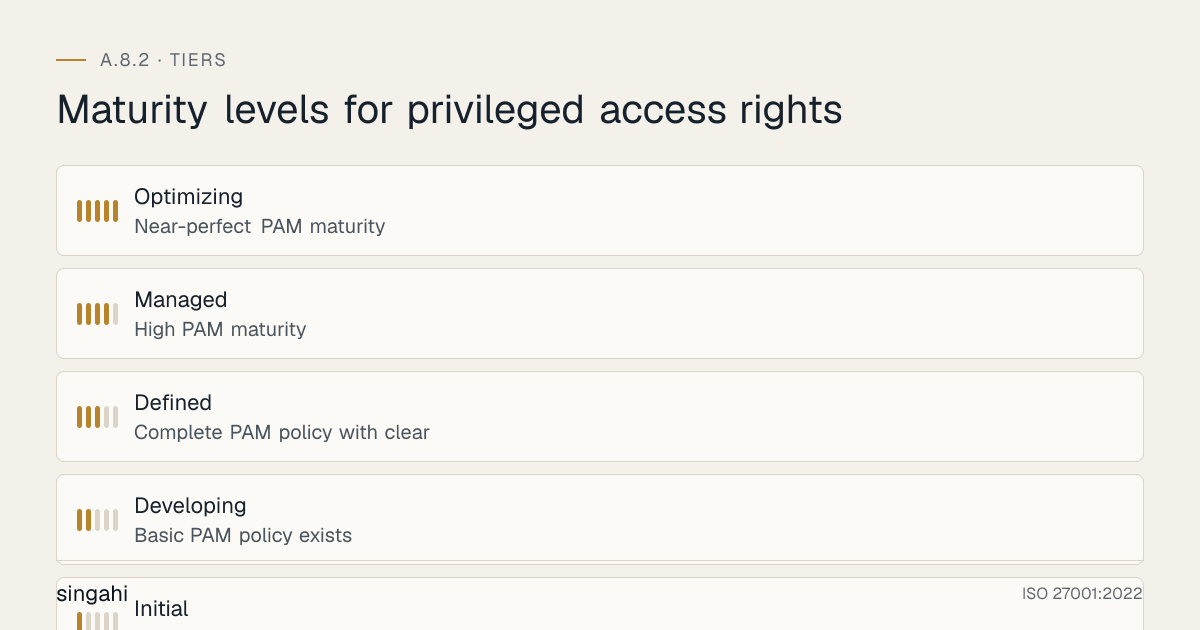
Maturity Model for A.8.2
| Level | Name | Characteristics | Evidence |
|---|---|---|---|
| 1 | Initial | No formal PAM program; shared admin accounts; no MFA; no monitoring; no vaulting; passwords in spreadsheets; no access reviews; high risk of insider threats and credential compromise | No documentation, no controls, no monitoring, shared accounts, no MFA, no reviews |
| 2 | Developing | Basic PAM policy exists; some MFA on critical accounts; basic password vaulting; manual access reviews; some monitoring; basic session recording for critical systems; inconsistent enforcement | Basic policy, some MFA, some vaulting, manual reviews, some monitoring, inconsistent |
| 3 | Defined | Complete PAM policy with clear requirements; PAM solution deployed; MFA enforced for all privileged accounts; vaulting and credential rotation for all human privileged accounts; session recording for all privileged sessions; real-time monitoring with alerting; JIT access for Critical and High accounts; quarterly access reviews; SoD enforced; vendor access controlled; service account management; break-glass procedures; training program; quarterly policy review | Complete policy, PAM solution, MFA, vaulting, rotation, recording, monitoring, JIT, reviews, SoD, vendor controls, service accounts, break-glass, training, review |
| 4 | Managed | High PAM maturity; automated provisioning and deprovisioning; integration with SIEM, SOAR, and ITSM; behavioral analytics and UEBA for privileged access; automated access reviews and certification campaigns; adaptive authentication; zero-standing privilege for most accounts; cloud-native PAM (AWS/Azure/GCP); DevOps secrets management; API security; continuous optimization; metrics-driven; purple team exercises | Automation, integration, analytics, adaptive auth, zero-standing privilege, cloud-native, DevOps, metrics-driven, purple team |
| 5 | Optimizing | Near-perfect PAM maturity; AI/ML-powered threat detection for privileged access; predictive analytics for privilege creep and anomaly detection; self-healing PAM (automatic response to threats); zero trust architecture with ephemeral privileges; continuous authorization; real-time risk scoring; industry-leading practices; PAM as a competitive advantage; continuous innovation; automated compliance reporting; self-service privileged access with governance | AI/ML, predictive analytics, self-healing, zero trust, ephemeral privileges, continuous auth, industry-leading, competitive advantage, innovation |
Improvement Cycle
Plan:
- Quarterly policy and procedure review
- Benchmarking against industry standards and peer organizations (Gartner, Forrester, CISO benchmarks)
- Regulatory change assessment and alignment (RBI, SEBI, IRDAI, NABH, HIPAA, PCI DSS, DPDP Act)
- Technology evaluation for automation and enhancement (AI/ML, UEBA, cloud-native PAM, DevOps secrets)
- Maturity assessment and target setting
- Incident analysis for lessons learned
- Threat assessment updates (new attack techniques, new malware, new APT tactics)
- Business continuity and disaster recovery plan updates for PAM systems
- Vendor and contractor performance review
- Cost optimization and ROI analysis
- Innovation roadmap for next-generation PAM capabilities
Do:
- Implement new PAM capabilities (JIT, adaptive auth, behavioral analytics, cloud-native PAM)
- Expand PAM coverage to new systems, platforms, and environments
- Upgrade MFA to stronger factors (FIDO2, biometrics) for Critical accounts
- Implement automated provisioning and deprovisioning
- Integrate PAM with SIEM, SOAR, ITSM, and IAM for smooth workflows
- Implement UEBA and behavioral analytics for privileged access
- Implement cloud-native PAM for AWS, Azure, GCP, and SaaS applications
- Implement DevOps secrets management (HashiCorp Vault, AWS Secrets Manager, Azure Key Vault)
- Implement API security for privileged API access
- Enhance session recording with AI-powered analytics (command analysis, screen analysis)
- Implement automated access reviews and certification campaigns
- Implement self-service privileged access with governance (user requests, automated approval, JIT)
- Conduct purple team exercises to test and improve PAM controls
- Implement zero trust architecture with ephemeral privileges and continuous authorization
- Implement predictive analytics for privilege creep and anomaly detection
- Implement self-healing PAM capabilities (automatic response to threats)
- Enhance training with gamification, simulations, and hands-on exercises
- Implement sustainability and efficiency initiatives for PAM operations
Check:
- Monthly privileged access metrics review (MFA enrollment, vaulting coverage, session recording, JIT usage, access reviews)
- Quarterly PAM solution performance and uptime review
- Annual complete PAM program review and maturity assessment
- Compliance audit preparation and results
- Personnel feedback and comprehension assessment
- Cost optimization and ROI measurement
- Incident correlation analysis (PAM controls vs. incident prevention)
- Vendor and contractor performance assessment
- Technology trend analysis and readiness assessment
- Benchmarking against industry standards and peer organizations
- Red team and purple team exercise results
- Maturity assessment against target level
- Innovation roadmap progress review
- User satisfaction and operational efficiency metrics
- Security incident reduction metrics
- Regulatory compliance score
Act:
- Update policy based on findings, incidents, and emerging risks
- Refine procedures based on personnel feedback and incident lessons
- Invest in tools that improve automation, accuracy, and monitoring
- Expand training for high-risk roles, new hires, and vendor personnel
- Report improvements to leadership and board
- Share best practices and lessons learned
- Benchmark against industry standards and peer organizations
- Engage with regulatory bodies on compliance
- Participate in industry forums on PAM best practices
- Publish illustrative scenarios and research on PAM effectiveness
- Innovate with new technologies (AI/ML, quantum-resistant authentication, blockchain for identity)
- Continuously optimize PAM operations and reduce manual effort
- Implement next-generation PAM capabilities (zero trust, continuous authorization, ephemeral privileges)
- Automate compliance reporting and audit readiness
- Enhance integration across the security ecosystem
- Improve user experience and operational efficiency
- Reduce time-to-access for legitimate privileged requests while maintaining security
- Implement predictive and preventive PAM capabilities
- Achieve industry-leading PAM maturity and recognition
Toolkit Download
The A.8.2 Control Pack contains a policy template, a step-by-step procedure, checklists, an audit evidence checklist, training materials, an issue playbook, a RACI, a metrics dashboard and a regulatory mapping.
Frequently Asked Questions
Q1: Is privileged access management mandatory for ISO 27001 certification?
A: Not automatically. No Annex A control is mandatory. Under clause 6.1.3 you choose the controls your risk assessment calls for, then record A.8.2 in your Statement of Applicability as included (and how) or excluded (and why). Almost every organisation has admin accounts, so almost every organisation includes it. If you include it, a single uncontrolled privileged account (for example a shared admin login with no MFA and no logging) is likely to be a significant finding. PAM is also referenced in multiple other controls (A.8.5 Secure Authentication, A.8.15 Logging, A.8.16 Monitoring Activities) and is essential for compliance.
Q2: What is the difference between a standard user account and a privileged account?
A: A standard user account has limited permissions, it can access only the files, applications, and systems that the user is authorized to use for their daily work. A privileged account has elevated permissions, it can access, modify, or delete any system, configuration, or data. Examples include administrator accounts (can install software, create users, change settings), root accounts (can do anything on Linux/Unix systems), DBA accounts (can access, modify, or delete any database), and domain admin accounts (can control the entire network). Privileged accounts are the "keys to the kingdom" and must be protected accordingly.
Q3: Do we need a commercial PAM solution, or can we manage privileged access manually?
A: For small organizations with very few privileged accounts (fewer than 10), manual management (spreadsheet tracking, manual password changes, manual reviews) may be acceptable as a starting point. However, manual management is error-prone, time-consuming, and difficult to scale. For medium and large organizations, a commercial PAM solution is strongly recommended. The benefits of a PAM solution include: automated vaulting and rotation, session recording, JIT access workflows, real-time monitoring, integration with SIEM and ITSM, and complete reporting. The cost of a PAM solution is typically recovered quickly through avoided incidents and improved operational efficiency. For organizations with budget constraints, open-source PAM solutions (Teleport, HashiCorp Vault, Linux auditd) or cloud-native PAM features (Azure PIM, AWS IAM, GCP IAM) can provide efficient alternatives. However, even with a PAM solution, the program (policy, processes, governance, training) is more important than the tool.
Q4: How do we enforce MFA on privileged accounts for legacy systems that don't support MFA?
A: Legacy systems that don't support native MFA are a common challenge. Solutions: (1) PAM gateway: Use a PAM solution that acts as a gateway to the legacy system, the user authenticates to the PAM gateway with MFA, and the PAM gateway connects to the legacy system with vaulted credentials. The legacy system never sees the user's direct authentication. (2) Jump server / bastion host: Use a hardened jump server with MFA for all access to legacy systems. The jump server enforces MFA, and users access the legacy system only through the jump server. (3) Network-level MFA: Use network access control (NAC) or VPN with MFA to enforce MFA at the network level before the user can reach the legacy system. (4) Compensating controls: If MFA cannot be enforced technically, implement compensating controls: session recording, enhanced monitoring, time-based restrictions, approval workflows, and frequent access reviews. Document the risk acceptance and the migration plan to replace the legacy system. Legacy systems should not be an excuse for weak privileged access controls, they require additional compensating controls, not less.
Q5: How do we handle shared service accounts that cannot be eliminated?
A: Some legacy applications and systems require shared service accounts because they do not support individual authentication or because multiple services need to use the same account. For these cases: (1) Vault the credentials: Store the shared account credentials in the PAM vault and control access to the vault. (2) Checkout/check-in: Require users or services to check out the credentials from the vault for each session and return them after use. (3) Rotate after each use: Automatically rotate the password after each checkout/check-in cycle. (4) Monitor usage: Log and monitor all usage of the shared account to detect anomalies. (5) Limit access: Restrict who can check out the shared account credentials to the minimum necessary. (6) Document and justify: Document the reason the shared account cannot be eliminated and the compensating controls in place. (7) Migration plan: Create a plan to replace the application or system with one that supports individual accounts or managed service identities. Shared accounts should be treated as a temporary measure with a path to elimination, not as a permanent solution.
Q6: How do we manage privileged access in cloud environments (AWS, Azure, GCP)?
A: Cloud environments require cloud-native PAM approaches: (1) AWS: Use AWS IAM roles with temporary credentials (STS), AWS IAM Identity Center (SSO) for privileged access, AWS Secrets Manager for secrets, and AWS CloudTrail for logging. Implement AWS IAM Permissions Boundaries and Service Control Policies (SCPs) to restrict maximum privileges. Use AWS PIM (if available) or third-party PAM solutions integrated with AWS. (2) Azure: Use Azure AD Privileged Identity Management (PIM) for JIT access, Azure AD Conditional Access for MFA and adaptive policies, Azure Key Vault for secrets, and Azure Monitor for logging. Implement Azure AD Administrative Units and Custom Roles to restrict scope. (3) GCP: Use GCP IAM with temporary credentials, Organization Policy Constraints for privilege restriction, Cloud IAM Recommender for least privilege analysis, and Cloud Audit Logs for logging. Use Secret Manager for secrets. (4) Multi-cloud: Use a multi-cloud PAM solution (CyberArk, Delinea, HashiCorp Vault) that can manage privileged access across AWS, Azure, and GCP from a single console. The key is to use cloud-native IAM features for least privilege and temporary credentials, rather than relying on traditional username/password approaches.
Q7: How do we balance security with operational efficiency for privileged users?
A: PAM should improve, not hinder, operational efficiency: (1) Vaulting actually speeds up access: Users don't need to remember multiple passwords or search for credentials in spreadsheets. They check out credentials from the vault in seconds. (2) JIT access reduces waiting time: Users request access through an automated workflow and receive approval quickly (often within minutes). This is faster than the informal "can you give me admin access?" requests that took days. (3) Session recording improves troubleshooting: Recordings can be replayed to see exactly what happened during an incident, speeding up troubleshooting and reducing finger-pointing. (4) Credential rotation reduces lockouts: Automatic rotation ensures credentials are always current, reducing the "my password expired" tickets. (5) Monitoring reduces incidents: Better monitoring prevents incidents, which reduces the firefighting that consumes IT time. (6) Self-service access: Implement self-service privileged access with automated approval for low-risk requests (e.g., a developer requesting JIT access to a dev server). Only high-risk requests require manual approval. The key is to design the PAM program with user experience in mind, not just security. Involve the IT operations team in the design to ensure the workflows are practical and efficient.
Q8: How do we detect and respond to compromised privileged credentials?
A: Detection and response require multiple layers: (1) Behavioral analytics: UEBA tools detect anomalous behavior (login from unusual location, unusual time, new device, unusual commands, data exfiltration). (2) SIEM correlation: Correlation of privileged access logs with other security events (failed logins, malware detection, vulnerability alerts) can identify compromise. (3) Honeytokens: Plant fake privileged credentials (honeytokens) in the environment. If they are used, it is an immediate indicator of compromise. (4) Credential monitoring: Monitor for privileged credentials on the dark web or in breach databases. (5) Endpoint detection: EDR tools on privileged workstations can detect credential harvesting, pass-the-hash attacks, and lateral movement. (6) Network detection: NDR tools can detect anomalous network traffic from privileged accounts (e.g., data exfiltration, C2 communication). (7) Response: If compromised credentials are detected, immediately disable the account, rotate all credentials, terminate active sessions, investigate the scope of compromise, and activate incident response. Time is critical, the average attacker moves from initial compromise to domain admin in under 2 hours.
Q9: What is the role of AI and machine learning in privileged access management?
A: AI/ML is transforming PAM in several ways: (1) Behavioral analytics: ML models learn normal privileged user behavior and detect anomalies (e.g., a DBA accessing the finance system, an admin logging in at 3 AM from a new location). (2) Risk scoring: AI assigns real-time risk scores to privileged sessions based on multiple factors (user, device, location, time, behavior, threat intelligence). (3) Predictive privilege creep: ML models analyze access patterns and predict which users are accumulating unnecessary privileges, enabling proactive remediation. (4) Automated response: AI-driven SOAR playbooks can automatically respond to privileged access threats (e.g., terminate a session, disable an account, require re-authentication) without human intervention. (5) Anomaly detection in session recordings: AI can analyze session recordings (commands, screen content) to detect suspicious activities without human review. (6) Credential compromise prediction: ML models can predict which credentials are most likely to be compromised based on usage patterns, password strength, and exposure. (7) Adaptive authentication: AI adjusts MFA requirements based on real-time risk (e.g., require additional factors for high-risk sessions). AI/ML does not replace human judgment in PAM, it augments it by handling the volume and complexity of data that humans cannot process in real-time.
Q10: How do we manage privileged access for DevOps and CI/CD pipelines?
A: DevOps environments require specialized PAM approaches: (1) Secrets management: Use a secrets manager (HashiVault, AWS Secrets Manager, Azure Key Vault, GitHub Secrets) to store and inject credentials into CI/CD pipelines dynamically. Do not hardcode credentials in scripts or configuration files. (2) Dynamic credentials: Use dynamic, short-lived credentials that are created for each pipeline run and destroyed afterward. AWS IAM Roles, Azure Managed Identities, and HashiCorp Vault dynamic secrets are examples. (3) Least privilege for CI/CD: Grant CI/CD pipelines only the minimum permissions needed for their specific tasks (e.g., a deployment pipeline should not have access to production databases). (4) Pipeline access control: Control who can trigger pipelines, approve deployments, and modify pipeline configurations. (5) Audit logging: Log all pipeline activities, including credential usage, deployments, and configuration changes. (6) Infrastructure as Code (IaC) security: Scan IaC templates (Terraform, CloudFormation, ARM) for excessive privileges and insecure configurations before deployment. (7) Container security: Use Kubernetes RBAC, service accounts, and pod security policies to restrict privileged access within container environments. (8) GitOps security: If using GitOps (e.g., ArgoCD, Flux), ensure that the Git repository is protected with strong access controls and that the GitOps controller has minimal privileges. DevOps PAM is about "secrets as code" and "identity as code", privileged access is managed programmatically, not manually.
Q11: How do we handle privileged access for outsourced IT and managed service providers (MSPs)?
A: MSP access is a high-risk scenario that requires strict controls: (1) Contractual controls: The MSP agreement must include specific privileged access requirements (MFA, session recording, time limits, monitoring, immediate revocation). (2) No shared credentials: The MSP must use individual accounts provided by the organization, not their own accounts or shared accounts. (3) Vault and monitor: All MSP access must be through the organization's PAM vault with session recording and real-time monitoring. (4) No access to security systems: The MSP must not have access to the organization's PAM, SIEM, IAM, or security systems (to prevent them from hiding their tracks). (5) Quarterly access reviews: MSP access must be reviewed quarterly and terminated immediately upon contract completion. (6) Independent audit: The organization must retain the right to audit MSP access independently. (7) Data residency: If the MSP is offshore, ensure that privileged access sessions and data do not violate data residency requirements (DPDP Act, RBI). (8) Incident notification: The MSP must notify the organization immediately of any security incident involving privileged access. The 2020 SolarWinds breach demonstrated that MSPs can be a catastrophic attack vector. Organizations must treat MSP access as higher-risk than internal access and apply stricter controls.
Q12: What is zero-standing privilege, and how do we implement it?
A: Zero-standing privilege (ZSP) is a security model where no user has permanent privileged access. All privileged access is temporary, requested on-demand, and automatically revoked after use. Implementation: (1) Eliminate all permanent admin accounts. (2) Users have standard accounts for daily work. (3) When admin access is needed, the user requests it through an automated workflow. (4) The request is approved (automatically for low-risk, manually for high-risk). (5) The user receives temporary admin access for a defined time period (e.g., 1 hour, 4 hours, 1 day). (6) After the time period, the access is automatically revoked. (7) The session is recorded and monitored. (8) The activity is logged and audited. ZSP is the ultimate implementation of least privilege and JIT access. It reduces the attack surface to zero when no one is actively using privileged access. ZSP is increasingly feasible with modern cloud platforms (Azure PIM, AWS IAM, GCP IAM) and PAM solutions. It may not be feasible for all legacy systems, but it should be the target for all new systems and cloud environments.
Q13: How do we handle privileged access during mergers, acquisitions, and divestitures?
A: M&A and divestitures create privileged access risks: (1) Discovery: During due diligence, discover all privileged accounts in the acquired organization. Many acquired organizations have poor PAM practices. (2) Integration: Integrate the acquired organization's privileged accounts into the acquiring organization's PAM program. This may require a PAM solution that can manage multiple environments. (3) Standardization: Standardize privileged access policies and controls across the merged organization. The weakest environment becomes the target for attackers. (4) Separation: During divestitures, ensure that privileged access is completely removed for the divested entity. Shared accounts, vendor accounts, and service accounts used by the divested entity must be changed or terminated. (5) Timeline: M&A PAM integration should be completed within 90 days of closing, not deferred to "later." (6) Cultural integration: Train acquired personnel on the acquiring organization's PAM policies and tools. The acquiring organization may have stricter controls that the acquired personnel are not accustomed to. M&A is a high-risk period for privileged access because two organizations with different security cultures are merged, and the attack surface temporarily expands.
Q14: How do we maintain PAM program effectiveness over the long term?
A: Long-term PAM effectiveness requires: (1) Continuous monitoring: Monitor PAM metrics (MFA enrollment, vaulting coverage, session recording, JIT usage, access reviews) and address gaps immediately. (2) Regular testing: Conduct red team and purple team exercises to test PAM controls. (3) Incident-driven improvement: After every incident, review whether PAM controls could have prevented it and improve accordingly. (4) Technology refresh: Keep PAM technology current. Legacy PAM tools may not support cloud-native environments, containers, or DevOps. (5) Training refresh: Provide regular refresher training for privileged users and new training for new hires. (6) Regulatory alignment: Stay current with regulatory changes (RBI, SEBI, DPDP Act) and adjust PAM controls. (7) Maturity advancement: Aim to move up the maturity model (from Level 3 to Level 4 to Level 5) by implementing new capabilities (AI/ML, zero trust, ephemeral privileges). (8) Culture: Build a security culture where privileged users understand that PAM is not about surveillance but about protecting them and the organization. (9) Executive support: Maintain executive support by reporting PAM metrics, ROI, and incident prevention to the board. (10) Community engagement: Participate in industry forums, share best practices, and learn from peers. PAM is not a destination, it is a continuous journey that must evolve with threats, technology, and the organization.
References and Further Reading
Standards and Frameworks
- ISO/IEC 27001:2022, Information Security, Cybersecurity and Privacy Protection, Information Security Management Systems, Requirements
- ISO/IEC 27002:2022, Information Security, Cybersecurity and Privacy Protection, Information Security Controls
- NIST SP 800-53, Security and Privacy Controls for Information Systems and Organizations
- NIST SP 800-207, Zero Trust Architecture
- COBIT 2019, IT Governance and Management Framework
- CIS Controls v8, Controls 5 (Account Management) and 6 (Access Control Management)
- PCI DSS v4.0.1, Access Control and Authentication Requirements
- HIPAA Security Rule, Access Controls, Audit Controls, and Integrity Controls
- SOX, Segregation of Duties and Access Controls for Financial Systems
- GDPR, Article 32 (Security of Processing) and Article 25 (Data Protection by Design)
- CMMC, Access Control and Privileged Access Requirements
- FedRAMP, Privileged Access Management Requirements for Cloud Systems
- IEC 62443, Industrial Automation and Control Systems Security (Privileged Access for OT)
Indian Legal and Regulatory References
- Digital Personal Data Protection Act, 2023
- Information Technology Act, 2000 (as amended through 2008)
- Official Secrets Act, 1923 (for government and defense classified information)
- RBI Cybersecurity, Technology: Risk, Resilience and Assurance Framework Directions, 2026 (31 July 2026)
- SEBI Cybersecurity and Cyber Resilience Framework (CSCRF) for SEBI Regulated Entities, circular of 20 August 2024
- IRDAI Information and Cyber Security Guidelines (2023)
- NABH Accreditation Standards for Hospitals (relevant to patient information protection)
- Bharatiya Nyaya Sanhita, 2023 (replaced the Indian Penal Code from 1 July 2024); unauthorised access itself is covered by IT Act ss.43 and 66
- Companies Act, 2013 (relevant to data protection and board responsibility)
- RBI Guidelines on Information Security, Electronic Banking, Technology Risk Management, and Cyber Frauds
Industry and Research Sources
- Verizon, Data Breach Investigations Report (2025)
- CrowdStrike, Global Threat Report (annual; breakout time)
- CISA and NSA guidance on securing privileged access
- NIST SP 800-53 Rev 5 AC-2, AC-6, IA-2
Tool Documentation
- CyberArk, Privileged Access Security Documentation and Best Practices
- BeyondTrust, Privileged Access Management Documentation
- Delinea, Secret Server and Privileged Access Management Documentation
- One Identity, Safeguard Documentation
- Microsoft, Azure AD Privileged Identity Management (PIM) Documentation
- AWS, AWS IAM, AWS Secrets Manager, and AWS IAM Identity Center Documentation
- Google Cloud, Cloud IAM, Cloud Identity, and Secret Manager Documentation
- HashiCorp, Vault Documentation and Secrets Management Best Practices
- Yubico, YubiKey Documentation and FIDO2 Implementation Guides
- Duo Security, MFA Deployment and Best Practices Documentation
- Okta, Identity and Access Management Documentation
- SailPoint, Identity Governance Documentation
- Splunk, User Behavior Analytics (UBA) Documentation
- Exabeam, UEBA and SIEM Documentation
Open Source Resources
- Teleport (Gravitational), Open-Source Infrastructure Access Platform Documentation
- HashiCorp Vault, Open-Source Secrets Management Documentation
- Linux auditd, Open-Source System Call Auditing Documentation
- Windows Sysmon, Open-Source System Monitoring Documentation
- Wazuh, Open-Source SIEM and XDR Documentation
- Zabbix, Open-Source Monitoring Documentation
- OpenSSH, Open-Source Secure Shell Documentation
- sudo, Open-Source Privilege Elevation Documentation
- FreeIPA, Open-Source Identity Management Documentation
- Keycloak, Open-Source Identity and Access Management Documentation
- OpenLDAP, Open-Source Directory Services Documentation
- Custom PowerShell/Python scripts for privileged account discovery and monitoring
- Custom scripts for PAM metrics tracking and dashboard generation
- Open-source UEBA and behavioral analytics tools (Apache Spot, OpenUBA)
- Open-source secrets management tools (Mozilla SOPS, Sealed Secrets for Kubernetes)
Document Control
- Version: 1.0
- Author: Singahi, ISO 27001 Implementation Experts
- Review Cycle: Quarterly + Annual
- Next Review: June 2027
- Classification: TLP:CLEAR, Public Information