
On this page
- Quick Reference (60 Seconds)
- What the Standard Actually Requires
- Why Information Access Restriction Matters
- Scope and Applicability
- Key Definitions and Terminology
- Relationship to Other Controls
- Implementation Roadmap (Week-by-Week)
- Detailed Implementation Guidance
- Tools, Technologies, and Solutions
- Policy and Procedure Templates
- Risk Assessment and Treatment
- Audit and Compliance Checklist
- Metrics and KPIs
- Common Pitfalls and How to Avoid Them
- Illustrative Scenarios
- Multi-Framework Mapping
- Regulatory and Industry Context
- Roles and Responsibilities (RACI)
- Documentation and Evidence Requirements
- Continuous Improvement
- FAQ
- References and Further Reading
- Access Control for Specific Industries
- Access Control Implementation Checklist
- Additional Illustrative Scenarios: Indian Access Control Incidents
Quick Reference (60 Seconds)
Figure · At a glance
A.8.3 at a glance
- Control ID
- A.8.3
- Control Name
- Information Access Restriction
- ISO 27002:2022 Section
- 8.3
- Primary Purpose
- Restrict access to information based
- Key Activities
- Define access rules
- Typical Owners
- IT Security, Identity and Access Management
| Aspect | Summary |
|---|---|
| Control ID | A.8.3 |
| Control Name | Information Access Restriction |
| ISO 27002:2022 Section | 8.3 |
| Primary Purpose | Restrict access to information based on business requirements and the information classification scheme |
| Key Activities | Define access rules, implement access controls, review and revoke access, manage privileged access, monitor access |
| Typical Owners | IT Security, Identity and Access Management (IAM), Data Owners, System Owners |
| Implementation Effort | High (6–12 weeks) |
| Annual overhead Range | – for growing companies |
Bottom Line: Not everyone in your organization needs access to everything. Information access restriction ensures that people can only access the information they need to do their job, nothing more. This is the principle of least privilege applied to information.
What the Standard Actually Requires
Figure · Process
What A.8.3 asks you to do

ISO 27001:2022 Annex A.8.3 states:
ISO 27001:2022 Annex A 8.3 asks organizations to restrict access to information and associated assets in line with the access control policy.
ISO 27002:2022 expands this into practical guidance covering:
- Access control policy, Define and document rules for restricting access to information
- User registration and de-registration, Formal processes for granting and revoking access rights
- User access provisioning, Assigning access rights based on job roles and business requirements
- Management of privileged access rights, Special controls for administrative and super-user accounts
- User access rights review, Periodic review of access rights to ensure they remain appropriate
- Removal of access rights, Prompt revocation when users change roles or leave
- Access to source code, Restricted access to application source code (also covered by A.8.4)
Why Information Access Restriction Matters
The Principle of Least Privilege
The principle of least privilege states that any user, program, or process should have only the minimum privileges necessary to perform its function. When applied to information access, this means employees should only access the information they need for their specific job, no more, no less.
Key Statistics
- 74% of data breaches involve insider actions, privilege abuse, or compromised credentials
- Over-privileged accounts are present in 80% of organizations, creating significant attack surface
- Privilege abuse is a leading cause of insider threats, with 60% of insider incidents involving excessive access rights
- Unauthorized access due to poor access controls is one of the top 5 causes of data breaches globally
- Dormant accounts (accounts of former employees or contractors) are a common attack vector
Real-World Consequences
- A junior employee in a bank had access to the core banking database due to a default role assignment; they transferred to a personal account over 6 months before detection
- A contractor's access was never revoked after project completion; 8 months later, the contractor used the still-active account to access and steal customer data for a competitor
- A manager had access to all employee records including salary data, despite only needing access to their own team; the manager leaked salary information, causing organizational conflict and resignations
- A developer had access to production customer data for "testing purposes"; the developer's laptop was compromised, exposing all customer records
- A company had no access review process; after 5 years, 200 former employees still had active accounts, creating an enormous attack surface
Regulatory and Business Drivers
- DPDP Act 2023 requires that personal data be processed only by authorized personnel with appropriate access controls
- RBI Cyber Security Framework mandates role-based access control (RBAC) for banking systems with quarterly access reviews
- SEBI Cybersecurity Circular requires trading systems to have strict access controls with segregation of duties
- PCI DSS v4.0 Requirement 7 mandates access control measures to restrict access to cardholder data based on need-to-know
- SOC 2 CC6.1 requires logical access controls to restrict access to authorized users
- HIPAA (for US healthcare) requires access controls to limit access to ePHI to authorized personnel
Scope and Applicability
What Is Covered
- All information assets (files, databases, applications, documents, emails, reports)
- All systems that store, process, or transmit information (servers, databases, applications, file shares, cloud services)
- All users (employees, contractors, vendors, temporary staff, administrators, executives)
- All access methods (direct login, API access, service accounts, automated processes, third-party integrations)
- All access types (read, write, modify, delete, execute, administer)
- All access locations (on-site, remote, cloud, mobile)
What Is Not Covered
- Public information intended for unrestricted access (though access logging may still apply)
- Physical access to premises (covered by A.7.2, A.7.6)
Applicability by Organization Type
| Organization Type | Applicability | Key Access Control Concerns |
|---|---|---|
| IT/Software Services | High | Source code access, customer data, dev/prod separation, admin access |
| BFSI | Critical | Customer financial data, trading systems, core banking, segregation of duties |
| Healthcare | Critical | Patient records, medical images, prescription data, HIPAA/ePHI equivalent |
| Manufacturing | High | R&D designs, production plans, SCADA access, supplier data |
| Government/Defense | Critical | Classified information, citizen data, secure communications, compartmentalization |
| Education | Medium | Student records, exam data, research data, financial aid information |
| SaaS/Cloud | Critical | Customer tenant data, admin access, multi-tenant isolation, API access |
| Retail/E-commerce | High | Customer purchase data, payment information, inventory, supplier contracts |
Key Definitions and Terminology
| Term | Definition |
|---|---|
| Access Control | The selective restriction of access to information or resources, permitting only authorized actions by authorized users |
| Role-Based Access Control (RBAC) | An access control model where access rights are assigned based on job roles rather than individual users |
| Attribute-Based Access Control (ABAC) | An access control model where access decisions are based on attributes of the user, resource, and environment |
| Least Privilege | The principle that users should have the minimum access rights necessary to perform their job functions |
| Need-to-Know | The principle that users should only have access to information necessary for their specific tasks |
| Segregation of Duties (SoD) | The practice of dividing critical functions among different people to prevent fraud and errors |
| Privileged Access | Access rights that exceed standard user rights, typically administrative or super-user access |
| Service Account | An account used by applications, services, or automated processes rather than human users |
| Access Certification | The periodic review and attestation of access rights by managers or data owners to confirm they are still appropriate |
| Access Recertification | The process of reviewing and re-approving access rights on a regular schedule |
| Identity and Access Management (IAM) | The framework of policies, processes, and technologies for managing digital identities and access rights |
| User Access Review (UAR) | A periodic audit of user access rights to ensure they are appropriate and aligned with current roles |
| Dormant Account | A user account that has not been used for a defined period but remains active in the system |
| Orphaned Account | A user account that remains active after the user has left the organization or changed roles |
| Identity Governance and Administration (IGA) | The set of policies, processes, and tools for managing identity lifecycle and access governance |
Relationship to Other Controls
| Control | Relationship |
|---|---|
| A.5.1 Policies for information security | Access control policy must align with overall security policy |
| A.5.9 Inventory of information and other assets | Access control must be applied to all inventoried assets |
| A.5.12 Classification of information | Access restriction must align with information classification |
| A.5.15 Access control | The overarching access control policy that governs A.8.3 |
| A.6.1 Screening | Background checks inform access decisions |
| A.6.2 Terms and conditions of employment | Employment contracts define access responsibilities |
| A.6.3 Information security awareness training | Users must be trained on access control responsibilities |
| A.6.4 Disciplinary process | Violations of access controls may trigger disciplinary action |
| A.7.2 Physical entry controls | Physical access complements logical access |
| A.8.1 User endpoint devices | Access controls apply to endpoint devices |
| A.8.4 Access to source code | Source code access is a specific type of information access |
| A.8.5 Secure authentication | Authentication precedes access control decisions |
| A.8.16 Monitoring activities | Access must be monitored and logged |
| A.8.18 Access rights | Closely related control on managing access rights |
| A.8.24 Use of cryptography | Encryption can enforce access control at the data level |
| A.8.32 Configuration of information systems | System configurations must enforce access controls |
Implementation Roadmap (Week-by-Week)
Week 1: Information Inventory and Classification Mapping
- Inventory all information repositories (databases, file shares, applications, cloud storage)
- Map information to classification scheme (Public, Internal, Confidential, Secret)
- Identify all systems and applications that contain classified information
- Document current access control state and identify gaps
- Identify privileged accounts and super-user access
- Identify service accounts and their access rights
- Identify dormant and orphaned accounts
Week 2: Policy and Framework Development
- Draft information access restriction policy
- Define access control model (RBAC, ABAC, or hybrid)
- Define roles and corresponding access rights
- Define segregation of duties (SoD) rules for critical functions
- Define privileged access management (PAM) requirements
- Define access request, review, and revocation procedures
- Define access certification schedule and process
Week 3: Role Design and Access Mapping
- Design standard roles for each job function (e.g., HR Manager, Finance Analyst, Developer, Sales Rep)
- Map each role to required information access rights
- Define role hierarchies and inheritance (if applicable)
- Identify conflicts of interest and SoD violations in role design
- Validate roles with business stakeholders and data owners
- Document role definitions and access matrices
Week 4: Access Control Implementation
- Implement RBAC in identity management system (Active Directory, LDAP, cloud IAM)
- Configure access control lists (ACLs) for file shares and databases
- Implement application-level access controls
- Configure group policies for access enforcement
- Implement PAM solution for privileged accounts
- Configure service account management
- Test access controls in non-production environment
Week 5: User Access Provisioning and Cleanup
- Map all current users to appropriate roles
- Remove excessive access rights (rights not aligned with role)
- Revoke access for dormant accounts (no login in 90+ days)
- Revoke access for orphaned accounts (former employees/contractors)
- Provision access for users who are missing required rights
- Document all changes with justification
- Test user access to ensure functionality is maintained
Week 6: Access Review and Certification Setup
- Implement access certification workflow (quarterly, semi-annual, or annual)
- Configure automated access review reports
- Train managers and data owners on access certification process
- Define escalation for non-responsive certifiers
- Schedule first access review cycle
- Set up automated alerts for access anomalies
Week 7: Monitoring and Logging
- Implement access logging for all critical systems
- Configure SIEM alerts for unauthorized access attempts
- Set up privileged access monitoring
- Configure alerts for SoD violations
- Test monitoring and alerting systems
- Create access anomaly dashboard
Week 8: Training, Communication, and Audit
- Train all users on access control responsibilities and least privilege
- Train managers on access certification and review
- Train IT staff on access provisioning and revocation
- Create quick reference guides for access requests and reviews
- Conduct internal audit of access control implementation
- Prepare documentation for external audit
- Plan for continuous improvement
Detailed Implementation Guidance
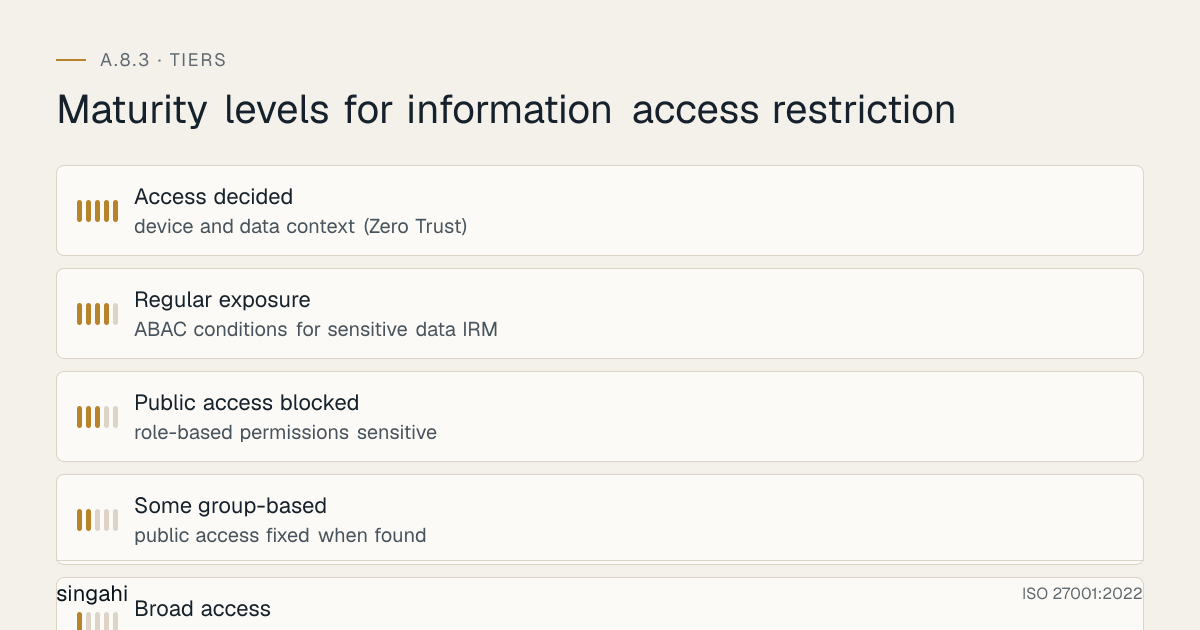
Figure · Tiers
Maturity levels for information access restriction
- AuditContinuous/scheduled
- RevokeTermination, resignation, contract end
- ModifyRole change, project end
- ReviewQuarterly/annual schedule
- ProvisionApproved request
- RequestNew employee, role change
Access Control Models
Role-Based Access Control (RBAC):
| Role | Description | Typical Access Rights |
|---|---|---|
| Employee (Base) | All employees | Email, intranet, shared drive (read-only common), HR self-service |
| Manager | People managers | Employee records for their team, approval workflows, team reports |
| Finance User | Finance staff | Financial systems, accounting software, budget reports, expense data |
| Finance Manager | Finance leadership | All financial data, approval limits, audit reports, payroll |
| HR User | HR staff | HRIS, employee records, recruitment systems, training records |
| HR Manager | HR leadership | All HR data, compensation data, disciplinary records, performance reviews |
| Developer | Software developers | Dev environments, code repositories (dev branch), staging systems |
| Senior Developer | Lead developers | Production read access, code review rights, deployment to staging |
| IT Admin | IT administrators | All systems (admin level), user management, backup systems, monitoring |
| Database Admin | Database administrators | Database servers, data export, backup/restore, performance tuning |
| Security Analyst | Security team | SIEM, vulnerability scanners, security tools, audit logs |
| Security Manager | Security leadership | All security systems, policy management, incident response, risk reports |
| Sales Rep | Sales staff | CRM, customer data for their accounts, sales reports, proposals |
| Sales Manager | Sales leadership | All CRM data, pipeline reports, commission data, territory analytics |
Attribute-Based Access Control (ABAC):
ABAC makes access decisions based on attributes:
| Attribute Type | Examples | Access Decision |
|---|---|---|
| User attributes | Department, job title, location, clearance level, employment status | Can user access this resource? |
| Resource attributes | Classification, owner, department, data type, sensitivity | What classification is this data? |
| Environment attributes | Time of day, location (IP, geography), device type, network | Is this access from a trusted location? |
| Action attributes | Read, write, delete, share, download, print | What action is being attempted? |
ABAC Policy Example:
ALLOW IF:
User.department == Resource.owner_department
AND User.clearance >= Resource.classification
AND Environment.time IN business_hours
AND Environment.location IN [office, VPN]
AND Action IN [read, write]
DENY IF:
User.employment_status == "terminated"
OR Resource.classification == "Secret" AND Environment.location != office
Hybrid Model (Recommended for Most Organizations):
- Use RBAC for standard, role-based access (80% of access decisions)
- Use ABAC for dynamic, context-sensitive access (20% of access decisions)
- RBAC provides simplicity and manageability
- ABAC provides flexibility for complex scenarios
Segregation of Duties (SoD)
Critical Function Pairs That Must Be Separated:
| Function A | Function B | Risk if Combined |
|---|---|---|
| Request payment | Approve payment | Fraudulent payments |
| Create user account | Approve user access | Unauthorized access creation |
| Develop code | Deploy to production | Malicious code deployment |
| Record transactions | Reconcile transactions | Transaction fraud |
| Initiate wire transfer | Approve wire transfer | Unauthorized fund transfers |
| Manage inventory | Approve inventory write-offs | Inventory theft |
| Process payroll | Distribute paychecks | Payroll fraud |
| Customer data access | Customer data deletion | Data destruction |
| Security monitoring | Security incident response | Cover-up of incidents |
| Database backup | Database restore | Data manipulation |
SoD Implementation:
- Define SoD rules in the access control framework
- Implement automated SoD checking in IAM/IGA systems
- Review user access for SoD violations during access certification
- For small organizations where SoD is not feasible, implement compensating controls (manager review, audit trails, dual authorization)
Privileged Access Management (PAM)
Privileged Account Types:
| Account Type | Examples | Risk Level | Control Requirements |
|---|---|---|---|
| Domain/Directory Admin | Active Directory admin, LDAP admin | Critical | PAM vault, MFA, session recording, just-in-time access |
| System Administrator | Server admin, OS root, local admin | Critical | PAM vault, MFA, session recording, time-limited access |
| Database Administrator | DBA, schema owner, backup operator | Critical | PAM vault, MFA, query logging, no direct production access |
| Application Administrator | App admin, super-user, config manager | High | PAM vault, MFA, change logging |
| Network Administrator | Network admin, firewall admin, switch config | Critical | PAM vault, MFA, command logging, out-of-band access |
| Cloud Administrator | AWS root, Azure AD admin, GCP owner | Critical | PAM vault, MFA, activity logging, break-glass procedures |
| Service Account | App service account, batch job account, API key | High | Vault storage, regular rotation, no interactive login |
| Emergency/Break-Glass | Disaster recovery admin, incident response | Critical | Dual control, sealed envelope, audit trail, time-limited |
PAM Best Practices:
- Store privileged credentials in a secure vault (CyberArk, BeyondTrust, Delinea)
- Require MFA for all privileged access
- Use just-in-time (JIT) access, grant privileged access only when needed, for limited duration
- Record and monitor all privileged sessions
- Rotate privileged passwords automatically and frequently
- Implement privileged access workflows with approval
- Separate privileged accounts from standard user accounts (no dual-use accounts)
- Disable privileged accounts when not in use
Access Lifecycle Management
Access Lifecycle Stages:
| Stage | Trigger | Actions | Responsible Party |
|---|---|---|---|
| Request | New employee, role change, project assignment | Submit access request with business justification and manager approval | Employee/Manager |
| Provision | Approved request | Assign role, create accounts, grant access rights, notify user | IT Operations/IAM |
| Review | Quarterly/annual schedule | Manager or data owner reviews access rights and attests appropriateness | Manager/Data Owner |
| Modify | Role change, project end, access review finding | Adjust access rights to match new requirements | IT Operations/IAM |
| Revoke | Termination, resignation, contract end, role change | Disable accounts, revoke access rights, reassign data, archive records | IT Operations/HR |
| Audit | Continuous/scheduled | Monitor access logs, detect anomalies, investigate violations | IT Security |
Automated Access Provisioning:
- Integrate HR system (workday, SAP, BambooHR) with IAM system
- When employee is hired, automatically provision base access based on role
- When employee changes role, automatically modify access rights
- When employee leaves, automatically revoke all access within 24 hours
- Reduces manual errors, delays, and orphaned accounts
Access Revocation Requirements:
- Standard employees: revoke access within 24 hours of termination
- Privileged users: revoke access immediately upon termination
- Contractors: revoke access on contract end date (not after)
- Temporary staff: set expiration dates on access at time of provisioning
- Service accounts: review and rotate credentials when associated application is decommissioned
Access Certification and Recertification
Access Certification Schedule:
| Access Type | Certification Frequency | Certifier | Escalation |
|---|---|---|---|
| Standard user access | Semi-annual or annual | Direct manager | IT Security after 2 weeks |
| Privileged access | Quarterly | Department head + CISO | CISO after 1 week |
| Application owner access | Quarterly | Application owner | IT Security after 1 week |
| Database access | Quarterly | Database owner + CISO | CISO after 1 week |
| Third-party/contractor access | Monthly or quarterly | Contract manager + IT Security | IT Security after 1 week |
| Emergency/break-glass access | After each use | CISO | Board if misuse suspected |
| Service accounts | Semi-annual | Application owner + IT Security | IT Security after 2 weeks |
Certification Process:
- Generate report: IAM system generates access certification report for each certifier
- Review: Certifier reviews each user's access and confirms or revokes
- Approve: Certifier approves the review with electronic signature
- Escalate: If certifier does not respond within deadline, escalate to next level
- Revoke: Unapproved access is automatically revoked or flagged for review
- Document: All certification results are documented and retained
Certification Report Contents:
- User name and role
- All access rights (systems, applications, data, permissions)
- Access granted date and grantor
- Last access date (to identify unused access)
- Risk indicators (excessive access, SoD violations, dormant access)
- Approve/Revoke action for each right
Tools, Technologies, and Solutions
Identity and Access Management (IAM) Platforms
| Vendor | Product | Key Features | licensing Range (INR) |
|---|---|---|---|
| Microsoft | Azure AD / Entra ID | Cloud-native, RBAC, conditional access, MFA | |
| Okta | Workforce Identity | Enterprise SSO, lifecycle management, MFA | |
| Ping Identity | PingOne / PingFederate | Enterprise, hybrid, strong federation | |
| SailPoint | IdentityNow | Enterprise IGA, access certification, SoD | |
| Saviynt | Enterprise Identity Cloud | Cloud-native IGA, analytics, compliance | |
| Oracle | Oracle Identity Manager | Enterprise, on-premise, complex environments | |
| ManageEngine | ADManager Plus | Growing companies, AD management, automation | |
| One Identity | Active Roles | AD/Azure AD management, automation |
Privileged Access Management (PAM)
| Vendor | Product | Key Features | licensing Range (INR) |
|---|---|---|---|
| CyberArk | Privileged Access Security | Enterprise PAM, vault, session management | |
| BeyondTrust | Privileged Remote Access | PAM, remote access, password management | |
| Delinea (Thycotic) | Secret Server | PAM vault, password rotation, session recording | |
| HashiCorp | Vault | Open-source secrets management, dynamic credentials | |
| ManageEngine | PAM360 | Growing companies, password vault, session monitoring | |
| WALLIX | Bastion | European PAM, session management, compliance |
Access Review and Certification Tools
| Vendor | Product | Key Features | licensing Range (INR) |
|---|---|---|---|
| SailPoint | Access Certification | Enterprise, automated campaigns, risk scoring | |
| Saviynt | Access Certification | Cloud-native, AI-powered, continuous | |
| Oracle | Access Governance | Enterprise, on-premise, complex workflows | |
| Microsoft | Identity Governance | Azure AD, access reviews, lifecycle workflows | |
| One Identity | Access Certification | Automated, policy-based, integrated | |
| IBM | Security Verify Governance | Enterprise, AI-driven, integrated |
SIEM and Access Monitoring
| Vendor | Product | Key Features | licensing Range (INR) |
|---|---|---|---|
| Splunk | Enterprise Security | SIEM, UEBA, access analytics, anomaly detection | |
| IBM | QRadar | SIEM, UEBA, access monitoring, compliance | |
| Microsoft | Sentinel | Cloud-native SIEM, UEBA, integrated with Azure AD | |
| LogRhythm | NextGen SIEM | SIEM, UEBA, access monitoring, SOAR | |
| Elastic | Security | Open-source, SIEM, access analytics | |
| ManageEngine | Log360 | Growing companies, SIEM, access auditing, compliance |
Policy and Procedure Templates
Information Access Restriction Policy Template
Template
Information Access Restriction Policy
1. Purpose
This policy establishes requirements for restricting access to information and systems based on business requirements, job roles, and the information classification scheme.
2. Scope
This policy applies to all information assets, systems, applications, and users within the organization.
3. Access Control Principles
3.1 Least Privilege
- Users shall be granted only the minimum access rights necessary to perform their job functions
- Access rights shall not exceed the requirements of the user's current role
3.2 Need-to-Know
- Users shall only have access to information necessary for their specific tasks
- Access to sensitive information requires justification and approval
3.3 Segregation of Duties
- Critical functions shall be divided among different individuals to prevent fraud and errors
- No single user shall have the ability to both initiate and approve critical transactions
3.4 Role-Based Access
- Access rights shall be assigned based on job roles rather than individual preferences
- Role definitions shall be documented and approved by data owners
4. Access Request and Provisioning
4.1 Access Request
- All access requests must be submitted through the formal access request process
- Requests must include business justification and manager approval
- Requests for privileged access require additional approval from IT Security or CISO
- Requests for access to Confidential or Secret information require data owner approval
4.2 Access Provisioning
- Access shall be provisioned based on approved roles and requests
- Access provisioning must be documented with requestor, approver, date, and rights granted
- Automated provisioning is preferred for standard roles
- Manual provisioning requires dual verification
5. Access Review and Certification
5.1 Review Schedule
- Standard user access: reviewed semi-annually by direct manager
- Privileged access: reviewed quarterly by department head and CISO
- Third-party/contractor access: reviewed monthly or quarterly by contract manager
- Service accounts: reviewed semi-annually by application owner and IT Security
5.2 Certification Process
- Managers and data owners must certify that access rights are appropriate
- Unapproved access must be revoked within 30 days of certification
- Certification results must be documented and retained
6. Access Revocation
6.1 Triggers for Revocation
- Employee termination or resignation
- Role change
- Project completion
- Contract end
- Access review finding
- Security incident
6.2 Revocation Timeline
- Standard users: within 24 hours of termination or role change
- Privileged users: immediately upon termination or role change
- Contractors: on contract end date
- Temporary access: at expiration date
7. Privileged Access Management
7.1 Privileged Account Requirements
- Privileged accounts must be separate from standard user accounts
- Privileged access requires MFA and session recording
- Privileged passwords must be stored in a secure vault and rotated automatically
- Just-in-time (JIT) access is preferred for privileged operations
7.2 Service Accounts
- Service accounts must be documented with owner, purpose, and associated application
- Service account credentials must be stored in a secure vault
- Service accounts must not be used for interactive login
- Service account passwords must be rotated regularly
8. Monitoring and Enforcement
- Access to critical systems must be logged and monitored
- Unauthorized access attempts must be investigated
- SoD violations must be flagged and remediated
- Access policy violations may result in disciplinary action
9. Roles and Responsibilities
- Data Owners: Approve access to their data, participate in access certification
- System Owners: Approve access to their systems, define access requirements
- Managers: Review and certify access for their team members
- IT Security: Define access policy, monitor compliance, investigate violations
- IT Operations: Implement access controls, provision and revoke access
- HR: Notify IT of employee status changes (hire, transfer, termination)
- Users: Use access only for authorized purposes, report unauthorized access
10. Review
This policy is reviewed annually or after any significant access control incident.
Access Request Form Template
Template
Access Request Form
Requestor Information
- Name: _______________
- Employee ID: _______________
- Department: _______________
- Manager: _______________
- Job Role: _______________
Access Requested
- System/Application: _______________
- Data/Resource: _______________
- Access Type: _______________ (Read / Write / Modify / Delete / Admin)
- Duration: _______________ (Permanent / Temporary, specify end date)
- Business Justification: _______________
Approvals
- Manager Approval: _______________ Date: _______________
- Data Owner Approval (if sensitive data): _______________ Date: _______________
- IT Security Approval (if privileged): _______________ Date: _______________
- CISO Approval (if Secret/high-risk): _______________ Date: _______________
Provisioning
- Provisioned By: _______________ Date: _______________
- Access Rights Granted: _______________
- Role Assigned: _______________
Review and Revocation
- Last Review Date: _______________
- Review Result: _______________ (Approved / Revoked / Modified)
- Revocation Date: _______________ (if applicable)
- Revocation Reason: _______________
Risk Assessment and Treatment
Risk Assessment Matrix for Information Access Restriction
| Risk ID | Threat | Vulnerability | Likelihood | Impact | Risk Level | Treatment |
|---|---|---|---|---|---|---|
| R1 | Insider accesses unauthorized data | Over-privileged users; no access review | High | High | Critical | RBAC; least privilege; quarterly access reviews |
| R2 | Former employee retains access | Delayed revocation; no HR-IT integration | Medium | High | High | Automated deprovisioning; 24-hour revocation SLA |
| R3 | Privileged account abuse | Shared admin accounts; no monitoring | Medium | High | High | PAM; separate admin accounts; session recording |
| R4 | SoD violation enables fraud | Single user with conflicting rights | Medium | High | High | SoD rules; automated checking; compensating controls |
| R5 | Unauthorized access via service account | Hardcoded credentials; no rotation | Medium | High | High | Vault; automated rotation; no interactive login |
| R6 | Dormant account exploited | Unused accounts remain active | Medium | Medium | Medium | Dormant account detection; auto-disable after 90 days |
| R7 | Access granted without approval | Informal access requests; no workflow | High | Medium | High | Formal access request workflow; mandatory approval |
| R8 | Access rights not reviewed | No access certification program | High | Medium | High | Quarterly access reviews; automated certification |
| R9 | Third-party excessive access | Contractors granted broad access | Medium | High | High | Limited scope; time-bound; monthly review |
| R10 | Break-glass account misuse | Emergency access not audited | Low | High | Medium | Dual control; post-use audit; time-limited |
Audit and Compliance Checklist
Internal Audit Checklist (30 Questions)
Policy and Framework (5 Questions)
- Is an access control policy documented and approved?
- Are access control models (RBAC/ABAC) defined and documented?
- Are role definitions documented with corresponding access rights?
- Are SoD rules defined and documented?
- Is the policy reviewed annually?
Access Provisioning (5 Questions)
- Is all access granted through a formal request and approval process?
- Is access provisioning based on approved roles and business justification?
- Is privileged access granted with additional approval and controls?
- Is access provisioning documented with requestor, approver, and date?
- Is automated provisioning used where possible?
Access Review (5 Questions)
- Are access reviews conducted on schedule (quarterly for privileged, semi-annual for standard)?
- Do managers/data owners certify access appropriateness?
- Are unapproved access rights revoked within 30 days?
- Are access review results documented and retained?
- Is there escalation for non-responsive certifiers?
Access Revocation (5 Questions)
- Is access revoked within 24 hours of employee termination?
- Is access revoked on role change?
- Is access revoked on contract end?
- Are service accounts decommissioned when applications are retired?
- Is revocation documented and verified?
Privileged Access (5 Questions)
- Are privileged accounts separate from standard user accounts?
- Is privileged access stored in a secure vault?
- Is MFA required for privileged access?
- Are privileged sessions recorded and monitored?
- Are privileged passwords rotated automatically?
Monitoring and SoD (5 Questions)
- Is access to critical systems logged and monitored?
- Are SoD violations detected and flagged?
- Are unauthorized access attempts investigated?
- Are dormant accounts identified and disabled?
- Are access anomalies detected and alerted?
Audit Scoring
- 30–27: Excellent (Green), Full compliance
- 26–22: Good (Yellow), Minor gaps, address within 30 days
- 21–15: Needs Improvement (Orange), Significant gaps, address within 60 days
- 14–0: Critical (Red), Major non-compliance, immediate action required
Metrics and KPIs
Figure · Measures
The measures that show A.8.3 is working
- Access Request Approval Time<= 3 businessMonthly
- Access Certification Completion Rate>= 95%Per certifica…
- Access Certification FindingsTrending down…Per certifica…
- Orphaned Account Rate<= 1%Monthly
- Dormant Account Rate<= 5%Monthly
Key Performance Indicators
| KPI | Formula | Target | Measurement Frequency |
|---|---|---|---|
| Access Request Approval Time | Average days from request to provisioning | <= 3 business days | Monthly |
| Access Certification Completion Rate | (Completed certifications / Total certifications) x 100 | >= 95% | Per certification cycle |
| Access Certification Findings | Number of excessive or inappropriate access rights identified | Trending downward | Per certification cycle |
| Orphaned Account Rate | (Orphaned accounts / Total accounts) x 100 | <= 1% | Monthly |
| Dormant Account Rate | (Dormant accounts / Total accounts) x 100 | <= 5% | Monthly |
| Access Revocation SLA Compliance | (Revocations within SLA / Total revocations) x 100 | 100% | Monthly |
| Privileged Account Coverage | (Privileged accounts in PAM / Total privileged accounts) x 100 | 100% | Monthly |
| SoD Violation Rate | (SoD violations / Total access rights) x 100 | <= 1% | Quarterly |
| Unauthorized Access Attempts | Count of detected unauthorized access attempts | Trending downward | Monthly |
| Access-Related Security Incidents | Count of incidents caused by access control failures | 0 | Monthly |
| Service Account Rotation Rate | (Rotated service accounts / Total service accounts) x 100 | 100% | Quarterly |
| Emergency Access Usage | Count of break-glass account activations | <= 2 per quarter | Quarterly |
| Role Accuracy Rate | (Users with correct role / Total users) x 100 | >= 95% | Quarterly |
| Policy Review Cycle Adherence | (Reviews on time / Required reviews) x 100 | 100% | Annually |
| Audit Finding Closure Rate | (Closed findings / Total findings) x 100 | 100% within 60 days | Per audit |
Common Pitfalls and How to Avoid Them
Pitfall 1: Over-Privileging by Default
Problem: New users are granted broad access rights "to get them started," with the intention of narrowing later. The narrowing never happens. Users accumulate excessive access over time. Solution: Start with minimal access. Use role-based provisioning to grant only what's needed. Implement a formal process for requesting additional access. Conduct regular access reviews to identify and remove excessive rights. Make least privilege the default, not the exception.
Pitfall 2: "Temporary" Access Becomes Permanent
Problem: Temporary access is granted for a project or emergency and never revoked. Over time, temporary access accumulates into permanent excessive access. Solution: Set expiration dates for all temporary access. Automate reminders before expiration. Automatically revoke access if not renewed. Include temporary access in access reviews. Do not grant permanent access for temporary needs.
Pitfall 3: Shared Admin Accounts
Problem: Organizations use shared admin accounts (e.g., "admin," "root," "administrator") that multiple people know the password to. This makes accountability impossible and creates a massive security risk. Solution: Eliminate shared admin accounts. Give each administrator their own privileged account with their name. Use a PAM vault for shared credentials if absolutely necessary. Implement session recording so that actions can be attributed to individuals. Audit who uses shared accounts and when.
Pitfall 4: No Access Reviews
Problem: Access is granted once and never reviewed. Users accumulate rights from previous roles, projects, and requests. After years, users have access to systems they no longer need. Solution: Implement mandatory access reviews on a regular schedule (quarterly for privileged, semi-annual for standard). Use automated access certification tools. Make managers accountable for certifying their team's access. Auto-revoke access that is not certified. Start with a baseline cleanup of all existing access.
Pitfall 5: Ignoring Service Accounts
Problem: Service accounts are forgotten. They have hardcoded passwords that never change. They have excessive access. They are used for both batch jobs and interactive login. When applications are decommissioned, the service accounts remain active. Solution: Inventory all service accounts. Document each account's owner, purpose, and associated application. Store credentials in a vault. Rotate passwords regularly. Disable interactive login. Decommission accounts when applications are retired. Include service accounts in access reviews.
Pitfall 6: No Integration Between HR and IT
Problem: HR knows when employees are hired, transferred, or terminated, but IT does not receive timely notification. Access is provisioned late and revoked even later. Solution: Integrate HR system with IT/IAM system. Automate provisioning based on HR data. Automate revocation based on termination dates. Create a formal HR-to-IT notification process for all status changes. Include access revocation in the termination checklist. Test the integration regularly.
Pitfall 7: SoD Rules Ignored for Small Organizations
Problem: Small organizations claim that segregation of duties is not feasible due to limited staff, so they skip it entirely. This creates fraud risk. Solution: Even small organizations can implement SoD. If you cannot separate roles, implement compensating controls: (1) Manager review of all critical transactions, (2) Audit trails with regular review, (3) Dual authorization for high-value transactions, (4) Surprise audits, (5) Mandatory vacation policies (fraud is often discovered when someone is away). SoD is about risk management, not headcount.
Pitfall 8: Access Controls Without Monitoring
Problem: Access controls are implemented but never monitored. Unauthorized access attempts go undetected. Privileged access abuse goes unnoticed. SoD violations are not flagged. Solution: Implement access monitoring and logging. Use SIEM to detect anomalies. Configure alerts for unauthorized access attempts, privileged access outside business hours, SoD violations, and access from unexpected locations. Review logs regularly. Investigate anomalies promptly. Access controls without monitoring are like locks without alarm systems.
Illustrative Scenarios
Illustrative scenario, a composite example for guidance, not a specific Singahi engagement or a verified outcome.
Illustrative Scenario 1: Indian FinTech Startup, Access Control Overhaul (Growing company)
Organization: A 400-employee FinTech startup in Mumbai offering digital lending and payment services Challenge: The startup had grown rapidly from 50 to 400 employees in 18 months. Access control was ad-hoc: every employee had access to almost everything. The core banking database was accessible to developers, marketers, and even interns. A developer accidentally ran a query that exposed 500,000 customer records in a test environment. The records were visible to the entire engineering team. The RBI audit found 47 critical access control deficiencies and threatened to revoke the company's payment aggregator license. Before State:
- 400 employees with broadly shared access to all systems
- No role-based access control; access granted on request without justification
- No access review process; some former contractors still had active accounts
- No privileged access management; all developers had production database access
- No SoD; the same person could approve and execute transactions
- No monitoring of database access; no alerts for unusual queries
- Shared admin accounts ("admin/admin123") for multiple systems
Implementation: Month 1: Emergency access lockdown. Revoked all excessive access. Implemented emergency RBAC roles. Month 2: Designed and documented RBAC framework with 25 roles mapped to job functions. Month 3: Deployed Microsoft Azure AD with RBAC, conditional access, and MFA. Month 4: Implemented PAM solution (CyberArk) for privileged accounts. Removed production database access from developers. Month 5: Implemented automated access provisioning integrated with HR system (BambooHR). Month 6: Conducted first access review; identified and revoked 1,200 excessive access rights. Month 7: Implemented SIEM (Microsoft Sentinel) for access monitoring and anomaly detection. Month 8: Conducted SoD analysis; implemented compensating controls for unavoidable conflicts. Month 9: Trained all staff on access control responsibilities and least privilege.
Results (After 12 Months):
- 100% of users mapped to appropriate RBAC roles
- 100% of privileged accounts in PAM with MFA and session recording
- 1,200+ excessive access rights revoked
- 47 dormant/orphaned accounts removed
- 6 shared admin accounts eliminated; replaced with individual privileged accounts
- Zero unauthorized database access incidents
- Access certification completion: 98%
- SoD violations: reduced from 45 to 3 (with compensating controls)
- RBI audit passed; payment aggregator license retained
- Customer trust improved; new enterprise clients signed citing security posture
Investment: (Azure AD, CyberArk, Sentinel, integration, training, audit) ROI: Retained payment aggregator license (worth /year in transaction volume). Avoided RBI penalties estimated at . The unauthorized data exposure could have overhead in customer notification and remediation. The access control overhaul was essential for the company's survival and growth.
Key Lesson: Rapid growth without access control governance creates catastrophic risk. In FinTech, where customer financial data is the core asset, access control is not just a compliance requirement, it is a business imperative.
Illustrative Scenario 2: Large Indian Manufacturing Conglomerate, Global IAM Standardization
Organization: A manufacturing conglomerate with 15,000+ employees across 12 plants in India and 5 international locations, 500+ applications, and diverse IT systems Challenge: The conglomerate had grown through decades of organic growth and acquisition. Each plant, subsidiary, and business unit had its own access control practices. Some plants used Active Directory with RBAC; others used local user accounts with no central control. A corporate audit found that 3,000+ employees had access to systems outside their business unit. 200+ former employees across the group still had active accounts. Privileged accounts were shared across plants. An acquisition in Southeast Asia had no access control whatsoever, all employees had the same password and full access to all systems. The board mandated global access control standardization within 18 months. Before State:
- 15,000+ employees with inconsistent access control across 17 locations
- 500+ applications with varying access control mechanisms
- 3,000+ cross-business-unit access violations
- 200+ orphaned accounts
- 150+ shared privileged accounts across plants
- No global access review process
- No PAM solution
- Acquired company with no access control
Implementation: Phase 1 (Months 1–3): Global access control policy and RBAC framework. Defined 50 global roles and 200 local variants. Phase 2 (Months 4–6): Deployed global IAM platform (SailPoint IdentityNow) with connectors to all major systems. Phase 3 (Months 7–9): Automated provisioning/deprovisioning integrated with global HR system (SAP SuccessFactors). Phase 4 (Months 10–12): Implemented PAM (CyberArk) for all privileged accounts globally. Eliminated shared accounts. Phase 5 (Months 13–15): Conducted global access certification. Identified and revoked 8,000+ excessive access rights. Phase 6 (Months 16–18): Deployed global SIEM for access monitoring. Implemented automated SoD checking. Global internal audit.
Results (After 18 Months):
- 100% of 15,000+ employees mapped to standardized RBAC roles
- 100% of 500+ applications connected to global IAM
- 100% of privileged accounts in PAM with individual accountability
- 8,000+ excessive access rights revoked globally
- 200+ orphaned accounts removed
- 150+ shared admin accounts eliminated
- Cross-business-unit access violations: reduced from 3,000 to 150 (all with documented justification)
- Global access certification: 96% completion rate
- SoD violations: reduced by 85%
- Acquired company: fully integrated into global IAM with standard controls
- Estimated annual risk reduction: (avoided fraud, data breaches, compliance penalties)
Investment: (global IAM, PAM, SIEM, HR integration, training, audit) ROI: The investment was recovered through risk reduction within the first year. The standardization enabled centralized governance, reduced operational overhead, and supported future growth. The board's mandate was achieved with 2 months to spare.
Key Lesson: For large, distributed organizations, access control without standardization is chaos. Each location and business unit creates its own risks, and the weakest link becomes the attack vector for the entire enterprise. Global IAM standardization is a massive undertaking but essential for enterprise security governance.
Multi-Framework Mapping
ISO 27001:2022 A.8.3 to Other Frameworks
| ISO 27001:2022 A.8.3 | NIST 800-53 Rev 5 | PCI DSS v4.0 | SOC 2 CC6.1 | CIS Controls v8 | COBIT 2019 |
|---|---|---|---|---|---|
| Information access restriction | AC-2 (Account Management) | Req 7.1 (Access Control Measures) | CC6.1 (Logical and Physical Access) | CIS 6.1 (Establish Access Granting Process) | DSS05.04 (Manage Physical Security) |
| RBAC | AC-2, AC-3 (Access Enforcement) | Req 7.1 | CC6.1 | CIS 6.2 (Establish Access Revocation Process) | DSS05.04 |
| Privileged access | AC-6 (Least Privilege) | Req 7.2 (Default Deny) | CC6.1 | CIS 6.3 (Require MFA for Admin Access) | DSS05.04 |
| SoD | AC-5 (Separation of Duties) | Req 7.2 | CC6.1 | CIS 6.8 (Define and Maintain Role-Based Access) | DSS05.04 |
| Access review | AC-2 (g) | Req 7.2 | CC6.1 | CIS 6.7 (Manage Access Revocation) | DSS05.04 |
NIST 800-53 Rev 5:
- AC-2: Account Management, Maps to user registration, provisioning, and review
- AC-3: Access Enforcement, Maps to access restriction enforcement
- AC-5: Separation of Duties, Maps to SoD requirements
- AC-6: Least Privilege, Maps to least privilege and privileged access management
- AC-17: Remote Access, Maps to off-site access restriction
PCI DSS v4.0:
- Requirement 7.1: Access control measures to restrict access to cardholder data based on need-to-know
- Requirement 7.2: Default deny-all setting; specific access granted based on job function
SOC 2 CC6.1:
- Logical and physical access controls to restrict access to authorized users
CIS Controls v8:
- CIS Control 6: Access Control Management, Account management, access granting, revocation, MFA, SoD
Regulatory and Industry Context
India-Specific Regulatory Requirements
Digital Personal Data Protection (DPDP) Act 2023:
- Section 8(5): Data fiduciaries must implement reasonable security safeguards including access control
- Personal data must be processed only by authorized personnel with appropriate access rights
- Access to personal data must be limited based on need-to-know
- Penalties up to for failure to protect personal data
RBI Cyber Security Framework:
- Role-based access control (RBAC) mandatory for all banking systems
- Quarterly access review required for critical systems
- Segregation of duties mandatory for high-risk functions (payments, user management, database access)
- Privileged access must be monitored and logged
- Dormant accounts must be disabled after 90 days of inactivity
SEBI Cybersecurity Circular:
- Trading systems must have strict access controls with role-based access
- SoD mandatory for trading authorization and execution
- Access to market data and trading systems must be restricted to authorized personnel
- Annual compliance audit must include access control review
IRDAI Guidelines:
- Insurance customer data access must be restricted to authorized personnel
- Access control must align with job functions and data sensitivity
Information Technology Act 2000 (as amended):
- Section 43A: Compensation for failure to protect sensitive personal data due to inadequate access controls
- Section 66: Computer-related offenses involving unauthorized access
Industry-Specific Context
BFSI:
- RBI mandates RBAC for all banking applications
- SoD is critical for preventing fraud in payments, loans, and trading
- Privileged access to core banking systems requires PAM and session recording
- Quarterly access certification is mandatory for cyber audit compliance
- Cross-functional access (e.g., developer access to production) is strictly prohibited
Healthcare:
- Patient data access must be role-based and limited to clinical need (equivalent to HIPAA)
- SoD between clinical and billing functions
- Access to medical images and lab results restricted to authorized clinicians
- NABH accreditation requires access control documentation and review
Manufacturing:
- SCADA/ICS access must be strictly separated from IT access
- Production planning access must be limited to authorized personnel
- R&D data access must be restricted to prevent IP theft
- SoD between procurement and payment approval
Government/Defense:
- Classified information requires compartmentalization (need-to-know at the highest level)
- Security clearance determines access level
- SoD for procurement, contract management, and financial approvals
- Multi-person rule for top-secret access
SaaS/Cloud:
- Multi-tenant isolation requires strong access control between tenants
- Customer admin access must be restricted from provider admin access
- API access must be controlled and monitored
- Zero Trust architecture is increasingly standard for SaaS access control
Roles and Responsibilities (RACI)
| Activity | CISO | Data Owner | System Owner | Manager | IT Security | IT Operations | HR | IAM Admin |
|---|---|---|---|---|---|---|---|---|
| Policy Development | A | C | C | I | R | C | I | C |
| Role Design | C | A | R | C | R | C | I | R |
| Access Request Approval | C | A (for their data) | A (for their system) | R | C | I | I | I |
| Access Provisioning | I | I | C | I | C | R | I | R |
| Access Review | C | A | C | R | C | I | I | C |
| Access Revocation | I | C | C | I | C | R | R | R |
| Privileged Access Approval | A | C | C | I | R | C | I | C |
| PAM Management | A | I | C | I | R | C | I | C |
| SoD Definition | A | C | C | I | R | C | I | C |
| SoD Monitoring | C | I | I | I | R | C | I | C |
| Access Monitoring | A | I | C | I | R | C | I | C |
| Incident Response | A | C | C | I | R | C | I | C |
| Audit and Compliance | A | C | C | I | R | C | I | C |
| Training and Awareness | A | C | I | C | R | I | R | I |
| Continuous Improvement | A | C | C | I | R | C | I | C |
Documentation and Evidence Requirements
| Document | Purpose | Retention Period | Owner |
|---|---|---|---|
| Information Access Restriction Policy | Defines access control requirements | Duration + 3 years | CISO |
| Role Definitions | Maps roles to access rights | Duration + 3 years | IT Security |
| Access Request Forms | Authorization evidence | Duration + 3 years | IT Operations |
| Access Provisioning Records | Evidence of access granted | Duration + 3 years | IT Operations |
| Access Review Reports | Certification results | Duration + 3 years | IT Security |
| Access Revocation Records | Evidence of access removed | Duration + 3 years | IT Operations |
| Privileged Access Records | PAM vault logs, session records | Duration + 3 years | IT Security |
| SoD Matrix | Defines segregation rules | Duration + 3 years | IT Security |
| SoD Violation Reports | Compliance monitoring | 1 year | IT Security |
| Service Account Inventory | Service account tracking | Duration + 3 years | IT Operations |
| Access Monitoring Logs | Security monitoring evidence | 1 year | IT Security |
| Audit Checklist and Results | Audit evidence | Duration + 3 years | Internal Audit |
| Risk Assessment | Risk treatment evidence | Duration + 3 years | CISO |
| Training Records | Awareness evidence | Duration + 3 years | HR |
Continuous Improvement
Maturity Model for A.8.3
| Level | Name | Characteristics | Evidence |
|---|---|---|---|
| 1 | Initial | No access control policy; ad-hoc access grants; no reviews; shared accounts; no monitoring | No policy; no RBAC; no reviews; excessive access; shared admin accounts |
| 2 | Developing | Basic policy; informal access requests; occasional reviews; basic AD groups; no PAM | Some role groups; paper access requests; annual reviews; no PAM |
| 3 | Defined | Full RBAC; formal access requests; regular reviews; privileged accounts identified; basic PAM | RBAC implemented; access reviews quarterly; PAM for critical accounts; SoD defined |
| 4 | Managed | Metrics-driven; automated provisioning; automated reviews; full PAM; SIEM monitoring; SoD automated | Automated UAR; full PAM; SIEM alerts; automated SoD checking; KPI dashboards |
| 5 | Optimized | AI-powered; predictive access analytics; continuous adaptive risk and trust assessment (CARTA); Zero Trust; self-service | AI anomaly detection; dynamic access adjustment; Zero Trust architecture; continuous authentication; fully automated governance |
Continuous Improvement Activities
Monthly:
- Access provisioning and revocation metrics review
- Orphaned and dormant account detection
- Privileged access monitoring review
- Unauthorized access attempt investigation
Quarterly:
- Access certification campaigns
- SoD violation analysis and remediation
- Service account rotation verification
- Privileged access audit
- Internal audit of access controls
Annually:
- Full policy review
- Role definition review and optimization
- Complete access control risk assessment
- Technology and tool evaluation
- Benchmark against industry standards
- External audit preparation
- Maturity assessment against target level
Trigger-Based:
- After any access-related security incident
- Upon organizational change (merger, acquisition, restructuring)
- Upon new system or application deployment
- After significant audit findings
- Upon regulatory change
FAQ
Q1: What is the difference between RBAC and ABAC? A: RBAC (Role-Based Access Control) assigns access based on job roles. A "Finance Manager" role gets the same access as all other Finance Managers. ABAC (Attribute-Based Access Control) assigns access based on multiple attributes (user department, resource classification, time of day, location, action). ABAC is more flexible and granular but more complex to implement. Most organizations use RBAC as the foundation and ABAC for specific dynamic scenarios. RBAC is easier to manage; ABAC is more powerful.
Q2: How often should we review user access rights? A: At minimum: quarterly for privileged access, semi-annually for standard access, and monthly for contractor/third-party access. For highly regulated industries (BFSI, healthcare), quarterly reviews for all access are recommended. Access reviews should also be triggered by role changes, project completions, and security incidents. Annual reviews are the minimum; more frequent is better.
Q3: What is "privilege creep" and how do we prevent it? A: Privilege creep is the gradual accumulation of access rights over time as users change roles, join projects, and receive temporary access. The access is never revoked, leading to excessive privileges. Prevention: (1) Regular access reviews, (2) Time-bound temporary access with automatic expiration, (3) Role-based access that is replaced (not added) when roles change, (4) Automated detection of excessive access, (5) Manager accountability for certifying their team's access.
Q4: How do we handle access control for contractors and third parties? A:** Contractors require the same rigor as employees, plus additional controls: (1) Time-bound access (set expiration dates), (2) Limited scope (only what they need for their specific project), (3) Enhanced monitoring (log all their activities), (4) Regular reviews (monthly or quarterly), (5) Immediate revocation upon contract end, (6) Separate contractor domain or tenant if possible, (7) No privileged access unless absolutely necessary and supervised.
Q5: What is Zero Trust and how does it relate to access control? A: Zero Trust is a security model that assumes no user or device is trusted by default, regardless of location or network. It requires continuous verification of identity, device health, and context before granting access. In access control terms, Zero Trust means: (1) Never trust, always verify, (2) Least privilege access, (3) Assume breach, (4) Verify explicitly, (5) Use least privilege access. Zero Trust is the modern evolution of access control, moving beyond perimeter-based security to identity-centric security.
Q6: How do we implement access control for cloud resources? A: Cloud access control uses the same principles but different tools: (1) Use cloud IAM (AWS IAM, Azure AD, GCP IAM) for role-based access, (2) Implement conditional access based on device, location, and risk, (3) Use MFA for all cloud access, (4) Implement just-in-time access for privileged cloud operations, (5) Monitor cloud access with cloud-native SIEM (Azure Sentinel, AWS GuardDuty), (6) Use cloud access security broker (CASB) for visibility and control, (7) Regular access reviews for cloud resources.
Q7: What is the most common audit finding for A.8.3? A:** Excessive access rights and lack of access reviews. Auditors consistently find that users have access to systems and data they do not need for their job. The root cause is usually: (1) No formal access request process, (2) No regular access reviews, (3) No role-based access control, (4) Shared admin accounts, (5) No integration between HR and IT for access revocation. The most common finding is simply "users have excessive access with no evidence of review."
Q8: How do we balance security with usability in access control? A: Access control should enable work, not prevent it. Strategies: (1) Use role-based access so users get what they need automatically, (2) Implement self-service access requests for additional needs, (3) Use automated provisioning to reduce wait times, (4) Provide clear guidance on what access is available for each role, (5) Use risk-based authentication (stronger auth for sensitive resources, simpler for routine), (6) Gather user feedback and adjust roles, (7) Monitor access request patterns to identify common needs that should be in roles.
Q9: Do we need different access control for different types of information? A: Yes. Access control should align with information classification: Public (no restriction), Internal (employee-only), Confidential (need-to-know + role-based), Secret (strict need-to-know + enhanced monitoring + additional approval). The more sensitive the information, the stronger the access controls. Secret information may require: additional approval, dual control, enhanced monitoring, restricted locations, and additional authentication.
Q10: How do we manage access for legacy systems that don't support modern IAM? A: Legacy systems are a common challenge. Options: (1) Use IAM connectors or adapters that bridge modern IAM to legacy systems, (2) Implement manual access control processes for legacy systems with strong documentation, (3) Use application-level access control within the legacy system, (4) Implement compensating controls (enhanced monitoring, restricted network access, additional approval), (5) Plan for legacy system modernization or replacement, (6) Use PAM to manage and monitor access to legacy systems. Legacy systems should not be an excuse for weak access control.
Q11: What is the impact of implementing A.8.3 for a growing company? A: For a 200-person company: IAM platform (–/year), PAM (–/year), access review tool (–/year), SIEM (–/year), integration (–), training (–). Total: –/year. Many components can be consolidated (e.g., Microsoft stack provides IAM, PAM, SIEM together). The investment is significant but essential for security and compliance.
Q12: How do we handle access control for M&A (mergers and acquisitions)? A: M&A creates significant access control challenges. Approach: (1) Before integration, assess the acquired company's access controls, (2) Identify risks (excessive access, shared accounts, no reviews), (3) Implement emergency controls (disable risky access, enable MFA), (4) Integrate acquired users into parent IAM system, (5) Map acquired roles to parent roles or create new roles, (6) Conduct complete access review post-integration, (7) Implement consistent access control across both organizations. Do not leave acquired companies with independent access control indefinitely.
Q13: What is the difference between authentication and authorization? A: Authentication is verifying who you are (proving identity, password, biometric, token). Authorization is determining what you are allowed to do (access rights, permissions, roles). You must authenticate first, then authorize. A.8.5 (Secure Authentication) covers "who are you?" A.8.3 (Information Access Restriction) covers "what can you access?" Both are essential and work together.
Q14: How do we handle access control for APIs and machine-to-machine communication? A: API and service-to-service access requires specialized controls: (1) API keys and tokens with limited scope and expiration, (2) OAuth 2.0 / OIDC for delegated authorization, (3) API gateways for centralized access control and rate limiting, (4) Service accounts with vault-managed credentials, (5) Mutual TLS (mTLS) for service authentication, (6) API access logging and monitoring, (7) Regular rotation of API credentials. Treat API access with the same rigor as human user access.
Q15: Can we use AI for access control? A: Yes, AI is increasingly used in access control: (1) AI-powered anomaly detection for unusual access patterns, (2) Risk-based authentication that adjusts based on AI-calculated risk, (3) Automated access certification recommendations (AI suggests which access to approve/revoke), (4) Predictive analytics for privilege creep detection, (5) Behavioral biometrics for continuous authentication. AI enhances access control but does not replace policy, process, and governance. Use AI as a complement to traditional access control.
References and Further Reading
Standards and Frameworks
- ISO/IEC 27001:2022, Information Security, Cybersecurity and Privacy Protection, Information Security Management Systems, Requirements
- ISO/IEC 27002:2022, Information Security, Cybersecurity and Privacy Protection, Information Security Controls
- NIST SP 800-53 Rev 5, Security and Privacy Controls for Information Systems and Organizations
- NIST SP 800-178, A Comparison of Attribute-Based Access Control (ABAC) Standards for Data Service Applications
- PCI DSS v4.0, Payment Card Industry Data Security Standard
- CIS Controls v8, CIS Controls Version 8
- COBIT 2019, Control Objectives for Information and Related Technologies
Indian Regulations
- Digital Personal Data Protection Act, 2023 (India)
- Information Technology Act, 2000 (as amended)
- RBI Cyber Security Framework for Banks
- SEBI Circular CIR/ISD/2019 on Cyber Security and Cyber Resilience
Books and Publications
- ISO 27001/27002: A Pocket Guide by Alan Calder
- Identity and Access Management: A Systems Engineering Approach by Abhijit Das
- The Definitive Guide to Identity Governance by SailPoint
- NIST 800-53: Security and Privacy Controls (NIST)
Access Control for Specific Industries
Banking and Financial Services (RBI Requirements)
| Requirement | Access Control Implementation | RBI Reference |
|---|---|---|
| Segregation of duties | No single person can create and approve transactions | Cyber Security Framework |
| Four-eyes principle | Critical transactions require dual authorization | Core Banking Guidelines |
| Role-based access | Teller, Manager, Branch Head, Operations roles with defined permissions | Access Control Policy |
| Time-based access | Teller access only during business hours | Time-based restrictions |
| Location-based access | Branch staff can only access from branch IP ranges | IP-based restrictions |
| Privileged access | Admin access requires CISO approval, session recording, time-bound | PAM Implementation |
| Customer data access | Need-to-know, customer data only for servicing that customer | Data Access Policy |
| SWIFT access | Dedicated SWIFT users, dual control, message verification | SWIFT CSP |
| Audit logging | All access logged, retained 1 year, reviewed monthly | Audit Policy |
Healthcare (HIPAA / Indian Healthcare)
| Requirement | Access Control Implementation | Regulation |
|---|---|---|
| ePHI access | Role-based, minimum necessary, automatic logout | HIPAA / DISHA |
| Patient data access | Access limited to treating physicians and nurses | Hospital Policy |
| Break-glass access | Emergency access for patient care, logged, post-event review | Emergency Access Policy |
| Medical device access | Biomedical engineers only, maintenance windows, supervised | Device Access Policy |
| Audit logging | All ePHI access logged, retained 6 years | HIPAA |
| Patient portal | Patients access own records only, MFA, session timeout | Portal Policy |
| Research data | De-identified data access for researchers, IRB approval | Research Policy |
| Insurance claims | Insurer access to specific claims only, not full records | Claims Access Policy |
Government and Defense
| Requirement | Access Control Implementation | Standard |
|---|---|---|
| Security clearance | Access based on security clearance level (Confidential, Secret, Top Secret) | Government Security Policy |
| Need-to-know | Access granted only for specific projects/tasks | Need-to-Know Policy |
| Compartmentalization | Project-specific access, no cross-project access | Compartmentalization Policy |
| Dual control | Critical operations require two authorized persons | Dual Control Policy |
| Session recording | All admin sessions recorded, stored, reviewed | Session Recording Policy |
| Air-gapped access | Physical access only, no remote access, escort required | Air-Gap Policy |
| Biometric access | Biometric + smart card for classified areas | Biometric Access Policy |
| Periodic revalidation | Access revalidated every 6 months | Revalidation Policy |
Access Control Implementation Checklist
Pre-Implementation Checklist
- Information classification scheme defined and approved (A.5.12)
- Asset inventory complete with ownership assigned (A.5.9)
- Access control policy drafted and approved
- Roles and responsibilities defined (RACI matrix)
- Risk assessment completed for all information assets
- Business requirements for access documented
- Regulatory requirements mapped to access controls
- Budget approved for access control tools and implementation
- Stakeholder buy-in obtained (CISO, IT, HR, Legal, Business)
- Implementation team identified and trained
Implementation Checklist
- Identity provider (IdP) selected and deployed
- Directory service (AD/LDAP/Entra ID) configured with OU structure
- RBAC model designed with role definitions
- Access request workflow implemented (service desk, self-service)
- Access approval workflow implemented (manager, data owner, security)
- Privileged access management (PAM) deployed
- MFA enforced for all users (admin first, then all users)
- Conditional access policies configured (device, location, risk)
- Access review process implemented (quarterly)
- Access revocation process implemented (automated for termination)
- Logging and monitoring configured (SIEM integration)
- Segregation of duties rules implemented
- Default deny policy configured (explicit allow only)
- Guest access policy implemented (if required)
- Third-party access controls implemented (vendors, contractors)
Post-Implementation Checklist
- Access review completed for all users (100% coverage)
- Privileged access review completed (100% coverage)
- Access control policy communicated to all users
- Training delivered to all users (access policy, responsibilities)
- Technical controls tested (penetration testing, access control testing)
- Audit evidence gathered and organized
- Metrics baseline established (coverage, compliance, reviews)
- Continuous improvement process established
- Incident response plan updated for access control incidents
- Documentation updated and archived
Additional Illustrative Scenarios: Indian Access Control Incidents
Illustrative Scenario 3: Indian Bank, Unauthorized SWIFT Transaction (2022)
What happened: A bank employee in Mumbai used their legitimate credentials to execute unauthorized SWIFT transactions totaling . The employee had access to both transaction creation and approval (no segregation of duties). The unauthorized transactions were discovered during a routine reconciliation after 3 days.
Impact:
- unauthorized transfer (recovered partially after 6 months)
- RBI penalty: for inadequate access controls and segregation of duties
- SWIFT CSP violation notification required
- International correspondent bank relationship damaged
- Employee arrested, bank faced criminal investigation
- Remediation overhead: (system changes, investigation, legal, regulatory)
Root causes:
- No segregation of duties (same employee could create and approve SWIFT messages)
- No dual control for high-value transactions
- No time-based restrictions (transactions executed at 2 AM)
- No location-based restrictions (transaction from home IP)
- No transaction monitoring for unusual patterns
- No session recording for SWIFT terminal
- Access review not conducted for 2 years
- Employee had excessive standing privileges
Lessons:
- Implement strict segregation of duties for financial transactions (creator ≠ approver)
- Dual control for high-value transactions (second authorization required)
- Time-based restrictions for sensitive systems (business hours only)
- Location-based restrictions (corporate office only for SWIFT)
- Real-time transaction monitoring (anomaly detection, threshold alerts)
- Session recording for all SWIFT and banking terminal access
- Quarterly access reviews with mandatory re-certification
- Principle of least privilege (no standing privileges, JIT access)
- Regular reconciliation (daily, not weekly/monthly)
- Implement SWIFT CSP (Customer Security Programme) controls
Illustrative Scenario 4: Indian IT Company, Privilege Escalation via Shared Service Account (2023)
What happened: A junior developer at an IT company in Bengaluru discovered a shared service account (svc-deploy) that had domain admin privileges. The developer used this account to escalate their own privileges, access source code repositories, and exfiltrate proprietary algorithms to a personal cloud account. The exfiltration was detected after 2 months via DLP alerts.
Impact:
- Proprietary algorithms stolen (valued at )
- Customer source code accessed (breach of customer contracts)
- 3 customer contracts cancelled ( annual revenue)
- Legal action from customers for confidentiality breach
- Developer terminated, criminal case filed
- Remediation overhead: (forensics, legal, customer notification, system changes)
Root causes:
- Shared service account with excessive privileges (domain admin)
- No segregation of duties for service accounts
- No monitoring of service account usage (who used it, when, what did they do)
- Service account password known to multiple people
- No vault for service account credentials
- No access review for service accounts
- No DLP on source code repositories
- No behavioral analytics for unusual access patterns
Lessons:
- Eliminate shared service accounts (one account per application/person)
- Implement least privilege for all service accounts (no domain admin)
- Deploy PAM for all service accounts (checkout, session recording, rotation)
- Monitor all service account usage (who, when, what, from where)
- Store service account credentials in vault (HashiCorp Vault, CyberArk)
- Implement quarterly access reviews for service accounts
- Deploy DLP on all source code repositories and IP assets
- Behavioral analytics for unusual access (UEBA, anomaly detection)
- Segregation of duties for critical operations (deployment ≠ development)
- Regular scanning for excessive privileges and privilege escalation paths
This guide is part of the Singahi ISO 27001:2022 Annex A Control Guide Series.