
On this page
- Quick Reference (60 Seconds)
- What the Control Asks For
- Why Protection against malware Matters
- Scope and Applicability
- Key Definitions and Terminology
- Relationship to Other Controls
- Implementation Roadmap (Week-by-Week)
- Detailed Implementation Guidance
- Tools, Technologies, and Solutions
- Policy and Procedure Templates
- Risk Assessment and Treatment
- Audit and Compliance Checklist
- Metrics and KPIs
- Common Pitfalls and How to Avoid Them
- Illustrative Scenarios
- Multi-Framework Mapping
- Regulatory and Industry Context
- Roles and Responsibilities (RACI)
- Documentation and Evidence Requirements
- Continuous Improvement
- FAQ
- References and Further Reading
Quick Reference (60 Seconds)
Figure · At a glance
A.8.7 at a glance
- Control ID
- A.8.7
- Control Name
- Protection against malware
- ISO 27002:2022 Section
- 8.7
- Primary Purpose
- Protect information and systems from malware
- Key Activities
- Deploy anti-malware, scan regularly
- Typical Owners
- CISO, IT Security Manager
| Aspect | Summary |
|---|---|
| Control ID | A.8.7 |
| Control Name | Protection against malware |
| ISO 27002:2022 Section | 8.7 |
| Primary Purpose | Protect information and systems from malware through detection, prevention, and response measures |
| Key Activities | Deploy anti-malware, scan regularly, update signatures, educate users, control removable media, implement EDR, respond to incidents |
| Typical Owners | CISO, IT Security Manager, Endpoint Security Team, SOC |
| Implementation Effort | Medium (4–6 weeks) |
| Main cost drivers | Endpoint protection or EDR licences (often in existing Microsoft 365 or similar plans), email and web filtering, offline or immutable backups, and staff time for monitoring and response |
| ISO 27002 attributes | Control type: Preventive, Detective, Corrective · Properties: Confidentiality, Integrity, Availability · Concepts: Protect, Detect · Capabilities: System and network security, Information protection · Domains: Protection, Defence |
Bottom Line: Malware is one of the most common and damaging threats to organizations. A single malware infection can lead to data theft, ransomware encryption, system compromise, and business disruption. Protection against malware requires a multi-layered defense: prevention, detection, and response. This is not just about antivirus, it's about a complete anti-malware strategy.
What the Control Asks For
In short:
ISO 27001:2022 Annex A 8.7 asks organizations to protect information and associated assets against malware, supported by user awareness.
Do you need this control?
A.8.7 is not mandatory in itself: under clause 6.1.3 you include it if your risk assessment calls for it, and record the decision in your Statement of Applicability. Almost every organisation includes it. The usual adaptation is choosing the mix of measures (EDR, allowlisting, email and web filtering, user awareness) for your environment, including systems that cannot run anti-malware.
What ISO 27002:2022 Adds
27002 8.7 (paraphrased) says protection should combine malware detection and repair software with awareness, appropriate access control and change management: anti-malware software alone is not usually enough. It suggests:
- (a) rules and controls to prevent or detect unauthorised software, such as application allowlisting (see 8.19, 8.32)
- (b) controls to prevent or detect use of known or suspected malicious websites (blocklisting)
- (c) reducing exploitable vulnerabilities (8.8, 8.19)
- (d) regular automated validation of software and data on critical systems, investigating unapproved files or changes
- (e) protection against risks from files and software obtained from external networks or media
- (f) installing and updating malware detection, scanning data received over networks or media, email and messaging attachments and downloads (at several points, such as mail servers and endpoints), and web pages when accessed
- (g) placing detection tools by risk, using defence in depth (gateways, endpoints, servers) and allowing for evasive techniques such as encrypted files and encrypted transport
- (h) protecting against malware introduced during maintenance and emergency procedures, which can bypass normal controls
- (i) a formal process to disable anti-malware temporarily or permanently, with an approver, documented justification and review date
- (j) business continuity plans for recovering from malware, with online and offline backups (8.13)
- (k) isolating environments where consequences could be catastrophic
- (l) procedures and responsibilities, including training, reporting and recovery
- (m) awareness for all users (6.3)
- (n) and (o) regularly collecting information on new malware from reputable sources and checking warnings are genuine
27002 also notes that some systems (for example industrial control systems) cannot run anti-malware, so other controls must protect them.
Why Protection against malware Matters
The Malware Threat Landscape
Malware is a persistent, evolving threat that affects organizations of all sizes. From ransomware that encrypts entire networks to spyware that steals credentials, malware is a primary attack vector for cybercriminals.
Key Statistics
- Ransomware was present in 44% of breaches reviewed in the Verizon DBIR 2025, up from 32% the year before
- Phishing and malicious attachments remain leading delivery routes for malware
- Malware-based attacks are reportable in India: the CERT-In Directions (2022) list ransomware and malicious code attacks among incidents to report within 6 hours of noticing
How It Goes Wrong (hypothetical patterns)
- A manufacturing company in Pune was hit by ransomware (LockBit) that encrypted all 500 endpoints and servers. The attacker demanded a ransom. The company had no backups and no incident response plan. Total cost included recovery, downtime, and reputation loss.
- A bank employee clicked a phishing link that downloaded a banking trojan. The trojan stole credentials for 200 customer accounts. The bank had to freeze accounts, reset passwords, and notify regulators. The bank reported the incident to RBI and CERT-In and faced supervisory scrutiny.
- A healthcare clinic's systems were infected with spyware that exfiltrated 50,000 patient records over 6 months. The clinic had no endpoint detection. The data was sold on the dark web. Once the DPDP Rules apply, a breach like this must be intimated to the Data Protection Board and every affected patient, and lawsuits from patients.
- A logistics company's dispatch system was infected with a worm that spread across the entire network in 2 hours. All delivery tracking, routing, and invoicing systems were down for 3 days. The company lost revenue to delayed deliveries and contractual penalties.
- An employee used a USB drive from a cyber café on an office laptop. The USB contained a worm that infected the entire network, spreading to 200 machines. The company had no removable media scanning policy. Recovery took 2 weeks.
Regulatory and Business Drivers
- CERT-In Directions (2022): ransomware and malicious code attacks are reportable within 6 hours of noticing
- RBI, SEBI CSCRF (2024) and IRDAI (2023) expect anti-malware and incident reporting within their own windows (RBI typically six hours)
- DPDP Act 2023 requires reasonable security safeguards, including protection against malware that could compromise personal data
- IT Act 2000 s.43 and s.66 make introducing malware an offence; s.43A covers negligence with sensitive personal data (until DPDP s.44(2) commences)
- ISO 27001: A.8.7 is one of the Annex A controls you consider when treating risk (clause 6.1.3). If your risk assessment calls for it, it goes in your Statement of Applicability with how it is implemented; if not, you record why it is excluded
- PCI DSS v4.0.1 Requirement 5 requires anti-malware on systems at risk, with periodic evaluation of those not at risk (5.2.3)
- SOC 2 CC6.8 requires preventing or detecting unauthorised or malicious software
- Cyber Insurance policies increasingly require proof of anti-malware controls as a condition of coverage
Scope and Applicability
What Is Covered
- All endpoint devices (desktops, laptops, tablets, mobile phones, thin clients)
- All servers (physical, virtual, cloud instances, containers)
- All network infrastructure (firewalls, routers, switches, load balancers, VPN concentrators)
- All email systems (on-premise, cloud-based, hybrid)
- All web gateways and proxies
- All removable media (USB drives, external hard drives, SD cards, CDs/DVDs)
- All file shares and storage systems
- All cloud services and SaaS applications with file upload/download capabilities
- All remote access endpoints and VPN clients
- All IoT devices and embedded systems
- All development and test environments
What Is Not Covered
- Air-gapped systems with no connectivity and no removable media (though physical security controls apply)
- Systems with approved exceptions (documented, risk-assessed, and approved by CISO)
- Personal devices not used for business (BYOD policies may require anti-malware)
Applicability by Organization Type
| Organization Type | Applicability | Key Malware Concerns |
|---|---|---|
| IT/Software Services | Critical | Development environments, client code, IP theft, supply chain malware |
| BFSI | Critical | Banking trojans, ransomware, ATM malware, SWIFT fraud, credential theft |
| Healthcare | Critical | Ransomware, spyware, patient data theft, medical device malware, WannaCry-type attacks |
| Manufacturing | High | Industrial malware (TRITON, Stuxnet), ransomware, ICS/SCADA malware, IP theft |
| Government/Defense | Critical | APT malware, nation-state attacks, espionage, ransomware, critical infrastructure malware |
| Education | Medium | Ransomware, credential theft, student data theft, cryptomining on lab computers |
| SaaS/Cloud | Critical | Supply chain malware, container malware, cloud-native malware, API abuse |
| Retail/E-commerce | High | POS malware, ransomware, credential theft, payment card malware, Magecart-type attacks |
Key Definitions and Terminology
| Term | Definition |
|---|---|
| Malware | Malicious software designed to infiltrate, damage, or steal data from computer systems |
| Virus | Malware that attaches itself to legitimate programs and replicates when executed |
| Worm | Self-replicating malware that spreads across networks without user action |
| Trojan | Malware disguised as legitimate software that creates a backdoor for attackers |
| Ransomware | Malware that encrypts data and demands payment for decryption keys |
| Spyware | Malware that secretly monitors user activity and steals data (passwords, keystrokes, screenshots) |
| Adware | Malware that displays unwanted advertisements, often bundled with legitimate software |
| Rootkit | Malware that hides its presence by modifying the operating system at a deep level |
| Keylogger | Malware that records keystrokes to capture passwords and sensitive data |
| Botnet | A network of infected computers controlled by a central command-and-control server |
| Cryptominer | Malware that uses infected systems' computing power to mine cryptocurrency without authorization |
| Fileless Malware | Malware that operates in memory without writing files to disk, making detection difficult |
| Polymorphic Malware | Malware that changes its code to evade signature-based detection |
| Zero-Day Malware | Malware that exploits vulnerabilities before patches are available |
| Anti-Malware Software | Software designed to detect, prevent, and remove malware (antivirus, anti-spyware, EDR, XDR) |
| Endpoint Detection and Response (EDR) | Advanced endpoint security that detects, investigates, and responds to threats in real-time |
| Extended Detection and Response (XDR) | Integrated security platform that correlates data across endpoints, network, and cloud |
| Heuristic Analysis | Detection method that identifies malware by behavior rather than signature |
| Behavioral Analysis | Detection method that monitors system behavior for anomalies indicative of malware |
| Sandboxing | Isolating suspicious files in a controlled environment to observe their behavior |
| Sandbox Detection | Evasion technique where malware detects sandbox environments and refuses to execute |
| Command and Control (C2) | Communication channel between malware and the attacker's server |
| Lateral Movement | Technique used by malware to spread from one system to another within a network |
| Indicator of Compromise (IoC) | Evidence that a system has been compromised by malware |
| YARA Rule | Pattern-matching rule used to identify and classify malware samples |
Relationship to Other Controls
| Control | Relationship |
|---|---|
| A.5.7 Threat intelligence | Malware intelligence from reputable sources (27002 8.7 (n), (o)) |
| A.5.24–A.5.26 Incident management | Malware incidents are handled and reported |
| A.6.3 Awareness, education and training | User awareness (27002 8.7 (m)) |
| A.8.1 User endpoint devices | Endpoints are the main malware target |
| A.8.8 Technical vulnerability management | Fewer exploitable vulnerabilities (27002 8.7 (c)) |
| A.8.13 Information backup | Online and offline backups for recovery (27002 8.7 (j)) |
| A.8.16 Monitoring activities | Detection and response |
| A.8.19 Installation of software on operational systems | Controlling software installation (27002 8.7 (a), (c)) |
| A.8.20 / A.8.22 Network security; segregation | Containing spread; isolating critical environments |
| A.8.23 Web filtering | Blocking malicious websites (27002 8.7 (b)) |
| A.8.32 Change management | Allowlisting and authorised change (27002 8.7 (a)) |
Implementation Roadmap (Week-by-Week)
Week 1: Malware Risk Assessment and Inventory
- Assess current malware threat landscape for the organization
- Inventory all endpoints, servers, network devices, and mobile devices
- Identify current anti-malware solutions and their coverage gaps
- Review recent malware incidents and near-misses
- Identify high-risk users and systems (executives, finance, admins, developers)
- Assess email security and web filtering capabilities
- Review removable media usage and controls
- Document current state and risk assessment
Week 2: Policy and Strategy Development
- Draft anti-malware policy and procedures
- Define anti-malware strategy (prevention, detection, response)
- Define deployment requirements (all endpoints, all servers, mobile devices)
- Define scanning schedules (real-time, daily, weekly, on-demand)
- Define update requirements (signature updates, engine updates, heuristics)
- Define removable media policy (scanning, restrictions, exceptions)
- Define email and web protection requirements
- Define incident response procedures for malware infections
- Define user awareness and training requirements
Week 3: Anti-Malware Solution Selection and Deployment
- Evaluate anti-malware solutions (traditional AV, EDR, XDR, cloud-native)
- Select solution based on coverage, detection rates, performance
- Deploy anti-malware on all endpoints (desktops, laptops, mobile devices)
- Deploy anti-malware on all servers (physical, virtual, cloud)
- Deploy email security gateway (if not already present)
- Deploy web security gateway (if not already present)
- Configure real-time scanning and on-access protection
- Configure scheduled scanning (daily quick scan, weekly full scan)
- Configure automatic updates for signatures and engine
Week 4: Advanced Detection and Response (EDR/XDR)
- Deploy Endpoint Detection and Response (EDR) for advanced threat detection
- Configure behavioral analysis and machine learning detection
- Configure sandboxing for suspicious files
- Set up threat intelligence feeds and IoC integration
- Configure automated response actions (isolate, kill process, quarantine)
- Deploy XDR if budget allows (correlates endpoint, network, email, cloud)
- Configure alert rules and severity levels
- Integrate EDR/XDR with SIEM for centralized monitoring
- Test detection and response capabilities with simulated malware
Week 5: Removable Media and Email/Web Controls
- Implement removable media scanning (scan all USB drives before use)
- Deploy Data Loss Prevention (DLP) for USB monitoring (if needed)
- Configure email security gateway to scan all attachments and URLs
- Implement URL rewriting and sandboxing for email links
- Configure web filtering to block malicious websites and downloads
- Implement download scanning for all web downloads
- Configure macro security for Office documents (disable macros by default)
- Implement attachment sandboxing for suspicious email attachments
- Configure anti-phishing and anti-spoofing in email gateway
Week 6: User Training and Awareness
- Develop malware awareness training program
- Train all users on phishing, safe browsing, and removable media
- Conduct phishing simulation exercises
- Create malware incident reporting procedures and channels
- Distribute quick reference guides for malware identification and reporting
- Train IT staff on malware incident response and forensics
- Train help desk on malware triage and initial response
- Create awareness materials (posters, emails, intranet content)
Week 7: Testing, Validation, and Hardening
- Test anti-malware detection with EICAR test file and safe malware samples
- Test EDR behavioral detection with simulated attack scenarios
- Test email security gateway with test phishing emails
- Test web filtering with known malicious URLs
- Verify removable media scanning with test files
- Conduct vulnerability scan to identify malware entry points
- Harden systems (disable unnecessary services, restrict macros, patch vulnerabilities)
- Test malware incident response procedure with tabletop exercise
- Validate backup and recovery procedures for ransomware scenarios
Week 8: Documentation, Monitoring, and Audit
- Document all anti-malware configurations and policies
- Create malware incident response playbook
- Set up monitoring dashboards for anti-malware status and alerts
- Configure reporting for compliance (coverage, detection rates, update status)
- Conduct internal audit of malware protection implementation
- Verify all systems have anti-malware installed and updating
- Verify email and web protection is operational
- Prepare for external audit
- Plan for continuous improvement
Detailed Implementation Guidance
Figure · Matrix
Comparison: Malicious apps to Cryptomining
Anti-Malware Architecture
Defense-in-Depth Layers:
| Layer | Control | Purpose | Implementation |
|---|---|---|---|
| Layer 1: Perimeter | Email gateway, web gateway, DNS filtering | Block malware before it reaches endpoints | Deploy at network edge; scan all inbound traffic |
| Layer 2: Network | Network segmentation, IDS/IPS, firewall | Prevent malware spread and C2 communication | Segment network; monitor east-west traffic; block C2 IPs |
| Layer 3: Endpoint | Anti-malware, EDR, host firewall, application control | Detect and block malware on endpoints | Deploy on all endpoints; real-time scanning; behavioral detection |
| Layer 4: Application | Application control, macro security, browser isolation | Prevent malware execution via applications | Whitelist applications; disable macros; sandbox browsers |
| Layer 5: Data | Encryption, DLP, backup | Protect data if malware bypasses other layers | Encrypt sensitive data; DLP monitoring; regular backups |
| Layer 6: Human | User awareness, phishing training, reporting culture | Prevent users from introducing malware | Training; simulations; clear reporting channels; no blame culture |
Anti-Malware Deployment Strategy
Endpoint Deployment:
| Endpoint Type | Anti-Malware Requirement | EDR Requirement | Scanning Schedule | Notes |
|---|---|---|---|---|
| Windows Desktops/Laptops | Mandatory (all users) | Recommended for all; mandatory for high-risk | Real-time + daily quick + weekly full | Standard corporate devices |
| Mac Desktops/Laptops | Mandatory (all users) | Recommended | Real-time + weekly full | Mac malware is growing; do not skip |
| Linux Desktops | Mandatory | Recommended | Real-time + weekly full | Often overlooked but vulnerable |
| Windows Servers | Mandatory | Mandatory | Real-time + daily full | High-value targets for ransomware |
| Linux Servers | Mandatory | Mandatory | Real-time + daily full | Web servers, databases, applications |
| Virtual Servers | Mandatory (on each VM) | Mandatory | Real-time + daily full | Do not rely on hypervisor-level only |
| Cloud Instances (AWS/Azure/GCP) | Mandatory | Mandatory | Real-time + daily full | Cloud-native agents preferred |
| Containers | Runtime protection | Container security platform | Continuous | Scan images before deployment; runtime protection for running containers |
| Mobile Devices (iOS/Android) | Mobile threat defense (MTD) | MTD with EDR features | Continuous | BYOD and corporate devices |
| IoT/OT Devices | Specialized IoT security | Network-based detection | Continuous | Often cannot install agents; use network monitoring |
Server-Specific Anti-Malware Considerations:
- Exclude database files, log files, and temporary files from real-time scanning to avoid performance impact
- Schedule full scans during maintenance windows
- Use lightweight agents for high-performance servers (databases, trading systems)
- Ensure anti-malware does not interfere with backup operations
- Test anti-malware impact on server performance before production deployment
Email and Web Protection
Email Security Gateway Configuration:
| Feature | Configuration | Purpose |
|---|---|---|
| Attachment scanning | Scan all attachments; block executable file types | Block malware attachments |
| URL rewriting | Rewrite all email URLs to proxy through security gateway | Prevent malicious link clicks |
| Sandboxing | Detonate suspicious attachments in sandbox | Detect zero-day malware |
| Anti-phishing | Enable anti-phishing and anti-spoofing | Block phishing emails that deliver malware |
| Macro security | Block emails with macros or quarantine for review | Block macro-based malware |
| File type filtering | Block .exe, .scr, .js, .vbs, .bat, .cmd in emails | Block executable malware |
| Encrypted attachment handling | Quarantine encrypted attachments; require password via separate channel | Block encrypted malware |
| Bulk email filtering | Block or quarantine bulk emails | Reduce spam and malware volume |
| DMARC/DKIM/SPF | Enforce email authentication | Prevent spoofed emails |
Web Security Gateway Configuration:
| Feature | Configuration | Purpose |
|---|---|---|
| Malicious URL blocking | Block known malicious websites and domains | Prevent malware downloads |
| Download scanning | Scan all downloaded files | Block malware downloads |
| Category filtering | Block high-risk categories (gambling, piracy, adult) | Reduce malware exposure |
| SSL/TLS inspection | Decrypt and inspect HTTPS traffic | Malware increasingly uses HTTPS |
| Geo-blocking | Block high-risk countries (if business allows) | Reduce APT and malware |
| File type blocking | Block .exe, .zip, .rar downloads from uncategorized sites | Block malware downloads |
| Cloud app control | Control access to cloud storage and apps | Prevent malware upload/download via cloud |
| Browser isolation | Isolate high-risk browsing sessions | Prevent browser-based malware |
Removable Media Controls
Removable Media Policy:
| Control | Implementation | Purpose |
|---|---|---|
| Scan all media | Auto-scan all USB drives, external disks, SD cards before use | Block malware on removable media |
| Restrict unauthorized media | Block unknown USB devices; allow only authorized devices | Prevent unauthorized media introduction |
| Endpoint DLP | Monitor and control data copying to USB | Prevent data exfiltration and malware spread |
| USB device control | Disable USB ports or require approval for removable storage | Reduce attack surface |
| Macro disabling | Disable macros in Office documents from removable media | Block macro malware |
| Autorun disabled | Disable autorun/autoplay on all systems | Prevent automatic malware execution |
| Media encryption | Require encryption for authorized USB devices | Protect data on lost media |
| Media inventory | Inventory all authorized USB devices and their owners | Track and manage removable media |
Ransomware-Specific Protection
Ransomware Defense Strategy:
| Layer | Control | Implementation |
|---|---|---|
| Prevention | Email security, web filtering, user training | Block phishing and malicious downloads |
| Prevention | Application control / allowlisting | Block unauthorized executables (including ransomware) |
| Prevention | Macro security | Disable macros or require signed macros |
| Prevention | Patch management | Patch vulnerabilities exploited by ransomware |
| Prevention | Remote Desktop Protocol (RDP) security | Disable or restrict RDP; use VPN + MFA; monitor RDP sessions |
| Detection | EDR behavioral detection | Detect ransomware behavior (mass file encryption, shadow copy deletion) |
| Detection | Deception technology (honeypots) | Deploy fake files that trigger alerts when encrypted |
| Detection | File integrity monitoring (FIM) | Monitor critical files for unauthorized changes |
| Response | Automated isolation | EDR automatically isolates infected endpoints from network |
| Response | Backup and recovery | Immutable backups (air-gapped, offline, cloud with versioning) |
| Response | Incident response plan | Documented ransomware response procedure with legal, PR, and technical actions |
| Recovery | Immutable backups | Backups that cannot be encrypted or deleted by ransomware |
| Recovery | Disaster recovery plan | Tested recovery procedures for ransomware scenarios |
| Recovery | Cyber insurance | Insurance policy covering ransomware incidents |
Ransomware Response Checklist:
- Isolate infected systems immediately (disconnect from network)
- Identify the ransomware strain (use ID Ransomware, VirusTotal, or EDR)
- Determine scope of infection (which systems, which data, encrypted vs. stolen)
- Preserve evidence for forensics (memory dumps, logs, encrypted files)
- Notify incident response team, CISO, legal, and leadership
- Do not pay ransom without legal and law enforcement consultation
- Assess backup availability and integrity (verify backups are not encrypted)
- Initiate recovery from clean backups if available
- Report to law enforcement (CERT-In for India, local police cyber cell)
- Conduct post-incident review and strengthen defenses
- Notify affected customers and regulators if data was compromised
- Review cyber insurance policy and initiate claim if applicable
Mobile and IoT Malware Protection
Mobile Threat Defense (MTD):
| Threat | MTD Capability | Implementation |
|---|---|---|
| Malicious apps | App reputation scanning, sideloading prevention | Scan all apps; block sideloading; app store restrictions |
| Phishing (SMS, email, social) | URL filtering, SMS scanning | Block malicious URLs; scan SMS links |
| Network-based attacks | Wi-Fi security, man-in-the-middle detection | Alert on insecure Wi-Fi; detect MITM |
| Device compromise | Jailbreak/root detection | Detect and quarantine compromised devices |
| Data exfiltration | DLP, app monitoring | Monitor app data access; prevent unauthorized data transfer |
| Cryptomining | Performance monitoring | Detect abnormal battery/CPU usage |
IoT/OT Malware Protection:
- IoT devices often cannot run traditional anti-malware
- Use network-based detection (IDS/IPS, network traffic analysis)
- Segment IoT/OT networks from IT networks (A.8.22)
- Monitor IoT device behavior for anomalies (unexpected traffic, C2 communication)
- Implement firmware signing and secure boot where supported
- Use IoT security platforms (Armis, Claroty, Dragos) for specialized protection
- Regularly update IoT firmware and patch vulnerabilities
Tools, Technologies, and Solutions
Endpoint Anti-Malware and EDR
| Vendor | Product | Type | Key Features | Pricing model |
|---|---|---|---|---|
| Microsoft | Defender for Endpoint | EDR | Built-in for Windows, behavioral detection, threat intelligence, vulnerability management | Commercial, per endpoint |
| CrowdStrike | Falcon | EDR/XDR | Cloud-native, AI-powered, threat hunting, managed threat hunting | Commercial, per endpoint |
| SentinelOne | Singularity | EDR/XDR | Autonomous response, rollback, ransomware guarantee, cloud workload protection | Commercial, per endpoint |
| Palo Alto | Cortex XDR | XDR | Network + endpoint + cloud correlation, behavioral analytics, managed detection | Commercial, per endpoint |
| Sophos | Intercept X | EDR | Deep learning, exploit prevention, ransomware rollback, managed detection | Commercial, per endpoint |
| Trend Micro | Apex One | EDR | Behavioral detection, vulnerability protection, managed XDR option | Commercial, per endpoint |
| Kaspersky | Endpoint Security | AV/EDR | Strong detection, sandboxing, EDR option, competitive pricing | Commercial, per endpoint |
| McAfee | MVISION Endpoint | EDR | Cloud-native, threat intelligence, unified management | Commercial, per endpoint |
| ESET | PROTECT Enterprise | AV/EDR | Lightweight, strong detection, low system impact, competitive pricing | Commercial, per endpoint |
| ManageEngine | Endpoint Central | AV/EDR | Growing companies, patch management, device control, affordable | Commercial, per endpoint |
Email Security Gateways
| Vendor | Product | Key Features | Pricing model |
|---|---|---|---|
| Microsoft | Defender for Office 365 | Email security, anti-phishing, sandboxing, threat intelligence | Commercial, per user |
| Proofpoint | Proofpoint TAP | Advanced email protection, URL defense, attachment defense, threat intelligence | Commercial, per user |
| Mimecast | Email Security | Email security, continuity, archiving, threat intelligence, awareness training | Commercial, per user |
| Cisco | Secure Email | Anti-spam, anti-malware, sandboxing, encryption, DLP | Commercial, per user |
| Barracuda | Email Security Gateway | Anti-phishing, anti-malware, sandboxing, link protection, affordable | Commercial, per user |
| Forcepoint | Email Security | DLP, anti-malware, anti-phishing, cloud app security | Commercial, per user |
| Trend Micro | Cloud App Security | Email security, cloud app security, sandboxing, threat intelligence | Commercial, per user |
| Virtru | Email Encryption | Encryption, DLP, access control for email | Commercial, per user |
Web Security and DNS Filtering
| Vendor | Product | Key Features | Pricing model |
|---|---|---|---|
| Cisco | Umbrella | DNS security, web filtering, threat intelligence, cloud-delivered | Commercial, per user |
| Zscaler | Internet Access | Cloud-native web security, SSL inspection, sandboxing, zero trust | Commercial, per user |
| Palo Alto | Prisma Access | Secure web gateway, threat prevention, SSL inspection, SD-WAN | Commercial, per user |
| Forcepoint | Web Security | Web filtering, DLP, anti-malware, cloud app control | Commercial, per user |
| Cloudflare | Gateway | DNS filtering, web security, zero trust, DDoS protection | Commercial, per user |
| Menlo Security | Isolation Platform | Browser isolation, web security, zero trust, malware prevention | Commercial, per user |
| Symantec/Broadcom | Web Security | Web filtering, anti-malware, SSL inspection, cloud app security | Commercial, per user |
| DNSFilter | DNSFilter | DNS security, threat blocking, content filtering, affordable | Commercial, per user |
Mobile Threat Defense (MTD)
| Vendor | Product | Key Features | Pricing model |
|---|---|---|---|
| Lookout | Mobile Endpoint Security | MTD, phishing protection, app analysis, network security | Commercial, per device |
| Zimperium | zIPS | On-device MTD, machine learning, network protection, app analysis | Commercial, per device |
| Check Point | Harmony Mobile | MTD, app security, network protection, threat intelligence | Commercial, per device |
| Microsoft | Defender for Endpoint (Mobile) | MTD, anti-phishing, jailbreak detection, app security | Commercial, per device |
| Wandera | Mobile Security | MTD, data usage control, app security, network security | Commercial, per device |
| Symantec/Broadcom | Endpoint Protection Mobile | MTD, app analysis, network security, threat intelligence | Commercial, per device |
IoT/OT Security
| Vendor | Product | Key Features | Pricing model |
|---|---|---|---|
| Armis | Armis Platform | Agentless IoT/OT discovery, threat detection, vulnerability management | Commercial, per device |
| Claroty | Continuous Threat Detection | OT network security, asset discovery, threat detection, compliance | Commercial, per device |
| Dragos | Dragos Platform | ICS/OT security, threat detection, incident response, threat intelligence | Commercial, per device |
| Nozomi Networks | Guardian | OT and IoT security, network monitoring, threat detection, asset visibility | Commercial, per device |
| Microsoft | Defender for IoT | IoT/OT security, agentless monitoring, threat detection, integration with Defender | Commercial, per device |
| Forescout | eyeSight/eyeControl | IoT/OT visibility, network segmentation, threat detection, automated response | Commercial, per device |
Policy and Procedure Templates
Anti-Malware Policy Template
Template
Anti-Malware Policy
1. Purpose
This policy establishes requirements for protecting the organization's information and systems from malware through prevention, detection, and response measures.
2. Scope
This policy applies to all information systems, endpoints, servers, network devices, mobile devices, and users within the organization.
3. Anti-Malware Principles
3.1 Prevention First
- Malware prevention is prioritized over detection and response
- Multiple layers of defense are implemented (perimeter, network, endpoint, application, human)
- Users are the first line of defense and must be trained and empowered
3.2 Complete Coverage
- Anti-malware protection is required on all systems without exception
- No system is considered "too small" or "too secure" for anti-malware
- Mobile devices, IoT devices, and cloud resources are included in protection
3.3 Proactive Updates
- Anti-malware definitions and engines are updated automatically and continuously
- Systems with outdated anti-malware are considered non-compliant and may be restricted from network access
- Zero-day protection through behavioral analysis and heuristics is prioritized
3.4 Rapid Response
- Malware incidents are responded to immediately with defined procedures
- Infected systems are isolated from the network to prevent spread
- Incident response includes technical, legal, and communication actions
4. Anti-Malware Deployment Requirements
4.1 Endpoint Protection
- All desktops, laptops, and workstations must have approved anti-malware/EDR installed
- Real-time scanning must be enabled on all endpoints
- Scheduled scanning (daily quick scan, weekly full scan) must be configured
- Anti-malware must not be disabled, modified, or bypassed by users
- Endpoints with disabled or non-functional anti-malware must be quarantined from the network
4.2 Server Protection
- All servers (physical, virtual, cloud) must have approved anti-malware/EDR installed
- Server scanning must be configured to minimize performance impact
- High-performance servers (databases, trading systems) may use lightweight agents with optimized scanning
- Server anti-malware must be monitored centrally
4.3 Mobile Device Protection
- All corporate mobile devices must have Mobile Threat Defense (MTD) installed
- BYOD devices accessing corporate data must have MTD or approved anti-malware
- Mobile devices must be enrolled in Mobile Device Management (MDM) for security policy enforcement
4.4 Cloud and Container Protection
- Cloud instances must have cloud-native or approved anti-malware/EDR agents
- Container images must be scanned for malware before deployment
- Container runtime protection must be implemented for running containers
- Serverless functions must be monitored for anomalous behavior
5. Email and Web Protection
5.1 Email Security
- All inbound and outbound email must pass through an email security gateway
- All email attachments must be scanned for malware
- All email URLs must be rewritten and scanned
- Executable file types (.exe, .scr, .js, .vbs, .bat, .cmd) are blocked in email
- Macros in Office documents from email are blocked or quarantined
- Encrypted email attachments are quarantined and require separate password verification
5.2 Web Security
- All web traffic must pass through a web security gateway or DNS filter
- Known malicious websites and domains are blocked
- All downloads are scanned for malware
- High-risk website categories (gambling, piracy, adult) are blocked
- HTTPS traffic is inspected for malware (SSL/TLS inspection)
- Browser isolation is used for high-risk browsing where feasible
6. Removable Media Controls
6.1 Scanning Requirement
- All removable media (USB drives, external disks, SD cards, CDs/DVDs) must be scanned before use
- Auto-scan is enabled on all endpoints
- Media that fails scanning is blocked and reported to IT Security
6.2 Device Control
- Only authorized USB devices are permitted on corporate systems
- Unknown USB devices are blocked by default
- USB device usage is logged and monitored
- Personal USB devices are prohibited from use on corporate systems (except in approved circumstances)
6.3 Autorun Disabled
- Autorun and autoplay are disabled on all systems to prevent automatic malware execution
7. User Awareness and Training
7.1 Training Requirements
- All users receive malware awareness training during onboarding
- Annual refresher training is mandatory for all users
- High-risk users (executives, finance, admins) receive quarterly training
- Training covers: phishing identification, safe browsing, removable media risks, social engineering, reporting procedures
7.2 Phishing Simulations
- Phishing simulation exercises are conducted quarterly
- Users who fail simulations receive additional training
- Simulation results are tracked and reported to management
- No punitive action for users who report suspicious emails (even if they are simulations)
7.3 Reporting Culture
- Users are encouraged to report suspicious emails, files, and behavior without fear of punishment
- Reporting channels are clearly communicated (email, phone, intranet)
- Security team responds to all reports within 1 hour during business hours
8. Malware Incident Response
8.1 Detection and Reporting
- Malware may be detected by: anti-malware alerts, EDR alerts, user reports, SIEM alerts, network monitoring
- All malware detections must be reported to the Security Operations Center (SOC) immediately
- Users must report suspected malware within 15 minutes of discovery
- The incident lead decides within the first hours whether the event is CERT-In reportable (for example ransomware or malicious code attacks): if so, report within 6 hours of noticing; also notify sector regulators within their windows and, where personal data is affected, prepare DPDP s.8(6) intimation
8.2 Initial Response
- Infected system is isolated from the network immediately
- Scope of infection is assessed (which systems, which data, what malware type)
- Evidence is preserved for forensics
- Incident response team is activated
8.3 Containment and Eradication
- Infected systems are cleaned or rebuilt from known-good images
- Malware is analyzed to determine infection vector and persistence mechanisms
- All affected systems are scanned and remediated
- Network is monitored for signs of reinfection or C2 communication
8.4 Recovery
- Systems are restored from clean backups if necessary
- Anti-malware is updated with new signatures for the specific malware
- Systems are tested before return to production
- Users are notified if their data or accounts were affected
8.5 Post-Incident Review
- Root cause analysis is conducted within 48 hours
- Lessons learned are documented and shared
- Defenses are strengthened based on findings
- Policy and procedures are updated if needed
- Regulatory notifications are made if required (RBI, SEBI, DPDP Act)
9. Ransomware-Specific Requirements
9.1 Prevention
- Application control (allowlisting) is implemented to block unauthorized executables
- Macros are disabled by default in Office applications
- RDP is disabled or restricted to VPN + MFA
- Vulnerability management ensures timely patching of ransomware-exploited vulnerabilities
- User training emphasizes ransomware delivery methods (phishing, RDP, drive-by downloads)
9.2 Detection
- EDR is configured to detect ransomware behavior (mass file encryption, shadow copy deletion, file extension changes)
- File integrity monitoring (FIM) alerts on unauthorized changes to critical files
- Deception technology (honeypot files) triggers alerts when encrypted
- Network monitoring detects C2 communication
9.3 Response
- Automated isolation of infected endpoints by EDR
- Immediate backup verification (are backups clean and accessible?)
- Law enforcement notification (CERT-In, local police cyber cell)
- No ransom payment without legal and leadership approval
- Communication plan for customers, regulators, and media
9.4 Recovery
- Immutable backups (air-gapped, offline, cloud with versioning) are the primary recovery method
- Disaster recovery plan is tested for ransomware scenarios annually
- Recovery Time Objective (RTO) and Recovery Point Objective (RPO) are defined and tested
10. Roles and Responsibilities
- CISO: Policy owner, incident oversight, regulatory liaison, board reporting
- IT Security Manager: Day-to-day anti-malware management, EDR/AV administration, threat intelligence
- SOC Analyst: Monitoring alerts, triage, initial response, threat hunting
- IT Operations: Deployment, configuration, maintenance, patching of anti-malware tools
- Help Desk: User support, malware triage, initial isolation, user guidance
- All Users: Follow safe computing practices, report suspicious activity, participate in training
- System Owners: Ensure their systems have anti-malware and comply with policy
- Legal: Ransomware response, regulatory notifications, law enforcement liaison
- Communications: External communication during malware incidents, media relations
11. Enforcement
- Systems without anti-malware or with outdated definitions are quarantined from the network
- Users who disable anti-malware or bypass security controls face disciplinary action
- Repeated malware infections due to user negligence may result in additional training or access restrictions
- Contractors and third parties must comply with anti-malware requirements or use isolated systems
12. Review
This policy is reviewed annually or after any significant malware incident.
Risk Assessment and Treatment
Risk Assessment Matrix for Protection against malware
| Risk ID | Threat | Vulnerability | Likelihood | Impact | Risk Level | Treatment |
|---|---|---|---|---|---|---|
| R1 | Ransomware encrypts all data | No EDR; no immutable backups; users click phishing | High | Critical | Critical | EDR + email security + training + immutable backups + IR plan |
| R2 | Banking trojan steals credentials | No anti-malware on endpoints; no web filtering; no MFA | High | High | Critical | EDR + web filtering + MFA + credential monitoring |
| R3 | Worm spreads across network | No network segmentation; no IDS; no host firewall | Medium | High | High | Network segmentation + IDS/IPS + host firewall + EDR |
| R4 | Malware via USB/removable media | No removable media scanning; no device control; autorun enabled | Medium | High | High | Media scanning + device control + autorun disabled + DLP |
| R5 | Malware via email attachment | No email gateway; no attachment scanning; users untrained | High | High | Critical | Email gateway + sandboxing + attachment scanning + user training |
| R6 | Malware via malicious website | No web filtering; no download scanning; SSL not inspected | High | Medium | High | Web filtering + download scanning + SSL inspection + browser security |
| R7 | Fileless malware evades detection | Signature-based AV only; no behavioral detection; no EDR | Medium | High | High | EDR with behavioral detection + memory scanning + threat hunting |
| R8 | Malware on mobile device steals data | No MTD; no MDM; BYOD uncontrolled | Medium | High | High | MTD + MDM + BYOD policy + containerization |
| R9 | Cryptomining malware consumes resources | No resource monitoring; no EDR; weak endpoint security | Medium | Medium | Medium | EDR + resource monitoring + anomaly detection + user training |
| R10 | Supply chain malware in software | No software integrity verification; no SCA; no vendor security assessment | Medium | High | High | Code signing + SCA + vendor security assessment + software integrity |
Audit and Compliance Checklist
Internal Audit Checklist (30 Questions)
Policy and Governance (5 Questions)
- Is an anti-malware policy documented and approved?
- Are anti-malware procedures documented (deployment, scanning, response)?
- Is the policy reviewed annually?
- Are roles and responsibilities for anti-malware management defined?
- Is there a malware incident response plan?
Endpoint Protection (5 Questions)
- Is anti-malware installed on all endpoints (desktops, laptops, mobile devices)?
- Is real-time scanning enabled on all endpoints?
- Are scheduled scans configured (daily quick, weekly full)?
- Are anti-malware definitions up to date (within 24 hours)?
- Is EDR deployed on all endpoints (or at least high-risk endpoints)?
Server Protection (5 Questions)
- Is anti-malware installed on all servers?
- Is server scanning configured to minimize performance impact?
- Are server anti-malware definitions up to date?
- Is EDR deployed on all servers?
- Are cloud instances and containers protected?
Email and Web Protection (5 Questions)
- Is an email security gateway deployed and scanning all attachments?
- Is URL rewriting and sandboxing configured for email links?
- Is a web security gateway or DNS filter deployed?
- Are downloads scanned for malware?
- Is SSL/TLS inspection enabled for web traffic?
Removable Media (5 Questions)
- Is removable media scanned before use?
- Is USB device control implemented (block unauthorized devices)?
- Is autorun/autoplay disabled on all systems?
- Is removable media usage logged and monitored?
- Are personal USB devices prohibited on corporate systems?
User Awareness and Response (5 Questions)
- Have all users received malware awareness training?
- Are phishing simulations conducted regularly?
- Is there a clear malware reporting channel for users?
- Is the malware incident response procedure tested?
- Are post-incident reviews conducted and documented?
Audit Scoring
- 30–27: Excellent (Green), Full compliance
- 26–22: Good (Yellow), Minor gaps, address within 30 days
- 21–15: Needs Improvement (Orange), Significant gaps, address within 60 days
- 14–0: Critical (Red), Major non-compliance, immediate action required
Metrics and KPIs
Figure · Measures
The measures that show A.8.7 is working
- Endpoint Anti-Malware Coverage100%Monthly
- Server Anti-Malware Coverage100%Monthly
- Anti-Malware Definition Currency>= 98%Weekly
- EDR Coverage>= 95%Monthly
- Email Gateway Attachment Scanning100%Weekly
Key Performance Indicators
| KPI | Formula | Target | Measurement Frequency |
|---|---|---|---|
| Endpoint Anti-Malware Coverage | (Endpoints with anti-malware / Total endpoints) x 100 | 100% | Monthly |
| Server Anti-Malware Coverage | (Servers with anti-malware / Total servers) x 100 | 100% | Monthly |
| Anti-Malware Definition Currency | (Endpoints with defs <24hrs old / Total endpoints) x 100 | >= 98% | Weekly |
| EDR Coverage | (Endpoints with EDR / Total endpoints) x 100 | >= 95% | Monthly |
| Email Gateway Attachment Scanning | (Emails with scanned attachments / Total emails with attachments) x 100 | 100% | Weekly |
| Web Filtering Coverage | (Web traffic through filter / Total web traffic) x 100 | 100% | Monthly |
| Removable Media Scanning | (USB devices scanned / Total USB devices connected) x 100 | 100% | Monthly |
| Malware Detection Rate | (Malware detected / Total malware attempts) x 100 | >= 99% | Monthly |
| False Positive Rate | (False positives / Total detections) x 100 | <= 1% | Monthly |
| Malware Incident Count | Count of malware incidents per month | Trending downward | Monthly |
| Malware Incident MTTR | Mean time to resolve malware incidents | <= 4 hours | Monthly |
| Phishing Simulation Pass Rate | (Users who pass simulation / Total users tested) x 100 | >= 80% | Quarterly |
| User Reporting Rate | (User-reported suspicious emails / Total phishing emails) x 100 | >= 50% | Quarterly |
| Ransomware Detection Rate | (Ransomware detected before encryption / Total ransomware attempts) x 100 | >= 95% | Monthly |
| Backup Integrity (Ransomware) | (Backups verified clean after incident / Total incidents) x 100 | 100% | Per incident |
| Policy Review Cycle Adherence | (Reviews on time / Required reviews) x 100 | 100% | Annually |
| Training Completion Rate | (Users trained / Total users) x 100 | 100% | Quarterly |
| Audit Finding Closure Rate | (Closed findings / Total findings) x 100 | 100% within 60 days | Per audit |
Common Pitfalls and How to Avoid Them
Pitfall 1: "Antivirus is Enough"
Problem: Organizations rely solely on traditional signature-based antivirus and believe they are protected. Modern malware (fileless, polymorphic, zero-day) easily bypasses signature-based detection. Ransomware encrypts entire networks while antivirus watches helplessly. Solution: Deploy Endpoint Detection and Response (EDR) with behavioral analysis, machine learning, and threat hunting. Use a multi-layered defense: email gateway, web filtering, EDR, network monitoring, user training. Traditional antivirus is a baseline, not a complete solution. EDR is essential for modern malware defense.
Pitfall 2: No Coverage for Non-Windows Systems
Problem: Organizations assume Linux and macOS don't need anti-malware. Linux servers are increasingly targeted by ransomware and cryptominers. Mac malware is growing rapidly (Silver Sparrow, XLoader, OSX/Stealer). Unprotected non-Windows systems become the weak link. Solution: Deploy anti-malware/EDR on all operating systems: Windows, macOS, Linux, iOS, Android. Use cloud-native agents for Linux servers. Ensure mobile devices have MTD. No operating system is immune to malware. Attackers target the platforms that are unprotected, not just the most common ones.
Pitfall 3: "Users Will Know Better"
Problem: Organizations assume users won't click phishing links or open malicious attachments. 70% of malware infections start with a phishing email. Users are human, they make mistakes, especially when emails look legitimate and urgent. Solution: Train users regularly, but also implement technical controls that don't rely on user judgment. Use email gateways to block malicious emails before they reach users. Use web filtering to block malicious downloads. Use EDR to detect and respond even if users make mistakes. Build a defense that assumes users will click and protects them anyway.
Pitfall 4: Ignoring Mobile and BYOD Devices
Problem: Organizations focus on laptops and servers but ignore mobile devices. Mobile malware is growing, especially for banking trojans (Anubis, EventBot) and spyware. BYOD devices accessing corporate email and data are often unprotected. Solution: Deploy Mobile Threat Defense (MTD) on all corporate devices and require it for BYOD. Use MDM to enforce security policies. Containerize corporate data on BYOD devices. Monitor mobile app behavior. Mobile devices are endpoints, treat them with the same security as laptops.
Pitfall 5: No Removable Media Controls
Problem: Organizations allow unrestricted USB usage with no scanning. A single infected USB can spread malware across the entire network in minutes. Stuxnet, the most famous industrial malware, spread via USB. Solution: Implement USB device control (block unauthorized devices, allow only approved devices). Enable automatic scanning of all removable media. Disable autorun/autoplay. Use DLP to monitor data copying. Educate users on the risks of using personal USB drives on corporate systems. Removable media is a classic attack vector that is still highly effective.
Pitfall 6: No Ransomware-Specific Preparation
Problem: Organizations have generic malware protection but no specific ransomware preparedness. When ransomware hits, they have no immutable backups, no incident response plan, no communication strategy, and no legal guidance. They panic and pay the ransom. Solution: Implement ransomware-specific defenses: (1) Application control/allowlisting to block unauthorized executables, (2) Immutable backups (air-gapped, offline, cloud with versioning), (3) EDR with ransomware behavior detection, (4) File integrity monitoring, (5) Incident response plan specific to ransomware, (6) Legal pre-approval for response actions, (7) Cyber insurance with ransomware coverage, (8) Annual ransomware response drill. Ransomware is not "if" but "when", prepare accordingly.
Pitfall 7: Outdated Signatures and No Behavioral Detection
Problem: Anti-malware is deployed but signatures are weeks old. The system relies entirely on signature-based detection with no heuristics or behavioral analysis. New malware variants walk right past the outdated defenses. Solution: Configure automatic updates for signatures and engines (multiple times per day). Use behavioral detection and machine learning to catch zero-day threats. Monitor update status centrally and alert on outdated definitions. Test detection regularly with safe test samples. Anti-malware with old signatures is only slightly better than no anti-malware.
Pitfall 8: No Incident Response Practice
Problem: Organizations have a malware incident response plan but never practice it. When a real incident occurs, the team doesn't know who to call, what to do first, or how to contain the infection. The response is chaotic and ineffective. Solution: Conduct tabletop exercises quarterly for malware incidents. Practice with simulated infections (use safe test malware or purple team exercises). Test backup recovery procedures. Validate communication chains. Time the response and identify bottlenecks. Update the plan based on lessons learned. An untested plan is just a document, not a capability.
Illustrative Scenarios
Illustrative scenario, a composite example for guidance, not a specific Singahi engagement or a verified outcome.
Illustrative Scenario 1: Indian Manufacturing SME, Ransomware Recovery (Growing company)
Organization: A 250-employee manufacturing SME in Ahmedabad producing automotive components Challenge: The company had no EDR, no email security gateway, and no immutable backups. Their "anti-malware" was a free antivirus on 30% of endpoints that hadn't been updated in 6 months. An employee clicked a phishing email that appeared to be from a supplier. The email contained a malicious Excel macro that downloaded LockBit ransomware. Within 4 hours, the ransomware had encrypted all 200 endpoints, 15 servers, and the file server containing 5 years of engineering drawings, production schedules, and financial records. The attacker demanded a ransom in Bitcoin. The company had no incident response plan. They tried to pay but the ransom payment process failed (they didn't know how to buy Bitcoin). The remaining 40% were lost permanently. The company was offline for 3 weeks. They lost a major automotive client due to missed delivery deadlines. Before State:
- Free antivirus on 30% of endpoints; 70% had no anti-malware
- No anti-malware on servers ("it slows them down")
- No email security gateway; phishing emails reached users directly
- No web filtering; users could access any website
- No removable media controls; USB drives used freely
- No EDR or behavioral detection
- No user training on malware or phishing
- No immutable backups; backups were on a network share that was also encrypted
- No incident response plan; no ransomware-specific procedures
- No cyber insurance
Implementation (Post-Incident): Month 1: Emergency security overhaul. Deployed CrowdStrike Falcon EDR on all endpoints and servers. Implemented email security gateway (Microsoft Defender for Office 365). Deployed web filtering (Cisco Umbrella). Month 2: Implemented immutable backups (Veeam with air-gapped backup and cloud storage with versioning). Implemented application control (allowlisting) on all servers and critical endpoints. Month 3: Conducted company-wide malware awareness training. Implemented quarterly phishing simulations. Established clear malware reporting channels. Month 4: Implemented USB device control and removable media scanning. Disabled autorun on all systems. Month 5: Implemented network segmentation (separated production, office, and guest networks). Deployed IDS/IPS for east-west traffic monitoring. Month 6: Developed and tested ransomware incident response plan. Conducted tabletop exercise with leadership, legal, and IT. Purchased cyber insurance. Month 7: Implemented Mobile Threat Defense for all company mobile devices. Enrolled devices in MDM. Month 8: Conducted internal audit. All systems compliant. Zero malware incidents in 6 months.
Results (After 12 Months):
- 100% endpoint and server coverage with EDR
- 100% email security gateway coverage
- 100% web filtering coverage
- 100% immutable backup implementation with quarterly recovery testing
- 100% user training completion; phishing simulation pass rate: 85%
- Zero malware incidents in 12 months (vs. 3 in the previous year)
- Network segmentation reduced potential spread by 80%
- Cyber insurance purchased with ransomware coverage
- Incident response plan tested and validated quarterly
- Investment covered EDR, email security, web filtering, backups, training, network segmentation, MDM and cyber insurance Outcome: The ransomware incident nearly bankrupted the company; the investment in proper malware protection was a small fraction of what the incident cost. The company regained customer trust and won back the automotive client after demonstrating the security overhaul. For growing manufacturers, malware protection is not just IT security, it is business survival.
Key Lesson: A single malware incident can destroy a growing company. The cost of proper protection is trivial compared to the cost of an incident. Ransomware is not an IT problem, it is a business continuity, legal, financial, and reputational problem.
Illustrative Scenario 2: Large Indian Bank, Advanced Malware Defense Transformation
Organization: A large private sector bank with 1,500 branches, 25 million customers, and 10,000 employees Challenge: The bank had traditional antivirus on endpoints and servers but no EDR, no email sandboxing, and no behavioral detection. The bank experienced 3 malware incidents in 6 months: (1) A banking trojan (Dridex) stole credentials from 50 customer service representatives, (2) A worm spread through the branch network, causing 200 branches to lose connectivity for a day, (3) A ransomware attack on the development environment encrypted test data and source code. The RBI issued a show-cause notice and required a complete malware defense overhaul within 90 days. The bank's CISO was given a mandate to implement bank-grade malware protection. Before State:
- Traditional signature-based antivirus on 80% of endpoints; 20% had no protection
- No EDR on any endpoint or server
- No email security gateway (relied on basic Office 365 filtering)
- No web filtering or DNS security
- No removable media controls
- No network segmentation between branches and data center
- No malware-specific incident response plan
- No threat intelligence integration
- Quarterly user training (ineffective, outdated content)
- No mobile threat defense for banking apps
- 3 malware incidents in 6 months; average MTTR: 48 hours
Implementation: Phase 1 (Months 1–2): Emergency EDR deployment. Deployed Palo Alto Cortex XDR across all 10,000 endpoints and 500 servers. Integrated with existing SIEM. Implemented threat intelligence feeds. Deployed email security gateway (Proofpoint TAP) with sandboxing and URL rewriting. Phase 2 (Months 3–4): Network and perimeter security. Deployed web security gateway (Zscaler) with SSL inspection. Implemented DNS filtering (Cisco Umbrella). Deployed network segmentation between branches, data center, and cloud. Implemented IDS/IPS for east-west traffic. Phase 3 (Months 5–6): Advanced detection and response. Implemented threat hunting team (3 FTEs). Deployed deception technology (honeypots) in the data center. Implemented file integrity monitoring (FIM) on critical files. Integrated EDR with SOAR for automated response. Phase 4 (Months 7–8): User awareness and training. Implemented complete malware awareness program. Quarterly phishing simulations with gamification. Executive briefing on malware risks. Branch staff training on removable media and phishing. Phase 5 (Months 9–10): Mobile and application security. Deployed Mobile Threat Defense (Lookout) for all corporate mobile devices. Implemented app security for mobile banking apps. Containerized corporate data on BYOD devices. Phase 6 (Months 11–12): Ransomware-specific preparedness. Implemented immutable backups (Veeam with air-gapped tape and cloud). Application control (allowlisting) on all servers and critical workstations. Tested ransomware response plan with full-scale drill. Purchased cyber insurance with ransomware coverage.
Results (After 18 Months):
- 100% EDR coverage on all endpoints and servers
- 100% email security gateway coverage with sandboxing
- 100% web filtering and DNS security coverage
- 100% network segmentation between branches, DC, and cloud
- 100% removable media control and scanning
- 100% immutable backup implementation with quarterly recovery testing
- 100% user training completion; phishing simulation pass rate: 92%
- Threat hunting team identified 15 potential threats before they became incidents
- Deception technology detected 3 intrusion attempts in the first 6 months
- SOAR automated response reduced MTTR from 48 hours to 2 hours
- Zero successful malware incidents in 18 months (vs. 3 in 6 months before)
- RBI show-cause notice resolved; no penalty imposed
- Bank received "Best Security Practices" award from industry association
Key Lesson: For large, regulated organizations like banks, malware protection is not just about tools, it is about a complete program with people, processes, and technology. The RBI's pressure accelerated transformation, but the bank's proactive approach turned a compliance mandate into a security advantage. Advanced malware defense (EDR, XDR, threat hunting, deception) is the new standard for enterprise security.
Multi-Framework Mapping
ISO 27001:2022 A.8.7 to Other Frameworks
| Framework | Reference | How it relates to A.8.7 |
|---|---|---|
| NIST SP 800-53 Rev 5 | SI-3 Malicious code protection; SI-4 System monitoring; SI-7 Software, firmware and information integrity; CM-7(5) Authorised software (allowlisting); SC-18 Mobile code | Direct |
| PCI DSS v4.0.1 | 5.2.1–5.2.3 Anti-malware deployed and evaluated; 5.3.1–5.3.5 Active, updated, scanning, logs, not disabled without authorisation; 5.4.1 Anti-phishing | Direct for card environments |
| SOC 2 (2017 TSC) | CC6.8 Prevent or detect unauthorised or malicious software | Direct |
| CIS Controls v8 | Control 10 Malware defences (10.1–10.7); 2.5 Allowlist authorised software; 9.3 DNS filtering | Direct |
| COBIT 2019 | DSS05.01 Protect against malicious software | Direct |
| NIST CSF 2.0 | DE.CM-01, DE.CM-09; PR.PS-02 | Supports |
Regulatory and Industry Context
India-Specific Regulatory Requirements
CERT-In Directions (28 April 2022): ransomware, malicious code attacks and attacks through malicious mobile apps are among the listed incident types to report within 6 hours of noticing, whether or not a ransom is paid. ICT logs must be kept for 180 days in India.
DPDP Act 2023: malware that exposes, alters or destroys personal data, or locks access to it, is a personal data breach (s.2(u)); once the Rules apply, intimate the Board and each affected person without delay, with a detailed report within 72 hours (s.8(6)).
RBI: the Cybersecurity Directions 2026 and later directions expect anti-malware, email and web protection and incident reporting to RBI within six hours; follow your entity's current direction.
SEBI CSCRF (2024): anti-malware, monitoring and incident reporting for regulated entities, scaled by category.
IRDAI (2023): anti-malware and incident reporting for insurers.
IT Act 2000: s.43 and s.66 make introducing malware or damaging systems an offence; s.43A applies to negligence with sensitive personal data until DPDP s.44(2) commences.
Ransom payments: India has no specific ban, but payments can engage anti-money-laundering law and international sanctions (screen the wallet against OFAC and UN lists); report to CERT-In regardless of payment.
Industry-Specific Context
BFSI:
- Banking trojans (Dridex, TrickBot, QakBot) are the top malware threat
- Ransomware attacks on banks are increasing (LockBit, Cl0p, BlackCat)
- ATM malware (Ploutus, Cutlet Maker) targets cash dispensing
- SWIFT fraud malware (Dridex, Odinaff) targets international transfers
- RBI mandates anti-malware on all systems; penalties for non-compliance
- Mobile banking apps must be protected against mobile malware
- Trading systems must have behavioral detection for fileless malware
Healthcare:
- Healthcare is the #1 target for ransomware (WannaCry, NotPetya, Ryuk)
- Medical devices are vulnerable to malware (pacemakers, MRI machines, infusion pumps)
- Patient data is valuable on the dark web, driving spyware and data theft
- NABH accreditation requires anti-malware and incident response
- DPDP Act penalties are severe (up to ₹250 crore for failing to take reasonable security safeguards)
Manufacturing:
- Industrial malware (Stuxnet, TRITON, Industroyer) targets SCADA/ICS systems
- Ransomware attacks on manufacturing cause production shutdowns
- IP theft via malware is a major concern for manufacturing R&D
- Supply chain compromises (SolarWinds-style) affect manufacturing software
- IoT devices on the factory floor are vulnerable to botnets and cryptominers
- IS/IEC 62443 (industrial cybersecurity) requires malware protection for ICS
Government/Defense:
- Nation-state APT malware (APT29, APT28, Lazarus) targets government systems
- Critical infrastructure malware (power grid, water supply, telecom) is a national security threat
- Ransomware attacks on government portals (municipal corporations, state departments) are common
- Ministry of Home Affairs and NCIIPC provide malware threat intelligence for critical infrastructure
- Government systems must report malware to CERT-In and NCIIPC
- Defense systems require air-gapping and specialized malware protection
SaaS/Cloud:
- Cloud-native malware (cryptominers in containers, serverless abuse) is a growing threat
- Supply chain attacks (malicious npm packages, PyPI packages, Docker images) affect SaaS development
- API abuse and credential theft via malware are common SaaS threats
- Multi-tenant SaaS must protect against cross-tenant malware spread
- Cloud workload protection platforms (CWPP) are essential for cloud malware defense
- Customer trust requires demonstrated malware protection in SaaS operations
Roles and Responsibilities (RACI)
| Activity | CISO | Security Manager | SOC Analyst | IT Operations | Help Desk | All Users | Legal | Communications |
|---|---|---|---|---|---|---|---|---|
| Policy Development | A | R | C | C | I | I | C | I |
| Anti-Malware Deployment | C | R | C | R | I | I | I | I |
| EDR Management | C | R | R | C | I | I | I | I |
| Email/Web Security | C | R | C | R | I | I | I | I |
| Threat Intelligence | C | R | R | I | I | I | I | I |
| Threat Hunting | C | R | R | I | I | I | I | I |
| User Training | C | R | C | I | R | R | I | C |
| Phishing Simulations | C | R | R | I | C | R | I | I |
| Incident Detection | C | R | R | C | C | R | I | I |
| Incident Response | A | R | R | C | C | I | R | C |
| Forensics | C | R | R | C | I | I | R | I |
| Ransomware Response | A | R | R | C | I | I | R | R |
| Backup Recovery | C | C | C | R | I | I | I | I |
| Regulatory Reporting | A | R | C | I | I | I | R | C |
| External Communication | A | C | I | I | I | I | R | R |
| Continuous Improvement | A | R | R | C | I | I | I | I |
Documentation and Evidence Requirements
| Document | Purpose | Retention Period | Owner |
|---|---|---|---|
| Anti-Malware Policy | Defines malware protection requirements | Duration + 3 years | CISO |
| Anti-Malware Deployment Records | Evidence of coverage | Duration + 3 years | IT Operations |
| Scanning Schedules and Logs | Evidence of scanning activity | 1 year | IT Operations |
| Signature Update Records | Evidence of currency | 1 year | IT Operations |
| Malware Detection Logs | Evidence of detections and actions | 1 year | SOC |
| EDR Alert Records | Evidence of advanced detection | 1 year | SOC |
| Incident Response Records | Evidence of response actions | Duration + 3 years | CISO |
| Post-Incident Reviews | Analysis and improvement | Duration + 3 years | CISO |
| User Training Records | Awareness evidence | Duration + 3 years | HR |
| Phishing Simulation Results | Training effectiveness | 1 year | Security Manager |
| Email/Web Security Logs | Evidence of gateway protection | 1 year | IT Operations |
| Removable Media Logs | Evidence of media scanning | 1 year | IT Operations |
| Backup and Recovery Test Results | Ransomware preparedness | Duration + 3 years | IT Operations |
| Audit Checklist and Results | Audit evidence | Duration + 3 years | Internal Audit |
| Risk Assessment | Risk treatment evidence | Duration + 3 years | CISO |
Continuous Improvement
Figure · Tiers
Maturity levels for protection against malware
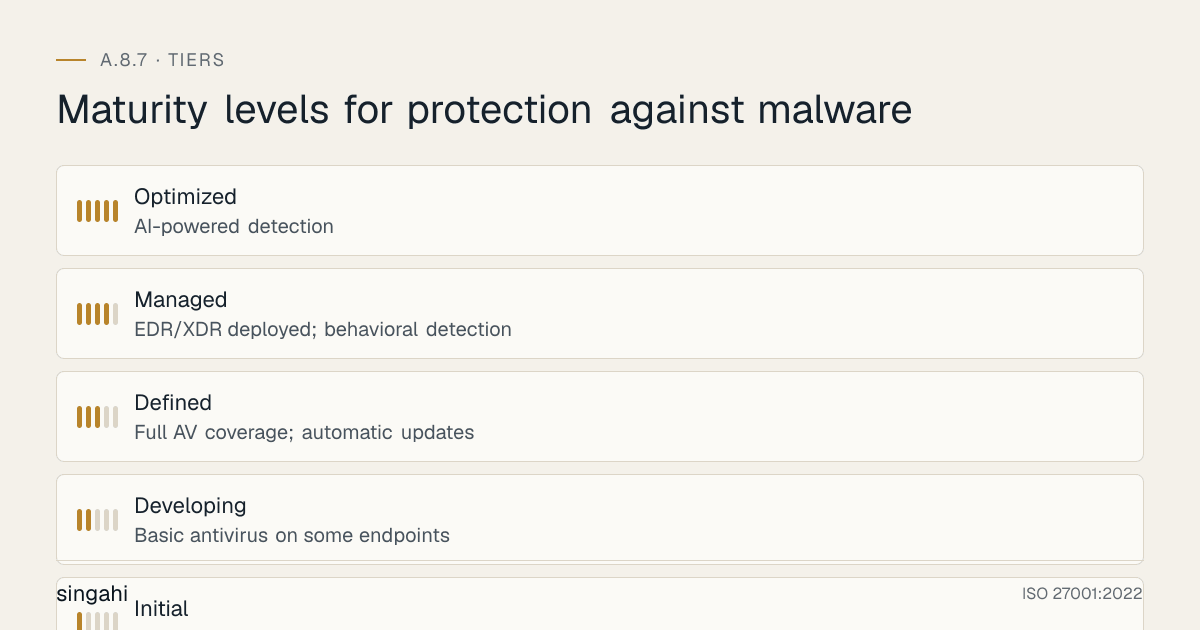
Maturity Model for A.8.7
| Level | Name | Characteristics | Evidence |
|---|---|---|---|
| 1 | Initial | No anti-malware or outdated free AV; no email security; no user training; no incident response; reactive to infections | No policy; no coverage; outdated signatures; no training; incidents unmanaged |
| 2 | Developing | Basic antivirus on some endpoints; occasional updates; basic email filtering; informal user guidance; ad-hoc incident response | Partial AV coverage; manual updates; basic spam filter; no EDR; no formal training |
| 3 | Defined | Full AV coverage; automatic updates; email gateway; web filtering; scheduled training; documented IR plan; removable media controls | Policy; full AV; email/web security; quarterly training; documented IR; media scanning; no EDR |
| 4 | Managed | EDR/XDR deployed; behavioral detection; threat hunting; automated response; phishing simulations; immutable backups; quarterly IR drills; metrics-driven | EDR; threat hunting; SOAR; automated response; simulations; immutable backups; quarterly drills; KPIs |
| 5 | Optimized | AI-powered detection; predictive threat intelligence; self-healing endpoints; zero-touch response; continuous purple teaming; automated threat intel sharing; fully integrated XDR | AI detection; predictive analytics; autonomous response; integrated XDR; automated threat intel; purple team automation; zero successful incidents |
Continuous Improvement Activities
Monthly:
- Anti-malware coverage and currency review
- Malware detection and incident analysis
- Signature update status verification
- Phishing simulation results analysis
- User-reported suspicious email analysis
- EDR alert review and tuning
Quarterly:
- Anti-malware policy review
- Threat landscape update and defense adjustment
- Phishing simulation exercise
- Malware incident response tabletop exercise
- Backup and recovery test (ransomware scenario)
- EDR/AV effectiveness review and tuning
- Internal audit of anti-malware controls
- User training refresh
Annually:
- Full anti-malware policy review
- Complete malware risk assessment
- Technology evaluation (new EDR, new threat intel, new detection methods)
- Benchmark against industry best practices
- External audit preparation
- Maturity assessment against target level
- Cyber insurance review and renewal
- Vendor security assessment (anti-malware vendor)
Trigger-Based:
- After any malware incident (especially ransomware)
- Upon new threat intelligence (new malware family, new IoCs)
- Upon new regulatory requirement
- After significant audit findings
- Upon new technology or vendor capability
- After industry peer incident ("could this happen to us?")
FAQ
Q1: Is traditional antivirus still necessary, or is EDR enough? A: Traditional antivirus (signature-based) is still a useful baseline, but it is not sufficient on its own. EDR provides behavioral detection, machine learning, threat hunting, and response capabilities that AV lacks. Best practice: Use both. Use AV for known malware and baseline protection. Use EDR for advanced threats, zero-day malware, and incident response. Many modern EDR platforms include AV functionality (e.g., Microsoft Defender for Endpoint, CrowdStrike Falcon). If budget is limited, prioritize EDR over standalone AV.
Q2: How often should anti-malware signatures be updated? A: At minimum, daily. Modern threats require more frequent updates. Best practice: Configure automatic updates every 1–4 hours. Use real-time cloud lookups for instant threat intelligence. Ensure that "out-of-date" definitions are flagged as a compliance issue. Some organizations update every 15 minutes for critical systems. The faster the update cycle, the better the protection against emerging threats.
Q3: What is the difference between EDR and XDR? A: EDR (Endpoint Detection and Response) focuses on endpoints only. It detects and responds to threats on desktops, laptops, and servers. XDR (Extended Detection and Response) extends detection across multiple security layers: endpoints, network, email, cloud, identity. XDR correlates data from these sources to detect complex, multi-stage attacks. EDR is essential for all organizations. XDR is valuable for larger organizations with mature security programs. Start with EDR; add XDR when you have the resources and need for cross-correlation.
Q4: How do we protect against fileless malware? A: Fileless malware operates in memory without writing files to disk, evading signature-based detection. Protection: (1) EDR with memory scanning and behavioral detection, (2) PowerShell constraints and logging (PowerShell is a common fileless vector), (3) Application control (allowlisting) to block unauthorized scripts, (4) WMI and registry monitoring for persistence mechanisms, (5) Network monitoring for C2 communication, (6) Threat hunting for anomalous memory activity. Fileless malware requires behavioral and memory-based detection, not just file scanning.
Q5: Should we pay the ransom if hit by ransomware? A: Generally, no. Paying the ransom does not guarantee decryption, does not prevent data publication, funds criminal activity, and may violate laws (OFAC sanctions, anti-money laundering). Alternatives: (1) Restore from immutable backups, (2) Use free decryption tools if available (NoMoreRansom.org), (3) Engage law enforcement and incident response firms, (4) Rebuild systems from scratch. Only consider paying as an absolute last resort after legal consultation, and never without involving law enforcement. The best ransomware defense is preparation (backups, IR plan, EDR) so that paying is unnecessary.
Q6: How do we handle malware on Linux systems? A: Linux malware is growing (cryptominers, ransomware, rootkits). Protection: (1) Deploy Linux-compatible EDR (CrowdStrike, SentinelOne, Microsoft Defender for Endpoint), (2) Use application control (SELinux, AppArmor) to restrict executable permissions, (3) Monitor for unauthorized cron jobs and systemd services (common persistence mechanisms), (4) Monitor network connections for C2 communication, (5) Use file integrity monitoring (FIM) for critical system files, (6) Keep Linux kernels and packages updated, (7) Use container scanning for Linux container images. Do not assume Linux is immune to malware.
Q7: What is the most common audit finding for A.8.7? A: The most common findings are: (1) Anti-malware not on all endpoints (especially Linux, macOS, and non-Windows servers), (2) Outdated signatures (>24 hours old), (3) No EDR or behavioral detection, (4) No email security gateway, (5) No web filtering, (6) No removable media controls, (7) No user training, (8) No malware-specific incident response plan, (9) No ransomware preparedness (no immutable backups, no application control). Auditors will check coverage, currency, detection capabilities, and incident response readiness.
Q8: How do we balance security with user productivity (anti-malware performance impact)? A: Modern EDR solutions are designed to have minimal performance impact. Strategies: (1) Use lightweight agents for high-performance servers, (2) Schedule full scans during maintenance windows, (3) Exclude database files, log files, and temp directories from real-time scanning, (4) Use cloud-based scanning to reduce local resource usage, (5) Optimize scan settings for business-critical systems, (6) Choose EDR solutions with proven low system impact, (7) Monitor system performance after deployment and tune accordingly. The performance impact of modern EDR is typically <5% CPU. The security benefit far outweighs the minimal performance cost.
Q9: How do we protect against supply chain malware (e.g., SolarWinds, Kaseya)? A: Supply chain malware is delivered through trusted software vendors. Protection: (1) Vendor security assessment before procurement, (2) Software integrity verification (code signing, hash verification) before installation, (3) Network segmentation for vendor management systems, (4) Monitor vendor software for anomalous behavior (EDR, network monitoring), (5) Least privilege for vendor software accounts, (6) Regular vendor security reviews, (7) Threat intelligence on vendor compromises, (8) Have a response plan for vendor security incidents. Supply chain attacks are difficult to prevent but detectable with good monitoring and segmentation.
Q10: What is the cost of implementing A.8.7 for a growing company? A: For a mid-sized company, the main costs are EDR, email and web filtering, immutable or offline backups, and training. Many are bundled in plans you may already have (for example Microsoft 365 E5 includes Defender for Endpoint and Defender for Office 365). The cost is usually small compared with a ransomware incident.
Q11: How do we handle malware in cloud-native environments (containers, serverless)? A: Cloud-native malware protection requires specialized approaches: (1) Scan container images for malware before deployment (Snyk, Aqua, Twistlock), (2) Use runtime protection for containers (Falco, Aqua, Sysdig), (3) Monitor serverless functions for anomalous behavior, (4) Use cloud-native EDR (Microsoft Defender for Cloud, CrowdStrike Falcon for cloud), (5) Implement container network segmentation, (6) Monitor cloud API calls for unauthorized access, (7) Use infrastructure-as-code security scanning. Cloud-native malware is a growing threat, cryptominers in containers, malicious serverless functions, and compromised cloud credentials are common.
Q12: What is the role of threat intelligence in malware protection? A: Threat intelligence provides context about current malware threats, IoCs, and attacker tactics. It enhances malware protection by: (1) Feeding IoCs into EDR/SIEM for detection, (2) Informing email/web filtering rules, (3) Guiding threat hunting activities, (4) Providing early warning of new malware families, (5) Supporting incident response with attribution and context, (6) Informing security awareness training content. Threat intelligence transforms reactive anti-malware into proactive defense. Sources: commercial feeds (Recorded Future, Mandiant), government feeds (CERT-In, NCIIPC), open-source feeds (MISP, AlienVault OTX), and industry sharing (ISACs).
Q13: How do we handle malware on air-gapped or isolated systems? A: Air-gapped systems cannot receive online updates but still need protection: (1) Install anti-malware with local signatures and manual update procedures, (2) Update signatures via approved removable media that is scanned before use, (3) Implement strict removable media controls (no personal media, only approved media), (4) Use application control (allowlisting) to block unauthorized executables, (5) Monitor system behavior for anomalies, (6) Implement physical security controls (A.7) to prevent unauthorized access, (7) Use deception technology (honeypots) to detect intrusion attempts. Air-gapped systems are protected by isolation, but they are not immune, Stuxnet proved that. Physical security and media controls are critical.
Q14: What is the difference between blacklisting and allowlisting (application control)? A: Blacklisting (default allow) blocks known bad applications and allows everything else. It is easier to implement but less secure (unknown malware is allowed). Allowlisting (default deny) allows only approved applications and blocks everything else. It is more secure but harder to implement (requires inventorying and approving all legitimate applications). For malware protection, allowlisting is far superior: it blocks ransomware, unknown malware, and unauthorized software by default. Blacklisting catches known malware but misses unknown variants. Best practice: Use allowlisting for critical systems (servers, finance, trading) and blacklisting for general user endpoints. Implement allowlisting gradually to avoid business disruption.
Q15: How do we measure the effectiveness of our malware protection program? A: Measure effectiveness through metrics: (1) Coverage (100% of endpoints/servers with anti-malware), (2) Currency (98%+ with up-to-date definitions), (3) Detection rate (malware detected before harm), (4) False positive rate (<1%), (5) Time to detect (MTTD), (6) Time to respond (MTTR), (7) Incident count (trending down), (8) User reporting rate (users actively reporting suspicious activity), (9) Phishing simulation pass rate (≥80%), (10) Backup recovery success rate (100% for ransomware tests). Also conduct red team/purple team exercises to test detection and response. The ultimate measure is: "How many malware incidents caused business impact?" The target is zero.
References and Further Reading
Standards and Frameworks
- ISO/IEC 27001:2022, Information Security, Cybersecurity and Privacy Protection, Information Security Management Systems, Requirements
- ISO/IEC 27002:2022, Information Security, Cybersecurity and Privacy Protection, Information Security Controls
- NIST SP 800-53 Rev 5, Security and Privacy Controls for Information Systems and Organizations
- NIST SP 800-83, Guide to Malware Incident Prevention and Handling
- PCI DSS v4.0.1, Payment Card Industry Data Security Standard
- CIS Controls v8, CIS Controls Version 8
- COBIT 2019, Control Objectives for Information and Related Technologies
Indian Regulations
- RBI Cybersecurity Directions 2026
- SEBI Cybersecurity and Cyber Resilience Framework (CSCRF) for SEBI Regulated Entities, circular of 20 August 2024
- CERT-In Guidelines for Information Security Practices
- Information Technology Act, 2000 (as amended)
- Digital Personal Data Protection Act, 2023 (India)
Books and Publications
- ISO 27001/27002: A Pocket Guide by Alan Calder
- The Art of Deception by Kevin Mitnick (social engineering and malware delivery)
- Malware Analyst's Cookbook by Michael Ligh, Steven Adair, Blake Hartstein, and Matthew Richard
- Practical Malware Analysis by Michael Sikorski and Andrew Honig
- NIST 800-83: Guide to Malware Incident Prevention and Handling (NIST)
Threat Intelligence Resources
- CERT-In: https://www.cert-in.org.in
- NCIIPC: https://www.nciipc.gov.in
- MISP (Malware Information Sharing Platform): https://www.misp-project.org
- NoMoreRansom: https://www.nomoreransom.org
- VirusTotal: https://www.virustotal.com
- ID Ransomware: https://id-ransomware.malwarehunterteam.com