
On this page
- Quick Reference (60 Seconds)
- What the Control Asks For
- Why Capacity management Matters
- Scope and Applicability
- Key Definitions and Terminology
- Relationship to Other Controls
- Implementation Roadmap (Week-by-Week)
- Detailed Implementation Guidance
- Tools, Technologies, and Solutions
- Policy and Procedure Templates
- Risk Assessment and Treatment
- Audit and Compliance Checklist
- Metrics and KPIs
- Common Pitfalls and How to Avoid Them
- Illustrative Scenarios
- Multi-Framework Mapping
- Regulatory and Industry Context
- Roles and Responsibilities (RACI)
- Documentation and Evidence Requirements
- Continuous Improvement
- FAQ
- References and Further Reading
Quick Reference (60 Seconds)
Figure · At a glance
A.8.6 at a glance
- Control ID
- A.8.6
- Control Name
- Capacity management
- ISO 27002:2022 Section
- 8.6
- Primary Purpose
- Ensure the capacity of information
- Key Activities
- Monitor capacity, plan for growth
- Typical Owners
- IT Operations Manager
| Aspect | Summary |
|---|---|
| Control ID | A.8.6 |
| Control Name | Capacity management |
| ISO 27002:2022 Section | 8.6 |
| Primary Purpose | Ensure the capacity of information processing facilities, people, offices and other facilities meets current and expected needs |
| Key Activities | Monitor capacity, plan for growth, manage resource allocation, set thresholds, test scalability, document capacity requirements |
| Typical Owners | IT Operations Manager, Infrastructure Manager, Cloud Architect, Database Administrator |
| Implementation Effort | Medium (4–8 weeks) |
| Main cost drivers | Monitoring and load-testing tools (open-source options exist), extra infrastructure or cloud spend, and people: on-call cover and avoiding key-person dependency |
| ISO 27002 attributes | Control type: Preventive, Detective · Properties: Integrity, Availability · Concepts: Identify, Protect, Detect · Capabilities: Continuity · Domains: Governance and ecosystem, Protection |
Bottom Line: Capacity management ensures your systems have enough resources to handle current and future demand. Without it, systems slow down, crash, or become unavailable, leading to business disruption, lost revenue, and damaged reputation. It's about having enough capacity, not too much, and planning for growth.
What the Control Asks For
In short:
ISO 27001:2022 Annex A 8.6 asks organizations to monitor and adjust the use of resources to meet current and expected capacity needs.
Do you need this control?
A.8.6 is not mandatory in itself: under clause 6.1.3 you include it if your risk assessment calls for it, and record the decision in your Statement of Applicability. Include it if running out of capacity (compute, storage, network, people) could affect availability or security. Cloud autoscaling changes how you do it, not whether you need it.
What ISO 27002:2022 Adds
27002 8.6 (paraphrased) covers the capacity of information processing facilities, human resources, offices and other facilities, not only IT. It suggests:
- identifying capacity requirements by the business criticality of systems and processes
- tuning and monitoring systems to keep them available and efficient
- stress-testing systems and services to confirm they can meet peak demand
- detective controls that flag problems in time
- projecting future needs from new business and system requirements and from trends
- paying attention to resources with long procurement lead times or high cost
- managers using capacity information to avoid resource limits and dependency on key personnel
To increase capacity: (a) hire people, (b) obtain new facilities or space, (c) acquire more powerful processing, memory and storage, (d) use cloud elasticity and scalability.
To reduce demand: (a) delete obsolete data, (b) dispose of hard-copy records past retention, (c) decommission applications, systems, databases or environments, (d) optimise batch processes and schedules, (e) optimise code and queries, (f) restrict bandwidth for non-critical heavy services (for example video streaming).
Consider a documented capacity plan for mission-critical systems. ISO/IEC TS 23167 gives more on cloud elasticity.
Why Capacity management Matters
The Cost of Capacity Failures
Capacity failures are among the most visible and damaging IT incidents. When systems run out of capacity, they don't just slow down, they crash, corrupt data, and deny service to users. The financial and reputational impact can be severe.
Key Statistics
- Industry surveys of cloud spending (for example Flexera's annual State of the Cloud reports) consistently find that organisations believe a large share of their cloud spend is wasted, so over-provisioning is a cost risk as well as under-provisioning an availability risk
- Peak events drive failures: festival sales, month-end and tax deadlines, exam results and market volatility all create surges that systems must be tested for
- People are capacity too: a single administrator or on-call engineer is a single point of failure
How It Goes Wrong (hypothetical patterns)
- An e-commerce site crashed during Diwali sales due to inadequate server capacity; the company lost six hours of peak sales and 50,000 customers moved to competitors
- A bank's core banking system ran out of storage during month-end processing; all branch transactions were halted for 4 hours, affecting 2 million customers
- A SaaS company's database ran out of connection capacity; all 5,000 customers experienced simultaneous service disruption, leading to 15% churn in the next quarter
- A cloud migration was done without capacity planning; the new environment had 40% less capacity than required, causing performance degradation and a costly rollback
- A government portal for tax filing crashed on the deadline day due to unexpected traffic surge; the government had to extend deadlines and faced public criticism
Regulatory and Business Drivers
- SEBI has a specific capacity-planning framework for market infrastructure institutions (installed capacity planned as a multiple of projected peak load and reviewed regularly), and stock exchanges set capacity requirements for brokers' trading systems; SEBI CSCRF (2024) adds resilience expectations
- RBI (Cybersecurity Directions 2026, paras 64–65) expects regulated entities to plan capacity and performance for critical systems; NPCI sets uptime and success-rate expectations for UPI participants
- SOC 2 A1.1 asks service organisations to maintain, monitor and evaluate processing capacity
- Service Level Agreements (SLAs) with customers and partners specify availability requirements that depend on capacity management
- Business Continuity requires that critical systems have adequate capacity to maintain operations during disruptions
- Cost Optimization requires balancing capacity needs with cost, over-provisioning wastes budget, under-provisioning risks availability
Scope and Applicability
What Is Covered
- All information processing facilities (servers, virtual machines, containers, cloud instances)
- All storage systems (SAN, NAS, object storage, cloud storage, databases)
- All network capacity (bandwidth, throughput, latency, connections)
- All memory and compute resources (CPU, RAM, GPU)
- All database capacity (connections, storage, IOPS, throughput)
- All application capacity (concurrent users, transactions per second, API rate limits)
- All cloud resources (compute, storage, network, database, serverless)
- All backup and recovery capacity (storage for backups, network for replication)
- All infrastructure supporting critical business processes
- People: on-call cover, key-person dependency and skills for critical systems (27002 8.6)
- Offices and facilities: space and facilities needed for operations
What Is Not Covered
- Power and cooling capacity for equipment, covered with utilities (A.7.11)
- Non-IT capacity (manufacturing equipment, vehicles), outside ISMS scope
Applicability by Organization Type
| Organization Type | Applicability | Key Capacity Concerns |
|---|---|---|
| IT/Software Services | High | Cloud costs, customer SLAs, scalability, auto-scaling, resource optimization |
| BFSI | Critical | Core banking capacity, trading system throughput, ATM network, UPI transaction volumes |
| Healthcare | High | EMR system capacity, medical imaging storage, patient portal traffic, telemedicine |
| Manufacturing | Medium | SCADA/ICS capacity, ERP system capacity, IoT data ingestion, real-time analytics |
| Government/Defense | High | Citizen portal capacity, tax filing systems, exam systems, record management |
| Education | Medium | LMS capacity, exam platforms, student portals, video streaming for online classes |
| SaaS/Cloud | Critical | Multi-tenant isolation, customer scaling, auto-scaling, cost optimization, API throttling |
| Retail/E-commerce | Critical | Website capacity, payment processing, inventory systems, seasonal surge handling |
Key Definitions and Terminology
| Term | Definition |
|---|---|
| Capacity | The maximum amount of work or load that a system, resource, or facility can handle in a given period |
| Capacity Management | The process of ensuring that IT resources have adequate capacity to meet current and future business requirements in a efficient manner |
| Capacity Planning | The process of estimating future capacity needs based on demand forecasts, growth projections, and business plans |
| Use | The percentage of available capacity that is currently being used |
| Threshold | A predefined level of use that triggers a warning or action when exceeded |
| Baseline | The normal or expected level of use under typical operating conditions |
| Peak Load | The maximum level of demand that occurs during a specific period (e.g., Diwali sales, tax filing deadline) |
| Headroom | The amount of spare capacity available above current use to handle unexpected demand |
| Scalability | The ability of a system to handle increased load by adding resources (scale up/scale out) |
| Auto-scaling | The automatic adjustment of resources based on demand (typically in cloud environments) |
| Right-sizing | The process of matching resource allocation to actual demand to optimize cost and performance |
| Over-provisioning | Allocating more resources than needed, leading to wasted capacity and higher costs |
| Under-provisioning | Allocating fewer resources than needed, leading to performance degradation and service disruption |
| Resource Exhaustion | A state where a system runs out of a critical resource (CPU, memory, disk, connections) and cannot function |
| Load Balancing | The distribution of workload across multiple resources to optimize use and prevent overload |
| Vertical Scaling (Scale Up) | Adding more power (CPU, RAM) to an existing resource |
| Horizontal Scaling (Scale Out) | Adding more resources (servers, instances) to distribute the load |
| Capacity Forecasting | Predicting future capacity needs using statistical models, trend analysis, and business projections |
| Service Level Objective (SLO) | A target for service performance or availability (e.g., 99.9% uptime) |
| Service Level Agreement (SLA) | A formal contract defining service levels between provider and customer |
| Mean Time Between Failures (MTBF) | The average time between system failures, used for capacity and reliability planning |
| Mean Time To Repair (MTTR) | The average time to recover from a failure, used for capacity planning of redundant systems |
Relationship to Other Controls
| Control | Relationship |
|---|---|
| A.5.30 ICT readiness for business continuity | Capacity during disruption and recovery |
| A.5.37 Documented operating procedures | Capacity monitoring and response procedures |
| A.6.1 / A.6.2 Screening; terms of employment | People capacity and key-person cover |
| A.7.11 Supporting utilities | Power and cooling capacity |
| A.8.10 Information deletion | Deleting obsolete data reduces demand |
| A.8.13 / A.8.14 Backup; redundancy | Backup storage and failover capacity |
| A.8.15 / A.8.16 Logging; monitoring | Log storage capacity; capacity alerts |
| A.8.31 Separation of environments | Decommissioning unused environments reduces demand |
Implementation Roadmap (Week-by-Week)
Week 1: Capacity Inventory and Baseline Establishment
- Inventory all information processing facilities (servers, VMs, cloud instances, containers)
- Inventory all storage systems (SAN, NAS, object storage, cloud storage, databases)
- Inventory all network infrastructure (bandwidth, throughput, connections)
- Establish baseline use for all resources (CPU, memory, disk, network, database connections)
- Identify peak load periods and patterns (daily, weekly, monthly, seasonal)
- Identify critical systems and their availability requirements
- Document current capacity and use baseline
Week 2: Capacity Planning Framework Development
- Define capacity management policy and objectives
- Define capacity planning methodology (trend-based, forecast-based, model-based)
- Define use thresholds (warning, critical, action)
- Define headroom requirements (e.g., 20% spare capacity for critical systems)
- Define capacity review and planning cycle (monthly, quarterly, annual)
- Define roles and responsibilities for capacity management
- Establish capacity planning templates and documentation standards
Week 3: Monitoring and Threshold Implementation
- Deploy capacity monitoring tools (monitoring, APM, cloud-native tools)
- Configure monitoring dashboards for all critical resources
- Set warning thresholds (e.g., 70% CPU, 80% memory, 85% disk)
- Set critical thresholds (e.g., 85% CPU, 90% memory, 95% disk)
- Configure alerting for threshold breaches (email, SMS, ticketing)
- Implement capacity monitoring for cloud resources (AWS CloudWatch, Azure Monitor, GCP Monitoring)
- Configure database capacity monitoring (connections, storage, IOPS, slow queries)
Week 4: Capacity Planning and Forecasting
- Analyze historical use trends (3–12 months of data)
- Identify growth patterns and seasonality
- Forecast capacity needs for the next 12–24 months
- Document capacity requirements for new projects and initiatives
- Plan for peak load scenarios (e.g., Diwali, tax season, year-end, product launches)
- Identify bottlenecks and constraints in current capacity
- Develop capacity improvement plan with timeline and budget
Week 5: Scalability and Auto-scaling Implementation
- Implement auto-scaling for cloud resources (if applicable)
- Configure load balancers for horizontal scaling
- Test scalability of critical applications under load
- Implement database scaling (read replicas, sharding, partitioning)
- Configure caching layers to reduce backend capacity demand
- Implement CDN for static content to reduce server load
- Test failover and redundancy capacity during maintenance
Week 6: Optimization and Right-sizing
- Analyze over-provisioned resources and right-size them
- Implement resource tagging for cost allocation and capacity tracking
- Identify and terminate unused or idle resources (zombie instances, unattached storage)
- Implement storage tiering (hot, warm, cold) to optimize cost and capacity
- Implement data compression and deduplication where applicable
- Optimize database capacity (indexing, archiving, purging)
- Implement resource scheduling (start/stop non-production environments outside business hours)
Week 7: Documentation, Reporting, and Communication
- Document capacity baseline, thresholds, and targets
- Create capacity dashboard for stakeholders
- Establish monthly capacity report with trends, forecasts, and recommendations
- Communicate capacity status to IT leadership and business stakeholders
- Document capacity escalation procedures for threshold breaches
- Create capacity plan for the next 12 months with budget requirements
- Prepare capacity documentation for audit
Week 8: Testing, Training, and Audit
- Conduct load testing to validate capacity planning assumptions
- Test alerting and escalation procedures for threshold breaches
- Test auto-scaling behavior under simulated load
- Test failover capacity during maintenance windows
- Train IT operations staff on capacity monitoring and management
- Conduct internal audit of capacity management implementation
- Prepare for external audit
- Plan for continuous improvement
Detailed Implementation Guidance
Capacity Planning Methodology
Trend-Based Planning:
- Analyze historical use data (3–12 months)
- Identify trends (linear growth, seasonal patterns, step changes)
- Extrapolate trends to forecast future needs
- Simple and effective for stable environments
- Formula: Future Capacity = Current Capacity × (1 + Growth Rate)^Time Period
Forecast-Based Planning:
- Incorporate business plans, marketing campaigns, product launches
- Adjust for known events (e.g., Diwali sales, tax season, new client onboarding)
- More accurate for dynamic environments
- Requires business input and cross-functional collaboration
Model-Based Planning:
- Use queuing theory, simulation, or modeling tools to predict capacity needs
- Accounts for complex interactions between systems
- Useful for complex, interconnected environments
- Requires specialized tools and expertise
Hybrid Approach (Recommended):
- Use trend-based for baseline forecasting
- Use forecast-based for known business events
- Use model-based for complex, high-risk systems
- Combine methods for complete capacity planning
Capacity Thresholds and Headroom
Recommended Thresholds:
| Resource Type | Warning Threshold | Critical Threshold | Action Threshold | Headroom Target |
|---|---|---|---|---|
| CPU Use | 70% | 85% | 90% | 15–20% |
| Memory Use | 75% | 85% | 90% | 15–20% |
| Disk Use | 80% | 90% | 95% | 10–15% |
| Network Bandwidth | 70% | 80% | 90% | 20–30% |
| Database Connections | 70% | 80% | 90% | 20–30% |
| Database Storage | 75% | 85% | 95% | 15–20% |
| Cloud Compute (CPU) | 70% | 80% | 90% | 20–30% |
| API Rate Limit | 70% | 80% | 90% | 20–30% |
| Concurrent Users | 75% | 85% | 90% | 10–15% |
| Backup Storage | 80% | 90% | 95% | 10–15% |
Headroom Considerations:
- Critical systems: 20–30% headroom to handle unexpected spikes and failover
- Standard systems: 15–20% headroom for normal growth and variability
- Non-critical systems: 10–15% headroom; can tolerate occasional degradation
- Peak season systems: 30–50% headroom during peak periods (e.g., e-commerce during Diwali)
- Failover systems: 50–100% headroom to handle full production load during failover
Cloud Capacity Management
Cloud-Specific Capacity Considerations:
| Cloud Resource | Capacity Metric | Management Approach | Tooling |
|---|---|---|---|
| EC2/VM Instances | CPU, memory, disk | Auto-scaling groups, right-sizing, reserved instances | AWS CloudWatch, Azure Monitor, GCP Monitoring |
| Containers (K8s) | CPU, memory, pods | HPA, VPA, cluster autoscaling, resource limits | Kubernetes Metrics Server, Prometheus, Datadog |
| Storage (EBS/Azure Disk) | IOPS, throughput, size | Volume type selection, scaling, storage tiering | CloudWatch, Azure Monitor, Cloudability |
| Object Storage (S3/Blob) | Storage size, request rate | Lifecycle policies, tiering, compression | S3 Analytics, Azure Storage Metrics |
| Database (RDS/Azure SQL) | CPU, memory, connections, IOPS | Read replicas, scaling, connection pooling | RDS Performance Insights, Azure SQL Analytics |
| Serverless (Lambda/Functions) | Memory, timeout, concurrency | Concurrency limits, provisioned concurrency, optimization | CloudWatch, Azure Monitor, Thundra |
| Load Balancer | Request count, latency, target capacity | Target group scaling, health checks, distribution | CloudWatch, Azure Monitor, NGINX Plus |
| CDN | Cache hit ratio, bandwidth, origin load | Cache optimization, edge locations, TTL tuning | CloudFront Analytics, Azure CDN Metrics |
| Network (VPC/Peering) | Bandwidth, throughput, NAT gateway | Traffic analysis, VPC sizing, peering optimization | VPC Flow Logs, Azure Network Watcher |
Cloud Cost Optimization Through Capacity Management:
- Use reserved instances or savings plans for predictable workloads (30–60% savings)
- Use spot instances for non-critical, interruptible workloads (60–90% savings)
- Implement auto-scaling to avoid over-provisioning during low demand
- Right-size instances based on actual use (not just "safe" sizing)
- Use storage tiering (S3 Glacier, Azure Cool Blob) for infrequently accessed data
- Implement resource scheduling (start/stop dev/test environments outside hours)
- Use serverless for variable workloads to pay only for actual usage
- Monitor and eliminate unused resources (unattached volumes, idle instances, abandoned snapshots)
- Implement resource tagging for cost allocation and accountability
Database Capacity Management
Database Capacity Dimensions:
| Dimension | Metric | Management Strategy |
|---|---|---|
| Storage | Database size, data file growth, log file growth | Archiving, partitioning, compression, index optimization, data retention policies |
| IOPS | Read/write operations per second | Storage tier selection, caching, query optimization, index tuning, read replicas |
| Connections | Active connections, connection pool use | Connection pooling, connection limits, query timeout, read replicas, queue management |
| Throughput | Queries per second, transactions per second | Query optimization, indexing, partitioning, sharding, read replicas, caching |
| Memory | Buffer cache use, query cache, sort area | Memory allocation, query optimization, cache tuning, temp table management |
| CPU | CPU use per query, parallel execution | Query optimization, indexing, partitioning, hardware scaling, query parallelism |
| Lock/Contention | Lock waits, deadlock frequency, blocking queries | Query optimization, indexing, transaction design, isolation level tuning, deadlock detection |
| Temp Space | Temporary tablespace usage, sort space | Query optimization, temp space allocation, large query management |
| Backup/Recovery | Backup window, backup size, recovery time | Incremental backups, compression, backup storage management, test recovery |
| Replication Lag | Replication delay, sync status | Replication monitoring, bandwidth, parallel replication, conflict resolution |
Database Capacity Planning:
- Monitor database growth rate (GB per month, rows per month)
- Forecast storage needs based on growth rate and retention policies
- Plan for index growth and maintenance space
- Account for log file growth (transaction logs, binary logs, redo logs)
- Plan for backup storage (full + incremental + archive)
- Test database performance under projected load before production deployment
- Plan for database scaling (vertical, horizontal, sharding, read replicas)
Application Capacity Management
Application Capacity Metrics:
| Metric | Description | Threshold | Measurement |
|---|---|---|---|
| Concurrent Users | Number of users simultaneously using the application | Warning: 80% of max; Critical: 90% of max | Application monitoring, session management |
| Transactions per Second (TPS) | Rate of business transactions processed | Warning: 80% of target; Critical: 90% of target | APM, application logs, transaction monitoring |
| API Requests per Second | Rate of API calls received | Warning: 80% of limit; Critical: 90% of limit | API gateway metrics, load balancer metrics |
| Response Time | Time to process and respond to a request | Warning: 2x baseline; Critical: 3x baseline | APM, synthetic monitoring, RUM |
| Error Rate | Percentage of requests resulting in errors | Warning: 1%; Critical: 5% | Application logs, APM, error tracking |
| Queue Depth | Number of requests waiting to be processed | Warning: 100; Critical: 500 | Queue monitoring, application metrics |
| Session Count | Number of active user sessions | Warning: 80% of max; Critical: 90% of max | Session management, application monitoring |
| Memory per Session | Memory consumed per user session | Warning: 1.5x baseline; Critical: 2x baseline | APM, memory profiling |
| Database Queries per Request | Number of DB queries per application request | Warning: 10; Critical: 20 | APM, database monitoring, query logging |
| External API Calls | Number of calls to third-party APIs per request | Warning: 5; Critical: 10 | APM, integration monitoring |
Application Capacity Planning:
- Profile application performance under load (load testing, stress testing)
- Identify bottlenecks (database queries, external APIs, memory leaks, CPU-intensive operations)
- Optimize bottlenecks before scaling (caching, query optimization, code optimization, CDN)
- Plan for user growth based on business projections (marketing, sales, expansion)
- Plan for seasonal spikes (Diwali, tax season, year-end, back-to-school)
- Test application behavior at 2x, 3x, and 5x expected peak load
- Plan for graceful degradation under extreme load (throttling, priority queues, feature degradation)
Network Capacity Management
Network Capacity Dimensions:
| Dimension | Metric | Management Strategy |
|---|---|---|
| Bandwidth | Mbps/Gbps throughput | Capacity planning, link upgrades, traffic shaping, QoS, compression |
| Latency | Round-trip time (RTT) | Network optimization, CDN, edge computing, protocol tuning, route optimization |
| Packet Loss | Percentage of packets lost | Network monitoring, link quality, redundancy, congestion management |
| Jitter | Variation in latency | QoS, traffic prioritization, dedicated links, SD-WAN |
| Connection Count | Active connections per device | Connection limits, connection pooling, NAT sizing, firewall capacity |
| VPN/Remote Access | Concurrent VPN sessions, bandwidth per session | VPN gateway sizing, split tunneling, bandwidth allocation, MFA |
| Internet Gateway | Total internet bandwidth, use | ISP capacity, redundant links, CDN, DDoS protection, traffic analysis |
| Inter-Site Links | WAN bandwidth between sites | SD-WAN, MPLS, bandwidth optimization, compression, deduplication |
| Wi-Fi | Access point capacity, channel use, client count | AP density, channel planning, bandwidth allocation, client limits |
| Network Device CPU/Memory | Router, switch, firewall use | Device sizing, traffic analysis, rule optimization, firmware updates |
Network Capacity Planning:
- Baseline current network use (peak and average)
- Identify bandwidth-intensive applications and users
- Plan for growth in remote work (VPN, video conferencing, cloud access)
- Plan for cloud migration (increased internet bandwidth, reduced internal traffic)
- Plan for new applications (bandwidth requirements, latency sensitivity)
- Implement QoS to prioritize critical traffic (VoIP, video, real-time systems)
- Design redundant links for critical paths (diverse paths, automatic failover)
- Monitor for bandwidth abuse and unauthorized high-bandwidth usage
- Plan for DDoS protection capacity (on-premise and cloud-based scrubbing)
Tools, Technologies, and Solutions
Infrastructure Monitoring and APM
| Tool | Type | Key Features | Pricing model |
|---|---|---|---|
| Datadog | Cloud-native monitoring | Infrastructure, APM, logs, capacity planning, forecasting | Commercial, per host |
| New Relic | Full-stack observability | APM, infrastructure, logs, capacity analytics, AI-powered | Commercial, per host |
| Dynatrace | AI-powered observability | Automatic discovery, capacity planning, root cause analysis, Davis AI | Commercial, per host |
| AppDynamics | Enterprise APM | Application performance, business insights, capacity management | Commercial, per host |
| SolarWinds | Infrastructure monitoring | Server, network, storage, virtualization monitoring, capacity planning | Commercial, per host |
| ManageEngine OpManager | Growing-company monitoring | Network, server, storage, capacity planning, affordable | Commercial, per host |
| Nagios | Open-source | Infrastructure monitoring, alerting, community plugins | Free (self-hosted) |
| Zabbix | Open-source | Enterprise monitoring, capacity planning, trending, forecasting | Free (self-hosted) |
| Prometheus + Grafana | Open-source | Metrics collection, visualization, capacity dashboards, trending | Free (self-hosted) |
Cloud Native Monitoring
| Tool | Cloud | Key Features | Pricing model |
|---|---|---|---|
| AWS CloudWatch | AWS | Metrics, logs, alarms, dashboards, auto-scaling, capacity insights | Commercial, per resource |
| Azure Monitor | Azure | Metrics, logs, alerts, Application Insights, capacity analytics | Commercial, per resource |
| Google Cloud Monitoring | GCP | Metrics, logs, alerts, dashboards, capacity planning | Commercial, per resource |
| AWS Cost Explorer + Trusted Advisor | AWS | Cost analysis, right-sizing recommendations, unused resource detection | Included with AWS |
| Azure Advisor | Azure | Cost optimization, right-sizing, performance recommendations | Included with Azure |
| GCP Recommender | GCP | Right-sizing, idle resource detection, cost optimization | Included with GCP |
| CloudHealth (VMware) | Multi-cloud | Cost optimization, governance, capacity planning, reporting | Commercial, per resource |
| Flexera (RightScale) | Multi-cloud | Cloud cost management, optimization, capacity planning | Commercial, per resource |
Database Capacity Management
| Tool | Database | Key Features | Pricing model |
|---|---|---|---|
| Oracle Enterprise Manager | Oracle | Performance, capacity, storage, tuning, automation | Commercial, per database |
| SQL Server Management Studio + DMVs | SQL Server | Built-in capacity monitoring, query performance, index analysis | Free (included) |
| MySQL Enterprise Monitor | MySQL | Performance, capacity, query analysis, replication monitoring | Commercial, per database |
| PostgreSQL pg_stat_statements + pgAdmin | PostgreSQL | Query statistics, capacity monitoring, index analysis | Free (open-source) |
| MongoDB Ops Manager | MongoDB | Performance, capacity, automation, backup, scaling | Commercial, per database |
| AWS RDS Performance Insights | AWS RDS | Database load, query analysis, capacity planning | Commercial, per database |
| Azure SQL Analytics | Azure SQL | Performance, capacity, query tuning, intelligent insights | Commercial, per database |
| SolarWinds DPA | Multi-database | Database performance analyzer, capacity planning, query tuning | Commercial, per database |
| Toad for Oracle/SQL Server | Oracle, SQL Server | Database management, capacity, performance, tuning | Commercial, per user |
Load Testing and Capacity Validation
| Tool | Type | Key Features | Pricing model |
|---|---|---|---|
| JMeter | Open-source | Protocol-based load testing, extensible, widely used | Free (open-source) |
| Gatling | Open-source | High-performance load testing, code-based scenarios, real-time reports | Free (open-source) |
| K6 | Open-source | Developer-friendly, code-based, cloud execution, Grafana integration | Free or Commercial, per test |
| Loader.io | Cloud-based | Simple load testing, cloud execution, quick setup | Free or Commercial, per test |
| BlazeMeter | Enterprise | JMeter in cloud, CI/CD integration, distributed testing, reporting | Commercial, per test |
| NeoLoad | Enterprise | Performance testing, capacity validation, CI/CD integration, analytics | Commercial, per test |
| LoadRunner | Enterprise | Complete load testing, protocol support, enterprise integration | Commercial, per test |
| Artillery | Open-source | Modern load testing, real-time metrics, cloud-native | Free (open-source) |
Policy and Procedure Templates
Capacity Management Policy Template
Template
Capacity Management Policy
1. Purpose
This policy establishes requirements for managing the capacity of information processing facilities to ensure they meet business requirements, maintain availability, and optimize cost.
2. Scope
This policy applies to all information processing facilities, including servers, storage, network, databases, cloud resources, and applications.
3. Capacity Management Principles
3.1 Proactive Planning
- Capacity shall be planned proactively based on business requirements, growth projections, and historical trends
- Capacity planning shall not be reactive to incidents or outages
3.2 Threshold-Based Management
- Capacity use thresholds shall be defined for all critical resources
- Alerts shall be triggered when thresholds are approached
- Actions shall be taken before capacity is exhausted
3.3 Cost Optimization
- Capacity shall be provisioned to meet requirements without excessive over-provisioning
- Resources shall be optimized and right-sized regularly
- Cloud resources shall be managed for cost efficiency
3.4 Business Alignment
- Capacity planning shall align with business plans, marketing campaigns, and product launches
- Business stakeholders shall be involved in capacity planning for their systems
4. Capacity Planning Requirements
4.1 Planning Cycle
- Short-term capacity planning: Monthly (next 3 months)
- Medium-term capacity planning: Quarterly (next 6–12 months)
- Long-term capacity planning: Annually (next 12–24 months)
4.2 Planning Inputs
- Historical use data (minimum 3 months)
- Business growth projections (new users, new clients, new products)
- Marketing and campaign plans (expected traffic spikes)
- Seasonal patterns (Diwali, tax season, year-end, back-to-school)
- New project requirements
- Technology changes (cloud migration, new applications, infrastructure upgrades)
4.3 Planning Outputs
- Capacity forecast report with resource requirements
- Budget estimate for capacity expansion or optimization
- Risk assessment for capacity shortfalls
- Implementation plan for capacity changes
- Capacity plan document approved by IT leadership
5. Capacity Monitoring Requirements
5.1 Monitoring Coverage
- All critical servers, virtual machines, and cloud instances
- All storage systems (SAN, NAS, cloud storage, databases)
- All network infrastructure (bandwidth, throughput, connections)
- All databases (connections, storage, IOPS, throughput)
- All critical applications (concurrent users, transactions, response time)
- All backup and recovery systems
5.2 Monitoring Thresholds
| Resource | Warning | Critical | Action |
|---|---|---|---|
| CPU | 70% | 85% | 90% |
| Memory | 75% | 85% | 90% |
| Disk | 80% | 90% | 95% |
| Network | 70% | 80% | 90% |
| DB Connections | 70% | 80% | 90% |
| DB Storage | 75% | 85% | 95% |
| Application Users | 75% | 85% | 90% |
5.3 Alerting and Escalation
- Warning alerts: Email to operations team, create ticket
- Critical alerts: Email + SMS to operations team and IT manager, create high-priority ticket
- Action alerts: Email + SMS + phone call to operations team, IT manager, and CISO, create emergency ticket
- Alerts must be acknowledged within 30 minutes during business hours, 1 hour outside business hours
6. Capacity Optimization Requirements
6.1 Right-Sizing
- Resources shall be reviewed quarterly for right-sizing opportunities
- Over-provisioned resources shall be downsized or terminated
- Under-provisioned resources shall be upsized or scaled
- Right-sizing changes must be tested before production implementation
6.2 Resource Cleanup
- Unused resources (idle instances, unattached storage, abandoned snapshots) shall be identified and removed monthly
- Non-production environments shall be scheduled to start/stop based on business hours
- Zombie resources shall be identified through automated tagging and monitoring
6.3 Cloud Cost Optimization
- Reserved instances or savings plans shall be used for predictable workloads
- Spot instances may be used for non-critical, interruptible workloads
- Storage tiering shall be implemented for infrequently accessed data
- Resource tagging shall be enforced for cost allocation and accountability
7. Scalability and Resilience
7.1 Auto-Scaling
- Cloud resources shall implement auto-scaling where applicable
- Auto-scaling policies shall be tested and validated
- Auto-scaling must not compromise security or availability
7.2 Load Balancing
- Critical applications shall use load balancing for horizontal scaling
- Load balancer capacity shall be monitored and planned
- Load balancer health checks shall be configured and tested
7.3 Failover Capacity
- Redundant systems must have adequate capacity to handle production load during failover
- Failover capacity shall be tested during maintenance windows and disaster recovery drills
- Failover capacity shall be planned for all critical systems
8. Documentation and Reporting
8.1 Capacity Baseline
- A capacity baseline shall be established for all critical resources
- Baseline shall be updated annually or after significant infrastructure changes
8.2 Capacity Reports
- Monthly capacity report: Current use, trends, anomalies, actions taken
- Quarterly capacity report: Forecast, budget requirements, recommendations, risk assessment
- Annual capacity report: Long-term forecast, strategic capacity plan, technology roadmap
8.3 Capacity Plan
- A formal capacity plan shall be maintained and updated quarterly
- Capacity plan shall be approved by IT leadership
- Capacity plan shall be available for audit and compliance review
9. Roles and Responsibilities
- IT Operations Manager: Overall capacity management, monitoring, alerting, incident response
- Infrastructure Manager: Server, storage, network capacity planning and optimization
- Cloud Architect: Cloud capacity management, auto-scaling, cost optimization
- Database Administrator: Database capacity planning, query optimization, storage management
- Application Manager: Application capacity requirements, user growth, performance monitoring
- IT Leadership: Capacity plan approval, budget allocation, strategic decisions
- Business Stakeholders: Capacity requirements, growth projections, peak load planning
- CISO: Security implications of capacity changes, audit compliance, risk assessment
10. Enforcement
- Failure to comply with capacity management requirements may result in service degradation, outages, or financial penalties
- Capacity-related incidents shall be investigated and remediated
- Capacity planning negligence shall be addressed through performance management
11. Review
This policy is reviewed annually or after any capacity-related incident.
Capacity Incident Response Procedure
Template
Capacity Incident Response Procedure
1. Purpose
This procedure defines the response to capacity-related incidents, including resource exhaustion, performance degradation, and capacity threshold breaches.
2. Incident Types
| Severity | Condition | Examples |
|---|---|---|
| Critical | System outage or severe degradation; business operations halted | Server disk full; database storage exhausted; memory leak causing crash; network saturation |
| High | Significant performance degradation; user experience severely impacted | CPU sustained >90%; database connections maxed; application response time >3x baseline |
| Medium | Noticeable performance degradation; user experience affected | CPU >80% for >30 min; disk >85%; memory >80%; network latency >2x baseline |
| Low | Approaching threshold; no immediate impact | CPU >70%; disk >80%; memory >75%; warning threshold breached |
3. Response Procedure
3.1 Detection
- Automated monitoring alerts trigger incident response
- User complaints or performance reports trigger manual investigation
- Capacity dashboard review identifies trends
3.2 Initial Response (0–15 minutes)
- Acknowledge alert and create incident ticket
- Assess scope and impact (which systems, how many users, what business processes)
- Classify severity (Critical, High, Medium, Low)
- Notify appropriate stakeholders based on severity
- Begin resource diagnostics (which resource is exhausted, root cause)
3.3 Containment (15–60 minutes)
- Critical: Implement emergency capacity expansion (add resources, restart services, clear caches, terminate non-critical processes)
- High: Initiate capacity scaling (auto-scaling, manual scaling, load balancing adjustment)
- Medium: Optimize resource usage (kill long-running queries, clear temp files, restart services)
- Low: Monitor and plan capacity adjustment for next maintenance window
- Document all actions taken
3.4 Resolution (1–4 hours)
- Restore service to normal capacity levels
- Verify system performance and user experience
- Implement permanent capacity fix (add resources, optimize, reconfigure)
- Update monitoring thresholds if needed
- Conduct post-incident review for Critical and High incidents
3.5 Post-Incident Review (within 48 hours for Critical/High)
- Root cause analysis (why did capacity fail? Was it predictable?)
- Capacity plan review and update
- Monitoring threshold review and adjustment
- Process improvement recommendations
- Lessons learned documentation
- Communicate findings to stakeholders
4. Escalation
| Timeframe | Critical | High | Medium | Low |
|---|---|---|---|---|
| 0–15 min | IT Operations Manager | IT Operations Team | IT Operations Team | IT Operations Team |
| 15–30 min | IT Director + CISO | IT Operations Manager | IT Operations Team | IT Operations Team |
| 30–60 min | CIO + Business Head | IT Director | IT Operations Manager | IT Operations Team |
| 1–2 hours | Board notification (if business-critical) | CIO | IT Director | IT Operations Manager |
| Post-incident | Full board briefing | IT leadership review | IT manager review | Team review |
5. Documentation
- All capacity incidents must be documented in the incident management system
- Incident records must include: date/time, affected systems, root cause, actions taken, resolution time, business impact
- Capacity incident trends must be analyzed monthly
- Post-incident reviews must be documented and retained
Risk Assessment and Treatment
Risk Assessment Matrix for Capacity management
| Risk ID | Threat | Vulnerability | Likelihood | Impact | Risk Level | Treatment |
|---|---|---|---|---|---|---|
| R1 | System outage due to resource exhaustion | No capacity monitoring; no thresholds | High | High | Critical | Implement monitoring; define thresholds; plan capacity |
| R2 | Performance degradation during peak | No peak load planning; no auto-scaling | High | Medium | High | Peak load planning; auto-scaling; load testing |
| R3 | Cloud cost overrun due to over-provisioning | No right-sizing; no cost monitoring | High | Medium | High | Right-sizing; cost monitoring; reserved instances; resource cleanup |
| R4 | Data loss due to backup storage exhaustion | No backup capacity monitoring; no retention policy | Medium | High | High | Backup capacity monitoring; retention policy; storage tiering |
| R5 | Database outage due to connection pool exhaustion | No connection monitoring; no pooling | Medium | High | High | Connection pooling; connection limits; monitoring; query optimization |
| R6 | Application failure under load | No load testing; no capacity validation | Medium | High | High | Load testing; capacity validation; bottleneck identification; caching |
| R7 | Network saturation causing service disruption | No network capacity monitoring; no QoS | Medium | Medium | Medium | Network monitoring; QoS; bandwidth planning; redundant links |
| R8 | Capacity-related security vulnerability | No capacity planning for security tools | Medium | Medium | Medium | Plan capacity for security tools (SIEM, IDS, firewalls); monitor security tool performance |
| R9 | Inability to failover due to insufficient redundant capacity | No failover capacity planning | Medium | High | High | Failover capacity planning; redundant system sizing; DR testing |
| R10 | Seasonal capacity shortfall | No seasonal capacity planning | Medium | High | High | Seasonal capacity planning; pre-provisioning for peak periods; load testing for peak scenarios |
Audit and Compliance Checklist
Internal Audit Checklist (30 Questions)
Policy and Planning (5 Questions)
- Is a capacity management policy documented and approved?
- Is capacity planning performed on a defined schedule (monthly, quarterly, annually)?
- Are capacity plans documented and approved by IT leadership?
- Are business requirements and growth projections incorporated into capacity planning?
- Is the policy reviewed annually?
Monitoring and Thresholds (5 Questions)
- Is capacity monitoring implemented for all critical resources?
- Are use thresholds defined and documented?
- Are alerts configured for threshold breaches?
- Is monitoring data retained for trend analysis?
- Are monitoring dashboards accessible to operations and management?
Response and Action (5 Questions)
- Are capacity incidents responded to within defined SLAs?
- Are escalation procedures documented for capacity incidents?
- Are capacity incidents documented and analyzed?
- Are post-incident reviews conducted for critical/high incidents?
- Are corrective actions implemented and tracked?
Optimization and Efficiency (5 Questions)
- Is resource right-sizing performed regularly?
- Are unused or idle resources identified and removed?
- Are cloud costs monitored and optimized?
- Is storage tiering implemented for infrequently accessed data?
- Are non-production environments scheduled for start/stop?
Scalability and Resilience (5 Questions)
- Is auto-scaling implemented for applicable cloud resources?
- Is load balancing configured for critical applications?
- Is failover capacity adequate for critical systems?
- Is failover capacity tested during maintenance or DR drills?
- Is load testing conducted for critical applications?
Documentation and Reporting (5 Questions)
- Is capacity baseline documented and maintained?
- Are monthly/quarterly capacity reports produced and distributed?
- Is capacity forecasting documented with methodology?
- Is capacity plan documentation available for audit?
- Are capacity incident records retained and reviewed?
Audit Scoring
- 30–27: Excellent (Green), Full compliance
- 26–22: Good (Yellow), Minor gaps, address within 30 days
- 21–15: Needs Improvement (Orange), Significant gaps, address within 60 days
- 14–0: Critical (Red), Major non-compliance, immediate action required
Metrics and KPIs
Figure · Measures
The measures that show A.8.6 is working
- Resource Use60–75%Daily
- Resource Use60–75%Daily
- Resource Use60–80%Daily
- Resource Use60–70%Daily
- Capacity Incident Frequency<= 2Monthly
Key Performance Indicators
| KPI | Formula | Target | Measurement Frequency |
|---|---|---|---|
| Resource Use (CPU) | Average CPU use across critical servers | 60–75% (optimal range) | Daily |
| Resource Use (Memory) | Average memory use across critical servers | 60–75% (optimal range) | Daily |
| Resource Use (Disk) | Average disk use across critical storage | 60–80% (optimal range) | Daily |
| Resource Use (Network) | Average network use across critical links | 60–70% (optimal range) | Daily |
| Capacity Incident Frequency | Count of capacity-related incidents per month | <= 2 | Monthly |
| Capacity Incident MTTR | Mean time to resolve capacity incidents | <= 2 hours | Monthly |
| Threshold Breach Response Time | Average time from threshold alert to acknowledgment | <= 30 minutes | Monthly |
| Capacity Plan Accuracy | (Forecasted capacity / Actual capacity needed) x 100 | 90–110% | Quarterly |
| Right-Sizing Savings | efficiency gains from right-sizing and optimization | Positive trend | Quarterly |
| Cloud Cost Variance | (Actual cloud cost / Budgeted cloud cost) x 100 | 90–110% | Monthly |
| Unused Resource Rate | (Unused resources / Total resources) x 100 | <= 5% | Monthly |
| Backup Storage Growth Rate | Month-over-month backup storage growth | Predictable and planned | Monthly |
| Database Connection Use | Average connection pool use | 60–75% | Daily |
| Application Response Time | Average response time under normal load | <= 2x baseline | Daily |
| Peak Load Handling | System performance during peak load (e.g., Diwali) | No degradation | Per peak event |
| Failover Capacity Verification | Percentage of redundant systems tested for failover capacity | 100% | Quarterly |
| Capacity Report Completion | (Capacity reports produced on time / Required reports) x 100 | 100% | Monthly/Quarterly |
| Policy Review Cycle Adherence | (Reviews on time / Required reviews) x 100 | 100% | Annually |
| Audit Finding Closure Rate | (Closed findings / Total findings) x 100 | 100% within 60 days | Per audit |
Common Pitfalls and How to Avoid Them
Pitfall 1: "We'll Add Capacity When We Need It"
Problem: Organizations wait until systems are at 95% use before planning capacity. By then, it's too late, procurement, deployment, and testing take weeks or months. Systems crash before new capacity arrives. Solution: Implement proactive capacity planning with defined thresholds (70% warning, 85% critical, 90% action). Plan capacity 3–6 months in advance. Include procurement and deployment lead times in capacity planning. Use auto-scaling for cloud resources to handle short-term spikes. Proactive capacity management prevents reactive firefighting.
Pitfall 2: Over-Provisioning "Just to Be Safe"
Problem: Organizations massively over-provision resources to avoid any risk of capacity shortfall. This wastes 30–50% of budget and creates "zombie" resources that are never used. Cloud costs spiral out of control. Solution: Use data-driven capacity planning, not guesswork. Monitor actual use and right-size regularly. Use auto-scaling for variable workloads. Use reserved instances for predictable workloads. Implement resource tagging allocation. Review cloud bills monthly. The goal is "just enough" capacity, not "way too much."
Pitfall 3: Ignoring Non-Production Environments
Problem: Organizations focus capacity management on production but ignore development, testing, and staging environments. These environments run 24/7 with no users, consuming significant resources and budget. Solution: Implement resource scheduling for non-production environments (start at 8 AM, stop at 8 PM). Use smaller instance sizes for non-production. Use spot instances or preemptible VMs for testing. Implement automated shutdown policies for idle environments. Non-production environments can consume 30–50% of total cloud spend, optimize them aggressively.
Pitfall 4: No Capacity Planning for Peak Loads
Problem: Organizations plan for average load but ignore peak periods (Diwali, tax season, year-end, product launches). Systems that handle average load fine crash during peak periods, leading to lost revenue and reputation. Solution: Identify all peak periods and their expected load. Plan capacity for peak, not average. Use auto-scaling for cloud resources to handle peaks. Use CDN for static content during high traffic. Implement load shedding and graceful degradation for extreme peaks. Load test at 2x–3x expected peak load. Peak planning is not optional for business-critical systems.
Pitfall 5: Capacity Management Without Business Input
Problem: IT plans capacity in isolation, without understanding business plans. A marketing campaign that will drive 10x traffic is not communicated to IT. The system crashes on launch day. Solution: Establish a formal process for business to communicate capacity requirements (campaigns, launches, expansions). Include business stakeholders in capacity planning meetings. Create a capacity requirement intake form for new projects. Review business plans quarterly for capacity implications. IT capacity planning must be a business partnership, not an IT-only function.
Pitfall 6: No Capacity Monitoring for Cloud
Problem: Organizations migrate to cloud but do not implement cloud-native monitoring. They are surprised by bills, performance issues, and outages because they cannot see what's happening in the cloud. Solution: Implement cloud-native monitoring (AWS CloudWatch, Azure Monitor, GCP Monitoring) from day one. Use cloud cost management tools (CloudHealth, Flexera). Set up budget alerts and anomaly detection. Monitor cloud resource use just as you would on-premise. Cloud visibility is essential for cloud management.
Pitfall 7: Ignoring Database Capacity
Problem: Organizations monitor server CPU and memory but ignore database-specific capacity (connections, storage, IOPS, query performance). Database capacity issues are the most common cause of application slowdowns. Solution: Monitor database capacity separately from server capacity. Track connections, storage growth, IOPS, query performance, and lock contention. Use database-specific monitoring tools (Oracle Enterprise Manager, SQL Server DMVs, PostgreSQL pg_stat_statements). Plan for database growth, indexing, and archiving. Database capacity is not server capacity, it requires specialized attention.
Pitfall 8: No Load Testing Before Production
Problem: Applications are deployed to production without load testing. The application works fine with 10 users but crashes with 100. The first real test is in production, with real users. Solution: Load test all critical applications before production deployment. Use realistic user scenarios and data volumes. Test at 2x, 3x, and 5x expected peak load. Identify and fix bottlenecks before launch. Use load testing tools (JMeter, Gatling, K6). Load testing is not optional for business-critical applications.
Illustrative Scenarios
Illustrative scenario, a composite example for guidance, not a specific Singahi engagement or a verified outcome.
Illustrative Scenario 1: Indian E-commerce Startup, Capacity Planning for Growth (Growing company)
Organization: A 150-employee e-commerce startup in Delhi selling fashion and lifestyle products, growing 40% year-over-year Challenge: The startup was growing rapidly but had no capacity planning. Their infrastructure was a single server (8 CPU, 16 GB RAM) running the website, database, and payment processing. During the previous Diwali, the website crashed at 11 AM on the first day of the sale. The server CPU hit 100%, memory was exhausted, and the database connection pool was maxed out. Customers flooded social media with complaints. The brand reputation was severely damaged. The CEO mandated a capacity overhaul before the next Diwali. Before State:
- Single server running all services (website, database, payment)
- No capacity monitoring; no alerts; no thresholds
- No capacity planning; infrastructure was "buy more when it breaks"
- No load testing; no idea of maximum capacity
- No auto-scaling; no cloud infrastructure
- No backup capacity planning; backups failed when storage was full
- Database was on the same server as the application
- No CDN; all traffic hit the single server directly
- No caching; every request hit the database
- No peak load planning; the previous year's Diwali traffic was 10x normal
Implementation: Month 1: Migrated to cloud (AWS) with auto-scaling EC2 instances, RDS for database, and S3 for storage and CDN. Month 2: Implemented complete monitoring (CloudWatch, RDS Performance Insights, Application Load Balancer metrics). Month 3: Implemented caching (Redis for session and product data, CloudFront for static content). Month 4: Conducted load testing with JMeter; identified and fixed bottlenecks (database queries, API latency, image loading). Month 5: Implemented auto-scaling policies (scale up at 70% CPU, scale out at 80% ALB requests). Month 6: Planned peak capacity for Diwali (3x expected load, pre-provisioned 10 instances, warmed CDN cache). Month 7: Implemented database read replicas and query optimization. Month 8: Implemented right-sizing optimization (reserved instances, storage tiering, non-prod scheduling). Month 9: Conducted Diwali simulation load test at 5x expected load; system handled it gracefully.
Results (Diwali Sale):
- Website handled 15x normal traffic without degradation
- Auto-scaling added 12 instances during peak and removed them after
- CDN served 85% of static content, reducing server load by 70%
- Database read replicas handled 60% of read queries
- Zero downtime during the 7-day Diwali sale period
- Revenue grew about threefold year on year, despite the previous crash
- Customer satisfaction: 95% (up from 60% after the previous crash)
- Cloud cost during Diwali: (optimized with auto-scaling and reserved instances)
- Cost optimization savings: per month through right-sizing and resource scheduling
Investment: (cloud migration, monitoring, caching, load testing, optimization, training)
Key Lesson: Capacity management is not an IT luxury, it is a business imperative for e-commerce. The cost of a capacity failure (lost revenue, reputation, customer churn) far exceeds the cost of proactive capacity planning. Cloud infrastructure, combined with monitoring, auto-scaling, and load testing, makes capacity management accessible to growing companies.
Illustrative Scenario 2: Large Indian Bank, Core Banking Capacity Management
Organization: A public sector bank with 2,000+ branches, 50 million customers, and a core banking system processing 5 million transactions per day Challenge: The bank's core banking system (CBS) was running on aging infrastructure with no capacity planning. The system was at 85% CPU use during normal business hours and frequently hit 95% during month-end and quarter-end. Storage was at 92% capacity with no archiving strategy. Database connection pools were frequently exhausted, causing transaction failures. The bank experienced 12 capacity-related outages in the previous year, with an average outage duration of 3 hours. The RBI audit flagged capacity management as a critical deficiency and required a complete capacity overhaul within 6 months. The bank faced regulatory penalties and potential restrictions on new product launches if not resolved. Before State:
- Core banking system on aging physical servers with no virtualization
- CPU: 85% normal, 95% peak; no headroom for failover
- Memory: 90% use; frequent swapping and slowdowns
- Storage: 92% full; no archiving; backups frequently failed due to space
- Database: 500 max connections, frequently exhausted; no connection pooling
- Network: No monitoring; no QoS; bandwidth unknown
- No capacity planning process; no monitoring; no thresholds
- No load testing; capacity unknown
- Month-end processing took 12 hours (should be 4 hours)
- Failover system had only 50% of production capacity (inadequate for full failover)
- No cloud strategy; all infrastructure on-premise
- Capacity incidents were "managed" by restarting services or adding emergency hardware
Implementation: Phase 1 (Months 1–2): Emergency capacity expansion and monitoring. Added memory, CPU, and storage to critical servers. Implemented complete monitoring (SolarWinds, database monitoring tools). Defined thresholds and alerts. Phase 2 (Months 3–4): Capacity planning framework. Established capacity planning team, methodology, and documentation. Implemented monthly, quarterly, and annual capacity planning cycles. Included business requirements (new products, branch expansion, customer growth) in capacity planning. Phase 3 (Months 5–6): Database optimization. Implemented connection pooling, query optimization, indexing, and archiving. Reduced database connection requirements by 40%. Implemented database partitioning for historical data. Phase 4 (Months 7–8): Storage optimization. Implemented data archiving (transactions older than 2 years moved to archive storage). Implemented storage tiering (hot data on SSD, warm data on HDD, cold data on tape). Freed 30% of primary storage. Phase 5 (Months 9–10): Infrastructure modernization. Migrated non-critical workloads to cloud (AWS for DR, Azure for development). Implemented virtualization for better resource use. Added redundant capacity for failover (100% of production capacity for critical systems). Phase 6 (Months 11–12): Load testing and validation. Conducted load testing for peak scenarios (month-end, quarter-end, tax season). Validated failover capacity. Optimized bottlenecks. Prepared RBI audit documentation.
Results (After 18 Months):
- CPU use: 65% normal, 75% peak (20% headroom maintained)
- Memory use: 60% normal, 70% peak (30% headroom)
- Storage use: 55% (archiving freed 30% space; tiering optimized cost)
- Database connections: 300 average, 400 peak (connection pooling reduced requirements by 40%)
- Month-end processing: 4 hours (down from 12 hours)
- Capacity incidents: 0 in the last 12 months (down from 12)
- Failover capacity: 100% of production for all critical systems
- RBI audit: Passed with no capacity-related findings
- Cloud migration: 30% of non-critical workloads moved to cloud, reducing costs
- Infrastructure costs reduced through right-sizing, virtualisation and archiving
Key Lesson: For large, legacy organizations, capacity management is a transformation journey, not a quick fix. It requires infrastructure modernization, process change, and cultural shift. The RBI's pressure accelerated the transformation, but the benefits (availability, performance, cost, compliance) justified the investment. Capacity management for critical banking systems is not optional, it is a regulatory and business requirement.
Multi-Framework Mapping
Figure · Matrix
Comparison: NIST SP 800-53 Rev 5 to PCI DSS v4.0.1
ISO 27001:2022 A.8.6 to Other Frameworks
| Framework | Reference | How it relates to A.8.6 |
|---|---|---|
| NIST SP 800-53 Rev 5 | CP-2(2) Capacity planning; SC-5(2) Capacity, bandwidth and redundancy; AU-4 Audit log storage capacity | Direct |
| SOC 2 (2017 TSC) | A1.1 Capacity maintained, monitored and evaluated | Direct |
| COBIT 2019 | BAI04.01–BAI04.05 Managed availability and capacity | Direct |
| ITIL 4 | Capacity and performance management practice | Process reference |
| ISO/IEC TS 23167 | Cloud elasticity and scalability | Cloud capacity |
| PCI DSS v4.0.1 | No direct capacity requirement | n/a |
Regulatory and Industry Context
India-Specific Regulatory Requirements
SEBI: the capacity-planning framework for market infrastructure institutions requires installed capacity to be planned against projected peak load with headroom, reviewed periodically and reported; exchanges set capacity and performance requirements for stockbrokers' trading systems. SEBI CSCRF (2024) adds resilience requirements.
RBI: the Cybersecurity, Technology: Risk, Resilience and Assurance Framework Directions, 2026 (31 July 2026) expect capacity and performance management for critical systems, and business continuity and DR capacity.
NPCI: UPI participants must meet NPCI's uptime, technical-decline and performance expectations, especially during peaks such as festive seasons.
IRDAI (2023): resilience and business continuity for insurers' core systems.
DPDP Act 2023: loss of access to personal data is a personal data breach (s.2(u)), so capacity failures that destroy or lock up personal data can trigger intimation duties once the Rules apply.
Industry-Specific Context
- BFSI: plan for month-end, quarter-end, tax deadlines and festive peaks; keep DR capacity able to carry production load; follow SEBI and NPCI capacity expectations where they apply.
- Healthcare: imaging storage grows fast; plan storage and network for PACS and telemedicine peaks.
- Government and public portals: deadline-day surges need load testing, queueing and elastic capacity.
- SaaS: use autoscaling with limits and alerts; watch database connections and noisy neighbours; publish capacity-related incidents honestly.
Roles and Responsibilities (RACI)
| Activity | CISO | IT Operations Manager | Infrastructure Manager | Cloud Architect | DBA | Application Manager | Business Stakeholder | IT Leadership |
|---|---|---|---|---|---|---|---|---|
| Policy Development | A | R | C | C | C | C | I | R |
| Capacity Planning | C | R | R | R | R | C | R | A |
| Monitoring Setup | C | R | R | R | C | C | I | I |
| Threshold Definition | C | R | R | R | C | C | I | A |
| Incident Response | C | R | R | C | C | C | I | C |
| Right-Sizing | C | R | R | R | C | C | I | A |
| Cloud Optimization | C | C | C | R | C | C | I | A |
| Database Capacity | C | C | C | C | R | C | I | C |
| Application Capacity | C | C | C | C | C | R | R | C |
| Peak Load Planning | C | R | R | R | C | R | R | A |
| Load Testing | C | R | C | C | C | R | I | C |
| Failover Capacity | C | R | R | R | C | C | I | A |
| Documentation | C | R | R | R | C | C | I | A |
| Reporting | C | R | R | R | C | C | I | A |
| Audit and Compliance | A | R | C | C | C | C | I | R |
| Training | C | R | C | C | C | C | I | A |
| Continuous Improvement | A | R | C | C | C | C | I | R |
Documentation and Evidence Requirements
| Document | Purpose | Retention Period | Owner |
|---|---|---|---|
| Capacity Management Policy | Defines capacity requirements | Duration + 3 years | CISO |
| Capacity Plan | Documents capacity forecasts and plans | Duration + 3 years | IT Operations Manager |
| Capacity Baseline | Records baseline use | Duration + 3 years | IT Operations Manager |
| Capacity Forecast Report | Forecasts future capacity needs | Duration + 3 years | IT Operations Manager |
| Monitoring Dashboard | Real-time capacity visibility | 1 year | IT Operations Manager |
| Threshold Configuration | Documents alert thresholds | Duration + 3 years | IT Operations Manager |
| Capacity Incident Records | Evidence of incidents and response | Duration + 3 years | IT Operations Manager |
| Post-Incident Review | Analysis and improvement | Duration + 3 years | IT Operations Manager |
| Right-Sizing Records | Evidence of optimization actions | Duration + 3 years | Infrastructure Manager |
| Cloud Cost Reports | Cost optimization evidence | 1 year | Cloud Architect |
| Load Test Results | Capacity validation evidence | Duration + 3 years | Application Manager |
| Database Capacity Report | Database capacity management | 1 year | DBA |
| Audit Checklist and Results | Audit evidence | Duration + 3 years | Internal Audit |
| Risk Assessment | Risk treatment evidence | Duration + 3 years | CISO |
| Training Records | Awareness evidence | Duration + 3 years | HR |
Continuous Improvement
Figure · Tiers
Maturity levels for capacity management
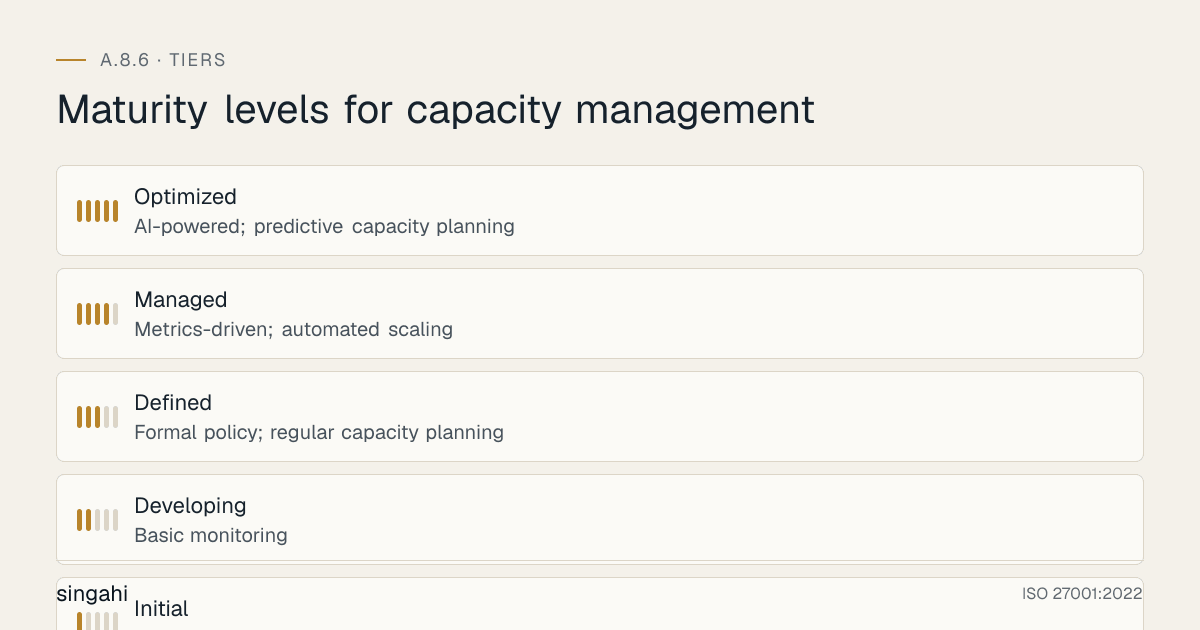
Maturity Model for A.8.6
| Level | Name | Characteristics | Evidence |
|---|---|---|---|
| 1 | Initial | No capacity planning; no monitoring; reactive to outages; no thresholds; "buy when it breaks" | No policy; no monitoring; no plans; frequent outages; no documentation |
| 2 | Developing | Basic monitoring; ad-hoc capacity planning; some thresholds; manual scaling; no forecasting | Basic monitoring; occasional planning; some alerts; no forecasts; manual intervention |
| 3 | Defined | Formal policy; regular capacity planning; defined thresholds; automated alerting; right-sizing; load testing | Policy; quarterly planning; thresholds; alerts; right-sizing; load testing; documentation |
| 4 | Managed | Metrics-driven; automated scaling; proactive forecasting; cost optimization; complete monitoring; capacity governance | Auto-scaling; forecasting; dashboards; cost reports; governance; monthly reports; DR testing |
| 5 | Optimized | AI-powered; predictive capacity planning; self-healing systems; dynamic resource allocation; fully automated governance; FinOps integration | AI forecasting; predictive scaling; self-healing; FinOps; zero-touch capacity management; continuous optimization |
Continuous Improvement Activities
Monthly:
- Capacity use review and trend analysis
- Capacity incident analysis and remediation tracking
- Right-sizing and resource cleanup
- Cloud cost review and optimization
- Capacity report generation and distribution
- Monitoring threshold review and adjustment
Quarterly:
- Capacity planning cycle (forecast, budget, recommendations)
- Database capacity review and optimization
- Application capacity review and load testing
- Peak load planning for upcoming events
- Failover capacity testing
- Internal audit of capacity management
Annually:
- Full policy review
- Complete capacity risk assessment
- Long-term capacity plan update (12–24 months)
- Technology and tool evaluation
- Benchmark against industry best practices
- External audit preparation
- Maturity assessment against target level
- Budget planning for capacity investments
Trigger-Based:
- After any capacity-related incident (outage, performance degradation, resource exhaustion)
- Upon business change (new product, new client, expansion, acquisition)
- Upon infrastructure change (migration, upgrade, new technology)
- Upon significant cloud cost variance (>20% from budget)
- After significant audit findings
- Upon regulatory change
FAQ
Q1: What is the difference between capacity management and performance management? A: Capacity management is about ensuring you have enough resources to meet demand. Performance management is about optimizing how efficiently those resources are used. Capacity management asks: "Do we have enough?" Performance management asks: "Are we using it well?" They are related but distinct. You can have adequate capacity but poor performance (inefficient code), or you can have good performance but inadequate capacity (out of resources). Both are needed for optimal system operation.
Q2: How often should we conduct capacity planning? A: Capacity planning should be a continuous activity with formal cycles: Monthly (short-term, next 3 months), Quarterly (medium-term, next 6–12 months), Annually (long-term, next 12–24 months). Additionally, capacity planning must be triggered by: new projects, business changes, technology changes, capacity incidents, and audit findings. The frequency depends on your organization's dynamism, rapidly growing companies need monthly planning; stable organizations can plan quarterly.
Q3: What is the optimal resource use target? A: There is no single optimal number, it depends on the resource type and criticality. General guidelines: CPU: 60–75% (leave headroom for spikes), Memory: 60–75% (avoid swapping), Disk: 60–80% (leave room for growth and defragmentation), Network: 60–70% (leave room for bursts), Database connections: 60–75% (leave room for connection storms). Critical systems should run at lower use (50–60%) to ensure resilience. Non-critical systems can run at higher use (70–80%). The key is maintaining enough headroom for unexpected demand while avoiding wasteful over-provisioning.
Q4: How do we handle capacity planning for unpredictable demand (e.g., viral content, sudden news events)? A: Unpredictable demand is challenging but manageable: (1) Use cloud auto-scaling for elasticity, (2) Implement CDN for content delivery (reduces origin load by 80–90%), (3) Use caching layers to reduce backend demand, (4) Implement circuit breakers and graceful degradation (limit non-essential features during high load), (5) Plan for 5x–10x baseline capacity in cloud, (6) Use serverless functions for variable workloads, (7) Monitor social media and news for early warning of demand spikes, (8) Implement load shedding to prioritize critical transactions. You cannot predict viral events, but you can build systems that scale elastically.
Q5: Should we buy on-premise hardware or use cloud for capacity? A: The answer depends on your workload patterns: On-premise is better for: predictable, steady-state workloads (you know the demand and it doesn't change much); regulatory requirements that mandate data location; very high, consistent use (cheaper than cloud at high use); existing sunk costs in data centers. Cloud is better for: variable, unpredictable workloads; rapid growth; seasonal spikes; need for geographic distribution; desire for auto-scaling and elasticity; cost optimization through right-sizing; disaster recovery. Many organizations use hybrid: on-premise for baseline, cloud for variable and peak load. Evaluate both options based on workload characteristics, cost, and strategic goals.
Q6: How do we manage capacity for legacy systems that cannot scale? A: Legacy systems that cannot scale require creative solutions: (1) Optimize the application (code, database, caching) to reduce resource demand, (2) Use load balancing and reverse proxies to distribute load, (3) Implement caching layers to reduce legacy system load, (4) Migrate data or functions to modern systems that can scale, (5) Use queueing systems to smooth demand spikes, (6) Implement graceful degradation (disable non-essential features during peak), (7) Plan for capacity limits and communicate them to business stakeholders, (8) Develop a modernization roadmap to replace the legacy system. If a legacy system truly cannot scale, you must either limit demand or modernize, there are no other sustainable options.
Q7: What is the most common audit finding for A.8.6? A: The most common findings are: (1) No capacity planning process, "we add resources when things break," (2) No capacity monitoring, no visibility into use, (3) No use thresholds or alerts, no proactive warning of capacity issues, (4) No documentation of capacity baseline or forecasts, (5) No load testing, applications deployed without capacity validation, (6) No cloud cost optimization, significant over-provisioning and waste, (7) No peak load planning, systems crash during predictable peak periods. Auditors will check monitoring dashboards, capacity plans, incident records, and load test results.
Q8: How do we manage capacity for a multi-tenant SaaS application? A: Multi-tenant SaaS capacity management is complex: (1) Plan capacity for the aggregate of all tenants (not just the largest), (2) Implement tenant-level resource quotas to prevent one tenant from consuming all capacity, (3) Use auto-scaling to handle tenant growth, (4) Monitor per-tenant use to identify noisy neighbors, (5) Implement tiered service levels (premium tenants get more capacity), (6) Plan for tenant onboarding spikes (new tenants may import large data sets), (7) Use database multi-tenancy strategies (shared schema, separate schema, separate database) with appropriate capacity planning for each, (8) Implement rate limiting per tenant to prevent API abuse. Multi-tenant capacity management requires both aggregate and per-tenant planning.
Q9: What is the cost of implementing A.8.6 for a growing company? A: Mostly effort rather than licences. Open-source monitoring (Prometheus, Grafana) and load testing (JMeter, Gatling, k6) cover many needs; cloud providers' native cost and capacity tools are included. The main costs are engineering time, extra capacity where tests show gaps, and on-call cover so you are not dependent on one person.
Q10: How do we manage capacity for disaster recovery and business continuity? A: DR capacity planning ensures you have adequate resources when primary systems fail: (1) DR site must have 100% capacity to handle full production load (not just a subset), (2) DR capacity must be tested during DR drills (not just assumed), (3) Network capacity to DR site must support failover traffic, (4) Storage capacity for DR must include growth and backup retention, (5) Database replication must not overwhelm DR database capacity, (6) Cloud DR (warm standby, pilot light) must be capacity-planned for rapid scale-up, (7) DR capacity must be reviewed quarterly as production capacity grows. DR capacity is not a secondary concern, it is primary capacity that happens to be used only during emergencies.
Q11: What is the role of FinOps in capacity management? A: FinOps (Financial Operations) is the practice of managing cloud costs with financial accountability. It is closely related to capacity management: (1) FinOps provides cost visibility that informs capacity decisions, (2) Capacity right-sizing is a FinOps activity, (3) Reserved instance planning is both capacity and FinOps, (4) Resource tagging for cost allocation is a FinOps practice that supports capacity tracking, (5) FinOps teams and capacity teams should collaborate on cloud optimization. In cloud environments, capacity management and FinOps are intertwined, you cannot manage capacity without managing cost, and you cannot manage cost without managing capacity.
Q12: How do we handle capacity for big data and analytics workloads? A: Big data workloads have unique capacity characteristics: (1) They are batch-oriented and bursty (high resource usage during processing, idle otherwise), (2) Storage grows exponentially (data lakes, data warehouses), (3) Compute is often decoupled from storage (cloud data warehouses like Snowflake, BigQuery), (4) Capacity planning must account for batch windows (ETL jobs must complete within time windows), (5) Use elastic compute resources (auto-scaling clusters, serverless) for batch processing, (6) Plan storage tiering (hot, warm, cold) for cost optimization, (7) Monitor data growth rates and plan storage expansion, (8) Use data compression and partitioning to reduce storage and compute needs. Big data capacity planning requires understanding workload patterns, not just average use.
Q13: What is the difference between horizontal and vertical scaling, and when should we use each? A: Vertical scaling (scale up) adds more power (CPU, RAM) to an existing server. It is simpler but has limits (maximum server size) and creates single points of failure. Horizontal scaling (scale out) adds more servers to distribute the load. It is more complex but provides unlimited scalability, better resilience optimization. Use vertical scaling for: stateful applications that cannot be distributed, quick temporary fixes, databases that are difficult to shard. Use horizontal scaling for: stateless web applications, microservices, cloud-native applications, and when you need high availability and resilience. Modern architectures favor horizontal scaling for most components.
Q14: How do we manage capacity for IoT and edge computing? A: IoT and edge computing have distributed capacity challenges: (1) Edge devices have limited CPU, memory, and storage, plan for lightweight processing, (2) Network capacity from edge to cloud must handle data ingestion bursts, (3) Cloud capacity must handle data aggregation, analytics, and storage, (4) Plan for device growth (number of devices, data volume per device), (5) Implement edge caching and filtering to reduce cloud capacity demand, (6) Use MQTT or similar lightweight protocols to reduce network capacity, (7) Plan for firmware updates (bandwidth and device capacity during updates), (8) Monitor edge device capacity (CPU, memory, storage) remotely. IoT capacity management spans edge, network, and cloud, all must be coordinated.
Q15: What is the relationship between capacity management and green IT / sustainability? A: Capacity management directly impacts sustainability: (1) Over-provisioned servers consume unnecessary power and cooling, (2) Right-sizing reduces energy consumption, (3) Cloud migration to efficient data centers reduces carbon footprint, (4) Resource scheduling (shutting down non-production environments) saves energy, (5) Storage tiering moves cold data to low-energy storage, (6) Virtualization and containerization improve resource use and reduce physical server count. Capacity management is not just about cost and availability, it is also about environmental responsibility. Efficient capacity management is green IT.
References and Further Reading
Standards and Frameworks
- ISO/IEC 27001:2022, Information Security, Cybersecurity and Privacy Protection, Information Security Management Systems, Requirements
- ISO/IEC 27002:2022, Information Security, Cybersecurity and Privacy Protection, Information Security Controls
- NIST SP 800-53 Rev 5, Security and Privacy Controls for Information Systems and Organizations
- ITIL 4: Capacity Management Practice Guide
- COBIT 2019, Control Objectives for Information and Related Technologies
Indian Regulations
- RBI Cybersecurity Directions 2026
- SEBI Cybersecurity and Cyber Resilience Framework (CSCRF) for SEBI Regulated Entities, circular of 20 August 2024
- Information Technology Act, 2000 (as amended)
- Digital Personal Data Protection Act, 2023 (India)
Books and Publications
- ISO 27001/27002: A Pocket Guide by Alan Calder
- ITIL 4: Capacity Management Practice (AXELOS)
- The Art of Capacity Planning by Arun Kejariwal and Lee Atchison
- Cloud FinOps by J.R. Storment and Mike Fuller
- Site Reliability Engineering by Google (SRE Book)