
On this page
- Quick Reference (60 Seconds)
- What the Control Asks For
- Why Working in Secure Areas Matters
- Scope and Applicability
- Key Definitions and Terminology
- Relationship to Other Controls
- The Six Working-in-Secure-Areas Rules
- Device, Camera and Recording Controls
- Detailed Implementation Guidance
- Supervising Third Parties and Maintenance
- Working in Secure Areas Policy (Template)
- Risk Assessment and Treatment
- Audit and Compliance Checklist
- Metrics and KPIs
- Common Pitfalls and Audit Failures
- Illustrative Scenarios
- 16A. Advanced Implementation Guidance
- Key Takeaways
- Multi-Framework Mapping
- Implementation Roadmap
- FAQ
- References and Further Reading
Quick Reference (60 Seconds)
ISO 27001:2022 Annex A 7.6 requires that security measures for working in secure areas be designed and implemented, governing how people behave once they are inside a sensitive area, not just how they get in.
| Element | What You Need to Know |
|---|---|
| Control Number | A.7.6 |
| Control Name | Working in Secure Areas |
| Standard Reference | ISO/IEC 27001:2022, Annex A, Control 7.6 |
| 27002 Guidance | ISO/IEC 27002:2022, Clause 7.6 |
| Control Type | Preventive |
| Objective | Protect information and assets in secure areas from damage and unauthorised interference by people working there |
| What You Must Do | Define rules for conduct in secure areas: need-to-know, supervision, no recording devices, locking/inspection, emergency procedures |
| Owner | Physical Security / Facilities (with CISO and area owners) |
| Maturity L1 → L5 | No rules → posted rules → enforced device/camera bans + supervision → monitored compliance → integrated, audited secure-area governance |
| Audit Red Flag | Phones/cameras in a data hall, lone unsupervised contractor in a secure room, vacant server room left unlocked |
| Quick Win | Post secure-area rules (no cameras, no unsupervised work, emergency steps) at the server-room door this week |
| Time to Implement | 2–4 weeks for rules, signage, and enforcement process |
| Related Controls | A.7.2 Physical entry · A.7.3 Securing offices/rooms · A.7.4 Physical monitoring · A.7.7 Clear desk & screen · A.8.1 User endpoint devices |
| ISO 27002 attributes | Control type: Preventive · Properties: Confidentiality, Integrity, Availability · Concepts: Protect · Capabilities: Physical security · Domains: Protection |
The Bottom Line: A.7.2 controls who gets in; A.7.6 controls what they can do once inside. An authorised person, or a supervised contractor, can still photograph a screen, plug in a USB, or tamper with a server. Working-in-secure-areas rules close that gap with need-to-know, supervision, device restrictions, and a locked, inspected, emergency-ready environment.
What the Control Asks For
The ISO 27001:2022 Text
In short:
ISO 27001:2022 Annex A 7.6 asks organizations to design and apply controls that govern how people work inside secure areas.
Do you need this control?
A.7.6 is not mandatory in itself: under clause 6.1.3 you include it if your risk assessment calls for it, and record the decision in your Statement of Applicability. Include it if you have secure areas such as server rooms, data halls or restricted floors. Without secure areas there is nothing for this control to govern, and you can exclude it with that reason.
What ISO 27002:2022 Adds
The measures apply to all personnel and cover all activities in the secure area. ISO 27002 says to consider:
- (a) making personnel aware of the existence of, or activities within, a secure area only on a need-to-know basis;
- (b) avoiding unsupervised work in secure areas, both for safety and to reduce the chance of malicious activity;
- (c) physically locking and periodically inspecting vacant secure areas;
- (d) not allowing photographic, video, audio or other recording equipment (such as cameras in user endpoint devices) unless authorised;
- (e) appropriately controlling the carrying and use of user endpoint devices in secure areas;
- (f) posting emergency procedures in a readily visible/accessible manner.
The "shall vs should" Analysis
| Phrase | Force | Meaning |
|---|---|---|
| "shall be designed and implemented" | Required once the control is selected | You must have, and enforce, secure-area working rules |
| The six measures (a)–(f) | Recommended menu | Apply those relevant to the area's sensitivity |
| "all personnel… all activities" | Scope of the measures | Rules apply to staff, contractors and visitors alike |
What Auditors Actually Check
- Documented, posted rules for secure areas (and awareness of them).
- No unauthorised recording devices (phones/cameras) where prohibited.
- Supervision: no lone/unsupervised work or unsupervised third parties in sensitive areas.
- Vacant secure areas locked and periodically inspected.
- Emergency procedures posted and known.
Why Working in Secure Areas Matters
Figure · Matrix
Comparison: IT/ITeS to Manufacturing/R&D
The Business Risk Narrative
Entry control (7.2) gets the right people into the room; it does nothing about what they do next. A legitimately-badged contractor servicing an air-conditioner in a data hall can photograph racks, read a screen, or insert a USB. A lone engineer working unsupervised at 2 a.m. could tamper with a server with no one to notice. A.7.6 addresses the insider-and-inside-the-room risk, the activities of people who are already, validly, in a secure area.
Indian Regulatory and Client Context
- DPDP Act 2023: Physical safeguards (Section 8(5)) extend to preventing unauthorised interference with systems holding personal data, including by people inside secure areas.
- BFSI / RBI: Data-centre and sensitive-area working rules (supervision, no unauthorised recording) are expected for facilities housing customer/critical data.
- Employee devices and lockers: a no-phone rule for staff is a workplace rule: put it in the policy or standing orders, give lockers and an emergency-contact route, and apply it consistently. Phone or bag checks need notice and dignity safeguards.
- IT/ITeS & BPO client mandates: Global clients routinely impose no-phone / no-camera / no-paper "clean floor" rules on secure delivery floors, plus supervision and clear-desk requirements, frequently audited.
- Defence/CII: Strict no-recording, supervision and inspection regimes for classified/critical areas.
Industry-Specific Consequences
| Sector | Failure mode | Consequence |
|---|---|---|
| IT/ITeS | Phone photo of customer data on a secure floor | DPDP/contract breach, client loss |
| BFSI | Unsupervised vendor in the data hall | RBI finding, tamper/fraud risk |
| Healthcare | Recording in a records/imaging area | Patient-privacy breach |
| Manufacturing/R&D | Camera in a design lab | IP theft |
Impact of Non-Compliance
A single photograph of a screen or a USB inserted in a server can cause a breach that no firewall would have stopped, and on a client's secure floor, it can cost the contract. The controls (signage, device lockers, supervision, locking vacant rooms) are inexpensive; the incidents they prevent are not.
Scope and Applicability
What the Control Covers
- Conduct and activities within secure areas: server/comms rooms, data halls, records vaults, R&D/design labs, secure delivery floors, and any area designated sensitive.
- Rules for all personnel (staff, contractors, visitors) and all activities in those areas.
Who It Applies To
Any organisation that has secure areas, scaled to context. A small firm sets rules for its server cupboard; a BPO enforces clean-floor rules across thousands of secure seats; a DC operator runs strict supervised-work and no-recording regimes.
Size-Based Applicability
| Size | Realistic implementation |
|---|---|
| Micro/SME | Posted rules for the server room; lock when vacant; no unsupervised contractor work; phones-away during maintenance |
| Growing companies | Designated secure areas with rules, signage, device control, supervision, periodic inspection |
| Enterprise / DC / BPO | Clean-floor regimes, device lockers, escorted/supervised work, monitored compliance, formal inspection schedules |
Key Definitions and Terminology
Figure · At a glance
A.7.6 at a glance
- Secure area
- A designated area requiring controlled
- Need-to-know
- Limiting even awareness of a secure area/its
- Unsupervised work
- Working alone in a secure area without
- Two-person rule
- Requiring two authorised people for work
- Recording equipment
- Cameras (incl. phone cameras), video
- Clean floor
- A regime prohibiting personal devices/paper
| Term | Definition |
|---|---|
| Secure area | A designated area requiring controlled access and conduct (e.g. server room, secure floor) |
| Need-to-know (existence) | Limiting even awareness of a secure area/its activities to those who must know |
| Unsupervised work | Working alone in a secure area without oversight |
| Two-person rule | Requiring two authorised people for work in highly sensitive areas |
| Recording equipment | Cameras (incl. phone cameras), video, audio or other recording devices |
| Clean floor | A regime prohibiting personal devices/paper on a secure work floor |
| Vacant-area inspection | Periodic check that an unoccupied secure area is locked/secure |
Relationship to Other Controls
| Control | Relationship to A.7.6 |
|---|---|
| A.7.2 Physical entry | Upstream. Entry control gets people in; 7.6 governs conduct inside |
| A.7.3 Securing offices, rooms and facilities | Parallel. Securing the areas themselves |
| A.7.4 Physical security monitoring | Parallel. CCTV/monitoring helps detect unsupervised/prohibited activity |
| A.7.7 Clear desk and clear screen | Parallel. Conduct rules to prevent information exposure |
| A.8.1 User endpoint devices | Parallel. Controls on carrying/using devices in secure areas |
| A.6.3 Awareness & training | Upstream. Personnel must know the rules |
| A.7.13 / A.7.4 Maintenance & monitoring | Parallel. Supervision of maintenance staff working in secure areas |
Entry vs Conduct
A.7.2 and A.7.6 are a pair: entry (7.2) decides who passes the door; conduct (7.6) governs what they do once through it. Both are needed, strong entry control with no conduct rules still allows an authorised insider or supervised contractor to photograph, copy, or tamper. A.7.6 is the behavioural layer of physical security.
The Six Working-in-Secure-Areas Rules
Operationalise ISO 27002's six measures:
| # | Rule | Practice |
|---|---|---|
| 1 | Need-to-know awareness (a) | Don't advertise the location/contents of secure areas; brief only those who must know |
| 2 | No unsupervised work (b) | No lone work in sensitive areas; two-person rule for the most critical; buddy/escort otherwise |
| 3 | Lock & inspect vacant areas (c) | Secure areas locked when empty; periodic inspection to confirm |
| 4 | No recording devices (d) | Prohibit cameras/phones/recorders unless explicitly authorised |
| 5 | Control endpoint devices (e) | Restrict what devices may be carried/used inside |
| 6 | Post emergency procedures (f) | Display evacuation/emergency steps visibly |
These translate directly into signage, a short policy, and an enforcement/inspection routine.
Device, Camera and Recording Controls
The highest-use rules for data-exfiltration risk:
- Prohibit recording (cameras, phone cameras, video/audio) in designated areas unless authorised (27002 (d)). Use device lockers at the entrance to secure floors.
- Control endpoint devices (27002 (e)): define which devices may be carried/used; block/secure USB ports where warranted (link A.8.1, A.7.10 storage media); prohibit personal devices on clean floors.
- Authorised exceptions: where recording is needed (e.g. documenting an incident or a maintenance task), authorise, log, and supervise it.
- Enforcement: signage + awareness + spot checks + CCTV (7.4). Make the rule visible and the culture supportive of challenge.
Detailed Implementation Guidance
Designate Secure Areas and Their Rules
Identify which areas are "secure" (server/comms rooms, data halls, records vaults, R&D labs, client secure floors) and define the conduct rules for each, proportionate to sensitivity.
Post Rules and Emergency Procedures
Put concise rules and emergency procedures at the entrance/inside (27002 (f)). Visible signage is both a control and audit evidence.
Enforce Supervision and the Two-Person Principle
Prohibit unsupervised work in sensitive areas (27002 (b)); apply a two-person rule for the most critical (e.g. work in the data hall). Ensure contractors are escorted/supervised (Section 10).
Lock and Inspect Vacant Areas
Ensure secure areas are locked when vacant and run periodic inspections to confirm (27002 (c)); record inspections.
Control Devices and Recording
Implement the device/camera controls in Section 8, lockers, USB control, no-camera signage, authorised exceptions.
Train and Build Awareness
Brief all who enter secure areas on the rules (link A.6.3); reinforce a challenge culture so violations are reported.
Monitor and Review
Use CCTV/monitoring (7.4) to detect prohibited activity; review incidents and inspection records; update rules as areas/risks change.
Supervising Third Parties and Maintenance
Maintenance and vendor staff are a frequently-overlooked vector, they have a legitimate reason to be inside, often near critical equipment:
- Authorise the specific work and personnel in advance.
- Escort/supervise them throughout (no unsupervised access to the secure area).
- Brief them on the secure-area rules (no recording, device limits).
- Restrict their access to only the equipment/area required.
- Log entry, the work performed, and departure (link A.7.13 equipment maintenance, A.7.2 entry).
- Inspect the area after the work (nothing left, nothing taken, area re-secured).
Working in Secure Areas Policy (Template)
Illustrative extract (the toolkit has the full policy template):
Working in Secure Areas Policy — [Organisation Name] (A.7.6)

Applies to all personnel, contractors and visitors, and all activities, in designated
secure areas (server/comms rooms, data halls, records vaults, secure delivery floors).

1. Awareness of secure areas and their activities is on a need-to-know basis.
2. Unsupervised work in secure areas is prohibited; a two-person rule applies to [data hall].
3. Secure areas shall be locked when vacant and inspected [weekly]; inspections recorded.
4. Photographic, video, audio and other recording equipment (including phone cameras) is
   prohibited in secure areas unless explicitly authorised, logged and supervised.
5. The carrying and use of user endpoint devices in secure areas is restricted; personal
   devices are prohibited on [secure floors]; device lockers are provided at entry.
6. Emergency procedures are posted visibly in all secure areas.
7. Third-party/maintenance personnel shall be authorised, escorted, briefed, restricted to
   the required area, logged, and the area inspected after work.
Risk Assessment and Treatment
Figure · Risk grid
Working in secure areas risks by likelihood and impact
Likelihood across · impact up
- Data exfiltration via phone cameraHigh/High
- Unsupervised contractor tampers/copiesMedium/High
- Lone after-hours work, no oversightMedium/High
- Vacant server room left unlockedMedium/High
- Emergency mishandledLow/High
- Personal USB used on secure floorMedium/Medium
- Sensitive activity overheard/observedLow/Medium
| Risk | Likelihood | Impact | Risk Level | Treatment |
|---|---|---|---|---|
| Data exfiltration via phone camera | High | High | Critical | No-recording rule + lockers + signage + CCTV |
| Unsupervised contractor tampers/copies | Medium | High | High | Escort/supervision; two-person rule |
| Lone after-hours work, no oversight | Medium | High | High | No unsupervised work; monitoring |
| Vacant server room left unlocked | Medium | High | High | Lock when vacant; periodic inspection |
| Personal USB used on secure floor | Medium | Medium | Medium | Device control; USB restriction |
| Sensitive activity overheard/observed | Low | Medium | Low | Need-to-know; area design |
| Emergency mishandled (safety) | Low | High | Medium | Posted emergency procedures; drills |
Audit and Compliance Checklist
| # | Audit Question | Expected Evidence | Red Flag |
|---|---|---|---|
| 1 | Are secure areas designated with documented rules? | Policy + area list | No defined rules |
| 2 | Are rules posted/visible in secure areas? | Signage | No signage |
| 3 | Is awareness of secure areas need-to-know? | Briefing approach | Widely advertised |
| 4 | Is unsupervised work prohibited in sensitive areas? | Policy + practice | Lone work observed |
| 5 | Is a two-person rule applied where warranted? | Procedure for data hall | None for critical work |
| 6 | Are vacant secure areas locked and inspected? | Inspection records | Unlocked vacant room |
| 7 | Are recording devices prohibited/controlled? | No-camera rule + lockers | Phones/cameras in data hall |
| 8 | Are endpoint devices controlled in secure areas? | Device control; USB rules | Personal devices/USB used |
| 9 | Are authorised recording exceptions logged? | Authorisation + log | Ad-hoc recording |
| 10 | Are emergency procedures posted? | Visible procedures | None posted |
| 11 | Are third parties supervised in secure areas? | Escort/supervision records | Unsupervised contractors |
| 12 | Is maintenance work authorised, restricted, logged? | Work authorisation + logs | Unlogged maintenance |
| 13 | Is the area inspected after third-party work? | Post-work inspection | No inspection |
| 14 | Are personnel trained on the rules? | Training records | No awareness |
| 15 | Is compliance monitored (CCTV/spot checks)? | Monitoring + incident records | No enforcement |
(The toolkit's audit evidence checklist maps each question to the records to show.)
Metrics and KPIs
Figure · Measures
The measures that show A.7.6 is working
- Unauthorised recording-device incidents0Monthly
- Unsupervised-work incidents0Monthly
- Vacant-area inspection compliance100%Monthly
- Vacant-area lock compliance100%Monthly
- Third-party supervision compliance100%Monthly
| # | KPI | Formula | Target | Frequency |
|---|---|---|---|---|
| 1 | Unauthorised recording-device incidents | Count in secure areas | 0 | Monthly |
| 2 | Unsupervised-work incidents | Count detected | 0 | Monthly |
| 3 | Vacant-area inspection compliance | % scheduled inspections done | 100% | Monthly |
| 4 | Vacant-area lock compliance | % checks finding area secured | 100% | Monthly |
| 5 | Third-party supervision compliance | % secure-area work supervised | 100% | Monthly |
| 6 | Device-control compliance | % secure-area entries compliant | 100% | Monthly |
| 7 | Signage/emergency-procedure currency | % areas with current postings | 100% | Quarterly |
| 8 | Secure-area awareness coverage | % relevant personnel trained | 100% | Annually |
| 9 | Post-maintenance inspection rate | % maintenance jobs inspected | 100% | Per event |
| 10 | Secure-area rule violations | Count reported | Trend ↓ | Monthly |
| 11 | Authorised-recording exceptions logged | % logged | 100% | Per event |
| 12 | Physical-security test findings (secure-area conduct) | Count | Trend ↓ | Per test |
Common Pitfalls and Audit Failures
| Pitfall | Root Cause | Fix |
|---|---|---|
| Phones/cameras in data hall | No device/recording rule | No-camera rule + lockers + signage |
| Unsupervised contractor in secure room | Weak third-party control | Escort/supervise; restrict; log |
| Lone after-hours work | No supervision rule | Prohibit unsupervised work; two-person rule |
| Vacant server room unlocked | No lock/inspection routine | Lock when vacant + periodic inspection |
| Rules exist but unknown | No signage/awareness | Post rules; train; reinforce |
| No emergency procedures posted | Overlooked | Post visibly; run drills |
| Maintenance unlogged/uninspected | Informal vendor handling | Authorise, supervise, log, inspect after |
| Clean-floor rule not enforced | Cultural laxity | Spot checks + CCTV + challenge culture |
Illustrative Scenarios
Illustrative scenario, a composite example for guidance, not a specific Singahi engagement or a verified outcome.
Illustrative Scenario 1, Indian BPO Secure Delivery Floor (Gurugram, 1,800 seats): Clean-Floor Enforcement
Challenge. A BPO processing a UK bank's customer data was contractually required to run a no-phone, no-camera, no-paper "clean floor" with supervised access. A client audit found agents carrying personal phones onto the floor, no device lockers, and vacant secure rooms left unlocked at shift change, putting the contract at risk and breaching the client's data-protection requirements.
Solution (6 weeks).
- Established the floor as a designated secure area with posted rules and device lockers at entry; personal devices prohibited inside (27002 (d), (e)).
- Implemented shift-change lock and inspection of secure rooms with recorded checks (27002 (c)).
- Mandated supervision for any maintenance/third-party work on the floor, with logging and post-work inspection.
- Ran a challenge-culture awareness campaign and added CCTV spot-check monitoring (A.7.4).
Results. Personal devices on the floor reduced to 0 in follow-up checks; vacant-room lock compliance reached 100%; the client audit passed and the engagement was renewed and expanded.
Illustrative Scenario 2, Indian Bank Data Hall (Bengaluru): Supervised Work and No-Recording Regime
Challenge. The bank's data hall allowed lone vendor engineers to perform maintenance and had no rule against recording; an internal review worried that a single unsupervised visit could enable tampering or photography of sensitive infrastructure, an RBI and ISO concern.
Solution (5 weeks).
- Introduced a two-person/supervised-work rule for all data-hall activity; no unsupervised vendor work (27002 (b)).
- Implemented a no-recording policy with authorised, logged, supervised exceptions only (27002 (d)).
- Posted emergency procedures and secure-area rules at the entrance (27002 (f)).
- Added post-maintenance inspection and tied data-hall entry to authorised work orders (link A.7.2, A.7.13).
Results. All data-hall work now supervised and recording-controlled; the practice satisfied the RBI examiner and the ISO 27001 auditor, and became the template for the bank's other critical facilities.
16A. Advanced Implementation Guidance
Figure · Tiers
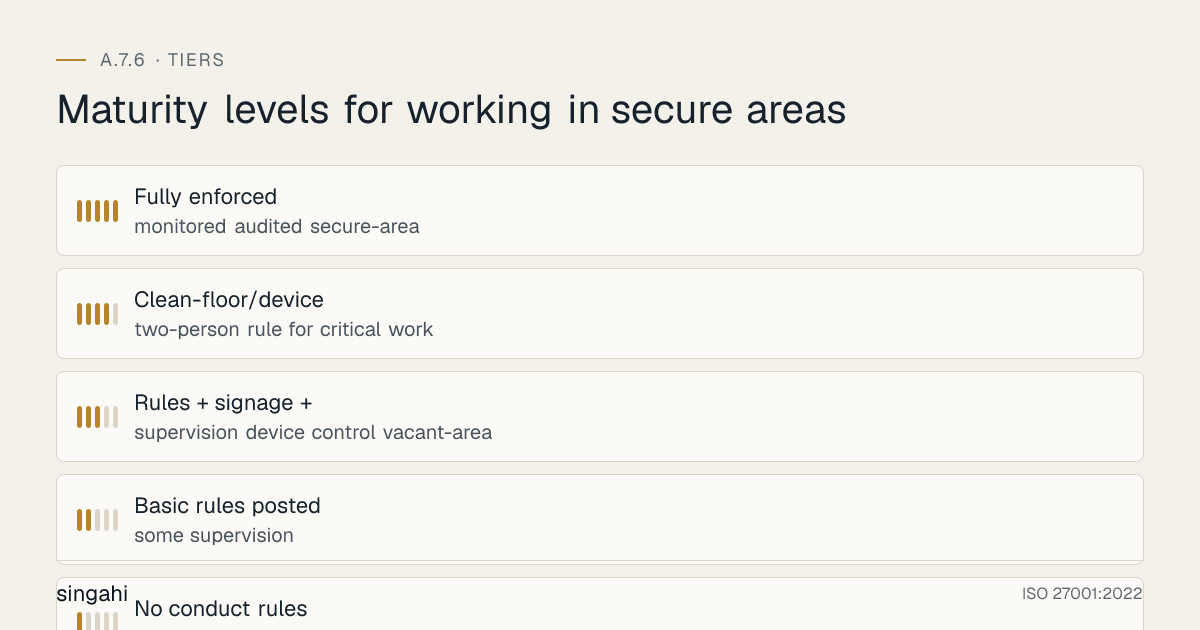
Maturity levels for working in secure areas
16A.1 Running a "Clean-Floor" Programme
Many Indian IT/ITeS and BPO engagements are contractually required to run a clean floor, no personal devices, no cameras, no paper, on secure delivery floors handling client data. Operating it well requires: device lockers at the entrance (phones/wearables deposited before entry); clear, posted rules and signage; entry checks (and, in the highest-security contexts, mobile-detection); paper controls (clear desk A.7.7, controlled printing, locked disposal); and continuous reinforcement so the rule survives day-to-day convenience pressure. The clean floor is as much a cultural programme as a control, it only holds if supervisors enforce it consistently and staff accept it as normal.
16A.2 Device-Locker and Endpoint-Device Operations
Operationalise the device controls (27002 (e)): provide enough lockers that depositing a phone is frictionless; define what may be carried (e.g. an approved, managed work laptop) versus prohibited (personal devices, personal USB); pair with endpoint/USB controls (A.8.1, A.7.10) so removable media cannot be used to exfiltrate; and define an authorised-exception process (e.g. a vendor needs a laptop for maintenance) that is approved, logged and supervised. The goal is to make the secure thing the easy thing.
16A.3 The Two-Person Rule and Supervision
For the most sensitive work, changes in the data hall, access to a records vault, handling of bulk sensitive data, require two authorised people present (27002 (b)). This reduces both safety risk (someone present in an emergency) and the chance of undetected malicious activity (a second pair of eyes). Where a strict two-person rule is impractical, require supervision/escort and monitoring as compensating controls. Define which areas/activities trigger the rule, and evidence it (sign-in showing two names, CCTV).
16A.4 Maintenance and Vendor Work, End to End
Maintenance staff are inside, near critical equipment, often with tools and devices, a classic blind spot. Run the full cycle: authorise the specific work order and personnel; brief them on secure-area rules (no recording, device limits); escort/supervise throughout; restrict them to the equipment/area required; log entry, work performed, and exit; and inspect afterwards (nothing left behind, nothing taken, area re-secured, no recording occurred). Tie this to the equipment-maintenance control (A.7.13) and physical entry (A.7.2).
16A.5 Monitoring and Enforcement
Conduct rules need enforcement to be real. Use CCTV spot-checks (A.7.4) to detect recording, unsupervised work, or prohibited devices; run periodic inspections of vacant secure areas (locked, secure, nothing amiss) with recorded results; and maintain a challenge culture (A.6.3) where staff report violations. Track violations and feed them into awareness and, where warranted, the disciplinary process (A.6.4). A posted rule that is never checked is not a control.
16A.6 OT, Labs and Special Environments
Secure-area conduct extends beyond server rooms. R&D/design labs (IP-theft risk) warrant no-camera and supervised-access rules. OT/plant control rooms require conduct rules adapted to safety constraints, where individual logins or strict device bans are impractical on legacy systems, compensate with supervision, physical access control (A.7.2), and segregation (A.8.22). The principle is constant: define and enforce measures for all personnel and all activities in the secure area, proportionate to its sensitivity.
16A.7 Working-in-Secure-Areas Maturity Model (L1–L5)
| Level | Characteristics |
|---|---|
| L1 | No conduct rules; ad-hoc behaviour in secure areas |
| L2 | Basic rules posted; some supervision |
| L3 | Rules + signage + emergency procedures; supervision; device control; vacant-area lock & inspection |
| L4 | Clean-floor/device lockers; two-person rule for critical work; supervised maintenance; CCTV-backed enforcement |
| L5 | Fully enforced, monitored, audited secure-area governance; strong challenge culture |
Target L3 for certification; secure delivery floors and data halls are typically expected at L4.
16A.8 Anatomy of a Secure-Area Conduct Failure
A vendor engineer is admitted to the data hall (valid entry under A.7.2) to service a unit, unsupervised. While there, they photograph rack labelling and a screen showing system details, and connect a personal USB to copy a configuration file, none of which the entry control could prevent, because the failure is one of conduct, not access. Each link is an A.7.6 measure: no unsupervised work, no recording devices, endpoint-device control, and post-work inspection. A.7.6 is the behavioural layer that ensures legitimately-present people cannot quietly exfiltrate or tamper.
Key Takeaways
- A.7.2 controls who gets in; A.7.6 controls what they do once inside: the behavioural layer of physical security.
- The six measures: need-to-know awareness, no unsupervised work, lock & inspect vacant areas, no recording devices, control endpoint devices, post emergency procedures.
- Device/camera control (lockers, no-camera rules) is the highest-use measure against data exfiltration.
- Supervise third parties and maintenance end-to-end, and inspect afterwards.
- Enforcement is the control: posted rules need CCTV spot-checks, inspections, and a challenge culture.
- In India, A.7.6 underpins client clean-floor mandates and DPDP physical safeguards.
Multi-Framework Mapping
| Framework | Reference | Mapping to A.7.6 |
|---|---|---|
| ISO/IEC 27002:2022 | 7.6 | Working in secure areas |
| NIST SP 800-53 Rev 5 | PE-3, PE-5 (output/device), PE-18 (asset location), PE-6 (monitoring) | Conduct/supervision in secure areas |
| NIST CSF 2.0 | PR.AA-06 | Physical access/conduct managed |
| PCI DSS v4.0.1 | Req 9.2, 9.3 (facility entry; personnel and visitor control) | Controlling personnel/visitors in sensitive areas |
| SOC 2 (TSC 2017) | CC6.4 | Restricting/controlling activity in facilities |
| COBIT 2019 | DSS05.05 | Manage physical access and environment |
| DPDP Act 2023 | Section 8(5) | Physical safeguards against interference |
Implementation Roadmap
Phase 1, Define (Weeks 1–2)
- Designate secure areas; draft the working-in-secure-areas rules (the six measures).
- Post rules and emergency procedures; brief relevant personnel.
Phase 2, Control (Weeks 2–3)
- Implement device/camera controls (lockers, no-camera signage, USB rules).
- Establish supervision/two-person rules and vacant-area lock+inspection routine.
Phase 3, Govern Third Parties (Week 3)
- Implement supervised, authorised, logged maintenance/vendor work + post-work inspection.
Phase 4, Assure (Week 4+)
- Awareness/challenge-culture campaign; CCTV spot-check monitoring.
- KPI dashboard; physical-security test; internal audit dry-run.
FAQ
Q1: Is A.7.6 mandatory for certification? Not automatically: it is selected through risk treatment (clause 6.1.3) and recorded in your Statement of Applicability. If you have secure areas (server rooms, data halls, secure floors), you will normally include it, and auditors then check posted rules, device and recording controls, supervision and inspection records.
Q2: How is A.7.6 different from A.7.2 and A.7.3? 7.2 controls entry (who gets in); 7.3 secures the rooms/facilities; 7.6 governs conduct of people once inside a secure area.
Q3: Do we really have to ban phones in the server room? Recording equipment (including phone cameras) should be prohibited unless authorised, proportionate to sensitivity. For a data hall or client secure floor, a no-camera rule (with lockers) is standard; for a small server cupboard, a "phones away during access" rule may suffice.
Q4: What's the most common finding? Unsupervised contractor/maintenance work in secure areas and phones/cameras where they shouldn't be. Fix with supervision/escort and device controls.
Q5: What is the "two-person rule"? Requiring two authorised people present for work in the most sensitive areas, reducing both safety risk and the chance of undetected malicious activity. Apply it to data-hall and critical-equipment work.
Q6: How does A.7.6 relate to clear desk/clear screen (A.7.7)? They are complementary conduct controls: 7.7 prevents leaving information exposed; 7.6 governs broader behaviour (recording, supervision, devices) within secure areas.
References and Further Reading
Primary standards
- ISO/IEC 27001:2022: Annex A control 7.6.
- ISO/IEC 27002:2022: Clause 7.6 (measures (a)–(f)); related §7.2, §7.3, §7.4, §7.7, §8.1.
Supporting frameworks
- NIST SP 800-53 Rev 5: PE-3, PE-5, PE-6, PE-18.
- NIST CSF 2.0: PR.AA-06.
- PCI DSS v4.0.1: Requirement 9.
- SOC 2 (TSC 2017): CC6.4.
- COBIT 2019: DSS05.05.
Indian regulations
- Digital Personal Data Protection Act, 2023: Section 8(5).
- RBI: data-centre/secure-area expectations.
- Client/contractual clean-floor requirements (IT/ITeS/BPO).
Singahi resources: the A.7.6 toolkit and related guides for A.7.2 Physical entry, A.7.3 Securing offices, rooms and facilities, A.7.4 Physical security monitoring, and A.7.7 Clear desk and clear screen.