
On this page
- Quick Reference (60 Seconds)
- What the Control Asks For
- Why Web Filtering Matters
- Scope and Applicability
- Key Definitions and Terminology
- Relationship to Other Controls
- What to Block and Why
- Web Filtering Technologies
- Detailed Implementation Guidance
- Privacy, Legal and Acceptable Use
- Web Filtering Policy (Template)
- Risk Assessment and Treatment
- Audit and Compliance Checklist
- Metrics and KPIs
- Common Pitfalls and Audit Failures
- Illustrative Scenarios
- 16A. Advanced Implementation Guidance
- Key Takeaways
- Multi-Framework Mapping
- Implementation Roadmap
- FAQ
- References and Further Reading
Quick Reference (60 Seconds)
ISO 27001:2022 Annex A 8.23 requires that access to external websites be managed to reduce exposure to malicious content, keeping users away from malware, phishing, command-and-control and other harmful web destinations.
| Element | What You Need to Know |
|---|---|
| Control Number | A.8.23 |
| Control Name | Web Filtering |
| Standard Reference | ISO/IEC 27001:2022, Annex A, Control 8.23 |
| 27002 Guidance | ISO/IEC 27002:2022, Clause 8.23 |
| Control Type | Preventive |
| Objective | Protect systems from compromise via malicious content and prevent access to unauthorised web resources |
| What You Must Do | Manage outbound web access; block malicious/unauthorised site categories; use threat intel |
| Owner | Network/Endpoint Security (with CISO) |
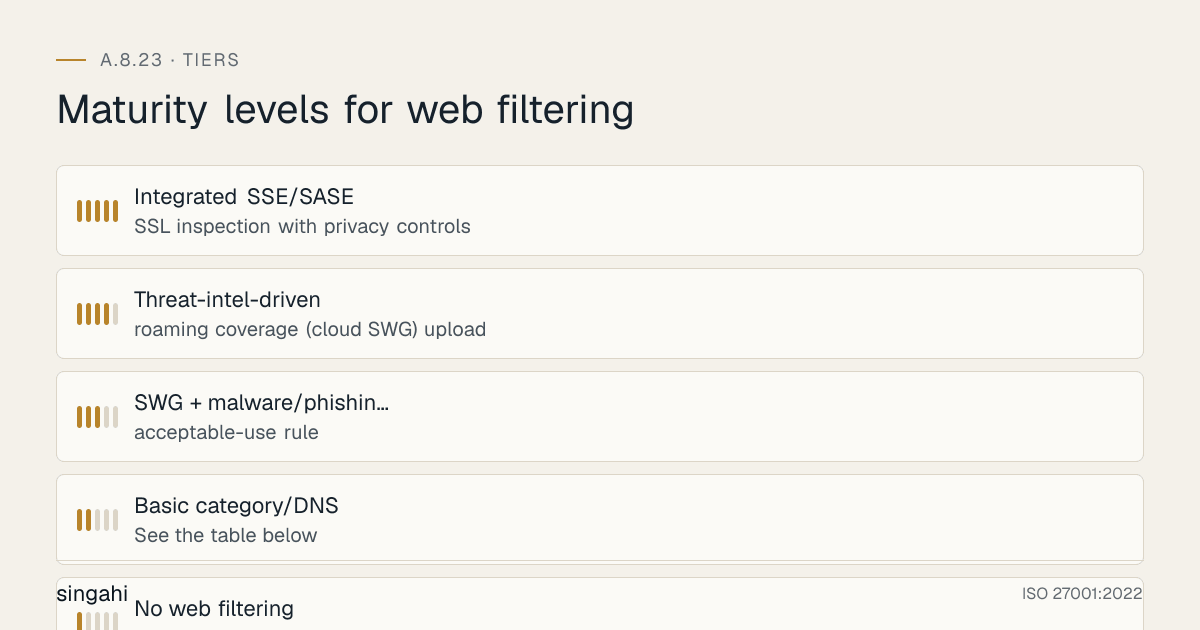
| Maturity L1 → L5 | No filtering → basic category blocking → SWG + threat-intel feeds → roaming/cloud coverage + SSL inspection → integrated SSE/Zero Trust egress |
| Audit Red Flag | No web filtering; known-malicious/phishing categories reachable; roaming users unprotected |
| Quick Win | Turn on category + malicious-domain blocking (incl. DNS filtering) for all users this week |
| Time to Implement | 2–6 weeks for SWG/DNS filtering rollout |
| Related Controls | A.8.7 Protection against malware · A.5.7 Threat intelligence · A.8.22 Segregation · A.8.20 Networks security · A.6.3 Awareness |
| ISO 27002 attributes | Control type: Preventive · Properties: Confidentiality, Integrity, Availability · Concepts: Protect · Capabilities: System and network security · Domains: Protection |
The Bottom Line: The web is the most common delivery channel for malware and phishing. Web filtering is a high-use preventive control: by blocking known-bad and risky destinations before a user reaches them, it stops a large share of drive-by malware, phishing landing pages, and command-and-control callbacks, cheaply and quietly.
What the Control Asks For
The ISO 27001:2022 Text
In short:
ISO 27001:2022 Annex A 8.23 asks organizations to manage access to external websites to limit exposure to harmful content.
Do you need this control?
A.8.23 is not mandatory in itself: under clause 6.1.3 you include it if your risk assessment calls for it, and record the decision in your Statement of Applicability. Include it if users browse the web from your devices or networks. If browsing is impossible in your environment, you may exclude it with that reason.
What ISO 27002:2022 Adds
The guidance says to reduce the risk of personnel accessing websites that contain illegal information or are known to host viruses or phishing material, commonly by blocking the IP address or domain of the sites concerned (many browsers/anti-malware tools do this or can be configured to). The organisation should identify the types of websites personnel should or should not access, and consider blocking:
- (a) websites with an information upload function, unless permitted for valid business reasons;
- (b) known or suspected malicious websites (malware/phishing distribution);
- (c) command-and-control (C2) servers;
- (d) malicious websites identified from threat intelligence (see 5.7);
- (e) websites sharing illegal content.
It also says:
- Set the rules before you deploy filtering. Define safe and appropriate use of online resources, including any restrictions on unwanted websites and web applications, and keep the rules up to date.
- Train personnel on secure and appropriate use of the web. Training should cover the rules, a contact point for raising security concerns, and the exception process for reaching blocked sites for legitimate business reasons.
- Train personnel not to overrule browser warnings that say a site is not secure but let the user carry on (certificate errors, safe-browsing warnings).
The "shall vs should" Analysis
| Phrase | Force | Meaning |
|---|---|---|
| "shall be managed to reduce exposure" (Annex A wording) | Required once the control is selected in your SoA | You must actively manage outbound web access |
| Blocking malicious/illegal/upload/C2 categories | Recommended menu | Apply per risk and business need |
| Threat-intel-driven blocking; user training | Recommended | Strongly expected at maturity |
What Auditors Actually Check
- Web filtering is in place for users (on-network and ideally roaming).
- Malicious categories (malware, phishing, C2) are blocked.
- Threat-intelligence feeds inform blocking (link 5.7).
- An acceptable-use rule defines permitted/blocked categories and exceptions.
- Logging of blocked/allowed access supports monitoring and incident response.
- Training covers the rules, the contact point, the exception process and not clicking through browser security warnings.
Why Web Filtering Matters
Figure · Matrix
Comparison: BFSI to Any
The Business Risk Narrative
Most malware and phishing arrive through the browser, a user clicks a link, lands on a malicious page, and is compromised by a drive-by download or tricked into entering credentials. Even after a phishing email slips through the mail filter, web filtering provides a second chance to block the payload when the user clicks the link. And when malware does land, blocking its command-and-control callbacks can prevent it from activating or exfiltrating data. Web filtering sits on the most-used and most-abused channel in the organisation.
How It Goes Wrong (hypothetical patterns)
- No filtering for home workers. The office proxy protects only people in the office; a remote employee opens a phishing link and enters their credentials.
- Click-through on a certificate warning. A user ignores a "your connection is not private" warning on a fake login page, and the account is taken over.
- Stale block list. The list was loaded once and never updated, so newly registered phishing domains get through.
- Unblocked C2. Malware lands on a laptop and calls home freely because nothing blocks known command-and-control domains.
- Uncontrolled uploads. Staff use personal file-sharing sites to move customer data, outside DLP.
Indian Regulatory Context
- DPDP Act 2023: web filtering supports the reasonable security safeguards required by section 8(5), by reducing the malware and phishing that lead to personal-data breaches.
- CERT-In Directions (28 April 2022): report specified incidents (including phishing and malicious code attacks) within 6 hours, and keep ICT system logs, which include proxy and DNS logs, for 180 days in India.
- CERT-In advisories and I4C: CERT-In publishes advisories with malicious domains and indicators, and the Indian Cyber Crime Coordination Centre (I4C, Ministry of Home Affairs) flags fraudulent apps and websites. Use them as feeds for 27002 8.23(d) where you can.
- Illegal content (27002 8.23(e)): always block content that is unlawful in India, for example child sexual abuse material (IT Act s.67B).
- Betting and online money games: the Promotion and Regulation of Online Gaming Act, 2025 prohibits offering and advertising online money games, and many states restrict gambling. Block these categories on corporate devices.
- RBI, SEBI and IRDAI: the RBI Cybersecurity Directions 2026, SEBI's CSCRF (2024) and IRDAI's Information and Cyber Security Guidelines (2023) expect protection against malware and phishing; web filtering is a common way to meet that.
Industry-Specific Consequences
| Sector | Failure mode | Consequence |
|---|---|---|
| BFSI | Phishing landing pages reachable | Credential theft, fraud |
| IT/ITeS | Drive-by malware on developer endpoints | Source/customer-data compromise |
| Healthcare | Ransomware via malicious web content | Care disruption, PII breach |
| Any | C2 callbacks unblocked | Malware activates/exfiltrates |
Impact of Non-Compliance
Web filtering is inexpensive and preventive; the incidents it stops, ransomware, credential theft, data exfiltration, are expensive and disruptive. As a layer in defence-in-depth, it quietly removes a large fraction of opportunistic web-borne threats before they ever reach the endpoint.
Scope and Applicability
What the Control Covers
- Outbound web (HTTP/HTTPS) access by personnel and systems, on the corporate network and (ideally) for roaming/remote users, and the policies, technologies and logging that manage it.
Who It Applies To
Every organisation whose users browse the web. Coverage must extend to remote/roaming users, increasingly the majority, via cloud-delivered filtering.
Size-Based Applicability
| Size | Realistic implementation |
|---|---|
| Micro/SME | DNS-based filtering (e.g. protective DNS) + endpoint/browser protections; basic categories blocked |
| Growing companies | Secure Web Gateway (proxy) or cloud SWG; category + threat-intel blocking; logging |
| Enterprise | Cloud SWG/SSE covering roaming users; SSL inspection (with privacy controls); CASB; threat-intel integration |
Key Definitions and Terminology
Figure · At a glance
A.8.23 at a glance
- Web filtering
- Controlling access to web destinations
- Secure Web Gateway
- A proxy that inspects and filters web
- DNS filtering / protective
- Blocking malicious domains
- Category filtering
- Allow/block by content category
- SSL/TLS inspection
- Decrypting HTTPS to inspect content
| Term | Definition |
|---|---|
| Web filtering | Controlling access to web destinations to block malicious/unauthorised content |
| Secure Web Gateway (SWG) | A proxy that inspects and filters web traffic |
| DNS filtering / protective DNS | Blocking malicious domains at the DNS-resolution layer |
| Category filtering | Allow/block by content category (malware, phishing, gambling, etc.) |
| C2 (command and control) | Infrastructure malware uses to receive instructions/exfiltrate |
| SSL/TLS inspection | Decrypting HTTPS to inspect content (with privacy safeguards) |
| CASB | Cloud Access Security Broker, visibility/control over cloud app use |
| SSE / SASE | Security Service Edge / Secure Access Service Edge, cloud-delivered security incl. SWG |
| Allow/block list | Explicit permitted/denied destinations |
Relationship to Other Controls
| Control | Relationship to A.8.23 |
|---|---|
| A.8.7 Protection against malware | Parallel. Web filtering is a key anti-malware layer |
| A.5.7 Threat intelligence | Upstream. Feeds malicious-domain/C2 blocking |
| A.8.20 Networks security | Parallel. Controls network traffic incl. web egress |
| A.8.22 Segregation of networks | Parallel. Controlled egress per segment |
| A.8.16 Monitoring activities | Parallel. Web logs feed monitoring/detection |
| A.5.10 Acceptable use | Parallel. Acceptable-use rules define permitted browsing |
| A.6.3 Awareness & training | Parallel. Users trained on safe web use |
A Layer in Defence-in-Depth
Web filtering is not a standalone control, it is a layer that works with anti-malware (8.7), threat intelligence (5.7), monitoring (8.16), and awareness (6.3). ISO 27002 explicitly notes filtering can be bypassed (encrypted/proxy sites), so it must be combined with endpoint protection and user vigilance. Its strength is catching the opportunistic and known-bad before it reaches the endpoint.
What to Block and Why
| Category | Why block | ISO ref |
|---|---|---|
| Known/suspected malware/phishing sites | Primary infection/credential-theft vectors | (b) |
| Command-and-control servers | Disrupts active malware | (c) |
| Threat-intel-identified malicious domains | Real-time emerging threats | (d) |
| Illegal content | Legal/compliance risk | (e) |
| Upload/file-sharing sites (unless business-approved) | Data-exfiltration risk | (a) |
| Newly-registered / uncategorised domains | Often used in attacks | risk-based |
| Anonymisers/proxies (that bypass filtering) | Defeat controls | risk-based |
| High-risk categories per acceptable use (e.g. adult, gambling) | Policy/legal | acceptable use |
| India-specific: betting and online money games, piracy, loan-app and investment-scam domains | Legal risk, malware, fraud | (d), (e) |
Blocking is risk- and business-based: an upload site may be essential for one team and blocked for everyone else, hence exceptions are defined, approved and logged.
Web Filtering Technologies
| Technology | What it does | Notes |
|---|---|---|
| DNS filtering / protective DNS | Blocks malicious domains at resolution | Cheap, fast, broad; first-line, even for SMEs |
| Secure Web Gateway (proxy) | Inspects/filters HTTP(S), category + malware | On-prem or cloud |
| Cloud SWG / SSE / SASE | Cloud-delivered filtering for all users incl. roaming | Best for remote workforce |
| Endpoint/browser protections | Local blocking, safe-browsing | Complements network filtering |
| CASB | Controls sanctioned/unsanctioned cloud apps | Beyond simple web filtering |
| Threat-intel feeds | Keep block lists current (link 5.7) | Essential for emerging threats |
SSL/TLS inspection: most web traffic is encrypted, so deep filtering may require HTTPS inspection, implement with privacy safeguards (exclude sensitive categories like banking/health, inform users, comply with law).
Detailed Implementation Guidance
Define the Web Acceptable-Use Rule
Document which categories are permitted/blocked and the exception process (link A.5.10). This is the policy basis the technology enforces.
Deploy Filtering Covering All Users
Roll out an SWG/DNS filtering solution covering on-network and roaming users (cloud-delivered for the latter). Block malicious/phishing/C2 and illegal categories by default (27002 (b)–(e)).
Integrate Threat Intelligence (link 5.7)
Feed threat-intelligence (malicious domains, C2, phishing) into the filter so blocking stays current against emerging threats (27002 (d)).
Manage Uploads and Exceptions
Block uncontrolled upload/file-sharing sites except where a documented business need exists (27002 (a)); route exceptions through approval and review (link DLP A.8.12).
Consider HTTPS Inspection with Privacy Safeguards
Where deeper inspection is needed, implement TLS inspection with category exclusions (banking, health), user notice, and legal compliance (Section 10).
Log, Monitor and Tune
Log blocked/allowed access; feed logs to monitoring (A.8.16) for detection and incident response; tune categories to balance security and business friction; review false positives.
Train Users (link 6.3)
Train personnel on safe web use and why filtering exists; reinforce that filtering is a safety net, not a substitute for vigilance. Cover:
- the web-use rules and what is blocked;
- who to contact with a security concern (name a mailbox or channel);
- how to request an exception for a blocked site needed for work;
- never click through a browser security warning (certificate error, "deceptive site ahead"). Report it instead.
Harden the Browser
Filtering works best with a managed browser. Enforce safe-browsing, block click-through on certificate and safe-browsing warnings through browser policy, allow only approved extensions, keep browsers updated, and prevent users from switching off these settings.
Start with DNS Filtering if You Are Small
For an SME, protective DNS on office routers and on laptops (via the device's DNS settings or an agent) is a low-cost first step that blocks known malicious domains everywhere. Add a secure web gateway when you need category control or content inspection.
Privacy, Legal and Acceptable Use
Web filtering monitors and controls employee browsing, so balance security with privacy and law:
- Transparency: inform personnel that web access is filtered/logged (in the acceptable-use policy and onboarding), consistent with the DPDP Act 2023 principles where personal data is processed.
- Proportionality: filter and log for security, not surveillance; minimise personal-data capture; restrict access to logs.
- TLS-inspection exclusions: exclude sensitive categories (banking, health, personal mail) from decryption.
- Lawful basis & retention: retain logs for the security/legal purpose and period; comply with the IT Act and applicable law.
- Acceptable use (A.5.10): define permitted use and consequences clearly so enforcement is fair and defensible.
Web Filtering Policy (Template)
Illustrative extract (the Control Pack has the full policy):
Web Filtering Policy — [Organisation Name] (A.8.23)

1. Access to external websites is managed to reduce exposure to malicious content.

2. The following are blocked by default for all users (on-network and roaming):
   known/suspected malware and phishing sites; command-and-control servers; malicious
   domains identified via threat intelligence (A.5.7); illegal content; and uncontrolled
   upload/file-sharing sites (unless business-approved).

3. Filtering covers all users via [cloud SWG / DNS filtering]; threat-intelligence feeds keep
   block lists current.

4. Exceptions require documented business justification and approval, and are reviewed.

5. Web access is logged for security purposes; logs are protected, access-restricted, and
   retained for [period]. Personnel are informed of filtering and logging (acceptable use,
   A.5.10) consistent with the DPDP Act.

6. Where HTTPS inspection is used, sensitive categories (banking, health, personal mail) are
   excluded from decryption.

7. Users shall not click through browser warnings that a site is not secure. Managed browsers
   are configured to prevent it. Security concerns go to [security contact].

8. These rules are set before filtering is deployed and reviewed at least [annually].
Risk Assessment and Treatment
Figure · Risk grid
Web filtering risks by likelihood and impact
Likelihood across · impact up
- Drive-by malware from malicious siteHigh/High
- Phishing landing page reached afterHigh/High
- Roaming users unprotectedHigh/Medium
- Malware C2 callback succeedsMedium/High
- Data exfiltration via upload siteMedium/High
- Filtering bypassed via anonymiserMedium/Medium
- Over-blocking harms businessMedium/Low
| Risk | Likelihood | Impact | Risk Level | Treatment |
|---|---|---|---|---|
| Drive-by malware from malicious site | High | High | Critical | Category + malicious-domain blocking |
| Phishing landing page reached after email click | High | High | Critical | Block phishing domains; threat-intel feeds |
| Malware C2 callback succeeds | Medium | High | High | Block C2; monitor egress |
| Data exfiltration via upload site | Medium | High | High | Block uncontrolled uploads; DLP (8.12) |
| Roaming users unprotected | High | Medium | High | Cloud-delivered filtering for all users |
| Filtering bypassed via anonymiser | Medium | Medium | Medium | Block anonymisers; endpoint protection |
| Over-blocking harms business | Medium | Low | Low | Exception process; tuning |
Audit and Compliance Checklist
| # | Audit Question | Expected Evidence | Red Flag |
|---|---|---|---|
| 1 | Is web filtering deployed for users? | SWG/DNS config | No filtering |
| 2 | Are malware/phishing/C2 categories blocked? | Block policy | Malicious categories reachable |
| 3 | Are roaming/remote users covered? | Cloud SWG/agent | Only on-network protected |
| 4 | Is threat intelligence integrated? | Feed config (link 5.7) | Static, stale block lists |
| 5 | Are upload/file-sharing sites controlled? | Policy + exceptions | Uncontrolled uploads |
| 6 | Is illegal content blocked? | Category policy | Not addressed |
| 7 | Is there an acceptable-use rule? | Policy (link 5.10) | No rule/exceptions process |
| 8 | Is web access logged and monitored? | Logs (link 8.16) | No logging |
| 9 | Are exceptions approved and reviewed? | Exception register | Ad-hoc allow-listing |
| 10 | Is HTTPS handled (inspection or risk-accepted)? | TLS-inspection config/decision | Encrypted threats unaddressed |
| 11 | Are privacy/legal safeguards in place? | Transparency + exclusions | Covert surveillance risk |
| 12 | Are users trained on safe web use? | Training records | No awareness |
| 13 | Are false positives managed? | Tuning records | Business friction unaddressed |
| 14 | Are logs protected and retained per policy? | Retention/access config | Unprotected logs |
| 15 | Is filtering combined with anti-malware/endpoint? | Defence-in-depth design | Sole reliance on filtering |
| 16 | Are users told not to click through browser warnings, and is it enforced? | Training content; browser policy | Click-through allowed |
| 17 | Is there a named contact point for web-security concerns? | Policy; intranet page | No contact point |
(The Control Pack's audit evidence checklist (04) lists where to find the evidence for each question.)
Metrics and KPIs
Figure · Measures
The measures that show A.8.23 is working
- User coverage100%Monthly
- Malicious requests blockedTrackedMonthly
- Threat-intel currencyReal-time/dailMonthly
- Phishing-domain block rate≥99%Monthly
- C2 callbacks blockedTrackedMonthly
| # | KPI | Formula | Target | Frequency |
|---|---|---|---|---|
| 1 | User coverage | % users (incl. roaming) under filtering | 100% | Monthly |
| 2 | Malicious requests blocked | Count of malware/phishing/C2 blocks | Tracked | Monthly |
| 3 | Threat-intel currency | Feed update frequency | Real-time/daily | Monthly |
| 4 | Phishing-domain block rate | % known phishing domains blocked | ≥99% | Monthly |
| 5 | C2 callbacks blocked | Count blocked | Tracked | Monthly |
| 6 | Upload-site control | % uncontrolled upload sites blocked | 100% | Quarterly |
| 7 | Exception currency | % exceptions reviewed on schedule | 100% | Quarterly |
| 8 | Roaming coverage | % remote endpoints with filtering | 100% | Monthly |
| 9 | False-positive rate | Blocked-but-legitimate ÷ total blocks | Low | Monthly |
| 10 | Log coverage | % web access logged | 100% | Monthly |
| 11 | Mean time to block new malicious domain | From intel to enforcement | ≤hours | Per event |
| 12 | Awareness coverage | % users trained on safe web use | 100% | Annually |
Common Pitfalls and Audit Failures
| Pitfall | Root Cause | Fix |
|---|---|---|
| Roaming users unprotected | On-prem-only proxy | Cloud-delivered filtering for all |
| Static, stale block lists | No threat-intel feed | Integrate threat intelligence (5.7) |
| Encrypted threats missed | No HTTPS handling | TLS inspection (with privacy exclusions) or compensating controls |
| Over-blocking frustrates users | No exception/tuning process | Exception workflow + tuning |
| Uncontrolled upload sites | Exfiltration overlooked | Block uploads; pair with DLP |
| No logging | "Block and forget" | Log + feed monitoring |
| Privacy/legal concerns | No transparency | Inform users; exclude sensitive categories |
| Sole reliance on filtering | Single layer | Combine with anti-malware/endpoint/awareness |
Illustrative Scenarios
Illustrative scenario, a composite example for guidance, not a specific Singahi engagement or a verified outcome.
Illustrative Scenario 1, Indian IT Services Company (Pune, 1,500 staff): Cloud SWG for a Remote Workforce
Challenge. After shifting to hybrid work, the company's on-premises proxy protected only office users; remote employees browsed unfiltered: and the security team saw a rise in phishing-driven credential theft and malware on home-connected laptops. An ISO 27001 audit flagged the lack of consistent web filtering as a control gap.
Solution (5 weeks).
- Deployed a cloud Secure Web Gateway (SSE) with endpoint agents covering all users on and off network.
- Enabled malware/phishing/C2 and illegal-content blocking with threat-intelligence feeds (link A.5.7).
- Blocked uncontrolled upload/file-sharing sites (with an approval workflow), paired with DLP.
- Updated the acceptable-use policy and informed staff (privacy transparency); fed web logs into monitoring (A.8.16).
Results. 100% of users, including remote, now filtered; phishing-domain access and malware detections dropped sharply; the ISO gap was closed and web logs became a useful incident-response data source.
Illustrative Scenario 2, Indian NBFC (Mumbai, 900 staff): Blocking C2 and Phishing
Challenge. A malware incident on a finance laptop succeeded partly because its command-and-control callbacks were not blocked and a phishing site had been reachable. The RBI-aligned review required stronger web controls and threat-intel-driven blocking.
Solution (4 weeks).
- Implemented SWG + protective DNS with category and C2/phishing blocking.
- Integrated threat-intelligence feeds and CERT-In advisories to block emerging malicious domains rapidly.
- Enabled logging and monitoring of blocked/allowed access for detection and CERT-In reporting readiness.
- Ran a safe-web-use awareness campaign (link A.6.3).
Results. C2 callbacks and known phishing domains now blocked; mean time to block a newly-flagged malicious domain fell to hours; the control satisfied the RBI-aligned review and the ISO 27001 auditor.
16A. Advanced Implementation Guidance
Figure · Tiers
Maturity levels for web filtering
16A.1 The Layered Web-Filtering Stack
Mature web filtering is layered, not a single appliance. DNS layer (protective DNS) blocks resolution of malicious domains cheaply and everywhere, an excellent first line, even for SMEs. Secure Web Gateway (SWG) inspects HTTP(S), applies category/malware policy, and can do SSL inspection. Endpoint/browser protections (safe-browsing, in-browser isolation) catch what slips through. CASB governs sanctioned/unsanctioned cloud-app use beyond simple URL filtering. The layers compensate for each other's blind spots, DNS filtering doesn't inspect content; an SWG might miss an uncategorised domain that DNS reputation flags.
16A.2 SSE / SASE for the Roaming Workforce
The single biggest modern gap is roaming users, staff browsing from home or on the road, beyond the office proxy. Cloud-delivered SWG, part of a Security Service Edge (SSE) / SASE architecture, follows the user via an endpoint agent or DNS, so filtering policy applies identically on and off network. For a hybrid workforce this is essential; an on-premises-only proxy protects only the people who are increasingly not in the office.
16A.3 SSL/TLS Inspection, Done Responsibly
The large majority of web traffic is encrypted, so without TLS inspection an SWG sees only domains, not content, missing malware delivered over HTTPS. Inspection requires decrypting traffic, which raises privacy and legal considerations. Do it responsibly: exclude sensitive categories from decryption (banking, healthcare, government, personal webmail); inform users transparently (acceptable-use policy, onboarding); restrict access to decrypted data and inspection logs; and ensure legal compliance (DPDP Act, IT Act). Where you choose not to inspect, compensate with strong endpoint protection (A.8.7) and DNS-layer blocking.
16A.4 Threat-Intelligence-Driven Blocking
Static block lists age into irrelevance within days, malicious domains are created continuously. Integrate threat-intelligence feeds (commercial, ISAC, CERT-In advisories and I4C alerts) so newly-identified malware, phishing and C2 domains are blocked automatically and quickly (27002 (d), link A.5.7). Track mean time to block a newly-flagged malicious domain (target: hours). This is the difference between a filter that stops yesterday's threats and one that stops today's.
16A.5 Category Strategy and Exception Management
Define a clear category policy: hard-block malicious/illegal/C2 for everyone; block uncontrolled upload/file-sharing (data-exfiltration risk, pair with DLP A.8.12) except for approved business use; and apply acceptable-use categories (e.g. adult/gambling) per policy. Run a lightweight exception workflow (justification + approval + review) and tune for false positives, over-blocking without a release valve drives risky workarounds (personal devices, anonymisers). Balance security with business friction deliberately.
16A.6 Web Filtering Maturity Model (L1–L5)
| Level | Characteristics |
|---|---|
| L1 | No web filtering |
| L2 | Basic category/DNS blocking on-network |
| L3 | SWG + malware/phishing/C2 blocking + logging; acceptable-use rule |
| L4 | Threat-intel-driven blocking; roaming coverage (cloud SWG); upload control + DLP; tuned exceptions |
| L5 | Integrated SSE/SASE; SSL inspection with privacy controls; CASB; Zero-Trust egress |
Certification does not require a set maturity level. Most organisations aim for L3; distributed or remote workforces should add L4 roaming coverage.
16A.7 Anatomy of a Web-Borne Attack (and where filtering breaks it)
A phishing email slips past the mail filter; the user clicks the link. Web filtering's first chance: the destination is a known phishing domain (from threat intel) and is blocked, attack stopped. If not, the user reaches a page that attempts a drive-by download; second chance: the malware-hosting domain is blocked, or endpoint protection catches it. If malware does execute, it tries to call home to its command-and-control server; third chance: the C2 domain is blocked, so the malware cannot activate or exfiltrate. Web filtering provides multiple independent opportunities to break the chain on the most-abused channel in the organisation, which is why it is such a high-use preventive control.
Key Takeaways
- Web filtering blocks the most common malware/phishing delivery channel: and gives multiple chances to break the attack chain (link → payload → C2).
- Layer it: DNS + SWG + endpoint + CASB, with threat-intelligence keeping block lists current.
- Cover roaming users via cloud SWG/SSE, an on-prem-only proxy protects the wrong population.
- SSL inspection catches encrypted threats, implement with privacy exclusions, transparency and legal compliance.
- Control uploads (pair with DLP) and manage exceptions/false positives to avoid risky workarounds.
- Train and enforce: no click-through on browser security warnings.
- In India, A.8.23 supports DPDP safeguards, CERT-In log and reporting duties, and advisory-driven blocking.
Multi-Framework Mapping
| Framework | Reference | Mapping to A.8.23 |
|---|---|---|
| ISO/IEC 27002:2022 | 8.23 | Web filtering |
| NIST SP 800-53 Rev 5 | SC-7(8) route traffic to authenticated proxy servers; SI-3 malicious code protection; SC-18 mobile code | Web protection; malicious-code defence |
| NIST CSF 2.0 | PR.IR-01, DE.CM-01 | Protect networks; monitor network activity |
| CIS Controls v8 | 9.1 supported browsers; 9.2 DNS filtering; 9.3 network-based URL filters; 9.4 restrict browser extensions | Browser and web protection |
| PCI DSS v4.0.1 | 1.3.2 restrict outbound CDE traffic; 5.4.1 anti-phishing mechanisms; Requirement 5 anti-malware | Controlled egress; anti-phishing |
| SOC 2 (TSC 2017) | CC6.6, CC6.8, CC7.1 | Boundary protection; malicious software; detection |
| COBIT 2019 | DSS05.01 | Protect against malicious software |
| DPDP Act 2023 | Section 8(5) | Reduce malware/phishing to protect personal data |
Implementation Roadmap
Phase 1, Policy & Quick Win (Weeks 1–2)
- Define the web acceptable-use rule and block categories.
- Enable DNS/category + malicious-domain blocking for all users (quick win).
Phase 2, Deploy & Integrate (Weeks 3–4)
- Roll out SWG/cloud SWG covering roaming users; integrate threat-intel feeds (5.7).
- Configure upload-site control and exception workflow.
Phase 3, Encryption & Privacy (Week 5)
- Decide on HTTPS inspection with privacy exclusions; finalise transparency/legal posture.
Phase 4, Assure (Week 6+)
- Logging + monitoring (8.16); tuning/false-positive process; awareness (6.3).
- KPI dashboard; internal audit dry-run.
FAQ
Q1: Is A.8.23 mandatory for certification? Not automatically: it is selected through risk treatment (clause 6.1.3) and recorded in your Statement of Applicability. If your users browse the web, you will normally include it and should be able to evidence web filtering. Excluding it needs a convincing risk-based reason.
Q2: Is DNS filtering enough? DNS/protective-DNS filtering is an excellent, cheap first line (great for SMEs), but for full coverage add a Secure Web Gateway (especially for category control and malware inspection) and ensure roaming users are covered.
Q3: Do we need HTTPS (SSL) inspection? Most threats ride encrypted traffic, so deeper inspection often needs HTTPS decryption, but implement it with privacy exclusions (banking, health), user transparency, and legal compliance. Where you don't inspect, compensate with strong endpoint protection.
Q4: How does A.8.23 relate to anti-malware (A.8.7)? They are complementary layers: 8.23 blocks access to malicious destinations; 8.7 detects/blocks malware on the endpoint/network. Together they form web-borne defence-in-depth.
Q5: How do we handle employee-privacy concerns? Be transparent (acceptable-use policy), filter/log for security not surveillance, restrict log access, exclude sensitive categories from inspection, and align with the DPDP Act and IT Act.
Q6: Should users be able to click past a browser's "not secure" warning? No. ISO 27002 asks you to train people not to overrule these warnings. Back the training with managed-browser policy that removes the option to proceed.
Q7: Users complain about over-blocking, what do we do? Run an exception/approval workflow and tune categories; balance security with business need. Over-blocking without a release valve drives risky workarounds.
References and Further Reading
Primary standards
- ISO/IEC 27001:2022: Annex A control 8.23.
- ISO/IEC 27002:2022: Clause 8.23 (categories to block (a)–(e); rules before deployment; training including browser warnings); related §8.7, §5.7, §5.10.
Supporting frameworks
- NIST SP 800-53 Rev 5: SC-7, SC-18, SI-3.
- NIST CSF 2.0: PR.IR-01, DE.CM-01.
- CIS Controls v8: Safeguards 9.1–9.4 (Email and Web Browser Protections).
- PCI DSS v4.0.1: 1.3.2, 5.4.1 and Requirement 5.
- SOC 2 (TSC 2017): CC6.6, CC6.8, CC7.1; COBIT 2019: DSS05.01.
Indian regulations
- Digital Personal Data Protection Act, 2023: Section 8(5).
- RBI Cybersecurity Directions 2026; SEBI CSCRF (2024); IRDAI Information and Cyber Security Guidelines (2023).
- CERT-In: Directions under Section 70B of the IT Act, 2000 (2022); advisories.
- IT Act, 2000: s.67B (child sexual abuse material). Promotion and Regulation of Online Gaming Act, 2025 (online money games).
- I4C (Indian Cyber Crime Coordination Centre): fraud alerts.
Singahi resources: the A.8.23 toolkit and related guides for A.8.7 Protection against malware, A.5.7 Threat intelligence, A.8.22 Segregation of networks, and A.8.16 Monitoring activities.