
On this page
- Quick Reference: A.5.37 in 60 Seconds
- What the Control Asks For
- Why This Control Matters
- Scope and Applicability
- Key Definitions and Terminology
- Relationship to Other Controls
- Detailed Implementation Guidance
- Tools, Technologies, and Solutions
- Policy and Procedure Templates
- Risk Assessment and Treatment
- Audit and Compliance Checklist
- Metrics and KPIs
- Common Pitfalls / Audit Failures & How to Avoid Them
- Illustrative Scenarios
- Multi-Framework Mapping
- Implementation Roadmap
- FAQ
- References and Further Reading
Quick Reference: A.5.37 in 60 Seconds
| Attribute | Detail |
|---|---|
| Control ID | ISO 27001:2022 Annex A 5.37 |
| Title | Documented operating procedures |
| Objective | Ensure that information processing and IT facilities are operated in a consistent, correct, secure, and repeatable manner through documented operating procedures. |
| Domain | Organizational controls (A.5), Operations Management |
| What You Must Do | Document operating procedures for systems, networks, applications, and services that personnel need to perform their duties; keep them current, accessible, and reviewed. |
| Owner | CISO / Information Security Manager (governance); Operations Manager / IT Manager / System Owners (operational ownership). |
| Maturity Level 1 | Ad-hoc, undocumented tasks performed from memory or tribal knowledge. |
| Maturity Level 2 | Basic runbooks exist for critical systems; inconsistent formatting; limited review cycle. |
| Maturity Level 3 | Standardized SOP library with owners, review cycles, version control, and accessibility for all critical operations. |
| Maturity Level 4 | SOPs integrated with ITSM, CMDB, change management, and training; compliance monitored by KPIs. |
| Maturity Level 5 | SOPs automated where possible, continuously improved through incident feedback, and aligned with threat intelligence and regulatory changes. |
| Audit Red Flag | Operators performing critical tasks without written procedures; outdated or missing runbooks; no version control; SOPs not accessible when needed. |
| Quick Win | Create a single-page runbook for the top 5 most critical IT operations (backup, restore, user onboarding, firewall change, incident escalation). |
| Time to Implement | 4–8 weeks for a baseline SOP library; ongoing maintenance forever. |
| Related Controls | A.5.1 (Policies), A.5.2 (Information Security Roles), A.5.4 (Management Responsibilities), A.5.8 (Project Management), A.6.3 (Awareness Training), A.8.1 (User Endpoint Devices), A.8.32 (Change Management), A.8.19 (Installation of Software) |
| ISO 27002 attributes | Control type: Preventive, Corrective · Properties: Confidentiality, Integrity, Availability · Concepts: Protect, Recover · Capabilities: Asset management, Physical security, System and network security, Application security, Secure configuration, Identity and access management, Threat and vulnerability management, Continuity, Information security event management · Domains: Governance and ecosystem, Protection, Defence |
What the Control Asks For
The Control in Brief
ISO 27001:2022 Annex A 5.37 asks organizations to document operating procedures for information processing facilities and make them available to those who need them.
Do you need this control?
A.5.37 is not mandatory in itself: under clause 6.1.3 you include it if your risk assessment calls for it, and record the decision in your Statement of Applicability. Include it where documented procedures are needed for operations to be carried out correctly and consistently, especially for critical or infrequent tasks. You decide which procedures need documenting based on risk; not every task needs a written procedure.
This is one of the shortest and most operationally focused controls in Annex A. The control is written with "shall", which applies once you have selected it through risk treatment (clause 6.1.3); like every Annex A control it is not mandatory in itself. If you include it, it asks for two things:
- Document operating procedures: the procedures required to operate information processing facilities must be written down.
- Make them available to relevant personnel: the documented procedures must be accessible to the people who need them to do their jobs.
There is no explicit requirement in ISO 27001:2022 for approval, review, or version control within the control text itself, but these are implied through other ISO 27001 clauses, especially clause 7.5 (Documented information) and clause 8.1 (Operational planning and control). An auditor will not accept a random Word document stored on a local desktop as satisfying A.5.37.
ISO 27002:2022 Implementation Guidance (Section 5.37)
ISO 27002 5.37 (paraphrased) says to document procedures for security-related operational activities when:
- (a) many people must perform the activity the same way
- (b) it is performed rarely, so people are likely to forget how
- (c) it is new and risky if done wrongly
- (d) it is about to be handed over to new personnel
Procedures should specify, as relevant: (a) the responsible people; (b) secure installation and configuration of systems; (c) automated and manual processing and handling of information; (d) backup (A.8.13) and resilience; (e) scheduling, including dependencies on other systems; (f) handling errors and exceptional conditions (for example restrictions on utility programs, A.8.18); (g) support and escalation contacts, including external support; (h) storage media handling (A.7.10, A.7.14); (i) restart and recovery after system failure; (j) managing audit trails, system logs (A.8.15, A.8.17) and video monitoring (A.7.4); (k) monitoring of capacity, performance and security (A.8.6, A.8.16); and (l) maintenance instructions.
Procedures should be reviewed and updated when needed, changes to them should be authorised, and where technically feasible systems should be managed consistently with the same procedures, tools and utilities.
In practice, procedures should be accurate and complete, tested where necessary, kept up to date, approved by management or system owners, and accessible to the people who need them. Keep production credentials out of procedure documents (store them in a vault), and route changes to procedures through change management (A.8.32).
"Shall" vs. "Should" Analysis
| Requirement | Source | Mandatory? | Auditor Expectation |
|---|---|---|---|
| Operating procedures are documented | ISO 27001 A.5.37 | Yes (shall) | Written runbooks/SOPs exist. |
| Procedures made available to personnel | ISO 27001 A.5.37 | Yes (shall) | Personnel can locate and use them. |
| Procedures cover installation, operation, maintenance | ISO 27002 5.37 | Guidance (should) | Adequate coverage for critical systems. |
| Procedures are reviewed and updated | ISO 27002 5.37 / ISO 27001 7.5 | Implied by clause 7.5 | Annual or trigger-based review records. |
| Procedures are approved | ISO 27002 5.37 / ISO 27001 7.5 | Implied | Approval signatures or workflow records. |
| Version control and archive | ISO 27001 7.5.3 | Yes | Old versions archived, current version identified. |
| Protection of documented information | ISO 27001 7.5.3 | Yes | Access control, backup, integrity protection. |
What Auditors Actually Check
| Auditor Action | What They Want to See |
|---|---|
| Sample critical IT systems and services | For each, an operating procedure exists and is current. |
| Check accessibility | Personnel can retrieve the SOP during the audit, ideally from a central repository. |
| Verify version control | Current version is labeled; obsolete versions archived; change history available. |
| Verify approval | SOPs approved by system owner, IT manager, or CISO as appropriate. |
| Test against actual operations | Observe whether operations staff follow documented steps or rely on memory. |
| Review change records | SOPs updated after major system changes, incidents, or audits. |
| Check training records | Staff trained on SOPs relevant to their role. |
| Review backup and recovery tests | Recovery runbooks tested and results documented. |
| Check incident records | Incidents traced back to missing or incorrect SOPs, with corrective action. |
| Cross-check job descriptions | Roles include responsibility to follow documented operating procedures. |
Why This Control Matters
The Business Risk Narrative
Documented operating procedures are the operational immune system of an organization. Policies tell people what to do; procedures tell them how. But operating procedures tell them exactly how to perform repetitive, critical, or risky tasks so that the outcome is consistent, secure, and independent of who is on duty.
When operating procedures are missing, outdated, or inaccessible, organizations rely on tribal knowledge. The risk is severe:
- Inconsistent execution: Two engineers performing the same backup task may use different commands, different retention settings, or different verification steps.
- Single points of failure: If the one person who knows how to restore the database leaves the organization, the business continuity plan collapses.
- Security misconfigurations: Firewall rules, access controls, and encryption settings are applied inconsistently, creating exploitable gaps.
- Delayed incident response: Without runbooks, responders waste critical minutes figuring out what to do instead of doing it.
- Audit failures: Auditors cannot verify that controls are implemented if the method of implementation exists only in someone's head.
Human error is a leading cause of unplanned downtime and incidents, and missing or outdated procedures are a common root cause.
Indian Regulatory Context
Indian organizations are subject to a dense web of regulations that implicitly or explicitly require documented operating procedures.
The Digital Personal Data Protection Act, 2023 (DPDP Act)
The DPDP Act requires data fiduciaries to implement reasonable security safeguards to protect personal data. Section 8(5) and the DPDP Rules 2025 (notified November 2025; most duties from about May 2027) expect technical and organisational measures. Documented operating procedures are a foundational organizational measure:
- Procedures for data subject rights requests (access, correction, erasure).
- Procedures for breach notification to the Data Protection Board and data principals.
- Procedures for data retention and secure deletion.
- Procedures for consent management and consent withdrawal.
- Procedures for cross-border data transfer controls.
Failure to demonstrate documented procedures can be interpreted as failure to implement reasonable safeguards, attracting penalties up to INR 250 crore for certain breaches.
CERT-In Directions, 2022
The Indian Computer Emergency Response Team (CERT-In) mandates:
- Incident reporting within 6 hours of noticing or being brought to notice of a cyber incident.
- Synchronization of ICT system clocks.
- Maintenance of logs for 180 days within Indian jurisdiction.
- Reporting to CERT-In of certain cyber incidents.
Each of these requirements demands documented operating procedures. Organizations cannot reliably report incidents within 6 hours without a runbook that defines what constitutes a reportable incident, who reports it, and through which channel.
Reserve Bank of India (RBI) Guidelines
Banks, NBFCs, payment system operators, and fintechs regulated by RBI must comply with:
- Cyber Security Framework in Banks (RBI circular, 2 June 2016) and the RBI Master Direction on Information Technology Governance, Risk, Controls and Assurance Practices (2023, in force from 1 April 2024).
These guidelines explicitly require documented IT operating procedures, business continuity plans, incident response plans, change management procedures, and vendor management procedures. RBI inspections routinely ask for SOPs and test whether they are followed.
Securities and Exchange Board of India (SEBI)
SEBI's CSCRF (20 August 2024), which covers stock brokers, depository participants and other regulated entities
- Documented policies and procedures for cyber security.
- Incident response and reporting procedures.
- Business continuity and disaster recovery procedures.
- Vulnerability assessment and penetration testing procedures.
- Two-factor authentication and access control procedures.
Insurance Regulatory and Development Authority of India (IRDAI)
IRDAI guidelines on information and cyber security for insurers require documented procedures for:
- Governance and risk management.
- Data protection and privacy.
- Access control and identity management.
- Incident management and reporting.
- Business continuity management.
Information Technology Act, 2000
Sections 43, 43A, and 66 of the IT Act create liability for negligence in maintaining reasonable security practices. The Information Technology (Reasonable Security Practices and Procedures and Sensitive Personal Data or Information) Rules, 2011 (the SPDI Rules) require organizations handling sensitive personal data to implement documented security practices and procedures. ISO 27001 is explicitly recognized as an acceptable standard. A.5.37 directly supports compliance with the reasonable security practices requirement.
Industry-Specific Consequences
| Industry | Consequence of Missing or Poor SOPs |
|---|---|
| Banking & Fintech | RBI penalties, suspension of payment aggregator license, loss of customer trust, fraud losses. |
| IT/ITES & SaaS | SOC 2 audit failures, customer churn, inability to serve enterprise accounts, data breach liability. |
| Healthcare | Patient safety incidents, DPDP violations, diagnostic equipment downtime. |
| E-commerce | PCI DSS non-compliance, payment gateway suspension, cart abandonment due to outages. |
| Manufacturing | OT/ICS disruptions, production losses, safety incidents, supply chain delays. |
| Government | Public service disruption, citizen data exposure, CAG audit objections. |
Cost of Non-Compliance with Statistics
- Cost of IT downtime: varies widely by organisation; estimate yours in the business impact analysis.
- Average cost of a data breach in India: INR 19.5 crore (IBM Cost of a Data Breach Report 2024; INR 17.9 crore in 2023).
- Breaches involving a non-malicious human element: 68% (Verizon DBIR 2024).
- Incident response planning and testing: consistently among the factors IBM finds reduce breach costs.
- RBI cyber security penalties on banks: Multiple banks have been fined INR 1 crore to INR 5 crore for deficiencies in IT operations and cyber controls.
Documented operating procedures are not a paper exercise. They are a direct control against operational, financial, and reputational damage.
Scope and Applicability
Figure · Matrix
Comparison: Micro to Enterprise
What This Control Covers
A.5.37 applies to operating procedures, the step-by-step instructions used to operate, administer, maintain, and support information processing facilities. It covers:
- IT infrastructure operations: Servers, networks, storage, cloud platforms, databases, middleware.
- Security operations: SIEM monitoring, firewall administration, EDR/AV management, identity management.
- Application operations: Deployment, rollback, health checks, performance tuning.
- End-user operations: Device provisioning, password resets, software installation, access requests.
- Data operations: Backup, restore, archival, retention, deletion, migration.
- Facility operations: Data center operations, environmental controls, physical access systems.
- Incident and continuity operations: Escalation, containment, recovery, crisis communication.
- Change and release operations: Pre-change checks, implementation steps, post-change validation.
- Vendor and supplier operations: Managed service handoffs, SLA monitoring, access reviews.
What This Control Does Not Cover (But Is Related To)
| Document Type | Covered By | Why Distinct |
|---|---|---|
| Information security policies | A.5.1 | High-level direction, not step-by-step operations. |
| Strategic plans | Clauses 5.1, 6.2; A.5.4 | Management direction, not operational tasks. |
| Risk assessments | Clauses 6.1.2, 8.2 | Risk analysis, not execution instructions. |
| Incident response plans | A.5.24, A.5.25 | Broader incident management framework. |
| Business continuity plans | A.5.29, A.5.30 | Recovery of business processes, not daily operations. |
| Change management records | A.8.32 | Authorization and tracking of changes. |
| Secure development guidelines | A.8.25-A.8.28 | Development practices, not operations. |
Who It Applies To
| Role Category | Application |
|---|---|
| System Administrators | Server, OS, database, cloud platform SOPs. |
| Network Engineers | Router, switch, firewall, VPN, DNS, load balancer SOPs. |
| Security Operations Center (SOC) Analysts | Monitoring, triage, escalation, threat containment SOPs. |
| IT Support / Service Desk | Ticket handling, user onboarding/offboarding, password resets. |
| Application Support Teams | Deployment, health checks, rollback, data fixes. |
| Database Administrators | Backup, restore, patching, replication, performance SOPs. |
| Cloud Engineers / DevOps | IaC deployment, CI/CD operations, container management. |
| Backup and Storage Administrators | Backup verification, restore testing, tape management. |
| Physical Security / Facilities | Data center access, environmental controls, visitor management. |
| Third-Party / Managed Service Providers | SOPs for services they operate on the organization's behalf. |
| Managers and Process Owners | Approval, review, and oversight of SOPs. |
Size-Based Applicability
| Organization Size | Applicability | Approach |
|---|---|---|
| Micro (1-10 employees) | Required | Keep SOPs lightweight; combine related tasks into shared runbooks; use checklists. |
| Small (10-50 employees) | Required | Create SOPs for all critical systems; assign part-time owners; use wiki or shared drive. |
| Medium (50-500 employees) | Required | Build a structured SOP library; integrate with ITSM; begin formal review cycles. |
| Large (500-5000 employees) | Required | Enterprise SOP repository; RACI ownership; automated compliance monitoring. |
| Enterprise (5000+ employees) | Required | Federated SOP governance; business unit variations; integration with GRC and ITSM platforms. |
A.5.37 applies regardless of organization size. The depth and formality of documentation should scale with risk and complexity, not with the presence or absence of the requirement.
Key Definitions and Terminology
| Term | Definition |
|---|---|
| Operating Procedure | A documented set of step-by-step instructions for performing a specific operational task or sequence of tasks in a consistent and secure manner. |
| Standard Operating Procedure (SOP) | A formalized operating procedure that is approved, version-controlled, and mandatory for specified tasks. |
| Runbook | A concise operational guide, often used in IT and DevOps, that describes how to perform routine operations, respond to alerts, or resolve incidents. |
| Playbook | A broader guide that may include decision trees, escalation paths, and response workflows; commonly used in incident response and security operations. |
| Work Instruction | A very granular, task-level document that explains how to perform a single activity, often with screenshots or command examples. |
| Documented Information | Information required to be controlled and maintained by the organization, including documents and records (ISO 27001 clause 7.5). |
| System Owner | The individual or role accountable for a specific information system, including its security, availability, and operating procedures. |
| Operational Change | A change to the IT environment that is performed through routine operational activity, often governed by SOPs. |
| Configuration Baseline | A documented set of configuration settings that represent the approved, secure state of a system or device. |
| Knowledge Base (KB) | A centralized repository of articles, runbooks, FAQs, and troubleshooting guides used by support and operations teams. |
| Tribal Knowledge | Unwritten, informally shared knowledge that exists only in employees' memories, creating risk if those employees leave. |
| Single Point of Failure (SPOF) | A part of a system that, if it fails, will stop the entire system from working; missing documentation can create human SPOFs. |
| Mean Time to Recover (MTTR) | The average time taken to recover from a failure or incident; strong SOPs reduce MTTR. |
| Mean Time Between Failures (MTBF) | The average time between system failures; consistent SOP execution can improve MTBF. |
| Golden Image | A pre-configured, hardened template for deploying servers, workstations, or containers. |
| Immutable Infrastructure | An operational model where components are replaced rather than modified; SOPs define image build and replacement workflows. |
Relationship to Other Controls
Upstream Controls
Upstream controls create the governance context within which A.5.37 operates.
| Control | Relationship |
|---|---|
| A.5.1, Policies for information security | Policies establish the rules; A.5.37 documents how to operate in compliance with those rules. Every SOP should trace back to one or more policies. |
| A.5.2, Information security roles and responsibilities | Defines who owns SOPs, who approves them, and who must follow them. |
| A.5.4, Management responsibilities | Top management must ensure resources and authority are available to create, maintain, and enforce operating procedures. |
| A.5.8, Project management | Projects should produce or update SOPs before handing systems over to operations. |
| A.6.3, Information security awareness, education and training | Personnel must be trained on the SOPs relevant to their roles. |
Downstream Controls
A.5.37 directly enables the consistent implementation of many operational and technical controls.
| Control | Relationship |
|---|---|
| A.5.24, Information security incident management planning and preparation | Incident response runbooks are a subset of operating procedures. |
| A.5.25, Assessment and decision on information security events | SOPs define triage criteria and escalation paths. |
| A.5.26, Response to information security incidents | Response playbooks document containment, eradication, and recovery steps. |
| A.5.29, Information security during disruption | Business continuity runbooks document failover and recovery operations. |
| A.5.30, ICT readiness for continuity | ICT recovery procedures are operating procedures for disaster scenarios. |
| A.8.1, User endpoint devices | SOPs for device provisioning, hardening, and retirement. |
| A.8.2, Privileged access rights | SOPs for privileged account management, MFA, and session monitoring. |
| A.8.5, Secure authentication | SOPs for password resets, MFA enrollment, and account recovery. |
| A.8.13, Information backup | Backup and restore SOPs are core to A.5.37. |
| A.8.15, Logging | SOPs for log configuration, review, and retention. |
| A.8.24, Use of cryptography | SOPs for key management, certificate renewal, and encryption configuration. |
| A.8.32, Change management | SOPs define how standard and emergency changes are implemented. |
| A.8.34, Installation of software on operational systems | SOPs for software installation, whitelisting, and change control. |
Parallel Controls
| Control | Relationship |
|---|---|
| A.5.7, Threat intelligence | Threat intelligence should feed into SOP updates, especially for detection and response runbooks. |
| A.5.36, Compliance with policies, rules and standards for information security | SOPs are the mechanism for demonstrating compliance with policies and standards. |
| A.7.14, Secure disposal or re-use of equipment | SOPs for data wiping, decommissioning, and asset disposal. |
| A.8.16, Monitoring activities | SOPs for security monitoring, alert handling, and dashboard review. |
| A.8.31, Separation of development, test and production environments | SOPs must reinforce environment separation and prevent cross-contamination. |
Detailed Implementation Guidance
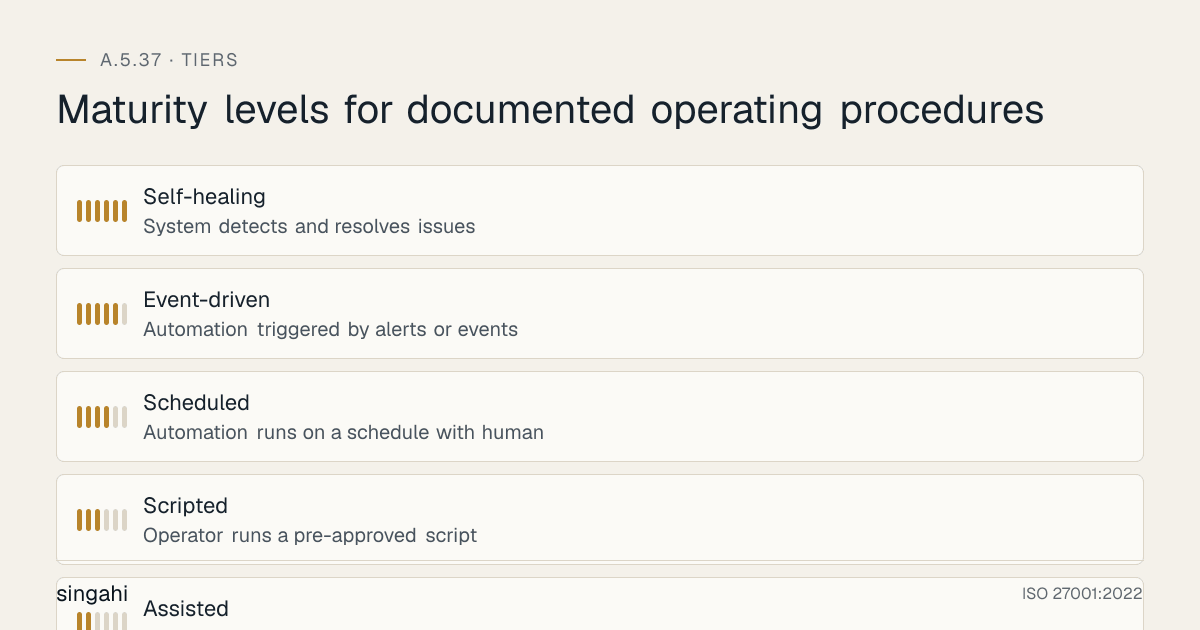
Figure · Tiers
Maturity levels for documented operating procedures
Step 0: Establish Governance for Operating Procedures
Before writing a single SOP, define how SOPs will be governed.
Governance decisions to document:
- SOP taxonomy: How will SOPs be categorized? (By system, by function, by risk level, by control mapping?)
- Template standard: One mandatory template for consistency.
- Ownership model: Who authors, reviews, approves, and maintains each SOP?
- Review cadence: Annual for all; quarterly for high-risk; trigger-based for changes and incidents.
- Repository: Central, searchable, access-controlled location.
- Version control: Naming convention, change log, archival rules.
- Training and communication: How are SOPs introduced to staff?
- Compliance monitoring: How is adherence measured?
Recommended governance body:
| Body | Frequency | Members | Responsibilities |
|---|---|---|---|
| SOP Governance Council | Quarterly | CISO, IT Director, Operations Manager, HR, Legal | Sets policy, resolves disputes, reviews metrics. |
| SOP Owner Forum | Monthly | All SOP owners | Shares updates, coordinates cross-functional SOPs, reviews risks. |
| SOP Administrator | Ongoing | ISMS/Quality administrator | Maintains repository, tracks reviews, archives versions. |
Step 1: Inventory Systems and Operations That Need SOPs
Start with a SOP coverage inventory. List every information processing facility, system, network, application, and service, then determine whether an operating procedure is required.
| System/Service | Criticality | SOP Required? | SOP Owner | Current Status |
|---|---|---|---|---|
| Active Directory / Identity Provider | Critical | Yes | IT Manager | Draft |
| Firewall ( perimeter) | Critical | Yes | Network Lead | Missing |
| SIEM | Critical | Yes | SOC Manager | Current |
| EDR Platform | High | Yes | Security Engineer | Outdated |
| ERP Application | Critical | Yes | Application Owner | Current |
| Database Clusters | Critical | Yes | DBA Lead | Draft |
| Backup System | Critical | Yes | Backup Admin | Current |
| Cloud Console (AWS/Azure/GCP) | Critical | Yes | Cloud Architect | Missing |
| Email Gateway | High | Yes | Messaging Admin | Current |
| VPN Service | High | Yes | Network Lead | Draft |
| HR Onboarding System | Medium | Yes | HR + IT | Current |
| Visitor Management System | Low | Optional | Facilities | Missing |
Priority rule: If a task is performed repeatedly, is critical to security or availability, or involves more than one person, it needs an SOP.
Step 2: Define the SOP Hierarchy and Taxonomy
A mature organization distinguishes between different levels of operational documentation:
┌─────────────────────────────────────────────────────────────┐
│  LEVEL 1: POLICIES                                          │
│  What we must do and why                                    │
│  Example: Information Security Policy, Access Control Policy│
└─────────────────────────────────────────────────────────────┘
                              │
                              ▼
┌─────────────────────────────────────────────────────────────┐
│  LEVEL 2: PROCEDURES / STANDARDS                            │
│  How we do it at a process level                            │
│  Example: Change Management Procedure, Patch Management Std │
└─────────────────────────────────────────────────────────────┘
                              │
                              ▼
┌─────────────────────────────────────────────────────────────┐
│  LEVEL 3: OPERATING PROCEDURES / RUNBOOKS (A.5.37)          │
│  Step-by-step instructions for specific systems or tasks    │
│  Example: AWS EC2 patching runbook, AD password reset SOP   │
└─────────────────────────────────────────────────────────────┘
                              │
                              ▼
┌─────────────────────────────────────────────────────────────┐
│  LEVEL 4: WORK INSTRUCTIONS / CHECKLISTS                    │
│  Very granular, task-level guidance                         │
│  Example: SSL certificate renewal checklist, onboarding form│
└─────────────────────────────────────────────────────────────┘
Recommended SOP categories for an Indian tech company:
- Identity and Access Management SOPs
- Network and Infrastructure SOPs
- Cloud and Platform SOPs
- Security Operations SOPs
- Data Management SOPs
- Application Operations SOPs
- Endpoint and Device SOPs
- Incident and Continuity SOPs
- Vendor and Supplier SOPs
- Physical and Facilities SOPs
- Compliance and Audit SOPs
Step 3: Adopt a Standard SOP Template
A standard template ensures every SOP contains the same essential elements. See Section 9 for the full template.
Minimum required fields:
- SOP title and unique ID
- Version number and effective date
- Approval signatures
- Purpose and scope
- Roles and responsibilities
- Prerequisites and dependencies
- Step-by-step instructions
- Expected outcomes / verification
- Rollback or error handling
- Related documents
- Review history
Step 4: Author SOPs with Operational Detail
Good SOPs are written by the people who do the work, reviewed by peers, and approved by system owners. They must be specific enough to be executed by a qualified substitute.
Writing principles:
- Use imperative verbs: "Run," "Verify," "Restart," "Escalate."
- Include exact commands, menu paths, or URLs where possible.
- Include expected outputs or screenshots for verification.
- State decision points clearly with "If X, then Y; else Z."
- Include safety checks: backups, approvals, notifications.
- Avoid assumptions; define acronyms and prerequisites.
- Keep runbooks concise; use appendices for reference data.
Example: Backup Verification SOP Excerpt
SOP-NET-007: Daily Database Backup Verification

1. Log in to the backup management console at https://backup.company.local.
2. Navigate to Jobs > Database > Production.
3. Verify that the job "PROD-DB-FULL" shows status Completed for the previous night.
4. If status is Failed or Warning, open incident INC-BKP-001 and notify the DBA on-call.
5. Select the completed job and click Verify to initiate an integrity check.
6. Wait for verification to complete. Expected result: "Integrity check passed."
7. If verification fails, immediately quarantine the backup set and initiate a retry.
8. Document the result in the Backup Verification Log (sheet: Daily).
Step 5: Review, Approve, and Publish
Every SOP must pass through a controlled lifecycle:
DRAFT → TECHNICAL REVIEW → SECURITY REVIEW → APPROVAL → PUBLISH → COMMUNICATE → TRAIN → PERIODIC REVIEW
| Stage | Owner | Activities |
|---|---|---|
| Draft | SOP Author | Write SOP using standard template. |
| Technical Review | Senior engineer / peer | Verify accuracy, commands, and dependencies. |
| Security Review | Security team | Verify alignment with security policies and controls. |
| Approval | System owner / manager | Formal sign-off. |
| Publish | SOP Administrator | Upload to repository, update index, archive old version. |
| Communicate | SOP Owner | Notify affected personnel of new or updated SOP. |
| Train | Training coordinator / manager | Include SOP in role-specific training. |
| Periodic Review | SOP Owner | Review annually or on trigger events. |
Step 6: Make SOPs Available
SOPs must be available to personnel who need them. Availability means:
- Findable: Searchable by system name, task, keyword, or control mapping.
- Accessible: Available during normal operations and incidents, including from alternate locations if primary systems are down.
- Readable: Available in a language and format understood by the personnel.
- Current: Only the latest approved version is visible for routine use.
- Protected: Access controlled so unauthorized personnel cannot misuse operational details (e.g., credentials, network diagrams).
Availability channels:
- Central intranet wiki or knowledge base (primary)
- ITSM tool attachment (linked to relevant service or configuration item)
- Document management system (SharePoint, Confluence, Documentum)
- Offline copies for business continuity scenarios (secure USB, printed binders in secure location)
- Mobile-accessible versions for on-call engineers
Step 7: Train Personnel and Verify Competence
Training ensures that SOPs are not just available but understood and followed.
| Training Type | Content | Frequency |
|---|---|---|
| Onboarding | Overview of SOP repository; how to find SOPs; role-specific SOPs. | Per hire |
| Role-specific training | Detailed walkthrough of SOPs the employee will execute. | Annually + on SOP change |
| Tabletop exercises | Walk through incident and continuity SOPs in a simulated scenario. | Quarterly |
| Hands-on drills | Execute recovery, failover, or incident response SOPs in a test environment. | Semi-annually |
| Competency checks | Supervisor observes employee executing SOP; records proficiency. | Annually |
Step 8: Monitor, Review, and Improve
SOPs are living documents. Establish a review rhythm:
| Review Type | Trigger | Owner | Timeline |
|---|---|---|---|
| Scheduled review | Annual calendar | SOP Owner | Within review month |
| Post-incident review | Major incident or near-miss | Incident Lead + SOP Owner | Within 14 days |
| Post-change review | Significant system change | Change Manager + SOP Owner | Before go-live |
| Post-audit review | Audit finding related to SOP | SOP Owner | Within remediation timeline |
| Regulatory change review | New or amended regulation | Compliance Manager + SOP Owner | Within 30 days |
| Technology refresh review | New tool or platform version | SOP Owner | Within 60 days |
Implementation by Organization Size
For Startups and Small Organizations (10-50 employees)
- Use a simple wiki (Notion, Confluence, or GitBook).
- Start with 10-15 critical SOPs: backup, restore, onboarding, offboarding, firewall change, incident escalation, patching, access request.
- Combine author, reviewer, and approver roles where appropriate, but maintain independence for high-risk SOPs.
- Review quarterly for the first year to mature quickly.
For Mid-Sized Organizations (50-500 employees)
- Implement an ITSM tool (ServiceNow, Freshservice, Jira Service Management).
- Link SOPs to configuration items in the CMDB.
- Introduce formal RACI ownership.
- Begin automated monitoring of SOP review status and training completion.
For Large and Enterprise Organizations (500+ employees)
- Deploy a dedicated knowledge management or GRC platform.
- Federate SOP ownership to business units with central governance.
- Automate SOP compliance checks where possible.
- Integrate SOP execution with SOAR playbooks and ITSM workflows.
- Maintain business unit or geography-specific variations with clear mapping to the master SOP.
SOPs for Cloud and DevOps Environments
Cloud and DevOps environments introduce unique operating procedure challenges: ephemeral infrastructure, infrastructure-as-code (IaC), continuous deployment, and shared responsibility models. A.5.37 applies equally here, but the form of documentation must adapt.
Key principles for cloud and DevOps SOPs:
- SOP the process, not just the server. In auto-scaling environments, document the pipeline and configuration rather than individual instance steps.
- Version control SOPs alongside code. Store runbooks in Git repositories so they evolve with the systems they describe.
- Automate the deterministic parts. Use CI/CD pipelines, Ansible playbooks, Terraform plans, and Kubernetes manifests to enforce SOPs.
- Document exceptions and escalations. Automated systems fail; SOPs must describe how humans intervene.
- Maintain runbooks for incident scenarios. Cloud outages, region failures, and service degradation require pre-defined response runbooks.
Cloud-specific SOP examples:
| SOP | Why It Matters |
|---|---|
| IAM role and policy provisioning | Prevents privilege escalation and misconfigured trust policies. |
| S3 bucket creation and hardening | Avoids public exposure of sensitive data. |
| VPC and security group changes | Ensures network segmentation is not accidentally weakened. |
| Database encryption and key rotation | Maintains data protection and compliance. |
| Container image build and scanning | Prevents vulnerable images from reaching production. |
| Kubernetes cluster upgrade | Reduces risk of API breakage and downtime. |
| Cloud resource tagging and inventory | Supports cost management, security, and audit traceability. |
| Cross-region failover runbook | Ensures continuity during cloud provider outages. |
SOP Automation and Infrastructure as Code
Automation does not eliminate the need for SOPs; it changes their focus. Automated SOPs must be documented, version-controlled, reviewed, and tested just like manual ones.
SOP automation maturity stages:
| Stage | Description | Example |
|---|---|---|
| Manual | Operator follows written steps without tooling assistance. | Manually run backup commands. |
| Assisted | Tool provides checklist or prompts; human executes. | ITSM checklist for onboarding. |
| Scripted | Operator runs a pre-approved script. | Python script to rotate logs. |
| Scheduled | Automation runs on a schedule with human monitoring. | Nightly backup job. |
| Event-driven | Automation triggered by alerts or events. | SOAR playbook triggered by SIEM alert. |
| Self-healing | System detects and resolves issues without human intervention. | Auto-remediation of known alert patterns. |
Documentation requirements for automated SOPs:
- Design rationale and decision logic
- Input parameters, preconditions, and constraints
- Output and success criteria
- Error handling and escalation paths
- Maintenance and ownership
- Audit logs and evidence of execution
Example: Automated Patch Deployment SOP
SOP-CLO-012: Automated OS Patch Deployment via Ansible

1. Patch candidate list is generated by vulnerability scanner every Tuesday.
2. Ansible playbook PATCH-OS-001 reads the candidate list from the shared drive.
3. Playbook executes in staging environment (SOP-CLO-012-STAGING).
4. Automated tests verify application functionality post-patch.
5. If tests pass, change request CHG-PATCH-### is auto-created for CAB approval.
6. Upon CAB approval, playbook executes in production during maintenance window.
7. Results are logged to the Patch Management Log.
8. Failures trigger incident INC-PATCH-### and notify on-call engineer.
Automation must be paired with human-readable SOPs so that operations teams can understand, audit, and intervene when needed.
Tools, Technologies, and Solutions
Categories of Tools
| Category | Purpose | Examples |
|---|---|---|
| Documentation / Wiki | Central SOP repository | Confluence, Notion, GitBook, SharePoint |
| IT Service Management (ITSM) | Link SOPs to services, incidents, changes, problems | ServiceNow, Freshservice, Jira Service Management, ManageEngine |
| Configuration Management Database (CMDB) | Map SOPs to systems and services | ServiceNow CMDB, Device42, Lansweeper |
| Runbook Automation | Automate SOP execution | Ansible, Rundeck, n8n, Torq, Relay |
| Security Orchestration, Automation and Response (SOAR) | Automate security runbooks | Splunk SOAR, Palo Alto XSOAR, Swimlane, IBM Resilient |
| Document Management | Version control, approval workflows | SharePoint, Documentum, OpenText, Google Drive |
| Learning Management System (LMS) | SOP training and acknowledgment | Workday Learning, TalentLMS, Litmos, KnowBe4 |
| Monitoring and Alerting | Trigger runbook execution | Datadog, PagerDuty, Opsgenie, Grafana OnCall |
Vendor Comparison Matrix
| Vendor / Tool | Category | Best For | Pricing model | Strengths | Weaknesses |
|---|---|---|---|---|---|
| Atlassian Confluence | Wiki / Documentation | Small to large orgs already using Jira | INR 500-1,500/user/month | Easy to use, strong search, integrations | Can become disorganized without governance |
| Notion | Wiki / Documentation | Startups and small teams | INR 800-1,200/user/month | Flexible, modern UI, templates | Limited enterprise governance features |
| Microsoft SharePoint | Document Management | Microsoft 365 enterprises | Part of M365 license | Tight Microsoft integration, workflows | Complex setup, poor search without tuning |
| ServiceNow | ITSM / CMDB / GRC | Large enterprises | Custom (high) | Complete, scalable, audit-friendly | expensive, complex implementation |
| Freshservice (Freshworks) | ITSM | Growing Indian companies | INR 600-2,500/agent/month | Easy to deploy, good value, India-based support | Less customizable than ServiceNow |
| Jira Service Management | ITSM | DevOps-oriented teams | INR 650-3,000/agent/month | Strong developer integration, flexible | Requires administration expertise |
| ManageEngine ServiceDesk Plus | ITSM | Indian SMBs and growing companies | INR 500-1,800/technician/month | efficient, on-premise option, Zoho ecosystem | UI can feel dated |
| Ansible (Red Hat) | Runbook Automation | Infrastructure teams | Free (AWX) / paid Tower custom | Agentless, powerful, widely adopted | Requires YAML/automation skills |
| Rundeck / PagerDuty Process Automation | Runbook Automation | Enterprises needing self-service runbooks | Custom | Good scheduling, delegation, audit trails | Setup effort for complex workflows |
| n8n | Workflow Automation | Tech-savvy small teams | Free self-hosted / cloud plans | Visual workflow builder, open-source | Less enterprise-hardened |
| Splunk SOAR / Palo Alto Cortex XSOAR | SOAR | Mature SOC teams | Custom (high) | Deep security automation | Significant investment and expertise |
| Swimlane | SOAR | SOC teams wanting low-code automation | Custom | Flexible, strong reporting | Requires tuning |
| ServiceNow CMDB | CMDB | ServiceNow customers | Part of ServiceNow | Integrated with ITSM | Complex data modeling |
| Device42 | CMDB | Growing companies needing agentless discovery | Custom | Fast discovery, visualization | Less mature integrations |
Tool Selection Guidance
| Organization Profile | Recommended Stack |
|---|---|
| Indian SaaS startup (10-50 employees) | Notion or Confluence + Jira Service Management + Ansible |
| Indian growing-company IT/ITES (50-500 employees) | Confluence + Freshservice or Jira Service Management + Ansible/Rundeck |
| Indian bank or NBFC | ServiceNow or ManageEngine + dedicated GRC module + SOAR |
| Indian enterprise manufacturer | SharePoint + ServiceNow + Rundeck + OT runbook repository |
| Regulated Indian fintech | ServiceNow + SOAR + Documentum/SharePoint with DLP |
Policy and Procedure Templates
Operating Procedures Policy (Level 2)
OPERATING PROCEDURES POLICY
[Organization Name]
Version: 1.0
Approved by: [CISO / IT Director]
Date: [Date]
Review Date: [Date + 12 months]
Classification: Internal

---

1. PURPOSE

This policy establishes the requirements for documenting, maintaining, and
making available operating procedures for information processing facilities
and IT services in accordance with ISO 27001:2022 Annex A 5.37.

2. SCOPE

This policy applies to all employees, contractors, vendors, and managed service
providers who operate, administer, support, or maintain [Organization Name]'s
information processing facilities, systems, networks, applications, and services.

3. POLICY STATEMENTS

3.1 All operating procedures required for the secure and reliable operation
    of information processing facilities shall be documented.

3.2 Documented operating procedures shall be made available to all personnel
    who need them to perform their duties.

3.3 Operating procedures shall be accurate, complete, reviewed, approved,
    version-controlled, and protected against unauthorized modification.

3.4 Each operating procedure shall have a designated owner responsible for
    its accuracy, review, and currency.

3.5 Operating procedures shall be reviewed at planned intervals, after
    significant changes, and after incidents that reveal gaps.

3.6 Personnel shall be trained on the operating procedures applicable to
    their role.

3.7 Deviations from operating procedures shall be documented, justified,
    and approved.

4. ROLES AND RESPONSIBILITIES

- CISO: Overall governance of the operating procedures program.
- IT Director: Ensures resources and accountability for IT operations SOPs.
- System Owners: Approve SOPs for systems under their ownership.
- SOP Authors: Draft and update SOPs.
- SOP Administrator: Maintains repository, tracks reviews, archives versions.
- All Operational Staff: Follow documented procedures and report issues.

5. COMPLIANCE

Failure to follow documented operating procedures may result in disciplinary
action, particularly where such failure leads to security incidents, downtime,
or non-compliance with regulatory obligations.

6. RELATED DOCUMENTS

- Information Security Policy (A.5.1)
- Change Management Procedure (A.8.32)
- Incident Response Plan (A.5.24-A.5.26)
- Documented Information Control Procedure (ISO 27001 clause 7.5)
- SOP Master Index

7. REVIEW

This policy is reviewed annually and when significant changes occur.
Standard Operating Procedure Template (Level 3)
STANDARD OPERATING PROCEDURE

SOP ID: [SOP-XXX-###]
Title: [Clear, action-oriented title]
Category: [e.g., Identity Management, Network Operations, Security Operations]
System/Service: [Name of system or service]
Owner: [Name and role]
Author: [Name]
Reviewers: [Names and roles]
Approved by: [Name and title]
Classification: [Internal / Confidential / Restricted]
Version: [X.Y]
Effective Date: [YYYY-MM-DD]
Next Review Date: [YYYY-MM-DD]
ISO 27001 Mapping: [e.g., A.5.37, A.8.13, A.8.32]

---

1. PURPOSE

Brief statement of what this SOP accomplishes and why it exists.

2. SCOPE

Who must follow this SOP and under what circumstances.

3. DEFINITIONS

Key terms, acronyms, and abbreviations used in this SOP.

4. ROLES AND RESPONSIBILITIES

| Role | Responsibility |
|---|---|
| [Role 1] | [Responsibility] |
| [Role 2] | [Responsibility] |

5. PREREQUISITES

- Access requirements (accounts, groups, permissions)
- Tools or systems needed
- Pre-conditions (e.g., maintenance window, backup completed)
- Related approvals or tickets

6. PROCEDURE

6.1 [Step 1]
    [Detailed instruction]
    [Expected result]

6.2 [Step 2]
    [Detailed instruction]
    [Expected result]

6.3 [Decision point or conditional step]
    IF [condition]
       THEN [action]
    ELSE [alternative action]

7. VERIFICATION

How to confirm the procedure was completed correctly.

8. ROLLBACK / ERROR HANDLING

Steps to take if the procedure fails or produces unexpected results.

9. RELATED DOCUMENTS

- [Linked policy]
- [Linked procedure]
- [Linked runbook]
- [Linked checklist]

10. REVISION HISTORY

| Version | Date | Author | Description of Change | Approved By |
|---|---|---|---|---|
| 1.0 | YYYY-MM-DD | [Name] | Initial release | [Name] |
| 1.1 | YYYY-MM-DD | [Name] | [Description] | [Name] |

11. APPROVAL SIGNATURES

| Name | Role | Signature | Date |
|---|---|---|---|
| [Name] | [Role] | _______________ | [Date] |
| [Name] | [Role] | _______________ | [Date] |
Sample SOP: Privileged Account Access Request and Provisioning
SOP ID: SOP-IAM-003
Title: Privileged Account Access Request and Provisioning
Owner: Identity and Access Management Lead
Version: 2.1
Effective Date: 2026-01-15
Next Review Date: 2027-01-15

1. PURPOSE
To standardize the request, approval, provisioning, and review of privileged
access to [Organization Name]'s critical systems.

2. SCOPE
All requests for privileged access to production systems, databases, network
devices, cloud consoles, security tools, and backup systems.

3. PREREQUISITES
- Requester has a valid business justification.
- Requester's manager has approved the request.
- Security team has reviewed the risk.

4. PROCEDURE
4.1 Requester submits a ticket in the ITSM portal using form "Privileged Access Request."
4.2 Manager reviews and approves the request within 24 hours.
4.3 Security team performs risk review and approves within 48 hours.
4.4 IAM team provisions access using the principle of least privilege.
4.5 MFA is enforced on the privileged account.
4.6 Access is logged in the Privileged Access Log.
4.7 Requester and manager are notified of provisioning.
4.8 Access is reviewed quarterly by the system owner.

5. VERIFICATION
Confirm the account exists in the Privileged Access Register with:
- Requester name
- Approved by
- Systems granted
- MFA status = Enabled
- Review date set

6. ROLLBACK
If access was granted in error, revoke within 2 hours and notify requester,
manager, and security team.
Sample SOP: Firewall Rule Change
SOP-NET-005: Perimeter Firewall Rule Change
Owner: Network Security Lead
Version: 1.4
Effective Date: 2026-02-01
Next Review Date: 2027-02-01

1. PURPOSE
To standardize the request, risk assessment, implementation, and verification of
perimeter firewall rule changes.

2. SCOPE
All changes to perimeter firewall rules, including additions, modifications, and deletions.

3. PREREQUISITES
- Firewall change request ticket with business justification.
- Security review approval for high-risk rules.
- Current firewall configuration backup.
- Maintenance window for production changes.

4. PROCEDURE
4.1 Review the change request and verify source IP, destination IP, port, protocol, and purpose.
4.2 Assess whether the rule aligns with the principle of least privilege.
4.3 Search existing rules to avoid duplication.
4.4 Create the rule in the firewall management interface with a descriptive name and ticket reference.
4.5 Set an expiration date for temporary rules (maximum 30 days).
4.6 Implement the change during the approved maintenance window.
4.7 Verify connectivity using test cases documented in the ticket.
4.8 Confirm no unintended traffic is permitted using firewall logs.
4.9 Update the Firewall Rule Register.

5. VERIFICATION
- Rule appears in the active rulebase.
- Required traffic passes; denied traffic remains blocked.
- No new high-severity alerts in the SIEM.

6. ROLLBACK
If the change causes issues, revert to the backup configuration and notify the requester and security team.
Sample SOP: Security Incident Escalation
SOP-SEC-011: Security Incident Escalation and Initial Triage
Owner: SOC Manager
Version: 2.0
Effective Date: 2026-03-15
Next Review Date: 2027-03-15

1. PURPOSE
To ensure security events are triaged, classified, and escalated consistently.

2. SCOPE
All security events detected by SIEM, EDR, threat intelligence, or manual reporting.

3. PROCEDURE
3.1 SOC analyst receives alert or report.
3.2 Analyst reviews alert context: source, target, severity, timestamp.
3.3 Determine if the event is a false positive, true positive, or requires escalation.
3.4 For true positives, classify as Low, Medium, High, or Critical using the Incident Classification Matrix.
3.5 For High/Critical incidents, page the on-call incident responder within 15 minutes.
3.6 Create incident record in ITSM and link related alerts.
3.7 Preserve evidence: screenshots, logs, memory dumps as applicable.
3.8 Communicate initial assessment to stakeholders per the Incident Communication Plan.

4. VERIFICATION
- Incident record exists with correct classification.
- On-call responder acknowledged within SLA.
- Evidence chain of custody initiated.

5. ROLLBACK
Not applicable for triage; escalation cannot be undone. If misclassified, update incident record and notify stakeholders.
Sample SOP: New Employee Endpoint Provisioning
SOP-END-003: Laptop Provisioning and Hardening for New Employees
Owner: IT Support Manager
Version: 1.6
Effective Date: 2026-01-20
Next Review Date: 2027-01-20

1. PURPOSE
To ensure all employee laptops are provisioned securely and consistently.

2. SCOPE
All corporate-owned and BYOD-enrolled laptops for employees and contractors.

3. PREREQUISITES
- Approved onboarding request in HR system.
- Hardware asset tag assigned.
- Golden image available and updated within last 30 days.

4. PROCEDURE
4.1 Verify employee details and role-based software requirements.
4.2 Image the laptop using the approved golden image.
4.3 Apply role-based configuration via MDM.
4.4 Enroll device in endpoint protection (EDR/AV).
4.5 Enable disk encryption and verify activation.
4.6 Install required applications from approved software catalog.
4.7 Configure VPN and MFA.
4.8 Update asset inventory with serial number, asset tag, and assigned user.
4.9 Hand over device to employee with security briefing.

5. VERIFICATION
- Device appears in MDM and EDR consoles.
- Encryption status shows "Enabled."
- Asset inventory updated.
- Employee signed acceptable use acknowledgment.

6. ROLLBACK
If the device is found non-compliant, quarantine it and re-image.
Risk Assessment and Treatment
Risk Scenarios Related to A.5.37
| Risk ID | Risk Description | Likelihood | Impact | Risk Level | Treatment |
|---|---|---|---|---|---|
| R-OP-001 | Critical system recovery procedure is missing; recovery during outage is delayed or fails. | Medium | Critical | High | Develop and test recovery runbooks for all critical systems. |
| R-OP-002 | Operators perform privileged tasks from memory, causing misconfiguration or outage. | High | High | High | Document all privileged operations; enforce runbook use; implement peer review. |
| R-OP-003 | SOPs are outdated after a system change, leading to incorrect execution. | Medium | High | High | Trigger SOP review with every significant change; link SOPs to change records. |
| R-OP-004 | SOPs are stored on a single person's laptop and inaccessible during an incident. | Medium | High | High | Centralize SOP repository with offline/DR copies. |
| R-OP-005 | SOPs contain credentials or sensitive configuration details, exposed to unauthorized personnel. | Low | Critical | High | Remove credentials from SOPs; integrate with vault; restrict access. |
| R-OP-006 | Personnel are not trained on SOPs, leading to inconsistent execution. | Medium | Medium | Medium | Include SOP training in onboarding and annual refresher. |
| R-OP-007 | SOP review cycle is missed, causing regulatory audit findings. | Medium | Medium | Medium | Implement automated review reminders and compliance dashboards. |
| R-OP-008 | Vendor-operated systems lack documented procedures, creating accountability gaps. | Medium | High | High | Include SOP requirements in vendor contracts and SLAs. |
| R-OP-009 | Emergency changes bypass SOPs, introducing unapproved configurations. | Low | High | Medium | Define emergency SOPs and require post-change review and documentation. |
| R-OP-010 | SOPs are not aligned with DPDP Act requirements for personal data handling. | Low | Critical | High | Review and update data handling SOPs for DPDP compliance. |
Risk Treatment Plan
| Treatment | Description | Responsible | Target Date |
|---|---|---|---|
| Mitigate | Create runbooks for top 20 critical systems and services. | IT Manager | 8 weeks |
| Mitigate | Implement SOP repository with role-based access and offline backup. | SOP Administrator | 4 weeks |
| Mitigate | Link SOP review to change management workflow. | Change Manager | 6 weeks |
| Mitigate | Train all operations staff on relevant SOPs. | Training Lead | 8 weeks |
| Transfer | Require MSPs to maintain and share SOPs for managed services. | Vendor Manager | 4 weeks |
| Accept | Retain residual risk for legacy systems being decommissioned within 12 months. | CISO | Ongoing |
Audit and Compliance Checklist
25 Audit Questions for A.5.37
| # | Audit Question | Expected Evidence | Red Flag |
|---|---|---|---|
| 1 | Is there an operating procedures policy or equivalent? | Approved policy document. | No policy; policy not approved. |
| 2 | Is there an inventory of systems requiring operating procedures? | SOP coverage inventory / CMDB extract. | No inventory; critical systems missing. |
| 3 | Are operating procedures documented for critical systems? | Sample SOPs for critical systems. | Missing SOPs for critical systems. |
| 4 | Are SOPs accessible to personnel who need them? | Repository access logs; staff demonstration. | SOPs stored locally; not searchable. |
| 5 | Are SOPs version-controlled? | Version history; naming convention. | No version numbers; multiple versions in use. |
| 6 | Are SOPs approved by appropriate management? | Approval records or signatures. | Draft SOPs in production use. |
| 7 | Are obsolete SOPs archived and removed from active use? | Archive folder; obsolete version log. | Old versions still referenced. |
| 8 | Are SOPs reviewed at planned intervals? | Review records with dates and owners. | No review history; expired review dates. |
| 9 | Are SOPs updated after significant changes? | Change records linked to SOP updates. | System changed but SOP not updated. |
| 10 | Are SOPs protected from unauthorized modification? | Access control settings; audit logs. | Open editing permissions; no audit trail. |
| 11 | Do SOPs include step-by-step instructions? | Sample SOP content. | Generic policy statements instead of steps. |
| 12 | Do SOPs include verification or expected outcomes? | Sample SOPs with verification sections. | No way to confirm correct execution. |
| 13 | Do SOPs include error handling or rollback? | Sample SOPs with rollback sections. | No guidance for failures. |
| 14 | Are personnel trained on the SOPs relevant to their role? | Training records; LMS completion reports. | No training records; staff unaware of SOPs. |
| 15 | Do job descriptions reference compliance with SOPs? | Sample job descriptions. | Roles do not mention SOP compliance. |
| 16 | Are deviations from SOPs documented and approved? | Exception log or deviation records. | Frequent undocumented deviations. |
| 17 | Are backup and recovery SOPs tested? | Test records and results. | Never tested; no test evidence. |
| 18 | Are incident response runbooks available and tested? | IR runbooks; drill records. | No IR runbooks; drills not conducted. |
| 19 | Are vendor/managed service SOPs available and reviewed? | Vendor SOPs; SLA review records. | Vendor operations undocumented. |
| 20 | Are SOPs aligned with information security policies? | Mapping matrix. | SOPs contradict policies. |
| 21 | Are SOPs considered in change management? | Change records referencing SOP updates. | Change process ignores SOP impact. |
| 22 | Are SOPs available during business continuity scenarios? | Offline SOP copies; DR site access. | SOPs only available on systems that may be down. |
| 23 | Do SOPs address regulatory requirements (DPDP, RBI, SEBI, etc.)? | Regulatory mapping; SOP content. | No regulatory alignment. |
| 24 | Are SOP metrics tracked and reported? | KPI dashboard; management review minutes. | No metrics; no management oversight. |
| 25 | Are lessons learned from incidents incorporated into SOPs? | Incident records with SOP update actions. | Same incidents recur due to unchanged SOPs. |
Metrics and KPIs
Figure · Measures
The measures that show A.5.37 is working
- SOP Coverage Rate100%Quarterly
- SOP Review On-Time Rate≥95%Monthly
- SOP Approval Completion Rate100%Quarterly
- SOP Accessibility Score≥95%Quarterly
- SOP Training Completion Rate≥98%Monthly
15 KPIs for A.5.37 Maturity
| # | KPI | Formula | Target | Frequency |
|---|---|---|---|---|
| 1 | SOP Coverage Rate | (Systems with current SOPs / Total critical systems) × 100 | 100% | Quarterly |
| 2 | SOP Review On-Time Rate | (SOPs reviewed on or before due date / Total SOPs due) × 100 | ≥95% | Monthly |
| 3 | SOP Approval Completion Rate | (Approved SOPs / Total active SOPs) × 100 | 100% | Quarterly |
| 4 | SOP Accessibility Score | (Personnel who can locate relevant SOP in <2 minutes / Sample tested) × 100 | ≥95% | Quarterly |
| 5 | SOP Training Completion Rate | (Personnel trained on relevant SOPs / Personnel required) × 100 | ≥98% | Monthly |
| 6 | SOP-Related Incidents | Count of incidents where root cause includes missing or incorrect SOP | <2 per quarter | Quarterly |
| 7 | Mean Time to Recover (MTTR) | Total downtime from incidents / Number of incidents | Trend downward | Monthly |
| 8 | SOP Compliance Rate (Observed) | (Tasks performed per SOP / Tasks observed) × 100 | ≥95% | Quarterly |
| 9 | SOP Version Currency | (SOPs at latest version / Total active SOPs) × 100 | 100% | Monthly |
| 10 | SOP Change Integration Rate | (Changes with SOP impact assessed / Total changes) × 100 | 100% | Monthly |
| 11 | Runbook Test Pass Rate | (Runbook tests passed / Runbook tests conducted) × 100 | ≥95% | Semi-annually |
| 12 | SOP Acknowledgment Rate | (Personnel who acknowledged relevant SOPs / Required personnel) × 100 | ≥98% | Monthly |
| 13 | Critical SOP Offline Availability | (Critical SOPs available offline / Total critical SOPs) × 100 | 100% | Quarterly |
| 14 | Vendor SOP Compliance Rate | (Vendors with documented SOPs / Critical vendors operating systems) × 100 | 100% | Quarterly |
| 15 | SOP Repository Search Success Rate | (Successful SOP searches / Total searches) × 100 | ≥90% | Monthly |
Sample KPI Dashboard
SOP GOVERNANCE DASHBOARD — JUNE 2026

┌─────────────────────────────────────────────────────────────┐
│ OVERALL MATURITY: LEVEL 3 (DEFINED)                         │
├─────────────────────────────────────────────────────────────┤
│ SOP Coverage Rate          94% ████████████████████░░       │
│ Review On-Time Rate        97% █████████████████████░       │
│ Training Completion        99% ██████████████████████       │
│ Runbook Test Pass Rate    100% ██████████████████████       │
│ SOP-Related Incidents         1 (target <2)                 │
├─────────────────────────────────────────────────────────────┤
│ ACTIONS REQUIRED                                            │
│ • SOP missing for new Kubernetes cluster → Owner: Cloud Lead│
│ • 2 SOPs due for review in July → Owners notified           │
└─────────────────────────────────────────────────────────────┘
Common Pitfalls / Audit Failures & How to Avoid Them
| Pitfall | Cause | Fix |
|---|---|---|
| SOPs exist only in operators' heads | No documentation culture; over-reliance on key individuals. | Mandate SOP creation as part of handover; use interviews to capture knowledge. |
| SOPs are generic copy-paste documents | Authors reused templates without customizing for the environment. | Require environment-specific commands, screenshots, and verification steps. |
| SOPs are outdated | No review cycle; no link to change management. | Implement annual reviews and trigger reviews on changes; use automated reminders. |
| SOPs are not accessible during incidents | Stored on systems that may be down; no offline copies. | Maintain offline/DR copies and printed emergency binders. |
| SOPs contain embedded credentials | Convenience; lack of secret management. | Remove credentials; integrate with vault; use placeholders. |
| Personnel not trained on SOPs | Training program ignores SOPs. | Include SOP training in onboarding and role-specific curricula. |
| SOPs contradict policies | Siloed authorship; no policy alignment review. | Map every SOP to relevant policies; include security review in approval. |
| No evidence of SOP use | SOPs published but not enforced. | Observe tasks; require checklists; integrate SOPs into ITSM workflows. |
| Vendor SOPs missing | Contracts do not require documentation from MSPs. | Include SOP requirements in contracts and vendor assessments. |
| SOPs too long and complex | Authors tried to cover everything in one document. | Split into focused runbooks; use appendices for reference. |
| No rollback or error handling | Authors only documented the happy path. | Require failure scenarios and rollback steps in every SOP. |
| Version control chaos | Multiple copies in email, shared drives, and local disks. | Enforce single source of truth in repository; block local copies. |
| SOPs not linked to CMDB | SOPs created outside IT asset governance. | Link each SOP to configuration item in CMDB or service catalog. |
| Auditors find draft SOPs in use | Approval workflow not enforced. | Block publication until approval; use workflow automation. |
| Language or literacy barriers | SOPs written in complex English; field staff struggle. | Use simple language; add visuals; provide vernacular versions where needed. |
Illustrative Scenarios
Illustrative scenario, a composite example for guidance, not a specific Singahi engagement or a verified outcome.
Illustrative Scenario 1: Indian NBFC, Database Recovery Failure During RBI Inspection
Organization: A mid-sized non-banking financial company (NBFC) in Mumbai with 400 employees and INR 800 crore assets under management.
Challenge: During a routine RBI IT inspection, the NBFC was asked to demonstrate recovery of its core banking database from backup. The DBA who had performed backups for five years had recently resigned. The remaining team attempted the restore using a partially documented procedure saved on the ex-employee's laptop. The restore failed because:
- The backup procedure did not document the encryption passphrase rotation performed six months earlier.
- The recovery runbook referenced a decommissioned backup server.
- No one else had tested a full restore in over two years.
The NBFC could not recover the database within the inspection window. RBI issued a cyber security deficiency letter, restricted certain digital onboarding activities, and imposed a penalty of INR 1.5 crore.
Solution: The NBFC engaged an external security consultant to rebuild its operating procedures discipline.
- Conducted a SOP coverage assessment across all 38 critical systems.
- Developed runbooks for backup, restore, failover, and DR for the core banking platform, databases, and network devices.
- Implemented a central SOP repository in SharePoint with version control and role-based access.
- Linked SOP reviews to the change advisory board (CAB) process.
- Conducted quarterly restore tests with documented results.
- Trained all operations staff and recorded competencies.
- Added SOP clauses to all MSP contracts.
Results:
- SOP coverage increased from 42% to 98% within 4 months.
- Database restore time reduced from undefined/failed to 45 minutes (RTO: 2 hours).
- Zero SOP-related findings in the subsequent RBI inspection.
- Staff confidence improved; no single points of failure for critical operations.
- The NBFC successfully renewed its ISO 27001 certification with no major nonconformities.
Illustrative Scenario 2: Indian SaaS Startup, Outage from Undocumented Deployment Process
Organization: A Bengaluru-based SaaS startup providing HR tech solutions to 200 enterprise customers.
Challenge: The startup had experienced rapid growth. Deployments were performed by a senior DevOps engineer who "knew the steps." During a Friday evening release, the engineer was on leave. A junior engineer attempted the deployment using informal notes shared over Slack. The deployment:
- Skipped the database migration pre-check.
- Deployed the new code to all nodes simultaneously instead of a canary rollout.
- Did not roll back when health checks began failing.
The result was a 4.5-hour outage, affecting 150 customers. The startup faced SLA penalties, negative social media attention, and a churn risk from three enterprise accounts representing 20% of revenue.
Solution: The startup implemented a documented operating procedures program focused on DevOps and platform operations.
- Created deployment runbooks with step-by-step commands, canary rollout rules, and rollback triggers.
- Integrated SOPs into the CI/CD pipeline so that key checklist items had to be acknowledged before release.
- Built an on-call runbook repository in Confluence, integrated with PagerDuty.
- Implemented runbook automation using Ansible for repetitive tasks.
- Introduced deployment drills every two weeks in a staging environment.
Results:
- Deployment-related outages reduced by 85% in six months.
- Mean time to recover (MTTR) improved from 4.5 hours to 18 minutes.
- The startup received a clean SOC 2 Type II report on its first attempt.
- Enterprise customer retention improved; two of the at-risk accounts renewed early.
- The DevOps team could scale without relying on a single individual.
Multi-Framework Mapping
| ISO 27001:2022 A.5.37 | SOC 2 | PCI DSS | NIST 800-53 | CIS Controls | COBIT 2019 | GDPR / DPDP Act 2023 |
|---|---|---|---|---|---|---|
| Documented operating procedures | CC6.1, Logical access security; CC7.2, System monitoring; CC8.1, Change control | The x.1.1 requirement in every PCI DSS v4.0.1 section (security policies and operational procedures documented, kept up to date, in use and known to all affected parties); 12.10.1 (incident response plan) | CM-3, Configuration change control; CM-6, Configuration settings; IR-4, Incident handling; MA-2, Controlled maintenance; SA-8, Security engineering principles; SI-4, Information system monitoring | Control 4, Secure configuration of enterprise assets and software; Control 7, Continuous vulnerability management; Control 8, Audit log management; Control 17, Incident response management; Control 19, Incident response tests | BAI03, Managed Change; BAI06, Managed Change Acceptance; DSS01, Managed Operations; DSS02, Managed Service Requests and Incidents; DSS04, Managed Continuity; DSS05, Managed Security Services; APO12, Managed Risk | GDPR Article 32, Security of processing; Article 33, Personal data breach notification; DPDP Act 2023 Section 8(5), Reasonable security safeguards; breach notification obligations |
Mapping Commentary
- SOC 2: A.5.37 directly supports CC6.1, CC7.2, and CC8.1 by ensuring that access controls, monitoring, and changes are performed through documented procedures. SOC 2 auditors routinely ask for runbooks and evidence that they are followed.
- PCI DSS: Requirements 2.2 (configuration standards) and 6.5 (change control) require documented procedures. Payment environments must have runbooks for firewall management, patching, access provisioning, and incident response.
- NIST 800-53: Controls CM-3, CM-6, IR-4, MA-2, SA-8, and SI-4 all depend on documented operating procedures. Federal contractors and agencies mapping to NIST will find A.5.37 foundational.
- CIS Controls: Controls 4, 7, 8, 17, and 18 require documented, repeatable processes. CIS Implementation Groups expect increasing formality of SOPs at higher maturity levels.
- COBIT 2019: BAI03, BAI06, DSS01, DSS02, DSS04, DSS05, and APO12 all reference the need for documented procedures, controlled operations, and managed change.
- GDPR / DPDP Act 2023: Security of processing and breach notification require documented operational steps. The DPDP Act's reasonable safeguards obligation is best demonstrated through SOPs for data handling, access control, and breach response.
Implementation Roadmap
Figure · Timeline
Rollout in order
- Week 1Define SOP governance, taxonomy
- Week 1Inventory critical systems and identify
- Week 2Select and configure SOP repository
- Week 2Communicate the SOP program to all
Phase 1: Foundation (Weeks 1–2)
| Week | Activities | Deliverables | Owner |
|---|---|---|---|
| 1 | Define SOP governance, taxonomy, and template; appoint SOP owners and administrator. | SOP policy, template, governance charter, owner list. | CISO |
| 1 | Inventory critical systems and identify SOP gaps. | SOP coverage inventory with criticality ratings. | IT Manager |
| 2 | Select and configure SOP repository; establish access control and version control. | Live SOP repository with folders and permissions. | SOP Administrator |
| 2 | Communicate the SOP program to all operations staff. | Town hall / email announcement; FAQ. | HR + CISO |
Phase 2: Core SOP Development (Weeks 3–6)
| Week | Activities | Deliverables | Owner |
|---|---|---|---|
| 3 | Develop SOPs for top 10 critical systems (backup, restore, AD, firewall, VPN, etc.). | 10 draft SOPs. | System Owners |
| 4 | Technical and security review of draft SOPs; iterate. | Reviewed SOPs ready for approval. | Senior Engineers + Security |
| 5 | Approve and publish first 10 SOPs; train relevant personnel. | Approved SOPs in repository; training records. | System Owners + Training Lead |
| 6 | Develop SOPs for next 15-20 systems and services. | 15-20 additional draft SOPs. | System Owners |
Phase 3: Integration and Automation (Weeks 7–10)
| Week | Activities | Deliverables | Owner |
|---|---|---|---|
| 7 | Link SOPs to CMDB/ITSM; update change management workflow to require SOP impact assessment. | CMDB links; workflow changes live. | ITSM Admin + Change Manager |
| 8 | Conduct tabletop exercises and runbook tests for critical recovery and incident SOPs. | Test records; identified improvements. | SOC Manager + IT Manager |
| 9 | Automate repetitive SOPs using Ansible/Rundeck or SOAR where feasible. | Automated runbooks for top 5 repetitive tasks. | DevOps / Automation Lead |
| 10 | Establish KPI dashboard and review rhythm. | Live dashboard; monthly SOP review meeting. | SOP Administrator + CISO |
Phase 4: Maturity and Continuous Improvement (Weeks 11–12 and Ongoing)
| Week | Activities | Deliverables | Owner |
|---|---|---|---|
| 11 | Address gaps from tests and audits; update SOPs. | Revised SOPs; closure of action items. | SOP Owners |
| 12 | Conduct management review of SOP program; plan next cycle. | Management review minutes; improvement plan. | CISO |
| Ongoing | Quarterly reviews, annual audits, incident-driven updates, change-driven updates. | Current SOP library; audit-ready evidence. | All Owners |
12-Week Timeline Summary
Week:  1  2  3  4  5  6  7  8  9  10 11 12
       ├──────┤
       Foundation
              ├──────────────────┤
              Core SOP Development
                                 ├──────────────────┤
                                 Integration + Automation
                                                    ├──────┤
                                                    Maturity + Review
FAQ
Q1: Does every single IT task need a documented procedure?
No. A.5.37 requires operating procedures for tasks performed on information processing facilities where the absence of documentation could affect security or operations. Routine, low-risk tasks may be covered by general work instructions or training. Critical, complex, or repeatable tasks must be documented.
Q2: What is the difference between a procedure and an operating procedure?
In the ISO 27001 context, a procedure often refers to a process-level document (e.g., Change Management Procedure under A.8.32). An operating procedure is a more granular, task-level document that tells an operator how to perform a specific function on a specific system (e.g., "How to add a firewall rule on Palo Alto X").
Q3: How often must operating procedures be reviewed?
ISO 27001 does not specify a frequency for A.5.37 itself, but clause 7.5 requires documented information to be reviewed and updated as needed. Best practice is annual review for all SOPs, quarterly for high-risk SOPs, and trigger-based review after changes, incidents, or regulatory updates.
Q4: Can operating procedures be stored in Confluence or a wiki?
Yes, provided the platform meets the requirements of clause 7.5: access control, version control, backup, searchability, and protection from unauthorized modification. A wiki is often the preferred modern repository.
Q5: Do vendors and managed service providers need to maintain SOPs?
Yes, if they operate information processing facilities on your behalf. The SOP requirement flows down through contracts and SLAs. You should review and retain copies of vendor SOPs for critical services.
Q6: What should we do if operators are not following documented procedures?
First, investigate why: Is the SOP outdated? Is it inaccessible? Is training lacking? Or is it a discipline issue? Address root causes through SOP updates, training, tooling, or enforcement. Document deviations and use them as improvement inputs.
Q7: Are screenshots and commands required in SOPs?
Screenshots and exact commands are highly recommended for complex tasks, especially those performed infrequently or under pressure (e.g., disaster recovery). They reduce ambiguity and error. However, avoid embedding credentials or secrets.
Q8: How do we protect SOPs that contain sensitive operational details?
Restrict access based on role and need-to-know. Use a vault for credentials. Mark sensitive SOPs as "Restricted." Log access and changes. Avoid distributing SOPs via email or uncontrolled shared drives.
Q9: What is the role of automation in A.5.37?
Automation reduces reliance on manual procedures and can enforce consistency. However, even automated processes need documented runbooks for design, maintenance, exception handling, and audit. Automation complements but does not replace A.5.37.
Q10: How does A.5.37 relate to business continuity?
A.5.37 ensures that day-to-day operations are documented, while business continuity procedures (A.5.29, A.5.30) ensure operations can continue during disruption. Recovery runbooks are a bridge between the two: they are operating procedures for crisis scenarios.
Q11: Should SOPs be written in English only?
English is typically the working language for ISO 27001 documentation and audits. However, if operational staff are more proficient in Hindi or a regional language, provide translated versions or visual aids to ensure comprehension. The master SOP should remain in English for audit consistency, with localized versions as supplementary documents.
Q12: How do we handle emergency situations where there is no time to follow the SOP?
Emergency deviations are allowed when necessary to prevent greater harm. The response should still be governed by a pre-defined emergency response runbook. After the emergency, document the deviation, the justification, the actions taken, and any lessons learned. Update the SOP if the emergency revealed a gap.
Q13: Can we use videos instead of written SOPs?
Videos can supplement written SOPs, especially for complex physical tasks or visual workflows. However, videos are harder to version-control and search. Best practice is to maintain a written SOP as the authoritative document and use video as a training aid.
Q14: Who should pay for SOP development, IT or the business unit?
SOP development is a shared cost. IT typically funds technical SOPs, while business units fund process-specific SOPs. The CISO or ISMS budget may cover governance, training, and audit support. Allocate costs based on system ownership and risk.
Q15: How do we prevent SOPs from becoming shelfware?
Integrate SOPs into daily workflows: link them in ITSM tickets, require acknowledgment in the LMS, observe compliance during audits, and update them based on real incidents. If an SOP is never used, question whether it is needed or whether the process has changed.
References and Further Reading
Standards
- ISO/IEC 27001:2022, Information security, cybersecurity and privacy protection, Information security management systems, Requirements.
- ISO/IEC 27002:2022, Information security, cybersecurity and privacy protection, Information security controls.
- ISO/IEC 27003:2017, Information security management system implementation guidance.
- ISO/IEC 27005:2022, Information security risk management.
Indian Regulations and Guidelines
- Digital Personal Data Protection Act, 2023 (DPDP Act).
- Information Technology Act, 2000.
- Information Technology (Reasonable Security Practices and Procedures and Sensitive Personal Data or Information) Rules, 2011.
- CERT-In Directions, 2022 (Cyber Security Directions).
- Reserve Bank of India, Master Direction on Information Technology Framework for the NBFC Sector.
- Reserve Bank of India, Cyber Security Framework in Banks.
- SEBI, SEBI CSCRF (Cybersecurity and Cyber Resilience Framework for SEBI Regulated Entities, 20 August 2024).
- IRDAI, Guidelines on Information and Cyber Security for Insurers.
Industry Frameworks
- NIST Special Publication 800-53, Revision 5, Security and Privacy Controls for Information Systems and Organizations.
- CIS Controls, Version 8.
- COBIT 2019 Framework.
- SOC 2 Trust Services Criteria (TSC) 2017.
- PCI DSS Version 4.0.
Additional Reading
- NIST SP 800-128, Guide for Security-Focused Configuration Management of Information Systems.
- ITIL 4 Practice Guides, Service Configuration Management, Incident Management, Change Enablement.
- IBM Cost of a Data Breach Report 2024.
- Verizon Data Breach Investigations Report 2024.
- ISACA, COBIT 2019 Framework: Introduction and Methodology.
- SANS Institute, Runbook and Playbook Development for Incident Response.
- AWS Well-Architected Framework, Operational Excellence Pillar.
- Microsoft Azure Well-Architected Framework, Operational Excellence.
- Google Cloud, DevOps and SRE Best Practices.
- ISO/IEC 27007:2020, Guidelines for information security management systems auditing.
- ISO/IEC 27017:2015, Code of practice for information security controls based on ISO/IEC 27002 for cloud services.
- Reserve Bank of India, Master Circular on Customer Protection, Limiting Liability of Customers in Unauthorized Electronic Banking Transactions.
- SEBI, SEBI CSCRF (Cybersecurity and Cyber Resilience Framework for SEBI Regulated Entities, 20 August 2024).
This guide was prepared by Singahi. For implementation support, audit readiness, or ISO 27001 certification services, contact us at /.