
On this page
- Quick Reference: A.5.25 in 60 Seconds
- What the Control Asks For
- Why This Control Matters
- Scope and Applicability
- Key Definitions and Terminology
- Relationship to Other Controls
- Detailed Implementation Guidance
- Tools, Technologies, and Solutions
- Policy and Procedure Templates
- Risk Assessment and Treatment
- Audit and Compliance Checklist
- Metrics and KPIs
- Common Pitfalls / Audit Failures & How to Avoid Them
- Illustrative Scenarios
- Multi-Framework Mapping
- Implementation Roadmap
- FAQ
- References and Further Reading
Quick Reference: A.5.25 in 60 Seconds
| Attribute | Details |
|---|---|
| Control ID | A.5.25 |
| Control Title | Assessment and Decision on Information Security Events |
| Objective | Ensure every detected information security event is consistently evaluated, classified, and routed to the correct response workflow, separating noise from genuine incidents. |
| Domain | Organizational controls, Incident Management |
| What You Must Do | Define event assessment criteria; assess every reported or detected event; decide whether it is an incident; prioritize and assign ownership; document the decision. |
| Typical Owner | CISO / Information Security Manager / SOC Manager |
| Maturity Level 1 | Ad-hoc event review via email or chat; no documented criteria; decisions depend on individual judgment. |
| Maturity Level 2 | Basic triage checklist exists; events logged in a spreadsheet; informal classification (Low / High). |
| Maturity Level 3 | Documented event assessment procedure; formal severity matrix; centralized ticket queue; 80%+ events assessed within SLA. |
| Maturity Level 4 | Integrated SOAR/SIEM triage; automated enrichment; threat intelligence correlation; consistent KPI reporting. |
| Maturity Level 5 | Predictive classification; ML-based false-positive reduction; continuous improvement loop; tabletop exercises quarterly. |
| Audit Red Flag | Events logged but never assessed; no classification criteria; incidents discovered weeks late; missing decision rationale. |
| Quick Win | Create a one-page event triage matrix and train the SOC/helpdesk to use it within one week. |
| Time to Implement | 2–6 weeks for documented process; 8–12 weeks for tool automation. |
| Control Type | Detective (27002 concepts: Detect, Respond) |
| Related Controls | A.5.24 (Planning and Preparation), A.5.26 (Response to Incidents), A.5.27 (Learning from Incidents), A.8.15 (Logging), A.8.16 (Monitoring Activities), A.8.17 (Clock Synchronization), A.6.8 (Information Security Event Reporting) |
| ISO 27002 attributes | Control type: Detective · Properties: Confidentiality, Integrity, Availability · Concepts: Detect, Respond · Capabilities: Information security event management · Domains: Defence |
What the Control Asks For
The Control in Brief
ISO 27001:2022 Annex A 5.25 asks organizations to assess security events and decide whether they should be treated as security incidents.
Do you need this control?
A.5.25 is not mandatory in itself: under clause 6.1.3 you include it if your risk assessment calls for it, and record the decision in your Statement of Applicability. Include it wherever security events are reported or detected, which is everyone. Small organisations can use a simple triage checklist; larger ones a SOC process.
This is a short, two-clause control, but it carries enormous operational weight. It sits at the centre of the incident management lifecycle: every alarm, alert, user report, vulnerability notification, anomaly, or automated detection must pass through a formal assessment gate before the organization decides whether it has become an incident.
ISO 27002:2022 Implementation Guidance (Section 5.25)
ISO 27002:2022 expands A.5.25 into the following practical guidance:
27002's own guidance is short: use an agreed categorisation and prioritisation scheme so the point of contact can assess each event, decide whether it is an incident and give it a priority; the assessment should be done by personnel responsible for coordinating and responding to incidents; and record the results in detail for later reference and verification. Items 2, 4 and 5 below are good practice that builds on this.
-
Establish assessment and classification criteria. The organization should define how events are evaluated and what factors turn an event into an incident. Criteria typically include business impact, technical severity, affected assets, data sensitivity, regulatory exposure, and exploitability.
-
Assess events as soon as practicable. Once an event is detected or reported, it should be evaluated promptly. Delays increase business impact and can turn a manageable event into a major incident.
-
Decide whether the event is an incident. A documented decision must be made and recorded. If the event is not an incident, it should be classified as a false positive, near miss, accepted risk, or minor event and closed with rationale.
-
Prioritize response. Genuine incidents must be prioritized based on severity, impact, and urgency so that response resources are allocated correctly.
-
Escalate when necessary. Events that exceed the authority or capability of the first-line assessor must be escalated to the incident response team, crisis management team, or top management.
-
Document everything. Assessment decisions, rationale, classification, owner, and timestamps must be recorded to support audit, forensics, legal defence, and post-incident learning.
The "Shall" vs "Should" Analysis
| Requirement | Wording | Interpretation |
|---|---|---|
| Events shall be assessed | Required once A.5.25 is included in your SoA | You cannot simply collect alerts and ignore them. Every event must go through an assessment step. |
| A decision shall be made | Required once A.5.25 is included in your SoA | Someone with appropriate authority must formally decide whether the event is an incident. |
| Classification criteria should be defined | Strongly recommended | ISO 27002 uses "should" but auditors treat defined criteria as essential for consistent decisions. |
| Prioritization should occur | Strongly recommended | Without prioritization, critical incidents can wait behind low-value alerts. |
What Auditors Actually Check
| Auditor Action | What They Want to See |
|---|---|
| Review the event assessment procedure | Documented steps from detection to classification |
| Check classification criteria | Clear matrix linking event attributes to severity/priority |
| Sample event tickets | Evidence that events were assessed, classified, and dispositioned |
| Interview SOC/helpdesk staff | They can explain the triage process without prompting |
| Review incident register | Linkage between events and declared incidents |
| Examine false-positive records | Closed events have rationale, not just "closed" |
| Check escalation paths | Events are escalated within defined timeframes |
| Verify decision ownership | Named role/person made the assessment decision |
| Review metrics | Time-to-assess, classification accuracy, false-positive rate |
| Test clock synchronization | Event timestamps are reliable across tools |
Why This Control Matters
The Business Risk of Getting Triage Wrong
A.5.25 is the control that prevents two equally dangerous failures: under-reaction and over-reaction.
- Under-reaction: A suspicious login from an unusual location is dismissed as a false positive. Three weeks later, the organization discovers that attackers have been moving laterally through its network, exfiltrating customer data. The initial event was never formally assessed; no one documented why it was ignored.
- Over-reaction: Every alert is treated as a critical incident. The SOC team is overwhelmed, executives are woken at 3 a.m. for routine vulnerability scans, and the organization burns trust, budget, and people.
Effective event assessment creates a disciplined filter between the noisy world of security telemetry and the focused world of incident response.
The Indian Regulatory Context
Indian organizations operate under an increasingly strict regulatory environment where the quality of event assessment directly affects legal and regulatory outcomes.
Digital Personal Data Protection Act, 2023 (DPDP Act)
The DPDP Act requires Data Fiduciaries to implement reasonable security safeguards and to notify the Data Protection Board and affected Data Principals of personal data breaches. A.5.25 is directly relevant because:
- Detection-to-decision time determines whether the organization can meet breach notification timelines.
- Classification rationale demonstrates that the organization exercised reasonable judgment in identifying a breach.
- Documentation becomes legal evidence in the event of a Board inquiry or penalty proceeding.
Failure to assess events promptly can lead to penalties of up to ₹250 crore for failure to take reasonable security safeguards and up to ₹200 crore for failure to notify breaches.
CERT-In Directions, 2022
The Indian Computer Emergency Response Team (CERT-In) mandates that organizations report specified cyber incidents within six hours of noticing or being brought to notice. The clock starts when you notice the incident or it is brought to your notice, for example by a credible alert, a user report or a vendor notice, not when your internal assessment finishes. Assessment therefore has to be fast enough to fit inside the six hours: an unassessed alert does not stop the clock.
Key incident types requiring reporting include:
- Targeted scanning or probing of critical networks
- Compromise of critical information systems
- Unauthorized access to IT systems or data
- Defacement of websites or intrusion into systems
- Malware deployment
- Data breach or data leak
- Attacks on DNS, routers, or core infrastructure
- Identity theft, spoofing, or phishing attacks
- Denial-of-service attacks
Reserve Bank of India (RBI) Cyber Security Guidelines
Banks, NBFCs, payment system operators, and other regulated entities must maintain a Security Operations Centre (SOC) and Cyber Crisis Management Plan. RBI expects:
- Continuous monitoring
- Incident detection and response
- Root-cause analysis
- Reporting to the RBI within defined timelines
A.5.25 provides the formal triage mechanism that feeds these RBI requirements. Poor triage leads to missed reporting deadlines and regulatory censure.
SEBI CSCRF (2024)
For stock brokers, depository participants, mutual funds, and other market infrastructure institutions, SEBI mandates:
- Periodic vulnerability assessments
- Incident reporting to SEBI
- Maintenance of cyber audit logs
- Business continuity planning
Event assessment determines whether a detected anomaly becomes a reportable cyber incident under SEBI's CSCRF (2024).
IRDAI Guidelines on Information and Cyber Security
Insurance companies and intermediaries must protect policyholder data. IRDAI expects insurers to detect, assess, and respond to cyber incidents. The event assessment decision is the first documented step in demonstrating due diligence.
Information Technology Act, 2000
Sections 43, 43A, 66, and 70B of the IT Act create obligations around reasonable security practices, compensation for negligence, and reporting to CERT-In. Organizations that fail to assess security events may struggle to demonstrate "reasonable security practices" in litigation or regulatory proceedings.
Industry-Specific Consequences
| Industry | Consequence of Weak A.5.25 |
|---|---|
| BFSI | Missed fraud transactions, regulatory penalties, RBI/SEBI enforcement, loss of banking licence eligibility |
| Healthcare | Delayed breach discovery, patient data exposure, reputational damage, legal action |
| IT/ITES & SaaS | Customer churn, contractual breach, loss of enterprise deals, SOC 2 audit failures |
| E-commerce | Payment card fraud, PCI DSS non-compliance, customer distrust |
| Manufacturing | OT/ICS disruption, production downtime, safety incidents, supply chain delays |
| Government | National security implications, citizen data exposure, public interest litigation |
Cost of Non-Compliance: By the Numbers
- The average time to identify a data breach globally was 194 days (IBM Cost of a Data Breach Report 2024; 204 days in 2023). Effective event assessment can compress this to hours or days.
- The average cost of a data breach in India was ₹19.5 crore (INR 195 million; IBM Cost of a Data Breach Report 2024).
- Organizations with automated SOAR-based triage had markedly lower breach costs than those without automation (IBM Cost of a Data Breach Report 2024).
- DPDP Act penalties can reach ₹250 crore for failure to implement reasonable security safeguards.
- CERT-In non-reporting can result in imprisonment up to 1 year or fines, or both, under the IT Act.
Scope and Applicability
What A.5.25 Covers
A.5.25 applies to every information security event that is detected or reported within the organization, including:
- Automated alerts from SIEM, EDR, IDS/IPS, DLP, firewall, WAF, CASB, IAM, and cloud security tools
- User-reported events such as suspicious emails, lost devices, password anomalies, or policy violations
- Threat intelligence indicating active exploitation of a vulnerability in the organization's technology stack
- Vulnerability scan results that show critical or exploitable weaknesses
- Supplier or third-party notifications of security events affecting shared systems or data
- Physical security events such as unauthorized entry, tailgating, or theft of equipment
- Audit findings or control failures that may indicate a security event
- Media or regulator inquiries that suggest a breach may have occurred
- Anomalous behaviour detected by UEBA, deception technology, or manual review
Who It Applies To
| Role Category | Relevance |
|---|---|
| SOC Analysts (L1/L2/L3) | Primary assessors of automated security alerts |
| IT Helpdesk | First point of contact for user-reported events |
| CISO / Information Security Manager | Owner of the assessment process and escalation authority |
| Incident Response Team | Receives escalated events classified as incidents |
| System Owners | Provide business context for impact assessment |
| Threat Intelligence Team | Supplies context for alert enrichment |
| Compliance / Legal | Involved in events with regulatory or legal implications |
| HR / Management | Involved in insider threat or personnel-related events |
| All Employees | Required to report events and cooperate with assessment |
Size-Based Applicability
| Organization Size | Approach |
|---|---|
| Micro (1-10 employees) | Simple event log + decision checklist; owner is the most technical person; weekly review |
| Small (11-50 employees) | Shared ticketing queue; documented triage criteria; CISO or IT manager as assessor |
| Medium (51-500 employees) | Dedicated SOC or outsourced SOC; formal L1/L2 triage; severity matrix; SLA-driven |
| Large (500+ employees) | 24x7 SOC; SOAR automation; threat intel integration; dedicated incident commander |
| Enterprise (5000+ employees) | Global SOCs with follow-the-sun model; AI-assisted triage; war-room protocols |
Key Definitions and Terminology
| Term | Definition |
|---|---|
| Information Security Event | An identified occurrence of a system, service, or network state indicating a possible breach of information security policy or failure of controls, or an unknown situation that may be relevant to security. |
| Information Security Incident | A single or series of unwanted or unexpected information security events that have a significant probability of compromising business operations and threatening information security. |
| Triage | The process of receiving, prioritizing, and assigning incoming events to the appropriate response workflow. |
| False Positive | An event that initially appeared suspicious but, after assessment, is determined to be benign or expected behaviour. |
| False Negative | A genuine security event that is incorrectly classified as benign and not escalated. |
| True Positive | A genuine security event or incident correctly identified by the assessment process. |
| Near Miss | An event that could have become an incident but was prevented by an existing control before impact occurred. |
| Severity | A measure of the potential or actual harm caused by an incident, usually expressed as Critical, High, Medium, or Low. |
| Priority | The order in which an event or incident should be handled, based on severity, urgency, and resource availability. |
| Impact | The adverse effect on business operations, finances, reputation, individuals, or regulatory standing. |
| Likelihood | The probability that a threat will exploit a vulnerability and cause harm. |
| Escalation | The process of raising an event to a higher level of authority or expertise because it exceeds the assessor's mandate or capability. |
| Disposition | The final decision on an event: incident declared, false positive closed, near miss recorded, investigation opened, etc. |
| SLA (Service Level Agreement) | The agreed timeframe within which an event must be assessed, escalated, or responded to. |
| MTTA (Mean Time to Acknowledge) | Average time between event detection and first human acknowledgement. |
| MTTD (Mean Time to Detect) | Average time between the start of a security issue and its detection. |
| MTTR (Mean Time to Respond) | Average time between detection and the start of effective response actions. |
| Enrichment | The process of adding context (threat intelligence, asset value, user identity, vulnerability data) to an event to improve assessment accuracy. |
| SOAR (Security Orchestration, Automation, and Response) | A platform that automates event enrichment, triage, and response actions. |
| SIEM (Security Information and Event Management) | A system that aggregates and correlates logs and alerts from multiple sources. |
| EDR (Endpoint Detection and Response) | A tool that monitors and responds to threats on endpoints. |
Relationship to Other Controls
A.5.25 does not operate in isolation. It is the central switching station of the incident management lifecycle.
Upstream Controls (Inputs to A.5.25)
| Control | Relationship |
|---|---|
| A.5.24, Information Security Incident Management Planning and Preparation | Provides the incident management framework, roles, and communication plans that A.5.25 executes. |
| A.8.15, Logging | Generates the audit trails that events are detected from. |
| A.8.16, Monitoring Activities | Defines how networks, systems, and applications are monitored to detect anomalous events. |
| A.8.17, Clock Synchronization | Ensures event timestamps across systems are reliable for correlation and assessment. |
| A.5.7, Threat Intelligence | Supplies external context that helps assess whether an event is malicious or benign. |
| A.5.23, Information Security for Use of Cloud Services | Cloud security events must be assessed alongside on-premises events. |
| A.8.8, Management of Technical Vulnerabilities | Vulnerability findings may trigger events requiring assessment. |
Downstream Controls (Outputs from A.5.25)
| Control | Relationship |
|---|---|
| A.5.26, Response to Information Security Incidents | Receives genuine incidents identified by A.5.25. |
| A.5.27, Learning from Information Security Incidents | Uses assessment records and incident outcomes to improve detection and triage. |
| A.5.28, Collection of Evidence | May begin during assessment if legal/forensic preservation is required. |
| A.5.35, Independent Review of Information Security | Internal audit tests whether A.5.25 is operating effectively. |
| A.5.36, Compliance with Policies, Rules and Standards for Information Security | Assessment decisions must align with documented policies. |
| A.6.8, Information Security Event Reporting | The channel through which people report events; its reports are the input to A.5.25 assessment. |
Parallel Controls (Coordinate With)
| Control | Relationship |
|---|---|
| A.5.2, Information Security Roles and Responsibilities | Defines who has authority to assess and classify events. |
| A.5.9, Inventory of Information and Other Associated Assets | Asset inventory provides context for impact assessment. |
| A.5.30, ICT Readiness for Business Continuity | Major incidents may activate business continuity plans. |
| A.8.15, Logging | Assessment may require additional log review. |
| A.8.24, Use of Cryptography | Encryption status affects impact assessment for data breach events. |
Detailed Implementation Guidance
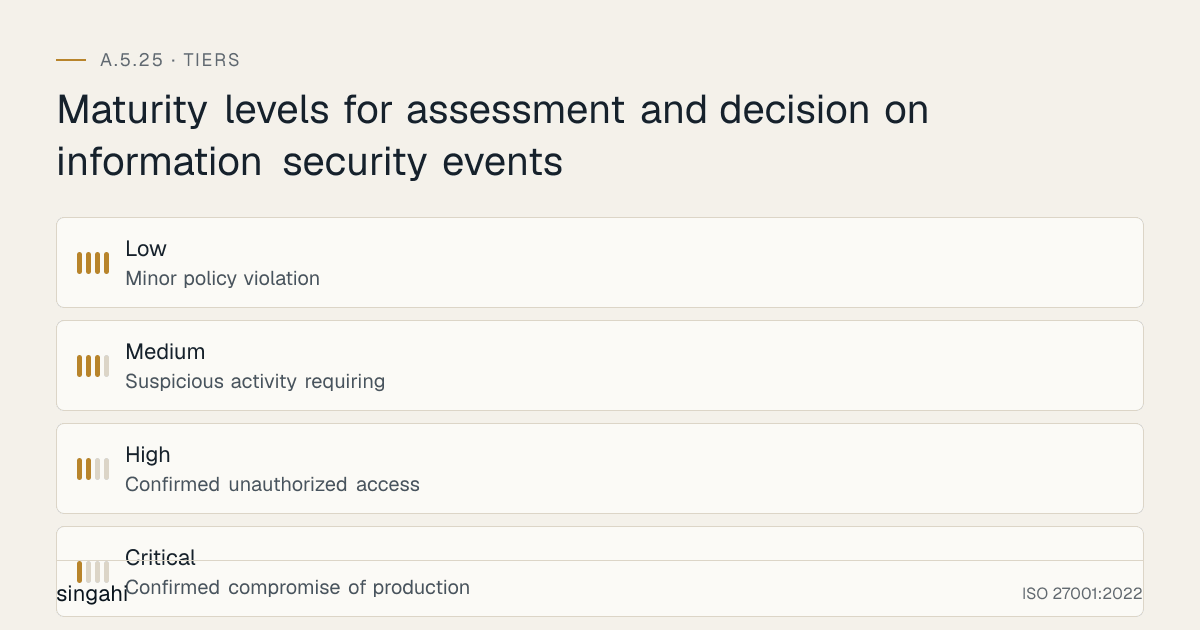
Figure · Tiers
Maturity levels for assessment and decision on information security events
The Event Assessment Lifecycle
┌──────────────┐    ┌──────────────┐    ┌──────────────┐    ┌──────────────┐
│   DETECT     │───▶│   RECEIVE    │───▶│   ENRICH     │───▶│   ASSESS     │
│  Event found │    │  Log ticket  │    │ Add context  │    │ Apply criteria│
└──────────────┘    └──────────────┘    └──────────────┘    └──────┬───────┘
                                                                    │
                                                                    ▼
┌──────────────┐    ┌──────────────┐    ┌──────────────┐    ┌──────────────┐
│    CLOSE     │◀───│   DISPOSE    │◀───│  CLASSIFY    │◀───│   DECIDE     │
│ With rationale│    │  Route/close │    │ Set severity │    │ Incident?    │
└──────────────┘    └──────────────┘    └──────────────┘    └──────────────┘
Step 1: Define Event Sources and Collection Points
Before you can assess events, you must know where they come from. Consolidate detection into a single queue:
| Source | Typical Events |
|---|---|
| SIEM | Correlated alerts, rule violations, anomaly detections |
| EDR/XDR | Endpoint malware, suspicious process execution, lateral movement |
| IDS/IPS | Network intrusion attempts, malicious traffic patterns |
| Firewall | Blocked connections, geo-anomalies, port scans |
| WAF | Web attacks, SQL injection attempts, bot traffic |
| DLP | Data exfiltration attempts, unauthorized file transfers |
| IAM/PAM | Failed logins, privilege escalation, unusual access patterns |
| CASB | Cloud misconfigurations, shadow IT, unsanctioned data sharing |
| Email security | Phishing, malware attachments, business email compromise |
| Vulnerability scanner | Critical vulnerabilities, exposure changes |
| User reports | Suspicious emails, lost devices, policy violations |
| Threat intel feeds | IOC matches, vulnerability exploitation in the wild |
| Cloud provider alerts | GuardDuty, Defender for Cloud, Security Command Center |
| Physical security | Access control alarms, CCTV alerts, visitor anomalies |
Action items:
- Inventory all detection sources.
- Ensure every source can create a ticket or alert in the central system.
- Standardize timestamp formats and time zones.
- Validate that A.8.17 clock synchronization is in place.
Step 2: Build the Event Assessment Criteria
The criteria are the rules that determine whether an event becomes an incident. Document them in the incident management policy or a standalone event assessment procedure.
Severity Matrix Example
| Severity | Technical Indicators | Business Impact | Response Time |
|---|---|---|---|
| Critical (P1) | Confirmed compromise of production system; active data exfiltration; ransomware deployment; critical infrastructure affected | Severe financial, regulatory, or reputational impact; immediate business disruption | 15 minutes |
| High (P2) | Confirmed unauthorized access; malware infection contained; sensitive data exposure possible; privileged account compromise | Significant impact if not contained quickly; regulatory notification likely | 1 hour |
| Medium (P3) | Suspicious activity requiring investigation; isolated malware; policy violation; vulnerability exploitation attempt | Limited impact; potential for escalation | 4 hours |
| Low (P4) | Minor policy violation; informational alert; scan/probe with no impact; false-positive likely | Minimal impact; routine handling | 24 hours |
Incident Declaration Criteria
An event shall be declared an information security incident when any of the following are true:
- Unauthorized access to systems, networks, or data has been confirmed.
- Malware has been detected on production systems.
- Data has been lost, corrupted, or exfiltrated.
- A critical control has been bypassed or disabled.
- A privileged account has been compromised.
- A ransomware or denial-of-service attack is in progress.
- A supplier reports a breach affecting the organization's data.
- Regulatory notification thresholds have been crossed.
- The event affects critical business processes or customer services.
- There is evidence of insider threat or malicious intent.
An event shall not be declared an incident when:
- It is confirmed to be expected or authorized behaviour.
- It is a known test or authorized security activity.
- It is a false positive with documented evidence.
- It is a near miss where controls prevented impact.
Step 3: Establish the Assessment Workflow
┌─────────────────────────────────────────────────────────────────────────────┐
│  EVENT RECEIVED (Ticket created within 15 minutes of detection)             │
└─────────────────────────────────────────────────────────────────────────────┘
                                      │
                                      ▼
┌─────────────────────────────────────────────────────────────────────────────┐
│  L1 TRIAGE (SOC Analyst / Helpdesk)                                         │
│  • Verify alert validity                                                    │
│  • Perform initial enrichment (user, asset, time, location)                 │
│  • Apply classification criteria                                            │
│  • Decision within SLA:                                                     │
│    a) False positive → close with rationale                                 │
│    b) Near miss → record and close                                          │
│    c) Needs investigation → escalate to L2                                  │
│    d) Confirmed incident → escalate immediately to Incident Response Team   │
└─────────────────────────────────────────────────────────────────────────────┘
                                      │
                                      ▼
┌─────────────────────────────────────────────────────────────────────────────┐
│  L2 ASSESSMENT (Senior Analyst / Incident Handler)                          │
│  • Deep-dive investigation                                                  │
│  • Correlate with threat intelligence                                       │
│  • Determine business impact                                                │
│  • Confirm or downgrade severity                                            │
│  • Decision: declare incident, continue monitoring, or close                │
└─────────────────────────────────────────────────────────────────────────────┘
                                      │
                                      ▼
┌─────────────────────────────────────────────────────────────────────────────┐
│  ESCALATION (CISO / Incident Commander / Crisis Team)                       │
│  • Critical/High incidents escalated immediately                            │
│  • Regulatory/legal involvement if required                                 │
│  • Executive notification per communication plan                            │
└─────────────────────────────────────────────────────────────────────────────┘
Step 4: Define Roles and Authority Levels
| Role | Authority |
|---|---|
| L1 SOC Analyst | Close false positives and near misses; escalate all others |
| L2 SOC Analyst / Incident Handler | Classify Medium and Low incidents; escalate High/Critical |
| SOC Manager | Override severity; manage queue; approve process changes |
| CISO / Information Security Manager | Declare Critical/High incidents; authorize external communications |
| Incident Commander | Take control of declared incidents; activate response plans |
| Legal / Compliance | Assess regulatory notification obligations; preserve evidence |
| Top Management | Authorize crisis communications; accept residual risk |
Step 5: Create the Event Record / Ticket Template
Every event must be recorded with the following fields:
| Field | Description |
|---|---|
| Event ID | Unique identifier (auto-generated) |
| Detection timestamp | When the event was first detected |
| Receipt timestamp | When the event was logged for assessment |
| Source | Tool, system, or person that reported the event |
| Event description | What happened, including technical details |
| Affected assets | Systems, data, networks, locations involved |
| Assessment criteria applied | Reference to the specific criteria used |
| Assessor name | Person performing the assessment |
| Assessment timestamp | When the decision was made |
| Decision | Incident / False Positive / Near Miss / Under Investigation |
| Severity | Critical / High / Medium / Low (if incident) |
| Priority | P1 / P2 / P3 / P4 |
| Rationale | Why this decision was made |
| Escalation | Yes / No; to whom and when |
| Next action | Investigation, containment, closure, monitoring |
| Closure timestamp | When the event was closed |
| Lessons learned | Any improvements identified |
Step 6: Set SLAs and OLAs
| Activity | SLA Target | OLA Owner |
|---|---|---|
| Event receipt and ticket creation | 15 minutes | SOC / Helpdesk |
| L1 triage completion | 30 minutes | L1 SOC Analyst |
| L2 assessment completion | 2 hours | L2 SOC Analyst |
| Escalation to Incident Response Team | 15 minutes (Critical), 1 hour (High) | SOC Manager |
| Executive notification for Critical incidents | 30 minutes | CISO |
| False positive closure with rationale | 1 hour | L1 SOC Analyst |
| Near-miss documentation | 4 hours | L2 SOC Analyst |
| Weekly event review | Weekly | SOC Manager |
| Monthly metrics reporting | Monthly | CISO |
Step 7: Implement Enrichment and Correlation
Enrichment turns raw alerts into assessable events. Key enrichment sources:
| Enrichment Source | What It Adds |
|---|---|
| Asset inventory | Asset owner, criticality, data classification, location |
| Identity and access management | User role, tenure, recent access history |
| Threat intelligence | Reputation of IPs, domains, file hashes, CVE exploitation |
| Vulnerability database | Whether affected system has known exploitable vulnerabilities |
| Geo-location | Whether login location is unusual for the user |
| Previous tickets | Whether similar events have occurred before |
| Business calendar | Whether event occurred during change window or maintenance |
Step 8: Handle Special Event Types
User-Reported Events
- Provide a single reporting channel: email, Slack bot, phone hotline, or incident portal.
- Acknowledge receipt within the SLA.
- Do not dismiss user reports without investigation; many major breaches begin with a user noticing something odd.
Third-Party / Supplier Events
- Maintain a contact directory for supplier security teams.
- Require contractual notification timelines (e.g., within 24 hours of discovery).
- Assess impact on your data, systems, and customers even if the event occurred at the supplier.
Physical Security Events
- Coordinate with facilities/security team.
- Determine if devices, documents, or access credentials were compromised.
- Treat theft of laptops, phones, or access badges as potential information security incidents until proven otherwise.
Insider Threat Events
- Handle with confidentiality and HR/legal involvement.
- Avoid tipping off the subject until evidence is preserved.
- Follow labour law and disciplinary procedures.
Step 9: Automate Where Appropriate
| Automation Use Case | Benefit |
|---|---|
| Auto-enrichment of IP/domain reputation | Reduces analyst research time |
| Auto-prioritization based on asset criticality | Ensures high-value assets are assessed first |
| Auto-closure of known false positives | Reduces queue noise |
| Playbook-triggered containment for confirmed malware | Speeds response |
| Slack/Teams notifications for escalations | Improves communication speed |
| Dashboard updates for leadership | Provides real-time visibility |
Caution: Automation should assist, not replace, human judgment for declaring incidents. Always require human approval for incident declaration.
Step 10: Continuous Improvement
- Review all closed events weekly for missed incidents or misclassifications.
- Measure false-positive rate and tune detection rules.
- Update assessment criteria after major incidents or changes in threat landscape.
- Conduct tabletop exercises quarterly to test decision-making under pressure.
- Benchmark MTTA and MTTD against industry standards.
Tools, Technologies, and Solutions
Categories of Tools
| Category | Purpose | Examples |
|---|---|---|
| SIEM | Centralize logs, correlate events, generate alerts | Splunk, IBM QRadar, Microsoft Sentinel, Elastic Security, Wazuh, LogRhythm |
| SOAR | Automate triage, enrichment, and response | Palo Alto XSOAR, Splunk SOAR, Swimlane, Tines, Torq, SIRP |
| EDR/XDR | Detect and respond to endpoint threats | CrowdStrike Falcon, Microsoft Defender for Endpoint, SentinelOne, Sophos Intercept X, Kaspersky |
| Threat Intelligence Platforms | Provide IOC and actor context | Mandiant Advantage, Recorded Future, MISP, Anomali, ThreatConnect |
| Ticketing / ITSM | Track events and incidents | ServiceNow, Jira Service Management, Freshservice, ManageEngine ServiceDesk Plus |
| Case Management | Investigate and document incidents | TheHive, DFIR-IRIS, Velociraptor, Kibana Case Management |
| Communication | Notify stakeholders | PagerDuty, Opsgenie, Slack, Microsoft Teams, Twilio |
| Vulnerability Management | Feed context into event assessment | Tenable, Qualys, Rapid7 InsightVM, Burp Suite, OpenVAS |
Vendor Comparison Table
| Vendor / Tool | Type | Best For | Pricing model | Notes |
|---|---|---|---|---|
| Microsoft Sentinel | SIEM + SOAR | Microsoft-heavy environments | Usage-based | Good integration with Microsoft 365 and Azure |
| Splunk Enterprise Security | SIEM | Large enterprises, complex data | High; enterprise negotiation required | Market leader; steep learning curve |
| IBM QRadar | SIEM | Regulated enterprises | Enterprise pricing | Strong correlation engine |
| Elastic Security | SIEM + EDR | Startups, open-source preference | Freemium + subscription | efficient; requires expertise |
| Wazuh | Open-source SIEM/EDR | Small-medium orgs, budget-conscious | Free (self-hosted) + support costs | Indian MSSPs often offer managed Wazuh |
| Palo Alto Cortex XSOAR | SOAR | Enterprise automation | Enterprise pricing | Powerful but complex |
| Tines | SOAR (no-code) | Modern security teams | Subscription per user | Fast to deploy |
| ServiceNow Security Operations | ITSM + SOAR | Enterprises already on ServiceNow | Module-based pricing | Tight workflow integration |
| TheHive | Case management | Incident response teams | Free (open source) | Good for structured investigations |
| MISP | Threat intelligence | CERTs, large SOCs | Free | Open-source IOC sharing |
| Recorded Future | Threat intel | Organizations needing curated intelligence | Premium subscription | Strong India-focused threat data |
| CrowdStrike Falcon | EDR/XDR | Endpoint-heavy environments | Per-endpoint subscription | Strong threat hunting |
| SentinelOne | EDR/XDR | Autonomous response | Per-endpoint subscription | Good rollback capabilities |
| Kaspersky | EDR/EPP | value-focused organizations | Lower per-endpoint cost | Strong presence in India |
| ManageEngine ServiceDesk Plus | ITSM | Growing Indian organizations | Affordable INR pricing | Local support |
Indian Vendor and MSSP Options
| Vendor | Offering | Relevance to A.5.25 |
|---|---|---|
| SISA Information Security | Managed SOC, IR, QSA services | 24x7 event assessment and incident response |
| Sequretek | EDR, SIEM, MSSP services | Indian threat intelligence |
| InstaSafe | Zero Trust, secure access | Context for access-related events |
| K7 Computing | Endpoint security | EDR for endpoint event detection |
| Quick Heal Seqrite | EDR, DLP, SIEM | efficient for Indian SMBs |
| TAC Security | Vulnerability management | Feeds vulnerability context into assessment |
Tool Selection Decision Matrix
| Criterion | Weight | Microsoft Sentinel | Splunk ES | Wazuh + TheHive | ServiceNow SecOps |
|---|---|---|---|---|---|
| Ease of deployment | 20% | 8 | 5 | 6 | 5 |
| Cost-effectiveness | 20% | 7 | 4 | 9 | 5 |
| Integration breadth | 20% | 9 | 9 | 6 | 9 |
| Automation capability | 20% | 8 | 8 | 5 | 8 |
| Indian support | 10% | 7 | 6 | 5 | 6 |
| Scalability | 10% | 9 | 10 | 7 | 9 |
| Weighted Score | 100% | 8.0 | 6.9 | 6.7 | 7.1 |
Policy and Procedure Templates
Event Assessment and Decision Policy (Extract)
INFORMATION SECURITY EVENT ASSESSMENT AND DECISION POLICY
[Organization Name]
Version: 1.0
Approved by: [CISO Name]
Date: [Date]
Review Date: [Date + 12 months]
Classification: Internal

1. PURPOSE
This policy defines the process for assessing information security events
and deciding whether they are to be classified as information security
incidents, in accordance with ISO 27001:2022 Annex A 5.25.

2. SCOPE
This policy applies to all information security events detected or reported
within [Organization Name], including automated alerts, user reports,
supplier notifications, vulnerability findings, and physical security events.

3. POLICY STATEMENT
3.1 Every information security event shall be assessed in a timely manner.
3.2 A formal decision shall be made on whether each event is an incident,
    false positive, near miss, or requires further investigation.
3.3 Assessment decisions shall be documented with rationale.
3.4 Events shall be prioritized based on severity and business impact.
3.5 Events exceeding the assessor's authority shall be escalated immediately.
3.6 Event assessment criteria shall be reviewed at least annually.

4. ROLES AND RESPONSIBILITIES
4.1 CISO: Owns this policy and the event assessment process.
4.2 SOC Manager: Manages the event queue and ensures SLAs are met.
4.3 SOC Analysts: Perform L1 and L2 assessment of events.
4.4 Incident Response Team: Responds to declared incidents.
4.5 All Employees: Report events promptly and cooperate with assessment.

5. CLASSIFICATION CRITERIA
[Reference the severity matrix and incident declaration criteria defined
in Section 7 of the guide.]

6. ESCALATION
Critical and High events shall be escalated to the Incident Response Team
within 15 minutes and 1 hour respectively.

7. DOCUMENTATION
All event records shall be maintained in the central ticketing system for
a minimum of [3/7] years, depending on regulatory requirements.

8. REVIEW
This policy is reviewed annually and after any major incident or significant
organizational change.
Event Assessment Procedure (Extract)
PROCEDURE: ASSESSMENT AND DECISION ON INFORMATION SECURITY EVENTS
Document ID: SEC-PROC-525
Version: 1.0
Owner: SOC Manager

PURPOSE
To provide step-by-step instructions for assessing information security
events and deciding whether they are incidents.

TRIGGER
Receipt of a security event in the SOC queue, helpdesk queue, or incident
hotline.

STEP-BY-STEP PROCESS

Step 1: Receive and Log
- Create a ticket within 15 minutes of detection.
- Record detection timestamp, source, description, and affected assets.

Step 2: Perform Initial Enrichment
- Identify the user, device, IP address, and location.
- Check asset criticality and data classification.
- Query threat intelligence for IOCs.
- Review recent change records and maintenance windows.

Step 3: Apply Classification Criteria
- Determine if the event meets incident declaration criteria.
- Assign preliminary severity (Critical/High/Medium/Low).
- Assign priority (P1/P2/P3/P4).

Step 4: Make Decision
- If confirmed incident: escalate to Incident Response Team.
- If false positive: close with documented rationale.
- If near miss: record and close with lessons learned.
- If uncertain: escalate to L2 for deeper investigation.

Step 5: Document Rationale
- Record the decision, criteria applied, assessor name, and timestamp.
- Attach evidence (logs, screenshots, intel reports).

Step 6: Escalate if Needed
- Critical/High: immediate escalation.
- Regulatory/legal exposure: notify Legal/Compliance.
- Customer impact: notify Customer Success/Account Management.

Step 7: Close or Hand Over
- False positives and near misses closed by L1/L2.
- Incidents handed over to Incident Response Team with full context.

QUALITY CHECKS
- All tickets have a recorded decision.
- No ticket is closed without rationale.
- SLA compliance is monitored daily.
Event Classification Quick Reference Card (Extract)
┌─────────────────────────────────────────────────────────────────────────────┐
│  EVENT CLASSIFICATION QUICK REFERENCE                                       │
├─────────────────────────────────────────────────────────────────────────────┤
│  CRITICAL (P1) — Escalate immediately                                       │
│  • Confirmed compromise of production system                                │
│  • Active data exfiltration or ransomware                                   │
│  • Critical infrastructure / customer service down                          │
│  • Response: Incident Response Team within 15 min; CISO within 30 min       │
├─────────────────────────────────────────────────────────────────────────────┤
│  HIGH (P2) — Escalate within 1 hour                                         │
│  • Confirmed unauthorized access                                            │
│  • Privileged account compromise                                            │
│  • Sensitive data potentially exposed                                       │
│  • Response: L2 investigation + IR team activation                          │
├─────────────────────────────────────────────────────────────────────────────┤
│  MEDIUM (P3) — Investigate within 4 hours                                   │
│  • Suspicious activity requiring deeper analysis                            │
│  • Isolated malware or policy violation                                     │
│  • Response: L2 investigation; escalate if impact confirmed                 │
├─────────────────────────────────────────────────────────────────────────────┤
│  LOW (P4) — Handle within 24 hours                                          │
│  • Minor policy violation                                                   │
│  • Informational alert                                                      │
│  • Response: Routine handling or closure with rationale                     │
└─────────────────────────────────────────────────────────────────────────────┘
Risk Assessment and Treatment
Figure · Matrix
How the options compare: Mitigate to Accept
Risk Scenarios Related to A.5.25
| ID | Risk Scenario | Likelihood | Impact | Risk Level | Treatment |
|---|---|---|---|---|---|
| R1 | Events are not assessed promptly, allowing attackers to operate undetected | Medium | Critical | High | Documented triage workflow, SLAs, 24x7 coverage or MSSP |
| R2 | Events are incorrectly classified as false positives, missing real incidents | Medium | Critical | High | Mandatory enrichment, dual-review for high-severity closures, quality assurance |
| R3 | Over-classification of benign events overwhelms incident response | High | Medium | Medium | Tune detection rules, automate false-positive closure, measure false-positive rate |
| R4 | Assessment decisions lack documentation, creating audit/legal exposure | Medium | High | Medium | Mandatory ticket fields, periodic QA review, policy enforcement |
| R5 | Key assessors unavailable during critical events | Medium | High | Medium | Cross-training, escalation roster, MSSP backup |
| R6 | Clock desynchronization corrupts event timelines | Low | High | Medium | NTP on all systems, regular clock audits (A.8.17) |
| R7 | Threat intelligence is stale, leading to poor enrichment | Medium | Medium | Medium | Subscribe to curated feeds, validate IOCs before action |
| R8 | Supplier events are not assessed because notifications are missed | Medium | High | Medium | Contractual notification clauses, supplier contact register |
| R9 | Insider threat events are mishandled due to lack of confidentiality | Low | High | Medium | HR/legal involvement, discrete investigation protocols |
| R10 | Assessment criteria are outdated and no longer match threat landscape | Medium | Medium | Medium | Annual review, post-incident updates, threat landscape reviews |
Risk Treatment Plan
| Treatment | Actions | Owner | Timeline |
|---|---|---|---|
| Mitigate | Implement SIEM/SOAR, documented workflow, training | CISO | 8-12 weeks |
| Mitigate | Define and enforce classification criteria | SOC Manager | 2-4 weeks |
| Mitigate | Establish QA review of closed events | SOC Manager | Ongoing |
| Transfer | Engage MSSP for 24x7 event assessment | CISO | Contract cycle |
| Accept | Residual risk of sophisticated zero-day evasion; monitored via threat intelligence | CISO | Ongoing |
Residual Risk Acceptance
Any residual risk rated High after treatment must be accepted by the CISO or top management with documented justification. Accepted risks are reviewed quarterly.
Audit and Compliance Checklist
Use this checklist to prepare for internal and external audits of A.5.25.
| # | Audit Question | Expected Evidence | Red Flag |
|---|---|---|---|
| 1 | Is there a documented procedure for assessing information security events? | Approved event assessment procedure | No procedure or outdated version |
| 2 | Are event classification criteria defined and approved? | Severity matrix, incident declaration criteria | Criteria exist only in people's heads |
| 3 | Does every detected event get logged for assessment? | Ticket queue, event register | Alerts cleared without tickets |
| 4 | Are events assessed within documented SLAs? | SLA report, timestamped tickets | Backlog of unassessed events |
| 5 | Is there evidence that a decision was made for each event? | Ticket status + decision field | Tickets closed without decision rationale |
| 6 | Are false positives documented with rationale? | Closed false-positive tickets | False positives simply deleted |
| 7 | Are near misses recorded and reviewed? | Near-miss register, review minutes | No near-miss tracking |
| 8 | Is there a clear escalation path for events that may be incidents? | Escalation matrix, contact roster | Staff unsure who to escalate to |
| 9 | Are incident declarations linked to original event records? | Incident register references event IDs | Incidents appear without originating events |
| 10 | Do assessors have appropriate authority and training? | Training records, role definitions | Untrained staff making incident decisions |
| 11 | Is there evidence of event enrichment (threat intel, asset context)? | Enriched ticket fields, attached intel | Raw alerts passed without context |
| 12 | Are timestamps reliable across event sources? | NTP configuration, clock sync logs | Discrepant timestamps in event logs |
| 13 | Are metrics tracked for event assessment performance? | KPI dashboard, monthly reports | No measurement of process effectiveness |
| 14 | Is the event assessment process reviewed and improved? | Management review minutes, improvement logs | Process never reviewed |
| 15 | Are supplier-reported events assessed? | Supplier notification log, assessment records | Supplier events ignored or not tracked |
| 16 | Are user-reported events acknowledged and assessed? | User report tickets, closure rationale | User reports dismissed informally |
| 17 | Are there quality assurance reviews of assessment decisions? | QA review records, sampled tickets | No sampling or quality checks |
| 18 | Are regulatory notification requirements considered during assessment? | Legal/compliance involvement records | Regulatory exposure missed |
| 19 | Is event assessment included in incident response tabletop exercises? | Exercise reports, lessons learned | Tabletops skip the triage phase |
| 20 | Are event records retained for the required period? | Retention policy, archived tickets | Records deleted prematurely |
| 21 | Is there segregation between event detection and assessment? | Role definitions, access controls | Same person detects and assesses without oversight |
| 22 | Are automated decisions reviewed by humans where appropriate? | SOAR logs with approval steps | Fully automated incident declaration |
| 23 | Are physical security events routed to information security assessment? | Procedure cross-reference | Physical and InfoSec silos |
| 24 | Are privileged access events given higher assessment priority? | Priority rules for privileged accounts | Privileged events treated like routine alerts |
| 25 | Is the event assessment criteria aligned with the risk register? | Mapping document | Criteria disconnected from organizational risks |
| 26 | Are events from cloud environments assessed with the same rigour? | Cloud event tickets | Cloud alerts handled separately/informally |
| 27 | Is there a process for handling duplicate events? | Deduplication procedure | Same event creates multiple tickets |
| 28 | Are events from red-team/penetration tests flagged to avoid false incidents? | Test notification records | Authorized tests trigger incident response |
| 29 | Are customers notified appropriately based on assessment outcomes? | Customer communication records | Customer notification decisions ad-hoc |
| 30 | Is executive reporting in place for critical/high event trends? | Monthly CISO report | Leadership blind to event patterns |
Metrics and KPIs
Figure · Measures
The measures that show A.5.25 is working
- Event Assessment SLA Compliance≥95%Daily/Weekly
- Mean Time to Acknowledge≤15 minutesWeekly
- Mean Time to Assess≤1 hourWeekly
- False Positive Rate≤30%Monthly
- False Negative Rate≤2%Quarterly
| # | KPI | Formula | Target | Frequency | Owner |
|---|---|---|---|---|---|
| 1 | Event Assessment SLA Compliance | (Events assessed within SLA / Total events) × 100 | ≥95% | Daily/Weekly | SOC Manager |
| 2 | Mean Time to Acknowledge (MTTA) | Average time from detection to ticket creation | ≤15 minutes | Weekly | SOC Manager |
| 3 | Mean Time to Assess (MTTA2) | Average time from ticket creation to decision | ≤1 hour | Weekly | SOC Manager |
| 4 | False Positive Rate | (False positives / Total events) × 100 | ≤30% (tuneable) | Monthly | SOC Manager |
| 5 | False Negative Rate | (Missed incidents discovered later / Total incidents) × 100 | ≤2% | Quarterly | CISO |
| 6 | Incident Declaration Accuracy | (Correctly classified incidents / Total declared incidents) × 100 | ≥90% | Monthly | CISO |
| 7 | Escalation Compliance | (Critical/High events escalated within SLA / Total critical/high events) × 100 | ≥98% | Weekly | SOC Manager |
| 8 | Event Volume Trend | Count of events week-over-week | Stable or decreasing with tuning | Weekly | SOC Manager |
| 9 | Backlog of Unassessed Events | Number of events older than SLA | ≤5 | Daily | SOC Manager |
| 10 | User-Reported Event Volume | Number of events reported by users | Track trend | Monthly | CISO |
| 11 | Near Miss Count | Number of near misses recorded | Track trend | Monthly | SOC Manager |
| 12 | Mean Time to Detect (MTTD) | Average time from incident start to detection | ≤4 hours | Quarterly | CISO |
| 13 | Assessment Quality Score | QA review score of sampled tickets | ≥90% | Monthly | SOC Manager |
| 14 | Automation Coverage | (Events auto-enriched or auto-triaged / Total events) × 100 | ≥60% | Quarterly | CISO |
| 15 | Training Completion Rate | (Trained assessors / Total assessors) × 100 | 100% | Quarterly | HR / CISO |
KPI Dashboard Layout
┌─────────────────────────────────────────────────────────────────────────────┐
│  EVENT ASSESSMENT KPI DASHBOARD — June 2026                                │
├─────────────────────────────────────────────────────────────────────────────┤
│  THIS WEEK                                                                  │
│  Total Events: 1,247   Assessed on Time: 96.3%   Backlog: 3                │
│  MTTA: 8 min   MTTA2: 42 min   False Positive Rate: 24%                    │
├─────────────────────────────────────────────────────────────────────────────┤
│  SEVERITY BREAKDOWN                                                         │
│  Critical: 2   High: 18   Medium: 142   Low: 1,085                          │
├─────────────────────────────────────────────────────────────────────────────┤
│  TRENDS (Last 4 Weeks)                                                      │
│  Event volume: ▁▂▄▆ (increasing — review detection tuning)                 │
│  SLA compliance: ████████░░ (96% — stable)                                 │
│  False positives: ▃▄▃▂ (improving)                                          │
├─────────────────────────────────────────────────────────────────────────────┤
│  ACTION ITEMS                                                               │
│  • 1 false negative from last week — update EDR rule                        │
│  • 2 assessors due for refresher training                                   │
│  • Phishing campaign increased user reports by 35%                          │
└─────────────────────────────────────────────────────────────────────────────┘
Common Pitfalls / Audit Failures & How to Avoid Them
| # | Pitfall / Audit Failure | Why It Happens | How to Avoid |
|---|---|---|---|
| 1 | Events logged but never assessed | Alert fatigue, understaffed SOC, missing workflow | Enforce ticket creation, SLA tracking, and daily backlog review |
| 2 | No documented classification criteria | Process evolved organically, no policy owner | Create and approve a severity matrix and incident declaration criteria |
| 3 | False positives closed without rationale | Analysts rushing to clear queue | Make rationale a mandatory field; conduct QA sampling |
| 4 | Incidents declared too late | Fear of escalation, unclear authority, slow enrichment | Define clear escalation triggers and empower L1 analysts |
| 5 | Over-classification of benign events | Overly broad detection rules, no tuning | Tune detection rules, automate known false positives, review weekly |
| 6 | Missing event-to-incident linkage | Separate tools with no integration | Use integrated SIEM/ticketing/case management |
| 7 | Assessors lack training | High turnover, no onboarding program | Create role-specific training and annual refresher |
| 8 | No executive visibility | Metrics not collected or reported | Build a KPI dashboard and monthly CISO report |
| 9 | Supplier events slip through cracks | No contractual notification process | Include security notification clauses and maintain contact register |
| 10 | Clock skew corrupts timelines | Missing NTP or misconfigured time zones | Implement NTP on all systems; audit quarterly |
| 11 | Insider threat events mishandled | HR not involved, subject tipped off | Establish confidential protocol with HR/legal |
| 12 | Criteria not aligned with risk register | Security team works in silo | Map assessment criteria to top organizational risks |
| 13 | Automated decisions without human oversight | Over-reliance on SOAR | Require human approval for incident declaration |
| 14 | Near misses ignored | Focus only on incidents | Record near misses and review for control effectiveness |
| 15 | Post-incident reviews skip assessment phase | Lessons learned focus on response only | Include triage decisions in every post-incident review |
Illustrative Scenarios
Illustrative scenario, a composite example for guidance, not a specific Singahi engagement or a verified outcome.
Illustrative Scenario 1: Indian Fintech Company, Missed Initial Compromise Due to Weak Triage
Organization: A Bengaluru-based payments fintech with 400 employees and RBI authorization.
Challenge: The fintech's SOC was receiving over 3,000 alerts per day from its SIEM. The L1 team was two analysts working business hours only. Alerts were routinely marked "reviewed" without documented rationale. One alert showed a successful login from an unusual location for a senior finance executive at 2 a.m. The analyst assumed it was VPN-related travel and closed it as a false positive without enrichment.
Three weeks later, the company discovered that the executive's credentials had been harvested via a phishing email. The attacker had accessed the financial reporting system, attempted to modify settlement records, and exfiltrated data on 85,000 customers. The RBI was notified late, and the company's PCI DSS and RBI cyber audit were both flagged.
Root Cause:
- No documented criteria for when an anomalous login should be escalated.
- False positives closed without rationale or enrichment.
- No 24x7 coverage for critical alerts.
- User context (executive, sensitive role, off-hours) not factored into assessment.
Solution Implemented with external support:
- Rewrote the event assessment procedure with a clear severity matrix.
- Implemented automated enrichment: user role, asset criticality, geo-location, and login history.
- Created an escalation rule: any off-hours privileged access anomaly automatically escalates to L2.
- Engaged an Indian MSSP for 24x7 L1 coverage.
- Required documented rationale for every closure.
- Started weekly QA review of 10% of closed tickets.
Results (12 Months Later):
- Event assessment SLA compliance increased from 62% to 97%.
- False positives without rationale dropped to zero.
- MTTD for credential compromise scenarios fell from 21 days to under 4 hours.
- Customer trust was rebuilt; churn related to security concerns dropped by 40%.
Key Lesson: A single poorly assessed event can become a breach. Documented criteria, enrichment, and 24x7 coverage are non-negotiable for regulated organizations.
Illustrative Scenario 2: Indian IT Services Company, Over-Reaction damaging Deals and Reputation
Organization: A Hyderabad-based mid-sized IT services and SaaS provider with 1,200 employees serving global enterprise clients.
Challenge: The company had recently obtained ISO 27001 certification but had not operationalized A.5.25. Every alert from its EDR and DLP tools was escalated as a "potential incident." The incident response team was waking up 2-3 times per week for events that turned out to be authorized patching, legitimate data exports by operations teams, or misconfigured detection rules.
This "cry wolf" culture had several consequences:
- Client-facing incident reports were issued for non-incidents, causing unnecessary panic.
- Two major enterprise prospects requested additional security due diligence and delayed deals.
- Analyst burnout led to 35% attrition in the SOC in one year.
- External auditors noted that the incident register contained events that did not meet incident criteria.
Root Cause:
- No classification criteria; everything was treated as an incident.
- Detection rules not tuned to the environment.
- Lack of asset and business context in event assessment.
- No L1 triage layer to filter noise before escalation.
Solution Implemented with external support:
- Defined a four-tier severity matrix and incident declaration criteria.
- Introduced an L1 triage step with authority to close false positives and near misses.
- Implemented SOAR-based auto-enrichment and auto-closure for known benign patterns.
- Tuned detection rules based on baseline activity.
- Trained the SOC on the new criteria and held tabletop exercises.
- Created a communication protocol: only confirmed incidents trigger client notifications.
Results (12 Months Later):
- Incidents escalated to the IR team dropped by 70%.
- Mean time to respond to genuine incidents improved by 55%.
- SOC attrition fell to 12%.
- Both delayed enterprise deals closed.
- The next surveillance audit found no findings related to incident management.
Key Lesson: Over-classification is as damaging as under-classification. A disciplined triage layer with clear criteria protects both operational efficiency and customer trust.
Illustrative Scenario 3: Indian Healthcare Provider, Third-Party Event Assessment Failure
Organization: A chain of diagnostic laboratories based in Mumbai with 75 centres across Maharashtra and Gujarat.
Challenge: The provider used a third-party cloud laboratory information system (LIS). The vendor sent a security advisory about unauthorized access to a shared API key used by multiple customers. The IT team filed the email in a general inbox but did not assess whether the provider's patient data was affected. Two months later, a journalist contacted the provider about a data leak. The provider had no record of assessing the vendor advisory and could not demonstrate when it had "noticed" the breach.
Regulatory Exposure:
- Potential breach notification failure under the DPDP Act 2023.
- Loss of patient trust and negative media coverage.
- Investigation by the Maharashtra Medical Council.
Solution Implemented:
- Created a supplier security event register.
- Mandated that all vendor security advisories be logged and assessed within 24 hours.
- Added contractual clauses requiring vendors to report events within 4 hours.
- Mapped vendor events to affected assets and data types.
- Trained procurement and IT on the new process.
Results:
- Vendor events now assessed within SLA.
- DPDP Act breach response playbook created.
- No further missed third-party events in the next audit cycle.
Key Lesson: Third-party events must be assessed with the same rigour as internal events. "It happened at the vendor" is not a defence.
Multi-Framework Mapping
| A.5.25 element | SOC 2 | PCI DSS v4.0.1 | NIST SP 800-53 Rev 5 | CIS Controls v8 | COBIT 2019 | DPDP Act / GDPR |
|---|---|---|---|---|---|---|
| Assess events | CC7.2 (monitor for anomalies), CC7.3 (evaluate security events to decide whether they are incidents) | 10.4.1 (audit log review), 11.5.1 (intrusion detection), 12.10.5 (respond to monitoring alerts) | IR-4, IR-5 (incident monitoring), SI-4 (system monitoring) | 8.11 (audit log reviews), 13.1 (centralised alerting) | DSS02.02 (record, classify and prioritise requests and incidents) | DPDP s.8(5) safeguards |
| Decide and classify | CC7.3 | 12.10.1 (incident response plan, including classification) | IR-4, IR-8 | 17.9 (security incident thresholds) | DSS02.02 | - |
| Escalate and report | CC7.4 (respond to incidents) | 12.10.1 (communication and contact strategies) | IR-6 (incident reporting) | 17.2, 17.6 | DSS02.04 | DPDP s.8(6) (Board and Data Principals); GDPR Art. 33; CERT-In 6 hours |
How to Use This Mapping
- SOC 2 Type II auditors will look at A.5.25 evidence to satisfy CC7.2, CC7.3, CC7.4, and CC7.5.
- PCI DSS QSA will verify incident response procedures and event monitoring.
- NIST 800-53 assessors will map your process to IR-4, IR-5, IR-6, and SI-4.
- CIS Controls reviewers will check log management (Control 08) and incident response (Control 17).
- DPDP Act compliance requires that event assessment records support breach notification decisions.
Implementation Roadmap
Figure · Timeline
Rollout in order
- Week 1Define event sources
- Week 1Draft event assessment policy
- Week 2Create severity matrix and incident
- Week 2Design ticket template and workflow
Phase 1: Foundation (Weeks 1-2)
| Week | Activities | Deliverables | Owner |
|---|---|---|---|
| 1 | Define event sources; inventory detection tools; identify owners | Event source inventory | CISO |
| 1 | Draft event assessment policy and procedure | Policy/procedure draft | CISO / SOC Manager |
| 2 | Create severity matrix and incident declaration criteria | Classification criteria document | SOC Manager |
| 2 | Design ticket template and workflow | Workflow diagram; ticket template | SOC Manager |
Phase 2: Build (Weeks 3-5)
| Week | Activities | Deliverables | Owner |
|---|---|---|---|
| 3 | Configure central ticketing/ITSM queue | Operational event queue | IT / SOC |
| 3 | Integrate key detection sources (SIEM, EDR, email) | Integrated alert feed | SOC / IT |
| 4 | Implement enrichment sources (asset inventory, threat intel) | Enriched ticket fields | SOC |
| 4 | Define SLAs and escalation matrix | SLA document; contact roster | SOC Manager |
| 5 | Train L1/L2 analysts on criteria and workflow | Training completion records | HR / CISO |
| 5 | Run pilot with one event category (e.g., phishing alerts) | Pilot report | SOC Manager |
Phase 3: Operate (Weeks 6-8)
| Week | Activities | Deliverables | Owner |
|---|---|---|---|
| 6 | Roll out to all event sources | Full event queue operational | SOC Manager |
| 6 | Begin daily backlog review and weekly QA | Review minutes | SOC Manager |
| 7 | Tune detection rules based on false-positive analysis | Tuning log | SOC Manager |
| 7 | Build KPI dashboard | Dashboard live | SOC / BI |
| 8 | Conduct first tabletop exercise | Exercise report; lessons learned | CISO |
Phase 4: Optimize (Weeks 9-12)
| Week | Activities | Deliverables | Owner |
|---|---|---|---|
| 9 | Introduce SOAR automation for enrichment and known false positives | Automation playbooks | SOC / IT |
| 10 | Integrate supplier security event process | Supplier event register | Procurement / CISO |
| 11 | Refine criteria based on incident learnings | Updated criteria | CISO |
| 12 | Internal audit of A.5.25 | Audit report; corrective actions | Internal Audit |
Post-Implementation Sustainment
| Activity | Frequency | Owner |
|---|---|---|
| Daily backlog review | Daily | SOC Manager |
| Weekly false-positive review | Weekly | SOC Manager |
| Monthly metrics report | Monthly | CISO |
| Quarterly tabletop exercise | Quarterly | CISO |
| Annual policy and criteria review | Annually | CISO |
| Post-incident review | After every incident | Incident Response Lead |
FAQ
Q1: What is the difference between an information security event and an incident?
An event is any observable occurrence in a system, network, or service that may have security significance. An incident is an event (or series of events) that has actually compromised or has a significant probability of compromising information security. A.5.25 is the control that determines which events become incidents.
Q2: Does every event need to be investigated in depth?
No. Every event must be assessed, but the depth of investigation depends on severity and likelihood. Low-risk informational events can be closed with minimal rationale, while high-risk events require deeper analysis. The key is that the assessment decision is documented and defensible.
Q3: Who has the authority to declare an incident?
Authority levels should be defined in your policy. Typically, L1 analysts can close false positives and near misses; L2 analysts can declare Medium/Low incidents; the CISO or Incident Commander declares Critical/High incidents and authorizes external communications.
Q4: How quickly must events be assessed?
ISO 27001 does not specify a universal timeframe. Your organization must define SLAs based on risk. A common baseline is: Critical events within 15 minutes, High within 1 hour, Medium within 4 hours, and Low within 24 hours.
Q5: What should be documented when closing an event as a false positive?
At minimum: event ID, description, why it was determined to be benign, evidence reviewed, assessor name, and timestamp. Without this, auditors cannot verify that the event was properly assessed.
Q6: How does A.5.25 relate to CERT-In's six-hour reporting requirement?
CERT-In requires reporting of specified cyber incidents within six hours of noticing them or having them brought to notice. A regulator will treat receipt of a credible alert, user report or vendor notice as notice, so A.5.25 does not decide when the clock starts; it decides whether you can classify and report in time. Build the assessment to finish well inside six hours for potentially reportable events.
Q7: Can event assessment be fully automated?
Automation can help with enrichment, correlation, and closing known benign patterns. However, the final decision to declare an incident should involve human judgment, especially for events with regulatory, legal, or customer impact.
Q8: What are the most common audit findings for A.5.25?
Common findings include: events not assessed, no classification criteria, false positives closed without rationale, missing event-to-incident linkage, untrained assessors, and no metrics.
Q9: How do we handle events reported by employees?
Provide a simple reporting channel, acknowledge receipt within SLA, and assess every report. Do not dismiss user reports without investigation, many serious breaches are first noticed by employees.
Q10: How often should we review the event assessment criteria?
At least annually, and also after major incidents, significant organizational changes, new regulatory requirements, or changes in the threat landscape. Post-incident reviews often reveal needed updates to criteria.
Q11: What if we outsource our SOC, who owns A.5.25?
The organization retains accountability. Your contract must define the MSSP's responsibilities for event assessment, SLA, escalation, documentation, and evidence provision. The CISO still owns A.5.25 from an ISO 27001 perspective.
Q12: Do physical security events fall under A.5.25?
Yes, if they have information security implications. Examples include theft of laptops, unauthorized access to server rooms, or lost access badges. These should be routed to the information security team for assessment.
References and Further Reading
Standards and Frameworks
- ISO/IEC 27001:2022, Annex A, Control 5.25, Assessment and Decision on Information Security Events
- ISO/IEC 27002:2022, Section 5.25, Assessment and Decision on Information Security Events
- ISO/IEC 27035:2016, Information Security Incident Management
- NIST SP 800-61 Rev. 2, Computer Security Incident Handling Guide
- NIST SP 800-53 Rev. 5, Security and Privacy Controls (IR-4, IR-5, IR-6, SI-4)
- CIS Controls v8, Controls 08, 13, and 17
Indian Regulations and Guidance
- Digital Personal Data Protection Act, 2023 (India)
- CERT-In Directions, 2022, Cyber Security Incident Reporting
- Reserve Bank of India, NBFC Cybersecurity, Technology: Risk, Resilience and Assurance Framework Directions, 2026 (31 July 2026)
- Reserve Bank of India, Guidelines on Information Security, Electronic Banking, Technology Risk Management, and Cyber Frauds
- SEBI CSCRF (2024)
- IRDAI Guidelines on Information and Cyber Security for Insurers
- Information Technology Act, 2000 (India), Sections 43, 43A, 66, and 70B
Industry Reports
- IBM Security, Cost of a Data Breach Report 2024
- Ponemon Institute, State of Cybersecurity in India
- Verizon, Data Breach Investigations Report (DBIR) 2024
Useful Resources
- SANS Incident Handler's Handbook
- FIRST.org, Standards for Incident Response (CSIRT Services Framework)
- MITRE ATT&CK Framework, for understanding adversary tactics and enrichment context
- OWASP Logging Cheat Sheet
End of Guide
Sample Event Assessment Playbooks
The following playbooks provide concrete decision trees for common event types. Customize them for your environment.
Playbook A: Suspicious Email Reported by User
TRIGGER: User reports suspicious email via security@company.com or phishing button

L1 TRIAGE (15 minutes):
1. Acknowledge receipt to the reporter.
2. Extract email headers, sender, URLs, and attachments.
3. Check sender reputation via threat intelligence.
4. Scan attachments in sandbox.
5. Check if any other users received the same email.

DECISION:
├─ Confirmed malicious + user clicked link/opened attachment
│  → Declare INCIDENT (High or Critical)
│  → Escalate to IR Team
│  → Isolate affected endpoint
│  → Reset user credentials
│  → Hunt for lateral movement
├─ Confirmed malicious + no user interaction
│  → Record as NEAR MISS
│  → Update email security rules
│  → Notify affected users
├─ Suspicious but not confirmed malicious
│  → Escalate to L2 for deeper analysis
│  → Hold for 2 hours max
└─ Benign / legitimate email
│  → Close as FALSE POSITIVE
│  → Provide feedback to reporter
│  → Document rationale
Playbook B: Anomalous Login Alert
TRIGGER: SIEM alert for login from unusual location or device

ENRICHMENT:
- User role and privilege level
- Recent travel or remote work status
- Historical login locations
- MFA status (success/failure)
- Time of login (business hours or off-hours)
- Device compliance status

DECISION:
├─ Privileged user + impossible travel + successful MFA bypass
│  → Declare INCIDENT (Critical)
│  → Disable account immediately
│  → Escalate to IR Team
│  → Preserve logs
├─ Standard user + new location + successful MFA from managed device
│  → Contact user to confirm
│  → If confirmed legitimate → close as FALSE POSITIVE
│  → If unconfirmed → escalate to L2
├─ Multiple failed logins from unusual location
│  → Escalate to L2
│  → Consider blocking source IP
│  → Notify user
└─ Login from known VPN exit node or partner office
│  → Verify against travel/remote work register
│  → Close with rationale if legitimate
Playbook C: Malware Detection Alert
TRIGGER: EDR alerts that malware was detected on an endpoint

L1 TRIAGE:
1. Identify affected endpoint and user.
2. Determine malware family and reputation from threat intel.
3. Check if malware was executed or quarantined.
4. Identify how it arrived (email, web download, USB, supply chain).

DECISION:
├─ Malware executed + data access detected
│  → Declare INCIDENT (High or Critical)
│  → Isolate endpoint
│  → Begin forensics
│  → Reset credentials
│  → Hunt across environment
├─ Malware quarantined before execution
│  → Record as NEAR MISS
│  → Verify EDR protection across all endpoints
│  → Update signatures if needed
├─ Potentially unwanted application (PUA) but not malware
│  → Assess against software policy
│  → Remove if unauthorized
│  → Close as LOW event or near miss
└─ Known false positive from trusted software
│  → Close as FALSE POSITIVE
│  → Add exception with approval
│  → Document rationale
Playbook D: Data Exfiltration Alert (DLP)
TRIGGER: DLP alert for large file upload to personal cloud storage

L1 TRIAGE:
1. Identify user, data classification, and destination.
2. Check data volume and file types.
3. Review user's recent activity and job role.
4. Determine if upload was authorized (e.g., customer delivery).

DECISION:
├─ Sensitive/Restricted data + unauthorized destination
│  → Declare INCIDENT (High or Critical)
│  → Block further transfers
│  → Preserve evidence
│  → Notify Legal/Compliance
│  → Assess DPDP Act/GDPR breach notification
├─ Internal data + destination unclear
│  → Escalate to L2
│  → Interview user
│  → Review access logs
├─ Public data + authorized business purpose
│  → Close as FALSE POSITIVE
│  → Update DLP policy if needed
└─ Personal data of small volume, no malicious intent
│  → Handle as policy violation
│  → HR/manager notification
│  → Retraining
Integrating Event Assessment with Change Management
Many false positives arise from authorized changes. Reduce noise by:
- Requiring change records to include expected security alerts.
- Tagging change windows in the SIEM so alerts during those windows are auto-enriched.
- Training SOC analysts to check the change calendar before escalating.
- Creating a "known good" library of approved activities and their alert signatures.
Measuring and Improving Assessment Quality
Quality assurance is what separates a compliant process from an effective one.
| QA Activity | Frequency | Sample Size | Action on Finding |
|---|---|---|---|
| Random ticket review | Weekly | 10% of closed tickets | Retrain analyst if criteria misapplied |
| Missed incident review | After every missed incident | 100% of related tickets | Update criteria or detection rules |
| False positive deep-dive | Monthly | Top 10 false-positive categories | Tune rules or add auto-closure |
| True positive review | Monthly | All Critical/High incidents | Validate initial severity was correct |
| Analyst calibration session | Quarterly | All assessors | Align interpretation of criteria |
FAQ Addendum
Q13: Should red-team or penetration-test events be treated differently?
Yes. Authorized tests should be pre-registered with the SOC, including expected indicators and time windows. This prevents false incident declarations and allows the test to validate real detection and assessment capabilities. However, the SOC should not know exactly when or how the test will occur, otherwise the test loses value.
Q14: How do we balance speed and accuracy in event assessment?
Use automation for enrichment and initial filtering so analysts can focus on judgment. Define clear escalation triggers so uncertain events are quickly raised rather than silently closed. Measure both speed (SLA compliance) and accuracy (false-negative/false-positive rates).
Q15: What is the role of threat intelligence in A.5.25?
Threat intelligence provides context that helps distinguish benign anomalies from targeted attacks. For example, an IP address associated with a known APT group changes a routine failed login into a High-priority event. Integrate threat feeds into your enrichment workflow.
Q16: How should we handle events during a major outage or crisis?
Activate your incident management plan. Event assessment may be temporarily centralized under an Incident Commander. Document any deviations from normal SLAs and justify them in the post-incident review.