
On this page
- Quick Reference: A.8.9 in 60 Seconds
- What the Control Asks For
- The Configuration Management Lifecycle
- Policy & Governance
- Security Baselines by Asset Type
- Golden Images & Standard Builds
- Infrastructure as Code (IaC)
- Configuration Management Tools
- Cloud Configuration Management
- Container & Kubernetes Configuration
- Network Device Configuration
- Database Configuration Management
- Configuration Drift Detection
- Secrets Management in Configurations
- Compliance as Code
- Change Management Integration
- Configuration Review & Audit
- Implementation Roadmap: 8 Weeks
- Common Audit Failures & How to Fix Them
- Illustrative Scenarios: Misconfiguration Breaches
- Metrics & KPIs
- Multi-Framework Mapping
- FAQ
- Indian Regulatory Context
- Maturity Model: Level 1 to Level 5
- RACI Matrix
- Documentation and Evidence Requirements
- Continuous Improvement
- Illustrative Scenarios: Indian Configuration Management Incidents
- References
Quick Reference: A.8.9 in 60 Seconds
| Question | Answer |
|---|---|
| What is it? | A control requiring organizations to establish, document, implement, monitor, and review configurations of hardware, software, services, and networks. |
| Why does it matter? | 80% of breaches involve misconfiguration. Default settings, open ports, and weak passwords are the easiest attack vectors. |
| Minimum requirement | Configuration policy + security baselines + golden images + change records + drift monitoring + quarterly review. |
| Audit red flag | Default passwords, no documented baselines, ad-hoc configurations, no change records, no drift detection. |
| Quick win | Change all default passwords today. Disable unused services on all servers. |
| Time to implement | 4–8 weeks for initial baselines, ongoing monitoring forever. |
| Related controls | A.5.9 (Asset Inventory), A.8.1 (Endpoint Devices), A.8.32 (Change Management), A.8.8 (Vulnerability Management), A.8.15 (Logging), A.8.20 (Network Security) |
| ISO 27002 attributes | Control type: Preventive · Properties: Confidentiality, Integrity, Availability · Concepts: Protect · Capabilities: Secure configuration · Domains: Protection |
What the Control Asks For
ISO 27001:2022 A.8.9 Text
ISO 27001:2022 Annex A 8.9 asks organizations to establish, document, implement, monitor, and review the configurations of hardware, software, services, and networks.
Do you need this control?
A.8.9 is not mandatory in itself: under clause 6.1.3 you include it if your risk assessment calls for it, and record the decision in your Statement of Applicability. Include it if you manage hardware, software, services or networks whose configuration affects security, which is essentially everyone. Infrastructure as code and baseline templates are common ways to meet it.
ISO 27002:2022 Implementation Guidance (Section 8.9)
ISO 27002 8.9 (paraphrased) asks for processes and tools to enforce defined configurations (including security settings) for hardware, software, services (including cloud) and networks, for new and operational systems, with roles and procedures to control every change.
Standard templates should be built (a) from public guidance such as vendor and independent benchmarks, (b) for the level of protection needed, (c) in line with your policies, and (d) feasible in your context. Review them periodically and when new threats, vulnerabilities or versions appear. They should cover:
- (a) minimising privileged and administrator identities
- (b) disabling unnecessary, unused or insecure identities
- (c) disabling or restricting unnecessary functions and services
- (d) restricting powerful utility programs and host parameter settings
- (e) synchronising clocks
- (f) changing vendor default passwords immediately after installation and reviewing other security defaults
- (g) inactivity time-outs
- (h) verifying licence requirements (5.32)
Managing configurations: record established configurations and log all changes, stored securely (configuration databases or templates); route changes through change management (8.32). Records can include (a) owner or contact, (b) date of last change, (c) template version, (d) relations to other assets' configurations.
Monitoring: check configurations regularly against the defined targets with tools such as system utilities, and correct deviations automatically or manually.
27002 also notes that configuration documentation can be confidential and should be protected, and that automated configuration management (infrastructure as code) helps.
What Auditors Actually Check
| Auditor Action | What They Want to See |
|---|---|
| Review configuration policy | Signed, dated, version-controlled |
| Inspect baseline documents | Standard build checklists for each asset type |
| Spot-check device | Is this device actually configured per the baseline? |
| Check change records | Who changed what, when, why? |
| Review drift detection | How do you detect unauthorized changes? |
| Check default passwords | Are any default passwords still in use? |
| Review cloud configs | Are S3 buckets public? Are security groups open? |
| Check IaC/version control | Is infrastructure defined as code? |
| Review quarterly review | When did you last review and update baselines? |
The Configuration Management Lifecycle
┌─────────────────────────────────────────────────────────────┐
│  1. DEFINE                                                  │
│  • Select industry standard (CIS, NIST, vendor guide)       │
│  • Tailor to your environment                               │
│  • Document the baseline                                    │
└─────────────────────────────────────────────────────────────┘
                              │
                              ▼
┌─────────────────────────────────────────────────────────────┐
│  2. DOCUMENT                                                │
│  • Version control in Git                                   │
│  • Approval workflow                                        │
│  • Change log                                               │
└─────────────────────────────────────────────────────────────┘
                              │
                              ▼
┌─────────────────────────────────────────────────────────────┐
│  3. IMPLEMENT                                               │
│  • Apply to new systems before deployment                   │
│  • Retrofit existing systems                                │
│  • Automate where possible (IaC, GPO, MDM, Ansible)         │
└─────────────────────────────────────────────────────────────┘
                              │
                              ▼
┌─────────────────────────────────────────────────────────────┐
│  4. MONITOR                                                 │
│  • Continuous drift detection                               │
│  • Alert on unauthorized changes                            │
│  • Compliance scanning                                      │
└─────────────────────────────────────────────────────────────┘
                              │
                              ▼
┌─────────────────────────────────────────────────────────────┐
│  5. REVIEW                                                  │
│  • Quarterly baseline review                                  │
│  • Update for new threats and vulnerabilities               │
│  • Version increment and re-approval                        │
└─────────────────────────────────────────────────────────────┘
                              │
                              ▼
┌─────────────────────────────────────────────────────────────┐
│  6. REMEDIATE                                               │
│  • Fix drift automatically where safe                       │
│  • Ticket manual remediation                                │
│  • Root cause analysis                                      │
└─────────────────────────────────────────────────────────────┘
Policy & Governance
The Configuration Management Policy Template
CONFIGURATION MANAGEMENT POLICY — [Organization Name]

1. PURPOSE
   Ensure all hardware, software, services, and networks are configured
   securely, consistently, and in accordance with documented baselines.

2. SCOPE
   All technology assets: servers, workstations, network devices,
   cloud resources, containers, databases, applications, and mobile devices.

3. BASELINE STANDARDS
   • CIS Benchmarks (primary standard for all systems)
   • NIST SP 800-53 (for government/regulated environments)
   • Vendor hardening guides (supplementary)
   • Custom organizational requirements (where risk assessment demands)

4. ROLES AND RESPONSIBILITIES
   • CISO: Policy ownership, baseline approval, exception authorization
   • Security Architect: Baseline definition, industry standard research
   • Infrastructure Team: Baseline implementation, automation
   • Compliance Team: Drift monitoring, audit evidence, quarterly review
   • Change Advisory Board: Baseline change approval

5. BASELINE REQUIREMENTS
   5.1 All new systems must be configured per the approved baseline
       BEFORE deployment to production.
   5.2 Existing systems must be retrofitted to baseline within 90 days
       of baseline publication.
   5.3 No system may be deployed with default passwords, open ports,
       or unnecessary services.
   5.4 All configuration changes must be documented, approved, and tested.

6. CHANGE MANAGEMENT
   • Baseline changes require CAB approval (A.8.32)
   • Emergency changes require post-hoc approval within 24 hours
   • All changes versioned in Git with commit messages explaining why
   • Rollback procedure documented for every change

7. DRIFT MONITORING
   • Continuous automated scanning for configuration drift
   • Alert on unauthorized changes within 15 minutes
   • Weekly compliance report to CISO
   • Monthly drift analysis and trend report

8. REVIEW
   • Baselines reviewed quarterly by Security Architect
   • Baselines updated within 30 days of new CVE or threat intelligence
   • Annual comprehensive review of all baselines
   • Review records retained for 3 years

9. EXCEPTIONS
   • Exceptions require risk acceptance form (CISO approved)
   • Compensating controls must be documented
   • Exceptions reviewed quarterly
   • Maximum exception duration: 1 year

10. DOCUMENTATION
    • All baselines stored in Git repository
    • Version history maintained
    • Approval records in document management system
    • Audit trail of all changes

Approved by: _________________________ Date: _______________
Review Date: _________________________ Version: _______________
Security Baselines by Asset Type
The Universal Baseline Checklist
| Control | All Systems | Workstations | Servers | Network | Cloud | Mobile |
|---|---|---|---|---|---|---|
| Default passwords changed | ✅ | ✅ | ✅ | ✅ | ✅ | ✅ |
| Unused services disabled | ✅ | ✅ | ✅ | ✅ | ✅ | ✅ |
| Unused ports closed | ✅ | ✅ | ✅ | ✅ | ✅ | ✅ |
| Guest accounts disabled | ✅ | ✅ | ✅ | ✅ | ✅ | ✅ |
| Auto-run disabled | ✅ | ✅ | N/A | N/A | N/A | ✅ |
| Firewall enabled | ✅ | ✅ | ✅ | ✅ | ✅ | ✅ |
| Encryption enabled | ✅ | ✅ | ✅ | N/A | ✅ | ✅ |
| Logging enabled | ✅ | ✅ | ✅ | ✅ | ✅ | ✅ |
| Time sync (NTP) configured | ✅ | ✅ | ✅ | ✅ | ✅ | ✅ |
| MFA enabled for admin | ✅ | ✅ | ✅ | ✅ | ✅ | ✅ |
| Patch management configured | ✅ | ✅ | ✅ | ✅ | ✅ | ✅ |
| EDR/AV installed | ✅ | ✅ | ✅ | N/A | N/A | ✅ |
| Backup configured | ✅ | ✅ | ✅ | ✅ | ✅ | ✅ |
| Screen lock (5 min) | N/A | ✅ | N/A | N/A | N/A | ✅ |
| Secure boot enabled | N/A | ✅ | ✅ | N/A | N/A | ✅ |
| USB storage disabled | N/A | ✅ | N/A | N/A | N/A | ✅ |
Server Baseline (Linux Example)
## CIS Ubuntu Benchmark hardening script (excerpt)
#!/bin/bash

## 1. Disable unused services
systemctl disable avahi-daemon
systemctl disable cups
systemctl disable nfs-server

## 2. Close unused ports
ufw default deny incoming
ufw default allow outgoing
ufw allow 22/tcp   # SSH (restrict to bastion later)
ufw allow 80/tcp   # HTTP (if web server)
ufw allow 443/tcp  # HTTPS (if web server)
ufw enable

## 3. Change default passwords (if any)
## All service accounts must have unique, strong passwords
## Stored in vault (HashiCorp Vault, AWS Secrets Manager)

## 4. Disable guest accounts
userdel guest 2>/dev/null || true

## 5. Disable auto-run (for USB, not relevant for servers)
## But disable USB storage entirely
modprobe -r usb-storage

echo "install usb-storage /bin/true" >> /etc/modprobe.d/usb-storage.conf

## 6. Enable firewall
systemctl enable ufw
systemctl start ufw

## 7. Enable encryption (LUKS already configured during install)
## Verify:
cryptsetup luksDump /dev/sda1

## 8. Enable logging (rsyslog + auditd)
systemctl enable rsyslog
systemctl enable auditd

## 9. Time sync
systemctl enable chrony
systemctl start chrony

## 10. MFA for SSH (requires PAM setup with Google Authenticator or similar)
## See A.8.5 guide for MFA implementation

## 11. Patch management (unattended-upgrades)
apt install -y unattended-upgrades

cat > /etc/apt/apt.conf.d/50unattended-upgrades << 'EOF'
Unattended-Upgrade::Allowed-Origins {
};
Unattended-Upgrade::AutoFixInterruptedDpkg "true";
Unattended-Upgrade::MinimalSteps "true";
Unattended-Upgrade::InstallOnShutdown "false";
Unattended-Upgrade::Remove-Unused-Dependencies "true";
Unattended-Upgrade::Automatic-Reboot "true";
Unattended-Upgrade::Automatic-Reboot-Time "02:00";
EOF

## 12. EDR (CrowdStrike, Wazuh, etc.)
## Install EDR agent per vendor instructions

## 13. Backup (configure backup agent)
## Configure per your backup solution

## 14. Secure boot (verify in BIOS/UEFI)
## mokutil --sb-state
Golden Images & Standard Builds
Golden Image Strategy
| Environment | Image Type | Update Frequency | Tool |
|---|---|---|---|
| Corporate Windows Laptop | WIM/ISO | Monthly | MDT + Intune |
| Corporate Mac Laptop | DMG/Configuration Profile | Monthly | Jamf + DEP |
| Linux Server | AMI/OVF/Docker | Quarterly | Packer + Ansible |
| Cloud VM | AMI/Snapshot | Quarterly | Packer + Terraform |
| Container | Docker Image | Per build | Dockerfile + CI/CD |
| Network Device | Config Template | Quarterly | Ansible + Git |
| Database | Config + Schema | Quarterly | Terraform + Flyway |
Golden Image Build Pipeline
┌──────────┐    ┌──────────┐    ┌──────────┐    ┌──────────┐    ┌──────────┐
│  SOURCE  │ → │  HARDEN  │ → │  TEST    │ → │  SCAN    │ → │  PUBLISH │
│          │    │          │    │          │    │          │    │          │
│ • OS ISO │    │ • CIS    │    │ • Smoke  │    │ • Vuln   │    │ • Tag    │
│ • Vendor │    │   Benchmark│   │   test   │    │   scan   │    │   version│
│   image  │    │ • Custom │    │ • Func   │    │ • Compliance│   │ • Sign   │
│ • Base   │    │   config │    │   test   │    │   scan   │    │ • Store  │
│   container│   │ • Secrets│    │ • Sec    │    │ • Baseline│    │   in registry│
│          │    │   injection│  │   test   │    │   compare│    │          │
└──────────┘    └──────────┘    └──────────┘    └──────────┘    └──────────┘
       │                                                          │
       └────────────────────── ROLLBACK ON FAILURE ←──────────────┘
Packer Example (AWS AMI)
{
  "builders": [{
    "type": "amazon-ebs",
    "region": "ap-south-1",
    "source_ami": "ami-0abcdef1234567890",
    "instance_type": "t3.medium",
    "ssh_username": "ubuntu",
    "ami_name": "hardened-ubuntu-{{isotime \"2006-01-02\"}}",
    "tags": {
      "Name": "Hardened Ubuntu Server",
      "BaselineVersion": "v2.3.1",
      "CISVersion": "Ubuntu 22.04 v2.0.0",
      "ApprovedBy": "security-team@company.com"
    }
  }],
  "provisioners": [{
    "type": "ansible",
    "playbook_file": "./ansible/harden-ubuntu.yml",
    "extra_arguments": ["--tags", "cis,company-custom"]
  },
  {
    "type": "shell",
    "inline": [
      "echo 'Running compliance scan...'",
      "/opt/cis-scanner/cis-scan.sh --benchmark ubuntu-22.04",
    ]
  }]
}
Infrastructure as Code (IaC)
IaC Tool Comparison
| Tool | Use Case | Language | Cloud | On-Prem | Best For |
|---|---|---|---|---|---|
| Terraform | Multi-cloud infrastructure | HCL | AWS, Azure, GCP | VMware, OpenStack | Cloud resources, VMs, networks |
| Ansible | Configuration management | YAML | All | All | Server hardening, app deployment |
| Pulumi | Developer-friendly IaC | Python/TypeScript/Go | AWS, Azure, GCP | Kubernetes | Teams that prefer code over HCL |
| CloudFormation | AWS-native | YAML/JSON | AWS only | ❌ | AWS-only environments |
| ARM/Bicep | Azure-native | Bicep/JSON | Azure only | ❌ | Azure-only environments |
| Chef | Enterprise configuration | Ruby | All | All | Large-scale server fleets |
| Puppet | Declarative configuration | Puppet DSL | All | All | Large-scale server fleets |
| SaltStack | Event-driven automation | YAML/Python | All | All | Real-time configuration pushes |
Terraform Security Baseline (AWS Example)
## terraform/modules/vpc/main.tf
## Secure VPC baseline

resource "aws_vpc" "main" {
  cidr_block           = var.vpc_cidr
  enable_dns_support   = true
  enable_dns_hostnames = true

  tags = {
    Compliance = "cis-aws-1.5"
  }
}

## Security Group: Default deny all
resource "aws_security_group" "default_deny" {
  name_prefix = "default-deny-"
  vpc_id      = aws_vpc.main.id
  description = "Default deny-all security group"

  # No ingress rules = deny all inbound
  # No egress rules = deny all outbound (unless explicitly added)

  tags = {
    Name = "default-deny"
    Baseline = "v2.3.1"
  }
}

## S3 Bucket: Secure by default
resource "aws_s3_bucket" "data" {

  tags = {
    Name = "company-data"
    Classification = "confidential"
  }
}

resource "aws_s3_bucket_public_access_block" "data" {
  bucket = aws_s3_bucket.data.id

  block_public_acls       = true
  block_public_policy     = true
  ignore_public_acls      = true
  restrict_public_buckets = true
}

resource "aws_s3_bucket_server_side_encryption_configuration" "data" {
  bucket = aws_s3_bucket.data.id

  rule {
    apply_server_side_encryption_by_default {
      sse_algorithm = "aws:kms"
      kms_master_key_id = aws_kms_key.data_key.id
    }
  }
}

resource "aws_s3_bucket_versioning" "data" {
  bucket = aws_s3_bucket.data.id
  versioning_configuration {
    status = "Enabled"
  }
}

resource "aws_s3_bucket_logging" "data" {
  bucket = aws_s3_bucket.data.id
  target_bucket = aws_s3_bucket.logs.id
  target_prefix = "s3-access-logs/"
}
Ansible Hardening Playbook (Excerpt)
---
- name: CIS Ubuntu 22.04 Hardening
  hosts: all
  become: yes
  vars:
    cis_level_1: true
    cis_level_2: false

  tasks:
    # 1.1.1 Disable unused filesystems
    - name: Disable cramfs
      lineinfile:
        path: /etc/modprobe.d/cis.conf
        line: "install cramfs /bin/true"
        create: yes

    # 1.3.1 Ensure AIDE is installed
    - name: Install AIDE
      apt:
        name: aide
        state: present

    # 2.1.1 Disable xinetd
    - name: Remove xinetd
      apt:
        name: xinetd
        state: absent

    # 3.5.1 Ensure UFW is installed
    - name: Install UFW
      apt:
        name: ufw
        state: present

    - name: Enable UFW
      ufw:
        state: enabled
        default_policy: deny

    # 5.1.1 Ensure cron is enabled
    - name: Enable cron
      systemd:
        name: cron
        enabled: yes
        state: started

    # 5.6 Ensure SSH is configured securely
    - name: Configure SSH
      lineinfile:
        path: /etc/ssh/sshd_config
        regexp: "{{ item.regexp }}"
        line: "{{ item.line }}"
      with_items:
        - { regexp: '^Protocol', line: 'Protocol 2' }
        - { regexp: '^PermitRootLogin', line: 'PermitRootLogin no' }
        - { regexp: '^PasswordAuthentication', line: 'PasswordAuthentication no' }
        - { regexp: '^X11Forwarding', line: 'X11Forwarding no' }
        - { regexp: '^MaxAuthTries', line: 'MaxAuthTries 4' }
        - { regexp: '^ClientAliveInterval', line: 'ClientAliveInterval 300' }
        - { regexp: '^ClientAliveCountMax', line: 'ClientAliveCountMax 0' }
      notify: restart ssh

  handlers:
    - name: restart ssh
      systemd:
        name: sshd
        state: restarted
Configuration Management Tools
Configuration Management Database (CMDB)
| CMDB | Best For | Key Feature |
|---|---|---|
| Ralph | Open source | Django-based, extensible |
| NetBox | Network-focused | IPAM, DCIM, circuits |
Configuration Management Tool Comparison
| Feature | Ansible | Chef | Puppet | SaltStack | Terraform |
|---|---|---|---|---|---|
| Agentless | ✅ | ❌ | ❌ | ❌ (optional) | ✅ |
| Push model | ✅ | ⚠️ | ❌ (pull) | ✅ | ✅ |
| Pull model | ❌ | ✅ | ✅ | ✅ | ❌ |
| Idempotent | ✅ | ✅ | ✅ | ✅ | ✅ |
| Learning curve | Low | High | Medium | Medium | Low |
| Best for | Ad-hoc, simple | Large scale | Large scale | Real-time | Infrastructure |
| Language | YAML | Ruby | Puppet DSL | YAML/Python | HCL |
| Cloud-native | ✅ | ✅ | ✅ | ✅ | ✅ (primary) |
| Community | Very large | Large | Large | Medium | Very large |
Cloud Configuration Management
AWS Configuration Management
| Service | Purpose | Security Baseline |
|---|---|---|
| AWS Config | Compliance monitoring, drift detection | Enable on all regions, all resource types |
| AWS Systems Manager | Patch management, run commands, inventory | Enable Session Manager (no SSH keys), Patch Manager |
| AWS CloudTrail | Audit logging | Enable in all regions, log to S3 + CloudWatch |
| AWS GuardDuty | Threat detection | Enable in all regions |
| AWS Security Hub | Centralized security findings | Enable, integrate with Config, GuardDuty, Inspector |
| AWS Inspector | Vulnerability scanning | Enable automated scanning on all EC2/ECR |
| AWS IAM Access Analyzer | External access detection | Enable on all resources |
| AWS Macie | S3 data discovery | Enable for sensitive data detection |
Azure Configuration Management
| Service | Purpose | Security Baseline |
|---|---|---|
| Azure Policy | Compliance enforcement | Deploy built-in policies (e.g., "Require encryption on storage") |
| Azure Blueprints | Environment deployment | Deploy landing zones with security baselines |
| Azure Security Center | Security posture | Enable Defender for all resources |
| Azure Update Manager | Patch management | Configure for all VMs |
| Azure Automation | Runbooks, desired state | DSC for VM configuration |
| Azure Monitor | Logging, alerting | Log Analytics for all resources |
| Azure AD Conditional Access | Access control | Block non-compliant devices |
GCP Configuration Management
| Service | Purpose | Security Baseline |
|---|---|---|
| Cloud Asset Inventory | Resource inventory, search | Enable for all projects |
| Security Command Center | Security posture | Enable Premium tier |
| Cloud Armor | WAF, DDoS protection | Enable for all load balancers |
| Cloud IAM Recommender | Least privilege | Review and apply recommendations monthly |
| Cloud DNS | DNS security | DNSSEC enabled, CAA records |
| Cloud Monitoring | Logging, alerting | Export to Cloud Logging |
| Cloud Audit Logs | Audit trail | Admin, Data Access, System logs enabled |
Container & Kubernetes Configuration
Docker Image Hardening
## Dockerfile — Hardened Python Application
FROM python:3.12-slim as builder

## Build dependencies
WORKDIR /app
COPY requirements.txt .
RUN pip install --no-cache-dir -r requirements.txt

## Production stage
FROM python:3.12-slim

## Security: Run as non-root
RUN groupadd -r appgroup && useradd -r -g appgroup appuser

## Security: Minimal packages
RUN apt-get update && \
    apt-get install -y --no-install-recommends \
    libpq5 && \
    rm -rf /var/lib/apt/lists/*

## Security: Copy only needed files
WORKDIR /app
COPY --from=builder /usr/local/lib/python3.12/site-packages /usr/local/lib/python3.12/site-packages
COPY --from=builder /usr/local/bin /usr/local/bin
COPY . .

## Security: Set permissions
RUN chown -R appuser:appgroup /app

## Security: Read-only root filesystem
USER appuser

## Security: No shell access
## (Use distroless for even stricter security)

## Health check
HEALTHCHECK --interval=30s --timeout=5s --start-period=5s --retries=3 \
  CMD python -c "import urllib.request; urllib.request.urlopen('http://localhost:8080/health')" || exit 1

EXPOSE 8080
CMD ["python", "app.py"]
Kubernetes Security Baseline
apiVersion: v1
kind: Pod
metadata:
  name: secure-app
spec:
  securityContext:
    runAsNonRoot: true
    seccompProfile:
      type: RuntimeDefault
  containers:
  - name: app
    image: company/secure-app:v2.3.1
    securityContext:
      allowPrivilegeEscalation: false
      readOnlyRootFilesystem: true
      capabilities:
        drop:
        - ALL
    resources:
      limits:
        memory: "256Mi"
        cpu: "500m"
      requests:
        memory: "128Mi"
        cpu: "250m"
    volumeMounts:
    - name: tmp
      mountPath: /tmp
  volumes:
  - name: tmp
    emptyDir: {}
Kubernetes Network Policy
apiVersion: networking.k8s.io/v1
kind: NetworkPolicy
metadata:
  name: default-deny-all
  namespace: production
spec:
  podSelector: {}
  policyTypes:
  - Ingress
  - Egress
---
apiVersion: networking.k8s.io/v1
kind: NetworkPolicy
metadata:
  name: allow-app-to-db
  namespace: production
spec:
  podSelector:
    matchLabels:
      app: web-app
  policyTypes:
  - Egress
  egress:
  - to:
    - podSelector:
        matchLabels:
          app: database
    ports:
    - protocol: TCP
      port: 5432
Network Device Configuration
Network Device Baseline
| Control | Firewall | Switch | Router | VPN | Load Balancer |
|---|---|---|---|---|---|
| Default passwords changed | ✅ | ✅ | ✅ | ✅ | ✅ |
| Admin access restricted | ✅ SSH + MFA | ✅ Console + SSH | ✅ SSH + MFA | ✅ MFA | ✅ SSH + MFA |
| Unused ports disabled | ✅ | ✅ (shutdown) | ✅ | ✅ | ✅ |
| Logging to SIEM | ✅ Syslog | ✅ Syslog | ✅ NetFlow + Syslog | ✅ Syslog | ✅ Syslog |
| Firmware updated | ✅ Quarterly | ✅ Quarterly | ✅ Quarterly | ✅ Quarterly | ✅ Quarterly |
| Backup config | ✅ Daily | ✅ Daily | ✅ Daily | ✅ Daily | ✅ Daily |
| Config version control | ✅ Git | ✅ Git | ✅ Git | ✅ Git | ✅ Git |
| ACL review | ✅ Monthly | ✅ N/A | ✅ Monthly | ✅ Monthly | ✅ N/A |
| Zone segmentation | ✅ | N/A | N/A | N/A | N/A |
Ansible Network Configuration (Cisco Example)
---
- name: Harden Cisco IOS Switch
  hosts: switches
  gather_facts: no
  connection: network_cli

  tasks:
    - name: Set secure console timeout
      ios_config:
        lines:
          - line console 0
          - exec-timeout 5 0
          - logging synchronous
          - transport input ssh

    - name: Disable unused ports
      ios_config:
        lines:
          - shutdown
        parents: "interface {{ item }}"
      with_items:
        - GigabitEthernet0/1
        - GigabitEthernet0/2

    - name: Enable SSH only
      ios_config:
        lines:
          - ip ssh version 2
          - crypto key generate rsa general-keys modulus 2048

    - name: Set syslog server
      ios_config:
        lines:
          - logging 10.0.0.10
          - logging trap informational

    - name: Save config
      ios_command:
        commands: write memory
Database Configuration Management
Database Security Baseline
| Database | Baseline Setting | Implementation |
|---|---|---|
| PostgreSQL | listen_addresses = 'localhost' or specific IPs | Only local or bastion access |
| PostgreSQL | ssl = on | Enforce TLS |
| PostgreSQL | password_encryption = scram-sha-256 | Strong password hashing |
| PostgreSQL | log_connections = on | Audit logging |
| PostgreSQL | log_disconnections = on | Audit logging |
| PostgreSQL | log_line_prefix = '%t [%p]: [%l-1] user=%u,db=%d,app=%a,client=%h' | Structured logs |
| MySQL | bind-address = 127.0.0.1 | Local only |
| MySQL | require_secure_transport = ON | TLS required |
| MySQL | default_password_lifetime = 90 | Auto-rotation |
| SQL Server | xp_cmdshell = 0 | Disable dangerous procedures |
| SQL Server | clr enabled = 0 | Disable CLR unless needed |
| MongoDB | authorization = enabled | RBAC enabled |
| MongoDB | tls.mode = requireTLS | TLS required |
| Redis | protected-mode yes | Block external access |
| Redis | requirepass + ACL | Authentication + ACL |
| Elasticsearch | xpack.security.enabled = true | Security enabled |
| Elasticsearch | xpack.security.transport.ssl.enabled = true | TLS for cluster |
Configuration Drift Detection
Drift Detection Tools
| Tool | Platform | How It Works |
|---|---|---|
| Azure Policy | Azure | Evaluates Azure resources against policies |
| GCP Asset Inventory + Forseti | GCP | Monitors GCP resource changes |
| Cloud Custodian | Multi-cloud | Policy-as-code for cloud resources |
| ScoutSuite | Multi-cloud | Security auditing tool |
| Prowler | AWS | Security best practices assessment |
| OpenSCAP | Linux | Scans against SCAP baselines |
| CIS-CAT Pro | Multi-OS | CIS benchmark scanning |
Cloud Custodian Policy (Drift Detection)
## Detect public S3 buckets
policies:
  - name: s3-public-access
    resource: aws.s3
    filters:
      - type: check-public-block
        BlockPublicAcls: false
        BlockPublicPolicy: false
        IgnorePublicAcls: false
        RestrictPublicBuckets: false
    actions:
      - type: notify
        to:
          - security@company.com
        subject: "ALERT: Public S3 Bucket Detected"
        transport:
          type: sqs
          queue: security-alerts

## Detect security groups with open SSH
  - name: sg-open-ssh
    resource: aws.security-group
    filters:
      - type: ingress
        Cidr: 0.0.0.0/0
        Ports: 22
    actions:
      - type: notify
        to:
          - security@company.com
        subject: "ALERT: Security Group with Open SSH"
Secrets Management in Configurations
Secrets in Configuration, Anti-Patterns
| ❌ Anti-Pattern | ✅ Best Practice |
|---|---|
| Hardcoded passwords in config files | Use environment variables + vault |
| API keys in source code | Use vault + runtime injection |
| Database passwords in Terraform | Use vault data source |
| Certificates in Git repositories | Use vault or cloud KMS |
.env files committed to Git | Use .env.example template, real .env in vault |
| Docker image with secrets baked in | Use runtime secret injection |
| Kubernetes secrets in plain YAML | Use Sealed Secrets or external vault |
HashiCorp Vault + Terraform Integration
## terraform/main.tf
## Fetch secrets from Vault instead of hardcoding

data "vault_generic_secret" "db" {
  path = "secret/data/production/database"
}

resource "aws_db_instance" "main" {
  identifier           = "production-db"
  engine               = "postgres"
  instance_class       = "db.t3.medium"
  allocated_storage    = 100

  username = "dbadmin"
  password = data.vault_generic_secret.db.data["password"]

  # Encryption
  storage_encrypted = true
  kms_key_id        = aws_kms_key.db_key.arn

  # Backup
  backup_retention_period = 7
  backup_window           = "03:00-04:00"

  # Maintenance
  maintenance_window = "Mon:04:00-Mon:05:00"
  auto_minor_version_upgrade = true

  tags = {
    Name = "production-db"
    Baseline = "v2.3.1"
  }
}
Kubernetes External Secrets Operator
apiVersion: external-secrets.io/v1beta1
kind: ExternalSecret
metadata:
  name: db-credentials
  namespace: production
spec:
  refreshInterval: 1h
  secretStoreRef:
    kind: ClusterSecretStore
    name: vault-backend
  target:
    name: db-credentials
    creationPolicy: Owner
  data:
  - secretKey: password
    remoteRef:
      key: secret/data/production/database
      property: password
Compliance as Code
Policy Enforcement Tools
| Tool | Platform | How It Works | Language |
|---|---|---|---|
| Open Policy Agent (OPA) | Kubernetes, Terraform, API | Deny requests that violate policy | Rego |
| Kyverno | Kubernetes | Native Kubernetes policy engine | YAML |
| Sentinel | HashiCorp Enterprise | Policy-as-code for HashiCorp | Sentinel HCL |
| Falco | Kubernetes, Linux | Runtime security monitoring | Falco rules (YAML) |
| Conftest | Terraform, Kubernetes, Docker | Test configurations against policies | Rego |
| Checkov | Terraform, CloudFormation, ARM | Static analysis for IaC | Python (built-in) |
| tfsec | Terraform | Security scanner for Terraform | Go (built-in) |
| Terrascan | Terraform, Kubernetes, Docker | Static analysis | YAML (built-in) |
| Kubesec | Kubernetes | Security risk analysis for YAML | JSON output |
Kyverno Policy Example (Kubernetes)
apiVersion: kyverno.io/v1
kind: ClusterPolicy
metadata:
  name: require-non-root
spec:
  validationFailureAction: enforce
  rules:
  - name: check-non-root
    match:
      resources:
        kinds:
        - Pod
    validate:
      message: "Running as root is not allowed"
      pattern:
        spec:
          securityContext:
            runAsNonRoot: true
          containers:
          - securityContext:
              allowPrivilegeEscalation: false
              readOnlyRootFilesystem: true
              capabilities:
                drop:
                - ALL
Checkov Scan Example (Terraform)
## Scan Terraform for security issues
pip install checkov
checkov -d ./terraform/

## Output shows:
## - CKV_AWS_19: Ensure S3 bucket has MFA delete enabled
## - CKV_AWS_20: Ensure S3 bucket has public access blocked
## - CKV_AWS_21: Ensure S3 bucket has encryption enabled
## - CKV_AWS_23: Ensure security group has description
## - CKV_AWS_24: Ensure no security group allows 0.0.0.0/0 to SSH
Change Management Integration
Configuration Change Workflow
┌─────────────────────────────────────────────────────────────┐
│  REQUEST                                                    │
│  • Identify need for baseline change                        │
│  • Document business justification                          │
│  • Assess security impact                                   │
└─────────────────────────────────────────────────────────────┘
                              │
                              ▼
┌─────────────────────────────────────────────────────────────┐
│  REVIEW                                                     │
│  • Security team reviews impact                             │
│  • Architecture team reviews compatibility                  │
│  • Compliance team reviews regulatory impact                │
└─────────────────────────────────────────────────────────────┘
                              │
                              ▼
┌─────────────────────────────────────────────────────────────┐
│  APPROVE (CAB)                                              │
│  • Change Advisory Board reviews and approves               │
│  • Emergency change: post-hoc approval within 24h          │
└─────────────────────────────────────────────────────────────┘
                              │
                              ▼
┌─────────────────────────────────────────────────────────────┐
│  TEST                                                       │
│  • Apply to test environment                                  │
│  • Validate functionality                                     │
│  • Security scan new baseline                                 │
│  • Performance test if applicable                             │
└─────────────────────────────────────────────────────────────┘
                              │
                              ▼
┌─────────────────────────────────────────────────────────────┐
│  IMPLEMENT                                                  │
│  • Update IaC / Ansible / GPO / MDM                           │
│  • Version control commit with change record                  │
│  • Deploy to staging                                          │
│  • Deploy to production (phased rollout)                       │
└─────────────────────────────────────────────────────────────┘
                              │
                              ▼
┌─────────────────────────────────────────────────────────────┐
│  VERIFY                                                     │
│  • Compliance scan confirms baseline applied                  │
│  • Drift detection confirms no unauthorized changes           │
│  • Functionality tests pass                                    │
└─────────────────────────────────────────────────────────────┘
                              │
                              ▼
┌─────────────────────────────────────────────────────────────┐
│  DOCUMENT                                                   │
│  • Update baseline documentation                              │
│  • Version increment (v2.3.1 → v2.3.2)                        │
│  • Communicate to stakeholders                                  │
│  • Archive old version                                          │
└─────────────────────────────────────────────────────────────┘
Configuration Review & Audit
Figure · Matrix
How the options compare: Weekly to On-Demand
Review Schedule
| Frequency | Scope | Owner | Method |
|---|---|---|---|
| Weekly | Drift alerts, compliance dashboard | SOC Analyst | Automated scan + review |
| Monthly | Configuration changes, unauthorized changes | Security Engineer | Change log review |
| Quarterly | Baseline review, update for new threats | Security Architect | Full baseline review |
| Annually | Complete audit of all baselines | CISO + External Auditor | Internal audit |
| On-Demand | Post-incident, new CVE, new compliance requirement | Security Architect | Emergency review |
Configuration Audit Checklist
- All baselines documented and approved
- All new systems deployed from approved baselines
- No default passwords in use (scan all systems)
- No unnecessary services running (scan all systems)
- No unnecessary ports open (network scan)
- All changes documented in version control
- Drift detection operational and alerting
- All cloud resources compliant with policies
- All container images scanned before deployment
- All network devices backed up and version controlled
- All databases configured per baseline
- All secrets managed in vault (no hardcoded)
- Quarterly review completed and documented
- All exceptions documented with risk acceptance
- Baseline version history maintained
Implementation Roadmap: 8 Weeks
| Week | Focus | Key Activities | Deliverable |
|---|---|---|---|
| 1 | Inventory | Discover all assets needing baselines | Asset inventory complete |
| 2 | Policy | Draft configuration management policy | Signed policy v1.0 |
| 3 | Baselines | Define baselines for top 5 asset types | 5 baseline documents |
| 4 | Automation | Deploy Ansible/Terraform for baseline enforcement | Automation scripts live |
| 5 | Cloud** | Deploy CSPM, enable AWS Config/Azure Policy | Cloud compliance monitoring |
| 6 | Drift Detection | Deploy drift detection tools, configure alerts | Drift detection operational |
| 7 | Retrofit | Apply baselines to existing systems | 80% of systems compliant |
| 8 | Review | First quarterly review, fix gaps | Audit-ready |
Common Audit Failures & How to Fix Them
| # | Finding | Severity | Why It's Wrong | How to Fix | Timeline |
|---|---|---|---|---|---|
| 1 | Default passwords in use | 🔴 Major | Known credentials, easily exploited | Change all defaults, scan for remaining | 1 week |
| 2 | No documented baselines | 🔴 Major | No standard to audit against | Create baseline documents for all asset types | 2 weeks |
| 3 | Unnecessary services running | 🟡 Minor | Expanded attack surface | Disable unused services, document exceptions | 1 week |
| 4 | Open ports with no business need | 🟡 Minor | Network exposure | Scan and close unnecessary ports | 1 week |
| 5 | No change records | 🔴 Major | Can't trace who changed what | Implement version control + change management | 2 weeks |
| 6 | No drift detection | 🟡 Minor | Unauthorized changes go undetected | Deploy CSPM or config scanner | 2 weeks |
| 7 | Public S3 bucket / cloud storage | 🔴 Major | Data exposure | Enable public access block, audit all storage | 1 week |
| 8 | Hardcoded secrets in code/config | 🔴 Major | Credential leakage | Move to vault, scan with gitleaks | 2 weeks |
| 9 | No quarterly review | 🟡 Minor | Baselines become outdated | Schedule quarterly review, document | 1 week |
| 10 | Ad-hoc configurations | 🔴 Major | No consistency, hard to audit | Enforce baseline-only deployments | 4 weeks |
| 11 | No backup of network configs | 🟡 Minor | Can't recover from misconfiguration | Enable automated config backup | 1 week |
| 12 | Guest accounts enabled | 🟡 Minor | Anonymous access possible | Disable guest accounts on all systems | 1 week |
Illustrative Scenarios: Misconfiguration Breaches
Cases 1 to 3 summarise publicly reported incidents (facts as reported); scenarios 4 to 6 later on this page are hypothetical.
Case 1: Capital One (2019)
What happened: A former AWS employee exploited a misconfigured WAF (ModSecurity) to access 100 million customer records. The WAF had excessive permissions that allowed SSRF attacks, which then accessed S3 buckets with sensitive data.
Configuration failure:
- WAF had overly broad IAM permissions
- S3 bucket policies were too permissive
- SSRF vulnerability in WAF configuration
- No proper cloud security posture management
Lessons for A.8.9:
- Apply least privilege to all cloud IAM roles
- Regularly review WAF and security group configurations
- Use CSPM to detect overly permissive policies
- Implement SSRF protection in application configurations
Case 2: Tesla Kubernetes Dashboard (2018)
What happened: Tesla's Kubernetes console was left exposed to the internet without authentication. Attackers used it to access AWS credentials, then ran cryptocurrency mining on Tesla's cloud infrastructure.
Configuration failure:
- Kubernetes dashboard exposed to internet
- No authentication on Kubernetes dashboard
- AWS credentials stored in pod configuration
- No network segmentation
Lessons for A.8.9:
- Never expose admin interfaces to the internet
- Enable authentication on all admin dashboards
- Use IAM roles for service accounts (IRSA), not static credentials
- Network policies must restrict pod-to-pod communication
Case 3: Elasticsearch Data Leaks (Multiple Incidents)
What happened: Multiple organizations left Elasticsearch databases exposed to the internet without authentication. Billions of records were exposed, including personal data, financial data, and medical records.
Configuration failure:
- Elasticsearch
xpack.security.enabled = false - No authentication configured
- Bound to 0.0.0.0 (all interfaces)
- No network firewall rules restricting access
Lessons for A.8.9:
- Enable authentication on all databases by default
- Bind to localhost or specific IPs only
- Use network security groups to restrict database access
- Include database security in baseline configuration
Metrics & KPIs
Figure · Measures
The measures that show A.8.9 is working
- Baseline coverage100%Monthly
- Baseline compliance>95%Weekly
- Drift detection alertsTrend downWeekly
- Mean time to remediate drift<24 hoursPer event
- Default password instances0Monthly
Configuration Management Scorecard
| Metric | Target | How to Measure | Frequency |
|---|---|---|---|
| Baseline coverage | 100% | (Assets with baseline / Total assets) | Monthly |
| Baseline compliance | >95% | (Compliant assets / Total assets) | Weekly |
| Drift detection alerts | Trend down | Count of drift alerts per week | Weekly |
| Mean time to remediate drift | <24 hours | Time from alert to compliance | Per event |
| Default password instances | 0 | Scan results showing default passwords | Monthly |
| Open port violations | 0 | Network scan showing unnecessary open ports | Monthly |
| Unused service instances | Trend down | Scan showing disabled services | Monthly |
| IaC coverage | >80% | (IaC-managed resources / Total resources) | Monthly |
| Secrets in code | 0 | gitleaks/truffleHog scan results | Weekly |
| Cloud compliance score | >90% | CSPM dashboard score | Weekly |
| Config change approval rate | 100% | (Approved changes / Total changes) | Monthly |
| Baseline review completion | 100% | Quarterly review on time | Quarterly |
| Audit findings | 0 major | Internal audit results | Quarterly |
Multi-Framework Mapping
| ISO 27001:2022 | SOC 2 Type II | PCI DSS 4.0 | NIST 800-53 Rev 5 | DORA | COBIT 2019 |
|---|---|---|---|---|---|
| A.8.9 | CC7.1, CC8.1 | 2.2.1–2.2.7, 2.3.1 | CM-2, CM-3, CM-6, CM-7, CM-8 | Art. 9 | BAI10.01–BAI10.05 |
| A.5.9 | CC6.1 | 12.3.4 | CM-8 | Art. 9 | BAI09.01 |
| A.8.1 | CC6.8, CC7.1 | 2.2.1 | CM-6, SC-28 | Art. 9 | DSS05.03 |
| A.8.32 | CC8.1 | 6.5.1 | CM-3, CM-4 | Art. 9 | BAI06.01 |
| A.8.8 | CC7.1 | 6.3.1, 6.3.3 | RA-5, SI-2 | Art. 9 | BAI03.10, DSS05.07 |
| A.8.20 | CC6.1 | 1.2.1, 1.3.1 | SC-7, SC-8 | Art. 9 | BAI10.01 |
FAQ
What is the difference between A.8.9 and A.8.32?
- A.8.9 (Configuration Management) = The "what", what should the configuration be? The secure state of the system.
- A.8.32 (Change Management) = The "how", how do we change the configuration? The process of approving and implementing changes.
They are siblings. A.8.9 defines the baseline. A.8.32 governs changes to that baseline.
Do we need IaC for ISO 27001?
Not explicitly required, but strongly recommended. IaC provides version control, auditability, and repeatability that manual configuration cannot. Auditors appreciate seeing infrastructure defined as code with Git history.
What if we have legacy systems that can't be automated?
Document the exception and implement compensating controls:
- Manual configuration checklist with sign-off
- Quarterly manual compliance scans
- Enhanced monitoring and alerting
- Plan for replacement or upgrade
How often should we update baselines?
- Quarterly: Formal review of all baselines
- Within 30 days: Of new CVE or threat intelligence
- Within 7 days: Of critical vulnerability affecting your systems
- Annually: Complete rewrite of all baselines
What is the fastest path to A.8.9 compliance?
- Week 1: Change all default passwords, disable unnecessary services
- Week 2: Document baselines for top 5 asset types
- Week 3: Deploy CIS benchmarks on all servers
- Week 4: Enable cloud security scanning (AWS Config, Azure Policy)
- Week 5: Implement version control for all configurations
- Week 6: Deploy drift detection
- Week 7: Retrofit existing systems to baseline
- Week 8: First quarterly review
This gets you to 90% compliance in 8 weeks.
How much does full A.8.9 implementation cost?
| Cost Category | Small (10–50 assets) | Medium (50–500) | Large (500+) |
|---|---|---|---|
| Compliance scanning (CIS-CAT, etc.) | Free | Free | Free |
| Staff time | Baselines, rollout, drift review | Plus a configuration owner | Dedicated platform team |
Indian Regulatory Context
Digital Personal Data Protection Act (DPDP Act) 2023
| DPDP Act Provision | Configuration Management Implication | Implementation |
|---|---|---|
| Section 8(5), Reasonable security safeguards | Secure configuration is a core safeguard | Hardened baselines, encryption, logging and access controls on systems with personal data |
| Section 8(6), Breach intimation | Misconfiguration that exposes personal data is a breach | Detect drift and exposure quickly; intimate once the Rules apply |
| Section 8(7), Erasure | Retention and deletion settings | Configure retention and deletion to match your schedule |
| Section 33 and Schedule, Penalties | Up to ₹250 crore for failing to take reasonable security safeguards | Misconfiguration leading to a breach increases penalty risk |
CERT-In Directions (28 April 2022)
- Clock synchronisation: connect to the NTP servers of the National Informatics Centre (NIC) or the National Physical Laboratory (NPL), or to servers traceable to them; build this into every baseline (27002 8.9 (e)).
- Logs: enable logging of ICT systems and keep logs for 180 days in India; configure retention accordingly.
- Incident reporting: misconfiguration that leads to a listed incident (for example a data leak or unauthorised access) is reportable within 6 hours.
Information Technology Act 2000
- s.43A: failing to implement reasonable security practices for sensitive personal data (until DPDP s.44(2) commences); the SPDI Rules name ISO 27001 as one way to show this.
- s.43 and s.66: unauthorised access and damage; insecure defaults make them easier.
Sector regulators
- RBI: the Cybersecurity Directions 2026 expect documented secure configurations (baselines) and their enforcement, and cover configuration and change management. RBI does not mandate a specific benchmark such as CIS; CIS or vendor guides are a common way to meet the expectation.
- SEBI CSCRF (2024): secure configuration, hardening and periodic review, scaled by entity category.
- IRDAI (2023): secure configuration of insurers' systems.
Set recovery objectives (RPO, RTO) from your business impact analysis and any direction that applies to you; there is no single RBI-wide RPO/RTO figure.
Maturity Model: Level 1 to Level 5
Figure · Tiers
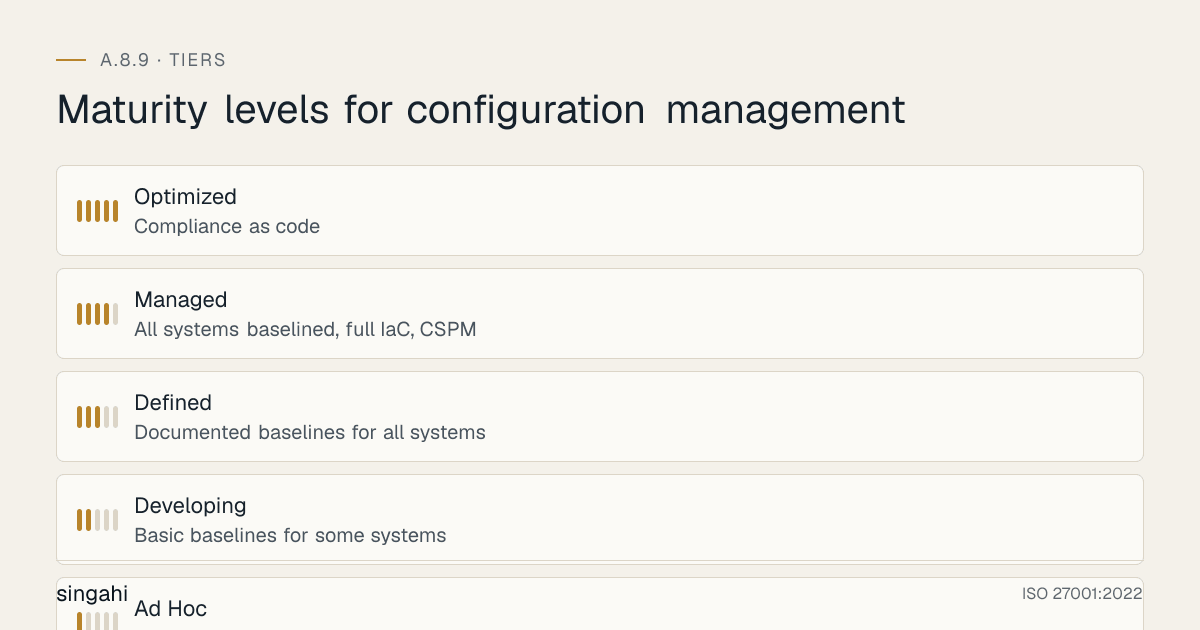
Maturity levels for configuration management
Configuration Management Maturity Assessment
| Level | Name | Characteristics | Baseline Coverage | Automation | Drift Detection | Review Cycle | Typical Organization |
|---|---|---|---|---|---|---|---|
| 1 | Ad Hoc | No documented baselines, reactive, manual configuration | <25% | None | None | Never | Small startups, legacy organizations |
| 2 | Developing | Basic baselines for some systems, partial automation, some monitoring | 25–50% | Partial (some scripts) | Basic scanning | Annual | Growing SMBs |
| 3 | Defined | Documented baselines for all systems, IaC for new systems, regular scanning | 50–75% | IaC for new systems | Automated scanning | Quarterly | Most enterprises |
| 4 | Managed | All systems baselined, full IaC, CSPM, automated remediation | 75–90% | Full IaC + CSPM | Real-time detection | Monthly | Mature enterprises, fintech |
| 5 | Optimized | Compliance as code, self-healing infrastructure, AI-driven optimization | 90–100% | Full automation + AI | Predictive detection | Continuous | Tech leaders, hyperscalers |
Level 1: Ad Hoc
Indicators:
- No documented configuration baselines
- Systems configured manually by individual administrators
- No version control for configurations
- No drift detection
- Default passwords common
- Unused services running everywhere
- Open ports not tracked
- No configuration review process
- "Tribal knowledge", only one person knows how things are configured
- Changes made directly in production without approval
Actions to reach Level 2:
- Create configuration management policy (1 week)
- Define baselines for top 5 asset types (2 weeks)
- Change all default passwords (1 week)
- Disable unnecessary services on critical systems (2 weeks)
- Document current configurations (2 weeks)
- Implement basic version control for configurations (1 week)
Level 2: Developing
Indicators:
- Basic baselines exist for some systems (servers, maybe workstations)
- Partial automation (some scripts, some manual)
- Basic vulnerability scanning but no configuration-specific scanning
- Annual review of baselines
- Some change records but not complete
- Default passwords mostly changed but not verified
- Some unnecessary services disabled but not systematically
Actions to reach Level 3:
- Define baselines for all asset types (4 weeks)
- Implement IaC for all new systems (4 weeks)
- Deploy automated compliance scanning (2 weeks)
- Implement quarterly review cycle (1 week)
- Integrate with change management (2 weeks)
- Deploy CSPM for cloud resources (2 weeks)
Level 3: Defined
Indicators:
- Documented, approved baselines for all asset types
- IaC used for all new system deployments
- Automated compliance scanning (CIS-CAT, OpenSCAP)
- Quarterly baseline reviews
- Cloud security posture management (CSPM) deployed
- Change management integrated with configuration management
- Drift detection operational for cloud resources
- Most default passwords changed and verified
- Unused services systematically disabled
Actions to reach Level 4:
- Achieve 100% IaC coverage (all infrastructure as code) (8 weeks)
- Implement real-time drift detection for all environments (4 weeks)
- Deploy automated remediation for safe changes (4 weeks)
- Implement compliance as code (OPA, Kyverno, Sentinel) (4 weeks)
- Achieve 95%+ baseline compliance across all assets (ongoing)
- Implement monthly review cycle (1 week)
Level 4: Managed
Indicators:
- All systems baselined and compliant (95%+)
- Full IaC coverage (new and existing systems)
- Real-time drift detection with automated remediation
- CSPM providing continuous compliance score
- Compliance as code enforcing policies at deployment time
- Monthly review and update of baselines
- Secrets management fully implemented (no hardcoded secrets)
- Network segmentation verified and monitored
- Container and Kubernetes security fully baselined
- Automated golden image pipeline operational
Actions to reach Level 5:
- Implement AI-driven anomaly detection (8 weeks)
- Deploy self-healing infrastructure (auto-remediation for all drift) (8 weeks)
- Implement predictive configuration optimization (4 weeks)
- Achieve 100% passwordless authentication (12 weeks)
- Implement continuous compliance monitoring (4 weeks)
- Achieve zero manual configuration changes (12 weeks)
Level 5: Optimized
Indicators:
- Compliance as code prevents non-compliant deployments automatically
- Self-healing infrastructure corrects drift without human intervention
- AI-driven anomaly detection identifies configuration threats before they materialize
- Predictive configuration optimization recommends improvements
- Continuous compliance monitoring with real-time dashboards
- Zero manual configuration changes (everything automated)
- Configuration metrics drive continuous improvement
- Industry-leading security posture (top 10% of peers)
- Full transparency into configuration state across all environments
- Automated evidence collection for audits
Benchmarking:
- Compare with industry peers (Gartner, Forrester benchmarks)
- Participate in CIS Community Defense Model (CDM)
- Contribute to open-source security baselines
- Share anonymized metrics with industry groups
- Regular red team exercises focused on configuration bypass
- Continuous improvement via threat intelligence integration
RACI Matrix
Configuration Management RACI
| Activity | CISO | Security Architect | Infrastructure Lead | Compliance Manager | App Owners | DevOps Team | Cloud Architect | Network Engineer |
|---|---|---|---|---|---|---|---|---|
| Configuration policy | A | R | C | C | I | I | I | I |
| Baseline definition | A | R | C | C | C | C | C | C |
| Baseline approval | A | R | C | C | I | I | I | I |
| IaC development | A | C | C | I | I | R | R | I |
| Golden image creation | A | C | R | I | I | R | I | I |
| Cloud configuration | A | C | C | C | I | C | R | I |
| Network configuration | A | C | R | C | I | I | I | R |
| Server hardening | A | C | R | C | I | R | I | I |
| Database configuration | A | C | R | C | R | C | I | I |
| Container security | A | C | I | C | I | R | R | I |
| Kubernetes security | A | C | I | C | I | R | R | I |
| Drift detection | A | C | C | R | I | C | R | C |
| Compliance scanning | A | C | C | R | I | C | R | C |
| Change management | A | C | C | R | C | C | C | C |
| Incident response | A | C | C | R | I | C | C | C |
| Quarterly review | A | R | C | R | C | C | C | C |
| Audit evidence | A | C | R | R | C | C | C | C |
| Exception approval | A | C | C | R | I | I | I | I |
| Tool procurement | A | R | C | C | I | C | C | I |
| Training | A | R | C | C | I | I | I | I |
| Vendor management | A | C | R | C | I | C | C | C |
Legend: A = Accountable (approves), R = Responsible (does the work), C = Consulted (provides input), I = Informed (kept updated)
Detailed Role Definitions
| Role | Responsibilities | Key Activities |
|---|---|---|
| CISO | Accountable for configuration management strategy, policy approval, risk acceptance, audit readiness | Approve policy, approve exceptions, report to board, own audit findings, approve budget |
| Security Architect | Responsible for baseline definition, industry standard research, tool evaluation, architecture design | Define baselines, research CIS/NIST updates, evaluate tools, design architecture, review changes |
| Infrastructure Lead | Responsible for infrastructure implementation, server hardening, automation, golden images | Deploy baselines, manage servers, implement automation, create golden images |
| Compliance Manager | Responsible for drift monitoring, compliance reporting, audit evidence, quarterly reviews | Run compliance scans, report drift, gather evidence, conduct reviews, track exceptions |
| App Owners | Responsible for application-level configuration, application security, business requirements | Configure app settings, ensure app security, provide business requirements for baselines |
| DevOps Team | Responsible for IaC development, CI/CD pipeline, container security, Kubernetes security | Write IaC, manage CI/CD, secure containers, manage Kubernetes, deploy configurations |
| Cloud Architect | Responsible for cloud architecture, cloud security baselines, CSPM, cloud cost optimization | Design cloud architecture, define cloud baselines, manage CSPM, optimize cloud security |
| Network Engineer | Responsible for network device configuration, firewall rules, network segmentation, VPN | Configure network devices, manage firewalls, implement segmentation, manage VPN |
Documentation and Evidence Requirements
Required Documents for A.8.9
| Document | Purpose | Owner | Review Frequency | Retention | Approval Required |
|---|---|---|---|---|---|
| Configuration Management Policy | Defines organizational approach to configuration management | CISO | Annual | 5 years | CISO + Board |
| Security Baseline Documents | Standard secure configurations for each asset type | Security Architect | Quarterly | 5 years | CISO |
| Golden Image Standards | Requirements for golden images | Infrastructure Lead | Quarterly | 5 years | CISO |
| IaC Standards | Standards for infrastructure as code | DevOps Lead | Annual | 5 years | CISO |
| Cloud Security Baselines | Cloud-specific security configurations | Cloud Architect | Quarterly | 5 years | CISO |
| Network Configuration Standards | Network device security configurations | Network Engineer | Quarterly | 5 years | CISO |
| Database Configuration Standards | Database security configurations | Database Admin | Quarterly | 5 years | CISO |
| Container Security Standards | Docker/Kubernetes security configurations | DevOps Lead | Quarterly | 5 years | CISO |
| Secrets Management Procedure | How secrets are managed in configurations | Security Architect | Annual | 5 years | CISO |
| Drift Detection Procedure | How drift is detected and remediated | Compliance Manager | Annual | 5 years | CISO |
| Change Management Integration | How config changes link to CAB | Change Manager | Annual | 5 years | CISO |
| Configuration Review Procedure | How reviews are conducted | Compliance Manager | Annual | 5 years | CISO |
| Exception Register | All documented exceptions with compensating controls | Compliance Manager | Quarterly | 5 years | CISO |
| Asset Configuration Inventory | Current configuration state of all assets | Infrastructure Lead | Monthly | 3 years | Infrastructure Lead |
| Audit Evidence Package | Evidence collected for audits | Compliance Manager | Per audit | 5 years | CISO |
| Training Records | Configuration management training completion | HR/Security Awareness | Annual | 5 years | CISO |
| Vendor Configuration Requirements | Security requirements for vendor configurations | Procurement/Security | Annual | 5 years | CISO |
| Incident Response Playbook | How to respond to configuration-related incidents | SOC Manager | Annual | 5 years | CISO |
| Rollback Procedures | How to rollback configuration changes | DevOps Lead | Annual | 5 years | CISO |
Evidence for Audits
| Evidence Type | What to Provide | Source | Frequency | Retention |
|---|---|---|---|---|
| Policy documents | Signed, dated, version-controlled configuration policy | Document management system | As needed | 5 years |
| Baseline documents | Approved baseline documents for all asset types | Git repository | Quarterly | 5 years |
| Configuration scans | Results of compliance scans (CIS-CAT, OpenSCAP, etc.) | Scanning tool | Weekly | 2 years |
| Drift detection reports | Reports showing detected drift and remediation | CSPM/SIEM | Weekly | 2 years |
| Change records | All configuration changes with approval, testing, implementation | Change management system | Per change | 5 years |
| IaC repositories | Git repositories showing all infrastructure as code | Git platform | Continuous | 5 years |
| Golden image records | Build records, scan results, approval for golden images | CI/CD platform | Per build | 3 years |
| Cloud compliance reports | CSPM reports showing compliance scores | CSPM dashboard | Weekly | 2 years |
| Network configuration backups | Daily backups of network device configurations | Network management tool | Daily | 2 years |
| Database configuration records | Current configuration settings for all databases | Database admin logs | Monthly | 2 years |
| Container scan results | Vulnerability and compliance scan results for container images | Container scanning tool | Per build | 2 years |
| Kubernetes audit logs | API server audit logs showing configuration changes | Kubernetes audit | Continuous | 1 year |
| Exception records | Risk acceptance forms for all configuration exceptions | Risk register | Quarterly | 5 years |
| Review records | Documentation of quarterly baseline reviews | Compliance records | Quarterly | 5 years |
| Training records | Evidence of configuration management training | LMS | Annual | 5 years |
| Penetration test results | Configuration-focused penetration testing results | External pentest | Annual | 5 years |
| Vulnerability scan results | Configuration-related vulnerability scan results | Vulnerability scanner | Monthly | 2 years |
| Incident records | Any incidents caused by configuration issues | Incident management | As needed | 5 years |
| Vendor audit records | Vendor configuration audits and findings | Vendor management | Annual | 5 years |
Continuous Improvement
Configuration Management Improvement Cycle
┌─────────────────────────────────────────────────────────────────┐
│                    PLAN                                          │
│  • Threat intelligence review (new CVEs, new attack vectors)      │
│  • Industry benchmark comparison (CIS updates, NIST revisions)    │
│  • Audit findings remediation                                     │
│  • New technology evaluation (new tools, new approaches)          │
│  • Business change review (new systems, new requirements)         │
└─────────────────────────────────────────────────────────────────┘
                              │
                              ▼
┌─────────────────────────────────────────────────────────────────┐
│                    DO                                            │
│  • Update baselines based on new threats                        │
│  • Implement new tools and technologies                          │
│  • Retrofit existing systems to new baselines                    │
│  • Update automation and IaC                                     │
│  • Train team on changes                                         │
└─────────────────────────────────────────────────────────────────┘
                              │
                              ▼
┌─────────────────────────────────────────────────────────────────┐
│                    CHECK                                         │
│  • Compliance scanning results                                   │
│  • Drift detection reports                                       │
│  • Penetration testing results                                   │
│  • Red team exercise results                                     │
│  • Audit findings                                                │
│  • User feedback                                                 │
│  • Incident post-mortems                                         │
└─────────────────────────────────────────────────────────────────┘
                              │
                              ▼
┌─────────────────────────────────────────────────────────────────┐
│                    ACT                                           │
│  • Adjust baselines based on findings                            │
│  • Update risk assessment                                        │
│  • Communicate changes to stakeholders                           │
│  • Document lessons learned                                      │
│  • Update metrics and KPIs                                       │
│  • Plan next improvement cycle                                   │
└─────────────────────────────────────────────────────────────────┘
Improvement Triggers
| Trigger | Action | Owner | Timeline |
|---|---|---|---|
| New CVE affecting configuration | Update baseline, patch systems, re-scan | Security Architect | 24 hours |
| New CIS benchmark release | Evaluate changes, update baselines, test, deploy | Security Architect | 30 days |
| Audit finding | Remediate, update baseline, re-test, document | Compliance Manager | Per finding severity |
| Incident involving misconfiguration | Post-incident review, update baseline, train team | SOC Manager | 2 weeks |
| Regulatory change | Assess impact, update policy, implement changes | Legal/CISO | Per regulation timeline |
| New system type | Define baseline, create IaC, test, deploy | Security Architect | 4 weeks |
| M&A activity | Integrate configuration management, harmonize baselines | Infrastructure Lead | 6 months |
| Cloud migration | Implement cloud-native baselines, migrate IaC | Cloud Architect | 6 months |
| New tool availability | Evaluate, pilot, assess ROI, plan rollout | Security Architect | 3 months |
| User feedback | Assess usability vs. security, adjust baseline | Security Architect | 1 month |
| Threat intelligence | Update detection rules, adjust conditional access | SOC Manager | 1 week |
| Benchmarking result | Compare to industry, identify gaps, plan improvements | CISO | Annual |
Annual Improvement Agenda
| Month | Activity | Owner | Output |
|---|---|---|---|
| January | Threat intelligence review, CIS benchmark update check | Security Architect | Threat report, baseline update plan |
| February | Baseline update implementation (critical systems first) | Infrastructure Lead | Updated baselines for critical systems |
| March | Access review cycle, compliance scan review | Compliance Manager | Access review report, compliance score |
| April | Penetration testing (configuration focus) | External pentest | Pentest report |
| May | Training program update, new hire training | Security Awareness | Updated training materials |
| June | Mid-year metrics review, KPI dashboard review | CISO | KPI dashboard, improvement plan |
| July | Tool evaluation (new CSPM, new IaC tools) | Security Architect | Evaluation report |
| August | Red team exercise (configuration bypass focus) | External red team | Red team report |
| September | Audit preparation, evidence gathering | Compliance Manager | Pre-audit checklist |
| October | External audit | External auditor | Audit report |
| November | Audit findings remediation | Infrastructure Lead | Remediation plan, evidence |
| December | Year-end review, budget planning, next-year roadmap | CISO | Annual report, next-year budget |
Illustrative Scenarios: Indian Configuration Management Incidents
Illustrative Scenario 4 (hypothetical): E-Commerce Platform, Exposed S3 Bucket
What happened: A major Indian e-commerce platform (processing 500,000+ orders daily) had an S3 bucket misconfigured with public access enabled. The bucket contained customer order details, addresses, phone numbers, and partial payment information for 2.5 million customers. A security researcher discovered the exposed bucket and reported it via a bug bounty program.
Configuration failures:
- S3 bucket
BlockPublicAclsset tofalse(default was not changed) - S3 bucket
BlockPublicPolicyset tofalse - S3 bucket
IgnorePublicAclsset tofalse - S3 bucket
RestrictPublicBucketsset tofalse - No S3 bucket policy restricting access
- No AWS Config rule monitoring public bucket access
- No CSPM tool deployed to detect public buckets
- Bucket naming convention revealed it contained customer data (
customer-orders-production-2023) - No encryption configured (SSE not enabled)
- No versioning enabled (couldn't recover if data was deleted)
- No access logging enabled (couldn't determine who accessed the data)
Impact:
- 2.5 million customer records exposed (names, addresses, phone numbers, order details, partial card numbers)
- Once the DPDP Rules apply, a breach like this must be intimated to the Data Protection Board and affected people; quick containment and remediation would weigh in the company's favour
- Customer trust erosion, negative media coverage
- Bug bounty payout of to the researcher
- 3-week incident response effort, legal review, customer notification
Lessons for A.8.9:
- Always configure S3 bucket public access block on bucket creation (Terraform:
aws_s3_bucket_public_access_block) - Deploy AWS Config rule
s3-bucket-public-read-prohibitedon all accounts, all regions - Deploy CSPM (Cloud Security Posture Management) to detect public buckets automatically
- Enable S3 access logging on all buckets containing customer data
- Enable SSE-S3 or SSE-KMS encryption on all S3 buckets by default
- Use bucket naming conventions that don't reveal contents (
bucket-abc123notcustomer-data) - Implement automated scanning in CI/CD pipeline (Checkov, tfsec) to catch public buckets before deployment
How to prevent this:
## Terraform — Secure S3 bucket by default
resource "aws_s3_bucket_public_access_block" "default" {
  bucket = aws_s3_bucket.data.id

  block_public_acls       = true
  block_public_policy     = true
  ignore_public_acls      = true
  restrict_public_buckets = true
}

resource "aws_s3_bucket_server_side_encryption_configuration" "default" {
  bucket = aws_s3_bucket.data.id
  rule {
    apply_server_side_encryption_by_default {
      sse_algorithm = "AES256"
    }
  }
}

resource "aws_s3_bucket_versioning" "default" {
  bucket = aws_s3_bucket.data.id
  versioning_configuration {
    status = "Enabled"
  }
}

resource "aws_s3_bucket_logging" "default" {
  bucket        = aws_s3_bucket.data.id
  target_bucket = aws_s3_bucket.logs.id
  target_prefix = "s3-access-logs/"
}
Illustrative Scenario 5 (hypothetical): Bank, Unpatched Database Server
What happened: A mid-sized Indian bank (200+ branches) had a PostgreSQL database server that had not been patched in 18 months. The server was running PostgreSQL 9.6 (end-of-life, no security patches). An attacker exploited a known CVE-2018-1688 (SQL injection vulnerability) to access customer account data, transaction history, and KYC documents for 800,000+ customers. The attack went undetected for 6 weeks.
Configuration failures:
- Database server not patched for 18 months (no patch management process)
- End-of-life database version (PostgreSQL 9.6 EOL in November 2021)
- Default PostgreSQL configuration (
listen_addresses = '*', accessible from any IP) - No firewall rules restricting database access (port 5432 open to entire internal network)
- No database activity monitoring (DAM) deployed
- No encryption at rest (customer data stored in plaintext)
- Weak database password (8-character dictionary word)
- No database audit logging (
log_connections = off,log_disconnections = off) - No network segmentation (database in same VLAN as workstations)
- No vulnerability scanning (no scanner deployed on database servers)
Impact:
- 800,000+ customer records exposed (names, addresses, account numbers, transaction history, KYC documents)
- RBI reporting required within its window (six hours) and CERT-In within 6 hours; the bank notified after 48 hours
- RBI imposed a monetary penalty for delayed reporting and inadequate security
- Customer notification required (communications and call-centre support)
- Reputational damage, customer churn (estimated 15% customer loss)
- 6-month remediation effort: patch management, database upgrade, encryption, monitoring
Lessons for A.8.9:
- Implement automated patch management (
unattended-upgradesfor Linux, WSUS for Windows) - Maintain database version currency (plan upgrades before EOL)
- Configure
listen_addressesto specific IPs only (bastion host, application servers) - Implement network segmentation (database in isolated subnet, only application servers can access)
- Deploy database activity monitoring (DAM) for all production databases
- Enable encryption at rest for all databases containing customer data
- Enable database audit logging (
log_connections,log_disconnections,log_statementfor DDL) - Deploy vulnerability scanning on all database servers (weekly scans)
- Implement strong database passwords (32+ characters, vault-managed, rotated every 90 days)
- Conduct quarterly configuration reviews specifically for databases
How to prevent this:
## PostgreSQL secure configuration (postgresql.conf)
listen_addresses = '10.0.1.10,10.0.1.11'  # Application servers only
ssl = on
ssl_cert_file = '/etc/ssl/certs/server.crt'
ssl_key_file = '/etc/ssl/private/server.key'
ssl_ca_file = '/etc/ssl/certs/ca.crt'
ssl_crl_file = '/etc/ssl/certs/server.crl'
ssl_ciphers = 'HIGH:!aNULL:!MD5'
password_encryption = scram-sha-256
log_connections = on
log_disconnections = on
log_duration = on
log_line_prefix = '%t [%p]: [%l-1] user=%u,db=%d,app=%a,client=%h '
log_statement = 'ddl'  # Log all DDL statements
log_min_duration_statement = 1000  # Log slow queries (>1 second)
log_checkpoints = on
log_lock_waits = on
shared_preload_libraries = 'pg_stat_statements'  # Query statistics
Illustrative Scenario 6 (hypothetical): Government Portal, Default Credentials
What happened: A state government portal for citizen services (property registration, tax payment, certificate applications) was found to have default credentials (admin/admin) on the administrative interface. The portal processed 10,000+ transactions daily and stored citizen PII (names, addresses, Aadhaar numbers, phone numbers). A security researcher discovered the default credentials and reported them. The credentials had been unchanged since the portal's launch 3 years earlier.
Configuration failures:
- Default credentials
admin/adminnever changed after installation - Administrative interface exposed to internet (no IP whitelisting)
- No MFA on administrative accounts
- No brute force protection on login page
- No session timeouts (sessions remained active indefinitely)
- No audit logging (couldn't determine who accessed what)
- No regular security scans (no vulnerability scanning in 3 years)
- No security review before launch (portal launched without security assessment)
- No change management process (configuration changes made ad-hoc)
- No configuration baseline (no documented secure configuration for the portal)
Impact:
- Portal taken offline for 2 weeks for security remediation
- 3 years of citizen data potentially accessible (10,000+ citizens daily × 3 years = ~10 million records)
- CERT-In notification required within 6 hours (the CERT-In Directions apply to government organisations and body corporates alike)
- Media coverage, public trust erosion in government digital services
- CISO and IT Director transferred (accountability action)
- New security policy mandated for all government portals
Lessons for A.8.9:
- Change all default credentials immediately after installation (Day 1 task)
- Never expose administrative interfaces to the internet without IP whitelisting + MFA
- Implement brute force protection on all login pages (rate limiting, account lockout)
- Configure session timeouts (30 minutes idle, 8 hours maximum)
- Enable complete audit logging on all systems (who, what, when, where)
- Conduct security assessment before any system goes live (mandatory security review)
- Deploy vulnerability scanning on all internet-facing systems (weekly scans)
- Implement configuration baselines for all web applications (secure defaults)
- Integrate with change management (no configuration changes without approval)
- Conduct quarterly security reviews of all internet-facing systems
How to prevent this:
## Day 1 checklist for any new web application
## 1. Change all default credentials
## 2. Create unique admin accounts (no shared "admin")
## 3. Enable MFA on all admin accounts (hardware key preferred)
## 4. IP whitelist admin interface (corporate office only)
## 5. Enable brute force protection (rate limiting, CAPTCHA)
## 6. Configure session timeouts (30 min idle, 8 hours max)
## 7. Enable audit logging (all admin actions, all data access)
## 8. Disable unnecessary services and features
## 9. Enable HTTPS only (HSTS, TLS 1.3)
## 10. Conduct security scan before launch (OWASP ZAP, Burp Suite)
## 11. Deploy WAF (Web Application Firewall)
## 12. Schedule quarterly security reviews
References
Standards and Frameworks
| Reference | Title | Relevance |
|---|---|---|
| ISO 27001:2022 | Information Security Management Systems, Requirements | Primary standard |
| ISO 27002:2022 | Information Security Controls | Implementation guidance |
| CIS Benchmarks | Center for Internet Security Benchmarks | Primary baseline standard |
| NIST SP 800-53 Rev 5 | Security and Privacy Controls | Control mapping |
| NIST SP 800-70 Rev 4 | National Checklist Program for IT Products | Configuration checklists |
| PCI DSS v4.0.1 | Payment Card Industry Data Security Standard | Financial services |
| SOC 2 Trust Services Criteria | Security, Availability, Confidentiality | Service organizations |
| COBIT 2019 | Control Objectives for Information Technologies | Governance framework |
| ITIL 4 | Information Technology Infrastructure Library | Change management |
Indian Regulations
| Reference | Title | Relevance |
|---|---|---|
| DPDP Act 2023 | Digital Personal Data Protection Act | Data protection, consent |
| IT Act 2000 (as amended) | Information Technology Act | Cybersecurity, penalties |
| RBI Master Direction | Digital Payments Security | Payment systems |
| RBI Cybersecurity Directions 2026 | Cybersecurity, Technology: Risk, Resilience and Assurance Framework Directions, 2026 | Banking infrastructure |
| SEBI CSCRF (2024) | Cybersecurity and Cyber Resilience | Market infrastructure |
| IRDAI Cybersecurity Guidelines | Cybersecurity Guidelines for Insurers | Insurance systems |
| CERT-In Guidelines | Information Security Guidelines | National security |
| STQC Guidelines | Standardization Testing and Quality Certification | Government systems |
Technical References
| Reference | Description |
|---|---|
| CIS Benchmarks | cisecurity.org, Free security configuration benchmarks |
| CIS Controls | cisecurity.org/controls, CIS Critical Security Controls |
| CIS-CAT Pro | Configuration assessment tool (free for CIS members) |
| OpenSCAP | Open-source SCAP implementation |
| Terraform | terraform.io, Infrastructure as code |
| Ansible | ansible.com, Configuration management |
| Packer | packer.io, Golden image creation |
| Chef | chef.io, Configuration management |
| Puppet | puppet.com, Configuration management |
| AWS Config | AWS configuration monitoring |
| Azure Policy | Azure compliance enforcement |
| GCP Security Command Center | GCP security posture |
| OPA (Open Policy Agent) | openpolicyagent.org, Policy as code |
| Kyverno | kyverno.io, Kubernetes policy engine |
| Checkov | checkov.io, IaC static analysis |
| tfsec | aquasecurity.github.io/tfsec, Terraform security scanner |
| Cloud Custodian | cloudcustodian.io, Cloud policy engine |
| HashiCorp Vault | vaultproject.io, Secrets management |
| Sealed Secrets | Sealed Secrets for Kubernetes |
| External Secrets Operator | External secrets for Kubernetes |
| gitleaks | gitleaks.io, Secret detection in Git |
| truffleHog | trufflesecurity.com, Secret detection |
Books and Resources
| Resource | Author | Description |
|---|---|---|
| "Infrastructure as Code" | Kief Morris | IaC patterns and practices |
| "Terraform: Up & Running" | Yevgeniy Brikman | Terraform best practices |
| "Ansible for DevOps" | Jeff Geerling | Ansible configuration management |
| "The Phoenix Project" | Gene Kim | DevOps and change management |
| "Continuous Delivery" | Jez Humble, David Farley | CI/CD and automation |
| "Cloud Security Posture Management" | Various | CSPM best practices |
| CIS Community Defense Model | CIS | Threat-informed defense |
Industry Reports
| Report | Source | Year |
|---|---|---|
| Verizon Data Breach Investigations Report | Verizon | Annual |
| IBM Cost of a Data Breach Report | IBM | Annual |
| State of Cloud Security | Wiz/Orca/Lacework | Annual |
| State of DevSecOps | GitLab/Sonatype | Annual |
| CERT-In Annual Report | Indian CERT | Annual |
| CIS Controls Effectiveness | CIS | Annual |
📧 Questions? Email us at security@singahi.com
End of ISO 27001:2022 Annex A 8.9, Configuration Management: The Definitive Implementation Guide